

10 Best Mobile App Prototyping Tools For 2026

Best Mobile App Prototyping Tools Shortlist


There are seemingly countless mobile prototyping solutions available, so figuring out which one is best for you is tough. You want your team to visualize app interfaces, user interactions, and user flows, allowing them to iterate on design concepts before the actual development phase, but you need to figure out which tool is the best fit. I've got you! In this post, I review the best mobile app prototyping tools and use my experience managing dozens of products and working with different tools in large teams to accurately evaluate them.
Why Trust Our Software Reviews
We’ve been testing and reviewing product management software since 2020. As product managers ourselves, we know how critical and difficult it is to make the right decision when selecting software.
We invest in deep research to help our audience make better software purchasing decisions. We’ve tested more than 2,000 tools for different product management use cases and written over 1,000 comprehensive software reviews. Learn how we stay transparent & our software review methodology.
Best Mobile App Prototyping Tools Summary
This comparison chart summarizes pricing details for my top mobile app prototyping tools selections to help you find the best one for your budget and business needs.
| Tool | Best For | Trial Info | Price | ||
|---|---|---|---|---|---|
| 1 | Best for dynamic mind mapping | Free trial + free plan available | From $9/user/month (billed annually) | Website | |
| 2 | Best for collaborative app wireframing | Free plan available | From $8/member/month (billed annually) | Website | |
| 3 | Best mobile app prototyping tool for interactive prototypes | Free plan available | From $16/user/month (billed annually) | Website | |
| 4 | Best mobile app prototyping tools for early-stage startups | Free plan available | From $11/editor/month (billed annually) | Website | |
| 5 | Best mobile app prototyping tool for lo-fi prototyping | 14-day free trial available | From $16/user/month (billed annually) | Website | |
| 6 | Best mobile app prototyping tool for beginners | Free plan + free demo available | From $12/month (billed annually) | Website | |
| 7 | Best mobile app prototyping tool for rapid prototyping | 14-day free trial + free demo available | From $49/month (billed annually) | Website | |
| 8 | Best mobile app prototyping tool for simple interactive design | 30-day free trial | Pricing upon request | Website | |
| 9 | Best mobile app prototyping tool for pre-built UI kits | Free plan available | From $19/user/month | Website | |
| 10 | Best mobile app prototyping tool for Mac users | 30-day free trial available | From $12/user/month (billed annually) | Website |

Best Mobile App Prototyping Tool Reviews
Below are my detailed summaries of the best mobile app prototyping tools that made it onto my shortlist. My reviews offer a detailed look at the key features, pros & cons, integrations, and ideal use cases of each tool to help you find the best one for you.

Best for dynamic mind mapping

Lucidspark is a virtual whiteboard for teams working on mobile app prototyping. It supports agile development by providing tools for brainstorming, project planning, and user research. With integrations across common platforms, Lucidspark enables smooth collaboration and idea sharing, making it ideal for hybrid teams building mobile apps in fast-moving development cycles.
Why I Picked Lucidspark
I picked Lucidspark because it supports creative, collaborative work during mobile app prototyping. Its infinite canvas lets teams brainstorm freely while capturing and organizing ideas in real time. Dynamic mind maps and interactive Lucid Cards support more structured thinking and decision-making, which is essential when developing mobile applications. These features help teams stay aligned on goals and reduce the risk of ideas being lost during the development process.
Lucidspark Key Features
In addition to its collaborative prowess, Lucidspark offers several key features that enhance the mobile app prototyping process:
- Templates: Explore a wide range of templates that cater to different stages of app development, from wireframes to user journey maps.
- AI Capabilities: Utilize AI-driven tools to automate repetitive tasks and enhance the creative process.
- Guest Collaboration: Invite external stakeholders to collaborate on projects, ensuring diverse input and feedback.
- Meeting Facilitation Tools: Use built-in tools to manage and facilitate productive meetings, keeping your team on track and engaged.
Lucidspark Integrations
Integrations include Microsoft Teams, Google Drive, Slack, Jira, Asana, Google Calendar, Microsoft Excel, Google Docs, Google Meet, and Dropbox Paper.
Pros and Cons
Pros:
- Integrates with Google Drive and Jira
- Real-time collaboration for teams
- Kanban workflow templates available for teams
Cons:
- Annual billing required for access
- Team plans start from $10 monthly per user

Miro
Best for collaborative app wireframing
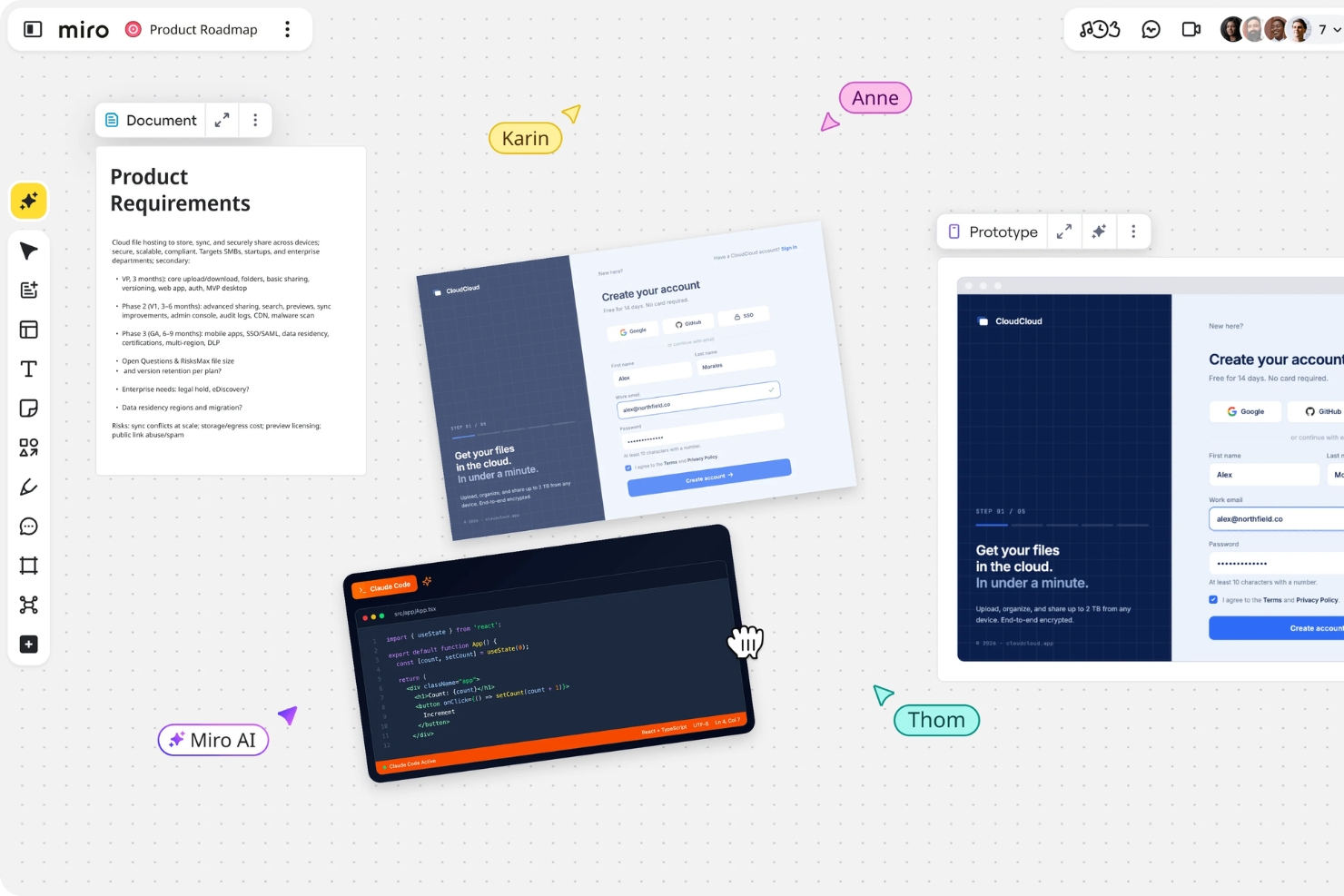
Miro is a mobile app prototyping tool that supports collaborative design workflows with an interactive whiteboard and AI-powered features.
Why I picked Miro: I chose Miro for mobile app prototyping because of its flexible whiteboard-style workspace, which makes it easy for teams to brainstorm, sketch, and prototype in one place. Miro’s customizable templates help teams get started quickly, while its AI tools automate repetitive tasks and streamline workflows. I also liked that you can record Talktracks to share async feedback—handy for distributed teams working across time zones.
Miro is great for mapping out user journeys and wireframes collaboratively. You can turn static frames into interactive prototypes and customize them with drag-and-drop components. With over 160 integrations and advanced collaboration features like real-time cursors, voting, and live calls, Miro makes it easy to keep everyone aligned throughout the design process.
Miro Standout Features and Integrations
Features include interactive whiteboards, custom templates, intelligent canvas, AI-powered shortcuts, Talktrack async recording, real-time editing, live call integration, product management tools, visual roadmaps, UX and app design components, and tools for agile collaboration.
Integrations include Microsoft 365, Google Workspace, Atlassian, Microsoft Teams, Jira, Slack, Confluence, AWS, GitHub, Azure DevOps, Asana, and Figma.
Pros and Cons
Pros:
- Free forever plan available
- Intuitive and easy setup
- Built-in communication features for streamlined collaboration
Cons:
- Visitor/guest accounts locked to paid plans only
- Free version does not allow high-quality export to pdf
New Product Updates from Miro
Miro Adds Japan Data Residency for Enterprise Customers
Miro has introduced Japan data residency for enterprise customers, offering in-region storage for production data, backups, and metadata, plus in-region compute infrastructure. For more information, visit Miro's official site.

Figma
Best mobile app prototyping tool for interactive prototypes

Figma is a mobile app prototyping tool that helps design teams create and present interactive prototypes.
Why I picked Figma: Figma enables you to create great-looking app prototypes so you can show clients or stakeholders what the final digital product would look like. You can link pages to pinning items, show motion and animation, and move from tab to tab to present your ideas.
Figma’s collaboration features make it a great choice for design teams that want to iterate fast. The software enables multiple users to design, leave comments, and adjust the prototype in real-time, so they don’t have to send the prototype back and forth for approval.
Figma Standout Features and Integrations
Features include no-code prototyping, interactions, mobile viewing, low-fidelity mockup templates, advanced transitions, GIF and video support, and embedded comments.
Integrations include Avocode, Bubble, Flinto, GitLab, Maze, Microsoft Teams, Mixpanel, Slack, Sprig, Storybook, and others.
Pros and Cons
Pros:
- Drag-and-drop prototyping
- Active user community
- Wide variety of plugins and widgets available
Cons:
- Offers limited control over document management
- Doesn’t allow you to preview GIFs in the working document, so you have to switch to the prototype to do so

Visily
Best mobile app prototyping tools for early-stage startups

Visily is a design platform built to help teams turn ideas into prototypes quickly. It’s used by product managers, designers, and developers who need a shared space to create and test layouts. The tool helps you align concepts, content, and visuals early in the planning process.
Why I picked Visily: Visily gives you and your team an easy way to go from sketches to prototypes without needing advanced design skills. You can import screenshots or rough ideas and turn them into editable wireframes. The tool also offers ready-to-use templates that save you time when starting projects. Its built-in collaboration features make it simple to share ideas and get feedback, which is especially useful for early-stage teams.
Visily Standout Features and Integrations
Features include AI-assisted design tools that convert rough sketches into editable screens. You can create wireframes and prototypes with drag-and-drop components. The platform also includes prebuilt templates that cover common app flows and layouts.
Integrations include Jira, Trello, Slack, Figma, Notion, GitHub, Asana, Azure DevOps, ClickUp, and Miro.
Pros and Cons
Pros:
- Templates help speed up project kickoffs
- Lets you test flows before coding
- Converts sketches into editable wireframes
Cons:
- May not scale well for enterprise teams
- Can feel basic for seasoned designers

Balsamiq
Best mobile app prototyping tool for lo-fi prototyping
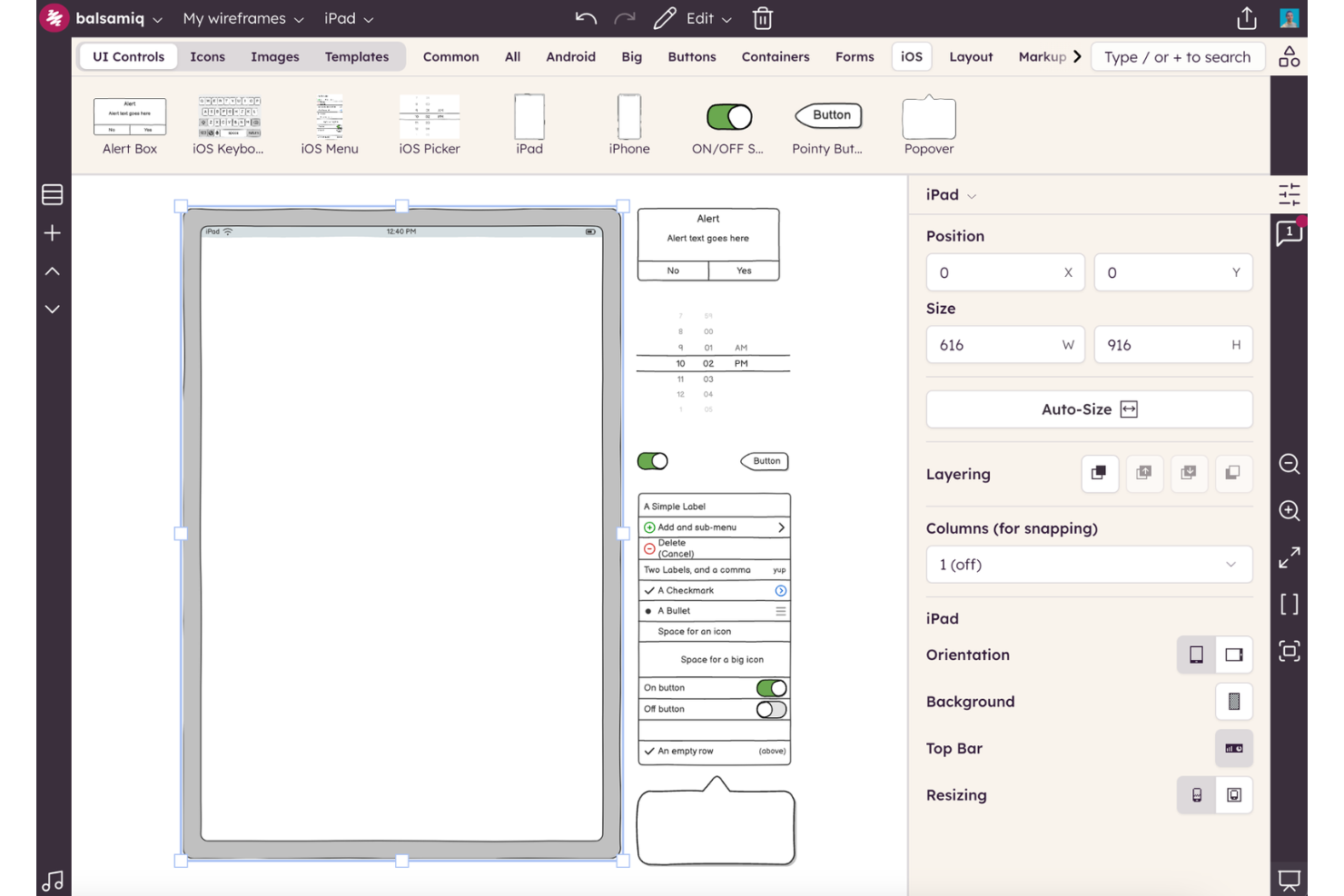
Balsamiq is a wireframing tool designed to help teams sketch and share early layout ideas. It’s built for people who want a quick way to visualize screens, test workflows, and get feedback before moving into detailed design. The platform simplifies planning by focusing on structure and clarity.
Why I picked Balsamiq: Balsamiq makes it easy for you and your team to capture ideas fast with a simple drag-and-drop editor. You can sketch layouts, link screens together, and simulate flows without worrying about design polish. The tool’s sketch-style elements push you to focus on usability and content, not visuals. It’s a good choice when you need to test low-fidelity concepts early in the process.
Balsamiq Standout Features and Integrations
Features include a built-in library of UI elements you can drag onto the canvas. You can link screens together to create interactive click-throughs for user flows. The platform also includes reusable symbols that help you keep designs consistent across projects.
Integrations include Confluence, Jira, Google Drive, Dropbox, FogBugz, XWiki, and Notion.
Pros and Cons
Pros:
- Lets you test flows without coding
- Helps you focus on layout not visuals
- Quick setup with minimal learning curve
Cons:
- Hard to manage complex prototypes
- Can feel too simple for large projects

Marvel
Best mobile app prototyping tool for beginners

Marvel is a mobile app prototyping software that helps novice designers create functional prototypes without writing code.
Why I picked Marvel: Marvel has a clean interface that’s easy to navigate. The solution offers a variety of adaptable templates, so designers can save time when they start building their prototypes. Designers can use the tool’s library to add actions without writing code, which can be a huge time saver for beginners.
Marvel’s user testing tool allows you to share your prototypes with developers, testers, stakeholders, and alpha or beta testers. You can share the entire prototype or you can share only specific sections for usability tests.
Marvel Standout Features and Integrations
Features include a wireframing tool, no-code interactions, user testing, cross-department collaboration tools, user management, hotspots, and offline downloads.
Integrations include Ballpark, Confluence, Dropbox, Jira, Microsoft Teams, Niice, Sketch, Smartmockups, and others.
Pros and Cons
Pros:
- Library of pre-made UI components
- Good variety of web app design templates
- Generous freemium plan
Cons:
- Hiding on-screen buttons at the prototype level could be easier
- Doesn’t allow you to duplicate prototypes

UXPin
Best mobile app prototyping tool for rapid prototyping

UXPIn is a mobile app prototyping tool that enables designers to build prototypes that carry code and spec properties, speeding up the prototyping process.
Why I picked UXPin: UXPin helps cross-department professionals to work better together. The tool can save businesses hours of manual work by automating the designs’ specs, style guides, and CSS, making it easier for designers to collaborate with developers.
UXPin automatically generates the product design’s specs, so it helps speed up the app development process. The software also enables designers to leave detailed element descriptions in their projects, so devs can start coding without the usual back and forth between them and the design team.
UXPin Standout Features and Integrations
Features include UI & UX design, mockups, wireframing, design handoff, real-time design collaboration, prototype sharing, and user feedback.
Integrations include Desktop.com, Jira, Miro, Rambox, Shift, Sketch, Storybook, Tray, and others.
Pros and Cons
Pros:
- Powerful interaction features
- Desktop app for Mac and Windows devices
- Prototypes are very close to the final product
Cons:
- Shotcut commands are different from other prototyping tools, so experienced designers might find them annoying
- Some complex prototypes can make the design platform lag at times

Adobe XD
Best mobile app prototyping tool for simple interactive design

Adobe XD is a mobile app prototyping tool that enables teams to build interactive prototypes with ease.
Why I picked Adobe XD: Adobe XD has a straightforward interface that’s friendly toward novice designers. The solution’s Responsive Resize feature allows you to see how each component would look on various devices in real-time, so you can create precise prototypes from the get-go.
Adobe XD helps you wire your designs together and define satisfying micro-interactions between different components. The software’s Auto-animate functionality allows you to visualize how your components would move on different mobile devices. You can adjust the Drag and Time triggers to create complex motion effects, and you can validate your animations with stakeholders before development starts.
Adobe XD Standout Features and Integrations
Features include an asset library, custom shortcuts, repeat grids, auto-animate, responsive resize, and voice prototypes.
Integrations include Adobe Photoshop, Adobe Illustrator, Airtable, Dribbble, Google Sheets, Microsoft Teams, Slack, Trello, UI Faces, Usertesting, and others.
Pros and Cons
Pros:
- Flawless integration with Adobe Photoshop and Illustrator
- Rich library of educational resources
- Straightforward interface that’s easy to use
Cons:
- No workspace customization options
- Limited animation options

Best mobile app prototyping tool for pre-built UI kits

Justinmind is a mobile app prototyping solution that helps design teams turn bland wireframes into prototypes with pre-built UI kits.
Why I picked Justinmind: Justinmind comes with pre-installed UI kits for iOS, Android, and web prototyping, so you can speed up your design process. The UI kits are updated frequently, so there are plenty of options to choose from if you need to prototype multiple apps.
Justinmind helps you turn wireframes into high-fidelity mockups and fully-functional prototypes. The software allows you to adjust your prototype to all screen sizes by using a dynamic layout, and you can add different events and actions for each type of device.
Justinmind Standout Features and Integrations
Features include no-code prototyping, web interactions, mobile gestures, transitions and effects, testing, and pre-built UI kits.
Integrations include Adobe Illustrator, Adobe Photoshop, Adobe XD, Confluence, Figma, Hotjar, Jira, Microsoft Azure DevOps, UserZoom, and others.
Pros and Cons
Pros:
- Drag-and-drop prototyping
- Works offline
- Includes a rich web interactions library
Cons:
- Has a learning curve
- Search feature could be more specific


Sketch is a mobile app prototyping tool that helps Mac users create and test precise prototypes for Apple devices.
Why I picked Sketch: Sketch stands out from the competition thanks to its performance. The software runs smoothly on all Mac devices even when working with large files, so it’s a great choice for complex projects. The tool also offers a wide variety of plugins you can use to create unique prototypes.
Sketch’s clean layout and light build make the tool easy to use. Designers can build prototypes without having to create layers because they are added automatically, which can speed up the production process.
Sketch Standout Features and Integrations
Features include smart layout, developer handoff tools, design mirroring, real-time collaboration, shared component libraries, and an iPhone app for prototype testing.
Integrations include Abstract, Flinto, Maze, Overlay, ProtoPie, Zeplin, and others.
Pros and Cons
Pros:
- Short learning curve
- Works offline
- Wide variety of plugins available
Cons:
- Works exclusively on macOS
- Collaborating or presenting your prototype to Windows users can be tricky
Other Mobile App Prototyping Tools
Here are some additional mobile app prototyping tools options that didn’t make it onto my shortlist, but are still worth checking out:
- ProtoPie
Mobile app prototyping tool for easy testing
- Proto.io
Mobile app prototyping tool for no-code physical interactions
- Judo
Mobile app prototyping tool for responsive prototypes
- Framer
Mobile app prototyping tool for easy transitions
- Invision
Mobile app prototyping tool for collaborative designs
- Mockplus
Mobile app prototyping tool for hi-fi prototypes
- Bubble
Mobile app prototyping tools for product owners
- Wondershare Mockitt
Mobile app prototyping tools for shared component libraries
- Axure
Mobile app prototyping tool for no-code state-based logic
- Moqups
Mobile app prototyping tool for speedy designs
- App Builder
Mobile app prototyping tools for template-based designing
- Protoshare
Mobile app prototyping tools for quick design reviews


How I Evaluate Mobile App Prototyping Tools
I look at mobile app prototyping tools in two layers: the core capabilities a product must have to qualify, and the differentiators—like gesture fidelity and dev handoff—that separate good from great.
Core Functionality (Table Stakes For This List)
When I'm selecting tools for my list, I rank each one on a scale from 0 (does not offer the functionality) to 5 (excels in this area) for each core functionality listed below. Then, I calculate the tool's total score into a percentage. Each tool needs to achieve a minimum total score of 65% to be considered for inclusion.
- Mobile-Specific Prototyping: I check for native mobile device frames, gesture support like swipes and long presses, and realistic screen transitions that match iOS and Android patterns.
- Interactive Prototype Creation: Each tool is evaluated on how well it lets you link screens, define tap targets, and build navigable flows that simulate a real app experience.
- On-Device Preview: I look at whether you can preview prototypes on actual phones—via a companion app, QR code, or shareable link—so stakeholders see what users will see.
- Collaboration & Sharing: Commenting, link sharing, and multi-user editing matter here. I evaluate how easily a PM can collect feedback from engineers, designers, and leadership.
- Design-to-Developer Handoff: Tools like Figma and Zeplin handle this differently, so I look at spec generation, asset export, and whether devs can inspect spacing, colors, and fonts directly.
- Reusable Components & Templates: Pre-built mobile UI kits and saveable component libraries speed up prototyping. I evaluate whether you can maintain consistency across screens and projects.
Once I have a list of tools that meet the criteria, I consider what sets each platform apart.
Differentiating Factors (What Sets Vendors Apart)
Here's how I compare and contrast different vendors:
Standout Features
AI-assisted prototyping is a growing differentiator. Tools like Uizard and Galileo AI let PMs turn text prompts or rough sketches into mobile screens, cutting hours off early ideation. I also evaluate built-in user testing or native integrations with platforms like Maze—running usability tests directly on a prototype removes friction from the research loop. Animation and micro-interaction support matters when you need to show stakeholders how a bottom sheet animates or a swipe gesture feels.
Beyond Features
Integration with product management tools like Jira or Linear matters because PMs need to link prototypes directly to user stories and sprint work. I also evaluate learning curve—tools like Marvel and Proto.io tend to be more accessible for PMs without design backgrounds, which affects time-to-first-prototype. Pricing structure is worth scrutinizing too. Many prototyping tools charge per editor but offer free viewer seats, which suits product teams where a few people build and many review.
How to Choose Mobile App Prototyping Tool
It’s easy to get bogged down in long feature lists and complex pricing structures. To help you stay focused as you work through your unique software selection process, here’s a checklist of factors to keep in mind:
| Factor | What to Consider |
|---|---|
| Scalability | Will the tool grow with your team? Consider if the solution can handle more users, projects, or complexity as your needs expand. Look for flexible pricing and features. |
| Integrations | Does it connect with your existing tools? Check if it integrates with your team's favorite apps like Slack, Jira, or design software to ensure smooth workflows. |
| Customizability | Can you tailor it to fit your needs? Evaluate if you can adjust aspects like interface layouts or workflows to match your team's processes and preferences. |
| Ease of use | Is it simple for your team to learn? Consider the learning curve and if the interface feels intuitive to encourage quick adoption without extensive training. |
| Implementation and onboarding | How quickly can you get started? Look for available resources like tutorials, templates, and support to help your team begin using the tool effectively right away. |
| Cost | Does it fit your budget? Compare pricing plans and assess if the features you need justify the cost. Watch for hidden fees or long-term commitments. |
| Security safeguards | Are your data protected? Ensure the tool meets your security standards, including encryption and compliance with relevant regulations like GDPR or CCPA. |
| Support availability | What support options are available? Check if there's reliable customer service, including chat, email, or phone support, to assist you when issues arise. |
What Are Mobile App Prototyping Tools?
Mobile app prototyping tools are software that lets you quickly create, share, and test what a mobile app will look and feel like before it’s built. Designers, developers, and product teams use these tools to sketch out screens, set up interactions, and get feedback—all without writing code. You can see how your ideas work in practice, catch problems early, and make changes before spending time and money on development.
Features
When selecting mobile app prototyping tools, keep an eye out for the following key features:
- Interactive prototypes: Allows you to create clickable and interactive mockups to simulate user experience and gather feedback.
- Collaboration tools: Enables team members to work together in real-time, ensuring everyone is aligned and can provide input during the design process.
- Drag-and-drop interface: Simplifies the design process by allowing users to easily manipulate design elements without coding expertise.
- Feedback collection: Facilitates gathering user and stakeholder feedback directly within the tool, helping to refine and improve designs.
- Integration capabilities: Connects with other software tools your team uses, such as Slack or Jira, to streamline workflows and enhance productivity.
- Template library: Offers pre-designed templates to speed up the prototyping process and ensure consistency across projects.
- Version control: Keeps track of design iterations, allowing teams to revert to previous versions if necessary and maintain a clear project history.
- Animation tools: Provides the ability to add animations to prototypes, enhancing user interaction and making designs more engaging.
- Customizable design components: Lets users tailor design elements to fit specific project needs, improving the flexibility and adaptability of prototypes.
- Security safeguards: Ensures data protection through encryption and compliance with relevant regulations, keeping sensitive project information secure.
Benefits
Implementing mobile app prototyping tools provides several benefits for your team and your business. Here are a few you can look forward to:
- Faster iterations: Quickly make changes to designs and test new ideas using features like drag-and-drop interfaces and interactive prototypes.
- Improved collaboration: Real-time collaboration tools let team members contribute and provide feedback, keeping everyone aligned and involved.
- Cost savings: Identify design flaws early with user testing and feedback collection, reducing the need for costly revisions during development.
- Enhanced user experience: Use animation tools and customizable components to create engaging and user-friendly designs that meet user needs.
- Streamlined workflows: Integration capabilities with other software tools help your team work more efficiently by connecting design processes with existing workflows.
- Effective communication: Clearly share design concepts and ideas with stakeholders using interactive prototypes, ensuring everyone understands the project vision.
- Data security: Protect sensitive project information with security safeguards, including encryption and compliance with data regulations.
Costs & Pricing
Selecting mobile app prototyping tools requires an understanding of the various pricing models and plans available. Costs vary based on features, team size, add-ons, and more. The table below summarizes common plans, their average prices, and typical features included in mobile app prototyping tools solutions:
Plan Comparison Table for Mobile App Prototyping Tools
| Plan Type | Average Price | Common Features |
|---|---|---|
| Free Plan | $0 | Basic prototyping capabilities, limited collaboration features, and a small template library. |
| Personal Plan | $5-$25/user/month | More design elements, enhanced collaboration tools, and access to a wider range of templates. |
| Business Plan | $25-$50/user/month | Advanced prototyping features, priority support, and integration with other business tools. |
| Enterprise Plan | $50-$100/user/month | Customizable solutions, extensive security features, dedicated account management, and API access. |
Mobile App Prototyping Tools FAQs
Here are some answers to common questions about mobile app prototyping tools:
Can mobile app prototyping tools be used for web design?
Yes, many mobile app prototyping tools also support web design. These tools often come with features that cater to both mobile and web interfaces, allowing you to design responsive layouts that adapt to different screen sizes. This versatility makes them suitable for teams working on cross-platform projects. When selecting a tool, ensure it has the necessary capabilities for web design, such as grid systems and responsive breakpoints.
How do mobile app prototyping tools help with user testing?
Mobile app prototyping tools facilitate user testing by creating interactive mockups that users can interact with. This interaction allows you to gather feedback on user experience, navigation, and design elements before development begins. By testing early, you can identify potential issues and make necessary adjustments, saving time and resources. Look for tools that offer easy sharing options and analytics to track user interactions.
Do I need coding skills to use mobile app prototyping tools?
No, most mobile app prototyping tools are designed for users without coding skills. They typically feature drag-and-drop interfaces and pre-built components that make it easy to create interactive designs. However, some advanced features might require a basic understanding of design principles. If you’re new to prototyping, start with tools that emphasize ease of use and offer tutorials or templates to help you get started.
What’s Next:
If you're in the process of researching mobile app prototyping tools, connect with a SoftwareSelect advisor for free recommendations.
You fill out a form and have a quick chat where they get into the specifics of your needs. Then you'll get a shortlist of software to review. They'll even support you through the entire buying process, including price negotiations.