The best product analytics tools track and interpret user interactions across your product, giving you accurate, actionable data to improve retention, optimize onboarding, and reduce churn. Without the right tool, you risk unreliable event tracking, fragmented user journeys, and dashboards that create more confusion than clarity—making it hard to identify what’s actually driving behavior.
After reviewing dozens of platforms and working with product teams on analytics implementation, I’ve selected tools that deliver trustworthy data, intuitive reporting, and team-wide usability—so you can replace guesswork with evidence and confidently prioritize changes that have the biggest impact.
Why Trust Our Software Recommendations
6,700+
Reviews
20
Industry experts
16+
Evaluation factors
14
Years
Our team has been testing and reviewing software since 2012. As product managers ourselves, we know how difficult—and important—it is to choose the right software.
For this guide, we evaluated tools using hands-on testing and independent research, scoring tools using our selection criteria.
Our reviews reflect our human editorial judgment, not a sales pitch.
Expert reviewers:
- Andrew LumbySenior TPM
- Cristiano ValimSenior UI/UX Lead


Product Analytics Tools Comparison Table
Here is a table you can use to compare the pricing information from all the tools we just covered in the overviews.
| Tool | Best For | Trial Info | Price | ||
|---|---|---|---|---|---|
| 1 | Best for AI-driven UX issue root-cause analysis | Free demo available | Pricing upon request | Website | |
| 2 | Best for visualizing user behavior | Free plan available | Pricing upon request | Website | |
| 3 | Best for autocapture with retroactive analysis | Free plan available | Pricing upon request | Website | |
| 4 | Best for revenue-tied behavioral analytics | 7-day free trial + free demo available | From $99/month | Website | |
| 5 | Best for privacy-compliant analytics | Free demo available | From $40/month | Website | |
| 6 | Best for analyzing user actions | Free plan available | From $120/month (billed annually) | Website | |
| 7 | Best for granular user cohort analysis | Free plan available | Pricing upon request | Website | |
| 8 | Best for managing customer feature requests | Free plan + 30-day free trial + free demo available | Pricing upon request | Website | |
| 9 | Best for open-source, all-in-one product analytics | Free plan available | Pricing upon request | Website | |
| 10 | Best for auto-captured journey and friction insights | Free plan + free demo + 15-day free trial available | From $39/month (billed annually) | Website |


It’s not just about working with data in a vacuum. The reason that we do all this stuff with data is because we’re trying to understand something about our business that we didn’t know before we looked at the data.

20 Best Product Analytics Tools Reviews
Here’s a brief description of the top 10 product analytics platforms and what makes them great. I’ve added screenshots to show you the tool and pricing information to help you identify the ones that fit your budget.
 Best for AI-driven UX issue root-cause analysis
- Free demo available
- Pricing upon request
Visit WebsiteCustomer Rating:4.7/5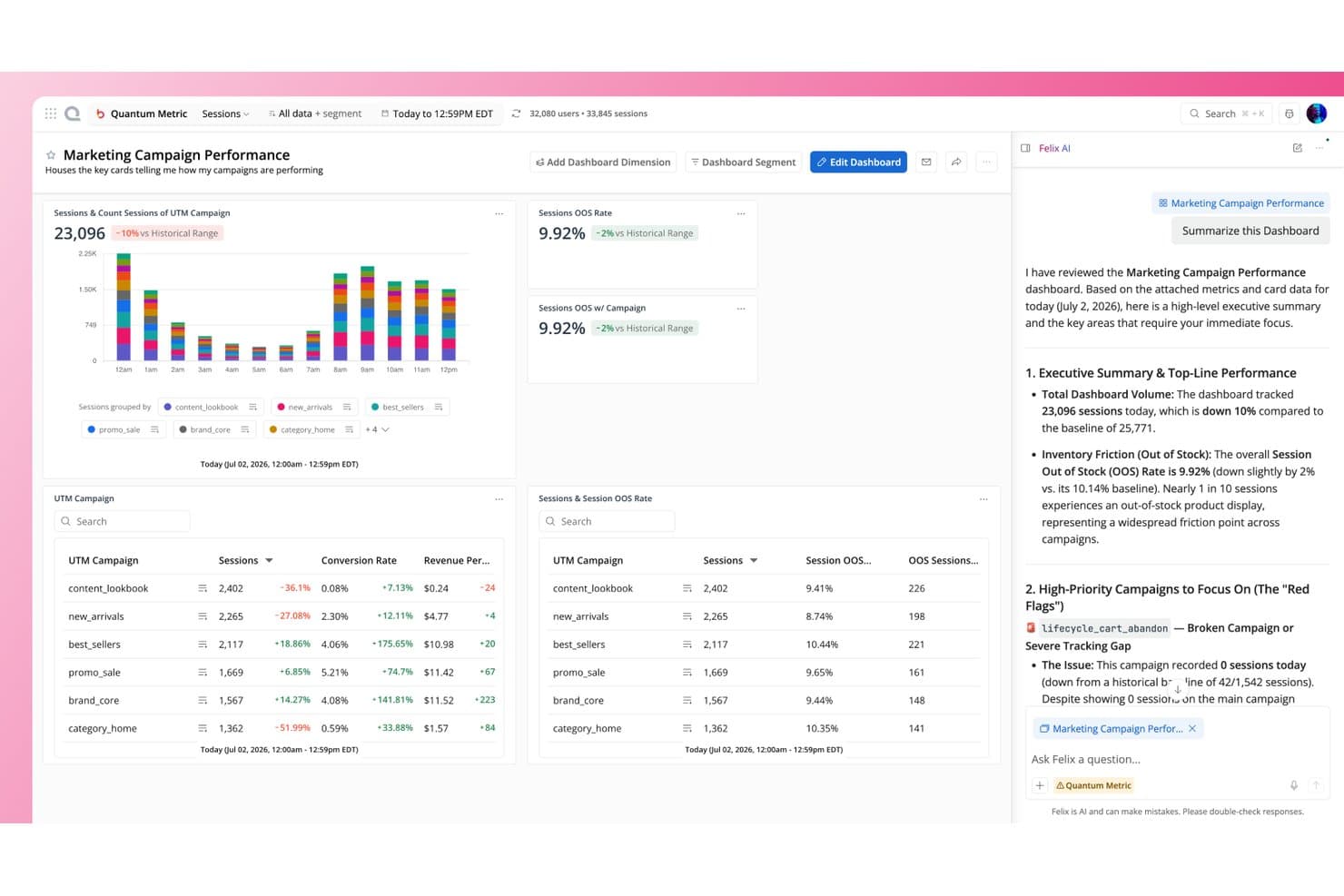
Quantum Metric surfaces AI-driven campaign insights via Felix AI summaries. Quantum Metric is a product analytics platform that captures behavioral, technical, and performance signals automatically, combining session replay, funnel analysis, journey mapping, heatmaps, and AI-driven root-cause analysis in a single tool.
Who Is Quantum Metric Best For?
Quantum Metric is built for enterprise teams at large consumer-facing companies where UX friction has a direct and measurable impact on revenue.
Why I Picked Quantum Metric
Quantum Metric earns its spot on my shortlist because of how Felix Agentic AI handles root-cause analysis: it doesn't just surface anomalies, it investigates them autonomously, tests causal factors, and surfaces session-level evidence to explain why a metric shifted. I especially like that funnels link directly to friction signals and replays, so when a checkout drop-off spikes, I'm not hunting for context. Autocapture of 300+ signals means that evidence exists from day one, with no tagging backlog to work through first.
Quantum Metric Key Features
- Autocapture event tracking: A single tag automatically captures 300+ behavioral and technical signals, including rage clicks and errors, with no manual tagging setup.
- Session replay with AI summaries: Built-in session replay for web and native mobile includes Felix AI Summarization, which generates AI-written overviews of individual sessions.
- Opportunity Analysis: Automatically identifies and sizes friction points across your product, ranking them by estimated business impact.
- User Analytics module: Tracks feature adoption and user retention directly within the platform, without requiring a separate tool or data export.
Quantum Metric Integrations
Quantum Metric integrates with Optimizely, Qualtrics, Salesforce Service Cloud, ServiceNow CSM, Adobe Analytics, Adobe Experience Platform, Customer Journey Analytics, and Looker. Its Data Streaming add-on connects with Snowflake, BigQuery, Redshift, and Databricks.
Pros and Cons
Pros:
- Felix investigates KPI changes automatically
- Links funnel drop-offs to replays
- Autocaptures 300-plus behavioral signals
Cons:
- No native experimentation workflow
- Segment builder search frustrates reviewers
Learn more about Quantum Metric: Best for visualizing user behavior
- Free plan available
- Pricing upon request
Visit WebsiteCustomer Rating:4.5/5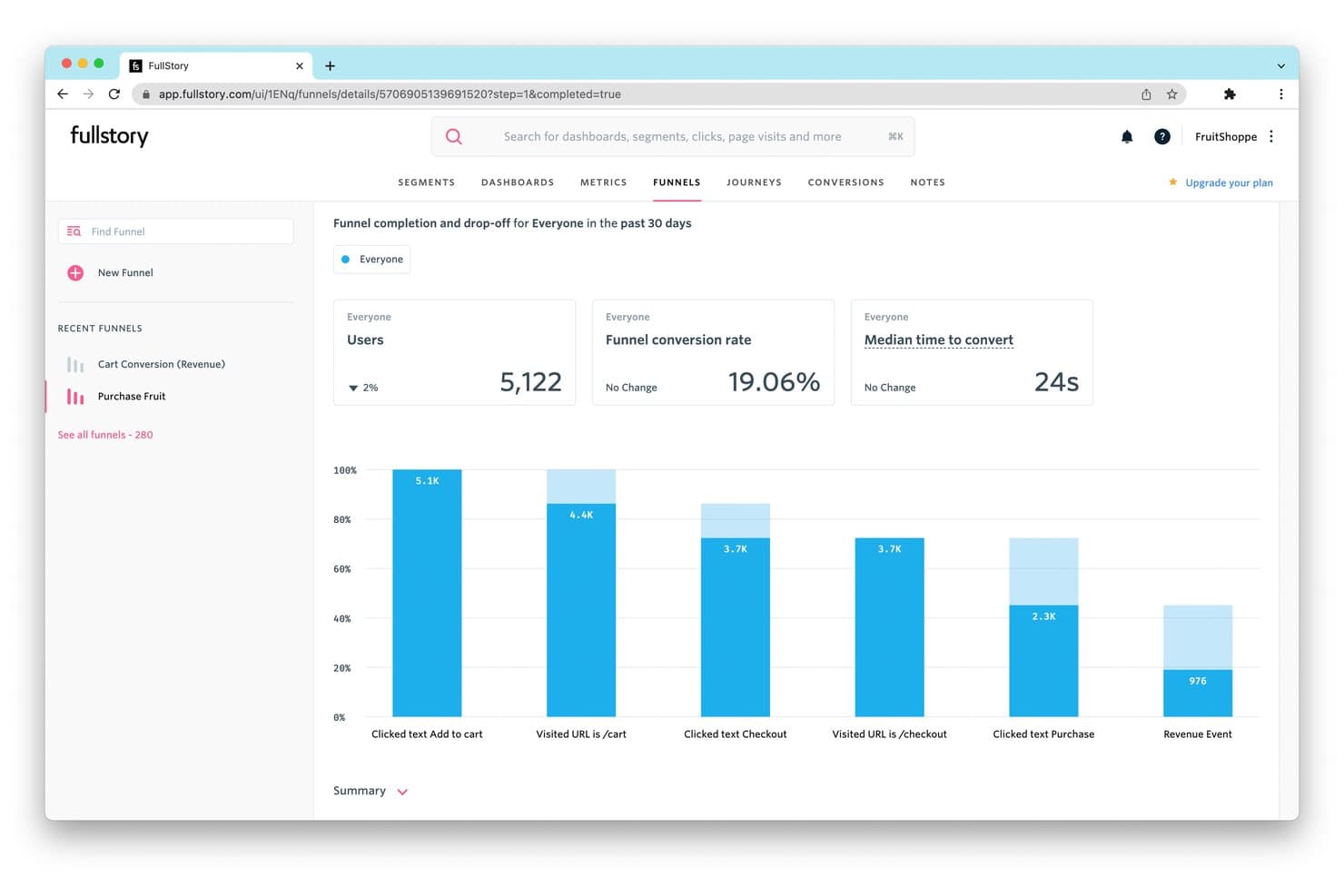
FullStory tracks funnel drop-off rates to reveal where users abandon purchases. Fullstory is a product analytics and session replay platform that captures user behavior automatically—without manual tagging—and surfaces it through funnels, retention charts, journey maps, heatmaps, and AI-assisted session summaries.
Who Is Fullstory Best For?
Fullstory fits product managers and UX researchers who need to connect quantitative behavior data—funnels, retention, journey maps—directly to the session recordings that explain why users behave that way.
Why I Picked Fullstory
Fullstory is one of my top picks because I love how it connects quantitative behavior data directly to the session recordings that explain it. Its Fullcapture engine records every interaction automatically, so when a funnel drop-off shows up in your conversion analysis, you can click that metric and land immediately in the sessions where users struggled. Journey mapping and heatmaps layer on top, giving you a clear picture of real user paths rather than assumed ones.
Fullstory Key Features
- Fullcapture automatic recording: Fullstory logs every user interaction on your site without any manual event tagging setup.
- StoryAI session summaries: An AI layer that summarizes session replays so you can spot friction points without watching full recordings.
- Anywhere Warehouse export: Sends raw behavioral event data directly to your data warehouse for deeper analysis alongside other business data.
- Consent API: A built-in API that lets you manage user consent and data privacy compliance across GDPR and CCPA requirements.
Fullstory Integrations
Fullstory integrates with Segment, Adobe Analytics, and Google Tag Manager through Data Layer Capture. It also supports an open API, webhooks, and data exports to data warehouses and cloud storage through Anywhere.
Pros and Cons
Pros:
- Journey maps reveal real user paths
- Metrics link directly to session replays
- Automatic capture reduces manual event tagging
Cons:
- Schema governance remains limited
- Built-in experimentation tools are absent
Learn more about Fullstory: Best for autocapture with retroactive analysis
- Free plan available
- Pricing upon request
Visit WebsiteCustomer Rating:4.3/5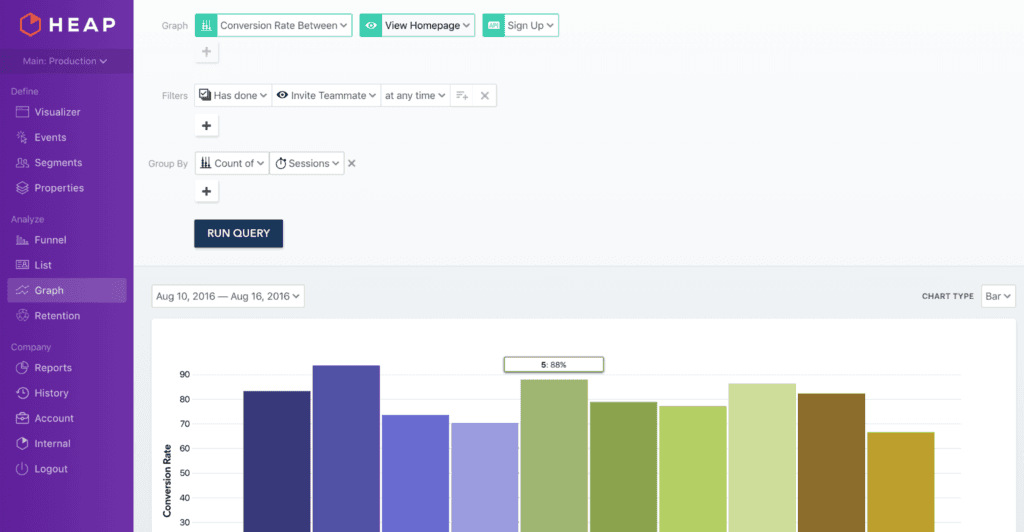
Heap offers a graphical representation of core user metrics. Heap is a product analytics platform that automatically captures every user interaction across web and mobile, then lets you define, label, and analyze events retroactively without any pre-instrumentation.
Who Is Heap Best For?
Heap is a strong fit for product teams that want to analyze user behavior without relying on engineering to set up event tracking in advance.
Why I Picked Heap (by Contentsquare)
I've included Heap in my top picks because its autocapture engine records every click, tap, and form interaction automatically, so I can go back and analyze behavior I never thought to track at the start. That retroactive analysis is what sets Heap apart: if a new drop-off pattern surfaces in your funnel, you can define and label the relevant events after the fact, with no engineering work required. Heap's Journeys and Illuminate features then surface those patterns visually and flag trends you weren't actively monitoring.
Heap Key Features
- Heap Illuminate: An automated trend detection feature that flags behavioral patterns and anomalies you weren't actively monitoring.
- Funnels and retention reports: Pre-built analysis views that show where users drop off in a flow and how cohorts retain over time.
- Playbooks: Ready-made analysis templates that help product teams run common analyses without building reports from scratch.
- Session replay: Available via the Experience Analytics add-on, this feature lets you watch recorded user sessions to understand exactly how people interact with your product.
Heap Integrations
Heap supports data warehouse sync through Heap Connect and engagement-tool connectivity through Heap Activate. Specific third-party native integrations aren’t clearly documented, but APIs are available for custom integrations.
Pros and Cons
Pros:
- Journeys expose path-level drop-offs visually
- No-code event labeling reduces engineering dependency
- Autocapture supports retroactive adoption analysis
Cons:
- Native experimentation isn’t included
- Autocapture can overwhelm teams with data
Learn more about Heap (by Contentsquare): Best for revenue-tied behavioral analytics
- 7-day free trial + free demo available
- From $99/month
Visit WebsiteCustomer Rating:4.1/5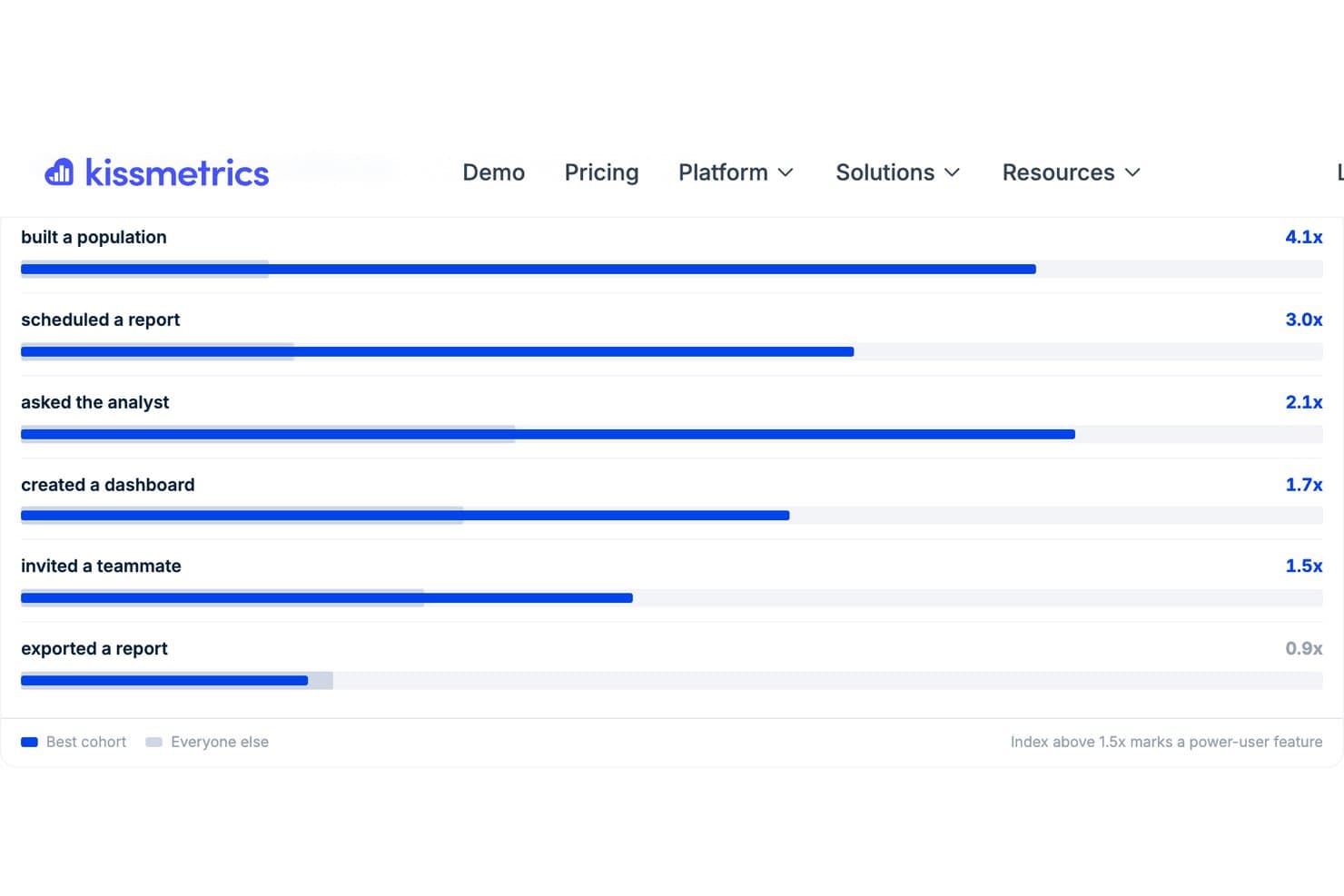
Kissmetrics highlights power-user features by comparing best cohort behavior. Kissmetrics is a product analytics platform that ties behavioral event tracking, funnel analysis, cohort retention, and revenue reporting to individual user identities across devices and acquisition channels.
Who Is Kissmetrics Best For?
Kissmetrics is a strong fit for growth-stage product and marketing teams that need to connect user behavior directly to revenue and acquisition performance.
Why I Picked Kissmetrics
Kissmetrics earns its spot on my shortlist because it's one of the few product analytics tools that ties behavioral data directly to revenue and acquisition channel performance. I love how autoconfiguration scans your site, assigns roles to events like "Viewed Product" or "Completed Checkout," and builds your first funnel and dashboard automatically. The revenue reports let me see, at a glance, that organic sign-ups convert at a meaningfully higher rate than paid channels, without writing a single SQL query.
Kissmetrics Key Features
- Autocapture: A single snippet or CLI command automatically captures every user event and ties it to an individual person, with no developer or tag manager required.
- AI chat: Ask questions in plain English and get back a chart, funnel, or direct answer without writing SQL or building a query manually.
- Populations: Behavior-based audience segments you define once and reuse as filters across every report in the platform.
- Activation campaigns: Launch targeted campaigns triggered by a population segment, sent directly from your own domain.
Kissmetrics Integrations
Kissmetrics offers 30+ integrations, including Mailchimp and Slack, with connections to advertising, CRM, and email tools. Full API and CLI access support custom integrations on every plan, while native integrations require the Growth plan or higher.
Pros and Cons
Pros:
- AI chat supports self-serve product questions
- Autocapture reduces engineering work during instrumentation
- Revenue reports connect behavior to outcomes
Cons:
- Governance controls remain largely undocumented
- Advanced segmentation requires higher-tier access
Learn more about Kissmetrics: Best for privacy-compliant analytics
- Free demo available
- From $40/month
Visit WebsiteCustomer Rating:4.2/5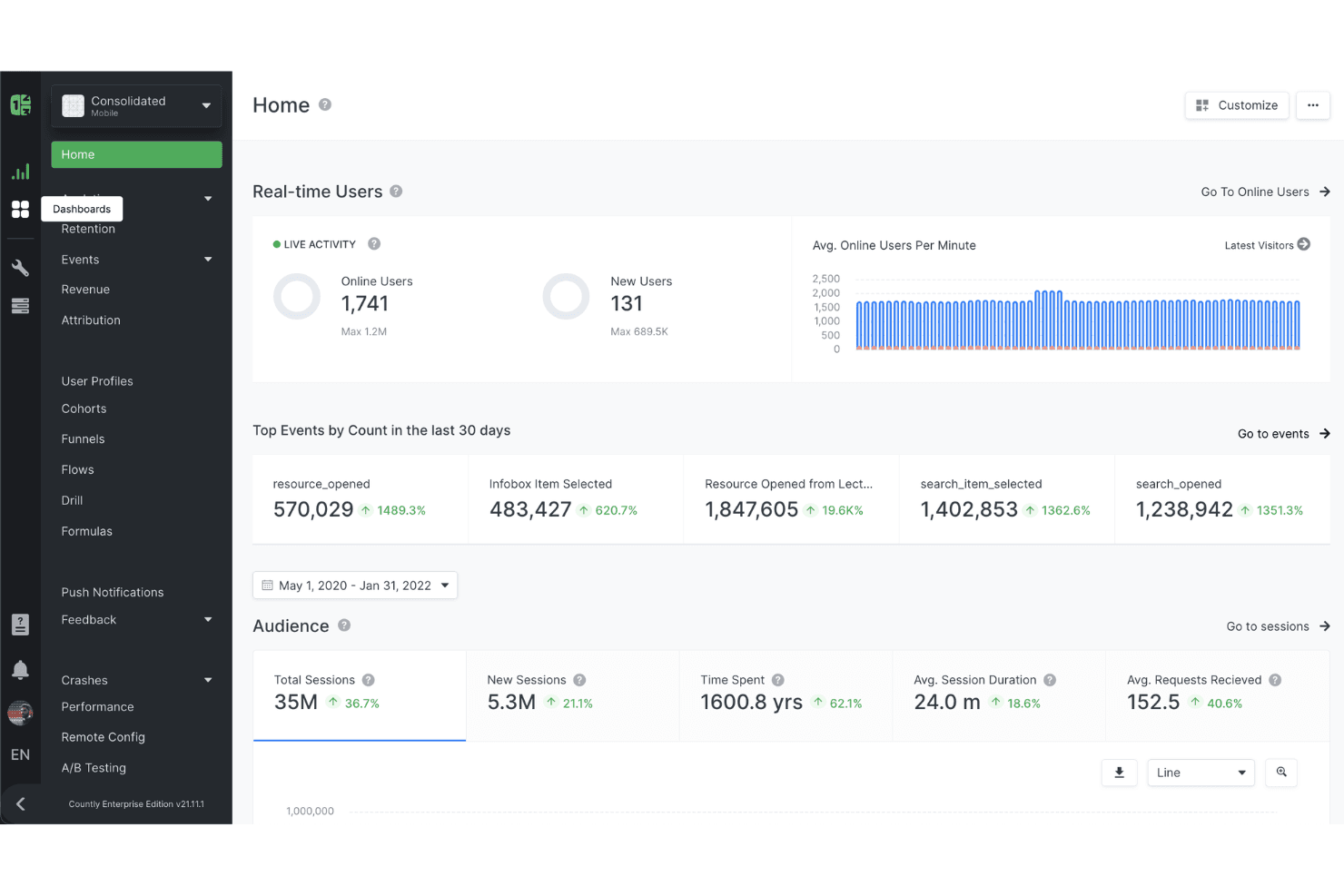
Countly's dashboard provides a comprehensive view of various metrics and access to analytics tools for product analysis. Countly is a product analytics platform that combines event tracking, behavioral reporting, user segmentation, A/B testing, and engagement tools across mobile, web, desktop, and connected devices—with self-hosting and data ownership as core architectural options.
Who Is Countly Best For?
Countly is a strong fit for product teams in regulated industries—fintech, healthcare, or enterprise—where data ownership and privacy compliance are non-negotiable.
Why I Picked Countly
I've included Countly in my top picks because it's the only tool on this list that treats data ownership as a core architectural decision, not an afterthought. If your team works in fintech, healthcare, or any regulated space, Countly's self-hosted Enterprise option means your event data, user profiles, and behavioral reports never touch a vendor's shared cloud. I also like its Compliance Hub, which actively supports GDPR, HIPAA, and CCPA requirements alongside SOC 2 Type 2 and ISO 27001 certifications.
Countly Key Features
- Drill: A no-code query tool that lets you explore granular user and event data without writing SQL.
- A/B testing and remote config: Run experiments and manage feature flags to test product changes against defined user segments.
- Cee AI agent: A natural-language interface for exploring your analytics data and surfacing insights without manual report-building.
- Journeys: An automated multi-step flow builder for targeting users with in-app messages, push notifications, or surveys based on behavior.
Countly Integrations
Countly offers 2 documented integrations, including Jira and Adjust for Enterprise customers. Its REST API and Hooks support custom connections to external systems.
Pros and Cons
Pros:
- Built-in experimentation supports product iteration
- Real-time analytics helps validate feature adoption
- Self-hosted data ownership supports regulated teams
Cons:
- No native session replay limits qualitative diagnosis
- Behavioral reports require additional access
Learn more about Countly: Best for analyzing user actions
- Free plan available
- From $120/month (billed annually)
Visit WebsiteCustomer Rating:4.5/5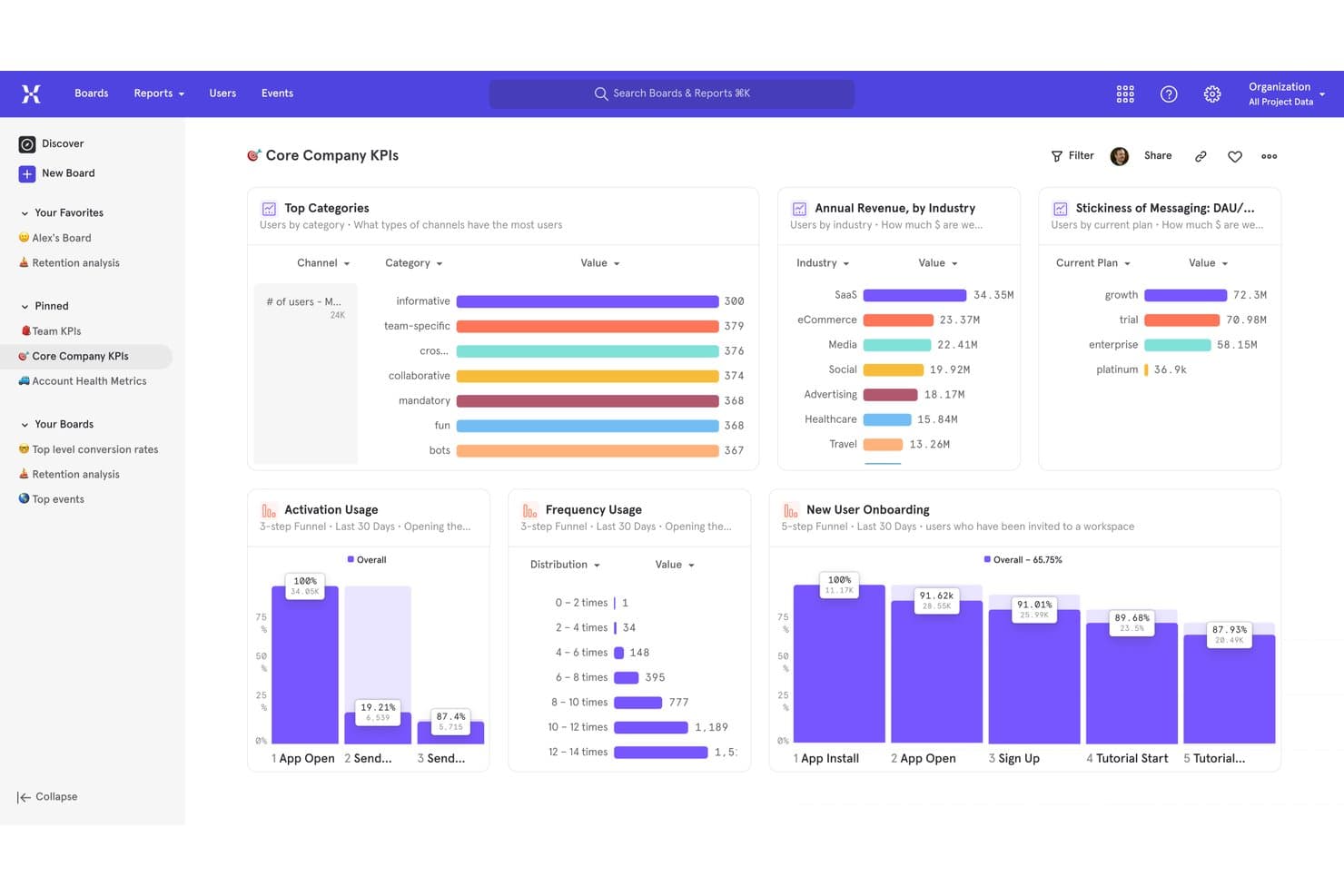
Mixpanel centralizes KPIs, funnels, and revenue metrics in one dashboard. Mixpanel is a product analytics platform that combines event tracking, behavioral reporting, user segmentation, session replay, and built-in experimentation and feature flags into a single no-code interface.
Who Is Mixpanel Best For?
Mixpanel is a strong fit for product managers and growth teams who need to track user actions, build behavioral reports, and share insights without writing SQL.
Why I Picked Mixpanel
I picked Mixpanel as one of the best because it's built around tracking what users actually do, not just what pages they visit. Funnels, retention reports, and Flows (path analysis) let me see exactly where users drop off or change course after a feature ships. I also like that behavioral cohorts let me group users by specific action sequences, so I can compare how power users behave versus those who churn.
Mixpanel Key Features
- Session replay with heatmaps: Records real user sessions on web and mobile, with heatmaps, clickmaps, and rage-click detection to show exactly how users interact with your product.
- Built-in experiments: Runs A/B tests with multiple variants, frequentist and sequential statistics, and AI-assisted analysis without needing a separate testing tool.
- Feature flags: Supports percentage rollouts, dynamic configs, sticky variants, and OpenFeature provider integration to manage controlled feature releases.
- Data dictionary: Centralizes event definitions, assigns owners, and supports an approval workflow to keep your tracking clean and consistent across teams.
Mixpanel Integrations
Mixpanel integrates with Segment, mParticle, Slack, Survicate, and OpenFeature. It also offers warehouse connectors and ingestion, query, export, and Python APIs for custom data connections.
Pros and Cons
Pros:
- Governance keeps event definitions trustworthy
- Built-in replay links behavior with context
- Funnels reveal precise adoption drop-offs
Cons:
- Clean tracking requires developer planning
- Advanced analysis overwhelms new teams
 Best for granular user cohort analysis
- Free plan available
- Pricing upon request
Visit WebsiteCustomer Rating:4.5/5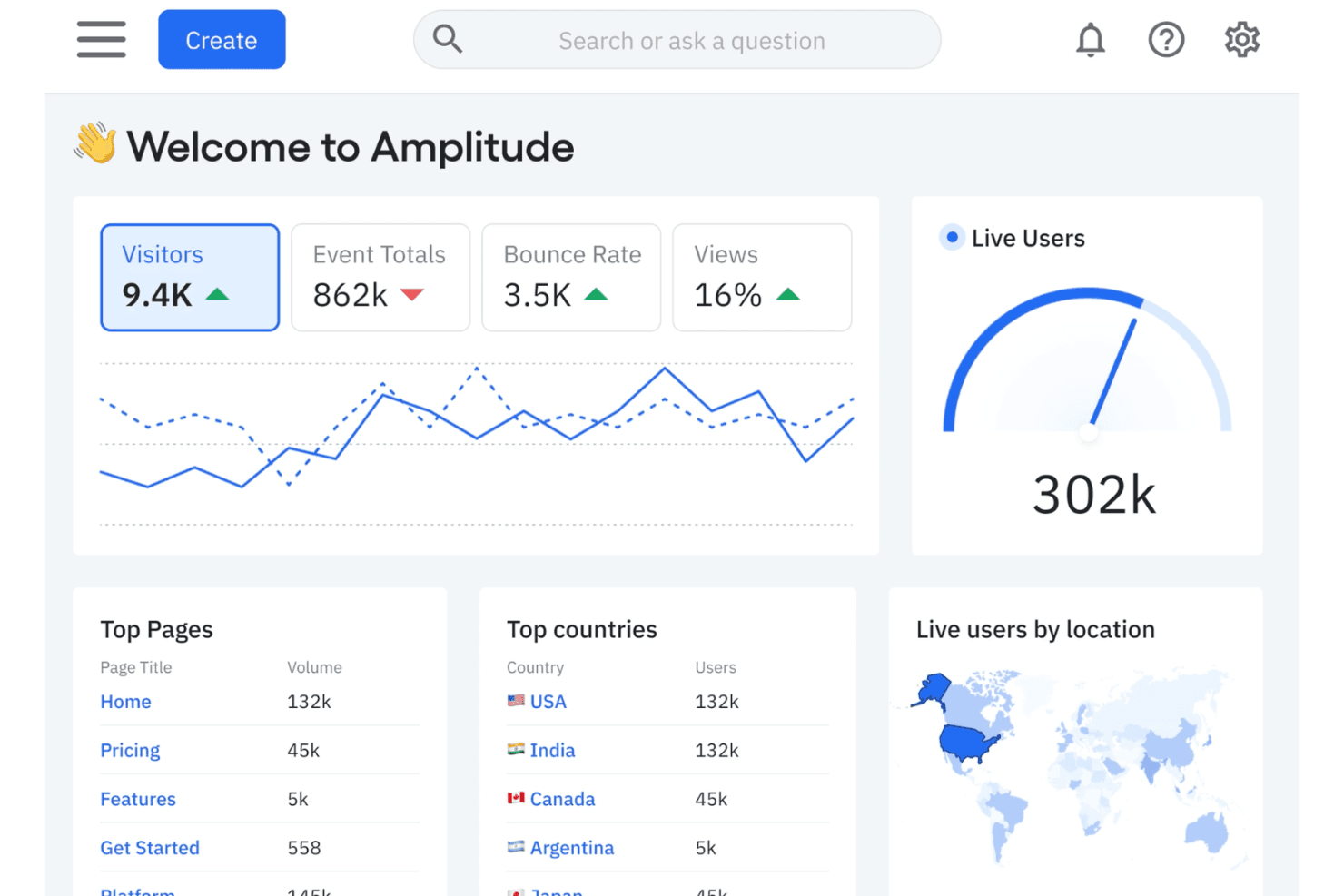
Amplitude tracks product usage, user activity, and engagement metrics to help teams understand customer behavior. Amplitude is a product analytics platform that combines event tracking, behavioral reporting, user segmentation, session replay, and built-in experimentation into a single SDK.
Who Is Amplitude Best For?
Amplitude is a strong fit for product teams that need to slice and compare user behavior across highly specific behavioral segments.
Why I Picked Amplitude
Amplitude earns its spot on my shortlist because of how precisely it lets you build and compare behavioral cohorts. I love that you can define segments using real event sequences, then reuse those cohorts across funnels, retention charts, and experiments without rebuilding them each time. The Behavioral Cohorts API on Growth plans makes it even more flexible, letting you pipe those segments directly into other tools.
Amplitude Key Features
- Session replay: Watch recorded user sessions directly in the platform to see exactly how users interact with your product, available on every plan.
- AI-powered natural language queries: Type a plain-language question and Amplitude generates the corresponding chart without SQL or manual setup.
- Autocapture: A single line of code automatically records page views, clicks, and form changes, with built-in privacy filtering for sensitive inputs.
- Built-in experimentation: Run A/B/n tests and multi-armed bandit experiments without leaving the platform, using the same behavioral data powering your analytics.
Amplitude Integrations
Amplitude offers integrations with Snowflake, Databricks, BigQuery, Twilio Segment, Braze, HubSpot, Fivetran, Census, AWS Kinesis, and Azure Blob. Its Cohorts API, Profile API, and merged user IDs support custom data workflows.
Pros and Cons
Pros:
- Self-serve charts reduce analyst bottlenecks
- Session replay clarifies feature adoption friction
- Granular behavioral cohorts sharpen product decisions
Cons:
- Saved charts and cohorts cap team scale
- Plan gates restrict advanced exploration
Learn more about Amplitude: Best for managing customer feature requests
- Free plan + 30-day free trial + free demo available
- Pricing upon request
Visit WebsiteCustomer Rating:4.4/5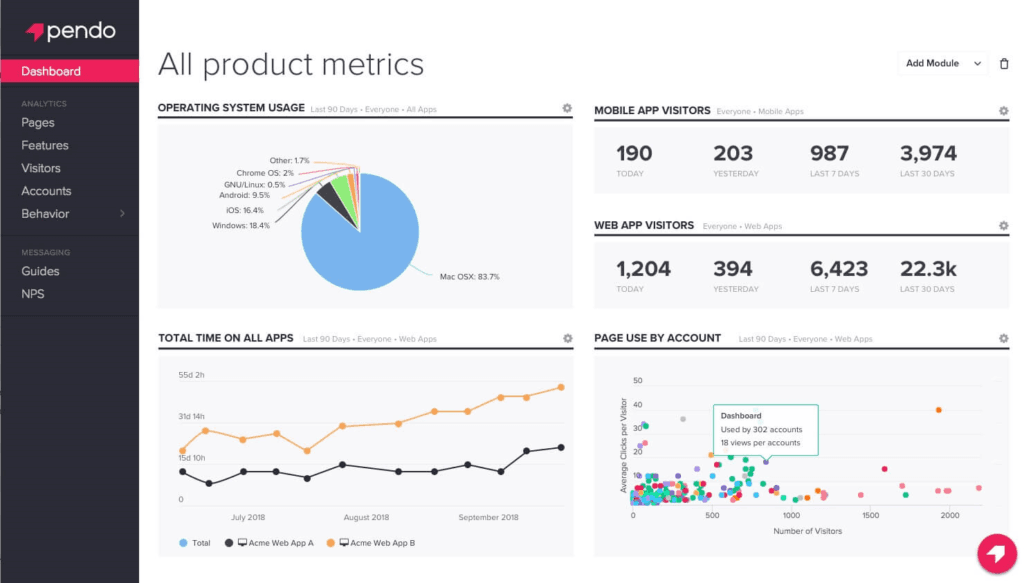
Pendo provides detailed reports on activity by both mobile and web visitors. Pendo is a product analytics platform that combines auto-capture event tracking, behavioral reporting, user segmentation, in-app guides, session replay, and feedback collection in one tool.
Who Is Pendo Best For?
Pendo is a strong fit for product managers who need to close the loop between customer feedback and product decisions in one platform.
Why I Picked Pendo
I've included Pendo in my top picks because it's the only tool on this list that closes the loop between customer feedback and product decisions without switching platforms. I particularly like how Pendo Feedback pulls feature requests from in-app widgets, Salesforce, Zendesk, and support tickets into one view, then uses AI to group and prioritize themes automatically. You can also let customers vote on ideas and share temporary workarounds while a fix is in progress—which keeps users informed without requiring engineering time.
Pendo Key Features
- Auto-capture event tracking: Pendo records user interactions automatically from a single JavaScript snippet, with no manual tagging required to start collecting data.
- Product Engagement Score (PES): A combined metric that rolls adoption, stickiness, and growth into one score for quick health checks.
- In-app guides: Low-code overlays you can target to specific user segments to drive onboarding, feature discovery, or announcements.
- Session replay: Recorded user sessions you can filter by segment or feature to see exactly how users interact with your product.
Pendo Integrations
Pendo lists 85+ integrations, including Salesforce, Zendesk, Slack, and GitHub. An MCP server also connects AI tools such as ChatGPT and Claude to Pendo data.
Pros and Cons
Pros:
- Connects feature requests to product decisions
- Retroactive analytics preserves earlier interaction data
- Auto-captures behavior for faster instrumentation
Cons:
- Native experimentation capabilities are unavailable
- Tagging can still require manual maintenance
Learn more about Pendo: Best for open-source, all-in-one product analytics
- Free plan available
- Pricing upon request
Visit WebsiteCustomer Rating:4.5/5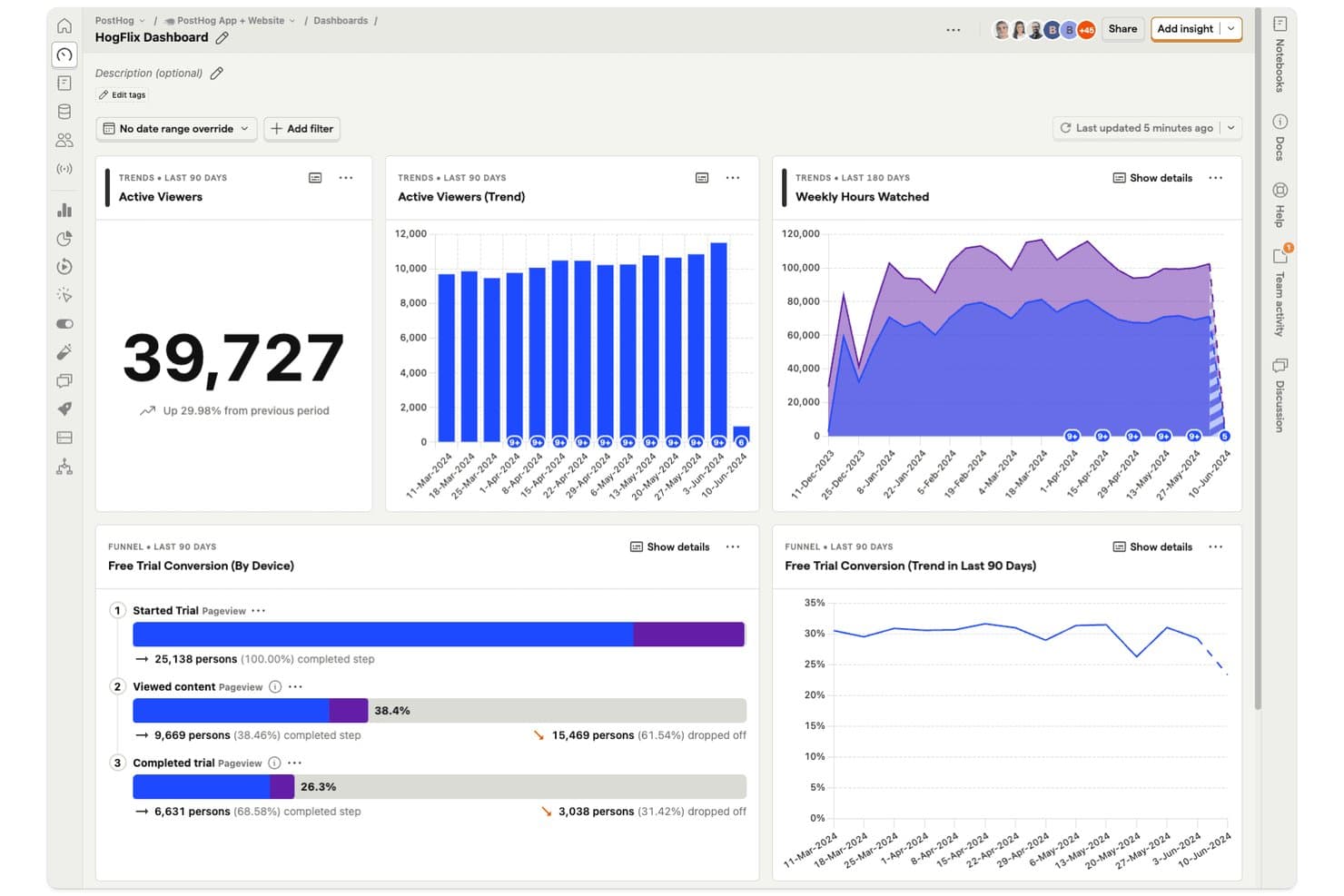
PostHog dashboards let product managers track viewer trends and funnel conversions in one view. PostHog is an open-source product analytics platform that combines event tracking, behavioral reporting, session replay, feature flags, A/B experimentation, and a built-in data warehouse into a single tool.
Who Is PostHog Best For?
PostHog is a strong fit for product and engineering teams at growth-stage companies that want analytics, session replay, and experimentation in one place without stitching together multiple tools.
Why I Picked PostHog
PostHog earns its spot on my shortlist because it replaces what would otherwise be three or four separate tools: product analytics, session replay, and A/B experimentation all share the same underlying data model. I particularly like that when a funnel drop-off catches my eye, I can jump directly into linked session recordings to see exactly what happened, without any export or context-switching. Native feature flags and experiments mean I can measure the impact of a product change against real metrics, all in one place.
PostHog Key Features
- Autocapture: Records pageviews, clicks, and form submissions automatically, without requiring custom event code for every interaction.
- Correlation analysis: Automatically surfaces the user properties and behaviors most linked to conversion or drop-off inside any funnel.
- HogQL and SQL access: Lets you query your product data directly using SQL or PostHog's own HogQL dialect for deep, custom analysis.
- Cohort builder: Creates reusable user segments from behavioral and property data that carry across reports, feature flags, and experiments.
PostHog Integrations
PostHog supports 50+ CDP destinations, including Braze, Customer.io, and Slack, plus data connections to Snowflake, BigQuery, and Redshift. Its API and webhooks support custom integrations.
Pros and Cons
Pros:
- HogQL supports deep product behavior analysis
- Linked replays explain funnel drop-offs quickly
- Analytics, replay, flags, and experiments share data
Cons:
- No predictive insights or in-app guidance
- Complex interface slows nontechnical dashboard setup
Learn more about PostHog: Best for auto-captured journey and friction insights
- Free plan + free demo + 15-day free trial available
- From $39/month (billed annually)
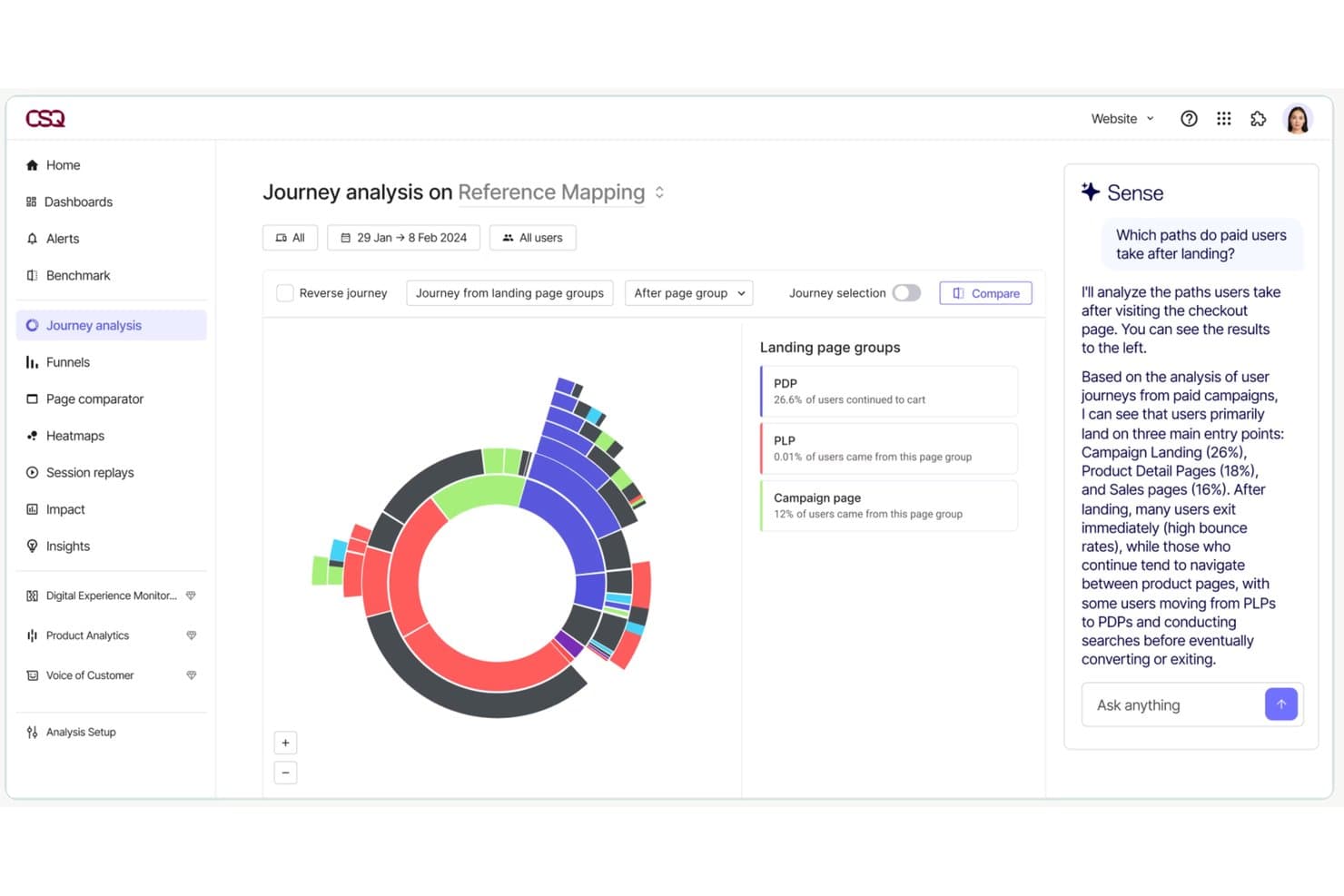
Contentsquare's Journey Analysis maps user paths with AI-driven insights. Contentsquare is a product analytics platform that combines auto-captured behavioral data, session replay, heatmaps, journey analysis, and AI-assisted insights across web, mobile, and desktop.
Who Is Contentsquare Best For?
Contentsquare is a strong fit for product and UX teams that need behavioral data, session replay, and journey analysis in one place without heavy instrumentation work.
Why I Picked Contentsquare
I've included Contentsquare in my top picks because the auto-capture approach means you're not dependent on manual event tagging to understand how users move through your product. Smart Capture records every interaction from day one, so you can run retroactive journey analysis on actions you never instrumented in advance. I also like how Sense, the built-in AI assistant, surfaces friction points and ties them directly to revenue or retention impact.
Contentsquare Key Features
- Session replay with rage-click detection: Records full user sessions and flags rage clicks and dead zones so you can pinpoint exactly where frustration occurs.
- Sense AI assistant: Queries your behavioral data in natural language, builds visualizations, and surfaces friction points tied to revenue or retention impact.
- Cross-platform identity resolution: Tracks users across web, mobile, and desktop, and links anonymous sessions to logged-in profiles for a continuous view of each journey.
- Data Connect ETL export: Syncs Contentsquare data to your data warehouse via a managed pipeline, with native integrations for Snowflake and AWS.
Contentsquare Integrations
Contentsquare documents 100+ integrations, including Shopify, AWS, Microsoft Azure, and Snowflake. It also offers Data Connect managed ETL, open APIs, and MCP connectors for ChatGPT, Claude, Microsoft Copilot, and Dust.
Pros and Cons
Pros:
- Unifies web, mobile, and desktop behavior
- Connects journeys with replay and friction signals
- Captures interactions without manual event tagging
Cons:
- Segment selections can disappear during drill-downs
- Key analysis views require higher-tier plans
Learn more about Contentsquare:
Other Product Analytics Tools
Product analytics tools help you track, measure, and interpret how users interact with your product—so you can make smarter decisions backed by real behavior, not gut instinct. Whether you’re trying to improve retention, optimize onboarding, or reduce churn, these tools give you the data you need to take action with confidence.
If you’ve ever struggled with unreliable event tracking, incomplete user journeys, or dashboards that leave more questions than answers, you’re not alone. This list highlights the best product analytics tools available today—ones that actually deliver on clarity, accuracy, and team-wide usability.
Here are a few more that didn’t make the top list but are worth your consideration as an analytics tool.
- 11Adobe AnalyticsBest for enterprise-scale cross-platform attribution
- 12StatsigBest for analytics tied to feature flag rollouts
- 13GlassboxBest for regulated-industry friction detection
- 14UserpilotBest for analytics and in-app fixes in one tool
- 15LogRocketBest for session replay tied to funnel drop-offs
- 16Gainsight PXBest for B2B product adoption and CS alignment
Related Product Management Reviews
If you still haven't found what you're looking for here, check out these tools closely related to product management tools that we've tested and evaluated.
- Best Idea Management Software
- Best Heatmap Software
- Best User Onboarding Software
- Best User Research Tools
- Best Product Marketing Tools
- Best UX Design Tools
How I Evaluate Free Product Analysis Tools
First, I define what counts as free. Product analysis is an ongoing function, so I only consider tools with a long-term free plan—not a trial. From there, I split my evaluation into three parts: core functionality, which carries the most weight, like capturing user events and surfacing usage dashboards; standout features, like autocapture tracking; and what a tool offers beyond its feature set, like how cleanly it scales from free to paid.
Core Functionality (Table Stakes For This List)
In addition to my free plan requirements, I use a scoring system to select tools for my list. I score each one on a scale from 0 (does not offer the functionality) to 5 (excels in this area) for each core functionality listed below, based on what's available on the free plan. I then convert the total into a percentage to help assess each tool's overall fit, with extra weight on any functionalities I've deemed essential.
- Event & Behavior Tracking (Essential): I check whether custom events, clicks, and pageviews are captured with enough volume for a growing product's daily active users.
- Usage Dashboards & Reporting (Essential): The free plan should include visual dashboards that surface key metrics like DAU, feature usage, and trends without manual setup.
- Funnel & Retention Analysis: I evaluate whether you can build multi-step funnels and view cohort retention curves to pinpoint where users drop off after onboarding.
- Segmentation: Filtering by user properties, behaviors, or cohorts matters—I look for combinable filters, like isolating mobile users who completed signup.
- Data Export or Integration: I check for CSV exports, API access, or native connections to warehouses and tools like BigQuery, Slack, or Hubspot on the free tier.
- Session or Path Analysis: Path visualizations or session replays help trace how users move through a product, so I look at depth and volume limits here.
Once I have a list of tools that meet the criteria, I consider what sets each platform apart.
Differentiating Factors (What Sets Vendors Apart)
Here's how I compare and contrast different vendors:
Standout Features
Autocapture tracking is the first thing I check. Tools like PostHog and Heap record clicks, taps, and pageviews without manual instrumentation, which means you get usable data within minutes of installing the snippet. Session replay access is equally valuable—I look for free tiers that let you watch real user sessions so you can see exactly where someone hesitates during checkout or abandons a multi-step form. Heatmaps round this out by showing aggregate click and scroll patterns across key pages, giving you quick UX reads without building custom reports.
Beyond Features
I check whether a tool lets you export raw event data on the free tier, since teams that can't pull CSVs or hit a basic API risk losing months of behavioral data if they switch platforms later. Self-serve setup matters just as much—I look for SDKs, tag manager support, and starter templates that let a PM get tracking live without filing an engineering ticket. Privacy posture rounds this out: tools like PostHog and Matomo offer cookie-less or self-hosted options, which saves early-stage teams from scrambling to retrofit GDPR compliance after launch.
How to Choose Product Analytics Tools
With so many different product analytics solutions available, it can be challenging to make decisions on what product analytics tool is going to be the best fit for your needs.
As you're shortlisting, trialing, and selecting product analytics tools, consider the following:
- What problem are you trying to solve - Start by identifying the product analytics feature gap you're trying to fill to clarify the features and functionality the product analytics tool needs to provide.
- Who will need to use it - To evaluate cost and requirements, consider who'll be using the software and how many licenses you'll need. You'll need to evaluate if it'll just be the product management professionals, or the whole organization that will require access. When that's clear, it's worth considering if you're prioritizing ease of use for all, or speed for your product analytics tool power users.
- What other tools it needs to work with - Clarify what tools you're replacing, what tools are staying, and the tools you'll need to integrate with, such as accounting, CRM or HR software. You'll need to decide if the tools will need to integrate together, or alternatively, if you can replace multiple tools with one consolidated product analytics tool.
- What outcomes are important - Consider the result that the software needs to deliver to be considered a success. Consider what capability you want to gain, or what you want to improve, and how you will be measuring success.
For example, an outcome could be the ability to get greater visibility into performance. You could compare product analytics tool features until you’re blue in the face, but if you aren’t thinking about the outcomes you want to drive, you could be wasting a lot of valuable time. - How it would work within your organization - Consider the software selection alongside your workflows and delivery methodology. Evaluate what's working well, and the areas that are causing issues that need to be addressed. Remember every business is different — don’t assume that because a tool is popular that it'll work in your organization.
Trends in Product Analytics Tools
As product analytics tools evolve, their focus is shifting beyond traditional tracking and reporting. Companies are demanding deeper, more actionable insights, frictionless data integration, and AI-powered automation to make sense of complex user behaviors.
New regulations and changing consumer expectations are also shaping how businesses collect, analyze, and act on user data.
By reviewing product updates, press releases, and industry trends, we’ve identified several key shifts influencing the future of product analytics. Here’s what’s defining the next generation of these tools:
1. Unified Data Integration for a Complete User View
Data silos are becoming a thing of the past. The latest analytics tools prioritize seamless integration with multiple data sources, including CRM systems, customer data platforms (CDPs), and customer support platforms.
By consolidating data from various touchpoints, businesses can gain a holistic view of the user journey, making it easier to correlate behaviors with long-term business value.
💡 Example: Amplitude’s CDP centralizes user data, ensuring that product teams have a single source of truth for informed decision-making.
2. Combining Qualitative and Quantitative Data for Richer Insights
Tracking what users do is no longer enough—businesses also need to understand why they do it. The most advanced product analytics tools now blend quantitative metrics like clicks, session duration, and drop-off rates with qualitative insights such as heatmaps, user recordings, and surveys.
By integrating qualitative and quantitative metrics, users are able to develop a fuller picture of user behavior, allowing product teams to move beyond surface-level analytics and uncover the motivations, frustrations, and opportunities hidden within their data.
💡 Example: Contentsquare combines advanced data science with qualitative behavior tracking to highlight friction points, improve retention, and boost customer satisfaction.
3. AI-Driven Automated Insights and Predictive Analytics
The next wave of analytics isn’t just about reporting past behavior—it’s about anticipating future actions. With AI and machine learning, modern product analytics tools can automatically detect anomalies, predict user churn, and recommend optimizations without requiring manual analysis.
Automated insights reduce decision-making time, helping teams act quickly on data-driven recommendations instead of spending hours digging through reports.
💡 Example: FullStory uses AI to surface behavioral trends and suggest improvements to increase engagement and conversion rates.
4. Cross-Platform Analytics for a Seamless User Journey
Users interact with products across multiple devices, channels, and platforms, and analytics tools are adapting to keep up. The leading solutions now offer unified tracking across web, mobile apps, voice interfaces, and even offline interactions, ensuring teams can analyze the entire user journey without missing key touchpoints.
💡 Example: Mixpanel enables cross-platform event tracking, giving product teams a single view of user behavior across mobile, desktop, and connected devices.
5. Impact Analysis: Measuring What Actually Moves the Needle
Traditional analytics tools show what happened, but they don’t always explain why. There’s a growing emphasis on impact analysis, where analytics tools help product teams measure how specific changes influence user behavior and business outcomes.
These features go beyond basic A/B testing by incorporating causal inference models to determine whether a new feature, UI change, or marketing initiative actually drives conversions, retention, or revenue growth.
💡 Example: Heap’s impact analysis tool highlights which product changes have the biggest effect on user engagement and retention.
6. Privacy-First Analytics and Compliance-Ready Tracking
With the increasing enforcement of GDPR, CCPA, and other privacy regulations, product analytics tools are rethinking data collection. Invasive tracking methods like third-party cookies are being phased out in favor of privacy-safe analytics, which rely on first-party data, anonymized tracking, and user-consented data collection.
Expect to see more robust privacy settings, consent management tools, and cookieless tracking built into analytics platforms.
💡 Example: Piwik PRO offers GDPR-compliant analytics solutions that prioritize user privacy while still delivering actionable insights.
7. Customer Data Platforms (CDPs) as the Foundation of Product Analytics
Customer data platforms are becoming a critical backbone for product analytics. By centralizing customer data from multiple sources, CDPs help teams create unified user profiles, personalize experiences, and improve decision-making.
More analytics tools are integrating directly with CDPs or building their own to give companies a single source of truth for customer behavior.
💡 Example: Amplitude’s CDP enhances product analytics by organizing and segmenting customer data for more precise targeting and engagement strategies.
The Future of Product Analytics: Actionable, Privacy-First, and Fully Integrated
The trends shaping product analytics reflect a shift toward more actionable, automated, and privacy-conscious insights. The most successful tools will be those that:
- Unify qualitative and quantitative data to provide a complete understanding of user behavior
- Automate insights with AI to reduce decision-making time
- Offer cross-platform tracking for a seamless view of the user journey
- Ensure compliance with privacy-first data collection
- Integrate with CDPs to create a single source of truth for user interactions
These innovations ensure that product teams can track, analyze, and act on user data with more precision than ever—driving better experiences, higher retention, and long-term business success.
What Are Product Analytics Tools?
Product analytics tools are software that collects, processes, and analyzes data related to the usage, performance, and interactions with a product or service. These tools help you gain valuable insights into how users engage with your products, allowing for data-driven decision-making and optimization of the product development and marketing strategies.
Product analytics tools often track metrics such as user behavior, feature usage, conversion rates, customer satisfaction, and other key performance indicators. They play a crucial role in understanding the effectiveness of a product, identifying areas for improvement, and making informed decisions to enhance overall product success.
Essential for teams looking to understand user interactions with their products, product analytics tools make use of data to enhance user experience. These tools help gather, analyze, and interpret vast amounts of data on user behavior, product usage, and performance metrics, guiding product development and marketing strategies.
Features of Product Analytics Tools
When selecting product analytics tools, keep an eye out for the following key features:
- User event tracking: Follow exactly what users do within your product including scrolls, swipes, purchases, or rage clicks—so you can see which features get love and which ones might need a little TLC.
- Funnel analysis: Note how users flow through critical steps, like onboarding or checkout, and instantly spot where most folks are dropping off. This lets you focus your fixes where they’ll make the biggest splash.
- Segmentation: Group users based on traits, behavior, or custom attributes. This helps you see, for example, how power users behave differently from your one-and-done visitors.
- Retention analysis: See who keeps coming back, and who vanishes after a single encounter. This helps you fine-tune your product and turn casual users into loyal fans.
- Cohort analysis: Compare groups of users (like those who signed up in April vs. June) to uncover trends over time and spot the long-term effects of product updates.
- Custom dashboards and reports: Build personalized dashboards to track the metrics that matter most to you, and easily share bite-sized insights with your team—no data wizardry required.
- A/B testing support: Experiment with different versions of a feature or page to see which one users prefer, so your improvements are rooted in real data, not just intuition.
- Real-time analytics: Access your product’s data as it’s happening, so you can react quickly if something’s going sideways or double down when things are working well.
Common Product Analytics Tools AI Features
Beyond the standard product analytics tools features listed above, many of these solutions are incorporating AI with features like:
- Churn prediction: Receive AI-powered alerts when users are likely to abandon your product, so you can swoop in with offers and improvements before they leave.
- Automated insights: Let AI sift through heaps of data and flag trends, anomalies, or sudden changes you might have missed, so you don’t have to squint at endless charts.
- Predictive analytics: Use AI to forecast user churn, conversion rates, or future buying habits. This gives you a head start on keeping users engaged and happy.
- Personalized recommendations: Automatically suggest content, features, or actions tailored to individual users, boosting engagement and satisfaction without guesswork.
- Natural language queries: Type questions about your data in plain English (“Which features are causing churn this month?”) and get clear answers, ditching the need for complicated queries.
- Anomaly detection: Detect unexpected shifts in user behavior, site performance, or metrics, so you can spot problems—or opportunities—before they snowball.
Choosing the right product analytics tool with the above features empowers your team to deeply understand user behavior, optimize product performance, and drive growth. Beyond this, teams can leverage product analytics tools to better personalize user experiences, and ultimately, build products that match user expectations.
Benefits of Product Analytics Tools
Product analytics tools provide insights into user behavior, preferences, and engagement levels, enabling organizations to make informed decisions. Here are five primary benefits of leveraging product analytics tools:
- Enhanced User Experience: Product analytics tools pinpoint areas of friction and opportunities for improvement within the product. By understanding how users interact with the product, businesses can refine features and interfaces to enhance overall user satisfaction and usability.
- Data-Driven Decision Making: With access to comprehensive data on user behavior and product performance, organizations can base their strategic decisions on solid evidence. This reduces guesswork and enables more effective planning and execution of product strategies.
- Increased User Engagement: By analyzing how users engage with the product, companies can identify what features are most valued and which ones need reevaluation. This insight allows for targeted improvements that boost user engagement and product stickiness.
- Improved Product Development: Product analytics provide valuable feedback on how new features are received by users, informing the development process. This ensures that resources are invested in enhancements that truly meet user needs and contribute to the product's success.
- Competitive Advantage: Utilizing product analytics gives businesses a leg up on the competition by offering deeper insights into market trends and user preferences. This enables the creation of superior products that cater more closely to customer demands.
For organizations looking to stay ahead in a competitive landscape, investing in product analytics tools is a good strategic move. Not only do these tools offer a way to deeply understand and connect with users, but they also empower businesses to innovate and improve continuously. The benefits extend beyond simple analytics; they translate into happier users, more effective product teams, and a stronger market position.
Costs & Pricing For Product Analytics Tools
When exploring product analytics tools, understanding the various plan and pricing options available is crucial, especially for software buyers new to this type of software. Pricing and plan options typically vary based on the features offered, the volume of data processed, and the level of support provided.
Below is an overview of common plan options, their average pricing, and the features typically included with each plan, designed to help you find the right fit for your needs and budget.
Plan Comparison Table for Product Analytics Tools
| Plan Type | Average Price | Common Features Included |
|---|---|---|
| Plan TypeEnterprise | Average PriceCustom Pricing | Common Features IncludedAdvanced analytics, Unlimited data points, Full API access, Custom integrations, Dedicated support, Custom features |
| Plan TypeProfessional | Average Price$800 - $2,000/month | Common Features IncludedEnhanced analytics capabilities, Up to 10 million data points, API access, Priority support, Advanced integrations |
| Plan TypeBasic | Average Price$100 - $500/month | Common Features IncludedStandard analytics, Up to 1 million data points, Email support, Basic integrations |
| Plan TypeFree | Average Price$0 | Common Features IncludedLimited analytics, Up to 10,000 data points, Community support, Basic dashboard functionality |
The pricing and features for each plan can vary significantly between different product analytics tools, and many providers offer customizable options to tailor the plan to your specific needs. When selecting a plan, consider the scale of your data needs, the complexity of the analytics you require, and the level of support that will best assist your team.
Additionally, starting with a free plan can be a great way to evaluate a tool's capabilities and user experience before committing to a paid subscription. Otherwise, opting for a plan that offers a bit more than your current requirements can provide flexibility as your needs evolve.
Product Analytics Tools Frequently Asked Questions
Find answers to common questions other people ask about this topic.
How user-friendly are product analytics tools for non-technical users?
Many of these tools are designed with user-friendliness in mind. Mixpanel and Amplitude stand out for their intuitive interfaces and easy-to-understand analytics. On the other hand, more technical power users might gravitate towards tools like Google Analytics 4 or Heap, which offer deeper customization and more complex analysis capabilities.
The good news for non-technical users is that many tools offer extensive resources, tutorials, and customer support to help bridge the gap for those less familiar with data analytics. So, whether you’re just starting out or looking to dive deeper into your product’s data, there’s likely a tool out there that matches your mastery of product analytics skills as well as your needs.
Can these tools track user engagement across different devices?
Yes, top product analytics platforms use device IDs and account-based tracking to measure engagement across web, mobile, and other platforms. This lets you see a user’s journey no matter which device they use, supporting better cross-platform product insights.
Are there any free product analytics tools?
Yes, several product analytics platforms offer free plans or trials, like Mixpanel, Google Analytics, and Heap. Free versions are usually limited in features, event volume, or data retention, but they can give smaller teams a useful starting point for analysis.
How do these tools handle data privacy and GDPR compliance?
Most leading platforms comply with major privacy regulations and offer GDPR-friendly features like data anonymization, consent management, and data export controls. It’s wise to review each tool’s privacy documentation and involve your legal or IT team before finalizing a choice.
How do I create a product dashboard?
You can create product dashboards within your analytics tool with only a few clicks. Dashboards are normally special views where you can add widgets by dragging and dropping from a library of pre-made elements that will give you information.
Examples of this information include:
- Daily active users
- Number of events
- Count of new users
- Monthly active users
- Bugs
- Crashes
You can explore this within your current software or look at our list of product analytics dashboard software if you want to check out more tools specialized in dashboards.
1. Unified Data Integration for a Complete User View
Data silos are becoming a thing of the past. The latest analytics tools prioritize seamless integration with multiple data sources, including CRM systems, customer data platforms (CDPs), and customer support platforms. By consolidating data from various touchpoints, businesses can gain a holistic view of the user journey, making it easier to correlate behaviors with long-term business value.
💡 Example: Amplitude’s CDP centralizes user data, ensuring that product teams have a single source of truth for informed decision-making.
2. Combining Qualitative and Quantitative Data for Richer Insights
Tracking what users do is no longer enough—businesses also need to understand why they do it. The most advanced product analytics tools now blend quantitative metrics like clicks, session duration, and drop-off rates with qualitative insights such as heatmaps, user recordings, and surveys. This integration provides a fuller picture of user behavior, allowing product teams to move beyond surface-level analytics and uncover the motivations, frustrations, and opportunities hidden within their data.
💡 Example: Contentsquare combines advanced data science with qualitative behavior tracking to highlight friction points, improve retention, and boost customer satisfaction.
3. AI-Driven Automated Insights and Predictive Analytics
The next wave of analytics isn’t just about reporting past behavior—it’s about anticipating future actions. With AI and machine learning, modern product analytics tools can automatically detect anomalies, predict user churn, and recommend optimizations without requiring manual analysis.
Automated insights reduce decision-making time, helping teams act quickly on data-driven recommendations instead of spending hours digging through reports.
💡 Example: FullStory uses AI to surface behavioral trends and suggest improvements to increase engagement and conversion rates.
4. Cross-Platform Analytics for a Seamless User Journey
Users interact with products across multiple devices, channels, and platforms, and analytics tools are adapting to keep up. The leading solutions now offer unified tracking across web, mobile apps, voice interfaces, and even offline interactions, ensuring teams can analyze the entire user journey without missing key touchpoints.
💡 Example: Mixpanel enables cross-platform event tracking, giving product teams a single view of user behavior across mobile, desktop, and connected devices.
5. Impact Analysis: Measuring What Actually Moves the Needle
Traditional analytics tools show what happened, but they don’t always explain why. In 2025, there’s a growing emphasis on impact analysis, where analytics tools help product teams measure how specific changes influence user behavior and business outcomes.
These features go beyond basic A/B testing by incorporating causal inference models to determine whether a new feature, UI change, or marketing initiative actually drives conversions, retention, or revenue growth.
💡 Example: Heap’s impact analysis tool highlights which product changes have the biggest effect on user engagement and retention.
6. Privacy-First Analytics and Compliance-Ready Tracking
With the increasing enforcement of GDPR, CCPA, and other privacy regulations, product analytics tools are rethinking data collection. Invasive tracking methods like third-party cookies are being phased out in favor of privacy-safe analytics, which rely on first-party data, anonymized tracking, and user-consented data collection.
Expect to see more robust privacy settings, consent management tools, and cookieless tracking built into analytics platforms in 2025.
💡 Example: Piwik PRO offers GDPR-compliant analytics solutions that prioritize user privacy while still delivering actionable insights.
7. Customer Data Platforms (CDPs) as the Foundation of Product Analytics
Customer data platforms are becoming a critical backbone for product analytics. By centralizing customer data from multiple sources, CDPs help teams create unified user profiles, personalize experiences, and improve decision-making.
More analytics tools are integrating directly with CDPs or building their own to give companies a single source of truth for customer behavior.
💡 Example: Amplitude’s CDP enhances product analytics by organizing and segmenting customer data for more precise targeting and engagement strategies.
The Future of Product Analytics: Actionable, Privacy-First, and Fully Integrated
The trends shaping product analytics in 2025 reflect a shift toward more actionable, automated, and privacy-conscious insights. The most successful tools will be those that:
- Unify qualitative and quantitative data to provide a complete understanding of user behavior
- Automate insights with AI to reduce decision-making time
- Offer cross-platform tracking for a seamless view of the user journey
- Ensure compliance with privacy-first data collection
- Integrate with CDPs to create a single source of truth for user interactions
These innovations ensure that product teams can track, analyze, and act on user data with more precision than ever—driving better experiences, higher retention, and long-term business success.
How do I choose between event-based and pageview-based analytics tools?
Choose event-based tools if you want to track specific user actions like clicks, sign-ups, or feature usage. Pageview-based tools focus on website traffic and navigation. For SaaS and product teams, event-based platforms usually provide more granular, actionable insights on usage patterns.
Can I customize reports and dashboards to fit my team’s workflow?
Yes, most modern product analytics tools let you tailor reports and dashboards to your specific metrics, filters, and visualizations. You can set user permissions, schedule reports, and build role-based dashboards so everyone sees the data that matters most to their goals.