

The best product roadmap software helps you visualize priorities, align stakeholders, and communicate your product strategy with clarity. Without the right tool, roadmaps often live in static decks or spreadsheets that quickly become outdated, causing confusion, misalignment, and duplicate work.
I’ve reviewed 30+ roadmap tools hands-on and know what product teams need: flexible views, collaboration features, and real-time updates.
In this guide, you’ll find software that makes it easier to adapt your roadmap as priorities shift—so you can keep teams aligned and deliver what matters most.
Why Trust Our Software Recommendations
6,700+
Reviews
20
Industry experts
16+
Evaluation factors
14
Years
Our team has been testing and reviewing software since 2012. As product managers ourselves, we know how difficult—and important—it is to choose the right software.
For this guide, we evaluated tools using hands-on testing and independent research, scoring tools using our selection criteria.
Our reviews reflect our human editorial judgment, not a sales pitch.
Expert reviewers:
- Andrew LumbySenior TPM
- Cristiano ValimSenior UI/UX Lead


The Best Product Roadmap Software Comparison Chart
Here is a table you can use to compare the software we just covered in the overviews.
| Tool | Best For | Trial Info | Price | ||
|---|---|---|---|---|---|
| 1 | Best for visualizing project timelines | 14-day free trial | From $10/user/month (billed annually) | Website | |
| 2 | Best for branded public roadmaps synced from Jira | 30-day free trial + free plan available | From $1.10/user/month | Website | |
| 3 | Best for collaborative roadmap workshops | Free plan + 14-day free trial available | From $8/user/month (billed annually) | Website | |
| 4 | Best for an extensive template library for roadmaps | Free demo available | Pricing upon request | Website | |
| 5 | Best for story map–driven roadmap planning | 14-day free trial + free demo available | From $9/user/month (billed annually) | Website | |
| 6 | Best for customer-driven feature prioritization | Free demo available | Pricing upon request | Website | |
| 7 | Best for OKR-linked roadmap visualization | 14-day free trial + free demo available | From $24/user/month | Website | |
| 8 | Best for strategy-led roadmaps at enterprise scale | 30-day free trial + free demo available | From $59/user/month (billed annually) | Website | |
| 9 | Best for feedback-to-roadmap workflows in one workspace | Free plan available; 14-day free trial; free demo available | From $12/user/month (billed annually) | Website | |
| 10 | Best for Atlassian-native product discovery | Free plan available | From $10/user/month | Website |


Overviews Of The Best Product Roadmap Software
Here’s a brief description of the best product roadmap tools with screenshots and pricing information.
 Best for visualizing project timelines
- 14-day free trial
- From $10/user/month (billed annually)
Visit WebsiteCustomer Rating:4.3/5
Wrike’s roadmap templates can be displayed as Gantt charts to visualize timelines to allow for better and more accurate planning. Wrike is a project management platform that gives product teams tools for building, visualizing, and managing product roadmaps with interactive Gantt charts, custom workflows, and real-time collaboration.
Who Is Wrike Best For?
Wrike is a strong fit for mid-size to enterprise product and project teams that need a centralized platform for cross-functional planning and roadmap visibility.
Why I Picked Wrike
I picked Wrike as one of the best because of how well its interactive Gantt chart handles the complexity of real product timelines. I use it to map out task dependencies across multiple workstreams, and when a deadline shifts, Wrike automatically reschedules all dependent tasks in real time. That alone saves my team from a lot of manual rework. I also like the snapshot feature, which lets me capture a frozen view of the timeline at any point—useful for comparing planned vs. actual progress or sharing a clean view with stakeholders without giving them edit access.
Wrike Key Features
- Custom project views: Toggle between Board, Table, Gantt, Calendar, and Chart views to visualize roadmap progress in the format that works best for your team.
- Scrum boards: Manage agile product planning with backlog prioritization, sprint tracking, and real-time collaboration on shared Scrum boards.
- Resource bookings: Reserve team members or job roles for specific tasks and estimate hours needed to assess bandwidth before committing to roadmap timelines.
- Workflow automation: Use no-code automation rules to move tasks through pipeline stages, escalate at-risk items, and trigger actions without manual intervention.
Wrike Integrations
Wrike offers hundreds of integrations through its built-in integrations and marketplace, including tools like Google Workspace, Microsoft 365, Salesforce, and Slack. It also supports Zapier and provides an API for custom integrations.
Pros and Cons
Pros:
- Improved deadline management and task tracking with dashboards
- Gantt chart improves project visualization
- Enhanced collaboration through centralized task management
Cons:
- Some users want more Gantt chart flexibility
- Users have mixed feedback about the AI and automation features
 Best for branded public roadmaps synced from Jira
- 30-day free trial + free plan available
- From $1.10/user/month
Visit WebsiteCustomer Rating:5/5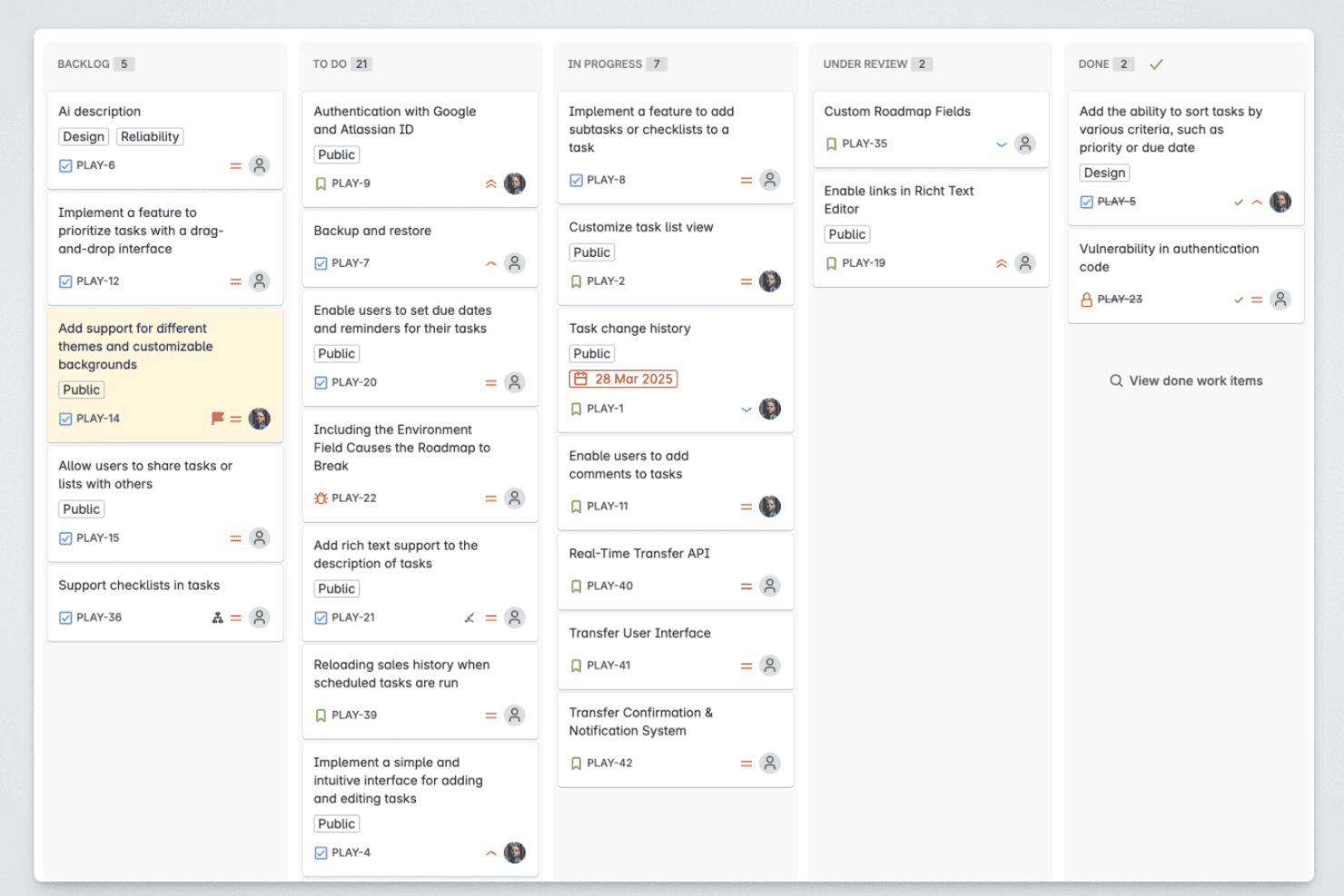
Released lets product managers organize roadmap items across backlog, in-progress, review, and completed stages. Released is a Jira-native roadmap and release communication tool that lets product teams publish customer-facing roadmaps, release notes, and feedback portals synced directly from Jira.
Who Is Released Best For?
Released is a strong fit for product managers at Jira Cloud shops who need to share polished, up-to-date roadmaps with customers or executives without leaving the Atlassian ecosystem.
Why I Picked Released
I picked Released as one of the best because it solves a problem I see constantly: roadmaps that live in Jira but never reach the people who need them most. I love that Hub reads Jira issues live, so when an epic moves, the customer-facing roadmap updates automatically. I can also control exactly who sees what: a public portal for customers, a password-protected view for executives, and an invite-only link for partners, all from one place.
Released Key Features
- AI-generated release notes: Automatically generate polished, on-brand release notes from completed Jira tickets.
- Custom domain portals: Host your public or private roadmap, changelog, and feedback portals on your own domain.
- SOC 2 Type 2 security: Meet rigorous enterprise compliance needs with encrypted data, SAML SSO, and regular third-party audits.
- Centralized feedback inbox: Aggregate feedback from portals, embedded forms, and Slack, all linked directly to Jira.
Released Integrations
Released offers native integrations with Jira Cloud and Jira Product Discovery, along with Slack.
Pros and Cons
Pros:
- Supports role-specific portal access controls
- Publishes customer-facing changelogs with release notes
- Auto-syncs live roadmap status from Jira epics
Cons:
- Not suited for non-Jira product teams
- Limited roadmap views beyond public-facing formats
Learn more about Released: 3Best for collaborative roadmap workshops
Miro
- Free plan + 14-day free trial available
- From $8/user/month (billed annually)
Visit WebsiteCustomer Rating:4.8/5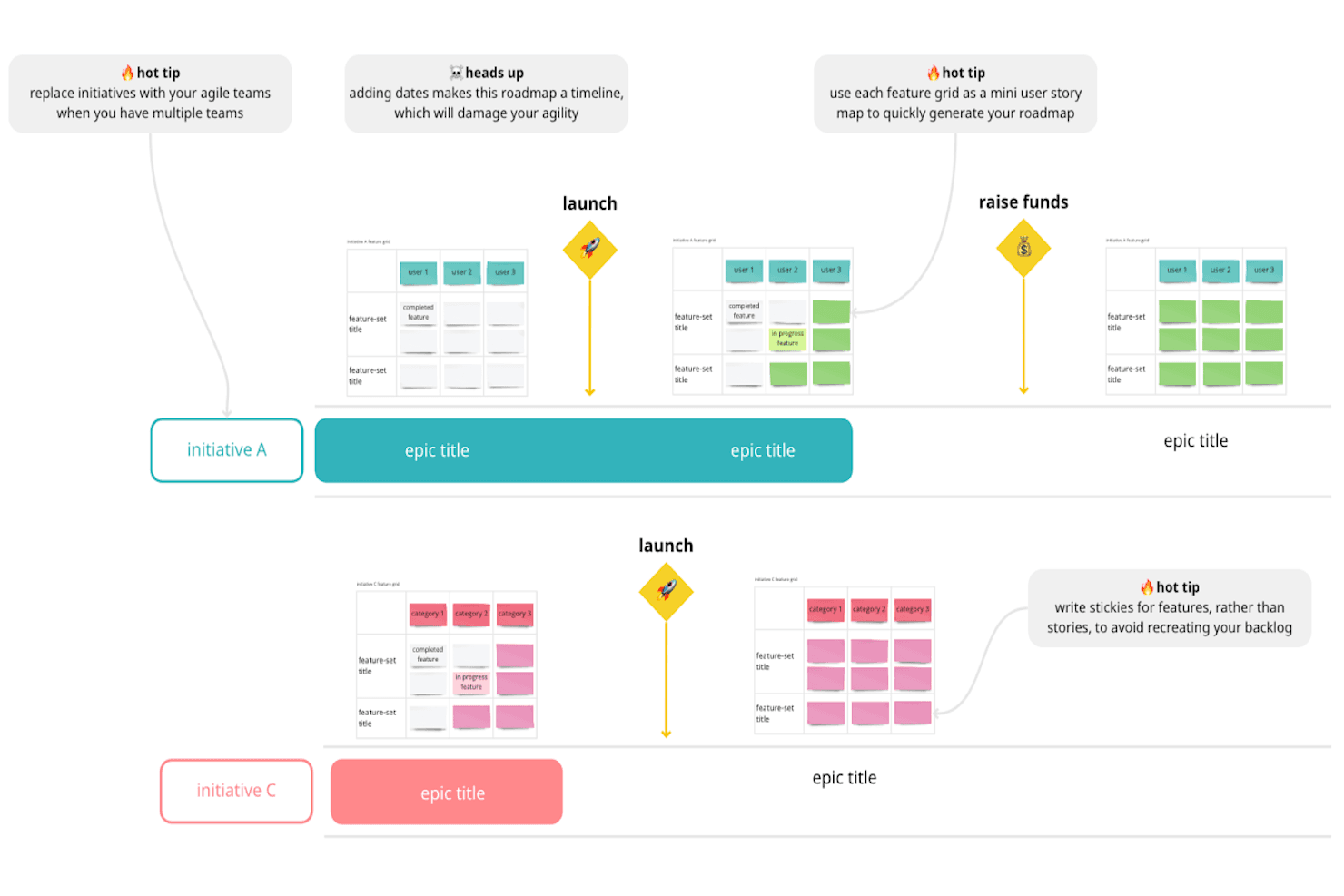
Miro’s roadmaps enable teams to visualize the product journey from conception to launch, allowing them to align on goals, prioritize features, and track progress, keeping all stakeholders informed and engaged. Miro is a visual collaboration platform that lets product teams build roadmaps on an infinite canvas using 60+ roadmap templates, timeline and table views, two-way delivery tool integrations, and real-time or async editing tools.
Who Is Miro Best For?
Miro is a strong fit for cross-functional product teams that run frequent planning workshops and need a flexible visual space to align engineering, design, and business stakeholders around a shared roadmap.
Why I Picked Miro
Miro earns its spot on my shortlist because no other tool I've used comes close for running live roadmap workshops with a mixed group of engineers, designers, and stakeholders. I love that you can drop into a Now/Next/Later template mid-planning session and let the whole room reshape priorities together in real time. The automated weekly Flow updates also keep the roadmap alive between sessions without anyone having to chase status manually.
Miro Key Features
- Two-way delivery tool sync: Miro connects bidirectionally with Jira, Azure DevOps, Asana, Linear, and ClickUp to keep your roadmap and backlog in step.
- Timeline and table views: Structured Timeline and Table layouts let you display roadmap data in formats suited to different audiences and planning horizons.
- AI Roadmap Strategist Sidekick: This AI assistant suggests roadmap ideas and edits using your company's own insights and goals.
- OKR and goal linking: Roadmap items can be tied directly to company goals and portfolio-level objectives to show strategic alignment.
Miro Integrations
Miro offers 250+ integrations, including native two-way sync with Jira, Azure DevOps, Asana, Linear, and ClickUp, plus CA Rally support. Its Marketplace and MCP API support additional connections and custom workflows.
Pros and Cons
Pros:
- Connects roadmaps with strategic goals
- Extensive templates support flexible roadmap views
- Excellent for collaborative roadmap workshops
Cons:
- Customer feedback requires manual workarounds
- No native prioritization scoring engine
 Best for an extensive template library for roadmaps
- Free demo available
- Pricing upon request
Visit WebsiteCustomer Rating:4.4/5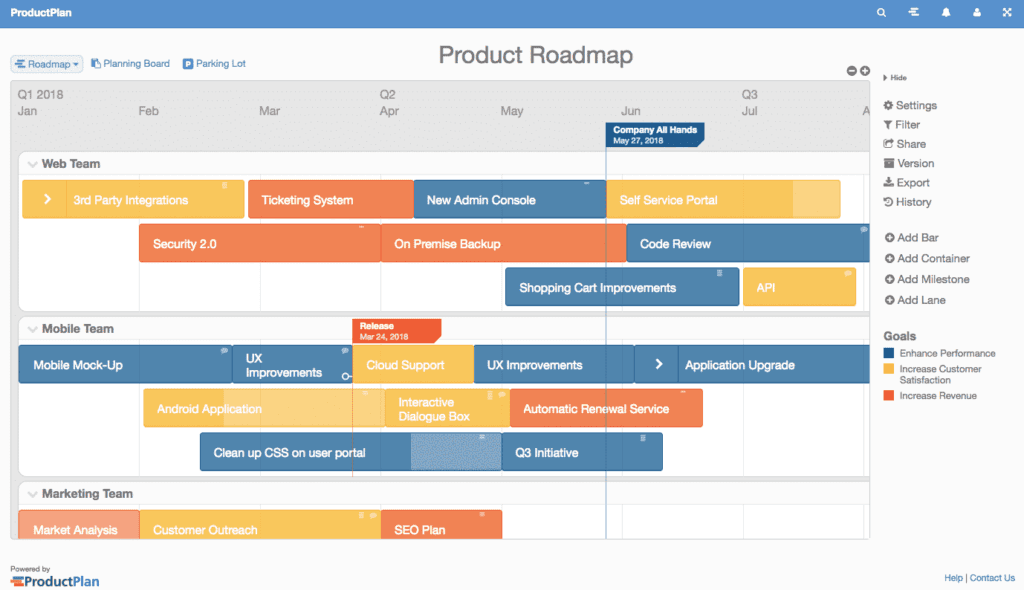
ProductPlan offers robust color-coded product roadmaps for visualization and strategy. ProductPlan is a product roadmap software platform that combines visual timeline roadmaps, prioritization boards, portfolio views, feedback collection, and AI-driven research tools.
Who Is ProductPlan Best For?
ProductPlan is a strong fit for product managers who need to quickly build and share polished roadmaps across multiple teams and stakeholder audiences.
Why I Picked ProductPlan
ProductPlan earns its spot on my shortlist because of its template library, which is the most extensive I've seen in this category. With around 30 ready-made roadmaps spanning product, IT, engineering, marketing, and executive portfolio use cases, I can hand a new PM a customer-facing roadmap or an OKR-linked timeline and have it live the same day. I also like that audience-specific views let me show leadership a clean portfolio view while engineering sees dependency tracking on the same underlying plan.
ProductPlan Key Features
- Audience-specific views: Configure separate roadmap views for leadership, engineering, and external stakeholders—all from the same underlying plan.
- OKR linking: Connect individual roadmap items directly to Objectives & Key Results to keep strategy and execution aligned.
- AI-moderated research surveys: Run adaptive surveys that adjust follow-up questions in real time and automatically summarize responses into insights.
- Two-way Jira and Azure DevOps sync: Sync text, dates, labels, and parent/child links between ProductPlan and your delivery tools at the account level.
ProductPlan Integrations
ProductPlan offers seven documented integrations, including Jira, Azure DevOps, GitHub, Trello, Confluence, Slack, and Microsoft Teams. It also supports Zapier and provides a public API for custom integrations.
Pros and Cons
Pros:
- AI research connects feedback to planning
- Audience-specific views simplify stakeholder communication
- Extensive templates cover diverse roadmap scenarios
Cons:
- Portfolio categories can be difficult to organize
- Prioritization lacks named scoring frameworks
Learn more about ProductPlan: Best for story map–driven roadmap planning
- 14-day free trial + free demo available
- From $9/user/month (billed annually)
Visit WebsiteCustomer Rating:4.4/5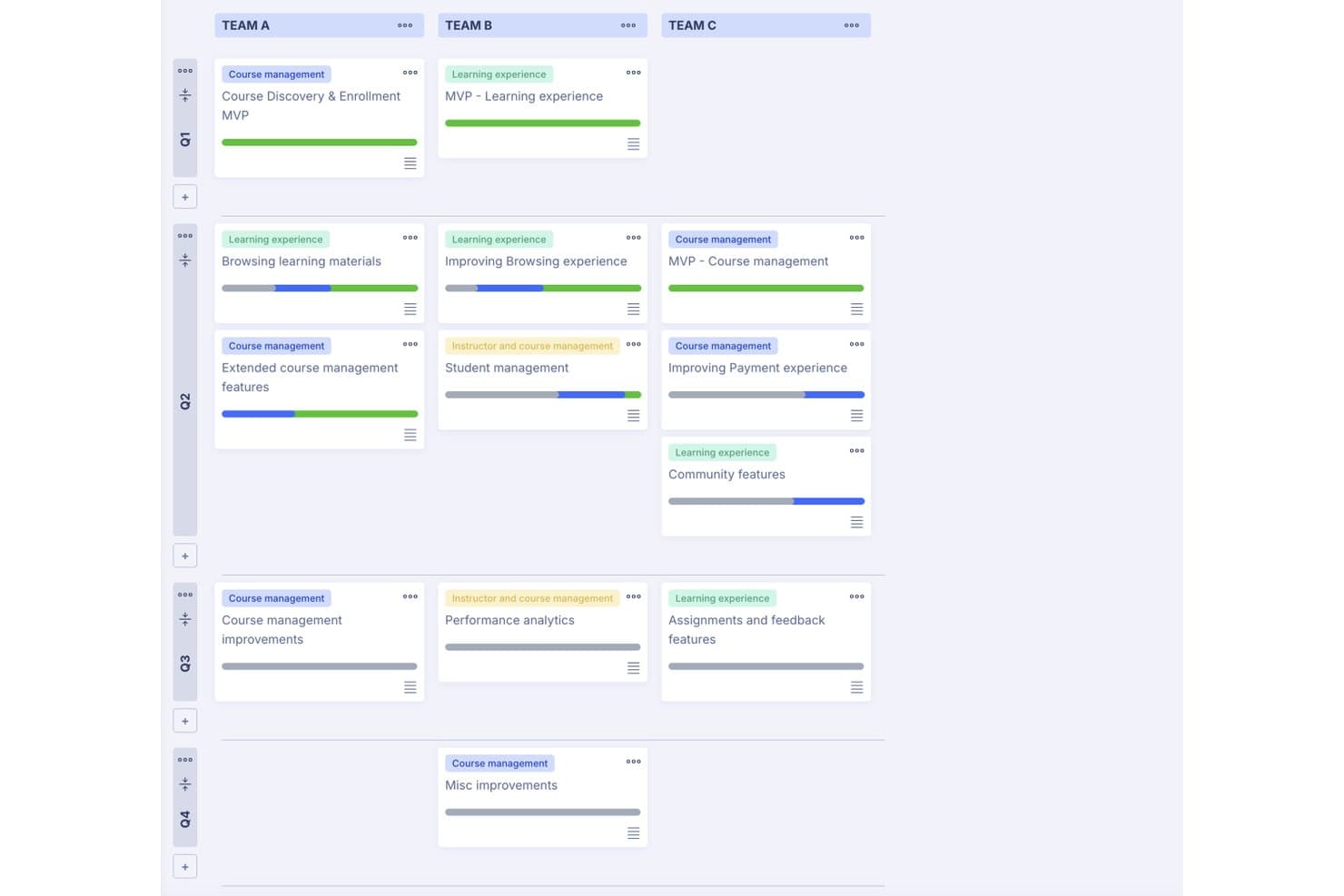
StoriesOnBoard organizes team initiatives by quarter on a visual roadmap board. StoriesOnBoard is a product management platform that combines user story mapping, backlog management, roadmap visualization, and feedback collection in a single connected workspace.
Who Is StoriesOnBoard Best For?
StoriesOnBoard fits product managers and product owners who plan their roadmaps directly from user story maps rather than building them as a separate artifact.
Why I Picked StoriesOnBoard
StoriesOnBoard earns its spot on my shortlist because the roadmap isn't a separate artifact you maintain alongside your backlog—it's generated directly from your story map. I love how release and portfolio roadmaps are built by surfacing existing backlog items into a visual timeline, so there's no duplication of work. You can slice releases by quarter or priority, add swimlanes by workstream, and sync linked copies for different audiences, all while keeping every view tied to the same underlying story data.
StoriesOnBoard Key Features
- Insights inbox: Aggregates feedback from Slack, email, Intercom, and a Chrome extension, then categorizes and prioritizes it automatically.
- Prioritization frameworks: Supports MoSCoW, Kano, RICE, and Value vs. Effort scoring to rank stories and backlog items.
- Two-way delivery tool sync: Connects bidirectionally with Jira, Azure DevOps, GitHub, Trello, and Pivotal Tracker to keep story maps and delivery tools aligned.
- Free unlimited guests: Stakeholders can view roadmaps, open items, and leave comments at no added cost on most plans.
StoriesOnBoard Integrations
StoriesOnBoard offers integrations with Jira, Azure DevOps, GitHub, Trello, Pivotal Tracker, Confluence, Figma, and Slack. It also supports Zapier.
Pros and Cons
Pros:
- Stakeholders can comment on shared roadmaps
- Portfolio views connect multiple product backlogs
- Roadmaps emerge directly from story maps
Cons:
- Reporting may not satisfy detailed analysis needs
- Prioritization frameworks lack custom team rules
Learn more about StoriesOnBoard: Best for customer-driven feature prioritization
- Free demo available
- Pricing upon request
Visit WebsiteCustomer Rating:4.5/5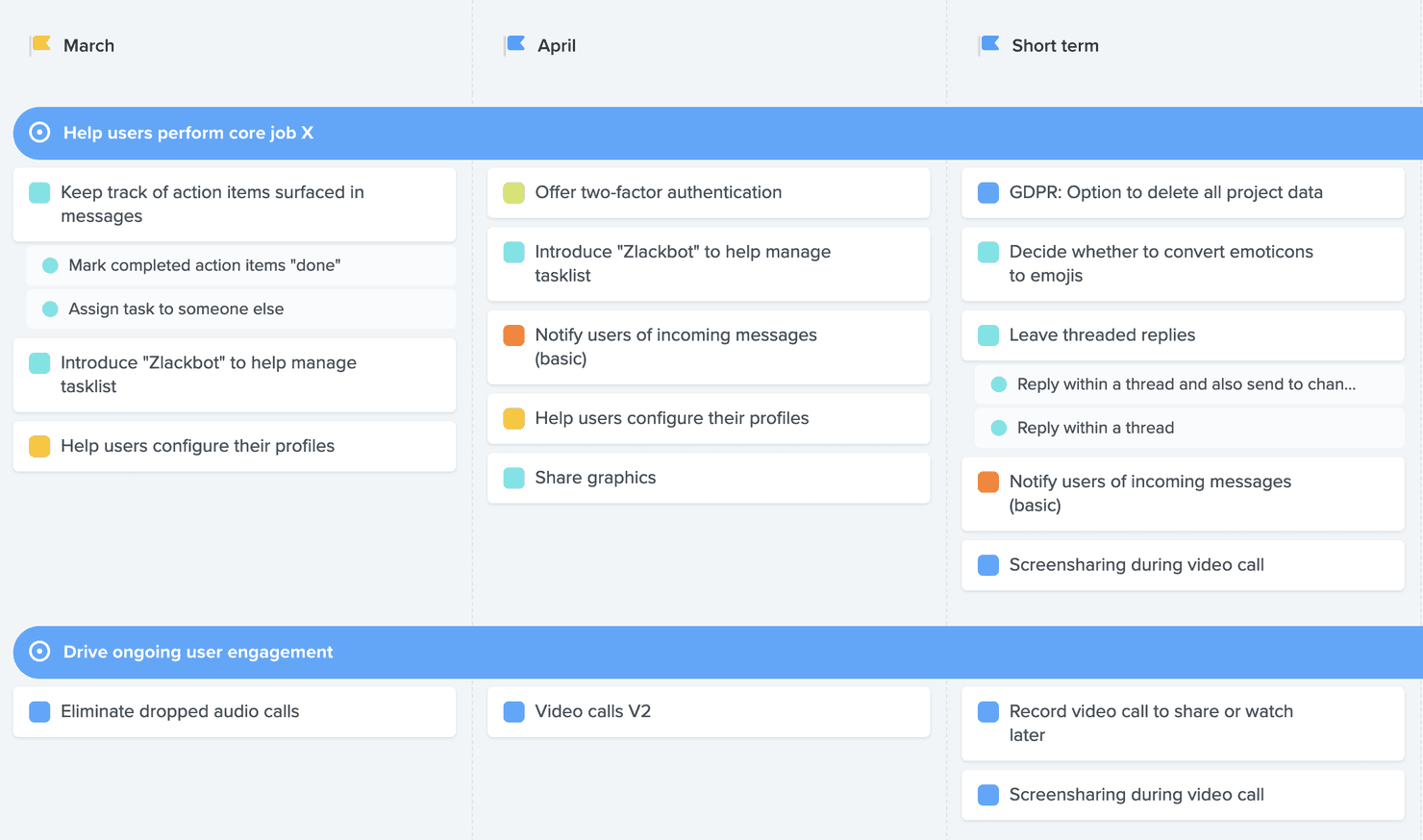
Create a product roadmap that charts priority tasks by week or month and highlights which elements are the most "user critical." Productboard is a product roadmap software that centralizes customer feedback, links it directly to features, and supports prioritization, OKR planning, and stakeholder-facing roadmap sharing across your entire product portfolio.
Who Is Productboard Best For?
Productboard suits product managers at mid-size to enterprise companies who need to tie customer feedback directly to prioritization decisions.
Why I Picked Productboard
Productboard earns its spot on my shortlist because of how directly it ties customer feedback to prioritization decisions. I love that feedback from sources like Zendesk, Gong, and Intercom flows into a central view, where it links to specific features rather than sitting in a disconnected inbox. From there, custom prioritization formulas can weight requests by customer segment, so you're not just counting votes but understanding which requests matter most to the right customers.
Productboard Key Features
- OKR and initiative rollups: View objectives, initiatives, and features in a single hierarchy, with progress tracking and risk monitoring across your portfolio.
- Product Portals: Give customers a dedicated space to validate ideas, vote on features, and see what's already launched.
- Audience-specific roadmap views: Tailor roadmap visibility for different stakeholder groups, with each view updating automatically when plans change.
- Productboard Spark: An AI agent that analyzes feedback, generates feature specs, and connects to external tools through MCP connectors.
Productboard Integrations
Productboard offers 25+ native integrations, including Jira, Azure DevOps, Amplitude, Mixpanel, Figma, Confluence, Notion, and Salesforce. It also supports API v2.0 and Zapier, while Jira and Azure DevOps provide the deepest delivery-tool sync.
Pros and Cons
Pros:
- OKR rollups connect strategy to delivery
- Audience-specific roadmaps update with plan changes
- Customer feedback links directly to features
Cons:
- AI usage stops when credits run out
- Analytics and search feel limited
Learn more about Productboard: Best for OKR-linked roadmap visualization
- 14-day free trial + free demo available
- From $24/user/month
Visit WebsiteCustomer Rating:4.4/5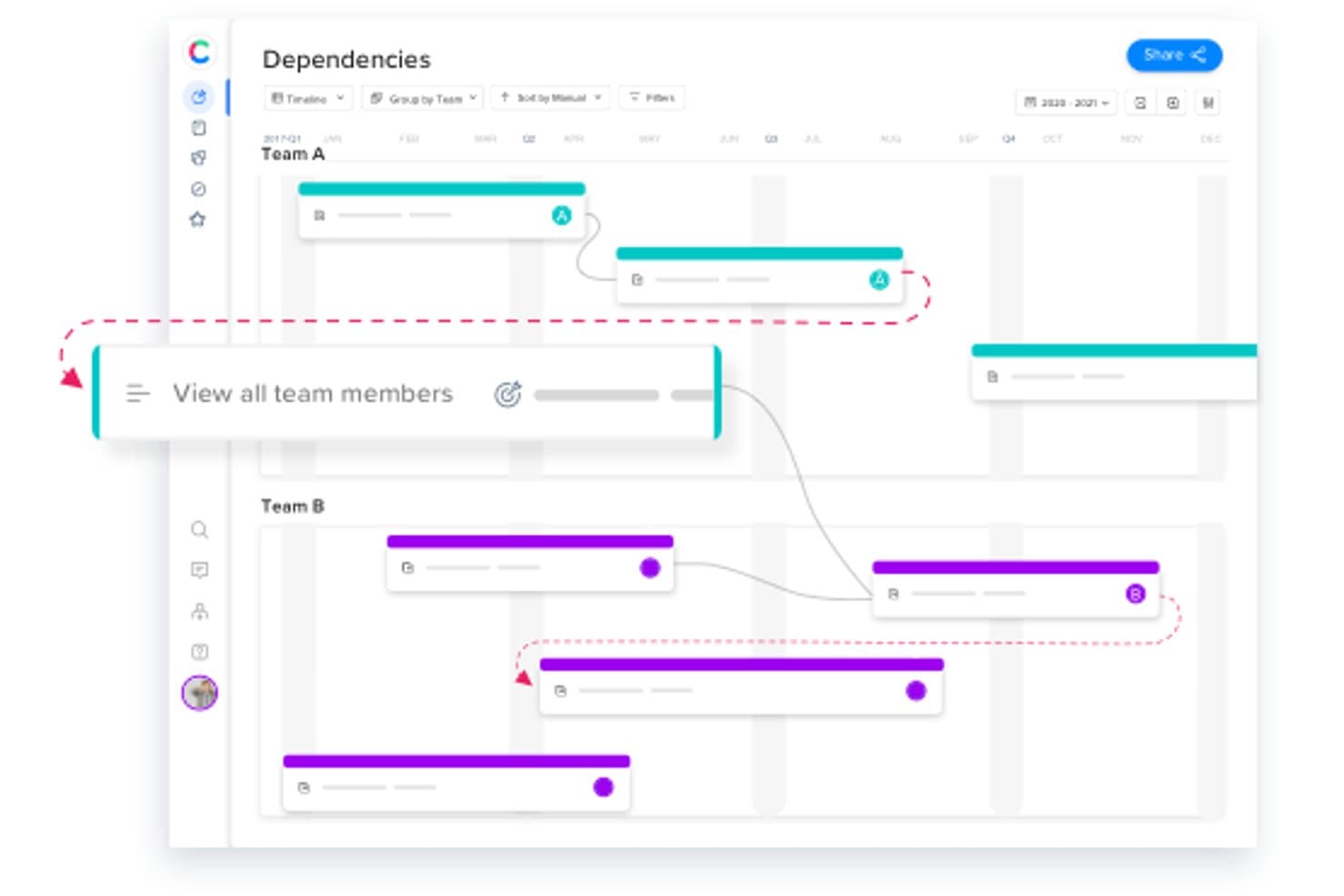
Craft.io helps you get insights on product data and create tailored roadmaps that seamlessly connect strategy to features. Craft.io is a product roadmap platform that combines OKR management, prioritization frameworks, feedback collection, and multi-audience roadmap visualization in a single workspace.
Who Is Craft.io Best For?
Craft.io is a strong fit for product managers who need to connect their OKRs directly to roadmap views and communicate strategy across multiple stakeholder audiences.
Why I Picked Craft.io
Craft.io earns its spot on my shortlist because it's one of the few tools that lets you tie OKRs directly to roadmap items rather than managing them in a separate system. I like how you can assign OKRs to individual initiatives and then track progress in real time through OKR dashboards, so leadership always sees how the work connects to strategic goals. The formula builder for custom prioritization scoring makes that connection even tighter, letting your team weight features against OKR impact using your own criteria.
Craft.io Key Features
- Guru AI: An AI layer that summarizes epics, generates release notes, and drafts go-to-market briefs directly within the platform.
- Custom formula builder: A scoring tool that lets you define your own prioritization criteria and weight factors beyond built-in frameworks like RICE and MoSCoW.
- Free contributor and viewer seats: Unlimited stakeholders can view and comment on roadmaps without counting as paid editor seats.
- Two-way delivery tool sync: Bi-directional integration with Jira, Azure DevOps, GitHub, GitLab, and Pivotal Tracker keeps roadmap and development data aligned.
Craft.io Integrations
Craft.io offers 13 native integrations, including two-way sync with Jira Software, Azure DevOps, GitHub, GitLab, and Pivotal Tracker, plus Figma, Adobe XD, Axure, InVision, Miro, Salesforce, Slack, and Microsoft Teams. Enterprise includes an API, and Zapier is also supported.
Pros and Cons
Pros:
- Feedback voting connects requests to priorities
- Custom scoring supports nuanced prioritization
- OKR-linked roadmaps clarify strategic alignment
Cons:
- External roadmap sharing remains unclear
- Add-ons fragment feedback and capacity workflows
Learn more about Craft.io: Best for strategy-led roadmaps at enterprise scale
- 30-day free trial + free demo available
- From $59/user/month (billed annually)
Visit WebsiteCustomer Rating:4.1/5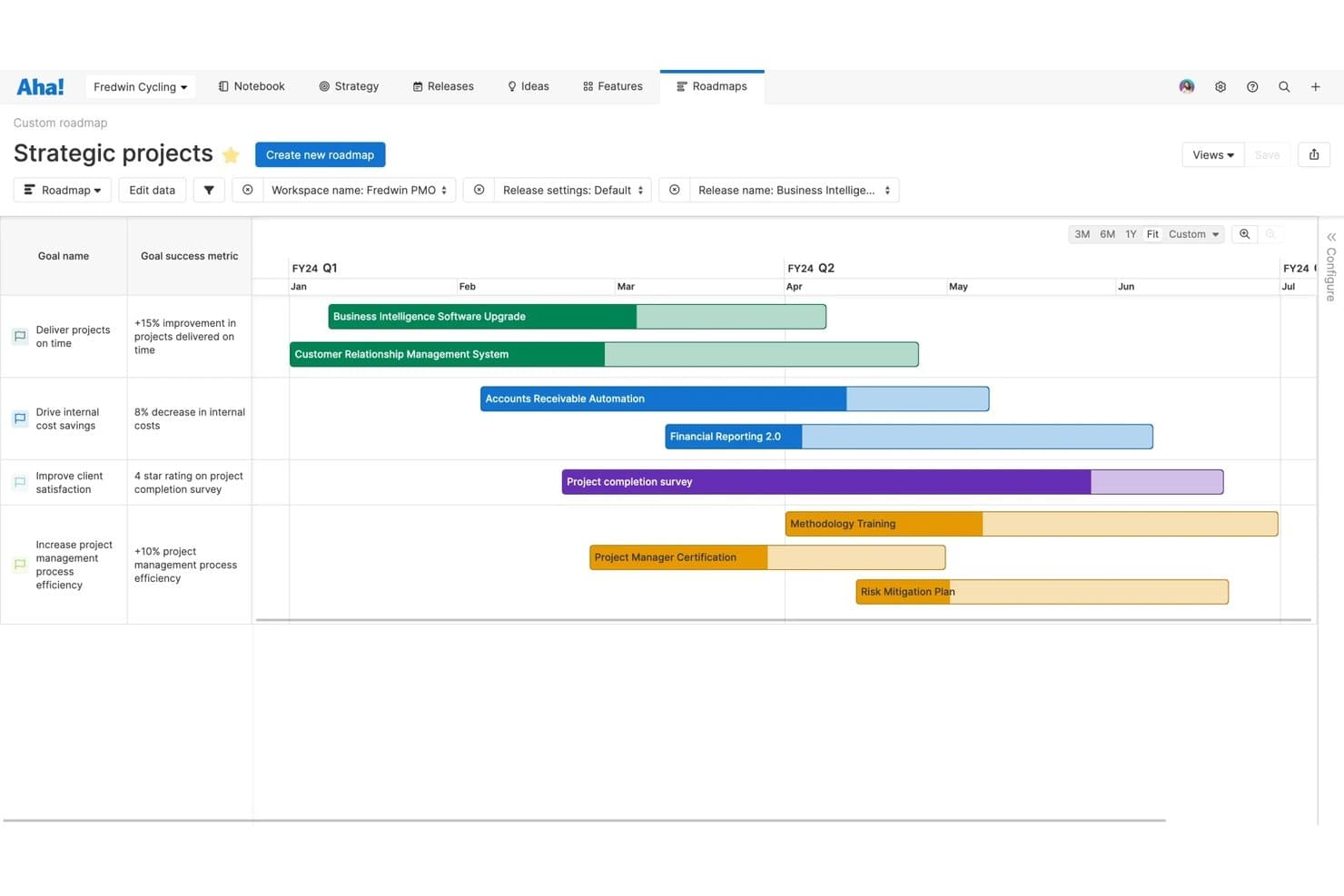
Aha! Roadmaps aligns strategic goals with project timelines on a visual roadmap. Aha! Roadmaps is a strategy-first product roadmap platform that connects goals and initiatives to features, releases, and dependencies across portfolio, timeline, and whiteboard views.
Who Is Aha! Roadmaps Best For?
Aha! Roadmaps is a strong fit for product managers at mid-to-large organizations who need to connect company strategy directly to roadmap execution across multiple product lines.
Why I Picked Aha! Roadmaps
I've included Aha! Roadmaps in my top picks because it's the only tool I've used that truly connects company strategy to every item on the roadmap. You can link OKRs and initiatives directly to features, so when a goal shifts, you can trace the impact across your entire product portfolio. I also love the auto-updating presentations, which let me share audience-tailored views with executives or customers without rebuilding anything from scratch.
Aha! Roadmaps Key Features
- Ideas portal: Collect and score feature requests from customers through a branded portal with unlimited free portal users.
- Release planning: Map out what ships and when by organizing features into structured releases with milestone tracking.
- Dependency management: Identify and visualize dependencies between features and teams to flag blockers before they derail delivery.
- Whiteboard collaboration: Work through strategy and planning in real time using built-in whiteboards with about 100 templates.
Aha! Roadmaps Integrations
Aha! Roadmaps integrates with 40+ tools, including Jira, Azure DevOps, Slack, and Google Analytics. Its API supports custom integrations.
Pros and Cons
Pros:
- Collects and scores customer ideas
- Tailors auto-updating presentations for stakeholders
- Links strategy directly to roadmap items
Cons:
- Broad capabilities demand substantial onboarding time
- Advanced planning requires higher-tier access
Learn more about Aha! Roadmaps: Best for feedback-to-roadmap workflows in one workspace
- Free plan available; 14-day free trial; free demo available
- From $12/user/month (billed annually)
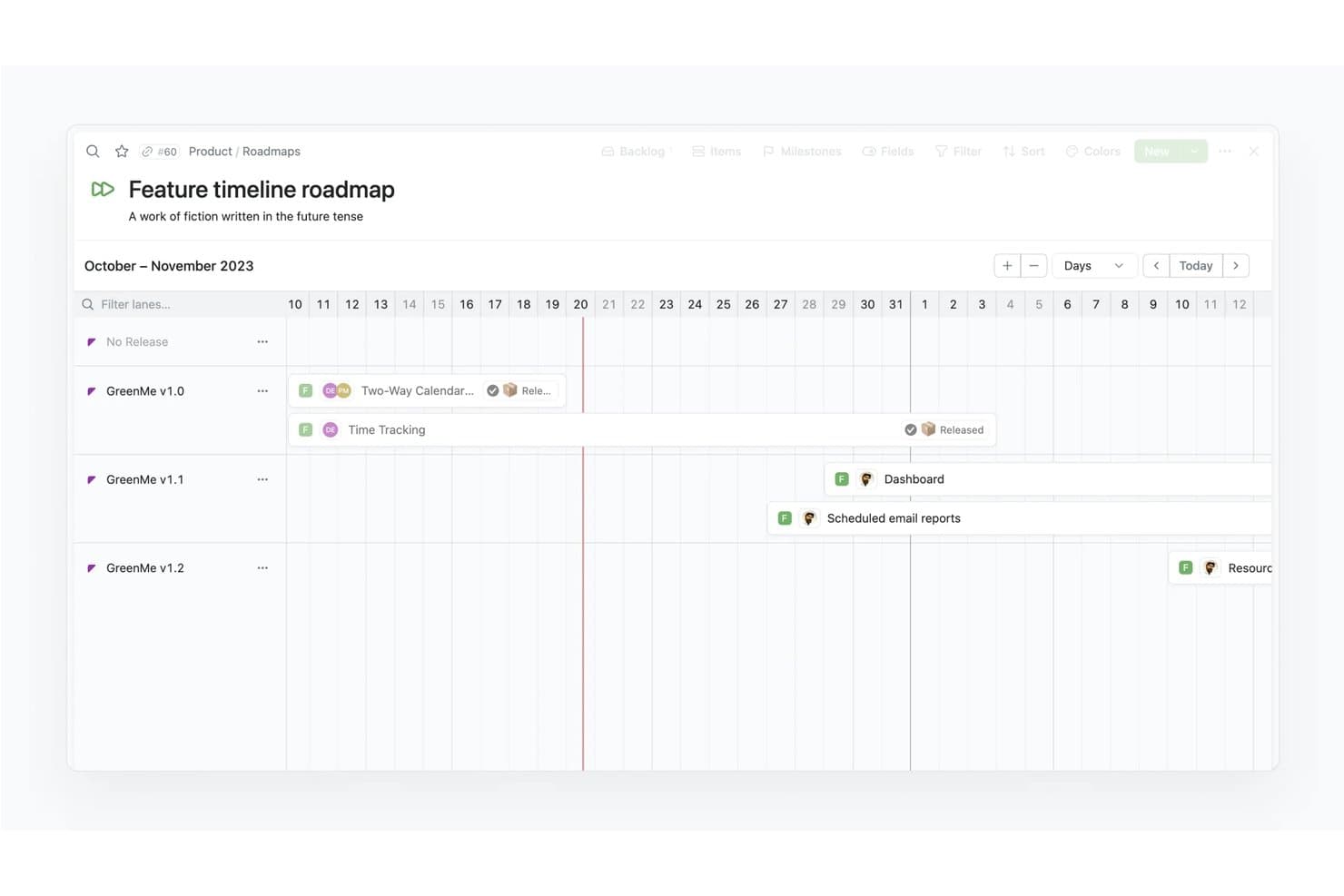
Fibery lets users visualize feature releases on a timeline roadmap. Fibery is a product management platform that connects customer feedback, prioritization, specs, and roadmapping into a single, customizable workspace with Timeline and Kanban roadmap views, formula-based scoring, and built-in sprint delivery tracking.
Who Is Fibery Best For?
Fibery is a strong fit for product managers who want to handle feedback collection, prioritization, and roadmapping in a single workspace rather than stitching together separate tools.
Why I Picked Fibery
Fibery earns its spot on my shortlist because it's the only tool where feedback, prioritization, specs, and roadmapping all live in one connected workspace. I love that customer feedback can be weighted by ICP fit or MRR, then scored through custom formulas, and linked directly to roadmap items on a Timeline or Kanban view. You can also roll product plans up to company OKRs without ever leaving the platform.
Fibery Key Features
- Public roadmap and changelog sharing: Publish live roadmaps and auto-updated changelogs that external stakeholders and customers can view without a paid seat.
- Free Observer and Guest access: Invite read-only Observers or limited-collaboration Guests at no cost, keeping stakeholder visibility open without adding to your license count.
- Two-way sync with Jira, GitHub, and GitLab: Sync pull requests, branches, commits, and issues in real time to keep your roadmap aligned with what engineering is actually shipping.
- AI-powered feedback analysis: AI extracts pain level, target persona, and sentiment from feedback, and surfaces related inputs while you write specs or summarize interview recordings.
Fibery Integrations
Fibery offers integrations with Jira, GitHub, GitLab, Zendesk, and Slack, plus a GraphQL API and SDK for custom connectors. It also supports Zapier.
Pros and Cons
Pros:
- Links roadmaps to company OKRs
- Custom formulas support RICE-style prioritization
- Connects feedback directly to roadmap priorities
Cons:
- Highly configurable workspace takes longer to learn
- Custom scoring requires setup before use
Learn more about Fibery: Best for Atlassian-native product discovery
- Free plan available
- From $10/user/month
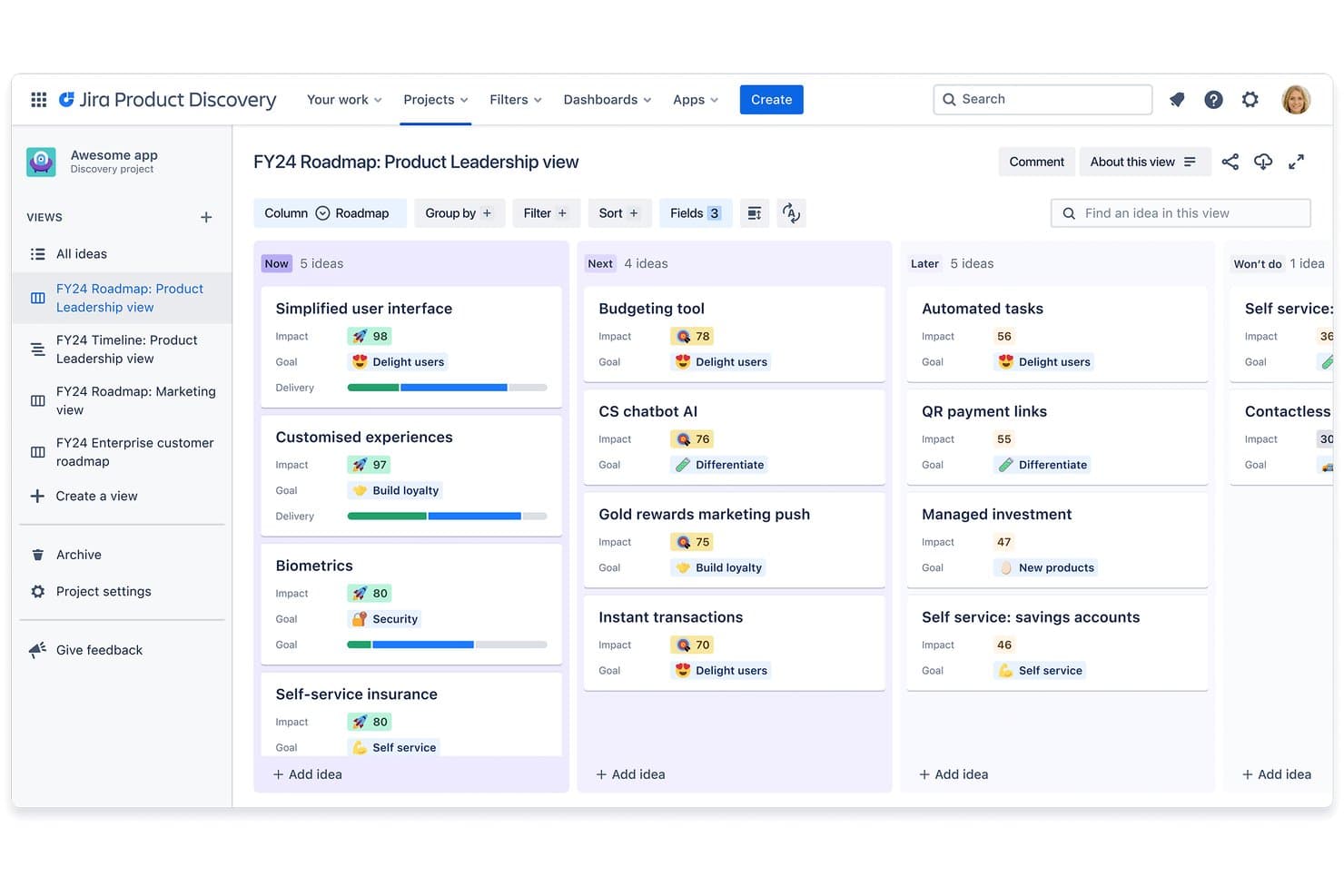
Jira Product Discovery organizes ideas into Now, Next, and Later roadmap columns. Jira Product Discovery is a product roadmap tool built by Atlassian that combines idea capture, prioritization frameworks, and roadmap visualization with direct two-way linking to Jira delivery workflows.
Who Is Jira Product Discovery Best For?
Jira Product Discovery is a natural fit for product managers and product owners already working inside the Atlassian ecosystem who want discovery and delivery planning in one connected workflow.
Why I Picked Jira Product Discovery
Jira Product Discovery earns its spot on my shortlist because it closes the loop between product thinking and delivery in a way that standalone roadmap tools can't. I love that you can link any roadmap idea directly to Jira epics and issues, so delivery progress surfaces inside your discovery workspace without any manual updates. Custom fields and formulas let my team run RICE scoring consistently, and the board, timeline, and matrix views make it easy to shift between planning for yourself and communicating priorities to stakeholders.
Jira Product Discovery Key Features
- Insights capture: Link customer evidence directly to ideas using the built-in insights feature, the Chrome extension, or connected third-party apps.
- Contributor access: Invite stakeholders as free contributors who can vote, comment, and react on ideas without consuming a paid creator seat.
- Confluence roadmap embeds: Embed live roadmap views directly into Confluence pages so stakeholders always see current priorities without leaving their workspace.
- Automation rules: Set up automated workflows with up to 500 rules per month on Standard to reduce repetitive manual updates across your roadmap.
Jira Product Discovery Integrations
Jira Product Discovery has five documented native integrations: Jira, Jira Service Management, Confluence, Atlassian Goals, and Atlassian Projects. It also connects with Rovo and supports third-party insight sources.
Pros and Cons
Pros:
- Stakeholder voting captures cross-functional product input
- RICE scoring supports repeatable prioritization
- Roadmap views adapt to stakeholder audiences
Cons:
- No scenario modeling for uncertain priorities
- No native capacity planning for resource decisions
Learn more about Jira Product Discovery:
Other Product Roadmap Software
Here are a few more that didn’t make the top list. If you need additional suggestions for a handy software product roadmap, check these out:
- 11DragonboatBest for outcome-driven portfolio roadmapping
- 12airfocusBest for customizable roadmaps
- 13ClickUpBest for highly visual and collaborative roadmaps
- 14ProdPadBest for lean roadmaps linked to company OKRs
- 15Tempo Roadmapping SoftwareBest for Jira sync with two-way data control
- 16CannyBest for revenue-weighted feedback prioritization
- 17FeaturebaseBest for feedback-linked roadmap transparency
Related Software Reviews
Here's a roundup of some of our top software reviews in the UX and product management space:
- Best Product Management Tools
- Best Product Planning Software
- Best Product Development Software
- Best Product Analytics Tools
- Best Idea Management Software
- Best Heatmap Software
How I Evaluate Product Roadmap Tools
I split my evaluation into three parts: core functionality first (visualizing timelines and supporting prioritization frameworks), which carries the most weight; standout features like scenario modeling; then beyond-feature factors like onboarding support and pricing value.
Core Functionality (Table Stakes for This List)
When I'm selecting tools for my list, I score each one on a scale from 0 (does not offer the functionality) to 5 (excels in this area) for each core functionality listed below. I then convert the total into a percentage to help assess each tool's overall fit, with extra weight on any functionalities I've deemed essential.
- Roadmap Visualization (Essential): I check whether a tool offers multiple view types—timeline, swimlane, board—and how quickly views adapt when dates or priorities shift.
- Prioritization Frameworks (Essential): Built-in scoring models like RICE or value-versus-effort matter, but I also evaluate how easily teams can customize weights and criteria.
- Feedback and Idea Collection: I look for structured intake portals that link requests directly to roadmap items, not just untagged comment threads buried in a sidebar.
- Stakeholder Sharing and Views: The ability to publish tailored, read-only views for executives versus customers is what I evaluate—static PDF exports alone fall short.
- Cross-Team Collaboration: Real-time commenting, @mentions, and role-based permissions show me a tool can support product, design, and engineering working in one space.
- Delivery Tool Integration: Two-way sync with tools like Jira or Azure DevOps keeps roadmap status honest, so I verify sync depth and how often data refreshes.
Once I have a list of tools that meet the criteria, I consider what sets each platform apart.
Differentiating Factors (What Sets Vendors Apart)
Here's how I compare and contrast different vendors:
Standout Features
OKR and goal rollups are the first thing I check because they show whether a shipped feature actually moved a business metric. I look for automatic progress rollups that connect individual initiatives to company-level objectives without manual status updates. Scenario modeling is equally valuable—I evaluate how easily a team can simulate swapping two initiatives and instantly see the downstream impact on timelines and capacity. Tools like Productboard and Aha! approach this differently, so I compare the depth of trade-off analysis each offers before a team commits to a sequence.
Beyond Features
I evaluate how quickly a product manager can migrate an existing backlog and start getting value. Vendors like Productboard and Aha! offer guided templates, but setup complexity varies widely once you move past defaults. Scalability matters just as much—a tool that works for one squad often breaks down at the portfolio level when you need rollups across dozens of roadmaps. I also check API depth and webhook support, since most teams need custom automations that go beyond native integrations.
How to Choose Product Roadmap Software
As you work through your own unique software selection process, keep the following points in mind:
- Alignment with Strategic Goals: Choosing the right product roadmap software requires understanding how well it aligns with your company’s strategic goals. Consider how the software enables you to link features, tasks, and milestones directly to overarching business objectives.
For project tracking and milestone management, consider exploring free milestone software options that can complement your roadmapping efforts. - Flexibility and Scalability: The chosen software should be flexible and scalable to accommodate growth and change within your organization. As your company expands or shifts its focus, your product roadmap software should easily adapt, offering customizable views and features that cater to various user roles and departments.
- Integration Capabilities: Effective integration with other tools used by your organization is essential. Product roadmap software should connect with project management tools, customer relationship management (CRM) systems, and other software to ensure data consistency and improve workflow.
- User Experience and Usability: A critical aspect of any software is its usability. Product roadmap software should offer an intuitive interface that all stakeholders can navigate easily, regardless of their tech savviness. This includes clear visualizations of the roadmap, easy-to-use planning and prioritization tools, and minimal training requirements.
- Support and Resources: Look for software that provides robust support and educational resources. This includes access to a knowledgeable customer service team, comprehensive documentation, online tutorials, and community forums. This consideration is particularly important for organizations that operate in regions or sectors with limited access to technical support services.
Selecting the right product roadmap software involves careful consideration of these factors to ensure the solution not only meets your current needs but also supports your strategic vision and growth over time.
Trends in Product Roadmap Software For 2025
In 2025, the landscape of product roadmap software continues to evolve rapidly, driven by the need for more dynamic planning tools that can keep pace with fast-changing business environments. Here’s a breakdown of the latest trends in product roadmap software:
- Enhanced Visualization Tools: The trend towards more sophisticated visualization tools is evident, with an emphasis on real-time, interactive roadmaps. These tools are designed to provide clear visibility into project statuses and dependencies, making it easier for teams to stay aligned and adjust to changes swiftly.
- AI-driven Forecasting: A novel and unusual functionality that is gaining traction is the use of AI to predict timelines and potential bottlenecks. This feature is becoming increasingly popular as it helps product managers anticipate problems before they occur, ensuring smoother project execution.
- Automated Prioritization: AI is also being used to automate the prioritization of tasks based on historical data and predefined criteria. This not only saves time but also increases the objectivity in decision-making processes.
- Collaborative Feedback Loops: Features that facilitate easier and more structured feedback collection from both users and stakeholders are in high demand. This trend underscores the importance of user-centric design and continuous improvement in product development.
These trends illustrate the ongoing development and refinement of product roadmap software to meet the sophisticated demands of today's product managers. As the product development landscape becomes more complex, the tools used to manage and visualize the roadmap with storyboards must evolve accordingly, providing comprehensive solutions that not only track progress but also anticipate future challenges.
What Is Product Roadmap Software?
Product roadmap software is a tool that helps product managers, project managers, and cross-functional teams plan, visualize, and communicate the strategy and progress of a product over time. It addresses challenges like misaligned priorities, unclear timelines, and fragmented stakeholder communication by providing a centralized platform for managing product initiatives, timelines, and goals.
Features of Product Roadmap Software
When selecting product roadmap software, keep an eye out for the following key features:
- Visual roadmapping: Create clear, interactive timelines and roadmaps that let you see how product initiatives fit together over time. Enable everyone on your team to align and focus on upcoming features, initiatives, and plans.
- Collaboration tools: Built-in communication makes it easier to work with teammates and stakeholders. Share feedback directly on the roadmap, tag people, and make updates so everyone can contribute and stay up-to-date on priorities.
- Prioritization frameworks: Use built-in tools to rank features, improvements, and ideas based on factors like customer impact or effort required. You can make smarter decisions about what to build next and avoid tough calls turning into guesswork.
- Progress tracking: Monitor the status of projects, tasks, or features as they move from idea through development to completion. You can quickly spot delays, celebrate wins, and keep everyone on track without micromanaging.
- Release planning: Plan releases with features grouped by upcoming launches. Knowing what’s shipping next helps you coordinate launches, communicate changes, and avoid last-minute fire drills.
- Integration capabilities: Connect your roadmap to tools you already use—like project management, communication, or development platforms for two-way sync. This keeps everything up to date and saves you from duplicate data entries.
- Custom views and filters: Customize your roadmap view to fit the user—whether it’s by team, timeframe, or product area. Plus, create a high level roadmap view made specifically for key decision-makers.
- Feedback management: Collect, organize, and incorporate feedback from users and internal stakeholders to help inform your roadmap. Feedback management can fast-track ideas to implementation and proves to your user base that their input matters.
- Permissions and sharing controls: Adjust views and permissions for various team members to edit the roadmap, keeping sensitive plans confidential while enabling people to pitch in where needed.
Common Product Roadmap Software AI Features
Beyond the standard product roadmap software features listed above, many of these solutions are incorporating AI with features like:
- Smart summary generation: AI creates easy-to-share summaries of your roadmap, updates, or feedback. That means less time writing reports and more time building great products.
- Automated prioritization: AI analyzes customer feedback, market trends, and team input to suggest which features or tasks should come next. Automations can save hours of manual sorting and help you select your most impactful additions.
- Predictive forecasting: AI can estimate possible release dates, resource needs, or risks based on historical data and current plans so you can plan ahead with fewer surprises.
- Intelligent dependency detection: AI can automatically identifies dependencies between roadmap items, flagging conflicts or bottlenecks to better keep your plans on track.
- Sentiment analysis: AI can reviews user comments and feedback to gauge overall sentiment about roadmap items, helping you to understand ongoing user frustration and opportunities for improvement.
Benefits of Product Roadmap Software
Product roadmap software is a crucial tool for organizations seeking to streamline their product development process and align it with their strategic objectives. By providing a visual and interactive overview of a product's evolution, this software helps teams to prioritize features, anticipate challenges, and manage resources efficiently. Below are five primary benefits that product roadmap software offers to users and organizations:
- Strategic Alignment: Ensures that every feature and task on the roadmap directly supports broader business goals. This alignment helps organizations to focus their efforts and resources on initiatives that drive the most value.
- Enhanced Collaboration: Facilitates communication and transparency between different teams and stakeholders. By using product roadmap software, everyone involved has access to real-time updates and insights, which fosters a collaborative environment and reduces misunderstandings.
- Increased Flexibility: Allows for quick adjustments to plans as market conditions or company priorities change. This adaptability is crucial in today’s fast-paced business environments, enabling companies to respond swiftly to emerging opportunities or challenges.
- Improved Resource Management: Provides tools for planning and tracking the allocation of both human and financial resources. Effective resource management prevents over-commitment on projects and helps ensure that critical tasks have the necessary support to succeed.
- Better Decision-Making: Integrates data from various sources to provide a comprehensive view of the product strategy and its execution. This integration enables more informed decision-making, helping leaders to prioritize features based on solid data and clear insights.
Product roadmap software not only simplifies the complex task of product management but also enhances strategic execution, ensuring that teams can adapt to changes and collaborate effectively. Adopting this software can lead to significant improvements in how organizations plan, execute, and deliver on their product development goals.
Costs & Pricing For Product Roadmap Software
Product roadmap software offers a range of plans and pricing options tailored to meet the needs of different organizations, from startups to large enterprises. These plans vary in features, support levels, and scalability to accommodate the unique requirements and budget constraints of each business. Understanding these options can help you select the right software to streamline your product development process and align it with your business goals.
Plan Comparison Table For Product Roadmap Software
Below is a table that outlines the pricing and plan structures of product roadmap software, helping you compare what each option offers:
| Plan Type | Average Price | Best For | Common Features |
|---|---|---|---|
| Plan TypeFree | Average Price$0 | Best ForEarly-stage startups | Common FeaturesBasic roadmapping, limited users, essential integrations |
| Plan TypeBasic | Average Price$10-20 per user/month | Best ForSmall teams in growth mode | Common FeaturesRoadmapping, task management, basic integrations |
| Plan TypeProfessional | Average Price$20-50 per user/month | Best ForMature organizations | Common FeaturesAdvanced roadmapping, unlimited users, full integrations, reporting tools |
| Plan TypeEnterprise | Average Price$50+ per user/month | Best ForEnterprise-level businesses | Common FeaturesCustomizable features, dedicated support, advanced analytics, API access |
When considering which plan to choose, think about the size of your team and the complexity of your projects. Smaller teams or startups might find the free or basic plans sufficient, while larger organizations or those needing more sophisticated features might opt for professional or enterprise plans. Each step up in plan offers more features and flexibility, so consider what will best support your organization's growth and product strategy.
Product Roadmap Software FAQs
Before we get into more detail about product roadmap tools, let’s answer some of the common questions product management teams ask about roadmapping software.
How can feature prioritization impact my product management efforts?
Strong feature prioritization in roadmap tools helps you focus on the highest-impact work and avoid scope creep. Many platforms include scoring, voting, or custom fields that align your roadmap with business goals. Consistent prioritization keeps your team aligned and ensures you deliver features your users really need.
How do you present a roadmap to stakeholders using roadmap software?
Most roadmap tools let you generate shareable links, export visuals, or run live presentations. Use the platform’s filtering and timeline options to highlight key releases and milestones tailored to your stakeholders. Keeping your presentation interactive and up to date helps your audience understand your product vision and priorities quickly.
How secure is product roadmap software for sharing sensitive plans with stakeholders?
Leading product roadmap tools offer robust security features such as user-level permissions, data encryption, and audit logs. You can control who sees or edits specific roadmaps and share links with external stakeholders securely. Always check each platform’s compliance certifications and security documentation before sharing sensitive details.
Can product roadmap tools integrate with project management or development software?
Yes, most roadmap tools integrate with software like Jira, Trello, Asana, and Slack. This lets you sync your roadmap with project tasks and development workflows so everything stays up to date. These integrations save time by reducing manual updates and providing visibility across your tool stack.
How do roadmap tools help align remote or distributed teams?
Roadmap tools enable remote teams to see updates in real time and keep everyone on the same page. Many platforms let you comment directly on items, @mention teammates, and set up automated notifications. This transparency makes it easier for dispersed groups to track progress, clarify priorities, and reduce misunderstandings.
What features should I look for in product roadmap software for cross-functional teams?
Look for product roadmap software that offers real-time collaboration, customizable views, and clear permissions settings. These help different departments communicate effectively and keep everyone aligned. Tools with built-in integrations, easy sharing options, and support for feedback loops let your product, engineering, and marketing teams work together without friction.
What's Next?
The 10 best product roadmap software offers a variety of features and capabilities. They enable teams to stay organized, keep track of their progress, and better understand the development process. Product roadmaps provide teams with an essential tool to help them reach their goals in the most effective way possible.
The right roadmap software can make all the difference in ensuring success and helping teams take their products to the next level. You know what else can make all the difference? Subscribing to the Product Manager newsletter for weekly tips, insights, and news.