The best product development software helps you manage requirements, track progress, and coordinate teams across the entire product lifecycle.
Without it, development efforts get blocked by unclear priorities, siloed communication, and disconnected tools that slow down delivery.
I’ve reviewed 30+ platforms and worked with cross-functional teams that need more than just task management—they need visibility, alignment, and traceability.
In this guide, you’ll find tools that support everything from ideation to launch, helping you ship better products, faster.
What is Product Development Software?
Product development software is a tool that helps teams plan, build, and deliver products more efficiently. It centralizes tasks like roadmap planning, backlog prioritization, cross-functional collaboration, and progress tracking. Product managers, engineers, and designers use it to streamline workflows, reduce communication gaps, and accelerate time to market—all without juggling multiple tools or drowning in busywork.
Why Trust Our Software Recommendations
6,700+
Reviews
20
Industry experts
16+
Evaluation factors
14
Years
Our team has been testing and reviewing software since 2012. As product managers ourselves, we know how difficult—and important—it is to choose the right software.
For this guide, we evaluated tools using hands-on testing and independent research, scoring tools using our selection criteria.
Our reviews reflect our human editorial judgment, not a sales pitch.
Expert reviewers:
- Andrew LumbySenior TPM
- Cristiano ValimSenior UI/UX Lead


Product Development Software Comparison Table
This comparison table summarizes pricing details for my top product development software selections:
| Tool | Best For | Trial Info | Price | ||
|---|---|---|---|---|---|
| 1 | Best product development software for flexibility | Free plan available | From $8/user/month (billed annually) | Website | |
| 2 | Best for voting-based ideas portal | 30-day free trial + free demo available | From $9/user/month | Website | |
| 3 | Best for OKR-to-delivery workflow visibility | Free demo + 14-day free trial available | From $8/user/month (billed annually) | Website | |
| 4 | Best for end-to-end dev pipeline traceability | Free plan available | From $6/user/month | Website | |
| 5 | Best for Scrum-based sprint and release tracking | Free plan and 15-day free trial available | From $3/user/month | Website | |
| 6 | Best for unified tasks, docs, and roadmaps | Free plan + free demo available | From $7/user/month (billed annually) | Website | |
| 7 | Best for product development with pre-built templates | Free trial available | From $9/month (billed annually) | Website | |
| 8 | Best for idea-to-release traceability via dev tools | Free plan available | From $10/user/month (billed annually) | Website | |
| 9 | Best for multi-team dependency tracking at scale | Free plan + 14-day free trial available | From $7.91/user/month | Website | |
| 10 | Best for rapidly growing enterprise NPD portfolios | Free trial + free demo available | Pricing upon request | Website |


Best Product Development Software Reviews
Here’s a brief description of each of product development software tool that is featured on this top 10 list.
 1Best product development software for flexibility
Miro
- Free plan available
- From $8/user/month (billed annually)
Visit WebsiteCustomer Rating:4.8/5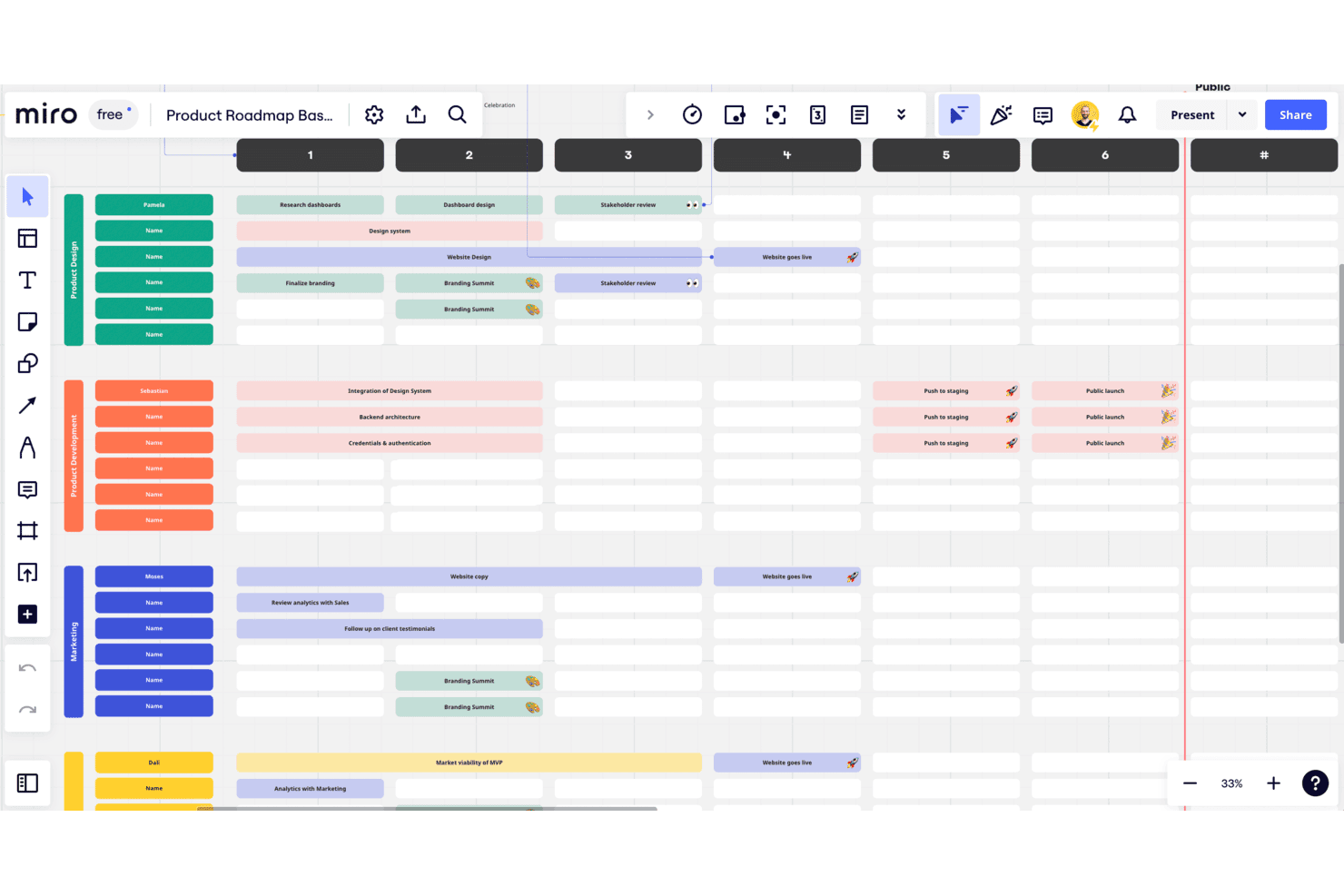
Control your product's progress using Miro's visual canvas and product-oriented templates. Miro is a visual collaboration platform that supports product development workflows across ideation, roadmapping, sprint planning, and cross-functional coordination through an open-ended canvas, 7,000+ templates, and two-way sync with tools like Jira, Asana, and Azure DevOps.
Who Is Miro Best For?
Miro works best for cross-functional product teams that need a shared visual space to connect discovery, planning, and delivery across design, engineering, and business stakeholders.
Why I Picked Miro
I picked Miro as one of the best because its open-ended canvas adapts to virtually any product development workflow without forcing your team into a rigid structure. I love that you can run a discovery session, build a visual roadmap, and map Jira dependencies all in one board. Talktrack lets async teams walk stakeholders through decisions without scheduling yet another meeting, which is where Miro's flexibility really shows up in practice.
Miro Key Features
- AI roadmap generator: Builds visual product roadmaps from prompts, letting you move from raw inputs to a structured plan without starting from scratch.
- Two-way Jira and Azure DevOps sync: Keeps Miro planning boards and your delivery backlog aligned in real time, so changes in one tool reflect in the other.
- Private Mode for retrospectives: Lets team members submit input independently before revealing responses to the group, reducing groupthink in structured ceremonies.
- Talktrack async walkthroughs: Records narrated video tours of any board so stakeholders can review decisions and context on their own schedule.
Miro Integrations
Miro offers 250+ marketplace integrations, including native two-way sync with Jira, Asana, Linear, ClickUp, and Azure DevOps. It also connects with Microsoft 365, Google Workspace, Slack, and Adobe, with REST APIs and Web SDKs for custom integrations.
Pros and Cons
Pros:
- Private retrospectives reduce groupthink during ceremonies
- Talktrack supports asynchronous stakeholder walkthroughs
- Flexible canvas adapts across lifecycle stages
Cons:
- Requirements lack formal versioning and approvals
- Native execution tracking remains limited
 2Best for voting-based ideas portal
Aha!
- 30-day free trial + free demo available
- From $9/user/month
Visit WebsiteCustomer Rating:4.6/5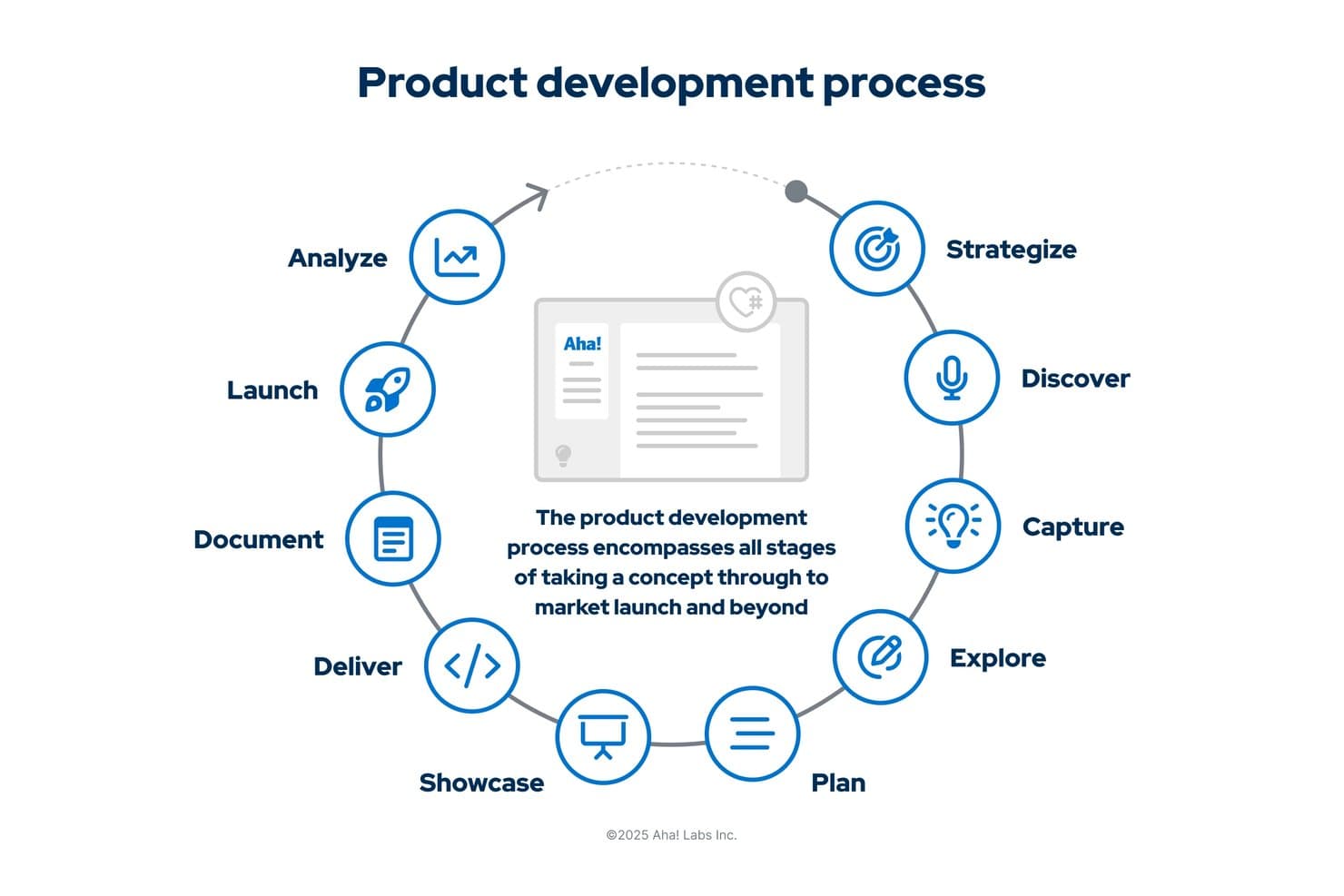
Aha! maps the full product development lifecycle from strategy to launch. Aha! is a connected product development suite spanning idea capture, roadmapping, agile delivery, and documentation—linking customer feedback through strategy to engineering execution in a single platform.
Who Is Aha! Best For?
Aha! is a strong fit for software-focused product teams that want to connect customer feedback, roadmapping, and agile delivery in one place.
Why I Picked Aha!
Aha! earns its spot on my shortlist because its ideas portal is genuinely one of the best I've seen for turning raw customer input into prioritized roadmap work. I love that portal users can vote on ideas, and those votes feed directly into a scoring model that weighs requests by revenue impact, so your team isn't just collecting feedback but actually ranking it by business value. From there, a winning idea moves straight into Roadmaps and links through to Jira or Aha! Develop, keeping the full thread from customer request to shipped feature visible in one place.
Aha! Key Features
- Prioritization scorecard: Score features against custom criteria like business value and revenue impact to rank work before it hits the roadmap.
- Aha! Develop agile planning: Run scrum, kanban, or SAFe sprints with built-in capacity tracking, risk flags, and story point estimates.
- Aha! Knowledge document hub: Create and co-edit requirements docs, specs, and release notes using 100+ templates with full version history.
- Customer research studies: Run discovery interviews, manage a participant database, and pull AI-analyzed insights directly into your roadmap via Aha! Discovery.
Aha! Integrations
Aha! offers 40+ native Roadmaps integrations, including Jira and Azure DevOps, plus native Develop integrations with GitHub and Azure Pipelines. Roadmaps and Develop also connect natively for product-to-delivery traceability.
Pros and Cons
Pros:
- Agile planning includes capacity and risk tracking
- Requirements gain versioned context beside roadmaps
- Voting turns feedback into ranked roadmap work
Cons:
- Hardware teams lack native CAD lifecycle support
- Setup can demand extensive process configuration
Learn more about Aha!: Best for OKR-to-delivery workflow visibility
- Free demo + 14-day free trial available
- From $8/user/month (billed annually)
Visit WebsiteCustomer Rating:3.9/5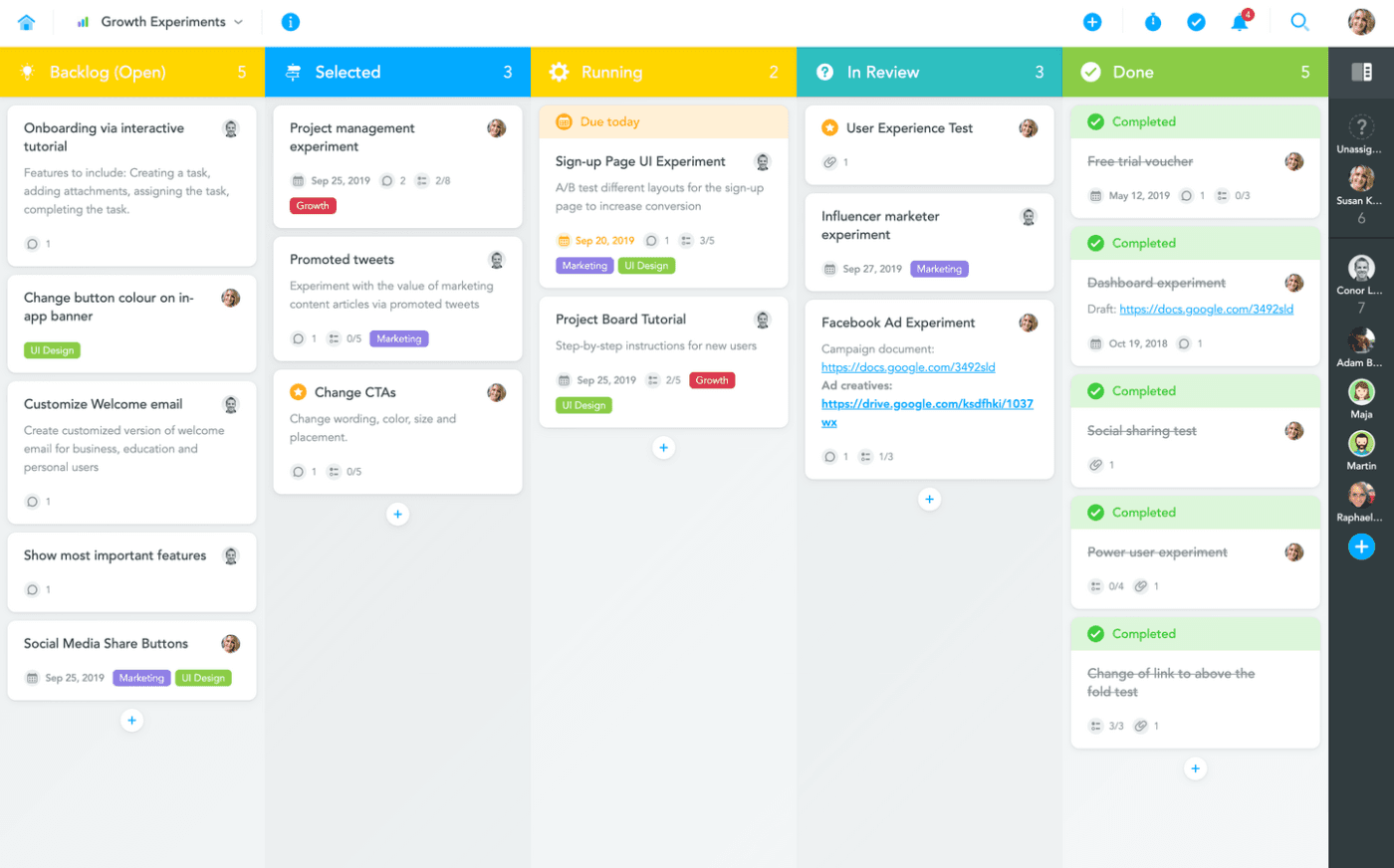
Businessmap lets your new product development team have a visual means of assessing their tasks and how those tasks affect the overall progress. Businessmap is a portfolio and workflow management platform that connects OKRs to delivery through a structured work hierarchy, Kanban boards, Gantt planning, flow analytics, and cross-team collaboration workspaces.
Who Is Businessmap Best For?
Businessmap is a strong fit for cross-functional product teams that need clear visibility into how strategic goals connect to day-to-day delivery work.
Why I Picked Businessmap
I've included Businessmap in my top picks because it's the clearest way I've seen a tool connect OKRs directly to delivery work through a structured hierarchy: OKRs flow down to initiatives, epics, projects, and individual work items. That linkage makes it easy to see whether day-to-day delivery is actually moving the right strategic needles. I also like the Monte Carlo-based project forecasting, which gives teams probability-based delivery date estimates grounded in real throughput data rather than guesswork.
Businessmap Key Features
- Unlimited Kanban boards: Build and customize as many workflow boards as your teams need, with custom fields, work templates, and process policies.
- Flow metrics dashboards: Track cycle time, throughput, WIP, and flow efficiency on real-time dashboards and heatmaps.
- Dependency management: Map dependencies between work items, visualize blockers, and analyze their impact across teams and projects.
- Smart Canvases: Use collaborative whiteboards for planning, brainstorming, and capturing requirements alongside active work items.
Businessmap Integrations
Businessmap offers native integrations with Jira, GitLab, Bitbucket, SVN, Power BI, Tableau, Looker/Data Studio, Okta, OneLogin, and Azure AD. It also provides a REST API and supports Zapier.
Pros and Cons
Pros:
- Reveals bottlenecks through detailed flow analytics
- Forecasts timelines using real throughput data
- Connects OKRs directly to delivery work
Cons:
- Complex boards can hinder prioritization
- Requirements lack dedicated traceability workflows
Learn more about Businessmap: Best for end-to-end dev pipeline traceability
- Free plan available
- From $6/user/month
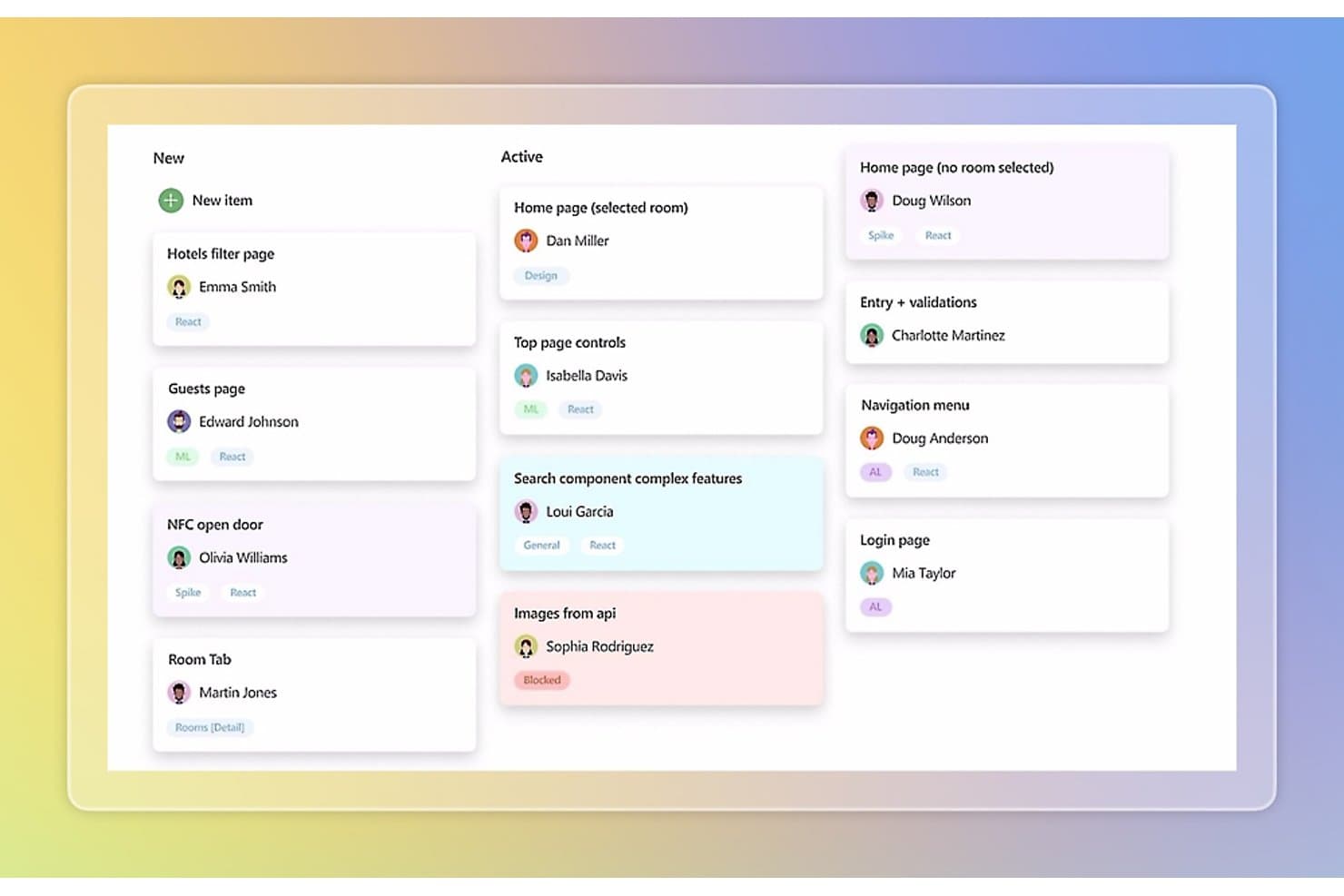
Azure DevOps organizes tasks by status across New and Active columns. Azure DevOps is a Microsoft application lifecycle management platform that covers work item tracking, Git repositories, CI/CD pipelines, test planning, and release management across the full software development lifecycle.
Who Is Azure DevOps Best For?
Azure DevOps is a strong fit for software engineering teams that need full traceability across planning, code, CI/CD, and release within a single Microsoft-native environment.
Why I Picked Azure DevOps
Azure DevOps earns its spot on my shortlist because no other tool traces a feature from backlog to build to release with the same native depth. I particularly like Delivery Plans, which maps live work items across teams on a shared timeline and surfaces dependency conflicts before they stall a sprint. Paired with Pipelines and Repos under one roof, your engineering team gets end-to-end visibility without stitching together separate tools.
Azure DevOps Key Features
- Backlog hierarchy: Organizes work across Epics, Features, User Stories, and Tasks so teams can plan by sprint and area path.
- Inherited process customization: Lets you build custom work item types, fields, states, and rules on top of built-in Agile, Scrum, or CMMI templates.
- OData and Power BI integration: Exports Analytics data via OData feeds so teams can build cross-project reports in Power BI.
- Azure Artifacts: Hosts package feeds for NuGet, npm, Maven, and Python, keeping dependencies versioned and accessible within the same platform.
Azure DevOps Integrations
Azure DevOps offers native integrations across the Microsoft ecosystem and GitHub, including Microsoft Teams, Microsoft Entra ID, Power BI, Visual Studio, Azure, and GitHub. It also supports REST APIs, service hooks, and Marketplace integrations for tools such as Slack, Jenkins, and ServiceNow.
Pros and Cons
Pros:
- Custom workflows fit complex engineering processes
- Delivery Plans expose cross-team dependency conflicts
- End-to-end traceability from backlog through release
Cons:
- Developer-centric workflows limit design collaboration
- No native scenario planning for strategic roadmaps
Learn more about Azure DevOps: Best for Scrum-based sprint and release tracking
- Free plan and 15-day free trial available
- From $3/user/month
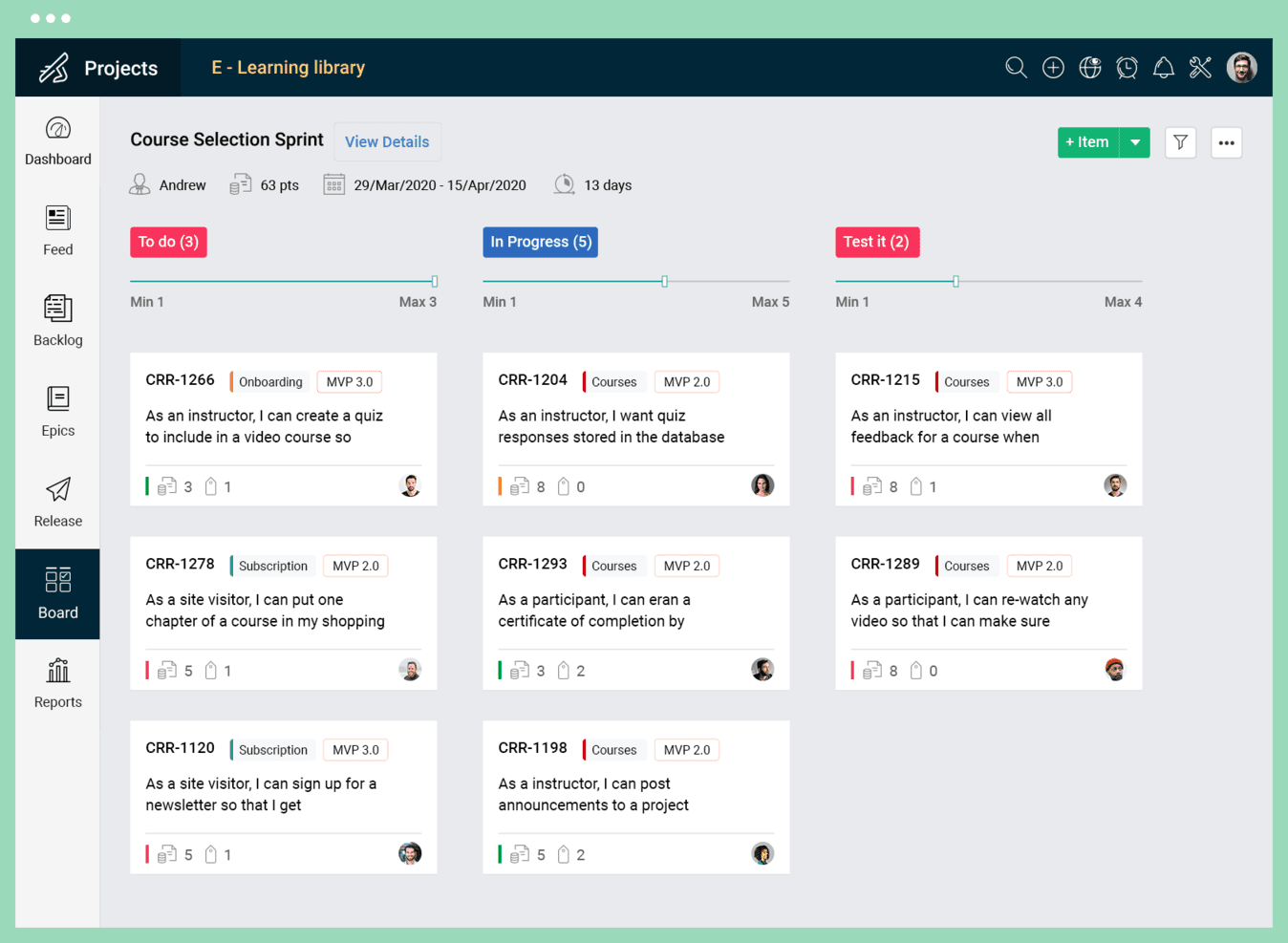
Zoho lets you build great products, sprint by sprint. Zoho Sprints is an agile project management tool built around Scrum and Kanban that covers backlog management, sprint planning, release tracking, and CI/CD integrations for software-focused product teams.
Who Is Zoho Sprints Best For?
Zoho Sprints is a strong fit for software-focused product teams that run Scrum or Kanban and need tight sprint-to-release coordination alongside CI/CD pipeline integrations.
Why I Picked Zoho Sprints
Zoho Sprints earns its spot on my shortlist because it's one of the few tools that ties sprint execution directly to release tracking, which matters when your team ships on a cadence and needs to know exactly what's going in each release. I like how backlog grooming, sprint planning, and release reports all connect in one workflow, so nothing slips between planning and delivery. The two-way sync with Azure DevOps and Jenkins means release pipeline status is visible right inside Sprints, without toggling between tools.
Zoho Sprints Key Features
- Scrum and Kanban boards: Run parallel Scrum and Kanban workflows with custom statuses and WIP limits on a single platform.
- Burnup/burndown and velocity reports: Track sprint progress and team throughput with built-in agile charts including cumulative flow diagrams and cycle time.
- CI/CD integrations: Sync work items directly with GitHub, GitLab, Bitbucket, Azure DevOps, and Jenkins for real-time pipeline visibility.
- Client and vendor portals: Give external stakeholders direct project visibility without requiring a full user seat.
Zoho Sprints Integrations
Zoho Sprints offers native integrations with GitHub, GitLab, Bitbucket, Azure DevOps, Jenkins, AWS CodeCommit, Jira, Trello, Zendesk, and Zoho Analytics. It also supports custom integrations through its REST API and Zapier.
Pros and Cons
Pros:
- External portals support stakeholder visibility
- Scrum metrics clarify sprint progress
- Release tracking connects planning to delivery
Cons:
- Visual portfolio roadmaps remain unavailable
- Requirements lack dedicated documentation controls
Learn more about Zoho Sprints: Best for unified tasks, docs, and roadmaps
- Free plan + free demo available
- From $7/user/month (billed annually)
Visit WebsiteCustomer Rating:4.6/5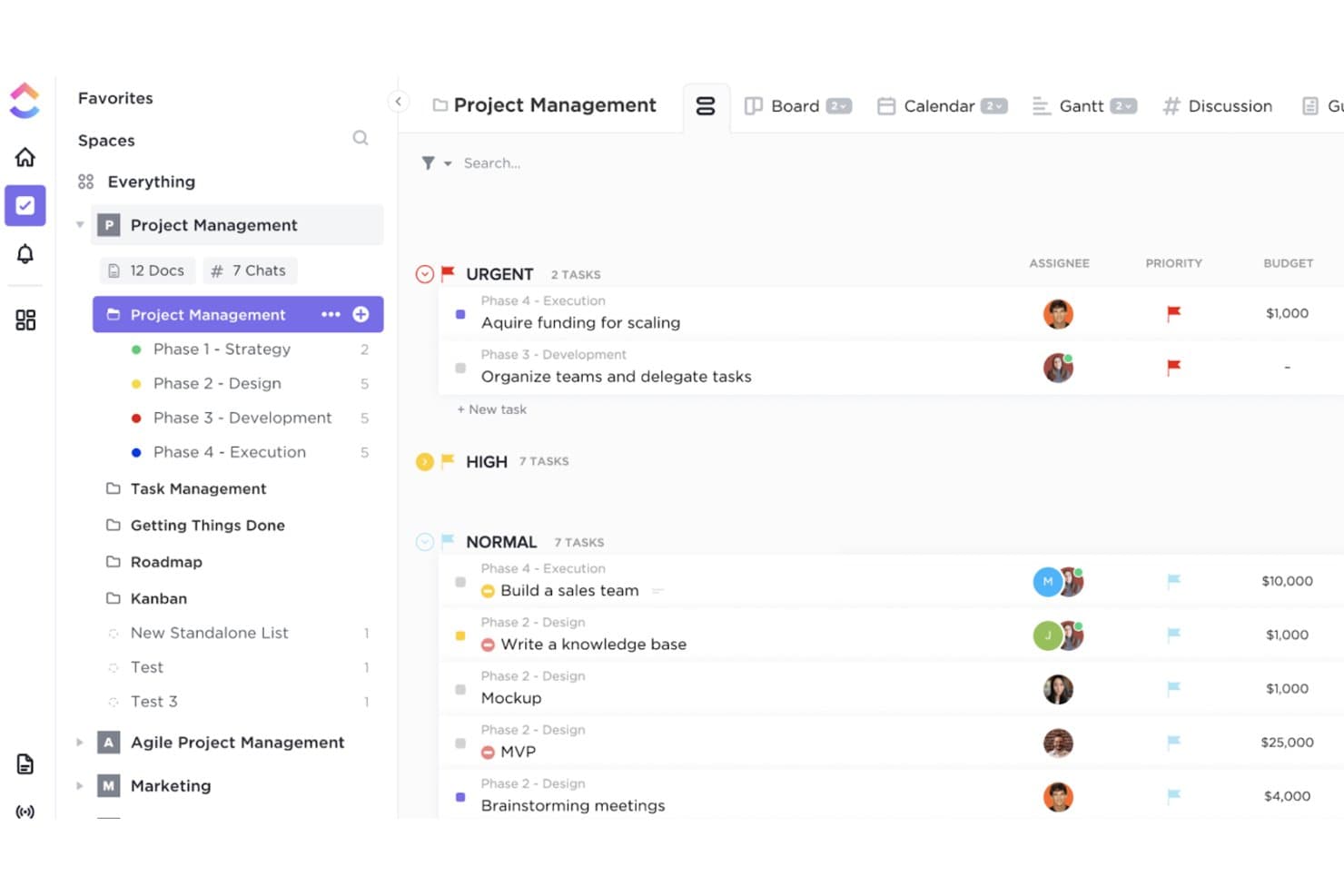
ClickUp can help you visualize your product development plan into phases, by department/team, or even by an item’s level of urgency. ClickUp is a project and product management platform that brings together task management, roadmapping, docs, whiteboards, and reporting dashboards in a single workspace.
Who Is ClickUp Best For?
ClickUp fits cross-functional product teams that need tasks, docs, roadmaps, and collaboration tools in one place without juggling multiple apps.
Why I Picked ClickUp
ClickUp earns its spot on my shortlist because it keeps tasks, docs, and roadmaps in one workspace, which means product teams aren't constantly switching tools to connect planning to execution. I especially like how roadmaps link directly to epics and sprints, so when priorities shift, the whole team sees it without a separate sync. Linked Docs let you attach requirements and briefs straight to tasks, keeping specs and delivery work in the same place.
ClickUp Key Features
- Customizable dashboards: Build dashboards with burnup/burndown charts, KPI widgets, and time tracking to monitor product health across sprints.
- Whiteboards: Sketch workflows, map ideas, and convert whiteboard items directly into tasks without leaving the workspace.
- Sprint reporting: Track sprint points, velocity, and progress with built-in sprint reporting available on the Business plan.
- Guest permissions: Invite external stakeholders with role-based access so collaborators can view or contribute without disrupting your workspace.
ClickUp Integrations
ClickUp offers 200+ native integrations, including GitHub, Bitbucket, Figma, Sentry, Slack, Microsoft Teams, HubSpot, Salesforce, Zendesk, and Intercom. It also supports webhooks, automation integrations, and an Enterprise API for custom connectivity.
Pros and Cons
Pros:
- Dashboards expose sprint health and ownership
- Whiteboards convert ideas into actionable tasks
- Roadmaps connect directly to delivery tasks
Cons:
- Dense interfaces can overwhelm new teams
- Hardware teams lack CAD version control
Learn more about ClickUp: Best for product development with pre-built templates
- Free trial available
- From $9/month (billed annually)
Visit WebsiteCustomer Rating:4.6/5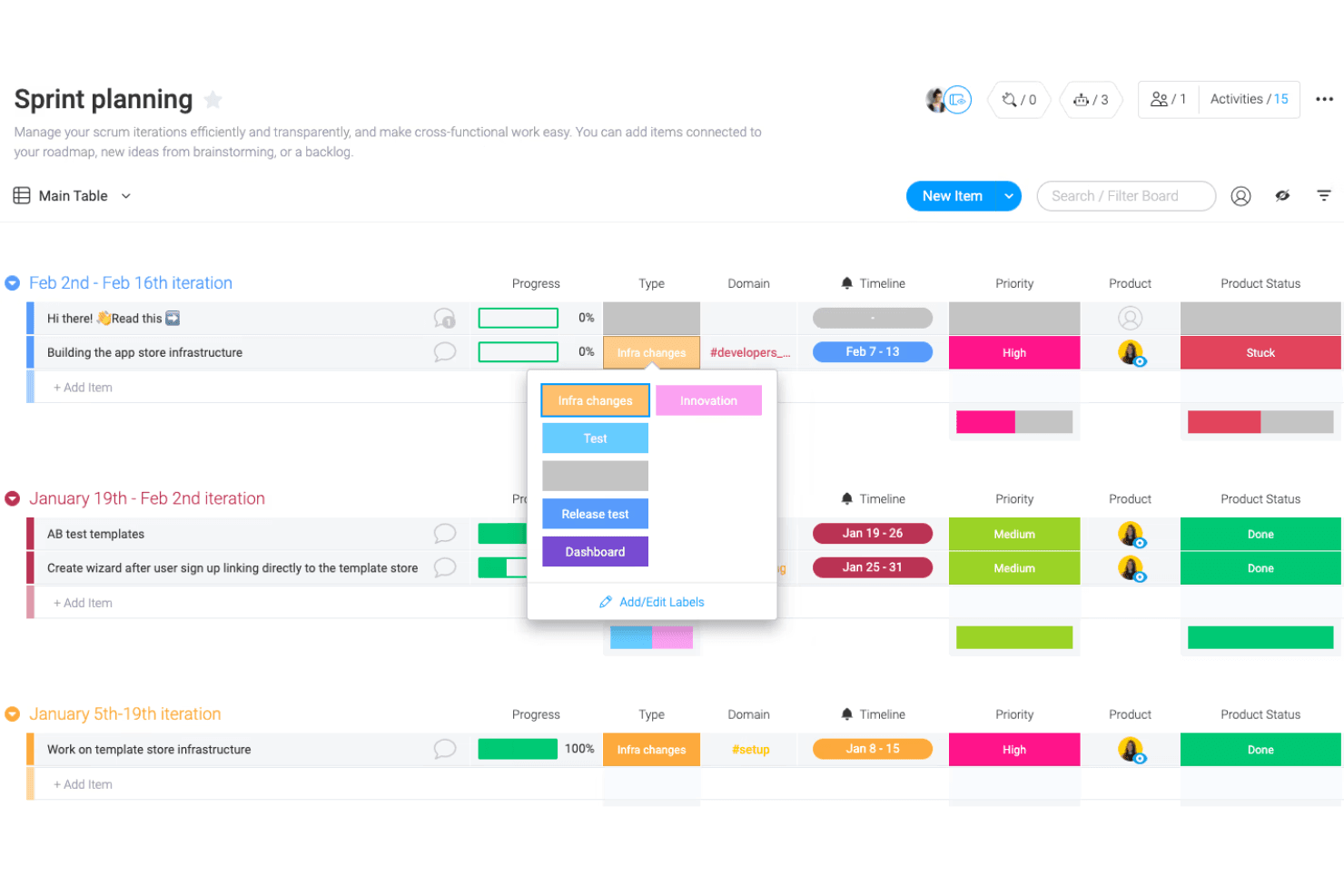
Monday dev's pre-built templates include sprints, roadmaps, bug tracking, and more. monday dev is a product development platform that brings roadmapping, sprint planning, backlog management, bug tracking, and release planning together in one workspace.
Who Is monday dev Best For?
monday dev is a strong fit for software product teams that want to manage roadmaps, sprints, and bug tracking in a single workspace without building their setup from scratch.
Why I Picked monday dev
I picked monday dev as one of the best because its pre-built templates genuinely cut the setup time that kills momentum on new product initiatives. You get ready-to-run boards for roadmaps, backlogs, sprint planning, bug tracking, and release plans, all linked within the same workspace. I also like how customer feedback on the Pro plan feeds directly into the roadmap, so prioritization decisions stay grounded in real input rather than gut instinct.
monday dev Key Features
- Burndown and velocity charts: Track sprint progress and team delivery pace with agile reports available on the Pro plan.
- Two-way GitHub sync: Connect your codebase to tasks so code changes and issues stay in sync with your dev boards.
- AI-generated sprint summaries: Get automated standup updates and sprint summaries pulled directly from your board activity.
- Unlimited free viewers: Give stakeholders read-only access to boards and roadmaps at no extra cost, across all plans.
monday dev Integrations
monday dev integrates with GitHub, GitLab, Bitbucket, CircleCI, Jira, Figma, Slack, and Azure DevOps, with two-way sync for GitHub.
Pros and Cons
Pros:
- Burndown and velocity reports clarify delivery pace
- Roadmaps connect directly with sprint execution
- Pre-built lifecycle templates reduce setup time
Cons:
- Hardware teams lack native PLM workflows
- Formal requirements approvals remain underdeveloped
Learn more about monday dev: Best for idea-to-release traceability via dev tools
- Free plan available
- From $10/user/month (billed annually)
Visit WebsiteCustomer Rating:4.6/5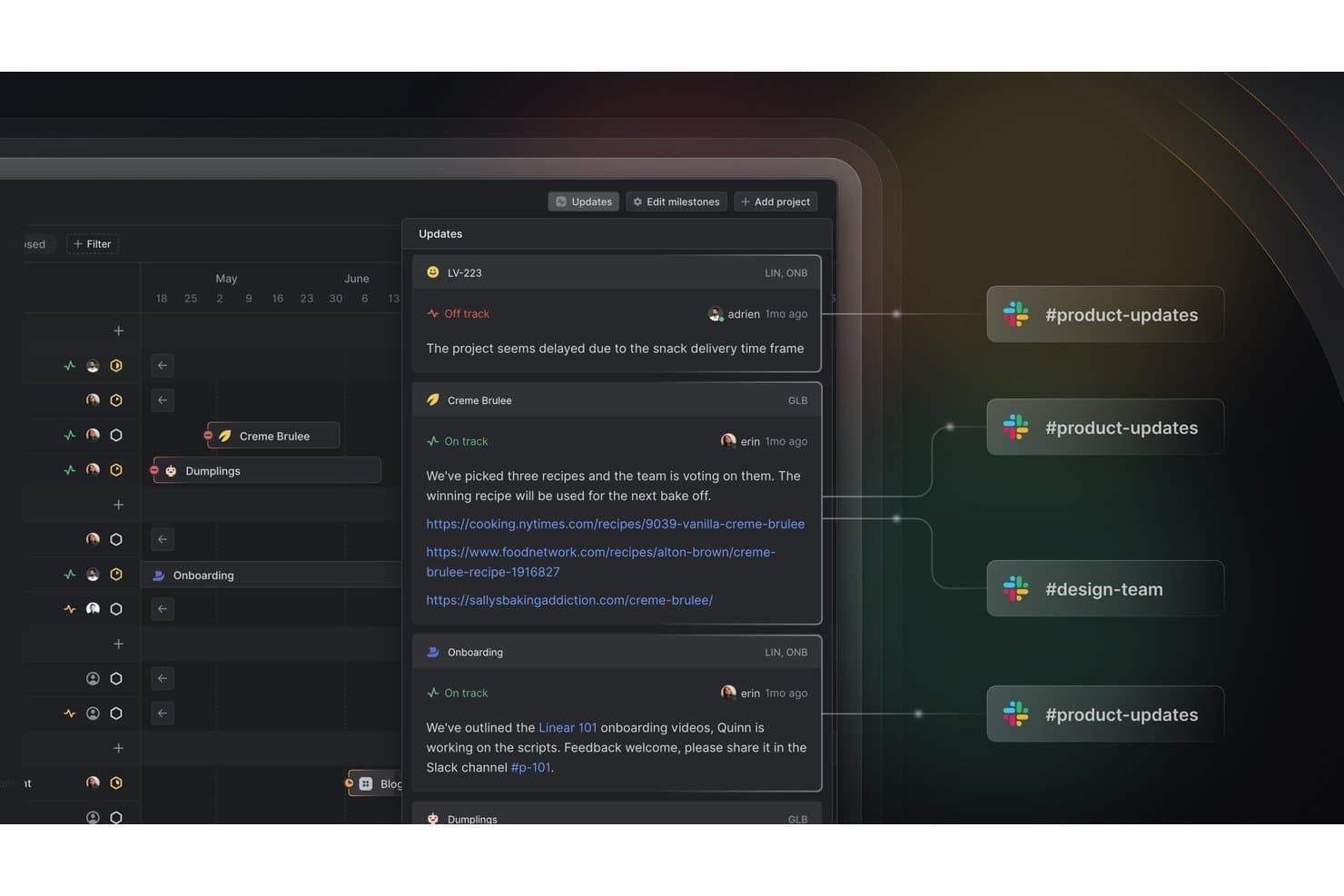
Linear syncs project status updates directly to Slack channels. Linear is a product development lifecycle tool built for software teams, combining issue tracking, sprint planning, roadmapping, and release management in one tightly integrated workspace.
Who Is Linear Best For?
Linear works well for software product teams that need a direct line from customer feedback and roadmap items all the way through to code review and release.
Why I Picked Linear
Linear earns its spot on my shortlist because it keeps every stage of development connected, from the first customer request all the way to a merged pull request. I particularly like how Customer Requests links real user feedback directly to the issues your team is building against, so nothing gets lost in translation between discovery and delivery. Paired with its GitHub and GitLab integrations, which automatically sync PR status back to open issues, you always know exactly where a feature stands in the release pipeline.
Linear Key Features
- Customer Requests: Links incoming customer feedback directly to the issues your team is actively building against, keeping discovery and delivery connected.
- Cycles: Time-boxed sprints that organize issues into focused work periods, helping teams maintain a consistent delivery cadence.
- Triage Intelligence: An AI-powered tool that automatically categorizes and prioritizes incoming issues to reduce manual triage overhead.
- Outcome prediction: Tracks scope and velocity over time to generate finish-date estimates for active projects.
Linear Integrations
Linear offers integrations with GitHub, GitLab, Figma, Slack, Microsoft Teams, and Sentry for connected product development workflows. It also provides a public API, webhooks, and Zapier support for custom integrations.
Pros and Cons
Pros:
- Project health updates keep teams aligned
- Customer feedback connects directly to delivery work
- Idea-to-release traceability stays visible
Cons:
- Reporting trails more mature platforms
- Requirements lack formal approvals and versioning
Learn more about Linear: 9Best for multi-team dependency tracking at scale
Jira
- Free plan + 14-day free trial available
- From $7.91/user/month
Visit WebsiteCustomer Rating:4.4/5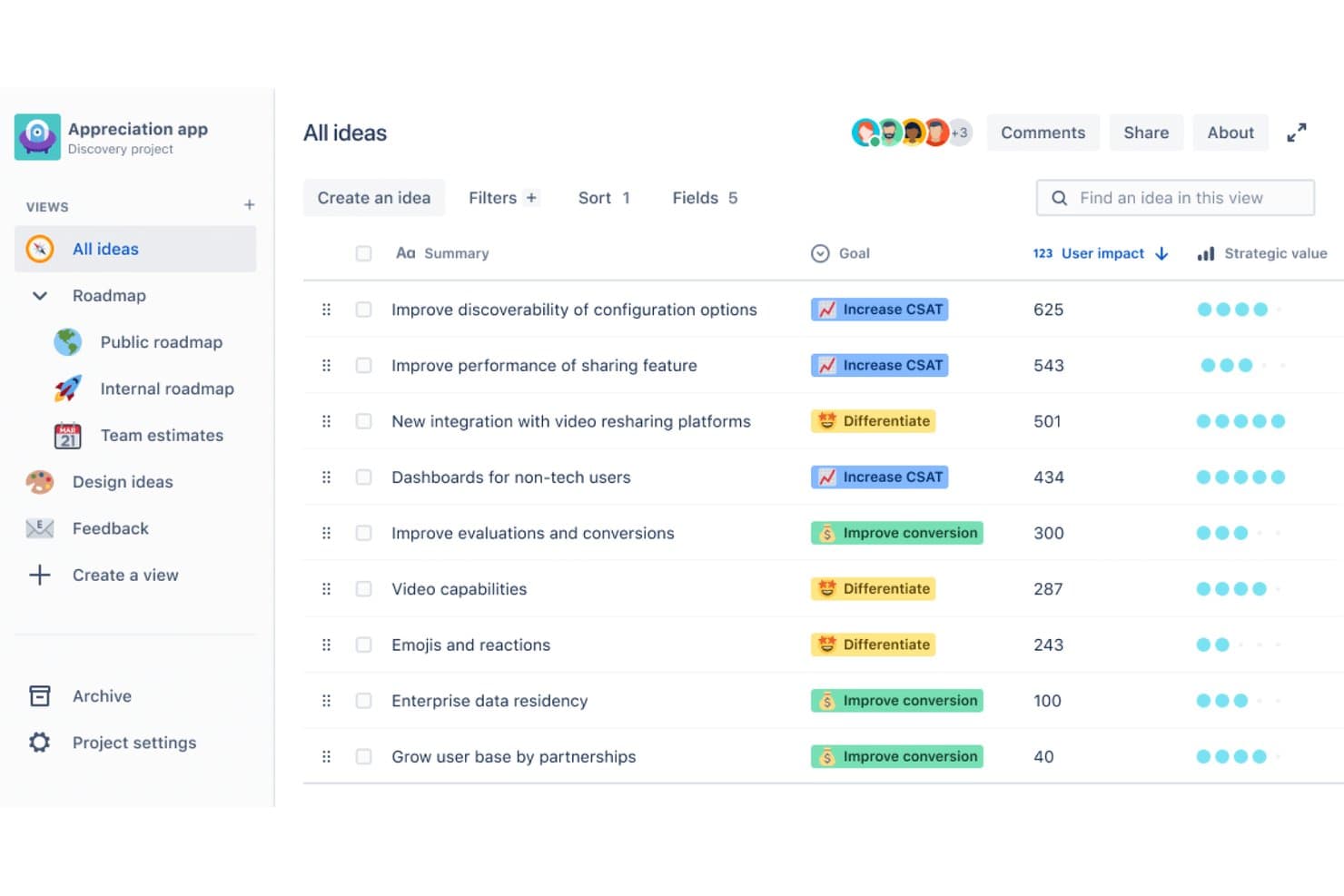
Jira organizes product ideas by impact, goal, and strategic value. Jira is a project and product development tracking platform that combines customizable workflows, multi-team roadmapping, dependency management, and automation to support software-centric teams across planning and delivery.
Who Is Jira Best For?
Jira is a strong fit for software-focused product teams that need to coordinate work across multiple squads, manage complex dependencies, and connect planning to delivery at scale.
Why I Picked Jira
I've included Jira in my top picks because no other tool on this list handles multi-team dependency tracking at scale quite like it does. When I'm coordinating a launch across product, engineering, and marketing, Jira's cross-project dependency visualization and scenario planning let me model alternative delivery paths before committing to one. I also rely on its advanced capacity planning to catch overallocation across squads early, well before it becomes a delivery problem.
Jira Key Features
- Custom workflows and fields: Build and configure workflows with custom fields, dropdown menus, and approval steps to match your team's exact delivery process.
- Rovo AI task breakdown: Use AI to split large initiatives into individual tasks, assign them automatically, and generate automations from plain-language requests.
- Forms builder: Create drag-and-drop forms that let partner teams submit structured requests and track their progress without needing full project access.
- Atlassian Analytics and Data Lake: Connect project data across your organization to build custom reports and surface trends with AI-generated insights.
Jira Integrations
Jira offers more than 3,000 Marketplace integrations, including Confluence, Figma, Slack, Gmail, and Google and Microsoft tools. Rich APIs support custom integrations with code repositories and CI/CD pipelines.
Pros and Cons
Pros:
- Capacity planning exposes squad overallocations early
- Custom workflows fit complex delivery governance
- Cross-project dependencies clarify launch tradeoffs
Cons:
- Hardware development lacks native PLM support
- Requirements traceability requires separate documentation
 10Best for rapidly growing enterprise NPD portfolios
Planview
- Free trial + free demo available
- Pricing upon request
Visit WebsiteCustomer Rating:3.8/5
Planview is an enterprise product portfolio management platform that spans idea capture, roadmapping, Stage-Gate governance, resource capacity planning, and cross-tool integration across PLM, ALM, and development environments.
Who Is Planview Best For?
Planview is built for enterprise R&D and product organizations managing large, multi-team portfolios where governance, capacity constraints, and cross-tool integration are daily realities.
Why I Picked Planview
Planview earns its spot on my shortlist because it's purpose-built for the scale and governance demands that come with rapidly growing enterprise NPD portfolios. I'm particularly drawn to its capacity-constrained roadmapping, which checks your product roadmap against real engineering capacity before you commit, so you're not overpromising to stakeholders. Its automated Stage-Gate governance, certified by Stage-Gate International, removes the manual bottleneck from phase approvals across large, multi-team programs.
Planview Key Features
- Planview IdeaPlace: A dedicated ideation module that captures ideas via forms, routes them to reviewers automatically, and supports crowd voting and pairwise ranking before ideas move into your portfolio.
- What-if scenario modeling: Lets you compare portfolio configurations side by side, ranking R&D projects by ROI and strategic fit before locking in commitments.
- Cross-discipline dependency mapping: Maps dependencies across hardware, software, and firmware teams so integration conflicts surface early in planning.
- Planview Hub two-way sync: Connects 60+ tools including Jira, Azure DevOps, and PTC Windchill with near real-time, bidirectional data sync across your entire development tool stack.
Planview Integrations
Planview offers 60+ documented integrations, including PTC Windchill, Aras, Jira, Azure DevOps, Jama, GitHub, GitLab, Tricentis, ServiceNow, and Salesforce. Planview Hub also supports near-real-time two-way sync and custom connections through its Universal Connector API.
Pros and Cons
Pros:
- Scenario modeling clarifies portfolio tradeoffs
- Stage-gate governance supports regulated launches
- Capacity-constrained roadmaps prevent overcommitment
Cons:
- Detailed engineering work needs companion tools
- Portfolio breadth complicates initial implementation
Learn more about Planview:
Other Product Development Software
Here are more tools that did not make it to the top but are still worth your consideration.
Related Product Management Software Reviews
If you still haven't found what you're looking for here, check out these tools closely related to product development software that we've tested and evaluated.
- Best Product Management Tools
- Best Product Planning Software
- Best UX Design Tools
- Best Heatmap Software
How I Evaluate Product Development Software
I split my evaluation into three parts, starting with core functionality—whether a tool lets teams map out a product roadmap and build and track development tasks—which carries the most weight. Then I look for standout features like customer-linked traceability and automated dependency mapping. Finally, I consider onboarding support, pricing structure, and how well the tool fits different team sizes.
Core Functionality (Table Stakes For This List)
When I'm selecting tools for my list, I score each one on a scale from 0 (does not offer the functionality) to 5 (excels in this area) for each core functionality listed below. I then convert the total into a percentage to help assess each tool's overall fit, with extra weight on any functionalities I've deemed essential.
- Roadmapping & Planning (Essential): I check whether roadmaps stay linked to live work items so timelines shift automatically when sprint dates or milestones move.
- Task & Workflow Management (Essential): I look for customizable stages, dependency tracking, and automation rules that adapt to how different teams actually ship work.
- Requirements & Documentation: I evaluate how well teams can tie specs and PRDs directly to backlog items and trace them through to delivery and testing.
- Cross-Functional Collaboration: Shared boards, inline commenting, and role-based views matter—I check if engineering, design, and product can all work in context.
- Progress Tracking & Reporting: Dashboards should let you filter by team, sprint, or objective. I look for real-time status rolls ups across multiple workstreams.
- Development Tool Integrations: Two-way syncs with tools like GitHub, GitLab, and Figma keep data flowing without manual updates between platforms.
Once I have a list of tools that meet the criteria, I consider what sets each platform apart.
Differentiating Factors (What Sets Vendors Apart)
Here's how I compare and contrast different vendors:
Standout Features
I look for customer-linked traceability—the ability to trace a feature from an initial customer request through requirements, development, and testing. Without it, teams lose sight of why they're building something. Automated dependency mapping is equally important; I check whether a tool visually flags cross-team blockers before they stall delivery. Scenario planning tools round out my evaluation. When a team lead asks "what happens if we lose two engineers next sprint," the right tool lets you model that trade-off against your roadmap in minutes.
Beyond Features
I evaluate how well each tool scales with team size—enterprise R&D groups need multi-project portfolio views and layered permissions, while smaller teams need fast onboarding without heavy configuration. Industry fit matters too. Hardware teams should look for CAD/PLM compatibility, whereas software teams benefit more from deep CI/CD and repo integrations. I also check for audit logging and compliance documentation support, since teams in regulated spaces like medical devices can't ship without it.
How to Choose Product Development Software
With so many different product development software solutions available, it can be challenging to make decisions on what product development software is going to be the best fit for your needs.
As you're shortlisting, trialing, and selecting product development software, consider the following:
- What problem are you trying to solve - Start by identifying the product development feature gap you're trying to fill to clarify the features and functionality the product development software needs to provide.
- Who will need to use it - To evaluate cost and requirements, consider who'll be using the software and how many licenses you'll need. You'll need to evaluate if it'll just be the product development professionals, or the whole organization that will require access. When that's clear, it's worth considering if you're prioritizing ease of use for all, or speed for your product development software power users.
- What other tools it needs to work with - Clarify what tools you're replacing, what tools are staying, and the tools you'll need to integrate with, such as accounting, innovation management tools, prototyping and wireframing software, CRM or HR software. You'll need to decide if the tools will need to integrate together, or alternatively, if you can replace multiple tools with one consolidated product development tool.
- What outcomes are important - Consider the result that the software needs to deliver to be considered a success. Consider what capability you want to gain, or what you want to improve, and how you will be measuring success. For example, an outcome could be the ability to get greater visibility into performance. You could compare product development software features until you’re blue in the face, but if you aren’t thinking about the outcomes you want to drive, you could be wasting a lot of valuable time.
- How it would work within your organization - Consider the software selection alongside your workflows and delivery methodology. Evaluate what's working well, and the areas that are causing issues that need to be addressed. Remember every business is different — don’t assume that because a tool is popular that it'll work in your organization.
Trends in Product Development Software for 2026
Product development software has seen rapid evolution and innovation in 2026, driven by ever-changing industry demands and the shifting technological landscape. These trends not only highlight the features that are evolving rapidly, but also pinpoint novel and unusual emerging functionalities. I have identified several key trends that I believe will significantly shape the future of product development software.
Evolving Trends in Product Development Software
- Integration with AI and Machine Learning: The integration of artificial intelligence (AI) and machine learning (ML) into product development software is becoming increasingly prevalent. These technologies are being harnessed to automate routine tasks, predict trends, and offer insights, thereby enhancing decision-making and efficiency throughout the product lifecycle.
- Increased Emphasis on Collaboration Tools: As remote work becomes more common, there's a significant uptrend in the development and enhancement of collaboration tools within product development software. These tools are designed to support seamless communication, real-time co-editing, and project tracking across geographically dispersed teams.
- Rise of Customization and Flexibility: The demand for highly customizable and flexible software solutions is on the rise. Users now seek platforms that can be tailored to fit their specific project needs and workflows, indicating a shift away from one-size-fits-all solutions.
Novel and Unusual Functionality
- Virtual Reality (VR) and Augmented Reality (AR) for Prototyping: An emerging and unusual trend is the use of VR and AR technologies for product design and prototyping. This allows for immersive experiences that enable designers and stakeholders to explore and interact with prototypes in a virtual environment, significantly enhancing the design process.
Most Important and In-Demand Features
- Comprehensive Project Management Tools: The core of product development software remains its project management capabilities. Features that facilitate detailed planning, tracking, and management of every stage of the product development process are highly valued by professionals in the field.
- Robust Document Management and Compliance Tracking: Given the regulatory complexities associated with many industries, features that support effective document management and compliance tracking continue to be in high demand. These tools help organizations maintain adherence to industry standards and regulatory requirements, reducing the risk of non-compliance.
Declining in Importance and Demand
- Standalone Reporting Tools: As integrated analytics and reporting capabilities become standard in product development software, the need for standalone reporting tools is diminishing. Users prefer comprehensive dashboards and analytics features that offer insights within the same platform, rather than having to rely on external or separate reporting tools.
These trends in product development software for 2026 reflect a broader move towards more intelligent, collaborative, and customizable tools, capable of supporting the complex needs of modern product development teams. As such, implementing these trends can help organizations to more effectively navigate the challenges of bringing new products to market in an increasingly competitive and technologically-advanced environment.
The Product Development Process (And Why It’s Never a Straight Line)
Building a product isn’t a step-by-step checklist—it’s more like an obstacle course. There are unexpected turns, last-minute changes, and those “Wait, why didn’t we think of this sooner?” moments. The right software keeps everything organized, helps teams adapt quickly, and stops things from slipping through the cracks.
1. Ideation: Capturing the "Aha!" Moments
This is where anything goes—brainstorming, analyzing customer needs, and throwing out wild ideas. But inspiration is fleeting, and without the right tools, great concepts can get lost in Slack threads or buried under sticky notes. Idea management software helps capture thoughts, prioritize concepts, and make sure the best ones actually move forward.
2. Market Research: Making Sure There’s an Audience
Before you go all-in on an idea, you need to know if people actually want it. Research tools make it easier to collect survey responses, track competitor movements, and analyze customer needs—so you’re working with real data, not just gut feelings.
3. Concept Development: Defining What You're Actually Building
Now it’s time to move from "Wouldn't it be cool if..." to "Here's how it works." Requirements need to be clear, sketches need to make sense, and everyone needs to be aligned. Product development software helps teams document specs, collaborate on early designs, and avoid miscommunication that could lead to costly mistakes later.
4. Design & Prototyping: Testing Before You Commit
Things start getting real here. Wireframes, 3D prototyping tools, and interactive prototypes help teams visualize the product before full-scale production. Design tools let you tweak, refine, and perfect every detail—so you don’t spend time and money manufacturing something that almost works.
5. Testing & Iteration: Finding the Flaws Before Customers Do
No product is perfect on the first try. Testing software helps automate quality checks, track issues, and gather user feedback so you can fix problems before launch. This stage is all about refining the experience and making sure customers won’t need a 50-page manual to figure things out.
6. Manufacturing & Production: Scaling Without the Chaos
Turning a prototype into thousands (or millions) of units requires careful coordination. Supply chain and production management software helps teams track inventory, schedule production, and ensure quality stays consistent—so nothing gets held up by missing parts or last-minute hiccups. Effective milestone tracking tools become essential for monitoring these critical production phases.
7. Launch & Beyond: Keeping the Momentum Going
Once the product is out in the world, the work isn’t over. Analytics tools track performance, customer behavior, and potential improvements—so you can iterate based on real-world use. And if things don’t go exactly as planned (because they never do), the right software makes it easier to pivot.
Product development software plays a critical role in coordinating the various stages of product development, from conception through design, manufacturing, and market introduction. Identifying the right features in such software can significantly impact a company's ability to bring innovative products to market efficiently and effectively. Below, I highlight the most important features to look for in product development software.
Features of Product Development Software
When selecting product development software, keep an eye out for the following key features:
- Product Roadmapping: The ability to create a product roadmap lets your team keep their backlog organized and prioritized. You may also connect the development software with a separate product roadmap tool.
- Project management tools: Coordinate tasks, deadlines, and team collaboration so you can juggle timelines and responsibilities without the sticky notes jungle. These tools ensure that everyone knows what's happening, and when, all from one central hub.
- Version control: Track different iterations of your product designs and never lose sight of changes or accidentally overwrite great ideas. Experiment freely while always having a back button available to "Command + z".
- Collaboration features: Share files, feedback, and updates effortlessly among cross-functional teams. Real-time collaboration bridges gaps between designers, engineers, and marketers, reducing those endless meetings.
- Document management: Organize, store, and retrieve all your specs, blueprints, and regulatory paperwork in a snap. Everything you need stays at your fingertips instead of buried in a mysterious file named “final_FINAL_v3.docx.”
- Resource planning: Allocate people, budgets, and tools, making sure you never run out of what you need to finish a project. Accurate resource planning keeps the workflow smooth, and team members delivering on time.
- Prototyping tools: Create and test digital or physical prototypes before full-scale production begins. You can spot flaws, gather feedback early, and adapt, saving time and resources down the road.
- Timeline and Gantt charts: Visualize the entire product journey, from that first sketch to the final shipment. These charts give you a bird’s-eye view, making it easier to manage dependencies, spot bottlenecks, and celebrate project milestones.
- Requirement tracking: Set, monitor, and update essential product requirements—never miss a spec or regulatory checkbox. Stay on target and in compliance throughout development.
- Reporting and analytics: Generate insightful reports to keep tabs on progress, productivity, and potential risks. Clear data helps you make informed decisions in real time instead of just relying on gut feelings.
Common Product Development Software AI Features
Beyond the standard product development software features listed above, many of these solutions are incorporating AI features like:
- Natural language processing for requirements management: AI can read and organize requirement documents, flags inconsistencies, and auto-suggests clarifications, letting you focus on what matters most without missing details buried in the fine print.
- Automated design suggestions: AI has the ability to analyze design options and recommend improvements, making it easier for you to optimize for function, cost, or customer appeal without hours of manual tweaking.
- Predictive project timelines: Machine learning examines past project data to give you forecasts for delivery, helping you spot potential roadblocks before they cause trouble.
- Intelligent resource allocation: AI algorithms can assess workloads and skill sets, automatically assigning team members and shifting resources to where they’ll have the biggest impact.
- Automated risk detection: AI scans your projects for anomalies or signs of trouble, so you can proactively address issues and keep development on track.
Choosing the right product development software equipped with these features can transform the way companies design, develop, and launch new products. By prioritizing these capabilities, organizations can enhance collaboration, improve efficiency, and accelerate time to market, ultimately leading to greater innovation and competitiveness.
Benefits of Product Development Software
Product development software streamlines the complex process of bringing new products from concept to market, offering numerous benefits that can transform operations and help businesses stay competitive. Below are five primary advantages that such software provides to its users and organizations, highlighting why potential buyers should consider integrating these solutions into their product development strategy:
- Enhanced Collaboration: Product development software fosters a unified platform for team communication and collaboration. It breaks down silos between departments, enabling a seamless flow of ideas and information, which is crucial for the timely and successful development of products.
- Increased Efficiency: By automating routine tasks and organizing workflows, product development software significantly reduces the time and resources required to develop new products. Users can focus on innovation and problem-solving rather than getting bogged down in administrative tasks.
- Improved Quality Control: With built-in quality management features, this software ensures that every stage of the product development process meets the highest standards. This leads to the creation of superior products that satisfy customer needs and comply with regulatory requirements.
- Greater Market Responsiveness: The ability to rapidly prototype, test, and iterate designs within the software allows organizations to respond more quickly to market trends and customer feedback. This agility can be a key differentiator in today's fast-paced market environment.
- Cost Reduction: By optimizing the product development process, the software helps in identifying inefficiencies and reducing waste, leading to significant cost savings. Additionally, accurate budgeting and resource allocation features prevent overspending and ensure that projects stay on financial track.
Investing in product development software offers tangible benefits that extend beyond the immediate ease of managing projects. It enables organizations to harness creativity, reduce time-to-market, and produce high-quality products more efficiently and cost-effectively. For businesses aiming to lead in innovation while managing resources wisely, adopting such software isn't just an option—it's a strategic necessity.
Costs & Pricing For Product Development Software
Navigating the myriad of plan and pricing options for product development software can be a daunting task, especially for buyers who are new to this type of software.
The key to making an informed decision lies in understanding the different tiers of service offered, the features included in each plan, and how they align with your organizational needs and budget constraints. Typically, product development software providers offer a range of plans to cater to businesses of all sizes, from startups to large enterprises.
Plan Comparison Table for Product Development Software
| Plan Type | Average Price | Common Features Included |
|---|---|---|
| Plan TypeStarter | Average Price$10 - $25/user/month | Common Features IncludedBasic project management tools, document sharing, limited collaboration features |
| Plan TypeProfessional | Average Price$50 - $100/user/month | Common Features IncludedAdvanced project management features, integration capabilities, enhanced collaboration tools |
| Plan TypeEnterprise | Average PriceCustom Pricing | Common Features IncludedCustom integrations, advanced security features, dedicated support and training |
| Plan TypeFree Option | Average Price$0 | Common Features IncludedBasic project management functionality, limited number of projects, access to community support |
When selecting a plan, it is important to consider not only the current size and needs of your organization but also anticipate future growth and potential for scaling. Each plan offers a different set of features designed to match the complexity and scope of your projects, with pricing structured to reflect these capabilities.
Remember, the cheapest option may not always meet your needs, and the most expensive plan may offer more than you currently require.
Product Development Software Frequently Asked Questions
Find answers to common questions other people ask about this topic.
How do these tools support product lifecycle management from ideation to retirement?
These tools let you plan, design, test, launch, and retire products in one place. You can track requirements, manage feedback, and monitor releases. This helps your team stay aligned and reduces handoff errors across stages.
What is the difference between product design software and product development software?
Product design software focuses on creating and prototyping how your product looks and works. Product development software handles the end-to-end process, covering planning, collaboration, testing, and tracking progress from concept to launch.
How scalable are these software solutions as a company grows?
For startups and small businesses, some platforms offer basic packages that focus on essential features, keeping costs low while still providing the tools needed for early-stage development. As businesses grow, providers offer more comprehensive features like advanced analytics, larger team collaboration tools, and more extensive integration capabilities.rnrnPricing plans typically reflect this scalability, allowing companies to upgrade their services as their needs evolve and ensuring that they always have access to the necessary tools without overpaying for unneeded features.
How do product development software providers handle data security and privacy?
Providers typically use data encryption, secure user authentication, and compliance with standards like GDPR or SOC 2. Ask vendors for clear details on their security protocols and any certifications they hold to keep your work safe.
Is there free product development software?
Yes! Some examples you might want to try include OpenProject, Trello, Taskade, Craftwork Marketplace, Productific, Productstash, and Bitrix24. Many tools have a free trial, too, if you want to try before you buy.rnrnWe’ve developed an entire list of free product development software to help you decide which one is best for your use case.
Can I integrate product development software with my existing design, engineering, or collaboration tools?
Yes, leading tools support integrations with apps like Jira, Slack, Figma, GitHub, and more. Check if the software offers open APIs or built-in connectors to fit your team’s workflow and avoid silos.
How do these tools help remote or hybrid product development teams collaborate?
Product development tools have features like shared roadmaps, commenting, file sharing, and real-time updates. These make sure everyone—no matter where they’re located—can see progress, give feedback, and stay involved on key tasks.
How do I know when it’s time to upgrade from basic tools (like spreadsheets) to full product development software?
Upgrade when tracking projects gets confusing, version control becomes hard, or communication starts slipping. Dedicated software keeps your team coordinated and gives you better insight as projects grow more complex.