

Balancing priorities as a product manager isn’t easy—I’ve learned that the hard way. I’ve spent hours untangling messy backlogs, dealt with frustrated teams unsure of what to focus on without a clear product development strategy, and watched timelines slip because priorities weren’t clear.
Looking back, a lot of this chaos came from not having the right product backlog tools. It’s not just about organization—it’s about having a system that helps you prioritize effectively, communicate clearly, and keep work moving forward.
That’s why I’ve put together this roundup of the best product backlog tools. These are the tools I wish I’d had sooner, and they’ll help you cut through the noise, align your team, and stay on track.
Why Trust Our Software Recommendations
6,700+
Reviews
20
Industry experts
16+
Evaluation factors
14
Years
Our team has been testing and reviewing software since 2012. As product managers ourselves, we know how difficult—and important—it is to choose the right software.
For this guide, we evaluated tools using hands-on testing and independent research, scoring tools using our selection criteria.
Our reviews reflect our human editorial judgment, not a sales pitch.
Expert reviewers:
- Andrew LumbySenior TPM
- Cristiano ValimSenior UI/UX Lead


The Best Product Backlog Tools Comparison Table
| Tool | Best For | Trial Info | Price | ||
|---|---|---|---|---|---|
| 1 | Best for prioritizing feature requests | Free plan available | From $79/month (billed annually) | Website | |
| 2 | Best for building no-code custom apps and workflows | 30-day free trial | From $35/user/month (billed annually) | Website | |
| 3 | Best for customizable request forms | 14-day free trial | Pricing upon request | Website | |
| 4 | Best all-in-one, free product backlog tool | Free plan available | From $7/user/month (billed annually) | Website | |
| 5 | Best for dev-native backlog and Git-driven workflows | Free plan available | From $10/user/month (billed annually) | Website | |
| 6 | Best for dev-team backlog customization | Free plan and 14-day free trial available | From $3.67/user/month | Website | |
| 7 | Best for scaled agile backlog management | Free plan available | From $7.91/user/month | Website | |
| 8 | Best for enterprise-scale agile capacity planning | Website | |||
| 9 | Best for AI-driven feedback-to-backlog prioritization | 14-day free trial + free demo available | From $24/user/month | Website | |
| 10 | Best for story mapping-led backlog planning | 14-day free trial + free demo available | From $9/user/month (billed annually) | Website |





Best Product Backlog Tool Reviews
Here’s a brief description of the best product backlog management tools, showcasing what each tool does best with screenshots to highlight some of the top features.
 Best for prioritizing feature requests
- Free plan available
- From $79/month (billed annually)
Visit WebsiteCustomer Rating:4.6/5
Canny's autopilot feature helps teams automatically review and categorize incoming user feedback from multiple sources. Canny is a customer feedback and feature request management platform that captures, deduplicates, and organizes incoming feedback into a structured backlog, then helps teams score and rank ideas using custom prioritization formulas tied to revenue, demand, and effort.
Who Is Canny Best For?
Canny is a strong fit for product managers at B2B SaaS companies who need to turn customer feedback into a structured, revenue-weighted list of what to build next.
Why I Picked Canny
Canny earns its spot on my shortlist because its prioritization engine goes far beyond simple vote counts. I love how it lets you build custom scoring formulas that weigh ARR, renewal risk, and effort together, so your highest-scored backlog items are grounded in real revenue data rather than the loudest voices. Canny's AI Autopilot also captures and deduplicates feature requests from support tickets automatically, linking each idea back to the accounts and deal values behind it.
Canny Key Features
- AI Autopilot deduplication: Automatically merges duplicate feedback posts and routes each request to the correct product area without manual tagging.
- Changelog with targeted announcements: Publishes release notes and ships feature announcements directly to the users who originally requested them.
- Two-way dev tool status sync: Connects with Jira, Linear, GitHub, and Azure DevOps to reflect updated issue statuses back in Canny automatically.
- Unlimited contributor seats: Lets GTM teammates, executives, and stakeholders follow and comment on feedback without consuming a manager seat.
Canny Integrations
Canny offers native integrations with Jira, Linear, GitHub, ClickUp, Asana, Azure DevOps, Salesforce, HubSpot, Slack, and Microsoft Teams. It also provides an API, webhooks, and Zapier for custom integrations.
Pros and Cons
Pros:
- Customer context stays attached to backlog items
- Autopilot deduplicates requests into actionable ideas
- Revenue-weighted scoring sharpens feature prioritization
Cons:
- Lacks epic, story, and subtask hierarchies
- No sprint planning or capacity tracking
Learn more about Canny: Best for building no-code custom apps and workflows
- 30-day free trial
- From $35/user/month (billed annually)
Visit WebsiteCustomer Rating:4.4/5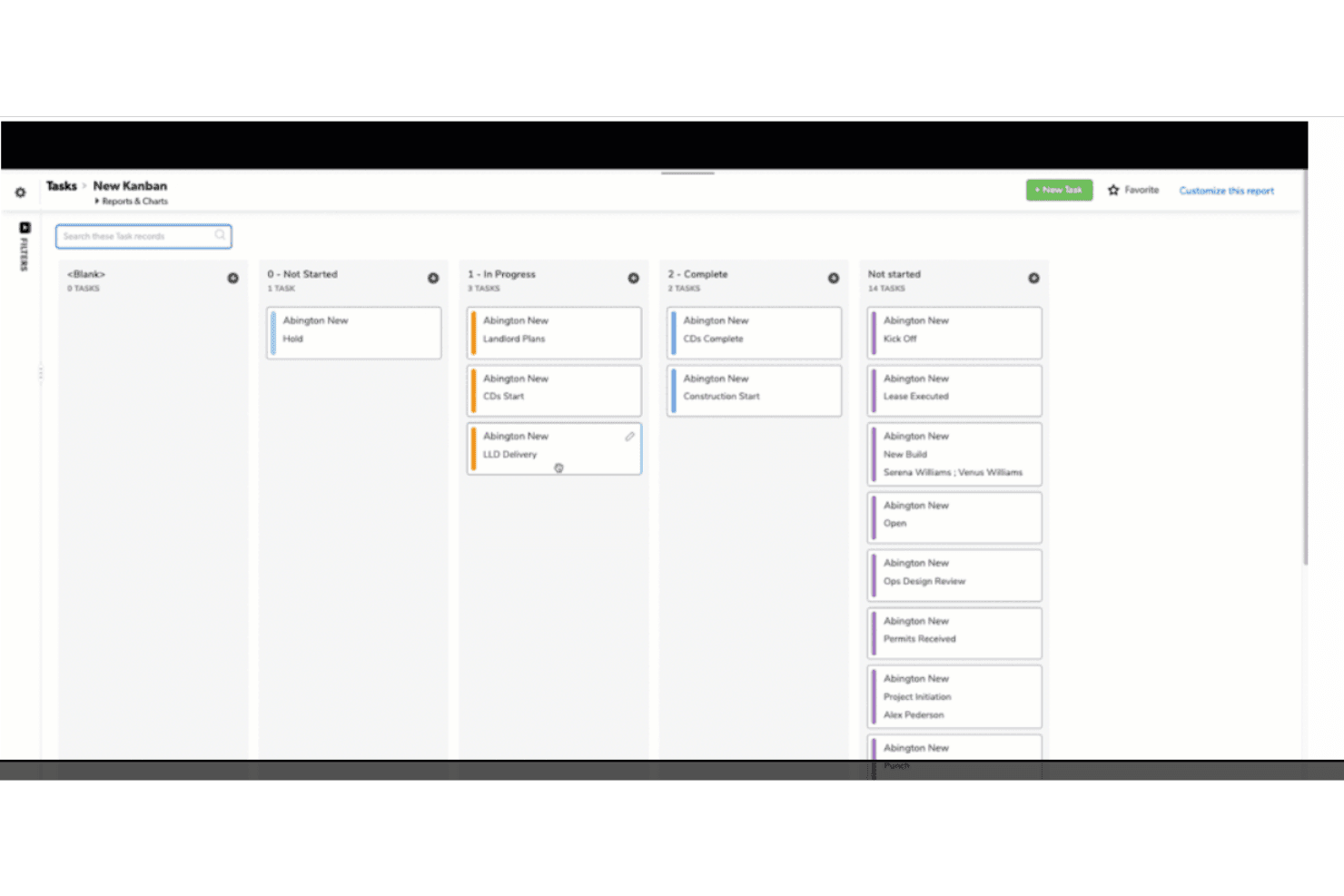
QuickBase's ability to manage, track, and allocate resources, orchestrate workflows, and administer compliance policies efficiently underscores its value proposition for no-code project management. Quickbase is a no-code application platform that lets teams build custom backlog management apps using configurable tables, forms, relationships, Kanban reports, and workflow automation.
Who Is Quickbase Best For?
Quickbase fits development team leads and operations-focused teams in regulated industries who need a highly customizable, governed backlog system they can build to match their exact process.
Why I Picked Quickbase
I picked Quickbase as one of the best because it lets you build a backlog system shaped around your actual process rather than adapting your process to fit a rigid tool. Using custom tables and relationship modelling, you can structure hierarchies like epics, stories, and tasks exactly as your team thinks about them. I also like that the Product Management Operations template gives you a real starting point for agile workflows without building from scratch.
Quickbase Key Features
- Quickbase Pipelines automation: A visual, drag-and-drop builder that chains triggers and actions across your backlog app and third-party tools to auto-assign records, update statuses, and sync data.
- Role-based access control: Permissions extend down to the field level, letting you control exactly what each stakeholder sees and edits within your backlog.
- Audit logs: Every change to a backlog record is captured and retained, with log history ranging from six months to three years depending on your plan.
- Jira channel integration: A prebuilt Pipelines channel connects Quickbase to Jira Cloud via API token, keeping backlog records in sync across both platforms.
Quickbase Integrations
Quickbase offers 40+ pre-built integration channels, including Jira Cloud, Salesforce, QuickBooks, Google Drive, Dropbox, SFTP, CSV, and Procore. Its RESTful APIs support custom connections, while Pipelines enables automated data syncing across apps.
Pros and Cons
Pros:
- Dashboards improve cross-functional backlog visibility
- Field-level permissions support governed backlog access
- Custom hierarchies model epics, stories, and tasks
Cons:
- Threaded comments and mentions require workarounds
- No native sprint, velocity, or capacity tracking
Learn more about Quickbase: Best for customizable request forms
- 14-day free trial
- Pricing upon request
Visit WebsiteCustomer Rating:4.3/5
Wrike offers a clear view of the product backlog with task prioritization features. Wrike is a work management platform that combines customizable backlog item types, dynamic request forms, sprint boards, workflow automation, and cross-team reporting to support product backlog management.
Who Is Wrike Best For?
Wrike is a strong fit for product managers at mid-size to enterprise companies who need to turn stakeholder, sales, and customer requests into structured backlog items without manual triage.
Why I Picked Wrike
I picked Wrike as one of the best because its dynamic request forms are genuinely unlike what most backlog tools offer. Conditional logic adjusts follow-up questions based on previous answers, then auto-routes submissions into the right folder, assigns a blueprint, and sets priority and status on creation. That means a sales request and a bug report can hit Wrike as fully structured, pre-triaged backlog items without any manual sorting.
Wrike Key Features
- Custom item types: Define your own agile backlog objects—bugs, epics, features, stories—each with unique fields, layouts, and automation rules.
- Scrum boards: Visualize and reprioritize backlog items using drag-and-drop Kanban and Scrum boards tied to your live project data.
- Workload and resource booking: Reserve team capacity by person or job role with effort estimates to support sprint capacity planning.
- Shareable dashboards and reports: Build customizable dashboards with scheduled report delivery that external stakeholders can access without a paid seat.
Wrike Integrations
Wrike offers 400+ integrations, including native GitHub sync and integrations with Jira, Slack, Microsoft Teams, and Google Workspace. Its REST API and Wrike Integrate support custom connections.
Pros and Cons
Pros:
- Dashboards give stakeholders shared backlog visibility
- Custom item types model epics and stories
- Conditional forms create structured backlog items
Cons:
- Advanced configuration demands substantial administration
- Native sprint semantics remain limited
 Best all-in-one, free product backlog tool
- Free plan available
- From $7/user/month (billed annually)
Visit WebsiteCustomer Rating:4.6/5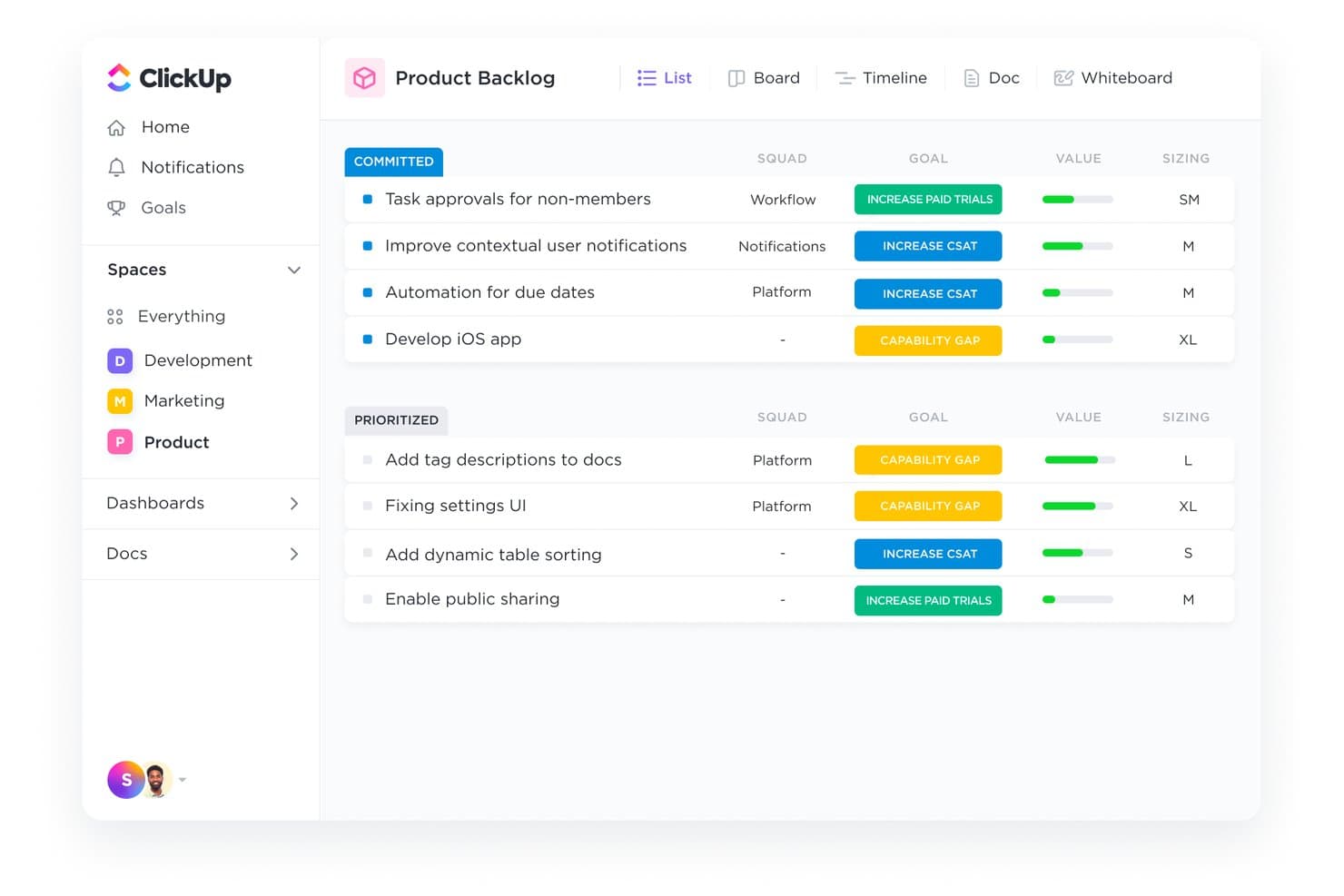
ClickUp organizes backlog items by priority, goal, and team squad. ClickUp is an all-in-one project management platform with purpose-built agile tools, including sprint planning, backlog management, Kanban boards, and velocity dashboards, all within a single customizable workspace.
Who Is ClickUp Best For?
ClickUp is a strong fit for agile product teams that want sprint planning, backlog management, and cross-functional collaboration in a single workspace without paying for multiple tools.
Why I Picked ClickUp
ClickUp earns its spot as one of the best on my shortlist because it's the rare free tool that doesn't cut corners on agile-specific backlog management. I love that Sprint Folders give you a dedicated backlog List alongside each sprint, so you're always pulling from a single source of truth rather than juggling disconnected lists. Burndown, burnup, and velocity dashboard cards make sprint health visible without needing a separate reporting tool.
ClickUp Key Features
- Custom priority flags: Assign one of four priority levels (Urgent, High, Normal, Low) to any backlog item, then sort and filter by priority across views.
- Workload view: See each team member's assigned sprint points or hours against their set capacity to catch overcommitment before a sprint starts.
- Native Forms for backlog intake: Build forms that automatically create backlog tasks from submitted responses, connecting feedback directly to your backlog.
- Customizable statuses: Define unique workflow statuses per Space, Folder, or List to match how your team actually moves work from idea to done.
ClickUp Integrations
ClickUp offers native integrations with GitHub, GitLab, Bitbucket, Zendesk, Intercom, Front, HubSpot, Figma, Slack, and Microsoft Teams. It also provides an API, webhooks, and Zapier connectivity for custom integrations.
Pros and Cons
Pros:
- Custom fields support RICE and WSJF scoring
- Capacity views support more realistic sprint commitments
- Sprint Folders connect backlogs with active sprints
Cons:
- Large workspaces may experience task-loading delays
- Backlog structure can confuse Jira-trained teams
Learn more about ClickUp: Best for dev-native backlog and Git-driven workflows
- Free plan available
- From $10/user/month (billed annually)
Visit WebsiteCustomer Rating:4.6/5
Linear organizes backlog items by team, assignee, and due date. Linear is a project and backlog management tool built around a developer-native issue model, offering sprint-style Cycles, Git-triggered workflow automations, customer feedback-to-backlog linking, and roadmap-level Initiatives.
Who Is Linear Best For?
Linear is a strong fit for product and engineering teams that want their backlog tightly coupled to Git activity and dev tooling.
Why I Picked Linear
Linear earns its spot on my shortlist because its backlog is genuinely built around how engineering teams work. I love that Git automations move issues through workflow stages automatically when a branch is created, a PR opens, or a merge lands, keeping the backlog accurate without manual updates. Customer Requests is another feature I find valuable: it links Intercom or Zendesk feedback directly to issues with revenue and tier context, so prioritization decisions have real customer signal behind them.
Linear Key Features
- Cycles: Linear's sprint planning feature lets you scope work into time-boxed iterations with burn-up graphs and automatic rollover of unfinished issues.
- Triage: A dedicated intake gate where issues are reviewed, accepted, duplicated, declined, or snoozed before entering the active backlog.
- Sub-issues: Issues support a parent-child hierarchy, letting you break large backlog items into granular tasks that inherit team, priority, and project settings.
- Linear Insights: Real-time analytics dashboards that track cycle time, lead time, issue age, and effort across teams, with CSV export and data warehouse sync.
Linear Integrations
Linear offers native integrations with GitHub, GitLab, Slack, Intercom, Zendesk, Microsoft Teams, and Sentry. It also provides a public GraphQL API, webhooks, and Zapier for custom connectivity.
Pros and Cons
Pros:
- Cycles expose rollover and effort trends
- Customer requests add revenue-based prioritization
- Git-driven status updates keep backlogs accurate
Cons:
- Opinionated cycles frustrate deadline-driven planning
- Reporting depth trails enterprise backlog platforms
Learn more about Linear: Best for dev-team backlog customization
- Free plan and 14-day free trial available
- From $3.67/user/month

Identify and log product issues with YouTrack in order to add them to your backlog with assigned priority for roadmap optimization. YouTrack by JetBrains is a backlog management and project tracking tool that combines agile boards, sprint planning, customizable workflows, a built-in knowledge base, and deep version control integrations into a single platform purpose-built for software development teams.
Who Is YouTrack Best For?
YouTrack is a strong fit for software development teams that need deep backlog customization, from custom fields and workflows to VCS integrations with GitHub, GitLab, and JetBrains IDEs.
Why I Picked YouTrack by JetBrains
I picked YouTrack because its backlog customization runs deeper than most tools I've worked with. Custom fields with conditional visibility and per-project task layouts mean your backlog structure can mirror exactly how your team thinks about work. I also love that the Workflow Constructor lets you write JavaScript rules to automate state transitions, so the board enforces your process rather than fighting it. The multi-level agile boards, where epics become swimlanes with nested stories, make sprint planning genuinely cleaner at scale.
YouTrack Key Features
- Voting with vote histogram: Teams and customers can vote on backlog issues, and a Vote Histogram app visualizes vote activity to inform prioritization decisions.
- AI Text-to-Issue transformation: YouTrack scans selected text for action items and converts them into backlog tasks in bulk using JetBrains AI.
- Helpdesk project integration: Support tickets submitted via email or web form live in the same system as dev tasks and can be linked or converted directly into backlog items.
- Cumulative flow diagrams: Built-in cumulative flow charts surface bottlenecks across your backlog so you can spot where work is getting stuck between stages.
YouTrack by JetBrains Integrations
YouTrack by JetBrains offers native integrations with JetBrains IDEs, TeamCity, GitHub, GitLab, Bitbucket Cloud, Slack, and Telegram. It also provides a REST API, Marketplace integrations, and imports from Jira, Asana, ClickUp, and monday.com.
Pros and Cons
Pros:
- Feedback converts directly into actionable backlog items
- Multi-level boards clarify epic-to-story relationships
- Deep backlog customization mirrors team processes
Cons:
- Reporting options offer limited customization depth
- Permission settings require careful administrative setup
Learn more about YouTrack by JetBrains:

Jira organizes sprint backlog items by epic, priority, and assignee. Jira is an agile project and backlog management platform that supports structured work-item hierarchies, customizable workflows, sprint and release planning, and cross-team dependency tracking across Scrum and Kanban setups.
Who Is Jira Best For?
Jira is a strong fit for agile product and engineering teams that need to manage structured backlogs across multiple squads, sprints, and release cycles at scale.
Why I Picked Jira
Jira earns its spot on my shortlist because no other tool matches its depth for managing backlogs across multiple squads at scale. I love how the work-item hierarchy, from subtasks up through stories, epics, and custom initiative levels, lets teams structure a program-level backlog without losing sprint-level detail. The capacity-aware Plans feature lets me model scenarios across teams before committing to a release, and the Release Hub flags open pull requests or broken builds tied to backlog items in real time.
Jira Key Features
- Customizable workflow builder: Define unique statuses, transitions, and rules per work type, so each team's process is reflected on the board.
- JQL filtering: Use Jira Query Language to build precise, saved searches across the backlog by any field, label, version, or assignee.
- Rovo AI work item breakdown: Automatically split a large epic or story into subtasks, with AI-generated summaries and descriptions added instantly.
- Forms for intake requests: Create structured intake forms so partner teams and stakeholders can submit work requests directly into the backlog.
Jira Integrations
Jira offers 3,000+ Marketplace integrations, plus native integrations with Confluence, Bitbucket, Figma, Slack, Google Workspace, GitHub, and GitLab. Its APIs support custom integrations and connect code, pull requests, and deployment status to work items.
Pros and Cons
Pros:
- Custom workflows reflect distinct delivery processes
- Capacity planning connects squads and releases
- Deep hierarchy preserves backlog context
Cons:
- Native prioritization scores require custom setup
- Configuration overwhelms smaller product teams
Learn more about Jira:
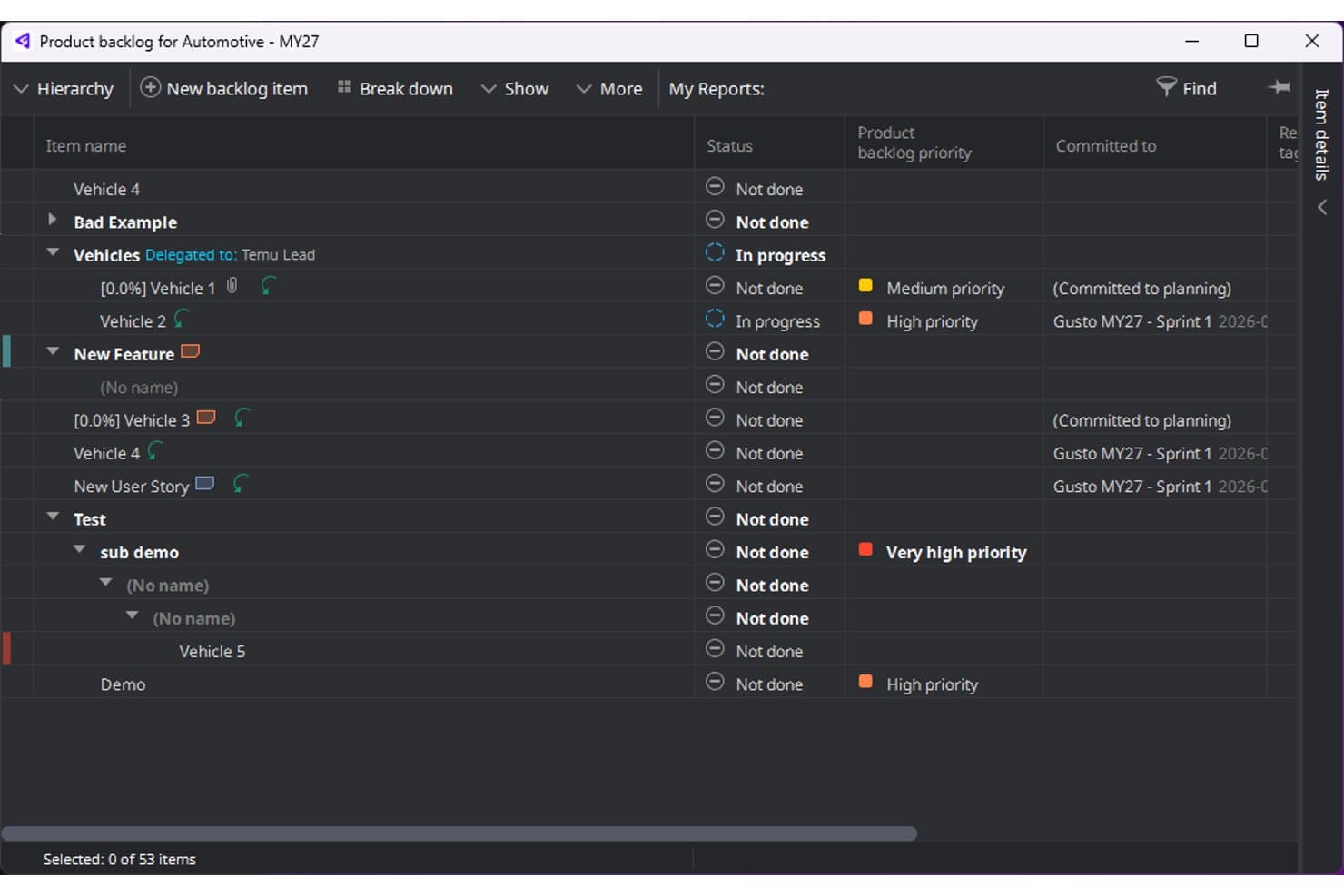
Hansoft Perforce organizes backlog items with priority levels and sprint assignments. Hansoft (now P4 Plan by Perforce) is an enterprise agile planning tool that combines a shared product backlog, sprint planning, capacity management, and multi-methodology support across Scrum, Kanban, Gantt, and Waterfall in a single platform.
Who Is Hansoft Best For?
Hansoft is a strong fit for enterprise product and engineering teams managing large, multi-team backlogs across mixed methodologies like Scrum, Kanban, and Waterfall in a single environment.
Why I Picked Hansoft Perforce
I picked Hansoft (now P4 Plan by Perforce) as one of the best because it's built specifically for the kind of capacity-aware sprint planning that large engineering orgs actually need. The 2026.3 Capacity Planning view shows per-user workload across weekly, monthly, or quarterly horizons with color-coded over/under-capacity cells, so you can spot overloaded team members before sprint kickoff. I also like that placeholder users let you model staffing scenarios against a live backlog before headcount is confirmed.
Hansoft Key Features
- Single shared backlog: A unified backlog spans all teams and projects, giving product owners a single ranked view of work across the entire organization.
- Multi-methodology support: Scrum, Kanban, Gantt, and Waterfall can run simultaneously within the same environment, so different teams don't need separate tools.
- Custom Boards: Drag-and-drop boards with configurable columns and status mappings let teams visualize workflow stages and sync changes back to the native client.
- Field-level permissions: Custom columns can be set as hidden or read-only per user or group, controlling exactly what each team member sees in the backlog.
Hansoft Perforce Integrations
Hansoft Perforce integrates with P4, Helix ALM, Slack, and Jira Cloud via webhooks. Its GraphQL API, SDK, and webhooks support custom integrations, while the P4 Plan MCP Server connects AI clients such as Claude and VS Code Copilot.
Pros and Cons
Pros:
- Accommodates Scrum, Kanban, and Waterfall planning
- Supports capacity-aware multi-team sprint planning
- Handles large backlogs with strong performance
Cons:
- Browser experience trails the desktop client
- Requires substantial configuration before broad adoption
Learn more about Hansoft Perforce: Best for AI-driven feedback-to-backlog prioritization
- 14-day free trial + free demo available
- From $24/user/month
Visit WebsiteCustomer Rating:4.4/5
Build, view, and organize your product backlog with our brand-new hierarchical table view Craft.io is an end-to-end product management platform that combines hierarchical backlog management, multi-framework prioritization (RICE, MoSCoW, custom formulas), AI-driven feedback analysis, roadmapping, and two-way dev tool sync across Jira, GitHub, GitLab, and Azure DevOps.
Who Is Craft.io Best For?
Craft.io is a strong fit for product managers and product owners at mid-size to enterprise companies who need one platform to connect strategy, backlog, and delivery.
Why I Picked Craft.io
Craft.io earns its spot on my shortlist because of how well its Guru AI bridges the gap between raw customer feedback and a structured, prioritized backlog. I love that it doesn't just collect feedback—it analyzes it across channels to surface trends, then lets me convert those insights directly into backlog items. Layered on top of that, built-in frameworks like RICE, MoSCoW, and a custom formula builder mean prioritization is driven by data, not gut feel.
Craft.io Key Features
- Hierarchical backlog structure: Organize work across Products, Epics, and Features with expand/collapse table views, custom fields, grouping, and sorting.
- Two-way dev tool sync: Connect backlogs directly to Jira, GitHub, GitLab, Azure DevOps, and Linear with bidirectional updates.
- Free contributor and viewer roles: Add unlimited stakeholders as Contributors or Viewers at no extra cost, keeping cross-team visibility open without per-seat charges.
- Capacity planning add-on: Model resource availability by team, role, or individual and run staffing simulations without affecting your live roadmap.
Craft.io Integrations
Craft.io offers native two-way integrations with Jira, Azure DevOps, GitHub, GitLab, Linear, and Pivotal Tracker, plus Figma, Miro, and Zendesk. It also supports a public REST API and Zapier; on-premise Jira and Azure DevOps connectors require Enterprise.
Pros and Cons
Pros:
- Hierarchical epics and features organize complex backlogs
- Multiple scoring frameworks support data-informed decisions
- AI converts feedback into prioritized backlog items
Cons:
- Key planning capabilities require separate add-ons
- Advanced workflows take time to learn
Learn more about Craft.io: Best for story mapping-led backlog planning
- 14-day free trial + free demo available
- From $9/user/month (billed annually)
Visit WebsiteCustomer Rating:4.4/5 Learn more about StoriesOnBoard:
Other Product Backlog Tools
Here are a few more tools that didn’t make the top list.
- 11TargetprocessBest for enterprise backlog and portfolio alignment
- 12Jira Service ManagementBest ITSM software with request management
- 13ProdPadBest for turning ideas into achievable objectives
- 14Microsoft PlannerBest for inexperienced teams
- 15Aha! RoadmapsBest for strategy-linked backlog prioritization
- 16GitLabBest for backlog planning tied to code and CI/CD
- 17monday devBest for customizable Agile workflows
- 18ShortcutBest for structured sprint-to-roadmap flow
- 19VisorBest for collaborating across time zones
- 20Azure DevOpsBest for Microsoft-stack dev team backlog planning
Related Product Management Software Reviews
If you still haven't found what you're looking for here, check out these other related tools that we've tested and evaluated:
- Best Product Management Tools
- Best Product Planning Software
- Best UX Design Tools
- Best Product Development Software
- Best Product Analytics Tools
- Best Idea Management Software
How I Evaluate Product Backlog Tools
My evaluation splits into three parts. Core functionality carries the most weight—I look for tools that let you create and organize backlog items and rank or score them clearly. Then I consider standout features like AI-assisted story writing, plus factors beyond features like onboarding support and pricing flexibility.
Core Functionality (Table Stakes For This List)
When I'm selecting tools for my list, I score each one on a scale from 0 (does not offer the functionality) to 5 (excels in this area) for each core functionality listed below. I then convert the total into a percentage to help assess each tool's overall fit, with extra weight on any functionalities I've deemed essential.
- Backlog Item Management (Essential): I check whether you can create structured items with custom fields, attachments, and hierarchies like epics, stories, and subtasks.
- Prioritization Capabilities (Essential): I look for scoring models, drag-and-drop ranking, or frameworks like RICE and MoSCoW that move beyond simple high/medium/low labels.
- Sprint or Release Planning: Planning tools should let you group items into sprints or releases with clear timelines, capacity tracking, and progress visibility.
- Status and Workflow Tracking: I evaluate how items move through stages and whether workflows are customizable to match how your team actually works.
- Collaboration and Commenting: Threaded comments, @mentions, and activity history on individual backlog items keep context where it belongs instead of buried in chat threads.
- Cross-Team Visibility: I look for shareable dashboards and permission controls that let stakeholders view backlog status without needing full edit access.
Once I have a list of tools that meet the criteria, I consider what sets each platform apart.
Differentiating Factors (What Sets Vendors Apart)
Here's how I compare and contrast different vendors:
Standout Features
I look for dependency mapping that shows cross-team blockers before a sprint starts—missing a upstream API dependency mid-sprint is a pain no one needs twice. Feedback-to-backlog linking matters just as much, since tools like Productboard and Aha! let you trace a backlog item back to the customer request that sparked it. I also evaluate capacity-aware sprint planning, checking whether the tool calculates velocity and flags overcommitment automatically rather than forcing manual math in a spreadsheet.
Beyond Features
I evaluate how well a tool scales across team structures, since a platform that works for one squad but breaks down at the portfolio level wastes migration effort later. Pricing flexibility matters just as much—per-seat models can quietly balloon costs when you add stakeholders who only need read access. I also check for native two-way sync with dev tools like Jira or GitHub, because backlog items that drift out of sync with engineering work create confusion fast.
How to Choose Product Backlog Tools
With so many different product backlog solutions available, it can be challenging to make decisions on what product backlog tool is going to be the best fit for your needs.
As you're shortlisting, trialing, and selecting product backlog tools, consider the following:
- What problem are you trying to solve? Start by identifying the product backlog feature gap you're trying to fill to clarify the features and functionality the product backlog tool needs to provide.
- Who will need to use it? To evaluate cost and requirements, consider who will be using the software and how many licenses you'll need. You'll need to evaluate if it'll just be the product management professionals, or the whole organization that will require access. When that's clear, it's worth considering if you're prioritizing ease of use for all, or speed for your product backlog tool power users.
- What other tools does it need to work with? Clarify what tools you're replacing, what tools are staying, and the tools you'll need to integrate with, such as accounting, CRM or HR software. You'll need to decide if the tools will need to integrate together, or alternatively, if you can replace multiple tools with one consolidated product backlog tool.
- What outcomes are important? Consider the result that the software needs to deliver to be considered a success. Consider what capability you want to gain, or what you want to improve, and how you will be measuring success. For example, an outcome could be the ability to get greater visibility into performance. You could compare product backlog features until you’re blue in the face, but if you aren’t thinking about the outcomes you want to drive, you could be wasting a lot of valuable time.
- How would it work within your organization? Consider the software selection alongside your workflows and delivery methodology. Evaluate what's working well, and the areas that are causing issues that need to be addressed. Remember every business is different — don’t assume that because a tool is popular that it'll work in your organization.
Trends in Product Backlog Tools
The landscape of product backlog tools is undergoing significant transformations, driven by evolving market demands and technological advancements. I have identified several trends that I believe will be key to helping businesses enhance their agility and efficiency in product development in the future.
Integration with AI and Machine Learning
Tools are increasingly leveraging AI to offer predictive analytics, automate task prioritization, and provide intelligent suggestions for sprint planning. This trend addresses the need for data-driven decision-making and efficiency in managing backlogs.
Enhanced Real-time Collaboration Features
The focus on improving real-time collaboration capabilities, including live editing and instant notifications, caters to the growing demand for remote and distributed team support, ensuring all team members stay aligned and informed.
Emphasis on User Feedback Loops
Another emerging trend involves novel features that facilitate direct integration of customer feedback into the product backlog. This functionality underscores the importance of user-centric product development and the need for tools that can swiftly adapt to user needs and market changes.
Don’t think of it as a pipeline where you’re trying to be efficient and getting things done as quickly as possible. Look at this as like a co-building experience with your customer.

Advanced Security and Access Controls
Tools are enhancing their security features and access control mechanisms in response to increasing anxiety around data privacy and security. These features ensure that sensitive project information remains protected while facilitating collaboration within designated teams and stakeholders.
Predictive Resource Management
Another significant trend focuses on leveraging AI to forecast resource allocation needs and identify potential bottlenecks before they occur. This feature allows teams to optimize their workload distribution and anticipate the need for additional resources, ensuring that projects remain on track and within budget.
These trends illustrate the dynamic evolution of product backlog tools, driven by the need to support more efficient, flexible, and user-centric product development processes. As the market continues to evolve, these insights can guide product management professionals in selecting tools that not only meet their current needs, but can also adapt to future challenges and opportunities.
What Are Product Backlog Tools?
Product backlog tools are platforms that support the creation, prioritization, and tracking of items in the backlog, helping product teams stay focused on delivering high-value features.
Key features of product backlog tools include user story creation, prioritization capabilities, collaboration features, integration with project management tools, and the ability to track progress and changes. Together, these features help product managers and teams maintain a dynamic and well-organized backlog that aligns with the overall product strategy.
Features of Product Backlog Tools
Product backlog tools can help teams prioritize, organize, and track the myriad of features, requirements, and user stories that make up a product's roadmap, making them indispensable to managing the product development process. It is therefore important to understand what specific features you need when searching for a product backlog tool. Aside from basic aspects such as a good user experience without a high learning curve or flexible customization options, here I outline the most important features to look for in such tools in order to streamline your software development workflows and enhance productivity.
- Customizable Prioritization Criteria
This feature allows teams to define and adjust their priorities based on specific criteria. It ensures that the team focuses on developing features that offer the highest value to the users and the business. - Flexible Organization Structures
Support for various organizational methods (e.g., themes, epics, and user stories) enables teams to structure their backlog in a way that best suits their project's complexity. It helps make the backlog more navigable and understandable. - Integration Capabilities
The ability to integrate with other tools, such as version control systems, CI/CD pipelines, and project management software, streamlines workflows and keeps all related information in sync. This feature is essential for maintaining a seamless development process. - Real-time Collaboration
This feature enables team members to work together and make updates in real-time. It’s vital for ensuring that everyone has access to the latest information, fostering better communication and collaboration across the team. - Visual Backlog Management
Tools that offer drag-and-drop interfaces and visual representations of the backlog make it easier to prioritize and move items around. This visual aspect is key for quickly understanding the state of the project and making informed decisions. - Reporting and Analytics
Provides insights into the progress of the project, including burn-down charts, velocity tracking, and release forecasts. These analytics are important for assessing the team's performance and planning future sprints accurately. - Access Control and Permissions
Allows for the management of who can view or edit various parts of the backlog. This feature is critical for protecting sensitive information and ensuring that only authorized personnel make changes. - Search and Filtering Options
The ability to quickly find specific items in the backlog saves time and improves efficiency. Especially in large projects, this feature becomes a necessity for managing the backlog effectively. - Scalability and Cloud Solutions
Scalability is essential for handling growing backlogs and evolving project needs. The tool should be capable of accommodating an expanding workload without performance issues. Cloud-based solutions are particularly recommended for their ability to scale efficiently, ensuring that teams can seamlessly adapt as the project or team size grows. - User Feedback Integration
This feature allows for direct linkage between user feedback and backlog items. It’s vital for ensuring that product development is aligned with user needs and expectations, making it easier to prioritize features that users are asking for.
By prioritizing these features in your selection process, you’ll be better equipped to choose a backlog tool that keeps your team productive, focused, and ready to adapt to the demands of any project.
Benefits of Product Backlog Tools
Product backlog tools offer a structured approach to managing the myriad of tasks that need attention during the product development process, prioritizing what needs to be done and ensuring that the entire product development team is aligned towards common goals. Here are five primary benefits of utilizing product backlog tools that both users and organizations can enjoy.
- Enhanced Team Collaboration: These tools facilitate seamless communication and collaboration among team members. By providing a central platform for all backlog items, they ensure that every team member is on the same page, leading to more efficient teamwork and reduced misunderstandings.
- Improved Prioritization and Focus: Product backlog tools help in clearly defining the priority of tasks, ensuring that the team focuses on work that delivers the most value. This strategic focus aids in driving the product forward in alignment with business goals and user needs.
- Greater Transparency Across the Organization: These tools promote transparency by offering a bird's-eye view of the project's progress. This transparency enables stakeholders to understand the current status and direction of the product development effort, fostering trust and alignment across the organization.
- Efficient Use of Resources: By enabling precise prioritization and planning, product backlog tools ensure that resources are allocated effectively. This efficiency not only saves time and money, but also maximizes the output of the development team.
- Continuous Improvement and Adaptability: These tools support Agile methodologies that encourage continuous feedback and iteration. This adaptability allows teams to quickly respond to changes in user needs or market dynamics, ensuring the product remains competitive and relevant.
By enhancing collaboration, improving focus, promoting transparency, optimizing resource use, and facilitating adaptability, these tools offer a solid foundation for any organization aiming to deliver successful products. Leveraging the right product backlog tool can transform the way teams work and significantly impact the success of a product in the competitive market.
Costs & Pricing for Product Backlog Tools
Selecting the right plan for a product backlog tool is a crucial step that can significantly influence the efficiency and effectiveness of your product development process. Product backlog tools generally offer various plan options to cater to different sizes of teams, project complexities, and budget constraints.
From free versions designed for small projects or startups to enterprise solutions that offer extensive features for large organizations, understanding the pricing and features of each plan will help you make an informed decision that aligns with your team's needs.
Plan Comparison Table for Product Backlog Tools
| Plan Type | Average Price | Common Features Included |
|---|---|---|
| Plan TypeBasic | Average Price$10 - $20/user/month | Common Features IncludedAccess to core backlog management features, basic reporting, limited integrations, and email support. |
| Plan TypeStandard | Average Price$20 - $50/user/month | Common Features IncludedEnhanced collaboration tools, more integrations, advanced reporting and analytics, and priority email support. |
| Plan TypePremium | Average Price$50 - $100/user/month | Common Features IncludedFull access to all features, including AI-driven insights, unlimited integrations, 24/7 support, and custom security options. |
| Plan TypeEnterprise | Average PriceCustom Pricing | Common Features IncludedCustomizable features, dedicated support, advanced security compliance, and training resources for large teams. |
| Plan TypeFree Option | Average Price$0 | Common Features IncludedBasic backlog management, limited users, and essential collaboration features. |
When choosing a plan, software buyers should consider the scale of their project, the size of their team, and the specific features they need to efficiently manage their product development process. It's also important to factor in future growth, as upgrading plans later can provide more features and support as your project and team expand.
Product Backlog Tools Frequently Asked Questions
If your team is considering working with a product backlog tool, you may have some questions before making the leap. Let’s take a look at some product backlog FAQs.
What are some key considerations for product backlog tools?
When we look at key features required by a product backlog tool, we determine whether the tool can be called a DEEP Agile project management tool. I will provide more details about the DEEP acronym below.
Detailed appropriately: Project backlog items have varying importance and take different places in the list accordingly. For example, the backlog software needs to allow for sprint planning where subtasks with closer due dates in the sprint run have more details, while those items whose deadlines are still far off don’t need to be prioritized and can move forward at a normal pace.
Estimated: A good product backlog tool should provide burndown charts and other tools that provide the product development team with the ability to visualize project progress, dependencies, due dates, labor, and the time required to accomplish the remaining tasks. Thus, the pivotal tracker is a must for a good product backlog tool.
Emergent: Within an Agile environment, things are always in a state of change, implying that the scrum board will also need to change with changing circumstances. This is why a good product backlog software should provide an emergent scrum tool that facilitates an Agile framework.
Prioritized: An effective scrum project management tool ensures that the items are prioritized on the task board based on how close they are to delivery. The subtasks prioritized are those that the product owner has given the go-ahead to implement. User stories and daily scrum or sprint retrospective feedback are also essential elements for determining the tasks that need to be higher in the task board.
How do you maintain a product backlog?
Anyone who wants to learn how to manage a product backlog needs to start by realizing the importance of selecting a professional software package that’s easy to use. After all, you are looking for product backlog tools to reduce the effort required to keep product development moving efficiently. Therefore, maintaining a product backlog starts with selecting a tool that automates processes.
In addition to getting the product backlog tool that does most of the work for you, you also need to start with an appropriate product vision, collaborate with other team members constantly, and arrange backlog grooming meetings to maintain the product backlog.
What is product backlog refinement?
Usually, the top priority tasks on a product backlog are those whose deadlines are closer. These tasks have more details than the tasks lower down on the priority list. As the tasks at the bottom come closer to their due dates, more details are added to these tasks. This process is known as product backlog refinement. Even the items higher up the list can also be revised anytime when circumstances change during the product life cycle.
Who does product backlog refinement?
The scrum team takes responsibility for product backlog refinement under the leadership of the product owner. At the scrum meeting, the product owner indicates the product backlog items that require refinement. The team discusses the items, and the product backlog is refined accordingly.
What is product backlog in scrum?
In scrum, the product backlog features the most important tasks at the top and the least important tasks at the bottom. Tasks are completed by iteration, and new tasks are tackled as the development team has the capacity to complete them.
What are the best practices for backlog management?
Balancing priorities as a product manager isn’t easy—I’ve learned that the hard way. I’ve spent hours untangling messy backlogs,Managing your product backlog effectively is essential for keeping your team aligned and your priorities on track. Based on experience and insights from top backlog tools, here are some best practices for backlog management:
Prioritize ruthlessly: Not everything can be a priority. Use frameworks like MoSCoW (Must-Have, Should-Have, Could-Have, Won’t-Have) or weighted scoring models to decide what matters most. Check out this guide for three examples of backlogs done right.
Keep it lean: A cluttered backlog slows everything down. Regularly review and prune items that are outdated, irrelevant, or no longer align with your product goals.
Make it collaborative: Your backlog isn’t just for you—it’s a tool for your entire team. Involve stakeholders, developers, and designers in refining and estimating backlog items to ensure alignment.
Use clear and actionable user stories: Each item in your backlog should have a clear goal and value. Writing user stories in a structured format (e.g., “As a [user], I want [feature] so that [benefit]”) helps keep the focus on outcomes.
Leverage the right tools: Backlog management is infinitely easier with the right tool. Platforms like Jira, Monday.com, or Trello provide powerful features for prioritization, collaboration, and tracking. Check out this guide to find tools tailored for product management.
Set realistic timelines: Backlogs can balloon if deadlines aren’t set and enforced. Use sprint planning or time-boxing to keep work manageable and moving forward.
Keep it transparent: Your team needs to understand the “why” behind the priorities. Keep your backlog visible and explain how items align with your product strategy and goals.
By following these practices and investing in a tool that fits your workflow, you’ll spend less time firefighting and more time delivering value.
What is the difference between a product backlog and a sprint backlog?
A product backlog is a prioritized list of everything that could be worked on to improve or build the product, including features, fixes, and improvements. The sprint backlog, on the other hand, is a smaller list pulled from the product backlog. It includes the specific tasks and goals the team plans to complete during the current sprint. The sprint backlog is more focused and helps the team stay on track with what they can realistically deliver within a sprint.