

The best product lifecycle management (PLM) software helps you centralize product data, track changes, and coordinate cross-functional teams from concept to end-of-life. Without a reliable PLM system, it’s easy to lose version control, duplicate efforts, or miss critical updates—especially when engineering, design, and supply chain teams work in different tools.
I’ve evaluated 30+ PLM platforms and know how hard it is to find one that supports complex workflows without overwhelming users. In this guide, I’ve selected tools that help you standardize documentation, accelerate product development, and reduce costly errors across the lifecycle.
What is PLM software?
Product lifecycle management (PLM) software is a tool that helps product teams, engineers, and manufacturers manage all product-related data, processes, and collaboration across the entire product lifecycle—from design to retirement. It is used to centralize documentation, track revisions, manage the Bill of Materials (BOM), and streamline cross-functional workflows. PLM software addresses challenges such as version control issues, disconnected teams, and delays in bringing products to market by providing a single source of truth for product development.
Why Trust Our Software Recommendations
6,700+
Reviews
20
Industry experts
16+
Evaluation factors
14
Years
Our team has been testing and reviewing software since 2012. As product managers ourselves, we know how difficult—and important—it is to choose the right software.
For this guide, we evaluated tools using hands-on testing and independent research, scoring tools using our selection criteria.
Our reviews reflect our human editorial judgment, not a sales pitch.
Expert reviewers:
- Andrew LumbySenior TPM
- Cristiano ValimSenior UI/UX Lead


PLM Software Comparison Table
The table below compares key details for my top PLM software selections.
| Tool | Best For | Trial Info | Price | ||
|---|---|---|---|---|---|
| 1 | Best product lifecycle dashboards & data visualizations | Free plan + 14-day free trial available | From $10/user/month (billed annually) | Website | |
| 2 | Best with integrated supply chain risk scoring | Free trial available | Pricing upon request | Website | |
| 3 | Best for Salesforce-connected product teams | Free demo available | Pricing upon request | Website | |
| 4 | Best for flexible BOM management | Free plan available | From $75/seat/month (billed annually) | Website | |
| 5 | Best for large-scale enterprise PLM needs | 30-day free trial | Pricing upon request | Website | |
| 6 | Best for Oracle ERP-connected PLM and AI sourcing | Free demo available | Pricing upon request | Website | |
| 7 | Best for model-based enterprise product lifecycle | Free demo available | Pricing upon request | Website | |
| 8 | Best for discrete & regulated manufacturing | Free demo available | Pricing upon request | Website | |
| 9 | Best for customizable digital thread PLM | Free plan available | Pricing upon request | Website | |
| 10 | Best for scaling SMB manufacturers | Free demo available | From $93/user/month (billed annually) | Website |


Overviews Of The Top PLM Software
Here’s a brief description of each of the PLM software tools that are featured on my top list. I’ve added screenshots of each platform’s user interface as well as notes on its best use case and overall functionality.
 Best product lifecycle dashboards & data visualizations
- Free plan + 14-day free trial available
- From $10/user/month (billed annually)
Visit WebsiteCustomer Rating:4.3/5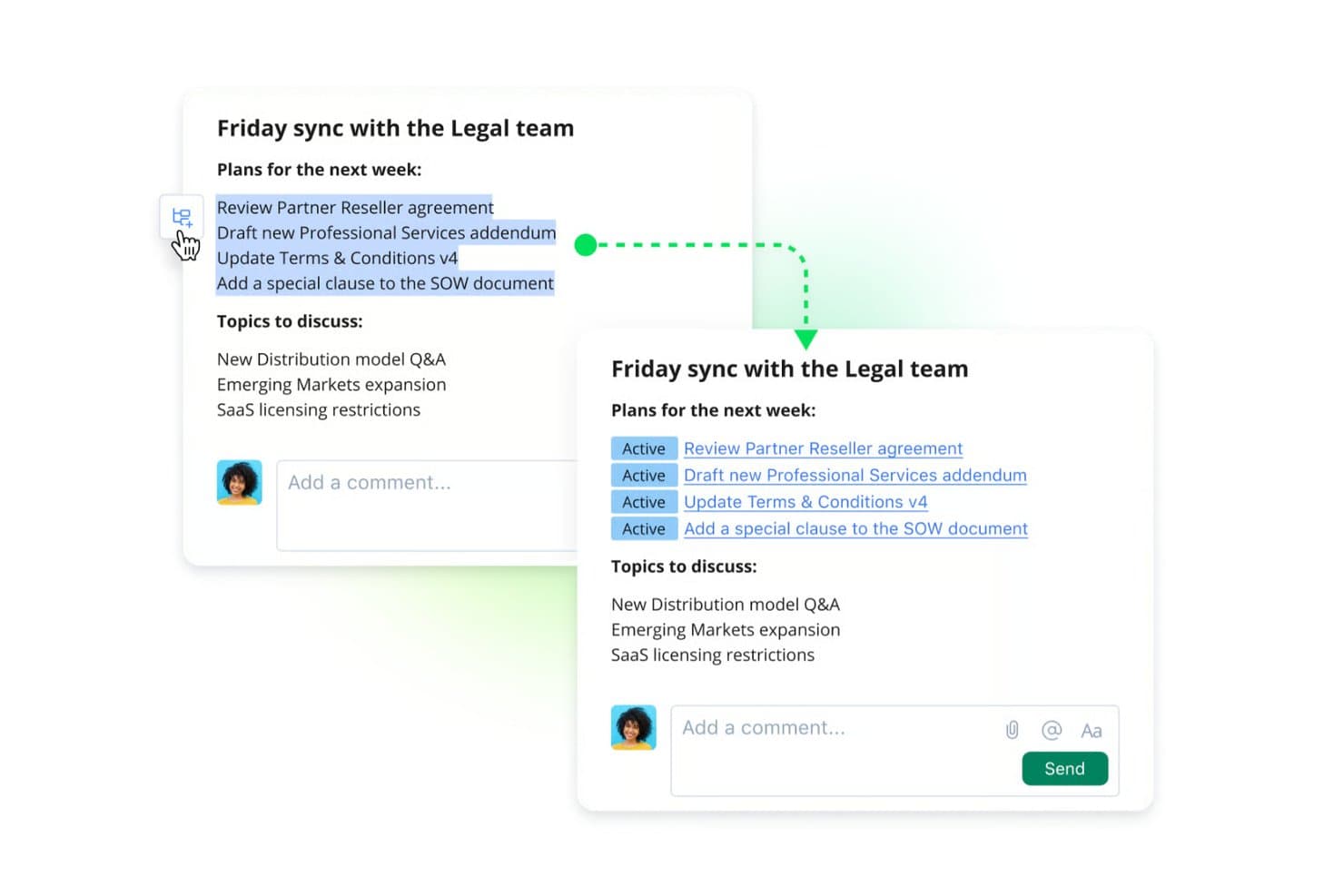
Wrike converts meeting notes into active, trackable tasks instantly. Wrike is a work management platform that combines project planning, cross-functional collaboration, configurable workflows, and visual reporting to support product teams managing complex, multi-stage product lifecycles.
Who Is Wrike Best For?
Wrike is a strong fit for cross-functional product teams that need to visualize lifecycle progress, manage phase-gate approvals, and coordinate launch activities across multiple departments.
Why I Picked Wrike
Wrike earns its spot on my shortlist because of how well it turns lifecycle data into something your whole team can actually act on. I love that you can build custom dashboards that surface phase-gate status, launch readiness, and cross-functional blockers all in one view. Wrike's configurable workflows also let you model stage-gate and NPI processes with approval gates and reusable blueprints, which is exactly what product teams need when coordinating engineering change requests or launch reviews.
Wrike Key Features
- Gantt chart timeline view: Visualize task dependencies, milestones, and phase sequences across the full product lifecycle in an interactive timeline.
- Stage-gate and NPI process modeling: Configure phase-gate workflows, approval gates, and reusable blueprints to run new product introduction, engineering change, and launch readiness processes.
- Resource management: Allocate team capacity across projects and track workload distribution to prevent bottlenecks during high-demand launch phases.
- Cross-tagging: Link tasks to multiple projects simultaneously so work items appear in every relevant team's view without duplication.
Wrike Integrations
Wrike offers 400+ prebuilt connectors, including Jira, GitHub, GitLab, Bitbucket, and Salesforce. Its API supports custom integrations for product development, engineering, and launch workflows.
Pros and Cons
Pros:
- Cross-tagging connects work across product teams
- Stage-gate workflows support NPI approvals
- Product lifecycle dashboards clarify phase-gate status
Cons:
- Project views can feel fragmented at scale
- Doesn’t replace CAD and BOM control
 Best with integrated supply chain risk scoring
- Free trial available
- Pricing upon request
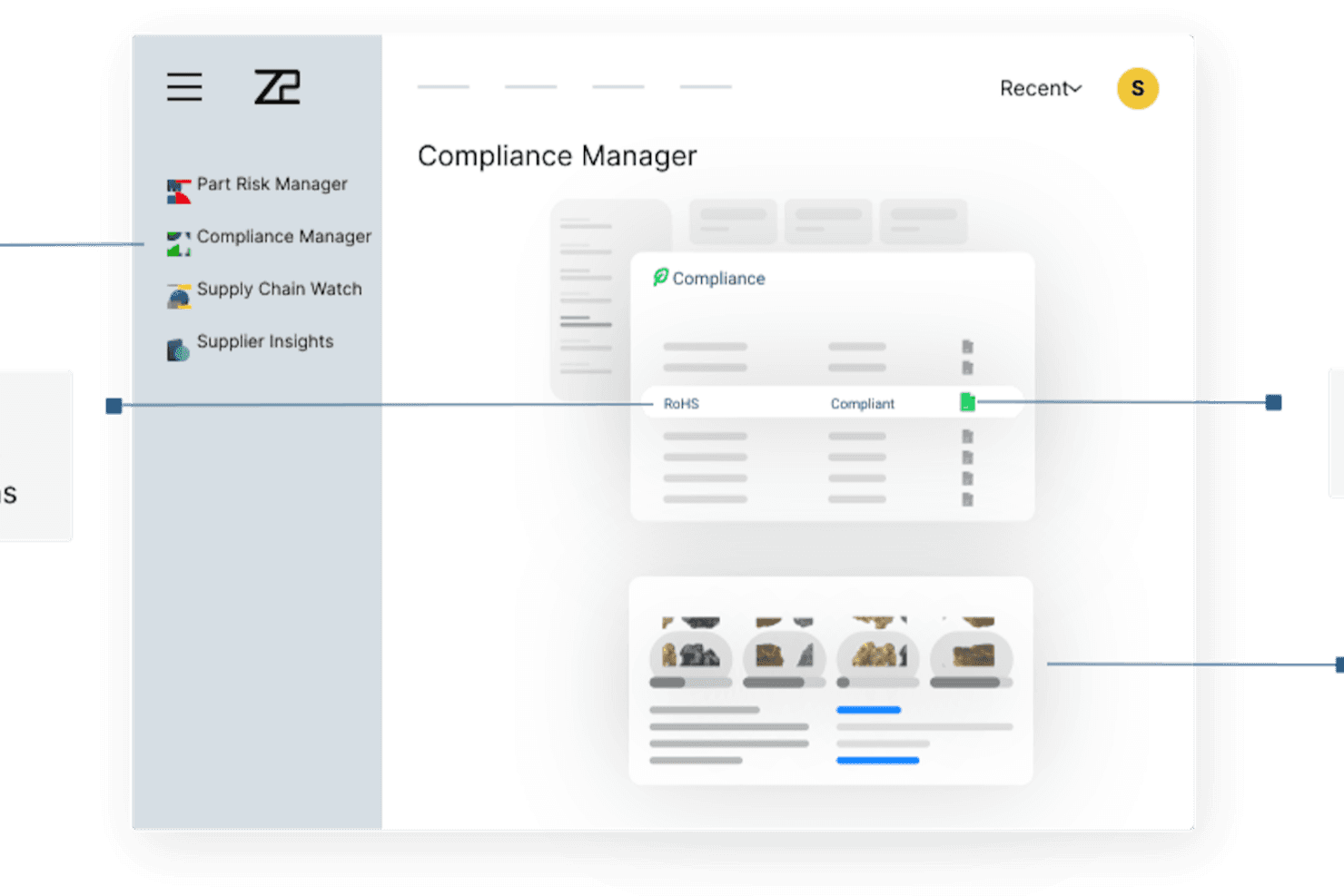
Z2Data’s compliance management dashboard centralizes regulatory tracking, supplier insights, and part risk monitoring to support end-to-end product lifecycle management. Z2Data is a component intelligence and supply chain risk platform that monitors BOMs for part lifecycle status, regulatory compliance across 270+ regulations, and supplier risk across up to four tiers of your supply network.
Who Is Z2Data Best For?
Z2Data suits supply chain managers and compliance engineers in electronics-heavy industries like aerospace, medical devices, and automotive who need real-time component risk visibility across multi-tier supplier networks.
Why I Picked Z2Data
Z2Data earns its spot on my shortlist because its integrated supply chain risk scoring gives PLM workflows something most dedicated PLM tools don't natively offer. I particularly like how Supply Chain Watch maps supplier networks up to four tiers deep and surfaces disruption alerts up to two weeks earlier than competing tools. On the compliance side, Compliance Manager checks parts against 270+ regulations, including RoHS, REACH, and PFAS, and produces audit-ready reports from day one.
Z2Data Key Features
- Part Risk Manager: Scores every component across six risk factors and forecasts end-of-life up to 36 months ahead.
- AI-powered alternate part finder: Identifies compliant replacement components from a database of over one billion electronic parts.
- BOM revision sync: Pulls live BOM updates from your connected PLM or ERP so risk monitoring reflects each design change automatically.
- Executive risk dashboards: Translates part, supplier, and compliance risk data into revenue-at-risk figures for leadership reporting.
Z2Data Integrations
Z2Data supports live BOM connections from external PLM and ERP platforms, but specific vendors aren’t named. Native integrations are not clearly documented, and public API details aren’t confirmed.
Pros and Cons
Pros:
- Maps sub-tier suppliers across four network levels
- Checks parts against 270-plus compliance regulations
- Scores component lifecycle risk up to 36 months
Cons:
- Lacks change orders and multi-level BOM authoring
- Doesn’t manage CAD files or product documents
Learn more about Z2Data: Best for Salesforce-connected product teams
- Free demo available
- Pricing upon request
Visit WebsiteCustomer Rating:4.5/5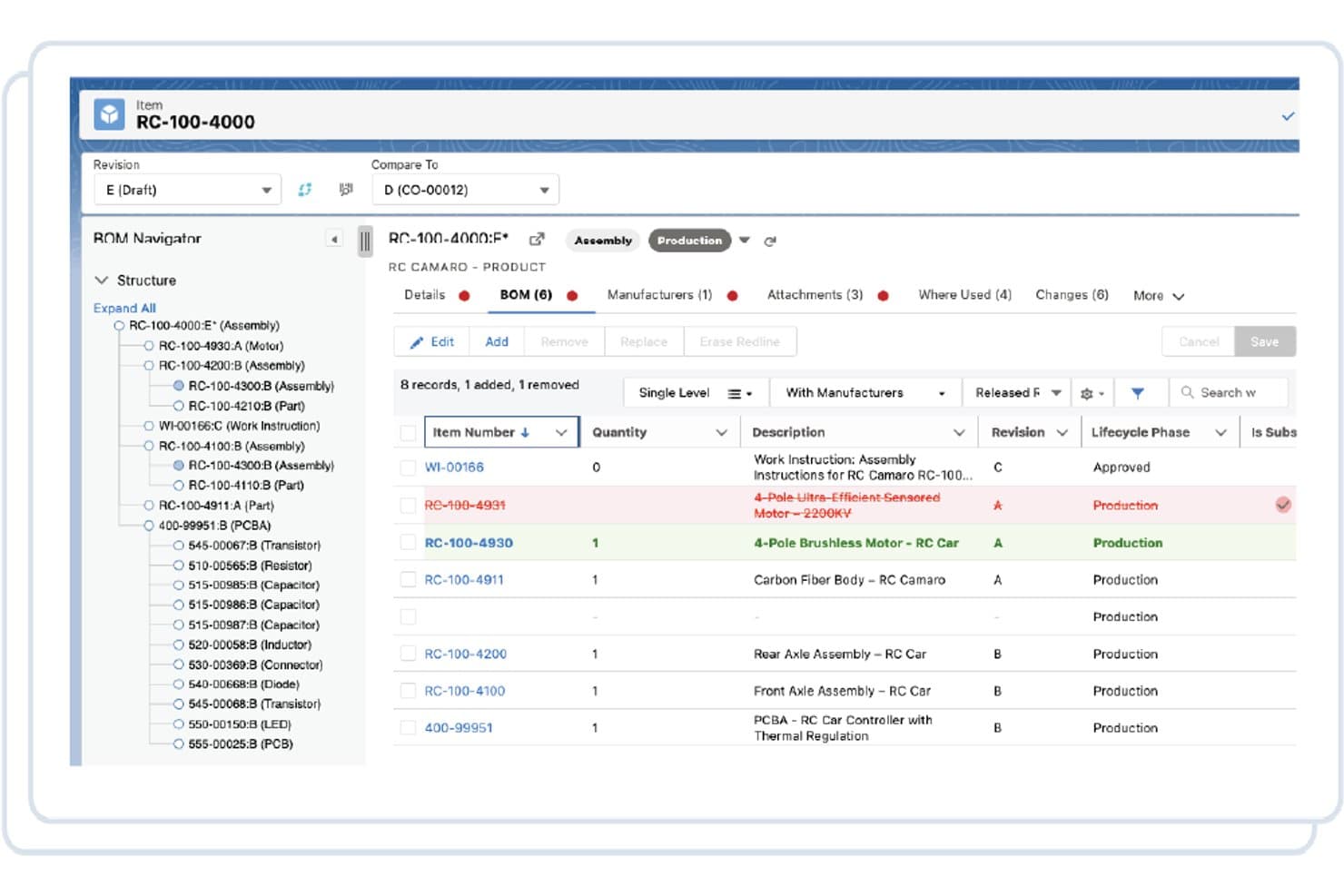
Propel lets users compare BOM revisions and track component changes. Propel is a Salesforce-native PLM platform that combines product lifecycle management, quality management, and product information management in a single unified system, with tools for BOM management, change control, CAD integration, and supplier collaboration.
Who Is Propel Best For?
Propel is a strong fit for product and engineering teams already running on Salesforce who want PLM, QMS, and PIM in one place.
Why I Picked Propel
Propel earns its spot on my shortlist because it's built natively on Salesforce, meaning your product, quality, and sales data live in one connected system without custom middleware. I love how its Unified Product Thread links BOM management, ECO workflows, and QMS processes so a change in engineering automatically surfaces across affected parts, suppliers, and customers. Propel One AI makes change impact analysis genuinely faster, pulling from BOM, Where Used, and in-service asset data to flag costs and affected customers before anyone approves a thing.
Propel Key Features
- Supplier Community: A permissioned, branded workspace where suppliers can access relevant BOM and AML/AVL data without needing a full PLM license.
- QMS module: Built-in quality management covering NCMR, CAPA, SCAR, complaint handling, audit management, and digital FDA MedWatch submissions.
- Design Hub: A CAD integration layer that syncs parts, BOMs, files, and AMLs from major MCAD, ECAD, and PDM tools directly into Propel.
- Low-code builder: A drag-and-drop, no-code configuration tool included with every license for customizing workflows and data models without developer support.
Propel Integrations
Propel offers documented integrations with Salesforce, SOLIDWORKS, Onshape, Creo, Inventor, AutoCAD, NX, CATIA, Windchill, Autodesk Vault, Teamcenter, and SiliconExpert. It also supports APIs and partner connectors for custom integrations.
Pros and Cons
Pros:
- Supplier workflows include audit trails
- AI-assisted ECO impact analysis
- Unified PLM, QMS, and PIM data
Cons:
- Search and processing can feel slow
- Heavy customization can complicate upgrades
Learn more about Propel: Best for flexible BOM management
- Free plan available
- From $75/seat/month (billed annually)
Visit WebsiteCustomer Rating:4.2/5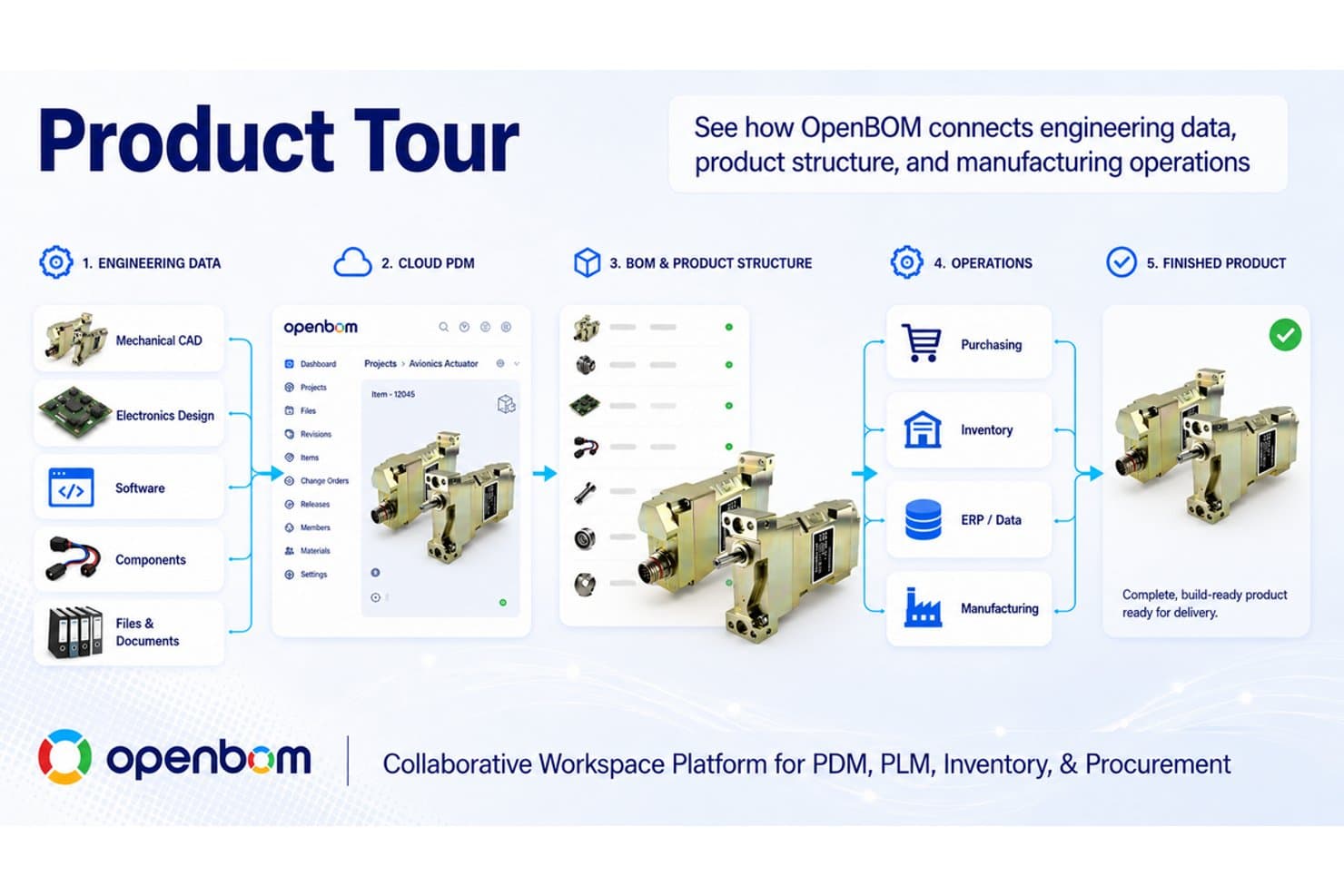
OpenBOM connects engineering data to manufacturing via a unified PLM workflow. OpenBOM is a cloud-native PLM and BOM management platform that combines multi-level BOM creation, CAD integration, cloud PDM, engineering change orders, and procurement and inventory tracking in one shared workspace.
Who Is OpenBOM Best For?
OpenBOM fits small to mid-sized engineering and product teams that need BOM management, CAD integration, and procurement tracking without the overhead of traditional enterprise PLM.
Why I Picked OpenBOM
OpenBOM earns its spot on my shortlist because of how it handles BOM flexibility across the full product lifecycle. I love that you can maintain an EBOM and MBOM in the same workspace, then resolve configured BOMs by date, serial number, or configuration without switching tools. In practice, that means engineering and procurement are always working from the same product structure, which I've seen prevent costly misalignments during handoffs.
OpenBOM Key Features
- CAD integration: Connects with a wide range of MCAD and ECAD tools, including SOLIDWORKS, Fusion 360, Onshape, Creo, NX, Altium, and KiCAD, syncing metadata through releases.
- Real-time BOM co-editing: Multiple team members can edit BOMs simultaneously, similar to working in Google Sheets.
- Procurement and inventory tracking: Includes part catalogs, inventory control, RFQs, and purchase orders within the same workspace as your BOM.
- Engineering change order (ECO) workflows: Lets teams manage revisions, route approvals, and track changes directly inside the product structure.
OpenBOM Integrations
OpenBOM offers documented integrations with SOLIDWORKS, Onshape, Fusion 360, Inventor, Solid Edge, Siemens NX, PTC Creo, CATIA, Altium, and KiCAD. It also supports ERP connections and custom integrations through its REST API.
Pros and Cons
Pros:
- Procurement and inventory share product context
- Real-time cross-functional BOM collaboration
- Flexible EBOM and MBOM structures
Cons:
- Compliance and requirements management remain limited
- Large BOMs can become slow
Learn more about OpenBOM: Best for large-scale enterprise PLM needs
- 30-day free trial
- Pricing upon request
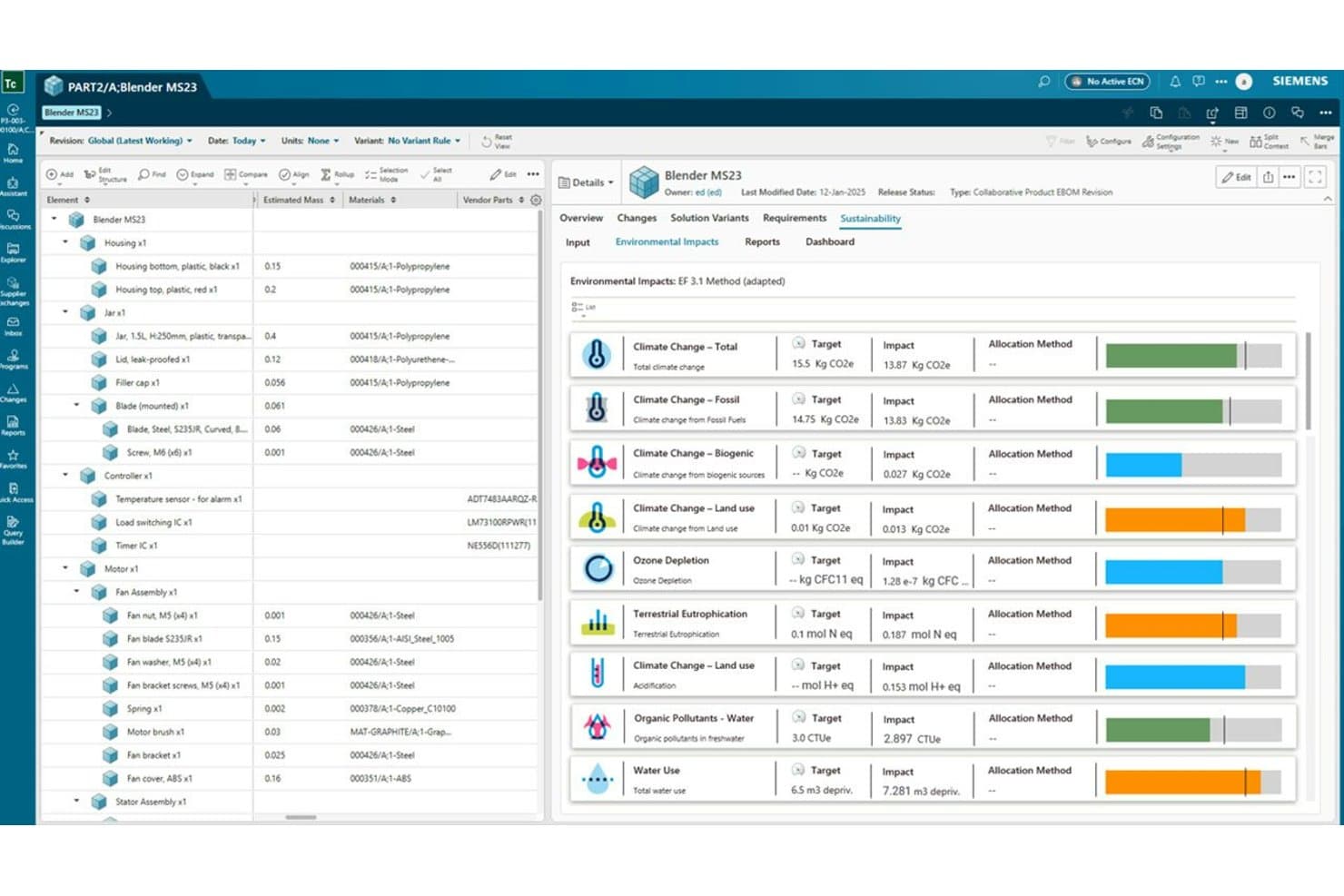
Siemens Teamcenter tracks environmental impacts across a product's full lifecycle. Siemens Teamcenter is a PLM platform that manages product data, multi-discipline BOMs, engineering change workflows, CAD integrations, and digital thread connectivity across the full product lifecycle.
Who Is Siemens Teamcenter Best For?
Teamcenter is built for large enterprises managing complex, multi-discipline product development across engineering, manufacturing, and service teams.
Why I Picked Siemens Teamcenter
Siemens Teamcenter earns its spot as one of the best on my shortlist because no other PLM platform matches its depth across the full product lifecycle at enterprise scale. I'm particularly impressed by its synchronized eBOM, MBOM, and bill of process management, which lets large, multi-site teams track a single structure from engineering through manufacturing without reconciling separate systems. Teamcenter Copilot's agentic AI can run impact analysis and trigger multi-step change workflows across variants and domains, which is genuinely useful when you're managing complex engineering changes across hundreds of configurations.
Siemens Teamcenter Key Features
- Multi-CAD data management: Connects NX, SolidWorks, Creo, Inventor, and AutoCAD to a single product data repository with check-in/check-out and where-used tracking.
- Requirements traceability: Lets you create, link, and grade requirements against INCOSE standards, with AI-generated test cases for standards like ISO 26262.
- Variant and configuration management: Uses the Teamcenter Product Configurator to build and validate 150% BOMs, including clearance analysis across configurations.
- Digital thread connectivity: Links requirements, CAD, BOM, manufacturing, quality, and service data across the full product lifecycle in one connected structure.
Siemens Teamcenter Integrations
Siemens Teamcenter has native integrations with NX, Solid Edge, SolidWorks, Creo, Inventor, AutoCAD, PADS, and Altium Designer. It also connects with Makersite and ERP systems through enterprise integration capabilities.
Pros and Cons
Pros:
- Automates variant analysis and change workflows
- Supports multi-discipline product data traceability
- Connects eBOM, MBOM, and BOP structures
Cons:
- Large datasets can produce slow performance
- Complex interface slows new user adoption
Learn more about Siemens Teamcenter: Best for Oracle ERP-connected PLM and AI sourcing
- Free demo available
- Pricing upon request
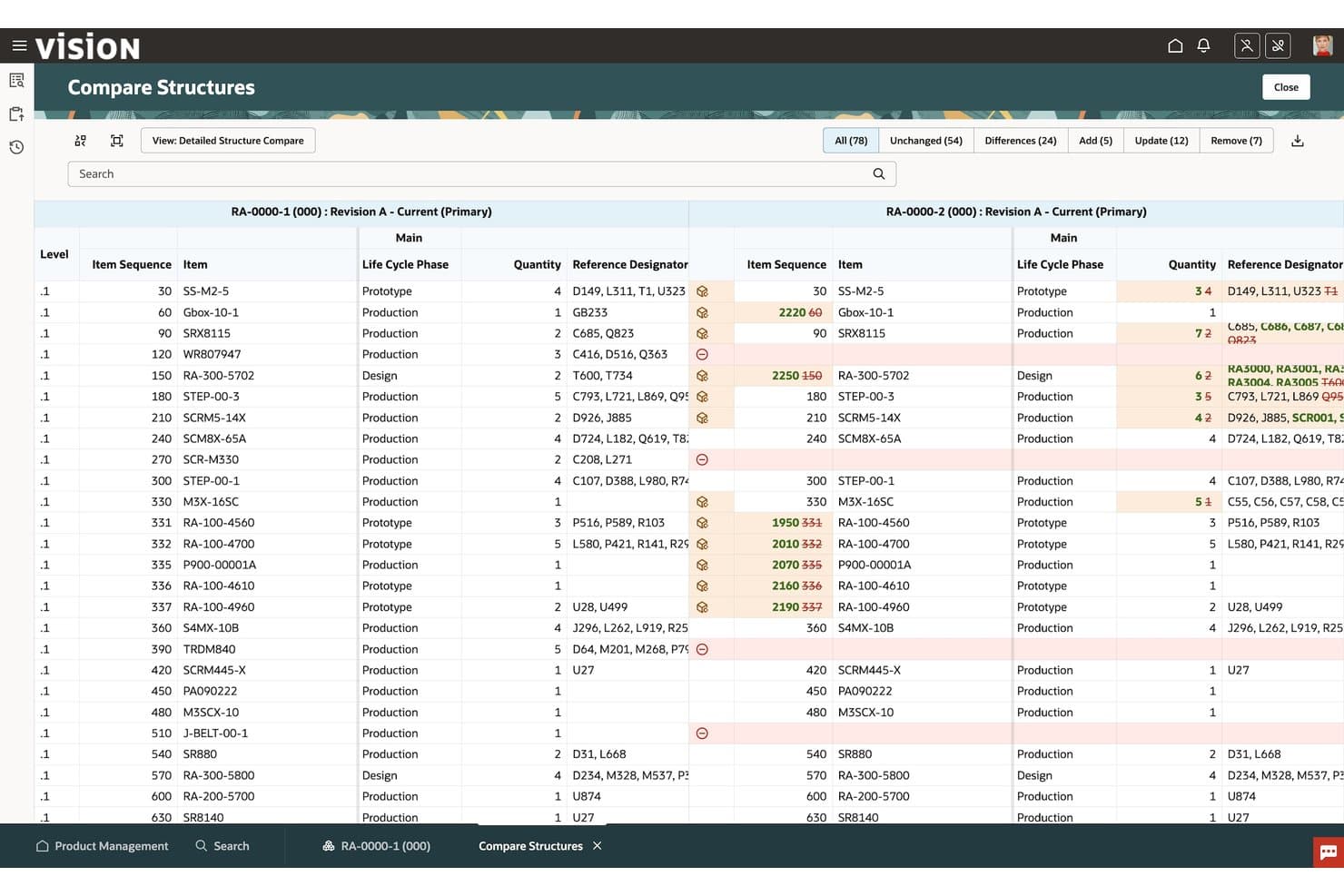
Oracle Fusion Cloud lets users compare BOM structures side by side. Oracle Fusion Cloud is a PLM platform that manages product data, BOMs, engineering change orders, quality workflows, variant configuration, and supplier collaboration within the same suite as Oracle's ERP and SCM applications.
Who Is Oracle Fusion Cloud Best For?
Oracle Fusion Cloud PLM is the right fit for enterprise teams already running Oracle ERP or SCM who want product data, change orders, and sourcing workflows in one connected system.
Why I Picked Oracle Fusion Cloud
Oracle Fusion Cloud earns its spot on my shortlist because it's the only PLM option here that shares a native data model with Oracle ERP and SCM, so your product records, BOMs, and change orders flow directly into procurement and manufacturing without any middleware. I particularly like the embedded AI tools, especially the Component Replacement Assistant, which flags affected items and surfaces replacement parts the moment a component changes on an ECO. The Product Regulations Compliance Advisor also catches BOM-level compliance risks before launch, which is genuinely useful when you're managing complex, multi-level product structures at enterprise scale.
Oracle Fusion Cloud Key Features
- Innovation Management: Captures, prioritizes, and traces product requirements from initial concept through design to keep engineering decisions connected to customer needs.
- Closed-loop quality management: Links quality issues, corrective actions, and controlled documents directly to product records within the same platform.
- Advanced configuration modeling: Builds configurable product models with guided selling questions, predefined templates, and simulation testing before release.
- Supplier portal access: Gives suppliers role-based visibility into items, change orders, and problem reports through a dedicated portal with ACL-based permissions.
Oracle Fusion Cloud Integrations
Oracle Fusion Cloud PLM has native integrations with Oracle Fusion Cloud ERP, SCM, CX, Sales, and Oracle Analytics through a shared data model. It also supports REST and SOAP APIs, FBDI imports, and supplier connectivity through Oracle Supplier Portal.
Pros and Cons
Pros:
- Quality workflows preserve product traceability
- Multi-level BOM impact analysis supports change decisions
- Embedded AI flags replacement and compliance risks
Cons:
- Complex role and data setup slows adoption
- Native multi-CAD connectors remain limited
Learn more about Oracle Fusion Cloud: Best for model-based enterprise product lifecycle
- Free demo available
- Pricing upon request
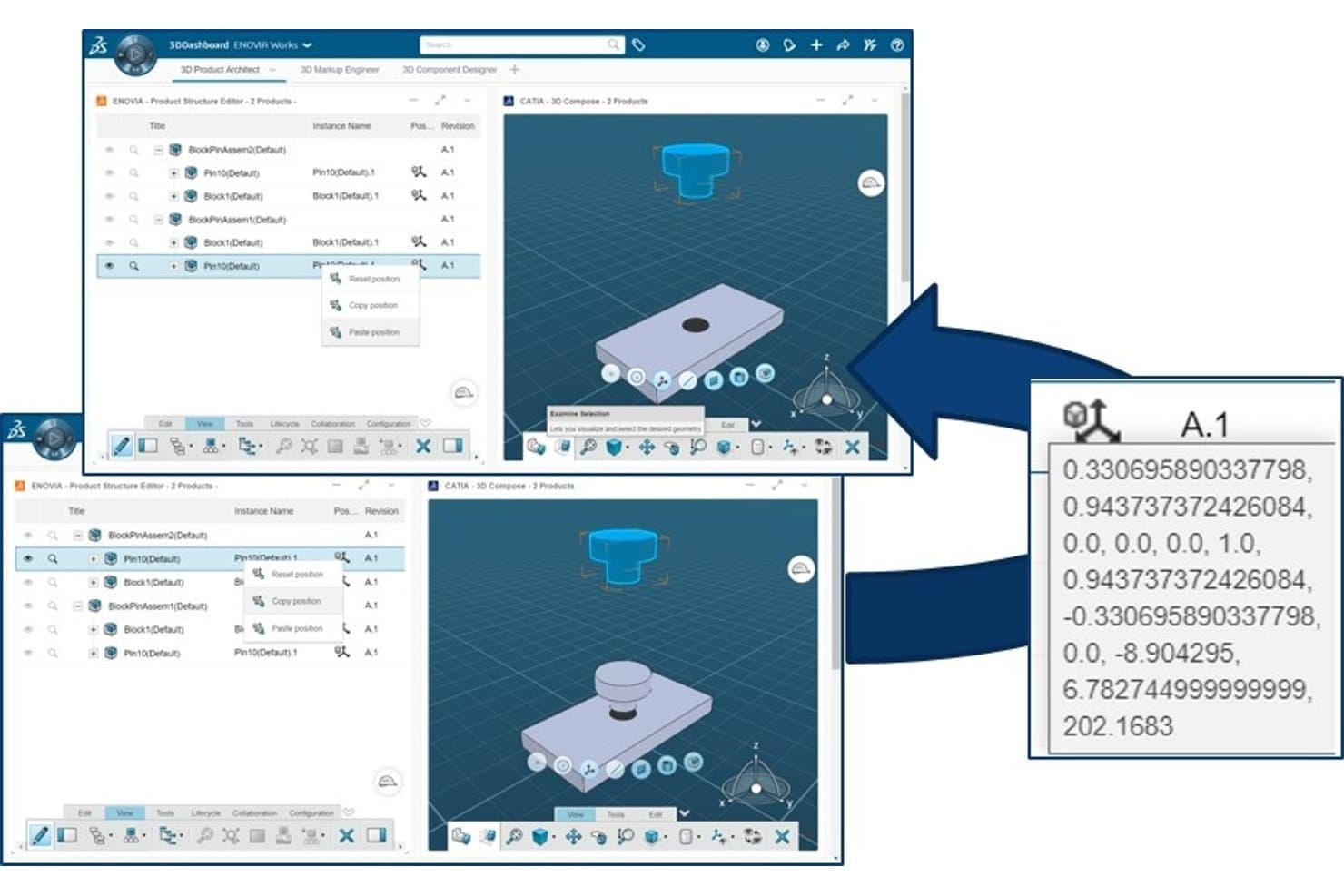
Dassault ENOVIA lets users manage and reposition 3D assembly components with precision. Dassault ENOVIA is an enterprise PLM platform built on the 3DEXPERIENCE environment that covers product data management, BOM management, change management, CAD integration, configuration management, and cross-functional collaboration.
Who Is Dassault ENOVIA Best For?
ENOVIA is a strong fit for engineering-led enterprises in aerospace, automotive, and industrial manufacturing that need deep CAD integration and configuration management at scale.
Why I Picked Dassault ENOVIA
ENOVIA earns its spot on my shortlist because it's built specifically for model-based enterprise product lifecycle management, where a single source of truth across engineering, configuration, and change data isn't optional. I'm particularly drawn to its "Change Intelligence" role, which gives teams live, 360° analytics on open change orders rather than static reports. Its Configuration Management capability also lets product teams govern complex variant structures, which matters when you're managing aerospace or automotive programs with hundreds of configurable options.
Dassault ENOVIA Key Features
- CAD connector access: Open ENOVIA directly from within CATIA V5, SOLIDWORKS, Altium, and other mechanical and electrical design tools without leaving your CAD environment.
- IP protection and reuse: Organize and classify existing company designs so engineering teams can search, find, and reuse approved IP across new programs.
- 3DSwymer collaboration hub: Connect internal teams, external partners, and suppliers in a shared environment with permission-tiered access to product data.
- Business process management automation: Build and automate custom workflows across the 3DEXPERIENCE platform using low-code tools and open APIs.
Dassault ENOVIA Integrations
Dassault ENOVIA offers documented integrations with CATIA V5, SOLIDWORKS, and Altium, plus migration from SOLIDWORKS PDM and ENOVIA SmarTeam. Open APIs support custom applications across the 3DEXPERIENCE platform.
Pros and Cons
Pros:
- Supports configurable product variants at scale
- Connects change intelligence to decisions
- Centralizes complex product definitions
Cons:
- Reviewers report occasional platform slowness
- Implementation often takes about eight months
Learn more about Dassault ENOVIA: Best for discrete & regulated manufacturing
- Free demo available
- Pricing upon request
PTC Windchill organizes product files and folders within a PLM workspace. PTC Windchill is an enterprise PLM platform that centralizes product data, BOM management, engineering change workflows, CAD integration, and quality and compliance tracking across the full product lifecycle.
Who Is PTC Windchill Best For?
PTC Windchill fits engineering-led organizations in regulated industries—like aerospace, defense, and medtech—that need rigorous change control, compliance traceability, and multi-site BOM management at scale.
Why I Picked PTC Windchill
PTC Windchill earns its spot on my list because it's built from the ground up for the complexity of discrete and regulated manufacturing, where a missed change order or compliance gap carries real consequences. I particularly like how its Agentic Digital Thread connects mechanical, electrical, and software changes across the full lifecycle, giving teams a traceable audit trail that satisfies aerospace and medtech regulatory requirements without extra manual work. The synchronized eBOM/mBOM management, complete with supplier traceability and sustainability roll-ups, is genuinely hard to replicate in lighter PLM tools.
PTC Windchill Key Features
- AI part intelligence: Automatically identifies duplicate or similar parts across your library to reduce redundancy and improve part reuse.
- FedRAMP-authorized SaaS deployment: Windchill+ offers a cloud-native option with federal-grade security clearance for government and regulated-sector teams.
- FMEA and fault tree analysis: Built-in risk and reliability tools let engineering teams document failure modes and corrective actions directly within the PLM environment.
- Browser-based 3D visualization: Product View Web renders 3D models in a browser without a plugin, so stakeholders can review designs without a CAD license.
PTC Windchill Integrations
PTC Windchill integrates with Creo, Onshape, Jetstream, Navigate, and SAP ERP systems. It also supports multi-CAD connectivity for tools such as SOLIDWORKS, NX, CATIA, Inventor, and AutoCAD.
Pros and Cons
Pros:
- Built-in FMEA and CAPA traceability
- Synchronized engineering and manufacturing BOMs
- Traceable changes across product disciplines
Cons:
- Search can frustrate frequent users
- Reviewers report outdated interface design
Learn more about PTC Windchill: Best for customizable digital thread PLM
- Free plan available
- Pricing upon request
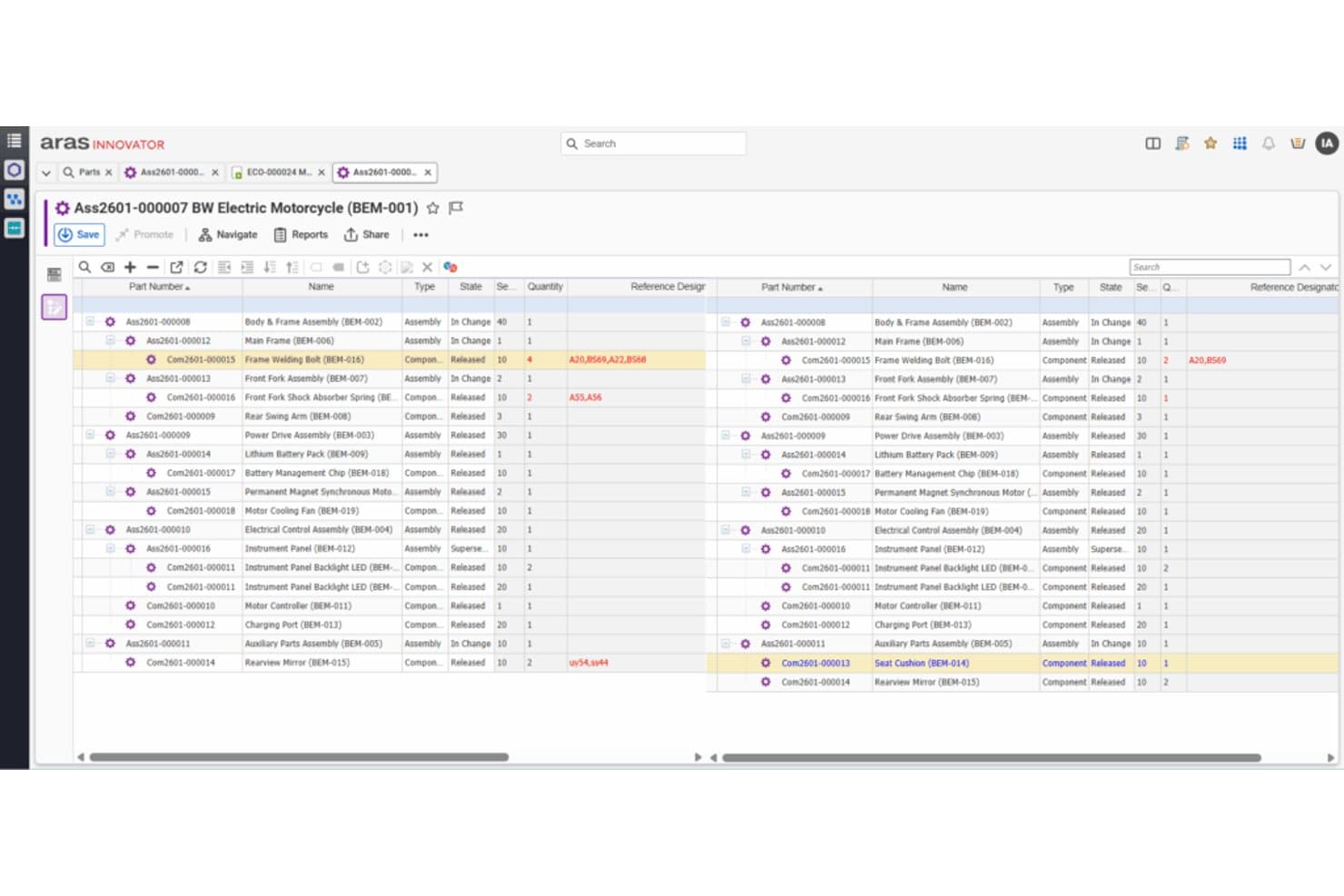
Aras PLM lets users compare BOMs side by side for change review. Aras PLM is a highly customizable PLM platform built around a digital thread data architecture, offering BOM management, engineering change workflows, requirements engineering, variant management, and manufacturing process planning in a single system.
Who Is Aras PLM Best For?
Aras PLM is a strong fit for engineering and R&D teams in complex discrete manufacturing industries—like aerospace, medical devices, and high tech—that need deep customization and a connected digital thread across the full product lifecycle.
Why I Picked Aras PLM
Aras PLM earns its spot on my shortlist because its digital thread architecture connects every product record—requirements, design, BOM, change orders, and manufacturing plans—into a single traceable data backbone. I especially like how its variant management and effectivity engine handle complex product configurations at scale, so engineering changes ripple through correctly without manual reconciliation. Its low-code workflow builder also lets teams customize change approval processes to match real operational complexity, not just a generic template.
Aras PLM Key Features
- Requirements engineering: Links product requirements directly to design artifacts, change orders, and test results in a single traceable record.
- Simulation management: Stores and connects simulation data to the digital thread so engineering teams can track analysis results alongside design revisions.
- Manufacturing process planning: Builds and manages manufacturing BOMs and process plans tied directly to engineering data and change workflows.
- Low-code workflow builder: Lets teams configure approval processes, access controls, and event handling using a visual designer without custom development.
Aras PLM Integrations
Aras PLM offers integrations with SolidWorks, Siemens NX, and SolidWorks Electrical. It also provides an Open API, web services, and connectors for ERP, ALM, simulation, Office, and Workspace tools.
Pros and Cons
Pros:
- Traceable change workflows support cross-functional governance
- Variant management handles complex product configurations
- Customizable digital thread connects lifecycle data
Cons:
- Data mapping and synchronization need attention
- Interface can feel unintuitive to users
Learn more about Aras PLM: Best for scaling SMB manufacturers
- Free demo available
- From $93/user/month (billed annually)
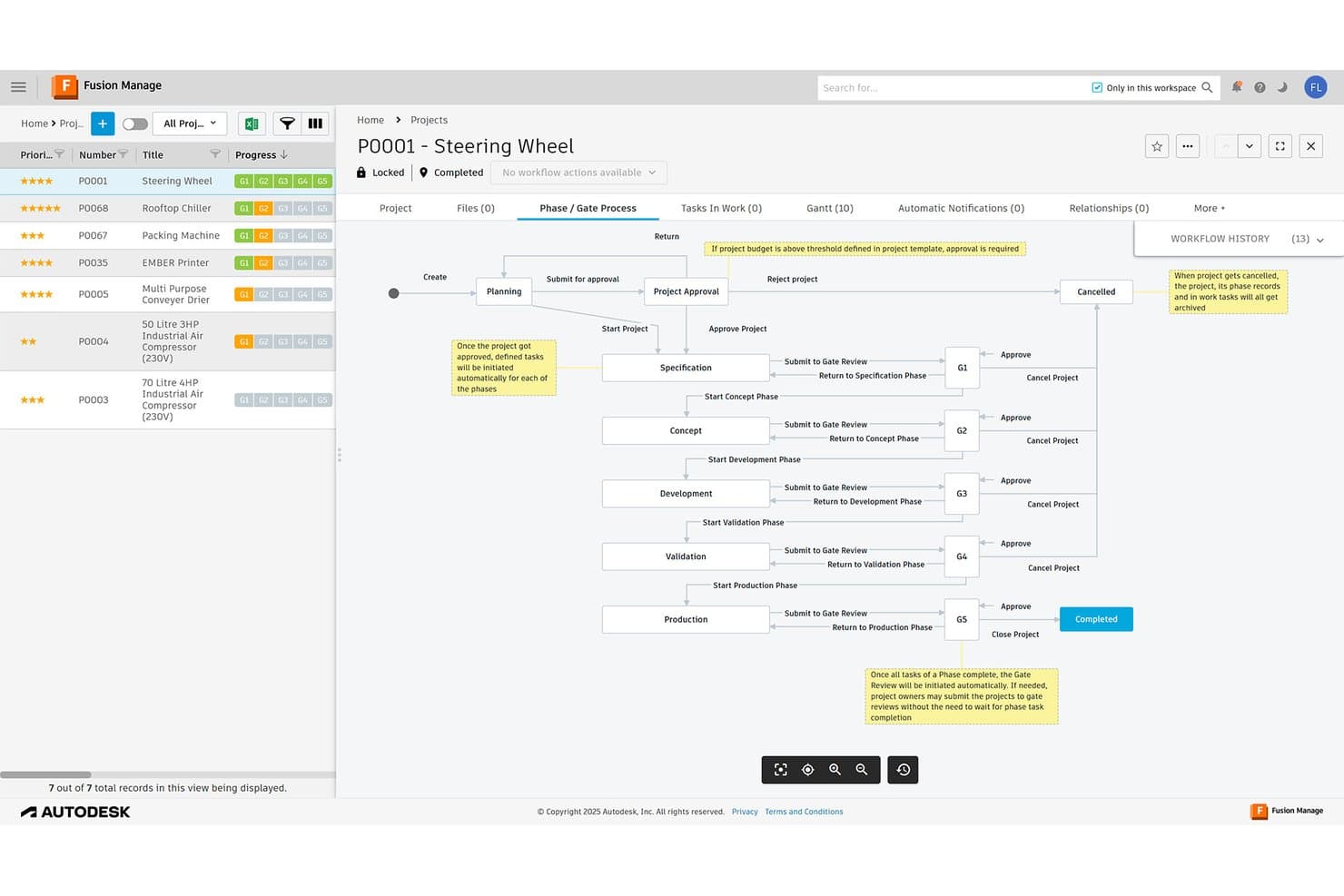
Autodesk Fusion Manage visualizes phase/gate workflows for product projects. Autodesk Fusion Manage is a cloud PLM platform that centralizes BOM management, change workflows, quality processes, NPI phase-gates, and supplier collaboration within the Autodesk ecosystem.
Who Is Autodesk Fusion Manage Best For?
Autodesk Fusion Manage fits small and mid-sized manufacturers that are growing fast and need PLM processes without the cost and complexity of an enterprise suite.
Why I Picked Autodesk Fusion Manage
I've included Autodesk Fusion Manage in my top picks because it gives fast-growing manufacturers real PLM depth without the enterprise price tag. I especially like its built-in quality templates (CAPA, FMEA, 8D, FAI) and low-code workflow builder, which let a small team configure NCR and change order processes without a dedicated IT department. The mBOM Editor also stands out for manufacturers converting engineering BOMs into manufacturing BOMs as products move toward production.
Autodesk Fusion Manage Key Features
- Supplier collaboration workspace: External stakeholders can access dynamic workflows for quoting, procurement, and development directly through a browser-based portal.
- NPI phase-gate templates: Pre-built project templates guide new product introduction from idea through launch, with lifecycle stage tracking and approvals.
- Fusion Contributor seat: A low-cost license lets suppliers and reviewers view BOMs, approve workflows, create reports, and mark up designs without authoring access.
- Open REST API: Connects Fusion Manage to ERP, CRM, and PDM systems, with support for CSV, JSON, and XML data export formats.
Autodesk Fusion Manage Integrations
Autodesk Fusion Manage offers native integrations with Autodesk Fusion and Autodesk Vault, supporting Inventor, AutoCAD, and Revit data through Vault. It supports ERP connectivity with SAP, Oracle, Microsoft Dynamics, and NetSuite, plus an open REST API for custom integrations.
Pros and Cons
Pros:
- EBOM-to-MBOM conversion supports production handoffs
- Quality templates cover CAPA, FMEA, 8D, FAI
- Low-code workflow templates reduce admin setup
Cons:
- Native CAD file management remains separate
- No documented 150% BOM variant rules
Learn more about Autodesk Fusion Manage:
Other PLM Tools
Here’s a few more that didn’t make the top list. If you need additional suggestions for product lifecycle management, check these out.
- 11AletiqBest for AI-native PLM with compliance packs
- 12DuroBest for cloud PLM with ITAR-ready hosting
- 13OnshapeBest for cloud-native CAD and PDM in one place
- 14ArenaBest for cloud PLM with built-in supplier access
- 15SAP PLMBest for SAP-ecosystem product and supply chain teams
- 16Infor PLMBest for Infor ERP-connected BOM and change workflows
- 17Technia PLMBest Dassault-based PLM with low-code extensions
- 18UpchainBest for SMB cloud PDM without local servers
Other Product Management Software Reviews
Looking for more software to support your product team? Here are some other software reviews we’ve written:
- Digital asset management software
- Agile PLM software
- Product Design Software For 3D/2D Rendering
- ALM Software For Managing Digital Product Life Cycles
How I Evaluate PLM Software
I focus first on whether a tool can serve as a true product data hub and manage multi-level BOMs across engineering and manufacturing views—these two things carry the most weight. Then I look for standout capabilities like configurable variant management. Finally, I consider implementation complexity and total cost of ownership.
Core Functionality (Table Stakes For This List)
When I'm selecting tools for my list, I score each one on a scale from 0 (does not offer the functionality) to 5 (excels in this area) for each core functionality listed below. I then convert the total into a percentage to help assess each tool's overall fit, with extra weight on any functionalities I've deemed essential.
- Product Data Management (Essential): I check whether the tool acts as a true single source of truth for parts, documents, and CAD files with structured metadata and relationships.
- BOM Management (Essential): I evaluate how the tool handles multi-level BOMs, specifically whether it separates engineering and manufacturing views and supports where-used tracking.
- Change Management Workflows: Formal ECR/ECO routing with role-based approvals and impact analysis matters here, not just a basic change log buried in a comments thread.
- CAD & Design Tool Integration: I look at which CAD systems connect natively and whether the sync preserves design intent, metadata, and assembly dependencies across tools like SOLIDWORKS or Creo.
- Version & Revision Control: Clear audit trails, rollback capability, and effectivity date tracking are what I evaluate—especially for teams working under regulatory or compliance requirements.
- Cross-Functional Collaboration: I assess how teams and external suppliers share data inside the platform, including permission tiers, controlled access, and real-time visibility across departments.
Once I have a list of tools that meet the criteria, I consider what sets each platform apart.
Differentiating Factors (What Sets Vendors Apart)
Here's how I compare and contrast different vendors:
Standout Features
I look for configurable variant management first. A tool that supports 150% BOMs lets teams define all possible options in one structure instead of duplicating BOMs per variant—essential when you're managing product families with dozens of regional or customer-specific configurations. I also evaluate digital thread connectivity, checking whether requirements, CAD models, BOMs, and test records link into a single traceable chain. That traceability closes the loop between what was promised and what shipped. Beyond that, I check for low-code workflow builders that let product teams modify approval routes or forms without waiting on IT.
Beyond Features
I evaluate deployment model and scalability first. A cloud PLM like Arena or Propel works for teams that need fast rollout, while on-premise options suit organizations with strict data residency requirements. Licensing structure matters too—named-user pricing can balloon costs as cross-functional teams grow. I also check ecosystem and extensibility, specifically whether open APIs connect to ERP, MES, and supplier portals without heavy custom work. A weak integrator ecosystem limits your ability to adapt the platform as product complexity increases.
Usability
The user-friendliness of software solutions is always important to me. It’s frustrating when a tool that’s meant to support your team takes too long to implement and get the hang of. I looked for PLM platforms with simple user interfaces and intuitive functionality.
Integrations
Ideally, you’ll want a PLM software that connects to your other important product development tools. I looked for software that integrates with computer-aided design (CAD) software, project management software, and enterprise resource planning (ERP) software. I also kept an eye out for tools that could import data from spreadsheets or have APIs you can use to build custom integrations.
FAQ: More on Product Lifecycle Management
Have some questions about the processes and management tools used across a product lifecycle? Check out this handy FAQ for answers!
What’s the Difference Between PLM Software and PDM Software?
Product lifecycle management (PLM) software covers all stages of a product—from planning and design through launch and updates. Product data management (PDM) software specifically manages product data like CAD files, version control, and documentation. While PLM tools oversee the workflow and collaboration, PDM tools focus on securely storing and tracking product information. If your team needs both process oversight and detailed data management, you might need an integrated PLM-PDM solution.
Can PLM software help with regulatory compliance in manufacturing?
Yes, most PLM software platforms support regulatory compliance for manufacturers by automating documentation, enforcing approval workflows, and tracking changes. This helps your team stay organized during audits and ensures that all compliance processes are well-documented. Some PLM tools even offer templates or modules tailored to common industry standards, so you can streamline certification and avoid compliance gaps.
How do cloud-based PLM systems compare to on-premise solutions?
Cloud-based PLM systems offer easy access for distributed teams, lower upfront costs, and automatic updates. On-premise PLM solutions give you more control over data security and customization, but require higher maintenance and bigger IT investment. If you prioritize collaboration and scalability, cloud PLM is usually better. If you have strict security policies, on-premise might fit your needs.
What are common challenges when implementing PLM software?
Common challenges include resistance to change, data migration issues, and training users on the new system. To make your implementation successful, focus on clear communication with your team, set realistic timelines, and work closely with the vendor’s support team. You’ll also want to clean up old data and define your workflows before the rollout to reduce friction.