With so many different analytics solutions available, figuring out which one is right for you is tough. You know you want to present complex product data in a clear and accessible manner, allowing teams to quickly understand how customers use your products and make informed decisions but need to figure out which tool is best. I've got you! In this post I'll help make your choice easy, sharing my personal experiences using dozens of different tools with large teams and diverse products, with my picks of the best product analytics dashboards.
Why Trust Our Software Recommendations
6,700+
Reviews
20
Industry experts
16+
Evaluation factors
14
Years
Our team has been testing and reviewing software since 2012. As product managers ourselves, we know how difficult—and important—it is to choose the right software.
For this guide, we evaluated tools using hands-on testing and independent research, scoring tools using our selection criteria.
Our reviews reflect our human editorial judgment, not a sales pitch.
Expert reviewers:
- Andrew LumbySenior TPM
- Cristiano ValimSenior UI/UX Lead


Product Analytics Dashboard Comparison Table
Compare pricing details for my top product analytics dashboard selections in the table below.
| Tool | Best For | Trial Info | Price | ||
|---|---|---|---|---|---|
| 1 | Best for real-time collaboration and visualization of product analytics data | Free plan available | From $8/user/month (billed annually) | Website | |
| 2 | Product analytics dashboard with predictive analytics | Free plan available | From $50,000/year (billed annually) | Website | |
| 3 | Best for no-code adoption analytics and onboarding | 14-day free trial | From $299/month | Website | |
| 4 | Best for linking session replays to dashboard metrics | Free plan + free demo available | Pricing upon request | Website | |
| 5 | Product analytics tool with a resource wiki builder | Free plan + 30-day free trial + free demo available | Pricing upon request | Website | |
| 6 | Best for AI-driven session replay and friction analysis | Free demo available | Pricing upon request | Website | |
| 7 | Best for behavioral analytics with real-time alerts | Free plan available | From $120/month (billed annually) | Website | |
| 8 | Best for warehouse-native behavioral analytics | Free plan available | Pricing upon request | Website | |
| 9 | Best for open-source, warehouse-native analytics | Free plan available | From $250/month | Website | |
| 10 | Best for quantitative and qualitative data in one view | Free plan + free demo + 15-day free trial available | From $39/month (billed annually) | Website |


Best Product Analytics Dashboard Reviews
Below are my detailed summaries of the best product analytics dashboard that made it onto my shortlist. My reviews offer a detailed look at the key features, pros & cons, integrations, and ideal use cases of each tool to help you find the best one for you.
 1Best for real-time collaboration and visualization of product analytics data
Miro
- Free plan available
- From $8/user/month (billed annually)
Visit WebsiteCustomer Rating:4.8/5This rating combines scores from multiple user review sites to reflect overall customer sentiment about the product.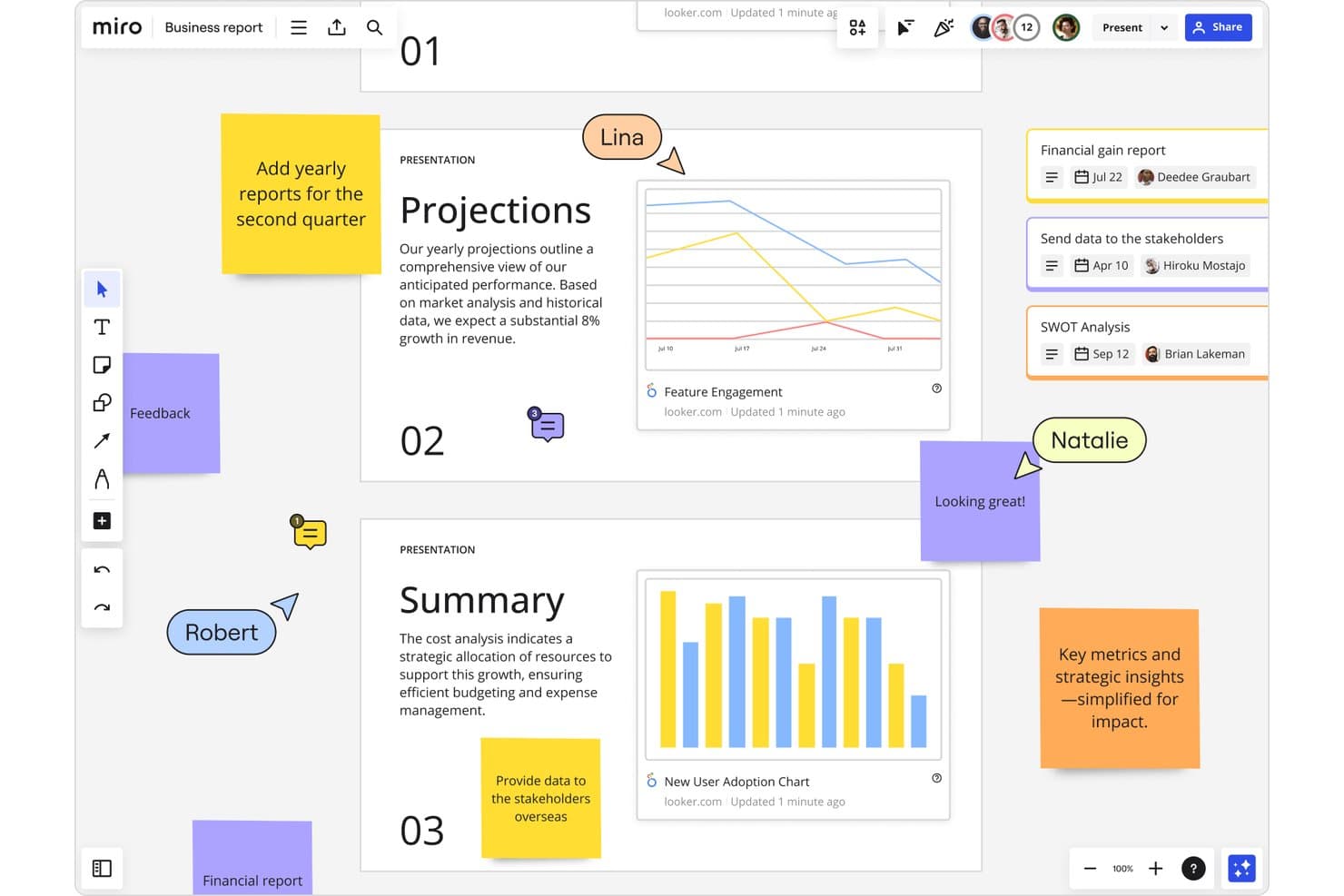
Miro integrates Looker analytics dashboards into collaborative product boards. Miro is a visual collaboration workspace that lets product teams map user journeys, build shareable visual boards, and bring in data from external analytics tools to discuss and act on together.
Who Is Miro Best For?
Miro fits product teams that already use dedicated analytics tools and need a shared space to bring that data together, discuss it, and turn it into decisions.
Why I Picked Miro
I've included Miro in my top picks because it's the strongest option for teams that need a shared space to bring analytics data together and turn it into decisions. When my team pulls charts from Amplitude into a Miro board, we can annotate them, run live workshops, and map findings directly onto a customer journey template without switching tools. Talktrack lets me walk stakeholders through a board asynchronously, which keeps alignment moving even when everyone can't meet at the same time.
Miro Key Features
- Journey mapping templates: Pre-built templates let you diagram user flows, onboarding paths, and friction points directly on a shared canvas.
- Two-way project tool sync: Boards connect bidirectionally with Jira, Asana, Linear, and ClickUp so decisions made on the board flow straight into delivery work.
- Data tables: Nested tables and tree views let you organize and display structured information alongside visual content on the same board.
- Talktrack: Record a narrated walkthrough of any board so stakeholders can review findings and decisions on their own schedule.
Miro Integrations
Miro offers 250+ integrations, including Amplitude, Looker, Jira, Asana, Linear, ClickUp, and Azure DevOps. Its REST API and SDKs support custom integrations, while Amplitude embeds static chart images rather than live dashboards.
Pros and Cons
Pros:
- Links journey maps to prioritization
- Turns charts into shared decisions
- Supports real-time analytics review workshops
Cons:
- Manual boards replace calculated dashboards
- No native event or behavior tracking
 Product analytics dashboard with predictive analytics
- Free plan available
- From $50,000/year (billed annually)
Visit WebsiteCustomer Rating:4.6/5This rating combines scores from multiple user review sites to reflect overall customer sentiment about the product.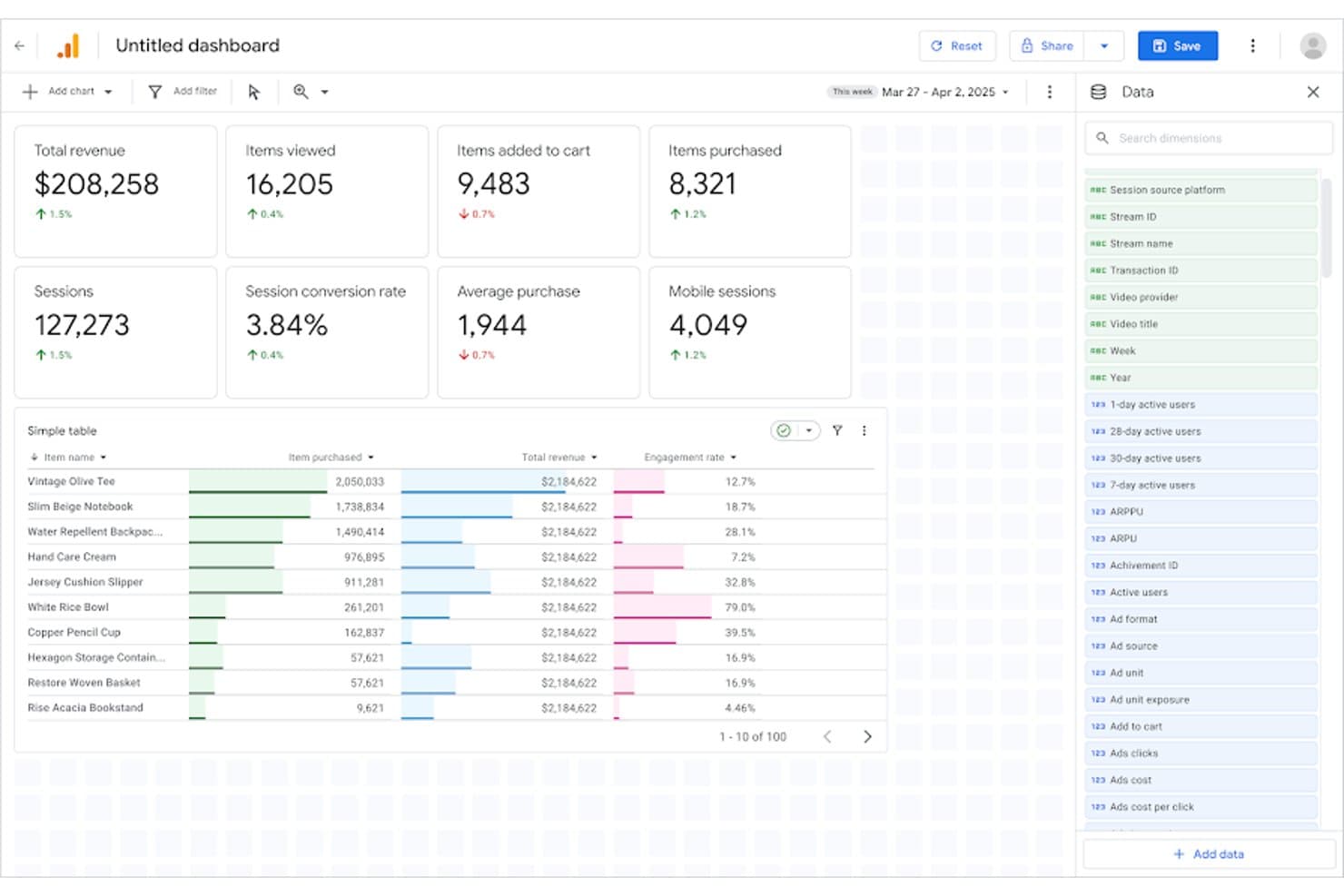
Google Analytics tracks product revenue, sessions, and item performance in one dashboard. Google Analytics is a web and app analytics platform that tracks user behavior through event-based data collection, funnel and cohort analysis, segmentation, and customizable dashboards.
Who Is Google Analytics Best For?
Google Analytics is a strong fit for product and growth teams already embedded in the Google ecosystem who need a free, capable starting point for web and app behavioral analytics.
Why I Picked Google Analytics
Google Analytics earns its spot on my shortlist because its built-in predictive analytics do something most product analytics tools don't: flag users likely to churn or convert before it happens, using ML trained on your own behavioral data. I rely on its Funnel Exploration and Cohort Exploration reports to trace exactly where users drop off and how retention shifts across segments over time. Its BigQuery export then lets me join that behavioral data with product and revenue sources for deeper analysis.
Google Analytics Key Features
- Segment overlap analysis: Compare up to three user segments simultaneously to identify where audience behaviors intersect and inform prioritization decisions.
- Path exploration: Visualize the exact routes users take through your product, including backwards path analysis to trace steps leading to a key event.
- BigQuery export: Send raw event data directly to BigQuery to join behavioral data with product or revenue sources for warehouse-level analysis.
- Predictive audiences: Use ML-generated audience lists to surface users likely to purchase or churn based on their behavioral patterns in your product.
Google Analytics Integrations
Google Analytics offers native integrations with Google Ads, Search Console, BigQuery, AdMob, and Salesforce Marketing Cloud. Its Admin API and Data API support custom integrations, while data import connects additional first-party and campaign cost sources.
Pros and Cons
Pros:
- Cohort reports support retention diagnosis
- Open and closed funnel analysis
- Predictive audiences flag likely churners
Cons:
- No session replay limits friction diagnosis
- Marketing orientation weakens feature adoption context
Learn more about Google Analytics: Best for no-code adoption analytics and onboarding
- 14-day free trial
- From $299/month
Visit WebsiteCustomer Rating:4.7/5This rating combines scores from multiple user review sites to reflect overall customer sentiment about the product.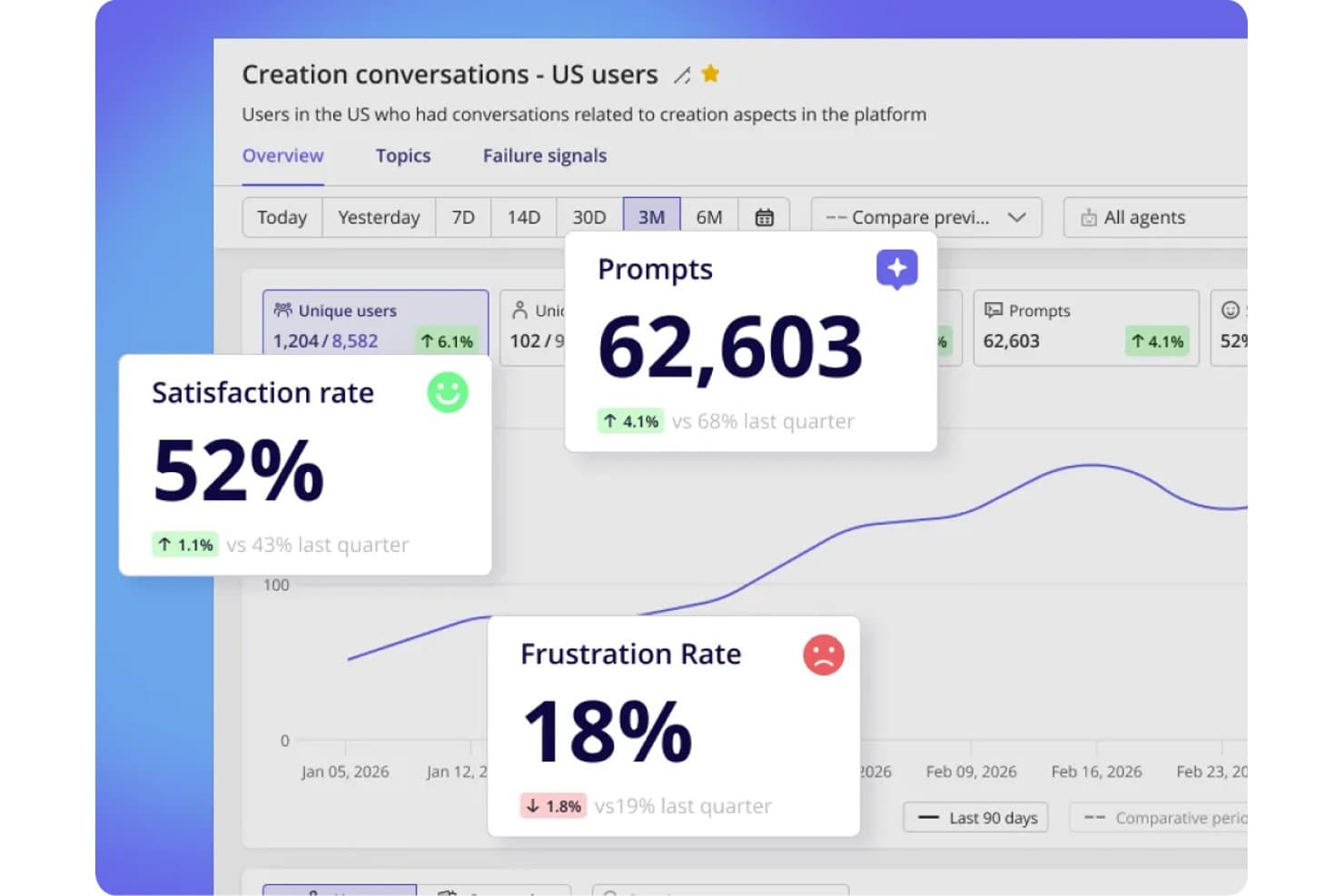
Userpilot tracks satisfaction, frustration rates, and prompts in one dashboard. Userpilot is a product analytics and onboarding platform that combines no-code behavioral tracking, funnel and retention analysis, user segmentation, session replay, and in-app feedback tools in a single product.
Who Is Userpilot Best For?
Userpilot is a strong fit for non-technical product managers who want adoption analytics and onboarding tools in one place, without writing SQL or filing developer tickets.
Why I Picked Userpilot
I picked Userpilot as one of the best because it's built specifically for product managers who need adoption analytics without writing a line of SQL or waiting on engineering. I love that autocapture handles behavioral tracking from day one, and retroactive event renaming means your taxonomy stays clean without losing historical data. Lia, Userpilot's AI agent, goes further by explaining drops in your Trends reports and predicting activation and retention changes in plain language.
Userpilot Key Features
- Funnel and path analysis: Funnels link drop-off points to specific steps in the user journey, while Paths show how users navigate through your product.
- User and account-level profiles: Every tracked user and company gets a dedicated profile, letting you analyze behavior at both the individual and organizational level.
- In-app surveys and NPS: Built-in NPS and customizable surveys collect feedback directly inside your product, with AI-powered sentiment and theme analysis on Growth plans.
- Session replay with frustration indicators: Recorded user sessions surface rage clicks and friction signals, with saved playlists and console logs available on Growth.
Userpilot Integrations
Userpilot offers eight documented integrations, including Segment, Mixpanel, Amplitude, Heap, Intercom, Slack, HubSpot, and Salesforce. Growth includes an HTTP API and webhooks.
Pros and Cons
Pros:
- Onboarding and analytics share one workspace
- Account-level profiles connect usage to organizations
- Autocapture tracks behavior without developer tickets
Cons:
- Dashboard sharing options remain limited
- Core funnel reports require Growth
Learn more about Userpilot: Best for linking session replays to dashboard metrics
- Free plan + free demo available
- Pricing upon request
Visit WebsiteCustomer Rating:4.5/5This rating combines scores from multiple user review sites to reflect overall customer sentiment about the product.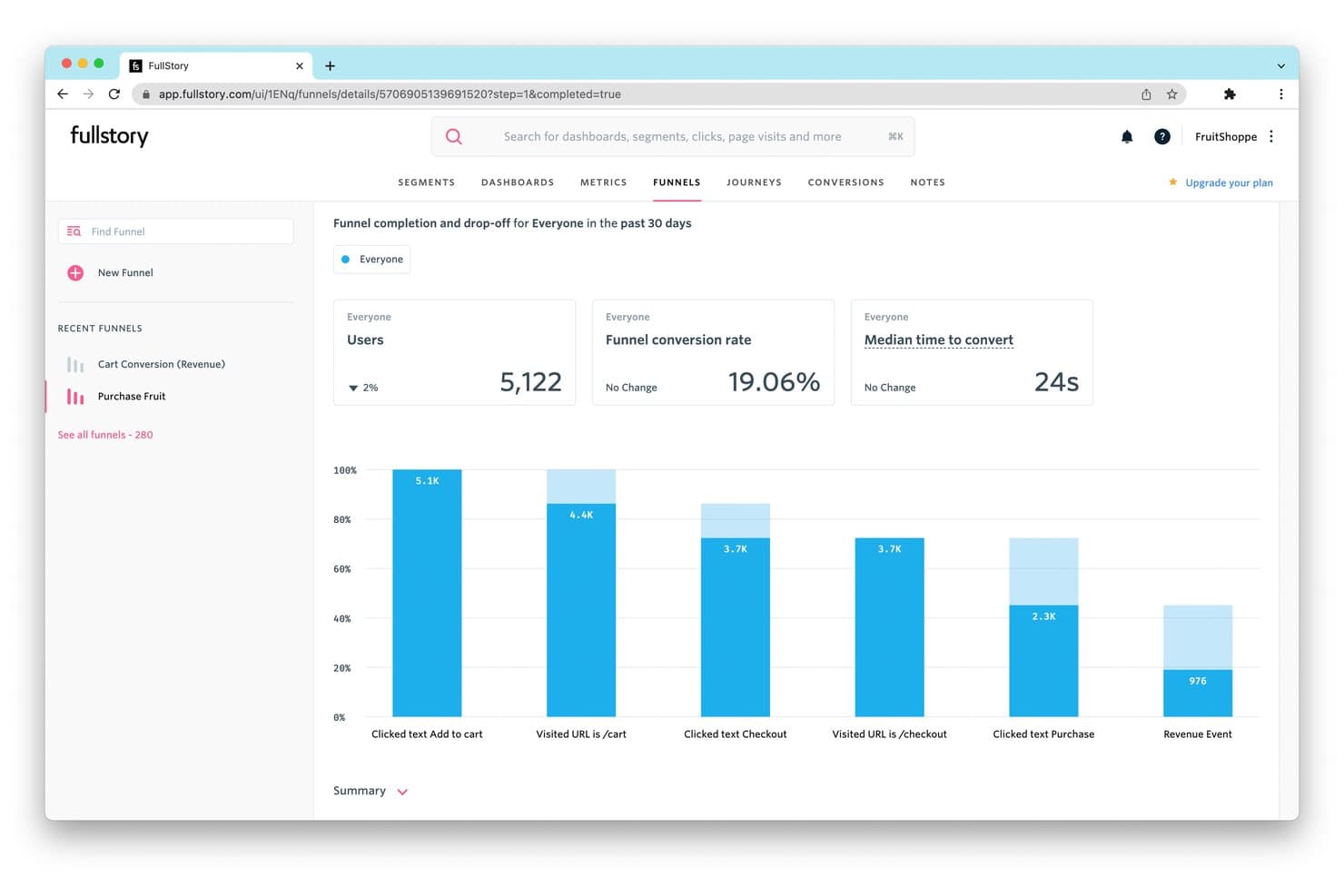
FullStory tracks funnel drop-off rates to reveal where users abandon purchases. Fullstory is a digital experience analytics platform that combines autocaptured behavioral data, customizable dashboards, session replay, funnel analysis, and journey mapping to give product teams a connected view of how users interact with their product.
Who Is Fullstory Best For?
Fullstory is a strong fit for product and UX teams at mid-market and enterprise companies that need to connect quantitative dashboard metrics directly to the user sessions behind them.
Why I Picked Fullstory
Fullstory earns its spot on my shortlist because of how directly it connects session replays to dashboard metrics. I love that you can click any data point on a dashboard and immediately watch the actual sessions behind it, so when your retention chart drops, you're not guessing why. Fullstory's Sentiment Signals layer on top, surfacing frustration patterns like rage clicks tied to those same moments. That combination of quantitative and qualitative in one place is what makes it genuinely useful for product teams.
Fullstory Key Features
- Fullcapture™ autocapture: Automatically records web and mobile user behavior in a single data stream with no manual event tagging required.
- Funnel and conversion analysis: Tracks drop-off across user flows with Funnels, Conversion Maps, and Page Flow to pinpoint where users disengage.
- Sentiment Signals: Detects frustration patterns like rage clicks and tied them to specific moments in the user journey.
- StoryAI summaries: Generates AI-powered session summaries so you can quickly understand what happened in a session without watching it in full.
Fullstory Integrations
Fullstory’s documented integrations include Segment, Adobe Analytics, and Google Tag Manager through Data Layer Capture. It also offers an open API for custom events and Anywhere: Warehouse for sending behavioral data to a warehouse or cloud storage.
Pros and Cons
Pros:
- Frustration signals expose product journey friction
- Autocapture reduces upfront event instrumentation
- Dashboard metrics connect directly to session replays
Cons:
- Feature flagging isn’t built in
- Retention analysis requires higher-tier access
Learn more about Fullstory: Product analytics tool with a resource wiki builder
- Free plan + 30-day free trial + free demo available
- Pricing upon request
Visit WebsiteCustomer Rating:4.4/5This rating combines scores from multiple user review sites to reflect overall customer sentiment about the product.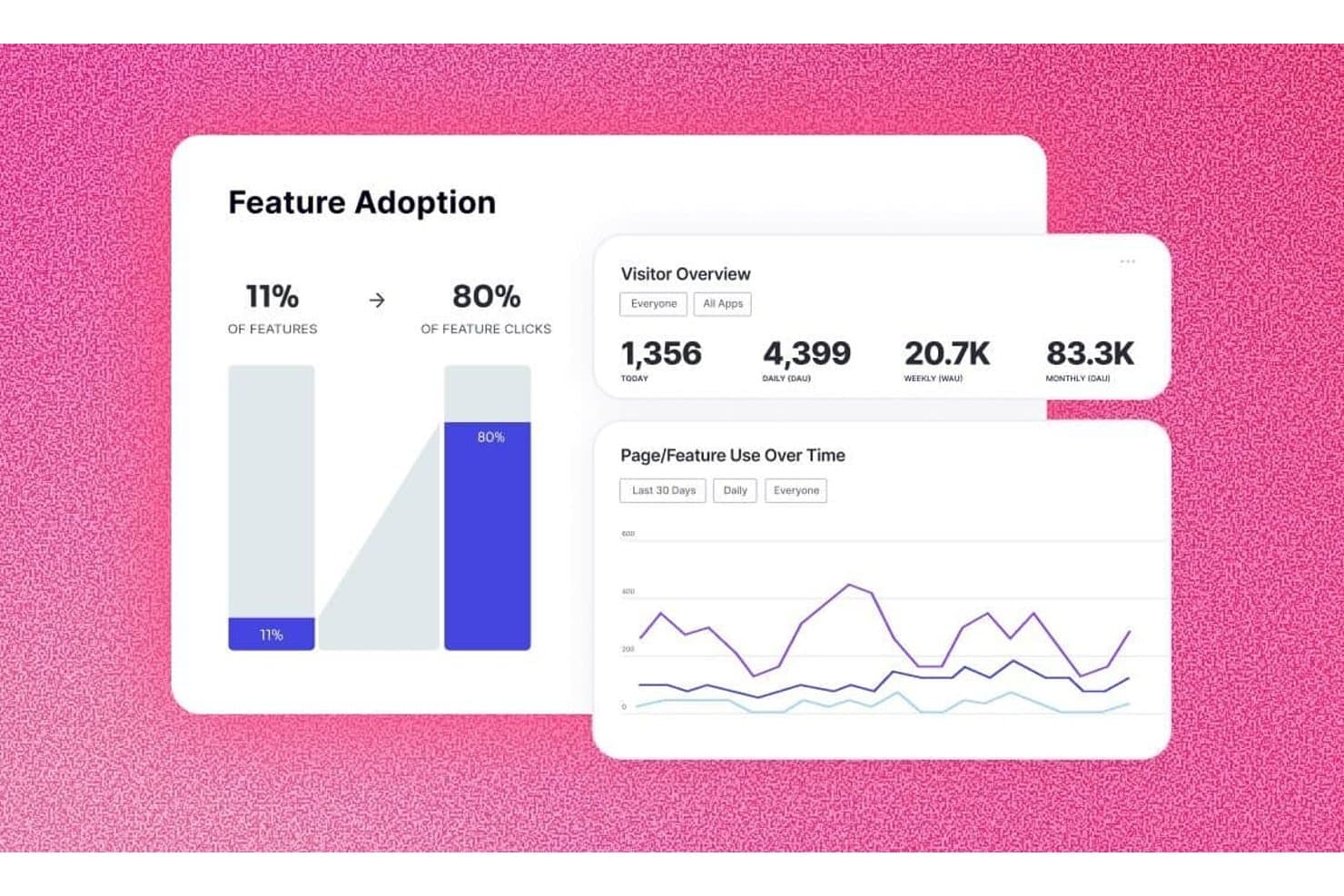
Pendo tracks feature adoption and visitor trends in one dashboard. Pendo is a product analytics platform that combines auto-capture behavioral tracking, customizable dashboards, funnel and retention analysis, session replay, and in-app feedback and guidance tools.
Who Is Pendo Best For?
Pendo is a strong fit for product managers who want analytics, in-app guidance, and user feedback in one platform without heavy engineering overhead.
Why I Picked Pendo
Pendo earns its spot on my shortlist because it's the only product analytics tool I've found that pairs deep behavioral tracking with a built-in Resource Center wiki, letting you act on what the data tells you without leaving the platform. Auto-capture with retroactive tagging means I can tag features after the fact and pull historical data immediately, which is a real advantage when stakeholders want answers fast. I also rely on Pendo's Session Replay and funnel reports together to pinpoint exactly where users drop off during onboarding.
Pendo Key Features
- Product Engagement Score (PES): A single metric that combines adoption, stickiness, and growth to give you a quick read on overall product health.
- In-app guides: Contextual messages and walkthroughs you can trigger directly inside your product based on user behavior or segment.
- Behavioral segmentation: Slice your user base by actions, metadata, or account attributes to compare usage patterns across groups.
- Data Sync: Exports behavioral data to Snowflake, Amazon S3, Azure, or Google Cloud Storage for deeper analysis in your BI tools.
Pendo Integrations
Pendo lists 51 integrations, including Salesforce, Jira, Figma, Snowflake, Tableau, Looker, Segment, Zendesk, Intercom, and Slack. It also supports Data Sync to Snowflake, Amazon S3, Azure, and Google Cloud Storage, plus Zapier and webhooks.
Pros and Cons
Pros:
- Resource wiki turns insights into guidance
- Replay connects drop-offs with behavior
- Retroactive capture speeds historical analysis
Cons:
- Reviewers report tedious tagging workflows
- Dashboard filters exclude paths and funnels
Learn more about Pendo: Best for AI-driven session replay and friction analysis
- Free demo available
- Pricing upon request
Visit WebsiteCustomer Rating:4.7/5This rating combines scores from multiple user review sites to reflect overall customer sentiment about the product.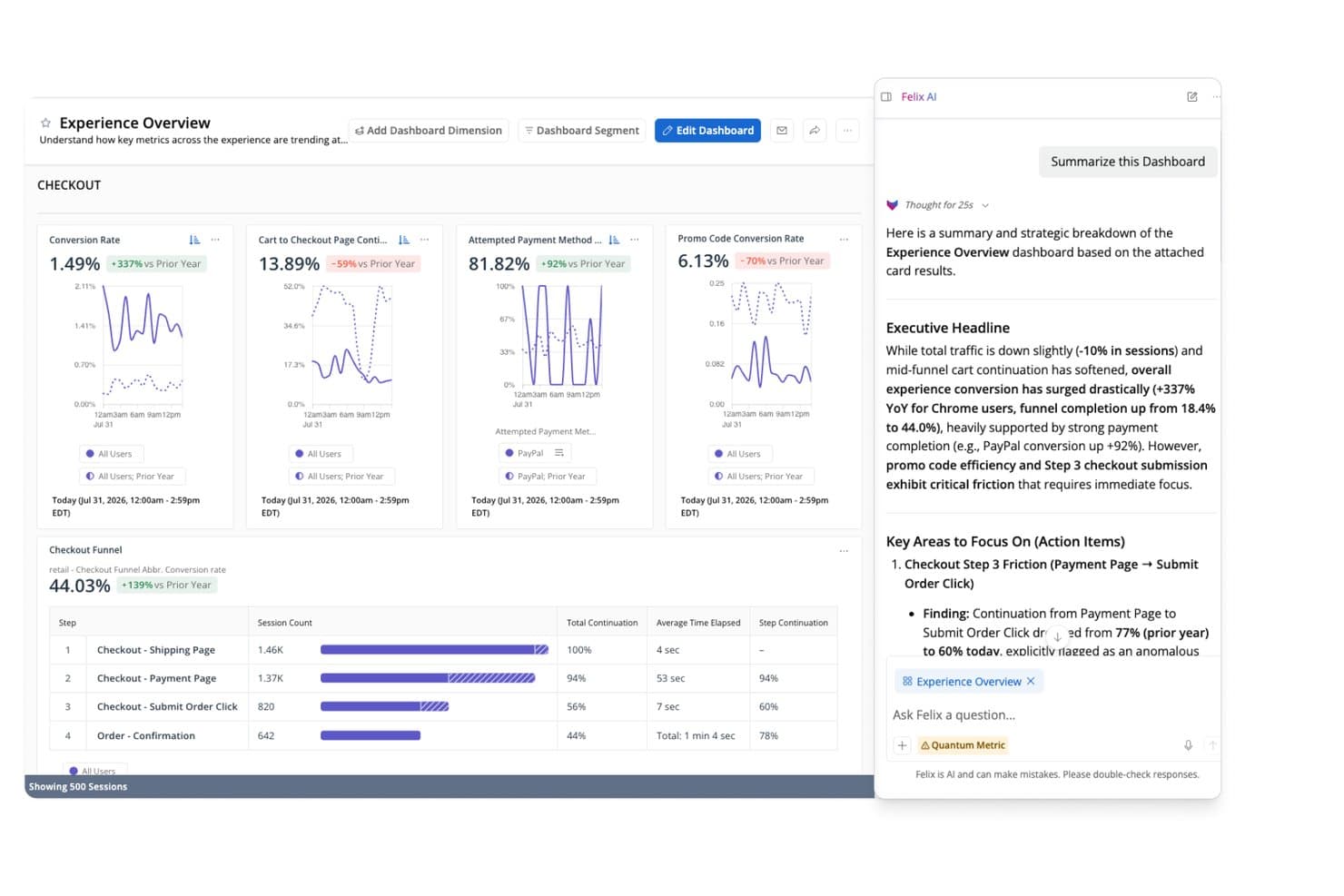
Quantum Metric surfaces AI-generated checkout funnel insights for PMs. Quantum Metric is a digital experience analytics platform that combines autocapture behavioral tracking, customizable dashboards, AI-driven session replay, segmentation, and journey analysis across web and mobile products.
Who Is Quantum Metric Best For?
Quantum Metric is a strong fit for enterprise product and UX teams at B2C companies—think retail, finance, and travel—who need to connect behavioral data to real revenue impact.
Why I Picked Quantum Metric
I picked Quantum Metric as one of the best because its AI-driven session replay goes well beyond basic playback. Felix AI Summarization writes plain-language summaries of individual sessions, so I can understand what went wrong in a checkout flow without scrubbing through hours of recordings. Opportunity Analysis automatically surfaces friction points and quantifies their revenue impact, which means my team can walk into a roadmap meeting with data-backed prioritization instead of gut instinct.
Quantum Metric Key Features
- Autocapture behavioral tracking: Records clicks, taps, scrolls, and interactions automatically across 300+ built-in metrics with no manual tagging or code changes.
- Segment Builder: Creates complex audience segments using AND, OR, THEN, and WHERE logic, including sequential step-by-step filters usable across the entire platform.
- Copilot for Dashboards: An AI assistant built into dashboards that answers plain-language questions about live data on screen.
- Data Streaming: A paid add-on that exports your behavioral and business data directly to warehouses like Snowflake, BigQuery, and Redshift.
Quantum Metric Integrations
Quantum Metric supports data streaming to Snowflake, BigQuery, Redshift, Databricks, Amazon S3, and Oracle. Partner integrations include Salesforce, Optimizely, and Split.
Pros and Cons
Pros:
- Sequential segments support roadmap prioritization
- Autocapture reduces instrumentation work
- AI summaries accelerate session diagnosis
Cons:
- Session playback sometimes loads slowly
- Segment search can feel awkward
Learn more about Quantum Metric: Best for behavioral analytics with real-time alerts
- Free plan available
- From $120/month (billed annually)
Visit WebsiteCustomer Rating:4.5/5This rating combines scores from multiple user review sites to reflect overall customer sentiment about the product.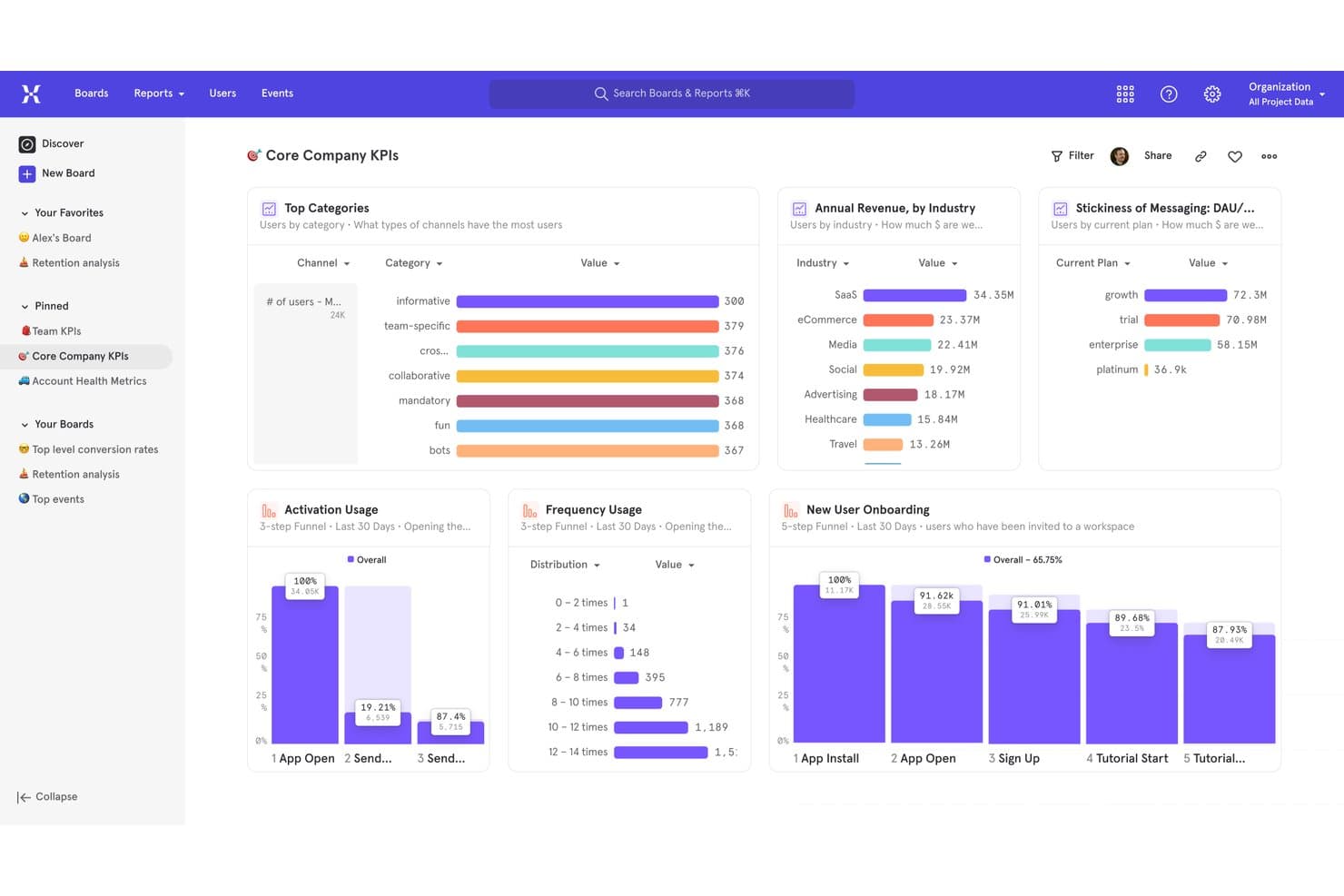
Mixpanel centralizes key product KPIs in one analytics dashboard. Mixpanel is an event-based product analytics platform that combines behavioral tracking, funnel and retention analysis, user segmentation, session replay, and built-in feature flags and experiments into a single dashboard-driven workspace.
Who Is Mixpanel Best For?
Mixpanel is a strong fit for product managers and data analysts at growth-stage companies who need to go beyond pageview metrics and understand exactly how users behave inside a product.
Why I Picked Mixpanel
Mixpanel earns its spot on my shortlist because its real-time alerting and anomaly detection give product teams an early warning system that most analytics dashboards lack. I particularly like that you can set threshold-based alerts on any metric, so if a funnel conversion rate drops unexpectedly after a release, your team knows immediately. Pair that with behavioral cohort analysis and funnel drop-off reports, and you can move from detecting a problem to diagnosing its source without leaving the platform.
Mixpanel Key Features
- Behavioral cohorts: Group users by actions they've taken inside your product and reuse those cohorts to filter reports, target feature flags, or set up experiments.
- Session replay: Watch real user sessions with rage-click and dead-click detection, console logs, and AI-generated summaries to pinpoint exactly where users struggle.
- Built-in feature flags and experiments: Run A/B tests with multiple variants, bias testing, and diagnostic analysis, then roll out changes to specific cohorts using percentage-based targeting.
- Warehouse connectors: Sync data directly from Snowflake, BigQuery, Databricks, and Redshift to run analytics on your existing data without duplicating your pipeline.
Mixpanel Integrations
Mixpanel offers documented integrations with Segment, mParticle, Snowflake, BigQuery, Databricks, and Redshift. Ingestion, export, and query APIs support custom data flows.
Pros and Cons
Pros:
- Feature flags connect insights to rollouts
- Session replays reveal journey friction
- Real-time alerts surface metric changes
Cons:
- No native surveys for direct feedback
- Advanced reports require substantial setup
 Best for warehouse-native behavioral analytics
- Free plan available
- Pricing upon request
Visit WebsiteCustomer Rating:4.5/5This rating combines scores from multiple user review sites to reflect overall customer sentiment about the product.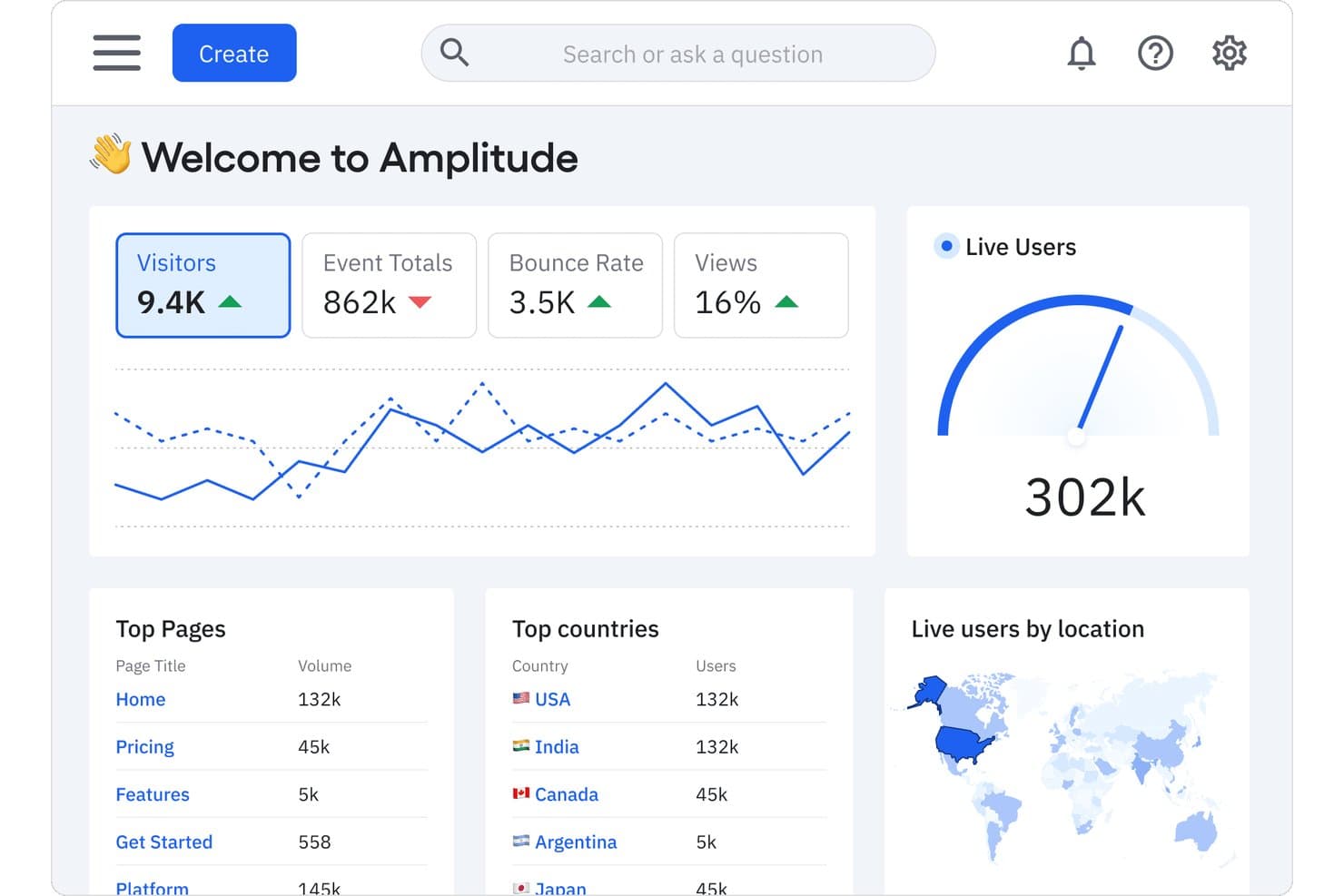
Amplitude centralizes key product metrics in one analytics dashboard. Amplitude is a product analytics platform that combines event-based behavioral tracking, funnel and retention analysis, customizable dashboards, session replay, and built-in experimentation tools.
Who Is Amplitude Best For?
Amplitude is a strong fit for product and growth teams that need to connect behavioral analytics directly to their data warehouse without duplicating data pipelines.
Why I Picked Amplitude
Amplitude earns its spot on my shortlist because of how it handles warehouse-native behavioral analytics, letting your team query event data directly in Snowflake without duplicating pipelines. I particularly like the Journeys and Pathfinder charts, which map exactly where users drop off across a flow, so you're not guessing why onboarding stalls. Pair that with funnel analysis that surfaces conversion drivers by segment, and you get a dashboard setup that feeds real roadmap decisions.
Amplitude Key Features
- Session replay: Watch recorded user sessions to see exactly how people interact with your product, including clicks, scrolls, and navigation paths.
- In-app surveys and AI feedback: Collect user feedback directly inside your product and surface themes using AI-assisted analysis across up to 2,000 records per month.
- Feature flags and experimentation: Run A/B tests and control feature rollouts with built-in experimentation tools, including multi-armed bandits on Growth and Enterprise plans.
- Tracking plan and schema validation: Define and enforce your event taxonomy in one place to keep data consistent across teams and instrumentation sources.
Amplitude Integrations
Amplitude integrates with Segment, mParticle, Snowflake, BigQuery, Redshift, Databricks, Braze, HubSpot, Salesforce, and Iterable. It also offers SDKs, an HTTP API, and webhooks for custom integrations.
Pros and Cons
Pros:
- Funnels reveal conversion drivers by segment
- Journeys expose onboarding friction points
- Warehouse-native behavioral analytics
Cons:
- Qualitative research stops short of dedicated tooling
- Complex reports can overwhelm first-time analysts
Learn more about Amplitude: Best for open-source, warehouse-native analytics
- Free plan available
- From $250/month
Visit WebsiteCustomer Rating:4.5/5This rating combines scores from multiple user review sites to reflect overall customer sentiment about the product.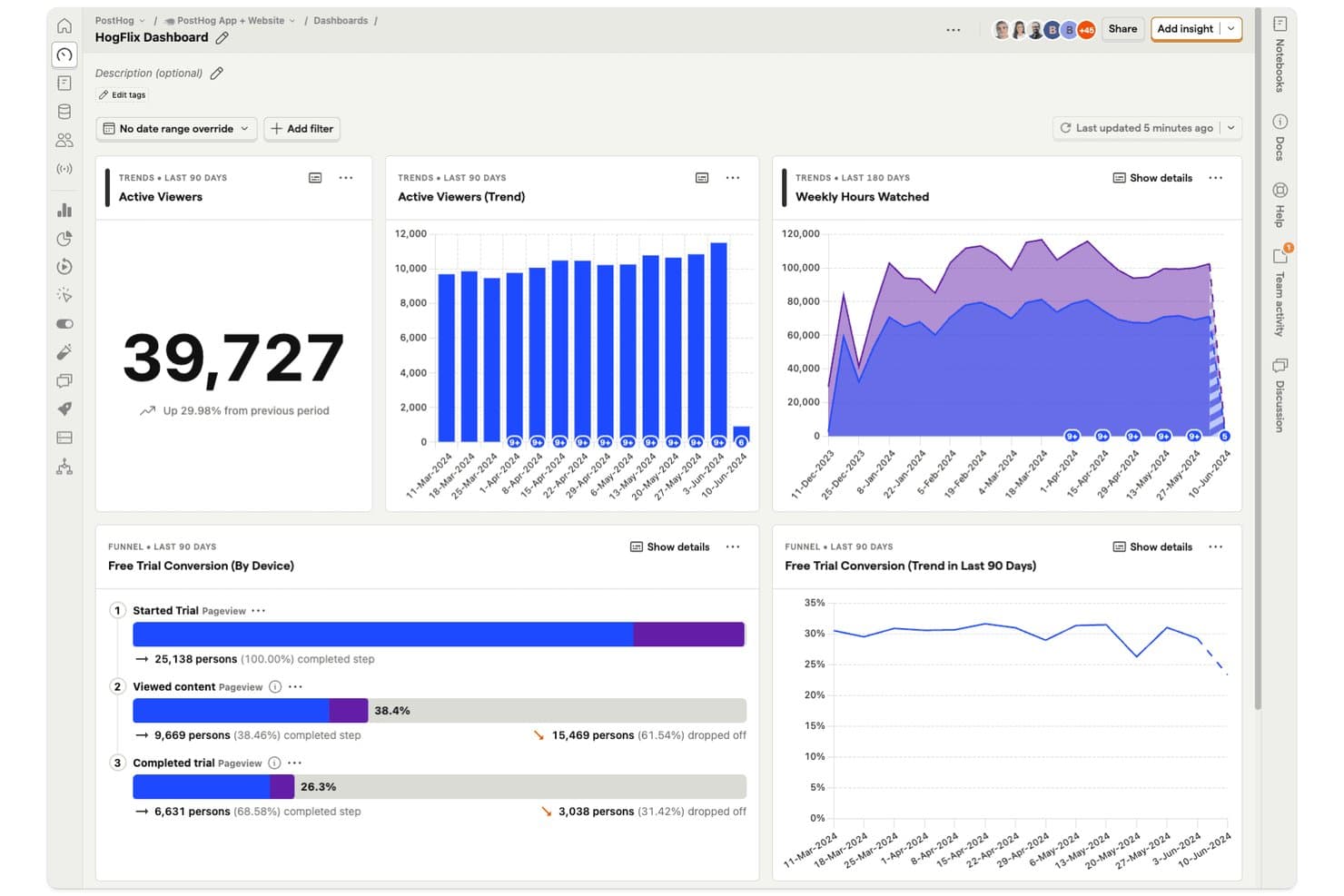
PostHog dashboards let product managers track viewer trends and funnel conversions in one view. PostHog is an open-source product analytics platform that combines event tracking, customizable dashboards, funnel and retention analysis, session replay, feature flags, in-app surveys, and a built-in data warehouse and SQL editor.
Who Is PostHog Best For?
PostHog is a strong fit for product and engineering teams that want analytics, session replay, feature flags, and a built-in data warehouse in one platform—without paying per seat.
Why I Picked PostHog
PostHog earns its spot on my shortlist because it's the only analytics platform I've found that lets product teams query raw event data, warehouse-synced sources like Stripe or Salesforce, and session replays from one place using plain SQL. I love that funnels link directly to session recordings, so when I see a drop-off in an onboarding flow, I can jump straight to the matching replays without switching tools. The built-in data warehouse and HogQL editor mean my team isn't waiting on a data team to answer product questions.
PostHog Key Features
- Autocapture: Records pageviews, clicks, and form submissions automatically, with no extra code required.
- Correlation analysis: Automatically surfaces the person and event properties most associated with conversion or drop-off in a funnel.
- In-app surveys: Collects user feedback directly inside your product, with up to 1,500 free responses per month.
- Feature flags: Controls feature rollouts per user or group, with flag status visible on each session replay.
PostHog Integrations
PostHog offers data warehouse integrations with Stripe, Postgres, Salesforce, HubSpot, and dozens of other sources. Its data pipelines connect hundreds of tools, including Slack and Intercom, with webhooks, Hog custom functions, APIs, and MCP access.
Pros and Cons
Pros:
- Autocapture speeds initial tracking setup
- SQL queries raw and warehouse data
- Funnels link directly to session replays
Cons:
- Usage costs can rise with replay volume
- Dashboard interface can confuse beginners
Learn more about PostHog: Best for quantitative and qualitative data in one view
- Free plan + free demo + 15-day free trial available
- From $39/month (billed annually)
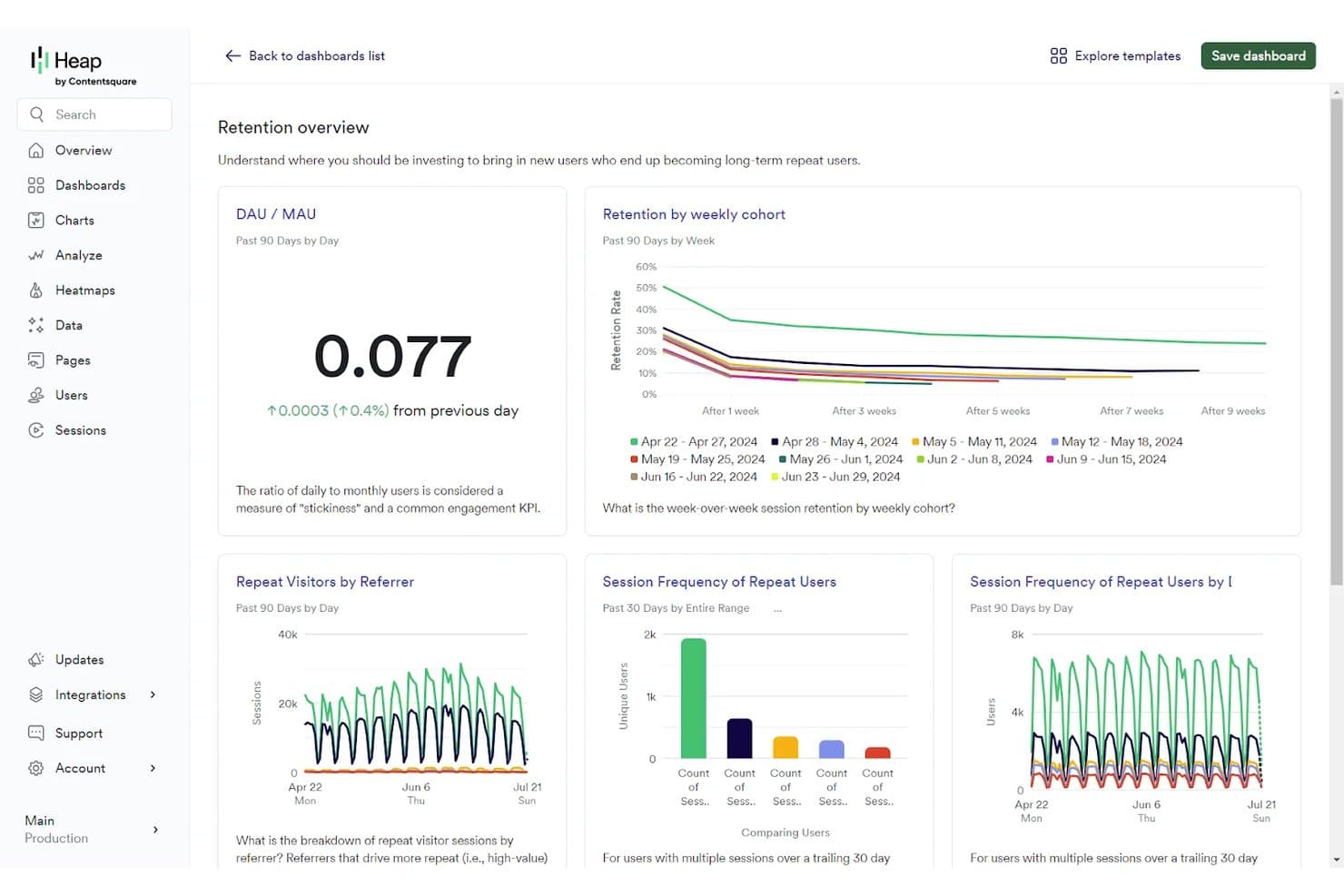
Contentsquare tracks user retention and engagement via analytics dashboards. Contentsquare is a product analytics platform that unifies behavioral tracking, session replay, heatmaps, funnel analysis, retention reporting, and Voice of Customer surveys into a single dashboard environment.
Who Is Contentsquare Best For?
Contentsquare is a strong fit for cross-functional product teams that need behavioral analytics and qualitative insight—like session replay and heatmaps—in a single platform.
Why I Picked Contentsquare
I picked Contentsquare because it's one of the few platforms where behavioral numbers and qualitative insight genuinely share the same roof. When I'm investigating a funnel drop-off, I can move from the retention chart directly into session replays filtered to that exact segment, without switching tools. Sense AI then flags the friction, estimates its revenue impact, and tells me what to fix, which cuts the time between noticing a problem and acting on it.
Contentsquare Key Features
- Smart Capture: Automatically records every user interaction from day one, with no manual tagging, enabling retroactive analysis across web and mobile.
- Enhanced Experimentation: Lets you set up A/B tests with no configuration and compare variants using ready-made dashboards and real-time alerts.
- Voice of Customer surveys: Collects in-product user feedback and displays it alongside behavioral data in the same platform environment.
- Data Connect: A managed pipeline that exports Contentsquare data directly to your data warehouse, including Snowflake and AWS.
Contentsquare Integrations
Contentsquare supports 100+ integrations and open APIs, including Shopify, AWS, Microsoft Azure, and Snowflake. Data Connect exports data to your warehouse through a managed pipeline, helping product teams combine behavioral data with broader analytics.
Pros and Cons
Pros:
- Behavioral and qualitative insights share context
- Session replays explain dashboard drop-offs quickly
- Automatic capture supports retroactive product analysis
Cons:
- Session limits can interrupt data collection
- Plan boundaries complicate cross-product reporting
Learn more about Contentsquare:
Other Product Analytics Dashboards
Here are some additional product analytics dashboard options that didn’t make it onto my shortlist, but are still worth checking out:
- 11Adobe AnalyticsBest for cross-Adobe ecosystem product insights
- 12StatsigBest for analytics tied to feature flag rollouts
- 13TableauBest for BI-driven product dashboard reporting
- 14UXCamBest for mobile tap heatmaps and funnel drop-offs
- 15Zoho AnalyticsBest for blending product data with business data
- 16CleverTapBest for analytics-to-engagement in one platform
- 17LogRocketBest for AI-driven funnel and session insights
- 18Gainsight PXBest for CRM-linked product usage analytics
- 19KubitBest for AI agent and user behavior analytics
- 20Datadog Product AnalyticsBest for observability-backed user behavior dashboards
How I Evaluate Product Analytics Dashboards
I split my evaluation into three parts, starting with core functionality—specifically, whether a tool can capture discrete user events and let you build custom dashboards around them, since these carry the most weight. Next, I look for standout features like session replay or AI-generated insights. Finally, I consider onboarding ease and pricing transparency.
Core Functionality (Table Stakes for This List)
When I'm selecting tools for my list, I score each one on a scale from 0 (does not offer the functionality) to 5 (excels in this area) for each core functionality listed below. I then convert the total into a percentage to help assess each tool's overall fit, with extra weight on any functionalities I've deemed essential.
- Event-Based Tracking (Essential): I check whether each tool captures user actions as named events with custom properties, not just page views or session counts.
- Dashboard Customization (Essential): Each tool should let you build, arrange, and save your own charts and widgets rather than locking you into preset report templates.
- User Segmentation: I look for multi-condition filters that combine behavioral and demographic attributes so you can compare cohorts like trial users vs. paying accounts.
- Funnel and Retention Analysis: Drop-off diagnostics and time-to-convert metrics matter here, especially for spotting where users abandon onboarding or activation flows.
- Data Export and Sharing: I evaluate whether dashboards can be shared via links, scheduled emails, or embedded views that stakeholders actually open without needing a login.
- Third-Party Integration: Tools should sync with your data warehouse, CRM, or CDP so product data doesn't live in a silo separate from revenue or support context.
Once I have a list of tools that meet the criteria, I consider what sets each platform apart.
Differentiating Factors (What Sets Vendors Apart)
Here's how I compare and contrast different vendors:
Standout Features
Session replay is the first thing I check because it bridges the gap between what your dashboards say and what actually happened. I look for tools that let you jump from a funnel drop-off chart directly into a recording of a user who churned at that step. AI-generated insights also matter—I evaluate whether a tool surfaces anomalies automatically or just waits for you to ask the right question. Feature flag integration rounds this out by tying experiment rollouts directly to usage data, so you can measure impact without stitching tools together manually.
Beyond Features
I evaluate how quickly a team can go from SDK install to a working dashboard without filing engineering tickets. Tools with auto-capture or no-code event tracking—like those offered by Heap and PostHog—shrink that gap considerably. Pricing models matter too, since event-based or MTU-based tiers can quietly balloon costs as your product scales. I also check data privacy controls, especially data residency options and PII handling, which become non-negotiable when your user base spans multiple regions subject to GDPR or CCPA.
How to Choose Product Analytics Dashboard
It’s easy to get bogged down in long feature lists and complex pricing structures. To help you stay focused as you work through your unique software selection process, here’s a checklist of factors to keep in mind:
| Factor | What to Consider |
|---|---|
| FactorScalability | What to ConsiderCan the tool grow with your business? Check if it handles increased data volumes and user counts without performance issues. Consider future growth plans. |
| FactorIntegrations | What to ConsiderDoes it integrate with your existing tools? Ensure it connects smoothly with your CRM, marketing platforms, and other essential apps. |
| FactorCustomizability | What to ConsiderCan you tailor it to fit your workflows? Look for customization options that let you adapt dashboards and reports to your team's needs. |
| FactorEase of use | What to ConsiderIs the interface intuitive? Evaluate if team members can quickly learn and use it. A complex tool may hinder adoption. |
| FactorImplementation and onboarding | What to ConsiderHow long does setup take? Assess the resources needed for onboarding and whether support is available to guide you through the process. |
| FactorCost | What to ConsiderDoes it fit your budget? Compare pricing plans and look for hidden fees. Consider the value provided for the price. |
| FactorSecurity safeguards | What to ConsiderAre your data protected? Check for compliance with security standards and data encryption to ensure sensitive information is safe. |
| FactorSupport availability | What to ConsiderIs help available when needed? Look for 24/7 support options and evaluate the responsiveness and helpfulness of the support team. |
What Are Product Analytics Dashboards?
Product analytics dashboards are tools that show you how people use your product, breaking down their actions into easy-to-read charts and graphs. Product managers, UX designers, and marketers use these dashboards to spot trends, find out where users get stuck, and make better decisions about what to improve next. You can see things like where people click, which features get the most love, and when users drop off—so you know exactly where to focus to make your product better.
Features
When selecting product analytics dashboard, keep an eye out for the following key features:
- Session replay: Allows you to watch recorded user sessions to understand user journeys and identify friction points.
- Heatmaps: Visualizes user interactions on your product, highlighting areas of interest and neglect.
- Funnel analytics: Tracks user conversion paths to pinpoint where users drop off in the process.
- Customizable dashboards: Lets you tailor the dashboard to focus on metrics and KPIs that matter most to your team.
- Real-time alerts: Provides instant notifications about significant changes in user behavior or KPIs.
- User segmentation: Analyzes user behavior based on specific criteria, enabling targeted insights.
- Integrations: Connects seamlessly with other essential tools and platforms your team uses.
- Predictive analytics: Uses data to forecast future trends and user behavior, aiding in proactive decision-making.
- Data security: Ensures that sensitive user data is protected and complies with industry standards.
- Interactive product tours: Offers guided walkthroughs to help users quickly understand and use the tool effectively.
Benefits
Implementing product analytics dashboard provides several benefits for your team and your business. Here are a few you can look forward to:
- Improved decision-making: Access to detailed data and insights helps your team make informed product choices.
- Enhanced user experience: Features like session replays and heatmaps identify user pain points, allowing for targeted improvements.
- Increased conversions: Funnel analytics pinpoint where users drop off, enabling optimization of conversion paths.
- Efficient resource allocation: Customizable dashboards focus on key metrics, helping prioritize team efforts and resources.
- Proactive problem-solving: Real-time alerts and predictive analytics allow you to address issues before they impact users.
- Better user engagement: User segmentation provides insights into different user groups, allowing for tailored engagement strategies.
Costs & Pricing
Selecting product analytics dashboard requires an understanding of the various pricing models and plans available. Costs vary based on features, team size, add-ons, and more. The table below summarizes common plans, their average prices, and typical features included in product analytics dashboard solutions:
Plan Comparison Table for Product Analytics Dashboard
| Plan Type | Average Price | Common Features |
|---|---|---|
| Plan TypeFree Plan | Average Price$0 | Common FeaturesBasic analytics, limited data storage, and essential support. |
| Plan TypePersonal Plan | Average Price$10-$30/user/month | Common FeaturesAdvanced analytics, custom dashboards, and email support. |
| Plan TypeBusiness Plan | Average Price$40-$80/user/month | Common FeaturesTeam collaboration tools, API access, and priority support. |
| Plan TypeEnterprise Plan | Average Price$100-$200/user/month | Common FeaturesCustom integrations, dedicated account management, and enterprise-level security features. |
Product Analytics Dashboard FAQs
Here are some answers to common questions about product analytics dashboard:
How do I ensure data security with a product analytics dashboard?
To ensure data security with a product analytics dashboard, verify that the platform complies with industry standards. Look for features like data encryption, access controls, and regular security audits. Ask the vendor about their data protection policies and whether they provide compliance support for regulations like GDPR or CCPA. It’s crucial to choose a dashboard that prioritizes data security to protect sensitive user information and maintain trust with your customers.
Is training required to use a product analytics dashboard effectively?
Yes, some training may be required to use a product analytics dashboard effectively. While many platforms offer intuitive interfaces, understanding the full capabilities may take time. Look for vendors that provide training resources like webinars, tutorials, and user guides. These resources can help your team quickly get up to speed and make the most of the tool’s features. Investing in training can lead to more accurate data interpretation and better decision-making.
How can I measure the impact of a new feature using a product analytics dashboard?
You can set up event tracking for the feature in your dashboard and create conversion or funnel reports to see how many users actually adopt it. Compare behavior before and after rollout across segments (e.g., plan types, regions) to detect changes in use or drop-off. Use this insight to decide whether the feature is worth scaling or needs iteration.
What are typical drop-off points I should monitor on a product analytics dashboard?
Common drop-off points include the onboarding flow, trial-to-paid conversion, new user activation, and feature discovery journeys. Your dashboard should surface where users leave the flow, how long they take to perform key steps, and which steps cause friction. That helps you prioritise fixes rather than guessing where issues may lie.
How do I align dashboard metrics with business outcomes rather than just usage stats?
Go beyond surface KPIs like daily active users by defining metrics that connect to business value—such as time-to-value (how fast users realise benefit), retention rate of high-value users, or upgrade conversion rate. Link those in your dashboard so you trace how user actions map to revenue, churn, or expansion. That alignment makes your analytics more actionable.
What should I keep in mind when sharing product analytics dashboards across multiple teams?
Ensure your dashboard is understandable by non-technical stakeholders: include clear labels, avoid jargon, and tailor views for roles (e.g., product-ops vs execs). Set alert thresholds so teams get notified when metrics deviate. Also ensure access controls are set correctly so people see only relevant data and your teams stay aligned on terminology and definitions.