

10 Best User Feedback Software for Product Teams in 2026

10 User Feedback Software Shortlist


With so many different user feedback solutions available, figuring out which one is right for you is tough. You know you want to gather insights into user experiences, preferences, and pain points to make informed decisions for product improvement and enhancement but need to figure out which tool is best. I've got you! In this post I'll help make your choice easy, leveraging my personal experiences using dozens of different tools with large teams and diverse products to share my picks of the best user feedback software.
Why Trust Our Software Reviews
We’ve been testing and reviewing product management software since 2020. As product managers ourselves, we know how critical and difficult it is to make the right decision when selecting software.
We invest in deep research to help our audience make better software purchasing decisions. We’ve tested more than 2,000 tools for different product management use cases and written over 1,000 comprehensive software reviews. Learn how we stay transparent & our software review methodology.
Best User Feedback Software Summary
This comparison chart summarizes pricing details for my top user feedback software selections to help you find the best one for your budget and business needs.
| Tool | Best For | Trial Info | Price | ||
|---|---|---|---|---|---|
| 1 | Best for AI-powered contextual insights | Free demo available | Pricing upon request | Website | |
| 2 | Best for automated feedback tagging | Free demo available | Pricing upon request | Website | |
| 3 | Best for advanced omnichannel survey creation and distribution | Free demo available | Pricing upon request | Website | |
| 4 | Best for real-time multi-location feedback | Free demo available | Pricing upon request | Website | |
| 5 | Best for actionable feedback | Free plan available | From $29/month (billed annually) | Website | |
| 6 | Best for conversational surveys | 14-day free trial + free plan + free demo available | Pricing upon request | Website | |
| 7 | User feedback software for analyzing feedback from specific customers | Free plan available | From $19/month | Website | |
| 8 | Best for customer feedback integration | 10-day trial | From $56/month | Website | |
| 9 | Best for automatic feedback trend detection | Free demo available | Pricing upon request | Website | |
| 10 | Best for AI-generated feedback forms | Free demo available | From $18/month | Website |

Best User Feedback Software Reviews
Below are my detailed summaries of the best user feedback software that made it onto my shortlist. My reviews offer a detailed look at the key features, pros & cons, integrations, and ideal use cases of each tool to help you find the best one for you.

Best for AI-powered contextual insights

Enterpret offers an AI-driven platform that helps businesses transform customer feedback into actionable insights. Tailored for product managers and customer experience leaders, it empowers you to enhance decision-making and operational efficiency by unifying feedback from over 50 sources. The platform's intelligent classification and adaptive reporting address the challenge of managing vast amounts of feedback, allowing your team to focus on impactful improvements.
Why I Picked Enterpret
I picked Enterpret because of its unique ability to provide contextual insights through its customer knowledge graph, which sets it apart in the user feedback software space. This feature allows you to understand feedback in relation to customer interactions and sentiments, making it highly relevant for product and customer experience leaders. Additionally, its AI agents automate resolutions, helping your team respond swiftly to feedback. Enterpret's integration with tools like Jira and Linear further enhances workflow efficiency by connecting feedback directly to your existing processes.
Enterpret Key Features
In addition to its standout features, I also found these useful:
- Natural Language Querying: This feature lets your team interact with the platform in everyday language, making it easier to extract insights.
- Real-Time Feedback Integration: You can gather and analyze feedback as it happens, ensuring timely responses and adjustments.
- Adaptive Taxonomy: This feature helps organize feedback into meaningful categories, aiding in prioritization and decision-making.
- Automated Workflows: Enterpret's AI-driven workflows minimize manual efforts, allowing you to focus on strategic tasks.
Enterpret Integrations
Integrations include Zendesk, Intercom, Salesforce, Amplitude, Gong, JIRA, Mixpanel, Slack, Snowflake, and AWS Connect.
Pros and Cons
Pros:
- Connects feedback to rich customer context automatically
- Supports faster, data-backed customer decisions
- Scales well for growing feedback volumes
Cons:
- Initial setup requires configuration and onboarding
- AI dependence means the quality of insights is contingent on AI's accuracy in interpreting data

Best for automated feedback tagging

Chattermill is an AI-powered customer feedback analytics platform built for teams that want to turn large volumes of feedback into clear, actionable insights. It’s particularly well suited to organizations focused on improving customer experience, retention, and product performance. By automatically analyzing feedback from surveys, support tickets, reviews, and other channels, Chattermill helps you uncover sentiment trends, identify recurring themes, and prioritize the issues that matter most so your team can make confident, data-driven decisions.
Why I Picked Chattermill
I picked Chattermill for its exceptional ability to centralize and analyze feedback using advanced AI technology. This platform stands out with its automated feedback tagging, allowing you to quickly identify critical themes and sentiments without manual intervention. Another compelling feature is its capacity to provide instant alerts for significant changes in customer experience metrics like NPS and CSAT, helping your team prioritize improvements swiftly. These features directly address the need for efficient feedback management and actionable insights, making it a strong contender in the user feedback software space.
Chattermill Key Features
In addition to its core capabilities, I also found that Chattermill offers several other valuable features:
- Speech Analytics: This feature helps you analyze spoken feedback, providing deeper insights into customer interactions.
- Support Data Analytics: You can integrate support data to enhance your understanding of customer service effectiveness.
- Product Experience Analytics: This allows your team to measure and improve the product experience based on user feedback.
- Multilingual Support: With support for over 100 languages, Chattermill ensures you can analyze feedback from a global audience.
Chattermill Integrations
Integrations include Zendesk, Trustpilot, Qualtrics, Intercom, Salesforce, Medallia, Slack, HubSpot, SurveyMonkey, and Google Sheets.
Pros and Cons
Pros:
- Industry specific sentiment models
- AI powered theme tagging
- Real time sentiment tracking
Cons:
- May require enterprise onboarding
- Pricing not publicly available

Best for advanced omnichannel survey creation and distribution

Sogolytics is a robust online survey and feedback management platform designed to help organizations collect and analyze data from their audiences. Whether you're seeking feedback from customers, employees, or other stakeholders, Sogolytics offers a comprehensive suite of tools to create, distribute, and analyze surveys.
Sogolytics stands out for its advanced omnichannel survey creation and distribution capabilities. The platform allows users to design highly customizable surveys with various question types, advanced branching, and skip logic to ensure a tailored respondent experience. Its dynamic and interactive survey options, combined with automated reminders and personalized invitations, enhance response rates by engaging participants across their preferred channels.
The platform’s powerful analytics tools further reinforce its value in collecting product user feedback. Sogolytics provides real-time reporting, response trend analysis, and conditional formatting to help users decode data effectively.
Key integrations include Salesforce, Zapier, Microsoft Teams, Slack, Google Sheets, HubSpot, and Tableau.
New Product Updates from Sogolytics
Sogolytics Adds Teams and Slack Surveys and Custom Automations
Sogolytics adds native Microsoft Teams and Slack survey distribution, a Custom Automations Builder, Derived Fields, PointClickCare integration, and authenticator-based MFA. These updates expand survey distribution and workflow automation while adding new data management and security capabilities. For more information, visit Sogolytics’ official site.
 .
.
Best for real-time multi-location feedback
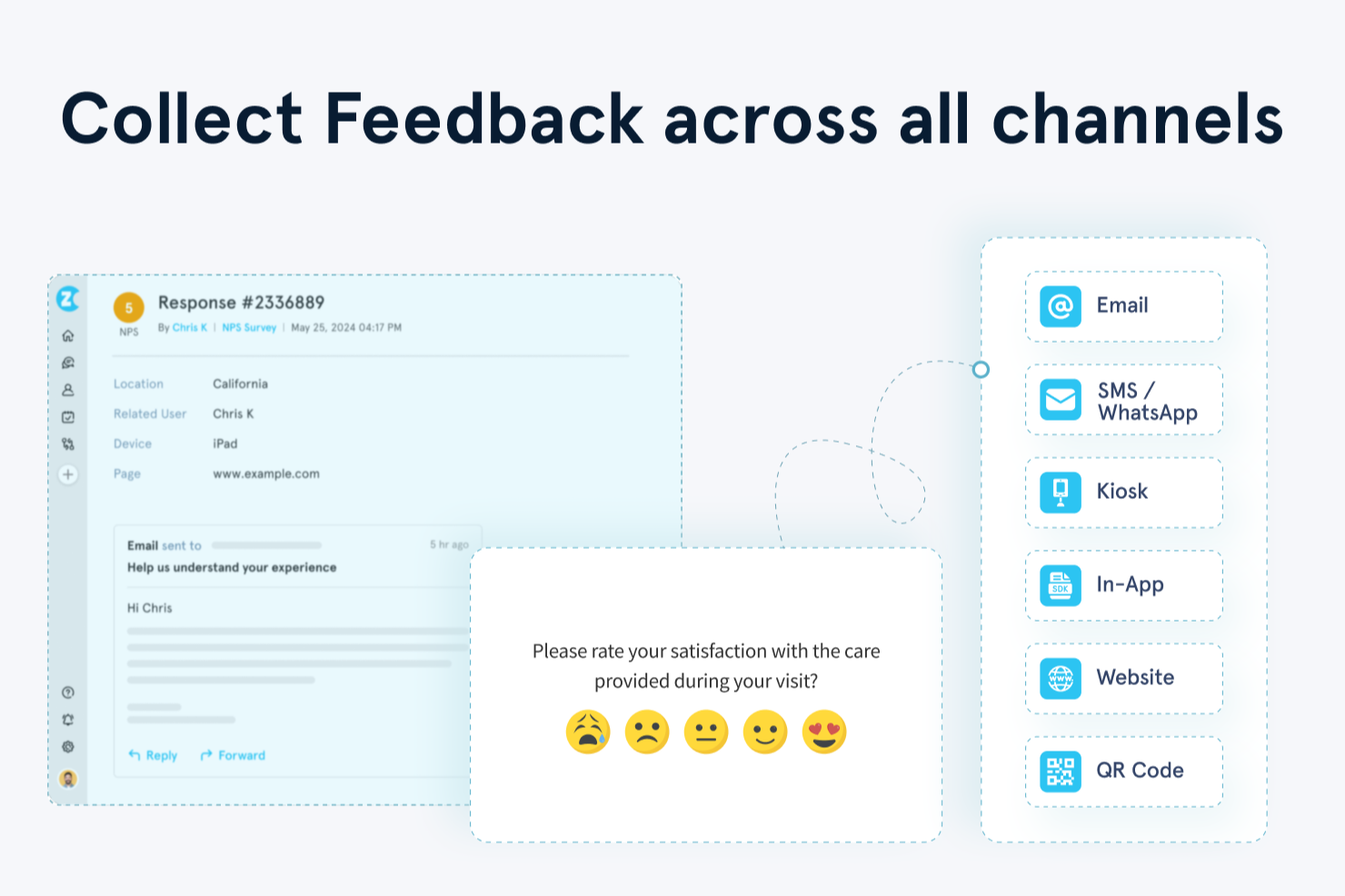
Zonka Feedback is a multichannel user feedback platform that lets you build surveys, collect responses across email, SMS, web, in-app, and offline kiosks, and analyze results with AI-powered sentiment analysis and real-time reports.
Who is Zonka Feedback Best For?
Zonka Feedback works well for mid-sized to enterprise businesses in healthcare, hospitality, retail, and SaaS that need to collect feedback across multiple physical or digital touchpoints.
Why I Picked Zonka Feedback
I've included Zonka Feedback in my top picks because it's one of the few user feedback tools built with multi-location operations as a core use case, not an afterthought. I particularly like its location-based leaderboards, which let you rank branches or outlets by NPS, CSAT, or CES scores side by side. Pair that with real-time alert routing, where negative responses at a specific location trigger instant notifications to the right team, and you have a setup that closes the loop at the branch level.
Zonka Key Features
- AI sentiment analysis: Tags open-text responses with sentiment scores and themes across all survey responses.
- Drag-and-drop survey builder: Create surveys using more than 30 question types and over 200 pre-built templates without any coding.
- Multilingual surveys: Translate surveys into over 50 languages with built-in AI translation to reach global audiences.
- CX workflow automation: Set up automated follow-up actions, ticket creation, and response routing based on survey answers.
Zonka Feedback Integrations
Zonka Feedback offers native integrations with Salesforce, HubSpot, Jira, Front, Freshdesk, Intercom, HelpScout, Pipedrive, Zendesk, and Slack, as well as additional native connections to MS Teams, Zoom, Google Sheets, Mailchimp, ActiveCampaign, and Airtable. It connects with Zapier, Integrately, and Make, supports webhooks, and provides an API for custom integrations.
Pros and Cons
Pros:
- Offers kiosk mode for on-site collection
- Compares location-based feedback within the platform
- Distributes surveys across six channels
Cons:
- Survey builder does not include an undo option
- Lacks advanced data analytics features

Userback
Best for actionable feedback

Userback is a user feedback platform that helps software teams collect visual, contextual feedback directly from their websites or products. It’s designed to make it easy for users to submit feedback with screenshots, annotations, and video recordings, improving the accuracy and speed of issue resolution.
The tool offers feedback widgets that allow users to provide annotated visual feedback without leaving the website or app. It also supports session replays to capture user interactions, helping teams see exactly how users experienced issues. Userback includes public roadmap functionality, giving users visibility into upcoming features and encouraging user engagement. Multi-device support ensures feedback can be collected from desktop and mobile platforms.
Additionally, Userback offers automated feedback workflows that help teams organize, prioritize, and act on user feedback efficiently. The platform supports detailed user identification, allowing teams to connect feedback to specific users and improve follow-up actions. Visual dashboards help teams track incoming feedback, manage tasks, and monitor project status in one place.
Integrations include Jira, Asana, Wrike, Webhook, Slack, Microsoft Teams, Notion, Trello, GitHub, monday.com, GitLab, Intercom, Zendesk, ClickUp, WordPress, Linear, Basecamp, Azure DevOps, and Zapier.
New Product Updates from Userback

Userback Mobile SDK Adds In-App Surveys
Userback’s Mobile SDK now supports in-app surveys, enabling iOS and Android users to submit NPS, CSAT, and other survey responses without leaving your app. For more information, visit Userback's official site.
 .
.
Best for conversational surveys

SurveySparrow is a voice-of-customer platform that facilitates online surveys and feedback collection to enhance customer experience. It is designed for businesses aiming to improve customer engagement and gain deeper insights.
The tool offers conversational surveys that mimic chat-like interactions, making it easier for users to provide feedback. It supports offline survey capabilities for collecting data without an internet connection. For measuring customer loyalty, net promoter score (NPS) surveys are available, and 360 assessments help in conducting employee evaluations. With multi-language support, SurveySparrow enables global feedback collection.
Additionally, with the AI insights tool, CogniVue, you can quickly understand all the feedback you gather. It analyzes the data and provides actionable insights, helping your team make informed decisions without getting lost in the details. Users can automate actions using visual workflows based on survey responses and utilize an executive dashboard for customizable data visualization.
Integrations include Gmail, Google Sheets, Slack, Microsoft Teams, Salesforce, HubSpot, Zendesk, Jira Software Cloud, NetSuite, Pipedrive, QuickBooks Online, and Mailchimp.

Canny
User feedback software for analyzing feedback from specific customers

Canny is a user feedback software that allows you to collect, analyze, and organize feedback from customers and teammates. You can use Canny to create customer profiles with customized fields to gather the information you need to serve your audience better.
Canny lets you automatically group similar user feedback and requests to make it easy for your customer support team to attend to them. Although customer feedback is important, you can only fully appreciate it if you know who is providing it, and Canny can help you in this regard.
Canny enables you to connect customer data to feedback giving you a better understanding of the type of customer demographics providing you customer reviews. You can use custom fields to segment customers, making it easier to filter feedback and attend to concerns from VIP customers.
Canny integrates with other CRM and productivity tools like HubSpot, Zendesk, Asana, Jira, ClickUp, and Intercom.
Canny pricing starts at $79/month with a free plan available.
New Product Updates from Canny

Canny Adds Two-Way Status Sync for Integrations
Canny introduces two-way status sync for project management integrations. This update keeps statuses aligned across tools, improving workflow efficiency and reducing manual updates. For more information, visit Canny’s official site.
 .
.
Best for customer feedback integration

Survicate is a user feedback platform that enables businesses to collect, analyze, and act on customer feedback through multiple channels, including email, website, in-product, and mobile in-app surveys. The platform helps businesses understand customer needs, improve user experiences, and inform product development.
With over 400 survey templates, Survicate allows businesses to customize surveys for their specific use cases. It supports a variety of survey types, including NPS, CSAT, and CES, to measure different aspects of the customer experience.
In addition to survey collection, Survicate offers Research Hub, an AI-powered research repository that centralizes customer feedback from multiple sources. Research Hub includes AI-generated reports with source-backed insights, project-based analysis, AI-powered theme discovery, and a Research Assistant that answers natural language questions using customer feedback. It can analyze feedback from surveys, support tickets, call transcripts, reviews, and other sources to help teams identify trends and customer insights.
Survicate integrates with a wide range of third-party applications, including HubSpot, Intercom, Slack, Drip, FullStory, Google Analytics, Google Sheets, Microsoft Teams, Zendesk, and Salesforce.
Pricing for Survicate starts at $56/month and includes a 10-day free trial.
New Product Updates from Survicate

Survicate MCP Support Now Available
Survicate now supports MCP, letting teams use AI tools like Claude, ChatGPT, and Slack to explore survey results, analyze responses and insights, and draft new surveys. For more information, visit Survicate's official site.
 .
.
Unwrap
Best for automatic feedback trend detection

Unwrap helps teams understand customers by organizing and analyzing feedback in a clear way. It suits customer support, product, and leadership teams that need a reliable view of what users are saying. By reducing the need for manual review, Unwrap supports faster, more informed decisions.
Why I Picked Unwrap AI
I picked Unwrap for its unique ability to automatically surface customer feedback trends with minimal manual effort. This is achieved through its auto-tagging feature, which categorizes feedback for easy access, and customizable dashboards that allow you to visualize data in a way that best suits your team's needs. These features ensure that you can swiftly identify and prioritize customer issues without sifting through endless data manually.
Unwrap AI Key Features
In addition to its trend detection capabilities, Unwrap offers:
- Assistant: Provides instant answers to queries with rich data and customer anecdotes.
- Alerts: Sends real-time notifications via Slack and email for detected anomalies.
- Responder: Facilitates tailored communication with users across multiple channels.
- Integration Support: Extensively integrates with various sources for comprehensive feedback collection.
Unwrap AI Integrations
Integrations include Salesforce, Slack, Zendesk, HubSpot, Intercom, Jira, Microsoft Teams, Trello, Google Analytics, and Shopify. An API is available for custom integrations.
Pros and Cons
Pros:
- Provides real-time insights for faster decision-making processes
- Supports multi-channel integration for comprehensive feedback analysis
- Ensures compliance with data security standards
Cons:
- Occasional gaps in native platform integrations compared to competitors
- Feedback taxonomy setup may require extra effort to customize

Formsuite
Best for AI-generated feedback forms
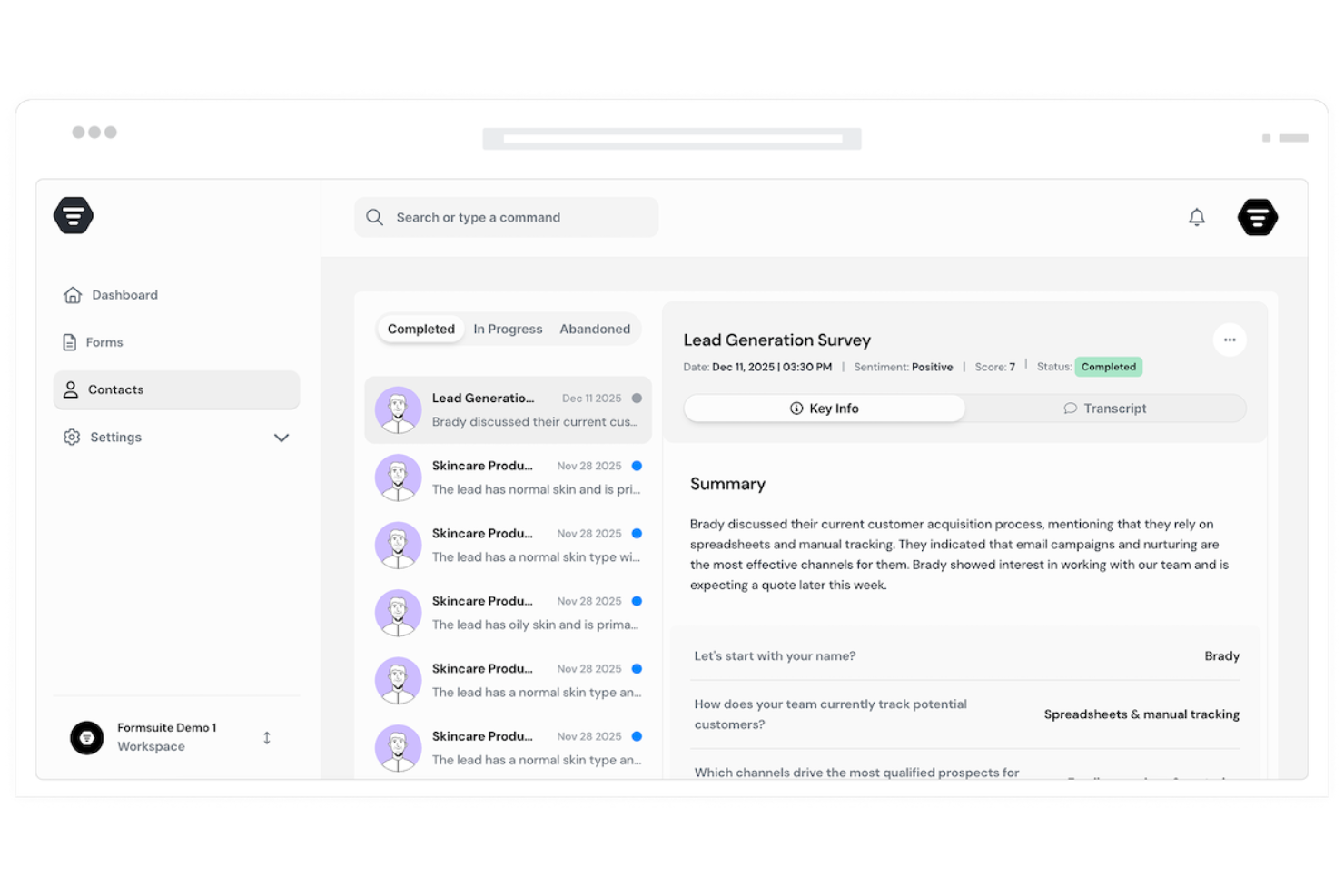
FormSuite is an AI-powered form and survey builder for teams that need to collect user feedback without building forms from scratch. It helps product, marketing, and customer support teams create feedback forms, NPS surveys, and satisfaction surveys with no-code editing, conditional logic, and AI response analysis to spot patterns faster.
Who Is Formsuite Best For?
Formsuite is a good fit for small to mid-sized businesses and solo operators who need to collect customer feedback without relying on a developer.
Why I Picked Formsuite
I picked Formsuite because its AI form assistant helps your team create feedback forms faster without starting from a blank page. You can describe the type of feedback you want to collect, such as NPS surveys, customer satisfaction surveys, or product feedback forms, and the platform generates a ready-to-edit form with relevant questions. I also like that it supports conditional logic, so you can tailor follow-up questions based on each user’s response. Its AI response analysis helps your team review submissions faster by summarizing feedback, identifying patterns, and surfacing sentiment from customer responses.
Formsuite Key Features
Beyond branded form design, FormSuite includes features that help teams collect, personalize, and analyze user feedback more effectively:
- Conditional logic: Personalizes feedback forms by showing different questions or paths based on each user’s response.
- AI response analysis: Summarizes submissions, detects sentiment, and highlights patterns across customer feedback.
- Conversational forms: Presents questions one at a time to create a more guided and engaging feedback experience.
- Integrations: Connects form responses to tools like CRMs, spreadsheets, and workflow apps through Zapier.
Formsuite Integrations
Integrations include Google Sheets, Google Analytics, Stripe, Slack, and Zapier.
Pros and Cons
Pros:
- AI builder creates feedback forms from simple prompts
- Conditional logic personalizes surveys based on user answers
- AI analysis summarizes responses and detects customer sentiment
Cons:
- Native integrations appear limited beyond Zapier-based workflows
- No clear roadmap or feature voting tools listed
Other User Feedback Software
Here are some additional user feedback software options that didn’t make it onto my shortlist, but are still worth checking out:
- Mouseflow
User feedback software for custom-triggered surveys
- Qualaroo
User feedback software with a Nudge feature for prototype creation
- Podium
User feedback software with automation feature for surveys and customer engagement
- Pendo
User feedback software with sentiments analytics feature to understand how customers feel
- Uservoice
User feedback software with a dedicated widget for measuring NPS score
- Sprig
For capturing and analyzing targeted user feedback at scale with AI
- Usersnap
User feedback software with video feedback feature for sharing customer experience
- ProdPad
User feedback software for creating outcome-focused roadmaps
- Gainsight PX
User feedback software with a wide variety of survey types
- GetFeedback
User feedback software with a mobile app survey feature
- Usabilla
User feedback software for launching feedback campaigns
- Jotform
Enterprise user feedback software
- UserGuiding
User feedback software for getting insights in real-time
- Product Fruits
For its customizable product onboarding surveys
- ReviewFlowz
For multi-platform customer feedback
- PathPro
For feature voting and prioritization
- Hotjar
Integrated website analytics solution for generating heatmaps of user behavior, feedback falls, and customer surveys
- Doorbell.io
Customer feedback system for websites and mobile applications.
- Mopinion
User feedback software with easy-to-install SDKs for iOS and Android mobile devices
- Productboard
User feedback software for prioritizing features during product development


How I Evaluate User Feedback Software
I split my evaluation into baseline criteria—like multi-channel collection and feedback loop closure—and differentiators that separate tools built for serious product teams from the rest.
Core Functionality (Table Stakes For This List)
When I'm selecting tools for my list, I rank each one on a scale from 0 (does not offer the functionality) to 5 (excels in this area) for each core functionality listed below. Then, I calculate the tool's total score into a percentage. Each tool needs to achieve a minimum total score of 65% to be considered for inclusion.
- Multi-Channel Feedback Collection: I check whether the tool captures input from in-app widgets, email, surveys, and third-party sources like Intercom or Zendesk—not just a single intake form.
- Centralized Feedback Repository: Every submission should land in one searchable hub linked to customer records, so product managers can filter by account, segment, or plan tier.
- Feedback Tagging & Categorization: I evaluate how each tool lets you organize submissions—whether through manual tags, category hierarchies, or AI-driven theme detection across large volumes.
- Feature Request Prioritization: Scoring and ranking matter here. I look for upvoting, revenue-weighted scoring, or frameworks like RICE that help teams decide what to build next.
- Closing the Feedback Loop: Tools should let you update requesters when a feature ships or moves through your pipeline—via email notifications, status pages, or in-app changelogs.
- Product & Roadmap Tool Integrations: I evaluate connections to tools like Jira, Linear, and Productboard so feedback flows directly into planning and development workflows.
Once I have a list of tools that meet this criteria, I consider what sets each platform apart.
Differentiating Factors (What Sets Vendors Apart)
Here's how I compare and contrast different vendors:
Standout Features
AI-powered insights are a major differentiator. Tools that auto-detect themes and sentiment across hundreds of submissions save product managers hours of manual tagging. I also evaluate customer value weighting, which ties feedback to revenue data so teams can prioritize requests from their highest-value accounts over raw vote counts. Public feedback portals matter here too. They give customers a transparent space to submit and upvote ideas, which cuts down on duplicate requests and builds trust with your user base.
Beyond Features
Integration depth matters a lot in this space. I check whether tools offer two-way sync with Jira or Linear, not just a one-directional push, since product teams need feedback linked directly to development tickets. Scalability is another key factor. A five-person startup and a multi-product enterprise team have very different needs around workspaces, permissions, and governance. I also evaluate pricing models closely, especially how costs scale with feedback volume and contributor seats as organizations grow.
How to Choose User Feedback Software
It’s easy to get bogged down in long feature lists and complex pricing structures. To help you stay focused as you work through your unique software selection process, here’s a checklist of factors to keep in mind:
| Factor | What to Consider |
|---|---|
| Scalability | Will the software grow with your business? Consider if it supports an increasing volume of feedback and users without significant performance issues. |
| Integrations | Does it work with your existing tools? Check if it integrates seamlessly with your CRM, project management software, and communication platforms. |
| Customizability | Can you tailor it to your needs? Look for options to customize feedback forms, dashboards, and reports to fit your specific workflow requirements. |
| Ease of use | Is it user-friendly for your team? Assess the learning curve and whether the interface is intuitive enough for all team members to use effectively. |
| Implementation and onboarding | How quickly can you get started? Evaluate the onboarding process, setup time, and availability of training resources like tutorials and guides. |
| Cost | Is it within your budget? Compare pricing against features offered. Consider hidden costs or charges for additional users or features. |
| Security safeguards | How secure is your data? Ensure it complies with industry standards for data protection and offers features like encryption and regular backups. |
What Is User Feedback Software?
User feedback software is a tool that helps you gather and make sense of feedback from your customers or users. Product managers, marketers, and customer support teams use it to find out what people like, dislike, or want fixed. It lets you create surveys, spot trends in the results, and decide what to improve next—so you know you’re working on what matters most.
Features
When selecting user feedback software, keep an eye out for the following key features:
- Survey creation: Allows you to design and distribute surveys to gather user insights efficiently.
- Data analysis: Provides tools to interpret feedback data and uncover trends and patterns.
- Integration capabilities: Ensures compatibility with existing software like CRMs and project management tools.
- Customizable forms: Lets you tailor feedback forms to suit your specific needs and workflows.
- Real-time analytics: Offers immediate insights into user feedback, helping you make timely decisions.
- Multichannel feedback collection: Enables gathering feedback from various platforms, including websites and mobile apps.
- Sentiment analysis: Uses AI to identify and interpret customer emotions and sentiments in feedback.
- Roadmap visualization: Helps you plan and prioritize product development based on user feedback.
- Security safeguards: Protects user data through encryption and compliance with data protection standards.
- Conditional logic: Allows personalization of surveys and forms based on user responses, enhancing engagement.
Benefits
Implementing user feedback software provides several benefits for your team and your business. Here are a few you can look forward to:
- Improved decision-making: Access to real-time analytics and data analysis helps your team make informed decisions quickly.
- Enhanced product development: Feedback insights and roadmap visualization guide your team in prioritizing features that matter most to users.
- Customer satisfaction: Sentiment analysis and customizable forms allow you to address user needs effectively, boosting satisfaction.
- Time savings: Integration capabilities and multichannel feedback collection streamline the feedback process, saving your team valuable time.
- Data protection: Security safeguards ensure that user data is handled safely, maintaining trust with your customers.
- Increased engagement: Conditional logic and personalized surveys keep users engaged and willing to provide more feedback.
- Cross-platform insights: Multichannel feedback collection gives you a comprehensive view of user experience across different platforms.
Costs & Pricing
Selecting user feedback software requires an understanding of the various pricing models and plans available. Costs vary based on features, team size, add-ons, and more. The table below summarizes common plans, their average prices, and typical features included in user feedback software solutions:
Plan Comparison Table for User Feedback Software
| Plan Type | Average Price | Common Features |
|---|---|---|
| Free Plan | $0 | Basic survey creation, limited responses, and essential analytics. |
| Personal Plan | $5-$25/user/month | Customizable forms, basic integrations, and standard analytics. |
| Business Plan | $30-$75/user/month | Advanced survey options, multichannel feedback, and enhanced reporting tools. |
| Enterprise Plan | $100-$200/user/month | Unlimited responses, advanced security features, and dedicated account support. |
User Feedback Software FAQs
Here are some answers to common questions about user feedback software:
Is data collected through user feedback software secure?
Yes, reputable user feedback software solutions prioritize data security. They implement encryption and comply with industry standards for data protection. Before purchasing, review the software’s security features and policies. Ensure they meet your organization’s requirements to protect sensitive user information.
How can user feedback software improve your decision-making process?
It helps your team see what users actually think about your product or service so you can base updates on real input, not assumptions. You’ll notice patterns in what users like or dislike, which helps your team focus on the most impactful changes. It also gives you a clearer view of where your efforts are paying off.
How do you analyze user feedback to find actionable insights?
Start by grouping comments or responses by topic so you can see which areas come up most often. Look for repeated words or themes that show trends in user sentiment. Summarizing these points helps your team understand the broader message behind individual comments.
How can teams encourage more users to share feedback?
Make it easy and quick for users to give input by keeping forms simple and available in familiar places, like after completing a task or on a product page. Acknowledge feedback when it’s received so users feel heard. When people know their opinions matter, they’re more likely to respond again.
What are common challenges teams face when managing user feedback?
You may receive too much feedback to process efficiently, or it may be scattered across different channels. It’s also easy to focus on extreme opinions instead of balanced insights. Setting clear goals for what type of feedback you’re collecting helps your team stay focused.
How do you close the loop after collecting user feedback?
Share updates or responses that show users their input led to changes. Even a short acknowledgment helps build trust and keeps the feedback flow strong. When users see their opinions lead to real outcomes, they’re more willing to continue engaging with your team.
What’s Next:
If you're in the process of researching user feedback software, connect with a SoftwareSelect advisor for free recommendations.
You fill out a form and have a quick chat where they get into the specifics of your needs. Then you'll get a shortlist of software to review. They'll even support you through the entire buying process, including price negotiations.