

The best product management tools help product managers prioritize roadmaps, align teams, and keep stakeholders informed—without adding to the chaos.
With constant backlog pressure and the need for real-time updates, your tools need to be reliable, flexible, and capable of streamlining collaboration and communication.
After extensive hands-on testing and leveraging my own experience as a product manager, I’ve curated the top product management software that actually helps you stay focused and deliver.
Why Trust Our Software Recommendations
6,700+
Reviews
20
Industry experts
16+
Evaluation factors
14
Years
Our team has been testing and reviewing software since 2012. As product managers ourselves, we know how difficult—and important—it is to choose the right software.
For this guide, we evaluated tools using hands-on testing and independent research, scoring tools using our selection criteria.
Our reviews reflect our human editorial judgment, not a sales pitch.
Expert reviewers:
- Andrew LumbySenior TPM
- Cristiano ValimSenior UI/UX Lead


Product Management Comparison Table
| Tool | Best For | Trial Info | Price | ||
|---|---|---|---|---|---|
| 1 | Best for linking feedback to outcomes | Free demo available | Pricing upon request | Website | |
| 2 | Best for product planning with user feedback | Free plan available | From $79/month (billed annually) | Website | |
| 3 | Best product management analytics | Free plan + 14-day free trial + free demo available | From $10/user/month (billed annually) | Website | |
| 4 | Best for Jira-based release notes and roadmaps | 30-day free trial + free plan available | From $1.10/user/month | Website | |
| 5 | Best for flexible collaboration and visualization for product management | Free plan + 14-day free trial available | From $8/user/month (billed annually) | Website | |
| 6 | Best for companies where web-applications are their main product | Free demo available | From 1¢/AI credit | Website | |
| 7 | Best for team collaboration and brainstorming | Free plan available | From $16/user/month | Website | |
| 8 | Best modular product management software | Free plan + free demo available | From $9/user/month (billed annually) | Website | |
| 9 | Best for team alignment insights | Free plan available | From $7/per maker/month | Website | |
| 10 | Best for centralized product updates | 14-day free trial available | From $249/month (billed annually) | Website |


Best Product Management Software Reviews
Read more detailed information on each tool, what their standout features are and initial pricing information.
 Best for linking feedback to outcomes
- Free demo available
- Pricing upon request
Visit WebsiteCustomer Rating:4.8/5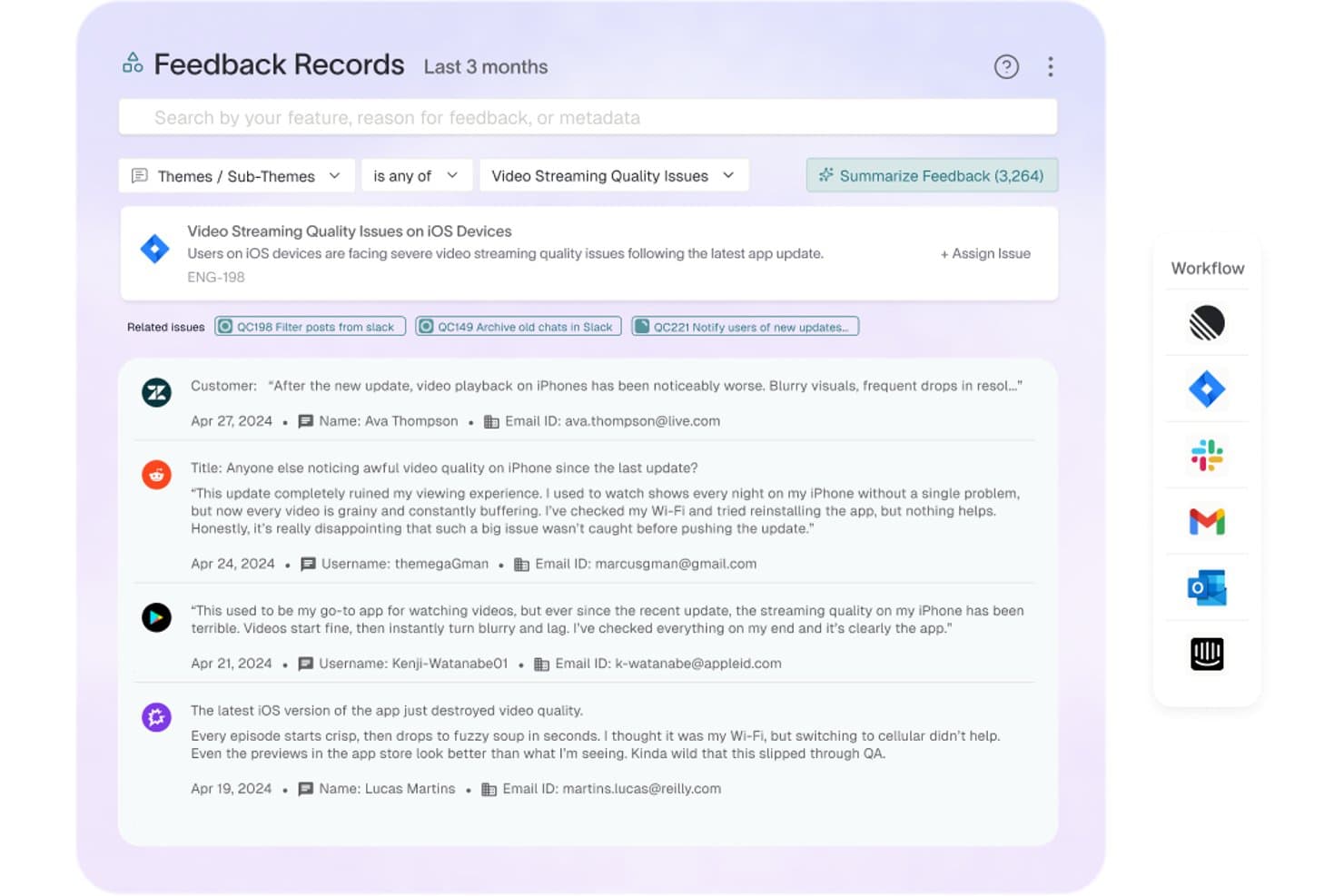
Enterpret offers a Feedback Records dashboard that aggregates and categorizes user feedback by themes, such as video streaming quality issues, with linked engineering tickets and customer details. Enterpret is a customer feedback intelligence platform that aggregates signals from 50+ sources, applies AI-driven taxonomy tagging, and ties each piece of feedback to customer account and revenue data.
Who Is Enterpret Best For?
Enterpret suits product teams at mid-market and enterprise SaaS companies that handle large volumes of customer feedback across multiple channels.
Why I Picked Enterpret
I picked Enterpret as one of the best because its Customer Context Graph ties every piece of feedback to the account, deal status, and revenue data behind it. When I query Wisdom AI in natural language, I get revenue-weighted signals I can bring straight into a roadmap conversation, not just raw theme counts. The Adaptive Taxonomy keeps categories current automatically, so I'm not spending time on manual tagging.
Enterpret Key Features
- Feedback ingestion from 50+ sources: Centralizes data from platforms like Zendesk, Intercom, Salesforce, Slack, and app stores.
- Adaptive taxonomy management: Automatically organizes feedback into dynamic categories that evolve with new signals.
- Slack workflow integrations: Enables instant sharing and discussion of insights directly within team channels.
- Agent OS for workflow automation: Lets you build and trigger automated workflows to route feedback insights into tools like Jira or Linear.
Enterpret Integrations
Enterpret offers native integrations with Zendesk, Intercom, Salesforce, Gong, Slack, Qualtrics, Linear, Jira, Google Play Store, and the Apple App Store. An API is available for custom integrations.
Pros and Cons
Pros:
- Links feedback signals directly to product decisions
- Adaptive taxonomy reduces manual categorization work
- AI surfaces revenue-weighted feedback themes automatically
Cons:
- Not a full roadmapping or backlog tool
- Setup requires significant data source configuration
Learn more about Enterpret: Best for product planning with user feedback
- Free plan available
- From $79/month (billed annually)
Visit WebsiteCustomer Rating:4.6/5
Canny's autopilot feature helps teams automatically review and categorize incoming user feedback from multiple sources. Canny gives product teams a dedicated space to collect, organize, and prioritize user feedback in one place. It’s especially useful for SaaS companies and digital product managers who want to make data-driven decisions about what to build next. By connecting feedback directly to your product roadmap, Canny helps you close the loop with users and keep your team focused on high-impact features.
Who is Canny Best For?
Canny supports product and customer experience teams at small to mid-sized organizations that need a structured way to incorporate user feedback into planning decisions. It fits companies focused on iterative product improvement and prioritization based on customer input across digital channels.
Why I Picked Canny
What sets Canny apart is its focus on centralized feedback collection and feature prioritization, which is essential for product teams managing user input at scale. The platform lets you gather feedback from multiple channels and organize it in a single, structured board, making it easy to spot trends and recurring requests. I appreciate how Canny connects feedback directly to your product roadmap, so you can prioritize features based on real user demand. This approach helps product managers make transparent, data-driven decisions and keeps stakeholders in the loop about what’s coming next.
Canny Key Features
In addition to leveraging user feedback for product planning, Canny offers a suite of features that enhance your product management capabilities.
- Feedback Management: Collect and organize feedback from users in a centralized location, enabling your team to better strategize product improvements.
- User Insights: Utilize detailed tracking to gain a deeper understanding of customer needs and preferences, allowing for more informed decision-making.
- Collaboration: Facilitate team interactions by enabling members to comment and vote on feature requests, fostering a collaborative environment.
- Public Roadmap: Create and share a public roadmap that keeps your community informed about upcoming features and developments.
Canny Integrations
Integrations include Jira, GitHub, ClickUp, Linear, Azure DevOps, Asana, Intercom, Zendesk, Salesforce, and HubSpot.
Pros and Cons
Pros:
- Segmentation filters feedback by user attributes
- Vote on behalf captures offline feedback sources
- Changelog keeps users informed about updates
Cons:
- No built-in task or sprint management
- Integrations require higher-tier plans
Learn more about Canny: Best product management analytics
- Free plan + 14-day free trial + free demo available
- From $10/user/month (billed annually)
Visit WebsiteCustomer Rating:4.3/5
Wrike's Gantt charts allow users to organize complex tasks into hierarchical structures with various dependencies, timelines, and resources. For teams seeking a versatile product management solution, Wrike offers a platform that streamlines workflows and enhances collaboration. Designed to cater to various industries and team sizes, Wrike provides tools like custom request forms, Gantt charts, and advanced analytics to support comprehensive project management. Whether you're in marketing, IT, or professional services, Wrike's integration with popular applications such as Microsoft, Google, and Salesforce can simplify your processes and improve project visibility.
Who is Wrike Best For?
Wrike supports product and analytics teams at small to enterprise organizations that need structured tools for product management, planning and performance tracking. It fits companies across industries that require integrated analytics within broader project and product workflows.
Why I Picked Wrike
I picked Wrike for its exceptional product management analytics, which are crucial for any team aiming to make data-driven decisions. With customizable dashboards, Wrike allows you to track key metrics such as customer acquisition costs and churn rates, providing insights that help optimize product strategies. The platform's real-time data inputs and AI-driven automations enhance your team's ability to understand customer behavior, improving engagement and performance. These features, combined with Kanban boards and Gantt charts, make Wrike a versatile tool for managing complex projects and achieving product-market fit.
Wrike Key Features
In addition to its analytics capabilities, Wrike offers a suite of features designed to enhance your product management experience.
- Visual Collaboration Tools: The Wrike Whiteboard provides a robust platform for team brainstorming and visual project planning.
- Dynamic Request Forms: Automate work intake and ensure that all necessary information is collected from requesters at the start.
- Resource Planning: Utilize tools like Gantt charts and workload charts to estimate needs and manage resource allocation effectively.
- Effort Management: Assess task effort to aid in assignment and project delivery forecasting, ensuring your team stays on track.
Wrike Integrations
Integrations include Klaxoon, QuickBooks, Skyvia, Power BI, Tableau, Google Sheets, Miro, Salesforce, Microsoft Teams, and Zoom.
Pros and Cons
Pros:
- Real-time document proofing streamlines asset reviews
- Improved communication with robust collaboration tools
- Offers strong security with ISO/IEC 27001 certification
Cons:
- Bulk editing options are limited for tasks
- Guest access requires additional paid licenses
 Best for Jira-based release notes and roadmaps
- 30-day free trial + free plan available
- From $1.10/user/month
Visit WebsiteCustomer Rating:5/5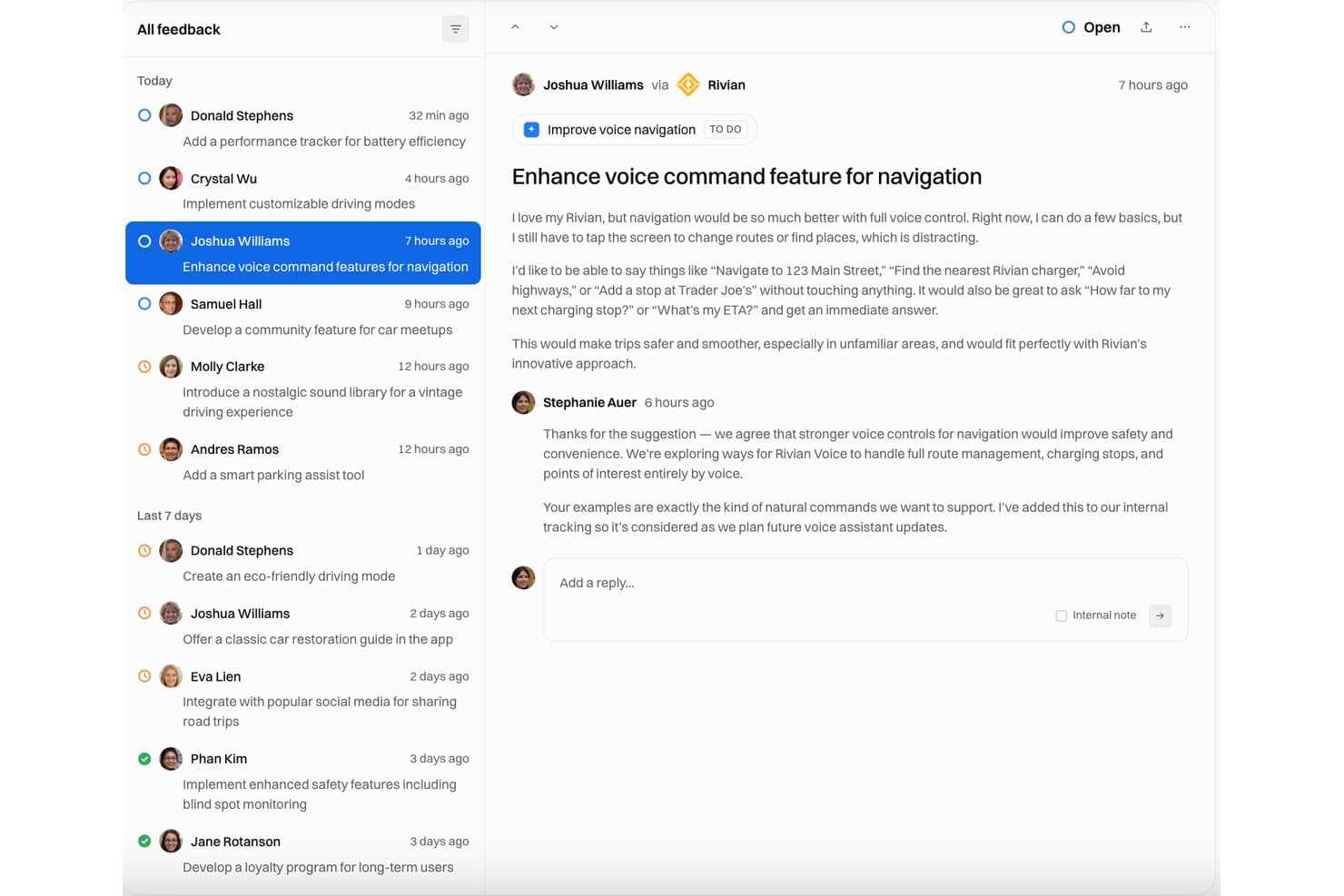
Released displays a feedback inbox where voice navigation improvement requests are tracked with open status and team responses. Released is a Jira-native product communication tool that lets teams publish AI-generated release notes, branded changelogs, and audience-specific public roadmaps directly from their Jira issues.
Who Is Released Best For?
Released is a strong fit for product managers and product ops teams at Jira Cloud shops who need to communicate releases and roadmaps to external stakeholders without adding another tool to their stack.
Why I Picked Released
Released earns its spot on my shortlist because it solves a real PM pain point: turning closed Jira tickets into polished, customer-facing release notes without manual rewriting. I like that the AI drafts notes directly from your Jira issues in your brand voice, then publishes them to a hosted changelog in minutes. The audience-specific roadmap views pull live from Jira, so I can share a clean customer-facing timeline without exposing internal ticket details.
Released Key Features
- Audience-specific roadmap views: Create different public, password-protected, or invite-only roadmap views tailored for customers, executives, or partners.
- Feedback inbox with voting: Centralize feedback from portals, forms, and Slack, allowing users to vote on feature ideas and requests.
- Jira Product Discovery integration: Link customer feedback and ideas directly to Jira Product Discovery for streamlined backlog grooming.
- Confluence and Slack publishing: Automatically publish release notes and updates to Confluence pages and Slack channels.
Released Integrations
Released offers native integrations with Jira Cloud, Jira Product Discovery, Confluence, and Slack.
Pros and Cons
Pros:
- No manual rewriting of closed tickets needed
- Publishes audience-specific roadmap views instantly
- AI drafts release notes from Jira issues
Cons:
- Narrow scope limits broader PM workflows
- Only works with Jira Cloud accounts
Learn more about Released: 5Best for flexible collaboration and visualization for product management
Miro
- Free plan + 14-day free trial available
- From $8/user/month (billed annually)
Visit WebsiteCustomer Rating:4.8/5
Miro has stunning visual tools to take an idea from start to completion. Imagine a platform where your product management needs are unified, allowing you to focus on innovation and collaboration. Miro stands out as a versatile tool for product managers, engineers, designers, and business leaders, offering a centralized space for everything from brainstorming to roadmapping. Its AI-driven features and over 250 integrations help your team prioritize, plan, and execute with precision, making it an ideal choice for any organization looking to enhance their product development workflow and deliver customer-centric solutions.
Who is Miro Best For?
Miro supports product, design, and cross-functional teams at small to enterprise organizations that need flexible collaboration and visual planning tools for product management. It fits teams working on ideation, roadmapping, and strategic alignment who benefit from shared visual spaces to coordinate work across contributors.
Why I Picked Miro
I picked Miro for its exceptional ability to foster flexible collaboration and visualization in product management. With its AI Innovation Workspace, Miro empowers your team to co-create roadmaps and prioritize features, offering real-time and asynchronous collaboration capabilities that facilitate teamwork. The platform's support for Agile methodologies and data-driven decision-making tools ensures that your product development process is efficient. Miro's suite of features, including customer journey mapping and design workshops, makes it an ideal choice for teams looking to enhance collaboration and drive innovation in their product management efforts.
Miro Key Features
In addition to its flexible collaboration and visualization capabilities, Miro offers a suite of features that further enhance your product management experience.
- Infinite Canvas: Provides endless space for your team to brainstorm and organize ideas visually, adapting to any collaborative need.
- Templates Library: Offers over 300 customizable templates to kickstart your projects and streamline your workflow.
- Sticky Notes and Drawing Tools: Simplify the process of capturing ideas and creating visual representations, making complex concepts easier to understand.
- Presentation Mode: Allows you to tell visual stories and present your product strategies effectively to stakeholders.
Miro Integrations
Integrations include Microsoft Teams, Jira, Slack, Confluence, Google Workspace, GitHub, Azure DevOps, Asana, Trello, and Zoom.
Pros and Cons
Pros:
- Voting and timer tools for structured sessions
- Wide template library for product frameworks
- Real-time collaboration enables live team workshops
Cons:
- Limited task management for product backlogs
- Performance may lag with large and complex boards
 Best for companies where web-applications are their main product
- Free demo available
- From 1¢/AI credit
Visit WebsiteCustomer Rating:4.9/5
A sample of a QA Wolf user story testing dashboard. QA Wolf offers a fully managed end-to-end automated testing service designed for product and engineering teams that want to ship with confidence. It’s especially useful for SaaS companies and digital product teams that need reliable test coverage without dedicating internal resources to test maintenance. If you’re looking for a solution that combines automation with expert support, QA Wolf stands out by handling both test creation and ongoing management for you.
Who is QA Wolf Best For?
QA Wolf supports quality assurance and engineering teams at small to mid-sized organizations where web applications are the primary product. It fits companies that need structured end-to-end testing workflows integrated with development cycles to maintain release quality and reliability.
Why I Picked QA Wolf
What sets QA Wolf apart is its combination of end-to-end automated testing with hands-on expert support, which is especially valuable for product teams that want to focus on building features rather than maintaining test suites. I picked QA Wolf because it provides a managed service where their team creates, runs, and maintains your automated tests, so you don’t have to allocate internal resources to test upkeep. The platform also delivers detailed test reports and real-time alerts, helping teams catch issues before they reach production. This approach is a strong fit for organizations that need reliable test coverage but want to avoid the overhead of managing it themselves.
QA Wolf Key Features
In addition to managed test creation and maintenance, I also found these features worth noting:
- Unlimited Test Runs: Run as many automated tests as needed without usage caps.
- Parallel Test Execution: Execute multiple tests at the same time to speed up feedback cycles.
- Test Coverage Dashboard: Visualize which parts of your application are covered by automated tests.
- Slack and Email Notifications: Receive instant alerts about test results directly in your communication channels.
QA Wolf Integrations
Integrations include Jira, Asana, Linear, and ClickUp.
Pros and Cons
Pros:
- Parallel execution accelerates feedback for releases
- Unlimited test runs support frequent deployments
- Managed service eliminates test maintenance workload
Cons:
- Lacks built-in analytics for test trends
- No self-service test creation for teams
Learn more about QA Wolf: Best for team collaboration and brainstorming
- Free plan available
- From $16/user/month
Visit WebsiteCustomer Rating:4.7/5
FigJam by Figma's tools allow for the the creation of diagrams with predefined shapes and connectors that can be easily manipulated to represent processes and relationships. FigJam offers product teams a digital whiteboard built for fast, visual collaboration on product planning and workshops. It’s especially useful for teams that want to sketch out user flows, run retrospectives, or gather feedback in a shared space. FigJam’s interactive widgets and sticky notes help you turn early ideas into structured plans without leaving the Figma ecosystem.
Who is FigJam Best For?
FigJam supports product, design, and cross-functional teams at small to enterprise organizations that need structured spaces for collaboration and brainstorming. It fits teams across industries that require visual ideation and real-time group engagement to inform product concepts, planning, and team alignment.
Why I Picked FigJam
When product teams need a collaborative space for planning and workshops, FigJam’s interactive whiteboard stands out. Its drag-and-drop sticky notes, voting tools, and ready-made templates make it easy to run brainstorming sessions or map out product flows together. I like that FigJam’s widgets and stamps help teams quickly gather feedback and prioritize ideas in real time. The seamless connection to Figma also means you can move from ideation to design without switching platforms.
FigJam Key Features
Some other FigJam features that product teams might find useful include:
- Audio Chat: Start live voice conversations directly on the board for quick discussions.
- Timer Tool: Set a countdown timer to keep workshops and activities on track.
- Link Previews: Paste links to files or resources and see instant previews on the board.
- Emojis and Reactions: Use visual reactions to give feedback or highlight ideas during sessions.
FigJam Integrations
Integrations include Slack, Microsoft Teams, Zoom, Jira, Asana, Trello, Notion, Confluence, Google Workspace, and Productboard.
Pros and Cons
Pros:
- Voting and reactions streamline team prioritization
- Figma integration enables direct design handoff
- Interactive widgets support agile product rituals
Cons:
- Board search is limited for large projects
- No built-in task or backlog management
Learn more about FigJam: Best modular product management software
- Free plan + free demo available
- From $9/user/month (billed annually)
Visit WebsiteCustomer Rating:4.6/5
ClickUp can be used to visualize product development tasks and group them according to priority or assignee. ClickUp brings together tasks, docs, goals, and collaboration in a single workspace designed for teams managing complex products. Product managers and cross-functional teams who need customizable workflows and deep visibility into project progress will find it especially useful. Its flexible structure helps you organize everything from feature requests to sprint planning in one place.
Who is ClickUp Best For?
ClickUp supports product and project management teams at small to enterprise organizations that need modular tools to manage product development workflows. It fits companies across industries that require flexible planning, prioritization, and cross-functional coordination within a unified work management platform.
Why I Picked ClickUp
I chose ClickUp because its all-in-one workspace approach addresses the need for centralizing product management activities. The platform lets you manage tasks, create and share documentation, and set and track goals without switching between tools. I find its ability to link docs directly to tasks and goals especially useful for keeping product requirements and progress visible to everyone involved. This unified structure helps product teams stay aligned and reduces the friction of managing multiple disconnected systems.
ClickUp Key Features
Some other features in ClickUp that support product management teams include:
- Custom Views: Choose from list, board, Gantt, or calendar views to visualize your product workflows in the way that fits your process.
- Automations: Set up rule-based automations to handle repetitive actions like status updates, task assignments, or notifications.
- Time Tracking: Track time spent on tasks directly within the platform to monitor team workload and project timelines.
- Mind Maps: Build visual mind maps to brainstorm product ideas, plan features, or map out user journeys.
ClickUp Integrations
Integrations include Slack, Google Drive, Dropbox, Figma, GitHub, Outlook, Google Calendar, Zoom, Microsoft Teams, and Zapier.
Pros and Cons
Pros:
- Native sprint and agile management features
- Built-in docs and wikis for requirements
- Highly customizable workflows for product teams
Cons:
- Limited advanced reporting without add-ons
- Overwhelming feature set for new users
Learn more about ClickUp: Best for team alignment insights
- Free plan available
- From $7/per maker/month
Visit WebsiteCustomer Rating:4.9/5
Chisel offers a Treeview feature for organizing product components. Chisel brings together roadmapping, feedback collection, and team alignment in one platform designed for product managers and cross-functional teams. It’s especially useful for organizations that want to connect customer insights directly to product decisions and keep everyone on the same page. With Chisel, you can prioritize features, gather input from stakeholders, and visualize your product strategy in real time.
Who is Chisel Best For?
Chisel supports product and cross-functional leadership teams at small to mid-sized organizations that need structured insights to improve team alignment. It fits companies with collaborative planning processes that require a shared platform to clarify priorities, roadmaps, and strategic decisions.
Why I Picked Chisel
What sets Chisel apart is its unified approach to product management, combining roadmapping, feedback, and team alignment in one workspace. I picked Chisel because it lets you link customer feedback directly to features on your roadmap, so you can prioritize based on real input. The team alignment board helps product managers visualize where stakeholders stand on key decisions, making it easier to build consensus. This combination of connected feedback, prioritization, and alignment tools makes Chisel a strong choice for teams that want to keep strategy, execution, and communication tightly integrated.
Chisel Key Features
Some other features in Chisel that product teams might find valuable include:
- Treeview Roadmaps: Visualize product initiatives and dependencies in a hierarchical roadmap format.
- Release Management: Plan, track, and manage product releases with dedicated release boards.
- Customizable Workspaces: Set up separate workspaces for different products or teams within the same account.
- Objective Tracking: Link product features and tasks to specific business objectives for better alignment.
Chisel Integrations
Integrations include Jira and Azure DevOps.
Pros and Cons
Pros:
- Feedback portal collects and organizes user input
- Team alignment board tracks stakeholder sentiment
- Treeview roadmaps visualize dependencies clearly
Cons:
- Cannot create custom workflow automations
- No built-in customer communication tools
Learn more about Chisel: Best for centralized product updates
- 14-day free trial available
- From $249/month (billed annually)
Visit WebsiteCustomer Rating:4.9/5
LaunchNotes provides insights for customer success. For those seeking a product management software that enhances team alignment and customer engagement, LaunchNotes could be the ideal tool. It centralizes release notes, roadmaps, and feedback collection, offering a streamlined communication platform that aligns cross-functional teams and keeps customers informed. By transforming internal documents into product announcements, LaunchNotes ensures that your team can seamlessly manage product changes and prioritize updates based on real-time user feedback.
Who is LaunchNotes Best For?
LaunchNotes supports product and communications teams at small to mid-sized organizations that need a centralized hub for announcing product updates. It fits companies with frequent releases that require consistent, structured communication of changes to internal stakeholders and external users.
Why I Picked LaunchNotes
I picked LaunchNotes for its exceptional capability in centralizing product updates, which is a crucial aspect for any product management software. With its multi-channel announcements, you can distribute updates across platforms like email, Slack, and even integrate with tools like Jira and Confluence, ensuring your team and customers are always informed. The in-app embedded widget further allows you to engage users directly by notifying them of feature releases on your app or website, making communication straightforward and immediate. Additionally, the roadmap management feature helps keep track of unpublished stages and notifies subscribers of any changes, allowing for transparent and efficient product development.
LaunchNotes Key Features
In addition to its centralized product updates, LaunchNotes offers several key features that enhance its utility for product management software.
- AI Announcement Generator: This feature allows you to quickly transform internal documents into product announcements, streamlining communication with stakeholders.
- Feedback Management: You can collect and manage feedback through integrations with tools like Chrome and Slack, making it easier to prioritize customer inputs.
- Ideas Management: This feature helps you aggregate and prioritize feedback for future work, with options for internal or public visibility, boosting collaborative development.
- Custom ESP Integration: By using your preferred email services for announcements, you can maintain consistent and branded communication with your audience.
LaunchNotes Integrations
Integrations include Jira, Confluence, Loom, Slack, Microsoft Teams, LinkedIn, Intercom, Notion, Gmail, and Hubspot.
Pros and Cons
Pros:
- Resource centers centralize help and announcements
- In-app NPS surveys collect actionable feedback
- Segmented onboarding flows target specific user groups
Cons:
- Advanced analytics require third-party integrations
- Guide versioning lacks detailed change history
Learn more about LaunchNotes:
Other Product Management Software
Here are a few more product management software that didn’t make the top list. I encourage you to experiment with these great options as well!
- 11ShortcutBest for teams using Agile methodologies
- 12JiraBest for digital product development like apps & SaaS tools
- 13Bonsai Agency SoftwareBest for product and business management
- 14SprigBest for capturing and analyzing user feedback and behavior at scale with AI
- 15ConfluenceBest for its wide variety of product collaboration templates
- 16ProdPadBest for end-to-end product management
- 17RavetreeBest for real-time utilization tracking
- 18VisorBest for project management collaboration
- 19ReveallBest product management software for product discovery
- 20UserGuidingBest for managing product adoption
- 21ProductiveBest for project management throughout the product lifecycle
- 22Peoplebox.aiBest for collaboration
- 23IgnitionBest for full go-to-market functionality
- 24DragonboatBest for connecting product development to OKRs
- 25airfocusBest for managing multiple products and teams
- 26WallingBest for visually organizing project ideas and tasks
- 27Craft.ioBest for built-in industry-leading best practices
- 28Zeda.ioBest for AI-powered insights
- 29PlanviewBest for enterprise organizations
- 30Jama SoftwareBest for requirements management and traceability
- 31PathProBest for feature voting and prioritization
- 32CreatelyBest for team collaboration
- 33ProductboardBest for customer research
- 34Aha!Best for roadmapping
- 35ProductPlanBest for beautiful UI
- 36API FuseBest for SaaS products
How I Evaluate Product Management Tools
I split my evaluation into three parts. Core functionality comes first—and carries the most weight—starting with whether a tool can build and adjust live roadmaps and manage a prioritized backlog. Then I look for standout features like customer portal voting or AI-powered insights. Finally, I consider pricing value and onboarding support.
Core Functionality (Table Stakes For This List)
When I'm selecting tools for my list, I score each one on a scale from 0 (does not offer the functionality) to 5 (excels in this area) for each core functionality listed below. I then convert the total into a percentage to help assess each tool's overall fit, with extra weight on any functionalities I've deemed essential.
- Roadmapping & Planning (Essential): I evaluate whether roadmaps support multiple views, real-time edits, and dependency mapping across initiatives and teams.
- Backlog & Prioritization (Essential): Scoring frameworks matter here. I check for built-in models like RICE or weighted scoring that connect directly to roadmap items.
- Feedback & Idea Collection: Tools that link customer feedback straight to backlog items earn higher marks than those that just collect it in a silo.
- Cross-Team Collaboration: I look for shared workspaces with role-based permissions so product, engineering, and design can plan together without stepping on each other.
- Progress & Release Tracking: Sprint and milestone tracking should show real-time progress against planned timelines, not just static status labels.
- Dev Tool Integration: Two-way sync with tools like Jira or Azure DevOps is the baseline. I check how deep the sync goes and how much manual cleanup it requires.
Once I have a list of tools that meet the criteria, I consider what sets each platform apart.
Differentiating Factors (What Sets Vendors Apart)
Here's how I compare and contrast different vendors:
Standout Features
AI-powered insights separate the best tools from the rest. I look for AI that can surface recurring feedback themes and draft PRDs, not just summarize data. Customer portal voting also matters because it closes the loop between what users request and what lands on the roadmap. Tools like Productboard and Aha! offer branded portals, but I check whether votes actually link back to backlog items. Finally, I evaluate scenario planning capabilities—modeling two or three roadmap options against real capacity constraints before committing to a quarter's plan.
Beyond Features
Pricing model matters more than sticker price. I check whether a tool charges per editor or offers free viewer seats, since product teams share roadmaps with dozens of stakeholders who never edit a thing. Scalability also shapes my evaluation—a team of three PMs and a 50-person product org need very different permission structures and portfolio views. Finally, I look at vendor ecosystem health: open APIs, webhook support, and an active template library signal a platform that grows with your stack instead of boxing you in.
How to Choose Product Management Software
With so many different product management solutions available, it can be challenging to make decisions on what product management software is going to be the best fit for your needs.
As you're evaluating trialing and shortlisting product management software, consider:
- What problem are you trying to solve?: Start by identifying the product management feature gap you're trying to fill to clarify the features and functionality the product management software needs to provide.
- Who will need to use it?: To evaluate cost and requirements, look at who'll be using the software and how many licenses or seats you’ll need. You'll also want to assess if the tool will be solely for product managers, or if more departments on your team will require access. Factor in how important ease of use, or speed of getting up and running is for your product management software users.
- What other tools does it need to work with?: Determine what tools you're replacing, which tools are staying, and any existing tools you'll need to integrate with, such as communications, CRM, customer support, development or sales software. Decide if your existing tools need to integrate with your new product management tool or, alternatively, if you can replace multiple options with one consolidated product management tool.
- What outcomes are important?: Factor in the result that the software needs to deliver to be considered a success. Consider what capability you want to gain or what you want to improve and how you will be measuring success. For example, an outcome could be the ability to get greater visibility into feature delivery timing or overall team performance. Keep the outcomes you want in mind as you’re evaluating different options to prioritize the maximum impact for your team.
- How would it work within your organization?: Account for your existing workflows and delivery methodology. Be clear on what's working well and the areas that are causing issues that need to be addressed. Remember, every team is different, so don’t assume that because a product management tool is popular, it'll be a fit for your organization.
Evaluation Methodology for Product Management Software
To evaluate product management software, I developed a comprehensive methodology that involved testing various tools across different use cases. Each software was assessed against a rubric covering seven critical aspects, with each criterion given a weighted score. These scores were then tallied to arrive at a final star rating for each product.
- Core Product Management Software Functionality (20% of final scoring):
- This criterion focused on essential features like roadmap planning, task management, and collaboration tools.
- I tested each software's ability to handle these core functionalities in various scenarios, from small teams to large-scale product launches.
- Additional Standout Features (20% of final scoring):
- Here, I looked for innovative features such as AI integration, advanced user analytics, or unique collaboration capabilities.
- I evaluated how these features contributed to the overall effectiveness and differentiation of the software.
- Ease of Use (10% of final scoring):
- The focus was on the user interface and overall user experience.
- I assessed how intuitive and easy it was to navigate the software, including the complexity of its features and the learning curve involved.
- Onboarding (10% of final scoring):
- I evaluated the onboarding process, including the availability and quality of training materials, templates, and interactive tours.
- The ease with which new users could start using the software effectively was a key consideration.
- Integrations (10% of final scoring):
- The ease with which new users could start using the software effectively was a key consideration.
- Customer Support (10% of final scoring):
- This involved assessing the responsiveness, availability, and helpfulness of the customer support team.
- I also looked at the variety of support channels offered, such as live chat, email, and phone support.
- Value for Money (10% of final scoring):
- I compared the pricing of the software against its feature set and performance.
- This involved considering whether the software offered a good return on investment, particularly for small to medium-sized businesses.
- Customer Reviews (10% of final scoring):
- Customer feedback from various review platforms was analyzed.
- I focused on overall satisfaction, specific praises, and common criticisms to gauge real-world user experiences.
Each software's scores in these categories were calculated based on their performance, weighted according to the importance of each criterion, and then summed to provide an overall star rating. This methodical approach ensured a balanced and comprehensive evaluation, providing clear insights into the strengths and weaknesses of each product management tool.
What Is Product Management Software?
Product management tools are specialized tools or suites of applications that help businesses and product teams effectively plan, develop, and manage their products throughout their lifecycle.
These tools can aid in tasks such as idea generation, product planning, collaboration, communication, and progress tracking. They also provide a central hub for product managers, designers, developers, and other stakeholders to collaborate, streamline workflows, and make informed decisions.
Product management software often includes features for design and prototyping, product development, roadmap planning, task management, documentation, team collaboration, and integration with other tools to streamline the overall product management process.
Trends in Product Management Software
Product management software is evolving rapidly, introducing new features that are reshaping how product managers plan, develop, and market products. These trends reflect the industry's response to the changing needs of product managers, especially focusing on customer-centric development and operational efficiency.
AI Integration
AI-powered tools, like Zeda.io, are providing insightful customer feedback and guiding product development decisions. This trend is pivotal for creating revenue-driving product roadmaps based on customer insights and product intelligence.
Innovation Management
Innovation management software is becoming imperative to the product manager’s toolkit. As product teams increasingly prioritize continuous innovation and ideation, these platforms help capture, organize, and evaluate new ideas from employees, customers, and stakeholders. By integrating with product roadmaps and lifecycle tools, innovation management software ensures that promising concepts are not lost in the shuffle but are systematically nurtured and assessed. This trend reflects the shift toward structured, data-backed innovation pipelines that align with strategic goals and customer needs.
Focus on Cybersecurity
With the rise of data breaches, product managers are increasingly responsible for ensuring the cybersecurity of their products throughout their lifecycle. This trend reflects the growing concern for data security in product management.
Emotional Intelligence in Product Management
The importance of emotional intelligence in product management is rising, focusing on empathy, team collaboration, and stakeholder management. Product management software with features like collaborative tools and feedback analysis can help foster a deeper understanding of customer and team emotions.
Work is just a bunch of humans getting together.

Greater Emphasis on Remote Collaboration
With the rise of remote work, there's an increasing demand for features that support remote collaboration. This includes tools for virtual brainstorming, remote sprint planning, and online feedback collection, enabling teams to work effectively regardless of their location. Implementing digital adoption platforms becomes the next step for ensuring team members can quickly adapt to new remote collaboration tools.
Increased Focus on Sustainability
Product management tools are also starting to include features that help in planning and tracking a product's environmental impact. This trend is driven by the increasing importance of corporate responsibility and sustainability in product development.
As product management continues to evolve, these trends are not just shaping the tools and software used, but also the way people approach product development and management. Product managers must adapt to these changes by leveraging new technologies and methodologies to stay competitive and effective.
Features of Product Management Software
When selecting product management tools, keep an eye out for the following key features:
- Version control: Track changes to requirements, plans, or roadmaps so you always know what’s changed, who changed it, and when. It’s like an “undo” button for your product strategy.
- Roadmapping functionality: Map out your product’s vision, timelines, and milestones all in one place. This feature lets you clearly see where your product is headed and make sure everyone on your team is pulling in the same direction.
- Task management: Organize, assign, and track tasks so nothing slips through the cracks. You can prioritize work, set deadlines, and keep your team accountable with a streamlined task management system.
- Collaboration tools: Encourage seamless communication with built-in chat, comments, and file sharing. These collaborative spaces help everyone stay in the loop, share feedback instantly, and avoid the dreaded email ping-pong.
- Idea collection and prioritization: Capture ideas from your team and stakeholders, then rank them by value, impact, and feasibility. It’s a practical way to separate the “maybe someday” dreams from those must-have, right-now features.
- Analytics and reporting: Track progress, user feedback, and product metrics through visual dashboards and reports. With this feature, you can spot trends, make data-driven decisions, and show off your wins with real proof.
- Integration capabilities: Connect your product management tool to other platforms like Jira, Slack, or customer feedback systems. Integrations help you avoid duplicate work and create a truly unified workflow.
- User feedback management: Gather, organize, and analyze feedback from users to inform your next steps. This keeps your product evolving based on what real people actually want or need.
- Release and launch planning: Coordinate every product launch with timelines, asset management, and progress tracking. Reduce last-minute panic and facilitate GTM launches with ease.
- Permissions and security controls: Make sure each team member has access to the right information and protect sensitive data. This helps you collaborate without worrying about leaks or accidental changes.
Benefits of Product Management Software
Product management software offers a range of benefits that can help users manage a product's lifecycle both efficiently and effectively. Understanding these benefits is key to making an informed decision about which tool will be the best fit for your needs. These benefits include:
- Enhanced Collaboration: This software facilitates better teamwork and ensures that everyone is aligned with the product goals, leading to more cohesive product development.
- Data-Driven Insights: By analyzing product performance and market data, businesses can make strategic decisions that align with customer needs and market trends.
- Increased Productivity: Product management software reduces manual workloads, allowing teams to focus on more critical aspects of product development and innovation.
- Risk Management: Early identification of risks allows for proactive mitigation, reducing the likelihood of product delays or budget overruns.
- Customer-Centric Development: Integrating customer feedback directly into the development process ensures that the end product meets market demands and customer expectations.
- Optimized Integration: Enhance the functionality of your existing software ecosystem by syncing seamlessly with design, data, and other collaboration platforms. These integrations ensure smooth handoffs, centralized data insights, and cohesive workflows, helping product managers bridge gaps between tools and departments.
Product management software is a great tool that not only streamlines various aspects of product development but also ensures that products are developed in line with market needs and customer expectations. These benefits collectively contribute to the creation of successful products and the overall growth of an organization.
Costs & Pricing for Product Management Software
Choosing the right plan and pricing for product management software is all about finding that 'Goldilocks zone' between getting the features your product team needs at the right price point. Here's a breakdown of typical product management software plan options and the features you can typically expect from each tier:
Plan Comparison Table for Product Management Software
| Plan Type | Average Price | Best For | Common Features |
|---|---|---|---|
| Plan TypeStarter/Basic | Average Price$0 - $15 per month | Best ForEarly-stage startups working toward product-market fit | Common Features- Basic product management features - Limited projects and users - Essential collaboration tools |
| Plan TypeProfessional | Average Price$15 - $50 per month | Best ForGrowth-stage startups | Common Features- Advanced features like roadmapping - Unlimited projects - Enhanced collaboration tools, basic integrations |
| Plan TypeBusiness | Average Price$50 - $100 per month | Best ForMature organizations, companies expanding their product portfolio | Common Features- Full feature access - Advanced analytics - Comprehensive integrations - Higher security levels |
| Plan TypeEnterprise | Average PriceCustom Pricing | Best ForEnterprise organizations | Common Features- Custom features - Dedicated support - Advanced security - Scalability options |
| Plan TypeFree | Average Price$0 | Best ForFounders building their first MVPs | Common Features- Limited feature access - Suitable for small teams or individual use |
Each plan typically caters to different business needs, with more advanced features and customization options available at higher pricing tiers. Free options, while limited in functionality, usually offer a good starting point for small teams or individuals just dipping their toes into the pool of product management software options.
When considering these plans, I recommend evaluating your specific needs, such as your team size, the complexity of your products, and the integrations you'll need. Balancing these factors with your budget considerations will help you select the most appropriate plan.
Product Management Software Frequently Asked Questions
Find answers to common questions other people ask about this topic.
Product Management Software vs Project Management Software
Product management software focuses on defining product vision, gathering requirements, prioritizing features, and guiding products from ideation to launch. Project management software, in contrast, helps teams plan, assign tasks, and track project execution. If you need to manage a product roadmap, stakeholder feedback, and feature requests alongside releases, a product management tool is the better fit.
Can these software solutions support Agile and waterfall methodologies?
Yes, most product management tools let you manage both Agile and waterfall workflows. You can create backlogs, sprints, and kanban boards for Agile or set up milestone-driven plans for waterfall. Many platforms also let your team mix methods and adjust processes as your needs change.
What is feature flagging in product management?
Feature flagging, also known as feature toggling or feature flags, is a software development and product management technique used to enable or disable certain features or functionality within a software application or product. It allows product teams to control the release and visibility of specific features to different user segments or under different conditions. This approach is particularly valuable in Agile development and continuous deployment environments.
Feature flagging software provides product managers with the functionality required to control projects and de-risk feature releases.
How do these tools manage product lifecycle from ideation to retirement?
Many product management software platforms offer features that support every stage of the product lifecycle. Some might focus on one or a selection of the stages, but here are some of the tools that can be useful at each stage:
- Ideation Stage: Idea boards and prioritization matrices help organize and prioritize ideas.
- Development Stage: Task assignments and timeline tracking tools keep projects on schedule.
- Launch Stage: Integrated marketing tools and launch planners ensure a smooth rollout.
- Maturity Stage: Analytics dashboards and user feedback tools facilitate ongoing improvements.
- Retirement Stage: Workflow management systems aid in the efficient sunsetting of products.
These targeted features empower teams to navigate each phase effectively, ensuring products evolve in response to market demands and internal goals.
Can these tools help with market analysis and competitor research?
Certainly, some product management tools offer integrations with data analytics platforms and web research tools. Others have feedback collection and analytics tools built in. This means you can gather, analyze, and track market trends, customer preferences, and competitor activities directly within your product management software. By leveraging these tools, product managers can make more informed decisions, identify market opportunities, and develop strategies that are responsive to the competitive landscape.
What security and access controls are available in top product management tools?
Most leading product management tools have role-based permissions, single sign-on (SSO), and audit trails. You can control who can view or edit certain boards, manage sensitive user data, and set up integrations with your company’s authentication tools to keep information secure.
Are there different types of product management software?
Some product management software are all-in-one suites, like several of the suites listed above. But there are also a number of great specialized tools that zero in on a particular niche within product planning, research, development, or strategy.
Here is a list of a few types of product management tools for developing, prioritizing, designing, and planning products:
- OKR Software & Tools – Develop and track objectives and key results for your product lifecycle.
- Prototyping Tools – Build product prototypes with little to no coding knowledge.
- Wireframing Tools – Wireframe an app or website with drag-and-drop functionality.
- Customer Feedback Tools – Collect customer feedback and rate it according to priority.
- Roadmap Tools – Visualize the future of your product with product roadmap tools.
- Flowchart Tools – Visualize ideas, brainstorm, or cutomer pathways using online flowcharts.
- Backlog Tools – Log, track, and manage all the backlog items for your product.
- Analytics Tools – Learn about how your poduct is perfoming in the wild to craft actionable insights.
- Product Portfolio Tools – Manage multiple ongoing product projects in one central location.
- Agile Product Management Tools – For Agile product workflows that champion speed and revision.
- Product Adoption Software – Help users and customers make the most out of your product with wikis, wizards, and walkthroughs.
How do product management platforms support remote or asynchronous teams?
These tools offer real-time collaboration, comment threads, notifications, and cloud-based access. You can tag teammates, share updates, and keep everyone aligned no matter their location or time zone. Many include integrations with Slack, email, and video calls to keep communication simple and in context.