

10 Best Digital Adoption Software Tools for 2026

10 Digital Adoption Platform Shortlist


The best digital adoption software helps you onboard users faster, improve workflow efficiency, and cut down on repetitive support and training requests.
Without it, employees struggle to find features, processes stall due to confusion, and teams rely on costly, time-consuming training sessions or constant help desk tickets. The right tool delivers in-app guidance, interactive walkthroughs, and real-time support to keep adoption high and frustration low.
After managing complex products with thousands of users and testing dozens of platforms firsthand, I’ve shortlisted the most effective solutions to help you drive adoption, reduce support burden, and boost productivity across your organization.
Why Trust Our Software Reviews
We’ve been testing and reviewing product management software since 2020. As product managers ourselves, we know how critical and difficult it is to make the right decision when selecting software.
We invest in deep research to help our audience make better software purchasing decisions. We’ve tested more than 2,000 tools for different product management use cases and written over 1,000 comprehensive software reviews. Learn how we stay transparent & our software review methodology.
What Is Digital Adoption Software?
Digital adoption software facilitates the effective use and maximization of digital tools within organizations. This category of software is primarily utilized by IT trainers, HR professionals, and organizational change managers who are responsible for overseeing the smooth transition to new technologies. Businesses use this type of software to accelerate the onboarding process for new technology, ensuring that employees quickly become proficient and productive with new systems.
Features like interactive walkthroughs, personalized learning paths, and analytics support these goals by enhancing user engagement, providing customized training, and measuring adoption success. Ultimately, digital adoption software significantly increases the return on investment in technology by ensuring that all users can fully leverage the capabilities of their digital tools.
The Best Digital Adoption Platform Comparison Chart
Here is a table you can use to compare all the tools we just covered in the overviews
| Tool | Best For | Trial Info | Price | ||
|---|---|---|---|---|---|
| 1 | Best for internal employee software walkthroughs | Free plan available | From $15/user/month (billed annually) | Website | |
| 2 | Best DAP for product feature walkthroughs | 14-day free trial | From $174/month (billed annually) | Website | |
| 3 | Best for creating interactive digital adoption content | Free demo available | Pricing upon request | Website | |
| 4 | Best for product tours in your knowledge base | 14-day free trial + free demo available | Pricing upon request | Website | |
| 5 | Discover pain points within your tech stack | Free demo available | Pricing upon request | Website | |
| 6 | Best for no-code onboarding | 14-day free trial | From $500/month | Website | |
| 7 | Full-featured DAP | Free trial available | Pricing upon request | Website | |
| 8 | DAP with user personalization features | Free trial available | Pricing upon request | Website | |
| 9 | Best for quickly implementing software help | Not available | Pricing upon request | Website | |
| 10 | Best for in-app guidance and AI insights | Free demo available | Pricing upon request | Website |
Overviews Of The 10 Best Digital Adoption Platforms
Here’s a brief description of each digital adoption solution to showcase each tool’s best use case, some noteworthy features, and screenshots to give a snapshot of the user interface.

Tango
Best for internal employee software walkthroughs
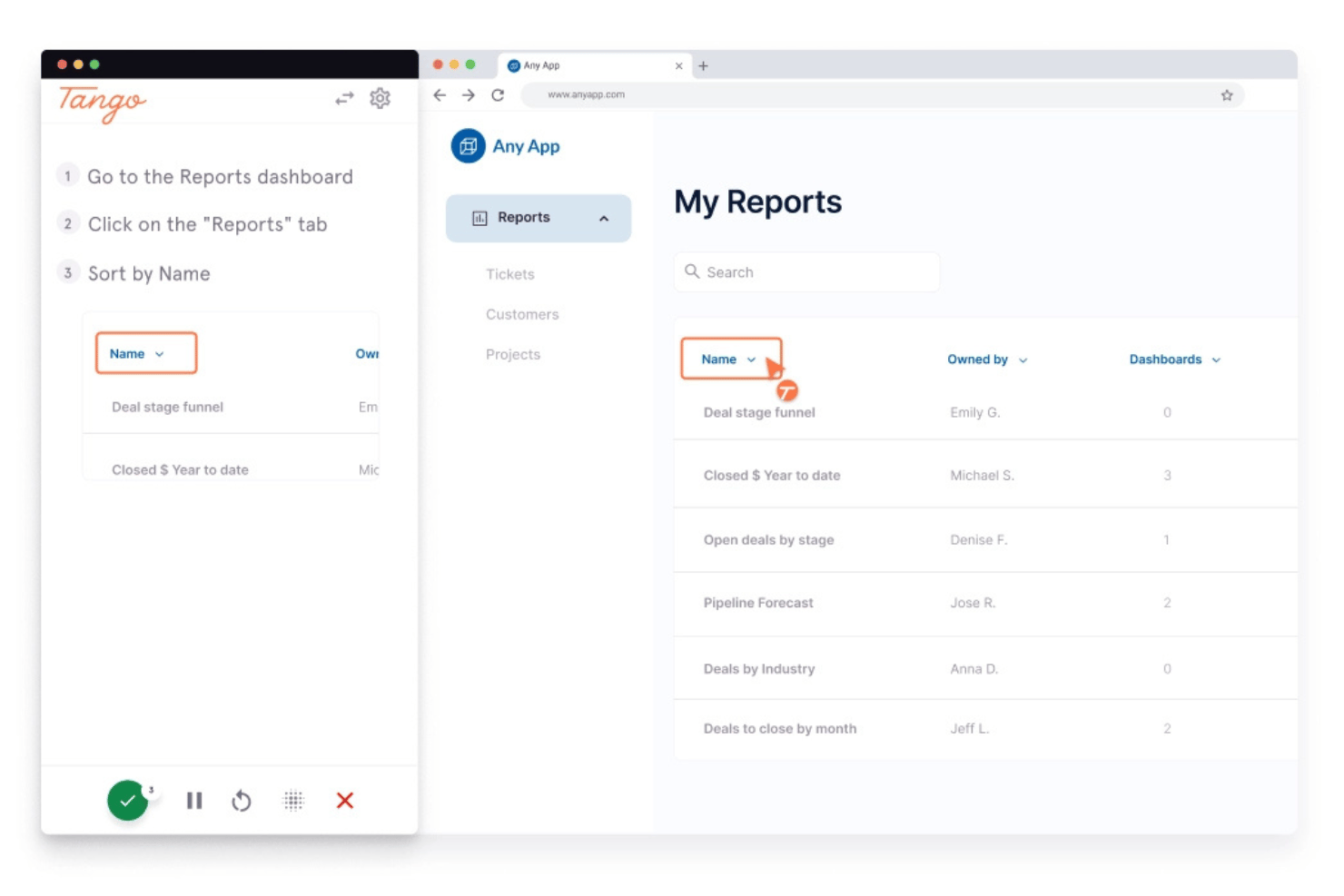
Tango is a browser extension-based digital adoption platform that captures workflows automatically and converts them into step-by-step guides, in-app walkthroughs, and contextual tooltips for internal employee software training.
Who Is Tango Best For?
Tango is a strong fit for L&D and enablement teams that need to train employees on internal software tools without pulling in developers or IT.
Why I Picked Tango
I picked Tango as one of the best because its automatic workflow capture genuinely sets it apart for internal employee software training. As a user performs a task in their browser, Tango builds a polished, screenshot-annotated guide in real time, with no manual documentation effort. I also like that Guide Me overlays step-by-step walkthroughs directly on screen, so employees training on tools like Workday or Salesforce never lose context by switching tabs.
Tango Key Features
- Automatic workflow capture: Records your browser actions in real time and generates annotated, screenshot-based step-by-step guides without any manual documentation.
- Browser automation: Converts captured workflows into supervised, human-in-the-loop automations that handle repetitive tasks across web apps like Salesforce and Workday.
- Role-based content assignment: Distributes guides to specific teams, departments, or geographic groups so employees see only the content relevant to their role.
- Multi-language workflow translation: Automatically translates guides into 15 languages and syncs updates across all versions when the source guide changes.
Tango Integrations
Tango supports embeds in Confluence, Notion, Coda, Slack, Microsoft Teams, LMS platforms, and helpdesk systems. It also offers a Zapier integration; native product analytics, CRM, and CDP integrations aren't documented.
Pros and Cons
Pros:
- Fast internal onboarding for enterprise software tools
- Easy deployment without engineering involvement required
- Workflow guides created automatically from user actions
Cons:
- Not designed for customer-facing onboarding flows
- No native user surveys or feedback tools

Best DAP for product feature walkthroughs

UserGuiding helps product teams create step-by-step product walkthroughs without requiring any coding. You can also use their software to highlight new features for your customer base to increase their digital adoption.
In addition to improving your feature adoption and overall customer success rate, UserGuiding's software can also help with product redesigns. If your product has been redesigned, you can use UserGuiding to give users the option to explore your new user interface through a guided walkthrough. This is a savvy option for proactively avoiding user confusion if the changes to your user experience are substantial.
Integrations include HubSpot, Google Analytics, Google Tag Manager, Intercom, MixPanel, Segment, Slack, and Woopra.
Paid plans start at $89/month when billed annually.

Absorb
Best for creating interactive digital adoption content

For organizations seeking to foster digital adoption, Absorb presents itself as a versatile learning management system that caters to diverse training needs. It appeals to HR and L&D professionals aiming to enhance employee onboarding, upskilling, and compliance training while simultaneously addressing customer education. With its AI-powered capabilities and focus on personalized learning experiences, Absorb bridges knowledge gaps, improves learner engagement, and reduces administrative burdens, making it a compelling choice for businesses looking to drive significant ROI through strategic learning initiatives.
Why I Picked Absorb
I picked Absorb for its ability to create interactive digital adoption content, a crucial aspect for any organization looking to enhance user engagement. The platform's course authoring tool stands out, allowing you to design tailored learning paths that resonate with specific user needs. Additionally, the social learning tools foster collaborative engagement, promoting knowledge sharing and retention among users. With gamification features, you can further enhance motivation and participation, ensuring that learning experiences are not only informative but also engaging.
Absorb Key Features
In addition to its interactive content creation capabilities, Absorb offers several other features that can significantly benefit your digital adoption strategy.
- Multi-Portal Branding: This feature allows you to customize the look and feel of the learning environment for different audiences, enhancing user experience.
- Automated Enrollments: Streamline the enrollment process by setting rules that automatically enroll users in relevant courses, saving time and reducing manual tasks.
- Advanced Reporting Tools: Gain insights into learner progress and course effectiveness with comprehensive reporting capabilities that support data-driven decisions.
- Seamless Integrations: Easily connect with existing HR and CRM systems to enhance the functionality of your learning management ecosystem.
Absorb Integrations
Integrations include Salesforce, Zoom, Microsoft Teams, BambooHR, Workday, Okta, PayPal, LinkedIn Learning, Adobe Connect, and Google Analytics. An API is also available for custom integrations.
Pros and Cons
Pros:
- Seamless integration with existing HR and CRM systems.
- The platform includes robust reporting tools for tracking learning outcomes.
- Quick setup time, typically between 4 to 8 weeks, aids adoption and implementation.
Cons:
- Some find the platform's cost higher than competitors.
- Users may desire more customizable admin dashboards.
New Product Updates from Absorb

Absorb Adds Department-Level Message Branding
Absorb adds Department Message Branding for custom email branding, contact details, and sender identity by department. This gives multi-tenant portals more control over brand-specific communications. For more information, visit Absorb’s official site.
 .
.
Stonly
Best for product tours in your knowledge base

For teams looking to enhance their digital adoption processes, Stonly offers a unique platform that empowers employees through adaptive guidance across various software applications. Ideal for industries ranging from contact centers to retail, Stonly's digital adoption platform addresses challenges like employee resistance to change and underutilization of tools. By incorporating interactive guides and a centralized knowledge base, Stonly helps streamline onboarding and support processes, ensuring your team can maximize the value of new technologies.
Why I Picked Stonly
I picked Stonly because it excels in offering product tours that seamlessly integrate into your knowledge base, providing a tailored experience for users. This unique feature allows your team to create immersive guides without the need for technical expertise, thanks to Stonly's no-code interface. Additionally, the platform's AI-powered answers enhance user engagement by delivering relevant information precisely when needed. For organizations focused on improving software utilization, Stonly's ability to incorporate detailed walkthroughs directly into existing knowledge structures makes it an invaluable tool in the digital adoption landscape.
Stonly Key Features
In addition to its unique product tours, I also found several other features that can enhance your team's digital adoption experience:
- Interactive Guides: Enable users to navigate complex software with step-by-step instructions that adapt to their pace and proficiency.
- Centralized Knowledge Base: Provides a comprehensive, searchable database where employees can find answers to their questions, reducing reliance on support teams.
- User Progress Tracking: Monitor and analyze user interactions to identify areas for improvement and ensure successful software adoption.
- AI-Powered Answers: Delivers accurate and contextually relevant information to users, enhancing their understanding and efficiency.
Stonly Integrations
Integrations include Zendesk, Salesforce, Freshworks, HubSpot, Intercom, Pipedrive, Slack, Google Analytics, Microsoft Teams, and Monday.com.
Pros and Cons
Pros:
- Customizable knowledge base enhances user experience.
- Flexible and continuously improving, catering to user needs.
- Effective for change management and feature rollouts.
Cons:
- Limited customization options for guide layouts.
- Pricing model incurs additional fees based on guide views.

Apty
Discover pain points within your tech stack

Apty is digital adoption software that helps get your employees up to speed with new technologies. This ensures you get the most from your software investment.The tool has plenty of analytics features. Managers can see how employees use the software and which business processes work.
You can see technology adoption and how this changes over time. The tool will even highlight the specific points that are causing issues.When you spot a point of friction, it’s easy to create in-app help that guides people past these barriers. This improves employee onboarding, new product adoption, and how people use your existing tools.
The tool works with any web-based application, meaning you can use it across your tech stack.
The company doesn’t advertise pricing, but you can contact the team for a quote via the website.

Userflow
Best for no-code onboarding

Userflow is a no-code user onboarding software designed to enhance customer engagement through customizable product tours, checklists, and surveys. It empowers users to create these onboarding elements quickly without needing developer assistance, making it accessible for teams of all sizes.
Why I Picked Userflow
I picked Userflow as a top digital adoption software because it allows you to create personalized product tours that guide users through your platform, ensuring they understand and utilize the features that matter most. The platform also offers onboarding checklists to help keep users focused and reduce drop-off rates, which is crucial for maintaining engagement and ensuring users get the most out of your product.
Another reason I chose Userflow is its ability to incorporate surveys and announcements directly into the user experience. This feature helps you gather valuable feedback and keep users informed about new updates or features, fostering a more interactive and engaged user base. These functionalities are vital for any digital adoption strategy, as they ensure users are both informed and engaged throughout their journey.
Standout Features Features include a debugger that helps identify and fix issues quickly, AI translation to cater to a global audience by translating content into multiple languages, and an AI rephrase tool that enhances communication by refining the language used in tours and announcements. These features collectively contribute to a more effective onboarding experience by addressing common pain points and ensuring clear communication with users.
Integrations
Integrations include Slack, Salesforce, HubSpot, Intercom, ActiveCampaign, ClickUp, Help Scout, Google Sheets, Mixpanel, Stripe, Notion, and Pipedrive.
Pros and Cons
Pros:
- reliable customer support
- user-friendly set-up for complex user flows
- comprehensive onboarding tool
Cons:
- can be complex for new users
- limited features during trial period

Whatfix
Full-featured DAP

Whatfix is a digital adoption platform that promises to streamline how people use your product. You can use it with both employees and customers. The software has several helpful features. Flows help you create product tours that are targeted toward specific user segments.
Use these alongside in-app task lists to get users up to speed with your tool. Beacons are another useful feature—these allow your product team to highlight specific features, for example, new releases or updates. Or you can use in-app pop ups with videos to communicate information to all users, while surveys allow you to collect customer opinions without dedicated customer feedback software.
The final feature is knowledge bases. You can build these directly into the app so that users can easily access all they need to use your product.
Thanks to the browser plugin that works with Chrome and Firefox, all these features are easy to use. And you can customize all the content so that it matches your branding.
Whatfix doesn’t advertise pricing, but you can contact the company for a quote.

Appcues
DAP with user personalization features

Appcues is easy-to-use software that lets you build onboarding flows. It uses no-code tools so anyone can create workflows and publish them within a day.The tool has personalization features so you can build customized journeys. For example, you can create different onboarding workflows depending on the user’s role in the company.
You can show a designer the most relevant features, while leading a manager through the features someone in their role is most likely to use.The tool lets you create checklists with a progress bar that shows customers how far into the onboarding process they are. This automatically updates as they complete more tasks, so they can see exactly how far they have come on their journey with your product.
There are also features designed for introducing users to product updates and new functionality. For example, you can create introductions and product flows to quickly get people up to speed, then add further information via the announcement center.
Appcues starts at $299 per month for up to 2,500 monthly active users. You can get started for free on the website.

Usetiful
Best for quickly implementing software help

Usetiful is digital adoption software with plenty of features to help people get up to speed with your tools. It’s used for onboarding, customer self-service help, and feature adoption. The onboarding features help customers see the value of your tools faster. This can, in turn, lead to a reduction in churn. Create a product tour that guides them through the setup process and include a checklist so they get everything done.
You can also use these tours to guide people through new features and updates.The tool makes it easy to get started. You can begin with one-off smart tips to quickly provide help if you don’t have time to create a full onboarding sequence. Just use it to highlight essential information about your product’s most important features.
The product tours are easy to create using the Usetiful no-code tools. They use a visual interface, so it’s easy for anyone to create flows, and then you use the customization tools to match the tour with your branding. You can also easily review tours with the browser extension to make real-time improvements. Another helpful feature is the ability to create different product tours for user segments, device types, or pages.
This ensures everyone gets the most relevant help content. It’s easy to integrate your tours with your product by adding a code snippet. Pricing starts at $29 per month with a free trial. There’s also a completely free version that allows you to create a single product tour.

Userlane
Best for in-app guidance and AI insights

Userlane offers a dynamic digital adoption solution for teams undergoing digital transformation and aiming to maximize software investments while minimizing training time. By providing in-app guidance and AI-driven insights, Userlane addresses challenges related to software proficiency and user engagement, empowering teams to achieve higher productivity and improved user experiences.
Why I Picked Userlane
I picked Userlane because its unique approach to digital adoption focuses on delivering in-app guidance and AI insights, which are crucial for enhancing user engagement and streamlining onboarding processes. The platform's app discovery feature helps your team navigate complex software environments with ease, while HEART analytics offers valuable insights into user behavior and software efficiency. These features collectively address the common challenge of software adoption by promoting a deeper understanding and more efficient use of business applications.
Userlane Key Features
In addition to its core functionalities, I also found several other features that make Userlane an attractive option for digital adoption:
- Context-Sensitive Help: Provides on-demand assistance tailored to the user's current context, reducing frustration and enhancing learning.
- Platform Reporting: Offers detailed analytics to track user engagement and identify areas for improvement in software utilization.
- Employee Training Solutions: Facilitates ongoing learning and development, ensuring that your team remains proficient with new and existing software.
- Customer Onboarding: Simplifies the onboarding process for new customers, helping them quickly become proficient with your software offerings.
Userlane Integrations
Integrations include Salesforce, SAP, Oracle, Microsoft Dynamics, Workday, and API options for custom integrations.
Pros and Cons
Pros:
- responsive and personalized customer support
- real-time analytics for tracking user behavior
- user-friendly interface and intuitive in-app functionality
Cons:
- some features are not advanced compared to competitors
- limited analytics compared to competitors
When to Use Digital Adoption Software
Digital adoption software sits as an invisible layer on top of your existing tools, delivering in-app guidance that helps users actually use the software you've already paid for. If your team is avoiding new platforms or your support queue is full of "how do I..." tickets, it's a sign you need it.
- You're watching adoption flatline after launch: Say your team spent 6 months rolling out Salesforce, but three months post-launch, reps are still defaulting to spreadsheets. A digital adoption platform like WalkMe or Whatfix delivers in-app walkthroughs that meet users where they are, right when they need help.
- You're onboarding users at scale: If you're onboarding hundreds of users a month across multiple segments, a one-size-fits-all help doc isn't cutting it. Tools like UserGuiding or Product Fruits let you build personalized onboarding flows per user type, cutting time-to-value from weeks to days.
- You're rolling out a major product change: When you're launching a significant UI overhaul or a new core feature, even experienced users hit a wall. In-app tooltips and guided tours surface the change in context, reducing support tickets and keeping workflows moving.
- You're flying blind on where users get stuck: If your analytics show drop-off but you can't tell why, you're guessing at fixes. Digital adoption tools track every click and hesitation, so you can pinpoint exactly where users lose confidence and iterate fast.
- You're managing enterprise software with high turnover: If you're in a sector like healthcare or finance where staff turnover is constant and compliance training is non-negotiable, re-running live training every cycle is expensive. A DAP automates that guidance in-app, keeping new hires compliant without draining your enablement team.
Other Options
Here are a few more that didn’t make the top list but are worth your consideration.
- WalkMe
DAP software to maximize investment value
- Pendo
For in-app user guidance
- Plotline
For consumer brands—across mobile and web platforms
- Inline Manual
For interactive user onboarding
- Guru
For AI-driven knowledge search
- Constructor Tech
Adoption software that allows companies to create personal learning experiences
- AppLearn
For real-time in-app guidance
- Compass
For AI-powered chat assistance
- Chameleon
For interactive product tours
- Product Fruits
For detailed analytics
- iSpring LMS
For online learning and training management
- SkyPrep
For data-driven reporting to improve learner experience
- Walnut
Build personalized product demos to help with sales
- Lemon Learning
Digital adoption tool for users and employees
- Baton
Manage software implementation and onboarding
- Intellum
Complete toolkit for creating educational experiences
- OnScreen
Enterprise digital adoption platform


Related Software Reviews
Here's a roundup of some of our top software reviews in the UX and product management space:
- Best Product Management Tools
- Best Product Planning Software
- Best Product Development Software
- Best Product Analytics Tools
- Best Idea Management Software
- Best Heatmap Software
How I Evaluate Digital Adoption Platforms
I evaluate DAPs in two layers: the baseline capabilities—no-code guidance, onboarding flows, analytics—a tool must have to qualify, and the differentiators that separate good from great.
Core Functionality (Table Stakes For This List)
When I'm selecting tools for my list, I rank each one on a scale from 0 (does not offer the functionality) to 5 (excels in this area) for each core functionality listed below. Then, I calculate the tool's total score into a percentage. Each tool needs to achieve a minimum total score of 65% to be considered for inclusion.
- In-App Guidance Creation: I evaluate whether the platform lets PMs build walkthroughs, tooltips, and hotspots without writing code—like guiding users through a new dashboard feature at launch.
- User Onboarding Flows: Each tool should support multi-step onboarding sequences with checklists and progress indicators that can adapt based on a user's role or plan tier.
- Product Usage Analytics: I look for tracking of feature adoption, funnel drop-off, and retention metrics so product teams can pinpoint where users disengage during key workflows.
- User Segmentation & Targeting: Targeting matters—I check whether you can scope guidance to specific cohorts, like trial users who haven't completed setup or enterprise accounts on a new plan.
- In-App Messaging & Announcements: The platform should offer multiple message formats (modals, banners, slideouts) with scheduling, so teams can announce a new integration without disrupting active sessions.
- In-App Surveys & Feedback: I evaluate built-in survey tools—NPS, CSAT, and custom formats—that let you capture user sentiment right inside the product after key interactions like completing onboarding.
Once I have a list of tools that meet this criteria, I consider what sets each platform apart.
Differentiating Factors (What Sets Vendors Apart)
Here's how I compare and contrast different vendors:
Standout Features
A/B experimentation is a big differentiator. I look for platforms that let you test variations of onboarding flows to see which version drives higher feature adoption. AI-powered personalization also matters, especially when a tool can auto-suggest next steps or tailor guidance based on real-time user behavior. Resource center hubs round out the picture, giving users a single in-app destination for help docs, walkthroughs, and changelogs without filing a support ticket.
Beyond Features
Integrations shape how well a DAP fits your stack. I check for native connections to tools like Amplitude, Segment, and Salesforce so adoption data flows into existing workflows. Implementation speed also matters—platforms that offer a lightweight snippet and pre-built templates let PMs launch first flows without waiting on engineering. Pricing structure is worth evaluating too, especially whether a vendor charges by MAUs or product lines, since costs can spike fast as adoption scales across multiple apps.
How to Choose Digital Adoption Software
As you work through your own unique software selection process, keep the following points in mind:
- Define Your Goals: Understanding your specific objectives is critical when selecting digital adoption software. Consider what you aim to achieve with the software: Is it to reduce the learning curve of new software deployments? Improve user engagement with your systems? Or perhaps streamline complex processes? For instance, if your primary goal is to accelerate user competency, the digital adoption software you choose should offer powerful interactive walkthroughs and role-specific content.
- Assess User Needs and Skills: The diversity in user tech-savviness within a target user base can significantly impact the effectiveness of digital adoption efforts. Analyze the current skill levels and learning preferences of your users to ensure the software provides appropriate support. For example, non-technical users may benefit more from solutions that offer straightforward, jargon-free instructions and visual aids, rather than complex textual content.
- Integration Capability: Ensure the digital adoption software integrates with your existing digital tools. Effective integration minimizes disruptions and enhances user experience by allowing the software to provide contextual guidance within the applications users are already utilizing.
- Scalability: The digital adoption solution should grow with your organization. It should be capable of supporting an increasing number of users and adapting to new software tools as your technology stack expands. This consideration is particularly relevant for rapidly growing companies that may add new technologies frequently and need their digital adoption solutions to adapt quickly.
- Evaluate Support and Updates: Ongoing support and regular updates are crucial to ensuring the long-term success of your digital adoption efforts. Consider the vendor’s reputation for customer service and the frequency of their software updates. A provider that offers prompt customer support and regular updates will help you keep the software effective against evolving digital landscapes and emerging user needs.
These tips are to support you in selecting the right tool for your needs. I've also outlined the selection criteria I used to curate this list further down the page!
Trends in Digital Adoption Software
The landscape of digital adoption software continues to evolve, reflecting broader technological advancements and shifting organizational needs. As companies increasingly rely on digital tools for every aspect of their operations, the software designed to facilitate the adoption of these tools is becoming more sophisticated. A review of recent product updates, press releases, and release logs from leading digital adoption platforms provides insight into current trends, the evolution of key features, and shifts in user demand.
- Enhanced Personalization and User Analytics: There is a significant trend towards increasing the personalization of learning paths and content delivery. Software updates show a heavy investment in analytics capabilities that track user interaction and progress. This data-driven approach allows the software to offer more tailored experiences, thereby improving user engagement and speeding up the learning curve.
- Integration with AI and Machine Learning: The integration of AI technologies is rapidly evolving within digital adoption platforms. AI is being used to predict user needs, offer proactive support, and automate repetitive training tasks. These features not only enhance user experience but also reduce the workload on human trainers and support teams.
- Expansion of Multimodal Learning Resources: The most novel functionalities include the expansion of learning formats to include interactive video content, AR-guided tutorials, and real-time feedback through voice assistants. These multimodal resources cater to diverse learning preferences and help bridge the gap between digital content and practical application.
- Focus on Mobile Optimization: With the increasing use of mobile devices in professional settings, there is a noticeable increase in features that optimize digital adoption platforms for mobile use. This trend underscores the need for tools that support learning and adaptation on-the-go, reflecting the modern workforce's flexibility needs.
- Decline in One-Size-Fits-All Training Modules: Conversely, the demand for generic, one-size-fits-all training modules is decreasing. Users and organizations are seeking more customized solutions that can address specific challenges and adapt to particular corporate cultures or industry requirements.
These trends in digital adoption software reflect a broader move towards more personalized, flexible, and data-driven tools. They align with the needs of product managers who are tasked with ensuring that digital tools are seamlessly integrated into their teams' workflows without disrupting productivity. By keeping abreast of these trends, product managers can better select and implement digital adoption solutions that will be most effective for their specific organizational contexts.
Features of a Digital Adoption Platform
When selecting a digital adoption platform, keep an eye out for the following key features:
- Guided onboarding: Offer interactive walkthroughs to help new users get comfortable with tools and workflows, making the learning curve less intimidating and a lot more enjoyable.
- Tool tips and in-app support: Provide contextual tips right where users need them so they can navigate with ease—kind of like having an expert whispering helpful hints as you go.
- User analytics: Track how users interact with your platform, which features they're drawn to, and where they might stumble so you can make smarter improvements. By analyzing user engagement and feedback, your team can identify pain points and areas for improvement.
- Knowledge base integration: Connect robust, searchable resources directly into your workflow, letting users source answers without stepping away from their screen.
- Task automation: Automate complex and repetitive tasks to free up time for creative, and meaningful manual work.
- Progress tracking: Show users their learning milestones and progress, which can give them them a boost, heighten their chances of onboarding faster, and keep them motivated.
- Multi-language support: Deliver onboarding and guidance in various languages, so users feel welcome, regardless of where they log in from.
- Customizable User Journeys: Adapt to the specific needs and roles of different users. Customized pathways ensure users receive relevant information and support that matches their job requirements, enhancing their experience and efficiency. Use templates for product walkthroughs and guides so you can provide clear, concise navigation for your audience.
Common Digital Adoption Platform AI Features
Beyond the standard digital adoption platform features listed above, many of these solutions are incorporating AI with features like:
- Automated workflow recommendations: Let AI analyze common user actions and proactively suggest faster, smarter paths in the platform—so you don’t have to figure it all out solo.
- Personalized learning paths: Use AI to recommend tailored onboarding journeys for each user based on their role, usage, and experience—so everyone gets just what they need (and nothing irrelevant).
- Automated content generation: AI can create guides, tooltips, and FAQs by ingesting new software elements or frequent user questions, keeping resources up-to-date automatically.
- Intelligent user segmentation: Analyze user data with AI to surface trends—like where different types of users struggle—so you can focus support where it’s needed most.
- Predictive analytics: Use AI to identify users at risk of dropping off or getting stuck, helping you intervene before a tiny problem becomes a big headache.
- Natural language support: Empower your help system to understand and respond to real user questions in plain language, making guidance feel easy and natural.
Prioritizing the features that are most aligned with your needs will help you narrow down a selection of platforms most suitable to help you succeed. As a result, you'll see increased productivity, reduced frustration among team members, and a higher return on investment in their digital tools.
Benefits of Digital Adoption Software
Digital adoption software is designed to facilitate and accelerate the process by which users and organizations become proficient with new software tools. This technology plays a crucial role in helping teams and individuals optimize their use of digital resources, thereby enhancing overall productivity and satisfaction. Here are five primary benefits that digital adoption software offers:
- Streamlined Onboarding Processes: Accelerates the time it takes for new users to become proficient with software. By providing interactive guides and personalized learning paths, digital adoption software significantly reduces the learning curve, enabling faster integration into daily workflows.
- Increased Productivity: Ensures that users fully utilize all features of a software application. Digital adoption platforms help users discover and use advanced features they might not find on their own, leading to more efficient use of the software and increased overall productivity.
- Reduced Support Costs: Minimizes the need for extensive IT support. With step-by-step tutorials and in-app support tools, digital adoption software allows users to solve common issues independently, reducing the workload on IT departments and lowering support costs.
- Enhanced User Experience and Satisfaction: Improves how users interact with software. By making learning more engaging and less frustrating, digital adoption software improves user satisfaction and helps maintain high levels of engagement, which are crucial for long-term software adoption.
- Data-Driven Insights: Offers valuable analytics on software usage and user engagement. Organizations can leverage these insights to understand how well their tools are being adopted, identify areas for improvement, and tailor training to meet user needs more effectively.
For businesses looking to maximize the effectiveness of their digital resources, adopting such platforms can be a game-changing decision. This strategic approach to digital tool integration helps maintain a competitive edge by ensuring that both users and organizations can fully leverage the capabilities of their software investments.
Costs & Pricing For Digital Adoption Software
When exploring digital adoption software, it's crucial to understand the various plan options and pricing structures available. These plans are typically designed to accommodate organizations of different sizes and with varying needs, ensuring that there is a suitable option whether you are part of a small team or a large enterprise. Pricing and features can vary significantly, so selecting the right plan will depend on your specific requirements and budget.
Plan Comparison Table For Digital Adoption Software
Below is a table outlining the typical plan structures and pricing for digital adoption software, helping you make an informed decision based on your organization's needs.
| Plan Type | Average Price | Common Features |
|---|---|---|
| Free | $0 | Basic tutorials, limited analytics, community support |
| Basic | $10 - $30 per user/month | Enhanced tutorials, usage analytics, email support |
| Professional | $30 - $70 per user/month | Full feature access, integration capabilities, 24/7 support |
| Enterprise | Custom pricing | Advanced analytics, personalized training programs, dedicated manager |
When choosing a plan, consider the size of your user base, the complexity of your digital tools, and the level of support your team requires. Balancing these factors will help you select the plan that best meets your needs and ensures a successful digital adoption process.
Digital Adoption Software Frequently Asked Questions
If you still need more information about digital adoption and the tools that support it, we’ve got answers for you!
What common barriers do companies face in digital transformation efforts?
Resistance to change, lack of clear communication, and insufficient training are the biggest barriers when rolling out digital adoption software. You can address these by involving key stakeholders early, providing simple onboarding experiences, and sharing ongoing support resources. Make sure your team understands how these tools benefit their daily workflows.
How can leadership effectively support digital adoption?
Leaders and managers need to champion digital adoption by actively using the tools and encouraging their teams. Share clear goals, communicate expected benefits, and talk openly about challenges. Offer rewards for engagement or mastery, and create feedback channels so users feel supported throughout the transition.
How do organizations measure the effectiveness of digital adoption software?
Most teams track metrics like platform usage rates, feature adoption, and drop in support requests to gauge effectiveness. Surveys and feedback can also reveal how confident users feel. Compare these with your initial goals—like faster onboarding or reduced errors—to understand your return on investment.
Can digital adoption software integrate with our existing HR or LMS systems?
Yes, most digital adoption platforms offer integrations with popular HR and learning management systems. This lets you embed guides, training, and analytics directly into your existing workflows. Always check compatibility during evaluation to avoid integration issues later.
How can I encourage employees to engage with digital adoption tools?
Start by customizing walkthroughs and guidance so they match your users’ real tasks. Use reminders, in-app prompts, and recognition programs to boost participation. Collect input through quick surveys so employees feel heard, and adjust your approach based on feedback.
Is digital adoption software suitable for remote or hybrid teams?
Yes, digital adoption software is well-suited for remote or hybrid workforces. These tools provide on-demand support and interactive training regardless of location, helping employees get up to speed quickly no matter where they work. Cloud-based platforms ensure accessibility across devices and working schedules.
What data privacy considerations should I be aware of with digital adoption platforms?
Make sure the software complies with data privacy laws like GDPR or CCPA, especially if you handle employee or customer data. Ask about data storage, access controls, and security certifications. Choose a vendor that offers transparency around data usage and gives you control over sensitive information.
What Do You Think About This List?
This list includes ten of the best digital adoption platforms, plus a few more thrown in for good measure.
When deciding on a tool, first choose your use case and look for products with the features you need. You can then take advantage of either free trials or demos to find out more.
For more information about product management, sign up for our newsletter. We send out insightful content every week. You can also check out our list of the best product management tools currently available.