

Feature flag software is every product manager's secret weapon. If your experience as a product manager has been anything like mine, the ability to toggle features on and off has saved your skin more times than you can count—so tools that make it easy to create, manage, and use your feature flags is a must.
So, I've made use of my personal experience managing hundreds of complex products to test, review, and rank this list of the best feature flag software on the market right now.
Why Trust Our Software Recommendations
6,700+
Reviews
20
Industry experts
16+
Evaluation factors
14
Years
Our team has been testing and reviewing software since 2012. As product managers ourselves, we know how difficult—and important—it is to choose the right software.
For this guide, we evaluated tools using hands-on testing and independent research, scoring tools using our selection criteria.
Our reviews reflect our human editorial judgment, not a sales pitch.
Expert reviewers:
- Andrew LumbySenior TPM
- Cristiano ValimSenior UI/UX Lead


Feature Flag Software Comparison Table
This comparison table summarizes pricing details for my top feature flag software selections:
| Tool | Best For | Trial Info | Price | ||
|---|---|---|---|---|---|
| 1 | Best for cross-platform feature flagging | Free plan available | From $99/month (unlimited seats) | Website | |
| 2 | Best for its role-based access controls | 14-day free trial + free demo available | From $75/seat/month | Website | |
| 3 | Best for analytics and triage reports | Free plan available | Pricing upon request | Website | |
| 4 | Best for scheduled flag changes and approvals | Free demo available | Pricing upon request | Website | |
| 5 | Best for flags with built-in analytics and replays | Free plan available | Pricing upon request | Website | |
| 6 | Best for KPI-triggered automated rollbacks | Free demo available | Pricing upon request | Website | |
| 7 | Best for detailed user targeting | Free plan + 14-day free trial + free demo available | From $10/month (billed annually) | Website | |
| 8 | Best for flag releases tied to experiment data | Free plan available | From $150/month | Website | |
| 9 | Best for flag targeting tied to live metrics | Free plan + free demo available | Pricing upon request | Website | |
| 10 | Best for open-source feature flags and A/B testing | Free plan + free demo available | From $40/user/month | Website |


Best Feature Flag Software Reviews
Here’s a brief description of each feature flagging platform to showcase each tool’s best use case, some noteworthy features, and screenshots to give a snapshot of the user interface.
 Best for cross-platform feature flagging
- Free plan available
- From $99/month (unlimited seats)
Visit WebsiteCustomer Rating:4.6/5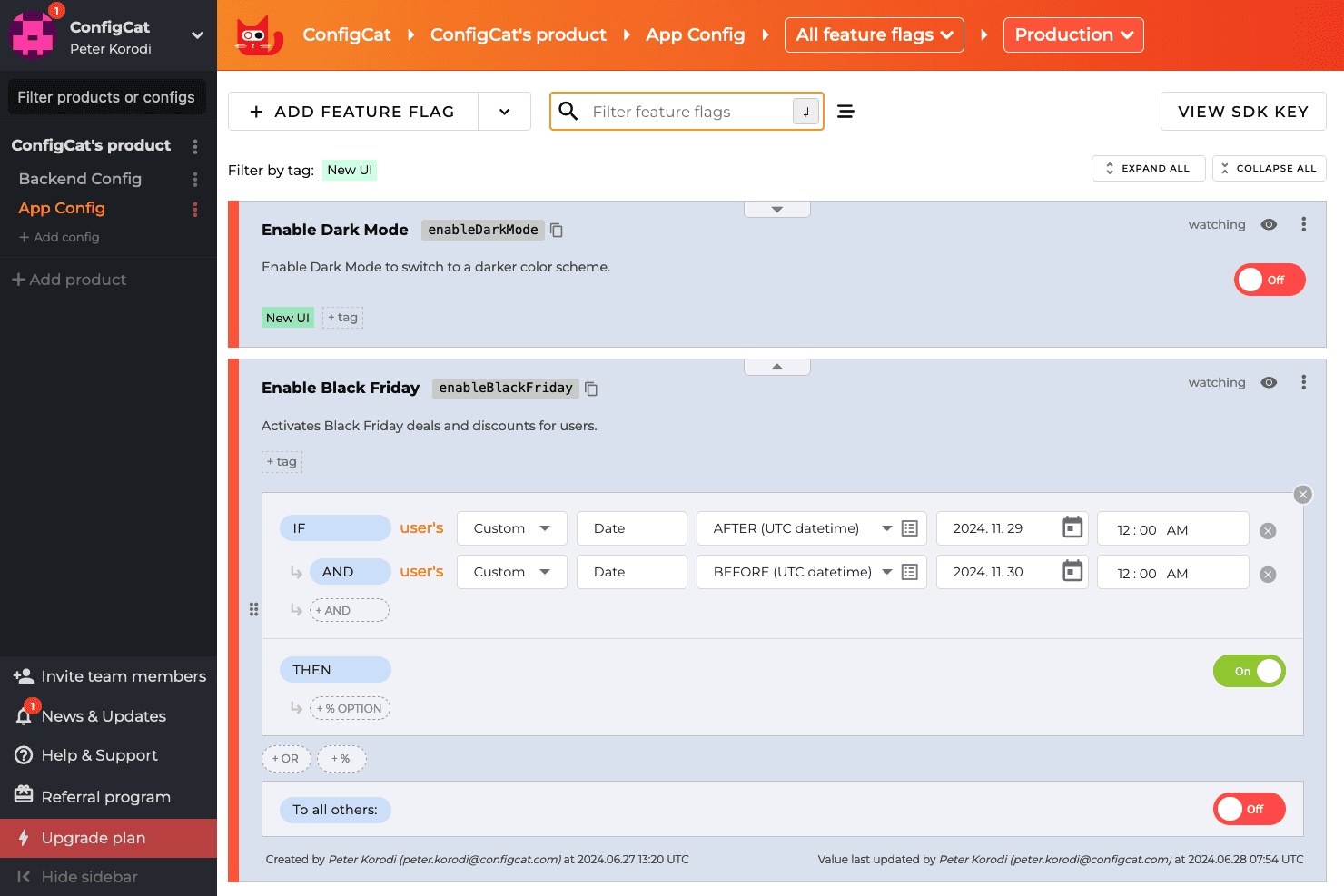
ConfigCat allows developers to turn features on and off using a dashboard, even after the code is deployed. ConfigCat is a hosted feature flag and remote configuration service that supports boolean flags, multivariate variations, targeted rollouts, percentage-based releases, and an emergency kill switch across an extensive range of SDKs spanning web, backend, mobile, game engines, and edge platforms.
Who Is ConfigCat Best For?
ConfigCat is a strong fit for engineering teams that ship across multiple platforms—web, mobile, backend, and game engines—and need one flag management system to cover all of them.
Why I Picked ConfigCat
I picked ConfigCat as one of the best because no other tool on this list matches its SDK breadth across genuinely different runtime environments. I'm talking Unity and Unreal Engine alongside Cloudflare Workers, Flutter, and Kotlin Multiplatform, all managed from a single dashboard. If your team ships a mobile app, a backend service, and a game, you can control one flag across all three without context-switching between tools. The Zombie Flags feature also helps my team stay disciplined by surfacing stale flags before they accumulate into technical debt.
ConfigCat Key Features
- Zombie Flags detection: Flags that haven't changed within a configurable number of days are automatically surfaced so your team can clean up stale toggles before they accumulate.
- SDK-side flag evaluation: Flag logic runs inside the SDK itself, so user data never leaves your infrastructure and reaches ConfigCat's servers.
- Terraform provider: You can manage flags and environments as code using ConfigCat's native Terraform provider, fitting flag management into existing IaC workflows.
- Unlimited seats on all plans: Every pricing tier includes unlimited team members, so you're not penalized for involving product managers, designers, or stakeholders in flag management.
ConfigCat Integrations
ConfigCat documents 20 integrations, including GitHub Actions, GitLab CI/CD, CircleCI, Bitrise, Terraform, Jira, Slack, Datadog, Amplitude, and Mixpanel. Its Management API supports custom integrations, while Zapier provides additional connectivity.
Pros and Cons
Pros:
- Zombie Flags expose stale toggles
- In-memory caching supports rapid emergency rollbacks
- Broad SDK coverage across diverse runtimes
Cons:
- SDKs poll instead of pushing updates
- No native statistics engine for experiments
Learn more about ConfigCat: Best for its role-based access controls
- 14-day free trial + free demo available
- From $75/seat/month
Visit WebsiteCustomer Rating:4.7/5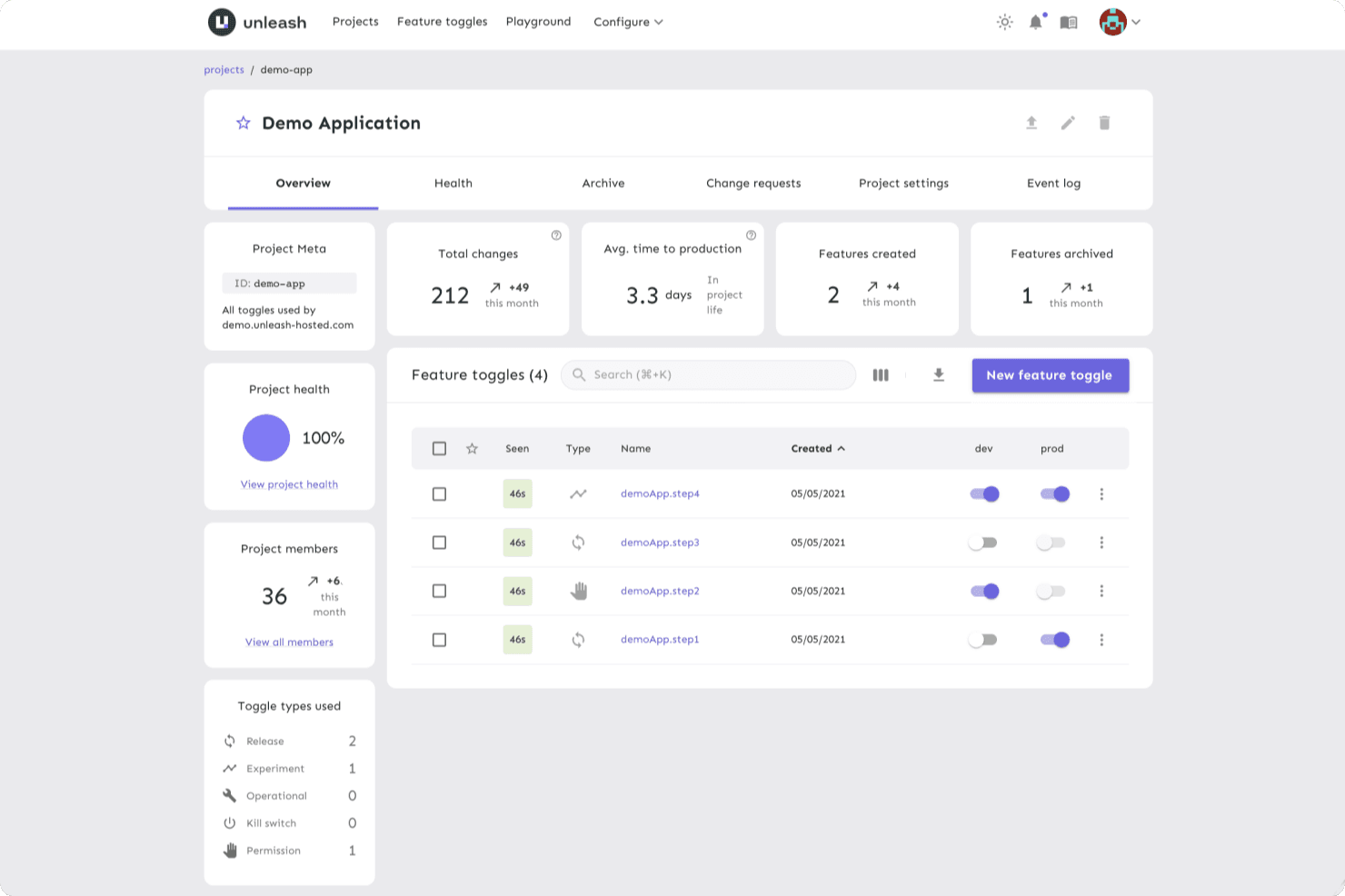
Unleash provides a unified platform for developers to manage flags, enabling them to make changes quickly in a controlled environment. Unleash is an open-source feature flag platform that supports feature toggling, targeted rollouts, kill switches, A/B testing with variants, and multi-environment flag management across 25+ SDKs.
Who Is Unleash Best For?
Unleash is a strong fit for engineering-led organizations that need granular control over who can view, edit, or toggle flags across large teams and multiple environments.
Why I Picked Unleash
I picked Unleash as one of the best because its role-based access controls go deeper than what most feature flag tools offer. You can define custom roles at the root, project, and environment level, so a developer can toggle flags in staging without touching production. I also like that change requests enforce two-person approval before any flag goes live, which matters when you're managing flags across large, distributed engineering teams.
Unleash Key Features
- Gradual rollout strategies: Roll out flags to a percentage of users using built-in activation strategies and reusable segments to control exactly who sees a change.
- Flag lifecycle management: Track stale flags, receive notifications, and monitor flag usage metrics to keep your flag inventory clean across projects.
- Kill switch: Instantly disable a feature in any environment without redeploying code, with per-environment permissions controlling who can toggle it.
- 25+ SDKs: Native SDKs for server-side, front-end, and mobile platforms—including React, Flutter, and Go—let any team integrate flag evaluation directly into their stack.
Unleash Integrations
Unleash offers four documented native integrations: Slack, Microsoft Teams, Datadog, and Jira. It also supports Admin, Frontend, and Client APIs for custom integrations, plus SAML 2.0 and OpenID Connect SSO.
Pros and Cons
Pros:
- Stale-flag tracking reduces flag sprawl
- Local evaluation supports fast flag decisions
- Granular roles protect production flag changes
Cons:
- Advanced controls can confuse navigation
- Experiment results need external analytics
Learn more about Unleash: Best for analytics and triage reports
- Free plan available
- Pricing upon request
Visit WebsiteCustomer Rating:4.6/5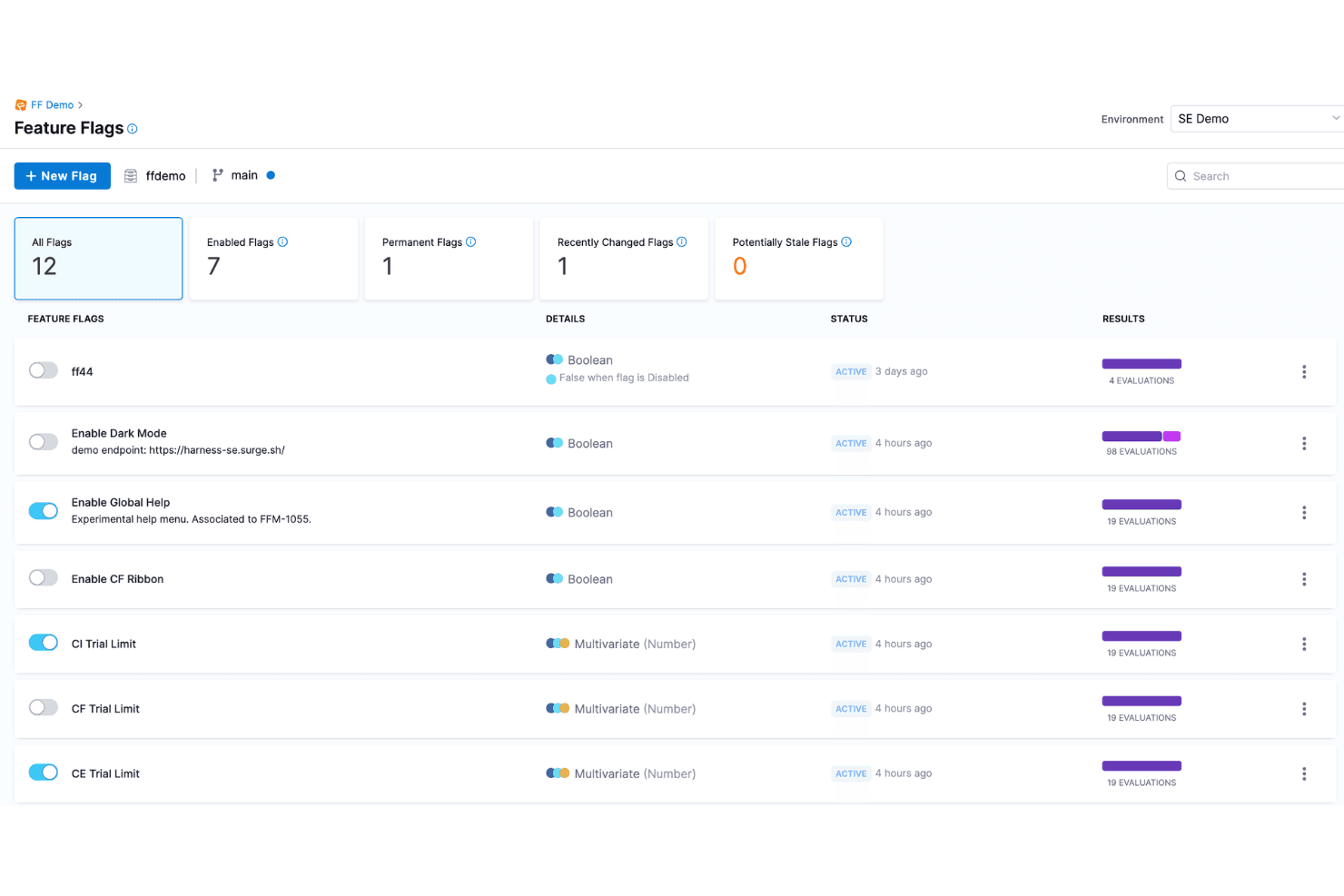
Harness is a modern, cloud-native software delivery platform that helps teams automate their deployment pipelines, including feature flags. Harness Feature Management & Experimentation (FME) is a feature flag platform that combines flag management, targeted rollouts, warehouse-native A/B testing, and automated rollback into a single module within the broader Harness DevOps platform.
Who Is Harness Best For?
Harness FME is a strong fit for enterprise engineering and product teams that need flag management, experimentation, and automated rollback in one platform.
Why I Picked Harness
I picked Harness FME as one of the best because its analytics and triage reporting capabilities are genuinely built into the rollback loop, not bolted on afterward. When a flag causes a harmful impact, Harness automatically triggers rollback in under 30 seconds based on measured metrics, not just alerts. I also love the warehouse-native experimentation layer, which pulls statistical significance directly from Snowflake, Redshift, or BigQuery, so triage reports reflect business KPIs your team already tracks.
Harness Key Features
- Stale flag detection: Harness automatically identifies unused flags and opens cleanup pull requests through Worker Agents for human review before merging.
- Warehouse-native experimentation: A/B test results pull directly from Snowflake, Redshift, or BigQuery, so metrics tie to your existing data models.
- Role-based access control: RBAC, approval workflows, OPA policy enforcement, and audit trails govern every flag change across your pipeline.
- Reusable segments: Define user segments once and apply them across flags, configs, and experiments without duplicating targeting logic.
Harness Integrations
Harness FME integrates with GitHub, GitLab, Bitbucket, Jenkins, Kubernetes, Datadog, New Relic, Snowflake, Amazon Redshift, and Google BigQuery for feature delivery, observability, and warehouse-native experimentation.
Pros and Cons
Pros:
- Automated stale-flag cleanup reduces maintenance
- Warehouse-native experiments measure business outcomes
- Analytics connect directly to rollback decisions
Cons:
- Product-specific reviews remain limited
- Mobile SDK coverage remains unclear
Learn more about Harness: Best for scheduled flag changes and approvals
- Free demo available
- Pricing upon request
Visit WebsiteCustomer Rating:4.2/5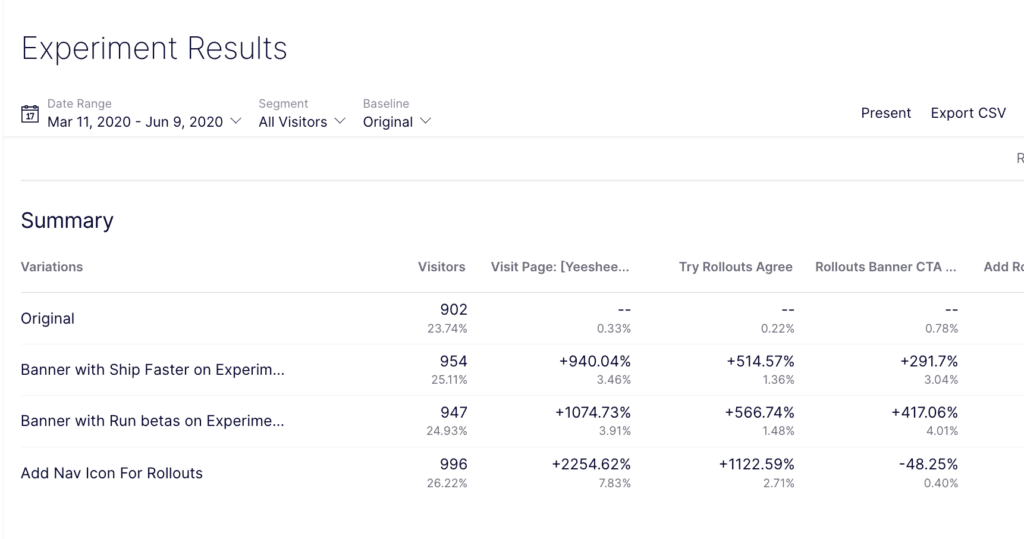
Optimizely helps you understand at a glance which of your rollouts was more successful. Optimizely is a feature flag and experimentation platform that combines targeted rollouts, A/B testing, approval workflows, and scheduled flag changes with governance tools like flag ownership tracking and audit history.
Who Is Optimizely Best For?
Optimizely is a strong fit for cross-functional product and engineering teams that need structured release governance, where both developers and non-technical stakeholders manage flags together.
Why I Picked Optimizely
Optimizely earns its spot on my shortlist because its approval workflows and scheduled flag changes set it apart from tools that treat flag management as a purely technical task. I particularly like that you can schedule a traffic percentage shift or audience swap in advance, and route it through a designated approver before it ever goes live. Flag changes are locked while a request is pending, and every decision is logged, so my team has a clear audit trail without any manual documentation.
Optimizely Key Features
- Staged rollouts: Incrementally release features to a percentage of users—1% to 10% to 50% and beyond—while targeting by user attributes, region, or audience.
- Warehouse-native analytics: Connect flag and experiment data directly to your existing data warehouse to measure impact on revenue, retention, and user behavior.
- MCP server integration: Manage flags, check statistical significance, and archive stale flags using plain-language commands through AI coding and assistant tools.
- Multiple environment support: Create and configure flags across development, staging, production, and custom environments from a single governance dashboard.
Optimizely Integrations
Optimizely supports 20+ SDKs, a REST API, webhooks for CI/CD and issue-tracking tools, and warehouse connections. Vercel offers an Optimizely edge middleware template, but specific native integrations aren’t clearly documented.
Pros and Cons
Pros:
- Local evaluation supports rapid kill switches
- Scheduled traffic and audience changes support releases
- Approval workflows lock pending flag changes
Cons:
- No documented automated rollback triggers
- Scheduled changes exclude variables and metrics
Learn more about Optimizely: Best for flags with built-in analytics and replays
- Free plan available
- Pricing upon request
Visit WebsiteCustomer Rating:4.5/5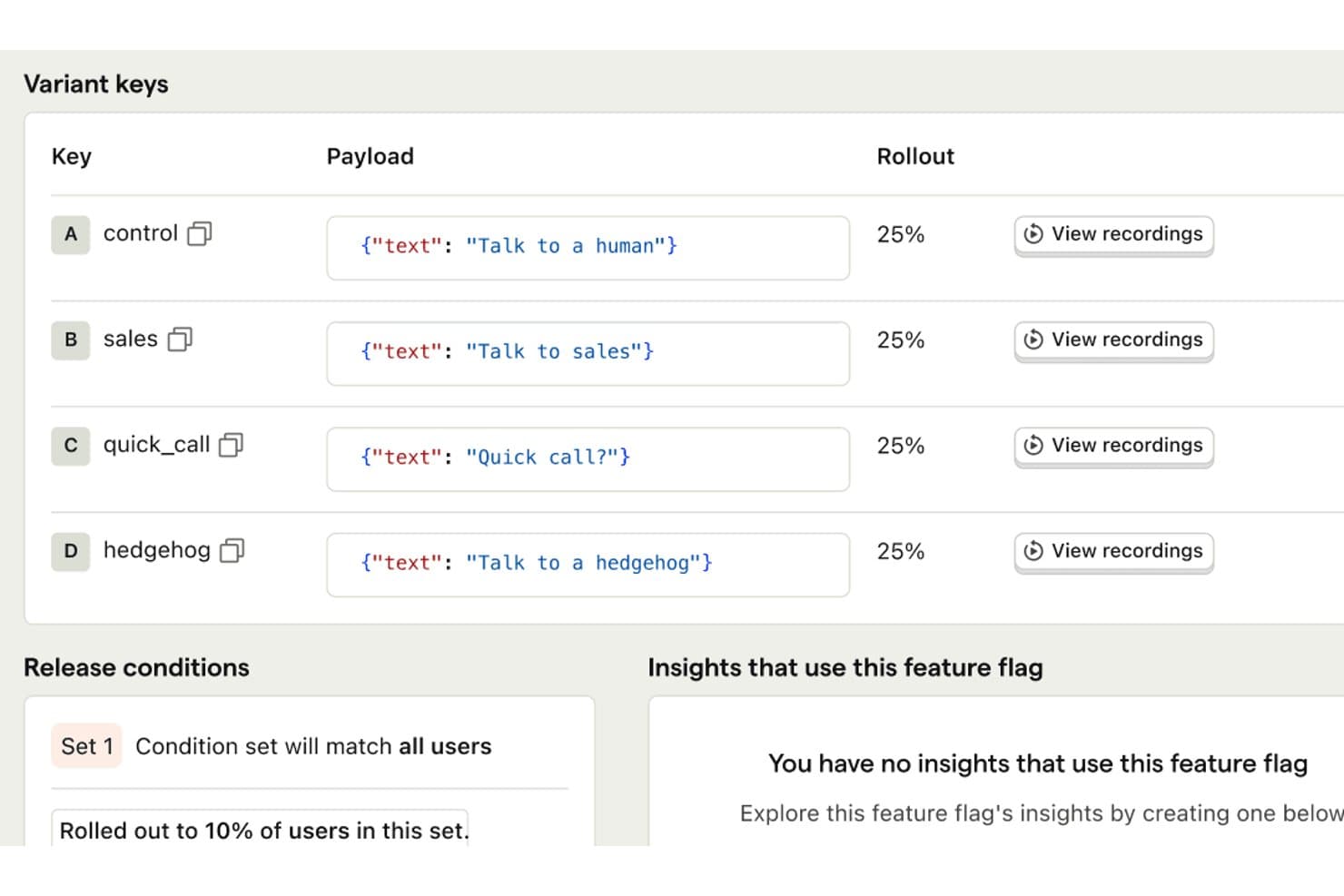
PostHog lets users run A/B tests with custom text variants and rollout controls. PostHog is a feature flag platform that combines boolean and multivariate flag toggling, targeted rollouts, A/B experimentation, session replay, and product analytics in a single tool.
Who Is PostHog Best For?
PostHog is a strong fit for product and engineering teams that want flags, experiments, analytics, and session replay in one place rather than stitching together multiple tools.
Why I Picked PostHog
PostHog earns its spot on my shortlist because it's the only feature flag tool I've used that puts flags, session replay, and product analytics in the same dashboard without any stitching. When I roll out a flag to 20% of users, I can immediately pull up replays of those sessions and see exactly how they're interacting with the new experience. I also love stale flag detection, which surfaces dead flags in your codebase so cleanup doesn't become a six-month backlog.
PostHog Key Features
- Scheduled flag releases: Set a flag to turn on, turn off, or change its rollout percentage automatically at a specific time.
- Early access opt-in widget: Let users join betas themselves through a built-in widget without any engineering work per request.
- Local flag evaluation: Cache flag values in server SDKs so flags resolve without a network call on every request.
- MCP server integration: Manage flags directly from AI coding agents like Cursor or Claude Code using natural-language prompts.
PostHog Integrations
PostHog integrates with Cursor, Claude Code, VS Code, and Slack through its MCP server and apps. It also offers 30+ SDKs and a full API for custom integrations and CI/CD workflows.
Pros and Cons
Pros:
- Scheduled releases reduce manual flag changes
- Session replays reveal rollout behavior
- Built-in analytics connect rollouts to outcomes
Cons:
- Governance controls require paid packages
- Lower tiers restrict project count
Learn more about PostHog: Best for KPI-triggered automated rollbacks
- Free demo available
- Pricing upon request
Visit WebsiteCustomer Rating:4.7/5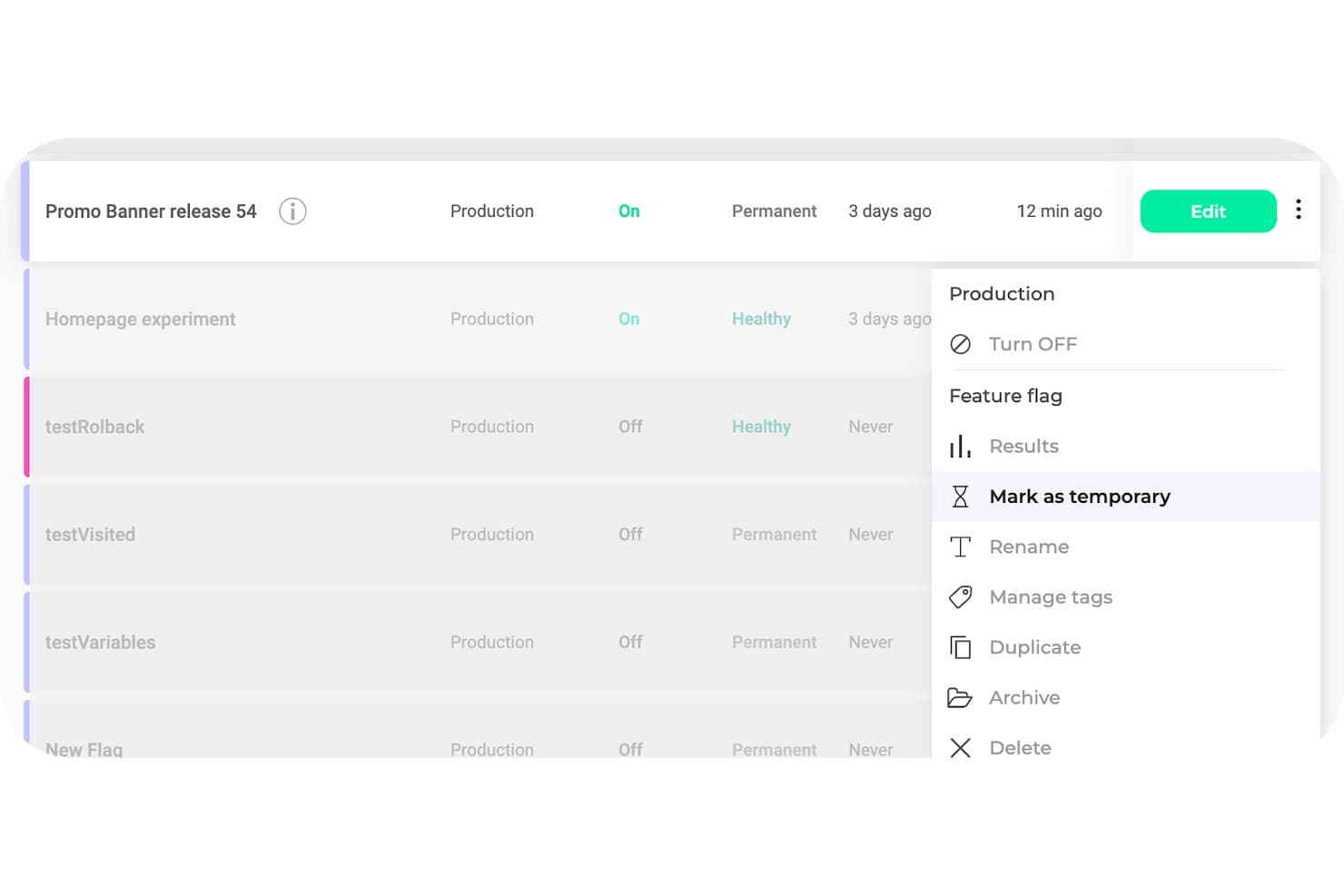
Kameleoon lets users manage feature flag lifecycle with archive, delete, and tagging options. Kameleoon is a feature flag and experimentation platform that combines flag toggling, targeted rollouts, A/B and multivariate testing, and automated rollbacks in a single dashboard with 12+ SDKs.
Who Is Kameleoon Best For?
Kameleoon is a strong fit for product and engineering teams that need experimentation and feature flag management in one platform, without juggling separate tools.
Why I Picked Kameleoon
Kameleoon earns its spot on my shortlist because of how it handles automated rollbacks tied directly to KPI thresholds. Rather than manually watching dashboards and toggling flags off when something breaks, Kameleoon monitors conditions through integrations like Datadog and Sentry and triggers a rollback the moment a metric crosses a set threshold. I also like that its stats engine, which includes CUPED and sequential testing, is wired into the same flag setup, so you're not piecing together separate tools to understand why a rollback happened.
Kameleoon Key Features
- OpenFeature SDK support: Kameleoon's SDKs are compatible with the OpenFeature standard, letting you integrate flags without vendor lock-in.
- Hybrid targeting mode: Combines client-side behavioral data, like GA4 segments or browsing activity, with server-side flag delivery for precise targeting.
- Stale flag detection: Kameleoon flags unused or outdated feature flags in your codebase, helping you manage technical debt before it accumulates.
- Approval workflows: Built-in roles, permissions, and approval steps let teams review and sign off on flag changes before they go live.
Kameleoon Integrations
Kameleoon integrates with GitHub, GitLab, Jira, Slack, Datadog, and Sentry for delivery, collaboration, and monitoring workflows. REST, JavaScript, Data, and Automation APIs support custom integrations and CI/CD workflows.
Pros and Cons
Pros:
- Approval workflows support safer releases
- Experiment results connect directly to flags
- KPI thresholds trigger automatic rollbacks
Cons:
- Starter limits multi-project flag management
- Advanced tests often require developer involvement
Learn more about Kameleoon: Best for detailed user targeting
- Free plan + 14-day free trial + free demo available
- From $10/month (billed annually)
Visit WebsiteCustomer Rating:4.5/5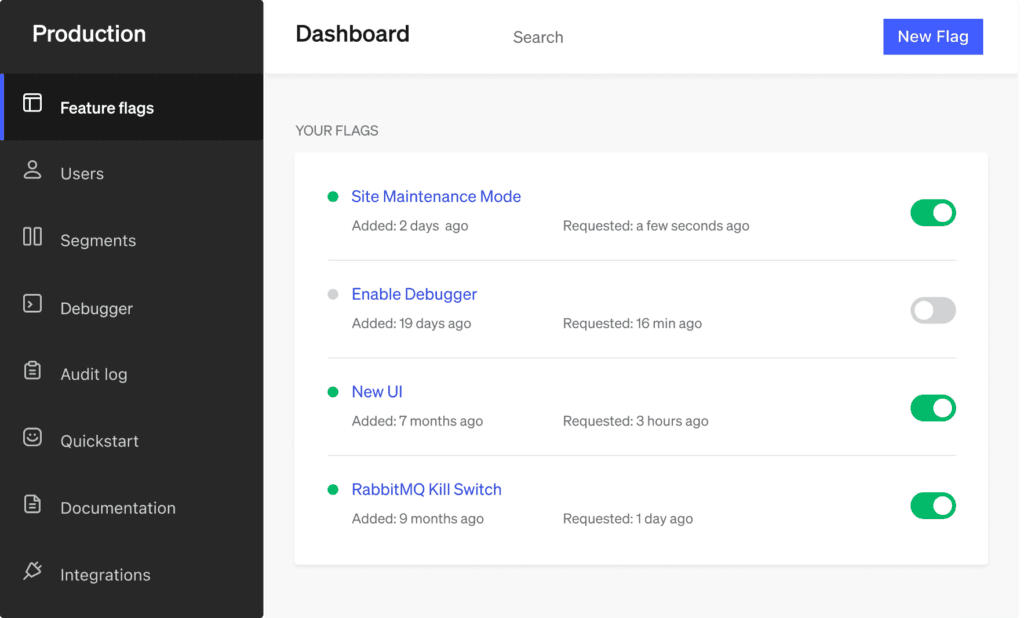
LaunchDarkly helps you use feature flags as kill switches, so you can disable the features whenever necessary. LaunchDarkly is a feature flag management platform that supports boolean and multivariate flags, targeted rollouts, built-in experimentation, and real-time flag control across unlimited projects and environments.
Who Is LaunchDarkly Best For?
LaunchDarkly is a strong fit for product and engineering teams that need granular control over who sees what—across user segments, accounts, and devices.
Why I Picked LaunchDarkly
LaunchDarkly earns its spot as one of the best on my shortlist because its targeting capabilities go well beyond a simple percentage rollout. I can define segments by user attributes, account, or device, then layer in bulk targeting and synced segments to reach exactly the right subset of users at exactly the right time. What I find especially useful is that flag changes propagate in under 150ms on Enterprise, so when I'm rolling out to a new segment, I'm not waiting on a deploy cycle to see results.
LaunchDarkly Key Features
- Multivariate flags: Define flags with multiple variations—not just on/off—so you can test several versions of a feature at once across different user groups.
- Stale flag detection: A built-in flag health list surfaces flags that are no longer in active use, with code references that show exactly where each flag appears in your codebase.
- Full-stack experimentation: Run A/B and multivariate experiments with Bayesian and frequentist statistics, CUPED variance reduction, sequential testing, and multi-armed bandits.
- 30 SDKs and REST API: Client-side, server-side, and edge SDKs cover most major languages and frameworks, with a full REST API supporting semantic, JSON, and merge patch operations.
LaunchDarkly Integrations
Native integrations are not clearly documented. LaunchDarkly supports data warehouse connections, event destinations, and custom integrations through its REST API.
Pros and Cons
Pros:
- Stale flag detection reduces technical debt
- Mature experimentation supports sophisticated product decisions
- Detailed targeting reaches precise user segments
Cons:
- Automated rollback isn’t included universally
- Advanced governance requires higher-tier plans
Learn more about LaunchDarkly: Best for flag releases tied to experiment data
- Free plan available
- From $150/month
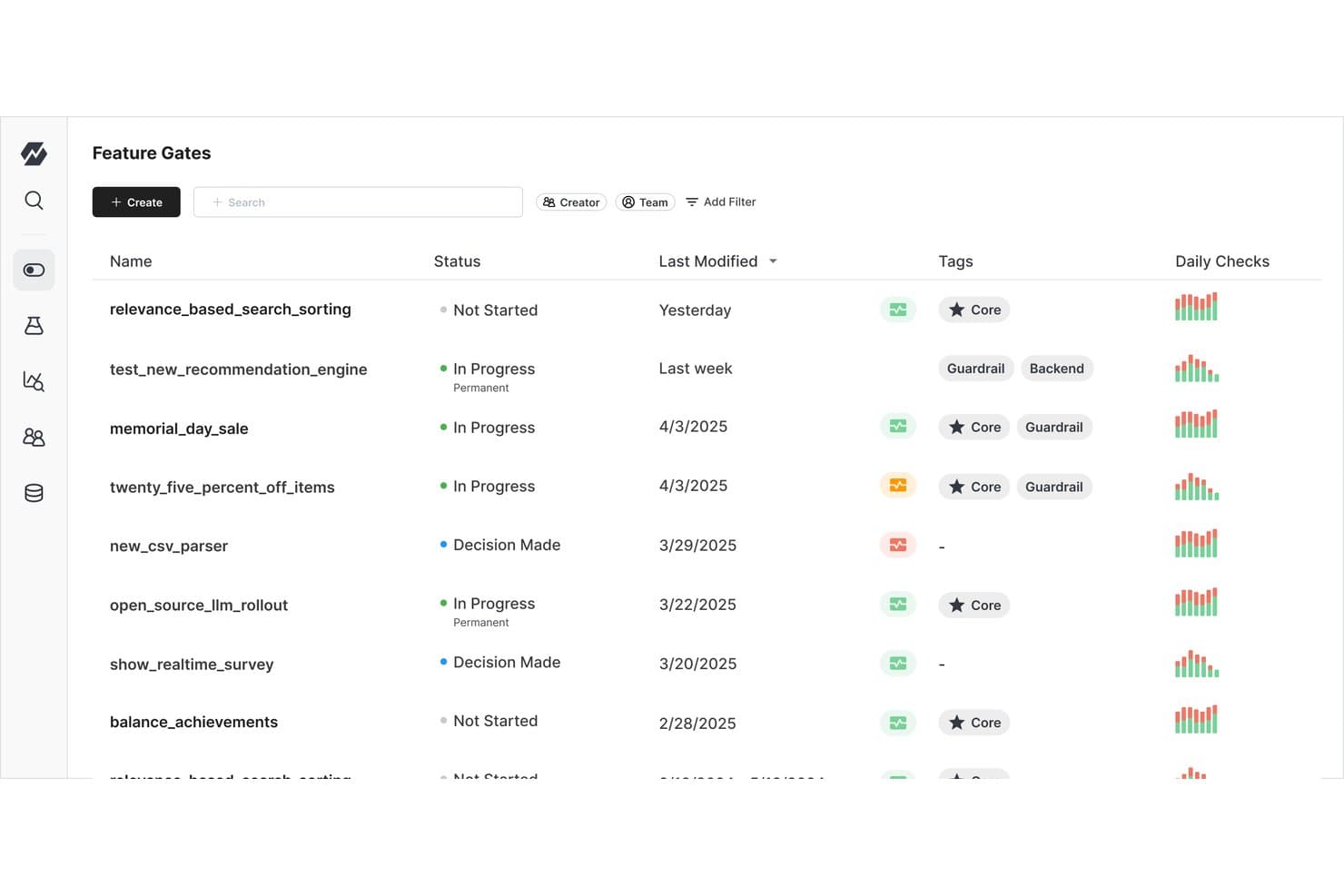
Statsig lets users manage and monitor feature gates with status and tags. Statsig is a feature flag and experimentation platform that combines flag management, A/B and multivariate testing, and product analytics in a single, tightly integrated toolset.
Who Is Statsig Best For?
Statsig is a strong fit for product and engineering teams that want every feature release backed by experiment data and measurable outcomes.
Why I Picked Statsig
Statsig earns its spot on my shortlist because every flag release is also an experiment. I love that you can attach metrics directly to a gate rollout and instantly see its measured impact, without setting up a separate test. When a rollout starts hurting a key metric, Statsig triggers an automatic rollback before you even open the console. Features like CUPED variance reduction and sequential testing make the statistical results genuinely trustworthy, not just directional.
Statsig Key Features
- Stale flag detection: Statsig sends automated alerts when a flag has been inactive or forgotten, nudging your team to clean it up before it becomes a liability.
- Warehouse-native deployment: Your flag and experiment data stays inside your own data warehouse, with support for Snowflake, BigQuery, Databricks, Redshift, and more.
- 30+ open-source SDKs: Client and server SDKs span nearly every major language, and Statsig builds them to minimize gate-check latency in production.
- Code references: The flag dashboard shows exactly where each flag appears in your codebase, making it easier to track usage and safely remove old flags.
Statsig Integrations
Statsig offers warehouse-native integrations with Snowflake, Databricks, BigQuery, Amazon Redshift, Amazon Athena, and Microsoft Fabric, plus Okta via SCIM. It supports API controls for custom integrations and is listed on AWS Marketplace.
Pros and Cons
Pros:
- Code references help remove stale flags
- Automatic rollbacks catch harmful metric changes
- Experiments measure each flag release’s impact
Cons:
- Dense experiment views challenge larger programs
- Initial setup requires coding knowledge
Learn more about Statsig: Best for flag targeting tied to live metrics
- Free plan + free demo available
- Pricing upon request
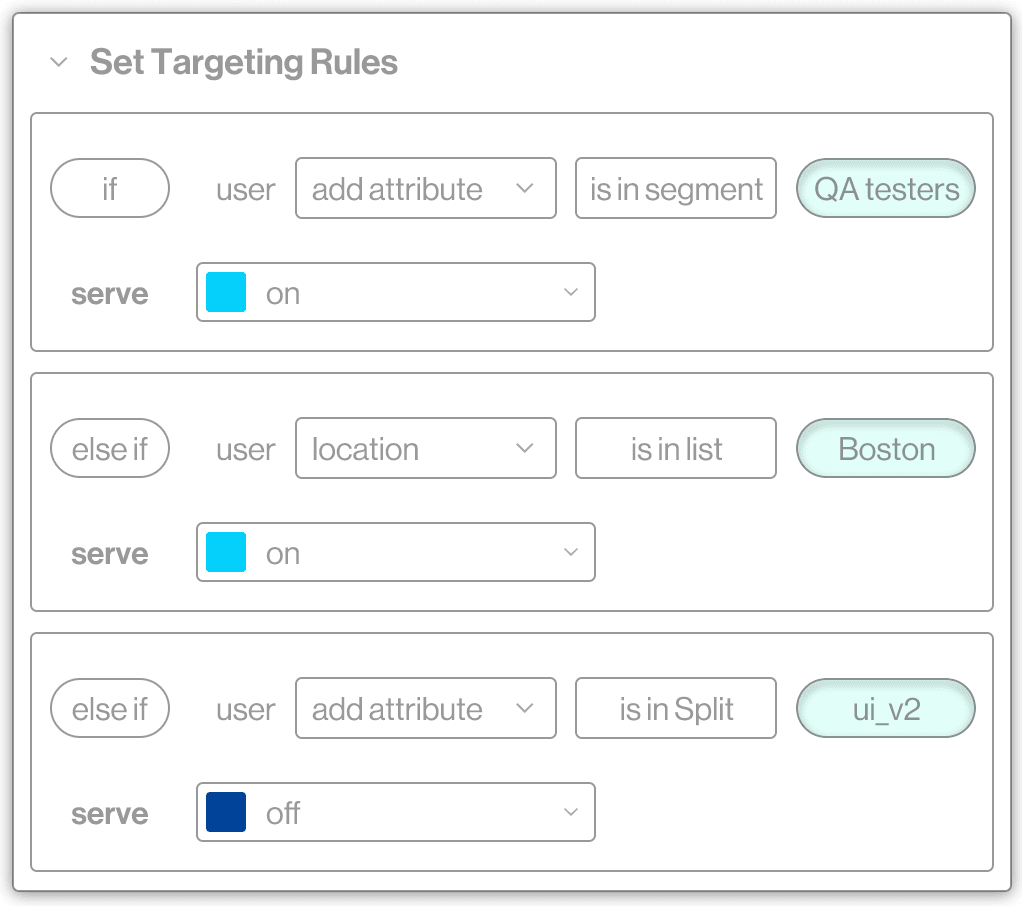
Split enables you to target feature flags to specific users or user groups. Split (now Harness Feature Management & Experimentation) is a feature flag platform that combines targeted rollouts, multivariate flag management, A/B and warehouse-native experimentation, and automated release monitoring with real-time metric tracking.
Who Is Split Best For?
Split is a strong fit for product and engineering teams at mid-to-large companies that need flag targeting tied directly to live performance metrics and experimentation data.
Why I Picked Split
Split earns its spot on my shortlist because it ties flag targeting directly to live performance metrics, which is something most feature flag tools don't do out of the box. I particularly like Release Monitoring: it tracks each flag's impact on system behavior in real time and can trigger an automated rollback when something goes wrong, pointing to the exact flag at fault. Warehouse-native experimentation is another standout, letting teams run A/B tests inside Snowflake, Redshift, or BigQuery without exporting data first.
Split Key Features
- Stale flag cleanup agent: Automatically identifies unused flags and opens draft pull requests to remove them from your codebase.
- Warehouse-native experimentation: Runs A/B tests directly inside Snowflake, Redshift, or BigQuery without exporting your data.
- Approval workflows: Requires sign-off from designated team members before any flag change goes live, locking the flag as read-only in the meantime.
- AI Configs: Lets you swap LLM prompts, models, and parameters in real time without redeploying your application.
Split Integrations
Split integrates with Datadog, New Relic, Dynatrace, Grafana, Prometheus, Jira, Slack, Microsoft Teams, PagerDuty, Snowflake, Amazon Redshift, and Google BigQuery. It also supports OpenFeature and provides a REST API for custom integrations.
Pros and Cons
Pros:
- Warehouse experiments connect flags with metrics
- Granular targeting supports measured rollouts
- Release monitoring links incidents to flags
Cons:
- Approval workflows add release overhead
- Product transition creates documentation confusion
Learn more about Split by Harness: Best for open-source feature flags and A/B testing
- Free plan + free demo available
- From $40/user/month
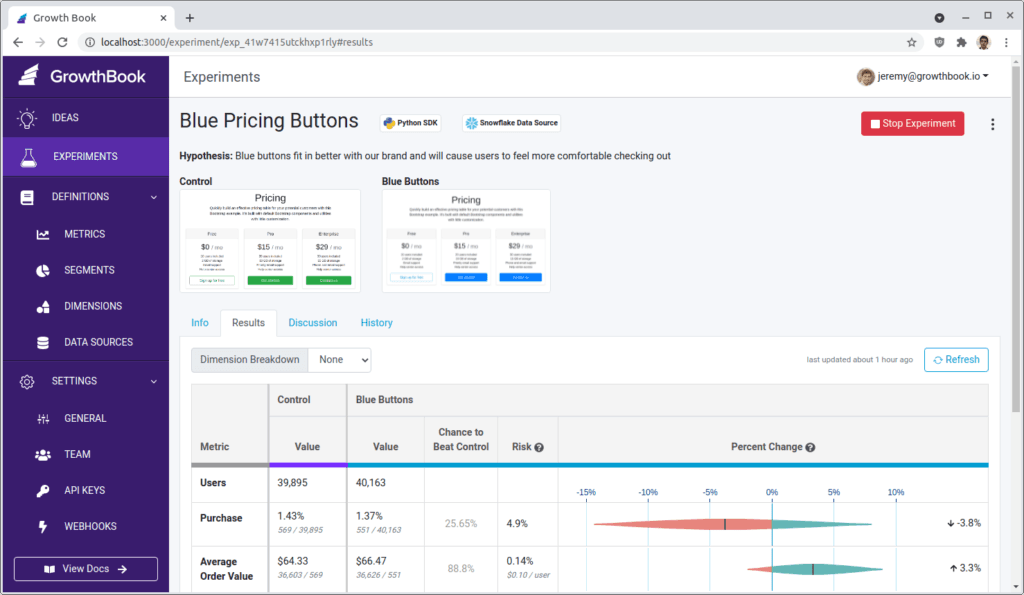
GrowthBook enables you to create gradual or canary releases with the help of user targeting. GrowthBook is an open-source feature flag and experimentation platform that supports remote toggling, targeted rollouts, A/B testing, and warehouse-native analytics across 24+ SDKs for frontend, backend, mobile, and edge environments.
Who Is GrowthBook Best For?
GrowthBook is a strong fit for engineering-led teams that want full control over their feature flag infrastructure without paying per end user or API call.
Why I Picked GrowthBook
GrowthBook earns its spot on my shortlist because it's the only tool here built open source from the ground up, meaning my team can self-host the entire platform and own our data completely. I particularly like how any feature flag converts into a full A/B test with one click, backed by a genuinely sophisticated stats engine that includes CUPED variance reduction and sequential testing pulled directly from our own data warehouse. The per-seat pricing model matters too: I'm not penalized as traffic scales, since flags are evaluated locally and handle trillions of lookups without per-MAU or per-API-call charges.
GrowthBook Key Features
- SDK-based local flag evaluation: Flags are evaluated directly inside your app using 24+ SDKs, keeping latency near zero without a round trip to a remote server.
- Warehouse-native analytics: GrowthBook connects directly to your existing data warehouse—Snowflake, BigQuery, Redshift, Databricks, or ClickHouse—to pull experiment metrics rather than relying on a proprietary data store.
- Safe rollouts: Automated rollback triggers when a guardrail metric is breached during a rollout, letting you catch regressions without manual monitoring.
- MCP server for AI coding tools: A Model Context Protocol server lets AI tools like Claude Code, Cursor, and Codex create and manage feature flags directly from your development environment.
GrowthBook Integrations
GrowthBook integrates with Snowflake, BigQuery, Redshift, Databricks, ClickHouse, Slack, OpenFeature, and the Vercel Flags SDK. It also supports REST API, webhooks, MCP, and edge connections for Cloudflare, Fastly, and AWS Lambda@Edge.
Pros and Cons
Pros:
- Self-hosting provides complete data ownership
- One-click flags enable sophisticated experimentation
- Local evaluation keeps flag latency low
Cons:
- Warehouse setup adds implementation work
- Advanced governance requires enterprise access
Learn more about GrowthBook:
Other Feature Flag Software
Here are a few more tools that did not make it to the top but are still worth your consideration.
- 11HypertuneBest for Git-style flag version control
- 12Harness Feature FlagsBest for flag governance with approval workflows
- 13AmplitudeBest for flags tied to behavioral cohort data
- 14FlagsmithBest for self-hosted and air-gapped deployments
- 15CloudBeesBest for multi-environment flag structure at scale
- 16DevCycleBest for OpenFeature-native flag management
- 17FlagshipBest for flagging tied to business KPI tracking
- 18Optimizely Web ExperimentationBest for flags bundled with a stats engine
Related Product Management Software Reviews
If you still haven't found what you're looking for here, check out these tools closely related to feature flag software that we've tested and evaluated.
- Best Product Management Tools
- Best Product Planning Software
- Best UX Design Tools
- Best Product Development Software
- Best Product Analytics Tools
- Best User Research Tools
How I Evaluate Feature Flag Software
I split my evaluation into three parts. Core functionality—toggling flags without a redeploy and targeting rollouts to specific user segments—carries the most weight. From there, I look at standout features like approval workflows, then factor in pricing model fit and onboarding quality.
Core Functionality (Table Stakes For This List)
When I'm selecting tools for my list, I score each one on a scale from 0 (does not offer the functionality) to 5 (excels in this area) for each core functionality listed below. I then convert the total into a percentage to help assess each tool's overall fit, with extra weight on any functionalities I've deemed essential.
- Feature Toggling (Essential): I check whether flags propagate instantly and support multiple types like boolean and multivariate, not just basic on/off switches.
- Targeted Rollouts (Essential): Each tool should let me combine user attributes, segments, and environments so I can roll out to, say, enterprise-tier accounts in staging first.
- Real-Time Flag Management: I look for a centralized dashboard with audit history, permissions, and lifecycle tracking so teams aren't digging through code to find stale flags.
- Experimentation Support: Tools earn higher marks when A/B or multivariate tests tie directly to flags with built-in statistical reporting rather than requiring a separate analytics platform.
- Kill Switch and Rollback: I evaluate how fast a team can disable a flag in production and whether rollback can be scoped to a specific segment or environment with one click.
- SDK and API Integration: Broad SDK coverage across server-side, mobile, and edge architectures matters. I also check API documentation quality and multi-language support.
Once I have a list of tools that meet the criteria, I consider what sets each platform apart.
Differentiating Factors (What Sets Vendors Apart)
Here's how I compare and contrast different vendors:
Standout Features
Stale flag detection is the first thing I check beyond table stakes. Teams that ship fast accumulate hundreds of flags, and without automatic cleanup alerts, technical debt quietly snowballs. I look for tools that surface unused or expired flags before they become a maintenance headache. Approval workflows matter just as much—I evaluate whether a PM can route a production flag change through a designated reviewer, which is essential when a pricing rollout needs sign-off before going live. I also look at scheduled releases, since syncing a flag flip to a product launch or partner embargo shouldn't require an engineer on standby.
Beyond Features
I evaluate how each tool's pricing model scales with real usage. Some vendors charge per seat, others by monthly active users or flag volume, and that difference matters when your product grows from a pilot to a full rollout across teams. I also check whether non-technical stakeholders can toggle flags or read experiment results without filing an engineering ticket. Shared dashboards that give product, marketing, and engineering aligned visibility into release timing save more coordination overhead than most teams expect.
How To Choose Feature Flag Software
With so many different feature flag software solutions available, it can be challenging to make decisions on what feature flag software is going to be the best fit for your needs.
As you're shortlisting, trialing, and selecting feature flag software, consider the following:
- What problem are you trying to solve? Start by identifying the feature flag feature gap you're trying to fill to clarify the features and functionality the feature flag software needs to provide.
- Who will need to use it? To evaluate cost and requirements, consider who will be using the software and how many licenses you'll need. You'll need to evaluate if it'll just be the product management professionals, or the whole organization that will require access. When that's clear, it's worth considering if you're prioritizing ease of use for all, or speed for your feature flag software power users.
- What other tools does it need to work with? Clarify what tools you're replacing, what tools are staying, and the tools you'll need to integrate with, such as accounting, CRM, or HR software. You'll need to decide if the tools will need to integrate together, or alternatively, if you can replace multiple tools with one consolidated feature flag tool.
- What outcomes are important? Consider the result that the software needs to deliver to be considered a success. Consider what capability you want to gain, or what you want to improve, and how you will be measuring success. For example, an outcome could be the ability to get greater visibility into performance. You could compare feature flag software features until you’re blue in the face, but if you aren’t thinking about the outcomes you want to drive, you could be wasting a lot of valuable time.
- How would it work within your organization? Consider the software selection alongside your workflows and delivery methodology. Evaluate what's working well, and the areas that are causing issues that need to be addressed. Remember every business is different — don’t assume that because a tool is popular that it'll work in your organization.
Trends in Feature Flag Software
As the feature flag software market evolves, additional trends emerge, reflecting the industry's response to new challenges and opportunities. These trends are shaping the way product management professionals activate, test, and manage features in their software applications:
Collaboration and Team Enablement
Enhanced collaboration features within feature flag platforms are becoming crucial as cross-functional teams require seamless communication and shared access to flag configurations. Platforms are incorporating features like comment threads, flag change notifications, and shared dashboards to facilitate better team collaboration and decision-making.
Environmental Consistency
Tools are now offering more sophisticated environment management features to ensure that flags behave consistently, reducing the risk of errors during rollouts. Advanced environment segmentation and synchronization features ensure that configurations remain consistent across all stages of development and deployment.
Self-Service Capabilities
There's an increasing demand for self-service capabilities within feature flag platforms, allowing non-technical team members to manage flags and understand their impacts without deep technical knowledge. This democratization of feature flag management is intended to empower broader teams to contribute to the product development process. These capabilities include user-friendly interfaces, simplified flag management workflows, and accessible analytics.
Predictive Analytics and AI
Integrating artificial intelligence and predictive analytics to forecast the impact of feature releases before they are fully deployed enables teams to make more informed decisions about feature rollouts. AI-driven predictions on feature performance and potential system impacts also allow users to make proactive adjustments.
What the AI can help with is the technical skill that is required to be able to parse data, to be able to transform and shape it how you want to get the answers that you want.

Sustainability and Efficiency
As sustainability becomes a more significant concern, feature flag platforms are emphasizing features that help reduce resource consumption and improve the efficiency of development processes. This includes minimizing the computational overhead of feature flag evaluations and optimizing the efficiency of flag-related operations.
As feature flag software continues to mature, these trends will play a pivotal role in shaping the future of software development, offering product management professionals advanced tools to navigate the complexities of modern application deployment and management.
What Are Feature Flags?
Feature flags, also known as feature toggles or feature switches, are tools used in product management and software development to enable or disable specific features within an application or system. They work by allowing product teams to enable or disable certain features within their products as simply and easily as switching on a lightbulb.
Mastering feature flag best practices allows development teams to be super strategic about how product features are deployed. They allow the team to control the release and visibility of features independently, separate from the overall code deployment.
What is feature flag software?
Feature flag software allows product teams to create, organize, and manage feature flags across their product portfolio. This capability enables product managers to implement gradual rollouts, A/B testing, and targeted feature deployments, allowing for more Agile and data-driven decision-making. These tools also provide the flexibility to respond quickly to issues or changing user requirements by enabling feature toggles, ensuring a smoother and more controlled product development and release process.
Features of Feature Flag Software
Feature flag software has become an indispensable tool for modern software development teams, allowing them to seamlessly activate, test, and manage features within their applications. This enables developers to roll out new features to select user groups or environments without deploying new code, thereby minimizing risk and facilitating smoother user experiences. Here, I outline the most important features to look for in feature flag software.
- Easy Integration: The software easily integrates with existing development workflows. This ensures developers can quickly implement feature flags without significant changes to their development processes, making the adoption seamless.
- Fine-Grained Targeting: It allows for targeting specific user segments. This is crucial for conducting A/B tests or rolling out features to a subset of users, enabling more personalized experiences and better understanding of user behavior.
- Real-Time Control: The feature provides the ability to toggle features on and off in real-time. This flexibility is vital for quickly addressing issues or making adjustments based on user feedback without needing to redeploy.
- Environment-Specific Flags: Supports separate flags for different environments (e.g., development, staging, production). This allows teams to test features extensively in non-production environments before releasing them to users, reducing the risk of errors.
- Auditing and Analytics: Offers comprehensive auditing and analytics capabilities. Understanding how features impact user behavior and system performance helps in making data-driven decisions and improving feature implementations.
- Role-Based Access Control (RBAC): It enforces role-based access control. By restricting who can create, modify, or delete feature flags, you ensure that only authorized personnel make changes, thereby maintaining system integrity.
- Scalability: The software scales with your application. As your user base grows and your application becomes more complex, the feature flag system should be able to handle the increased load without performance degradation.
- SDKs for Multiple Languages: Provides SDKs for various programming languages. This ensures that regardless of the technology stack your application uses, you can implement feature flags without significant hassle.
- Fallback Strategies: It includes fallback strategies for feature flags. In case of failures (e.g., network issues), the system should default to a predefined state to ensure the application remains functional.
- Customizable Flag Lifecycles: Allows for customizable flag lifecycles. This enables teams to define stages for each feature flag, from creation to retirement, ensuring that flags are managed effectively throughout their lifecycle.
By focusing on these key features, teams can ensure they choose a solution that both enhances their development process and provides a robust framework for feature management, ultimately leading to more controlled, efficient, and successful software releases. This strategic approach to feature management empowers teams to deliver superior software experiences while maintaining the flexibility to adapt to user feedback and market demands swiftly.
Benefits of Feature Flag Software
By enabling developers to toggle features on and off without deploying new code, feature flag tools offer unparalleled control over the software development lifecycle. For organizations considering the adoption of feature flag software, understanding its core benefits can help underscore its value. Here are five primary advantages of feature flag software:
- Increased Deployment Safety: By gradually rolling out changes to users, businesses can minimize disruptions and swiftly revert any feature that doesn't perform as expected, thereby safeguarding user experience and system stability.
- Faster Time to Market: Developers can push features into production but disabled, enabling other work to proceed without waiting for each feature to be perfect, thus accelerating the overall software development lifecycle and allowing businesses to innovate more rapidly.
- Enhanced User Experience Customization: Organizations can target specific features to specific groups based on user behavior, location, or other criteria, enhancing satisfaction and engagement through a more tailored experience.
- Simplified Testing and Feedback Loops: By enabling feature toggles for testing environments or specific user groups, teams can gather insights and iterate on features more effectively, leading to higher quality outcomes and more informed development decisions.
- Greater Operational Resilience: Feature flags allow for the quick disabling of problematic features without rolling back entire deployments, ensuring that the application remains operational and user impact is minimized during incidents.
Climate LLC, the digital farming division of Bayer Crop Science, uses feature flags in LaunchDarkly to streamline software development, ensuring instant rollbacks, safer deployments, and continuous delivery. By leveraging feature flags, their engineering team can release updates without risk, test changes in production, and instantly toggle features on or off.
I can change a flag status in LaunchDarkly and see it reflected in our mobile apps instantly. I'll pay for that any day.
Artie Lee, Director of Engineering, Climate LLC
These types of feature management platforms enable trunk-based development, enterprise security, and greater developer control, making software delivery faster and more reliable.
For potential buyers of feature flag software, these benefits highlight the strategic advantage of incorporating such a tool into their development and operational workflows. Adopting this approach can lead to significant improvements in deployment safety, market responsiveness, and overall user satisfaction, making feature flag software a compelling consideration for any organization looking to refine its software development practices.
Costs & Pricing for Feature Flag Software
When exploring feature flag software options, it's essential to understand the various available plan and pricing structures to ensure you select a solution that best aligns with your team's size, needs, and budget. Feature flag platforms typically offer a range of plans to cater to different types of users, from startups to large enterprises, with each plan designed to offer specific features and capabilities that match the scale and complexity of your projects. Here’s a breakdown of common plan options and pricing:
Plan Comparison Table for Feature Flag Software
| Plan Type | Average Price | Common Features Included |
|---|---|---|
| Plan TypeEnterprise | Average Price$500 - $2000/month | Common Features IncludedAdvanced targeting and segmentation, Full analytics suite, Unlimited feature flags, Premium customer support, SSO/SAML integration, Customizable roles and permissions |
| Plan TypePro | Average Price$100 - $500/month | Common Features IncludedStandard targeting and segmentation, Basic analytics, Unlimited feature flags, Email support, Basic SSO integration |
| Plan TypeTeam | Average Price$50 - $100/month | Common Features IncludedLimited targeting and segmentation, Basic analytics, Limited feature flags, Community support |
| Plan TypeFree | Average Price$0 | Common Features IncludedBasic feature flagging capabilities, Community support, Limited number of feature flags |
Each plan is tailored to fit different stages of growth and development needs. Enterprise plans are suited for large teams requiring comprehensive feature management and analytics capabilities, while Pro plans cater to mid-sized teams needing a balance of functionality and support. Team plans are ideal for small teams or projects just starting with feature flags, offering essential tools without a significant investment. Finally, the Free option usually allows individuals or small teams to experiment with basic feature flagging functionalities before committing to a paid plan.
When selecting a plan, it is important to consider your team's size, the complexity of your projects, and the level of support you might need. It's also worth considering the scalability of the platform, ensuring it can grow with your needs over time.
Feature Flag Software Frequently Asked Questions
What is a feature flag?
A feature flag is a process used by software development teams to enable or disable certain software functionalities without deploying code. This process helps DevOps teams test new features, make updates, and modify system behavior without affecting user experience.
Feature flag management can help you ship your product quickly and safely. It’s a critical part of the product roadmap, as it empowers your team to work incrementally on new features.
Why should I use a feature flag?
There are many reasons why feature flagging is important in product development. However, here are the top 3 in my opinion.
- It allows you to gradually roll out features to users. Therefore, you can start small, monitor, and make any required adjustments before rolling them out to everyone.
- Feature flags can help you A/B test. This lets you release different versions of a feature to two distinct user groups and see which one performs better.
- It prevents unnecessary risks. Feature flagging is ideal for mitigating risks. Think of this, you can release a new feature and turn it off as soon as you see problems that could translate into downtime for users.
How do feature flags help manage long-running feature development in CI/CD?
One of the biggest challenges in CI/CD is keeping the main branch stable while working on features that take weeks or months to develop. Traditionally, teams use long-lived feature branches, but these often lead to painful merge conflicts, deployment delays, and unexpected build failures. Feature flags solve this by allowing developers to merge incomplete features into the main branch without activating them for users. This keeps the codebase integrated and reduces the risk of last-minute surprises, enabling smoother releases and continuous delivery without slowing down development.
How do feature flags enable Trunk-Based Development?
Feature flags make Trunk-Based Development (TBD) more practical by allowing teams to work directly in the main branch without exposing incomplete features. Unlike long-lived feature branches—which often lead to complex merge conflicts and deployment bottlenecks—TBD promotes frequent integration, ensuring a cleaner, more stable codebase.
By using feature flags, teams can merge work incrementally while keeping unfinished functionality turned off. This enables continuous delivery without the risk of breaking production, reducing last-minute surprises, and simplifying releases.
Compared to traditional branching strategies, Trunk-Based Development offers key advantages:
- Faster iteration – Teams can ship smaller, incremental changes rather than waiting for a feature branch to be fully complete.
- Fewer merge conflicts – Developers merge continuously into the main branch instead of handling large, error-prone merges.
- Improved stability – A continuously integrated codebase minimizes unexpected deployment issues.
- Easier rollbacks – Problematic features can be instantly disabled via feature flags, avoiding the need for full rollbacks or emergency patches.
By reducing branching complexity and enabling controlled, incremental releases, feature flags make Trunk-Based Development a more viable and scalable approach for modern software teams.
Can I read other related content to feature flagging?
LaunchDarkly has definitely enhanced our development processes, leading to more efficiencies overall. We’ve been able to deliver faster while maintaining a high level of quality. One of the biggest benefits is the control it provides—allowing us to make data-driven decisions with confidence. It’s not just a feature flagging tool; it’s a smarter way to work.Yes! We have very interesting articles you can read to further your knowledge on the topic.
How Climate LLC Uses Feature Flags for Faster, Safer Releases
Climate LLC, the digital farming division of Bayer Crop Science, uses feature flags in LaunchDarkly to streamline software development, ensuring instant rollbacks, safer deployments, and continuous delivery. By leveraging feature flags, their engineering team can release updates without risk, test changes in production, and instantly toggle features on or off.
“I can change a flag status in LaunchDarkly and see it reflected in our mobile apps instantly. I’ll pay for that any day.”
— Artie Lee, Director of Engineering, Climate LLC
LaunchDarkly’s feature management platform enables trunk-based development, enterprise security, and greater developer control, making software delivery faster and more reliable.
For potential buyers of feature flag software, these benefits highlight the strategic advantage of incorporating such a tool into their development and operational workflows. Adopting this approach can lead to significant improvements in deployment safety, market responsiveness, and overall user satisfaction, making feature flag software a compelling consideration for any organization looking to refine its software development practices.