

As a product manager, you face many challenges—tight deadlines, team coordination, and resource allocation. The right project management solution can help, but sometimes the tool you’re using doesn’t fit your needs. If you’re finding Wrike isn’t cutting it, you’re not alone.
In my experience, finding the right software can transform how your team works. I’ve independently tested and reviewed several Wrike alternatives to help you find a tool that better suits your business challenges.
In this article, I’ll share my top picks, diving into each option's features, pros, and cons. My goal is to guide you to a solution that enhances your team’s productivity and fits your unique requirements.
What Is Wrike?
Wrike is a project management software that helps teams organize tasks, projects, and collaboration. It's often used by project managers, marketers, and IT professionals who need to manage complex workflows. Task tracking, Gantt charts, and real-time collaboration features help with improving team efficiency and project visibility. Overall, Wrike offers a centralized platform to boost your team's productivity and coordination.
Why Trust Our Software Recommendations
6,700+
Reviews
20
Industry experts
16+
Evaluation factors
14
Years
Our team has been testing and reviewing software since 2012. As product managers ourselves, we know how difficult—and important—it is to choose the right software.
For this guide, we evaluated tools using hands-on testing and independent research, scoring tools using our selection criteria.
Our reviews reflect our human editorial judgment, not a sales pitch.
Expert reviewers:
- Andrew LumbySenior TPM
- Cristiano ValimSenior UI/UX Lead


Wrike Alternatives Comparison Table
This comparison table summarizes pricing details for my top Wrike alternative selections.
| Tool | Best For | Trial Info | Price | ||
|---|---|---|---|---|---|
| 1 | Best for creative workflow automation | Free demo available | Pricing upon request | Website | |
| 2 | Best for privacy-focused project management | Free plan + 15-day free trial + free demo available | From $4/user/month (billed annually) | Website | |
| 3 | Best for customizable workspaces | Free plan available | From $7/user/month (billed annually) | Website | |
| 4 | Best for structured task and cross-team workflows | Free plan available | From $10.99/user/month (billed annually) | Website | |
| 5 | Best for client work and profitability tracking | Free plan available; 14-day free trial | From $9.99/user/month (billed annually) | Website | |
| 6 | Best for agile and developer-aligned planning | Free plan available | From $8.48/user/month | Website | |
| 7 | Best for client project visibility | 14-day free trial + free demo available | From $9.99/user/month (billed annually) | Website | |
| 8 | Best for enterprise creative and marketing ops | Free demo available | Pricing upon request | Website | |
| 9 | Best for long-term capacity and demand forecasting | 14-day free trial available | From $9/user/month (billed annually) | Website | |
| 10 | Best for managing multiple projects | Free trial + free demo available | From $29/user/month (billed annually) | Website |


Best Wrike Alternatives Reviews
Below are my detailed summaries of the best Wrike alternatives that made it onto my shortlist. My reviews offer a detailed look at the key features, pros & cons, integrations, and ideal use cases of each tool to help you find the best one for you.
 Best for creative workflow automation
- Free demo available
- Pricing upon request
Visit WebsiteCustomer Rating:4.6/5
Screendragon’s project dashboard helps creative teams automate workflows and track progress in real time. Screendragon is a workflow management platform designed for creative and marketing operations. It helps teams automate processes, manage projects visually, and streamline content reviews. With a no-code workflow builder, Screendragon supports global operations and offers real-time insights into performance and resource allocation.
Why it’s a good Wrike alternative: I picked Screendragon because it helps you automate repetitive tasks and reduce manual work, freeing your team to focus on creative output. The visual workflow builder makes it easy to customize processes without technical expertise, while built-in approval tools simplify content proofing. I also like how its analytics dashboards give you real-time visibility into project milestones, helping you stay on track across multiple regions.
Standout features & integrations:
Features include a no-code workflow builder, digital approval management, and dynamic custom forms for automating reviews and data collection. Advanced permission controls and enterprise-grade security make it well-suited for larger teams.
Integrations include Jira, Google Drive, Egnyte, Box, Adobe, Flock, OneDrive, NetSuite, PeopleSoft, Salesforce, Microsoft Dynamics 365, and SAP.
Pros and Cons
Pros:
- Centralized approval and feedback
- Visual no-code workflow builder
- Real-time workflow analytics
Cons:
- Higher learning curve for beginners
- Time-consuming initial setup
Learn more about Screendragon: Best for privacy-focused project management
- Free plan + 15-day free trial + free demo available
- From $4/user/month (billed annually)
Visit WebsiteCustomer Rating:4.3/5
Zoho Projects Kanban board showing task statuses, dependencies, and visual progress tracking across construction project phases. Zoho Projects offers a unique blend of simplicity and functionality, making it an appealing choice for small to medium-sized businesses seeking a Wrike alternative. It caters to industries like IT, education, and professional services, providing solutions to challenges such as task management and collaboration. With its user-friendly interface and a focus on privacy, Zoho Projects helps teams manage workflows without compromising data security.
Why I Picked Zoho Projects
I picked Zoho Projects as a Wrike alternative because of its strong focus on privacy and data security, which is a significant concern for many businesses today. The platform's task management features, including Gantt charts and task dependencies, allow you to visualize project timelines and manage complex projects with ease. Additionally, its time tracking capabilities enable accurate billing and productivity analysis, addressing a crucial need for teams that bill clients based on hours worked.
Zoho Projects Key Features
In addition to its robust task management and time tracking, there's several other features that make Zoho Projects a compelling option.
- Issue Tracking: This feature allows you to manage and resolve project-related issues efficiently, ensuring that your team can address problems as they arise.
- Team Collaboration: Zoho Projects includes chat and forum functionalities, fostering communication and idea exchange among team members.
- Customizable Dashboards: You can create dashboards tailored to your team's needs, providing quick insights into project progress and performance metrics.
- Resource Utilization: This feature helps you allocate resources effectively, ensuring that team members are neither overburdened nor underutilized.
Zoho Projects Integrations
Integrations include Zoho CRM, Zoho People, Zoho Desk, Zoho Invoice, Zoho Analytics, Google Calendar, Microsoft Teams, Salesforce, Dropbox, and Slack.
Pros and Cons
Pros:
- Built-in time tracking and billing
- Strong task dependencies and Gantt
- Affordable pricing for small teams
Cons:
- Interface can feel cluttered
- Fewer third-party integrations available
Learn more about Zoho Projects: Best for customizable workspaces
- Free plan available
- From $7/user/month (billed annually)
Visit WebsiteCustomer Rating:4.6/5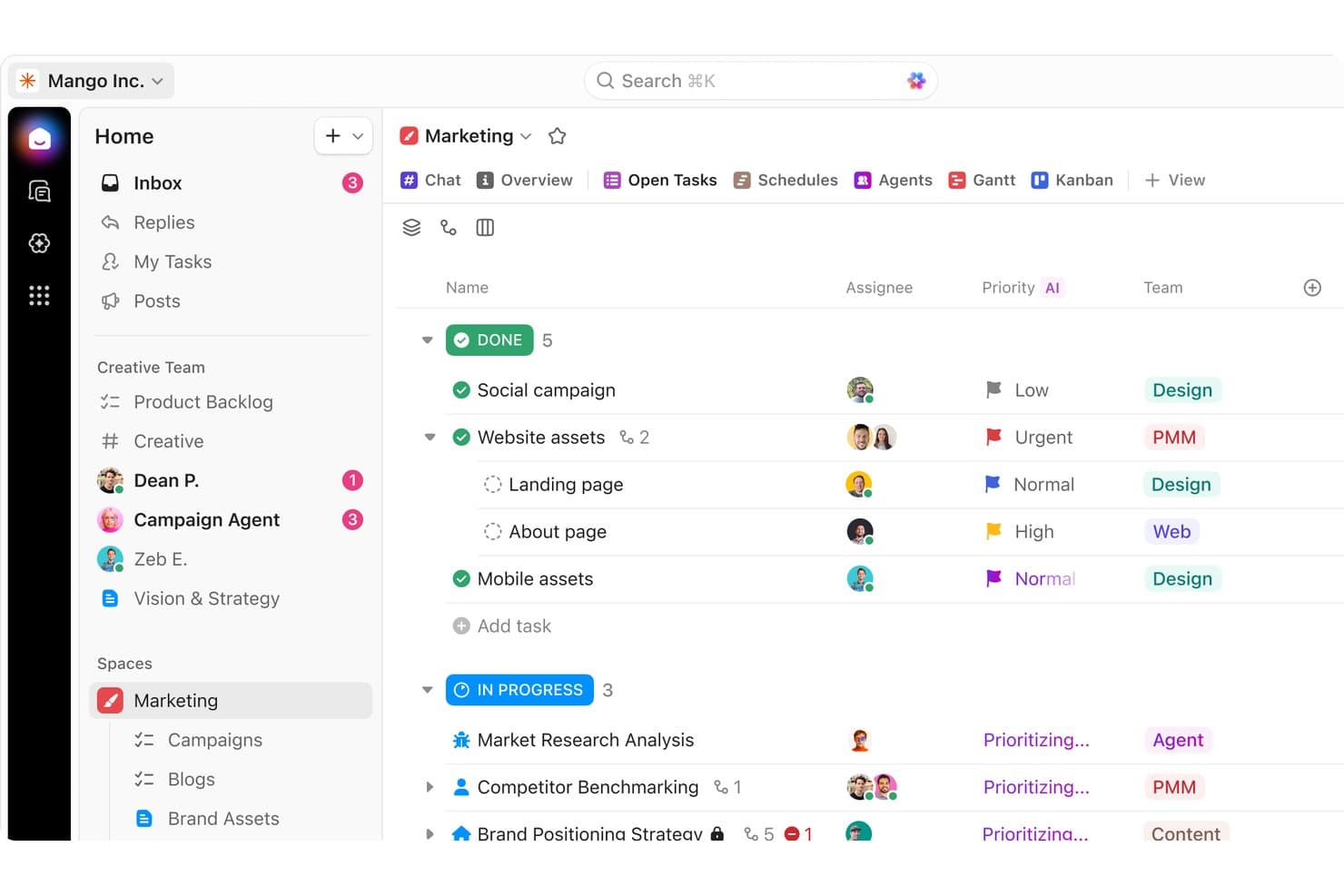
ClickUp organizes marketing tasks by status, priority, and team in one view. ClickUp is a project management platform for product teams and growing businesses that combines tasks, docs, goals, and collaboration, helping you coordinate work without stitching together separate tools.
Who Is ClickUp Best For?
ClickUp suits product and cross-functional teams that need customizable task views, workflows, docs, and goals.
Why ClickUp Is a Good Best Wrike Alternatives
I picked ClickUp because its customizable workspaces let my team tailor task views, statuses, and workflows to each product process. We use Docs alongside tasks to connect product requirements with delivery work, while Goals keep roadmap initiatives tied to measurable outcomes. That flexibility helps us replace rigid project structures with workspace setups suited to discovery, delivery, and operations.
ClickUp Key Features
- Time tracking: Record time directly on tasks.
- Automations: Trigger actions from task events.
- Dashboards: Monitor project metrics in custom panels.
- Forms: Capture requests and convert submissions into tasks.
ClickUp Integrations
ClickUp offers native integrations with GitHub, GitLab, Bitbucket, Slack, Microsoft Teams, Google Drive, Dropbox, Google Calendar, Figma, and HubSpot, and connects with Zapier. It also provides a public API for custom integrations.
Pros and Cons
Pros:
- Goals link initiatives to measurable outcomes
- Docs connect requirements with delivery tasks
- Custom statuses fit varied product workflows
Cons:
- Dense interfaces can obscure essential task details
- Extensive configuration can complicate workspace governance
Learn more about ClickUp: Best for structured task and cross-team workflows
- Free plan available
- From $10.99/user/month (billed annually)
Visit WebsiteCustomer Rating:4.4/5
Asana helps teams manage tasks and collaborate on projects effectively. Asana is a project management tool designed to help teams organize, track, and manage their work. It's widely used by teams across different industries for task management, project planning, and team collaboration.
Why it's a good Wrike alternative: Asana excels in team collaboration and task management with features like task assignments, due dates, and project timelines. These tools help your team stay organized and meet deadlines efficiently. Asana's intuitive interface makes it easy to adapt and use, enhancing team productivity. Its focus on collaboration and ease of use sets it apart as a Wrike alternative.
Standout features & integrations:
Features include customizable task views that let you organize work in a way that suits your team. The timeline feature helps you visualize project schedules and monitor progress. Asana also offers goal tracking to keep your team aligned with project objectives.
Integrations include Slack, Microsoft Teams, Google Drive, Dropbox, Zoom, Salesforce, Trello, Jira, GitHub, and Zapier.
Pros and Cons
Pros:
- Customizable project views
- Intuitive user interface
- Easy task assignment and tracking
Cons:
- Not ideal for complex projects
- Limited advanced reporting features
 Best for client work and profitability tracking
- Free plan available; 14-day free trial
- From $9.99/user/month (billed annually)
Visit WebsiteCustomer Rating:4.4/5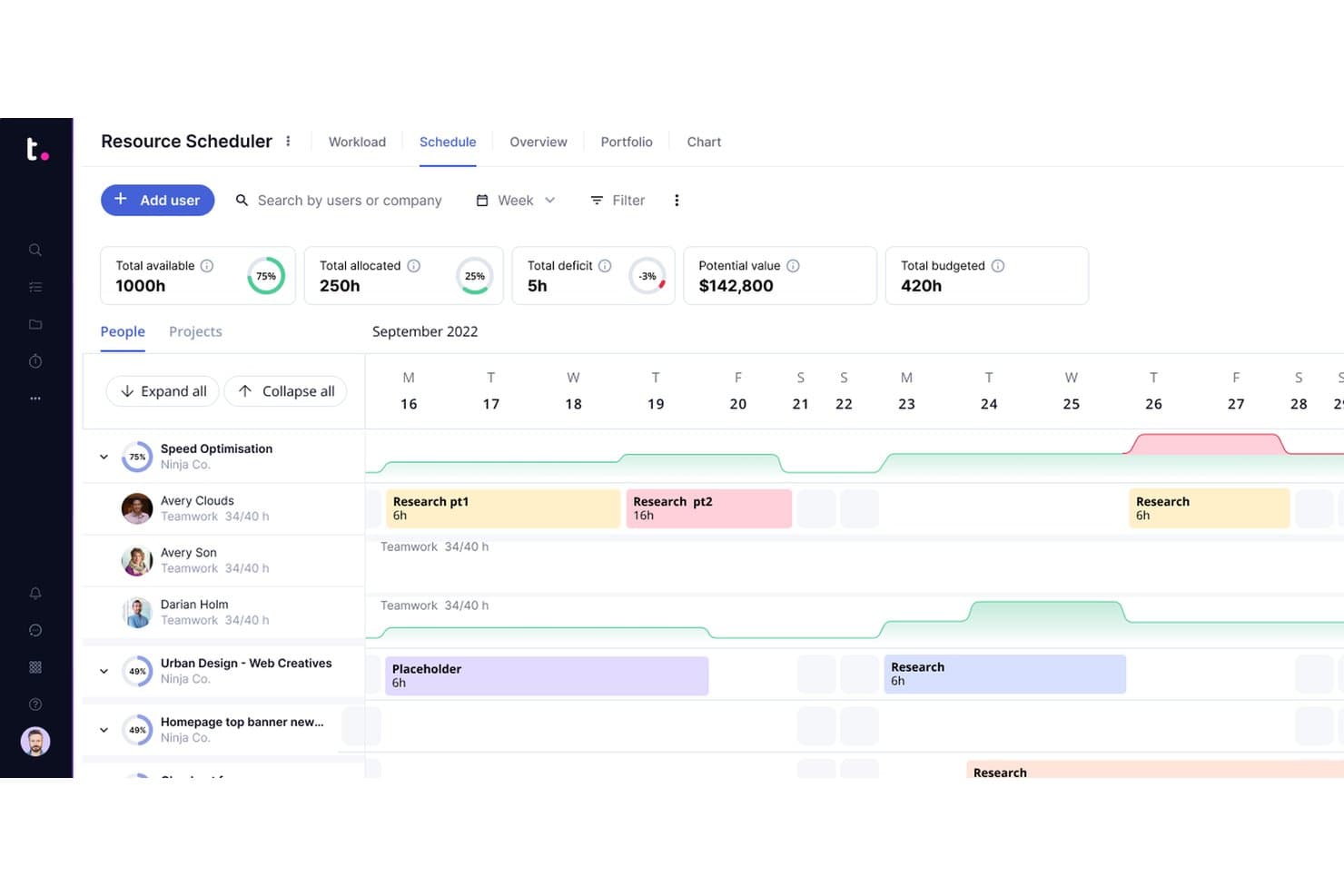
Teamwork.com lets users schedule and allocate team resources visually. Teamwork.com is a project management platform for agencies, consultancies, and service teams that need to coordinate client projects, track workloads, and connect delivery plans with business goals.
Who Is Teamwork.com Best For?
Teamwork.com suits agencies and consultancies that need to manage client delivery, team capacity, and project profitability in one place.
Why Teamwork.com Is a Good Best Wrike Alternatives
I picked Teamwork.com because my team can connect client projects with budgets, billable time tracking, and profitability reports. I use workload planning to balance assignments across accounts and spot capacity gaps before delivery slips. That gives me a clearer view of whether each project is meeting its financial goals.
Teamwork.com Key Features
- Task lists: Organize project work into actionable task groups.
- Gantt charts: Map task timelines and project dependencies visually.
- Project templates: Reuse predefined structures for recurring projects.
- Custom dashboards: Monitor project updates through configurable views.
Teamwork.com Integrations
Teamwork.com offers 150+ native and partner integrations, including QuickBooks, Xero, HubSpot, Google Drive, Microsoft OneDrive, Slack, Microsoft Teams, Harvest, and Stripe. It also connects with Zapier and provides an API for custom integrations.
Pros and Cons
Pros:
- Reusable templates support recurring client projects
- Strong workload planning for client teams
- Connects project delivery with profitability tracking
Cons:
- Advanced reporting takes time to configure
- Financial features may overwhelm smaller teams
Learn more about Teamwork.com: 6Best for agile and developer-aligned planning
Jira
- Free plan available
- From $8.48/user/month
Visit WebsiteCustomer Rating:4.4/5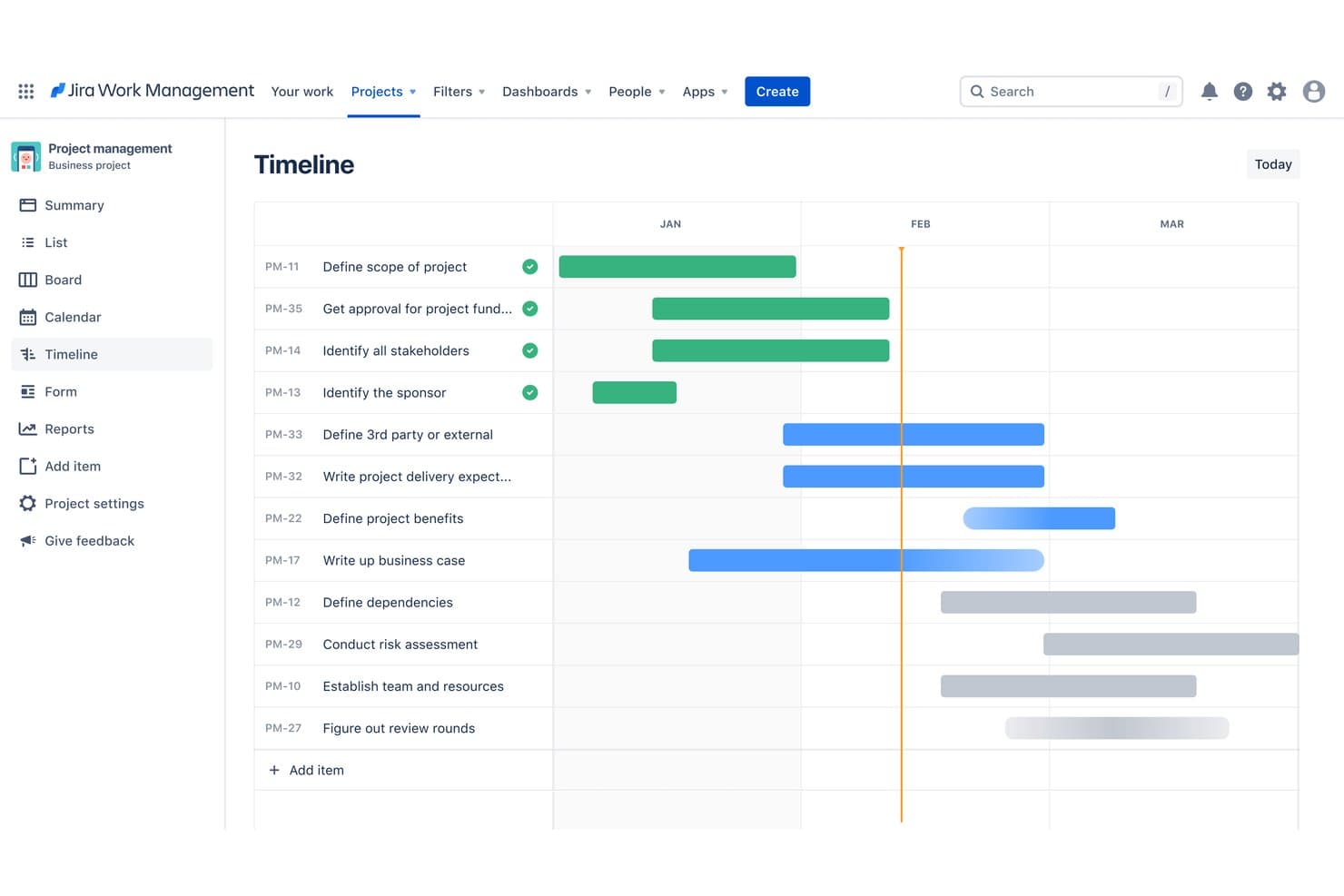
Jira's timeline view maps tasks across months with progress tracking. Jira is a project management platform for product and software teams that connects backlogs, sprint planning, issue tracking, and delivery workflows in one workspace.
Who Is Jira Best For?
Jira suits product and engineering teams that need agile planning, backlog management, sprint coordination, and developer-aligned delivery workflows.
Why Jira Is a Good Best Wrike Alternatives
I picked Jira because it supports agile and developer-aligned planning through product backlogs, Scrum and Kanban boards, and sprint planning. My team uses issue types, workflows, and release tracking to connect product requirements with engineering work. We can refine a feature, assign it to a sprint, and monitor delivery from one system.
Jira Key Features
- Custom dashboards: Build personalized views with configurable gadgets and charts.
- Automation rules: Trigger actions automatically when specified events or conditions occur.
- Reports: Generate velocity, burndown, cumulative flow, and control charts.
- Integrations: Connect Jira with development, collaboration, and documentation tools.
Jira Integrations
Jira offers 3,000+ marketplace integrations, including Confluence, Trello, Bitbucket, Slack, Microsoft Teams, GitHub, Azure DevOps, Jenkins, Salesforce, and Figma. It also provides an API for custom integrations and connects with Zapier.
Pros and Cons
Pros:
- Release reporting supports engineering tradeoffs
- Backlogs connect directly to delivery work
- Scrum and Kanban planning fit product teams
Cons:
- Cross-functional portfolio views feel less natural
- Issue workflows require careful initial configuration
 Best for client project visibility
- 14-day free trial + free demo available
- From $9.99/user/month (billed annually)
Visit WebsiteCustomer Rating:4.5/5
Teamwork lets teams plan, track, and manage tasks in one visual view. Teamwork is project management software for agencies and client-service teams that combines project planning, workload management, collaboration, and client communication in one workspace.
Who Is Teamwork Best For?
Agencies and client-service teams that need clear visibility across client projects, workloads, deadlines, and communication.
Why Teamwork Is a Good Best Wrike Alternatives
I picked Teamwork because I can track client project visibility across tasks, deadlines, workloads, and communications. My team uses project dashboards and workload views to spot risks early, while client access keeps approvals and project updates in one workspace.
Teamwork Key Features
- Time tracking: Record billable and nonbillable hours against projects and tasks.
- Project templates: Reuse predefined structures, task lists, and project settings.
- Task dependencies: Link tasks to show which work must happen first.
- Budget tracking: Monitor planned costs, logged time, and project spending.
Teamwork Integrations
Teamwork offers 150+ native integrations, including Slack, Microsoft Teams, Salesforce, HubSpot, Xero, QuickBooks Online, Jira, Google Calendar, Outlook Calendar, and Dropbox. It also supports Zapier and provides an API for custom integrations.
Pros and Cons
Pros:
- Budget tracking connects hours with spending
- Workload views expose resource conflicts early
- Client portals keep approvals and updates visible
Cons:
- Advanced reporting can take manual configuration
- Client permissions require careful workspace setup
Learn more about Teamwork: Best for enterprise creative and marketing ops
- Free demo available
- Pricing upon request
Visit WebsiteCustomer Rating:4.3/5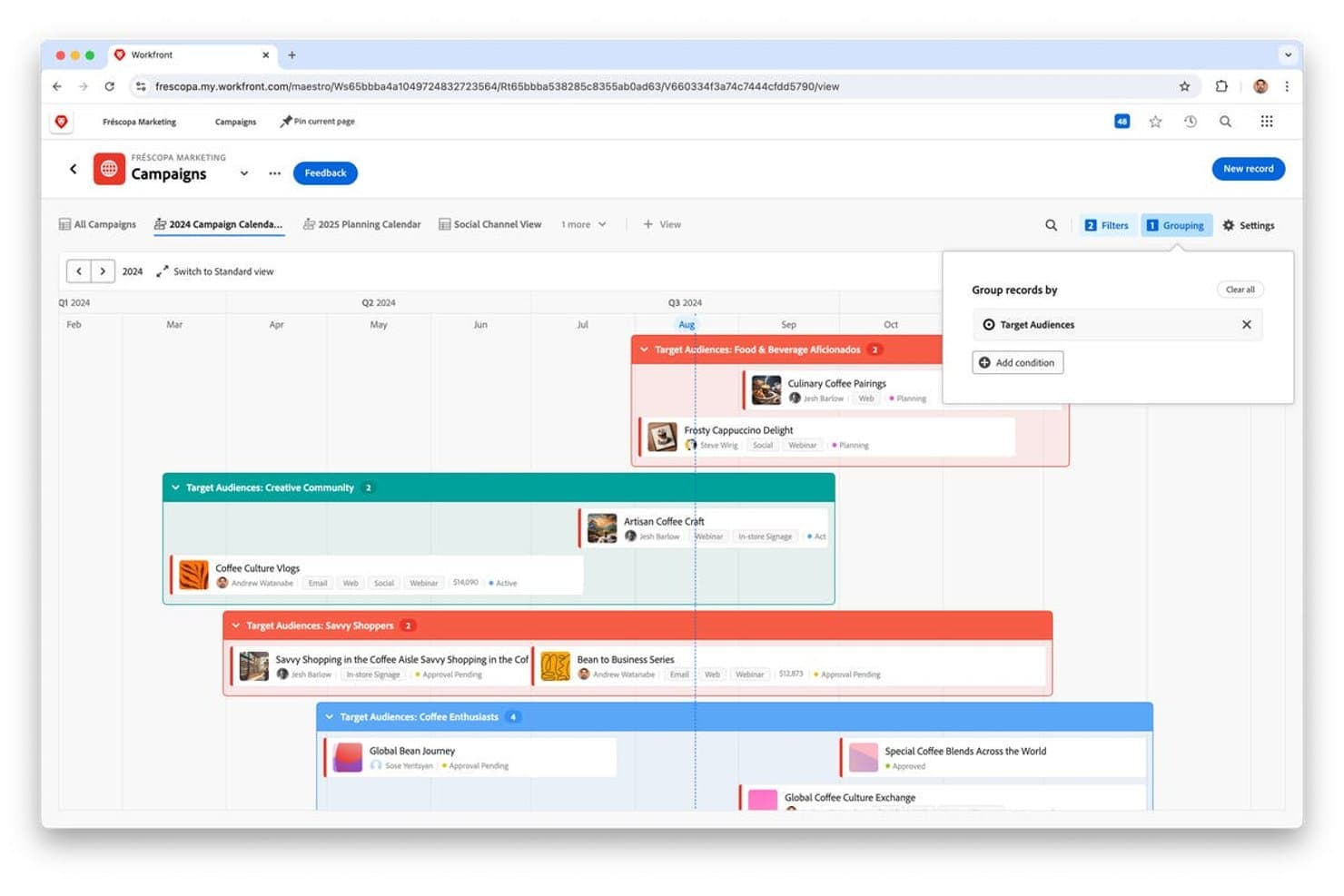
Adobe Workfront groups campaigns by target audience on a timeline calendar. Adobe Workfront is an enterprise project management platform for creative and marketing teams that connects planning, collaboration, resource management, and delivery across complex work portfolios.
Who Is Adobe Workfront Best For?
Adobe Workfront fits enterprise creative and marketing operations teams coordinating complex portfolios, cross-functional workflows, and high-volume campaign delivery.
Why Adobe Workfront Is a Good Best Wrike Alternatives
I picked Adobe Workfront because it connects enterprise portfolio planning with creative and marketing operations. My team uses resource management to assign specialists across campaigns, while proofing and approval workflows keep reviews moving. It fits complex organizations coordinating high-volume creative delivery across departments.
Adobe Workfront Key Features
- Custom forms: Capture standardized project and request details with tailored fields.
- Request queues: Route incoming work requests into organized queues for review.
- Dashboards: Display project metrics, tasks, and updates in configurable panels.
- Reports: Build custom reports for tracking milestones, workloads, and project status.
Adobe Workfront Integrations
Adobe Workfront offers built-in integrations with Adobe Creative Cloud, Adobe Experience Manager Assets, Adobe Express, GenStudio for Performance Marketing, Slack, Microsoft Teams, Google Drive, and Jira. Built-in support also includes Box and SharePoint, while Workfront Fusion and public REST and Event Subscription APIs support custom connections.
Pros and Cons
Pros:
- Resource planning exposes specialist capacity gaps
- Proofing keeps creative reviews in one workflow
- Portfolio governance spans complex campaign work
Cons:
- High-volume views can feel slow
- Setup demands substantial administrative configuration
Learn more about Adobe Workfront: Best for long-term capacity and demand forecasting
- 14-day free trial available
- From $9/user/month (billed annually)
Visit WebsiteCustomer Rating:4.4/5
Birdview helps teams align tasks, timelines, and resources for smoother delivery. Birdview is a project management and professional services automation platform designed for internal teams and professional services companies across various sectors like engineering, business consulting, and IT services. Its key business functions include resource planning, project management, billing, and collaboration, aimed at improving project delivery and resource utilization.
Why it's a good Wrike alternative: Birdview excels in advanced resource planning with features like AI-driven project management, customizable dashboards, and detailed resource allocation tools. These capabilities allow your team to optimize resource utilization and project timelines. With over 300 pre-configured dashboards, you can analyze data effectively. Birdview also offers tailored onboarding and support services, ensuring smooth implementation for your team.
Standout features & integrations:
Features include customizable workflows that let you tailor the platform to your team's needs. The platform provides business intelligence tools for in-depth data analysis. Customizable dashboards allow you to monitor operations and financial health efficiently.
Integrations include Salesforce, QuickBooks, Slack, Microsoft Teams, Trello, Asana, Dropbox, Google Workspace, Jira, and HubSpot.
Pros and Cons
Pros:
- AI-driven project management
- Customizable dashboards
- Advanced resource planning tools
Cons:
- Higher learning curve for new users
- Complex features for small teams
Learn more about Birdview: 10Best for managing multiple projects
Ravetree
- Free trial + free demo available
- From $29/user/month (billed annually)
Visit WebsiteCustomer Rating:4.3/5
Ravetree's Gantt chart views allow project managers to view the project from multiple perspectives, including task lists, critical path analysis, and resource allocation. Ravetree is a project management software designed to cater to the needs of teams seeking to organize their projects and resources effectively. It offers a suite of features that help with project workflows, from planning to execution.
Why it's a good Wrike alternative:
I picked Ravetree as a good Wrike alternative because of its robust project management capabilities. It offers tools for managing projects, creating templates, and customizing approval workflows, which are essential for teams that need to keep track of multiple projects simultaneously. These features help your team stay organized and ensure that project tasks are completed on time. Another reason is its resource management feature, which provides insights into team capacity and financial tracking. This allows you to allocate resources efficiently and manage your team's workload effectively, ensuring that projects are delivered within budget.
Standout features & integrations:
Features include detailed time and expense tracking, which enables you to keep a close eye on project costs and ensure accurate billing. The integrated CRM feature provides account managers and sales representatives with real-time access to client information, helping them manage customer relationships more effectively. Additionally, client portals offer real-time project updates, allowing clients to stay informed about the progress of their projects and facilitating better communication between your team and clients.
Integrations include Todoist, Microsoft Excel, Trello, Resource Guru, Monday.com, Favro, Asana, Microsoft Teams, Google Drive, Slack, Dropbox, and Jira.
Pros and Cons
Pros:
- Provides a holistic view of all projects and their statuses
- Supports Scrum and Kanban, catering to Agile teams
- Facilitates smoother communication and transparency with clients
Cons:
- The robust interface can feel cluttered due to numerous functionalities
- Offers less flexibility in interface and workflow customization compared to competitors
Learn more about Ravetree:
Other Wrike Alternatives
Here are some additional Wrike alternatives that didn’t make it onto my shortlist, but are still worth checking out:
- 11SmartsheetBest for spreadsheet-based project tracking
- 12ScoroBest for end-to-end business management
- 13KantataBest for resource planning and project accounting
- 14CeloxisBest for Gantt-based project and resource planning
- 15AcceloBest for professional services automation
- 16HiveBest for team-based productivity insights
- 17GoodDayBest for low-cost OKR and project tracking
- 18WorkamajigBest all-in-one project, billing, and resource planning
- 19Nifty PMBest for project management and collaboration
How I Evaluate Wrike Alternatives
I split my evaluation into three parts. The most weight goes to core functionality—whether a tool can structure tasks across projects and surface work in multiple views. Then I look for scenario planning tools, before considering pricing transparency and migration support.
Core Functionality (Table Stakes For This List)
When I'm selecting tools for my list, I score each one on a scale from 0 (does not offer the functionality) to 5 (excels in this area) for each core functionality listed below. I then convert the total into a percentage to help assess each tool’s overall fit, with extra weight on any functionalities I’ve deemed essential.
- Task & Project Management (Essential): I look for task hierarchies, dependencies, due dates, templates, and links across product, design, and engineering projects.
- Workflow Visualization (Essential): I check for customizable list, board, timeline, and Gantt views with filters for milestones, owners, and delivery status.
- Collaboration & Communication: I evaluate comments, @mentions, file sharing, approvals, and decision history within tasks and project spaces.
- Workflow Automation: I look for rules that assign work, update statuses, notify stakeholders, and route recurring requests across teams.
- Reporting & Dashboards: I assess dashboards that show delivery progress, workload, risks, and cross-project metrics for stakeholder reviews.
- Cross-Team Resource Planning: I check whether capacity views reveal allocation across projects, teams, roles, and upcoming product milestones.
Once I have a list of tools that meet the criteria, I consider what sets each platform apart.
Differentiating Factors (What Sets Vendors Apart)
Here's how I compare and contrast different vendors:
Standout Features
I look for native OKR tracking that ties roadmap items to measurable outcomes—without it, priority debates stay subjective. Scenario planning tools matter just as much; I evaluate whether a platform lets me model what happens to timelines and capacity when leadership shifts priorities mid-quarter. I also check for two-way Jira sync, since product and engineering teams that maintain separate systems inevitably drift out of alignment.
Beyond Features
I check whether a platform feels natural to developers—not just PMs. If engineers resist the tool, you end up with shadow workflows in Jira anyway. Scalability matters just as much: I evaluate whether workspace structures and permissions can grow from a single product team to a full portfolio without forcing a re-platforming project. I also look at migration support, since vendors that offer Wrike-specific import guides and dedicated onboarding cut weeks off the switch.
Why Look For A Wrike Alternative?
While Wrike is a good choice of project management software, there are a number of reasons why some users seek out alternative solutions. You might be looking for a Wrike alternative because…
- You need more customization options
- Your team finds Wrike too complex
- You're looking for better integration capabilities
- Your budget doesn't fit Wrike's pricing
- You require specific industry features
- Your team needs a simpler user interface
If any of these sound like you, you’ve come to the right place. My list contains several project management software options that are better suited for teams facing these challenges with Wrike and looking for alternative solutions.
Wrike Key Features
Here are some of the key features of Wrike, to help you contrast and compare what alternative solutions offer:
- Task management: Create and organize tasks and subtasks easily for better workflow.
- Collaboration tools: Connect with teammates using @mentions and feedback loops for approvals.
- Time tracking: Log time spent on tasks with built-in timers and descriptions.
- Resource management: Monitor team allocations and adjust tasks with drag-and-drop.
- Document management: Handle attachments with proofing and version control for client approvals.
- Custom dashboards: Build boards to access filtered information for task monitoring.
- Workload view: Visualize hours and allocation percentages to optimize team workloads.
- Comparison mode: Compare file versions side by side to spot differences easily.
- Request forms: Create custom forms to gather information from external users.
- Reporting and analytics: Generate detailed reports to gain insights into project performance.