

Navigating the challenges of product management can be tough. You're juggling customer expectations, market demands, and team coordination. Predictive customer journey tools can help lighten the load by offering insights into user behavior and simplifying customer interactions.
In my experience, these tools not only boost customer engagement but also provide you with actionable insights, which help your team make informed decisions. I've independently tested and reviewed various software to bring you an unbiased, well-researched list of the top predictive customer journey tools.
In this article, I'll guide you through my top picks, focusing on what makes each tool unique. By the end, you'll have a clearer picture of which solution fits your needs best.
Why Trust Our Software Recommendations
6,700+
Reviews
20
Industry experts
16+
Evaluation factors
14
Years
Our team has been testing and reviewing software since 2012. As product managers ourselves, we know how difficult—and important—it is to choose the right software.
For this guide, we evaluated tools using hands-on testing and independent research, scoring tools using our selection criteria.
Our reviews reflect our human editorial judgment, not a sales pitch.
Expert reviewers:
- Andrew LumbySenior TPM
- Cristiano ValimSenior UI/UX Lead


Best Predictive Customer Journey Tools Summary
This comparison chart summarizes pricing details for my top predictive customer journey tools selections to help you find the best one for your budget and business needs.
| Tool | Best For | Trial Info | Price | ||
|---|---|---|---|---|---|
| 1 | Best for friction-to-revenue journey analysis | Free demo available | Pricing upon request | Website | |
| 2 | Best for lifecycle retention with no-code predictions | Free demo available | Pricing upon request | Website | |
| 3 | Best for lifecycle triggers on predicted churn | Free demo available | Pricing upon request | Website | |
| 4 | Best for contact center journey orchestration | Free trial available | From $75/user/month (billed annually) | Website | |
| 5 | Best for B2C lifecycle churn prediction | Free demo available | Pricing upon request | Website | |
| 6 | Best for mobile app engagement predictions | 30-day free trial | From $85/month | Website | |
| 7 | Best for cross-channel predictive segmentation | Free demo available | Pricing upon request | Website | |
| 8 | Best for CRM-driven predictive lifecycle marketing | Free demo available | Custom pricing available upon request | Website | |
| 9 | Best for explainable churn prediction in ecommerce | Free demo available | Pricing upon request | Website | |
| 10 | Best for explainable churn and conversion models | Free plan available | Pricing upon request | Website |


Best Predictive Customer Journey Tool Reviews
Below are my detailed summaries of the best predictive customer journey tools that made it onto my shortlist. My reviews offer a detailed look at the key features, pros and cons, integrations, and ideal use cases of each tool to help you find the best one for you.
 Best for friction-to-revenue journey analysis
- Free demo available
- Pricing upon request
Visit WebsiteCustomer Rating:4.7/5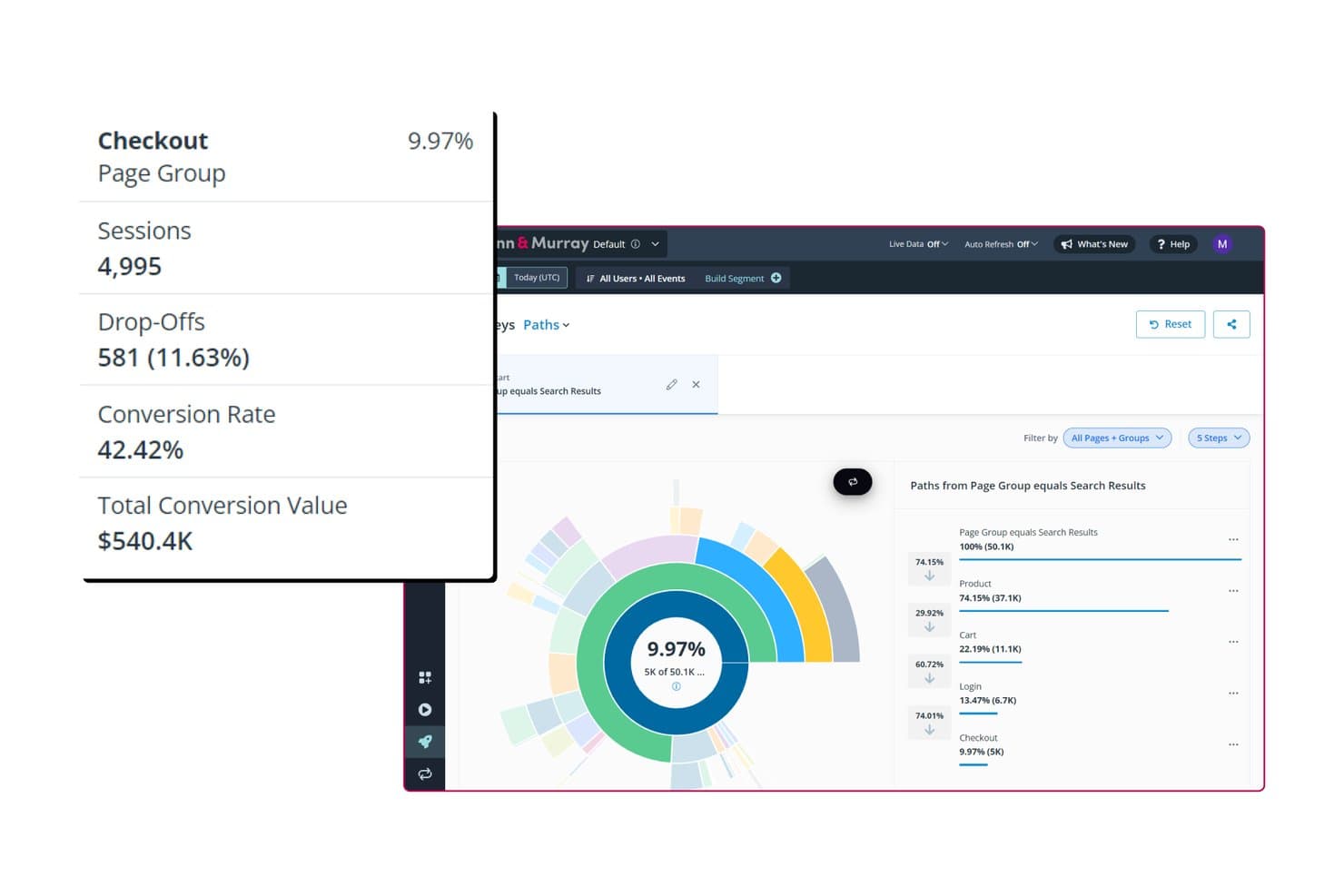
Quantum Metric maps checkout conversion paths with drop-off rates. Quantum Metric is an enterprise digital analytics platform that combines autocaptured behavioral data, real-time journey mapping, session replay, AI-driven anomaly detection, and friction-to-revenue quantification across web, mobile, and kiosk touchpoints.
Who Is Quantum Metric Best For?
Quantum Metric is a strong fit for enterprise product and CX teams that need to connect digital friction directly to revenue impact across web, mobile, and kiosk touchpoints.
Why I Picked Quantum Metric
Quantum Metric earns its spot on my shortlist because no other tool I've reviewed connects friction directly to a revenue figure as cleanly. Its Opportunity Analysis ranks every friction point by dollar impact, so my team isn't guessing what to fix first. Agent Felix monitors funnels continuously and flags drop-off the moment it starts, which means I can act before a problem compounds across thousands of sessions.
Quantum Metric Key Features
- Autocapture: A single JS tag or SDK automatically captures 60+ behavioral and technical data points across web, mobile, and kiosk without manual tagging.
- Session replay with AI summaries: Felix AI generates written summaries of individual session replays, letting you review friction moments without watching full recordings.
- VoC look-alike modeling: Sentiment is estimated for customers who never completed a survey, giving you a fuller picture of how your silent majority feels.
- Data streaming to external warehouses: Raw behavioral data can be piped to Snowflake, BigQuery, Databricks, and other destinations to power custom churn or propensity models built outside the platform.
Quantum Metric Integrations
Quantum Metric integrates with Adobe Experience Platform, Optimizely, AB Tasty, Split, Salesforce Service Cloud, and ServiceNow. Data Streaming connects to Snowflake, BigQuery, Databricks, Amazon S3, and other warehouses.
Pros and Cons
Pros:
- Session replay exposes technical conversion blockers
- Autocapture reveals cross-channel drop-off patterns
- Revenue-ranked friction clarifies journey priorities
Cons:
- Replay search can hinder investigations
- No configurable churn propensity scoring
Learn more about Quantum Metric: Best for lifecycle retention with no-code predictions
- Free demo available
- Pricing upon request
Visit WebsiteCustomer Rating:4.5/5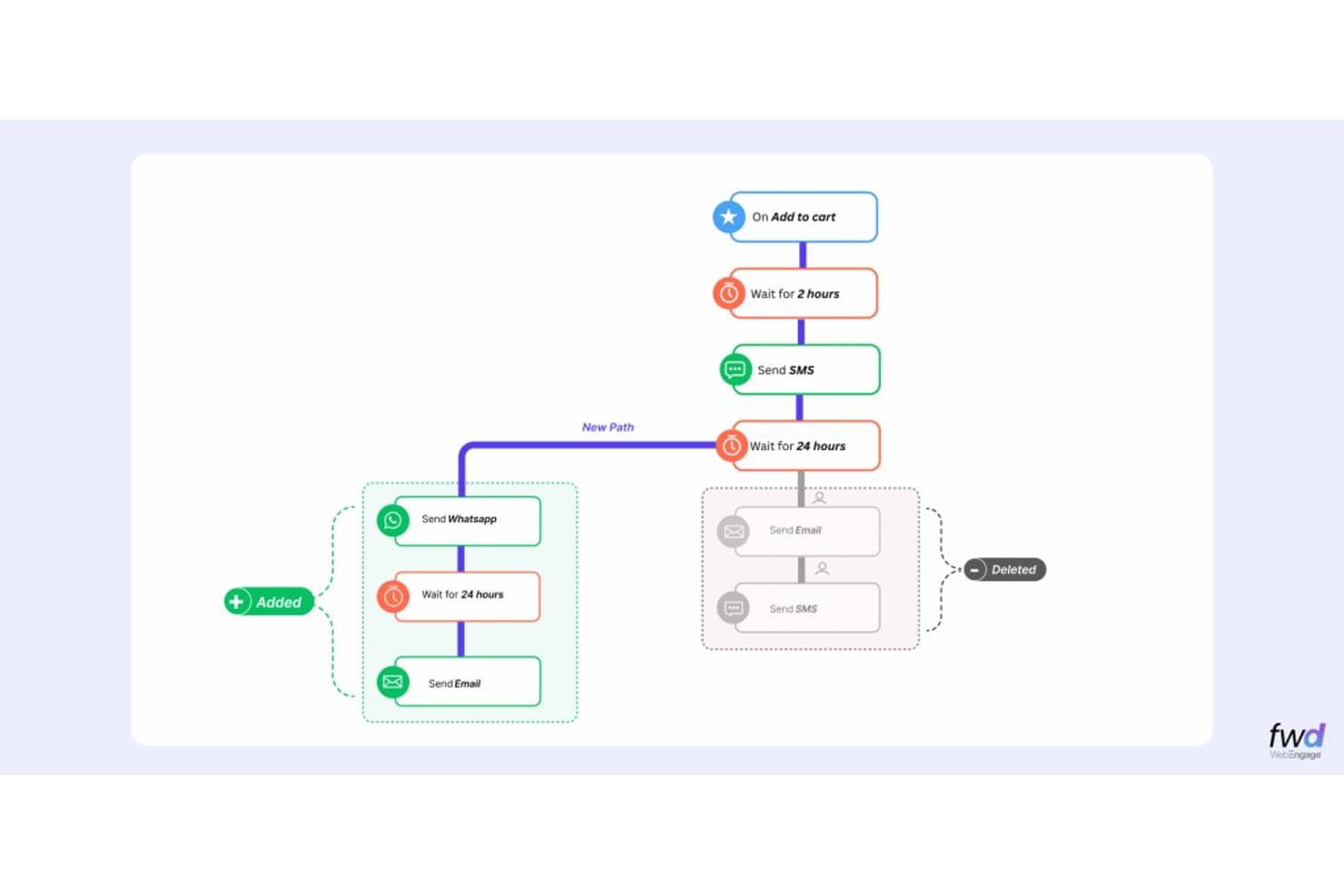
WebEngage lets users build multi-step automated journeys with branching paths. WebEngage is a customer data and marketing automation platform that combines predictive segmentation, RFM scoring, multi-channel journey automation, and behavioral analytics across web, mobile, and messaging channels.
Who Is WebEngage Best For?
WebEngage is a strong fit for CRM and lifecycle marketers at B2C companies in industries like ecommerce, insurance, and fintech who need to run predictive retention campaigns without a data science team.
Why I Picked WebEngage
I've included WebEngage in my top picks because its Predictive Segments and Predictive RFM scoring let lifecycle marketers act on churn risk without touching a data model. I like that "Least Likely" conversion segments can directly trigger re-engagement journeys, so a drop in purchase likelihood automatically queues the right message across 15 channels. BLACK adds pre-built industry personas with estimated revenue lift, giving retention teams a ready-made playbook from day one.
WebEngage Key Features
- Contextual journeys: Run multiple simultaneous journeys for the same user, each tied to a distinct business object like an order, policy, or loan.
- ZeroPII™ agent: Processes identity and personalization data on your own infrastructure so personal data never leaves your network.
- Universal control groups: Hold back a defined user segment across all channels and campaigns to measure true lift against an untreated baseline.
- Segment Agent: Builds audience segments from plain-language descriptions without requiring SQL or manual filter configuration.
WebEngage Integrations
WebEngage offers 40+ pre-built integrations, including Snowflake, BigQuery, Amazon Redshift, Segment, Salesforce, HubSpot, Customer.io, Mixpanel, Amplitude, and AppsFlyer. It also supports custom connections through APIs and partner-built Marketplace integrations.
Pros and Cons
Pros:
- Control groups measure campaign lift
- Cross-channel path analysis clarifies drop-offs
- Predictive segments trigger retention journeys
Cons:
- Predictive scores lack individual explanations
- Reports can lag at high volumes
Learn more about WebEngage: Best for lifecycle triggers on predicted churn
- Free demo available
- Pricing upon request
Visit WebsiteCustomer Rating:4.5/5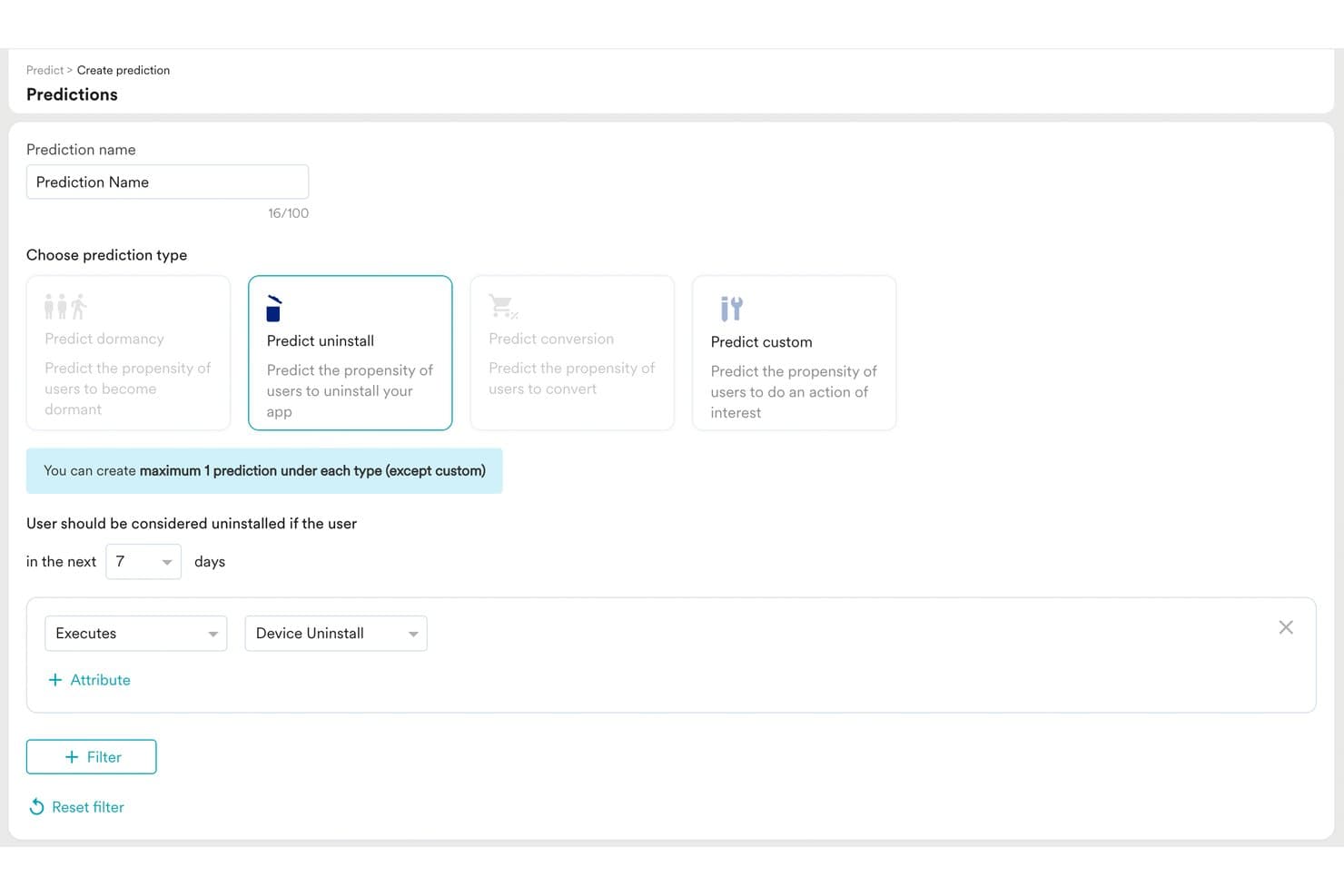
MoEngage lets users build predictive uninstall models with custom filters. MoEngage is a cross-channel customer engagement platform that combines predictive segmentation, lifecycle journey building, behavioral analytics, and AI-driven campaign decisioning across email, push, SMS, WhatsApp, and more.
Who Is MoEngage Best For?
MoEngage is a strong fit for CRM and lifecycle marketing teams that need to act on predicted churn signals across email, push, SMS, and WhatsApp from a single platform.
Why I Picked MoEngage
I picked MoEngage as one of the best because its Predictions feature assigns each user a propensity score for dormancy, uninstall, or conversion over a 7-day window, and those bands plug directly into campaign audiences. When a user's churn risk shifts to High, Flows can fire a targeted WhatsApp or push message before they go quiet. Proactive Insights adds a layer of anomaly detection, alerting you when RFM segments shift or retention drops outside your defined threshold.
MoEngage Key Features
- Merlin AI custom agents: No-code agents that analyze funnels, discover segments, and draft campaigns, running on a manual trigger or a set schedule.
- Unified Identity resolution: Merges anonymous and known profiles across up to five identifiers, including email, mobile, and custom attributes, with support for online-to-offline matching.
- Intelligent Path Optimizer: Automatically shifts users to the winning branch during journey A/B or multivariate tests based on live performance data.
- Control groups in Flows: Built-in holdout groups, sized from 1–95% of users, that calculate campaign uplift against a defined attribution window.
MoEngage Integrations
MoEngage’s marketplace lists 250–300+ integrations, including Snowflake, Databricks, BigQuery, Twilio Segment, Salesforce, HubSpot, Amplitude, Mixpanel, and Shopify. It also supports API and warehouse connections for custom data flows.
Pros and Cons
Pros:
- Identity stitching unifies cross-channel behavior
- Control groups quantify journey uplift
- Predicted churn bands trigger lifecycle interventions
Cons:
- Journey maps lack predictive overlays
- Prediction models offer limited explainability
Learn more about MoEngage: Best for contact center journey orchestration
- Free trial available
- From $75/user/month (billed annually)
Visit WebsiteCustomer Rating:4.4/5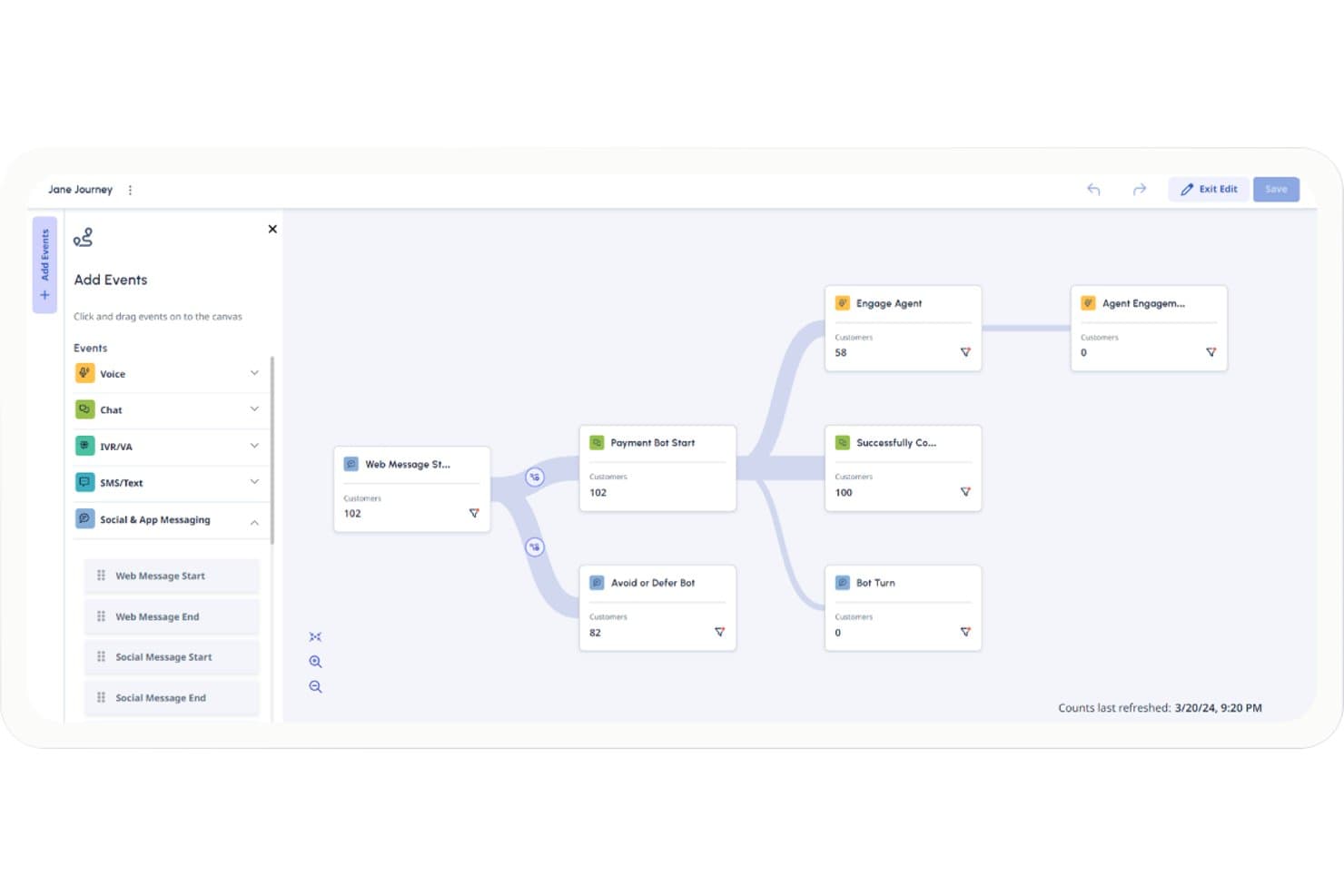
Genesys Cloud CX maps customer journeys with real-time flow analytics. Genesys Cloud CX is a contact center platform that combines cross-channel journey mapping, AI-driven predictive routing, behavioral data aggregation, and proactive engagement automation across voice, chat, email, SMS, and social channels.
Who Is Genesys Cloud CX Best For?
Genesys Cloud CX is a strong fit for enterprise contact center teams that need cross-channel journey visibility and automated proactive engagement built into a single CCaaS platform.
Why I Picked Genesys Cloud CX
Genesys Cloud CX earns its spot on my shortlist because it's one of the few CCaaS platforms that builds contact center journey orchestration directly into its core, rather than bolting it on. I like how Journey Analyzer stitches voice, chat, email, SMS, and social interactions into a single visual map, letting you trace exactly where customers abandon service journeys and measure the churn impact. Action maps then close the loop by triggering proactive chat or bot interventions within the same platform, no third-party handoff needed.
Genesys Cloud CX Key Features
- Predictive routing: AI matches each incoming interaction to the best available agent based on predicted KPI outcomes, including handle time, first-contact resolution, and churn reduction.
- Single customer view: Automatically links voice, email, SMS, and social interactions into one unified contact record using phone, email, and messaging IDs for identity resolution.
- External event ingestion: Pulls in behavioral data from third-party systems like Adobe Analytics, Qualtrics, and ServiceNow through APIs to enrich journey context.
- Anomaly detection: Flags unusual patterns on monitored contact center queues and sends alerts when journey performance shifts unexpectedly.
Genesys Cloud CX Integrations
Genesys Cloud CX offers AppFoundry marketplace integrations with Salesforce, ServiceNow, Microsoft Dynamics, Zendesk, Microsoft Teams, Zoom, Amazon Lex, Google CCAI, Okta, and OneLogin. It also supports custom connections through more than 3,000 public APIs and external journey events from Adobe Analytics and Qualtrics.
Pros and Cons
Pros:
- Identity stitching connects fragmented service interactions
- Predictive triggers launch proactive customer interventions
- Cross-channel journey maps reveal abandonment patterns
Cons:
- Daily refresh limits real-time journey analysis
- Outcome scoring deprecation weakens predictive segmentation
Learn more about Genesys Cloud CX:
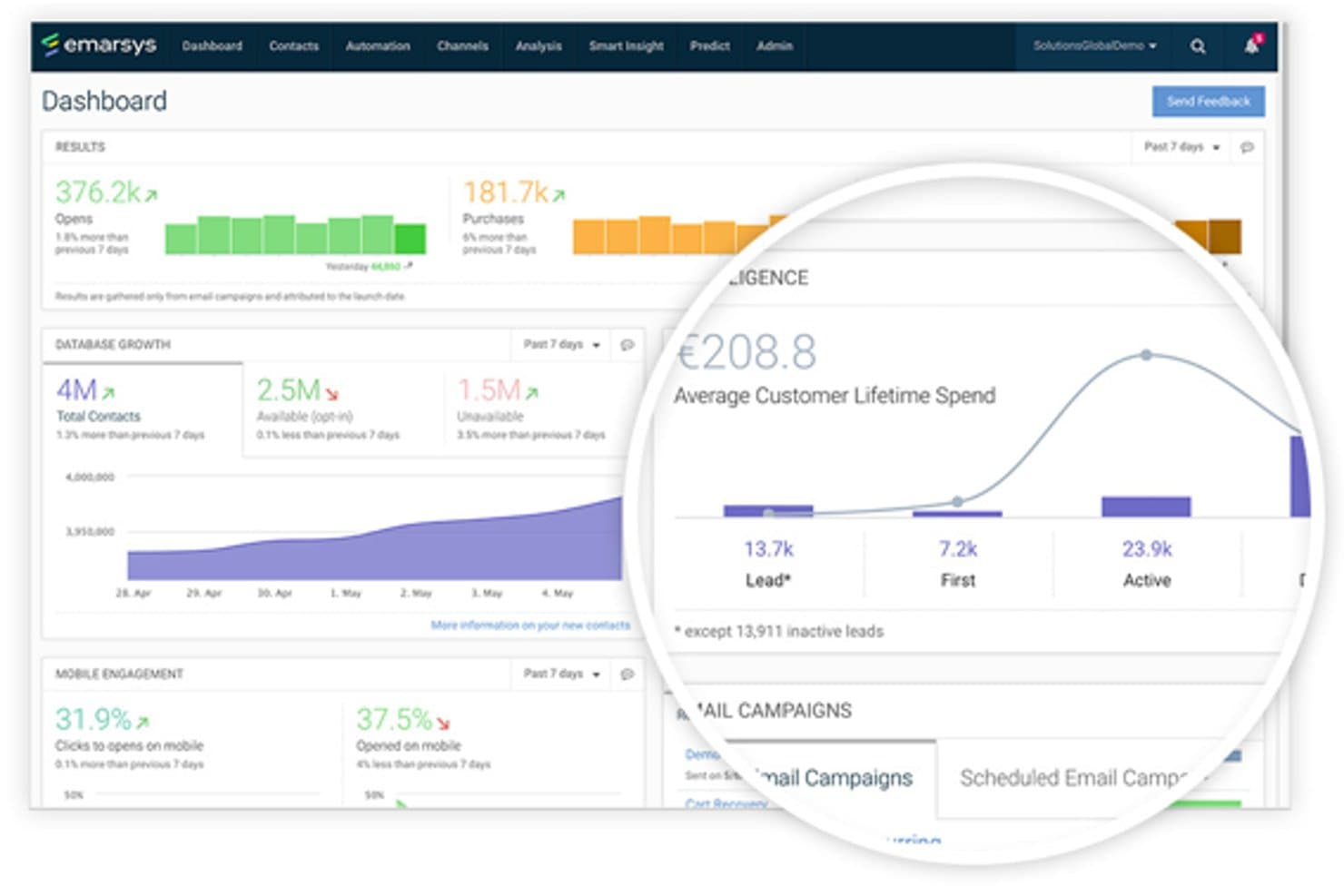
Emarsys marketing automation platform interface SAP Engagement Cloud (formerly Emarsys) is a B2C omnichannel marketing automation platform that combines AI-driven lifecycle segmentation, predictive behavioral modeling, and cross-channel journey orchestration.
Who Is Emarsys Best For?
Emarsys is a strong fit for mid-to-large B2C brands with mature CRM or lifecycle marketing teams managing high-volume customer bases across retail, ecommerce, or loyalty-driven industries.
Why I Picked Emarsys
I picked Emarsys as one of the best because its Smart Insight module directly targets B2C churn through eRFM lifecycle staging, automatically moving customers into "defecting" or "inactive" segments and triggering win-back journeys without manual intervention. I also like how predicted spend and churn probability surface directly on individual customer profile cards, giving lifecycle marketers actionable signals at the contact level rather than buried in aggregate dashboards.
Emarsys Key Features
- Predictive affinity scoring: AI identifies which customers have a propensity for specific product categories and surfaces those scores directly on individual contact profile cards.
- True Added Value testing: Built-in scientific control group split testing measures whether a campaign generated real incremental revenue, not just correlated activity.
- Automation Center canvas: A visual, no-code builder for constructing multi-step, multi-channel journeys using entry nodes, decision splits, and wait-time logic.
- Living audience segments: AI-driven segments update automatically based on real-time behavioral and predictive signals, activating across connected channels without manual refresh.
Emarsys Integrations
Documented integrations include SAP Commerce Cloud, SAP Customer Data Platform, SAP Analytics Cloud, mParticle, Twilio Segment, Tealium, and Zeotap. Emarsys also connects with Google Analytics and supports open APIs for custom integrations.
Pros and Cons
Pros:
- Measures incremental revenue with control groups
- Automates lifecycle win-back interventions
- Predicts churn, spend, affinity, and purchases
Cons:
- Predictions lack explanations and confidence scores
- Journey canvas lacks observed-path analytics
Learn more about Emarsys: Best for mobile app engagement predictions
- 30-day free trial
- From $85/month
Visit WebsiteCustomer Rating:4.5/5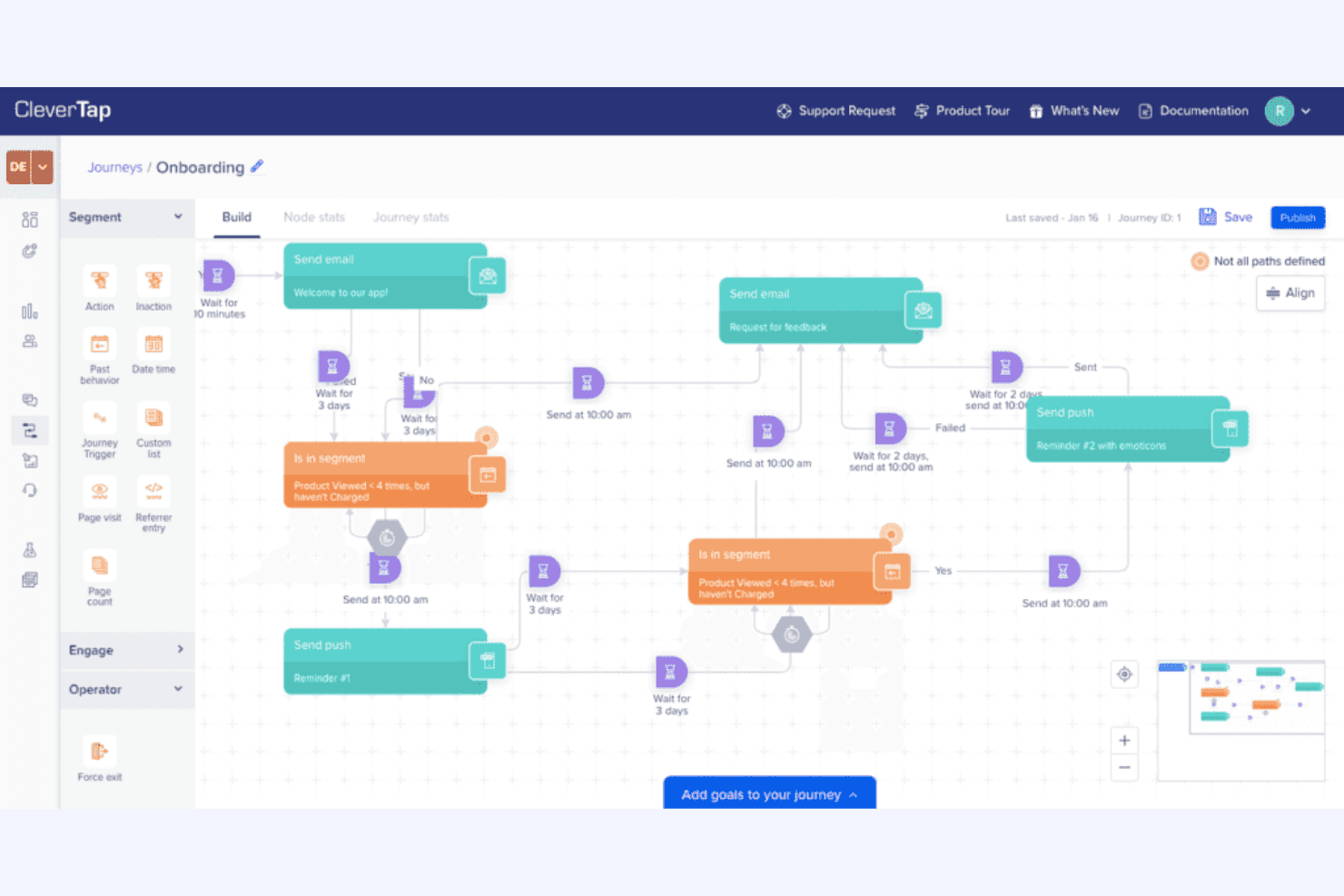
CleverTap aims to boost mobile user engagement and retention. CleverTap is a mobile-first customer engagement platform that combines predictive segmentation, multi-channel journey building, behavioral analytics, and AI-driven outcome measurement.
Who Is CleverTap Best For?
CleverTap is a strong fit for CRM and lifecycle marketers at mobile-first companies who need prediction-driven engagement without relying on a data science team.
Why I Picked CleverTap
CleverTap earns its spot on my shortlist because its predictive engine is built specifically around mobile app behavior, covering conversion likelihood, uninstall risk, and new user retention out of the box. I particularly like CleverAI Predictions, which uses XGBoost models to score users daily into High, Medium, and Low likelihood tiers, then lets me hit "Engage" to launch a targeted journey from that segment in one click. IntelliNODE takes it further by running a multi-armed bandit across journey paths in real time, automatically routing users toward the best-performing message and channel combination.
CleverTap Key Features
- Unified user profile: Merges a user's activity across mobile and web devices into a single identity-resolved profile using behavioral, demographic, and cross-platform data.
- Real Impact dashboard: Compares a target group against a system control group across retention, stickiness, revenue per user, and RFM transitions to measure true campaign lift.
- Analytics Alerts: Monitors Trends metrics for anomalies or threshold breaches using a seasonality-aware model, with notifications sent to the dashboard, email, or Slack.
- IntelliAB testing: Runs message and variant A/B tests across channels to identify top-performing content before scaling to the full audience.
CleverTap Integrations
CleverTap integrates with Amplitude, Mixpanel, Segment, mParticle, Adjust, AppsFlyer, Branch, BigQuery, Snowflake, and Zendesk. It supports SDK and API ingestion, data warehouse imports, and Zapier.
Pros and Cons
Pros:
- Turns likelihood segments into targeted journeys
- Explains scores with ranked behavioral drivers
- Predicts churn before mobile app uninstall
Cons:
- Alerts don’t respond directly to prediction scores
- Prediction overlays are absent from journey maps
Learn more about CleverTap: Best for cross-channel predictive segmentation
- Free demo available
- Pricing upon request
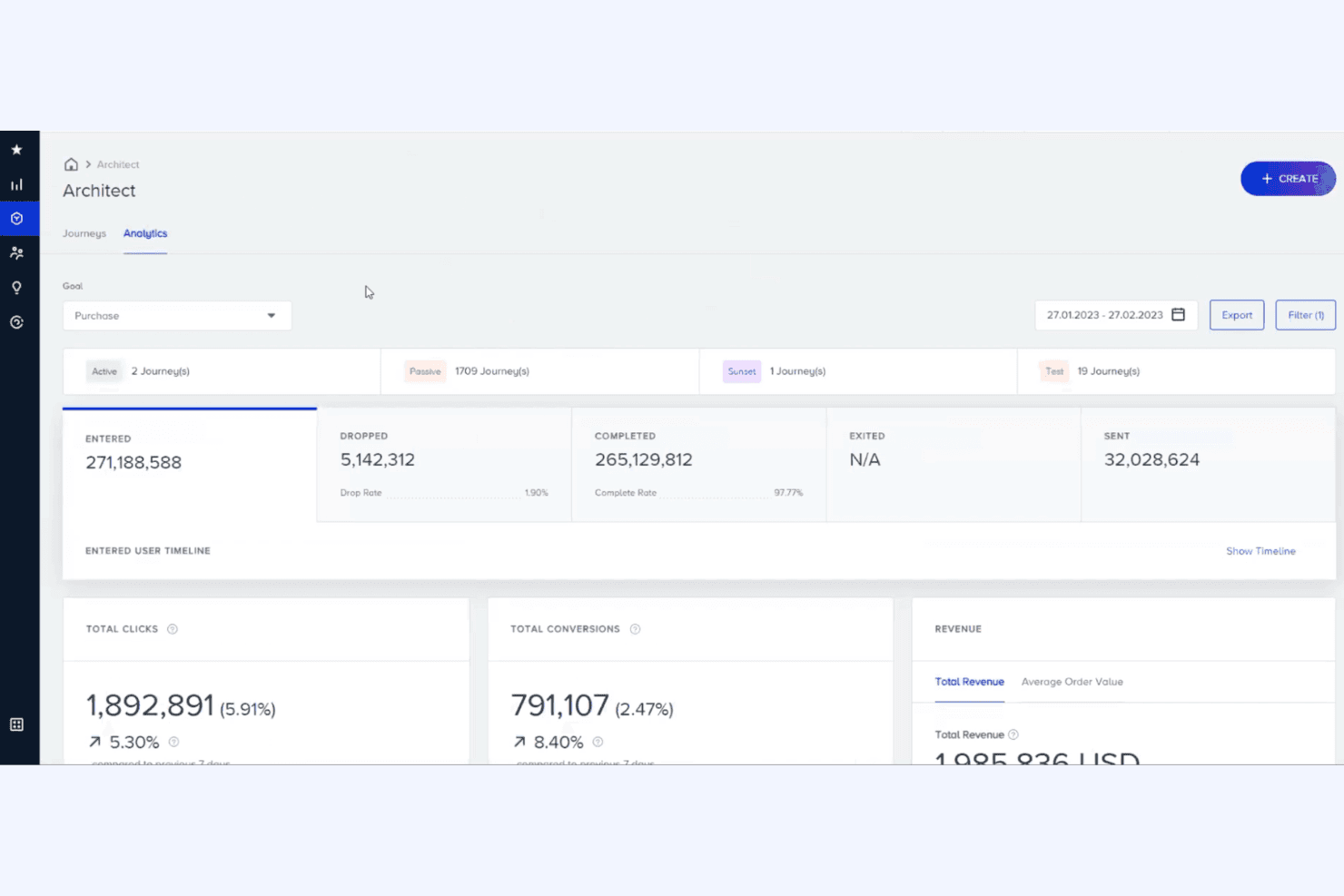
Insider One personalizes cross-channel marketing messages. Insider One is a cross-channel customer engagement platform that unifies a CDP, ML-based predictive segmentation, and a multi-channel journey builder to score, segment, and activate customers across 12+ channels.
Who Is Insider One Best For?
Insider One is a strong fit for enterprise and mid-market B2C brands in retail, financial services, or travel that need predictive segmentation and multi-channel journey execution in a single platform.
Why I Picked Insider One
Insider One earns its spot on my shortlist because its Likelihood to Purchase model scores every visitor, including anonymous ones, in real time based on live session behavior like category interactions and cart-abandonment patterns. I love that those predictive segments feed directly into Architect, its 12+ channel journey builder, so a visitor flagged as high-intent can trigger a personalized sequence across email, SMS, and web push without any manual handoff. The Customer Lifecycle Status model adds another layer, sorting users into six stages, from potential buyers to churned, so I can target at-risk customers before they disappear.
Insider One Key Features
- Customer Lifecycle Status model: Sorts users into six lifecycle stages—from visitors to churned—and updates daily using a full year of behavioral and CRM data.
- Agent One Insight Agent: Analyzes campaign performance in real time, flags anomalies, and recommends follow-up actions without manual review.
- Next Best Channel routing: Uses AutoML to automatically route each user to the channel they're most likely to engage with at the optimal send time.
- Control group testing: Lets you hold out 10–15% of an audience to measure incremental lift against campaign-exposed segments over a defined period.
Insider One Integrations
Insider One offers 100+ integrations through its Integration Hub, including Salesforce, HubSpot, Segment, Snowflake, Google Analytics, Shopify, AppsFlyer, and Google Ads. It also supports APIs and webhooks for custom connectivity.
Pros and Cons
Pros:
- Measures incremental lift with control groups
- Connects predictive segments to 12+ channels
- Scores anonymous visitors in real time
Cons:
- Relies on basic last-click journey attribution
- Uses fixed models without per-user explanations
Learn more about Insider One: Best for CRM-driven predictive lifecycle marketing
- Free demo available
- Custom pricing available upon request
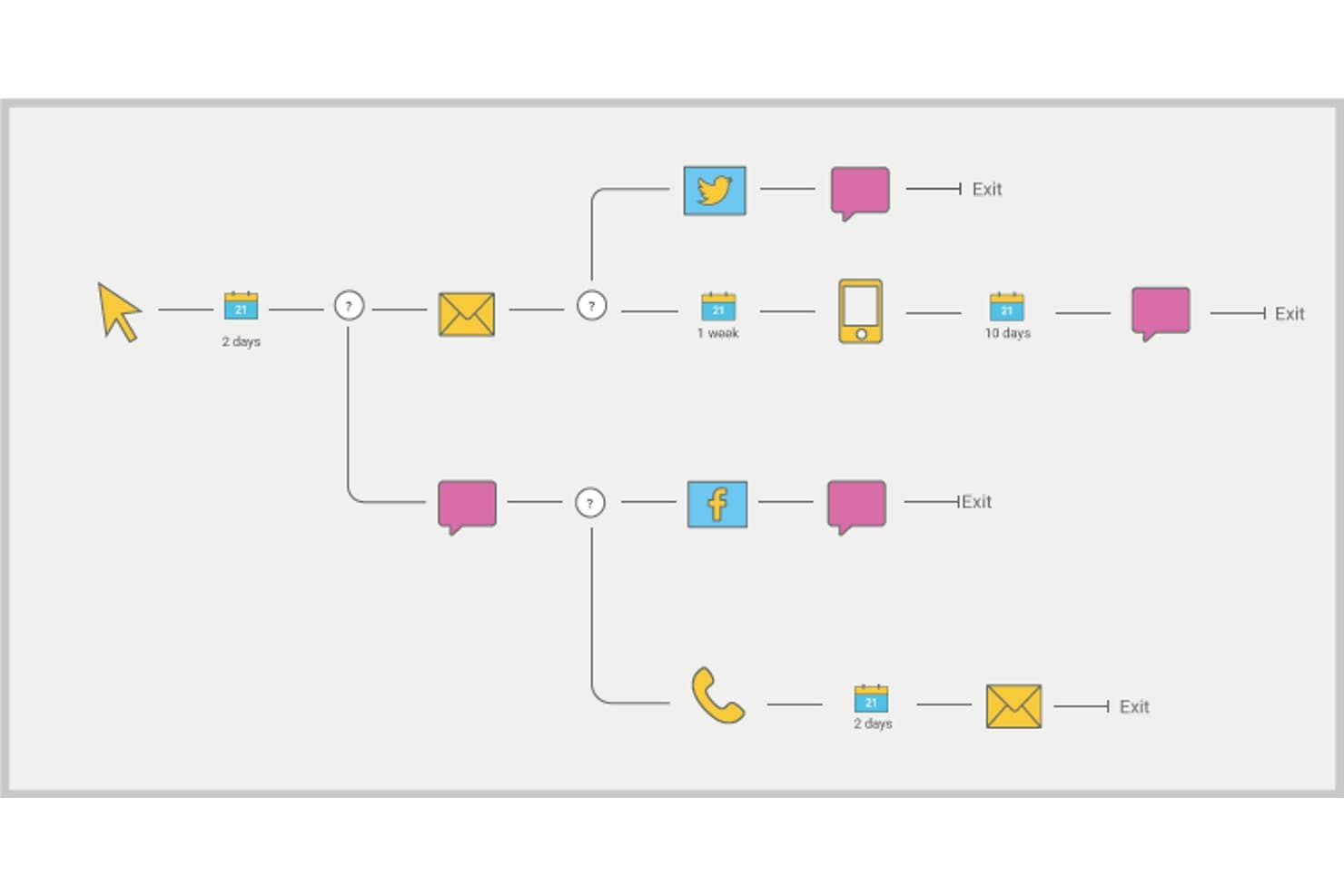
Optimove maps branching customer journeys across email, social, and mobile. Optimove is a CRM marketing platform built around predictive micro-segmentation, AI-driven journey orchestration, and lifecycle stage tracking across email, SMS, mobile push, and web channels.
Who Is Optimove Best For?
Optimove is a strong fit for CRM and lifecycle marketing teams in iGaming, retail, or subscription businesses that need predictive segmentation and rigorous campaign measurement built into one platform.
Why I Picked Optimove
I've included Optimove in my top picks because its predictive modeling goes deeper than most CRM platforms, with five continuously updated ML scores per customer: churn risk, conversion, reactivation, top spender likelihood, and 12-month future value. What I find especially compelling is how those scores feed directly into auto-built micro-segments and AI Journey Decisioning, which selects the next best campaign per customer using past responses. The Campaign Analysis module adds control groups and statistical significance testing, so you're measuring real lift rather than assuming it.
Optimove Key Features
- Target Group Discovery: An ML model that suggests audiences based on predicted deposit, purchase, or product affinity, which you can activate directly in Campaign Builder.
- Visual Stream Builder: A drag-and-drop canvas for building cross-channel journeys using trigger splits, attribute splits, wait rules, and exit criteria.
- Real-Time Triggers: Event-based campaign activation that fires on live web or app behavior, such as cart abandonment or early session signals.
- Generative AI Insights: A natural-language query interface that lets you ask questions about campaign data and receive charts built from aggregated, anonymized results.
Optimove Integrations
Optimove connects to Snowflake, Databricks, Google BigQuery, Amazon Redshift, SQL Server, MySQL, PostgreSQL, Oracle, Teradata, and Delta Lake. It also supports zero-copy data sharing, cloud storage, APIs, and SDKs for custom integrations.
Pros and Cons
Pros:
- AI decisioning selects next-best customer campaigns
- Control groups prove journey-level incremental lift
- Continuously updated churn and value predictions
Cons:
- No alerts for rising churn scores
- Streams lack predictive journey-map overlays
Learn more about Optimove: Best for explainable churn prediction in ecommerce
- Free demo available
- Pricing upon request
Visit WebsiteCustomer Rating:4.7/5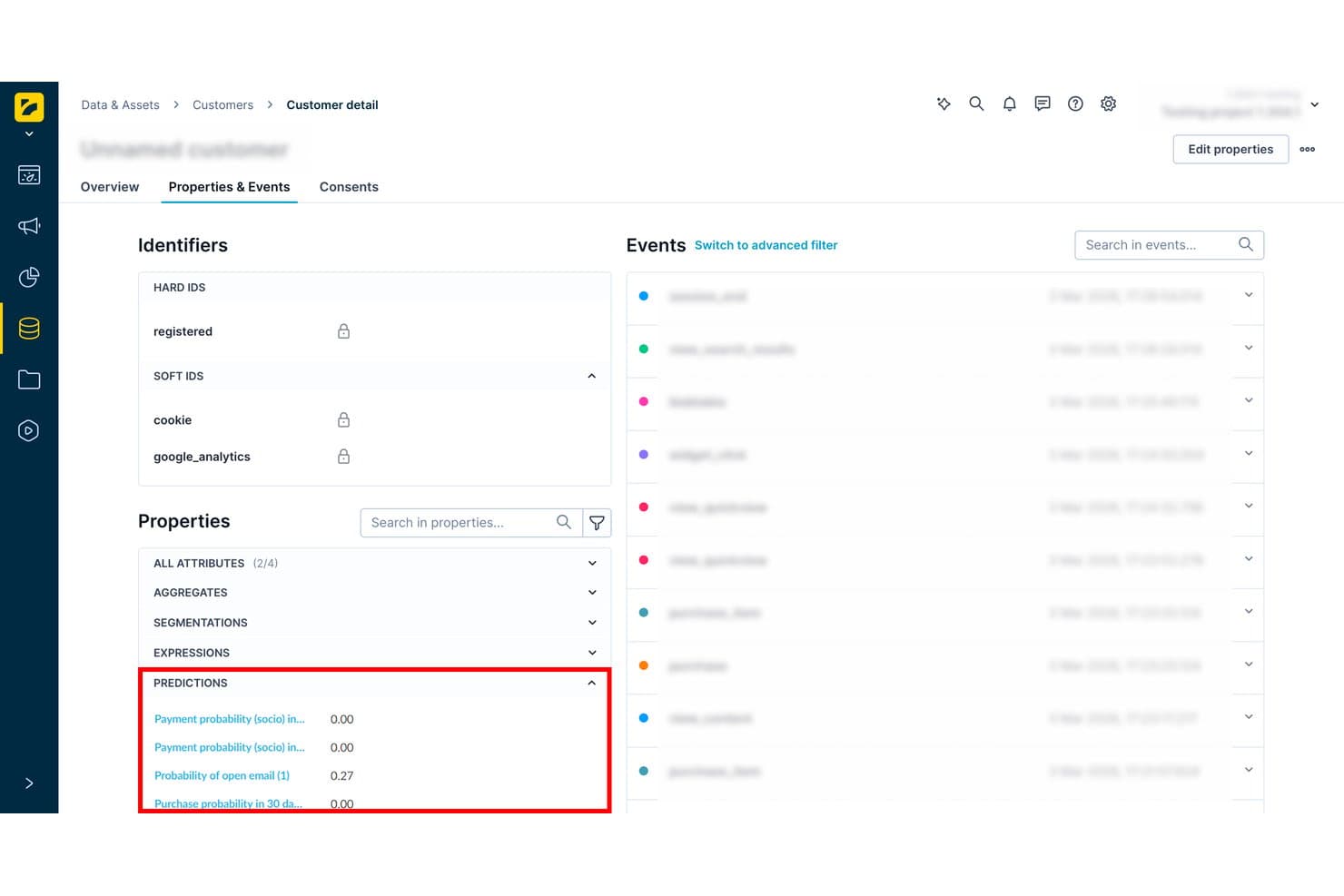
Bloomreach surfaces customer predictions like purchase probability per profile. Bloomreach is a customer data and marketing automation platform that combines a built-in CDP, AI-powered predictive modeling, behavioral segmentation, and multichannel journey automation.
Who Is Bloomreach Best For?
Bloomreach is built for CRM and lifecycle marketers at mid-to-large B2C ecommerce and retail brands that need prediction-driven segmentation and multichannel activation on a single data model.
Why I Picked Bloomreach
I picked Bloomreach as one of the best because its churn prediction doesn't just score customers—it shows you exactly why each score landed where it did, via a readable decision tree with node-level rules and customer counts. I've used that explainability to justify tiered interventions: customers above 0.7 churn probability get strong cross-channel incentives, while the 0.4–0.7 band gets a lighter email nudge. The in-session prediction layer is equally sharp, triggering real-time weblayers mid-browse before a customer ever reaches the exit.
Bloomreach Key Features
- Custom prediction builder: Define your own target event, eligible audience, input features, and algorithm settings to build models beyond the prebuilt templates.
- Tiered segmentation by score: Use live prediction scores as customer attributes to create threshold-based segments that feed directly into multichannel scenarios and ad platform syncs.
- Scenario-based journey automation: Build drag-and-drop, branching customer journeys with event, date, or API triggers, real-time performance tracking, and built-in A/B testing.
- Cross-device identity resolution: Anonymous visitor profiles merge with known customer records using soft-to-hard ID stitching across web, app, and offline touchpoints.
Bloomreach Integrations
Bloomreach lists 175+ integrations, including Shopify, BigCommerce, Snowflake, Databricks, BigQuery, Segment, Meta, and Google Ads. It also supports custom integrations through APIs, webhooks, Omniconnect, and Loomi Connect.
Pros and Cons
Pros:
- Evaluation framework separates model lift from campaign impact
- Real-time predictions trigger proactive journey interventions
- Explainable churn scores reveal customer risk drivers
Cons:
- Models require manual retraining and setup expertise
- Journey maps lack predictive score overlays
Learn more about Bloomreach: Best for explainable churn and conversion models
- Free plan available
- Pricing upon request
Visit WebsiteCustomer Rating:4.5/5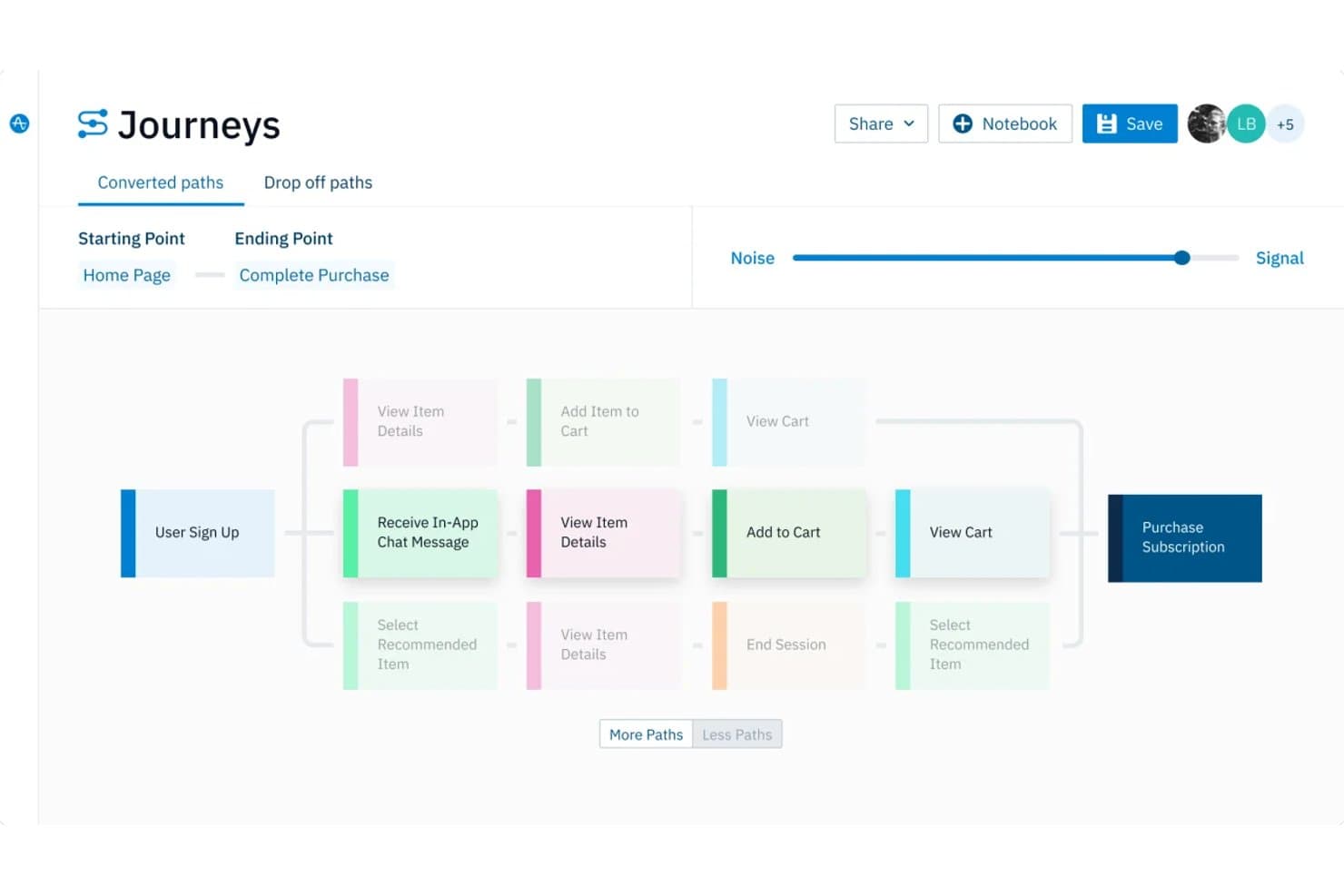
Amplitude maps converted user journeys from sign-up to purchase. Amplitude is a product and digital analytics platform with predictive modeling, journey mapping, behavioral segmentation, session replay, and AI-driven anomaly detection built into one connected workspace.
Who Is Amplitude Best For?
Amplitude is a strong fit for product managers and growth teams who want to build, interpret, and act on predictive models without needing a data science background.
Why I Picked Amplitude
Amplitude earns its spot on my shortlist because its predictive models don't just output a score—they show you exactly why a user is likely to churn or convert. I particularly like the Feature Importance view, which ranks the specific events and user properties driving each prediction, and the model performance metrics (AUC, TPR/FPR) that tell you whether the model is actually worth acting on. Predictive Cohorts update automatically as probabilities shift, so the segment you're targeting in Braze or Iterable stays current without manual refreshes.
Amplitude Key Features
- Predictive Cohorts: Automatically updates user segments as predicted probabilities shift, so your audience lists in connected tools like Braze or Iterable stay current without manual refreshes.
- Session Replay with AI summaries: Records and replays user sessions across web and mobile, with AI-generated summaries that flag friction points and user sentiment patterns.
- Journey Map visualization: Compares converted and dropped-off user paths side by side, with controls to filter by event properties, collapse repeated actions, and build cohorts directly from any node.
- Root Cause Analysis: Automatically identifies the user segments and properties behind a detected anomaly, adding context like holidays or product releases to help you act on the signal.
Amplitude Integrations
Amplitude offers 159+ integrations, including Braze, Iterable, Customer.io, MoEngage, Google Ads, Meta, Snowflake, BigQuery, Segment, and Hightouch. Its HTTP API, webhooks, and event streaming support custom data and activation workflows.
Pros and Cons
Pros:
- Holdout-based lift measurement supports outcome validation
- Predictive cohorts update as probabilities change
- Explainable churn and conversion drivers
Cons:
- Alerts aren't real-time or workflow orchestration
- Journey maps focus on instrumented product events
Learn more about Amplitude:
Other Predictive Customer Journey Tools
Here are some additional predictive customer journey tools options that didn’t make it onto my shortlist, but are still worth checking out:
- 11BrazeBest for no-code churn prediction to action
- 12SAS Customer Intelligence 360Best for explainable AI models in regulated industries
- 13Pega Customer Decision HubBest for explainable AI decisioning at scale
- 14ContentsquareBest for friction-to-revenue impact mapping
- 15Adobe Customer Journey AnalyticsBest for cross-channel journey visualization
- 16Google Analytics 360Best for Google ecosystem audience activation
- 17Marketo EngageBest for B2B lifecycle nurture automation
- 18Felix AIBest for impact-ranked journey friction alerts
How I Evaluate Predictive Customer Journey Tools
I split my evaluation into three parts, with core functionality carrying most weight: predict churn, map journeys, and trigger actions. Next, I assess standout features such as explainable AI scoring. Finally, I consider onboarding, support, scalability, privacy, and pricing value.
Core Functionality (Table Stakes For This List)
When I'm selecting tools for my list, I score each one on a scale from 0 (does not offer the functionality) to 5 (excels in this area) for each core functionality listed below. I then convert the total into a percentage to help assess each tool's overall fit, with extra weight on any functionalities I’ve deemed essential.
- Predictive Modeling (Essential): I look for explainable forecasts such as churn risk, conversion likelihood, next best action, and confidence scores.
- Journey Mapping (Essential): I assess live, cross-channel path visualization, including touchpoints, drop-offs, and predictive scores for individual journeys.
- Behavioral Data Unification: I check whether web, app, CRM, transaction, email, and support data feed models through reliable identity resolution.
- Predictive Segmentation: Dynamic segments should update with changing risk or intent scores and support targeted product or lifecycle actions.
- Automated Triggers: I look for alerts and workflows that respond to signals such as rising churn risk or a stalled conversion journey.
- Outcome Attribution: I evaluate whether reports connect predictions and interventions with retention, conversion, engagement, or other measurable outcomes.
Once I have a list of tools that meet the criteria, I consider what sets each platform apart.
Differentiating Factors (What Sets Vendors Apart)
Here's how I compare and contrast different vendors:
Standout Features
Explainable AI scoring is the first thing I check. A churn score means nothing if your team can't see which behaviors drove it—I look for platforms that surface contributing factors so I can defend prioritization decisions in roadmap reviews. I also evaluate whether session replay integrates with predictive scores, since pairing a "high churn risk" flag with the actual session where a user hit friction turns a data point into an actionable insight. Cross-platform identity stitching matters too, especially for products spanning web and mobile.
Beyond Features
I evaluate how quickly a platform's predictive models reach reliable accuracy. Some vendors ship pre-trained models that deliver usable churn scores within days, while others need weeks of event data before outputs stabilize. I also check whether product managers can self-serve insights or need a data scientist to configure every model. A tool that bottlenecks on technical resources slows down the feedback loop between prediction and action.
How To Choose Predictive Customer Journey Tools
It's easy to get bogged down in long feature lists and complex pricing structures. To help you stay focused as you work through your unique software selection process, here's a checklist of factors to keep in mind:
| Factor | What To Consider |
|---|---|
| FactorScalability | What To ConsiderDoes the tool grow with your business? Consider if it supports increasing data volumes and users without additional costs or performance issues. |
| FactorIntegrations | What To ConsiderCheck if the tool connects with your existing systems, such as CRM, email, or analytics software. Lack of integrations can lead to data silos and inefficiencies. |
| FactorCustomizability | What To ConsiderCan you tailor the tool to fit your workflows? Look for flexibility in report layouts, dashboards, and data segmentation options. |
| FactorEase of use | What To ConsiderIs the interface intuitive? A steep learning curve can slow down adoption. Test the tool with real tasks to see if your team can use it efficiently. |
| FactorImplementation and onboarding | What To ConsiderHow long does it take to set up? Consider the availability of training resources and support during the onboarding phase to ensure a smooth transition. |
| FactorCost | What To ConsiderEvaluate if the pricing aligns with your budget. Consider hidden fees, such as charges for extra users or premium features. Compare with competitors for value. |
| FactorSecurity safeguards | What To ConsiderDoes the tool protect customer data? Look for encryption, access controls, and compliance with data protection regulations, such as GDPR or CCPA. |
| FactorSupport availability | What To ConsiderWhat support options are offered? Check for 24/7 support, dedicated account managers, and the availability of self-service resources, such as FAQs and tutorials. |
What Are Predictive Customer Journey Tools?
Predictive customer journey tools are software solutions that analyze customer data to forecast future behavior and patterns. Marketing professionals, product managers, and customer success teams generally use these tools to improve customer engagement and optimize user experiences. Predictive analytics, journey mapping, and real-time insights help with understanding customer needs, improving conversion rates and decision-making processes. Overall, these tools provide valuable insights that drive better customer experiences and business outcomes.
Features
When selecting predictive customer journey tools, keep an eye out for the following key features:
- Predictive analytics: Analyze past data to forecast future customer behavior, helping teams anticipate client needs and tailor business strategies.
- Journey mapping: Visualizes customer interactions across different touchpoints, allowing for a thorough understanding of user paths.
- Real-time insights: Provide immediate data updates, enabling prompt decision-making and quick adaptation to changing customer behaviors.
- Segmentation capabilities: Divide customers into distinct groups based on behavior or demographics, allowing for targeted marketing efforts.
- Customizable dashboards: Offer flexibility in displaying data in a way that aligns with user preferences and business goals.
- Automated workflows: Simplify repetitive tasks, freeing up time for teams to focus on strategic activities.
- Sentiment analysis: Evaluates customer feedback to gauge emotions, providing insights into customer satisfaction and areas for improvement.
- Cross-channel tracking: Monitors customer interactions across multiple platforms, ensuring a unified view of the customer journey.
- AI-driven recommendations: Use machine learning to suggest actions based on data patterns, helping optimize customer engagement strategies.
Benefits
Implementing predictive customer journey tools provides several benefits for your team and your business. Here are a few you can look forward to:
- Improved decision-making: With real-time insights and predictive analytics, your team can make informed decisions quickly, improving your overall business strategies.
- More customer engagement: Journey mapping and segmentation capabilities allow for tailored interactions, resulting in more personalized customer experiences.
- Increased conversion rates: By understanding customer behavior through analytics, you can identify opportunities to optimize conversion strategies effectively.
- Time savings: Automated workflows reduce manual tasks, giving your team more time to focus on strategic initiatives and creative solutions.
- Better customer satisfaction: Sentiment analysis helps you understand and address customer feedback, leading to improved satisfaction and loyalty.
- Holistic customer view: Cross-channel tracking provides a unified perspective of customer interactions, ensuring consistent and cohesive experiences across platforms.
Costs and Pricing
Selecting predictive customer journey tools requires an understanding of the various pricing models and plans available. Costs vary based on features, team size, add-ons, and more. The table below summarizes common plans, their average prices, and typical features included in predictive customer journey tools solutions:
Plan Comparison Table for Predictive Customer Journey Tools
| Plan Type | Average Price | Common Features |
|---|---|---|
| Plan TypeFree Plan | Average Price$0 | Common FeaturesBasic analytics, limited user access, and restricted data storage. |
| Plan TypePersonal Plan | Average Price$20-$100/user/month | Common FeaturesIncreased analytics, journey mapping, and email support. |
| Plan TypeBusiness Plan | Average Price$100-$890/user/month | Common FeaturesAdvanced segmentation, real-time insights, and dedicated account management. |
| Plan TypeEnterprise Plan | Average Price$300-$700/user/month | Common FeaturesCustomizable dashboards, AI-driven recommendations, and full integration support. |
Predictive Customer Journey Tools FAQs
Here are some answers to common questions about predictive customer journey tools:
What data do predictive customer journey tools analyze?
Predictive customer journey tools analyze a variety of data, including transactional history, website interactions, and customer demographics. This data helps your team understand your consumers’ patterns and predict their future behavior. For example, by analyzing purchase history, you can identify which products are likely to interest specific customers. Ensure your tools integrate with your existing systems to gather data efficiently.
Can small businesses benefit from predictive customer journey tools?
Yes, small businesses can benefit from these tools by gaining insights into customer behavior and improving their engagement strategies. Even with limited resources, small businesses can use basic features, such as journey mapping and segmentation, to improve customer experiences. Look for tools with scalable pricing plans that fit your budget while offering essential features.
How do predictive customer journey tools improve customer retention?
These tools improve customer retention by providing insights into customer behavior, allowing you to tailor interactions and address pain points. By understanding customer journeys, you can create personalized experiences that foster loyalty. For instance, identifying churn signals early helps you intervene proactively, offering solutions or incentives to retain customers.
Is technical expertise required to use predictive customer journey tools?
Some technical expertise can be beneficial, but many tools offer user-friendly interfaces designed for non-technical users. Look for solutions with intuitive dashboards and support resources, such as tutorials and customer service. If your team lacks technical skills, a service with strong onboarding programs and dedicated account managers to guide you through the setup process could be the right tool for you.
What's Next:
If you're in the process of researching predictive customer journey tools, connect with a SoftwareSelect advisor for free recommendations.
You fill out a form and have a quick chat where they get into the specifics of your needs. Then you'll get a shortlist of software to review. They'll even support you through the entire buying process, including price negotiations.