

With so many different product adoption platforms available, figuring out which one is the right fit for you is tough. You know you want to improve user onboarding experiences, increase user engagement, reduce churn rates, and gather insights into user behavior, but need to figure out which tool is best. I've got you! In this post, I'll use what I've learned from managing hundreds of product launches and being exposed to these tools with large teams as I share with you my picks of the best product adoption software.
Why Trust Our Software Recommendations
6,700+
Reviews
20
Industry experts
16+
Evaluation factors
14
Years
Our team has been testing and reviewing software since 2012. As product managers ourselves, we know how difficult—and important—it is to choose the right software.
For this guide, we evaluated tools using hands-on testing and independent research, scoring tools using our selection criteria.
Our reviews reflect our human editorial judgment, not a sales pitch.
Expert reviewers:
- Andrew LumbySenior TPM
- Cristiano ValimSenior UI/UX Lead


Product Adoption Software Comparison Table
This comparison table summarizes pricing details for my top product adoption software selections:
| Tool | Best For | Trial Info | Price | ||
|---|---|---|---|---|---|
| 1 | Best for onboarding checklists with progress indicators | 14-day free trial | From $174/month (billed annually) | Website | |
| 2 | Best for driving business processes and outcomes | Free demo available | Pricing upon request | Website | |
| 3 | Best for creating custom onboarding flows | 14-day free trial | From $240/month (billed annually) | Website | |
| 4 | Best for enterprise-scale guided onboarding with AI | Not available | Pricing upon request | Website | |
| 5 | Best for monetization features like coupon prompts | 3-month free pilot available | From $999/month | Website | |
| 6 | Best for all-in-one adoption with built-in analytics | 14-day free trial | From $299/month | Website | |
| 7 | Best for expediting customer onboarding | Free trial available | Pricing upon request | Website | |
| 8 | Best for user-segmented onboarding tours | Free trial available | Pricing upon request | Website | |
| 9 | Best for in-depth product user analytics | Free plan + 30-day free trial + free demo available | Pricing upon request | Website | |
| 10 | Best inline guidance and design flexibility | 14-day free trial | Pricing upon request | Website |


Best Product Adoption Software Reviews
Below are my detailed summaries of the best product adoption software that made it onto my shortlist. My reviews offer a detailed look at the key features, pros & cons, integrations, and ideal use cases of each tool to help you find the best one for you.
 Best for onboarding checklists with progress indicators
- 14-day free trial
- From $174/month (billed annually)
Visit WebsiteCustomer Rating:4.7/5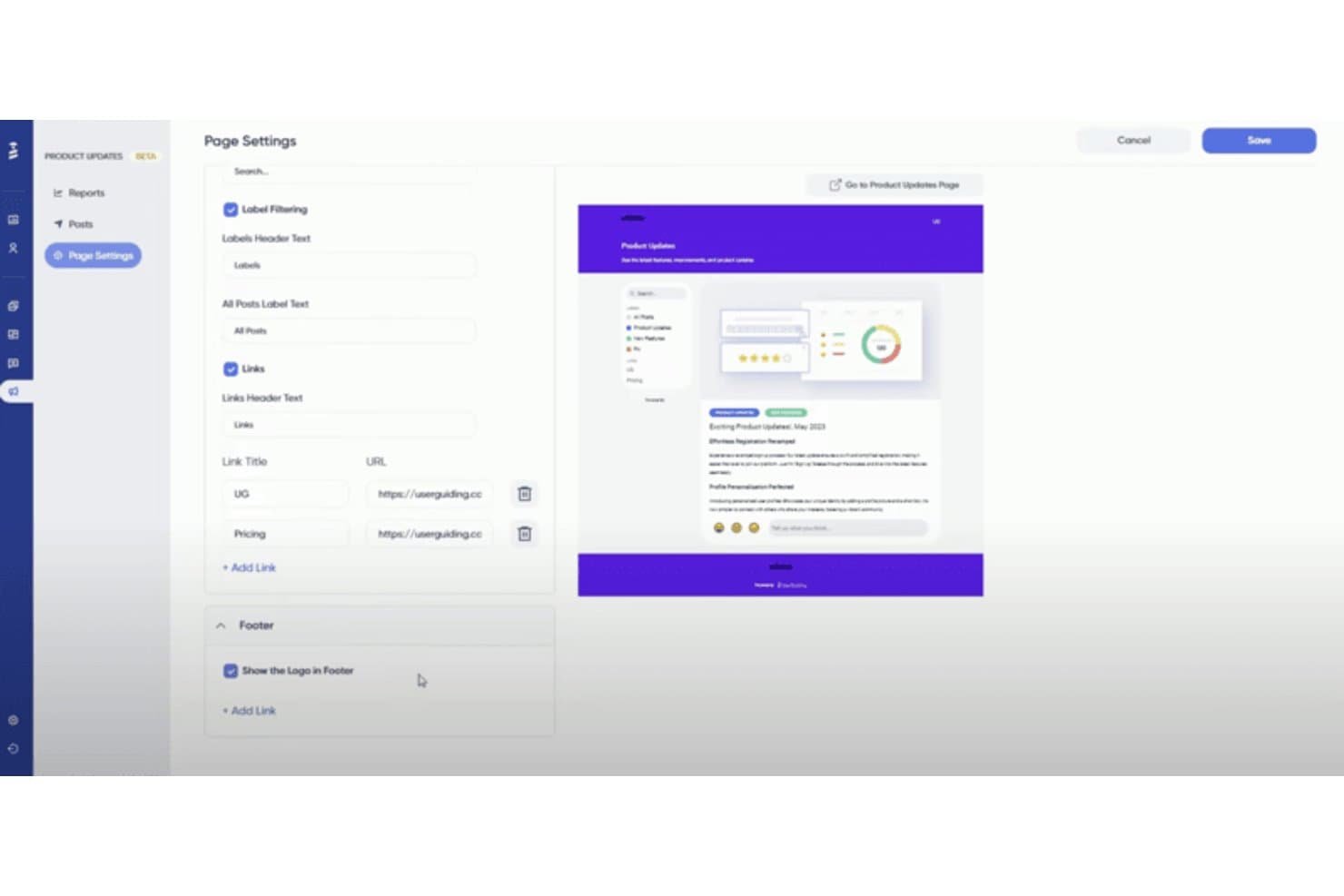
UserGuiding lets users customize a product updates page with labels, links, and footer settings. My Evaluation Score
- Adoption Analytics
- 3/5
- In-App Guided Tours
- 4/5
- No-Code Flow Builder
- 5/5
- Contextual In-App Messaging
- 5/5
- Checklists & Resource Center
- 5/5
- User Segmentation & Targeting
- 3/5
UserGuiding is a no-code product adoption platform that lets you build in-app guided tours, onboarding checklists, hotspots, tooltips, banners, and resource centers directly on your web application.
Who Is UserGuiding Best For?
UserGuiding is a strong fit for product and customer success teams at startups and SMBs that need to launch in-app onboarding quickly without relying on engineering resources.
Why I Picked UserGuiding
UserGuiding earns its spot on my shortlist because its onboarding checklists are genuinely best-in-class. I love how each checklist auto-tracks task completion, displays a live progress bar, and dismisses itself once a user finishes setup, so new users always know exactly where they stand. Paired with the Resource Center, which bundles guides, checklist tasks, and KB articles into one persistent in-app widget, it's a setup I'd reach for specifically when reducing time-to-value is the priority.
UserGuiding Key Features
- No-code Chrome extension builder: Build and publish in-app tours, hotspots, and banners directly on your live app without writing a single line of code.
- Session replay: Record and replay up to 3,000 user sessions per month to see exactly how users interact with your product.
- In-app NPS and survey tools: Embed Net Promoter Score surveys and custom feedback forms directly inside your product to capture user sentiment in context.
- A/B testing for guides: Test two variations of an onboarding flow on the Growth plan to identify which version drives better engagement.
UserGuiding Integrations
UserGuiding integrations include Google Analytics, Amplitude, Mixpanel, Segment, Salesforce, HubSpot, Intercom, Slack, and Woopra. Its Event API, webhooks, and MCP Server support custom connections and AI-powered access to product data.
Pros and Cons
Pros:
- In-app surveys and NPS included natively
- All guides built with no-code Chrome extension
- Onboarding checklists with real-time progress bars
Cons:
- Guide analytics lack funnels or retention analysis
- No native support for mobile app onboarding
Learn more about UserGuiding: 2Best for driving business processes and outcomes
Apty
- Free demo available
- Pricing upon request
Visit WebsiteCustomer Rating:4.8/5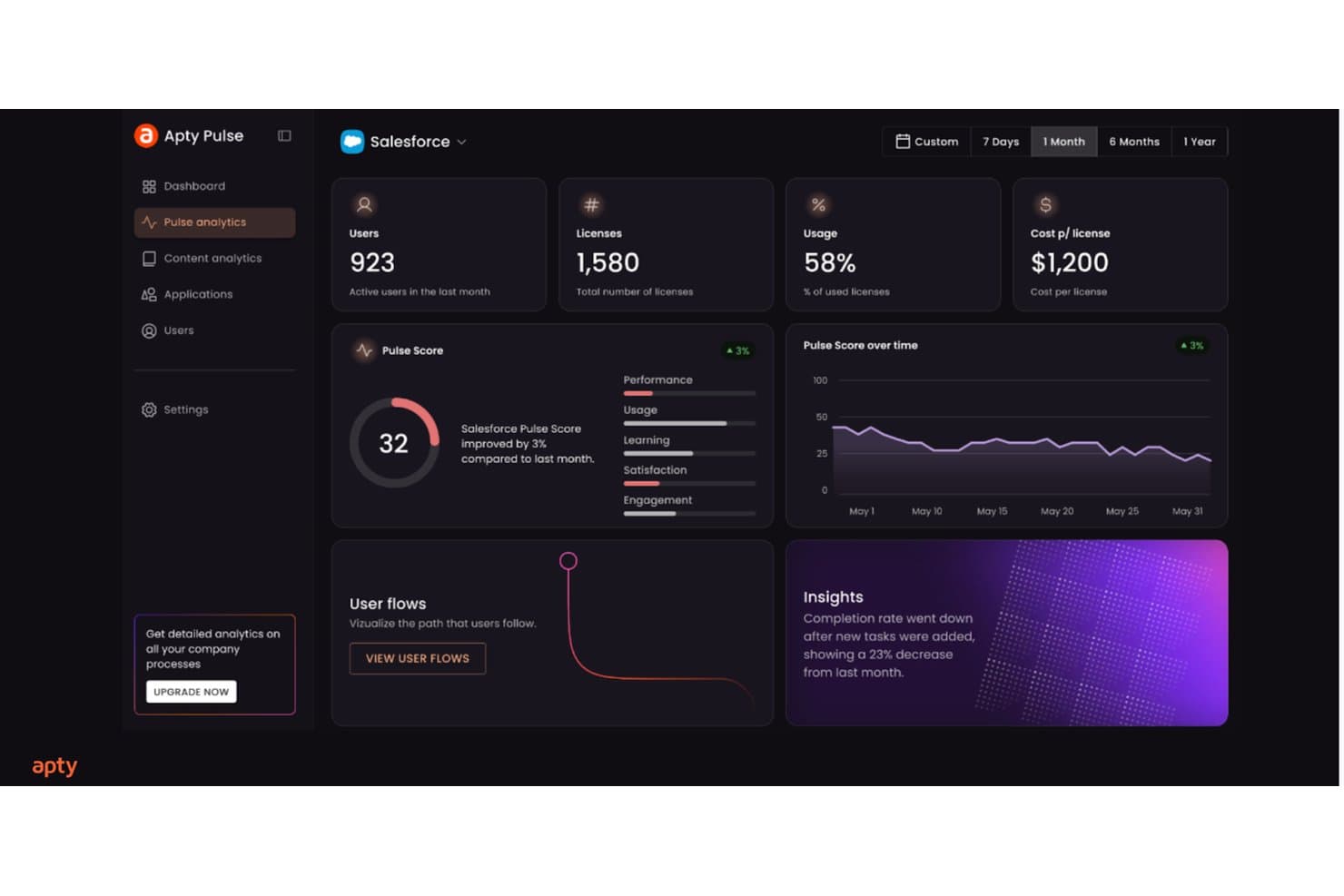
Apty tracks Salesforce adoption metrics like usage, pulse score, and insights. My Evaluation Score
- Adoption Analytics
- 4/5
- In-App Guided Tours
- 4/5
- No-Code Flow Builder
- 5/5
- Contextual In-App Messaging
- 4/5
- Checklists & Resource Center
- 4/5
- User Segmentation & Targeting
- 4/5
Apty is a digital adoption platform built for enterprise environments that layers in-app walkthroughs, contextual tooltips, onboarding checklists, and cross-application guided workflows on top of existing software like Salesforce, ServiceNow, and Workday.
Who Is Apty Best For?
Apty is a strong fit for enterprise teams managing employee adoption across complex internal software like Salesforce, ServiceNow, or Workday.
Why I Picked Apty
Apty earns its spot on my shortlist because no other tool I've reviewed ties in-app guidance so directly to business process outcomes. I love how Apty OneX lets you build a single guided workflow that spans multiple enterprise apps, so a user moving a request from Salesforce into ServiceNow gets step-by-step guidance the whole way through. Apty PULSE then surfaces AI-driven prescriptive recommendations, pinpointing exactly where users stall and what to fix.
Apty Key Features
- No-code walkthrough builder: A visual editor lets L&D and training teams create and publish step-by-step guided flows without any developer involvement.
- Real-time data validation: Apty catches and corrects data entry errors instantly as users fill out forms, enforcing process accuracy before submission.
- Onboarding checklists: Structured task lists guide new users through required steps in sequence, reducing bottlenecks and keeping onboarding consistent.
- SCORM and LMS export: Guided workflows can be exported as SCORM, PDF, video, or PowerPoint files for use in external learning management systems.
Apty Integrations
Apty supports integrations across 1,000+ enterprise applications, including Salesforce, ServiceNow, Workday, SAP, Jira, NetSuite, Oracle PeopleSoft HCM, Microsoft Dynamics, and Microsoft 365. Enterprise APIs support custom integrations, while SCORM connects Apty content with LMS platforms.
Pros and Cons
Pros:
- Prescriptive analytics identify workflow bottlenecks instantly
- Real-time data validation reduces onboarding mistakes
- Enables cross-application onboarding flows for users
Cons:
- Lacks built-in in-app survey functionality
- No support for native mobile onboarding
Learn more about Apty: Best for creating custom onboarding flows
- 14-day free trial
- From $240/month (billed annually)
Visit WebsiteCustomer Rating:4.8/5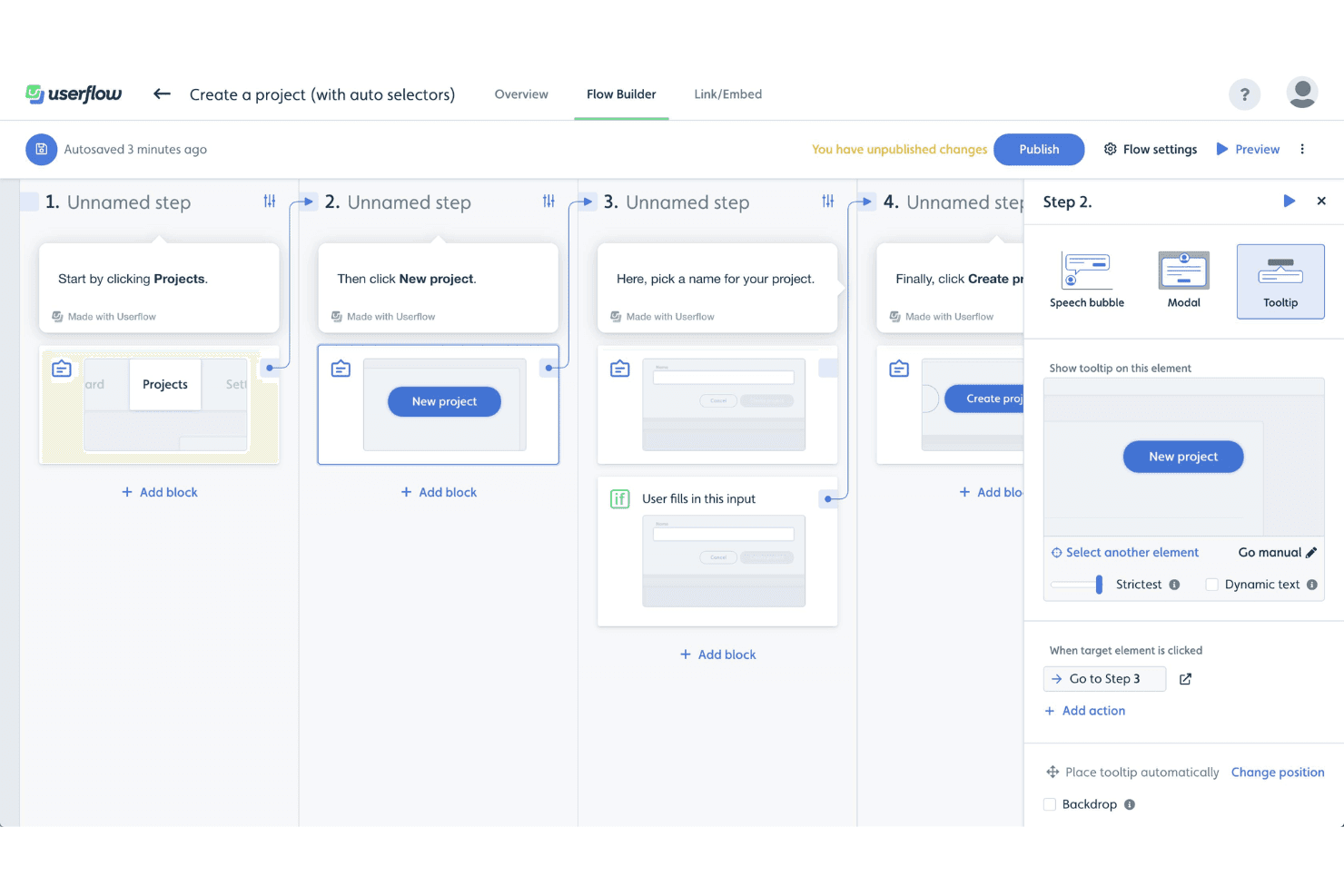
Userflow's Flow Builder lets users create step-by-step product tours using tooltips, modals, and speech bubbles with conditional logic. My Evaluation Score
- Adoption Analytics
- 3/5
- In-App Guided Tours
- 4/5
- No-Code Flow Builder
- 5/5
- Contextual In-App Messaging
- 5/5
- Checklists & Resource Center
- 5/5
- User Segmentation & Targeting
- 5/5
Userflow is a product adoption platform that lets you build in-app onboarding tours, checklists, tooltips, modals, and resource centers through a no-code visual builder, with an AI layer that generates, monitors, and optimizes flows based on user behavior.
Who Is Userflow Best For?
Userflow is a strong fit for product and customer success teams at SaaS companies who need to build and iterate on custom onboarding flows without relying on engineering resources.
Why I Picked Userflow
Userflow earns its spot on my shortlist because its no-code flow builder is genuinely in a class of its own for building custom onboarding flows. I love how FlowAI Builder lets you generate a complete, branded onboarding flow from a plain-language prompt by analyzing your live product, so you're not starting from scratch. Pair that with branching conditional logic and segmentation by lifecycle stage, and you can build flows that adapt to what a user has or hasn't done yet.
Userflow Key Features
- Adoption Agent: An AI-powered in-app assistant that answers user questions contextually and can complete tasks on behalf of users via Action Flows.
- In-app NPS and surveys: Native NPS, CSAT, and open-ended survey types that can be triggered by behavior or segment and used to activate follow-up flows.
- Two-way CRM sync: Live bidirectional data sync with HubSpot and Salesforce to keep user segments and lifecycle data current across tools.
- Resource center: A persistent in-app help hub where users can search content, access on-demand flows, and get AI-assisted answers without leaving your product.
Userflow Integrations
Userflow offers native integrations with Salesforce, HubSpot, Segment, RudderStack, Amplitude, Mixpanel, Zendesk, Intercom, Freshdesk, and LogRocket. It also supports REST API, webhooks, and Zapier for custom connectivity.
Pros and Cons
Pros:
- Adoption Agent answers user questions in-app
- Branching logic personalizes onboarding by user behavior
- AI can generate branded onboarding flows
Cons:
- Analytics depth limited without outside tools
- No SDK for native mobile onboarding
Learn more about Userflow: Best for enterprise-scale guided onboarding with AI
- Not available
- Pricing upon request
Visit WebsiteCustomer Rating:4.5/5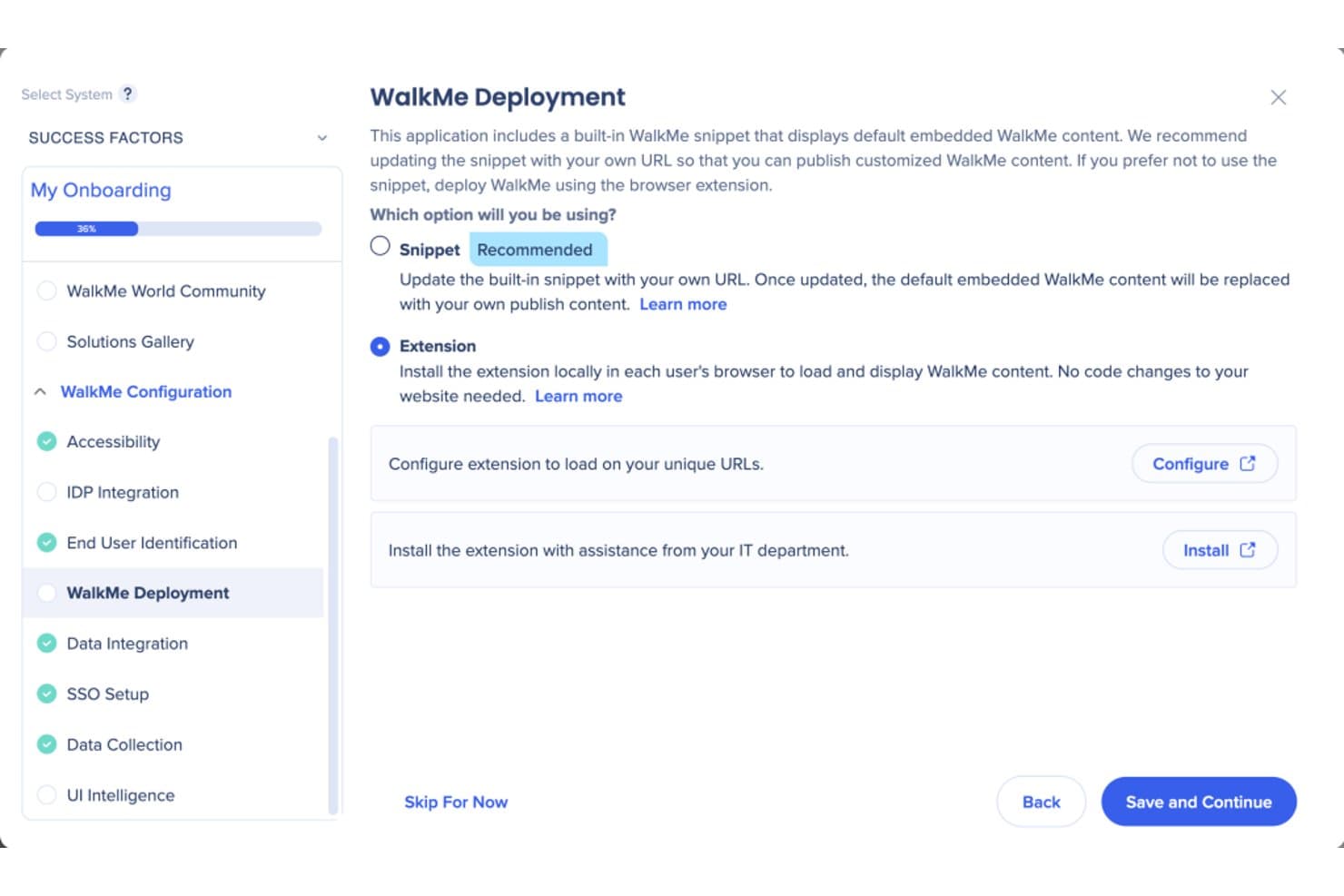
WalkMe lets users choose between snippet or extension deployment methods. My Evaluation Score
- Adoption Analytics
- 5/5
- In-App Guided Tours
- 5/5
- No-Code Flow Builder
- 4/5
- Contextual In-App Messaging
- 4/5
- Checklists & Resource Center
- 5/5
- User Segmentation & Targeting
- 5/5
WalkMe is a digital adoption platform that layers guided tours, contextual tooltips, in-app messaging, onboarding checklists, and behavioral analytics directly on top of web, desktop, and native mobile applications.
Who Is WalkMe Best For?
WalkMe is a strong fit for large enterprises managing complex, multi-application tech stacks that need guided onboarding at scale.
Why I Picked WalkMe
WalkMe earns its spot on my shortlist because no other tool I've evaluated matches its depth of AI-driven guidance at enterprise scale. I'm particularly impressed by its Proactive AI, which reads full-screen context and surfaces the next best action automatically, without any user prompt. Paired with Smart Walk-Thrus that support branching logic across multi-app workflows, it's built for organizations managing complex, layered tech stacks where simpler tools fall short.
WalkMe Key Features
- Smart Walk-Thrus: Step-by-step interactive walkthroughs that support branching logic, conditional steps, and multi-page flows across web, desktop, and mobile apps.
- Onboarding Tasks checklist: A persistent, cross-session checklist module that guides new users through multi-step onboarding sequences without losing progress.
- In-app surveys: A dedicated survey tool supporting NPS, multiple-choice, rating, and open-ended questions with branching logic and contextual triggers.
- Session Playback: A built-in session replay feature that captures clicks, scrolling, and form inputs to produce visual replays of user behavior within WalkMe Insights.
WalkMe Integrations
WalkMe offers native integrations with Salesforce, Gainsight, Segment.io, HubSpot, and Google Analytics for onboarding data, segmentation, and customer success workflows. It also supports Identity Provider integrations and an API for custom integrations.
Pros and Cons
Pros:
- Session replay built in for behavior analysis
- AI recommends proactive next best actions
- Handles cross-app onboarding at enterprise scale
Cons:
- Steep cost for smaller or leaner teams
- No free trial or self-serve onboarding
Learn more about WalkMe: Best for monetization features like coupon prompts
- 3-month free pilot available
- From $999/month
Visit WebsiteCustomer Rating:4.7/5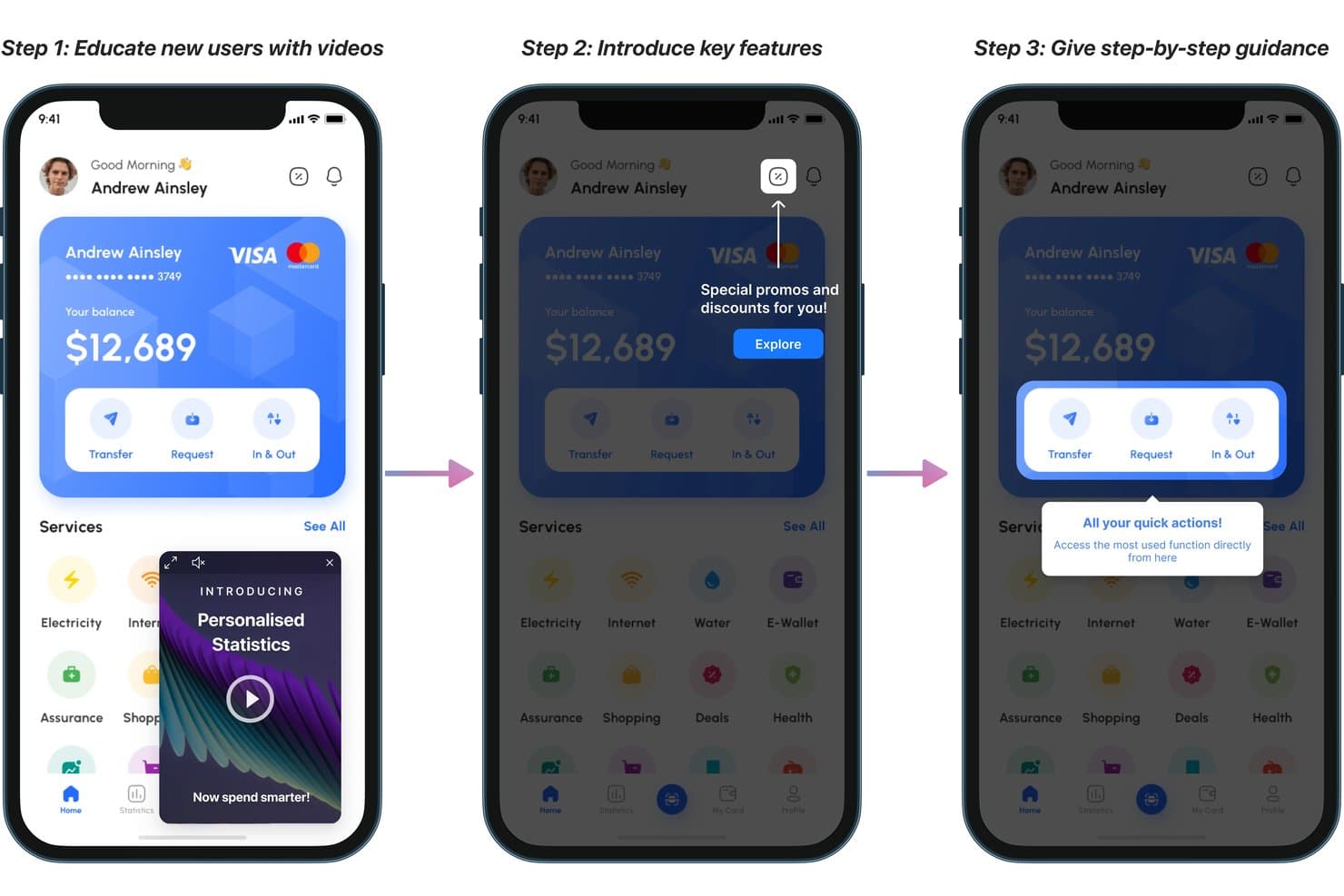
Plotline guides new users through onboarding with videos, tooltips, and highlights. My Evaluation Score
- Adoption Analytics
- 4/5
- In-App Guided Tours
- 5/5
- No-Code Flow Builder
- 5/5
- Contextual In-App Messaging
- 5/5
- Checklists & Resource Center
- 3/5
- User Segmentation & Targeting
- 5/5
Plotline is a mobile-first product adoption platform that combines in-app guided tours, contextual messaging, no-code flow building, user segmentation, surveys, gamification, and experimentation tools across iOS, Android, React Native, Flutter, and web.
Who Is Plotline Best For?
Plotline is a strong fit for mobile-first product and growth teams at consumer apps who want to drive activation, feature adoption, and in-app monetization without relying on engineering.
Why I Picked Plotline
Plotline earns its spot on my shortlist because of its built-in gamification and monetization features, which go well beyond what most product adoption tools offer. I love that you can deploy scratch cards, spin-the-wheel mechanics, and coupon code prompts directly from the dashboard, with configurable reward probabilities and per-user limits, without writing a line of code. Its AI Decisioning layer runs per-user optimization in real time, automatically selecting the best moment and format to surface a monetization nudge based on each user's behavior.
Plotline Key Features
- AI Decisioning: An AI layer that evaluates each user's real-time behavioral context to automatically select the best message format, channel, and timing—individually, not by segment.
- Multi-step guided tours: Chain tooltips, spotlights, and coachmarks into branching, event-triggered onboarding flows across iOS, Android, React Native, Flutter, and web.
- In-app surveys: 50+ pre-built survey templates, including NPS and CSAT, triggered by specific user events with reported response rates above 30%.
- Feature flags: No-code boolean and multivariate flags with configurable rollout percentages, custom payloads, and scheduling controls.
Plotline Integrations
Plotline offers documented integrations with Amplitude, Mixpanel, Segment, Rudderstack, Braze, MoEngage, Google Analytics, FullStory, UXCam, and Salesforce Marketing Cloud, plus backend API event ingestion for custom connectivity.
Pros and Cons
Pros:
- Per-user AI selects optimal onboarding moments
- Gamification features like scratch cards and spin wheel
- Mobile-first onboarding with native SDKs
Cons:
- Many advanced features require higher-tier plans
- No dedicated resource center or help hub
Learn more about Plotline: Best for all-in-one adoption with built-in analytics
- 14-day free trial
- From $299/month
Visit WebsiteCustomer Rating:4.7/5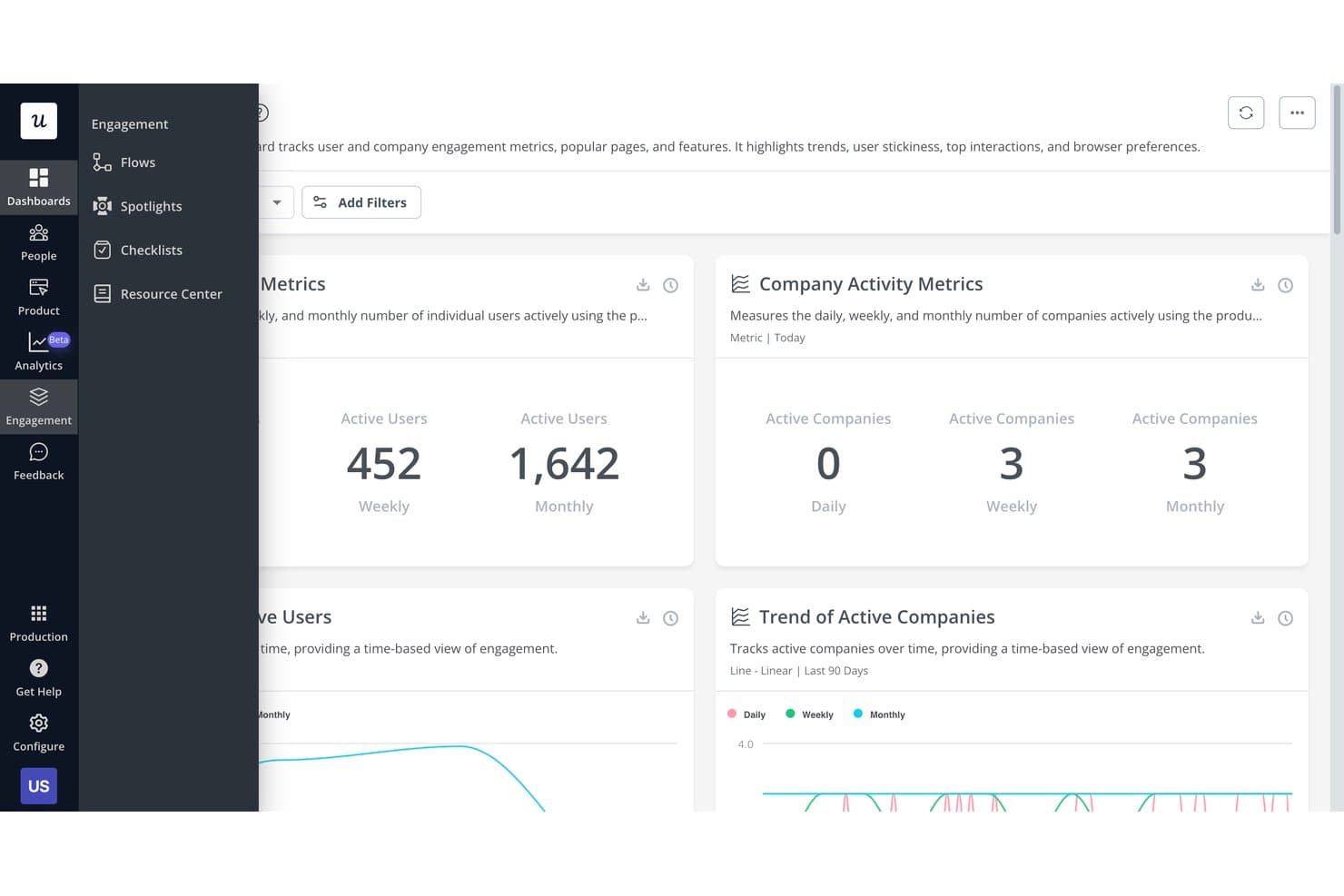
Userpilot tracks user and company engagement metrics on one dashboard. My Evaluation Score
- Adoption Analytics
- 5/5
- In-App Guided Tours
- 5/5
- No-Code Flow Builder
- 5/5
- Contextual In-App Messaging
- 5/5
- Checklists & Resource Center
- 5/5
- User Segmentation & Targeting
- 5/5
Userpilot is a product adoption platform that combines in-app guided tours, no-code flow building, contextual messaging, user segmentation, onboarding checklists, and a built-in analytics suite that includes funnels, session replay, and AI-powered insights.
Who Is Userpilot Best For?
Userpilot is a strong fit for mid-market SaaS product teams that want onboarding, analytics, and feedback in one platform instead of stitching together multiple tools.
Why I Picked Userpilot
Userpilot earns its spot on my shortlist because it replaces what used to be three or four separate tools with one platform. I particularly like that its built-in analytics suite, including funnels, path analysis, and session replay with frustration signal detection, sits alongside the flow builder, so I can see exactly where users drop off and fix the onboarding experience without switching contexts. The AI Guides Builder also lets me generate a full multi-step tour from a text prompt, which cuts authoring time significantly.
Userpilot Key Features
- Welcome survey builder: Create branching welcome surveys that auto-segment new users by role, use case, or goal on first login and route them to personalized onboarding flows.
- Onboarding checklists: Build task-based checklists available on all plans, where each completed task can trigger a flow, redirect, or custom JavaScript action.
- NPS and CSAT surveys: Deploy 15+ survey templates—including NPS, CSAT, CES, and PMF—with AI-powered sentiment and thematic analysis on Growth+ plans.
- Resource Center: Build a branded, searchable in-app help hub with knowledge base articles, embedded videos, and Zendesk-connected help content to support self-service guidance.
Userpilot Integrations
Userpilot offers native integrations with Segment, HubSpot, Salesforce, Zendesk, Intercom, Slack, Amplitude, Mixpanel, Heap, and Google Analytics. It also supports HTTP API access, webhooks, data warehouse sync, and MCP Server connectivity for custom workflows.
Pros and Cons
Pros:
- Advanced segmentation by behavior and surveys
- Fast no-code builder with AI flow creation
- Built-in analytics, session replay, and surveys
Cons:
- Flows may break after UI changes
- Advanced analytics gated to higher plans
Learn more about Userpilot: Best for expediting customer onboarding
- Free trial available
- Pricing upon request
Visit WebsiteCustomer Rating:4.6/5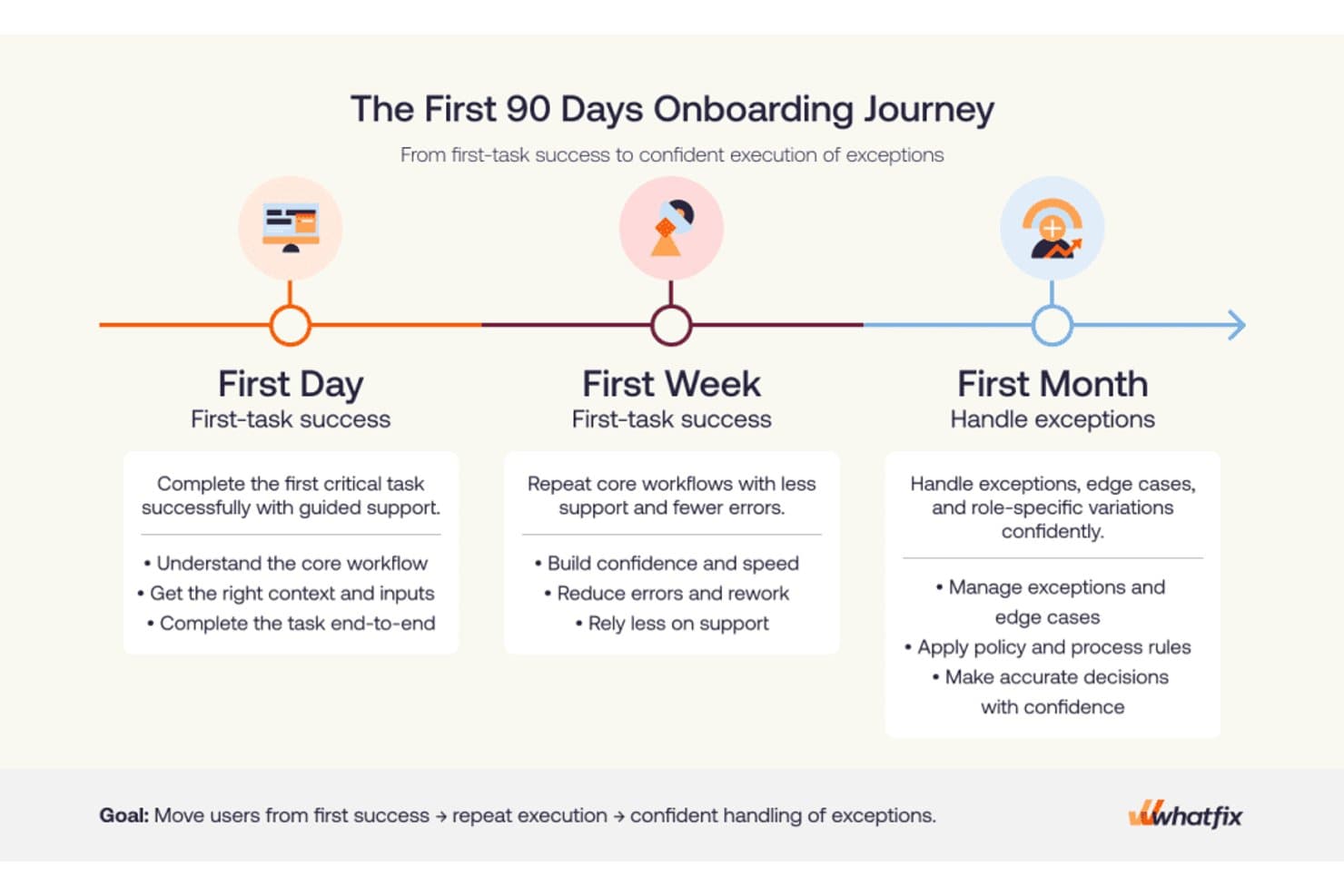
Whatfix structures onboarding into day, week, and month milestones. My Evaluation Score
- Adoption Analytics
- 5/5
- In-App Guided Tours
- 5/5
- No-Code Flow Builder
- 4/5
- Contextual In-App Messaging
- 5/5
- Checklists & Resource Center
- 5/5
- User Segmentation & Targeting
- 5/5
Whatfix is a digital adoption platform that delivers in-app guided tours, onboarding checklists, contextual tooltips, an AI-powered self-help widget, and behavioral analytics across web, desktop, and mobile applications.
Who Is Whatfix Best For?
Whatfix is a strong fit for enterprise customer success and onboarding teams that need to guide users through complex, multi-step software workflows at scale.
Why I Picked Whatfix
I picked Whatfix as one of the best because its onboarding toolset goes deeper than most: Task Lists deliver role-based checklists that persist inside the app, while Flows support branching paths and linked sub-flows that mirror how real users move through complex software. What really sets it apart is the AI Authoring Agent, which builds fully configured flows from a plain-text prompt, cutting the time it takes to get new onboarding content live from days to minutes.
Whatfix Key Features
- Self Help widget: An AI-powered, in-app resource center that aggregates knowledge base articles, Flows, videos, and external docs into a single searchable assistant.
- Smart Tips: Contextual tooltips and field-level guidance that surface relevant help content directly within the application interface.
- In-app surveys: Built-in NPS, usability, and custom surveys with AI-powered sentiment analysis to collect user feedback without leaving the app.
- Product Analytics AutoCapture: A no-code behavioral tracking layer that automatically logs user interactions, funnels, and journeys without developer instrumentation.
Whatfix Integrations
Whatfix offers native integrations with Salesforce, Workday, SAP SuccessFactors, Oracle, Microsoft Azure Active Directory, ServiceNow, SharePoint, and Google Drive. These connections support role-based onboarding, enterprise identity targeting, and in-app access to documentation.
Pros and Cons
Pros:
- Smart Tips and Beacons drive user action
- Scales onboarding across web, desktop, and mobile
- AI agents rapidly generate onboarding content
Cons:
- No built-in A/B testing for onboarding flows
- CSS or JavaScript needed for advanced customizations
Learn more about Whatfix: Best for user-segmented onboarding tours
- Free trial available
- Pricing upon request
Visit WebsiteCustomer Rating:4.7/5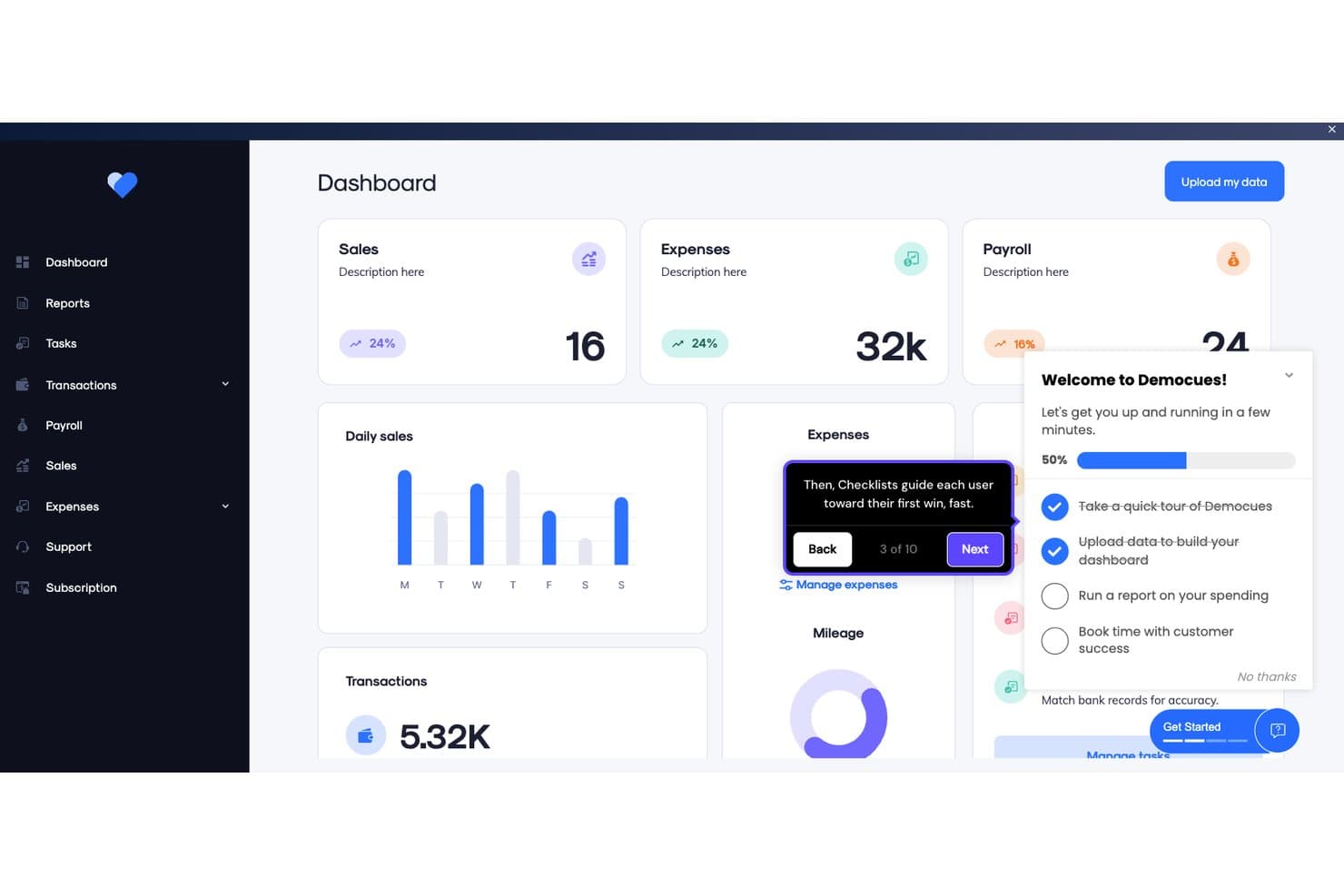
Appcues guides users through onboarding with checklists and tooltips. My Evaluation Score
- Adoption Analytics
- 5/5
- In-App Guided Tours
- 5/5
- No-Code Flow Builder
- 5/5
- Contextual In-App Messaging
- 5/5
- Checklists & Resource Center
- 4/5
- User Segmentation & Targeting
- 5/5
Appcues is a product adoption platform that lets teams build in-app onboarding flows, checklists, tooltips, banners, and resource centers—with native mobile SDKs, built-in NPS surveys, A/B testing, and behavioral segmentation across web and mobile apps.
Who Is Appcues Best For?
Appcues is a strong fit for product teams that need to deliver personalized onboarding experiences to different user segments without relying on engineering for every update.
Why I Picked Appcues
Appcues earns its spot on my shortlist because of how precisely it targets the right users with the right onboarding experience. I'm particularly drawn to its real-time behavioral segmentation, which lets you build audiences from live event data, CRM attributes, and lifecycle stage simultaneously. In practice, that means a new enterprise user can see a guided Flow tailored to their role while a freemium user on the same page sees a completely different checklist pushing them toward activation.
Appcues Key Features
- Native mobile SDKs: Build and publish in-app onboarding experiences for iOS, Android, React Native, and Flutter without waiting for app store review cycles.
- A/B testing via Audience Randomizer: Split users into variants to test which version of an experience drives better outcomes, with built-in uplift measurement.
- Built-in NPS and surveys: Collect in-app feedback through native NPS, rating-scale, and open-ended survey forms with conditional follow-up logic.
- Cross-channel campaign delivery: Coordinate in-app messages, behavioral emails, and push notifications from a single platform to support full lifecycle campaigns.
Appcues Integrations
Appcues offers native integrations with Salesforce, HubSpot, Segment, RudderStack, Slack, Intercom, Mixpanel, Amplitude, LaunchDarkly, and Fullstory. It also supports webhooks, an API, MCP server connectivity, and Zapier.
Pros and Cons
Pros:
- AI-assisted no-code builder for fast iteration
- Native mobile SDKs for iOS and Android
- Real-time behavioral segmentation for personalized onboarding
Cons:
- Initial setup requires developer involvement
- No native session replay or heatmaps
Learn more about Appcues: Best for in-depth product user analytics
- Free plan + 30-day free trial + free demo available
- Pricing upon request
Visit WebsiteCustomer Rating:4.4/5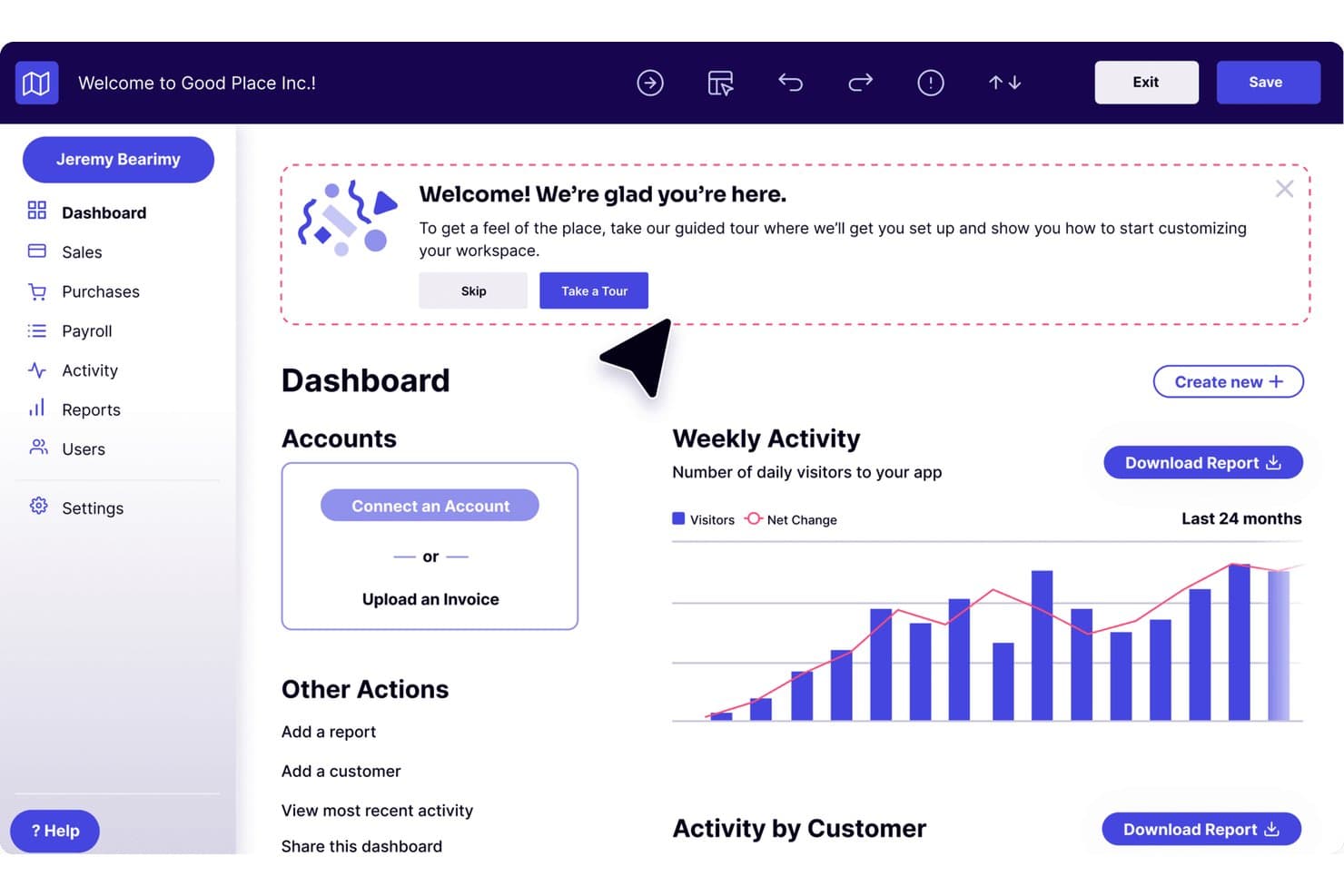
Pendo guides new users through onboarding with an in-app welcome tour prompt. My Evaluation Score
- Adoption Analytics
- 5/5
- In-App Guided Tours
- 5/5
- No-Code Flow Builder
- 4/5
- Contextual In-App Messaging
- 5/5
- Checklists & Resource Center
- 5/5
- User Segmentation & Targeting
- 5/5
Pendo is a product adoption platform that combines in-app guides, product analytics, session replay, NPS surveys, and a customizable resource center for web and mobile apps.
Who Is Pendo Best For?
Pendo is a strong fit for product teams at mid-market and enterprise SaaS companies that need deep behavioral analytics alongside their in-app guidance—not just one or the other.
Why I Picked Pendo
Pendo earns its spot on my shortlist because its product analytics go deeper than what most adoption tools offer. I'm talking about retroactive auto-tagging that captures every page and feature from day one, plus Data Explorer, Funnels, Paths, and Retention analysis all in one place. What I really like is the Product Engagement Score, which rolls behavioral signals into a single composite metric so you can see exactly where adoption is stalling.
Pendo Key Features
- Guide branching: Conditional logic lets you build multi-path onboarding flows that adapt based on each user's choices and actions.
- Resource center: A customizable in-app menu gives users on-demand access to checklists, help content, announcements, and feedback portals.
- In-app surveys: NPS, CSAT, and PMF surveys trigger contextually based on user behavior, segment, or time-in-app.
- Session replay: Unlimited video playback of user sessions with automatic flagging of rage clicks, U-turns, and dead clicks.
Pendo Integrations
Pendo offers 85+ native integrations, including Salesforce, HubSpot, Gainsight, Planhat, Segment, Zendesk, Slack, Jira, Snowflake, and BigQuery. It also supports Zapier and data sync with Databricks, Redshift, Amazon S3, Google Cloud Storage, and Microsoft Azure.
Pros and Cons
Pros:
- Guide branching for multi-path onboarding flows
- Deep analytics tied to onboarding outcomes
- Retroactive auto-tagging of all features
Cons:
- Ad blockers interfere with tracking accuracy
- Guides can break after UI changes
Learn more about Pendo: Best inline guidance and design flexibility
- 14-day free trial
- Pricing upon request
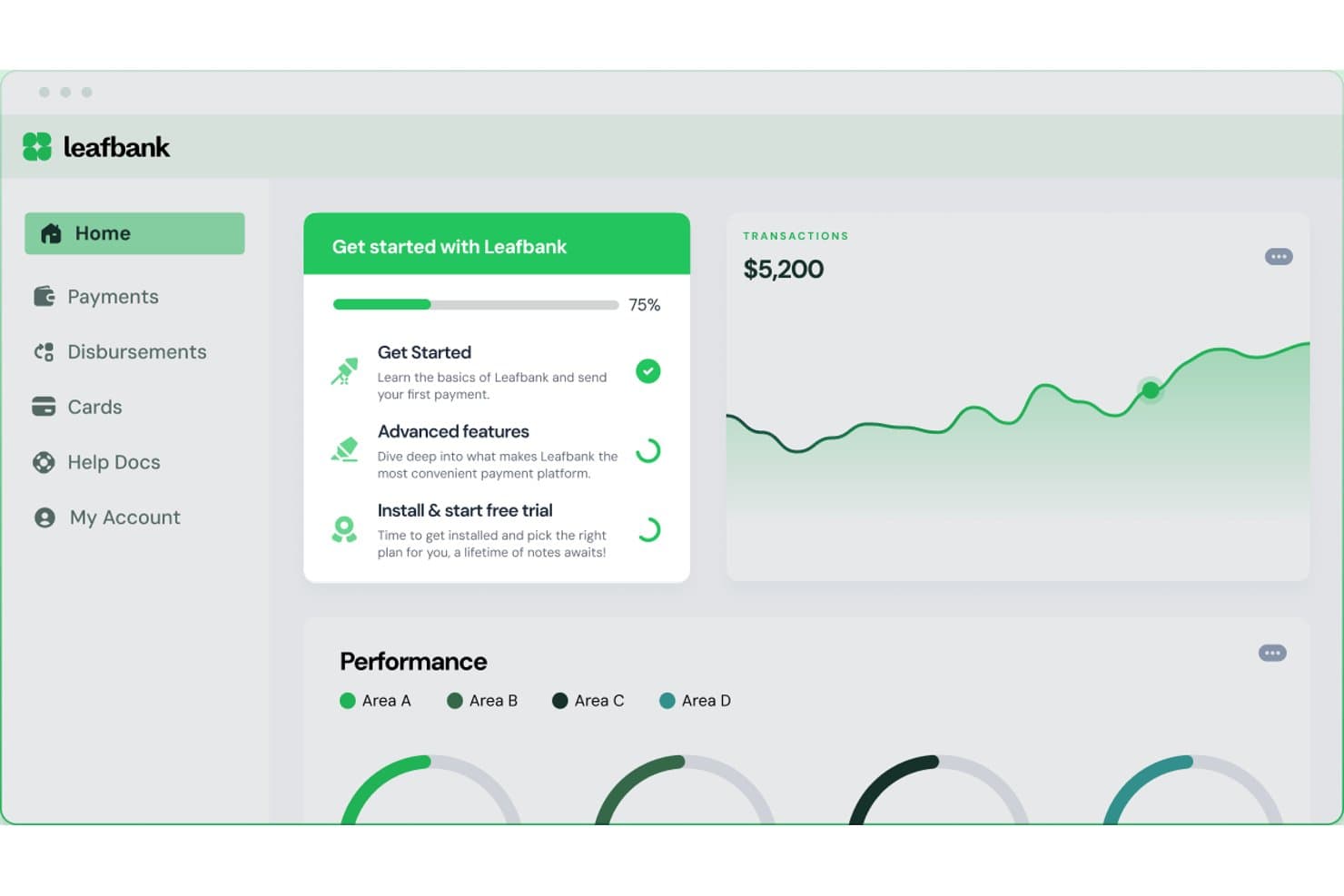
Chameleon guides users through onboarding steps with a progress checklist. My Evaluation Score
- Adoption Analytics
- 4/5
- In-App Guided Tours
- 4/5
- No-Code Flow Builder
- 5/5
- Contextual In-App Messaging
- 5/5
- Checklists & Resource Center
- 5/5
- User Segmentation & Targeting
- 5/5
Chameleon is a product adoption platform that lets teams build in-app tours, tooltips, modals, checklists, and microsurveys—plus a CMD+K help bar and AI-generated interactive demos—without writing code.
Who Is Chameleon Best For?
Chameleon is a strong fit for product teams at mid-market SaaS companies who need pixel-perfect, on-brand in-app experiences and want full control over design without relying on developers.
Why I Picked Chameleon
Chameleon earns its spot on my shortlist because of how much control it gives you over the look and feel of every in-app experience. I love that its no-code builder lets you apply custom CSS, brand fonts, and reusable themes so tours and tooltips feel native to your product, not bolted on. Its Smart Delay feature holds an experience until a user pauses, which means guidance surfaces at a natural moment rather than interrupting mid-flow.
Chameleon Key Features
- Microsurveys: Collect in-app user feedback using NPS, CSAT, CES, PMF, or open-ended survey formats with conditional branching logic and behavioral triggers.
- A/B testing: Run experiments on in-app experiences with automatic winner detection at 95% statistical confidence, available on Pro plans and above.
- HelpBar: A CMD+K spotlight search widget that lets users find help articles, trigger tours, or navigate features without leaving your product.
- Launchers: A configurable persistent widget you can use as an onboarding checklist, resource center, or help hub with dynamic content triggers.
Chameleon Integrations
Chameleon offers 30+ native integrations, including Amplitude, Mixpanel, Heap, Segment, HubSpot, Salesforce, Zendesk, Intercom, Help Scout, and Zapier. Its JavaScript API supports custom integrations and user data targeting.
Pros and Cons
Pros:
- AI agents identify user friction and personalize flows
- Product tours, tooltips, and checklists supported
- No-code builder with full CSS theming
Cons:
- Experience caps on lower pricing tiers
- No native app support for iOS or Android
Learn more about Chameleon:
Other Product Adoption Software
Here are some additional product adoption software options that didn’t make it onto my shortlist, but are still worth checking out:
- 11JIMOBest for AI-generated tours and in-app guidance
- 12Gainsight PXBest for CS-led adoption with account analytics
- 13IntercomBest for in-app live chat and chatbots
- 14Lemon LearningBest for guiding users on legacy enterprise apps
- 15Product FruitsBest for tours paired with in-app feedback
- 16FrigadeBest for AI-guided onboarding without flow authoring
- 17StonlyBest for creating in-app self-serve, interactive guides
- 18UserIQBest for CS-led onboarding with health scoring
- 19HopscotchBest for no-code tour building from day one
How I Evaluate Product Adoption Software
I split my evaluation into two layers: acceptance criteria every tool must clear—like in-app tours and user segmentation—and differentiators that determine the best fit for PLG teams or CS-led orgs.
Core Functionality (Table Stakes For This List)
When I'm selecting tools for my list, I rank each one on a scale from 0 (does not offer the functionality) to 5 (excels in this area) for each core functionality listed below. I then calculate the tool's total score into a percentage, using 65% as a benchmark to help assess its overall fit for the list.
- In-App Guided Tours: I evaluate whether a tool can deliver interactive, multi-step walkthroughs that guide users through real workflows—like setting up a first project or connecting an integration.
- No-Code Flow Builder: Product managers and onboarding specialists need to ship flows without filing engineering tickets, so I look for a visual editor or browser extension that handles the full build-to-publish cycle.
- Contextual In-App Messaging: Beyond basic modals, I check for tooltips, hotspots, banners, and slideouts that can be triggered by specific user actions—like surfacing a tip when someone visits a feature page for the first time.
- User Segmentation & Targeting: The ability to target flows by user attributes, behavioral events, or lifecycle stage matters here—for example, showing different onboarding paths to admins vs. end users.
- Adoption Analytics: I look for dashboards that tie flow engagement to feature usage and activation metrics, so teams can see whether a tour actually moved the needle on adoption.
- Checklists & Resource Centers: Persistent self-serve elements like onboarding checklists and in-app help hubs keep users oriented across sessions, and I evaluate how configurable and targetable these elements are.
Once I have a list of tools that meet the criteria, I consider what sets each platform apart.
Differentiating Factors (What Sets Vendors Apart)
Here's how I compare and contrast different vendors:
Standout Features
A/B testing on flows and messaging is a major differentiator. I look for tools that let you experiment with tooltip placement or checklist order and measure lift on activation rates. In-app surveys like NPS and PMF capture user sentiment right where adoption happens, closing the loop between guidance and feedback. Mobile SDK support also matters—teams with cross-platform products need the same tours and checklists on iOS and Android, not just web.
Beyond Features
Integration depth is one of the first things I evaluate. A tool that syncs with your analytics stack (Amplitude, Mixpanel), CRM, and customer success platform turns adoption data into action across teams. Pricing model matters too—MAU-based pricing can balloon fast for PLG products with high traffic, so I check how costs scale as your user base grows. I also consider deployment speed, since a browser extension or lightweight snippet means your team can launch a first flow in hours instead of waiting on an engineering sprint.
How to Choose Product Adoption Software
It’s easy to get bogged down in long feature lists and complex pricing structures. To help you stay focused as you work through your unique software selection process, here’s a checklist of factors to keep in mind:
| Factor | What to Consider |
|---|---|
| FactorScalability | What to ConsiderCan the software grow with your business? Consider if it handles increasing users without performance issues, especially if you plan to expand rapidly. |
| FactorIntegrations | What to ConsiderDoes it work with your current systems? Check compatibility with tools like CRM, analytics, and communication platforms to ensure smooth data flow. |
| FactorCustomizability | What to ConsiderCan you tailor it to your needs? Look for options to modify user interfaces and workflows to match your processes and branding. |
| FactorEase of use | What to ConsiderIs it user-friendly for your team? A simple interface can reduce training time and increase adoption rates. Test it with a small group before full implementation. |
| FactorImplementation and onboarding | What to ConsiderHow long does setup take? Consider the resources required for a successful rollout. Look for tools offering guided onboarding to assist your team. |
| FactorCost | What to ConsiderWhat’s the total cost of ownership? Compare initial fees, subscription tiers, and hidden costs. Ensure it fits your budget without compromising on necessary features. |
| FactorSecurity safeguards | What to ConsiderDoes it protect your data? Verify encryption standards and compliance with regulations like GDPR or CCPA to safeguard sensitive information. |
| FactorSupport availability | What to ConsiderWhat support options are available? Consider 24/7 support, dedicated account managers, and community forums to ensure help is available when needed. |
What Is Product Adoption Software?
Product adoption software is a tool designed to help users effectively onboard and engage with new software products. Professionals like product managers, customer success teams, and UX designers typically use these tools to enhance user experiences. Features like user onboarding, interactive walkthroughs, and in-app messaging help with guiding users and collecting feedback. Overall, these tools make it easier for users to understand and use new software, improving satisfaction and retention rates.
Features
When selecting product adoption software, keep an eye out for the following key features:
- User onboarding: Guides new users through the initial steps to help them get started quickly and effectively.
- Interactive walkthroughs: Provides step-by-step instructions within the application to enhance user understanding and engagement.
- In-app messaging: Allows direct communication with users for updates, tips, or support, improving overall user experience.
- User segmentation: Enables targeting of specific user groups with tailored content to meet their unique needs and preferences.
- Analytics dashboards: Offers insights into user behavior and engagement to help teams make data-driven decisions.
- Customizable templates: Allows teams to create personalized user experiences that align with their brand and workflows.
- A/B testing: Provides a way to test different user flows and optimize them for better engagement and conversion.
- Self-service support: Empowers users to find answers independently through resources like FAQs or knowledge bases.
- Multilingual support: Ensures that users from different linguistic backgrounds can access the product in their preferred language.
- Compliance tracking: Helps monitor and ensure adherence to necessary regulations and procedures within the software.
Benefits
Implementing product adoption software provides several benefits for your team and your business. Here are a few you can look forward to:
- Improved user engagement: Interactive walkthroughs and in-app messaging keep users engaged and informed, enhancing their overall experience.
- Faster onboarding: User onboarding features guide new users efficiently, reducing the time it takes for them to become productive.
- Data-driven decisions: Analytics dashboards offer insights into user behavior, helping you make informed decisions to boost product success.
- Personalized experiences: Customizable templates and user segmentation allow you to tailor content to specific user needs, improving satisfaction.
- Self-sufficiency: Self-service support empowers users to find answers on their own, reducing dependency on your support team.
- Global reach: Multilingual support ensures your product is accessible to users worldwide, expanding your market presence.
- Regulatory compliance: Compliance tracking helps your team stay on top of regulatory requirements, reducing risks associated with non-compliance.
Costs & Pricing
Selecting product adoption software requires an understanding of the various pricing models and plans available. Costs vary based on features, team size, add-ons, and more. The table below summarizes common plans, their average prices, and typical features included in product adoption software solutions:
Plan Comparison Table for Product Adoption Software
| Plan Type | Average Price | Common Features |
|---|---|---|
| Plan TypeFree Plan | Average Price$0 | Common FeaturesBasic onboarding, limited analytics, and community support. |
| Plan TypePersonal Plan | Average Price$5-$25/user/month | Common FeaturesUser onboarding, interactive walkthroughs, basic analytics, and email support. |
| Plan TypeBusiness Plan | Average Price$30-$75/user/month | Common FeaturesAdvanced analytics, customizable templates, user segmentation, and priority support. |
| Plan TypeEnterprise Plan | Average Price$100-$250/user/month | Common FeaturesComprehensive analytics, multilingual support, compliance tracking, dedicated account manager, and custom integrations. |
Product Adoption Software FAQs
Here are some answers to common questions about product adoption software:
How do I know if my team needs product adoption software?
If your team struggles with onboarding new users or if users aren’t fully engaging with your product, then product adoption software could help. It provides tools and insights to enhance user experiences and ensure they get the most out of your product. Consider it if you want to improve user retention and satisfaction.
How can product adoption software improve user satisfaction?
Product adoption software improves user satisfaction by providing tailored onboarding experiences and real-time support. With features like interactive walkthroughs and in-app messaging, users receive guidance and help when they need it. This personalized approach makes users feel valued and increases their likelihood of continued product use.
What metrics should I monitor to determine if the adoption software is working?
Key metrics include adoption rate, time-to-value, feature usage, churn rate, and support ticket volume. You can also track how guided users perform compared to non-guided ones. Look for signs of improvement in user engagement, retention, and satisfaction. Monitoring these indicators regularly will show whether the software is delivering results.
When might product adoption software not be the right move yet?
If your product is still early in development or you haven’t defined clear onboarding goals, it may be too soon to use adoption software. Without a solid understanding of your users’ journey, the tool may not add much value. It’s better to focus first on understanding user behavior and refining your core onboarding process. Once that’s in place, adoption software can help you scale and improve it further.