

You might find yourself juggling timelines, resources, and team coordination. That's where agile PLM software steps in, helping to simplify these challenges.
In my experience, these tools can make a significant difference in how you manage projects and collaborate with your team. They help keep everyone on the same page, making everything run smoother and more efficiently.
In this article, I'll share my top picks for agile PLM software, based on independent testing and a deep understanding of the product management world. You'll find unbiased, well-researched reviews that focus on what truly matters to you and your team.
Why Trust Our Software Recommendations
6,700+
Reviews
20
Industry experts
16+
Evaluation factors
14
Years
Our team has been testing and reviewing software since 2012. As product managers ourselves, we know how difficult—and important—it is to choose the right software.
For this guide, we evaluated tools using hands-on testing and independent research, scoring tools using our selection criteria.
Our reviews reflect our human editorial judgment, not a sales pitch.
Expert reviewers:
- Andrew LumbySenior TPM
- Cristiano ValimSenior UI/UX Lead


Agile PLM Software Comparison Table
This comparison table summarizes pricing details for my top agile PLM software selections:
| Tool | Best For | Trial Info | Price | ||
|---|---|---|---|---|---|
| 1 | Best for its backlog prioritization options | 15-day free trial | From $1/user/month (12 user minimum) | Website | |
| 2 | Best for infinite canvases | Free plan available | From $9/month (billed annually) | Website | |
| 3 | Best for managing complex product lifecycles | 14-day free trial | From $10/user/month (billed annually) | Website | |
| 4 | Best for visual iterative development | Free plan + 14-day free trial available | From $8/user/month (billed annually) | Website | |
| 5 | Best for end-to-end digital thread across engineering | 30-day free trial | Pricing upon request | Website | |
| 6 | Best for PLM, QMS, and PIM in one platform | Free demo available | Pricing upon request | Website | |
| 7 | Best for CAD-connected lifecycle control | 30-day free trial | From $545/year | Website | |
| 8 | Best for global product launch coordination | Free demo available | Pricing upon request | Website | |
| 9 | Best for multi-discipline product data management | Free demo available | Pricing upon request | Website | |
| 10 | Best for Oracle Agile PLM migration | 10-day free trial | Pricing upon request | Website |


Best Agile PLM Software Review
Below are my detailed summaries of the best agile PLM software that made it onto my shortlist. My reviews offer a detailed look at the key features, pros & cons, integrations, and ideal use cases of each tool to help you find the best one for you.
 Best for its backlog prioritization options
- 15-day free trial
- From $1/user/month (12 user minimum)
Visit WebsiteCustomer Rating:4.1/5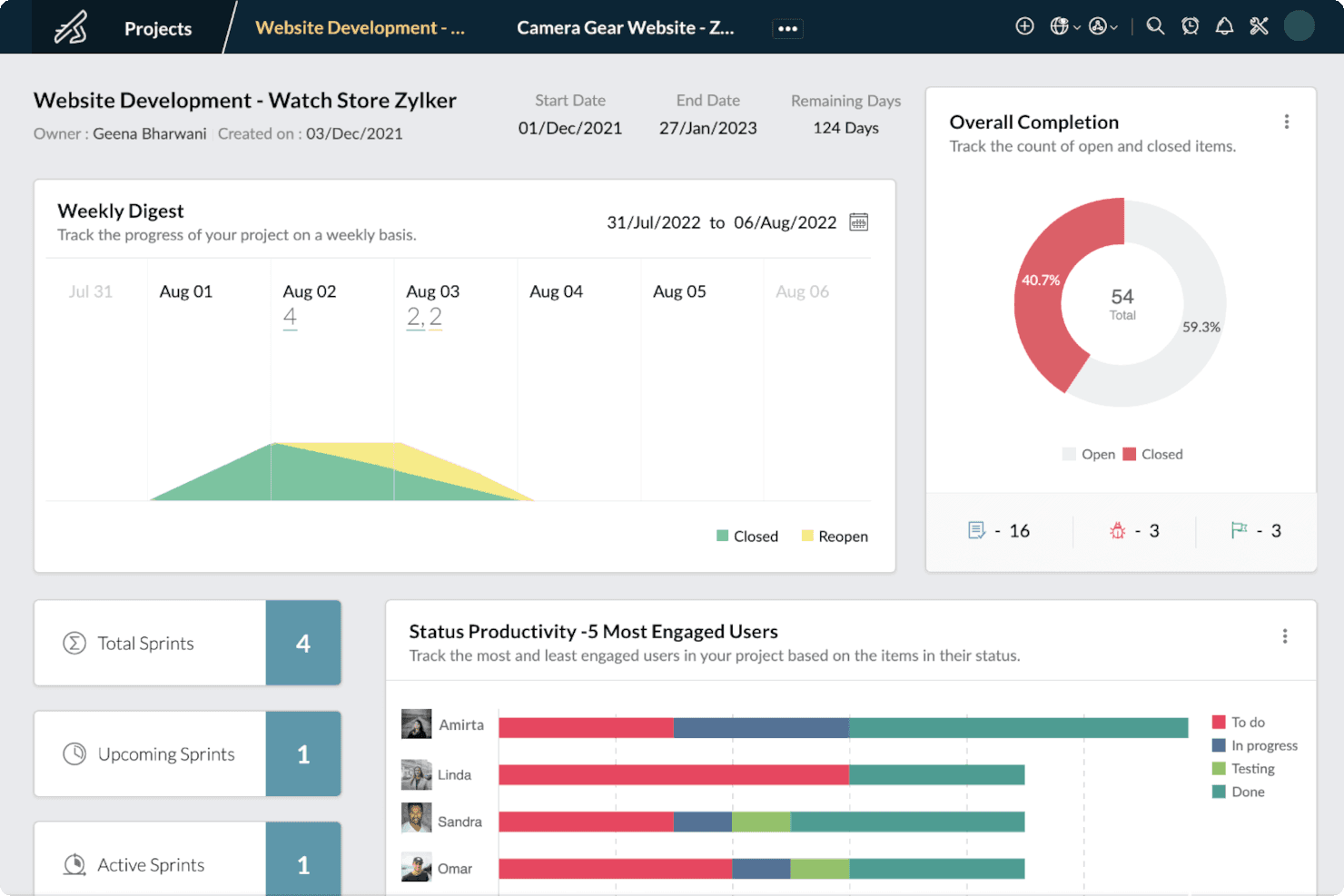
Zoho Sprints’ dashboard gives users a bird’s-eye view of their projects’ progress to gain insights useful for effectively managing projects. Zoho Sprints is an agile project management tool built around sprint planning, backlog management, and iterative delivery, with support for epics, custom workflows, Kanban and Scrum boards, and cross-functional collaboration features like portals, chat, and reporting.
Who Is Zoho Sprints Best For?
Zoho Sprints is a good fit for agile product teams that need structured backlog management and sprint planning without the overhead of a full PLM platform.
Why I Picked Zoho Sprints
I picked Zoho Sprints as one of the best because its backlog prioritization options give agile product teams a clear, structured path from raw requirements to sprint-ready work. I love how you can triage unplanned work directly from the backlog, breaking large epics into smaller stories and pulling them into sprints based on priority. Custom priorities, cluster tags, and work item links let you surface blockers and sequence work with real precision.
Zoho Sprints Key Features
- Custom workflow boards: Configure Scrum and Kanban boards with custom workflow stages to reflect how your team actually moves work from discovery to delivery.
- Work item linking: Connect related work items to surface dependencies and blockers across your backlog and active sprints.
- Client and vendor portals: Give external stakeholders, including clients and vendors, direct visibility into project progress without requiring a full user seat.
- Agile reporting suite: Access velocity charts, burndown and burnup charts, cumulative flow diagrams, and cycle time reports to track team performance across sprints.
Zoho Sprints Integrations
Zoho Sprints has documented integrations with Azure DevOps, Jira, GitHub, GitLab, SharePoint, and other Zoho apps. It supports REST APIs, webhooks, Zoho Flow, and Zapier, but no native CAD, ERP, or MES integrations are documented.
Pros and Cons
Pros:
- Custom workflows support cross-functional delivery
- Clear sprint planning from epics
- Strong backlog prioritization for agile teams
Cons:
- No BOM or ECO controls
- No structured product data management
Learn more about Zoho Sprints: Best for infinite canvases
- Free plan available
- From $9/month (billed annually)
Visit WebsiteCustomer Rating:4.5/5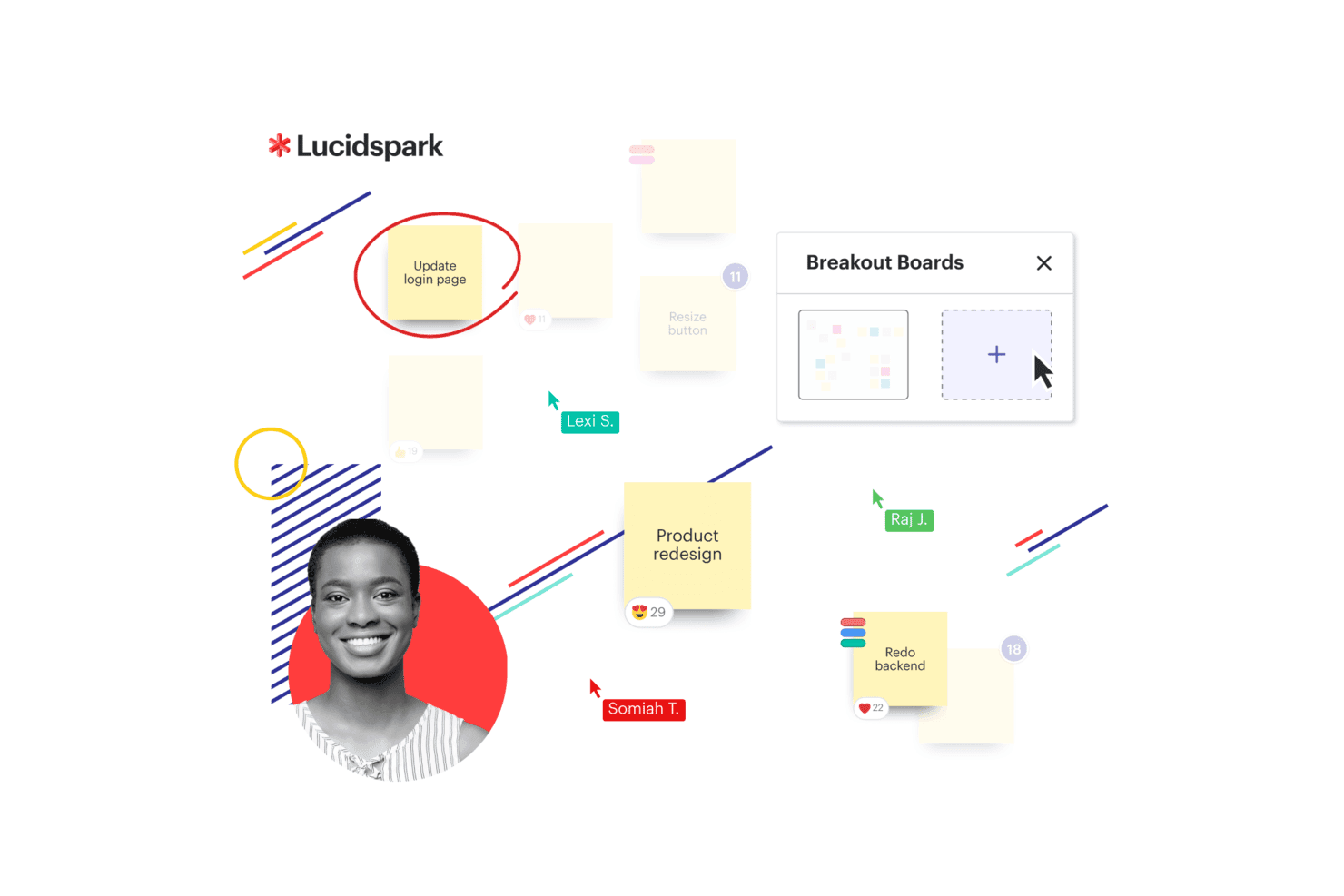
Lucidspark presents a Kanban board with workflow columns and task cards to help teams organize and track work visually. Lucidspark is a virtual whiteboard that supports agile planning workflows through an infinite canvas, sprint and retrospective templates, and real-time collaboration tools.
Who Is Lucidspark Best For?
Lucidspark is a good fit for agile teams that need a flexible visual workspace for sprint planning, retrospectives, and early-stage ideation.
Why I Picked Lucidspark
I've included Lucidspark in my top picks because its infinite canvas gives agile teams a genuinely unconstrained space for sprint planning and retrospectives. I like how Dynamic Mind Maps let you branch out ideas without hitting layout limits, and Visual Activities with voting sessions help teams reach decisions together during ceremonies. Lucid Cards then turn those ideas directly into Jira or Azure DevOps tasks, keeping planning and delivery connected.
Lucidspark Key Features
- AI-assisted brainstorming: An AI layer generates ideas, clusters themes, and summarizes session output directly on the canvas.
- Sprint and retrospective templates: Pre-built agile ceremony templates for standups, backlog refinement, and sprint planning that teams can run without setup from scratch.
- Visual Activities with voting: Structured on-canvas activities let participants submit and vote on ideas, helping teams prioritize during planning sessions.
- Guest collaborator access: External stakeholders can join a board without a paid account, keeping cross-functional reviews in one shared space.
Lucidspark Integrations
Lucidspark offers more than 100 marketplace integrations, including Jira, Azure DevOps, Okta, and GRID. It also provides an API for custom integrations, but no CAD, ERP, or MES connectors are documented.
Pros and Cons
Pros:
- Turns planning concepts into actionable tasks
- Maps early product ideas on infinite canvases
- Supports remote agile ceremonies with voting
Cons:
- No BOM, compliance, or change workflows
- No product data or revision control
Learn more about Lucidspark: Best for managing complex product lifecycles
- 14-day free trial
- From $10/user/month (billed annually)
Visit WebsiteCustomer Rating:4.3/5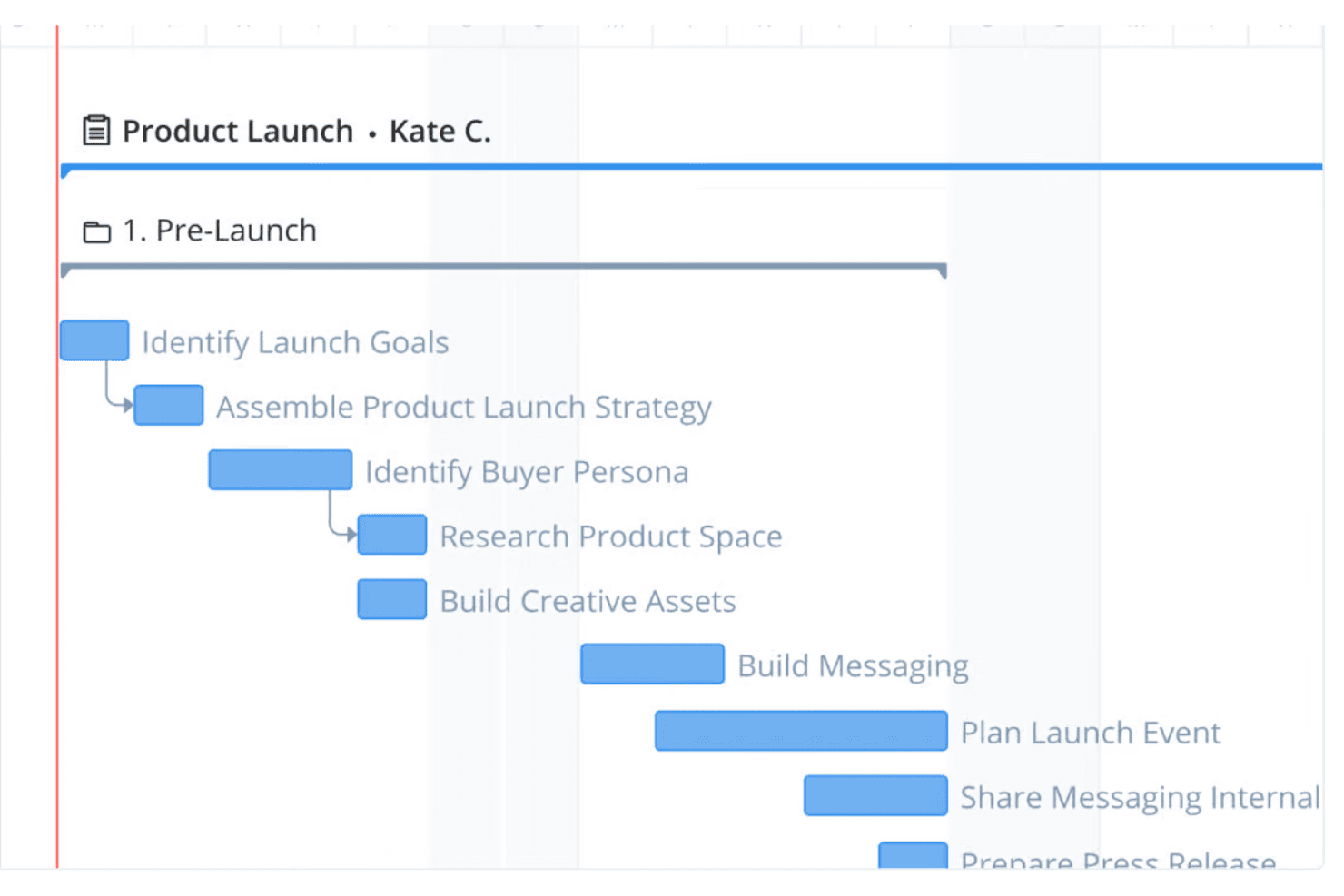
Wrike provides interactive Gantt charts for project scheduling across the entire product lifecycle, from planning to launch. Wrike is a cloud-based work management platform that brings together task tracking, workflow automation, cross-functional collaboration, and reporting across complex, multi-team programs.
Who Is Wrike Best For?
Wrike suits cross-functional product teams that need flexible program tracking and collaboration across complex NPI or product launch processes.
Why I Picked Wrike
I've included Wrike in my top picks because its configurable workflows and multi-view program tracking make it genuinely useful for managing complex product lifecycles across cross-functional teams. I like how custom request forms can model stage-gate approval processes, routing work automatically between teams without any custom code. Wrike's 15+ work views, including Gantt and Kanban, let my team track NPI progress from a single shared workspace rather than juggling separate tools.
Wrike Key Features
- No-code workflow automation: Build custom approval workflows and request forms using plain-language rules, without writing any code.
- Cross-functional dashboards: Share real-time dashboards across teams to track NPI program status, task progress, and blockers in one view.
- Role-based access control: Assign full, limited, or guest user roles to control what each stakeholder can view, edit, or approve.
- ERP and dev-tool integrations: Connect Wrike to NetSuite, Microsoft Dynamics 365, Jira, GitHub, and more via native or two-way sync connectors.
Wrike Integrations
Wrike lists 400+ integrations, including NetSuite, Microsoft Dynamics 365, Jira, GitHub, Tableau, and Power BI. CAD and MES integrations aren’t listed, so PLM buyers may need custom connectivity through Wrike Integrate.
Pros and Cons
Pros:
- External collaborators improve stakeholder visibility
- Dashboards coordinate complex lifecycle programs
- Flexible workflows model change approvals
Cons:
- No BOM or engineering change control
- No structured product data management
 4Best for visual iterative development
Miro
- Free plan + 14-day free trial available
- From $8/user/month (billed annually)
Visit WebsiteCustomer Rating:4.8/5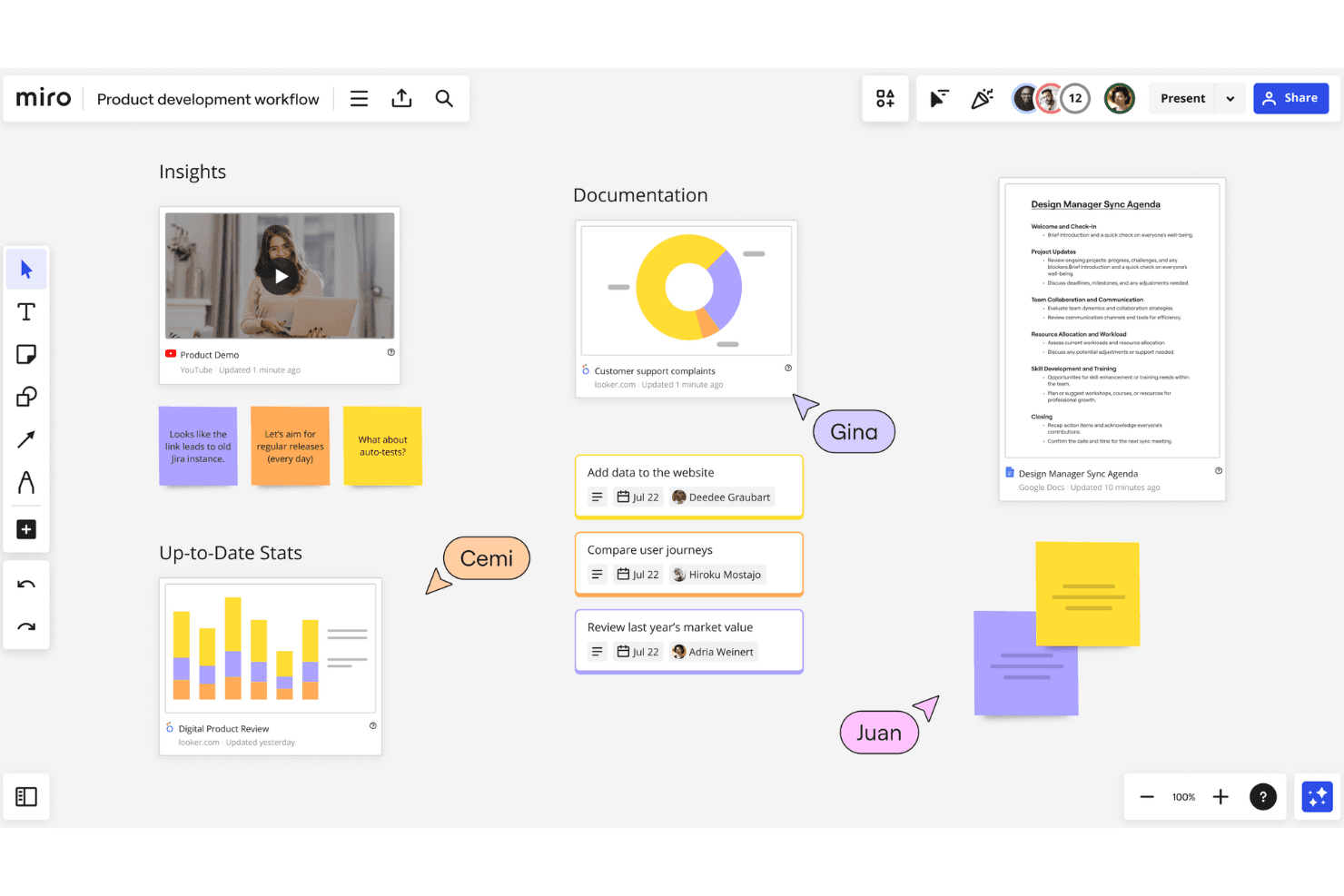
Miro offers a flexible, infinite whiteboard for multiple users to collaborate and innovate at the same time. Miro is a visual collaboration workspace that supports agile product development through tools like roadmapping, sprint planning, dependency mapping, wireframing, and iterative workflow templates.
Who Is Miro Best For?
Miro is a strong fit for agile product teams that rely on visual collaboration—think roadmapping, sprint planning, and iterative design work—rather than structured engineering or lifecycle data management.
Why I Picked Miro
Miro is one of my top picks because I love how it turns abstract product thinking into a shared visual workspace that teams can actually act on. Its sprint planning and PI planning templates give agile teams a structured canvas for iterative development, while the dependency mapping tool makes it easy to spot bottlenecks before a sprint kicks off. I also rely on Miro's roadmapping timelines to connect high-level product vision to delivery milestones across distributed teams.
Miro Key Features
- Kanban board: A visual task management board that lets teams track work items across custom columns and workflow stages in real time.
- PI planning template: A pre-built canvas for running program increment planning sessions across multiple agile teams, with built-in team boards and objectives tracking.
- Two-way Jira sync: A live integration that keeps Miro cards and Jira issues in sync, reflecting updates from either tool without manual entry.
- Talktrack: An async presentation tool that lets you record a narrated walkthrough of a board so stakeholders can review strategy on their own time.
Miro Integrations
Miro supports 250+ integrations, including two-way sync with Jira, Asana, Linear, ClickUp, and Azure DevOps, plus Slack and Microsoft Teams. Its MCP access supports custom connectivity, but no CAD, ERP, or MES integrations are documented.
Pros and Cons
Pros:
- Collaborative roadmapping aligns stakeholders
- Dependency mapping exposes delivery bottlenecks
- Visual sprint and PI planning
Cons:
- No ECR/ECO approval workflows
- No centralized product data repository
 Best for end-to-end digital thread across engineering
- 30-day free trial
- Pricing upon request
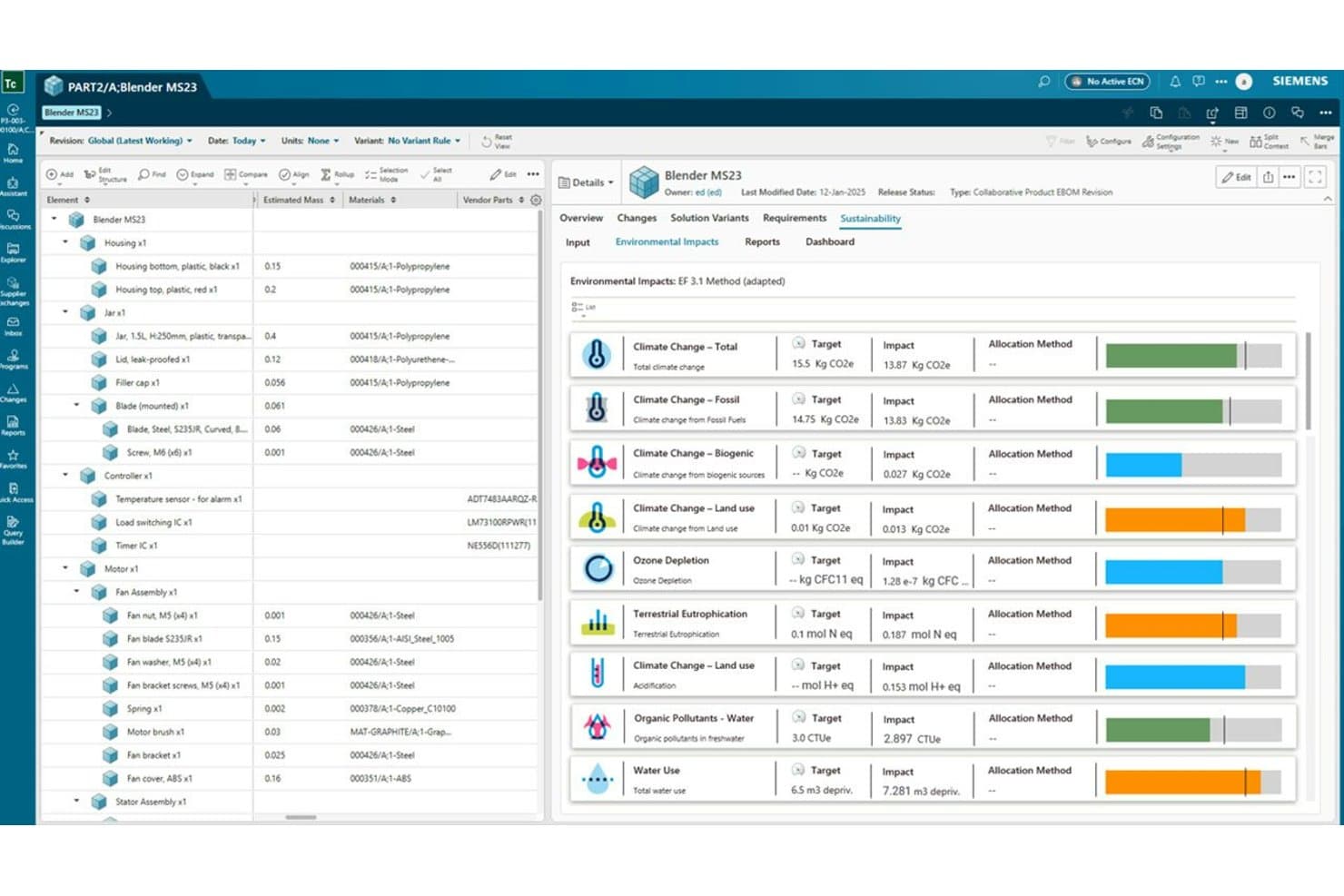
Siemens Teamcenter tracks environmental impacts across a product's full lifecycle. Siemens Teamcenter is a PLM platform that connects product data, BOM management, change workflows, requirements, and cross-functional collaboration across engineering, manufacturing, and service teams through a unified digital thread.
Who Is Siemens Teamcenter Best For?
Teamcenter is a strong fit for engineering-led organizations in aerospace, defense, and manufacturing that need to connect product data across development, manufacturing, and service from a single platform.
Why I Picked Siemens Teamcenter
Siemens Teamcenter earns its spot on my shortlist because no other PLM platform I've evaluated builds a digital thread as deliberately across engineering, manufacturing, and service. I'm particularly impressed by how Teamcenter connects MCAD and ECAD data, BOM revisions, and change workflows into a single traceable record, so when an engineer updates a design, that change flows through to manufacturing planning without manual hand-offs. The Enterprise BOM and manufacturing planning module makes the engineering-to-manufacturing handoff genuinely trackable, not just documented.
Siemens Teamcenter Key Features
- MCAD and ECAD data management: Centralizes mechanical and electrical design data with check-in/check-out, where-used lookup, and 3D viewing across your team.
- Effectivity rules on product structures: Lets you define when specific product configurations apply, controlling which version of a structure is valid at any point.
- Consumer licenses: Read-only access licenses give non-authoring stakeholders visibility into product data without requiring full seats.
- Quality and compliance management: The Premium tier includes built-in tools for tracking quality processes and compliance requirements alongside your product data.
Siemens Teamcenter Integrations
Teamcenter supports MCAD and ECAD integrations across tiers, while Premium adds ERP and other enterprise-system integration. Siemens doesn’t clearly document specific third-party vendors or a public API.
Pros and Cons
Pros:
- Supports controlled change and requirements workflows
- Tracks revisions across complex product structures
- Connects engineering, manufacturing, and service
Cons:
- Quality controls require the Premium tier
- Complex navigation slows new-user adoption
Learn more about Siemens Teamcenter: Best for PLM, QMS, and PIM in one platform
- Free demo available
- Pricing upon request
Visit WebsiteCustomer Rating:4.5/5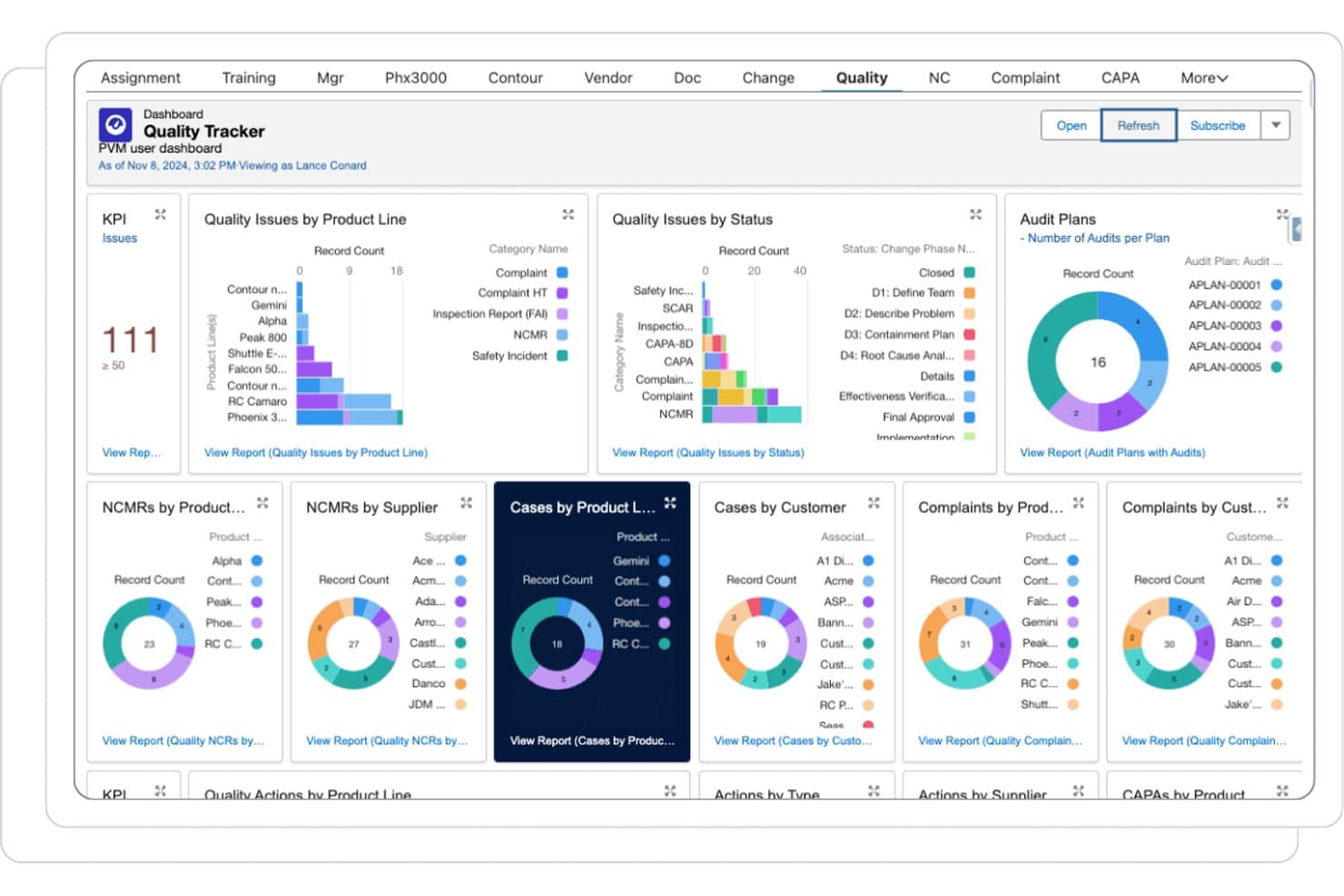
Propel centralizes quality tracking across audits, complaints, and NCMRs. Propel is a cloud-native PLM platform built on Salesforce that unifies product data management, BOM and change workflows, quality management, and product information management in a single system.
Who Is Propel Best For?
Propel is a strong fit for product, engineering, and quality teams in regulated industries—like medical devices and electronics—who need PLM, QMS, and PIM in a single cloud platform.
Why I Picked Propel
I picked Propel as one of the best because it's the only platform on this list that combines PLM, QMS, and PIM in a single Salesforce-native system. In practice, that means my team can manage engineering change orders, run CAPA workflows, and update product content without switching tools. I especially like Propel One AI, which summarizes engineering changes and flags issues mid-review, cutting change assessment time significantly.
Propel Key Features
- Multi-level BOM management: View and edit hierarchical BOMs in tree or table format, with redline comparison, cost rollup, and AML/AVL tracking.
- Supplier Community portal: A branded, secure portal where suppliers and contract manufacturers can exchange data, complete onboarding, and participate in audits with full audit trails.
- Visual Collaboration markup: View and annotate 2D/3D CAD files, PDFs, and images directly within the platform without leaving the change record.
- Component Insights: Syncs with SiliconExpert to surface real-time part data, availability, and risk signals at the component level.
Propel Integrations
Propel integrates with SolidWorks, Creo, Altium Designer, Windchill, Autodesk Vault, Teamcenter, and ERP systems through Manufacturing Hub. It also provides APIs, an iPaaS ecosystem, and custom connectors.
Pros and Cons
Pros:
- Supplier portal preserves collaboration audit trails
- AI summarizes changes and flags review issues
- Unifies PLM, QMS, and PIM workflows
Cons:
- Reviewers report occasional performance instability
- Multi-tenant cloud limits deployment flexibility
Learn more about Propel: Best for CAD-connected lifecycle control
- 30-day free trial
- From $545/year
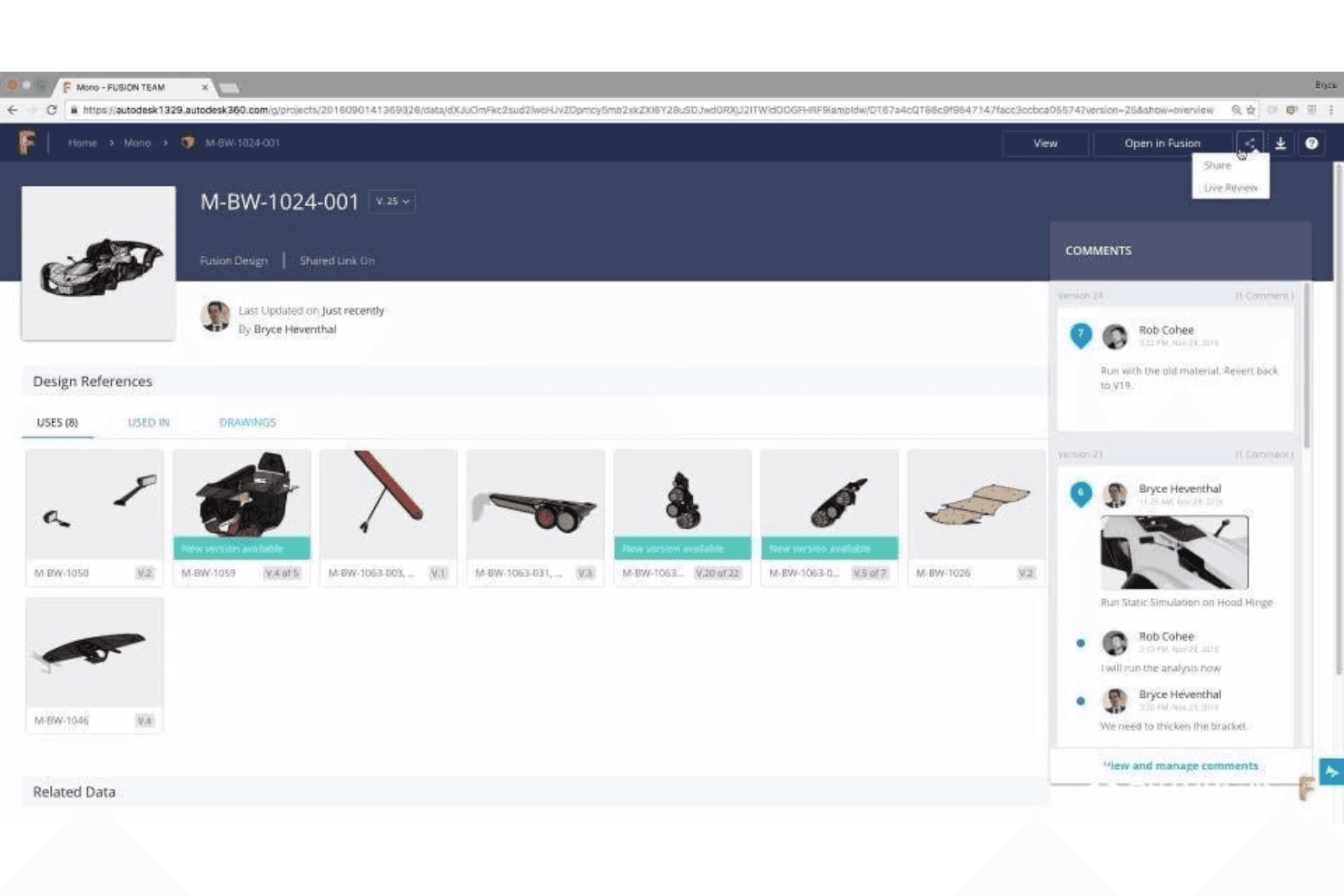
Save all product design references for all team members and stakeholders. Autodesk Fusion Manage is a cloud PLM platform that connects CAD data, BOM management, change workflows, quality processes, and supplier collaboration in one system built for engineering-driven product teams.
Who Is Autodesk Fusion Manage Best For?
Autodesk Fusion Manage is a strong fit for engineering-led manufacturers who already work in the Autodesk ecosystem and need CAD data, BOM management, and change workflows in one connected cloud system.
Why I Picked Autodesk Fusion Manage
Autodesk Fusion Manage earns its spot on my shortlist because the Vault Connector gives engineering teams something most PLM tools can't match: a live sync between CAD files in Vault Professional and the broader PLM workspace, so BOM states, revision history, and lifecycle status stay aligned without manual handoffs. I also like the no-code visual workflow editor for ECR/ECO processes, which lets teams configure multi-stage change approvals and escalation alerts without waiting on IT.
Autodesk Fusion Manage Key Features
- NPI project templates: Pre-configured new product introduction templates with standard phase-gate milestones and automated workflows to guide cross-functional teams from concept to launch.
- Supplier collaboration portal: Suppliers can access active workflows, mark up documents in real time, and respond to RFQs directly within the platform.
- Quality management module: Automates NCR, RMA, CAPA, and FMEA processes to connect non-conformance events to corrective actions in one traceable workflow.
- Real-time dashboards and KPIs: Live status views show task ownership, milestone progress, and key metrics across teams, with one-click export for reporting.
Autodesk Fusion Lifecycle Integrations
Autodesk Fusion Lifecycle offers native integrations with Autodesk Inventor, AutoCAD, Revit, SAP, Oracle, and Microsoft Dynamics through Vault PLM. Its open API supports custom connections to ERP, CRM, and other business systems.
Pros and Cons
Pros:
- NPI templates guide phase-gate product launches
- No-code workflows support controlled ECO approvals
- Vault Connector keeps CAD revisions aligned
Cons:
- Configuration can overwhelm first-time administrators
- Full PDM requires a separate Vault product
Learn more about Autodesk Fusion Lifecycle: Best for global product launch coordination
- Free demo available
- Pricing upon request
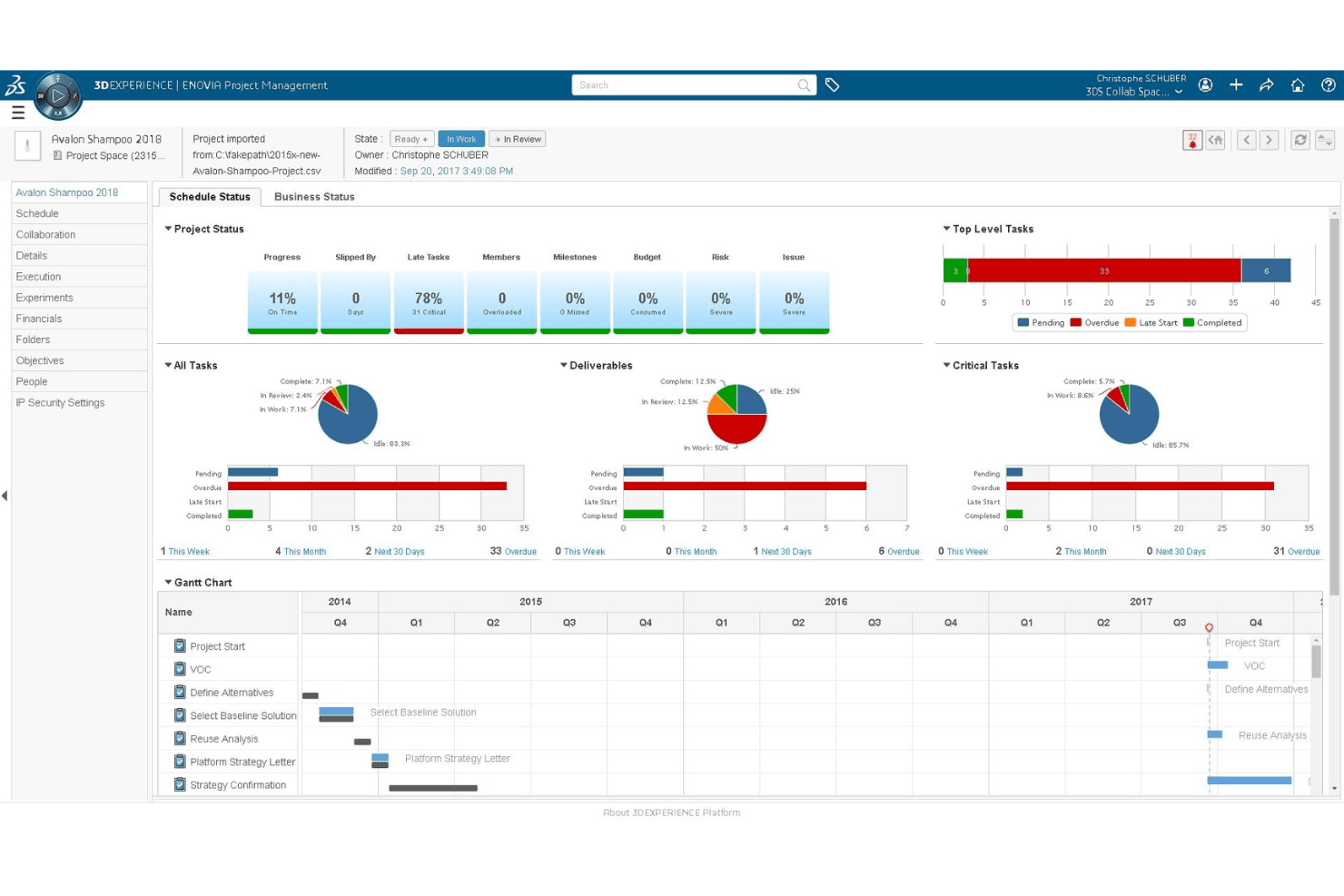
Companies can monitor their product’s development status. Dassault ENOVIA is an enterprise PLM platform built on the 3DEXPERIENCE cloud that covers product data management, BOM management, change workflows, quality and compliance, and cross-functional collaboration across engineering, design, and supply chain teams.
Who Is Dassault ENOVIA Best For?
ENOVIA is a strong fit for engineering-led organizations managing complex, multi-discipline products across global teams and supplier networks.
Why I Picked Dassault ENOVIA
I've included ENOVIA in my top picks because it handles global product launch coordination better than almost anything else I've seen, especially when engineering, quality, and supply chain teams are all in motion at once. Its Change Intelligence feature gives a 360° view of change impact across linked eBOM and mBOM structures, so a design update in one region doesn't quietly break a manufacturing plan in another. I also like the Artwork app, which directly targets label compliance errors that cause costly product recalls during launch.
Dassault ENOVIA Key Features
- Change Intelligence diagnostics: Analyzes trends and provides a 360° view of change impact across linked eBOM and mBOM structures to catch downstream issues early.
- Business process management workflows: Low-code tools let you configure and automate approval and decision workflows without heavy development work.
- Multi-CAD 3D product structure browsing: A dedicated role lets users navigate and view product structures built across multiple CAD tools in a shared 3D environment.
- AI virtual companions: Built-in AI assistants AURA, LEO, and MARIE surface relevant data and guide users through tasks directly within their workflows.
Dassault ENOVIA Integrations
Dassault ENOVIA offers native integrations with CATIA V5, SOLIDWORKS, Altium, DELMIA, and SIMULIA. APIs and developer tools support custom integrations, while documented native ERP and MES connectors are not available.
Pros and Cons
Pros:
- Maintains traceability across complex product structures
- Supports supplier collaboration beyond email
- Connects eBOM and mBOM change impacts
Cons:
- File operations can slow during heavy use
- Steep learning curve for new users
Learn more about Dassault ENOVIA: Best for multi-discipline product data management
- Free demo available
- Pricing upon request
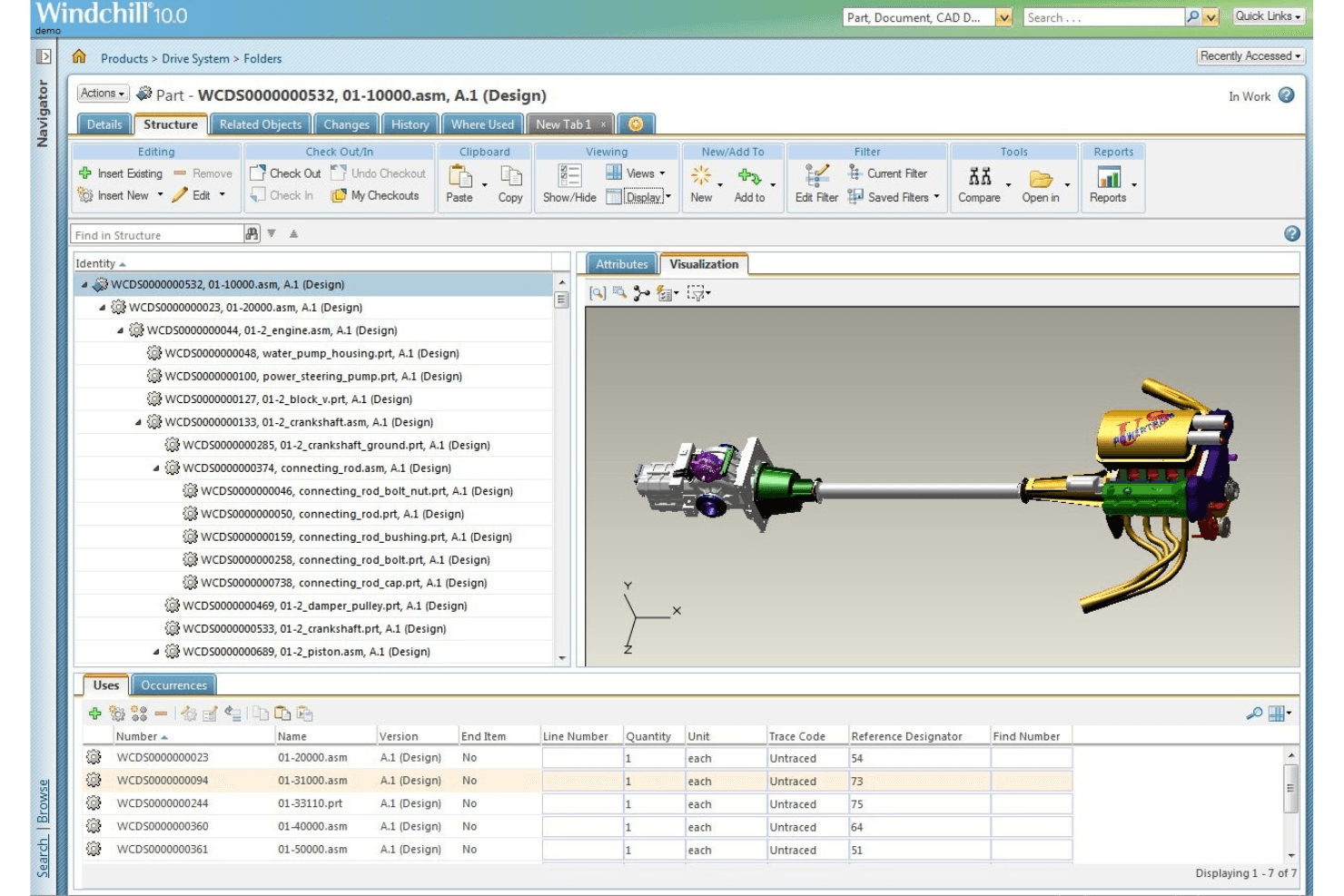
Store all product versions securely on the platform. PTC Windchill is a PLM platform that centralizes product data management across mechanical, electrical, and software disciplines, with tools for BOM management, engineering change workflows, cross-functional collaboration, and compliance tracking.
Who Is PTC Windchill Best For?
Windchill is a strong fit for mid-to-large manufacturers in regulated industries like aerospace, automotive, and MedTech that need to manage product data across mechanical, electrical, and software disciplines in one system.
Why I Picked PTC Windchill
I picked PTC Windchill as one of the best because it's one of the few PLM platforms that genuinely handles mechanical, electrical, and software data in a single system of record. I'm particularly impressed by AI Part Intelligence, which identifies duplicate or similar parts across disciplines before they create BOM conflicts. The AI-assisted eBOM-to-mBOM alignment also stands out, automatically converting engineering structures into manufacturing BOMs with reusable work instructions.
PTC Windchill Key Features
- AI assistants: Plain-language AI tools that answer product questions, summarize documents, and explain engineering changes across the product record.
- Windchill Navigate: Role-based apps that give occasional users secure, simplified access to product data without requiring full PLM expertise.
- Risk & reliability module: Built-in FMEA, fault tree analysis, and corrective action tools for managing product risk within the PLM environment.
- Windchill+ SaaS deployment: A cloud-hosted, continuously updated version of Windchill with FedRAMP authorization for organizations with security requirements.
PTC Windchill Integrations
PTC Windchill offers native integrations with Creo, Onshape, SAP, ThingWorx, Codebeamer, and ServiceMax. It also connects with Jetstream for secure collaboration with external partners.
Pros and Cons
Pros:
- Supports regulated quality and change workflows
- AI identifies duplicate parts before BOM conflicts
- Unifies mechanical, electrical, and software data
Cons:
- Dense screens complicate document management
- Implementation demands significant time and resources
Learn more about PTC Windchill:
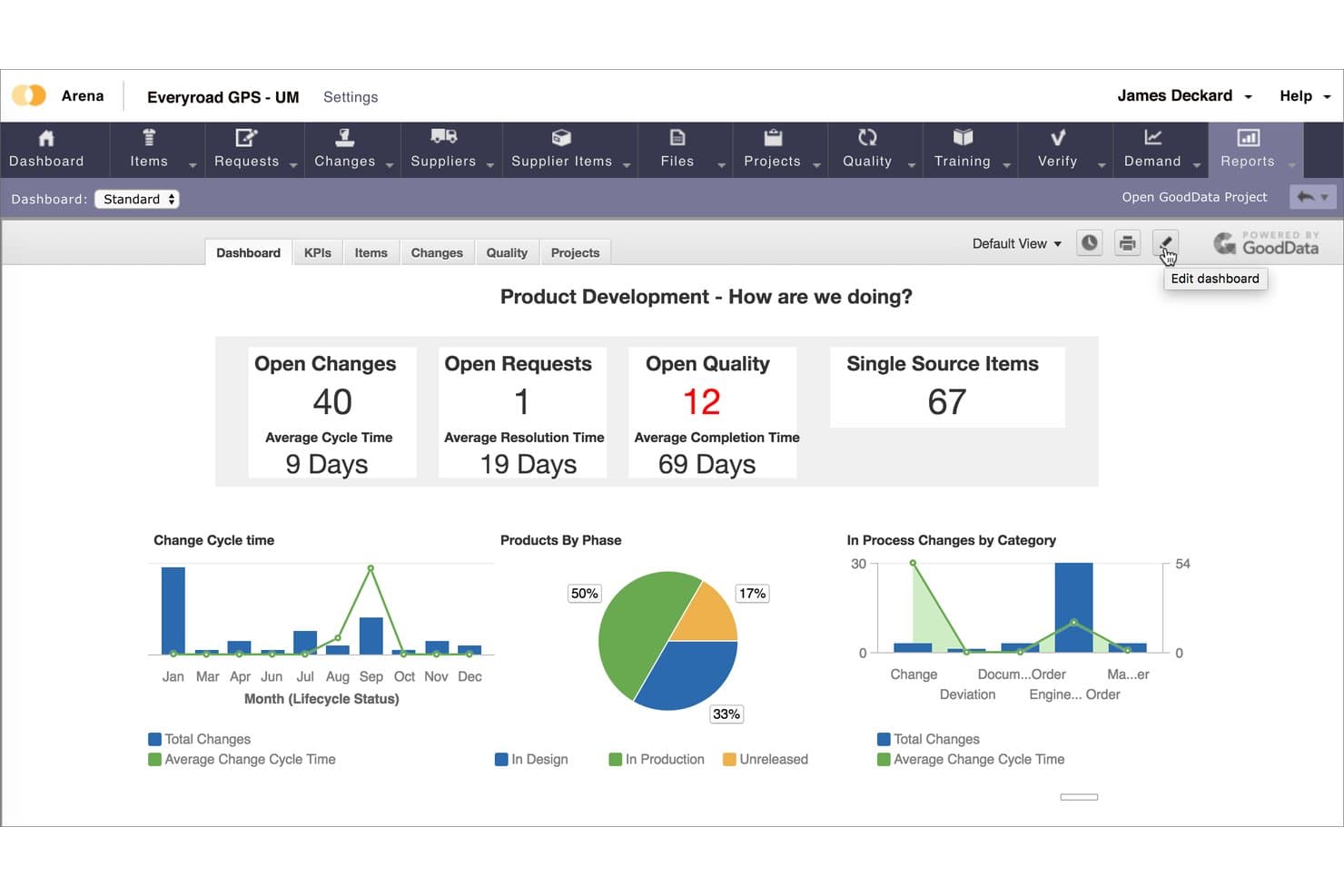
Arena PLM is a cloud-native product lifecycle management platform that unifies product data management, BOM and change control, quality management, and supplier collaboration in a single system built for hardware and regulated-industry teams.
Who Is Arena PLM Best For?
Arena PLM is a strong fit for hardware and regulated-industry teams—particularly in medical devices, aerospace, and high-tech electronics—that are ready to move off Oracle Agile PLM and want a cloud-native system that unifies PLM and QMS in one place.
Why I Picked Arena PLM
Arena PLM earns its spot on my shortlist because it's the most direct Oracle Agile PLM replacement I've found, with over 100 companies already migrated and a defined transition method to get there. I'm particularly drawn to how it unifies PLM and QMS in one cloud-native system, linking CAPAs, NCMRs, and DHF/DMR records directly to the BOM rather than managing them in separate tools. Arena Validate adds another layer I value for regulated teams, covering 21 CFR Part 820 with pre-built IQ/OQ documentation and 1,600+ test cases per release.
Arena PLM Key Features
- Supply Chain Intelligence: Scans approved manufacturer and vendor lists weekly to flag component risk and sourcing gaps using Accuris data.
- Arena Connect: An embedded integration platform with 200+ pre-built connectors, a visual workflow builder, and webhook-based triggers for syncing Arena with ERP, CAD, and other tools.
- Role-based supplier licensing: Gives external suppliers controlled access to BOMs, AMLs, 3D CAD files, change orders, and quality records within the platform.
- Arena Projects: Phase-gate project workflows with configurable milestones and tasks linked directly to ECOs, requirements, and quality actions.
Arena PLM Integrations
Arena PLM has a native Onshape connection and Arena Connect with 200+ pre-built connectors, including Jira, Microsoft Teams, and Slack. Marketplace integrations include SOLIDWORKS, Altium, SAP, Oracle EBS, and Microsoft Dynamics 365, with APIs and webhooks for custom integrations.
Pros and Cons
Pros:
- Suppliers participate in controlled change reviews
- Quality records link directly to product BOMs
- Oracle Agile migration method reduces replacement risk
Cons:
- Search can be slow and unreliable
- Approval workflows require too many clicks
Learn more about Arena PLM:
Other Agile PLM Software
Here are some additional agile PLM software options that didn’t make it onto my shortlist, but are still worth checking out:
- 11SAP PLMBest for SAP-native product lifecycle and ERP sync
- 12ArasBest for low-code PLM customization and digital thread
- 13DuroBest for CAD-native cloud BOM and ECO workflows
- 14OpenBOMBest for CAD-connected BOM and change tracking
- 15Oracle Fusion Cloud Product Lifecycle ManagementBest for existing Oracle ERP and SCM users
- 16Infor PLMBest for ERP-native BOM and lifecycle control
- 17BildBest for CAD-native ECO workflows and revision control
How I Evaluate Agile PLM Software
I split my evaluation into three parts, with core functionality carrying the most weight: the tool must centralize and version-control product data and support structured ECR/ECO approval workflows. From there, I look for standout features like AI-driven change impact analysis. Finally, I consider implementation support and pricing transparency.
Core Functionality (Table Stakes For This List)
When I'm selecting tools for my list, I score each one on a scale from 0 (does not offer the functionality) to 5 (excels in this area) for each core functionality listed below. I then convert the total into a percentage to help assess each tool's overall fit, with extra weight on any functionalities I've deemed essential.
- Product Data Management (Essential): I check whether the platform centralizes specs, CAD files, and revision history so teams aren't chasing down the latest version across shared drives.
- Change & Workflow Management (Essential): I evaluate how each tool routes ECRs and ECOs through approval steps, looking for configurable stages and role-based sign-offs.
- Bill of Materials Management: I look for multi-level BOM support that handles variants and distinguishes between engineering and manufacturing structures as a product matures.
- Cross-Functional Collaboration: Shared workspaces where engineering, quality, and manufacturing can comment, assign tasks, and hand off work on the same product record matter here.
- Compliance & Traceability: I look at how easy it is to pull an auditable trail of every change, approval, and revision to satisfy internal reviews or regulatory requirements.
- System Integration: I evaluate connections to CAD tools, ERP platforms, and MES systems, checking whether data syncs bidirectionally or requires manual re-entry.
Once I have a list of tools that meet the criteria, I consider what sets each platform apart.
Differentiating Factors (What Sets Vendors Apart)
Here's how I compare and contrast different vendors:
Standout Features
AI-driven change impact analysis is the first thing I look for. When an engineer proposes swapping a component, I want the system to predict ripple effects across BOMs, supplier lead times, and cost before anyone hits "approve." I also evaluate supplier collaboration portals, since letting contract manufacturers view specs and respond to change requests inside the system cuts weeks off NPI cycles. Digital thread visualization ties these together by mapping a traceable link from requirements through CAD to quality records, which matters when audits demand full traceability.
Beyond Features
I evaluate each vendor's industry-specific depth first. A medical device team needs validated FDA 21 CFR Part 11 templates out of the box, while an automotive supplier needs IATF 16949 frameworks ready to configure. Deployment model matters just as much—cloud options reduce IT overhead, but on-premise or hybrid setups may be necessary for data sovereignty or legacy CAD integration. I also check licensing structures, since named-user versus concurrent models can dramatically shift total cost as cross-functional teams scale. Finally, I look at migration tooling and onboarding support, because most PLM rollouts involve moving years of product data out of legacy PDM systems or spreadsheets.
How to Choose Agile PLM Software
It’s easy to get bogged down in long feature lists and complex pricing structures. To help you stay focused as you work through your unique software selection process, here’s a checklist of factors to keep in mind:
| Factor | What to Consider |
|---|---|
| FactorScalability | What to ConsiderCan the software grow with your business? Look for tools that can handle increased users and data without hiccups. |
| FactorIntegrations | What to ConsiderDoes it play well with other tools you use? Check for compatibility with your existing systems and APIs. |
| FactorCustomizability | What to ConsiderCan you tailor it to fit your processes? Ensure you can adjust workflows and settings to match your needs. |
| FactorEase of use | What to ConsiderWill your team adopt it easily? Look for intuitive interfaces that require minimal training. |
| FactorImplementation and onboarding | What to ConsiderHow quickly can you get started? Evaluate the time and resources needed to go live and see value. |
| FactorCost | What to ConsiderIs it within your budget? Compare pricing models and watch for hidden fees in long-term contracts. |
| FactorSecurity safeguards | What to ConsiderAre your data protected? Ensure the software complies with security standards and offers encryption. |
| FactorSupport availability | What to ConsiderWill help be there when you need it? Verify the availability of support channels like chat, email, and phone. |
What Is Agile PLM Software?
Agile PLM software is a tool used to manage the entire lifecycle of a product from conception to retirement. Professionals like product managers, engineers, and designers use these tools to improve collaboration and efficiency in product development. Features like project timelines, team collaboration, and compliance management help with organizing tasks and ensuring products meet standards. Overall, these tools make managing complex product data and workflows simpler and more organized.
Features
When selecting agile PLM software, keep an eye out for the following key features:
- Project timelines: Track and manage deadlines to ensure timely product delivery and adjust schedules as needed.
- Team collaboration: Facilitate communication and coordination among team members to enhance productivity and creativity.
- Version history: Maintain a record of changes and updates to ensure accuracy and traceability of product data.
- Compliance management: Ensure products meet industry standards and regulations, reducing the risk of non-compliance.
- Data integration: Connect with other systems and tools to streamline data flow and improve information accessibility.
- Customizable workflows: Adapt processes to fit your specific business needs and improve operational efficiency.
- Real-time analytics: Access up-to-date data insights to make informed decisions and identify areas for improvement.
- User-friendly interface: Simplify navigation and use to encourage adoption and reduce training time.
- Security safeguards: Protect sensitive data with encryption and compliance with security standards.
- Scalability: Accommodate growth in users and data without compromising performance or functionality.
Benefits
Implementing agile PLM software provides several benefits for your team and your business. Here are a few you can look forward to:
- Improved collaboration: Enhance teamwork by providing tools that facilitate communication and coordination among team members.
- Increased efficiency: Speed up product development with features like project timelines and customizable workflows.
- Better compliance: Reduce the risk of non-compliance with built-in compliance management and regulation tracking.
- Enhanced decision-making: Make informed choices with real-time analytics and data integration features that offer valuable insights.
- Data security: Protect sensitive information with security safeguards, ensuring data privacy and compliance with standards.
- Scalability: Support your business growth without performance issues, thanks to scalable software that adapts to increased users and data.
Costs & Pricing
Selecting agile PLM software requires an understanding of the various pricing models and plans available. Costs vary based on features, team size, add-ons, and more. The table below summarizes common plans, their average prices, and typical features included in agile PLM software solutions:
Plan Comparison Table for Agile PLM Software
| Plan Type | Average Price | Common Features |
|---|---|---|
| Plan TypeFree Plan | Average Price$0 | Common FeaturesBasic project management, limited user support, and basic data storage. |
| Plan TypePersonal Plan | Average Price$5-$25/user/month | Common FeaturesEnhanced collaboration tools, customizable workflows, and standard reporting. |
| Plan TypeBusiness Plan | Average Price$30-$60/user/month | Common FeaturesAdvanced analytics, integration with other tools, and compliance management. |
| Plan TypeEnterprise Plan | Average Price$70-$150/user/month | Common FeaturesFull customization, dedicated support, and enterprise-level security safeguards. |
Agile PLM Software FAQs
Here are some answers to common questions about agile PLM software:
What does PLM software provide companies with?
PLM software provides agility to your company to help manage complexity, scale when ready, and meet customer demand while adapting to unexpected changes. This software provides product traceability, which can increase product development speed as stakeholders who work in various countries, offices, time zones, and languages collaborate efficiently. You can also use Agile PLM software to enhance innovation because it can provide real-time consumer data when developing new products.
Do I need technical expertise to implement agile PLM software?
No, you don’t need extensive technical expertise to implement agile PLM software. Most solutions are designed with user-friendly interfaces and offer support during the onboarding process. However, it helps to have someone familiar with IT to handle integrations and address any technical issues that arise.
What Other Product Software Should I Use?
As you can see from this article, PLM software is an effective tool when monitoring your product’s development throughout its lifecycle. But product management can involve more than developing the product. To ensure you’re not missing a key component of your role, you can study these articles to discover a list of product software tools to help you excel.