

There are so many different Agile PM tools that selecting the best one for you can be tricky. You want to improve team collaboration, have a faster time-to-market, and use a development approach that emphasizes the customer’s growing and changing needs but you need the right tool for your team. I've got you covered! In this post I share from my personal experience managing hundreds of products, using many different platforms with large teams, and share my picks of the best Agile product management software.
What Is Agile Product Management Software?
Agile product management is a specialized tool that aligns with the principles of the Agile methodology and provides a platform where product teams can plan, track, and manage work collaboratively and iteratively, ensuring that product development stays aligned with customer needs and market dynamics.
Key features include sprint planning, backlog management, user story tracking, collaboration tools, and reporting and analytics. Overall, this software helps teams prioritize and deliver features in short, iterative cycles, fostering flexibility and responsiveness in the product development process.
Why Trust Our Software Recommendations
6,700+
Reviews
20
Industry experts
16+
Evaluation factors
14
Years
Our team has been testing and reviewing software since 2012. As product managers ourselves, we know how difficult—and important—it is to choose the right software.
For this guide, we evaluated tools using hands-on testing and independent research, scoring tools using our selection criteria.
Our reviews reflect our human editorial judgment, not a sales pitch.
Expert reviewers:
- Andrew LumbySenior TPM
- Cristiano ValimSenior UI/UX Lead


Comparison Table: Agile Product Management Software
Here is a table where you can compare all the tools we just covered in the overviews.
| Tool | Best For | Trial Info | Price | ||
|---|---|---|---|---|---|
| 1 | Best for Agile standups, sprints, and retros | Free plan available | From $9/month (billed annually) | Website | |
| 2 | Best for integrations | 14-day free trial | Pricing upon request | Website | |
| 3 | Best for remote collaboration during sprints | 15-day free trial | From $1/user/month (12 user minimum) | Website | |
| 4 | Best for cross-functional resource allocation | 14-day free trial + free demo available | From $10/user/month (billed annually) | Website | |
| 5 | Best for Agile product management in real time | Free plan + 14-day free trial available | From $8/user/month (billed annually) | Website | |
| 6 | Best free Agile tool with built-in sprint reports | Free plan available | From $9/user/month (billed annually) | Website | |
| 7 | Best for scaling agile across teams and portfolios | Free plan available | From $8.48/user/month | Website | |
| 8 | Best for enterprise SAFe and PI planning | Free trial + free demo available | Pricing upon request | Website | |
| 9 | Best for linking strategy directly to sprints | Website | |||
| 10 | Best for scaled Agile portfolio planning | Free demo available | Pricing upon request | Website |


Overviews Of The Best Agile Product Management Software
Here’s a brief description of each of the best Agile product solutions that are featured on this top 30 list.
 Best for Agile standups, sprints, and retros
- Free plan available
- From $9/month (billed annually)
Visit WebsiteCustomer Rating:4.5/5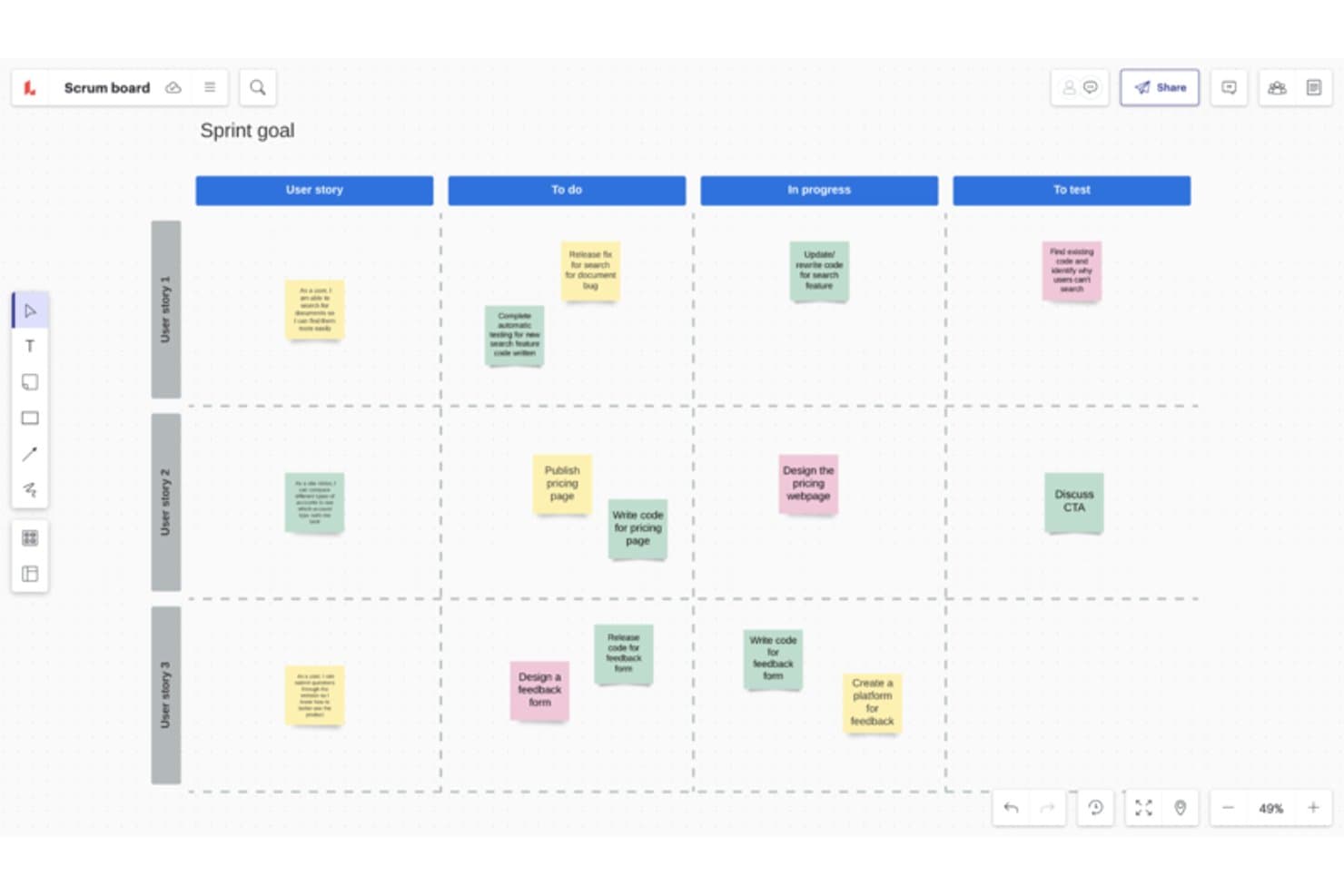
Lucidspark's customizable templates and frameworks align with Agile methodologies such as Scrum and Kanban. Lucidspark is a visual whiteboard tool that layers agile ceremony features—sprint planning templates, story point estimation, retrospective activities, and cross-team dependency mapping—on top of existing systems like Jira and Azure DevOps.
Who Is Lucidspark Best For?
Lucidspark is a strong fit for Scrum Masters and agile coaches who facilitate ceremonies like sprint planning, retrospectives, and standups across distributed teams.
Why I Picked Lucidspark
Lucidspark earns its spot on my shortlist as the best infinite canvas for agile standups, sprint planning, and retrospectives because it's built around the ceremonies themselves. I love the Team Estimation activity, where the whole team drops story point votes onto cards simultaneously and reviews them as a group—it replicates the feel of in-person planning poker without the awkward back-and-forth. The built-in facilitation tools, like timed voting, anonymous private mode, and breakout boards, make running a retrospective with a distributed team feel genuinely structured rather than chaotic.
Lucidspark Key Features
- Two-way Jira and Azure DevOps sync: Changes made in Lucidspark update your connected Jira or Azure DevOps project, and changes there reflect back in your board automatically.
- Dependency mapping: Teams can draw dependencies directly on the canvas, and those links sync bidirectionally with Jira or Azure DevOps for cross-team visibility.
- Dynamic Tables: Cards pulled from your backlog can be organized into tables for effort estimation, assignee tracking, and team bandwidth review.
- Lucid AI idea generation: The built-in AI can generate boards, summarize sticky notes, sort ideas, and surface a chat assistant to support planning sessions.
Lucidspark Integrations
Lucidspark offers 100+ integrations, including two-way sync with Jira Cloud and Azure DevOps Cloud, plus Airtable, Asana, Google Sheets, monday.com, and Smartsheet. It also connects with Microsoft Teams, Slack, Microsoft Copilot, and supports an MCP server and developer platform for custom integrations.
Pros and Cons
Pros:
- Supports anonymous retrospective participation
- Makes cross-team dependencies visible
- Facilitates structured sprint planning sessions
Cons:
- Provides no native velocity reporting
- Doesn’t replace a backlog system
Learn more about Lucidspark:
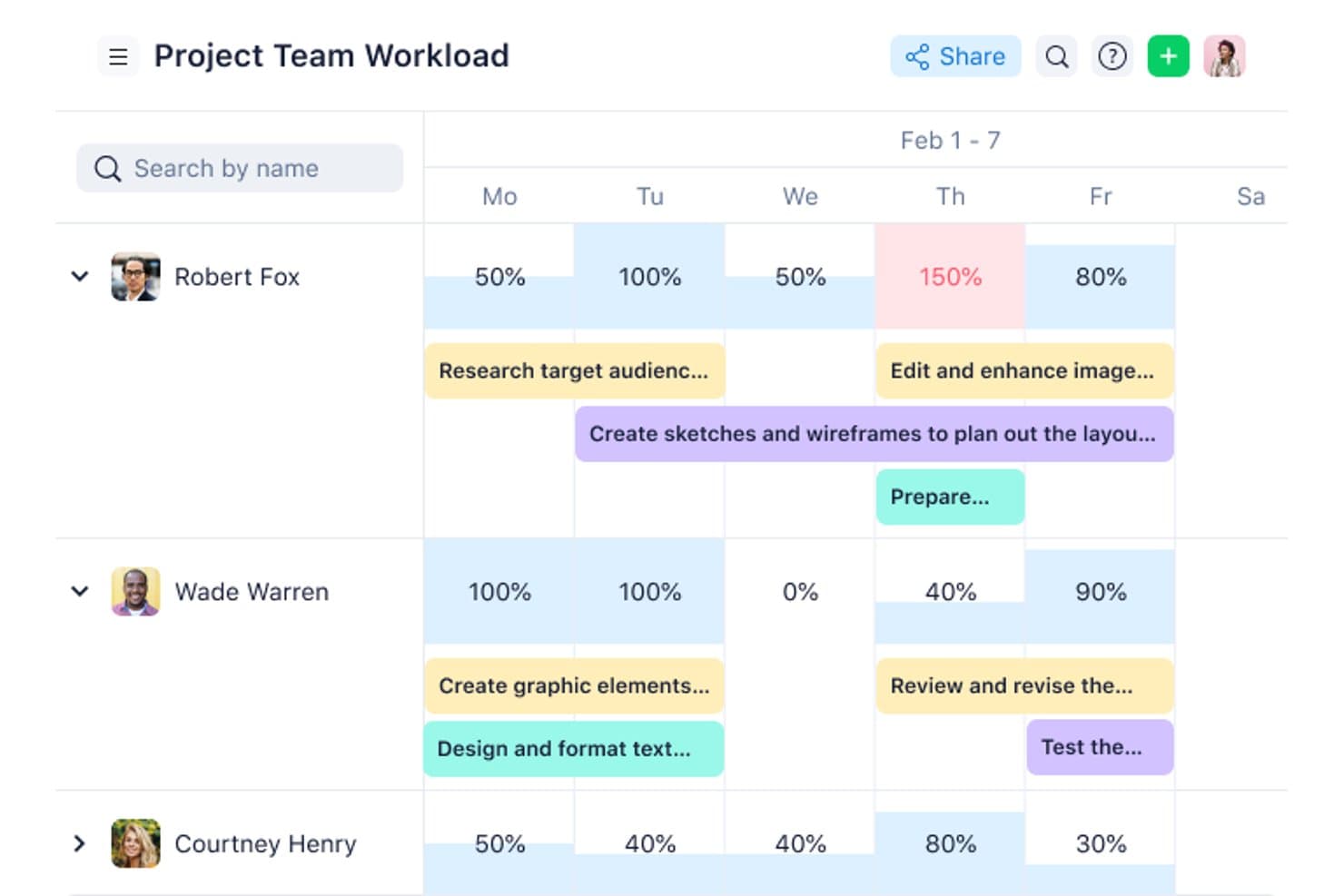
Wrike connects to hundreds of cloud and on-premise apps to diversify your product workspace. Wrike is a work management platform that supports agile workflows through Kanban boards, Gantt charts, customizable sprint templates, and cross-functional dashboards.
Who Is Wrike Best For?
Wrike is a strong fit for cross-functional teams that need to connect agile workflows across a wide range of tools, from Jira and GitHub to Salesforce and Slack.
Why I Picked Wrike
I've included Wrike in my top picks because its integration depth is genuinely hard to match when your agile workflows span multiple tools. With 400+ prebuilt connectors covering dev tools like Jira and GitHub, CRMs like Salesforce, and BI platforms like Tableau, I can keep sprint boards, dashboards, and reporting in sync across an entire tech stack. The two-way sync with Jira is what stands out to me most, since engineering teams can update tickets in Jira while product work stays current in Wrike automatically.
Wrike Key Features
- Scrum space template: A prebuilt agile space that adds custom item types—Epics, Features, Stories, Bugs, and Sprints—along with custom workflows and automation rules.
- Kanban board view: Available on all plans, including Free, with customizable workflow stages and WIP limits to manage work in progress.
- Interactive Gantt charts: Available on the Team plan and above, these charts link directly to live tasks and support task dependencies for timeline tracking.
- Wrike Copilot: An AI assistant that answers questions, flags project risks, and helps prioritize work across your agile workspace.
Wrike Integrations
Wrike offers 400+ integrations, including Jira, GitHub, GitLab, Bitbucket, Azure, Slack, Microsoft Teams, and Google Workspace. Its 22+ system Two-Way Sync includes Jira and GitHub, while an API supports custom integrations.
Pros and Cons
Pros:
- Dashboards support cross-functional sprint visibility
- Gantt timelines connect roadmap dependencies to tasks
- Kanban boards include configurable WIP limits
Cons:
- Sprint tracking relies on custom item types
- Backlog prioritization lacks RICE and WSJF
 Best for remote collaboration during sprints
- 15-day free trial
- From $1/user/month (12 user minimum)
Visit WebsiteCustomer Rating:4.1/5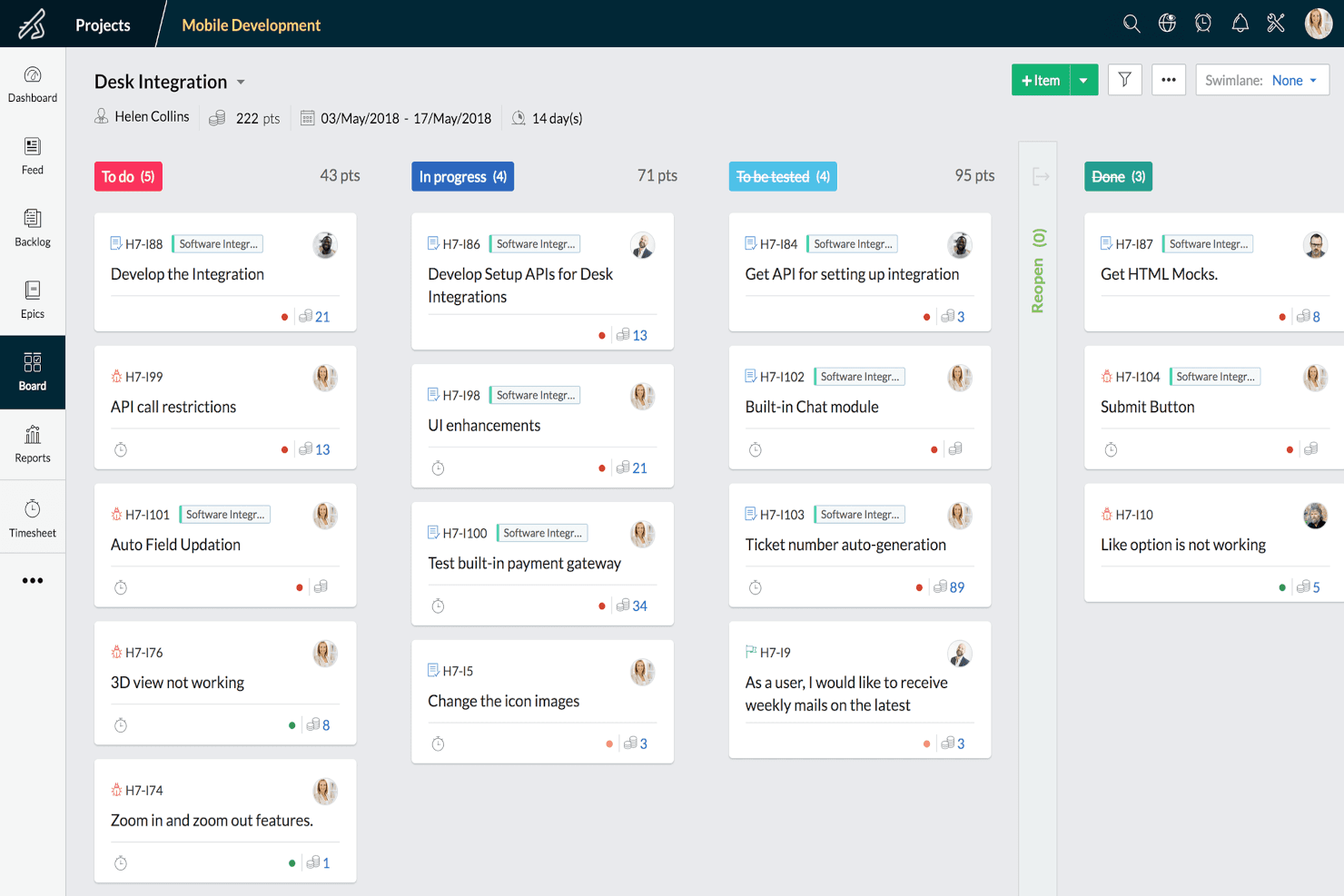
Zoho Sprints works as a Scrum tool for Agile teams to manage product backlogs and track progress on Scrum boards. Zoho Sprints is an agile project management tool that combines scrum and kanban boards, backlog management, sprint planning, release tracking, and built-in team collaboration features like chat, feed, and meetings.
Who Is Zoho Sprints Best For?
Zoho Sprints is a strong fit for scrum masters, product owners, and product managers on distributed teams who need built-in collaboration tools alongside their sprint workflow.
Why I Picked Zoho Sprints
I've included Zoho Sprints in my top picks because its built-in collaboration suite sets it apart from tools that rely on third-party add-ons for remote teamwork. During a sprint, your team can run stand-ups through the integrated Zoho Meeting, share updates via the team feed, and chat directly in the platform without switching tabs. I also like that client and vendor portals let outside collaborators join the workflow without needing a full license.
Zoho Sprints Key Features
- Scrum and Kanban boards: Both board types include WIP limits and swimlanes, available across all plans including the free tier.
- Burndown and velocity reports: Built-in charts track sprint progress and forecast future capacity using historical velocity data.
- Estimation planner: A planning poker-style feature where team members vote on work item estimates collaboratively.
- Engineering tool integrations: Two-way sync with Azure DevOps, plus connections to GitHub, GitLab, Bitbucket, and Jenkins for dev team workflows.
Zoho Sprints Integrations
Zoho Sprints integrates with Azure DevOps, GitHub, GitLab, Bitbucket, Jenkins, Jira, Trello, Microsoft 365, Google apps, Zoho Cliq, and Zoho Meeting. Its REST API, webhooks, and custom functions support additional integrations.
Pros and Cons
Pros:
- Scrum and Kanban boards include WIP limits
- Detailed velocity and flow reporting
- Built-in meetings support remote sprint rituals
Cons:
- Cross-team dependency mapping remains limited
- No dedicated visual roadmap for strategy
Learn more about Zoho Sprints: Best for cross-functional resource allocation
- 14-day free trial + free demo available
- From $10/user/month (billed annually)
Visit WebsiteCustomer Rating:4.5/5
Celoxis project workplan with a Gantt chart for scheduling tasks and milestones. Celoxis is a project portfolio management (PPM) platform that covers agile project planning, resource management, portfolio tracking, workflow customization, and BI-grade reporting for a range of teams and project types.
Who Is Celoxis Best For?
Celoxis suits mid-to-large organizations that handle multiple projects involving cross-functional teams with complex resource and reporting needs.
Why I Picked Celoxis
Celoxis earns its spot on my shortlist because of how it handles resource allocation across departments running different project types simultaneously. I can assign resources by role and allocate them based on percentage of availability, which prevents double-booking across engineering, design, and QA. Soft booking lets me tentatively reserve capacity before a project is confirmed, so sprint planning never starts blind on available headcount.
Celoxis Key Features
- Kanban boards: Visualize sprint tasks and manage work in progress with drag-and-drop task cards.
- Interactive Gantt charts: Plan project timelines with task dependencies, milestones, and drag-and-drop scheduling.
- Project request forms: Capture and approve new project requests through customizable intake forms and workflows.
- Custom workflow apps: Create no-code forms and workflows for risks, bugs, change requests, and other processes.
Celoxis Integrations
Celoxis integrates with tools such as Microsoft Project, Jira, QuickBooks Online, Salesforce, Okta, Slack, and GitHub, with additional integrations available through Zapier. It also provides an API for custom integrations.
Pros and Cons
Pros:
- Tracks project budgets, costs, and profitability
- Gantt charts update automatically with task changes
- Available in cloud or on-premises deployments
Cons:
- Mobile app has fewer features than desktop
- Reporting requires setup for complex workflows
Learn more about Celoxis: 5Best for Agile product management in real time
Miro
- Free plan + 14-day free trial available
- From $8/user/month (billed annually)
Visit WebsiteCustomer Rating:4.8/5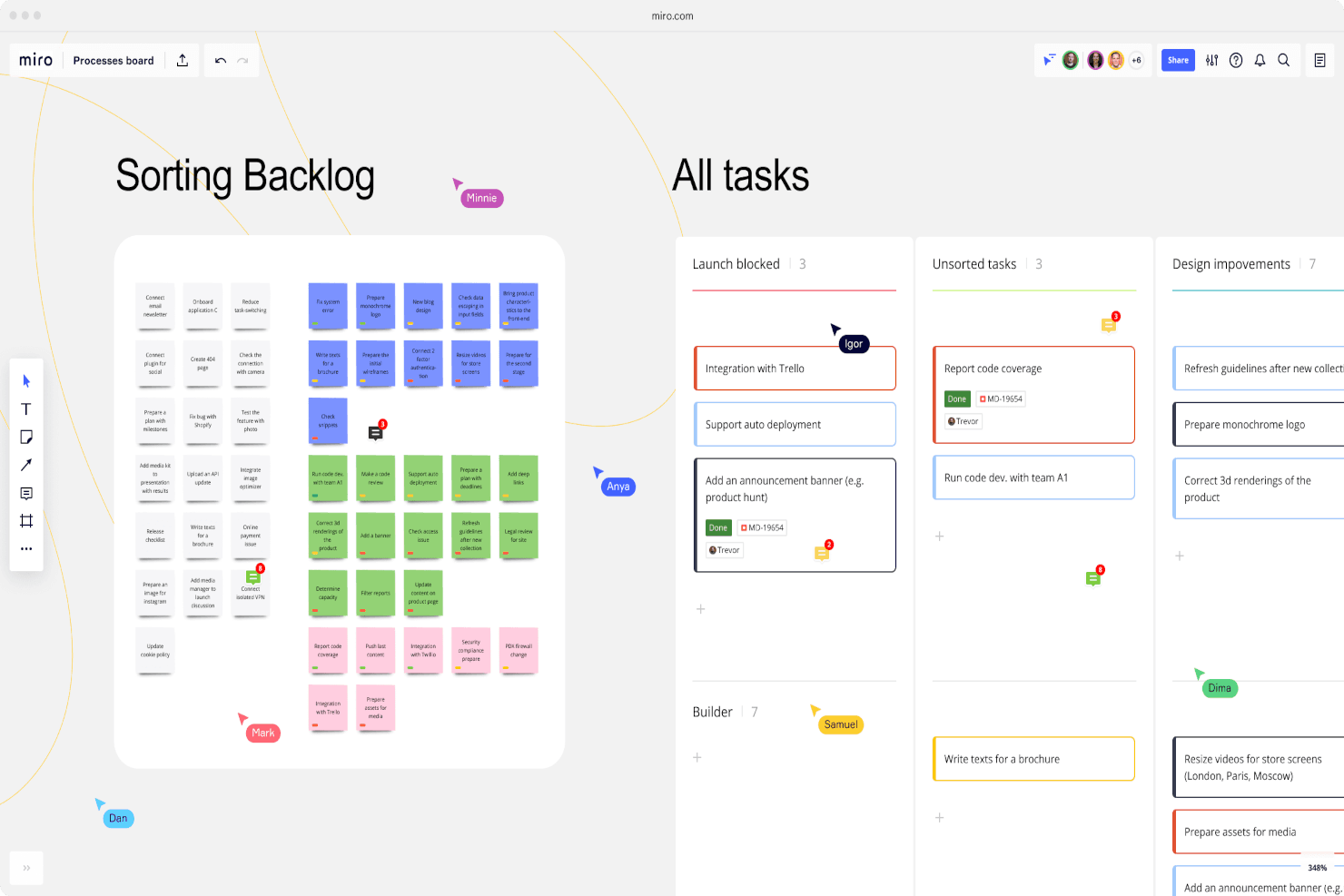
Miro's processes board provides project managers with a comprehensive overview of the entire process, ensuring transparency, accountability, and teamwork across all aspects of the project. Miro is a visual collaboration workspace built around an infinite canvas, offering agile teams tools for sprint planning, retrospectives, PI planning, roadmapping, dependency mapping, and real-time facilitation alongside two-way sync with tools like Jira and Azure DevOps.
Who Is Miro Best For?
Miro suits Scrum Masters, agile coaches, and distributed product teams who need a shared space for live planning ceremonies like sprint planning, retrospectives, and PI planning.
Why I Picked Miro
Miro earns its spot on my shortlist because real-time collaborative planning is where it genuinely excels. I love how the infinite canvas brings distributed agile teams together for live PI Planning sessions, sprint ceremonies, and retrospectives in a way that feels immediate and shared. The Dependency Mapping app lets teams visually surface cross-team risks during planning, and the built-in voting and timer tools keep facilitation moving without switching contexts.
Miro Key Features
- Estimations app: Lets your team collectively size user stories and tasks directly on the canvas, with results syncing back to Jira.
- Talktrack: Records an asynchronous audio and visual walkthrough of a board so stakeholders can review strategy on their own time.
- PI Planning board: A structured template supporting program increment planning across multiple agile teams, with built-in SAFe framework alignment.
- Two-way dev tool sync: Connects Miro to Jira, Azure DevOps, Asana, Linear, and ClickUp so changes in either tool reflect in both.
Miro Integrations
Miro offers 250+ integrations, including Microsoft Teams, Slack, Google, and Adobe, plus built-in two-way integrations with Jira, Azure DevOps, Asana, Linear, and ClickUp on Business and above. The Miro Marketplace and API support additional connections.
Pros and Cons
Pros:
- Talktrack supports asynchronous stakeholder roadmapping
- Dependency mapping exposes cross-team delivery risks
- Real-time PI planning unites distributed teams
Cons:
- Backlog ownership depends on external delivery systems
- Native velocity and burndown reporting are absent
 Best free Agile tool with built-in sprint reports
- Free plan available
- From $9/user/month (billed annually)
Visit WebsiteCustomer Rating:4.6/5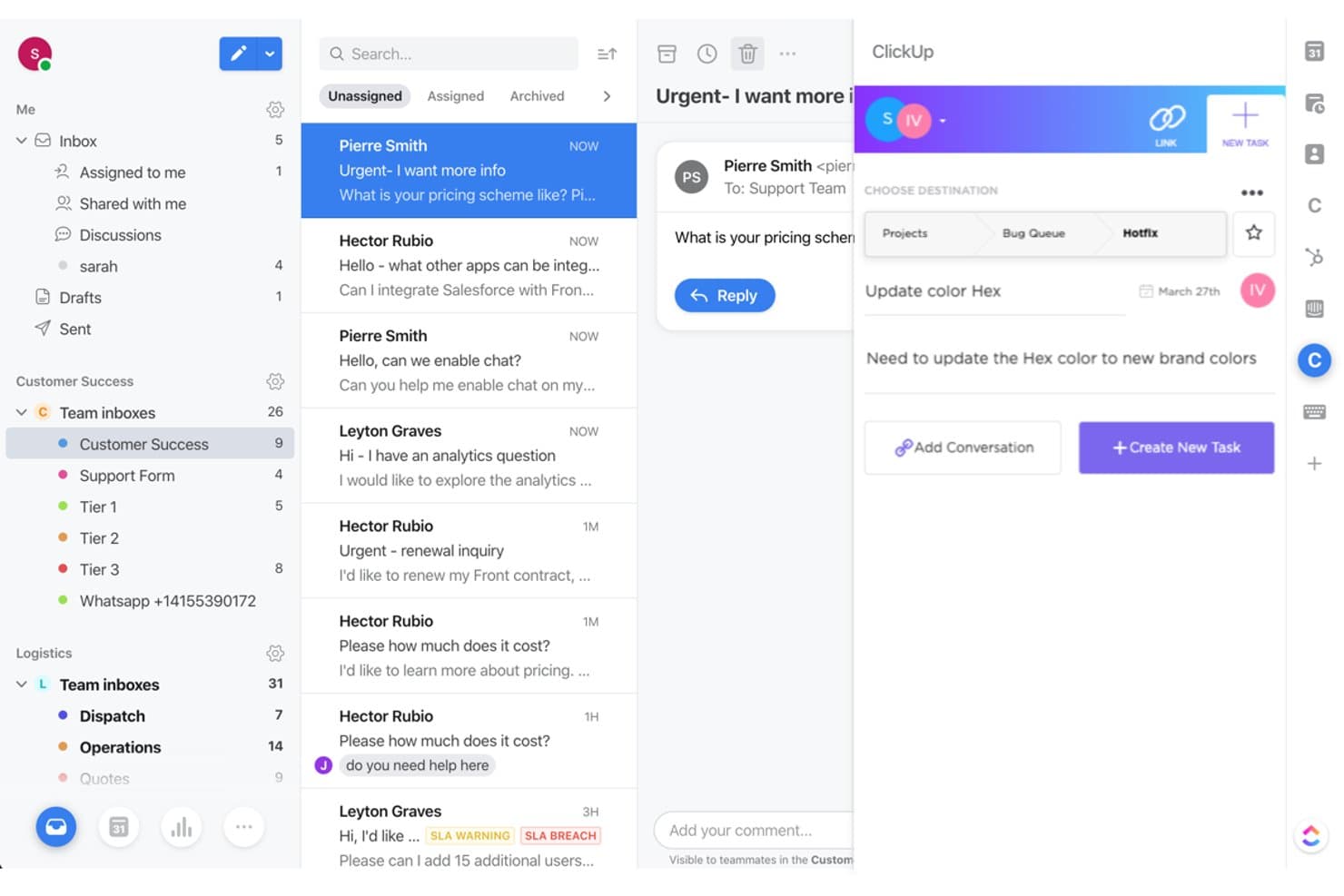
The freemium plan lets unlimited members communicate and collaborate with ease. ClickUp is an all-in-one agile project management platform that combines backlog management, sprint planning, Kanban boards, roadmapping, and built-in agile reporting including burndown, velocity, and cumulative flow charts.
Who Is ClickUp Best For?
ClickUp is a strong fit for small to mid-sized agile teams that want sprint planning, backlog management, and built-in reporting without paying for multiple tools.
Why I Picked ClickUp
I picked ClickUp as one of the best because its free plan includes sprint management and built-in agile reports that most tools lock behind paid tiers. I love that burndown, velocity, and cumulative flow charts come out of the box, so my team can track sprint health without building custom dashboards. Sprint automations also handle spillover and task transitions, cutting the admin work between sprints.
ClickUp Key Features
- Custom fields and task hierarchy: Organize work across Spaces, Folders, Lists, and Tasks, with custom fields like dropdowns, formulas, and currency to fit your backlog structure.
- Sprint automations: Set no-code "When > Then" rules that handle spillover tasks, status transitions, and sprint setup automatically between cycles.
- Cross-team dependency tracking: Link tasks across Lists and Spaces as blocking or waiting on, with visual indicators in List, Gantt, and Timeline views on all plans.
- Goals and portfolio management: Track progress against targets by linking Goals directly to tasks, giving you a live view of how work connects to outcomes.
ClickUp Integrations
ClickUp claims 1,000+ integrations, including GitHub, Figma, Google Drive, Dropbox, Outlook, Salesforce, Zoom, Slack, and HubSpot. It also offers a public API for custom integrations.
Pros and Cons
Pros:
- Cross-team dependencies span multiple workspaces
- Free sprint management supports smaller teams
- Built-in burndown and velocity reports
Cons:
- Large projects can feel cluttered
- Backlog prioritization requires custom scoring fields
Learn more about ClickUp: 7Best for scaling agile across teams and portfolios
Jira
- Free plan available
- From $8.48/user/month
Visit WebsiteCustomer Rating:4.4/5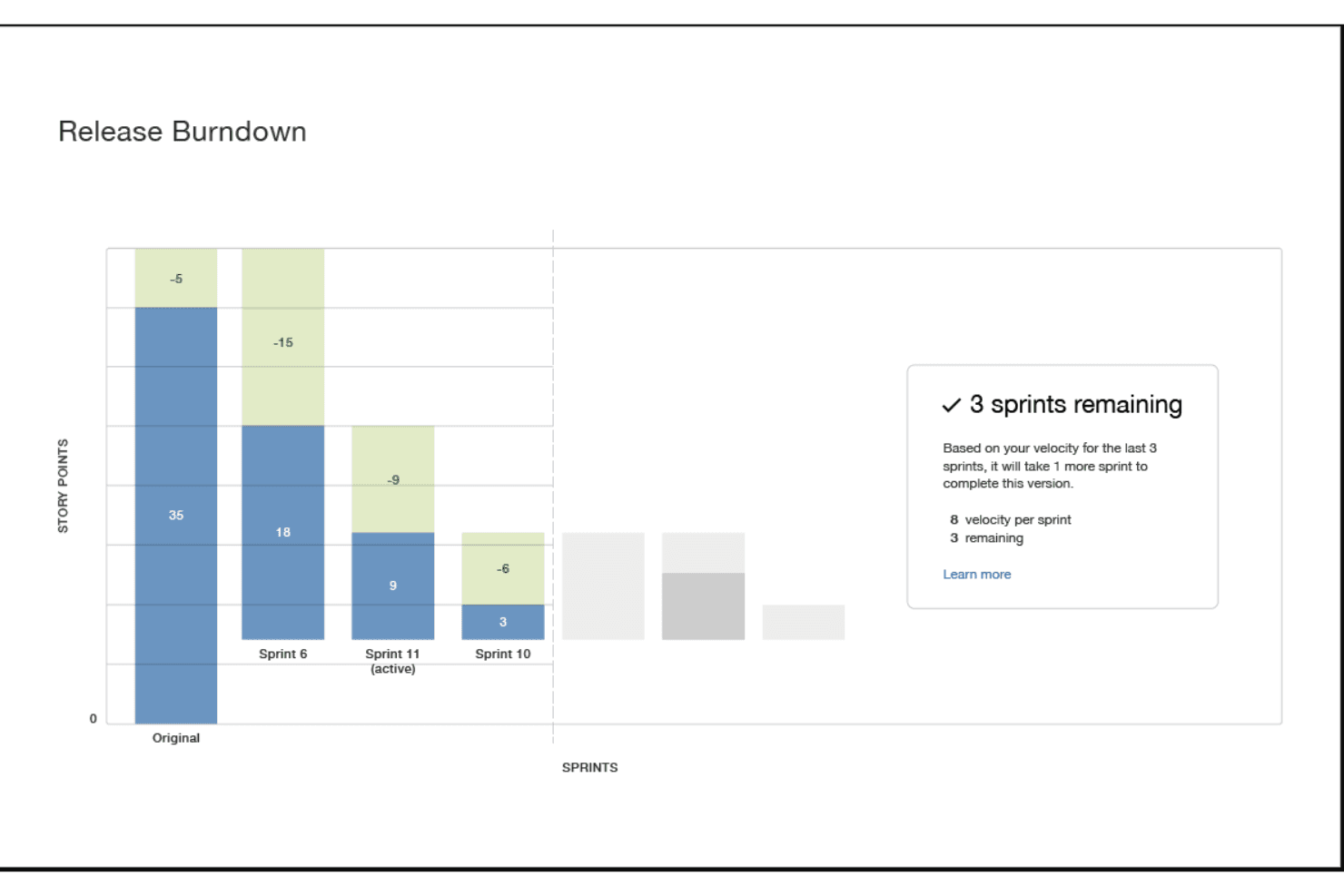
Jira Software includes several reports, like burndown/burnup charts and sprint reports, which are essential for tracking the performance of Agile teams and making informed decisions. Jira is an agile project management platform that combines backlog management, sprint planning, roadmapping, and configurable Scrum and Kanban boards with built-in velocity reporting and AI-assisted workflow automation.
Who Is Jira Best For?
Jira is a strong fit for product and engineering teams that need to coordinate multiple squads, manage complex backlogs, and scale agile practices across an entire organization.
Why I Picked Jira
Jira earns its spot on my shortlist because no other tool scales agile as cleanly from a single squad to a multi-team portfolio. I particularly like how Goals-to-backlog linkage lets product teams connect OKRs directly to sprint work, so strategy and delivery stay aligned without manual updates. Rovo AI adds real value by flagging dependency risks and breaking down initiatives automatically as work moves through your workflow.
Jira Key Features
- Scrum and Kanban boards: Fully configurable boards with swimlanes, WIP limits, and custom column statuses for both Scrum and Kanban workflows.
- No-code automation: Rule-based automation is available on every plan, letting teams trigger actions and AI agents without writing any code.
- Built-in velocity and burndown reports: Out-of-the-box sprint reports, velocity charts, and cumulative flow diagrams track team performance across every sprint.
- Guest access: External collaborators can view and contribute to Jira projects without consuming a paid user seat.
Jira Integrations
Jira offers native integrations with Confluence, Bitbucket, Figma, Slack, Gmail, and Google and Microsoft tools. Its Marketplace provides 3,000+ integrations, and its API supports custom connections.
Pros and Cons
Pros:
- Built-in velocity reports support sprint retrospectives
- Links strategic goals directly to backlog work
- Scales agile governance across multiple teams
Cons:
- Configurable workflows can overwhelm smaller teams
- Advanced prioritization scoring requires separate tools
 Best for enterprise SAFe and PI planning
- Free trial + free demo available
- Pricing upon request
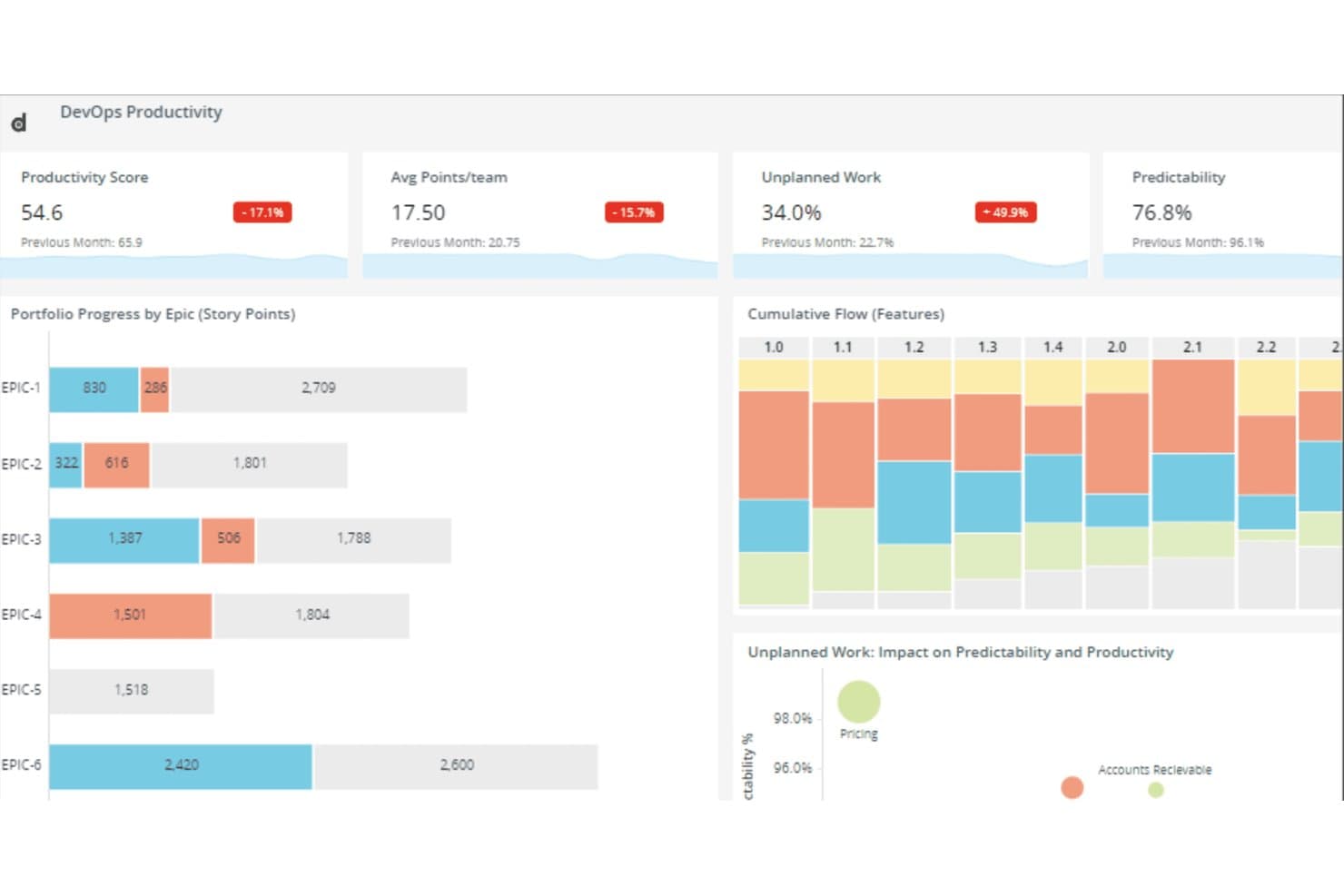
Digital.ai Agility tracks DevOps productivity metrics and epic progress in one view. Digital.ai Agility is an enterprise agile planning platform that covers portfolio, program, and team-level planning in one place, with built-in SAFe support, PI planning, backlog management, roadmapping, dependency tracking, and performance reporting.
Who Is Digital.ai Agility Best For?
Digital.ai Agility is a strong fit for enterprise PMOs and agile program managers running SAFe at scale across multiple teams and portfolios.
Why I Picked Digital.ai Agility
Digital.ai Agility earns its spot on my shortlist because no other tool I've reviewed handles SAFe at scale as natively. Built-in PI planning runs across portfolio, program, and team levels without requiring third-party plugins, and OKR-to-backlog traceability means strategic objectives connect directly to epics and stories. I also like that cross-team dependency tracking ships in every edition, so teams can see upstream and downstream blockers before they become release risks.
Digital.ai Agility Key Features
- IdeaSpace module: A dedicated space for capturing, developing, and prioritizing customer-focused ideas before they enter your execution backlog.
- Agility Lens analytics: A Premium data lake that aggregates data from Digital.ai and third-party tools, with 100+ prebuilt metrics and self-service exploration.
- Bi-directional sync: Pro and Premium editions connect to Jira, Azure DevOps, ServiceNow, and Rally with two-way data sync via Agility Sync.
- Flexible deployment options: Every edition supports both on-premise and hosted deployment, making it viable for regulated industries and government teams.
Digital.ai Agility Integrations
Digital.ai Agility supports bi-directional integrations with Jira, Azure DevOps, ServiceNow, Rally, and Salesforce through Agility Sync, available in Pro and Premium. It also offers a GitHub integration and a framework for custom integrations.
Pros and Cons
Pros:
- Detailed reporting improves cross-team coordination
- Portfolio-to-team planning supports enterprise alignment
- Built-in SAFe PI planning
Cons:
- Capabilities vary significantly between editions
- Busy navigation slows daily work
Learn more about Digital.ai Agility:
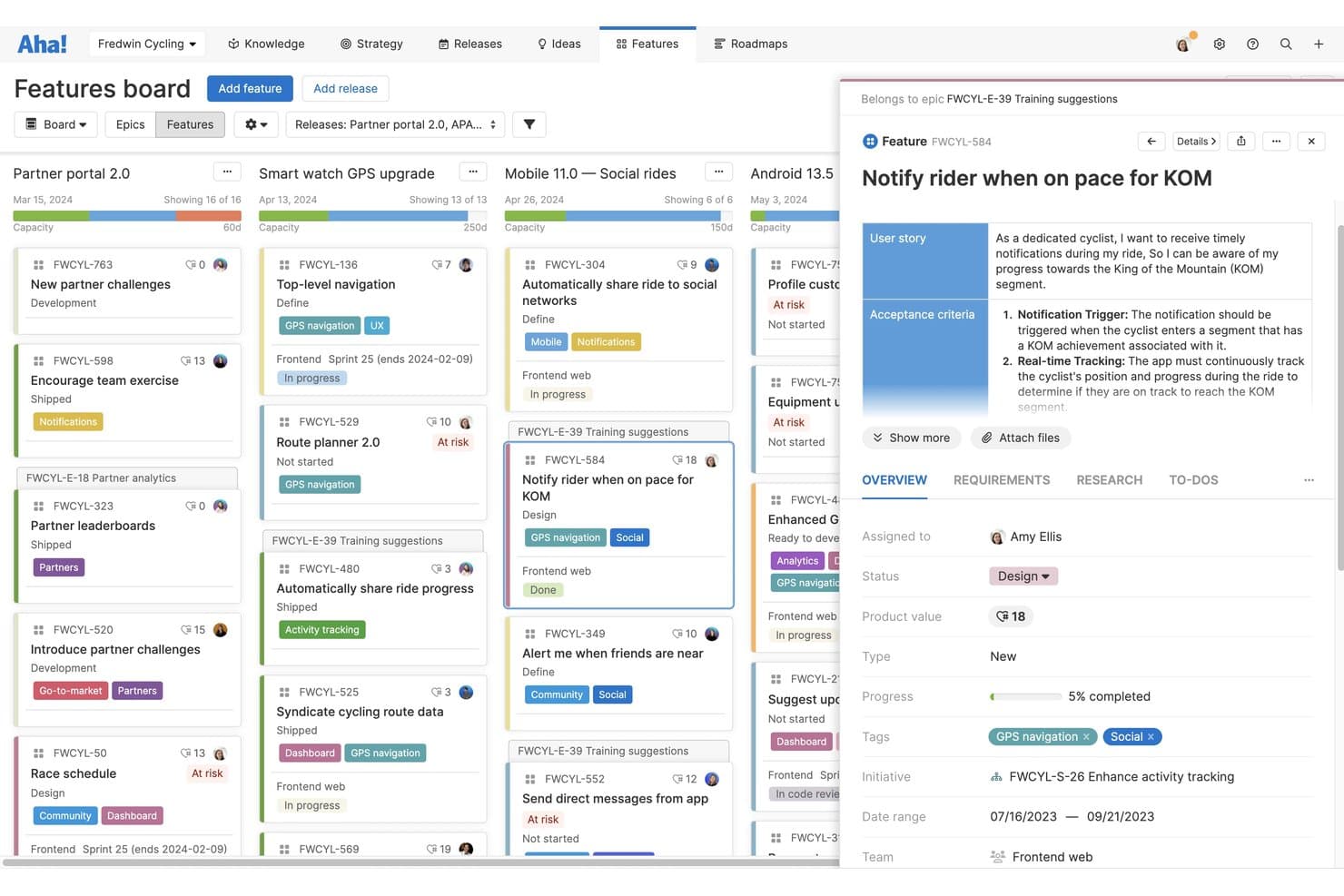
Aha! lets users manage features with detailed cards and status tracking. Aha! is an agile product management suite that connects strategy, roadmapping, idea crowdsourcing, and sprint delivery across a set of integrated products—Roadmaps, Ideas, Develop, and Discovery.
Who Is Aha! Best For?
Aha! is a strong fit for product managers and product owners at mid-size to enterprise companies who need to connect high-level strategy to sprint-level delivery in one place.
Why I Picked Aha!
I picked Aha! as one of the best because it's the only tool on my list that genuinely traces a strategic goal all the way down to a sprint story. You can set a company goal, tie it to an initiative, break that into features, and land it directly in a Develop sprint, with burndown and cycle time reports closing the loop. I also love that scorecard-based prioritization keeps backlog decisions tied to strategy rather than gut feel.
Aha! Key Features
- Idea portal: Run branded portals where users submit, vote on, and track ideas, with automatic status updates sent back to submitters.
- AI assistant (Elle): Generate user stories, create records, analyze feedback themes, and produce wireframes across the Aha! suite using shared AI credits.
- SAFe framework support: Plan and coordinate work across multiple teams using built-in Scaled Agile Framework support in Aha! Develop.
- Sprint performance reports: Access burndown, burnup, cycle time, and throughput charts directly in Aha! Develop to track sprint health and delivery trends.
Aha! Integrations
Aha! documents 40+ Roadmaps integrations and 35+ Develop integrations, including Jira, Azure DevOps, GitHub, Azure Pipelines, Salesforce, and Zendesk. An open API supports custom integrations and data export.
Pros and Cons
Pros:
- Crowdsources ideas through branded feedback portals
- Prioritizes backlogs with scorecard-based decision-making
- Connects strategy directly to sprint stories
Cons:
- Day-to-day sprint management feels less lightweight
- Large portfolios can overwhelm users
Learn more about Aha!: Best for scaled Agile portfolio planning
- Free demo available
- Pricing upon request
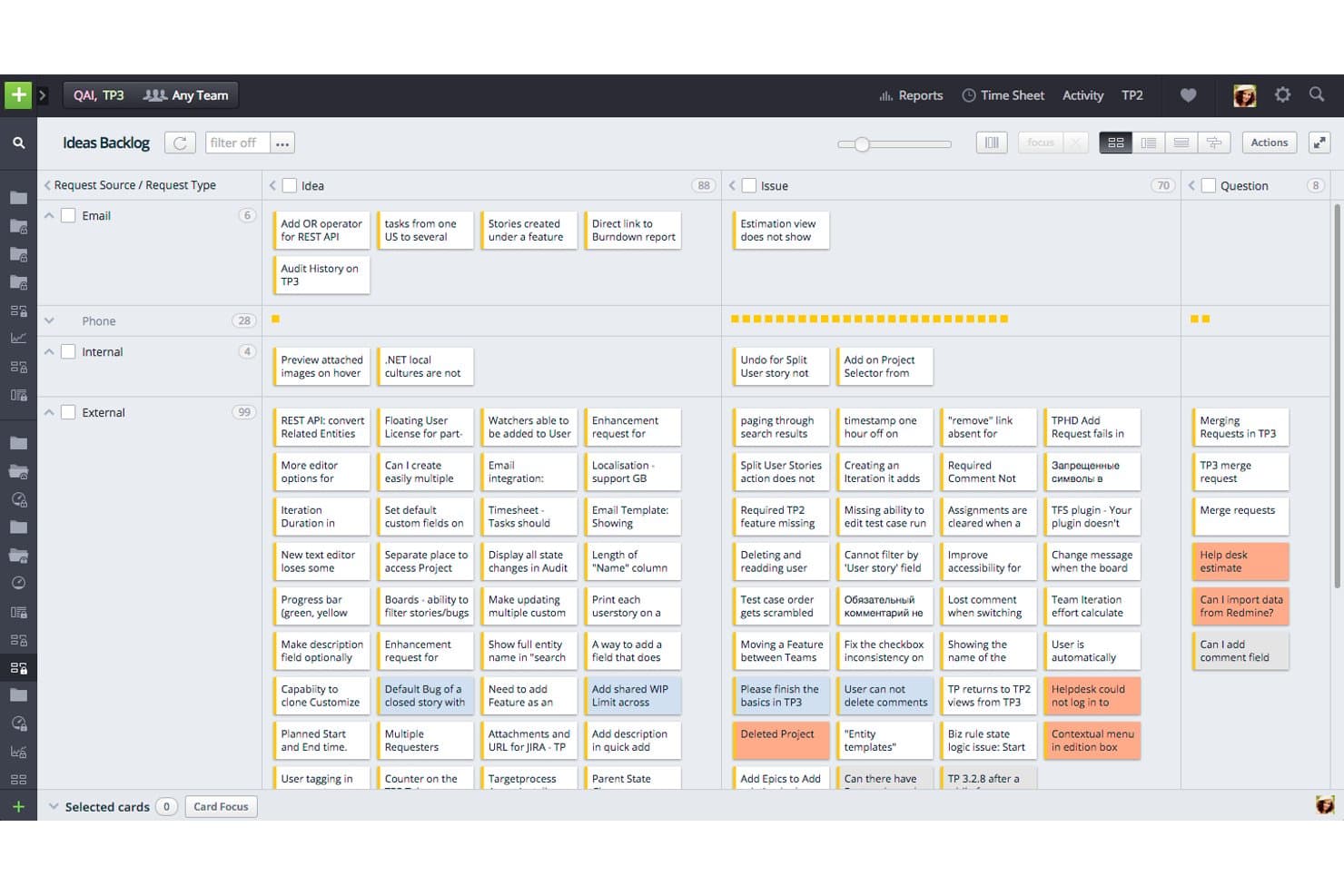
Targetprocess organizes backlog requests by source, type, and priority. IBM Targetprocess is an agile project management platform designed for enterprise-scale teams, offering multi-level backlog management, sprint and iteration planning, SAFe-aligned portfolio structures, roadmapping, and OKR-to-backlog traceability across teams, ARTs, and solution trains.
Who Is Targetprocess Best For?
Targetprocess is a strong fit for enterprise teams running SAFe or scaled agile frameworks, where managing work across ARTs, solution trains, and portfolios is a daily reality.
Why I Picked Targetprocess
I picked Targetprocess as one of the best because it's the only tool on my list that maps the full SAFe hierarchy—from Portfolio Epics down to team-level stories—without requiring workarounds. I especially like how OKRs connect directly to backlog items, so progress on a Key Result updates automatically as teams complete work. The PI Planning solution ties ART-level objectives to individual team iterations, which is exactly what large-scale agile programs need.
Targetprocess Key Features
- Multi-level backlog management: Organize work across Portfolio Epics, Features, and Stories with drag-and-drop prioritization and batch operations.
- SAFe Measure and Grow assessments: Run maturity assessments at the Team, ART, Solution Train, and Portfolio levels to track agile adoption.
- Scenario planning: Model and compare strategic options at the portfolio level before committing to a direction.
- Custom reporting and dashboards: Build visual and tabular reports with custom formulas, BI reports, and burndown charts across teams and programs.
IBM Targetprocess Integrations
IBM Targetprocess lists dozens of integrations, including Jira, Azure DevOps, GitHub, Jenkins, Miro, Slack, and Microsoft Teams. It also provides a REST API for custom integrations and supports Git commit linking.
Pros and Cons
Pros:
- Configurable reports support portfolio-level decisions
- OKRs connect strategy with backlog execution
- Deep SAFe hierarchy supports scaled planning
Cons:
- Reviewers report confusing navigation for simple tasks
- Enterprise structure overwhelms smaller product teams
Learn more about Apptio Targetprocess:
Other Options
Here are a few more that didn’t make the top list, if you need additional suggestions for software that hones the Agile methodology for a product lifecycle.
- 11OnePlanBest for feature backlog management
- 12airfocusBest with built-in prioritization
- 13monday AI WorkspaceBest for AI-driven sprint risk alerts
- 14ZenhubBest for GitHub-native agile sprint tracking
- 15GitLabBest for dev-team agile planning and delivery
- 16LinearBest for engineering-led sprint and cycle planning
- 17ShortcutBest for hybrid Scrum and Kanban methodologies
- 18Jira AlignBest for enterprise-wide dependency and PI tracking
- 19Planview AgilePlaceBest for Kanban flow at portfolio scale
- 20Azure BoardsBest for DevOps-integrated agile tracking
How I Picked The Best Agile Product Management Software
Are you wondering how I selected the best Agile product management software for this list? I began by taking a look at Agile product management software with an abundance of positive user ratings.
I explored each platform to gain an understanding of what features they had to offer and what made them different from the competition. I chose the best of the bunch to finalize my long list.
From there, I applied the below evaluation criteria to see how each platform stacked up against the next. I drew on my years of experience in Agile product management to pick which solutions were most likely to provide the most value. This is how I arrived at my shortlist.
How I Evaluate Agile Product Management Software
I weigh core functionality most heavily—specifically, whether a tool lets teams manage and prioritize a backlog and plan and track sprints in real time. From there, I look at standout features like OKR-to-backlog linkage and consider onboarding support and pricing value.
Core Functionality (Table Stakes For This List)
When I'm selecting tools for my list, I score each one on a scale from 0 (does not offer the functionality) to 5 (excels in this area) for each core functionality listed below. I then convert the total into a percentage to help assess each tool's overall fit, with extra weight on any functionalities I've deemed essential.
- Backlog Management (Essential): I check whether teams can create, rank, and groom work items in a structured backlog with flexible prioritization schemes.
- Sprint Planning & Tracking (Essential): Real-time progress visibility matters here, including capacity planning, sprint goals, and forecasting for upcoming iterations.
- Roadmapping Capabilities: I look for roadmaps that connect directly to backlog items so progress updates flow through automatically rather than requiring manual syncs.
- Agile Board Views: Boards should support both Kanban and Scrum workflows with options like swimlanes, WIP limits, and custom columns for different team setups.
- Velocity & Performance Reporting: Built-in burndown, burnup, and velocity charts help me assess whether a tool gives teams real insight into delivery trends over time.
- Cross-Team Dependency Tracking: I evaluate how well a tool surfaces blockers and handoffs across multiple teams, especially for organizations running several squads in parallel.
Once I have a list of tools that meet the criteria, I consider what sets each platform apart.
Differentiating Factors (What Sets Vendors Apart)
Here's how I compare and contrast different vendors:
Standout Features
I look for AI-assisted prioritization that suggests backlog ranking and story point estimates from historical team data—this saves hours of grooming when a team has hundreds of items in the queue. OKR-to-backlog linkage is equally important because I can trace every story back to a strategic objective, which makes stakeholder conversations about "why this sprint?" much easier. I also evaluate automated sprint health alerts that flag scope creep or capacity overloads before it's too late to course-correct.
Beyond Features
I evaluate how well each tool scales from a single scrum team to a multi-team portfolio setup without fragmenting backlogs or reporting. Integration depth matters just as much—I check for bi-directional sync with tools like Jira, GitHub, and Slack so sprint data stays current without manual updates. I also consider total cost of ownership, factoring in add-on fees for advanced reporting or premium support that can quietly inflate per-seat pricing as you scale agile practices across an organization.
Agile Product Management FAQs
Find answers to common questions other people ask about this topic.
What are the key features of Agile product management software?
When you’re choosing an Agile product management software solution, look for the following:
- Product roadmap templates: Simple workflow requirements should be automated or sped up in the perfect Agile environment; templates are one way of prioritizing agility.
- Stakeholders easily collaborate: Iteration, prioritization, and standups work best when stakeholders are given transparency on a team’s work.
- Product backlog metrics: Teams need to be able to review what items are needed and wanted so that they can quickly make judgment calls and prioritize features.
- Robust and flexible user stories: The Agile process relies heavily on team members being able to understand the customer journey.
- Scrum master roles and permissions: Should the Agile product development take a scrum route, being able to easily elevate a scrum master is a must.
What are the benefits of Agile product management software?
Agile product management software helps product development teams to iterate, gather timely feedback, and remain responsive to change so as to create products that customers love. Agile management systems help teams stay organized and on task, communicate with each other clearly, and prioritize actions based on what’s most important at each stage of the product development life cycle.
Speaking of benefits, you can learn how feature flagging can benefit your team in managing how the product scales.
Who uses Agile product management software?
Generally speaking, Agile product management software is used by product managers and their teams. More specifically, the product owner, scrum master, and additional stakeholders (potentially IT, operations, and marketing personnel from the company depending on the organization’s configuration) will all have access to these Agile management tools in order to collaborate and iterate throughout the development process.
If you are looking to hire a product manager, read how to create an effective job description to hire the best talent.
How do I implement Agile product portfolio management?
If you are reading this, it means you are involved in multiple product creations at the same time. While you will definitely benefit from product portfolio management, there are certain principles that you have to follow to guarantee success. These are:
- Testing, learning, and adapting
- Scaling transparency
- Continuous experimentation
Once you understand these principles, you’ll have to decide whether to build or buy your framework, create an implementation strategy, and prepare your organization for new processes. You can read all about this implementation process and portfolio principles in our product portfolio implementation guide.