

Managing a product's lifecycle can be tricky, especially when you're juggling customer needs, market trends, and team dynamics. You might find yourself overwhelmed with data and unsure of the right direction. That's where product discovery tools come in.
These tools help you and your team gather insights, prioritize features, and make informed decisions. In my experience, they alleviate the stress of guesswork.
I've tested and reviewed several options to give you an unbiased, well-researched list of the best tools available. In this article, you'll find concise reviews, key features, and what makes each tool stand out. Let's find the right tool to help your team succeed.
Why Trust Our Software Recommendations
6,700+
Reviews
20
Industry experts
16+
Evaluation factors
14
Years
Our team has been testing and reviewing software since 2012. As product managers ourselves, we know how difficult—and important—it is to choose the right software.
For this guide, we evaluated tools using hands-on testing and independent research, scoring tools using our selection criteria.
Our reviews reflect our human editorial judgment, not a sales pitch.
Expert reviewers:
- Andrew LumbySenior TPM
- Cristiano ValimSenior UI/UX Lead


Product Discovery Tools Comparison Table
This comparison table summarizes pricing details for my top product discovery tools selections:
| Tool | Best For | Trial Info | Price | ||
|---|---|---|---|---|---|
| 1 | Best for discovery-to-roadmap evidence traceability | Free demo available | Pricing upon request | Website | |
| 2 | Best for AI-driven feedback-to-roadmap workflows | Free plan available | Pricing upon request | Website | |
| 3 | Best for end-to-end feedback-to-roadmap traceability | Free plan available; 14-day free trial; free demo available | From $12/user/month (billed annually) | Website | |
| 4 | Best for OST-based continuous discovery | 7-day free trial | From $25/user/month | Website | |
| 5 | Best for AI-moderated interviews at scale | Free plan available | Pricing upon request | Website | |
| 6 | Best for visual brainstorming in product teams | Free plan + 14-day free trial available | From $8/user/month (billed annually) | Website | |
| 7 | Best for evidence-linked feature prioritization | Free demo available | Pricing upon request | Website | |
| 8 | Best for prioritization-driven feature decisions | Free demo available | Pricing upon request | Website | |
| 9 | Best for feedback-to-roadmap traceability | 14-day free trial + free demo available | Pricing upon request | Website | |
| 10 | Best for AI-driven continuous customer insight | Free plan + free demo available | Pricing upon request | Website |


Best Product Discovery Tool Reviews
Below are my detailed summaries of the best product discovery tools that made it onto my shortlist. My reviews offer a detailed look at the key features, pros & cons, integrations, and ideal use cases of each tool to help you find the best one for you.
 Best for discovery-to-roadmap evidence traceability
- Free demo available
- Pricing upon request
Visit WebsiteCustomer Rating:4.4/5
ProductPlan's roadmap platform focuses on product development. My Evaluation Score
- Prioritization Frameworks
- Excels
- Hypothesis Validation Tools
- Adequate
- Insight Synthesis & Tagging
- Adequate
- Customer Feedback Aggregation
- Adequate
- Opportunity & Idea Management
- Strong
- Discovery Collaboration & Sharing
- Strong
ProductPlan is a dedicated roadmapping platform designed to facilitate strategic planning and visualization of product timelines. Its features enable users to establish clear product strategies and communicate them effectively, aligning with its strength in high-level strategic planning and visualization.
Why I Picked ProductPlan:
I selected ProductPlan due to its singular focus on providing a comprehensive strategic planning platform. Its ability to display complex product timelines visually makes it stand out among similar tools. Based on my comparison and judgment, ProductPlan serves as an optimal choice for teams that require efficient visualization of their product roadmaps and strategic planning.
Standout Features & Integrations:
ProductPlan's most useful features include roadmap creation, planning templates, goal setting and tracking, prioritization, and collaboration tools. Its integrations include popular platforms like Jira, Trello, Slack, and Microsoft Teams, among others, making it easy to incorporate into an existing workflow.
Pros and Cons
Pros:
- Efficient collaboration tools
- Strong integrations with popular project management tools
- Powerful visualization of product timelines
Cons:
- Higher pricing point compared to some competitors
- Lacks detailed project management features
- The user interface might take time to understand
Learn more about ProductPlan: Best for AI-driven feedback-to-roadmap workflows
- Free plan available
- Pricing upon request
Visit WebsiteCustomer Rating:5/5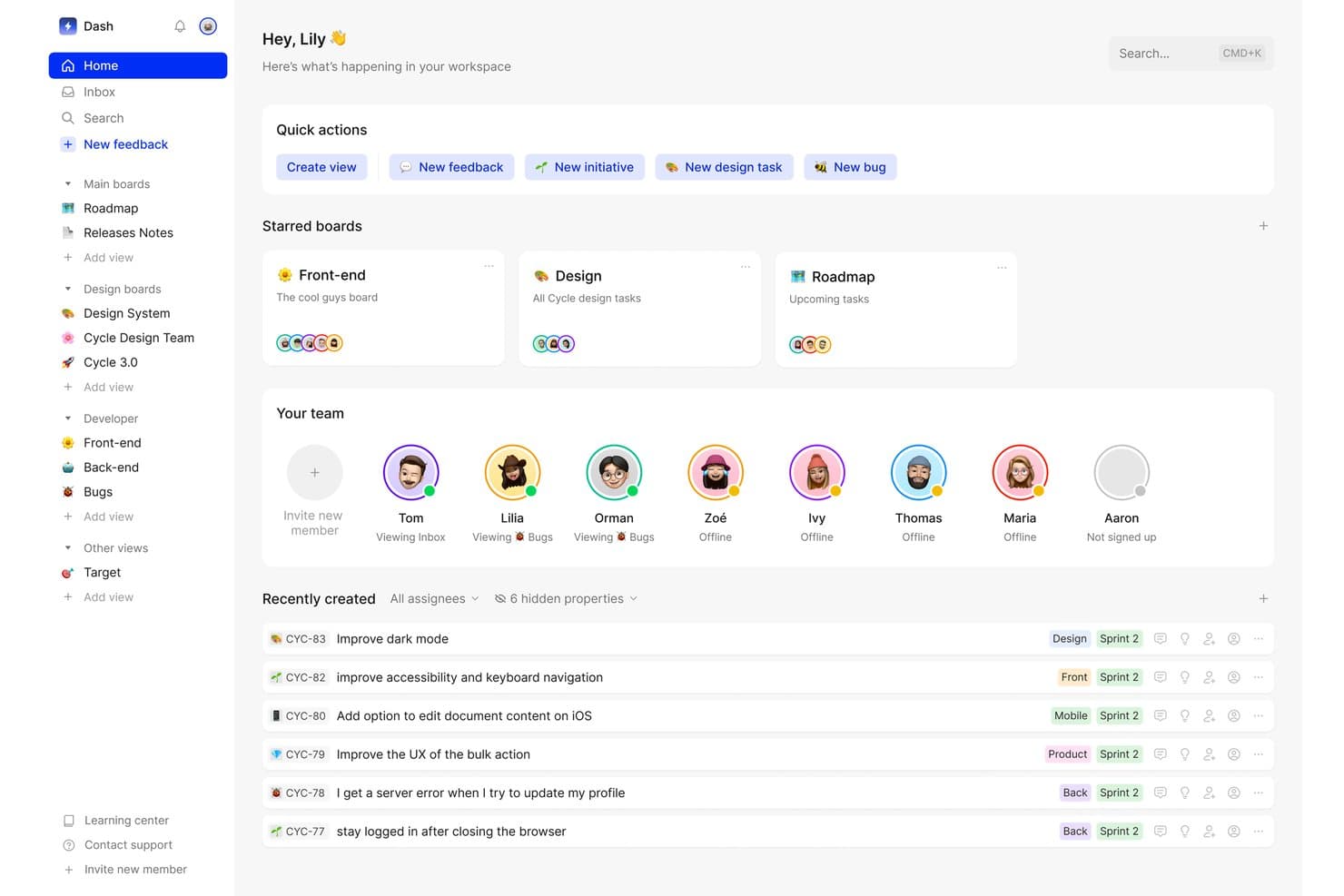
Cycle centralizes team tasks, feedback, and boards in one workspace. My Evaluation Score
- Prioritization Frameworks
- Minimal
- Hypothesis Validation Tools
- Limited
- Insight Synthesis & Tagging
- Excels
- Customer Feedback Aggregation
- Excels
- Opportunity & Idea Management
- Strong
- Discovery Collaboration & Sharing
- Excels
Cycle was a product discovery and feedback management platform that centralized multi-source customer feedback, generated AI-powered insights, and connected those insights to roadmap planning and release management.
Who Is Cycle Best For?
Cycle was a strong fit for product teams that needed to consolidate high-volume customer feedback from multiple channels and connect those insights directly to roadmap decisions.
Why I Picked Cycle
I've included Cycle in my top picks because it handles the full arc from raw customer signal to roadmap decision better than almost anything else I've seen. The @VoiceHunter agent automatically synthesizes interview notes and tags incoming feedback, while @LoopCloser notifies customers the moment their requested feature ships. What I find most compelling is how these AI agents turn what's usually a manual, scattered process into a continuous, largely automated workflow.
Cycle Key Features
- Multi-source feedback ingestion: Cycle automatically pulls customer feedback from Slack, Intercom, Zendesk, Gong, HubSpot, and meeting transcripts into a single hub.
- Cycle Ask NLP querying: An add-on that lets you search your entire feedback corpus using natural language questions to surface relevant customer signals on demand.
- Unlimited free Collaborator seats: Stakeholders like engineers, sales reps, and CS team members can join, comment, and submit feedback without taking up a paid seat.
- Release notes and changelog publishing: Teams can draft and publish AI-assisted release notes connected to a publicly hosted, custom-domain changelog.
Cycle Integrations
Cycle offered native integrations with Notion, Linear, GitHub, Figma, and Miro, plus integrations with Slack, Jira, Confluence, HubSpot, and Salesforce. It also provided a public API and Zapier connectivity.
Pros and Cons
Pros:
- Unlimited free collaborator seats support teamwork
- AI agents automate feedback synthesis workflow
- Excels at multi-source feedback aggregation
Cons:
- Lacks native hypothesis validation features
- No longer available as a standalone product
Learn more about Cycle: Best for end-to-end feedback-to-roadmap traceability
- Free plan available; 14-day free trial; free demo available
- From $12/user/month (billed annually)
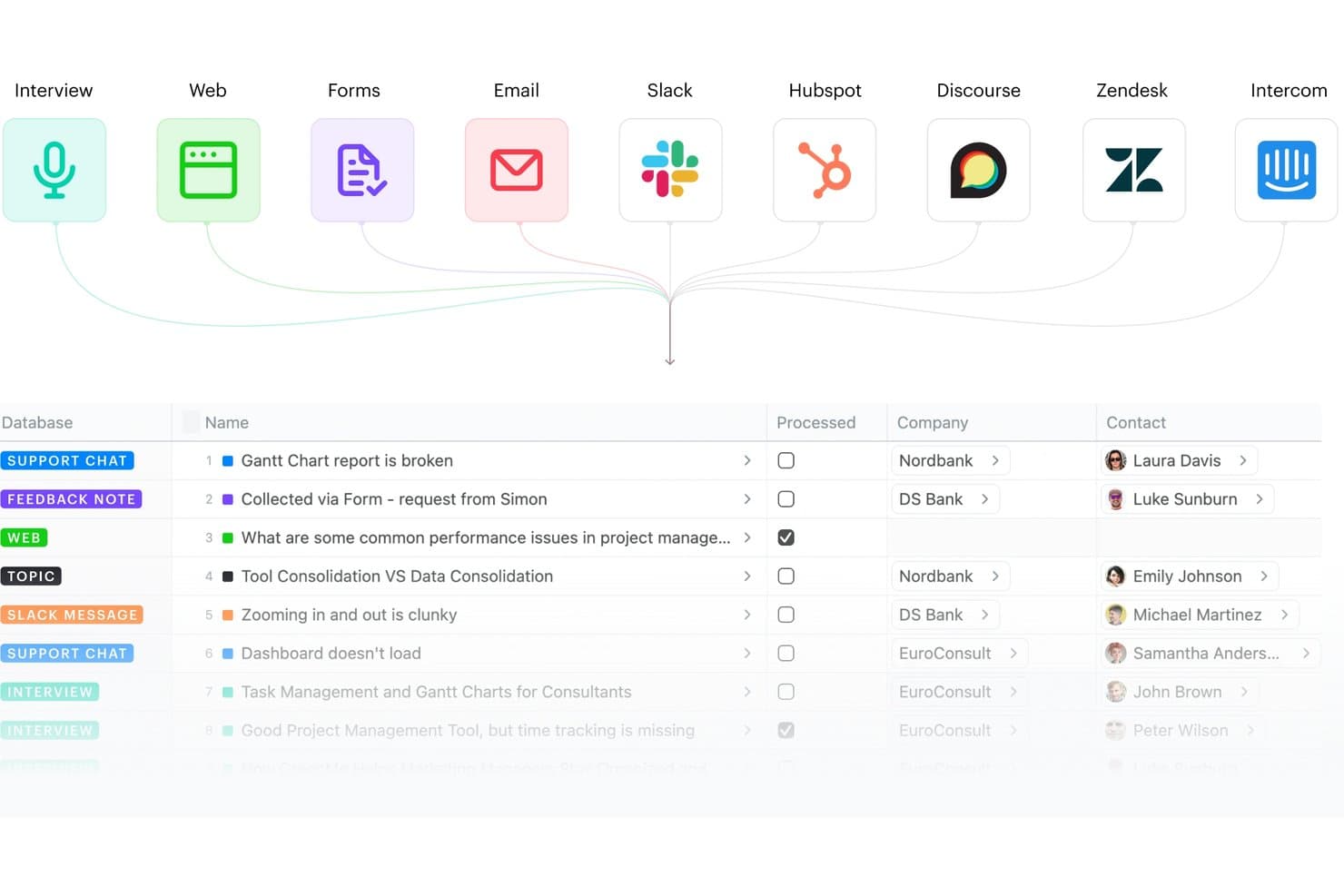
Fibery centralizes feedback from multiple sources into one database. My Evaluation Score
- Prioritization Frameworks
- Strong
- Hypothesis Validation Tools
- Adequate
- Insight Synthesis & Tagging
- Excels
- Customer Feedback Aggregation
- Excels
- Opportunity & Idea Management
- Excels
- Discovery Collaboration & Sharing
- Excels
Fibery is a modular product discovery and development platform that connects customer feedback aggregation, insight synthesis, opportunity mapping, and roadmap planning in a single relational workspace.
Who Is Fibery Best For?
Fibery fits product teams that want a single, deeply connected workspace to trace every insight from raw customer feedback all the way through to shipped features on the roadmap.
Why I Picked Fibery
Fibery earns its spot on my shortlist because of how tightly it connects raw customer feedback to shipped features, with no broken links in the chain. I love that its native Opportunity Solution Tree (built on Teresa Torres' framework) lets you map evidence directly to opportunities and solutions, so every roadmap item traces back to a real customer insight. Its AI-driven semantic clustering and Atomic Research template also mean my team can synthesize interview notes into tagged, linked facts rather than letting findings pile up in disconnected docs.
Fibery Key Features
- Feedback inbox: A centralized hub that collects and routes incoming feedback from sources like Intercom, Zendesk, Slack, HubSpot, and email into a single processing queue.
- AI-powered call transcription: Automatically transcribes recorded interviews and meetings, then generates summaries and extracts key notes without manual effort.
- Custom formula-based prioritization: Lets you build scoring models using any combination of feedback volume, customer segment, pain severity, and business impact tied to live CRM data.
- Public roadmaps and changelogs: Lets teams publish live, shareable roadmaps and product updates so stakeholders and customers can follow progress without needing a paid seat.
Fibery Integrations
Fibery offers native integrations with Intercom, Zendesk, HubSpot, Slack, Discourse, Jira, GitHub, GitLab, and Google Workspace. It also supports custom integrations through its API and Zapier.
Pros and Cons
Pros:
- AI clusters and summarizes research insights
- Highly flexible discovery and research templates
- Connects feedback directly to shipped features
Cons:
- Fewer specialized research integrations available
- No built-in user recruiting or surveys
Learn more about Fibery:
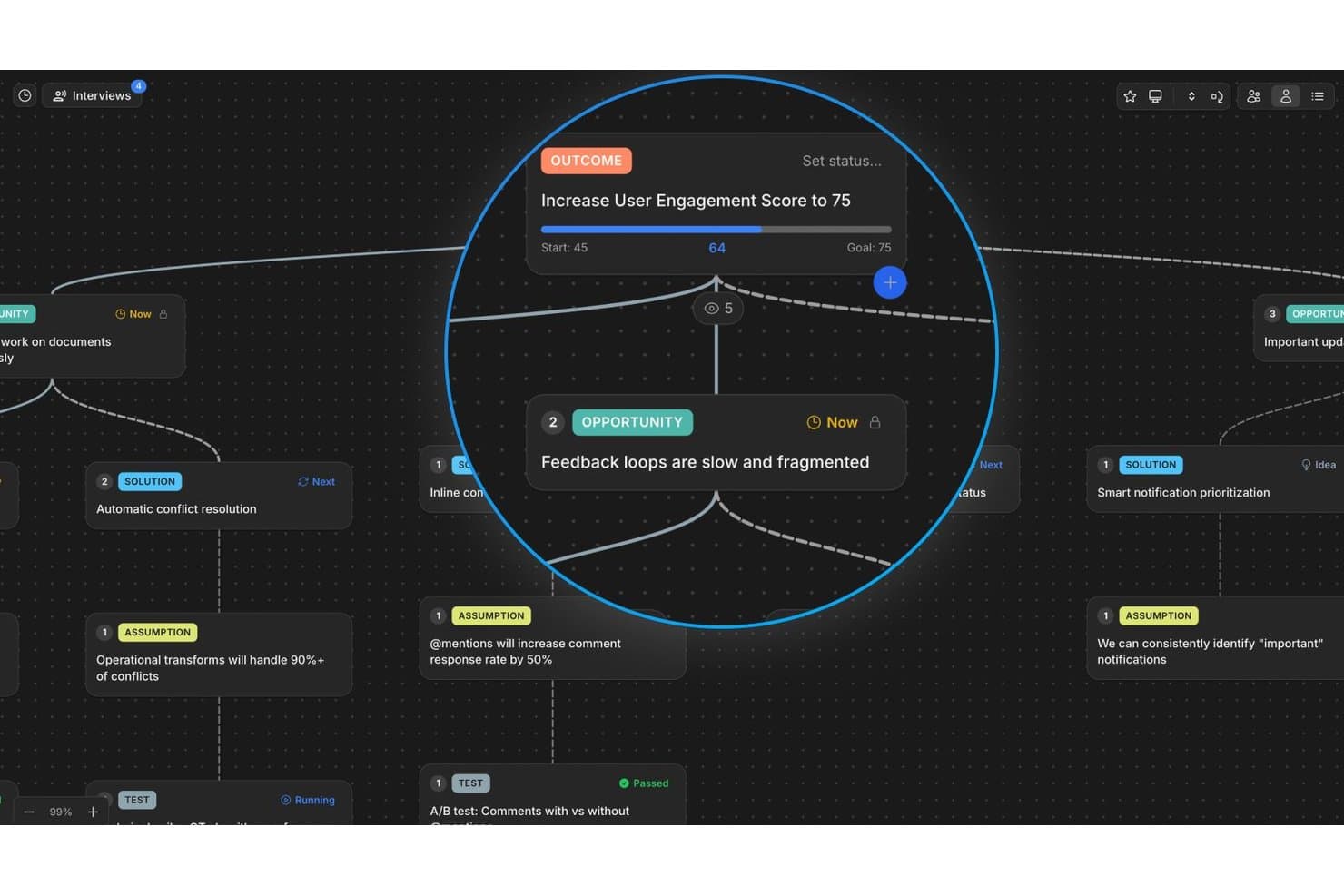
Vistaly maps opportunities and outcomes in a visual discovery tree. My Evaluation Score
- Prioritization Frameworks
- Adequate
- Hypothesis Validation Tools
- Minimal
- Insight Synthesis & Tagging
- Excels
- Customer Feedback Aggregation
- Adequate
- Opportunity & Idea Management
- Excels
- Discovery Collaboration & Sharing
- Excels
Vistaly is a product discovery platform built around the Opportunity Solution Tree framework, offering an interactive OST canvas, AI-powered interview synthesis, evidence traceability, and strategy mapping to connect discovery work to business outcomes.
Who Is Vistaly Best For?
Vistaly is a strong fit for product teams that have adopted—or are actively building—a continuous discovery practice around the Opportunity Solution Tree framework.
Why I Picked Vistaly
Vistaly earns its spot on my shortlist because it's the only product discovery tool built in formal partnership with Teresa Torres, the creator of the Opportunity Solution Tree framework. I picked it specifically for teams doing continuous discovery: you upload customer interviews in any of ~29 formats, and the AI synthesizes three or more into a fully structured OST with every opportunity card anchored to verbatim quotes. What I find most compelling is that the roadmap isn't a separate artifact—it's the OST itself, pivoted by card status.
Vistaly Key Features
- Strategy Space: Connect discovery opportunities directly to OKR and KPI trees, with live metric syncing from tools like PostHog, Amplitude, and Mixpanel.
- Mirror cards: Link a single opportunity or solution card to multiple outcomes, keeping evidence and status in sync across every instance.
- Assumption and Test cards: Log and structure hypotheses directly on the OST canvas using dedicated card types tied to specific solutions.
- Unlimited viewer seats: Give stakeholders, engineers, and executives read access to the full discovery tree without requiring editor licenses.
Vistaly Integrations
Vistaly offers native integrations with Jira, Linear, GitHub, Slack, Gong, and PostHog. It also provides a REST API, MCP access for Claude, ChatGPT, and Cursor, and Zapier.
Pros and Cons
Pros:
- Every card links to verbatim customer evidence
- Opportunity Solution Tree built with expert partnership
- AI turns interviews into structured OSTs
Cons:
- Lacks built-in participant recruiting features
- No native customer survey or test runner
Learn more about Vistaly: Best for AI-moderated interviews at scale
- Free plan available
- Pricing upon request
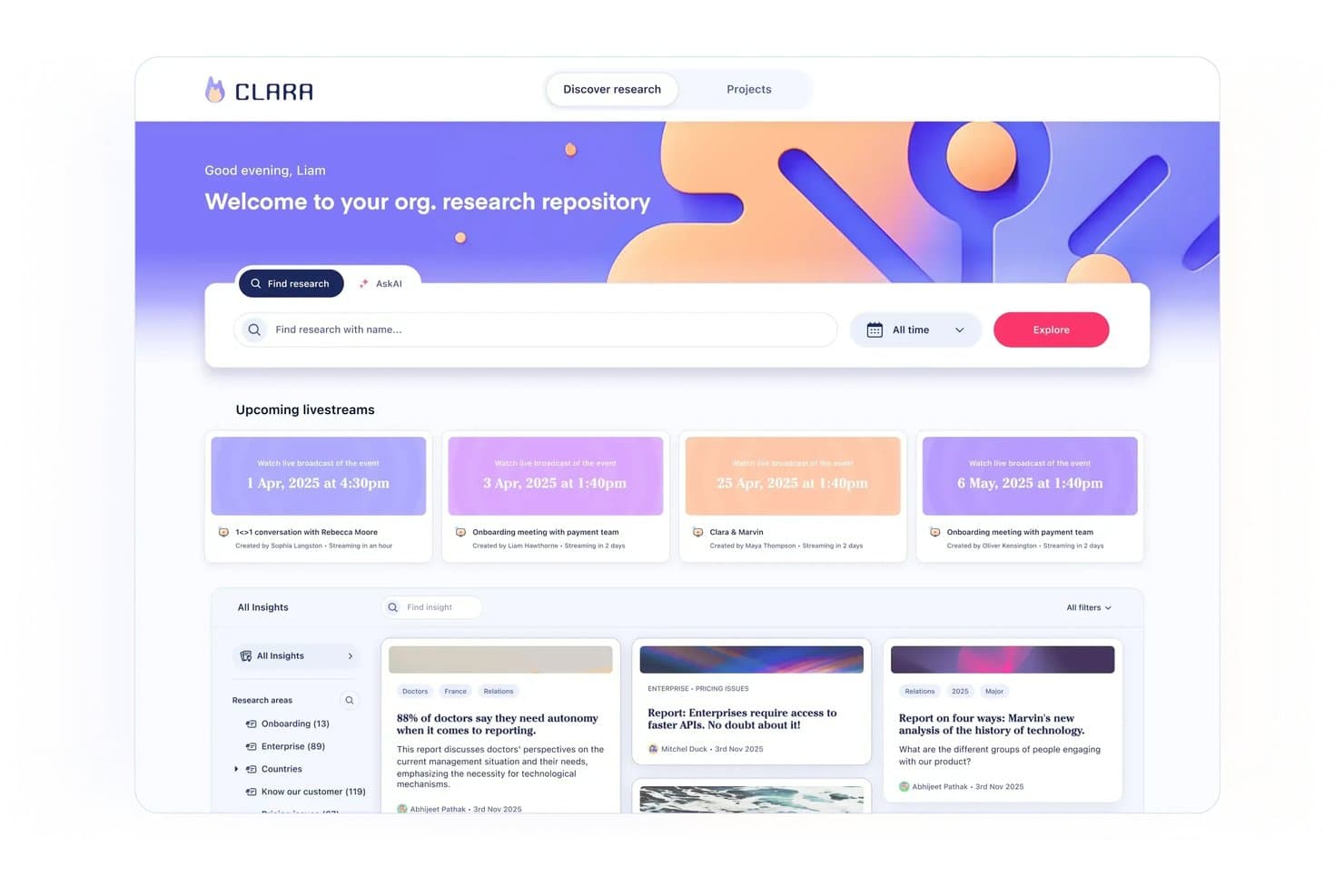
Marvin centralizes research insights and upcoming sessions in one hub. My Evaluation Score
- Prioritization Frameworks
- Limited
- Hypothesis Validation Tools
- Excels
- Insight Synthesis & Tagging
- Excels
- Customer Feedback Aggregation
- Excels
- Opportunity & Idea Management
- Minimal
- Discovery Collaboration & Sharing
- Excels
Marvin is an AI-native customer insights platform that centralizes qualitative research across interviews, support tickets, sales calls, and surveys, with built-in AI synthesis, moderated interviewing, and cross-project analysis.
Who Is Marvin Best For?
Marvin is a strong fit for UX research and product discovery teams that run high volumes of qualitative interviews and need AI to handle synthesis at scale.
Why I Picked Marvin
I picked Marvin as one of the best because it's the only tool on my list that lets you run hundreds of AI-moderated interviews simultaneously, without a researcher in the room. Its Live Intercept feature embeds a voice-to-voice AI interviewer directly inside your product, triggering real-time sessions with active users in 40+ languages. Pair that with Deep Research's hypothesis testing, and you can validate assumptions against your entire research corpus with cited, source-linked evidence.
Marvin Key Features
- Knowledge Hub: A centralized repository that ingests data from interviews, support tickets, sales calls, surveys, and reviews into one searchable system.
- Ask AI: A natural-language query tool that searches your entire research corpus and returns cited answers traceable to original source data.
- Research Digest newsletters: Auto-generated bi-weekly emails that surface curated research insights and send them directly to your team.
- Virtual Backroom: A live broadcast feature that lets stakeholders silently observe interviews in real time and collaborate via live chat.
Marvin Integrations
Marvin offers 30+ native integrations, including Notion, Jira, Confluence, Figma, Miro, Zoom, Google Meet, Gong, Zendesk, and Qualtrics. Its Import API supports custom integrations.
Pros and Cons
Pros:
- Delivers AI-cited insights traceable to sources
- Provides in-product voice-to-voice AI interviewing
- Runs hundreds of AI-moderated interviews simultaneously
Cons:
- Lacks native prioritization scoring frameworks
- No opportunity trees or solution mapping features
Learn more about Marvin: 6Best for visual brainstorming in product teams
Miro
- Free plan + 14-day free trial available
- From $8/user/month (billed annually)
Visit WebsiteCustomer Rating:4.8/5
Miro simplifies presenting plans and timeframes, ensuring adaptability to delays and client demands. My Evaluation Score
- Prioritization Frameworks
- Strong
- Hypothesis Validation Tools
- Strong
- Insight Synthesis & Tagging
- Strong
- Customer Feedback Aggregation
- Strong
- Opportunity & Idea Management
- Strong
- Discovery Collaboration & Sharing
- Excels
Miro is an online visual collaboration platform that enables teams to work together in real-time. Its focus on interactive, visual collaboration makes it an excellent choice for product teams looking to brainstorm and ideate together, regardless of their geographical location.
Why I Picked Miro:
In my judgment, I chose Miro for its exceptional focus on real-time visual collaboration. The platform differentiates itself with an extensive set of drawing and diagramming tools, supporting a diverse array of brainstorming activities. This focus makes Miro the best choice for product teams who need to visualize ideas and engage in collaborative brainstorming.
Standout Features & Integrations:
Miro shines with features such as endless canvas, premade templates, real-time collaboration and commenting, and intuitive drawing tools. The platform integrates well with many other productivity tools, including Slack, Google Drive, Dropbox, and Microsoft Teams, making it easy to incorporate into existing workflows.
Pros and Cons
Pros:
- Real-time collaboration and commenting features enhance team cooperation
- Excellent integrations with commonly used productivity tools
- Offers a wide range of drawing and diagramming tools
Cons:
- Occasional lag issues reported during heavy usage
- More expensive than some competitors when billed annually
- Can be overwhelming for new users due to the vast number of features
 Best for evidence-linked feature prioritization
- Free demo available
- Pricing upon request
Visit WebsiteCustomer Rating:4.5/5
Productboard improves customer retention and innovation by identifying critical needs and delivering timely solutions. My Evaluation Score
- Prioritization Frameworks
- Excels
- Hypothesis Validation Tools
- Minimal
- Insight Synthesis & Tagging
- Excels
- Customer Feedback Aggregation
- Excels
- Opportunity & Idea Management
- Strong
- Discovery Collaboration & Sharing
- Excels
Productboard is a comprehensive product management tool designed to help product teams prioritize features, centralize product information, and craft compelling product roadmaps. Its user-centric approach makes it invaluable for teams dedicated to building products that meet real user needs.
Why I Picked Productboard:
I singled out Productboard for its strong emphasis on feature prioritization and roadmap visualization. It simplifies the usually complex process of determining what to build next and lays out a clear path to achieve it. The tool stands apart with its features like a user feedback portal and prioritization matrix.
Therefore, I find it "best for" product managers to aim to systematically prioritize features and lay out clear roadmaps.
Standout Features & Integrations:
Productboard shines with its features like a customer feedback repository, feature scoring system, and visually appealing roadmaps. Additionally, it offers persona and segmentation tools to cater to different user needs. As for integrations, Productboard smoothly collaborates with popular tools like Slack, Jira, Intercom, and Salesforce to streamline product management workflows.
Pros and Cons
Pros:
- Comprehensive integrations with other tools
- Robust feedback management system
- Excellent for feature prioritization and roadmap visualization
Cons:
- Limited options for custom fields in some plans
- Higher tiers are fairly pricey
- User interface can be a bit overwhelming initially
Learn more about Productboard: Best for prioritization-driven feature decisions
- Free demo available
- Pricing upon request
Visit WebsiteCustomer Rating:4.4/5
Maximize strategy, discovery, and execution using custom workflows with Airfocus. My Evaluation Score
- Prioritization Frameworks
- Excels
- Hypothesis Validation Tools
- Limited
- Insight Synthesis & Tagging
- Strong
- Customer Feedback Aggregation
- Excels
- Opportunity & Idea Management
- Strong
- Discovery Collaboration & Sharing
- Strong
Airfocus is a product management tool that offers strategic planning and prioritization features. By using a unique scoring system and visualizations, it aids product teams in making informed decisions on feature prioritization, making it the ideal choice for product teams who need to strategically allocate resources and prioritize development tasks.
Why I Picked Airfocus:
In determining the best tools, I selected Airfocus due to its exceptional capacity for strategic decision-making. What makes Airfocus stand out is its proprietary prioritization system, which assists teams in understanding which features will offer the most value. This specific quality led me to view Airfocus as the best tool for prioritization in product feature development.
Standout Features & Integrations:
Airfocus provides robust features including a priority scoring system, a roadmap view for strategic planning, and a collaboration feature to include everyone in the decision-making process. It integrates with a number of other project management tools such as Jira, Trello, and Asana, making it a flexible addition to any product team's toolbox.
Pros and Cons
Pros:
- Allows for team-wide collaboration in feature prioritization
- Integrates well with other project management tools
- Unique priority scoring system supports strategic decision-making
Cons:
- Pricing may be on the higher end compared to other tools
- Has a bit of a learning curve, particularly for non-technical users
- Annual billing could be a barrier for some teams
 Best for feedback-to-roadmap traceability
- 14-day free trial + free demo available
- Pricing upon request
Visit WebsiteCustomer Rating:4.2/5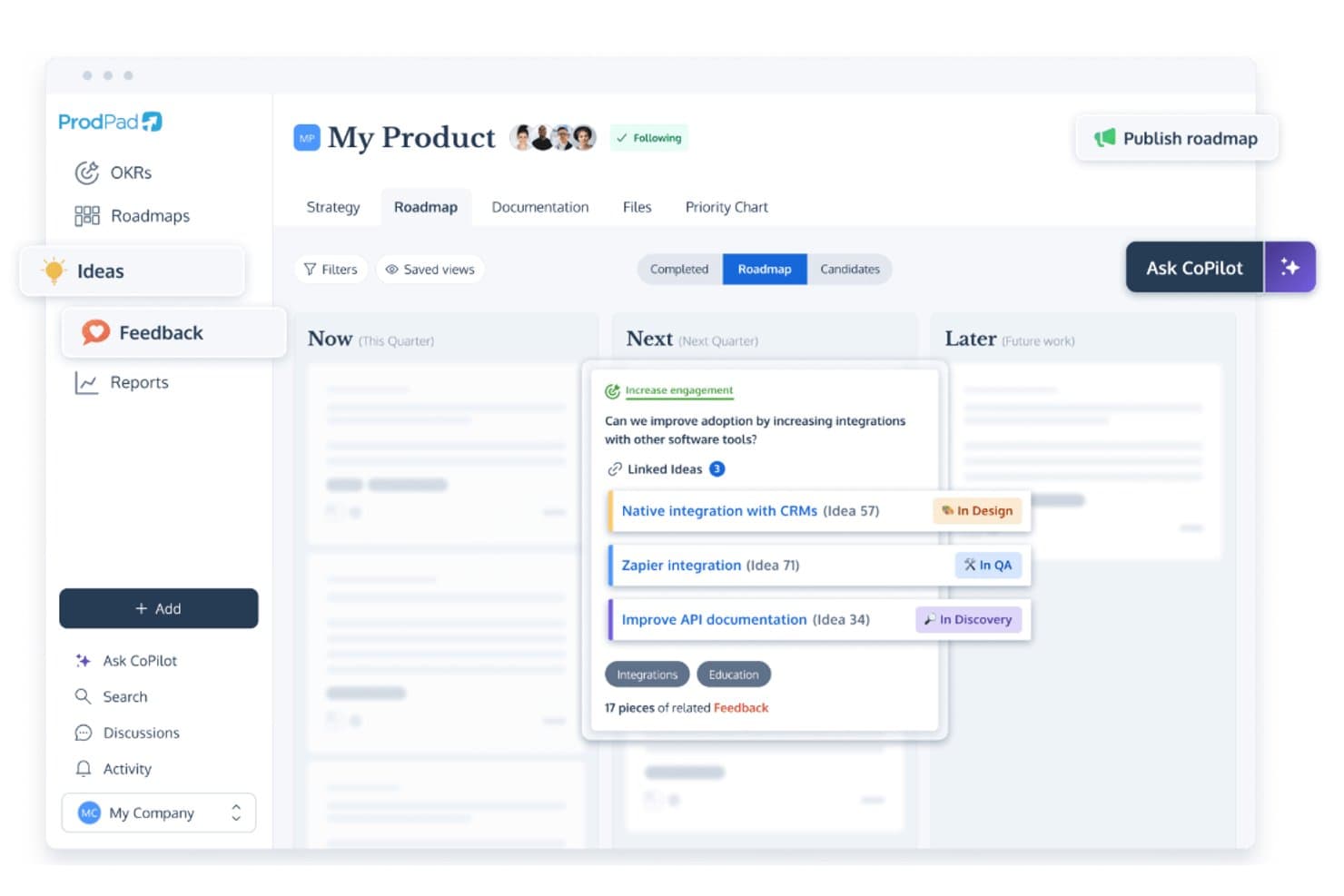
ProdPad links roadmap ideas to feedback and tracks development status. My Evaluation Score
- Prioritization Frameworks
- Strong
- Hypothesis Validation Tools
- Minimal
- Insight Synthesis & Tagging
- Strong
- Customer Feedback Aggregation
- Strong
- Opportunity & Idea Management
- Excels
- Discovery Collaboration & Sharing
- Excels
ProdPad is a product discovery and roadmapping platform built around feedback management, idea backlog organization, AI-assisted synthesis, and Now-Next-Later roadmapping.
Who Is ProdPad Best for?
ProdPad is a strong fit for product managers who need a clear, traceable link between customer feedback and roadmap decisions.
Why I Picked ProdPad
I picked ProdPad as one of the best because no other tool on this list makes the connection between raw customer feedback and roadmap decisions as traceable. Every piece of feedback links bidirectionally to the idea it influenced and the initiative it maps to, so you always know why something is on the roadmap. AI Signals surfaces recurring themes across your feedback corpus automatically, and CoPilot flags duplicate ideas in the backlog before they create noise.
ProdPad Key Features
- Now-Next-Later roadmap: A lean roadmap format organized by strategic time horizon rather than fixed dates, helping teams prioritize by outcome over output.
- Unlimited free reviewer seats: Any number of stakeholders—engineers, executives, sales, or CS—can access ProdPad as Reviewers at no added cost.
- CoPilot AI product coach: An embedded AI assistant that pressure-tests decisions, drafts specs and summaries, and generates measurable Key Results from broad strategic goals.
- Modular pricing: Teams can purchase only the modules they need—Roadmaps, Ideas, or Feedback—and add more as their discovery practice grows.
ProdPad Integrations
ProdPad offers native integrations with Jira, Azure DevOps, Linear, Salesforce, Intercom, Slack, Microsoft Teams, and Confluence. It also supports an API, webhooks, and Zapier for custom connectivity.
Pros and Cons
Pros:
- AI auto-detects feedback themes and duplicates
- Unlimited free reviewer seats for collaboration
- Feedback links directly to roadmap items
Cons:
- No native research interview repository
- No built-in surveys or testing tools
Learn more about ProdPad: 10Best for AI-driven continuous customer insight
Dovetail
- Free plan + free demo available
- Pricing upon request
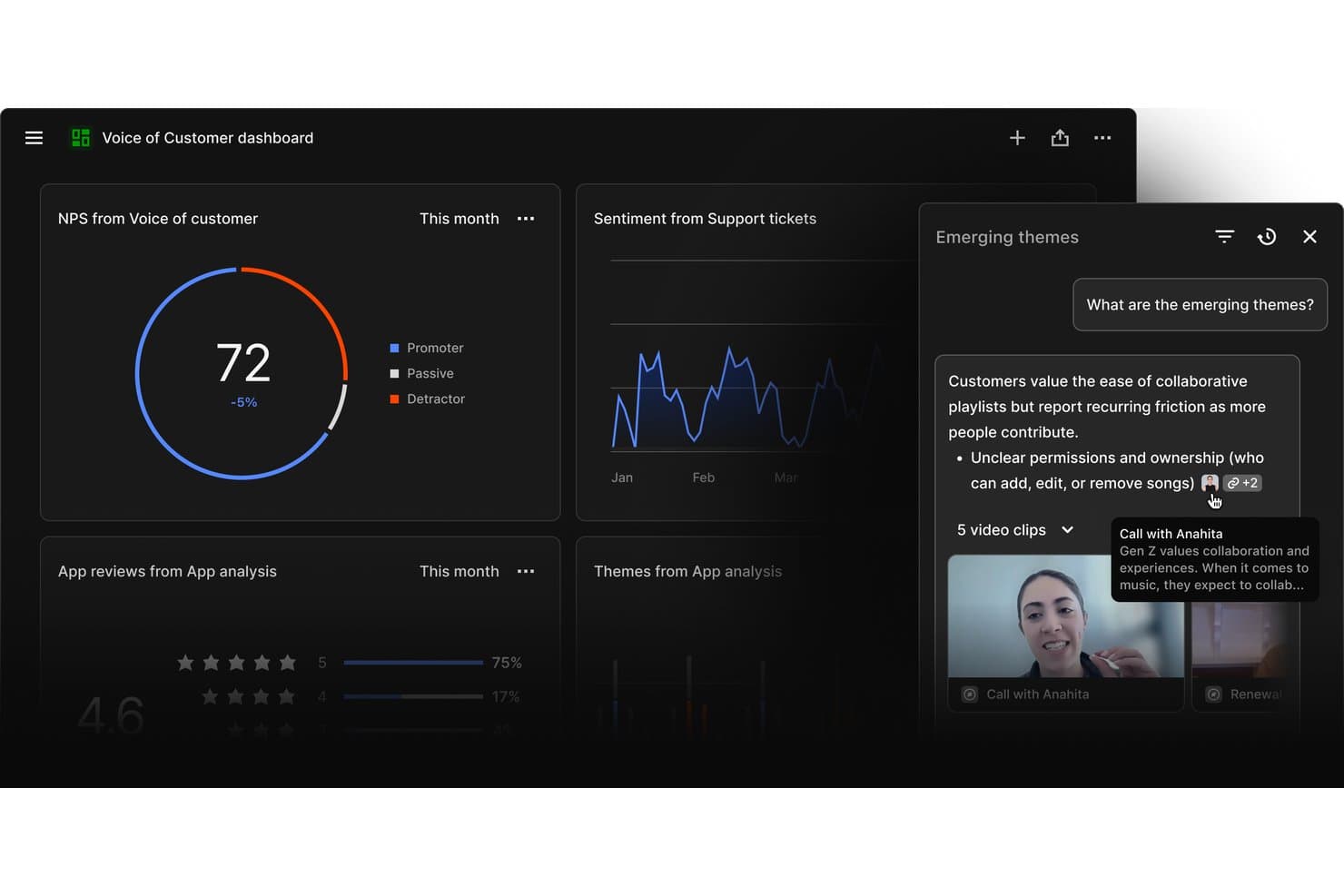
Dovetail surfaces emerging customer themes from mixed research sources. My Evaluation Score
- Prioritization Frameworks
- Adequate
- Hypothesis Validation Tools
- Minimal
- Insight Synthesis & Tagging
- Excels
- Customer Feedback Aggregation
- Excels
- Opportunity & Idea Management
- Strong
- Discovery Collaboration & Sharing
- Excels
Dovetail is a customer intelligence platform that centralizes feedback from support tickets, sales calls, surveys, and app reviews, using AI to transcribe, cluster, and synthesize qualitative data into ranked, evidence-backed opportunities for product teams.
Who Is Dovetail Best For?
Dovetail is a strong fit for product and research teams at mid-to-large companies that need to turn high volumes of customer feedback into prioritized, evidence-backed opportunities across the full organization.
Why I Picked Dovetail
Dovetail earns its spot on my shortlist because its AI Channels 2.0 turns continuous feedback into ranked, revenue-weighted opportunities without any manual triage. I particularly like how it weights each opportunity by ARR impact using Salesforce enrichment, so I'm not just seeing what customers mention most often but what actually matters to the business. The Digital Twins feature lets me pressure-test assumptions against real customer conversations before a single line of code is written.
Dovetail Key Features
- AI Clustering: Automatically groups high-volume feedback into themes without requiring manual tagging, so your team can surface patterns at scale.
- Multi-language transcription: Auto-transcribes and translates customer interviews and calls across 75 languages with multi-speaker recognition built in.
- AI Agents: Configurable, no-code agents that monitor your customer data and push scheduled or triggered insight updates to Slack, Teams, or email.
- MCP Server: Connects Dovetail's insight layer directly to Claude, ChatGPT, and Microsoft Copilot, embedding customer evidence into your team's existing AI workflows.
Dovetail Integrations
Dovetail offers 38 native integrations, including Jira, Linear, Productboard, Figma Make, Slack, Microsoft Teams, Notion, Salesforce, Zendesk, and Gong. It also supports custom connections through its API, CLI, and MCP Server, plus Zapier.
Pros and Cons
Pros:
- Shares evidence-backed insights with stakeholders automatically
- Transcribes and synthesizes feedback in 75 languages
- AI ranks opportunities by revenue impact
Cons:
- No built-in RICE or MoSCoW scoring
- Cannot validate prototypes or run usability tests
Learn more about Dovetail:
Other Product Discovery Tools
Here are some additional product discovery tools options that didn’t make it onto my shortlist, but are still worth checking out:
- 11DragonboatBest for portfolio-led discovery prioritization
- 12Zeda.ioBest for revenue-linked feedback synthesis
- 13UserTestingBest for research-heavy usability validation
- 14AirtableBest for multi-framework feature prioritization
- 15HarvestrBest for revenue-linked feedback prioritization
- 16ZefiBest for AI-driven VoC to opportunity mapping
How I Evaluate Product Discovery Tools
I evaluate product discovery tools in two layers: baseline requirements like customer feedback synthesis, opportunity management, and idea validation, then the differentiators that separate strong tools from the rest.
Core Functionality (Table Stakes For This List)
When I'm selecting tools for my list, I rank each one on a scale from 0 (does not offer the functionality) to 5 (excels in this area) for each core functionality listed below. Then, I calculate the tool's total score into a percentage. Each tool needs to achieve a minimum total score of 65% to be considered for inclusion.
- Customer Feedback Aggregation: I check whether a tool can centralize qualitative and quantitative feedback from sources like customer interviews, surveys, support tickets, and sales calls so teams can work from a shared repository.
- Insight Synthesis & Tagging: I look for tools that can turn raw feedback into structured insights through tagging, clustering, thematic grouping, or other synthesis methods that help teams identify recurring patterns.
- Opportunity & Idea Management: I evaluate whether teams can capture, organize, and track product opportunities, hypotheses, and ideas discovered through research. Strong tools connect these opportunities back to the customer evidence and outcomes behind them.
- Hypothesis Validation Tools: I look at how the platform helps teams test product assumptions before committing to development, whether through surveys, prototype tests, customer interviews, experiments, or other validation methods.
- Prioritization Frameworks: I assess whether teams can rank opportunities using built-in scoring or prioritization models such as RICE, MoSCoW, or weighted scoring. I also look for flexibility in how criteria are configured and tied to user evidence and business impact.
- Discovery Collaboration & Sharing: Discovery work needs input from across product, design, and research. I look for shared workspaces, comments, stakeholder views, and other ways teams can review and act on discovery findings together.
Once I have a list of tools that meet this criteria, I consider what sets each platform apart.
Differentiating Factors (What Sets Vendors Apart)
Here's how I compare and contrast different vendors:
Standout Features
AI research synthesis is a major differentiator. Tools that can transcribe interviews, extract highlights, and surface recurring themes can reduce the manual work involved in analyzing customer research. I also look for opportunity solution trees that connect outcomes, opportunities, solutions, and experiments, as well as evidence linking that traces product decisions back to customer insights. Continuous interview recruiting can help teams maintain a regular research cadence, while roadmap and delivery integrations make it easier to move validated opportunities into tools like Jira or Linear without losing discovery context.
Beyond Features
Integration depth is one of the first things I evaluate. A discovery tool that connects to your CRM, support platform, research tools, and delivery stack means less manual work moving customer evidence between systems. I also consider how well a platform supports cross-functional teams and different levels of discovery maturity. Methodology alignment matters too, particularly for teams using approaches like Continuous Discovery Habits, Jobs-to-be-Done, Dual Track Agile, or Lean Startup. Finally, I consider security and onboarding factors like permissions, data privacy controls, templates, migration support, and training resources.
How to Choose Product Discovery Tools
It’s easy to get bogged down in long feature lists and complex pricing structures. To help you stay focused as you work through your unique software selection process, here’s a checklist of factors to keep in mind:
| Factor | What to Consider |
|---|---|
| FactorScalability | What to ConsiderCan the tool grow with your team? Consider if it handles larger data volumes and more users without performance issues. Look for signals like user limits or data caps. |
| FactorIntegrations | What to ConsiderDoes it connect with tools you already use? Check if it integrates with your CRM, communication apps, or data analytics platforms. Avoid tools with limited APIs. |
| FactorCustomizability | What to ConsiderCan you tailor it to your workflow? Look for customizable fields, dashboards, and user roles. Avoid rigid systems that don't adapt to your needs. |
| FactorEase of use | What to ConsiderIs it intuitive for your team? Test the interface for simple navigation and minimal training needs. Avoid complex setups that frustrate users. |
| FactorImplementation and onboarding | What to ConsiderHow long till you're up and running? Check for fast setup, training resources, and support during onboarding. Avoid long deployment times that stall progress. |
| FactorCost | What to ConsiderDoes it fit your budget? Compare the total cost against your budget, including hidden fees. Look for flexible pricing plans or discounts for annual payments. |
| FactorSecurity safeguards | What to ConsiderAre your data and privacy protected? Ensure the tool complies with security standards like encryption and access controls. Avoid tools with vague security policies. |
What Are Product Discovery Tools?
Product discovery tools are software solutions that help teams gather insights and prioritize product features. Product managers, UX designers, and development teams typically use these tools to align on customer needs and business goals. Features like customer feedback collection, feature prioritization, and roadmapping help with decision-making and collaboration. Overall, these tools provide clarity and direction for successful product development.
Features
When selecting product discovery tools, keep an eye out for the following key features:
- Customer feedback collection: Gathers user insights to inform product decisions and align with customer needs.
- Feature prioritization: Helps teams rank features based on impact, ensuring the most valuable ones are developed first.
- Roadmapping: Visualizes the product's development path, helping teams and stakeholders understand timelines and priorities.
- Integration capabilities: Connects with existing tools like CRM and communication apps, ensuring seamless data flow across platforms.
- Customizable dashboards: Allow users to tailor their view to focus on relevant metrics and information.
- Collaboration tools: Facilitate team communication and alignment, ensuring everyone is on the same page.
- AI-driven insights: Leverages artificial intelligence to provide data-driven recommendations and forecasts.
- Security safeguards: Protects data with encryption and access controls, ensuring user privacy and compliance.
- Interactive product tours: Offers guided walkthroughs to help new users quickly understand and utilize the tool.
- Analytics and reporting: Provides detailed insights into product performance and user behavior for informed decision-making.
Benefits
Implementing product discovery tools provides several benefits for your team and your business. Here are a few you can look forward to:
- Better decision-making: With customer feedback and data-driven insights, your team can make informed choices about product features and priorities.
- Enhanced collaboration: Shared roadmaps and collaboration tools help keep your team aligned and working towards common goals.
- Increased efficiency: Prioritization features ensure that your team focuses on the most impactful tasks first, saving time and resources.
- Improved customer satisfaction: By aligning product development with user needs, you deliver products that resonate more with your audience.
- Clear product vision: Roadmapping provides a visual representation of your product's future, helping stakeholders understand the direction and timeline.
- Risk reduction: AI-driven insights and analytics help identify potential pitfalls early, allowing your team to address them proactively.
- Data security: With robust security safeguards, your team's and customers' data remains protected, ensuring compliance and trust.
Costs & Pricing
Selecting product discovery tools requires an understanding of the various pricing models and plans available. Costs vary based on features, team size, add-ons, and more. The table below summarizes common plans, their average prices, and typical features included in product discovery tools solutions:
Plan Comparison Table for Product Discovery Tools
| Plan Type | Average Price | Common Features |
|---|---|---|
| Plan TypeFree Plan | Average Price$0 | Common FeaturesBasic feedback collection, limited feature prioritization, and simple roadmapping. |
| Plan TypePersonal Plan | Average Price$5-$25/user/month | Common FeaturesEnhanced feedback tools, customizable dashboards, and integrations with basic apps. |
| Plan TypeBusiness Plan | Average Price$30-$75/user/month | Common FeaturesAdvanced analytics, team collaboration tools, and multiple integrations. |
| Plan TypeEnterprise Plan | Average Price$80+/user/month | Common FeaturesFull feature set, dedicated support, and advanced security safeguards. |
Product Discovery Tools FAQs
Here are some answers to common questions about product discovery tools:
How do teams capture insights using product discovery tools?
Teams usually record user interviews, survey data, and product usage patterns in one place. You can tag insights, link them to ideas, and share across teams. This keeps discovery work visible and connected to decision-making. It also avoids siloed research.
How do product discovery tools handle idea backlog management?
You can create, tag, and organize ideas as they come in. Some tools score ideas based on impact, effort, or alignment with goals. This helps your team avoid feature bloat and focus on what matters. You can revisit older ideas when context changes.
Do product discovery tools support dual-track agile?
Yes, many tools support discovery and delivery happening at the same time. They let you explore and validate ideas while your team continues building. You can move ideas between discovery and delivery tracks easily, keeping both efforts aligned.
Are product discovery tools suitable for small teams?
Yes, product discovery tools are suitable for small teams. Many tools offer scalable features that adapt to your team’s size and needs. They provide essential functionalities like feedback collection and feature prioritization, helping small teams stay organized and focused on their goals without overwhelming complexity.