

10 Best Online Roadmap Tools for PMs in 2026

10 Best Online Roadmap Tool Shortlist


The best online roadmap tools help you build, share, and update product roadmaps in real time—so teams stay aligned even as priorities shift. Without them, roadmaps often live in static slides or outdated spreadsheets that cause miscommunication and derail planning.
I’ve tested 25+ roadmap tools and know which ones offer flexible views, collaboration features, and integrations product teams actually use.
In this guide, you’ll find platforms that make it easy to visualize strategy, adjust timelines, and keep everyone on the same page, from leadership to delivery teams.
Why Trust Our Software Reviews
We’ve been testing and reviewing product management software since 2020. As product managers ourselves, we know how critical and difficult it is to make the right decision when selecting software.
We invest in deep research to help our audience make better software purchasing decisions. We’ve tested more than 2,000 tools for different product management use cases and written over 1,000 comprehensive software reviews. Learn how we stay transparent & our software review methodology.
The Best Online Roadmap Tools Summary
| Tool | Best For | Trial Info | Price | ||
|---|---|---|---|---|---|
| 1 | Best for mapping product workflows | Free plan available | From $8/member/month (billed annually) | Website | |
| 2 | Best for branded, audience-based roadmap portals | 30-day free trial + free plan available | From $1.10/user/month | Website | |
| 3 | Best for visualizing product plans | 14-day free trial available | From $249/month (billed annually) | Website | |
| 4 | Best library of roadmap templates | Free plan available | From $10/month (billed annually) | Website | |
| 5 | Best for centralizing product feedback | 14-day free trial + free plan + free demo available | From $19/maker/month (billed annually) | Website | |
| 6 | Best for a flexible creative platform | 14-day free trial + free plan available | From $12.25/user/month (billed annually) | Website | |
| 7 | Best for task prioritization | Free plan available | From $7/user/month | Website | |
| 8 | Best for flexible roadmap creation | Free demo available | Pricing upon request | Website | |
| 9 | Best for strategic portfolio management | Free trial available | Pricing upon request | Website | |
| 10 | Best for GitHub integration | Free plan + 14-day free trial + free demo available | From $4.99/user/month (billed annually) | Website |

Overviews Of The 10 Best Online Roadmap Tools
Here are my overviews of the 10 best online roadmap tools I’ve selected to highlight. I’ve included each platform’s best use case, standout features, integrations, and pros and cons. I also added a screenshot of the interface to give you a feel for the different tools.

Miro
Best for mapping product workflows

Miro empowers your team to visualize and execute your product vision with its online roadmap tool, perfect for industries like product management, engineering, and design. It offers an intelligent canvas and customizable templates, allowing you to create structured roadmaps that adapt to changing needs and strategies. By integrating seamlessly with platforms like Jira and Azure DevOps, Miro ensures real-time collaboration and keeps everyone aligned, addressing challenges in managing timelines and responsibilities across teams.
Why I Picked Miro
I chose Miro for its unique ability to map product development workflows effectively. Its intelligent canvas, equipped with AI capabilities, allows your team to create dynamic roadmaps that can adapt to changes in strategy and timelines. Miro's integration with popular tools like Jira and Azure DevOps enhances your workflow by providing real-time updates and seamless task management. These features make Miro an invaluable tool for product managers seeking to streamline their processes and enhance team collaboration.
Miro Key Features
In addition to its robust product development capabilities, I also found Miro offers a range of features that cater to diverse project needs.
- Customizable Templates: Miro provides over 7,000 templates that allow you to quickly set up and adapt your roadmaps to specific project requirements.
- Real-time Collaboration: This feature facilitates instant communication and teamwork across distributed teams, ensuring everyone stays informed and aligned.
- Video Walkthroughs: Miro supports video walkthroughs for sharing insights and updates, enhancing team understanding and engagement.
- Integration with MS Teams and Confluence: Embedding living roadmaps in these platforms ensures that all stakeholders have access to the latest project information.
Miro Integrations
Integrations include Jira, Azure DevOps, Microsoft Teams, Confluence, Slack, Google Drive, Dropbox, Trello, Asana, and Monday.com.
Pros and Cons
Pros:
- Extensive onboarding resources simplify initial setup.
- AI-driven features boost productivity and engagement.
- Integration with video conferencing enhances remote teamwork.
Cons:
- Lacks advanced roadmapping features.
- Some users desire more personalized customer support.
New Product Updates from Miro
Miro Adds Japan Data Residency for Enterprise Customers
Miro has introduced Japan data residency for enterprise customers, offering in-region storage for production data, backups, and metadata, plus in-region compute infrastructure. For more information, visit Miro's official site.

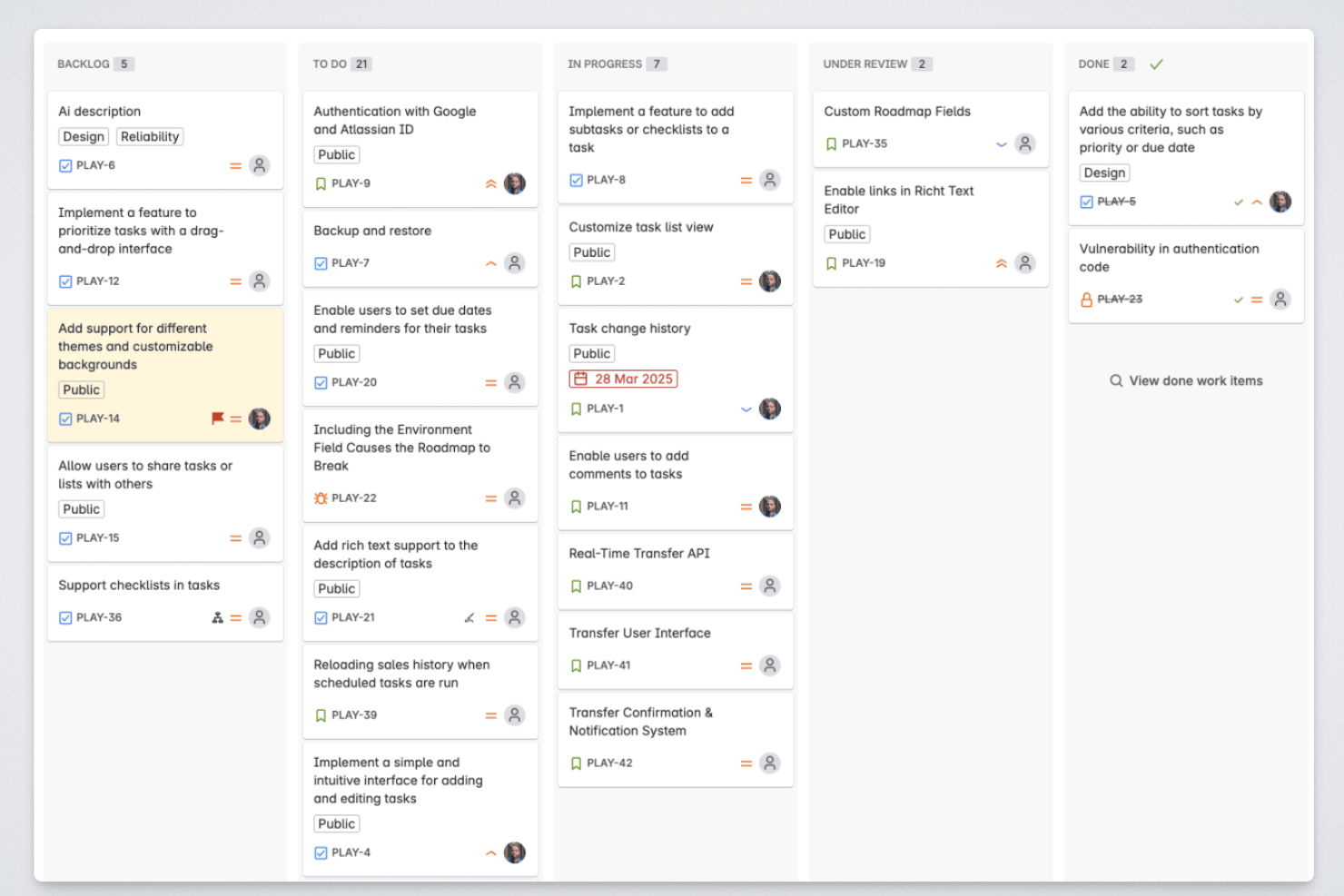
Released is a Jira-native roadmap tool that lets product teams publish live roadmaps, collect customer feedback, and generate AI-powered release notes directly from their Jira data.
Who Is Released Best For?
Released is a strong fit for product managers at Jira Cloud teams who need to communicate roadmap progress and product updates to external audiences like customers and partners.
Why I Picked Released
I've included Released in my top picks because its audience-specific roadmap portals are genuinely differentiated from what most roadmap tools offer. I can publish one portal for customers showing high-level themes, another for executives with full timeline detail, and a third for sales, all pulling live from the same Jira data with no manual updates. Granular access controls let me make each view public, password-protected, or invite-only, so I'm never sharing more than I intend to with any given audience.
Released Key Features
- Jira-native hierarchy mapping: Automatically maps initiatives, epics, and stories directly from Jira fields and structures.
- Customer feedback collection: Lets users submit ideas and vote on features through a branded feedback portal tied to Jira items.
- AI-generated release notes: Drafts release notes from completed Jira tickets with customizable templates and brand voice settings.
- Slack and Confluence publishing: Publishes product updates and roadmap changes to Slack channels and Confluence pages in real time.
Released Integrations
Released offers native integrations with Jira Cloud, Jira Product Discovery, Slack, and Confluence.
Pros and Cons
Pros:
- Customer feedback voting built into roadmap
- AI-generated release notes from Jira data
- Audience-specific portals for external stakeholder sharing
Cons:
- Limited roadmap view options available
- Only works with Jira Cloud

Best for visualizing product plans

LaunchNotes is an online roadmap tool that helps product teams centralize updates and keep stakeholders aligned. It combines visual roadmaps with announcement tools and feedback collection so you can clearly share what’s coming next and why it matters.
Why I picked LaunchNotes: I added this platform because it goes beyond static roadmaps by combining planning with communication. You can visualize product plans while also publishing release notes, changelogs, and updates directly to your customers or internal teams. I also like that it collects feedback alongside updates, which helps you prioritize based on real user input instead of assumptions.
LaunchNotes Standout Features and Integrations
Standout features include a changelog that organizes every update, ensuring nothing slips through the cracks. The in-app widget embeds announcements where your users already work, keeping updates visible and timely. LaunchNotes also supports AI-assisted writing for drafting professional announcements faster.
Integrations include Jira, Confluence, Loom, Slack, Microsoft Teams, Intercom, Notion, Gmail, Google Workspace, LinkedIn, Hubspot, Zapier, and many others.
Pros and Cons
Pros:
- AI-powered announcement writing
- Embedded in-app update widget
- Intuitive drag-and-drop roadmaps
Cons:
- Fewer customization options
- Limited roadmap automation

Venngage
Best library of roadmap templates

Venngage is a web-based creative platform that can be used to craft roadmaps and other types of assets, with a broad template gallery to get you started.
Why I picked Venngage: If you need to create a roadmap quickly, and want a pre-built template to get you started, this could be the right platform for you. Its template bank hosts over 10,000 ready-made outlines that can be used for various purposes. It has Scrum, product development, portfolio, website, release, and other specialized roadmap templates. Many of the templates are available for free, which lets you give the tool a try before you buy.
Venngage Standout Features and Integrations
Standout features include the platform’s additional templates, which cover things like timelines, presentations, proposals, mind maps, and more. You can use the same platform to outline and share your work with stakeholders and other teams. This is especially useful for product teams that need to keep other departments in the loop on their plans and progress. Another helpful feature is the knowledge base, which has tons of courses and webinars to ramp up your design skills.
Integrations can be built using the platform’s API.
Pros and Cons
Pros:
- Self-serve customer support content
- Friendly drag-and-drop interface
- Free plan available
Cons:
- Highly versatile, may not be specialized enough
- Lacks advanced roadmapping features

Best for centralizing product feedback

For product teams seeking an online roadmap tool that not only facilitates planning but also ensures alignment with customer needs, Productboard stands out as a compelling choice. It empowers teams across industries to prioritize features informed by user insights, making it particularly appealing to product managers and decision-makers who value data-driven approaches. By centralizing feedback and transforming it into actionable roadmaps, Productboard addresses the challenge of aligning product development with user expectations, enhancing your ability to deliver products that truly resonate with your audience.
Why I Picked Productboard
I picked Productboard for its unique ability to centralize product feedback, which is crucial for an effective online roadmap tool. With features like the Insights Board, you can gather and organize user feedback from various sources, ensuring that no valuable insights are lost. Additionally, the Prioritization Matrix helps you visualize which features align with strategic goals and user needs, providing clarity on what to focus on next. These functionalities directly address the challenge of making informed decisions, ensuring that your roadmap is not just a plan but a reflection of genuine user demand.
Productboard Key Features
In addition to its feedback centralization capabilities, Productboard offers several other valuable features:
- Timeline Roadmaps: This feature allows you to map out plans with a clear timeline view, helping your team stay on track with objectives and deadlines.
- Feature Prioritization: Use this tool to rank features based on user needs and strategic goals, ensuring that your team focuses on the most impactful developments.
- Portal for User Feedback: Share planned and recently launched features with users and collect their feedback to guide future iterations.
- Integration with Development Tools: Seamlessly push prioritized features into popular development planning tools like Jira and Trello, preserving your existing workflows.
Productboard Integrations
Integrations include Jira, Trello, Azure DevOps, GitHub, Pivotal Tracker, Intercom, Zendesk, Slack, Salesforce, and Google Analytics.
Pros and Cons
Pros:
- Prioritizes user insights along with feature requests for informed decision-making.
- Responsive, knowledgeable customer support.
- Facilitates collaboration across departments for cohesive planning.
Cons:
- Limited export capabilities restrict data sharing options.
- No notes or annotations on timelines and notification system lacks updates on insights' status.

Visme
Best for a flexible creative platform

Visme is an online creative platform you can use to build nearly anything, including product roadmaps.
Why I picked Visme: This is a super flexible platform that can be used for so many different things, roadmaps being just one of them. I added it to my list because depending on how your team works, you might be looking for a versatile tool for creating various types of assets. In addition to roadmaps, you can develop mockups, presentations, charts and graphs, video content, and more.
This software can be a useful tool to add to your team’s toolkit because it can be used for creating engaging content for stakeholders and other audiences. For example, you can create product mockups to go alongside a pitch deck. Or, you can develop data visualizations to outline product performance or user research. You might even craft customer-facing documentation to improve the onboarding experience and adoption of your product.
Visme Standout Features and Integrations
One standout feature of the product is its built-in templates. You can select from a large bank of ready-made roadmaps to customize and create your own. There are templates for various other assets, too, which is especially helpful if your team is lacking in design or UX expertise. Another nice feature is the ability to implement custom branding into your roadmaps. This makes for a visually appealing, on-brand roadmap that’s ready for presenting to investors and other key stakeholders.
Integrations include Google Analytics, Google Drive, OneDrive, Dropbox, Loom, Slack, Typeform, JotForm, HubSpot, Salesforce and Mailchimp, among others.
Pros and Cons
Pros:
- Large template library
- Friendly drag-and-drop interface
- Free plan available
Cons:
- Highly versatile, may not be specialized enough
- Lacks advanced roadmapping features

Hygger
Best for task prioritization

Hygger is a project management tool designed to enhance online roadmap functionalities for modern teams. It offers features that help you manage projects, prioritize tasks, and visualize plans.
Why I Picked Hygger
I chose Hygger as a good online roadmap tool because it offers powerful prioritization capabilities. With methods like the value/effort rating system and the Eisenhower matrix, you can make informed decisions about where to focus your resources. Additionally, Hygger's support for Scrum methodologies, including tools for sprint management like story points and burndown charts, allows your team to adapt and respond to changes quickly.
Another reason Hygger stands out is its ability to visualize plans in attractive roadmaps. This feature is essential for communicating with stakeholders and keeping everyone aligned on project goals. The tool's Kanban boards, equipped with swimlanes, WIP limits, and sub-columns, offer a clear structure for tracking tasks and progress.
Standout Features
Features include Kanban boards with swimlanes, WIP limits, and sub-columns that provide a structured way to track tasks and progress. Hygger also supports the Scrum framework with tools for sprint management, like story points and burndown charts. Additionally, it offers prioritization tools such as value/effort ratings and the Eisenhower matrix, helping teams focus on high-impact tasks.
Integrations
Integrations include GitHub, Bitbucket, GitLab, Google Drive, Dropbox, Slack, Harvest, iCalendar, Intercom, Jira, and Hygger Android and iOS mobile apps.
Pros and Cons
Pros:
- visualize tasks and workflows with customizable boards
- good value for money
- users commend their customer support overall
Cons:
- customer service can be inconsistent at peak times
- some users note frustration with programming features
Best for flexible roadmap creation

ProductPlan serves as a dynamic online roadmap tool designed for teams seeking to streamline product management and strategic planning. It particularly appeals to product managers and teams in tech-driven industries who need a clear, visual representation of their product strategy and roadmap. By offering features like flexible roadmap views and integrations with popular tools, ProductPlan helps address the challenge of aligning team efforts with company objectives.
Why I Picked ProductPlan
I picked ProductPlan because it excels at providing a single source of truth for your team's strategic initiatives. Its flexible roadmap creation feature allows you to easily communicate your product strategy across various stakeholders. Additionally, the platform's integration with tools like Slack and Jira ensures that your team stays aligned and informed. The drag-and-drop functionality further simplifies the process, enabling you to focus more on execution rather than planning.
ProductPlan Key Features
In addition to its roadmap creation capabilities, ProductPlan offers several other features that enhance its utility as an online roadmap tool.
- Opportunity Validation: This feature helps your team assess and prioritize potential opportunities effectively.
- Portfolio Views: You can manage multiple roadmaps and gain insights into how different projects align with your company objectives.
- Idea Capture and Prioritization: The platform allows for the easy capture and prioritization of ideas, ensuring that the most valuable concepts are pursued.
- Unlimited Support: With access to unlimited customer support, your team can resolve issues quickly and keep projects on track.
ProductPlan Integrations
Integrations include Slack, Microsoft Teams, Jira, Trello, GitHub, Confluence, Azure DevOps, Google Workspace, and Aha! An API is also available for custom integrations.
Pros and Cons
Pros:
- Team communication and collaboration tools
- Roadmap highlights show how plans change over time
- Weekly training sessions with all plans
Cons:
- Portfolio view not available in basic plan
- Integrations are limited based on pricing tier

Best for strategic portfolio management

Targetprocess is a strategic portfolio management platform designed to enhance online roadmap planning. As part of the IBM Apptio suite, it offers a variety of tools and features that cater to enterprise agile planning and resource management.
Why I Picked Targetprocess
I picked Targetprocess because of its robust capabilities in strategic portfolio management. It provides real-time visibility into work, resources, and budgets, allowing you to align your strategies effectively. This platform supports Agile, waterfall, and hybrid methodologies, which means you can choose the best approach that fits your team's needs.
Another reason I chose Targetprocess is its scenario planning capabilities. This feature lets you explore different project paths and outcomes, helping your team make informed decisions. The customizable processes and executive-level reporting further enhance its utility by allowing you to tailor the tool according to your specific requirements and track progress efficiently.
Standout Features
Features include capabilities for IT financial management, AI investment management, and scenario planning. The platform offers customizable dashboards that improve transparency and align organizational strategies with ongoing projects. You can also benefit from its project portfolio management and budgeting tools, which aid in managing dependencies and tracking progress.
Integrations
Integrations include GitHub, GitLab, Azure DevOps, Bitbucket, Slack, Microsoft Excel, Tableau, Zapier, Jira, Salesforce, Asana, and Microsoft Teams.
Pros and Cons
Pros:
- flexible tool for planning and development
- supports multiple methodologies
- offers real-time visibility and visual project management
Cons:
- steep learning curve
- high complexity in advanced set-up and configuration

Zenhub
Best for GitHub integration

Zenhub is a project management tool crafted for teams using GitHub. It integrates directly within GitHub to enhance collaboration and visibility, making it a valuable asset for managing projects efficiently.
Why I Picked
One reason I picked Zenhub as a good online roadmap tool is its ability to manage complex projects through advanced project hierarchies. You can organize your projects with features like sub-issues and epics, which help break down tasks into manageable pieces, ensuring clarity and focus for your team. Another benefit is its real-time reporting capabilities. With advanced reporting and the engineering investment report, you gain insights into project progress and resource allocation, helping you make informed decisions swiftly.
Zenhub also offers AI-powered automation, which simplifies repetitive tasks. By automating these tasks, your team can focus more on coding and less on administrative overhead, boosting productivity. This focus on automation makes Zenhub an excellent choice for those seeking to optimize their project management processes.
Standout Features
Features include AI-assisted task management, which streamlines the process of issue labeling and sprint planning. Zenhub's advanced analytics offer real-time synchronization, giving you a comprehensive view of your engineering efforts. Additionally, the platform supports agile methodologies, providing tools for sprint management and workflow automation to enhance productivity.
Integrations
Integrations include GitHub, Slack, Jira, Figma, Miro, Apple, Adobe, Cisco, Hyundai, NASA, Netlify, and Red Hat.
Pros and Cons
Pros:
- Ability to create multiple workspaces
- Community support network
- Highly functional GitHub integration and extension
Cons:
- Users limited to 250 in teams plan
- SOC-2 compliance only with enterprise plan
When to Use an Online Roadmap Tool
An online roadmap tool gives your team a single, always-current view of what's being built, why, and when, so you're not chasing updates across Slack threads and stale decks. If any of the scenarios below sound familiar, it's probably time to add one to your stack:
- Your roadmap lives in five different places: You've got one version in Notion, another in a slide deck, and a third someone exported to a spreadsheet. A roadmap tool centralizes everything so stakeholders always pull from one source of truth.
- You're juggling feedback from Sales and Support with no clear way to show tradeoffs: A roadmap tool lets you tie requests to strategy so you can defend prioritization decisions without a 3-hour Slack debate.
- Every sprint, engineering asks why something is on the roadmap: You're re-explaining context instead of building. A shared roadmap with linked goals cuts those questions before the standup starts.
- You're preparing for a board meeting and the slides are already outdated: An online roadmap tool lets you pull a live view so what leadership sees matches what your team is actually working on.
- You're managing multiple product lines across time zones: A single online tool with real-time editing keeps distributed teams aligned without a weekly sync just to compare notes.
Other Online Roadmap Tool Options
Here’s a list of the tools that didn’t make it to the top, but are still worth your consideration:
- ProdPad
With OKR planning
- Roadmunk
To build roadmaps for presenting
- Visor
For managing data from Jira and your CRM
- JIRA by Atlassian
For Agile development teams
- AHA.io
Online roadmap tool with idea management and whiteboarding
- GLIDR
For running tests and experiments
- ClickUp
For customizable workspaces
- airfocus
For scalability and flexibility
- Craft.io
All-in-one product management solution
- PathPro
For public roadmaps


How I Evaluate Online Roadmap Tools
I evaluate each tool across two layers: baseline must-haves like drag-and-drop timeline builders and bidirectional Jira sync, and differentiators like OKR goal linking and customer feedback portals.
Core Functionality (Table Stakes For This List)
When I'm selecting tools for my list, I rank each one on a scale from 0 (does not offer the functionality) to 5 (excels in this area) for each core functionality listed below. Then, I calculate the tool's total score into a percentage. Each tool needs to achieve a minimum total score of 65% to be considered for inclusion.
- Visual Roadmap Builder: I look for drag-and-drop editors where you can plot initiatives across timelines, customize colors and labels, and quickly rearrange items during sprint planning.
- Multiple Roadmap Views: Switching between a Gantt timeline for leadership and a now/next/later board for the dev team matters, so I check for at least three distinct view types.
- Initiative & Epic Hierarchy: I evaluate how each tool structures parent-child relationships, like linking a strategic theme down to individual features your engineering team ships.
- Real-Time Collaboration & Sharing: Tools should support live multi-user editing, inline commenting, and shareable links so a PM can walk a stakeholder through a roadmap without granting full access.
- Integrations With Dev/PM Tools: Bidirectional sync with platforms like Jira, Azure DevOps, or Linear is what I check for, since roadmap status should reflect real progress from the backlog.
- Prioritization Framework: Built-in scoring models like RICE or weighted value-vs.-effort matrices help teams make objective trade-offs, so I evaluate whether frameworks come ready to use.
Once I have a list of tools that meet this criteria, I consider what sets each platform apart.
Differentiating Factors (What Sets Vendors Apart)
Here's how I compare and contrast different vendors:
Standout Features
I pay close attention to whether a tool ties roadmap items directly to OKRs, since that link makes it much easier to justify priorities in quarterly reviews. Customer feedback portals also matter—tools like Productboard and Aha! let users vote on ideas, which gives PMs real demand signals instead of guesswork. I also evaluate capacity planning features, because knowing your team's bandwidth before committing to a release timeline prevents the overcommitment that derails most roadmaps.
Beyond Features
Stakeholder communication shapes how I evaluate each tool. I check whether a platform offers read-only viewer roles and export options like PDF or PowerPoint, since PMs often present roadmaps in board meetings where live access isn't practical. Scalability also weighs heavily—a solo PM at a startup and a product ops team managing a multi-product portfolio need very different permission structures. Finally, I look at onboarding speed, including pre-built templates for common formats like release plans or now/next/later boards, because faster setup means faster team adoption.
What is an Online Roadmap Tool?
An online roadmap tool is a web-based platform used to create, manage, and share visual roadmaps to enable teams to plan and communicate their strategic goals and project timelines effectively. Some of the features that make this possible are multiple timeline visualizations, milestone tracking, collaboration features, integration with project management tools, and the ability to customize and share roadmaps.
These tools provide a dynamic and collaborative environment for teams to outline and communicate strategic plans, align stakeholders on timelines, and track progress in real-time.
Online Roadmap Tools FAQs
Still have questions about product roadmapping, and the online tools that facilitate it? I’ve answered some common questions on the topic for you here.
How do online roadmap tools support collaboration between product teams and stakeholders?
Online roadmap tools make collaboration easy by centralizing updates, comments, and feedback. You can share the same visual roadmap with your team and stakeholders, assign tasks, and track progress in real time. Built-in notifications and permissions keep everyone aligned and make sure only the right people can make changes.
What integrations should I look for in an online roadmap tool?
Look for roadmap tools that integrate with project management platforms like Jira, Trello, or Asana and communication tools like Slack or Microsoft Teams. Integrations with analytics platforms, file storage, and version control systems can also help your team keep everything in sync and avoid manual updates.
How secure are online roadmap tools for sharing sensitive product plans?
Most online roadmap tools offer strong security with encryption, role-based access, and user authentication. You should check for SOC 2 compliance, SSO support, and detailed permission settings so your sensitive product information stays protected. Always review the vendor’s security documentation before sharing confidential plans.
Can I customize roadmap templates in these tools to fit my workflow?
Yes, most online roadmap tools let you customize templates, layouts, and fields to match your team’s process. You can usually add custom milestones, set different views (like timeline, swimlane, or Kanban), and color-code items for clarity. This helps you adapt the tool to the way your team works best.
What’s the best way to get stakeholder buy-in when adopting a new roadmap tool?
Start by involving stakeholders early in the selection process and gathering their input on needs and pain points. Show how the new tool will make updates, communication, and reporting easier for everyone. Offer hands-on demos and simple training so stakeholders feel comfortable and see immediate value.
What’s Next?
So, hopefully now you have a better sense of the online roadmap tools available to you. Remember, there is no single best product roadmap software. But there are a ton of options, and it’s worth investigating which one will most effectively meet your needs. With the information outlined in this article, you should have what you need to find the best product roadmap tool for your team!
Want to stay up to date on the latest content from The CPO Club? Subscribe to our newsletter mailing list!