

10 Best Product Management Roadmap Tools In 2026

10 Best Product Management Roadmap Tools List


With so many different roadmap solutions available, figuring out which is right for you is tough. You know you want to outline what’s to come for your product, but also communicate those outputs and their value to both your team and your stakeholders but need to figure out which tool is best. I've got you! In this post I'll help make your choice easy, using my personal experiences with dozens of different tools with large teams and diverse products to bring you my picks of the best product management roadmap tools.
What Are Product Management Roadmap Tools?
A product management roadmap tool is a software solution that helps create and share visual roadmaps outlining the product development strategy. These tools enable the representation of key milestones, features, and releases, fostering transparency and alignment across the organization.
Typically including features like customizable roadmaps, collaboration capabilities, integration with other tools, and the ability to track progress against planned milestones, it empowers product teams to articulate their strategy, prioritize tasks, and maintain a shared understanding of the product development journey.
Why Trust Our Software Reviews
We’ve been testing and reviewing product management software since 2020. As product managers ourselves, we know how critical and difficult it is to make the right decision when selecting software.
We invest in deep research to help our audience make better software purchasing decisions. We’ve tested more than 2,000 tools for different product management use cases and written over 1,000 comprehensive software reviews. Learn how we stay transparent & our software review methodology.
Overviews Of The 10 Best Product Management Roadmap Tools
Here’s a brief description of each product management roadmap software to showcase what each tool does best, including screenshots highlighting some of the features.

airfocus
Best for customizability

Airfocus allows you to build dynamic, visual roadmaps that are focused on Agile team objectives and dependencies. Using the roadmap builder, you can create roadmaps in minutes using a drag-and-drop builder. Multiple roadmaps can be rolled up to provide a single, unified view. Roadmaps may be shared and exported using secure URLs.
Airfocus uses a modular approach to customizing their platform, letting users build the tool they need with flexible feature blocks. This approach lets product managers build the software stack they need using native apps built by Airfocus.
Airfocus costs from $15/user/month and a free 14-day trial is available.
New Product Updates from airfocus

airfocus Adds Rich Text Fields, MCP Tools, and Admin Controls
airfocus adds rich text fields with bidirectional Jira sync, Check-in access for the agent and MCP server, an MCP Link Items tool, and admin-only integration management to improve product documentation, AI-assisted planning, and enterprise governance. For more information, visit airfocus’ official site.
 .
.
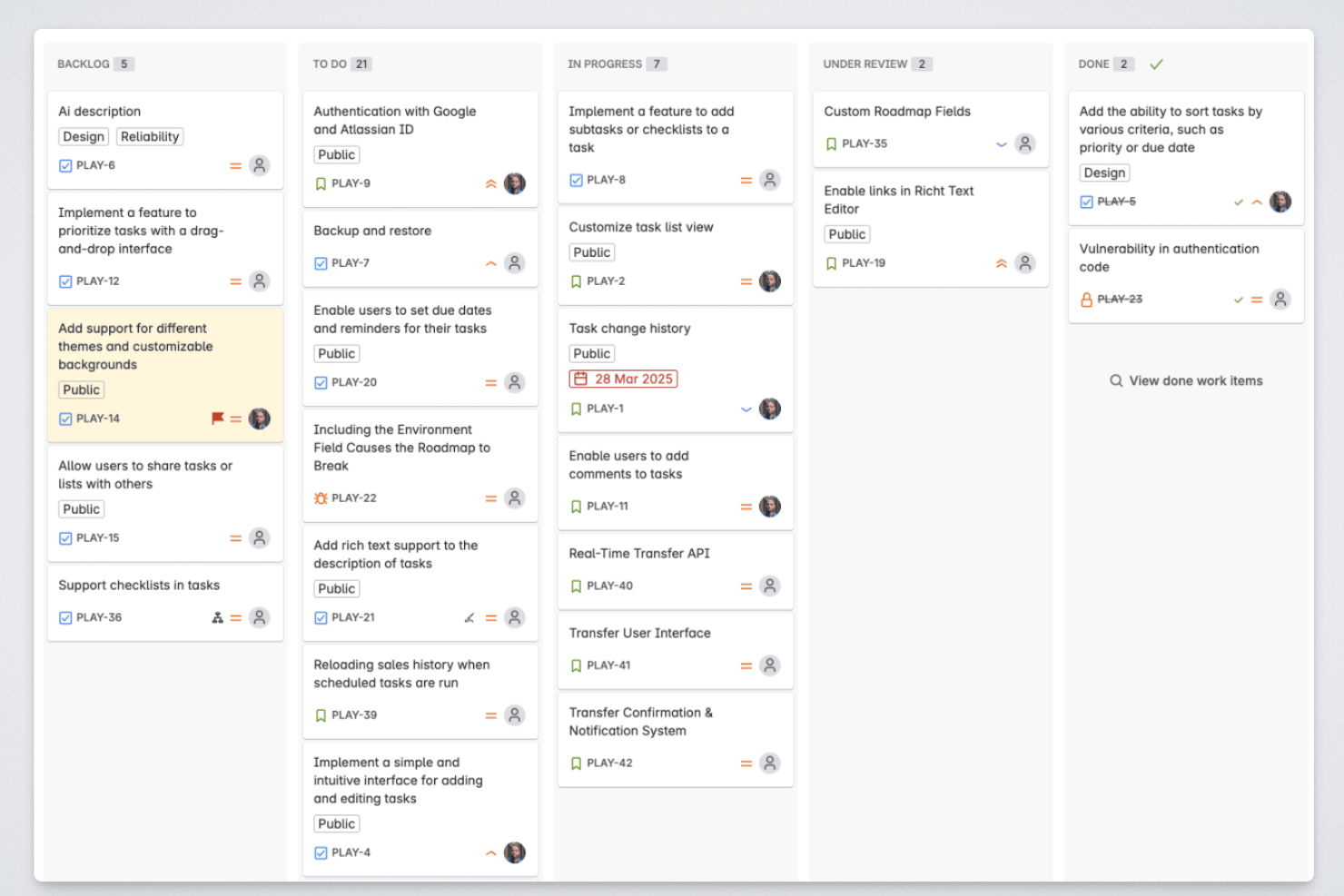
Released is an Atlassian-native roadmap and product communication tool that publishes live-synced public roadmaps, collects customer feedback, and generates AI-drafted release notes directly from your Jira and Jira Product Discovery data.
Who Is Released Best For?
Released is a natural fit for Jira-based product teams that want to share customer-facing roadmaps and changelogs without stepping outside the Atlassian ecosystem.
Why I Picked Released
Released earns its spot on my shortlist because it's the only roadmap tool that publishes directly from Jira without a separate database to maintain. I love that you can build cross-space roadmaps pulling from multiple Jira and Jira Product Discovery projects into a single unified view, then serve audience-specific versions to customers, executives, and GTM teams from that same source. When a ticket moves in Jira, the public roadmap updates automatically.
Released Key Features
- Branded changelog hub: Publish release notes to a dedicated changelog site with custom domain and styling.
- Feedback voting portal: Collect feature requests and upvotes from customers in a public or private portal.
- Slack feedback integration: Route product feedback from Slack channels directly into your roadmap and inbox.
- AI release note drafting: Automatically generate release note drafts from completed Jira tickets using built-in AI.
Released Integrations
Released offers native integrations with Jira, Jira Product Discovery, Confluence, and Slack.
Pros and Cons
Pros:
- AI drafts release notes from closed Jira tickets
- Supports audience-specific views from one source
- Roadmaps update live when Jira tickets move
Cons:
- Limited usefulness outside the Atlassian ecosystem
- Roadmap views lack deep prioritization framework support

Miro
Best for pre-built templates

Miro is a virtual whiteboard and collaboration platform that can be used by teams to generate ideas, develop product roadmaps, and document workflows.
Why I picked Miro: Miro stands out for its extensive library of pre-built templates, catering to diverse business functions such as Agile methodologies, strategic planning, and brainstorming. By utilizing these templates, product management teams can bypass the initial setup phase, diving straight into strategic discussions and planning.
Miro also offers an infinite canvas paired with a wide range of expression tools, enabling teams to utilize text, sticky notes, numerical data, images, brand elements, and videos for a richer representation of ideas. The inclusion of a Planner Tool also aids in organizing tasks and setting milestones, contributing to clearer visualization of project timelines, dependencies, and overall roadmaps.
Miro Standout Features & Integrations
Features include a template library, clustering, voting, comments, and sticky notes, Miro Assist AI, a dependencies app to map out project dependencies, quick diagramming tools, a timer, mind maps, freeform drawing, access controls, and GDPR and CCPA compliance.
Integrations include Zoom, Microsoft Teams, Slack, Google Workspace, Asana, monday.com, Jira, Dropbox, Confluence, OneDrive, Notion, Airtable, ClickUp, and Unito, among others.
Miro Plans & Pricing
A free plan is available and paid plans start from $10 per user per month.
New Product Updates from Miro
Miro Adds Japan Data Residency for Enterprise Customers
Miro has introduced Japan data residency for enterprise customers, offering in-region storage for production data, backups, and metadata, plus in-region compute infrastructure. For more information, visit Miro's official site.
 .
.
FigJam
Best for a flexible and customizable solution

FigJam is a virtual whiteboarding tool that can be used for product roadmapping among other key product and project management activities.
Why I picked FigJam: This is a unique tool for roadmapping because of its flexibility. As a whiteboarding tool, you can essentially create anything you'd like from a blank canvas. However, it has a pre-built roadmapping template that speeds up your process. You can customize the template to best suit your needs and outline your roadmap in a clear and effective way.
Other ways you can use this platform is for brainstorming, ideation, team meetings, project management, and collaborative work. It has audio and live chat so your team can work together on your roadmap (or other work) in real-time. Users can comment and add emoji reactions in the boards, facilitating feedback, questions, and updates.
FigJam Standout Features & Integrations
Features include pre-built templates, calendar and timeline widgets, external collaborator access, audio and live chat, stamp and emoji reacts, bitmoji avatars, music player, and mobile app.
Integrations include Figma, Microsoft Teams, Asana, Jira, Mixpanel, and Github.
FigJam Plans & Pricing
Paid plans start from $3 per user per month, but a freemium plan is also available with unlimited users and up to 3 FigJam files.

Chisel
Best for AI-powered roadmaps and feedback analysis

Chisel is a product management tool designed to help you organize product needs and gather customer feedback. It integrates everything you need to manage your product's lifecycle.
Why I Picked Chisel: I chose Chisel because it combines AI-driven assistance with a built-in feedback and roadmap system. Its AI PM agent automates common tasks like generating PRDs, release notes, and status updates, as well as organizing research and competitive analysis. This helps reduce repetitive work and keep product managers focused on strategic planning.
Chisel also stands out for its approach to customer feedback. The platform collects input from both first- and third-party sources and uses AI to classify comments, identify patterns, and surface actionable insights. Its customizable, feedback-connected roadmaps make it easier to prioritize development in line with user needs and business goals.
Chisel Standout Features & Integrations
Features include automated PM document creation, customer feedback analysis, team alignment tools like Team Radar, and customizable roadmaps connected to user input. Chisel also supports market research, trend identification, and generating reports and dashboards to share progress with stakeholders.
Integrations include Jira, Azure DevOps, Zendesk, Intercom, Salesforce, GitHub, Amplitude, Mixpanel, Pendo, Confluence, Google Drive, Microsoft Teams, and thousands more through Zapier.
Pros and Cons
Pros:
- AI-driven insights
- Multifunctional features offered such as Kanban boards and Treeview
- Integrates with tools like Jira and Azure DevOps
Cons:
- Platform has a learning curve
- Cookie consent process can be cumbersome

Coda
Best for in-team topic voting

Coda is a collaborative work management platform based on shared documents. Similar to tools like Notion and Slite, it brings a document-based approach to project management.
Why I picked Coda: Users can combine building blocks to create documents with the functionality of apps. One of the templates they offer is topic voting, which lets you suggest roadmap ideas to your team and has their vote on them to organize them from most to least popular automatically.
This simple approach makes it possible to build a product roadmap very quickly by dragging and dropping the items you need. First, tables are created for people, features, and resource allocation, and then these blocks are used to build out the roadmap.
Coda Standout Features & Integrations
Features include templates, building blocks for tables, copy-paste from Excel, customizable columns, and multiple layouts that include cards, calendar, detail, and timeline.
Integrations are called packs and include custom-built options using its API and pre-built integrations. These pre-built options include Salesforce, Asana, Microsoft Teams, Intercom, Figma, and Quickbooks.
Coda Plans & Pricing
There are three paid plans and pricing starts at $12/user/month. A limited free plan is also available.

Best for real-time roadmap visibility

LaunchNotes is a product communication platform that helps you share roadmaps, release notes, and updates in one place. It’s designed to align teams and keep customers engaged throughout the product lifecycle.
Why I Picked LaunchNotes: I picked LaunchNotes for its roadmap visibility, which gives your team and customers a clear view of what’s coming next. This transparency helps manage expectations and reduce misalignment. I also like that it automates product announcements, so updates reach the right people without adding to your team’s workload. On top of that, the built-in feedback tools make it easy to capture user input and refine your roadmap based on real needs.
LaunchNotes Standout Features & Integrations
Features include announcement templates you can brand and reuse, in-app widgets for real-time updates, and an AI writing assistant that helps you create clear and consistent product communications. It also offers analytics dashboards so you can track engagement and see how customers are responding to changes.
Integrations include Jira, Confluence, Loom, Slack, Microsoft Teams, Chrome extension, RSS, LinkedIn, Intercom, Notion, Gmail, and Google Sheets.
Pros and Cons
Pros:
- Multi-channel communication options
- AI-assisted announcement writing
- Clear roadmap visualization
Cons:
- Fewer roadmap customization options
- Limited automation workflows
Trello
Best for a Kanban-style roadmapping

Trello is a flexible work management tool that uses boards, lists, and cards to display information visually and bring your team together in one place.
Why I picked Trello: The software includes a product roadmap template designed to help you gather feature requests and track development. You can organize user stories and customer feedback on each feature card using the card template to ensure consistency. Story points can be added to cards for more effective sprint planning.
Trello Standout Features & Integrations
Features include automation for tasks and workflows, power-ups, templates, and 5+ views so you can see your project from every angle.
Integrations include Jira, Slack, Bitbucket, Mailchimp, Slab, GitLab, Pipedrive, Hootsuite, and Telegram. You can also connect Trello to thousands of apps using Zapier.
Trello Plans & Pricing
There are three paid plans and pricing starts at $6/user/month. A free plan is available (limited to 10 boards).

Jira
Best for Agile roadmap management across teams

Jira Software is an Agile project management tool that helps users keep track of development progress, plan sprints and milestones, and coordinate across teams.
Why I picked Jira Software: The software simplifies the task of managing multiple projects with a visual roadmap where users can see the status of each task or feature their teams are working on. Items can be set as stories, issues, and tasks in the platform, breaking larger initiatives into smaller pieces for teams to work on. These roadmap tools can help users identify dependencies between tasks and initiatives, minimize risks associated with complex projects, make better resource decisions, and gain insight into their teams' performance.
Customizable dashboards are also available in the software, making it easy for users to stay up-to-date on project progress. Teams can customize their dashboards with widgets that show various metrics related to their projects, such as total open or closed tickets over a certain period. This makes it easy for everyone involved in a project to get a quick overview of its progress without digging through multiple pages or reports.
Jira Software Standout Features & Integrations
Features include Kanban and Scrum boards, bug tracking, issue escalation, custom workflows, work-in-progress limits, unlimited levels of hierarchy, dependency tracking across teams and projects, and capacity planning.
Integrations include Adobe, Drobbox, Figma, Google Workspace, InVision, Microsoft, Miro, Slack, Zendesk, Zoom, and more.
Jira Software Plans & Pricing
Paid plans start at $10/user/month, and a 7-day free trial is available.

Aha!
Best for feedback-driven planning

Aha! is a product development software with a road mapping product that lets you build custom roadmaps that you can use to align strategy and execution.
Why I picked Aha!: The software has a custom-branded portal where you can gather ideas from your colleagues and partners and capture customer feedback. This can help you plan your roadmap according to input and prioritize your work based on stakeholder requests.
Additionally, there is a product value scorecard that you can use to rank each feature of your product based on your goals. Later, you can use the score to prioritize the most impactful work.
Aha! Standout Features & Integrations
Features include custom fields, release templates, goal tracking, initiative planning, dependency mapping, timeline views, capacity reports, idea submission forms, workflow approvals, presentation sharing, and activity logs.
Integrations include 30+ tools, including Jira, Azure DevOps, Slack, Salesforce, Asana, Google Analytics, and Dropbox.
Best Product Management Roadmap Tools Summary
Quickly compare all the options we just covered.
| Tool | Best For | Trial Info | Price | ||
|---|---|---|---|---|---|
| 1 | Best for customizability | Free demo available | Pricing upon request | Website | |
| 2 | Best with live Jira-synced public roadmaps | 30-day free trial + free plan available | From $1.10/user/month | Website | |
| 3 | Best for pre-built templates | Free plan available | From $8/member/month (billed annually) | Website | |
| 4 | Best for a flexible and customizable solution | Free plan available | From $3/editor/month (billed annually) | Website | |
| 5 | Best for AI-powered roadmaps and feedback analysis | Free plan available | From $7/per maker/month | Website | |
| 6 | Best for in-team topic voting | Free trial + free plan + free demo available | From $10/doc maker/month (billed annually) | Website | |
| 7 | Best for real-time roadmap visibility | 14-day free trial available | From $249/month (billed annually) | Website | |
| 8 | Best for a Kanban-style roadmapping | 14-day free trial | From $5/user/month (billed annually) | Website | |
| 9 | Best for Agile roadmap management across teams | 7-day free trial | From $8.15/user/month (billed annually) | Website | |
| 10 | Best for feedback-driven planning | 30-day free trial + free demo available | From $9/user/month | Website |
Other Product Management Roadmap Tools
Here are a few more that didn’t make the top list.
- Planview AdaptiveWork
For enterprise organizations
- ProdPad
For outcome-focused product roadmaps
- LoopedIn
For embeddable roadmaps
- Reveall
Roadmap tool with built-in a large template library
- FeatureMap
For the scalability of its roadmap boards
- ClickUp
For real-time team communication and collaboration
- Dragonboat
For product portfolio management
- Wrike
For Agile product development
- Craft.io
For roadmaps that connect strategy to tactical work
- Zeda.io
For building customer-centric roadmaps built with AI insights
- PathPro
For transparent public roadmaps
- Asana
For integrations
- Productboard
For customer-facing products
- StoriesOnBoard
For user story mapping
- ProductPlan
Training packages
- Roadmunk
For flexible swimlanes
- Harvestr
For customer notifications
- ClickUp
For free Gantt charts
- YouTrack by JetBrains
For issue tracking


How I Evaluate Product Management Roadmap Tools
I evaluate in two layers: the baseline every tool must hit—think Jira sync, timeline views, and stakeholder sharing—and the differentiators that separate a great fit from a generic one.
Core Functionality (Table Stakes For This List)
When I'm selecting tools for my list, I rank each one on a scale from 0 (does not offer the functionality) to 5 (excels in this area) for each core functionality listed below. Then, I calculate the tool's total score into a percentage. Each tool needs to achieve a minimum total score of 65% to be considered for inclusion.
- Visual Roadmap Builder: I check for multiple view types like timeline, swimlane, and now/next/later, plus the ability to customize grouping, color-coding, and date ranges per audience.
- Feature Prioritization Frameworks: Built-in scoring models like RICE or value-vs.-effort matrices matter here, along with the ability to customize criteria and weights.
- Strategic Goal Alignment: I look for the ability to link features and initiatives directly to OKRs or strategic themes so roadmap items trace back to business outcomes.
- Dev Tool Integrations: Bi-directional sync with tools like Jira, Azure DevOps, or Linear is what I evaluate, including how well field mapping and status updates flow between systems.
- Stakeholder Sharing Views: The ability to create filtered, permission-based views for different audiences matters—executives, customers, and engineering leads all need different lenses.
- Idea & Feedback Capture: I look for a centralized intake system where customer requests and internal ideas can be collected, voted on, and linked to specific roadmap items.
Once I have a list of tools that meet this criteria, I consider what sets each platform apart.
Differentiating Factors (What Sets Vendors Apart)
Here's how I compare and contrast different vendors:
Standout Features
Scenario planning is a big differentiator—I look for the ability to compare side-by-side "what-if" roadmaps before committing to a release plan. Capacity planning also matters, especially for teams juggling multiple product lines where knowing available engineering hours shapes what actually ships. Customer-facing portals are worth evaluating too. Tools like Productboard and Aha! offer branded public roadmaps and changelogs, giving customers visibility into progress without cluttering internal views.
Beyond Features
I evaluate how well a tool fits the team's size and maturity. A solo PM at a startup needs fast setup with templates, while a 20-person product org needs portfolio views, SSO, and SCIM provisioning. Pricing structure matters here too—I check whether viewer seats are free or paid, since roadmap tools often have far more viewers than editors. Integration depth is another factor I weigh. A tool that connects to Salesforce, Intercom, and Slack alongside Jira gives product teams a fuller picture of what customers are asking for and what engineering is delivering.
Trends in Product Management Roadmapping Tools
In my research, I sourced countless product updates, press releases, and release logs from different product management roadmap software vendors. Here are some of the emerging trends I’m keeping an eye on:
- AI-Driven Insights: Tools are increasingly using AI to provide predictive analytics and insights. This helps teams anticipate market changes and adjust strategies proactively. Some vendors are integrating AI to analyze user feedback and improve product roadmaps.
- Enhanced Collaboration Features: There's a growing focus on features that enhance team collaboration across different locations. Real-time editing and comment functions are becoming standard, allowing teams to work together more effectively.
- User-Centric Design: Vendors are prioritizing user experience with more intuitive interfaces and user-friendly design. This trend makes it easier for teams to adopt new tools without extensive training, focusing on simplicity and ease of use.
- Data Visualization Tools: Advanced data visualization is being standardized for presenting complex information clearly. Data visualization tools help teams make data-driven decisions quickly by transforming raw data into easy-to-understand visuals.
- Sustainability Tracking: More roadmaps are incorporating features to track sustainability goals. This trend aligns with growing business priorities on environmental impact, allowing teams to align product strategies with sustainability objectives.
Features of Product Management Roadmap
When selecting product management roadmap software, keep an eye out for the following key features:
- Roadmap visualization: Allows teams to create and share a visual representation of their product strategy, making it easier to communicate plans with stakeholders.
- Task and milestone tracking: Helps teams keep track of project progress and deadlines, ensuring that everyone stays on schedule.
- AI-driven insights: Provides predictive analytics to help teams anticipate changes and make informed decisions.
- Collaboration tools: Facilitates communication and teamwork across different locations, enhancing productivity and alignment.
- Customizable workflows: Lets teams tailor processes to fit their specific needs, offering flexibility in managing projects.
- Data visualization: Transforms raw data into clear visuals, aiding in quick and easy decision-making.
- Scenario planning: Enables teams to explore different strategies and outcomes, helping them prepare for various possibilities.
- Sustainability tracking: Allows teams to monitor and align their product strategies with environmental goals.
- User-centric design: Ensures the tool is intuitive and easy to use, reducing the learning curve for new users.
- Security safeguards: Protects sensitive information with encryption and compliance with data regulations, ensuring data security.
Benefits of Product Management Roadmap Tools
Implementing product management roadmap tools can provide several benefits for your team and your business. Here are a few you can look forward to:
Ease of use: User-centric design ensures that the tool is easy to adopt, minimizing training time and encouraging widespread use across the team.
Improved alignment: Helps ensure that all team members and stakeholders are on the same page with clear roadmap visualization and communication tools.
Enhanced decision-making: AI-driven insights and data visualization provide the information needed to make informed strategic choices.
Increased productivity: Collaboration tools and task tracking keep everyone coordinated and focused on meeting deadlines.
Greater flexibility: Customizable workflows and scenario planning allow teams to adapt quickly to changing project needs or market conditions.
Better resource management: Features like task and milestone tracking help allocate resources more effectively, reducing waste and optimizing efficiency.
Sustainability focus: Tools that track sustainability goals help align product development with environmental objectives, supporting corporate responsibility efforts.
Costs and Pricing of Product Management Roadmap Tools
Of course, an important aspect of choosing any software requires an understanding of the various pricing models and plans available. Naturally, costs vary based on features, team size, add-ons, and more. The table below provides a framework and summarizes common plans, their average prices, and typical features included in most product management roadmap solutions:
Plan Comparison Table for Product Management Roadmap
| Plan Type | Average Price | Common Features |
|---|---|---|
| Free Plan | $0 | Basic roadmap creation, limited collaboration tools, and basic reporting. |
| Personal Plan | $5-$25/user/month | Enhanced visualization, task tracking, and limited integrations. |
| Business Plan | $30-$60/user/month | Advanced collaboration, customizable workflows, and data visualization. |
| Enterprise Plan | $70-$120/user/month | AI-driven insights, full integrations, and advanced security features. |
Frequently Asked Questions
If your team is considering working with a product management roadmap tool, you likely have some questions. Below I’ve answered some of the FAQs about product management, product roadmaps, and product management tools.
What is product roadmap management?
Product roadmap management ensures that the development of a new or existing product continues according to a clearly defined plan. It provides a means for Agile teams and all interested parties to move the project forward while giving senior management a clear overview of tasks and priorities.
Using a product roadma2p software is a great way to manage your product development. Product roadmap tools offer drag-and-drop interfaces for mapping out your product plan, timeline management tools to ensure key deadlines are met, and more. They help give team members a clear picture of what they’re working towards, and stakeholders a clear picture of what they can anticipate.
What should a product roadmap include?
If it’s your first time learning how to build a product roadmap, don’t fear! No two will be exactly alike, but there are a few things you’ll want to be sure to include, like:
- A product vision that defines the overall development path,
- A strategy for achieving the desired results,
- An outline of the requirements that must be met,
- A product plan for achieving the above,
- Markers or milestones to stay on schedule, and
- Metrics that you can use to measure your progress.
There are a few different types of product roadmaps you might want to explore, and figure out the right one for your use case. But essentially, it’s about mapping out your end goals, the checkpoints towards them, and important details along the way.
What are the best product management roadmap tools for the technology and SaaS industry?
Software development teams and product teams working in the tech and SaaS industries may be looking for specific features or functionalities in a software to manage their roadmap. The best product roadmap tools for these use cases are ones that offer features like:
- Agile methodologies and frameworks, like sprint planning and scrum boards,
- APIs for building custom integrations, so you can connect it with your product or your existing tech stack,
- Tools that specialize in roadmapping new products, new features, or digital products specifically (especially for startups),
- Integrations with key software development tools like Jira, GitHub, Azure DevOps, etc.,
- Software that offers product roadmap templates that cater to building digital products, like software and apps.
How do product management roadmap tools cater to the needs of financial services companies?
Financial services providers often have stringent compliance and security requirements. As such, it will be important to find the best product roadmap software in terms of its data security features. Here are some things to look for:
- Compliance with specific data security governing structures, like GDPR, HIPAA, and SOC 2 compliance,
- Advanced user access permissions to ensure data is well-governed according to your organization’s security clearance levels,
- Audit trails to keep track of how information is updated, when, and by whom,
- Customizable approval workflows to ensure information is exchanged and signed off on according to your company’s standard operating procedures.
Essentially, you’re looking for a product that goes above and beyond when it comes to security. These are just a few examples of security features you might find in specific product management roadmap tools.
Who owns the product roadmap?
Typically, the product manager owns the product roadmap. They collaborate with stakeholders to ensure the roadmap aligns with strategic goals. The product manager also keeps the roadmap updated and communicates changes to the team, ensuring everyone is on the same page.
What's Next?
If you are looking for more tools but you're not ready to make a big investment or your team doesn't have extensive needs yet, we have a roundup of the best free product roadmapping tools to bring your product to life faster without breaking the budget.
Be sure to sign up for our newsletter, too, so you can get the latest thinking on product management software from thought leaders in this niche.