

As a product manager, you face unique challenges daily. Balancing stakeholder demands, keeping your team aligned, and ensuring projects stay on track can feel overwhelming. You might be considering alternatives to Productboard for better solutions that fit your team's needs.
I've spent years in the product management field, testing and reviewing software independently. I know how crucial it is to have tools that genuinely support your workflow. In my experience, finding the right software can make all the difference.
In this article, I'll share my top picks for Productboard alternatives. You'll get an unbiased, well-researched review of each option, focusing on how they can help you overcome your specific business challenges. Let's find the best fit for your team together.
What Is Productboard?
Productboard is a product management core that helps teams prioritize, plan, and build products effectively. Whether you're a startup looking for roadmap software or an established company refining its product management platform, Productboard’s tools, including its widget for gathering product feedback, can help teams stay connected to customer needs. Features like prioritization frameworks and road mapping help you keep track of user needs, decide what to build next, and efficiently communicate strategies to stakeholders. Overall, Productboard offers a structured approach to managing your product's lifecycle, ensuring your team stays focused and aligned with business goals.
Why Trust Our Software Recommendations
6,700+
Reviews
20
Industry experts
16+
Evaluation factors
14
Years
Our team has been testing and reviewing software since 2012. As product managers ourselves, we know how difficult—and important—it is to choose the right software.
For this guide, we evaluated tools using hands-on testing and independent research, scoring tools using our selection criteria.
Our reviews reflect our human editorial judgment, not a sales pitch.
Expert reviewers:
- Andrew LumbySenior TPM
- Cristiano ValimSenior UI/UX Lead


Productboard Alternatives Comparison Table
Use this comparison table to compare pricing details for my top Productboard alternatives.
| Tool | Best For | Trial Info | Price | ||
|---|---|---|---|---|---|
| 1 | Best for AI-driven customer feedback analysis | Free demo available | Pricing upon request | Website | |
| 2 | Best for Jira-based public roadmaps | 30-day free trial + free plan available | From $1.10/user/month | Website | |
| 3 | Best for revenue-weighted feedback prioritization | 30-day free trial + free demo available | From $16,000/year | Website | |
| 4 | Best for strategy-to-roadmap OKR alignment | 30-day free trial + free demo available | From $9/user/month | Website | |
| 5 | Best for product backlog management | 14-day free trial + free demo available | Pricing upon request | Website | |
| 6 | Best for AI-driven portfolio roadmapping | Free demo available | Pricing upon request | Website | |
| 7 | Best for customizable prioritization frameworks | Free demo available | Pricing upon request | Website | |
| 8 | Best for product discovery-driven roadmaps | 14-day free trial + free demo available | From $24/user/month | Website | |
| 9 | Best for customer feedback collection via AI | Free plan available | From $79/month (billed annually) | Website | |
| 10 | Best for closing the feedback loop with customers | Free plan available | From $29/user/month (billed annually) | Website |


We’ve been testing and reviewing product management software since 2020. As product managers ourselves, we know how critical and difficult it is to make the right decision when selecting software. We invest in deep research to help our audience make better software purchasing decisions.
We’ve tested more than 2,000 tools for different product management use cases and written over 1,000 comprehensive software reviews. Learn how we stay transparent & check out our software review methodology.
Best Productboard Alternatives Reviews
Below are my detailed summaries of the best Productboard alternatives that made it onto my shortlist. My reviews offer a detailed look at the key features, pros & cons, integrations, and ideal use cases of each tool to help you find the best one for you.
 Best for AI-driven customer feedback analysis
- Free demo available
- Pricing upon request
Visit WebsiteCustomer Rating:4.8/5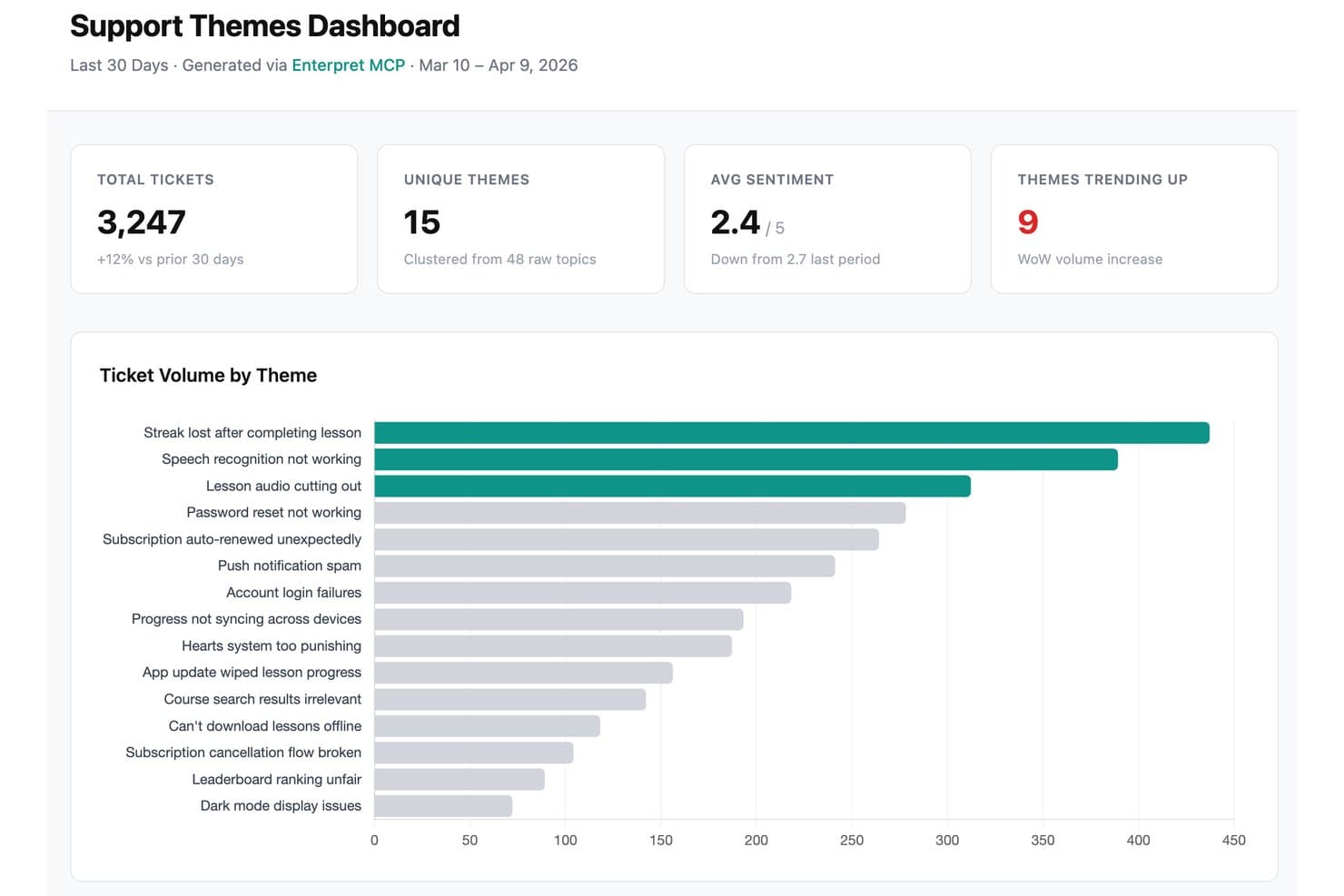
Enterpret offers a Support Themes Dashboard that clusters raw support tickets into themes, displaying ticket volume, sentiment trends, and trending issues. Enterpret is a customer feedback platform for product teams that unifies insights from multiple channels, helping businesses identify customer needs, validate product decisions, and prioritize roadmap improvements.
Who Is Enterpret Best For?
Enterpret suits product teams that need to combine feedback from multiple channels and turn customer insights into roadmap priorities.
Why Enterpret Is a Good Productboard Alternative
I picked Enterpret because its AI-driven customer feedback analysis brings feedback from multiple channels into one view. I use it to identify recurring customer needs, validate product decisions, and connect evidence to roadmap priorities. That helps my team replace scattered feedback with clear product direction.
Enterpret Key Features
- Feedback integrations: Connect customer feedback sources in one workspace.
- Custom taxonomy: Organize feedback with categories tailored to your product.
- Sentiment analysis: Classify feedback by positive, negative, or neutral sentiment.
- Search and filtering: Find feedback using keywords, tags, sources, or segments.
Enterpret Integrations
Enterpret offers 50+ native connectors, including Zendesk, Salesforce, Slack, Jira, Linear, Snowflake, Census, and Notion. It supports Zapier and webhook APIs for custom feedback sources.
Pros and Cons
Pros:
- Sentiment analysis surfaces recurring customer needs
- Custom taxonomy connects insights to roadmaps
- Unifies feedback across customer channels
Cons:
- Primarily focuses on feedback analysis
- Pricing transparency is limited
Learn more about Enterpret: Best for Jira-based public roadmaps
- 30-day free trial + free plan available
- From $1.10/user/month
Visit WebsiteCustomer Rating:5/5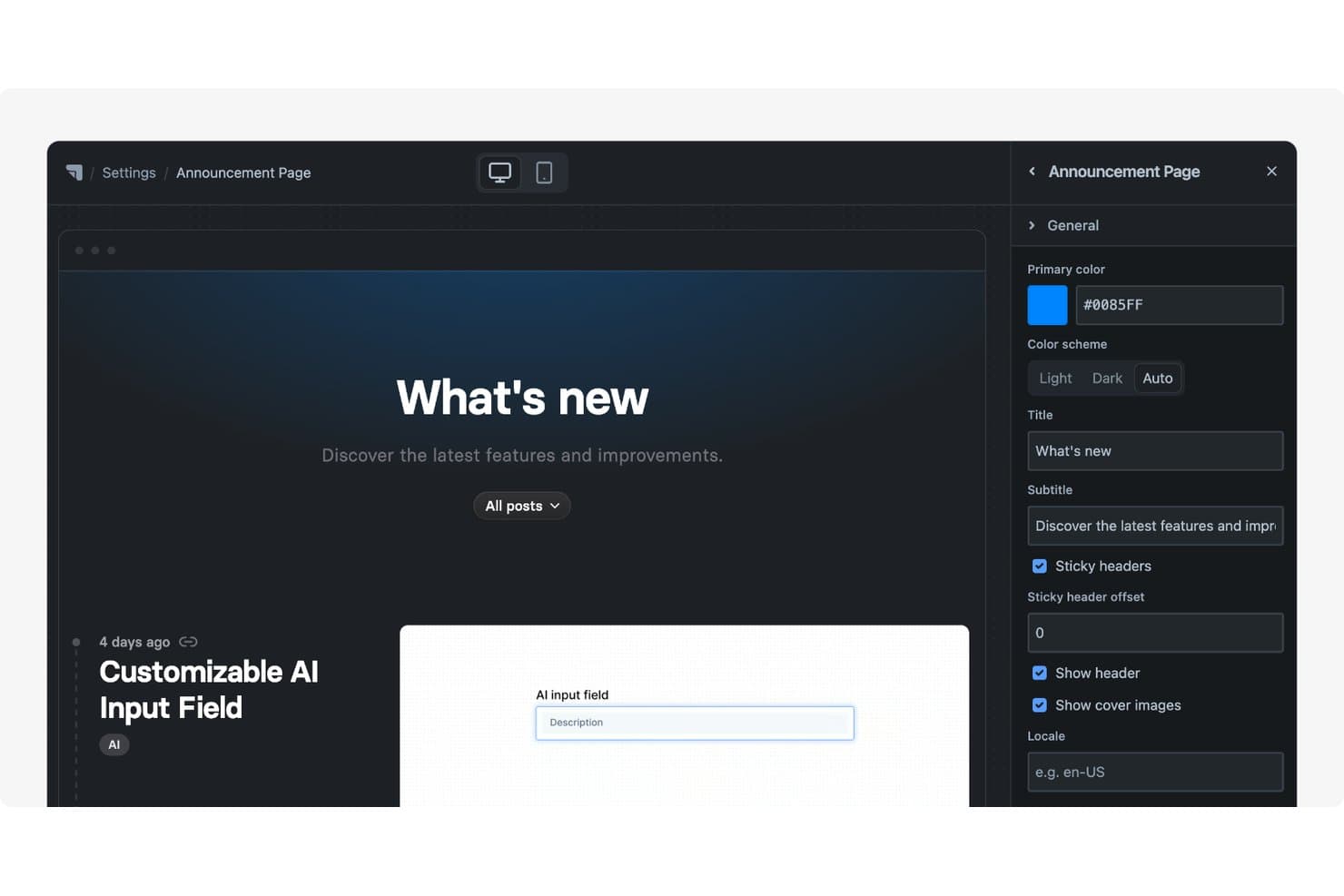
Released offers a customizable Announcement Page with editable title, subtitle, color scheme, and header settings via a side panel. Released is a product management platform for Jira-based teams that helps product managers organize customer feedback, prioritize requests, and align stakeholders around product plans.
Who Is Released Best For?
Product managers at Jira-based teams who need to share public roadmaps and keep customer feedback tied to delivery plans.
Why Released Is a Good Productboard Alternative
I picked Released because it’s best for Jira-based public roadmaps. My team uses it to organize customer feedback, prioritize requests, and connect roadmap updates to Jira delivery plans. That gives stakeholders a clear view of what’s planned without separating product communication from execution.
Released Key Features
- AI release notes: Draft release notes from completed Jira tickets.
- Branded changelog: Publish updates on custom domains.
- Email subscriptions: Let customers subscribe to product updates.
- Embeddable portals: Add roadmaps and changelogs to websites or docs.
Released Integrations
Released offers a native Jira integration, connecting customer-facing roadmaps, release notes, and feedback conversations to Jira work. Additional native integrations, Zapier support, and API access aren’t clearly documented.
Pros and Cons
Pros:
- Connects customer conversations with delivery context
- AI drafts release notes from completed work
- Publishes polished public roadmaps quickly
Cons:
- Fewer advanced prioritization frameworks than Productboard
- Less suited to research-heavy product discovery
Learn more about Released: Best for revenue-weighted feedback prioritization
- 30-day free trial + free demo available
- From $16,000/year
Visit WebsiteCustomer Rating:4.3/5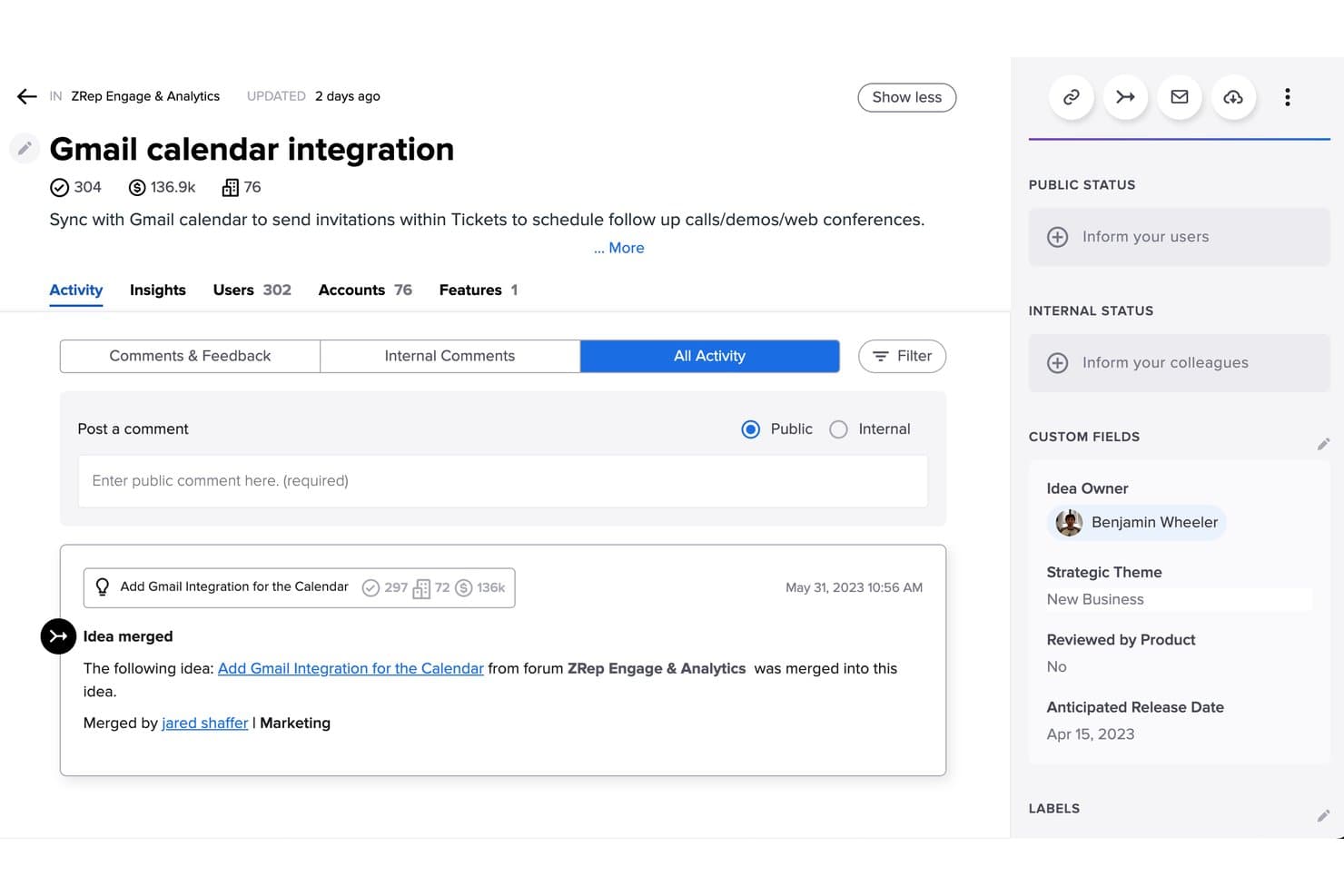
Uservoice merges duplicate ideas to consolidate user feedback efficiently. Uservoice is a customer feedback and product management platform for product teams that need to collect requests, connect them to customer insights, and prioritize roadmap decisions across growing organizations.
Who Is Uservoice Best For?
Product teams at growing organizations that need to connect customer feedback with revenue data and roadmap priorities.
Why Uservoice Is a Good Productboard Alternative
I picked Uservoice because it’s built for revenue-weighted feedback prioritization. I use its feedback portals and customer segmentation to group requests by account, segment, and product area, then connect demand to revenue impact. That helps my team prioritize a roadmap request from several high-value customers over one with greater volume but less commercial value.
Uservoice Key Features
- Feedback widgets: Collect product input directly inside your application.
- Idea statuses: Show customers where requests stand in your workflow.
- Product integrations: Connect feedback with tools your team already uses.
- Analytics dashboards: Review request trends and customer engagement data.
UserVoice Integrations
UserVoice offers documented integrations with Salesforce, Gainsight, Jira, Zendesk, Azure DevOps, Microsoft Teams, Slack, FullStory, Skyvia, and Dragonboat. It also provides Admin and Idea Collection APIs for custom integrations.
Pros and Cons
Pros:
- Status updates keep customers informed about request progress
- In-product widgets capture feedback at relevant moments
- Revenue-weighted prioritization connects requests to account value
Cons:
- Advanced reporting requires substantial configuration and setup
- Portal interface feels dated beside newer alternatives
Learn more about Uservoice: 4Best for strategy-to-roadmap OKR alignment
Aha!
- 30-day free trial + free demo available
- From $9/user/month
Visit WebsiteCustomer Rating:4.4/5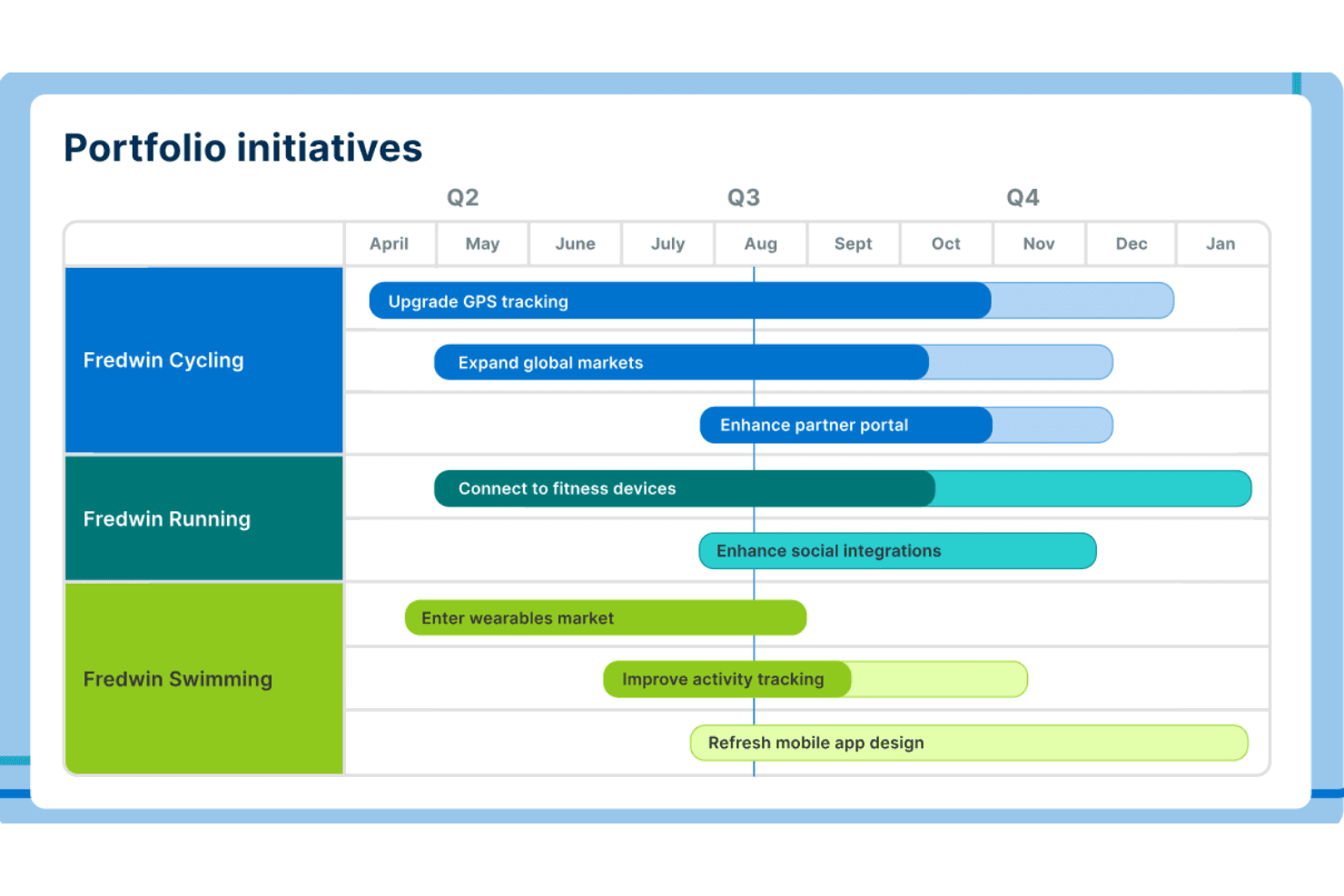
Aha! emphasizes strategic road mapping with tools for goals, ideas, and plan visualization. Aha! is product management software for teams that need to connect customer insights, product strategy, roadmaps, requirements, and delivery plans in one workspace.
Who Is Aha! Best For?
Product leaders and strategy teams that need to connect product vision, roadmaps, and OKRs across cross-functional organizations.
Why Aha! Is a Good Productboard Alternative
I picked Aha! because it connects customer insights to product strategy, roadmaps, and OKRs in one workspace. I use its strategic planning tools to define goals, then link initiatives and features to measurable outcomes. Its roadmap and requirements views help my team explain why each priority supports our product strategy.
Aha! Key Features
- Capacity planning: Compare team bandwidth with planned work.
- Dependency mapping: Link related work items and identify blockers.
- Workflow automation: Configure rules that update records automatically.
- Custom fields: Add structured data fields to capture team-specific details.
Aha! Integrations
Aha! offers 30+ native integrations, including Jira, Azure DevOps, GitHub, Slack, Microsoft Teams, Salesforce, and Zendesk. It also supports Zapier and provides an API for custom integrations.
Pros and Cons
Pros:
- Customizable views support detailed stakeholder reporting
- Captures customer feedback alongside product plans
- Links strategic goals to roadmap work
Cons:
- Dense interface slows first-time users
- Initial setup requires substantial planning
Learn more about Aha!: Best for product backlog management
- 14-day free trial + free demo available
- Pricing upon request
Visit WebsiteCustomer Rating:4.2/5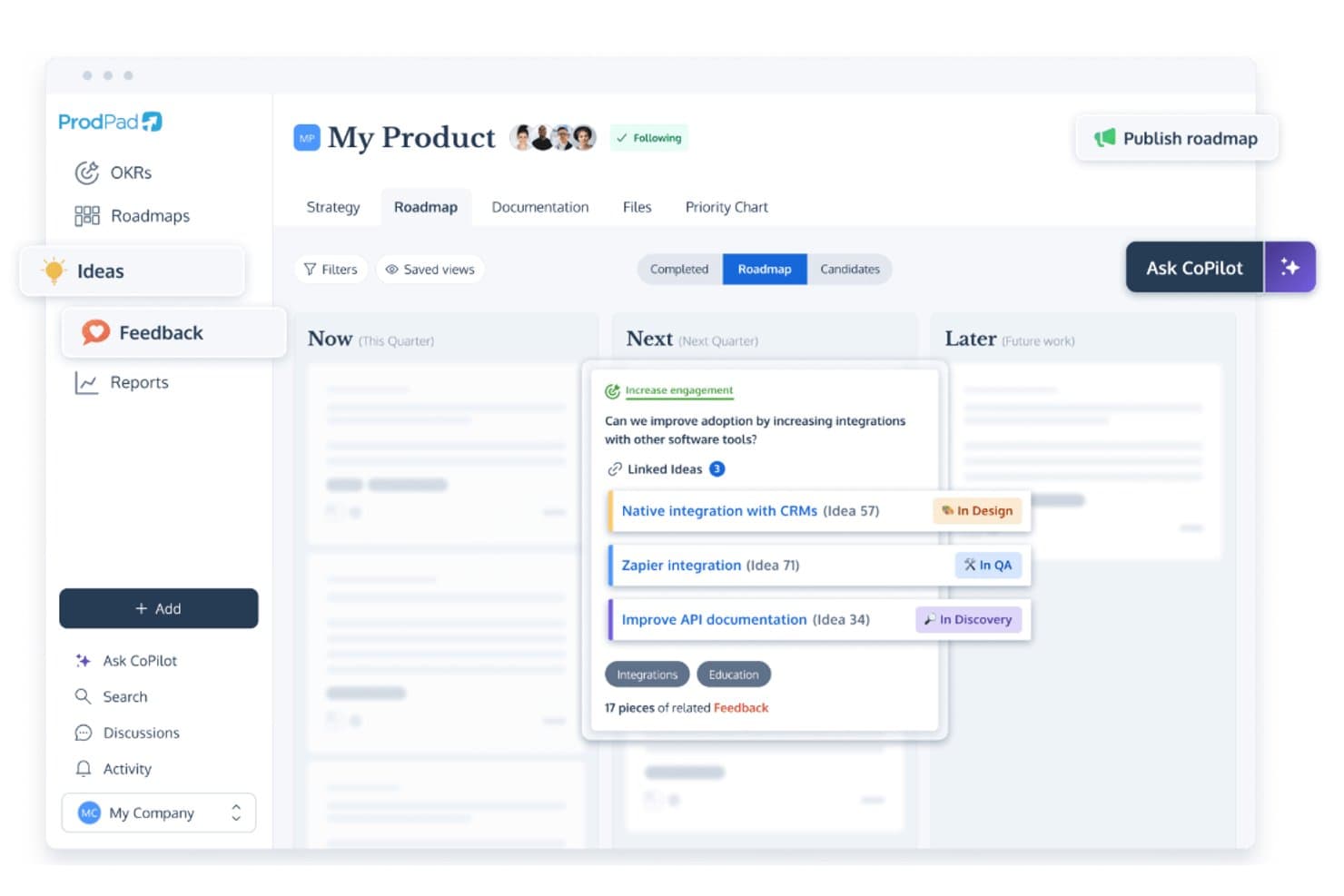
ProdPad links roadmap ideas to feedback and tracks development status. ProdPad is product management software for teams that connects customer insights, product strategy, roadmaps, and prioritization, helping product managers turn feedback into aligned plans and confident delivery decisions.
Who Is ProdPad Best For?
ProdPad suits product managers who need to connect customer feedback, product strategy, and backlog priorities in one workspace.
Why ProdPad Is a Good Productboard Alternative
I picked ProdPad because its product backlog management connects customer feedback with product ideas and strategic goals. I use its prioritization tools to assess requests, score opportunities, and keep discovery work tied to the roadmap. That gives my team a clearer basis for deciding which backlog items deserve attention next.
ProdPad Key Features
- User story editor: Draft stories with acceptance criteria and supporting details.
- Product canvas: Capture users, problems, hypotheses, and product vision in one workspace.
- Release planning: Group planned work into releases with dates and milestones.
- Development integrations: Connect ProdPad with tools such as Jira and Azure DevOps.
ProdPad Integrations
ProdPad offers integrations with Jira and Azure DevOps, helping teams connect product planning with development workflows.
Pros and Cons
Pros:
- Separates discovery work from delivery planning
- Connects backlog priorities with strategic objectives
- Links customer feedback to product ideas
Cons:
- Unique roadmap style requires adjustment
- Story-heavy views become visually muddy
Learn more about ProdPad: Best for AI-driven portfolio roadmapping
- Free demo available
- Pricing upon request
Visit WebsiteCustomer Rating:4.8/5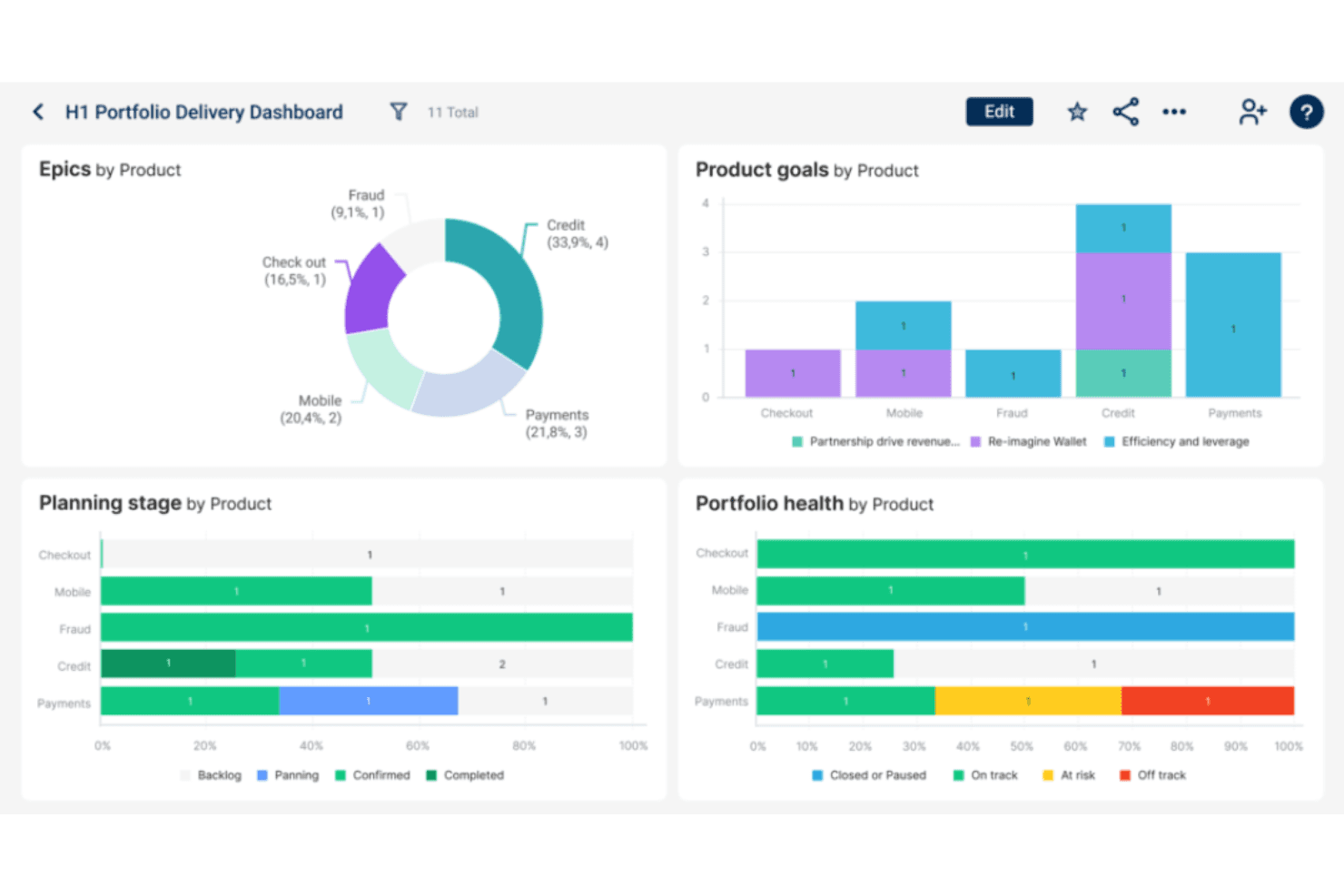
Dragonboat optimizes product strategy with AI-driven insights and portfolio roadmapping. Dragonboat is a product portfolio management platform for product leaders who need to connect strategy, prioritization, resource planning, and delivery across complex product organizations.
Who Is Dragonboat Best For?
Product leaders at scaling organizations who need AI-assisted portfolio roadmapping across strategy, prioritization, resources, and delivery.
Why Dragonboat Is a Good Productboard Alternative
I picked Dragonboat because its AI-driven portfolio roadmapping connects product strategy with prioritization, capacity planning, and delivery. I use portfolio views to compare initiatives against strategic goals, then model resource scenarios before committing engineering capacity. That helps my team explain why a roadmap changes when funding, staffing, or business priorities shift.
Dragonboat Key Features
- Jira and Azure DevOps integrations: Sync delivery data from connected development tools.
- Dependency mapping: Link related initiatives and identify delivery dependencies.
- Custom fields: Add structured attributes to initiatives and product records.
- Roadmap views: Display plans in timeline, swimlane, or list formats.
Dragonboat Integrations
Dragonboat integrates with Jira and Azure DevOps, syncing delivery data to connect portfolio roadmaps with development work.
Pros and Cons
Pros:
- Offers flexible roadmap views
- Supports portfolio-level dependency mapping
- Connects strategy with capacity planning
Cons:
- Setup can require hands-on guidance
- Less focused on customer feedback discovery
Learn more about Dragonboat: Best for customizable prioritization frameworks
- Free demo available
- Pricing upon request
Visit WebsiteCustomer Rating:4.4/5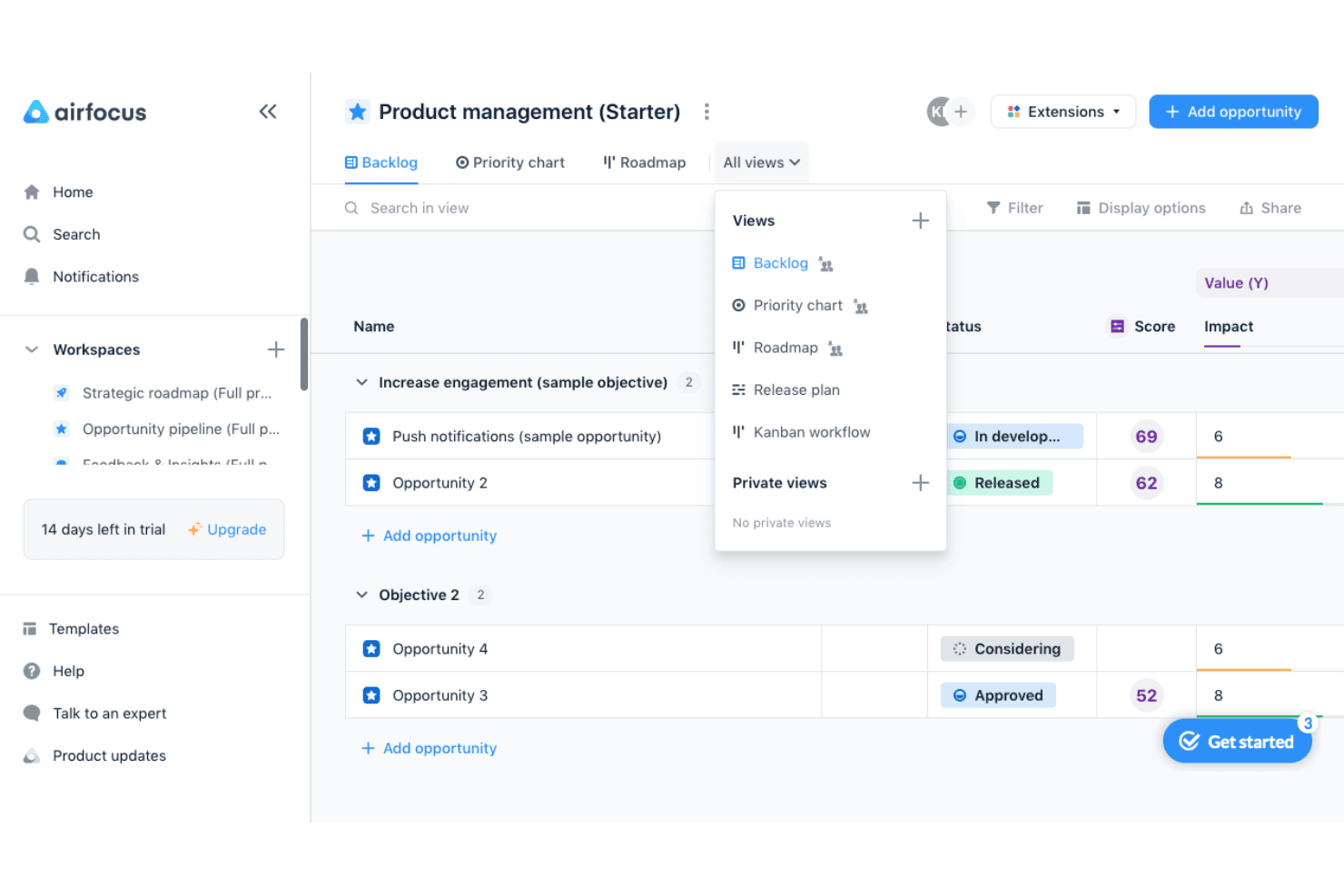
airfocus helps product teams prioritize opportunities and switch between backlog, priority chart, roadmap, release plan, and Kanban views. airfocus is a modular product management platform for teams that need to connect customer feedback, product strategy, roadmaps, and delivery decisions in one workspace.
Who Is airfocus Best For?
Product teams that need flexible prioritization models can use airfocus to connect customer feedback, strategy, roadmaps, and delivery decisions.
Why airfocus Is a Good Productboard Alternative
I picked airfocus because its customizable prioritization frameworks help my team weigh customer feedback against product strategy and delivery constraints. We use its modular workspace to connect feedback, roadmaps, and decisions, then adapt prioritization models for each product area. That makes it a practical Productboard alternative when different teams need distinct ways to rank work.
airfocus Key Features
- Jira integration: Sync issues between airfocus and Jira.
- Azure DevOps integration: Connect delivery work with product planning.
- Custom fields: Add product-specific fields to workspace items.
- Release planning: Organize planned work across releases and timelines.
airfocus Integrations
airfocus integrates with Jira and Azure DevOps, connecting product planning with delivery workflows.
Pros and Cons
Pros:
- Feedback connects directly to prioritization decisions
- Modular workspaces adapt across product teams
- Custom scoring models fit varied strategies
Cons:
- Roadmap views need more delivery depth
- Advanced setup can require admin guidance
 Best for product discovery-driven roadmaps
- 14-day free trial + free demo available
- From $24/user/month
Visit WebsiteCustomer Rating:4.4/5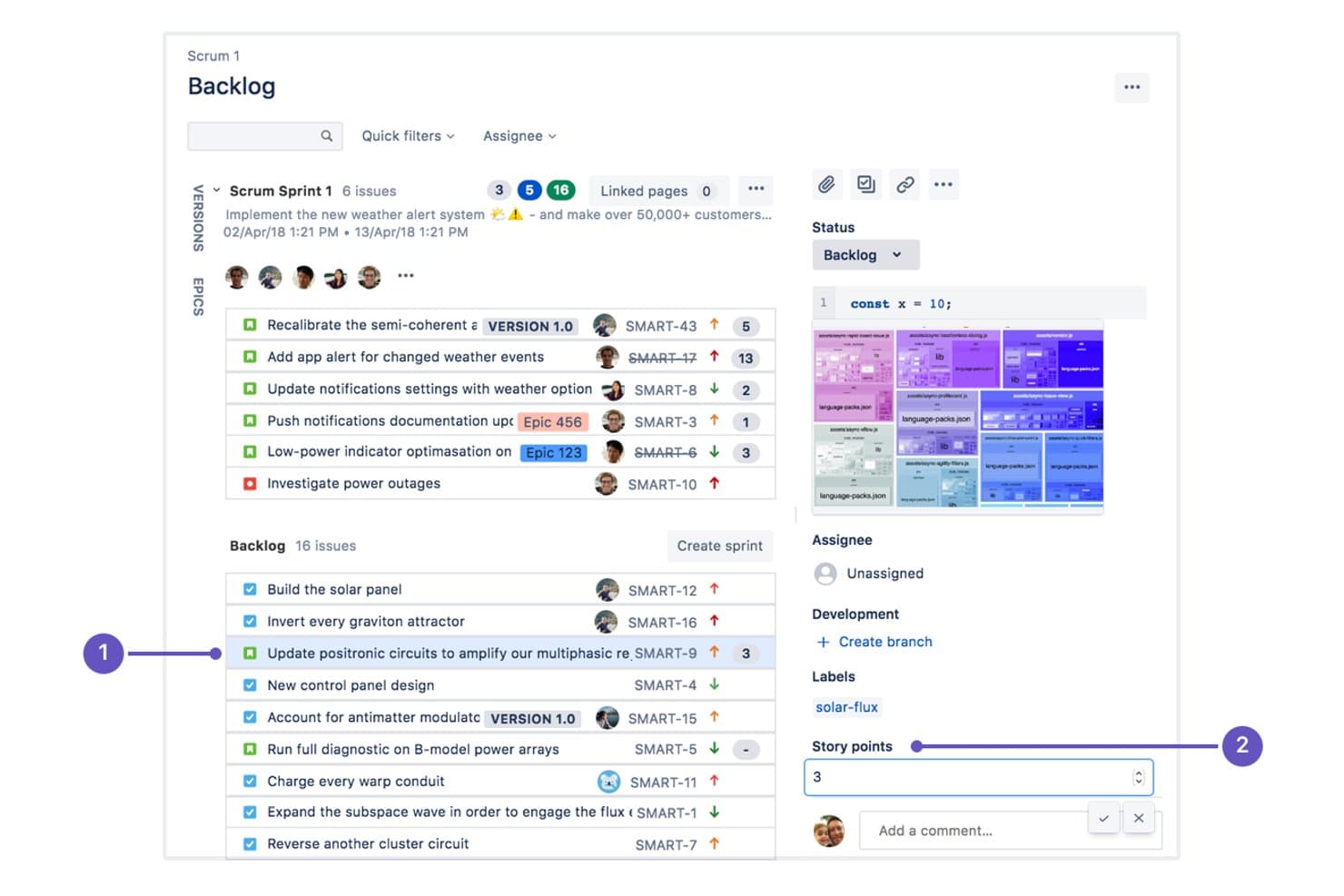
Craft.io integrates with Jira to manage sprint backlogs and story points. Craft.io is product management software for teams that need to connect customer insights, product strategy, and delivery planning, helping product managers turn discovery findings into prioritized roadmaps.
Who Is Craft.io Best For?
Craft.io suits product managers and cross-functional teams that turn customer discovery insights into prioritized product roadmaps.
Why Craft.io Is a Good Productboard Alternative
I picked Craft.io because it turns customer feedback and discovery insights into prioritized product decisions. Its feedback repository and product scoring help my team connect recurring user problems to strategic initiatives. I then map those initiatives into product discovery-driven roadmaps, giving stakeholders a clear view from validated needs to planned outcomes.
Craft.io Key Features
- Backlog management: Organize epics, features, and user stories in a structured backlog.
- Jira integration: Sync product plans with Jira delivery work.
- Custom fields: Add tailored metadata to products, features, and initiatives.
- Team permissions: Control access across workspaces, roles, and content.
Craft.io Integrations
Craft.io offers a native integration with Jira, allowing product plans to stay connected with delivery work.
Pros and Cons
Pros:
- Roadmaps expose dependencies across product work
- Scoring helps prioritize validated user problems
- Customer insights connect directly to initiatives
Cons:
- Advanced workflows take time to configure
- Roadmap filtering trails Productboard’s flexibility
Learn more about Craft.io: Best for customer feedback collection via AI
- Free plan available
- From $79/month (billed annually)
Visit WebsiteCustomer Rating:4.6/5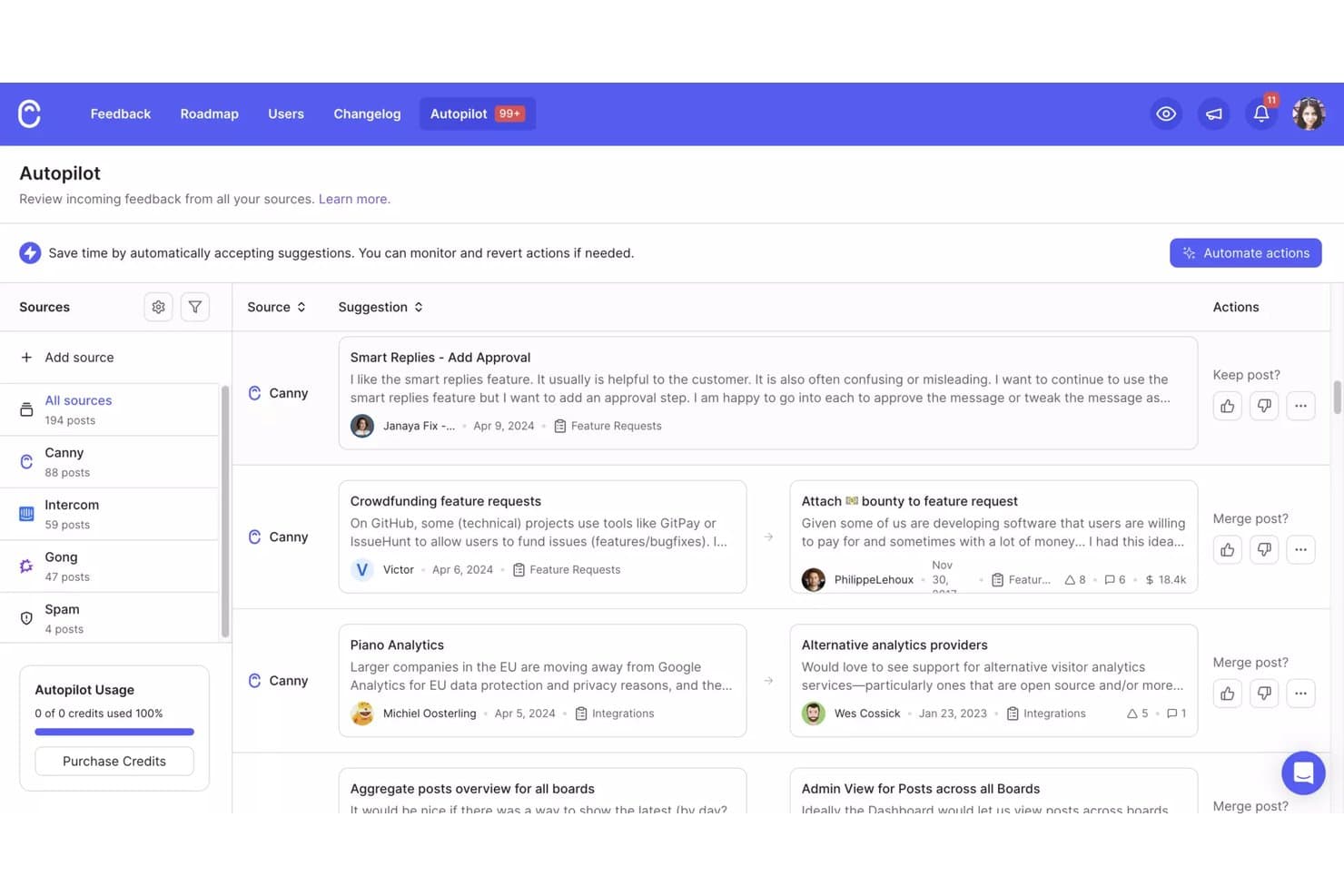
Canny's Autopilot consolidates feedback from multiple sources in one view. Canny is a customer feedback and product management platform for product teams that centralizes user insights, supports roadmap prioritization, and helps connect product decisions with customer needs.
Who Is Canny Best For?
Canny suits product teams at growing companies that need AI-assisted customer feedback capture, organization, and prioritization.
Why Canny Is a Good Productboard Alternative
I picked Canny because its AI-powered feedback collection helps my team capture customer requests from multiple channels and organize them in one place. AI-based categorization and duplicate detection reduce repetitive triage, while feedback boards connect requests to roadmap priorities. I use those insights to validate whether a feature solves a recurring customer problem before committing development time.
Canny Key Features
- User voting: Let customers vote on submitted ideas.
- Public and private boards: Control who can view and submit feedback.
- Changelog publishing: Share shipped updates with customers.
- Custom statuses: Track ideas through your preferred workflow.
Canny Integrations
Canny offers native integrations with Intercom, Zendesk, Slack, Salesforce, HubSpot, Jira Cloud, Linear, GitHub, ClickUp, and Asana. It also connects with Zapier and provides an API for custom integrations.
Pros and Cons
Pros:
- Changelog publishing closes the feedback loop
- Public voting connects requests to roadmap priorities
- AI-assisted duplicate detection reduces feedback triage
Cons:
- Voting can favor loud users over evidence
- Reporting offers limited trend analysis
Learn more about Canny: Best for closing the feedback loop with customers
- Free plan available
- From $29/user/month (billed annually)
Visit WebsiteCustomer Rating:4.7/5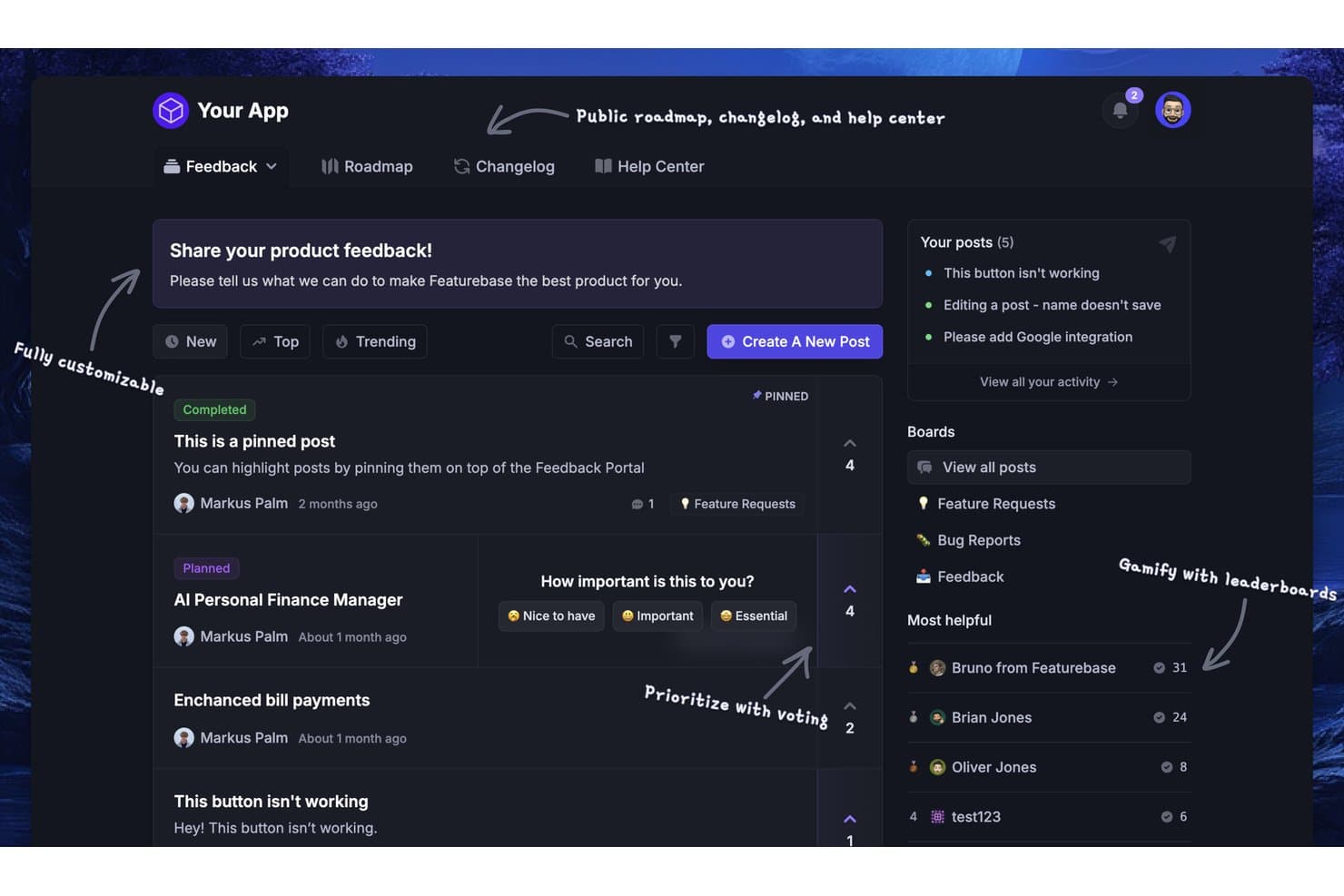
Featurebase lets users collect, vote on, and prioritize product feedback. Featurebase is a customer-centric product management platform for teams that need to organize product requests, prioritize roadmap decisions, and align product development with customer needs.
Who Is Featurebase Best For?
Featurebase suits product managers and customer-facing teams that need to collect, organize, and communicate customer feedback in one shared workspace.
Why Featurebase Is a Good Productboard Alternative
I picked Featurebase because it helps my team close the feedback loop with customers. We collect requests in feedback boards, connect them to roadmap decisions, and share product updates through changelogs. Customers can see which ideas are planned, shipped, or under consideration instead of submitting feedback into a void.
Featurebase Key Features
- Custom fields: Add structured fields to feedback forms for issue type, segment, or priority.
- In-app widgets: Collect feedback directly inside your product.
- Surveys: Create targeted surveys to gather structured product input.
- Jira integration: Send selected feedback into Jira for delivery tracking.
Featurebase Integrations
Featurebase offers native integrations with Linear, Jira, GitHub, ClickUp, Azure DevOps, Slack, HubSpot, Intercom, and Zendesk. It also connects with Zapier and provides an API for custom integrations.
Pros and Cons
Pros:
- In-app widgets capture feedback during product use
- Changelogs clearly communicate shipped customer feedback
- Public boards let customers vote on requests
Cons:
- Advanced prioritization analytics remain relatively limited
- Roadmap planning is less developed than Productboard
Learn more about Featurebase:
Other Productboard Alternatives
Still looking? Here are some additional Productboard alternatives. While they didn’t make the top 10, they’re still valuable and worth further research.
- 11Jira Product DiscoveryBest for Jira-connected delivery tracking
- 12MiroBest for canvas-based roadmap collaboration
- 13monday AI WorkspaceBest for cross-functional roadmaps at scale
- 14ProductPlanBest for multi-audience roadmap presentations
- 15Tempo Roadmapping SoftwareBest for timeline roadmaps with Jira sync
- 16PendoBest for in-app analytics tied to feedback
- 17LaunchNotesBest for real-time product visibility
- 18SleekplanBest for flat-rate AI feedback management
- 19IBM TargetprocessBest for SAFe portfolio roadmapping
How I Evaluate a Productboard Alternative
I split my evaluation into three parts. First, I check core functionality—specifically, whether a tool can aggregate feedback from multiple channels and build visual roadmaps stakeholders can actually use; these carry the most weight. Then I look for standout features like AI-powered insight extraction and OKR alignment. Finally, I consider pricing transparency and onboarding support.
Core Functionality (Table Stakes For This List)
When I'm selecting tools for my list, I score each one on a scale from 0 (does not offer the functionality) to 5 (excels in this area) for each core functionality listed below. I then convert the total into a percentage to help assess each tool's overall fit, with extra weight on any functionalities I’ve deemed essential.
- Customer Feedback (Essential): I look for searchable feedback from support, sales, interviews, and in-app channels, with tags that reveal recurring customer needs.
- Roadmap Visualization (Essential): I assess timeline, swimlane, or kanban views that communicate priorities and delivery horizons to internal and external audiences.
- Prioritization Scoring: I check for adaptable frameworks such as RICE or weighted scoring that compare customer value, effort, risk, and strategic fit.
- Feedback Linking: I look for traceability from individual requests to features, releases, and roadmap items, including demand signals for prioritization.
- Stakeholder Collaboration: I evaluate comments, votes, and structured input from product, engineering, sales, support, customers, and leadership.
- Integrations: I check connections with issue trackers, CRMs, support desks, collaboration tools, and automation platforms for two-way workflow updates.
Once I have a list of tools that meet the criteria, I consider what sets each platform apart.
Differentiating Factors (What Sets Vendors Apart)
Here's how I compare and contrast different vendors:
Standout Features
I look for AI-powered insight extraction that surfaces themes and sentiment from raw feedback without manual tagging—this saves hours when you're processing hundreds of support tickets after a major release. OKR alignment matters just as much; I check whether a tool ties roadmap items directly to strategic goals so leadership sees business impact, not just shipping dates. I also evaluate customer-facing portals, since a branded portal where customers submit and track requests closes the feedback loop without extra email overhead.
Beyond Features
I evaluate whether a vendor offers free or low-cost viewer seats, since product managers rarely work alone—sales, support, and executives need roadmap visibility without inflating per-seat costs. Migration support matters just as much; I check for dedicated onboarding help and data import tools that preserve feedback history, because rebuilding months of tagged insights from scratch kills momentum. I also look at SOC 2 Type II or ISO 27001 certification, especially when customer feedback contains sensitive account data.
Why Look for a Productboard Alternative?
While Productboard is a good choice for product management software, there are a number of reasons why some users seek out alternative solutions. For example, you might be looking for a Productboard alternative due to any of the following reasons:
- It doesn't fit your budget
- Your team needs more customization
- You're seeking better integration with other tools
- You require offline accessibility
- You're looking for a simpler user interface
- Your team is growing beyond Productboard's scalability
If any of these sound like you, you’ve come to the right place. My list contains several product management core options that are better suited for teams facing these challenges with Productboard and looking for alternative solutions.
Key Features to look for in a Productboard alternative
When selecting a Productboard alternative, or any product management software, keep an eye out for the following key features:
- User feedback portal: Centralize product feedback from multiple sources, including direct user input. A feedback management tool can help create a thorough feedback board for actionable insights.
- Feature prioritization matrix: Evaluate feature requests and allocate resources to the most impactful initiatives, ensuring your team focuses on what matters for better user experiences.
- Roadmapping: Leverage interactive roadmap software to visualize your product management platform strategy. Create clear timelines for new features, aligning with your team's goals.
- Team collaboration tools: Foster smoother teamwork with tools designed for idea-sharing, feedback exchange, and task management, keeping your team aligned on in-app updates and milestones.
- Analytics and reporting: Make data-driven product decisions with detailed metrics and insights. Understand what works, identify gaps, and track the success of new features.
- Task and workflow management: Organize and manage product development workflows. Track progress and streamline processes to ensure timely delivery of changelogs and updates.
- Idea management: Capture, categorize, and revisit ideas in a structured repository. This feature empowers your team to innovate while addressing customer needs.
P.S. If you’re still in the early stages of product discovery, moodboard creator tools can help you align on tone and visual direction before prioritizing features. - User segmentation: Tailor your product for various audiences by segmenting users based on their preferences. Deliver better products that cater to specific market demands.
- Notifications and alerts: Stay ahead of the curve with real-time notifications. Keep your team informed about critical changes, feedback, and milestones without missing a beat.
- Third-party integration: Extend the functionality of Productboard with integrations like Intercom, UserVoice, and more. Minimize interruptions and sync your workflows with other tools in your SaaS stack.