

The best user research tools make it easier to run studies, collect insights, and make informed product decisions. Without them, research gets stuck in scattered notes, inconsistent methods, or low response rates that make it hard to advocate for user needs.
I've drawn on years of product management experience, first-hand testing, user feedback, and a focus on real workflows to evaluate 30+ research platforms.
This guide compares top user research platforms across surveys, interviews, usability testing, analytics, and feedback collection, helping you identify the right tool based on your specific needs, use case, and budget.
Why Trust Our Software Recommendations
6,700+
Reviews
20
Industry experts
16+
Evaluation factors
14
Years
Our team has been testing and reviewing software since 2012. As product managers ourselves, we know how difficult—and important—it is to choose the right software.
For this guide, we evaluated tools using hands-on testing and independent research, scoring tools using our selection criteria.
Our reviews reflect our human editorial judgment, not a sales pitch.
Expert reviewers:
- Andrew LumbySenior TPM
- Cristiano ValimSenior UI/UX Lead


User Research Tools Comparison Table
Here is a table where you can compare all the tools we just covered in the overviews:
| Tool | Best For | Trial Info | Price | ||
|---|---|---|---|---|---|
| 1 | Best for omnichannel feedback | Free demo available | Pricing upon request | Website | |
| 2 | Best for visual in-app feedback | Free plan available | From $29/month (billed annually) | Website | |
| 3 | Best for mapping qualitative insights | 7-day free trial + free demo available | From $79/month | Website | |
| 4 | Best for sharing survey data across all tools | 10-day free trial | From $114/month (billed annually) | Website | |
| 5 | Best for effortless sharing | Free plan available | From $19/month | Website | |
| 6 | Best for targeting niche and B2B research audiences | Free demo available | Pricing upon request | Website | |
| 7 | Best for AI-generated executive research reports | Free demo available | Pricing upon request | Website | |
| 8 | Best for enterprise-grade research at org scale | Free demo available | Pricing upon request | Website | |
| 9 | Best for card sorting and tree testing | Free plan available | From $208/user/month | Website | |
| 10 | Best for running all research methods in one CRM | Free trial + free demo available | From $129/seat/month | Website |


Best User Research Tool Reviews
Here’s a brief description of each user research tool that showcases every tool’s best use case and standout features.
 Best for omnichannel feedback
- Free demo available
- Pricing upon request
Visit WebsiteCustomer Rating:4.7/5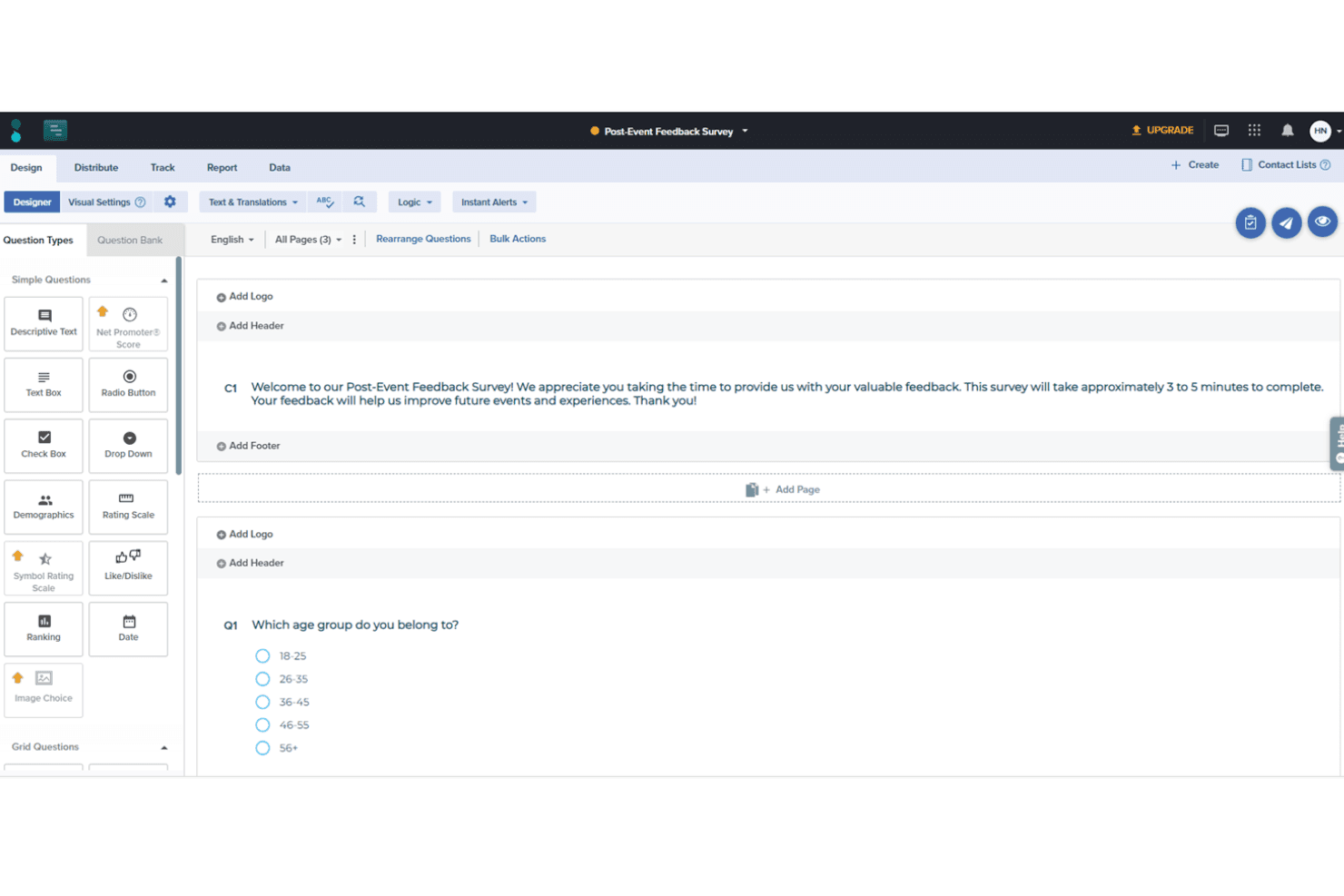
Users can create detailed surveys with custom branching and logic with Sogolytics' survey designer. Sogolytics is an experience management platform that collects customer and employee feedback across surveys, forms, polls, and omnichannel listening channels, with built-in AI text analytics, reporting dashboards, and panel services for managed research.
Who Is Sogolytics Best For?
Sogolytics is a strong fit for marketing and customer insights teams that need to collect feedback across multiple channels and turn open-ended responses into structured findings.
Why I Picked Sogolytics
I've included Sogolytics in my top picks because no other tool on this list matches its breadth of feedback channels in a single feed. Where most survey tools stop at email and web, Sogolytics pulls in SMS, QR codes, kiosk, point of sale, in-app, and social responses together, which matters when your research spans physical and digital touchpoints. I also like its AI text analytics, which groups open-ended responses into themes and assigns sentiment scores you can manually override.
Sogolytics Key Features
- AI survey generation: Build surveys from a text prompt using AI, which drafts question sets you can edit before publishing.
- Multilingual survey support: Create and distribute surveys in 50+ languages, with open-ended text analysis available across roughly 11 languages.
- Cross-tab and trend reports: Compare response segments side by side in cross-tabulation reports and track changes over time with trend analysis.
- Managed research services: Hand off end-to-end research projects to Sogolytics, including questionnaire design, panel sourcing, live monitoring, and final reporting.
Sogolytics Integrations
Documented integrations include Salesforce, HubSpot, Slack, Microsoft Teams, Miro, Tableau, Power BI, and Google Analytics. SogoCore also supports APIs and custom webhooks, while Zapier is available for additional connections.
Pros and Cons
Pros:
- Managed panel research supports broader recruitment
- AI groups open-ended themes and sentiment
- Omnichannel feedback reaches offline audiences
Cons:
- No prototype testing or insight repository
- No interviews or usability testing
Learn more about Sogolytics: Best for visual in-app feedback
- Free plan available
- From $29/month (billed annually)
Visit WebsiteCustomer Rating:4.8/5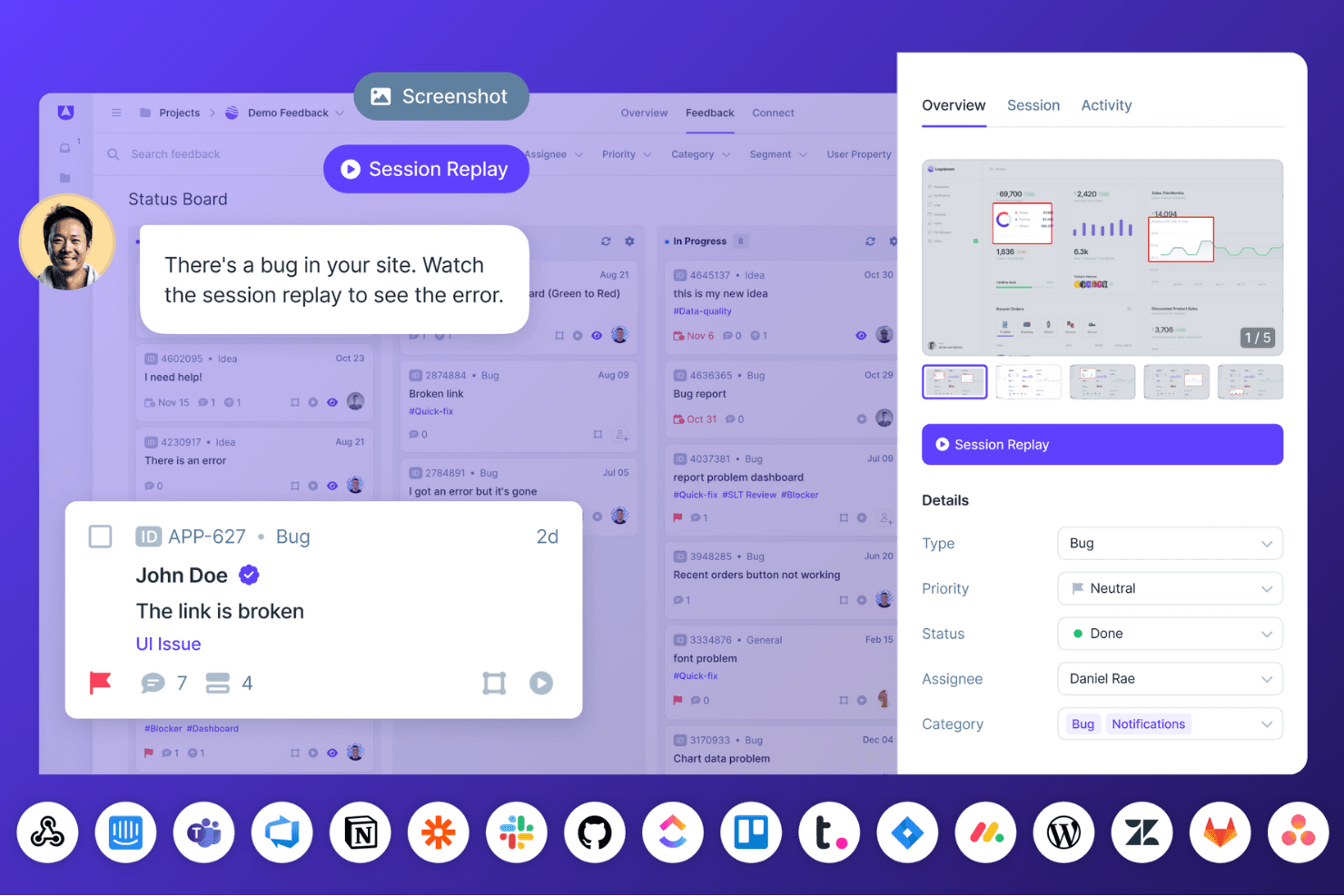
Userback enables teams to collect visual user feedback, annotated screenshots, and session replays to resolve bugs faster and improve product experiences. Userback is a visual feedback and bug-reporting platform that combines annotated screenshots, screen-recorded video, session replay, and in-app surveys to capture user input directly within web apps and websites.
Who Is Userback Best For?
Userback fits product managers who need rich visual context—annotated screenshots, video, and session replay—alongside bug reports and feature requests in one place.
Why I Picked Userback
I've included Userback in my top picks because it captures visual feedback in a way that most research tools simply don't. Every bug report or in-app survey response comes bundled with annotated screenshots, a narrated screen recording, and a session replay, so you're seeing exactly what a user saw and did. I particularly like that video submissions are auto-transcribed and tagged by AI-detected theme, which means I can spot recurring issues across hundreds of submissions without manually reviewing each clip.
Userback Key Features
- In-app survey builder: Create NPS, CSAT, CES, and custom surveys using templates or a drag-and-drop builder, with targeting by user, page, device, or segment.
- Session replay: Records clicks, scrolling, rage clicks, form inputs, and network activity to show exactly what a user did before submitting feedback.
- AI theme detection: Automatically clusters incoming feedback by recurring theme, surfacing patterns across submissions without manual tagging.
- Two-way sync with dev tools: Connects directly to Jira, Linear, and ClickUp so bug reports and feedback flow into engineering workflows with status updates synced back.
Userback Integrations
Userback offers native integrations with Jira, Linear, ClickUp, Slack, Microsoft Teams, GitHub, GitLab, and Notion, plus REST API, webhooks, and a JavaScript SDK for custom connections. Zapier is also supported.
Pros and Cons
Pros:
- Clusters recurring themes across submissions
- Connects session replays to reported issues
- Captures annotated visual context with feedback
Cons:
- Organizes findings by feedback items, not studies
- Offers no participant recruitment or scheduling
Learn more about Userback: Best for mapping qualitative insights
- 7-day free trial + free demo available
- From $79/month
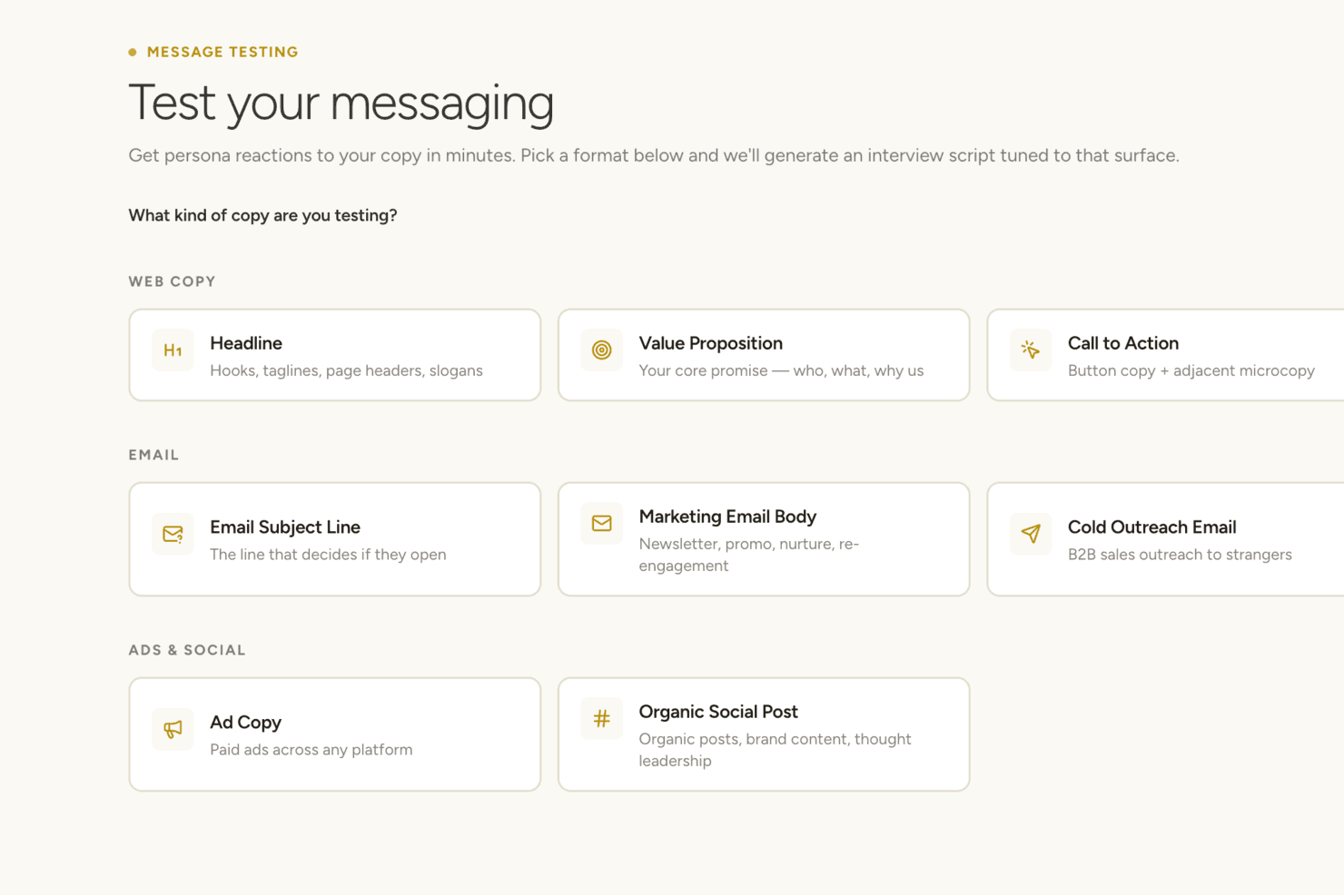
Articos lets you test persona reactions to different types of brand copy. Articos is a synthetic user research platform that runs AI-moderated interviews with AI-generated personas to produce structured reports on user motivations, objections, and points of confusion.
Who Is Articos Best For?
Articos suits product managers and agency researchers who need fast, directional qualitative feedback without the time or cost of recruiting real participants.
Why I Picked Articos
I've included Articos in my top picks because its Six-Stage Synthesis turns raw interview data from AI-generated personas into structured, traceable reports on motivations, objections, and confusion points. Every finding links back to the specific persona, question, and quote that produced it, so qualitative patterns are easy to map and communicate. Confidence scores and adversarial review flag where evidence is thin or contradictory, which I find genuinely useful for directional discovery work.
Articos Key Features
- Six-Stage Synthesis: Automatically processes interview data through theme detection, adversarial review, and bias checking to surface patterns across all personas.
- Persona stance distribution: Each study includes a forced mix of champions, skeptics, blockers, and observers to reduce confirmation bias in findings.
- Talk to Research: Lets you send written follow-up questions to any AI persona after a study is complete, without running a new research session.
- White-label reports: Pro and research pack users can export PDF reports under their own branding instead of Articos's.
Articos Integrations
Articos doesn't have any native integrations or a documented API. It operates as a standalone platform, with PDF and white-label report exports for moving findings into other tools.
Pros and Cons
Pros:
- Challenges assumptions through skeptical personas
- Generates reports faster than traditional research
- Maps motivations with traceable evidence chains
Cons:
- Reports require editing before stakeholder presentation
- Synthetic personas cannot validate real customer behavior
Learn more about Articos: Best for sharing survey data across all tools
- 10-day free trial
- From $114/month (billed annually)
Visit WebsiteCustomer Rating:4.6/5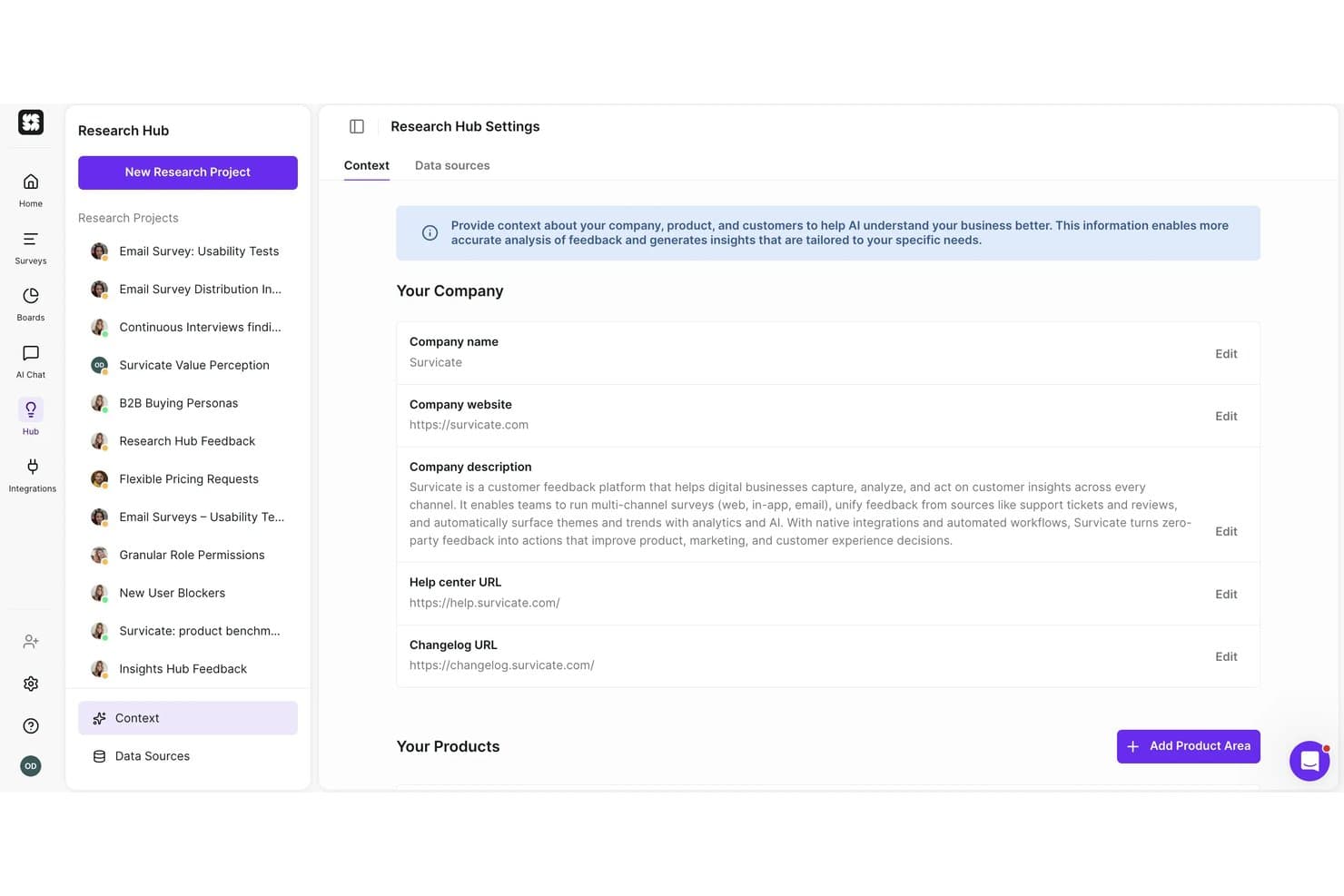
Survicate lets users add company context to guide AI research analysis. Survicate is a customer feedback and survey platform that collects responses across email, web, mobile, and in-product channels, and centralizes them alongside interview transcripts, support tickets, and reviews in an AI-powered research repository.
Who Is Survicate Best For?
Survicate is a strong fit for product managers and marketing teams that need to collect customer feedback across multiple channels and push that data directly into their existing CRM, analytics, or project management tools.
Why I Picked Survicate
I picked Survicate as one of the best because it's the only tool on this list that pushes survey data directly into your entire product stack without extra plumbing. Its native syncs with Jira, Linear, HubSpot, and Salesforce mean a churn survey response can become a backlog ticket or a CRM note automatically. I also love the MCP connector, which lets Claude or ChatGPT query your survey data and search across studies directly.
Survicate Key Features
- Multichannel survey distribution: Deploy surveys across email, web pop-ups, mobile SDKs, QR codes, kiosk mode, and in-product placements from a single platform.
- Research Hub: An AI-powered repository that pulls in survey responses, interview transcripts, support tickets, and reviews, then categorizes them by theme and sentiment.
- AI research assistant: Ask plain-language questions about your feedback data and get answers traced back to the exact source quotes.
- Feedback source integrations: Connect review platforms like G2, App Store, and Google Reviews, plus support tools like Zendesk and Intercom, to centralize all feedback automatically.
Survicate Integrations
Survicate offers 50+ documented integrations, including Jira, Linear, Slack, Salesforce, HubSpot, Google Meet, Gong, tl;dv, FullStory, and Amplitude. It also supports an Export API and Zapier.
Pros and Cons
Pros:
- AI findings cite source feedback quotes
- Research Hub unifies surveys and transcripts
- Multichannel survey collection reaches customers in context
Cons:
- No usability testing or prototype evaluation
- No participant recruitment or research panels
Learn more about Survicate:
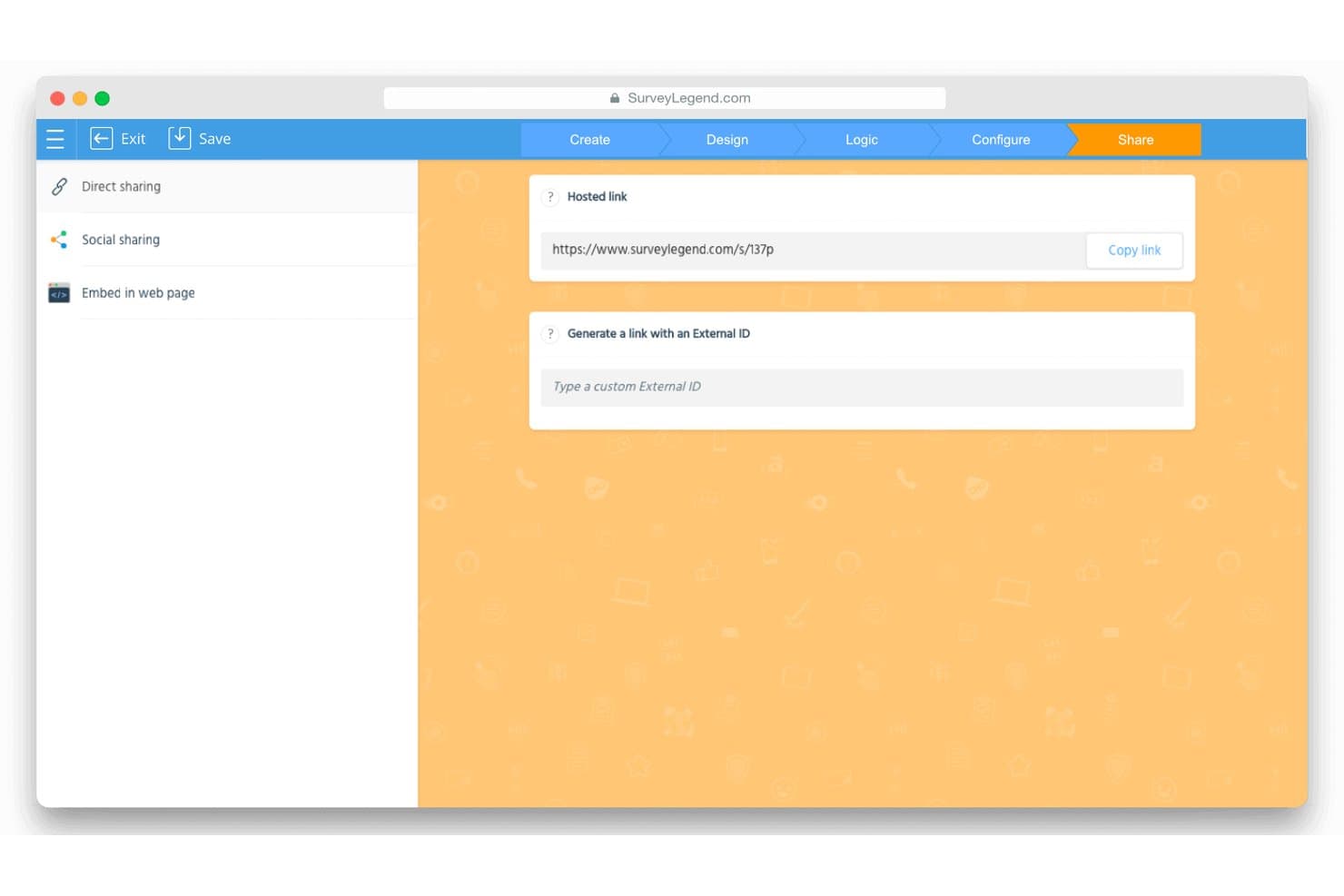
SurveyLegend lets users share surveys via a hosted link or external ID. SurveyLegend is a survey and form builder that supports NPS, CSAT, and visual feedback collection through drag-and-drop survey creation, skip logic, and real-time analytics dashboards.
Who Is SurveyLegend Best For?
SurveyLegend suits marketing and CX teams that need to distribute surveys quickly across multiple channels without a steep learning curve.
Why I Picked SurveyLegend
I've included SurveyLegend in my top picks because it makes getting surveys in front of respondents genuinely fast. Every survey generates a hosted short link you can post directly to LinkedIn, X, or Instagram in one click, and QR codes let you capture responses at in-person events without any setup friction. I also like that live analytics dashboards can be shared through a private, secure link, so stakeholders see results in real time without needing a login.
SurveyLegend Key Features
- Skip logic and branching: Set rules to show or hide questions based on previous answers, keeping surveys relevant to each respondent.
- Picture ranking questions: Let respondents rank or select between images, supporting basic visual concept and preference testing.
- NPS and CSAT question types: Built-in question formats for net promoter score and customer satisfaction tracking with a dedicated NPS gauge in the analytics dashboard.
- Google Sheets integration: Sync responses to Google Sheets in real time, giving you a live data feed outside the SurveyLegend platform.
SurveyLegend Integrations
SurveyLegend offers 3 native integrations: Google Sheets, Mailchimp, and Salesforce. Its API and webhooks support custom integrations on Business and Legendary plans.
Pros and Cons
Pros:
- Picture ranking supports visual concept testing
- Live dashboards support quick stakeholder feedback
- Hosted links and QR codes simplify distribution
Cons:
- Single-user plans limit team research
- No interviews or usability testing
Learn more about SurveyLegend: Best for targeting niche and B2B research audiences
- Free demo available
- Pricing upon request
Visit WebsiteCustomer Rating:4.5/5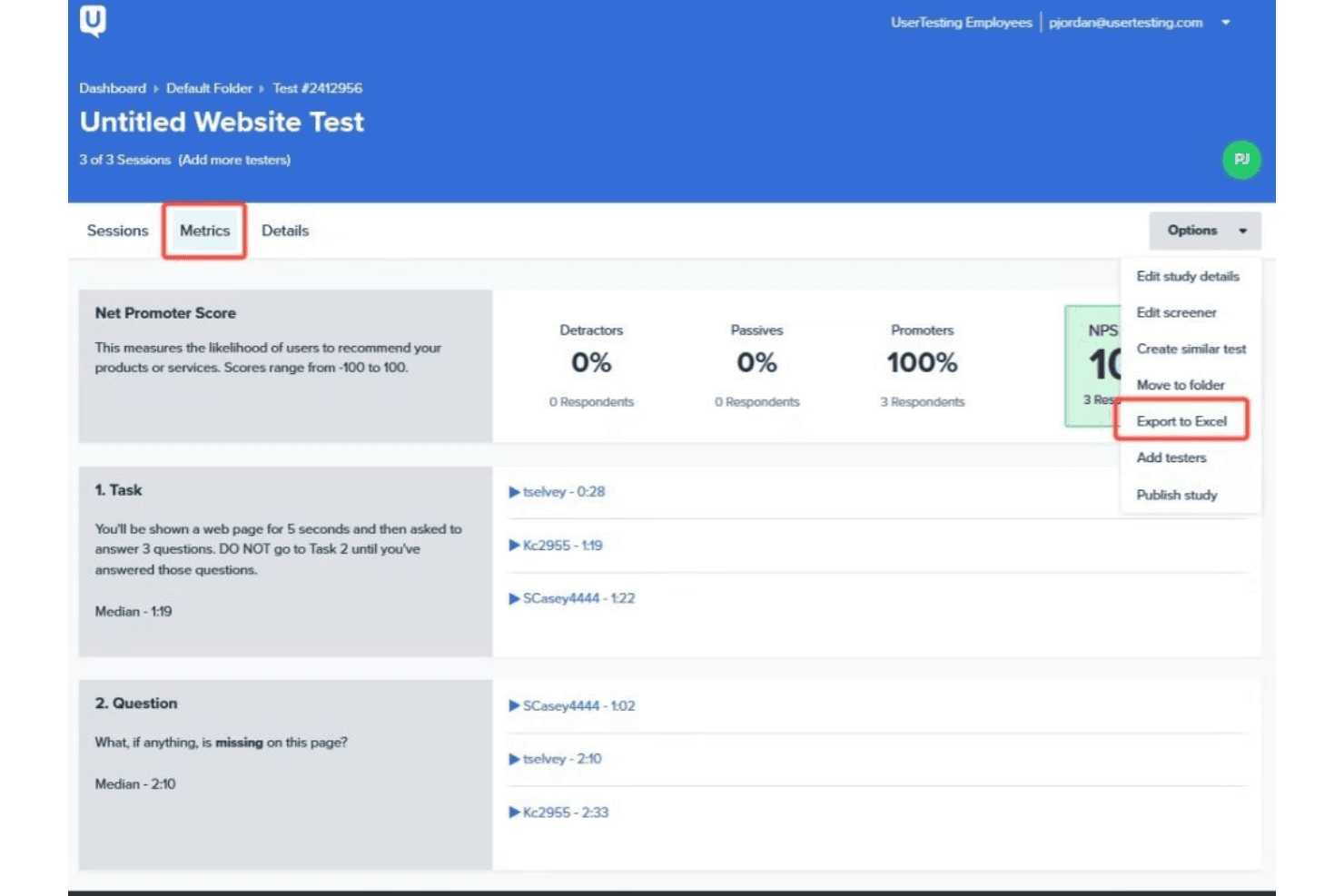
UserTesting has a comprehensive interface that tracks sessions, metrics, and details. UserTesting is a user research platform that supports unmoderated tests, moderated interviews, surveys, and participant recruitment through a verified global panel with advanced demographic targeting and screener logic.
Who Is UserTesting Best For?
UserTesting is a strong fit for enterprise product and research teams that need to recruit hard-to-reach B2B professionals or niche consumer segments at scale.
Why I Picked UserTesting
UserTesting earns its spot on my shortlist because of how far ahead it sits when it comes to reaching the audiences most research platforms can't. After the User Interviews acquisition, it now combines a 7.6M+ verified panel with B2B-specific targeting by job title, seniority, company size, and industry, so recruiting a senior procurement manager at a mid-market SaaS company is genuinely achievable. I also like the Advanced Targeting screeners, which support skip logic, double screening, and fraud prevention to keep study quality high even with niche segments.
UserTesting Key Features
- Live Conversation moderated interviews: Schedule and run real-time video interviews with participants directly through the platform, with Google Calendar integration for easy booking.
- QXscore benchmarking: Track and compare experience quality scores across studies over time to measure how product changes affect the user experience.
- Automated highlight reels: The platform automatically generates shareable video clips from sessions, so you can quickly surface key moments for stakeholders.
- Insights Hub: Search across past studies, import external research files, and aggregate app store reviews to connect findings without running duplicate research.
UserTesting Integrations
UserTesting integrates with Figma, FigJam, Jira, Jira Product Discovery, Miro, Slack, Microsoft Teams, Google Calendar, and Qualtrics. It also offers open and Results APIs for custom integrations.
Pros and Cons
Pros:
- Produces polished video-based insight reports
- Combines moderated and unmoderated research
- Reaches niche B2B professionals
Cons:
- Advanced synthesis tools require higher tiers
- Professional testers can skew participant behavior
Learn more about UserTesting: Best for AI-generated executive research reports
- Free demo available
- Pricing upon request
Visit WebsiteCustomer Rating:5/5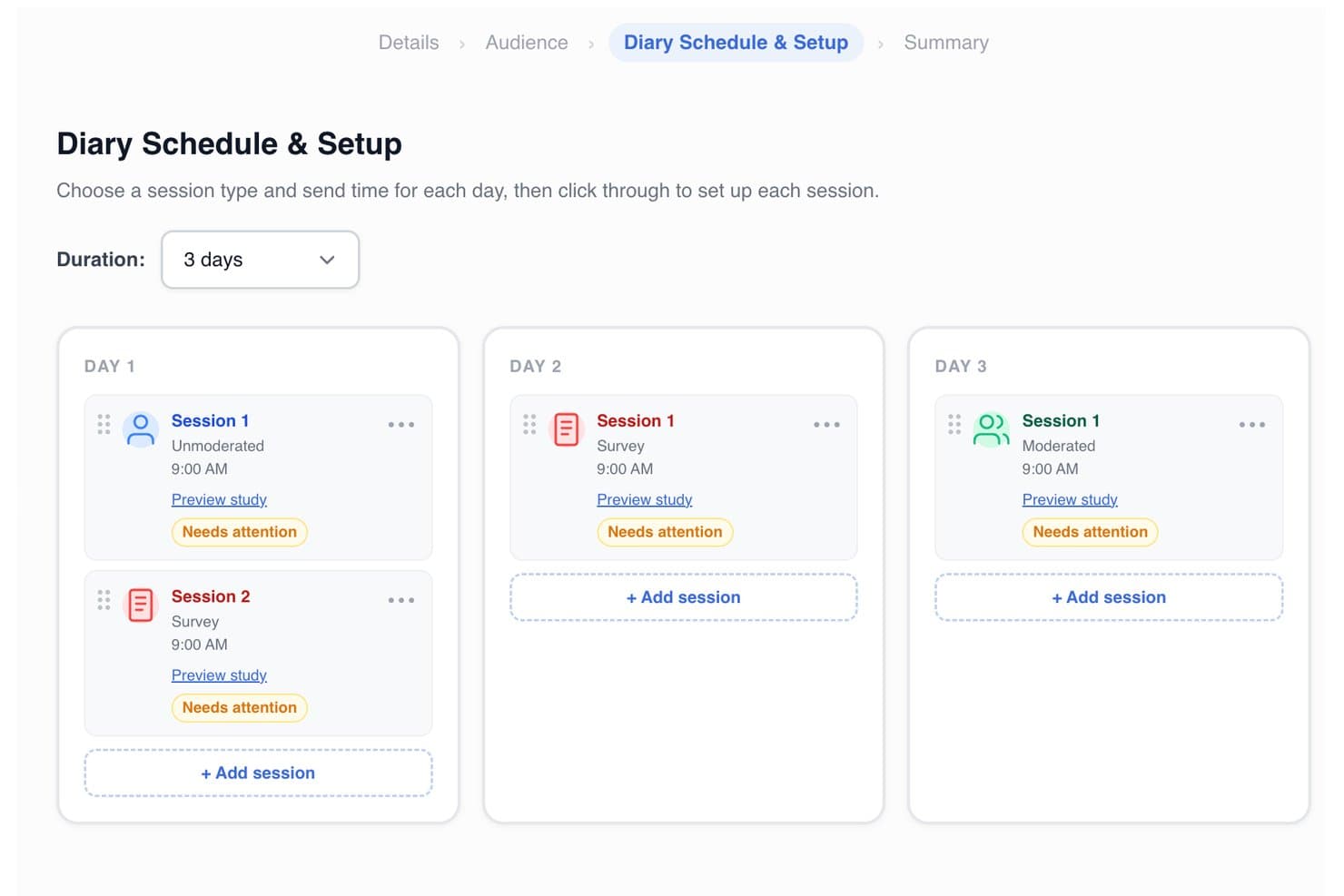
PlaybookUX lets users schedule multi-day diary study sessions by type and time. PlaybookUX is a user research platform that covers moderated and unmoderated testing, card sorting, tree testing, surveys, Figma prototype testing, and session replays, with a built-in participant panel and AI-powered analysis tools.
Who Is PlaybookUX Best For?
PlaybookUX is a strong fit for product managers and UX researchers who need to run studies across multiple methods and quickly turn findings into stakeholder-ready reports.
Why I Picked PlaybookUX
I picked PlaybookUX as one of the best because its AI Executive Reports do something I haven't seen done this cleanly elsewhere: they pull study setup, participant demographics, transcripts, themes, and supporting quotes into a single stakeholder-ready document, and they can generate that report in a different language than the study was conducted in. I also love that AI-generated synthetic personas are built from your own research videos and transcripts, not generic assumptions. These features make PlaybookUX especially useful when research velocity matters and findings need to reach executives fast.
PlaybookUX Key Features
- Built-in participant panel: Access a pool of 7M+ vetted consumers and professionals across 50+ countries, with demographic targeting, quotas, and screeners built in.
- Figma prototype testing: Import Figma prototypes directly, set goal screens, and capture task completion rates, misclicks, common paths, and heatmaps overlaid on your designs.
- Card sorting and tree testing: Run open, closed, or hybrid card sorts and tree tests natively, with results visualized as similarity matrices, dendrograms, and task-success charts.
- AI follow-up questions: During unmoderated sessions, the platform automatically asks dynamic follow-up questions based on participant responses to surface deeper context.
PlaybookUX Integrations
PlaybookUX offers a native Figma integration for prototype testing, plus Enterprise SSO/SAML with Okta, Azure, ADFS, and Google. Its open API and MCP layer support custom connections to data warehouses, CRMs, and AI tools.
Pros and Cons
Pros:
- Built-in panel supports targeted participant recruitment
- Broad research methods support mixed-method studies
- AI-generated executive reports speed stakeholder alignment
Cons:
- Reviewers report limited advanced analysis capabilities
- Repository lacks automatic cross-study insight linking
Learn more about PlaybookUX: Best for enterprise-grade research at org scale
- Free demo available
- Pricing upon request
Visit WebsiteCustomer Rating:4.3/5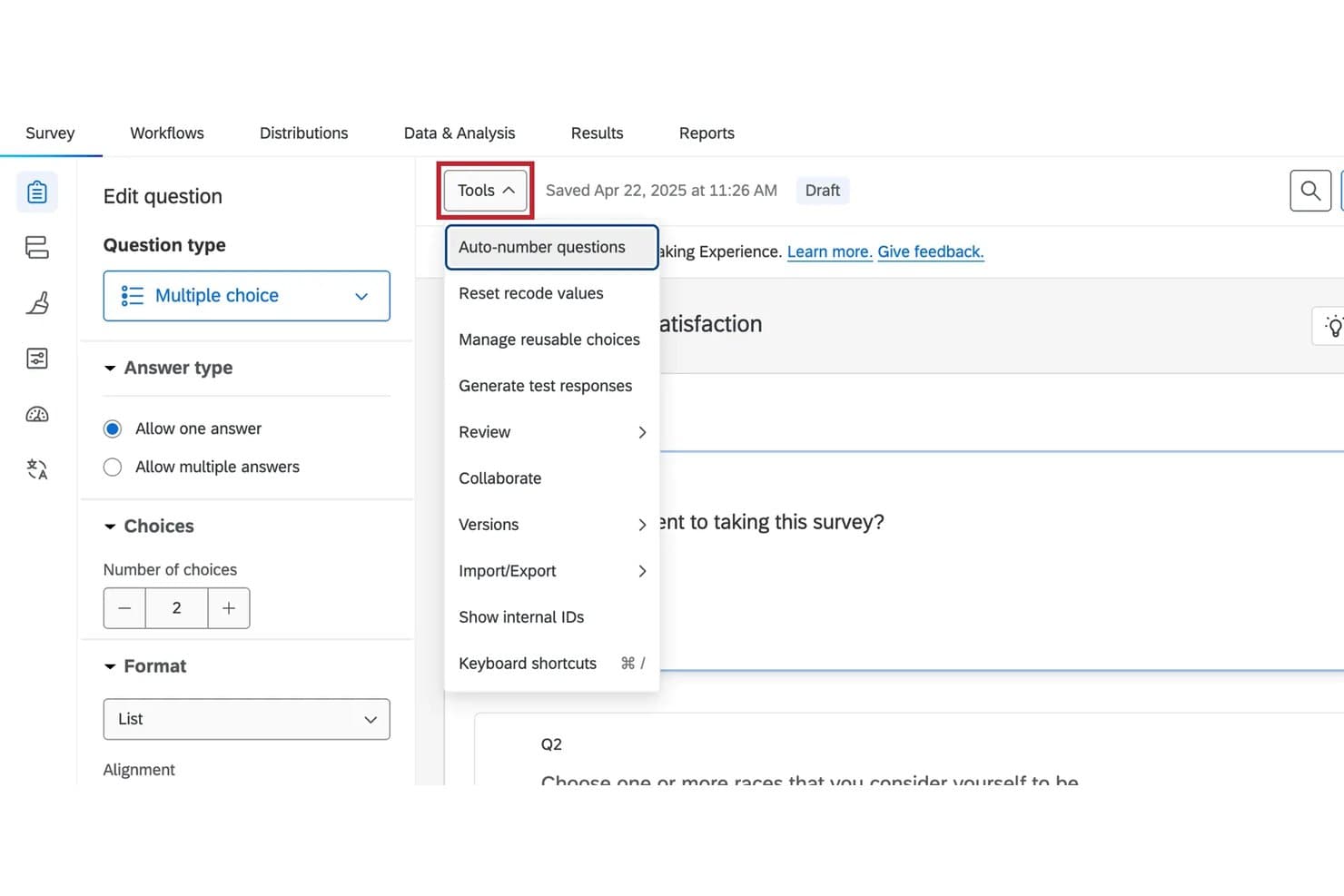
Qualtrics lets users manage survey tools like auto-numbering and imports. Qualtrics is an enterprise research platform that combines surveys, moderated and unmoderated usability testing, tree testing, card sorting, and an AI-powered insight repository into a single system.
Who Is Qualtrics Best For?
Qualtrics fits large organizations with dedicated UX research or insights teams that need to run surveys, usability tests, and org-wide research repositories under one enterprise-grade platform.
Why I Picked Qualtrics
Qualtrics earns its spot as one of the best on my shortlist because no other tool in this category covers as much research ground under one roof at enterprise scale. I've done everything from tree testing and card sorting to moderated sessions and org-wide repository searches without leaving the platform. Research Hub is what makes it genuinely enterprise-grade: it indexes every survey and dashboard across a license, supports semantic search, and lets teams upload syndicated research so you're not repeating work someone else already did.
Qualtrics Key Features
- Conversational feedback: AI generates follow-up questions based on open-text responses and prompts participants for clarification when answers are vague.
- Audio & Video Editor: Automatically transcribes, tags sentiment, detects topics, and generates AI summaries across recorded sessions.
- Tree testing: A native question type that captures success rates, path directness, and first-click data to evaluate information architecture.
- Edge Audiences panel network: Connects you to 30+ global panel partners across 84+ demographic segments for both B2B and B2C recruitment.
Qualtrics Integrations
Qualtrics integrates with Figma, Adobe XD, InVision, Zoom, Slack, Jira Cloud, Zendesk, ServiceNow, Salesforce, Tableau, and Google Sheets. Its REST API and XM Extensions framework support custom integrations.
Pros and Cons
Pros:
- Offers built-in B2B and B2C recruitment
- Searches org-wide research semantically
- Combines surveys with usability testing
Cons:
- Mobile testing lacks broad maturity
- UX testing remains survey-centric
Learn more about Qualtrics: Best for card sorting and tree testing
- Free plan available
- From $208/user/month
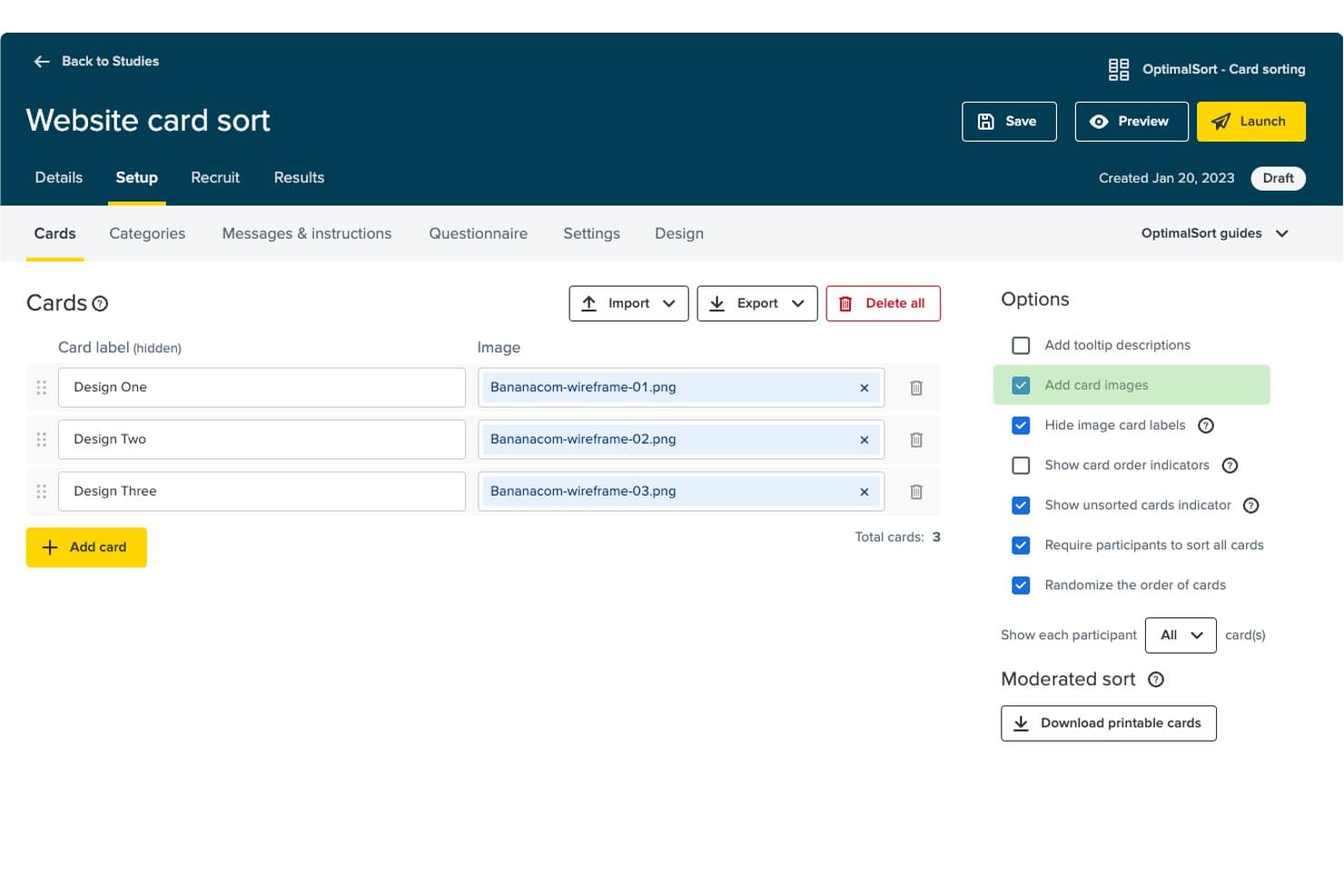
Optimal Workshop lets users attach wireframe images directly to sort cards. Optimal Workshop is a user research platform that covers card sorting, tree testing, usability testing, prototype testing, surveys, and moderated interviews—all in a single tool.
Who Is Optimal Workshop Best For?
Optimal Workshop is a strong fit for UX researchers and product teams who need card sorting and tree testing alongside a broader suite of usability, prototype, and interview research methods.
Why I Picked Optimal Workshop
Optimal Workshop earns its spot on my shortlist because it's the original card sorting and tree testing tool, and nothing else comes close to matching its depth in information architecture research. I love that tree testing results come with pietree diagrams showing exactly where participants drop off in your navigation, and card sort data surfaces dendrograms that reveal how users naturally group content. When I need to validate a site structure or rethink a navigation taxonomy, Optimal Workshop is my first call.
Optimal Workshop Key Features
- AI theme detection: Automatically surfaces themes across interviews, surveys, and usability tests, with each insight linked back to the source quote or clip.
- Moderated interview scheduling: Participants self-book, reschedule, and receive automated reminders, confirmations, and thank-you emails without manual coordination.
- Figma prototype import: Import Figma designs directly to run interactive prototype and usability tests without rebuilding assets inside the platform.
- Unlimited seats and responses: Every plan includes unlimited team members and no response caps per study, so your whole team can run and view research without extra costs.
Optimal Workshop Integrations
Integrations include Figma, Zoom, Google Meet, Microsoft Teams, Google Calendar, Microsoft Outlook, User Interviews, Respondent, Prolific, and Slack. Enterprise plans include an API for custom connections, while Optimal MCP connects research data with Claude, ChatGPT, Copilot, Gemini, and Cursor.
Pros and Cons
Pros:
- Unlimited seats support cross-functional research
- Broad research methods under one workspace
- Deep card sorting and tree testing analysis
Cons:
- Panel quality varies across recruited participants
- Survey logic trails dedicated survey platforms
Learn more about Optimal Workshop: Best for running all research methods in one CRM
- Free trial + free demo available
- From $129/seat/month
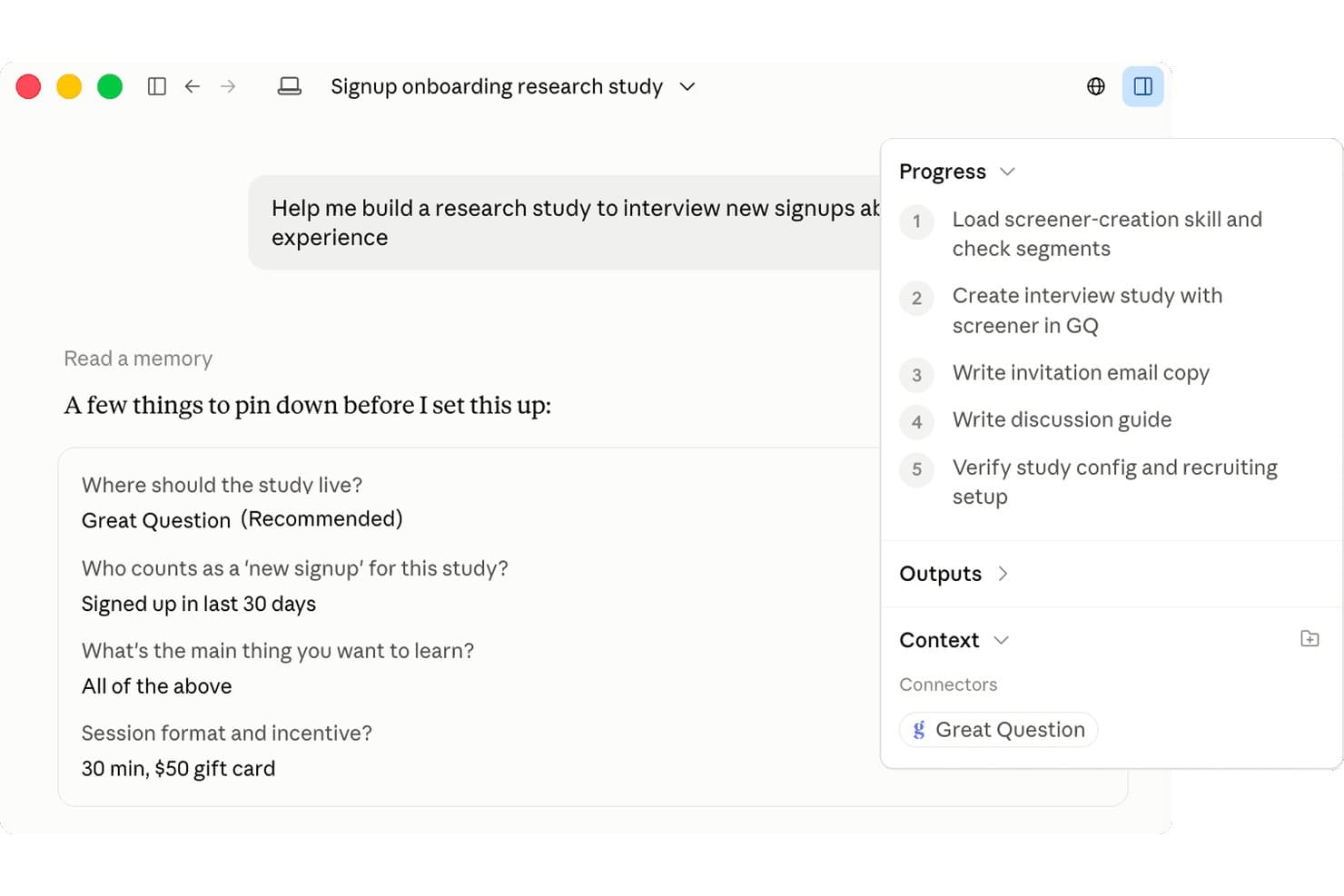
Great Question uses AI to guide study setup with structured steps. Great Question is a user research platform that combines participant recruitment, a research CRM, moderated and unmoderated studies, surveys, card sorting, tree testing, and an AI-powered insight repository in one tool.
Who Is Great Question Best For?
Great Question is a strong fit for product and UX research teams that need to run moderated interviews, unmoderated tests, surveys, and card sorting without juggling multiple tools.
Why I Picked Great Question
I picked Great Question as one of the best because it's the only tool I've seen where your research CRM, recruitment panel, moderated interviews, unmoderated tests, card sorting, and tree testing all live in one place and feed into the same AI-powered repository. I love that the AI moderator can run hundreds of sessions simultaneously, reacting in real time when a participant hesitates or takes a wrong path during a prototype test. The research CRM also lets you recruit your own customers without per-participant fees, while keeping governance guardrails like eligibility limits and consent controls in place.
Great Question Key Features
- AI-powered synthesis: After each session, AI generates summaries, key takeaways, video chapters, and tagged highlights automatically, with every finding linked back to a verbatim quote.
- Unmoderated prototype testing: Test Figma prototypes, AI-built apps, or live websites with video capture, click heatmaps, misclick rates, and user path reporting.
- Card sorting and tree testing: Native open, closed, and hybrid card sorts alongside tree tests with success rate tracking, agreement matrices, recordings, and AI summaries.
- MCP server for AI assistants: Connect Claude, ChatGPT, Gemini, Cursor, or Copilot to Great Question via an MCP server that covers 130+ actions across study design, recruitment, scheduling, and synthesis.
Great Question Integrations
Great Question offers 20+ native integrations, including Zoom, Google Meet, Microsoft Teams, Slack, Figma, Salesforce, HubSpot, Snowflake, Databricks, and Qualtrics. It also provides a public API for custom integrations and supports Zapier.
Pros and Cons
Pros:
- Manages participants with a research CRM
- Links AI themes to verbatim evidence
- Combines moderated and unmoderated research methods
Cons:
- Complex surveys can feel slow
- Enterprise gates repository and AI moderation
Learn more about Great Question:
Other User Research Tools
Here are a few more worthwhile options that didn’t make the best user research tools list:
- 11LightsterBest for direct user feedback
- 12SuzyBest for blending quant, qual, and panel research
- 13UserlyticsBest for enterprise UX research
- 14UXtweakBest for IA testing with card sort and tree test
- 15MazeBest for testing prototypes and getting design ideas
- 16LookbackBest for live moderated research with AI synthesis
- 17DovetailBest for AI-driven qualitative data synthesis
- 18DscoutBest for diary studies and AI-moderated research
- 19UseberryBest for testing prototypes across Figma and IA methods
- 20MarvinBest for AI-moderated interviews in your product
Related Product Management Software Reviews
If you still haven't found what you're looking for here, check out these other related tools that we've tested and evaluated:
- Best Product Management Tools
- Best Product Planning Software
- Best UX Design Tools
- Best Product Analytics Tools
- Best Heatmap Software
- Best Product Marketing Tools
How I Evaluate User Research Tools
I split my evaluation into three parts. Core functionality carries the most weight—I look for tools that can collect user data through interviews or surveys and synthesize findings into tagged, searchable insights. From there, I evaluate standout features like AI moderation and automated highlight reels, then consider pricing value and onboarding support.
Core Functionality (Table Stakes For This List)
When I'm selecting tools for my list, I score each one on a scale from 0 (does not offer the functionality) to 5 (excels in this area) for each core functionality listed below. I then convert the total into a percentage to help assess each tool's overall fit, with extra weight on any functionalities I've deemed essential.
- Data Collection Methods (Essential): I check whether a tool supports surveys, moderated interviews, unmoderated usability tests, or a mix—and how much flexibility you get in structuring each study.
- Participant Recruitment & Management: Built-in panel access, screening filters, scheduling, and incentive handling all matter here. Tools like UserTesting and Respondent approach recruitment differently, so I evaluate what fits your sourcing needs.
- Synthesis & Analysis Tools: I look for tagging, thematic coding, and cross-session pattern detection. The best tools let you move from raw transcripts to clustered themes without jumping into a spreadsheet.
- Insight Repository & Organization: Past research should be searchable and tagged so your team isn't re-running studies that already have answers sitting in a folder somewhere.
- Collaboration & Sharing: I evaluate whether stakeholders can comment, annotate clips, or co-analyze findings in real time—versus just receiving a static export after the fact.
- Reporting & Visualization: Shareable highlight reels, auto-generated summaries, and visual dashboards help research land with leadership. I look at how much manual assembly each tool requires.
Once I have a list of tools that meet the criteria, I consider what sets each platform apart.
Differentiating Factors (What Sets Vendors Apart)
Here's how I compare and contrast different vendors:
Standout Features
AI moderator capabilities matter most when you need to scale unmoderated sessions. I evaluate whether the AI can adapt follow-up questions based on participant responses, not just run a static script. Cross-study insight linking is the other feature I look for closely. Tools like Dovetail and Condens can surface connections between a new finding and past research, which keeps teams from re-running studies that already have answers buried in old reports. I also check for automated highlight reels, since assembling video clips manually for stakeholders can eat hours.
Beyond Features
I check how each tool's participant panel matches your actual audience. A platform with millions of consumer testers won't help if you're researching niche B2B buyers in healthcare IT. Integration depth also matters—I look at whether insights flow into Jira, Slack, or Figma without manual re-entry, since research that stays trapped in a silo rarely shapes roadmap decisions. Finally, I evaluate data privacy posture, including SOC 2 certification and GDPR-compliant handling of session recordings, because enterprise procurement teams will block tools that can't clear security review.
How to Choose User Research Tools
With so many different user research solutions available, it can be challenging to make decisions on what user research tool is going to be the best fit for your needs.
As you're shortlisting, trialing, and selecting user research tools, consider the following:
- What problem are you trying to solve - Start by identifying the user research tool feature gap you're trying to fill to clarify the features and functionality the user research tool needs to provide.
- Who will need to use it - To evaluate cost and requirements, consider who'll be using the software and how many licenses you'll need. You'll need to evaluate if it'll just be the product management professionals, or the whole organization that will require access. When that's clear, it's worth considering if you're prioritizing ease of use for all, or speed for your user research tool power users.
- What other tools it needs to work with - Clarify what tools you're replacing, what tools are staying, and the tools you'll need to integrate with, such as accounting, CRM or HR software. You'll need to decide if the tools will need to integrate together, or alternatively, if you can replace multiple tools with one consolidated user research tool.
- What outcomes are important - Consider the result that the software needs to deliver to be considered a success. Consider what capability you want to gain, or what you want to improve, and how you will be measuring success. For example, an outcome could be the ability to get greater visibility into performance.
You could compare user research tool features until you’re blue in the face, but if you aren’t thinking about the outcomes you want to drive, you could be wasting a lot of valuable time. - How it would work within your organization - Consider the software selection alongside your workflows and delivery methodology. Evaluate what's working well, and the areas that are causing issues that need to be addressed. Remember every business is different — don’t assume that because a tool is popular that it'll work in your organization.
Trends in User Research Tools For 2026
The landscape of user research tools is evolving rapidly in 2026, driven by technological advancements and shifting user needs. These new trends both reflect the current state of user research technology and highlight the features and functionalities that are evolving, novel, and those that are diminishing in importance. I believe that each of these trends will continue to influence the growth of user research tools in the future.
Trends in User Research Tools and Technology
- Integration with AI and Machine Learning: User research platforms are increasingly evolving into AI-powered research tools that automate the analysis of user feedback and behavior. This trend points towards a future where user research tools can predict user needs and behaviors, making insights more actionable and strategic decisions more informed.
- Enhanced Real-Time Collaboration Features: As remote work becomes more common, user research tools are evolving to include better real-time collaboration features. This allows teams to work together seamlessly on research projects, regardless of their physical location, enhancing productivity and the speed of insights gathering.
- Focus on Privacy and Security: With growing concerns about data privacy and security, user research tools are incorporating stricter data protection measures. This includes enhanced encryption and compliance with global privacy regulations, ensuring user data is handled responsibly.
Most Rapidly Evolving Features
- Automated Insights Generation: The ability to automatically generate insights from data is rapidly evolving. This reduces the time and effort required to analyze user feedback, allowing teams to focus on implementing improvements.
Most Novel and Unusual Functionality
- Predictive User Behavior Modeling: Some tools are introducing predictive modeling features that forecast user actions based on historical data. This novel functionality helps in anticipating user needs and tailoring experiences accordingly.
Features Becoming Less Important
- Static Reporting Tools: As dynamic and interactive reporting becomes the norm, the demand for static reporting tools is decreasing. Users now expect to interact with data in real-time, customizing reports to fit their specific needs.
These trends highlight the direction in which user research tools are moving, emphasizing a shift towards automation, advanced analytics, collaboration, and privacy. For product management professionals, staying informed about these developments is key to leveraging user research tools effectively.
By understanding these developments, professionals can better select tools that align with their strategic goals, ensuring they stay ahead in delivering user-centric products and experiences.
What are user research tools?
User research tools are platforms that facilitate and streamline the process of gathering insights into user behavior, preferences, and experiences. These tools help researchers, designers, and product teams understand their target audience better, enabling them to make informed decisions throughout the product development lifecycle.
User research tools can include features for conducting surveys, interviews, usability testing, analytics, heatmaps, and other methods of data collection. The goal is to gain a deeper understanding of users' needs, pain points, and behaviors, ultimately leading to the creation of more user-centric and effective products or services.
Features of User Research Tools
User research tools are great for collecting, analyzing, and interpreting data from real users—ultimately shaping smarter UX design decisions. Whether you're conducting remote usability testing, testing a wireframe in Figma, or running a second test on an updated prototype, the right tool should align with your design process and help you extract meaningful insights.
Below are the core features to look for when evaluating UX research tools.
- Ease of Use: If it takes you half a day to figure out how to run a simple test, it’s already costing more than it’s worth. The best tools make setup intuitive and keep researchers (and non-researchers) moving quickly—no hand-holding required.
- Multi-Method Support: Research isn’t one-size-fits-all. Your tool should flex for different formats—surveys, interviews, usability tests, diary studies, and whatever else your study calls for. You want a platform that evolves with your process, not one that boxes you in.
- Data Collection and Management: You shouldn’t need a Notion doc, a spreadsheet, and six sticky notes to wrangle your data. Tools like Optimal Workshop and Lookback help organize qualitative and quantitative feedback at scale. From participant responses to video recordings and task metrics, proper data management is key to drawing reliable insights from real users.
- Analytical Tools: Built-in analytics transform raw user input into usable findings. From wireframe testing to running sentiment analysis or conducting click testing, these tools help surface trends and behavioral patterns without needing extra software.
- Participant Recruitment and Management: Finding the right users is half the battle. The ability to recruit and manage real users based on demographic criteria can come in handy. Many tools support custom screeners, scheduling, and integrations with video conferencing platforms like Zoom for live sessions and follow-up interviews.
- Collaboration Features: Features that support collaboration—like shared dashboards, real-time note-taking, or integrations with your design tools—make it easier to get buy-in and keep teams aligned. Integrations with Figma, Miro, and InVision help bridge the gap between researchers, designers, and developers—so insights can quickly influence the UX design process.
- Integration Capabilities: Whether syncing with Qualtrics for survey data, exporting insights into Miro for synthesis, or embedding feedback into Figma mockups, integration support is essential for smooth workflows across teams.
- Scalability: As your product evolves, so should your research toolkit. Scalable tools support larger participant pools, more frequent testing (including second tests), and more complex studies—without bogging down performance.
- Security and Privacy Compliance: Working with real users means handling sensitive data. Tools should be GDPR- and CCPA-compliant, particularly when sessions are recorded or involve customer-facing products.
- Reporting and Visualization: Clear visual reports help turn research into action. Whether you're sharing insights from diary studies, heatmaps from click testing, or trends from remote usability testing, solid reporting tools make it easier to communicate findings to stakeholders.
Choosing the right user research tool means balancing ease of use, flexibility, and depth. Suppose you're iterating on a wireframe, running moderated interviews through Zoom, or synthesizing results in Miro; the right platform helps turn observations into decisions—and decisions into better experiences.
Benefits of User Research Tools
User research tools do more than just collect data—they help teams build smarter, more user-centered products. By making it easier to gather, analyze, and act on feedback, these tools bring clarity to the product development process and confidence to decision-making.
If you’re weighing whether investing in a research tool is worth it, here are five benefits that might help tip the scale:
- A Clearer Understanding of User Needs
User research tools give you direct access to what your users are thinking, feeling, and struggling with. Instead of building based on assumptions, you’re solving real problems for real people. That insight leads to better products, stronger alignment with user expectations, and higher long-term satisfaction. - Data-Driven Decision Making
Whether you’re deciding what feature to build next or how to position a product, having both qualitative and quantitative data at your fingertips takes the guesswork out of the process. It helps teams stay grounded in what users actually need —rather than relying on gut instinct or the loudest opinion in the room. - Better Usability, Better Experience
Usability testing and feedback collection highlight pain points that might otherwise go unnoticed. Fixing these issues early leads to cleaner flows, more intuitive interfaces, and products that just feel easier to use—translating to higher engagement and stronger retention. - A Competitive Edge That Lasts
When you’re regularly talking to users, spotting patterns, and catching unmet needs before your competitors, you’re not just reacting to the market—you’re anticipating it. That kind of proactive research gives you a leg up in building features and experiences people actually want. - Smarter Use of Time and Budget
Nobody wants to spend months building something users don’t care about. Research tools help you focus development on what really matters—reducing wasted effort and making sure every sprint is tied to validated user insight. That means better ROI and fewer “why didn’t this work?” moments. - Streamlined Insight Management with Research Repositories
If you've ever lost track of a great quote or key finding—this one’s for you. Research repository features like EnjoyHQ, Looppanel, and Notably give you a central place to store interviews, notes, transcripts, and insights. Easily search, tag, find, and use the research you've worked so hard to collect.
User research tools might not magically solve every product problem—but they do make it a lot easier to figure out what’s actually going on with your users. They give you a clearer lens, help you ask better questions, and build the kind of confidence that comes from listening before you leap.
Costs & Pricing for User Research Tools
User research tools come in various plans and pricing options designed to cater to different needs, from startups to large enterprises. Typically, these plans range from free versions with basic functionalities to more advanced options that offer comprehensive features for in-depth user research.
Here's a breakdown of the common plan types, their average prices, and the features they usually include:
Plan Comparison Table for User Research Tools
| Plan Type | Average Price | Common Features |
|---|---|---|
| Plan TypeFree | Average Price$0 | Common FeaturesBasic surveys, limited responses, basic analytics, community support |
| Plan TypeBasic | Average Price$20 - $50 per month | Common FeaturesEnhanced surveys, unlimited responses, export options, email support |
| Plan TypeProfessional | Average Price$50 - $200 per month | Common FeaturesAdvanced analytics, custom branding, integration with other tools, priority support |
| Plan TypeEnterprise | Average Price$200 - $2000+ per month | Common FeaturesFull feature access, dedicated support, custom integrations, advanced security and compliance options |
When choosing a user research tool, it’s worth taking a step back to consider what you actually need—both in terms of features and budget. The most expensive plan isn’t always the best fit, especially if you’re just getting started. Look for a plan that covers your must-haves without overcomplicating things or blowing up your budget.
Many tools offer free tiers or trials, which are great for testing the waters before you commit. As your research practice grows, you can always scale into a plan that better supports your workflow, team size, and goals.
User Research Tools Frequently Asked Questions
Find answers to common questions other people ask about this topic.
What is user research?
User research is a discipline that is part of the strategic layer of user experience and focuses on understanding the customer’s needs and pain points that will inform the visual and interaction layers of UX.
How do user research tools ensure data privacy and security?
User research tools tend to take data privacy and security concerns seriously, and many employ a variety of security measures to protect both the data collected and the privacy of participants. Here’s are some typical security features these tools might include:
- Encryption: Data is encrypted both in transit and at rest, ensuring that sensitive information is always protected from unauthorized access.
- Access Control: These tools often have robust access control mechanisms, allowing only authorized personnel to view or manipulate data, thereby reducing the risk of data breaches.
- Compliance: Many tools adhere to international standards and regulations like GDPR, HIPAA, or CCPA, providing a framework for managing personal data responsibly.
- Anonymization: Some tools offer options to anonymize user data, which is crucial for maintaining privacy and ethical standards in research.
- Regular Security Audits: Frequent security audits and updates ensure that the tools stay ahead of potential vulnerabilities.
-
These features work together to create a secure environment for conducting user research. By prioritizing data privacy and security, these tools not only protect users but also help build trust with participants, ensuring higher quality and more reliable data for product managers and researchers. Always check with the specific tool for their detailed security practices and compliance certifications to ensure they meet your project’s needs.
What are the differences between quantitative and qualitative research tools?
Quantitative research tools focus on collecting and analyzing numerical data to quantify trends, opinions, or behaviors. They use structured methods such as surveys with closed-ended questions, analytics platforms, and A/B testing tools. Specific features could include statistical analysis capabilities, data visualization tools, and metrics tracking to quantify user interactions.
Qualitative research tools, on the other hand, are designed to gather non-numerical, in-depth insights into user behaviors, motivations, and attitudes. They often involve methods like interviews, open-ended surveys, and usability tests, emphasizing understanding the ‘why’ behind user actions. Features might include video recording for interviews, sentiment analysis, and thematic coding tools.
Both approaches offer valuable insights, but they serve different purposes within product management. Qualitative tools help explore ideas and hypotheses deeply, while quantitative tools are best for validating those hypotheses at scale.
What are commonly used user research methods?
Here are the most common research methods:
- Usability testing: This method evaluates how easy it is to use an interface or product. These tests can be done on a prototype of any fidelity and any live site or piece of software, including competitors. These tests are useful to help you find out if there are issues with your product that impede a positive experience. Usability tests are usually moderated sessions, whether remote or in person, where user sessions are recorded and studied.
- User interviews: This method is used to get qualitative information from users. It’s basically an interview where you ask the user questions about their needs, motivations, and goals. An ethnographic interview is one of the best ways to do this. A user interview can help you and your team define user personas.
- Surveys: A method for collecting quantitative data from a large number of participants, using a standardized set of questions. There are several different types of survey tools available, including survey apps.
- Focus Groups: A method for collecting qualitative data from a small group of participants, discussing their attitudes, opinions, and behaviors around a specific topic.
- Card sorting: This method helps you categorize information and determine hierarchy for information architecture. The two variants to this method are called open card sorting and closed card sorting. Open sort is where the participants organize the cards in a way that it makes sense to them. Closed sort requires you to give the participants defined categories and they have to move items wherever they best fit.
- Tree testing: This method is linked to card sorting. Once you have your categories defined, you provide your tree structure to a user and ask them to find an item using that navigational structure.
- A/B Testing: A method for testing two different versions of a product or service to determine which performs better with users.
How do you collect data for UX research?
Collecting data for UX research is vital if you want to build a product that lasts. Here are 3 ways in which you can collect data:
- Send out a survey: This can be an email survey, a routine search for feedback, NPS questionnaire or any other type of proactive and reactive survey.
- Monitor social media: Follow hashtags, topics, and do social listening to learn how customers are talking about your product. Sometimes they will voice opinions in forums where they feel more freedom than the satisfaction survey you just sent.
- Watch them use your product: This can be done in person with a focus group or through tools that can provide recordings of user sessions, like Hotjar. You will gain valuable insights from this simple activity.
Are there generative AI tools that can be used for user research?
Yes—generative AI tools are increasingly being used to support and speed up user research workflows. While they’re not a replacement for critical thinking or hands-on analysis, they can take care of repetitive tasks like summarizing interview transcripts, identifying patterns in qualitative data, drafting research reports, and even generating follow-up questions.
These tools can help researchers move faster—especially when working with large volumes of data or tight timelines. Some examples of generative AI tools used in user research include:
- Dovetail AI: Automatically tags, summarizes, and extracts insights from user interview transcripts.
- Notably: Uses AI to detect patterns and synthesize notes across research sessions.
- Fireflies.ai: Records interviews and generates searchable transcripts with summaries and action items.
- Athenic AI: Drafts research reports and highlights trends based on uploaded notes and files.
- ChatGPT or Claude: Helpful for summarizing open-text feedback, brainstorming follow-up questions, or organizing key insights.
Generative AI can be a powerful co-pilot—just make sure you’re still in the driver’s seat when it comes to interpreting results and making decisions.
Can user research tools help in identifying user personas?
Absolutely, user research tools can collect and analyze data from your target audience to segment users based on behaviors, needs, and goals. Features that support you in identifying personas may include:
- Segmentation tools to categorize users based on their responses or behaviors
- Analytics and reporting for demographic and psychographic data
- Survey and interview modules to gather qualitative insights
- User behavior tracking to observe how different segments interact with your product.
By leveraging these tools, you can craft detailed personas that reflect the varied users of your product, guiding more targeted and effective product development.I’ve evaluated 30+ research platforms and understand what product teams need: reliable recruitment, flexible study formats, and easy-to-use analysis tools. In this guide, you’ll find solutions that streamline research workflows and help you uncover patterns, validate ideas, and build products that truly solve user problems.