

10 Adobe Illustrator Alternatives Picked for 2026

Adobe Illustrator Alternatives Shortlist


A strong Adobe Illustrator alternative offers advanced vector editing, compatibility with common file formats, and flexible pricing or licensing options. If you’re searching for Adobe Illustrator alternatives, you’re likely looking for tools that match its creative power without the subscription commitment or with features better suited to your workflow. This list will help you compare leading options, understand what sets each apart, and choose the right vector design software for your team’s needs in 2026.
What Is Adobe Illustrator?
Adobe Illustrator is a vector graphics editor used for UI design, user interface work, and scalable digital artwork. It supports both desktop app workflows and integration into broader web app design processes, making it a common choice for web designers and creative teams. With advanced features like the pen tool, precise shape editing, and keyboard shortcuts, it enables users to create detailed graphics for digital and print projects across Apple and other platforms.
Best Adobe Illustrator Alternatives Summary
This comparison chart summarizes pricing details for my top Adobe Illustrator alternatives for accountants selections to help you find the best one for your budget and business needs.
| Tool | Best For | Trial Info | Price | ||
|---|---|---|---|---|---|
| 1 | Best for offline Windows editing | Free plan available | From $11.99/user/month (billed annually) | Website | |
| 2 | Best for one-time license purchase | Not available | Free to use | Website | |
| 3 | Best for cross-platform browser access | Free plan and 14-day free trial available | From $7/user/month | Website | |
| 4 | Best for macOS native interface | 30-day free trial | From $12/editor/month (billed annually) | Website | |
| 5 | Best for open-source customization | Not available | Free and open-source | Website | |
| 6 | Best for AI-powered vector generation | Free plan available | From $10/month (billed annually) | Website | |
| 7 | Best for advanced print design tools | 15-day free trial | From CA$349.00/ year | Website | |
| 8 | Best for real-time team collaboration | Free plan available | From $3/user/month (billed annually) | Website | |
| 9 | Best for motion graphics integration | Free plan and 7-day free trial available | From $6.58/month (billed annually) | Website | |
| 10 | Best for vector brush versatility | Free plan and a 42-day free trial available for download | From $95 one time payment (commercial license) | Website |
Why Trust Our Software Reviews
We’ve been testing and reviewing product management software since 2020. As product managers ourselves, we know how critical and difficult it is to make the right decision when selecting software.
We invest in deep research to help our audience make better software purchasing decisions. We’ve tested more than 2,000 tools for different product management use cases and written over 1,000 comprehensive software reviews. Learn how we stay transparent & our software review methodology.
Adobe Illustrator Alternatives Reviews
Below are my detailed summaries of the best Adobe Illustrator alternatives that made it onto my shortlist. My reviews offer a detailed look at the features, best use cases, and pricing of each software to help you find the best one for you.


If you need a vector design tool that works fully offline on Windows, Lunacy is worth a close look. This app is built for designers, illustrators, and teams who want a fast, native Windows experience without relying on cloud access. Unlike Adobe Illustrator, Lunacy lets you work offline, offers built-in assets, and supports .sketch files natively, making it a practical choice for Windows-focused workflows.
Why Lunacy Is a Good Adobe Illustrator Alternative
Lunacy stands out for anyone who needs a vector design tool that works entirely offline on Windows. I picked Lunacy because it offers a native Windows experience, letting you access all design features without an internet connection. The app includes a built-in library of icons, photos, and illustrations, so you don’t have to search for assets elsewhere. If you’re looking for an Adobe Illustrator alternative that doesn’t depend on the cloud and supports .sketch files, Lunacy is a strong option.
Lunacy Key Features
Some other features that make Lunacy appealing for Windows-based design work include:
- AI-Powered Background Remover: Instantly remove backgrounds from images within your project.
- Real-Time Collaboration: Invite others to edit and comment on your files simultaneously.
- Text and Font Tools: Access advanced text formatting and a wide range of font options.
- Plugins Marketplace: Extend functionality with a variety of downloadable plugins.
Lunacy Integrations
Integrations include Figma, Sketch, and Pixso.
Pros and Cons
Pros:
- Supports .sketch file format natively
- Built-in library of icons and illustrations
- Native Windows app with full offline functionality
Cons:
- Performance can lag with complex files
- Limited advanced vector editing capabilities


If you’re looking for a vector design tool without a subscription, Affinity by Canva is worth considering. It’s designed for creative professionals, agencies, and freelancers who want advanced illustration and layout features with a one-time license. Affinity appeals to those who want full-featured design software without ongoing monthly costs or cloud dependencies.
Why Affinity Is a Good Adobe Illustrator Alternative
For designers who want to avoid ongoing subscription fees, Affinity offers a full-featured vector graphics solution with a one-time license purchase. I picked Affinity because it delivers advanced vector editing, unlimited artboards, and professional print support without tying you to a monthly payment. The software includes precise pen and shape tools, as well as non-destructive effects and adjustments for flexible design workflows. If you value ownership and long-term access to your design software, Affinity is a strong alternative to Adobe Illustrator.
Affinity Key Features
Some other features in Affinity make it a strong choice for professional design work:
- Pixel Persona: Switch between vector and raster workspaces to combine illustration and photo editing in one file.
- Advanced Typography Controls: Access a wide range of text styles, ligatures, and OpenType features for detailed type design.
- Asset Management Panel: Organize and reuse design assets, icons, and elements across multiple projects.
- PSD Import and Export: Open, edit, and save Adobe Photoshop files while preserving layers and effects.
Affinity Integrations
Integrates with Canva.
Pros and Cons
Pros:
- Handles both vector and raster workflows in one file
- Supports non-destructive effects and adjustments
- Advanced vector editing with precise pen and shape tools
Cons:
- No real-time collaboration features
- Access to Canva AI features require Canva Premium plan


Design teams who need a browser-based vector design tool should take a look at Penpot. This open-source platform works across operating systems, making it a fit for organizations with mixed device environments or remote teams. Unlike Adobe Illustrator, Penpot runs entirely in the browser and supports real-time collaboration without requiring any downloads.
Why Penpot Is a Good Adobe Illustrator Alternative
Penpot stands out for its true cross-platform browser access, which is something I appreciate for teams working across different operating systems. You can launch Penpot in any modern browser, so there’s no need to install software or worry about compatibility issues between Mac, Windows, or Linux. The platform also supports real-time collaboration, letting multiple users work on the same design at once. If you want a vector design tool that’s accessible from anywhere and supports distributed teams, Penpot is a strong alternative to Adobe Illustrator.
Penpot Key Features
Some other features that make Penpot appealing for vector design work include:
- Open-Source Codebase: Access and modify the platform’s source code to fit your organization’s needs.
- Component Libraries: Build, organize, and reuse design components across multiple projects.
- SVG Import and Export: Bring in existing SVG files or export your work for use in other tools.
- Interactive Prototyping: Create clickable prototypes with links, transitions, and interactive elements.
Penpot Integrations
Penpot offers a well-documented API for custom integrations and can be self-hosted for greater control over deployment. It also offers webhooks, access tokens, and add-ons through its plugin system.
Pros and Cons
Pros:
- Real-time collaboration for distributed teams
- Open-source with a customizable codebase
- Runs in browser across all major operating systems
Cons:
- Performance can lag with complex designs
- Limited advanced vector and mesh tools

Designers who want a vector tool built specifically for macOS often choose Sketch. This platform appeals to product designers and UI/UX teams who value a native Mac interface and real-time collaboration. Sketch sets itself apart from Adobe Illustrator with its focus on digital product design, reusable symbols, and seamless handoff features for developers.
Why Sketch Is a Good Adobe Illustrator Alternative
If you’re looking for a vector design tool that feels truly at home on macOS, Sketch is a top contender. I picked Sketch because its interface and performance are optimized specifically for Mac users, making it feel fast and familiar. The platform supports native macOS features like Dark Mode, system-wide font rendering, and smooth trackpad gestures, which help designers work more naturally. For anyone who values a Mac-friendly user experience in their creative workflow, Sketch offers a focused alternative to Adobe Illustrator.
Sketch Key Features
Some other features that make Sketch a strong choice for design teams include:
- Reusable Symbols: Build and update consistent UI components across multiple artboards and projects.
- Shared Libraries: Store and distribute design assets for use by multiple team members or projects.
- Prototyping Tools: Create interactive prototypes with transitions and hotspots directly within your design files.
- Developer Handoff: Generate code snippets, specs, and assets for developers to access and implement designs.
Sketch Integrations
Integrations include Slack, Notion, and ProtoPie.
Pros and Cons
Pros:
- Built-in prototyping for interactive design previews
- Reusable symbols and shared libraries for consistency
- Native macOS interface with optimized performance
Cons:
- Limited advanced vector illustration tools
- No support for Windows or Linux


Open-source enthusiasts and teams who want full control over their vector design environment often choose Inkscape. This tool is especially appealing to designers, educators, and organizations that need deep customization and the ability to modify or extend features. A popular free Adobe Illustrator alternative, Inkscape include it’s transparent, community-driven platform with extensive plugin support and source code access.
Why Inkscape Is a Good Adobe Illustrator Alternative
If you want a vector design tool you can truly make your own, Inkscape is worth considering. I picked Inkscape because it’s open-source, which means you can customize the software, add plugins, or even modify the source code to fit your workflow. The platform supports a wide range of extensions and scripting, letting you automate tasks or introduce new features as your needs evolve. For anyone who values flexibility and community-driven development, Inkscape offers a level of control that’s hard to find in other Adobe Illustrator alternatives.
Inkscape Key Features
In addition to its open-source customization, I also found these features useful for creative teams:
- Multi-Platform Support: Run Inkscape on Windows, macOS, and Linux without compatibility issues.
- Advanced Path Operations: Use tools for node editing, path simplification, and Boolean operations on vector shapes.
- SVG File Format Support: Create, edit, and export scalable vector graphics in the widely used SVG format.
- Bitmap Tracing: Convert raster images into editable vector paths directly within the application.
Inkscape Integrations
Native integrations are not currently listed.
Pros and Cons
Pros:
- Runs natively on Windows, macOS, and Linux
- Active community support and plugin ecosystem
- Extensive SVG editing and export capabilities
Cons:
- Performance slows with complex or large files
- No native CMYK color support


Designers looking to generate vector graphics with AI should consider Recraft. This tool appeals to creative professionals and teams who want to quickly produce scalable illustrations, icons, and patterns from text prompts. Unlike Adobe Illustrator, Recraft uses generative AI to automate the creation of original vector assets, speeding up the design process for users who need fresh visuals on demand.
Why Recraft Is a Good Adobe Illustrator Alternative
Recraft takes a different approach from traditional vector design tools by using AI to generate vector graphics from text prompts. I picked Recraft for its ability to quickly create original illustrations, icons, and patterns without manual drawing. The platform lets you customize and refine AI-generated assets directly in the editor, so you can adjust details to fit your project. If you want a tool that speeds up asset creation and brings AI-powered creativity to your workflow, Recraft is a strong alternative to Adobe Illustrator.
Recraft Key Features
Some other features that make Recraft appealing for vector design work include:
- SVG and PNG Export Options: Export your finished graphics in both SVG and PNG formats for flexible use.
- Style Presets: Apply a variety of pre-built visual styles to generated assets with one click.
- Layer Editing Tools: Adjust, rearrange, and fine-tune individual layers within your vector designs.
- Brand Kit Management: Store and reuse brand colors, fonts, and assets across multiple projects.
Recraft Integrations
Recraft offers an API for custom integrations, though specific integrations are not currently listed.
Pros and Cons
Pros:
- Style presets for quick visual variations
- Editable layers for refining generated designs
- AI-generated vector graphics from text prompts
Cons:
- AI outputs often require manual adjustments
- Limited manual drawing and path editing tools


Print-focused designers and production teams often turn to CorelDRAW for its specialized prepress and layout capabilities. The software is built for professionals who need advanced color management, spot color support, and precise print output controls. CorelDRAW stands out for users who require tools tailored to complex print projects, packaging, and signage work.
Why CorelDRAW Is a Good Adobe Illustrator Alternative
If your work centers on print design, CorelDRAW offers advanced tools that go beyond what many vector design platforms provide. I picked CorelDRAW because it includes features like spot color support, prepress tools, and precise color management that are essential for professional print production. The software also supports complex layout tasks, including multi-page documents and variable data printing, which are critical for packaging and signage projects. For anyone who needs specialized print output controls, CorelDRAW is a strong alternative to Adobe Illustrator.
CorelDRAW Key Features
Some other features in CorelDRAW make it a versatile choice for design professionals:
- LiveSketch Tool: Draw freehand vector illustrations that automatically convert to precise curves.
- Font Manager: Organize, search, and preview fonts without installing them on your system.
- Bitmap-to-Vector Tracing: Convert raster images into editable vector graphics with the integrated PowerTRACE tool.
- Interactive Mesh Fill: Apply complex color gradients and shading to objects for detailed illustrations.
CorelDRAW Integrations
Native integrations are not currently listed.
Pros and Cons
Pros:
- Multi-page layout capabilities for print projects
- Built-in variable data printing tools
- Advanced spot color and Pantone support
Cons:
- No real-time cloud collaboration options
- Mac version has fewer features than Windows


Figma Design is a browser-based vector graphics tool built for teams that need to collaborate in real time. It’s especially useful for product designers, UX professionals, and creative teams who want to work together on the same file without version control headaches. If you’re looking for a solution that prioritizes live feedback and collaborative workflows, Figma Design stands out from traditional desktop-based alternatives.
Why Figma Design Is a Good Adobe Illustrator Alternative
Figma Design stands out for teams that need to collaborate on vector graphics in real time. I picked it as an Adobe Illustrator alternative because it lets multiple users edit the same file simultaneously, making feedback and iteration much faster. The built-in commenting and version history features help teams stay aligned without endless file exchanges. If your workflow depends on live collaboration, Figma Design offers a unique advantage over traditional desktop tools.
Figma Design Key Features
Some other features in Figma Design make it a versatile choice for vector design work:
- Auto Layout: Automatically adjusts frames and components as you resize or add elements, keeping designs consistent.
- Component Libraries: Let you create and reuse design elements across multiple projects for brand consistency.
- Prototyping Tools: Allows you to build interactive prototypes directly within your design files without switching apps.
- SVG Export Options: Exports vector assets in multiple formats, including SVG, for easy use in web and app development.
Figma Design Integrations
Integrations include Slack, Microsoft Teams, Zoom, Asana, Jira, Notion, Dropbox, Trello, Confluence, and GitLab.
Pros and Cons
Pros:
- Built-in prototyping tools for interactive design workflows
- Browser-based access with no installation required
- Real-time collaboration with multi-user editing
Cons:
- Performance can lag with large or complex files
- Limited advanced vector editing compared to Illustrator


Designers looking to bridge vector illustration with motion graphics often turn to Linearity Curve. This tool appeals to creative teams and marketing professionals who want to create artwork that moves seamlessly into animation workflows. Linearity Curve stands out for its direct integration with motion design tools, making it easier to bring static designs to life.
Why Linearity Curve Is a Good Adobe Illustrator Alternative
For teams focused on motion graphics, Linearity Curve offers a unique advantage over traditional vector design tools. I picked Linearity Curve because it lets you export layered vector files directly into animation platforms like Linearity Move, making the transition from static to animated content much smoother. The software also supports timeline-based editing and keyframe-ready assets, which are essential for motion design workflows. If you need a vector tool that’s built with animation in mind, Linearity Curve is a strong alternative to Adobe Illustrator.
Linearity Curve Key Features
Some other features in Linearity Curve help it stand out for creative professionals:
- SVG and PDF Export: Export artwork in widely used vector formats for compatibility with other design tools.
- Asset Library: Access a built-in library of reusable shapes, icons, and templates for faster project setup.
- Real-Time Collaboration: Invite team members to view or edit projects simultaneously within the app.
- Brush Customization: Adjust brush settings to create unique strokes and textures for illustrations.
Linearity Curve Integrations
Integrations include Brandfetch, Unsplash, SF Symbols, Icons8, Figma, Adobe Illustrator, Sketch, and Linearity Move.
Pros and Cons
Pros:
- Real-time collaboration for team-based projects
- Built-in asset library with reusable design elements
- Direct export to animation workflows for motion design
Cons:
- Fewer plugin options than larger design tools
- Limited advanced typography controls
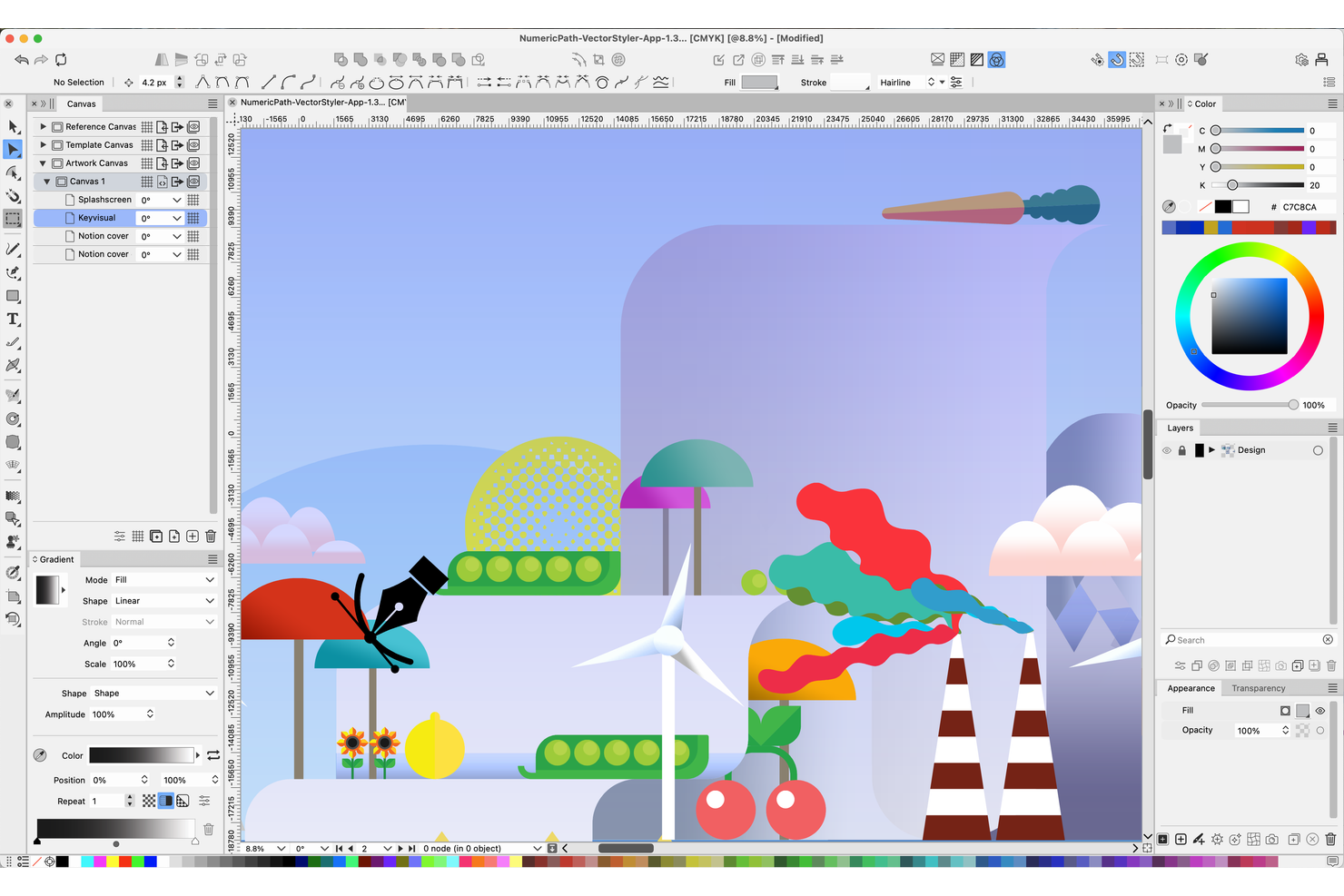
Artists and illustrators who want advanced brush control in their vector work often turn to VectorStyler. This tool is designed for creative professionals who need a wide range of customizable vector brushes and natural drawing effects. VectorStyler stands apart from other Adobe Illustrator alternatives by offering unique brush engines and detailed stroke options that support expressive, hand-drawn styles.
Why VectorStyler Is a Good Adobe Illustrator Alternative
VectorStyler stands out for anyone who wants more creative freedom with vector brushes. I picked VectorStyler because it offers a wide variety of brush types, including pattern, scatter, and artistic brushes, that let you create complex, textured strokes. The brush engine supports pressure sensitivity and custom brush creation, which is especially useful for illustrators who want to mimic natural media effects. If you’re looking for an Adobe Illustrator alternative that gives you more control over brush styles and expressive line work, VectorStyler is a strong choice.
VectorStyler Key Features
Some other features that make VectorStyler appealing for creative professionals include:
- Non-Destructive Effects: Apply and adjust effects to objects without permanently altering the original vector artwork.
- Advanced Shape Builder Tool: Combine, merge, or subtract shapes interactively for precise vector editing.
- Variable Fonts Support: Use and customize variable fonts for flexible typography in your designs.
- Multi-Page Document Handling: Create and manage multi-page layouts within a single project file.
VectorStyler Integrations
VectorStyler does not publicly list native integrations, but offers a well-documented API for custom integrations and supports no-code connectivity through third-party automation tools.
Pros and Cons
Pros:
- Supports multi-page and multi-artboard projects
- Non-destructive editing for flexible design changes
- Extensive vector brush customization with pressure support
Cons:
- Performance issues with large or complex files
- Limited third-party plugin ecosystem
Other Adobe Illustrator Alternatives
Here are some additional Adobe Illustrator alternatives options that didn’t make it onto my shortlist, but are still worth checking out:
- Amadine
For beginners learning vector art
- Xara Designer Pro+
For all-in-one creative suite
- Vectr
For quick vector project sharing
- OmniGraffle
For technical diagram creation
- Boxy SVG
For browser-based SVG editing
- Vecta
For collaborative SVG diagramming


Adobe Illustrator Alternatives Selection Criteria
When selecting the best Adobe Illustrator alternatives to include in this list, I considered common buyer needs and pain points related to Adobe Illustrator alternatives products, like cross-platform compatibility and support for both vector and raster editing. I also used the following framework to keep my evaluation structured and fair:
Core Functionality (25% of total score)
To be considered for inclusion in this list, each solution had to fulfill these common use cases:
- Create and edit vector graphics
- Export files in standard formats
- Use layers for complex designs
- Access drawing and shape tools
- Apply color, gradients, and effects
Additional Standout Features (25% of total score)
To help further narrow down the competition, I also looked for unique features, such as:
- Real-time collaboration tools
- Non-destructive editing capabilities
- Built-in asset libraries
- Advanced typography controls
- Cloud-based project storage
Usability (10% of total score)
To get a sense of the usability of each system, I considered the following:
- Intuitive interface layout
- Customizable workspace options
- Responsive performance with large files
- Accessibility of core tools
- Minimal menu complexity
Onboarding (10% of total score)
To evaluate the onboarding experience for each platform, I considered the following:
- Availability of training videos
- Access to starter templates
- Interactive product tours
- In-app chatbots for guidance
- Scheduled onboarding webinars
Customer Support (10% of total score)
To assess each software provider’s customer support services, I considered the following:
- Live chat or phone support availability
- Response time to inquiries
- Quality of help documentation
- Access to user communities
- Availability of support in multiple languages
Value For Money (10% of total score)
To evaluate the value for money of each platform, I considered the following:
- Transparent pricing structure
- Range of features for the price
- Flexible subscription options
- Discounts for teams or education
- Free trial or demo availability
Customer Reviews (10% of total score)
To get a sense of overall customer satisfaction, I considered the following when reading customer reviews:
- Consistency of positive feedback
- Reports of bugs or stability issues
- Praise for unique features
- Comments on customer support quality
- User sentiment about updates and improvements
Why Look For an Adobe Illustrator Alternative?
While Adobe Illustrator is a good choice of Adobe Illustrator alternatives, there are a number of reasons why some users seek out alternative solutions. You might be looking for an Adobe Illustrator alternative because…
- You need a lower-cost or free solution
- You want a tool with a simpler interface
- You require native support for non-Windows or non-Mac platforms
- You need better collaboration features for teams
- You want more flexible licensing or subscription options
- You need a tool that runs well on older hardware
If any of these sound like you, you’ve come to the right place. My list contains several Adobe Illustrator alternatives options that are better suited for teams facing these challenges with Adobe Illustrator and looking for alternative solutions.
Adobe Illustrator Key Features
Here are some of the key features of Adobe Illustrator, to help you contrast and compare what alternative solutions offer:
- Advanced vector drawing and editing tools
- Precision typography controls and font management
- Artboard management for multi-page projects
- Integration with Adobe Creative Cloud apps
- Extensive brush and effects libraries
- Support for industry-standard file formats
- Customizable workspace and tool panels
- Pen and shape builder tools for complex paths
- Variable data and asset export options
- Real-time preview and editing of artwork