

As a product manager, you know the headaches of managing design approvals. Chasing feedback, tracking changes, and keeping everyone on the same page can be a real challenge. That's where design approval software comes in, simplifying your workflow and saving you time.
Through my experience testing and reviewing software, I've found the best tools to help your team tackle these common challenges. Whether you're looking for something specific or just exploring options, you're in the right place. Let's dive in.
Why Trust Our Software Recommendations
6,700+
Reviews
20
Industry experts
16+
Evaluation factors
14
Years
Our team has been testing and reviewing software since 2012. As product managers ourselves, we know how difficult—and important—it is to choose the right software.
For this guide, we evaluated tools using hands-on testing and independent research, scoring tools using our selection criteria.
Our reviews reflect our human editorial judgment, not a sales pitch.
Expert reviewers:
- Andrew LumbySenior TPM
- Cristiano ValimSenior UI/UX Lead


Design Approval Software Comparison Table
This comparison table summarizes pricing details for my top design approval software selections.
| Tool | Best For | Trial Info | Price | ||
|---|---|---|---|---|---|
| 1 | Best for customizable request forms | Free plan + 14-day free trial + free demo available | From $10/user/month (billed annually) | Website | |
| 2 | Best for video and image comparison review | Free plan + free trial available | From $15/user/month (billed annually) | Website | |
| 3 | Best for enterprise-scale approval workflows | Not available | Pricing upon request | Website | |
| 4 | Best for regulated marketing team approvals | Free demo available | Pricing upon request | Website | |
| 5 | Best for frame-accurate video feedback | 7-day free trial available | From $16/user/month (min. 3 users, billed annually) | Website | |
| 6 | Best for ISO 27001-certified design sign-off | Free demo + 10-day free trial available | From $249/month | Website | |
| 7 | Best for real-time collaboration | 14-day free trial | From $35/5 users/month | Website | |
| 8 | Best for large-scale multi-format file reviews | 14-day free trial + free plan + free demo available | From $199/month (billed annually) | Website | |
| 9 | Best for compliance-driven sign-offs | 30-day free trial + free plan + free demo available | From $199/month | Website | |
| 10 | Best for video and animation reviews | Free plan + free demo available | From $66/month (billed annually) | Website |


Best Design Approval Software Reviews
Below are my detailed summaries of the best design approval software that made it onto my shortlist. My reviews offer a detailed look at the key features, pros & cons, integrations, and ideal use cases of each tool to help you find the best one for you.
 Best for customizable request forms
- Free plan + 14-day free trial + free demo available
- From $10/user/month (billed annually)
Visit WebsiteCustomer Rating:4.3/5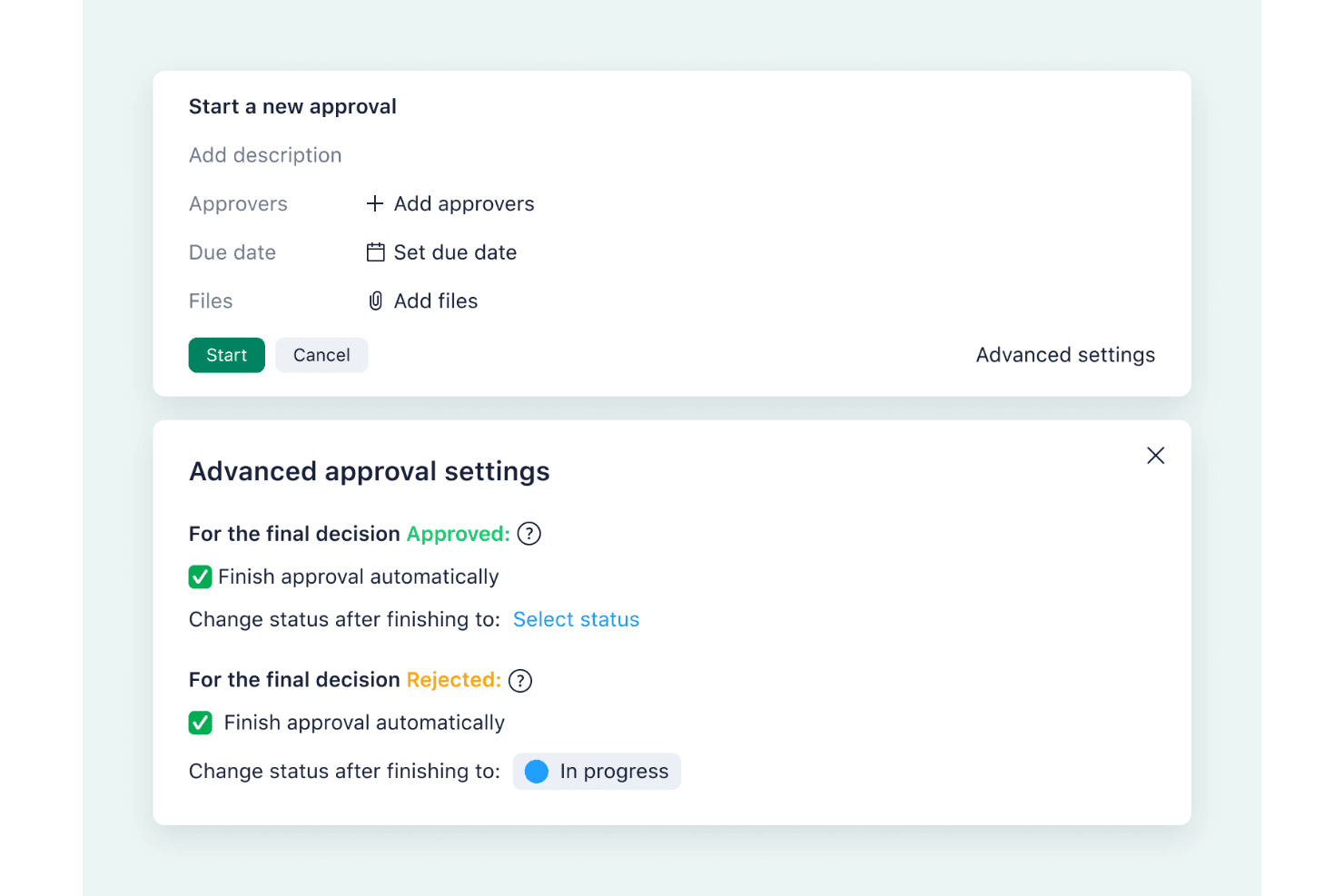
Wrike’s automated approval settings let teams manage reviews, assign approvers, and update task statuses automatically once decisions are made. Wrike is a work management platform with built-in proofing, structured approval workflows, and customizable request forms for routing creative assets through review.
Who Is Wrike Best For?
Wrike is a strong fit for marketing and creative teams that manage high volumes of incoming asset requests across multiple concurrent campaigns.
Why I Picked Wrike
I picked Wrike as one of the best because its request forms are genuinely the most configurable I've seen in this category. You can build branching logic that routes an asset to different approvers based on form answers, automatically trigger a multi-stage approval, and have the task status update on its own when a decision comes in. That end-to-end chain, from intake form to final sign-off, runs without manual handoffs.
Wrike Key Features
- Adobe Creative Cloud extension: Review and annotate files directly inside Photoshop, Illustrator, InDesign, and Premiere Pro without leaving the app.
- Version comparison mode: View two file versions side by side or in overlay with a draggable split bar, and approve or request changes from within the comparison view.
- Guest reviewer access: External stakeholders can comment and approve files via a link, with controls for password protection, expiry dates, download permissions, and version visibility.
- Video proofing: Leave frame-accurate comments at any point in a video, with frame-by-frame stepping and timestamp-sorted feedback.
Wrike Integrations
Wrike offers 400+ prebuilt connectors, including Adobe Creative Cloud, Bynder, MediaValet, Jira, GitHub, and Microsoft Teams. It also supports a REST API, two-way sync with Miro and Google Sheets via Unito, and Figma through Zapier.
Pros and Cons
Pros:
- Guest controls protect external review workflows
- Frame-accurate video feedback reduces review ambiguity
- Customizable forms route approvals automatically
Cons:
- Brand guideline enforcement remains undocumented
- Version comparison lacks automatic difference highlighting
 Best for video and image comparison review
- Free plan + free trial available
- From $15/user/month (billed annually)
Visit WebsiteCustomer Rating:4.5/5
Frame.io lets users leave timestamped comments directly on video footage. Frame.io is an Adobe creative review platform that supports video, image, PDF, and design file approvals with frame-accurate annotation, version comparison, and external stakeholder sharing.
Who Is Frame.io Best For?
Frame.io is a strong fit for creative teams and agencies working heavily with video and visual media who need fast, precise client review cycles.
Why I Picked Frame.io
Frame.io earns its spot on my shortlist because of how precisely it handles video and image comparison review. I'm particularly impressed by the Comparison Viewer, which lets you overlay two assets, run a pixel-difference highlight, and scrub both videos in sync, even when comparing different file types. On top of that, frame-accurate range comments let you mark exactly which three seconds of a video clip need a change, not just a vague timestamp.
Frame.io Key Features
- Frame-accurate range comments: Mark a specific stretch of video using in/out points so reviewers know exactly which frames need changes.
- External share links: Clients review assets through branded, password-protected share links without creating a Frame.io account.
- Multi-format file support: Upload and review video, images, PDFs, audio, PSD, AI, INDD, Office documents, and HTML ZIP files in one workspace.
- Internal comments: Team and Enterprise members can leave comments visible only to workspace members, keeping internal notes separate from client-facing feedback.
Frame.io Integrations
Frame.io offers native integrations with Adobe Premiere Pro, After Effects, Lightroom, Adobe Workfront, and Final Cut Pro. It also provides a public Platform API and is available on Zapier.
Pros and Cons
Pros:
- Clients review without creating accounts
- Pixel-difference comparison exposes subtle visual changes
- Frame-accurate comments pinpoint exact revisions
Cons:
- No built-in brand guideline enforcement
- Native approval routing remains limited
Learn more about Frame.io: Best for enterprise-scale approval workflows
- Not available
- Pricing upon request
Visit WebsiteCustomer Rating:4.3/5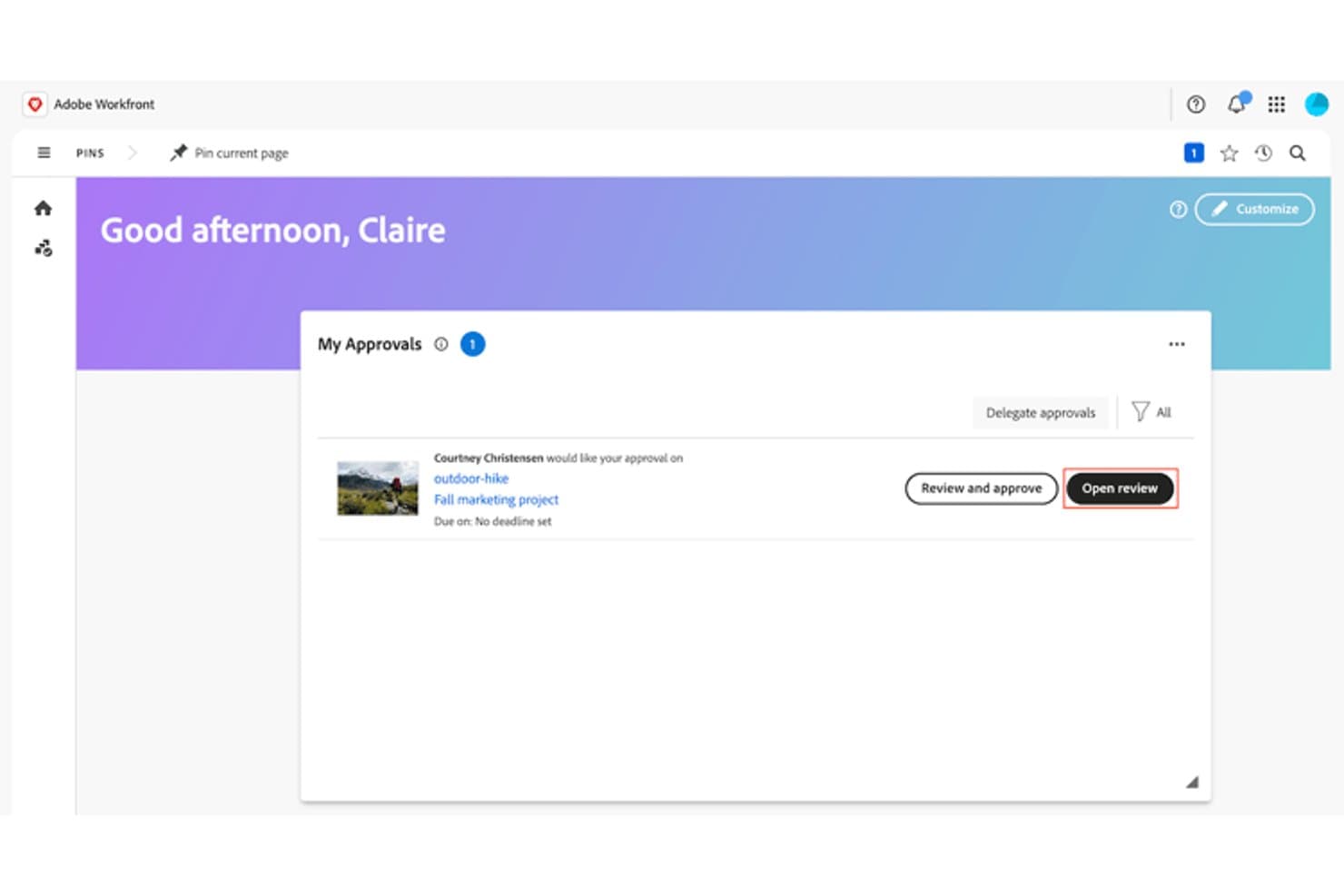
Adobe Workfront lets users review and approve design assets from a central dashboard. Adobe Workfront is an enterprise work management platform that combines structured multi-stage approval workflows, rich-media review via Frame.io, AI-powered brand compliance checks, and cross-project status tracking in one system.
Who Is Adobe Workfront Best For?
Adobe Workfront is built for enterprise creative and brand teams that need to manage high-volume, compliance-heavy approval pipelines across multiple concurrent projects.
Why I Picked Adobe Workfront
Adobe Workfront earns its spot on my shortlist because no other tool I've reviewed scales approval workflows like this: up to 100 stages and 30 parallel paths, with reusable templates that automatically calculate deadlines and send reminders at 72 and 24 hours out. I also love the AI Reviewer, which scores creative assets against your brand guidelines and flags issues before they reach a stakeholder. For enterprise teams running compliance-heavy pipelines across dozens of concurrent projects, that combination is genuinely hard to replicate.
Adobe Workfront Key Features
- Frame.io video review: Reviewers can add time-stamped comments directly to video assets inside the Frame.io viewer, supporting rich-media feedback on files up to 500 GB.
- AI Reviewer brand check: This beta tool scores images against your brand guidelines and surfaces suggested fixes before assets reach stakeholders.
- Mobile proofing app: The iOS and Android app lets reviewers comment on and approve documents, proofs, and tasks from any device.
- Audit trail logging: Every approval decision, including the date, time, user, and action, is automatically recorded in Workfront's change log.
Adobe Workfront Integrations
Adobe Workfront integrates with Adobe Creative Cloud, Frame.io, Adobe Express, Experience Manager Assets, GenStudio for Performance Marketing, and Figma through Fusion. It also connects with Slack and Microsoft Teams for approval notifications and task updates.
Pros and Cons
Pros:
- Logs approval decisions for compliance audits
- Supports timestamped video feedback up to 500GB
- Handles 100 approval stages and 30 paths
Cons:
- Frame.io comments bypass Workfront audit logs
- External reviewers need Frame.io accounts
Learn more about Adobe Workfront: Best for regulated marketing team approvals
- Free demo available
- Pricing upon request
Visit WebsiteCustomer Rating:4.8/5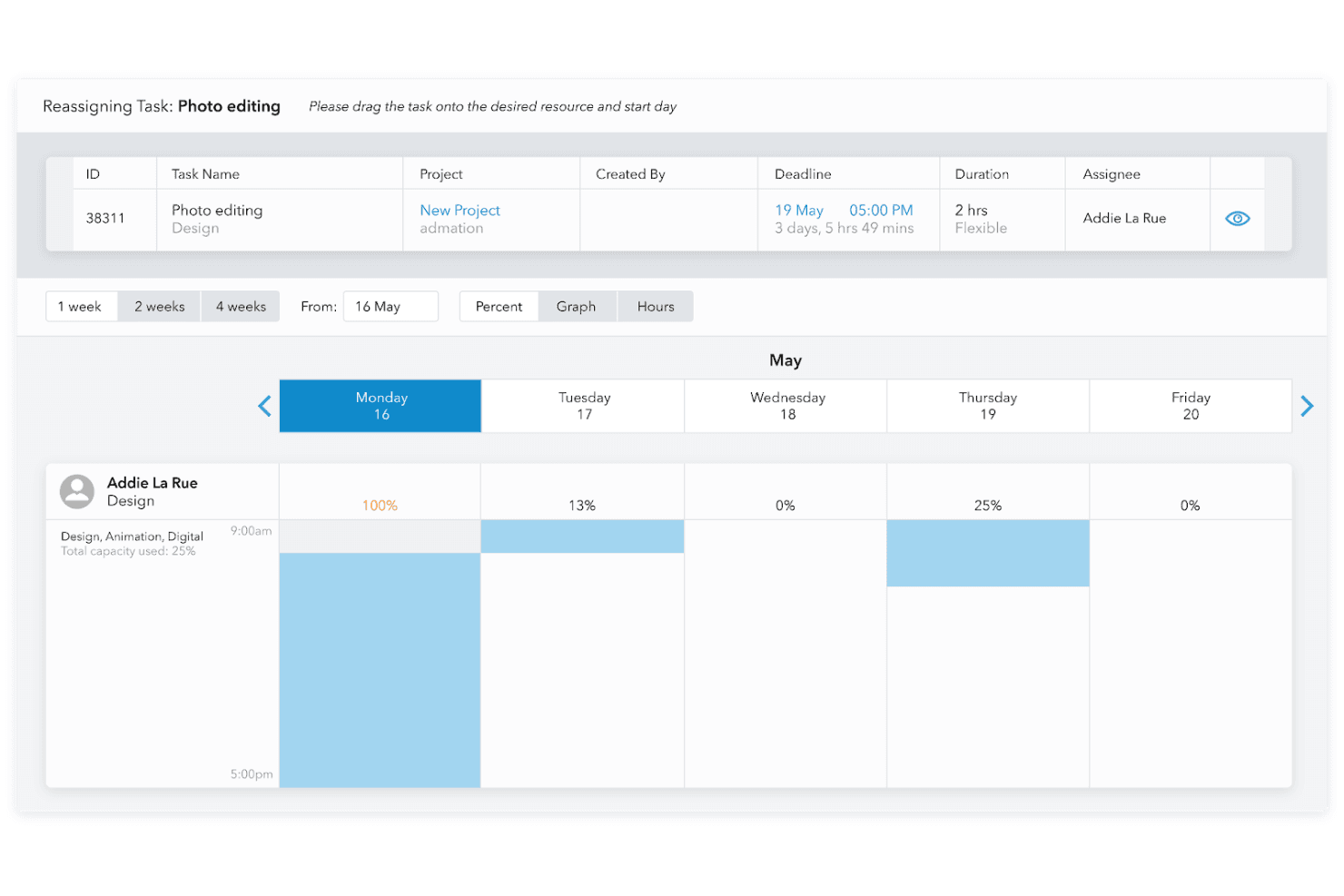
Admation simplifies task scheduling and progress tracking with intuitive design approval software. Admation is a marketing approval and project workflow platform that combines online proofing, multi-level approval workflows, AI compliance checking, and audit trail reporting in one system.
Who Is Admation Best For?
Admation fits marketing teams in regulated industries—financial services, healthcare, and insurance—where approval paths, compliance records, and brand governance aren't optional.
Why I Picked Admation
I've included Admation in my top picks because it's built specifically for marketing teams that can't afford approval shortcuts—think financial services or healthcare brands where every sign-off needs a paper trail. I love that its multi-level Approval Templates enforce mandatory, sequenced stages (creative, brand, legal, compliance, client) with no way to bypass them, and that AI compliance checking runs assets against your uploaded brand guidelines and regulatory rule sets before anyone signs off.
Admation Key Features
- Batch review and approval: Teams can review, mark up, approve, and forward groups of assets in a single action, with checklists completed once per batch.
- Four-mode version comparison: Side-by-side, swipe, overlay, and pixel contrast views let reviewers spot exact differences between asset versions.
- Frame-accurate video annotation: Reviewers can place time-stamped markup directly on video frames without leaving the proofing environment.
- Tamper-proof audit trail: Every comment, upload, approval, and forward is logged with a timestamp and username in an exportable, unalterable record.
Admation Integrations
Admation has native integrations with Simple Asset Manager, Simple Brand Manager, and Simple RetailPath, plus OpenID Connect SSO with Microsoft Entra ID and Okta. Native Figma, Adobe Creative Cloud, Jira, Asana, and Slack integrations aren’t documented.
Pros and Cons
Pros:
- Batch approvals reduce repetitive review work
- Four comparison modes clarify revisions
- Audit trails support regulated approvals
Cons:
- Updates have caused freezes and logouts
- Navigation can make projects hard to find
Learn more about Admation: Best for frame-accurate video feedback
- 7-day free trial available
- From $16/user/month (min. 3 users, billed annually)
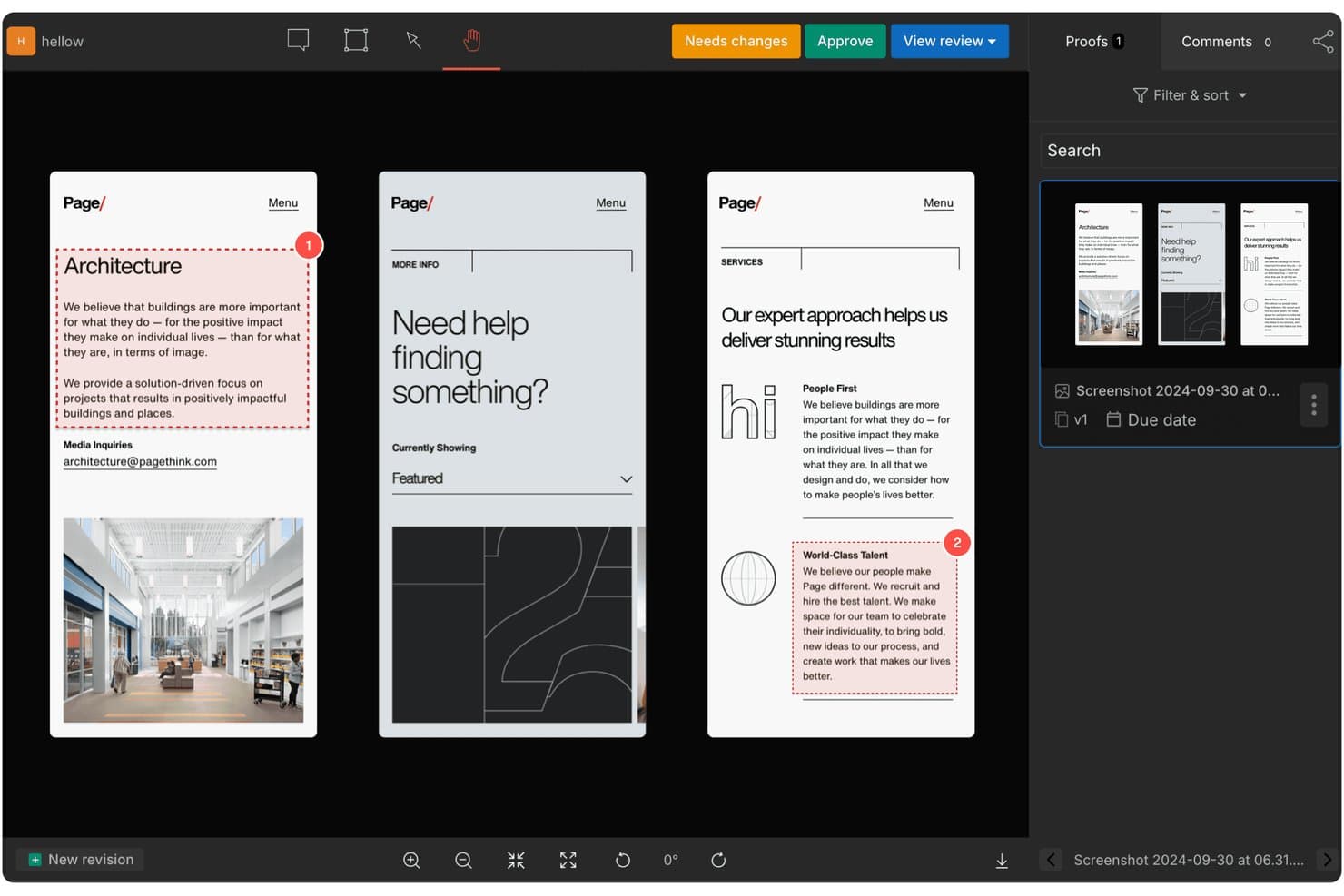
GoVisually lets users review and approve designs with numbered annotations. GoVisually is a design approval platform that centralizes feedback, version control, and stakeholder sign-offs across images, PDFs, and video files.
Who Is GoVisually Best For?
GoVisually is a strong fit for creative teams and agencies that regularly route video, image, and PDF assets through client or stakeholder review cycles.
Why I Picked GoVisually
GoVisually earns its spot on my shortlist because of how precisely it handles video feedback. Comments attach to an exact frame and timecode, so instead of a vague "fix the transition around 0:15," reviewers can pin notes directly to the moment they mean. I also like the Time Machine feature, which layers three or more revisions on a slider so you can scrub through changes rather than hunting through uploaded files.
GoVisually Key Features
- Approval checklists: Reviewers must tick off a set of required items before the Approve button activates, preventing incomplete sign-offs.
- External reviewer access: Stakeholders can open a shared link and leave feedback without creating an account, with optional password protection and link expiry.
- Bird's-eye View: A Pro-level dashboard that surfaces status across all active projects at once, helping you spot bottlenecks before they stall a deadline.
- Adobe Creative Cloud plugin: Lets designers share files, read comments, and check approval status directly inside Photoshop, Illustrator, or InDesign.
GoVisually Integrations
GoVisually offers native integrations with Adobe Creative Cloud, Slack, and Asana, plus webhooks. Its API supports custom workflows with Jira, Trello, Microsoft Teams, and CMS or asset libraries; Zapier is also available.
Pros and Cons
Pros:
- No-login reviews simplify stakeholder approvals
- Time Machine clarifies changes across revisions
- Frame-accurate video comments reduce revision ambiguity
Cons:
- Mobile markups challenge some clients
- Approval routing lacks conditional branching
Learn more about GoVisually: Best for ISO 27001-certified design sign-off
- Free demo + 10-day free trial available
- From $249/month
Visit WebsiteCustomer Rating:4.9/5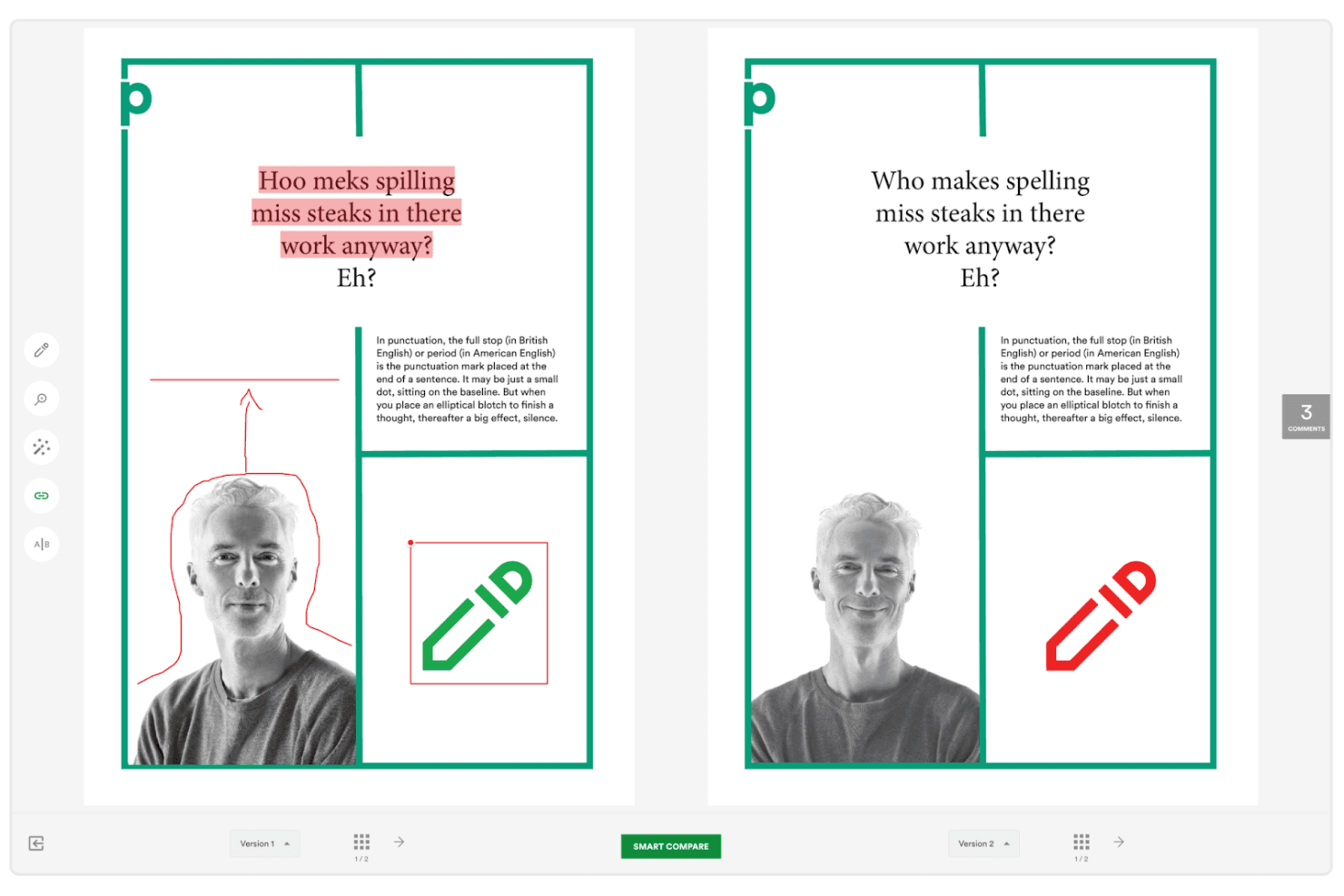
PageProof simplifies proofing with side-by-side version comparisons. PageProof is a design approval platform that covers markup and annotation, multi-stage approval workflows, version comparison, and file review across formats including video, audio, websites, and native design files.
Who Is PageProof Best For?
PageProof is a strong fit for marketing and creative teams in regulated industries where security compliance is a non-negotiable part of the approval process.
Why I Picked PageProof
I picked PageProof as one of the best because its ISO 27001:2022 certification is backed by real security infrastructure, not just a badge. I love that it uses patented triple-layer encryption and lets teams choose from 14 data storage regions to meet GDPR or CCPA requirements. Every approval also generates a tamper-proof audit log with quantum-resistant cryptography, so sign-offs hold up under scrutiny.
PageProof Key Features
- Frame-accurate video markup: Reviewers can comment on individual video frames, stretch comments across a time span, and step through footage frame by frame.
- Smart Compare: An AI-powered comparison tool that automatically detects and highlights visual and technical differences between proof versions, then adds comments on the changes.
- Reviewer roles and decision thresholds: Assign roles like Mandatory, Gatekeeper, and Approver to control how each workflow step progresses, and set how many decisions are required before a proof moves forward.
- Built-in checking tools: A suite of in-proof utilities including a ruler, color and font analyzer, barcode and QR code checker, spell check, and a WCAG color-contrast check.
PageProof Integrations
PageProof offers native integrations with Adobe Creative Cloud, Figma, Jira, Asana, monday.com, Trello, ClickUp, Slack, Microsoft Teams, and MediaValet. It supports custom connections through an API, SDK, webhooks, Make, and Zapier.
Pros and Cons
Pros:
- Feedback stays centralized across formats
- Tamper-proof approval audit trails
- Frame-accurate video markup
Cons:
- Approval loops can delay revisions
- Crashes reported during heavy use
Learn more about PageProof: Best for real-time collaboration
- 14-day free trial
- From $35/5 users/month
Visit WebsiteCustomer Rating:4.8/5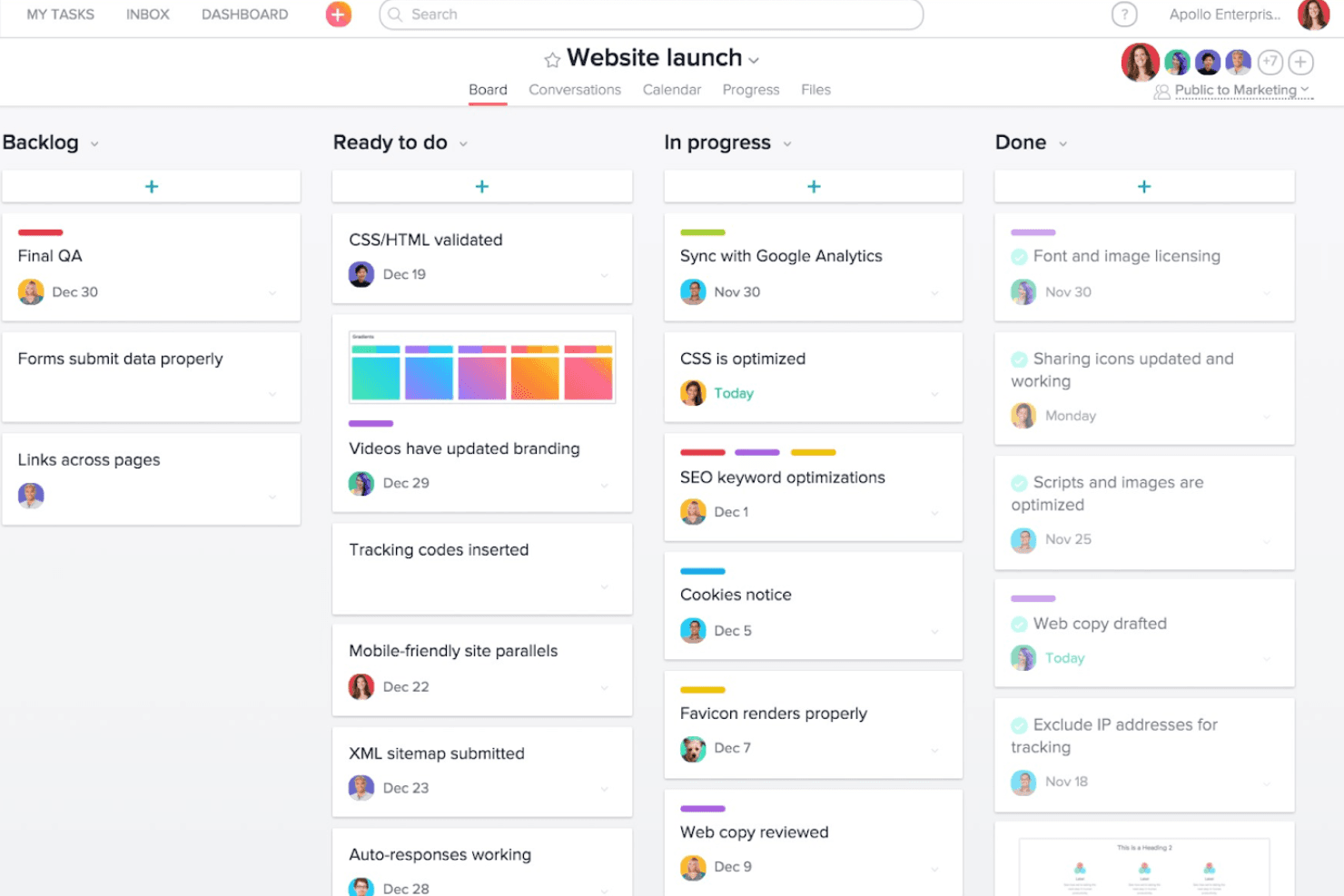
Approval Studio supports your workflow by visually tracking project progress and collaboration across tasks with ease. Approval Studio is a design approval platform with annotation tools, structured review workflows, version comparison, and multi-format file support built for creative and marketing teams.
Who Is Approval Studio Best For?
Approval Studio is a strong fit for creative and marketing teams that need designers, internal stakeholders, and external clients reviewing work together in real time.
Why I Picked Approval Studio
I've included Approval Studio in my top picks because its live chat, real-time viewer count, and Online Review Sessions let designers and stakeholders work through feedback together, not in separate slow-moving email threads. I especially like the four comparison modes: Toggle, Fader, Difference, and Side-by-Side sync let everyone confirm exactly what changed between versions without hunting through revision history. The Adobe CC extension takes this further by letting designers receive and respond to annotations without ever leaving Photoshop or Illustrator.
Approval Studio Key Features
- Adobe CC extension: lets designers upload artwork and receive annotated feedback directly inside Photoshop, Illustrator, or InDesign without switching apps.
- ABC compliance report: AI grades an asset against an uploaded brief, brand guideline, or regulatory checklist and produces a scored compliance report.
- Structured multi-stage workflows: sequential and parallel review stages route files to predefined reviewers, with automatic notifications, deadlines, reminders, and escalation rules at each step.
- Unlimited external reviewer access: external stakeholders join reviews through a link with no account required, and there's no cap on the number of reviewers per project.
Approval Studio Integrations
Approval Studio offers five documented native integrations: Adobe CC, Figma, Slack, Microsoft Teams, and Shopify. It also supports REST and GraphQL APIs, SSO through Google and Okta, and Zapier.
Pros and Cons
Pros:
- Timestamped audit trails document approval decisions
- Unlimited external reviewers simplify client sign-off
- Four comparison modes reduce version confusion
Cons:
- No native audio, HTML5, or 3D support
- MP4-only video support limits media reviews
Learn more about Approval Studio: Best for large-scale multi-format file reviews
- 14-day free trial + free plan + free demo available
- From $199/month (billed annually)
Visit WebsiteCustomer Rating:4.6/5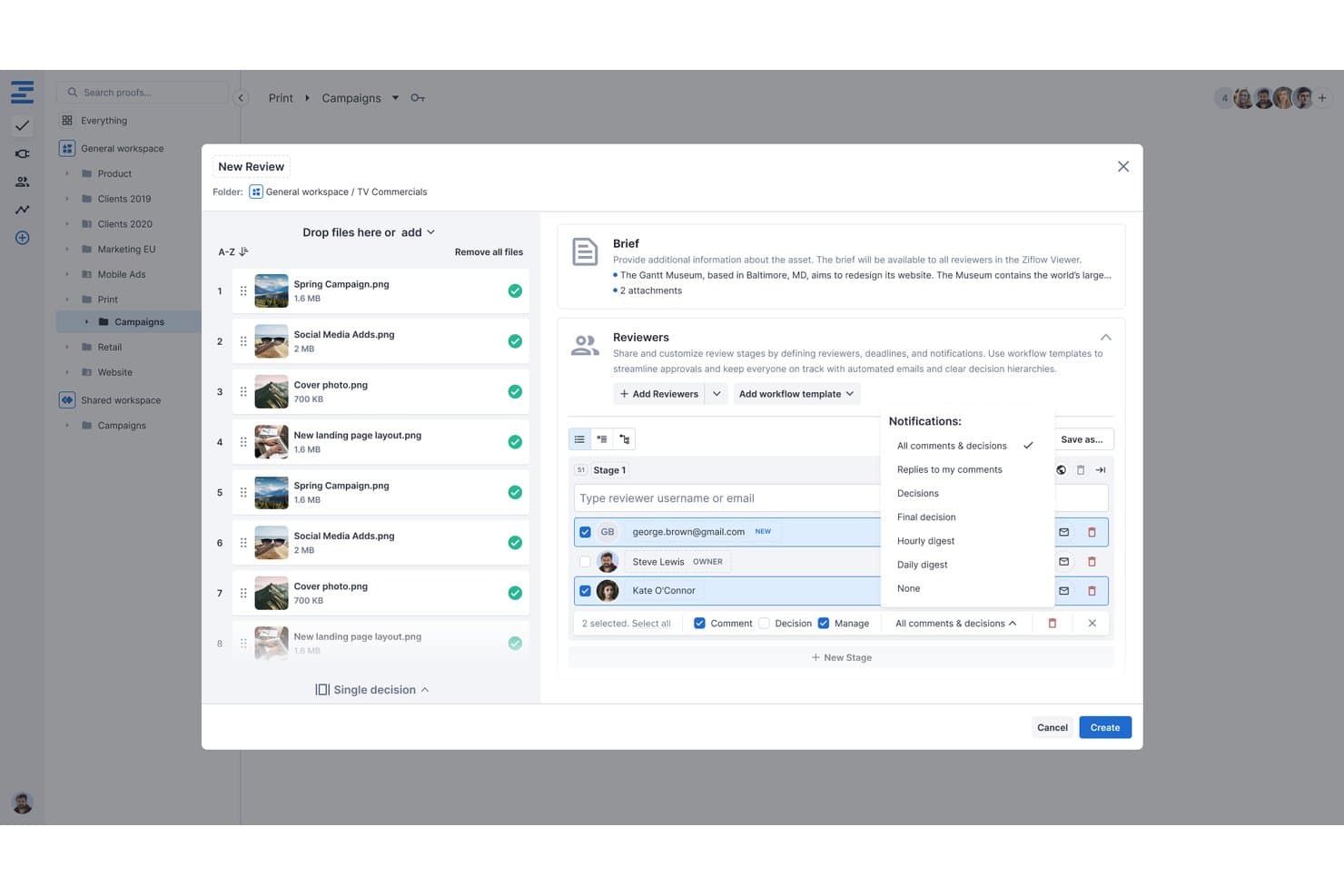
Ziflow lets users configure reviewers, notifications, and stages during proof creation. Ziflow is a design approval platform that supports markup, annotation, structured review workflows, version comparison, and multi-format file proofing across images, video, audio, PDFs, HTML5, and live websites.
Who Is Ziflow Best For?
Ziflow works well for creative and marketing teams managing high-volume review cycles across a wide range of file types, from video and audio to HTML5 and live websites.
Why I Picked Ziflow
I picked Ziflow as one of the best because no other tool on my shortlist handles sheer file variety at this scale: single proofs up to 5TB, 1,200+ supported formats, and native frame-accurate markup across video, audio, HTML5, and live websites in one viewer. I love that you can leave timeline-anchored annotations directly on a video without any conversion step, which matters when your team is reviewing a 4K campaign cut or a multi-channel audio mix.
Ziflow Key Features
- Structured approval workflows: Sequential, parallel, and conditional review stages with assignable deadlines, required decisions, and e-signatures built in.
- Pixel-level Auto Compare: Automatically highlights differences between proof versions on both static files and video, with adjustable sensitivity.
- Unlimited free guest reviewers: External stakeholders can view, comment, and approve proofs on any plan without needing a paid seat or a login.
- Adobe Creative Cloud and Figma plugins: Push proofs directly from Photoshop, Illustrator, InDesign, Premiere Pro, After Effects, and Figma into Ziflow without leaving your design tool.
Ziflow Integrations
Ziflow offers integrations with Adobe Creative Cloud, Figma, Final Cut Pro X, monday.com, Asana, Dropbox, Google Drive, SharePoint, Slack, and Microsoft Teams, plus a REST API, webhooks, Ziflow Connect, and Zapier.
Pros and Cons
Pros:
- Unlimited guests approve without paid seats
- Frame-accurate markup supports video and audio
- Handles 5TB proofs across 1,200 formats
Cons:
- Cross-version comments create confusion for reviewers
- Large uploads can take considerable time
Learn more about Ziflow: Best for compliance-driven sign-offs
- 30-day free trial + free plan + free demo available
- From $199/month
Visit WebsiteCustomer Rating:4.7/5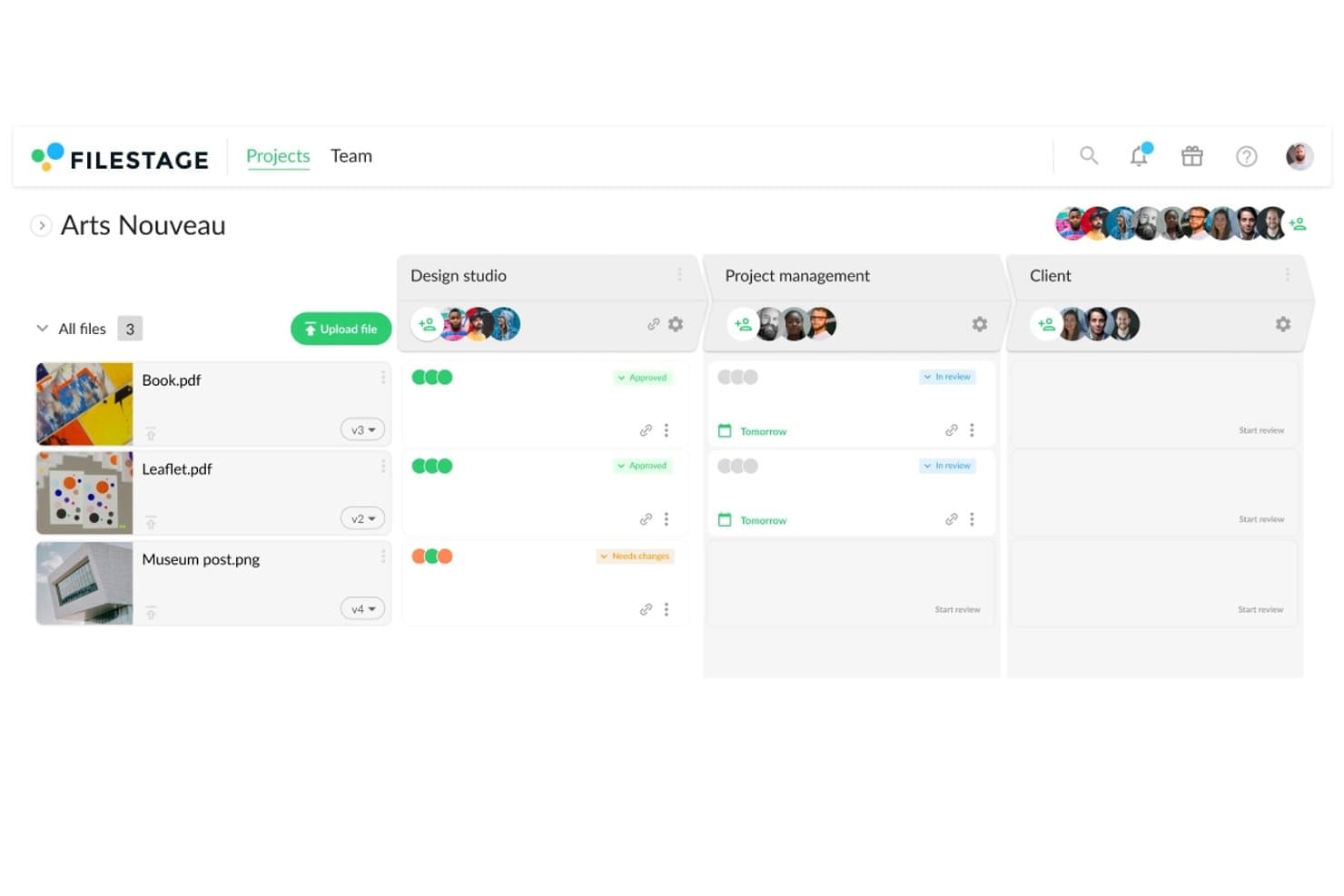
Filestage tracks design file approval status across reviewer groups. Filestage is a design approval platform that combines annotation tools, structured reviewer workflows, version comparison, and AI review agents across a wide range of file types, including video, documents, images, and live websites.
Who Is Filestage Best For?
Filestage is a strong fit for teams in regulated industries—pharma, legal, and MLR—where verified sign-offs, audit trails, and compliance with standards like FDA 21 CFR Part 11 are non-negotiable.
Why I Picked Filestage
Filestage earns its spot on my shortlist because it's built around the kind of verified sign-off that regulated teams actually need. The Enterprise "Approve and sign" feature issues a one-time password to each reviewer, creating a tamper-proof record that satisfies FDA 21 CFR Part 11 and EU Annex 11. Paired with a full audit trail that logs every human and AI action, it gives pharma, legal, and MLR teams documented proof that the right people approved the right version.
Filestage Key Features
- AI review agents: Automated agents for grammar, forbidden terms, barcode, and compliance checks comment directly on files before human reviewers step in.
- Version comparison tools: Side-by-side compare, overlay slider, and automated text-change highlighting let reviewers spot differences across any two versions of a file.
- Frame-accurate video comments: Reviewers can pin timestamped comments to specific frames in a video, so feedback stays tied to the exact moment it references.
- Multi-format file support: Filestage natively handles documents, RAW images, MXF video, audio, live websites, and HTML files up to 20 GB.
Filestage Integrations
Filestage integrates with Adobe Premiere Pro, Adobe InDesign, Adobe After Effects, Adobe Photoshop, Jira, monday.com, Google Drive, OneDrive, Dropbox, Slack, and Microsoft Teams. It also supports API access, webhooks, and Zapier.
Pros and Cons
Pros:
- Broad file support reduces format switching
- Frame-accurate comments clarify video feedback
- Verified sign-offs support regulated approvals
Cons:
- Reporting filters limit long-term oversight
- Advanced compliance controls require enterprise plan
Learn more about Filestage: Best for video and animation reviews
- Free plan + free demo available
- From $66/month (billed annually)
Visit WebsiteCustomer Rating:4.8/5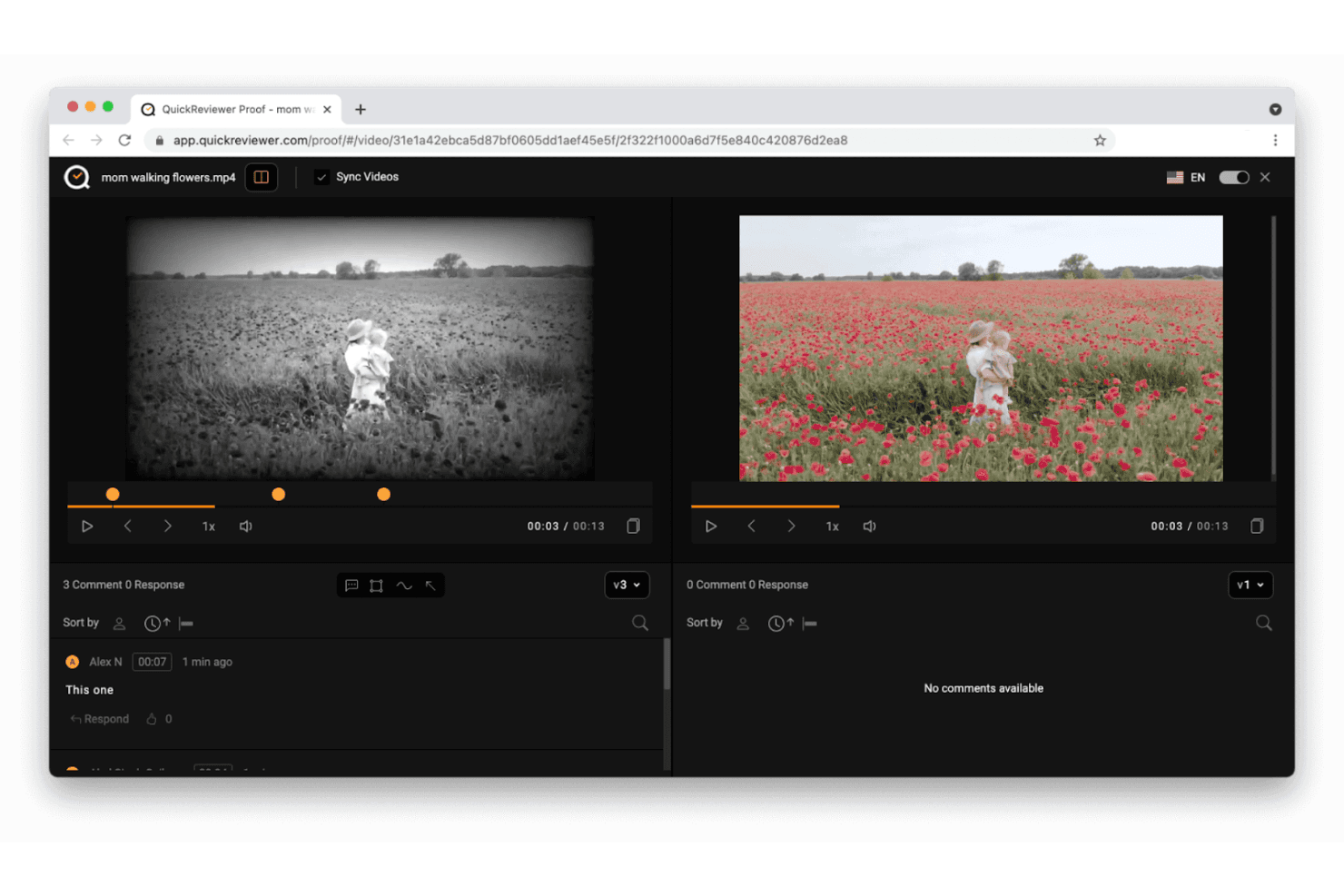
QuickReviewer accelerates feedback with side-by-side video comparison and collaborative design approval. QuickReviewer is a design approval platform that supports markup and annotation across video, audio, images, PDFs, HTML5, and 3D files, with frame-accurate commenting, version comparison, and multi-stage approval workflows.
Who Is QuickReviewer Best For?
QuickReviewer suits creative teams that need frame-accurate video and animation review with external stakeholder access before the platform shuts down on October 30, {{year}}.
Why I Picked QuickReviewer
I've included QuickReviewer in my top picks because its frame-accurate video markup is genuinely hard to beat for creative teams reviewing motion work. I love that you can drop a comment directly on a specific frame or across a range of frames, with all annotations visible in real time as the video plays. The pixel-by-pixel video comparison also means catching subtle color or motion differences between versions is fast and precise.
QuickReviewer Key Features
- Multi-format file support: Review video, audio, PDFs, images, HTML5, live websites, and 3D models in a single platform.
- Guest reviewer access: External stakeholders can comment and approve via a shared link without creating an account.
- Multi-stage approval workflows: Set up sequential review stages with custom statuses, checklists, and automatic deadline reminders.
- Project management integrations: Connect feedback directly to Jira, Asana, or Trello to turn comments into actionable tasks.
QuickReviewer Integrations
QuickReviewer offers documented integrations with Adobe Creative Cloud, Canva, Google Drive, Box, Dropbox, Jira, Asana, Trello, Slack, and Microsoft Teams. It also provides an API for custom integrations and supports Zapier.
Pros and Cons
Pros:
- Pixel comparisons expose subtle version differences
- Unlimited guest reviewers simplify stakeholder approvals
- Frame-accurate video comments reduce revision ambiguity
Cons:
- Comments and files cannot migrate to edoro
- Shutdown deadline creates immediate adoption risk
Learn more about QuickReviewer:
Other Design Approval Software
Here are some additional design approval software options that didn’t make it onto my shortlist, but are still worth checking out:
- 11GoProofBest for Adobe-native design sign-off
- 12ReviewStudioBest for agency-client review cycles
- 13IntelligenceBankBest for brand-compliant marketing approvals
- 14WipsterBest for unlimited external reviewer access
- 15StreamWorkBest for flat-rate team approval routing
- 16Artwork FlowBest for packaging and label compliance reviews
- 17MediaSiloBest for pre-release video asset sign-off
- 18HightailBest for file-sharing teams adding design review
- 19CageBest for lean creative team review workflows
- 20MarkUp.ioBest for no-login guest markup across 30+ file types
How I Evaluate Design Approval Software
I give the most weight to core functions: mark up creative files and route them through clear, multi-step approvals. Next, I look for differentiators such as Figma sync or frame-specific video comments. Finally, I consider onboarding, responsive support, and value for teams coordinating reviews across projects.
Core Functionality (Table Stakes For This List)
When I'm selecting tools for my list, I score each one on a scale from 0 (does not offer the functionality) to 5 (excels in this area) for each core functionality listed below. I then convert the total into a percentage to help assess each tool's overall fit, with extra weight on any functionalities I’ve deemed essential.
- Markup & Annotation (Essential): I look for precise pins, drawing, and comments on creative files, including timestamped feedback on video when teams review motion assets.
- Approval Workflows (Essential): I assess whether teams can route work through clear review stages, assign approvers, and track decisions when a campaign needs sign-off from several groups.
- Version Comparison: I check how clearly reviewers can compare revisions, such as spotting changes between two ad concepts without confusing feedback across versions.
- File Format Support: I look for native review of images, PDFs, and video so teams can handle varied campaign assets in one workflow.
- Status Tracking: I assess whether dashboards show each asset’s stage, owner, and deadlines across concurrent projects, making pending reviews easy to identify.
- External Reviewer Access: I check whether clients or other non-licensed reviewers can comment and formally approve through shared links, without needing a full account.
Once I have a list of tools that meet the criteria, I consider what sets each platform apart.
Differentiating Factors (What Sets Vendors Apart)
Here's how I compare and contrast different vendors:
Standout Features
I look for native integrations with tools like Figma or Adobe Creative Cloud, where two-way sync removes the need to export and re-upload files every time a revision lands. Brand guideline enforcement is another feature I evaluate closely—tools that flag off-brand colors or fonts before an asset reaches approvers catch issues that reviewers often miss under deadline pressure. I also check whether a platform offers mobile review and approval, since stakeholders traveling between meetings need to mark up and sign off on assets without waiting to reach a desktop.
Beyond Features
I check whether a tool connects to Jira or Asana so approval status flows into sprints without duplicate tracking. Cross-functional adoption matters just as much—if a legal reviewer or executive can't leave feedback without a tutorial, approvals stall. I also evaluate compliance certifications like SOC 2 and GDPR, especially when teams share unreleased product assets through external review links.
How to Choose Design Approval Software
It’s easy to get bogged down in long feature lists and complex pricing structures. To help you stay focused as you work through your unique software selection process, here’s a checklist of factors to keep in mind:
| Factor | What to Consider |
| Scalability | Ensure the software can grow with your team. Look for solutions that handle increasing workloads and larger teams without sacrificing performance. |
| Integrations | Check if it integrates with tools you already use. This includes design software like Adobe and project management tools like Trello or Asana. |
| Customizability | Look for options to tailor workflows to your needs. The ability to customize dashboards and approval processes can enhance your team’s efficiency. |
| Ease of Use | Assess whether the interface is intuitive and user-friendly. Your team should be able to navigate the software with minimal training. |
| Budget | Consider the cost relative to your budget. Look for transparent pricing with no hidden fees and assess if there’s a free trial to test the software. |
| Security Safeguards | Verify that the software includes strong security measures to protect your data. This is essential if you’re dealing with sensitive information. |
| Support | Consider the availability and quality of customer support. Ensure there are multiple channels like chat, email, and phone to get help when needed. |
| Feedback Mechanisms | Ensure the software supports detailed feedback collection. Look for features like annotation tools and comment threads for clear communication. |
Trends in Design Approval Software
In my research, I sourced countless product updates, press releases, and release logs from different design approval software vendors. Here are some of the emerging trends I’m keeping an eye on:
- Real-time collaboration: More tools are prioritizing this feature, especially creative agencies and freelancers, to review and edit creative assets together. This allows for quicker feedback, faster turnarounds, and fewer delays across multiple formats.
- AI-driven insights: Some vendors are introducing AI features that analyze patterns in creative review cycles. These insights can highlight bottlenecks, suggest next steps, or help optimize custom workflows based on previous project data.
- Enhanced security features: As protecting sensitive creative content becomes an industry standard, many platforms are investing in permissions controls, API-level authentication, and data encryption. This helps teams ensure compliance while keeping brand assets secure throughout the artwork approval process.
- Integrated feedback loops: Many tools now support centralized feedback and annotation directly on design files. This allows all comments, edits, and decisions to be tracked in one place, improving version control and reducing the need for follow-up emails or meetings.
- User experience focus: Vendors continue refining their interfaces to make design approval software easier to adopt. Simpler layouts, faster onboarding, and fewer training requirements are making these tools more accessible for both in-house teams and external stakeholders.
What Is a Design Approval Software?
Design approval software is used to manage the feedback and approval process for creative projects, from social media graphics to branded documents and digital campaigns. It's especially helpful for creative teams, agencies, and freelancers who need to collect input, manage edits, and gain final sign-off on visual work.
The software supports key tasks like real-time collaboration, creative review, and project tracking. Many tools now include features like AI insights, version control, and integrated feedback systems to help reduce revision cycles and keep projects on schedule. Some platforms even support artwork approval workflows tailored to brand or regulatory compliance.
Whether you're managing client approvals or working on internal creative assets, these tools provide a centralized space to move designs through each stage of review.
Features of Design Approval Software
When evaluating design approval tools, look for these essential features:
- Real-time collaboration: Enables multiple reviewers to leave feedback and make decisions quickly.
- Version control: Keeps all edits and iterations organized so teams always work from the correct file.
- Integrated feedback loops: Consolidates comments across documents and formats, making it easier to track progress.
- AI-driven insights: Helps spot workflow issues or repetitive feedback, and suggests ways to improve the review cycle.
- Advanced security features: Includes permissions control, API integration, and encryption to protect sensitive work.
- Custom workflows: Adapts the approval process to your specific needs, including optional stages or external sign-offs.
- Annotation tools:Enables users to leave feedback directly on docs, graphic design files, or illustrator formats.
- Project management capabilities: Tracks deadlines, tasks, and approvals in one system.
- Intuitive interface: Reduces the learning curve, making it easier for both team members and clients to get started.
- Multi-stage approvals: Allows for complex sign-off processes involving multiple stakeholders.
Benefits of Design Approval Software
Implementing design approval software provides several benefits for your team and your business. Here are a few you can look forward to:
- Improved communication: Real-time collaboration and annotation tools enhance how your team exchanges feedback, reducing miscommunication and speeding up decision-making.
- Time savings: Version control and integrated feedback loops ensure everyone is on the same page, which minimizes time spent on back-and-forth emails and meetings.
- Enhanced security: Advanced security features protect your sensitive design data, ensuring compliance with industry standards and safeguarding your business's reputation.
- Increased efficiency: Customizable workflows and AI-driven insights optimize processes, allowing your team to focus on creativity and productivity.
- Better project management: Project management capabilities help organize tasks and deadlines, ensuring projects are delivered on time and within scope.
- Streamlined approvals: Multi-stage approvals involve all necessary stakeholders, ensuring comprehensive feedback and reducing the likelihood of overlooked details.
- User-friendly experience: An intuitive interface allows your team to quickly adapt and use the software effectively, reducing the learning curve and increasing adoption rates.
Costs and Pricing of Design Approval Software
Selecting design approval software requires an understanding of the various pricing models and plans available. Costs vary based on features, team size, add-ons, and more. The table below summarizes common plans, their average prices, and typical features included in design approval software solutions:
Plan Comparison Table for Design Approval Software
| Plan Type | Average Price | Common Features |
| Free Plan | $0/user/ month | Basic feedback tools, limited storage, and basic version control. |
| Personal Plan | $5-$25/user/month | Advanced feedback tools, moderate storage, version control, and annotation tools. |
| Business Plan | $25-$50/ user/month | Team collaboration, increased storage, advanced security, and customizable workflows. |
| Enterprise Plan | $50+/user/ month | Unlimited storage, comprehensive security, multi-stage approvals, and dedicated support. |
Design Approval Software FAQs
Here are some answers to common questions about design approval software:
How does design approval software improve collaboration?
Design approval software improves collaboration by allowing team members to provide feedback in real-time, directly on the design files. This reduces the need for lengthy email chains and meetings, ensuring that stakeholders and designers are on the same page. The tools also centralize feedback, making it easy for teams to access and act on it.
Can design approval software handle different file types?
Yes, most design approval software can handle a variety of file types, including images, videos, and documents. This flexibility allows your team to work on diverse projects without switching between different tools. It ensures that all feedback and approvals are managed in one place.
What should I look for in artwork approval software security?
When evaluating security, check if the software offers end-to-end encryption to protect your data. Look for compliance with industry standards like GDPR or SOC 2. These features ensure that your sensitive designs and feedback are safe from unauthorized access.
How do I integrate design approval software with my existing tools?
Many design approval software solutions offer integrations with popular tools like Adobe Creative Cloud, Slack, and Trello. These integrations allow you to connect your design software with project management and communication tools, creating a seamless workflow for your team.
Is there a learning curve with design approval software?
While there may be a learning curve, most design approval software is designed to be user-friendly. Look for tools with intuitive interfaces and available training resources like tutorials and webinars. This can help your team quickly adapt and make the most of the software’s features.
How does design approval software support remote teams?
Design approval software supports remote teams by enabling real-time collaboration regardless of location. Team members can access and review designs from anywhere, providing feedback and approvals without delay. This flexibility ensures that projects continue to move forward smoothly, even with team members spread across different locations.