

Only those of us who have worked in instructional design truly understand how difficult it is to teach humans new things, which is why I'm extremely particular with my learning design software. It's hard enough to balance all the aspects that make training content effective, so the tools you use should make your design process as efficient as possible.
Speaking of learning new things, I've taken it upon myself to train myself on dozens of learning design software tools and narrow down the very best options. Here are the tools that earned an A+ from me, with all the relevant details you need to contrast and compare them all!
What Is Learning Design Software?
Learning design software (also known as instructional design software, or IDS) is a digital tool that facilitates the creation and delivery of digital learning experiences. Often used by educators, instructional designers, and corporate trainers, it supports the production of structured eLearning courses, interactive multimedia content, and comprehensive knowledge bases.
Important features of learning design software include:
- Gamification elements
- Customizability
- Content libraries
- Tutorial builders
- Interactive assessment builders
- Lesson presentations
- Video integration
Why Trust Our Software Recommendations
6,700+
Reviews
20
Industry experts
16+
Evaluation factors
14
Years
Our team has been testing and reviewing software since 2012. As product managers ourselves, we know how difficult—and important—it is to choose the right software.
For this guide, we evaluated tools using hands-on testing and independent research, scoring tools using our selection criteria.
Our reviews reflect our human editorial judgment, not a sales pitch.
Expert reviewers:
- Andrew LumbySenior TPM
- Cristiano ValimSenior UI/UX Lead


| Tool | Best For | Trial Info | Price | ||
|---|---|---|---|---|---|
| 1 | Best for AI-driven course creation | Free plan + free demo available | From $119/month (billed annually) | Website | |
| 2 | Best for interactive, multimodal eLearning content | 14-day free trial available | From $970/author (billed annually) | Website | |
| 3 | Best for SME-led course validation workflows | 30-day free trial + free demo available | From $8/user/month | Website | |
| 4 | Best for gamified, scenario-based course design | Free plan available | From $10/user/month (billed annually) | Website | |
| 5 | Best for beginner-friendly course authoring | Free trial + free demo available | From $116/author/month (billed annually) | Website | |
| 6 | Best for built-in AI drafting | 30-day free trial available | From $1,449/user (billed annually) | Website | |
| 7 | Best for authoring, review, and reuse in one place | Free trial available | Pricing upon request | Website | |
| 8 | Best for creating interactive e-learning content | Free trial available | From $33.99/month | Website | |
| 9 | Best for SCORM and xAPI standards-based publishing | 30-day free trial + free demo available | From $129/month (billed annually) | Website | |
| 10 | Best for mobile-first microlearning | Free plan available | From $29/user/month | Website |


Overviews Of The 12 Best Learning Design Software
 Best for AI-driven course creation
- Free plan + free demo available
- From $119/month (billed annually)
Visit WebsiteCustomer Rating:4.6/5This rating combines scores from multiple user review sites to reflect overall customer sentiment about the product.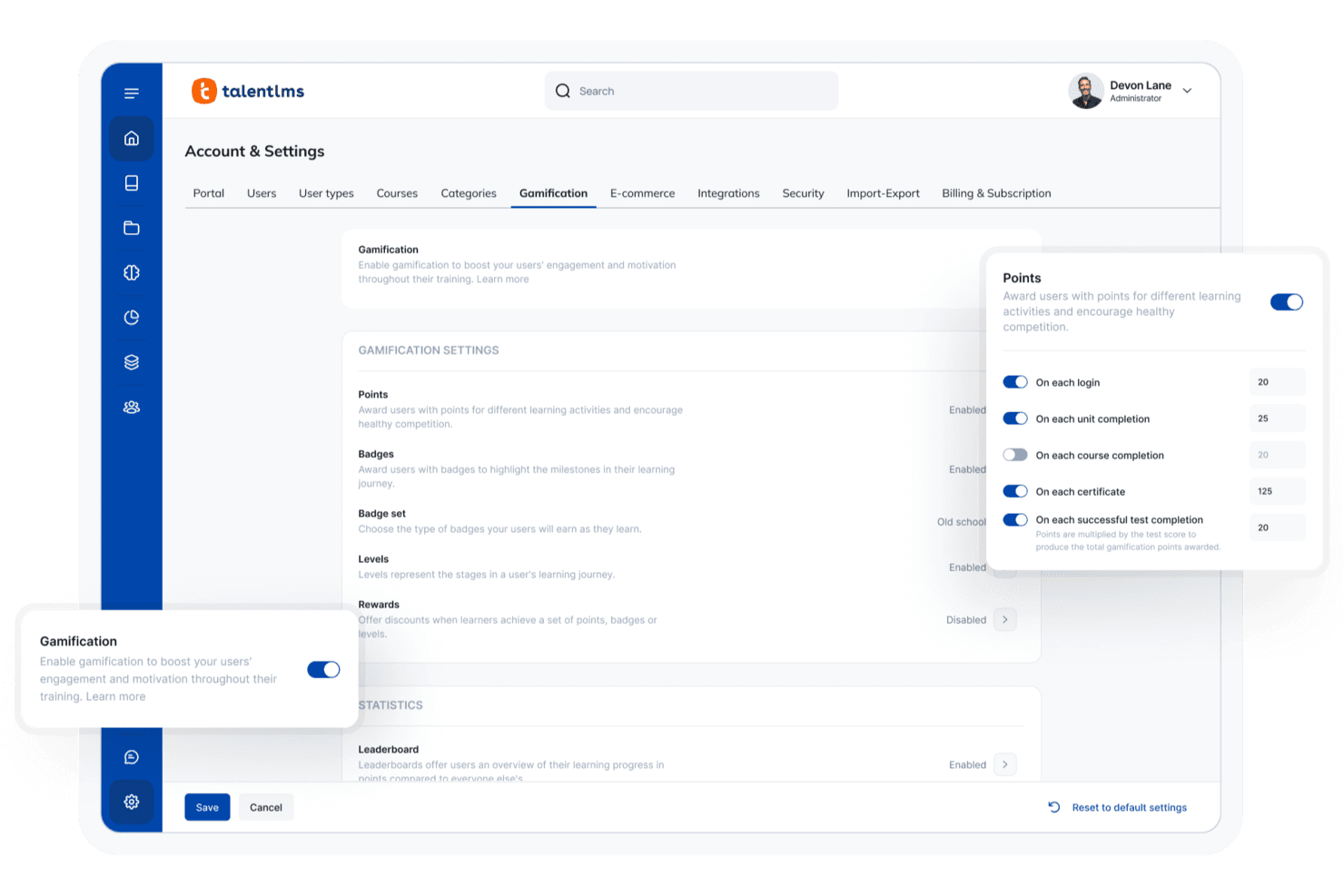
TalentLMS lets you manage courses and configure gamification settings within a learning platform dashboard. TalentLMS is a cloud-based learning management system with built-in AI course authoring, assessment creation, skills mapping, and interactive practice tools.
Who Is TalentLMS Best For?
TalentLMS is a strong fit for corporate trainers and instructional designers who need to build and deploy quiz-rich courses quickly without deep authoring expertise.
Why I Picked TalentLMS
I picked TalentLMS as one of the best because TalentCraft, its AI course creator, can turn a prompt into a fully structured course in hours, not days. I especially like the AI Test Creator, which generates quizzes directly from course content in one click, including question banks with seven types, weighting, and randomization. The Learning Playground adds AI-driven simulation and role-play practice on top, so learners can rehearse real workplace scenarios right after completing a module.
TalentLMS Key Features
- Learning Paths: Sequence courses so learners unlock the next module only after completing the previous one, with automations you can tie to path completion.
- AI document extraction: Uploads a PDF and converts it into an interactive unit complete with flashcards, images, and embedded questions.
- Seven question types with weighting and randomization: Build assessments using multiple choice, fill-the-gap, ordering, matching, free text, and randomized question pools pulled from a reusable question bank.
- AI course translation: Clones and translates a course into roughly 50 language and locale options in one click, with a choice of four writing styles.
TalentLMS Integrations
TalentLMS lists 40+ integrations, including Workday, BambooHR, Salesforce, HubSpot, Zoom, Microsoft Teams, OpenSesame, and LTI 1.3 tools. It also provides a REST API and Zapier.
Pros and Cons
Pros:
- Learning Paths organize multi-course curricula
- AI-generated assessments expand knowledge checks
- TalentCraft accelerates course drafting
Cons:
- SME review workflows remain limited
- Native courses lack SCORM export
Learn more about TalentLMS: Best for interactive, multimodal eLearning content
- 14-day free trial available
- From $970/author (billed annually)
Visit WebsiteCustomer Rating:4.6/5This rating combines scores from multiple user review sites to reflect overall customer sentiment about the product.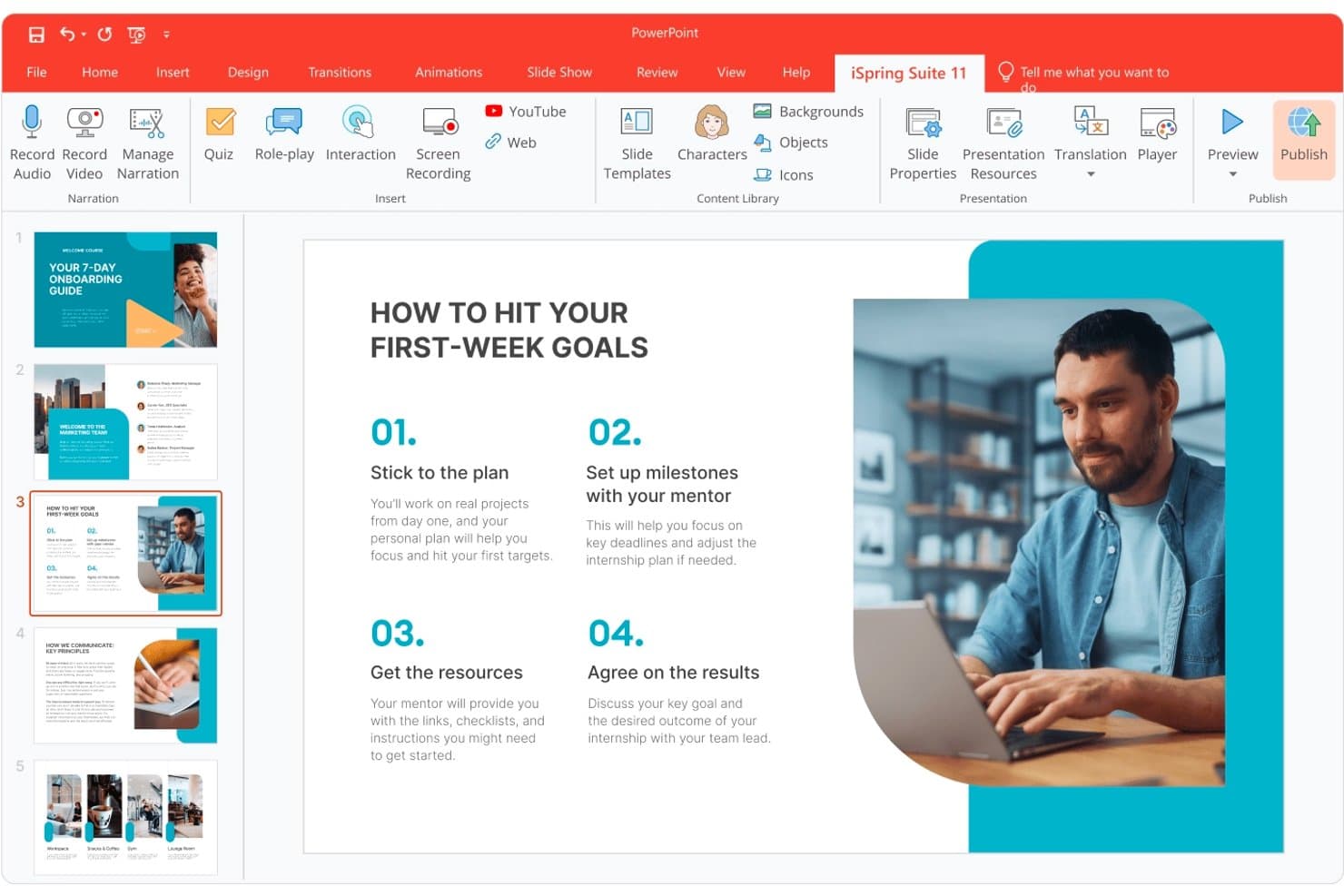
iSpring Suite lets users build structured onboarding courses in PowerPoint. iSpring Suite is a PowerPoint-based eLearning authoring tool that lets you build courses, branching scenarios, quizzes, and role-play simulations from a familiar desktop environment or directly in the browser.
Who Is iSpring Suite Best For?
iSpring Suite is a strong fit for instructional designers and corporate trainers who already live in PowerPoint and need to turn existing content into polished, interactive courses quickly.
Why I Picked iSpring Suite
iSpring Suite earns its spot on my shortlist because it covers more content formats in one tool than almost anything else I've seen in this category. I particularly like the combination of 14 branching question types with its visual scenario builder, which lets you build realistic dialogue simulations for sales or customer service training without writing a single line of code. The built-in Content Library adds 130,000+ assets, including characters, locations, and interaction templates, so you're never starting from a blank slide.
iSpring Suite Key Features
- AI course creator: Upload source files and set your goals, audience, and tone, and the AI drafts a course outline, slide structure, and narration suggestions for you to refine.
- Standards-based publishing: Export courses in SCORM 1.2, SCORM 2004, xAPI, cmi5, or AICC, with verified compatibility across 160+ LMS platforms.
- AI-powered localization: Translate entire courses—slides, quizzes, interactions, and role-plays—into 70+ languages without rebuilding layouts.
- Screencast and video tutorial recorder: Capture on-screen workflows with timeline editing and automatic highlighting of clicks and keystrokes for software or product training.
iSpring Suite Integrations
iSpring Suite supports integrations with 160+ verified LMSs, including Moodle, Blackboard, Canvas, Schoology, Absorb, Cornerstone, TalentLMS, LearnDash, and Skilljar through SCORM, xAPI, or AICC. It also offers iSpring LMS integration and an open JavaScript API for custom integrations.
Pros and Cons
Pros:
- Detailed assessments include answer-specific feedback
- Branching role-plays support realistic dialogue practice
- PowerPoint conversion preserves familiar authoring workflows
Cons:
- Branching lacks Storyline-style triggers and variables
- Windows-only desktop authoring limits access
Learn more about iSpring Suite : Best for SME-led course validation workflows
- 30-day free trial + free demo available
- From $8/user/month
Visit WebsiteCustomer Rating:4.7/5This rating combines scores from multiple user review sites to reflect overall customer sentiment about the product.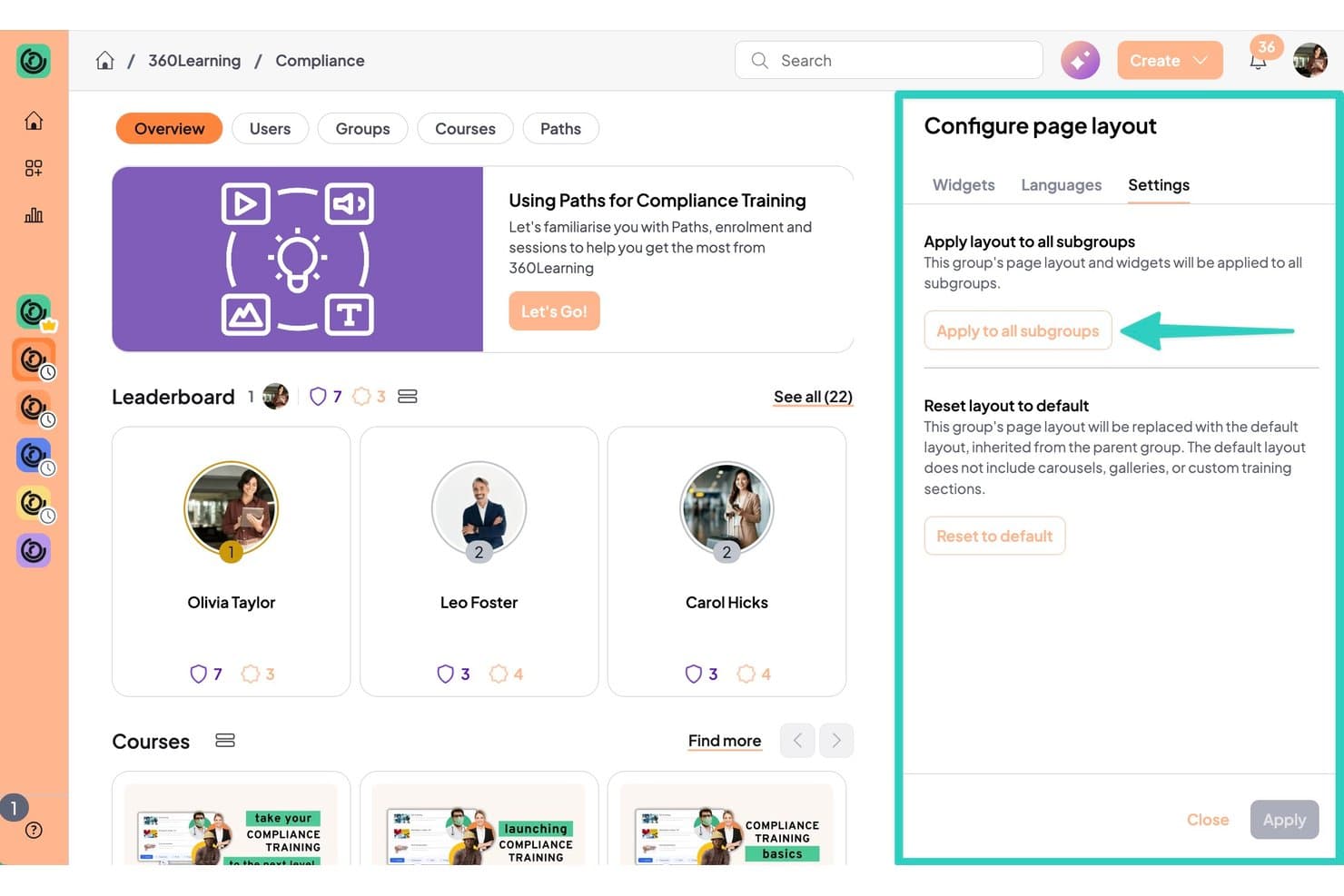
360Learning lets users apply custom page layouts across all subgroups. 360Learning is a cloud-based LMS with a built-in AI authoring tool that supports course creation, SME co-authoring, assessment building, and collaborative validation workflows.
Who Is 360Learning Best For?
360Learning is a strong fit for L&D managers who need subject matter experts to author and validate course content without losing oversight of quality or compliance.
Why I Picked 360Learning
I've included 360Learning in my top picks because its centralized validation workflows are built specifically for getting SMEs involved in course creation without losing L&D oversight. When an SME submits content, it routes through an approval process with inline comments and a feedback inbox, so quality checks happen before anything goes live. I also like the co-authoring setup, where contributors can flag outdated content in real time, keeping courses accurate after launch too.
360Learning Key Features
- AI Content Builder: Converts documents or prompts into structured, multi-module courses, complete with outlines, learning objectives, and AI-generated quizzes.
- AI Smart Review: Automatically grades open-ended responses and delivers real-time feedback to learners without manual evaluator input.
- Video and screencast response activities: Learners record video pitches, demos, or screen captures as course submissions, which managers or peers can then review against custom rubrics.
- One-click AI translation: Translates courses into 60+ languages, with a built-in translation workspace, company glossary, and .xliff import/export for language managers.
360Learning Integrations
360Learning offers 80+ integrations, including Workday, SAP SuccessFactors, BambooHR, Oracle, Slack, Microsoft Teams, Zoom, Go1, OpenSesame, and LinkedIn Learning. It also provides an API with webhooks and Data Connect for custom connections.
Pros and Cons
Pros:
- Video role-play supports practical assessment
- AI speeds course creation for SMEs
- Collaborative SME validation supports accurate course content
Cons:
- Native courses cannot export as SCORM
- No native branching or simulation builder
Learn more about 360Learning: Best for gamified, scenario-based course design
- Free plan available
- From $10/user/month (billed annually)
Visit WebsiteCustomer Rating:4.4/5This rating combines scores from multiple user review sites to reflect overall customer sentiment about the product.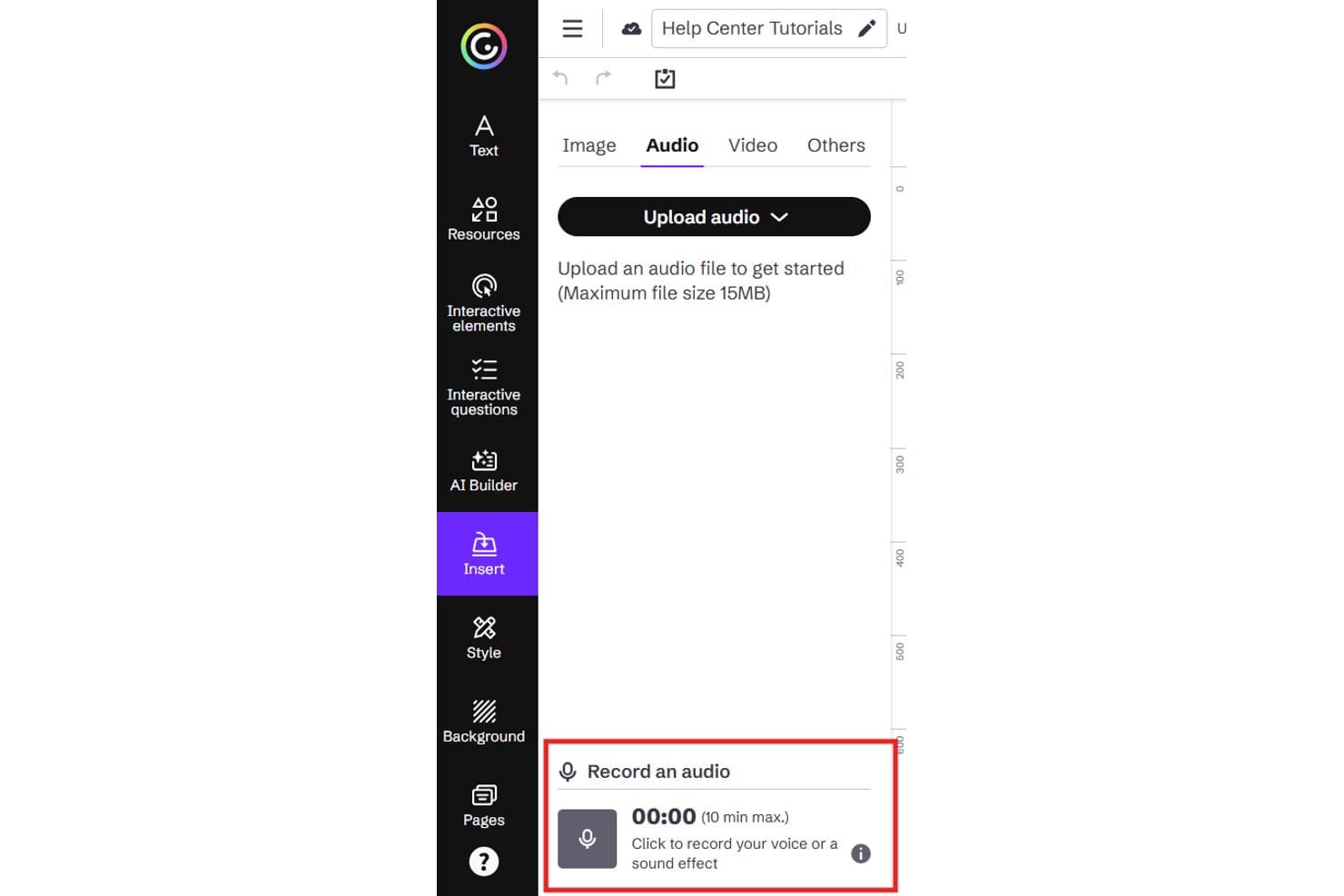
Genially lets users record audio directly within the editor. Genially is a no-code learning design platform that lets you build interactive courses, branching scenarios, gamified modules, and assessments using a drag-and-drop editor with 1,000+ templates.
Who Is Genially Best For?
Genially is a strong fit for instructional designers who need to build visually engaging, interactive courses—especially branching scenarios and gamified modules—without writing a line of code.
Why I Picked Genially
Genially earns its spot on my shortlist because of how far it pushes gamified, scenario-based design without requiring any coding knowledge. I particularly love the ready-to-use scenario templates, like the Cybersecurity Simulation and Onboarding Escape Game, which give you a working branching structure you can customize immediately. Conditional logic lets learner answers trigger specific audio, popups, or animations, making every scenario feel genuinely responsive.
Genially Key Features
- AI question generator: Builds quiz questions automatically from an uploaded PDF or prompt, then adds them directly to your question bank.
- Dynamic SCORM publishing: Syncs course updates to your LMS automatically, so you don't have to re-upload a new SCORM package after every edit.
- Live session hosting: Lets you run real-time quizzes, polls, and presentations directly from Genially with up to 50 participants on the free plan.
- AI translation: Translates full courses into 100+ languages on the Author plan, without requiring a separate localization tool.
Genially Integrations
Genially supports 30+ LMS platforms through SCORM or LTI 1.3, including Moodle, Canvas, Cornerstone, Docebo, and Blackboard, plus integrations with Google Classroom and Microsoft Teams. It also supports media embeds from YouTube and Vimeo.
Pros and Cons
Pros:
- Reviewers praise easy interactive production
- Templates speed gamified course development
- Branching scenarios support realistic practice
Cons:
- Mobile layouts may shrink content
- Interactions can be difficult to find
Learn more about Genially: Best for beginner-friendly course authoring
- Free trial + free demo available
- From $116/author/month (billed annually)
Visit WebsiteCustomer Rating:4.7/5This rating combines scores from multiple user review sites to reflect overall customer sentiment about the product.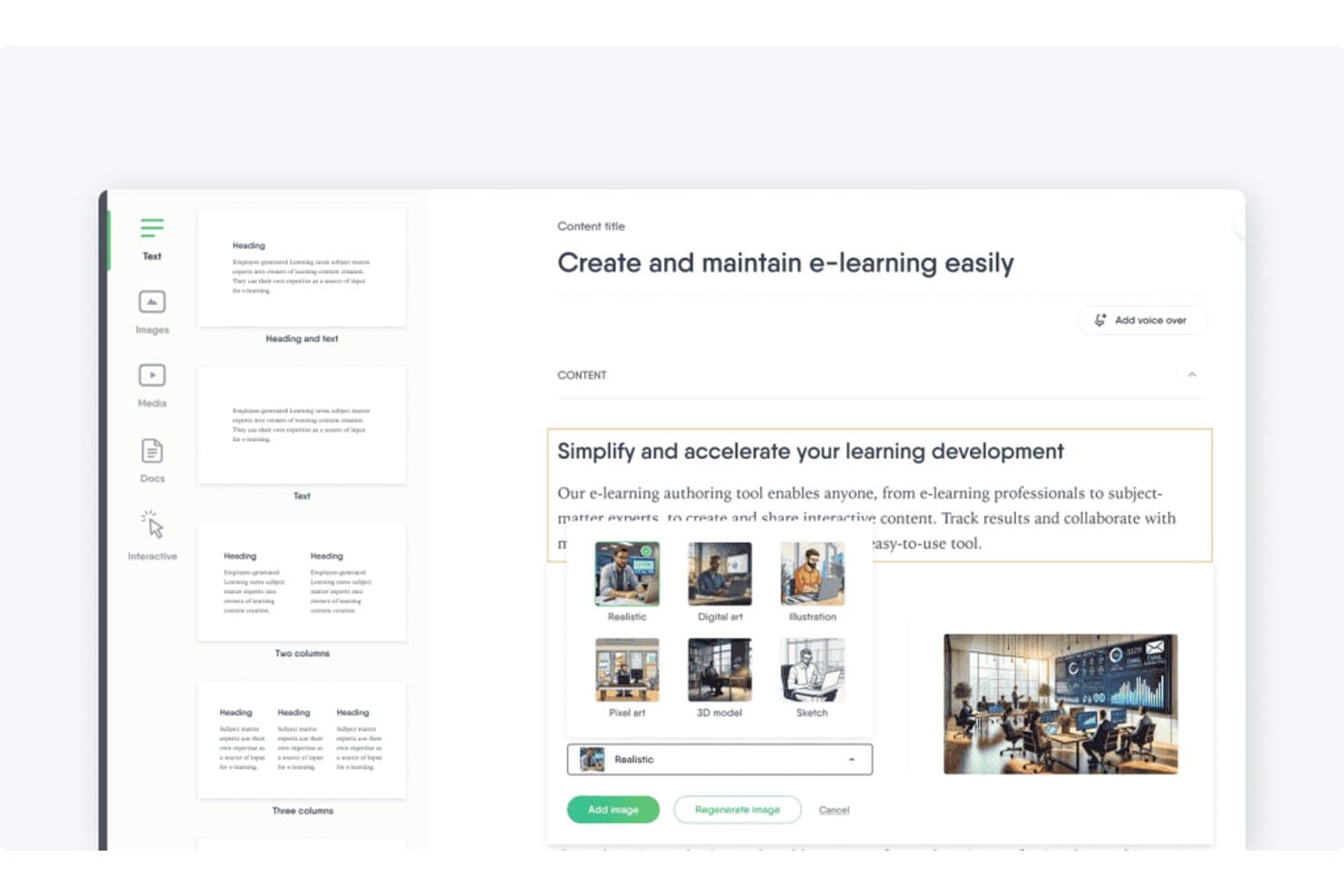
Easygenerator lets users generate AI images in multiple styles. Easygenerator is a cloud-based course authoring tool that lets teams build interactive e-learning modules using a drag-and-drop editor, branching scenarios, 11 question types, and SCORM/xAPI publishing.
Who Is Easygenerator Best For?
Easygenerator is a strong fit for corporate trainers and subject matter experts who need to build and publish SCORM-ready courses without a steep learning curve.
Why I Picked Easygenerator
I've included Easygenerator in my top picks because its guided Course Builder and AI drafting tools let subject matter experts create structured, interactive courses without needing instructional design experience. I particularly like the branching scenario editor, which lets non-experts build dialogue-based practice scenarios with avatars and multiple choice paths directly in the editor. The no-login reviewer links are another feature I rely on, since SMEs can annotate course drafts without ever creating an account.
Easygenerator Key Features
- 11 question types: Build assessments using single choice, multiple choice, hotspot, ranking, fill-in-the-blanks, and open question formats, with scoring, timers, and question pools.
- Standards-based publishing: Export courses as SCORM 1.2, SCORM 2004, xAPI, or LTI, or distribute via shareable link, embed code, QR code, or PDF.
- EasyAI Agent: An in-editor AI sidebar that drafts, edits, and structures course content using your uploaded documents and brand guidelines, with before/after comparison and one-click revert.
- No-login external review links: Share password-protected review links so stakeholders can comment on course drafts without creating an Easygenerator account.
Easygenerator Integrations
Easygenerator offers native integrations with Cornerstone, LearnUpon, HowNow, Degreed, and EdCast, with additional LMS and LXP connections available on Enterprise. It supports SCORM, xAPI, and LTI, but doesn't offer a public API for custom integrations.
Pros and Cons
Pros:
- Branching scenarios support dialogue-based practice
- No-login review links simplify SME feedback
- AI drafting is included across every plan
Cons:
- No curriculum builder connects separate courses
- Limited layout control restricts visual customization
Learn more about Easygenerator: Best for built-in AI drafting
- 30-day free trial available
- From $1,449/user (billed annually)
Visit WebsiteCustomer Rating:4.7/5This rating combines scores from multiple user review sites to reflect overall customer sentiment about the product.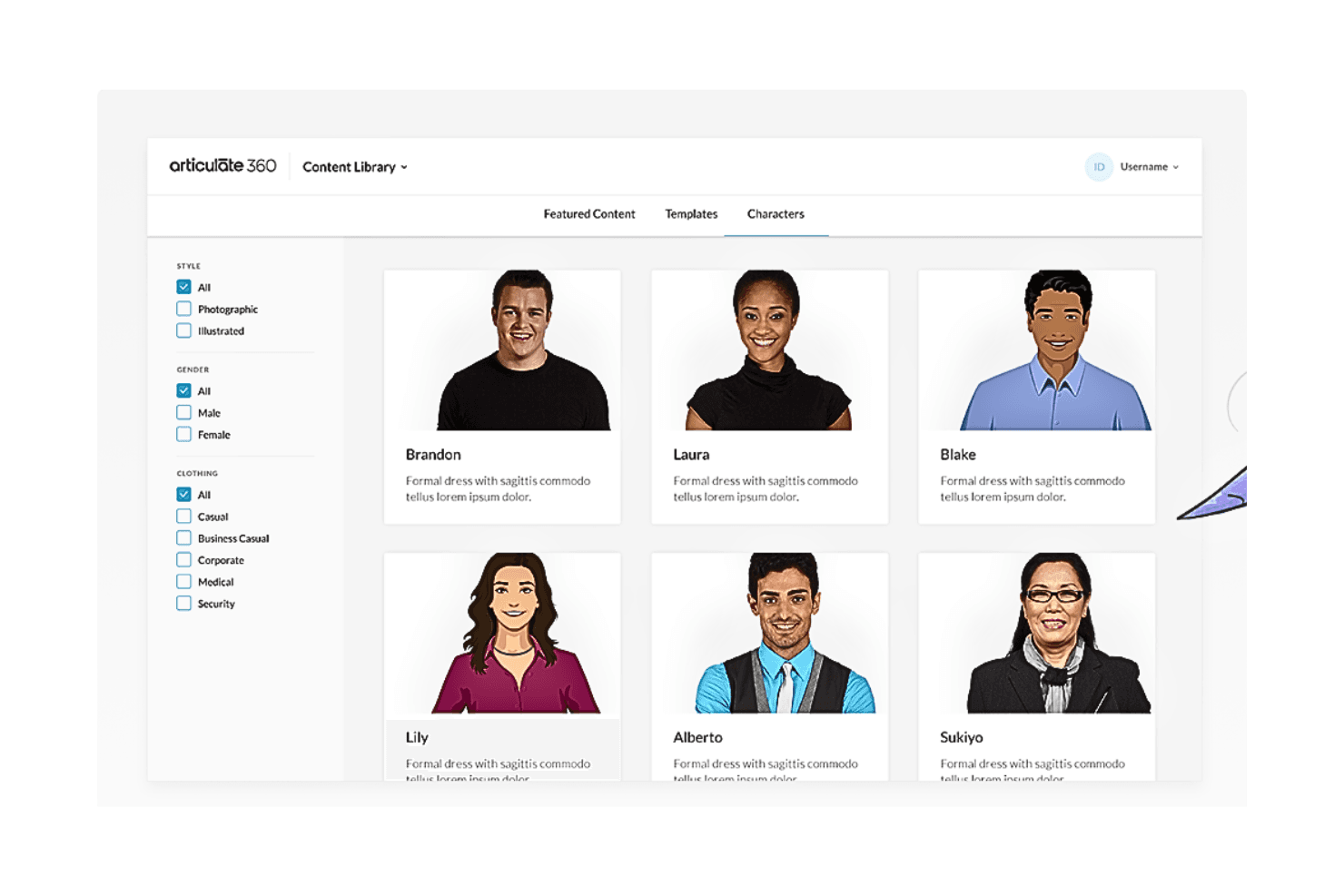
This is a screenshot of Articulate 360's content library. Articulate 360 is a learning design platform that pairs two authoring tools—block-based Rise and slide-based Storyline—with AI course drafting, assessment creation, stakeholder review, and built-in LMS publishing.
Who Is Articulate 360 Best For?
Articulate 360 is a strong fit for instructional designers and L&D teams that need both rapid block-based course building and deeply custom interactive experiences under one subscription.
Why I Picked Articulate 360
I've included Articulate 360 in my top picks because its built-in AI drafting genuinely changes how fast you can move from idea to course. The AI Assistant takes a prompt or an uploaded document and generates a full outline, lesson content, and quizzes in one pass. I also like that it doesn't stop at text: it creates images and text-to-speech voiceover, so a complete draft is ready before I've opened a single slide in Storyline.
Articulate 360 Key Features
- Storyline interactivity builder: Design slide-based courses with triggers, variables, states, and branching scenarios for custom learner paths.
- Standards-based LMS publishing: Export courses as SCORM, xAPI, cmi5, or AICC, or publish directly to the built-in Reach LMS.
- License-free stakeholder review: Share courses with reviewers who don't need a paid seat to leave in-context comments and track approval status.
- AI translation into 80+ languages: Translate courses automatically, validate them in context, and publish all language versions as a single course package.
Articulate 360 Integrations
Articulate 360 integrations include Google Drive, OneDrive, Thinkific, Slack, and Microsoft Teams, plus Claude, ChatGPT, and Microsoft Copilot through MCP. It also supports Zapier and a custom API.
Pros and Cons
Pros:
- Stakeholders review courses without paid licenses
- Rise and Storyline cover varied authoring needs
- AI drafts courses, quizzes, images, and voiceover
Cons:
- AI-generated interactions can feel repetitive
- Storyline requires Windows or virtualization
Learn more about Articulate 360: Best for authoring, review, and reuse in one place
- Free trial available
- Pricing upon request
Visit WebsiteCustomer Rating:4.3/5This rating combines scores from multiple user review sites to reflect overall customer sentiment about the product.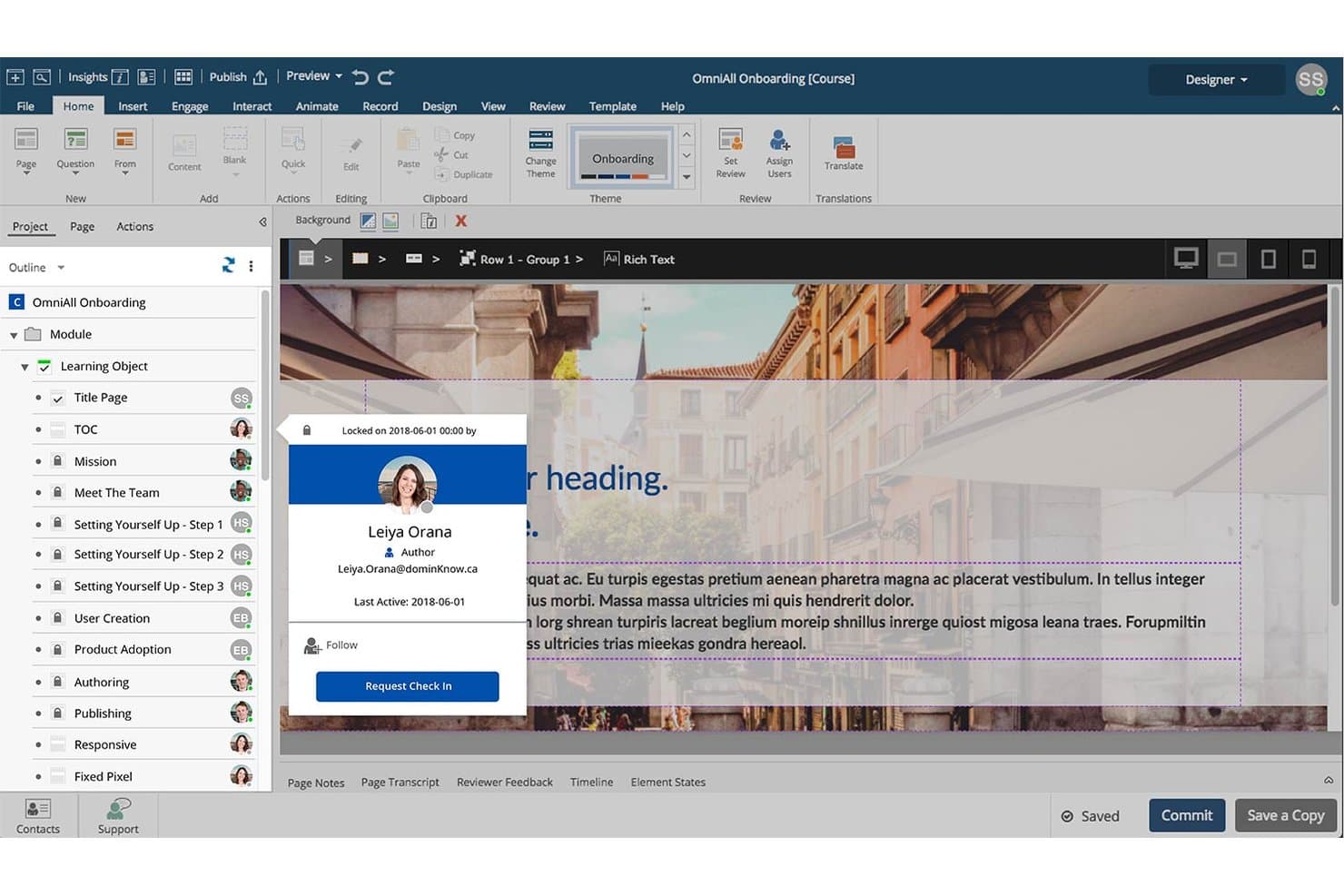
dominKnow lets users collaborate with check-in/check-out page locking. dominKnow | ONE is a cloud-based learning content management system (LCMS) that combines course authoring, software simulation, content reuse, review workflows, and multi-format publishing in one platform.
Who Is dominKnow Best For?
dominKnow | ONE is a strong fit for mid-size to enterprise L&D teams that need multiple authors working on the same content library at once.
Why I Picked dominKnow
I picked dominKnow | ONE as one of the best because it's the only tool where authoring, structured review, and content reuse genuinely live in the same environment. I love that real-time co-authoring and in-context commenting happen without leaving the editor, so SME review cycles don't stall production. Reusable learning objects update everywhere they're used at once, which is a real advantage when maintaining a large course library.
dominKnow Key Features
- Scenario Builder: A branching conversation tool that lets you design multi-path, decision-based learning without writing code.
- Software simulation capture: Records screen interactions in four modes—Show Me, Try Me, Guide Me, and Test Me—for hands-on software training.
- Question banks: Stores and organizes questions by topic, with randomization, weighting, and partial scoring options for assessments.
- Convey dynamic publishing: Hosts course content so updates reach learners instantly across multiple LMSs, without re-uploading files.
dominKnow Integrations
dominKnow | ONE connects with SCORM, AICC, xAPI, and cmi5 LMSs, plus YouTube, Vimeo, Google Drive, Box, and Dropbox. It supports SAML 2.0 SSO, sends xAPI data to LRS and BI tools, and offers content, user-login, and mobile-app APIs.
Pros and Cons
Pros:
- Four-mode software simulations support practice
- Reusable objects update across projects
- Real-time SME review inside courses
Cons:
- No native video-based role-play
- Large feature set slows first projects
Learn more about dominKnow: Best for creating interactive e-learning content
- Free trial available
- From $33.99/month
Visit WebsiteCustomer Rating:3.9/5This rating combines scores from multiple user review sites to reflect overall customer sentiment about the product.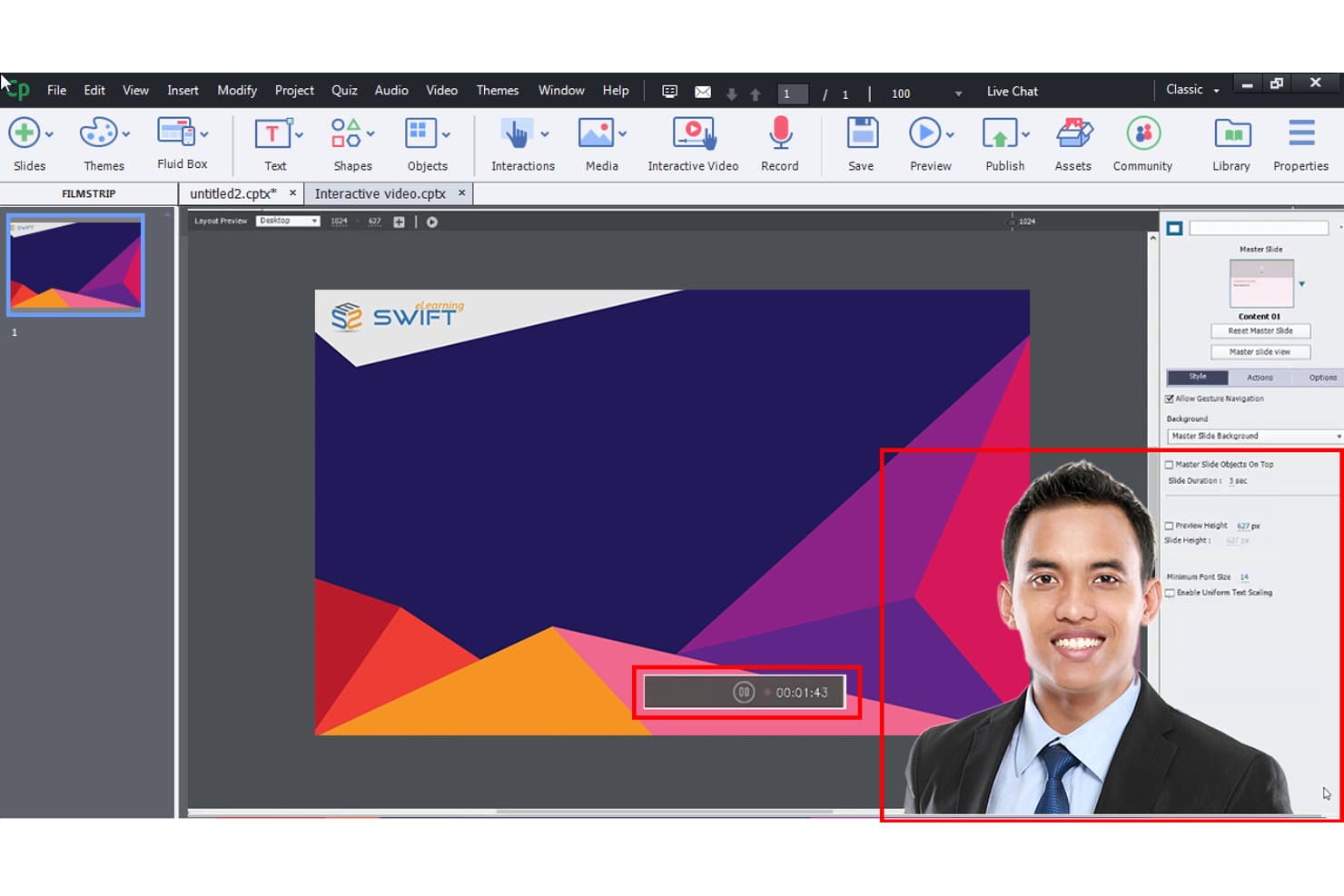
Adobe Captivate creates interactive e-learning and training content efficiently. Adobe Captivate is a desktop-based eLearning authoring tool that lets you build interactive courses, software simulations, quizzes, and responsive modules for web and mobile delivery.
Who Is Adobe Captivate Best For?
Adobe Captivate is a strong fit for instructional designers and corporate trainers who need to build software simulations, branching scenarios, and SCORM-ready courses.
Why I Picked Adobe Captivate
Adobe Captivate earns its spot on my list because its software simulation engine is genuinely unlike anything else in this category. I can record a screen workflow and instantly produce three versions: a Demo mode that walks learners through steps, a Training mode that prompts them, and an Assessment mode that only flags mistakes. On top of that, the no-code widget library, branching logic, and AI avatar generation let me build scenario-based courses without writing a single line of code.
Adobe Captivate Key Features
- Question pools: Build reusable, categorized banks of quiz questions that can be randomly drawn across modules and imported via CSV.
- Share for Review: Generate browser-based review links so stakeholders can comment, @mention others, and filter feedback by device view without installing anything.
- AI content generation: Use built-in text, image, avatar, and voice tools to draft questions, translate content, generate captions, and create talking avatars with multilingual narration.
- SCORM, AICC, and xAPI publishing: Export courses as HTML5 packages in any major eLearning standard, or publish directly to Adobe Learning Manager.
Adobe Captivate Integrations
Adobe Captivate connects with Adobe Learning Manager, Microsoft PowerPoint, Adobe Firefly, and Adobe Fonts. It also publishes SCORM, AICC, and xAPI packages to compatible LMSs.
Pros and Cons
Pros:
- Reusable question pools support assessment variety
- Responsive courses adapt across screen sizes
- Precise software simulation recording modes
Cons:
- Advanced logic takes considerable setup time
- Desktop authoring limits team collaboration
Learn more about Adobe Captivate: Best for SCORM and xAPI standards-based publishing
- 30-day free trial + free demo available
- From $129/month (billed annually)
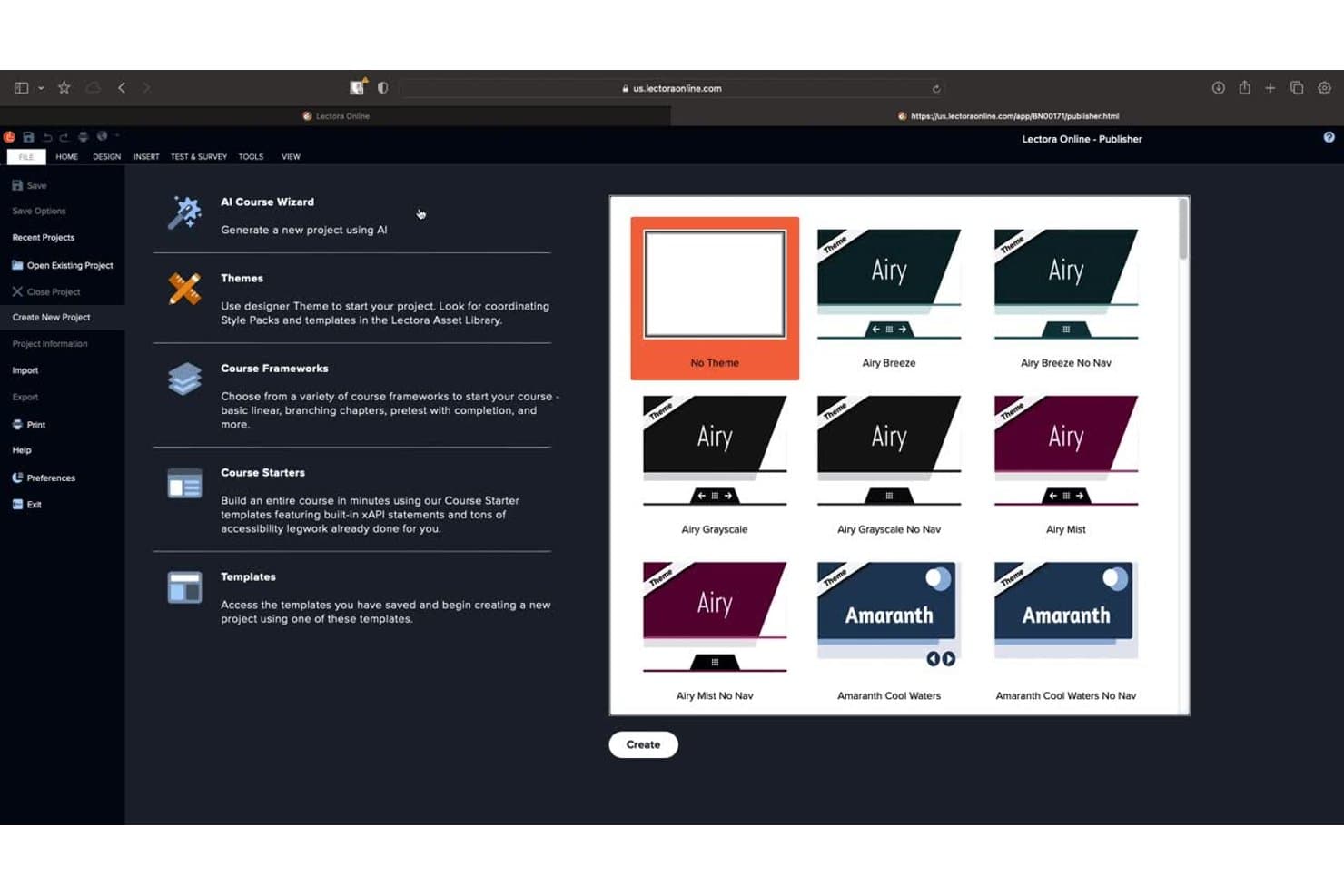
Lectora lets users choose from themed templates when creating a new course. Lectora is a WYSIWYG e-learning authoring tool that supports course building, branching scenarios, assessments, and standards-based publishing across SCORM, xAPI, AICC, and cmi5 formats.
Who Is Lectora Best For?
Lectora is a strong fit for instructional designers and curriculum developers who need precise control over course structure and must publish to strict compliance standards like SCORM or xAPI.
Why I Picked Lectora
Lectora earns its spot on my shortlist because no other authoring tool matches its depth of standards-based publishing support. I've published to SCORM 1.2, SCORM 2004, xAPI, AICC, and cmi5 from a single project file, which matters when your organization runs multiple LMSs or must meet strict compliance requirements. The built-in Accessibility Checker also makes WCAG 2.0 AA and Section 508 compliance far less painful to maintain across large course libraries.
Lectora Key Features
- BranchTrack scenario builder: A built-in tool for creating digital branching scenarios that guide learners through decision-based learning paths.
- ReviewLink: A stakeholder and SME feedback tool with customizable access levels and approval cycles for structured course review.
- Responsive Course Design: Lets you adjust layout and content for different devices and screen orientations within a single project file.
- AI Course Wizard: A three-step tool in Lectora Online that generates a draft course from a topic, theme, and page count selection.
Lectora Integrations
Lectora integrates with ELB Learning products, including CourseMill, Rockstar, CenarioVR, The Training Arcade, BranchTrack, MicroBuilder, ReviewLink, and Asset Library. It connects with LMSs and LRSs through SCORM, AICC, xAPI, and cmi5 publishing.
Pros and Cons
Pros:
- ReviewLink organizes SME feedback and approvals
- Reusable frameworks accelerate structured course development
- Standards-based publishing supports strict compliance requirements
Cons:
- Question bank management complicates assessment workflows
- Advanced interactions require substantial technical expertise
Learn more about Lectora: Best for mobile-first microlearning
- Free plan available
- From $29/user/month
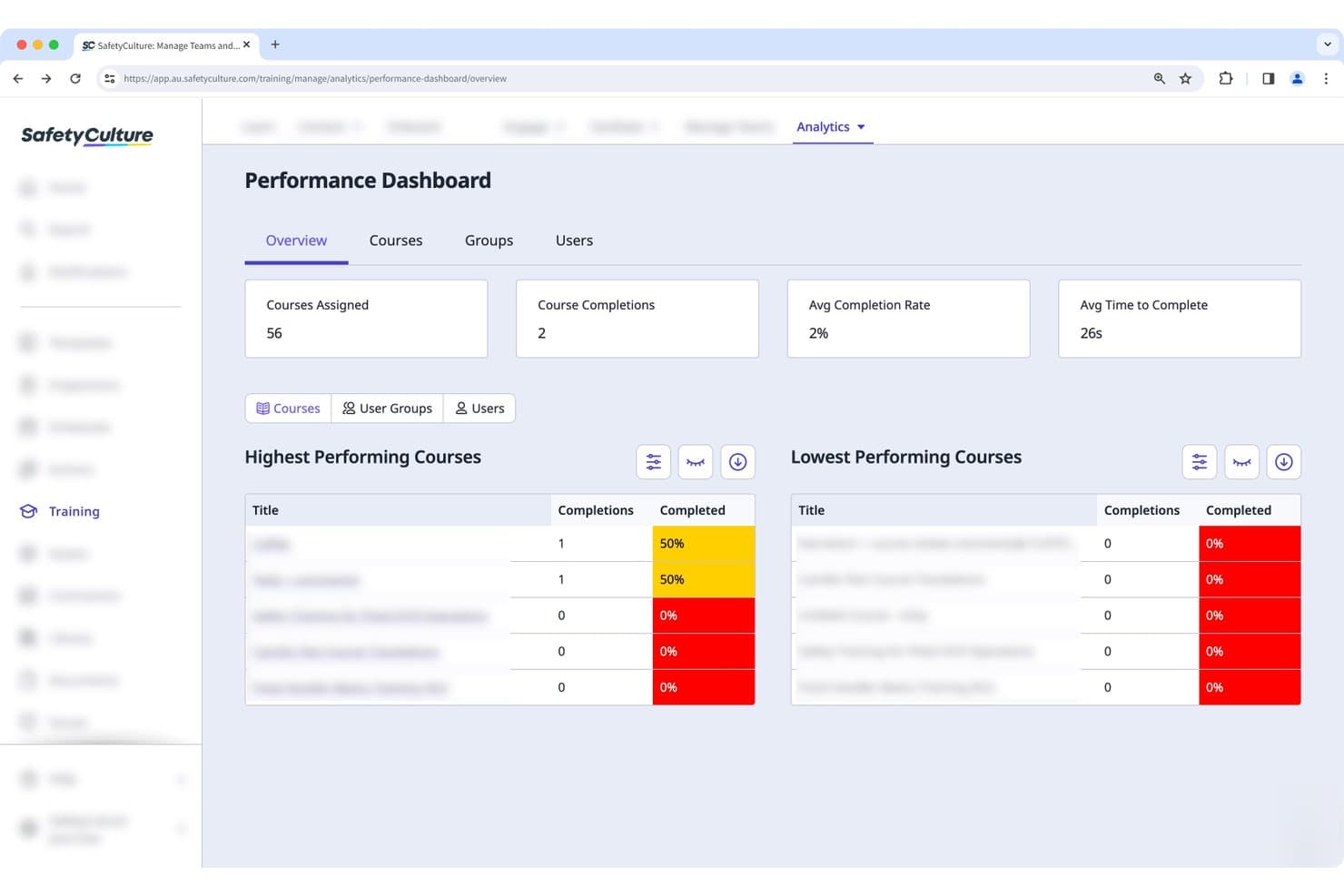
Mitti (by SafetyCulture) tracks course completions and performance rates. Mitti is a mobile-first learning design platform that combines AI-assisted course authoring, microlesson creation, quiz-based assessments, spaced repetition, and collaborative content review tools.
Who Is Mitti Best For?
Mitti is a strong fit for corporate trainers and L&D teams delivering frontline training, where fast AI-assisted course creation and mobile-first microlearning matter more than complex branching or LMS portability.
Why I Picked Mitti
I've included Mitti in my top picks because it's built from the ground up for mobile-first microlearning, delivering bite-sized lessons that work offline on iOS and Android. I particularly like its AI role-play scenarios, where learners practice real conversations with a scored AI character, and its spaced repetition quizzes, which automatically resurface knowledge gaps over growing intervals to lock in retention.
Mitti Key Features
- AI course creation: Generate full lessons from a text prompt, uploaded document, or photos, with AI editing tools to rewrite, adjust tone, or expand content.
- Collaborative review tools: Share courses for direct editing, leave slide comments with @mentions, and send SME preview links for browser-based course review.
- Version control and publishing history: Each republish creates a new version number, with a change log tracking who changed what and completion reports tied to specific versions.
- Practical assessments: Assessors use a built-in form to observe and score on-the-job tasks in real time, with the option to provide immediate feedback.
Mitti Integrations
Mitti offers integrations with Workday, SAP SuccessFactors, Microsoft Entra ID, Okta, Power BI, Tableau, Google Drive, SharePoint, OneDrive, and Dropbox. It also provides a public API and supports Zapier.
Pros and Cons
Pros:
- SME comments support course reviews
- Spaced repetition reinforces knowledge gaps
- AI turns documents into lessons
Cons:
- SCORM export is limited to lessons
- No branching scenarios for advanced design
Learn more about Mitti (by SafetyCulture):
Other Notable Learning Design Software
Below is a list of additional learning design software that I shortlisted, but did not make it to the top 12.
- 11ConfirmBest for collaborative enterprise course authoring
- 12Gomo LearningBest for multi-language responsive HTML5 courses
- 13AbsorbBest for AI-driven enterprise compliance training
- 14CoassembleBest for turning existing docs into training
- 15MoodleBest for open-source LMS customization and control
- 16Adapt Learning Best for creating responsive, multi-device learning
- 17EvolveBest for interactive simulations
- 187tapsBest for zero-friction snackable learning
How I Evaluate Learning Design Software
I split my evaluation into three parts. Core functionality carries the most weight—I look for tools that can build structured multi-module courses and support real interactivity like branching scenarios. Then I check for standout features like AI content generation and content reusability, plus beyond-features factors like integration depth and pricing scalability.
Core Functionality (Table Stakes For This List)
When I'm selecting tools for my list, I score each one on a scale from 0 (does not offer the functionality) to 5 (excels in this area) for each core functionality listed below. I then convert the total into a percentage to help assess each tool's overall fit, with extra weight on any functionalities I've deemed essential.
- Course Authoring (Essential): I check whether a tool supports multi-module course structures with flexible sequencing, not just single-page content builders.
- Interactive Content (Essential): Branching scenarios, drag-and-drop activities, and clickable simulations all factor in—static slide decks don't make the cut.
- Instructional Templates: A strong template library saves real design time. I look for lesson layouts and storyboard frameworks grounded in proven instructional models.
- Assessment Creation: I evaluate the range of question types, scoring options, and feedback mechanisms available for building quizzes and knowledge checks.
- Standards-Based Publishing: Export support for SCORM and xAPI matters when your content needs to run inside an LMS. I verify format compatibility and packaging reliability.
- Content Collaboration: Teams co-develop courses with subject matter experts constantly. I look for review workflows, commenting, role-based editing, and version tracking.
Once I have a list of tools that meet the criteria, I consider what sets each platform apart.
Differentiating Factors (What Sets Vendors Apart)
Here's how I compare and contrast different vendors:
Standout Features
AI content generation is a big differentiator. I evaluate whether a tool can draft quiz questions or scenario narratives from source material, since that cuts hours off course builds. Content reusability blocks matter just as much—I check if modular assets like case studies and quiz banks can be shared across onboarding tracks without duplicating work. I also look at competency mapping, which links assessments directly to role-specific skill frameworks so enablement leads can track PM proficiency gaps.
Beyond Features
Integration depth matters a lot here. I check whether a platform connects with tools like Jira, Productboard, or Slack so learning content fits into daily PM workflows instead of sitting in a separate silo. Data privacy is equally important—I look for SSO support, SOC 2 compliance, and role-based permissions that protect proprietary product strategy content used in training scenarios. I also evaluate how licensing models handle fluctuating headcount, since product orgs scale unevenly during reorgs or rapid hiring cycles.
How to Choose Learning Design Software
As you're evaluating learning design software options, consider:
- What are your goals with the materials you're creating? -Start by identifying the key objectives your users hope to achieve and determine the assortment of materials you'll need to create to help them get there.
- Who will need to use it? - Evaluate the number of people on your team that will need to use the software, either as an active user or viewer/commenter.
- What other tools does it need to work with? - Determine what tools you're replacing, which tools are staying, and any existing tools you'll need to integrate with (if applicable), such as your learning management system. Decide if your existing tools need to integrate with your new learning design tool.
- What outcomes are important? - Factor in the result that the software needs to deliver to be considered a success. Consider what capability you want to gain, or what you want to improve, and how you will be measuring success. For example, you may need your software to help you track and compare assessment results over time. Keep the outcomes you want front of mind as you’re evaluating different options to prioritize the maximum impact for your team.
- How it would work within your organization?- Do the features and functions of the software align with the goals and requirements of your organization? Are there similarities between the interfaces of the new tool and your current tool that will make it easier for folks on your team to learn how to use it? As with all software tools, the number of features isn't as important as the value of each feature to your organization.
Most Common Questions Regarding Learning Design Software
What are the benefits of using learning design software?
Learning design software provides several benefits including:
- Efficiency: They streamline the process of course creation and delivery, saving you time and effort.
- Engagement: With features such as quizzes, interactive content, and multimedia support, they enhance learner engagement and retention.
- Flexibility: These tools often support mobile learning, enabling learners to access courses anytime, anywhere.
- Integration: Many learning design tools easily integrate with LMS, HR systems, or websites, creating a learning ecosystem.
- Insights: Robust reporting features offer insights into learner progress and course effectiveness, informing future course development strategies.
How much do learning design software tools typically cost?
The pricing for learning design software varies significantly based on the specific features, the number of users, and the level of customer support provided. They usually employ a subscription-based pricing model charged either monthly or annually.
What are the typical pricing models for learning design software?
Most learning design software tools follow a subscription-based pricing model. Some offer tiered pricing, where different levels of functionality and features are available at different price points. Others may charge per user or per course, or provide unlimited access for a flat fee.
What is the typical range of pricing for learning design software?
The pricing for learning design software can range from around $20 per month for basic tools to several hundreds of dollars per month for more comprehensive, enterprise-level solutions.
What are the cheapest and most expensive learning design software?
The least expensive learning design software typically starts from around $20 per month for basic functionality. On the high end, comprehensive solutions with advanced features can cost several hundreds of dollars per month. For instance, Adobe Captivate starts at $33.99 per user per month, while Articulate 360 starts at $999 per user per year (around $83 per user per month).
Are there any free learning design software options?
Yes, there are free options available, like Moodle, which is an open-source learning management system. However, keep in mind that while the software itself may be free, there may be costs associated with hosting, customization, and support. Also, free versions of paid software often come with limitations on features or the number of users or courses.
Other Design Software Reviews
Summary
To conclude, the selection of learning design software is a crucial aspect of creating engaging and efficient eLearning courses. The tool you choose should not only be able to deliver your content effectively but also provide additional features such as integration with other systems, user-friendly design, and insightful reporting.
Key Takeaways
- Define Your Needs: The 'best' learning design software is subjective and depends largely on your specific needs and context. Define the core functionality you require, your budget, and your desired level of support before beginning your search.
- Consider Usability and Support: Even the most feature-rich software can fall short if it's not user-friendly or lacks adequate customer support. Consider the learning curve and the level of support provided by the software vendor.
- Evaluate Key Features: Consider the unique selling proposition of each tool. Some excel in interactivity, some in integration, and others in user experience. Identify the features that align best with your eLearning objectives.
By keeping these factors in mind, you'll be well-equipped to choose the learning design software that best fits your needs.
What Next?
To expand your toolkit, you may also want to check out some these awesome instructional design podcasts—because to build great learning products, you'll need great tools and great skills, too!
Don't forget to subscribe to our newsletter for more product management resources and guides, plus the latest podcasts, interviews, and other insights from industry leaders and experts.