

10 Best AI Documentation Tools in 2026

AI Documentation Tools Shortlist


AI documentation tools use artificial intelligence to help you create, organize, and update your team’s knowledge base or technical docs faster. If you’re searching for ways to keep documentation accurate, reduce manual work, or make it easier for your team to find answers, you’re in the right place. In this guide, you’ll get a clear look at the top AI documentation tools available in 2026, what makes each one unique, and how they can fit into your workflow. Whether you’re managing product docs, onboarding guides, or internal wikis, you’ll find options here that can help you keep your documentation sharp and up to date.
Why Trust Our Software Reviews
We’ve been testing and reviewing product management software since 2020. As product managers ourselves, we know how critical and difficult it is to make the right decision when selecting software.
We invest in deep research to help our audience make better software purchasing decisions. We’ve tested more than 2,000 tools for different product management use cases and written over 1,000 comprehensive software reviews. Learn how we stay transparent & our software review methodology.
AI Documentation Tools Comparison Table
This comparison table summarizes pricing details for my top AI documentation tool selections:
| Tool | Best For | Trial Info | Price | ||
|---|---|---|---|---|---|
| 1 | Best for browser-captured SOP creation | Free plan available | From $16/user/month (billed annually) | Website | |
| 2 | Best for integrated workspace collaboration | Free plan available | From $10/user/month (billed annually) | Website | |
| 3 | Best for team knowledge organization | 14-day free trial | From $10/user/month (billed annually) | Website | |
| 4 | Best with Slack-based knowledge capture | Free demo available | From $59/seat/month (billed annually) | Website | |
| 5 | Best for deep indexing of video content | Free demo available | Pricing upon request | Website | |
| 6 | Best for large-scale team documentation | Free trial + free plan available | From $5.42/user/month | Website | |
| 7 | Best for in-code documentation generation | Free demo available | Pricing upon request | Website | |
| 8 | Best for structured technical content creation | 14-day free trial + free plan available | From $65/site/month + $12/user/month (billed annually) | Website | |
| 9 | Best for advanced search in knowledge bases | 14-day free trial | From $249/month | Website | |
| 10 | Best for interactive rich media integration | Free plan available | From $8/user/month | Website |
AI Documentation Tools Reviews
Below are my detailed summaries of the AI documentation tools that made it onto my shortlist. My reviews offer a detailed look at the features, best use cases, and integrations of each platform to help you find the best one for you.

Tango
Best for browser-captured SOP creation
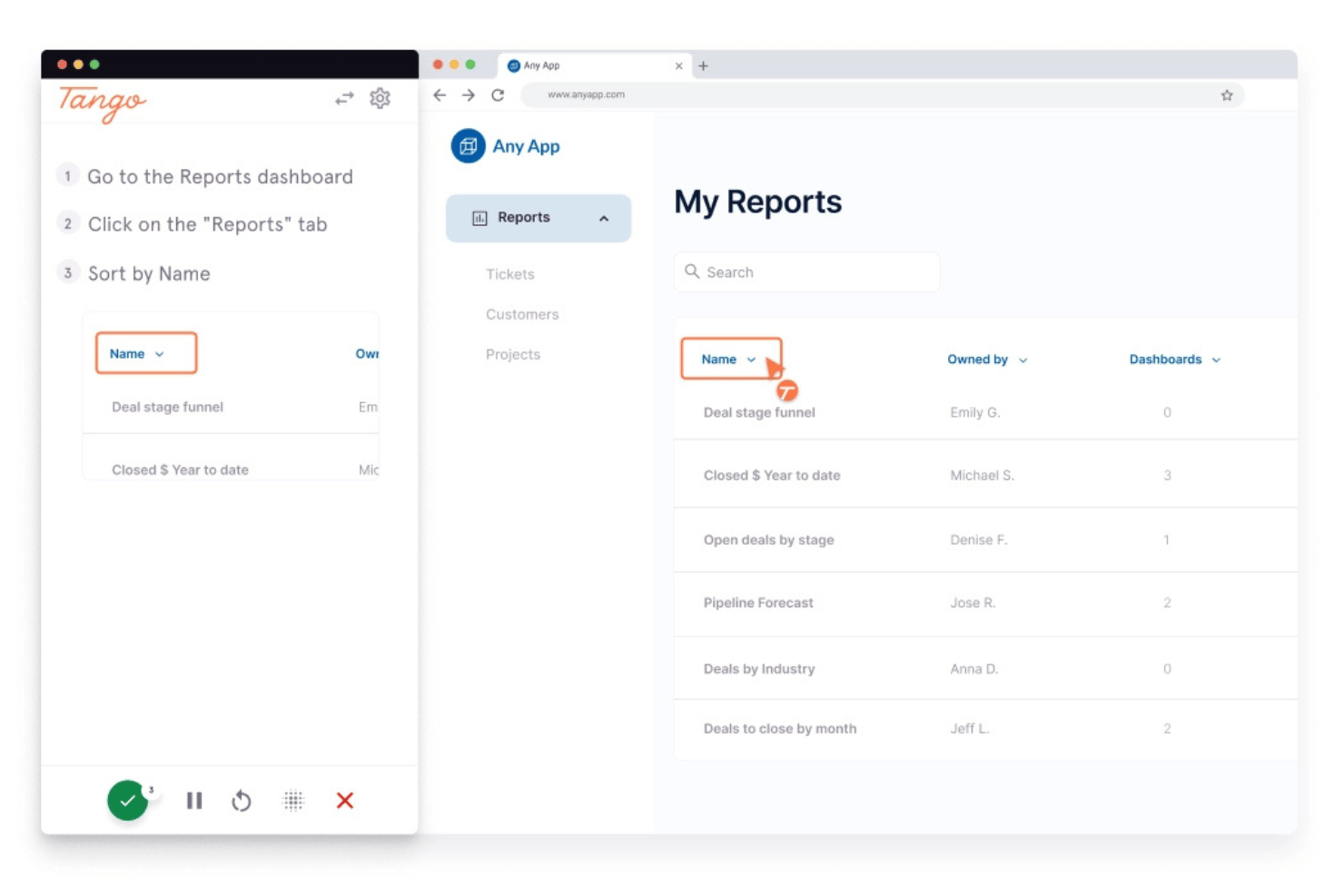
Tango is a process documentation and digital adoption platform that captures browser-based workflows in real time, automatically generating step-by-step guides, annotated screenshots, and SOPs.
Who Is Tango Best For?
Tango is a strong fit for operations, IT, and enablement teams that need to document browser-based processes and build step-by-step SOPs without manual effort.
Why I Picked Tango
Tango earns its spot on my list because it's the best tool I've found for capturing browser-based SOPs without any manual documentation effort. As you click through a workflow, Tango records every step in real time, producing annotated screenshots and structured guides automatically. I especially like the SOP Creator, which instantly formats captured processes into polished, shareable standard operating procedures that embed directly into Notion or Confluence.
Tango Key Features
- Voice transcription: Records spoken narration during workflow capture and converts it to text, automatically generating step descriptions from your commentary.
- Viewer analytics: Tracks which guides are being viewed, how far users progress, and which steps cause drop-off, so you can identify gaps in your documentation.
- Automatic PII redaction: Detects and blurs sensitive information captured during workflow recording before a guide is published or shared.
- Multi-path workflows: Documents branching processes with multiple decision points in a single guide, supporting non-linear workflows rather than just simple step sequences.
Tango Integrations
Tango supports embed-based integrations with Notion, Confluence, and Coda, plus learning management systems and ticketing tools. It also has a Zapier connector, but no native bidirectional integrations with Jira, Linear, Figma, Dovetail, Gong, or Slack.
Pros and Cons
Pros:
- Can embed SOPs directly into knowledge bases
- Annotated screenshots generated automatically in real time
- Instantly captures processes as step-by-step guides
Cons:
- No AI-powered search functionality for docs
- Cannot generate PRDs or release notes
Notion
Best for integrated workspace collaboration
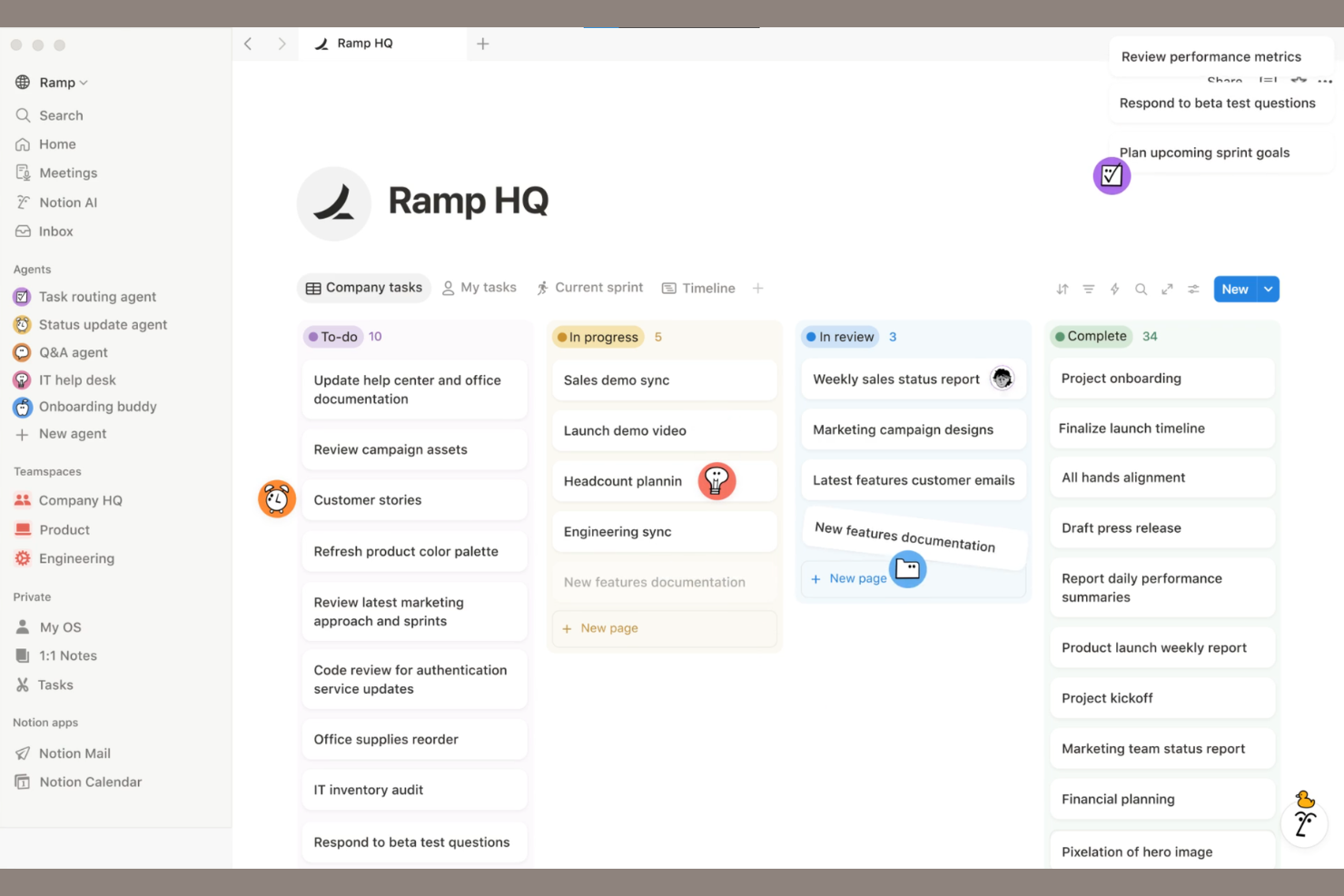
Notion is an AI-powered workspace platform that combines documentation, knowledge bases, wikis, and collaborative editing for teams managing and sharing internal content.
Who Is Notion Best For?
Notion is a good fit for cross-functional teams at startups and growing companies that need a unified workspace for documentation and collaboration.
Why I Picked Notion
I picked Notion as one of the best because I can combine AI-powered document creation with real-time collaborative editing and flexible databases in a single workspace. My team uses Notion to organize wikis, meeting notes, and project docs alongside tasks and knowledge bases. I like that I can embed code, tables, and media directly into docs, making it easy to centralize all our internal documentation and workflows.
Notion Key Features
- AI-powered writing assistant: Generate summaries, rewrite content, and automate documentation tasks using built-in AI tools.
- Custom templates: Create and reuse templates for documentation, meeting notes, and knowledge bases.
- Permission controls: Set granular access levels for pages, databases, and workspaces.
- Version history: Track changes and restore previous versions of any document.
Notion Integrations
Notion offers dozens of native integrations, including Slack, GitHub, Google Drive, Asana, Jira, Trello, Figma, Webex, Typeform, Miro, and Zapier. An API is available for custom integrations.
Pros and Cons
Pros:
- Supports embedding media, code, and tables
- Flexible database blocks for structured content
- AI can summarize and rewrite documentation
Cons:
- No built-in diagramming or flowchart tools
- Limited offline editing capabilities

Slite
Best for team knowledge organization
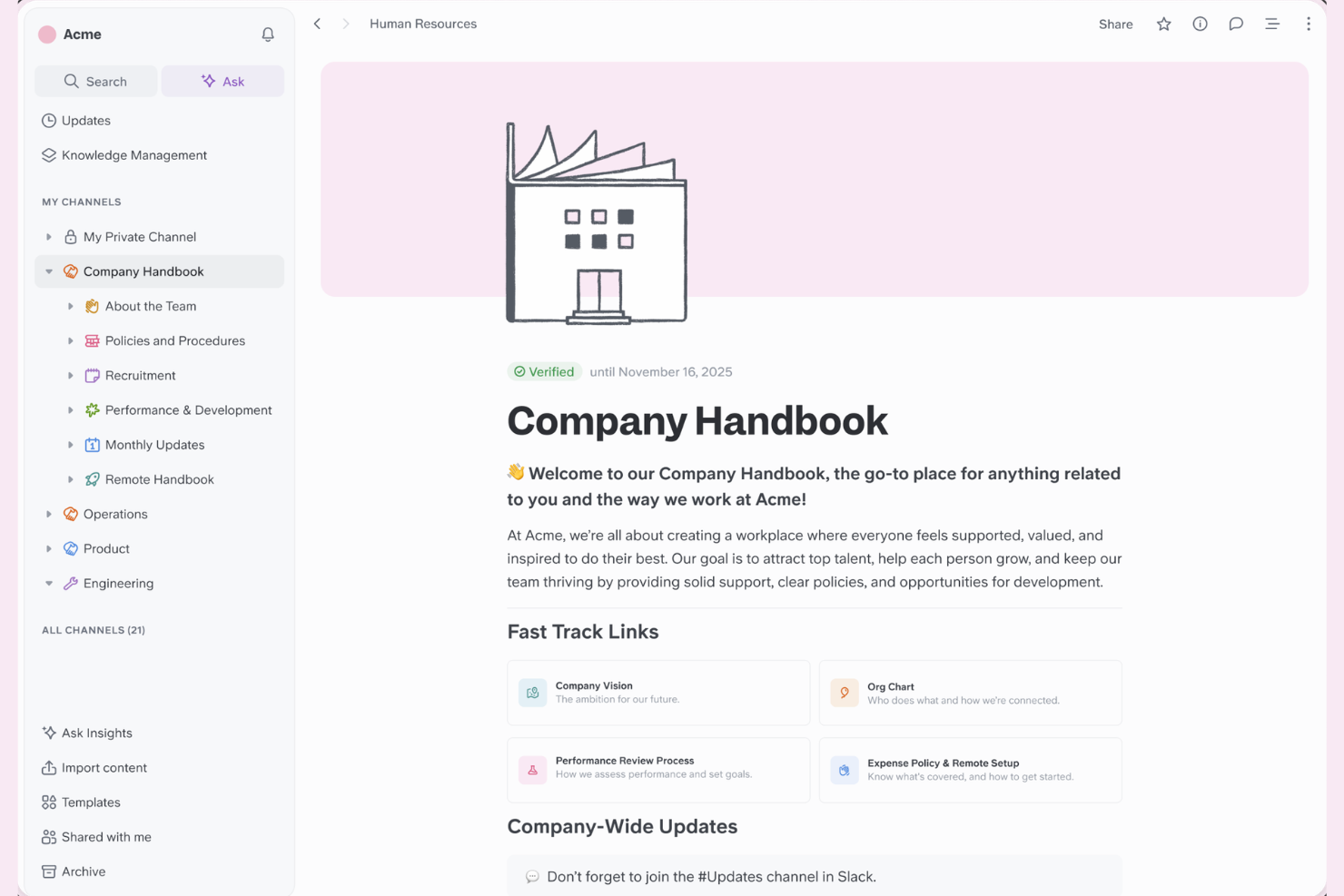
Slite is a collaborative documentation platform for teams that brings together structured note-taking, AI-powered search, and knowledge base organization in one workspace.
Who Is Slite Best For?
Slite is a good fit for distributed teams and startups that need to organize and share internal knowledge.
Why I Picked Slite
I picked Slite as one of the best because I can organize team knowledge into channels and collections, making it easy to keep documentation structured as my team grows. I like using the AI-powered Ask feature to surface answers from our docs instantly. My team is able to collaborate in real time on meeting notes, project docs, and internal wikis without losing context.
Slite Key Features
- Document version history: Track and restore previous versions of any document.
- Access permissions: Set granular access controls for teams and individuals.
- Templates library: Use pre-built templates for meeting notes, project plans, and more.
- Markdown support: Format documentation with markdown for structured, readable content.
Slite Integrations
Slite offers native integrations with Slack, Google Drive, Google Docs, Jira, Trello, Asana, Figma, Notion, Airtable, ClickUp, and Zapier, and provides an API for custom integrations.
Pros and Cons
Pros:
- Built-in templates for quick documentation setup
- Organized channels for structured team knowledge
- AI-powered Ask feature for instant answers
Cons:
- No offline editing mode available
- Lacks granular user permission controls
Pylon
Best with Slack-based knowledge capture
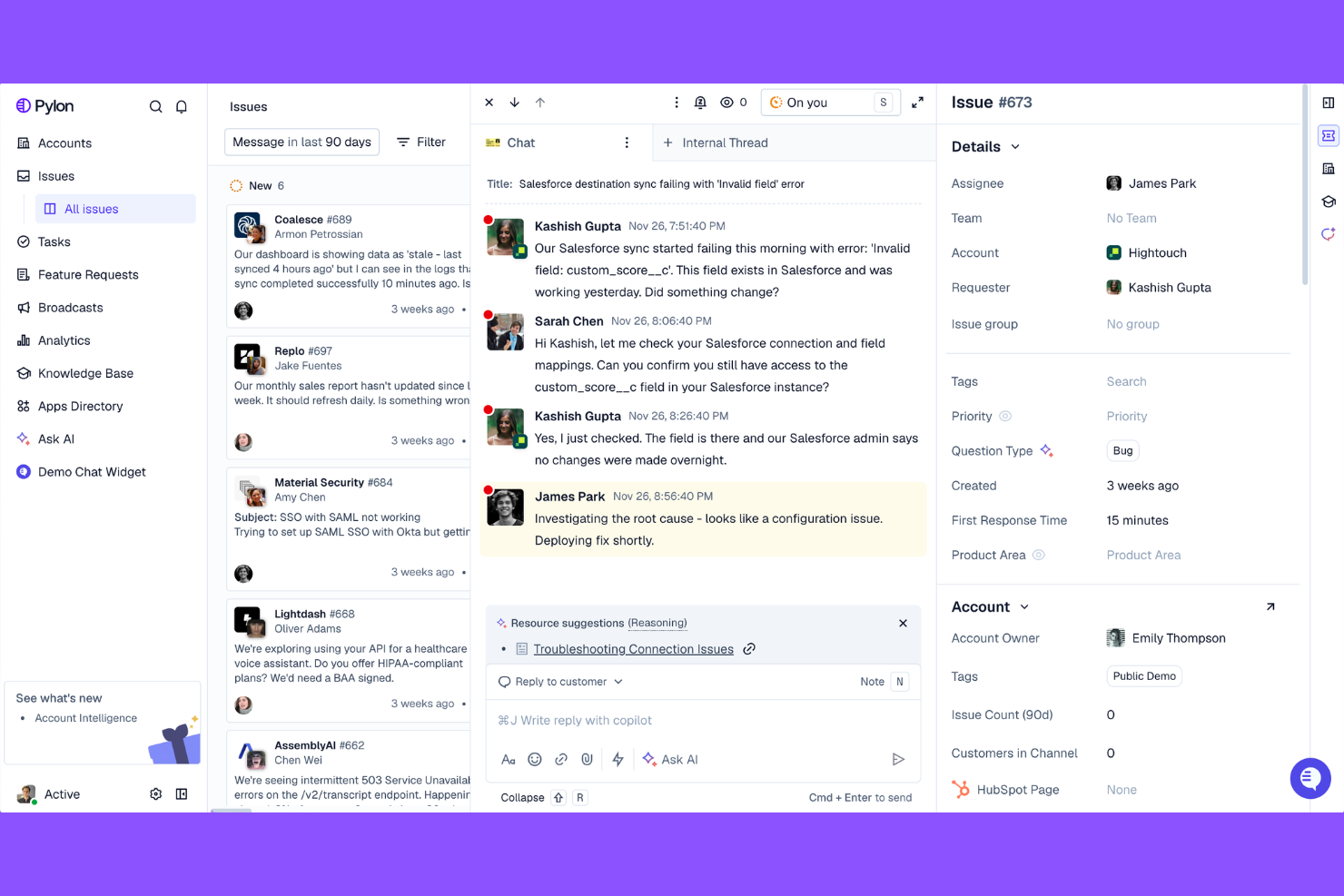
Pylon is an AI-powered knowledge management platform that captures, organizes, and surfaces team knowledge directly from Slack conversations and connected documentation sources.
Who Is Pylon Best For?
Pylon is a good fit for distributed teams and knowledge workers who rely on Slack as their primary communication and collaboration hub.
Why I Picked Pylon
I picked Pylon as one of the best because I can capture and organize knowledge directly from Slack threads without switching tools. My team uses its AI to summarize conversations and turn them into searchable documentation. I like that Pylon automatically links related topics and keeps our knowledge base up to date as Slack discussions evolve.
Pylon Key Features
- AI-powered search: Find relevant knowledge across Slack and connected sources using natural language queries.
- Knowledge verification workflows: Route captured knowledge for review and approval before publishing.
- Automatic topic detection: Group related information into topics for easier navigation.
- Access controls: Set permissions for who can view or edit specific knowledge entries.
Pylon Integrations
Pylon offers native integrations with Slack, Google Drive, Confluence, and Notion, and provides an API for custom integrations.
Pros and Cons
Pros:
- Supports review and approval workflows
- Links related topics for easy navigation
- Captures knowledge directly from Slack threads
Cons:
- No built-in visual tools
- Limited formatting options for documentation

Best for deep indexing of video content
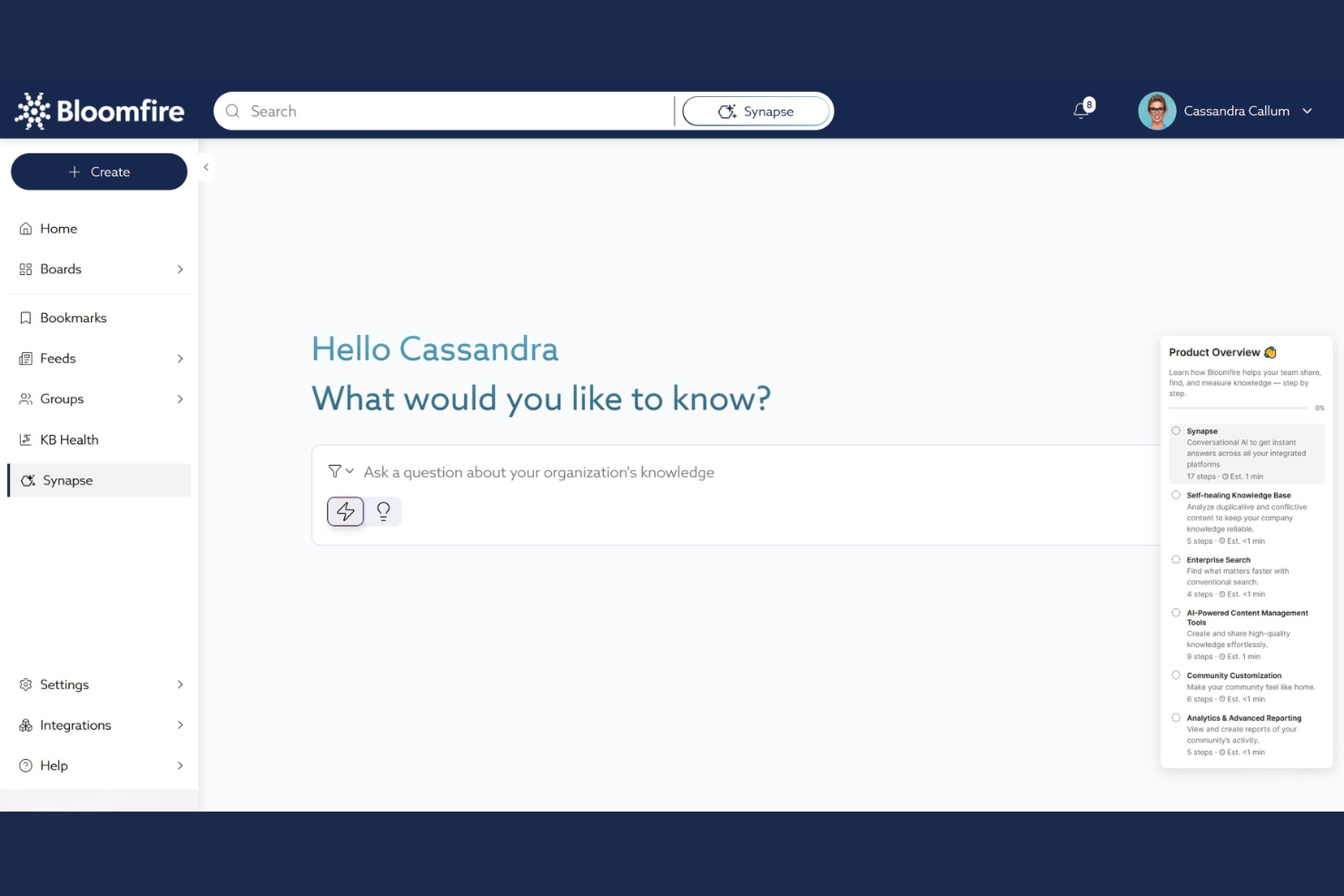
Bloomfire is a knowledge management platform for teams that lets you organize, search, and share documentation, videos, and multimedia content with advanced content indexing and AI-powered search capabilities.
Who Is Bloomfire Best For?
Bloomfire is a good fit for customer support, training, and knowledge management teams in midsize to large organizations handling large volumes of video and multimedia content.
Why I Picked Bloomfire
I picked Bloomfire as one of the best because I can upload video content and have every spoken word indexed for search, making it easy to find exact moments in recordings. My team uses the AI-powered search to surface answers from transcripts, documents, and multimedia. I like that we can organize knowledge into collections and apply custom tags for granular content discovery.
Bloomfire Key Features
- Q&A engine: Users can ask questions and receive answers directly within the platform.
- Custom branding: Teams can customize the look and feel to match their organization.
- Content approval workflows: Set up review and publishing processes for documentation.
- Analytics dashboard: Track engagement and content usage across the knowledge base.
Bloomfire Integrations
Bloomfire offers native integrations with Slack, Salesforce, Microsoft Teams, Zendesk, and Google Drive, and provides an API for custom integrations.
Pros and Cons
Pros:
- Q&A engine for capturing tribal knowledge
- AI-powered search across all file types
- Deep video and audio content indexing
Cons:
- No AI writing assistant for content creation
- Limited advanced analytics for documentation usage
Best for large-scale team documentation

Confluence is a collaborative documentation platform from Atlassian that lets teams create, organize, and manage knowledge bases, project documentation, and internal wikis with AI-powered content features.
Who Is Confluence Best For?
Confluence is a strong fit for large organizations and enterprises that need to manage extensive internal documentation across distributed teams.
Why I Picked Confluence
I picked Confluence as one of the best because I can organize massive volumes of team documentation in structured spaces and pages. I like using its AI features to summarize meeting notes and auto-generate content from prompts. My team relies on its granular permissions to manage access across departments.
Confluence Key Features
- Page version history: Track and restore previous versions of any page.
- Templates library: Access pre-built templates for meeting notes, project plans, and more.
- Inline comments: Add feedback and questions directly on specific sections of a page.
- Macros support: Embed dynamic content like task lists, calendars, and roadmaps within documentation.
Confluence Integrations
Confluence offers native integrations with Jira, Trello, Slack, Microsoft 365, Google Drive, Dropbox, GitHub, Salesforce, Zoom, and Box, and provides an API for custom integrations.
Pros and Cons
Pros:
- Page versioning supports detailed audit trails
- Extensive template library for structured content
- Deep integration with Jira for project tracking
Cons:
- Search can be slow with large spaces
- AI features require premium plans

Swimm
Best for in-code documentation generation
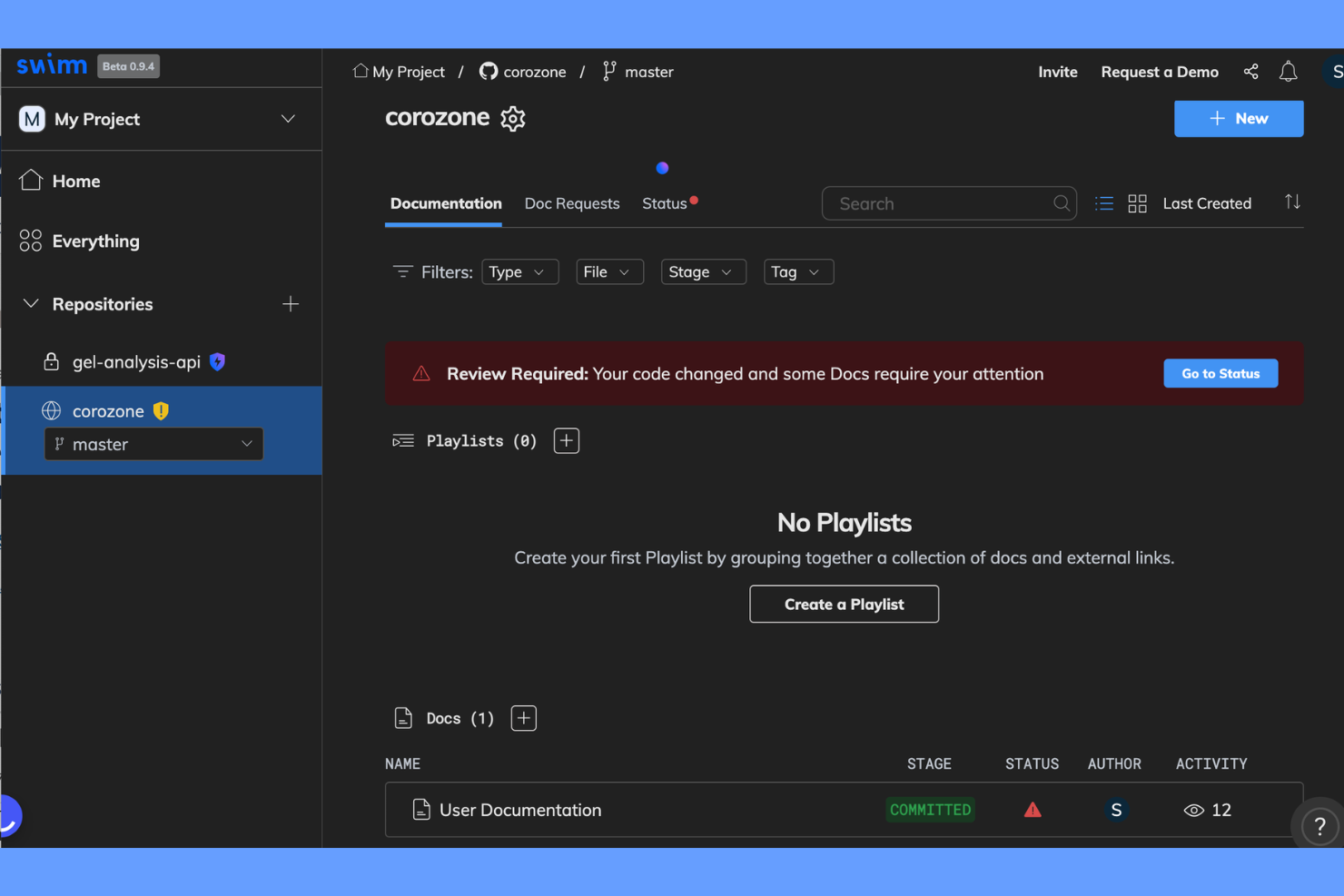
Swimm is an AI-powered documentation platform for engineering teams that generates, maintains, and syncs in-code documentation directly with your codebase.
Who Is Swimm Best For?
Swimm is a good fit for software development teams who need to generate and maintain in-code documentation directly within their repositories.
Why I Picked Swimm
I picked Swimm as one of the best because I can generate documentation directly from code, keeping docs synced with code changes through auto-updating snippets. I like using its AI-powered doc generation to create walkthroughs and explanations that stay relevant as the codebase evolves. My team is able to review, edit, and maintain documentation right inside our development workflow, which fits how we work day to day.
Swimm Key Features
- IDE plugins: Integrate documentation workflows directly into popular code editors.
- Smart doc suggestions: Get context-aware prompts for adding or updating documentation.
- Code-coupled tutorials: Create step-by-step guides linked to specific code sections.
- Documentation review workflows: Assign, review, and approve documentation changes within your team.
Swimm Integrations
Swimm offers native integrations with GitHub, GitLab, Bitbucket, and Slack, and provides an API for custom integrations.
Pros and Cons
Pros:
- Offers IDE plugins for in-context editing
- Supports code walkthroughs linked to codebase
- Syncs documentation with code automatically
Cons:
- Lacks advanced formatting for complex docs
- Limited integrations beyond code repositories

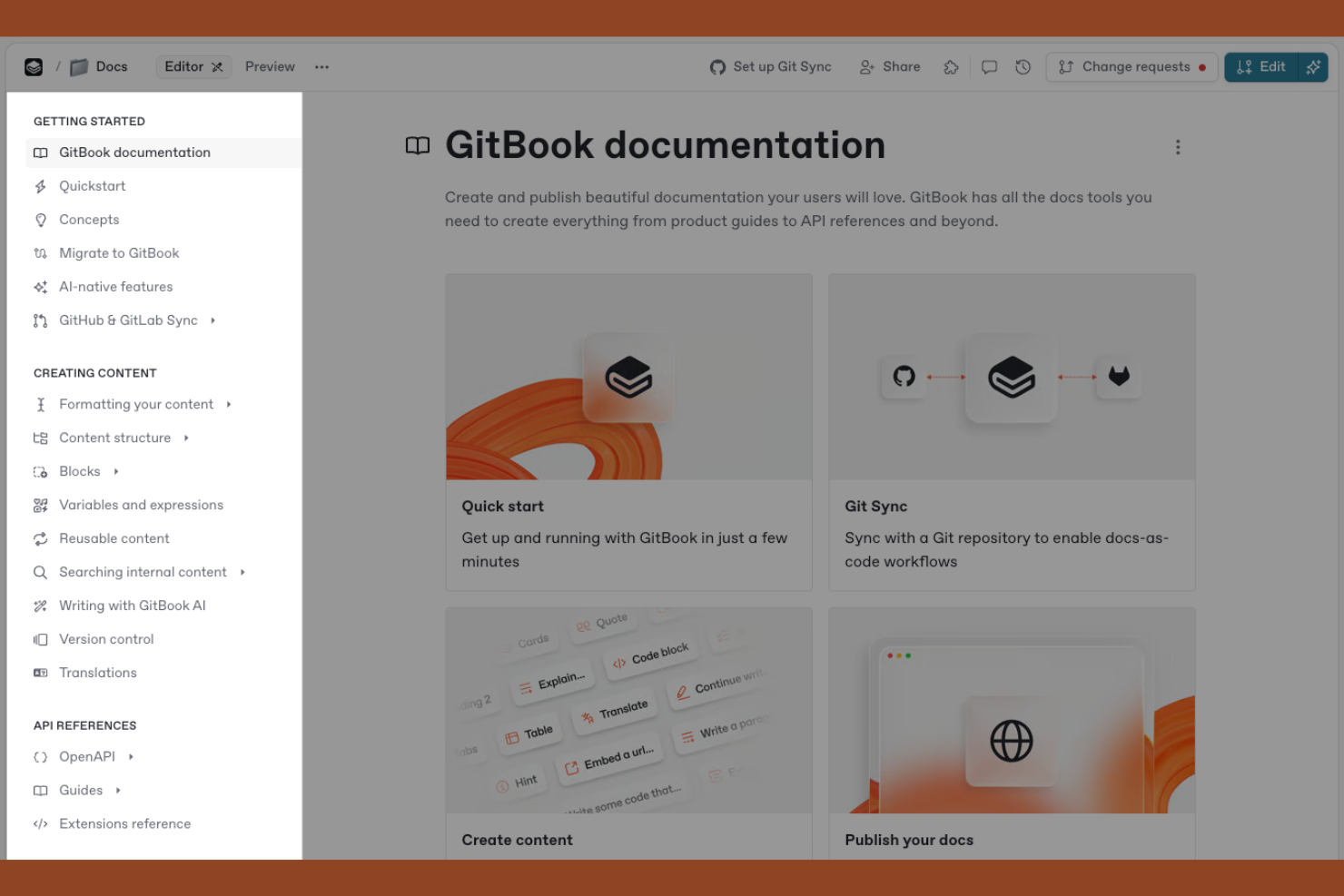
GitBook is an AI-powered documentation platform designed for technical teams to create, organize, and publish structured content, with features for collaborative editing, version control, and custom branding.
Who Is GitBook Best For?
GitBook is a good fit for technical writers and engineering teams at SaaS companies who need to create and maintain structured product documentation.
Why I Picked GitBook
I picked GitBook as one of the best because I can structure technical documentation with nested pages, custom navigation, and markdown support. I like using its AI assistant to generate summaries and improve clarity in API docs and developer guides. My team is able to collaborate on content with granular version control and review workflows, which keeps our technical documentation organized and up to date.
GitBook Key Features
- Custom domains: Publish documentation to your own branded web address.
- Access controls: Set granular permissions for teams and external collaborators.
- Content embedding: Embed rich media, code snippets, and interactive elements in docs.
- Public and private spaces: Organize documentation into spaces with configurable visibility.
GitBook Integrations
GitBook offers native integrations with GitHub, Slack, and Google Analytics, and provides an API for custom integrations.
Pros and Cons
Pros:
- Version history and branching for safe editing
- Offers structured content blocks
- AI generates technical documentation from prompts
Cons:
- API access is restricted to higher plans
- No native multi-language documentation support

Helpjuice is a cloud-based AI knowledge base platform for creating, organizing, and managing internal and external documentation with advanced search, analytics, and collaborative editing features.
Who Is Helpjuice Best For?
Helpjuice is a strong fit for support teams and knowledge managers at midsize to large organizations who need advanced search and analytics in their documentation.
Why I Picked Helpjuice
I picked Helpjuice as one of the best because its AI-powered search lets me surface relevant documentation instantly, even from large, complex knowledge bases. I like using its advanced analytics to see what users are searching for and where gaps exist. The article versioning and collaborative editing features help my team keep content accurate and up to date.
Helpjuice Key Features
- Custom branding: Apply your company’s logo, colors, and domain to the knowledge base.
- Rich text editor: Format articles with images, videos, tables, and code blocks.
- Access permissions: Set user roles and restrict access to specific content.
- Multi-language support: Create and manage documentation in multiple languages.
Helpjuice Integrations
Native integrations are not clearly documented. The tool supports integrations via its API for custom connections.
Pros and Cons
Pros:
- Custom branding for company-specific knowledge bases
- Analytics show article performance and gaps
- AI search delivers highly relevant results
Cons:
- Higher starting price than many competitors
- No built-in workflow automation tools

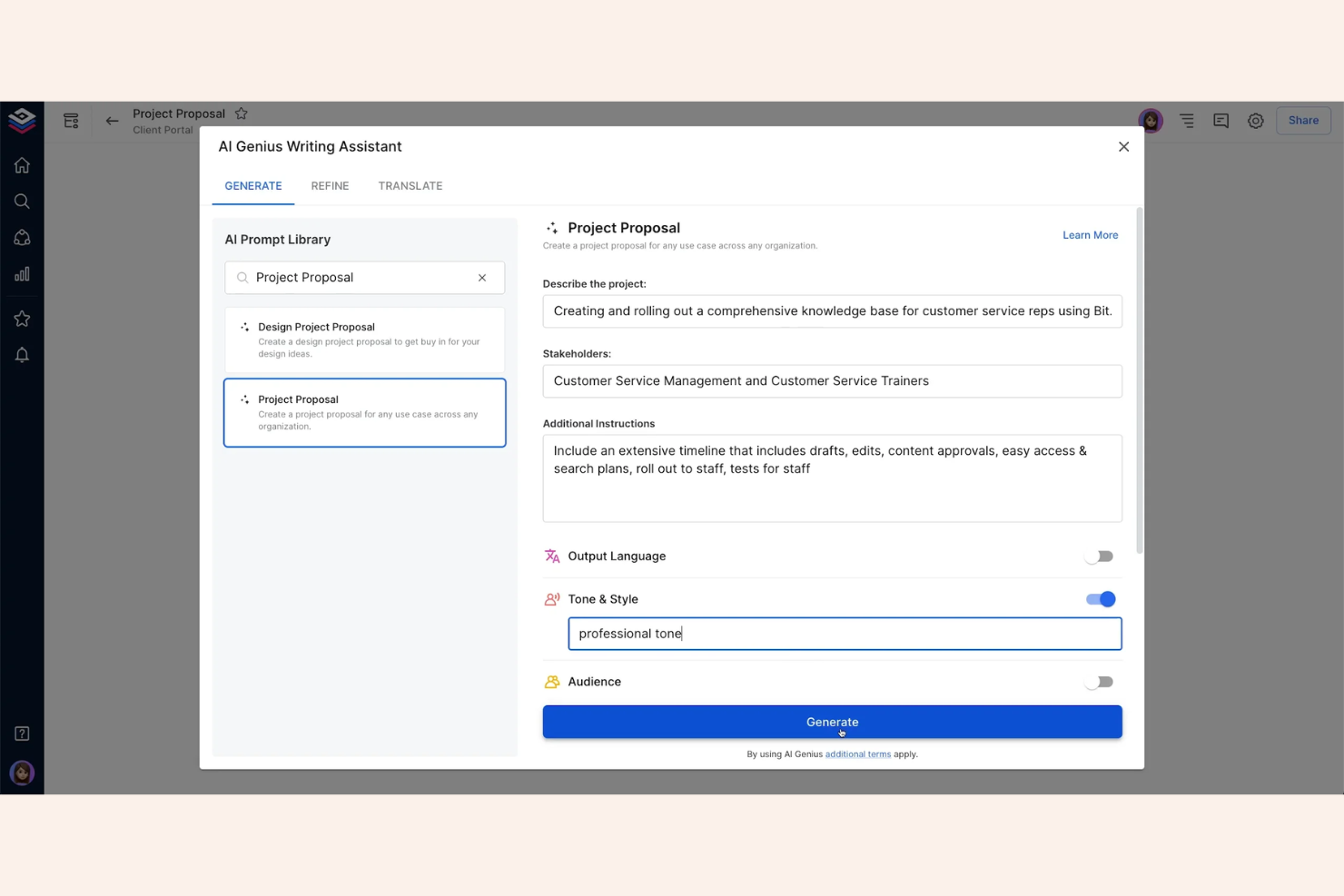
Bit.ai is a cloud-based documentation platform for teams that lets you create, organize, and collaborate on documents with support for rich media embeds and smart content blocks.
Who Is Bit.ai Best For?
Bit.ai is a good fit for marketing, product, and creative teams who need to create interactive documents with embedded media.
Why I Picked Bit.ai
I picked Bit.ai as one of the best because I can embed videos, spreadsheets, code snippets, and over 100 types of rich media directly into my documentation. My team uses Bit.ai’s smart widgets and content blocks to create interactive docs that go far beyond static text. I like that we can collaborate in real time while keeping all our media assets organized and accessible within each document.
Bit.ai Key Features
- Document version history: Track and restore previous versions of any document.
- Real-time collaboration: Multiple users can edit and comment on documents simultaneously.
- Granular access controls: Set permissions for workspaces, folders, and individual documents.
- Content library: Store and reuse assets, templates, and snippets across documents.
Bit.ai Integrations
Bit.ai offers native integrations with Google Drive, OneDrive, Box, Dropbox, YouTube, and GitHub, and provides an API for custom integrations.
Pros and Cons
Pros:
- Granular workspace, folder, and doc permissions
- Real-time collaboration with document mentions
- Embeds over 100 types of rich media
Cons:
- Limited workflow automation features
- No built-in AI writing assistant
Other AI Documentation Tools
Here are some additional AI documentation tools options that didn’t make it onto my shortlist, but are still worth checking out:
- Mintlify
For developer-focused docs automation
- KnowledgeBase.com
For customizable knowledge portals
- ChatPRD
For product requirements documentation
- Document360
For multi-channel self-service portals
- Archbee
For multi-product knowledge portals
- Chisel
For AI-powered PRD generation
- Scribe
For automated step-by-step process capture
- Guru
For AI wiki suggestions
- Aha! Knowledge
For connecting docs to product roadmaps
- Narratize
For cross-functional product knowledge hubs
- Reducto
For extracting structured data from documents


How I Evaluate AI Documentation Tools
Every tool on this list needs to do more than slap an AI label on a basic editor—I look for platforms that actually save product teams hours by drafting PRDs, summarizing research, or keeping docs in sync with Jira and Confluence. I split my evaluation into core functionality every tool must have to qualify and differentiating factors that separate one option from the next.
Core Functionality (Table Stakes For This List)
When I'm selecting tools for my list, I rank each one on a scale from 0 (does not offer the functionality) to 5 (excels in this area) for each core functionality listed below. Then, I calculate the tool's total score into a percentage. Each tool needs to achieve a minimum total score of 65% to be considered for inclusion.
- AI Content Generation: I check whether the tool can draft full PRDs, user stories, or release notes from a prompt—not just rewrite or polish existing text.
- Contextual AI Summarization: The tool should turn lengthy inputs like meeting transcripts, research notes, or ticket threads into structured, usable product docs.
- AI-Powered Search & Retrieval: I look for natural-language search that surfaces answers across the doc repository, not just basic keyword matching.
- Product Stack Integrations: Connecting to tools like Jira, Confluence, Notion, Linear, or Slack matters. I evaluate sync depth, not just whether a connector exists.
- Collaborative Editing Environment: Real-time co-editing, version history, and inline comments are what I expect—product docs are always a team effort.
- AI Structuring & Templates: I look for AI-driven templates that auto-format outputs into product doc types like specs, roadmaps, or PRDs with minimal manual cleanup.
Once I have a list of tools that meet this criteria, I consider what sets each platform apart.
Differentiating Factors (What Sets Vendors Apart)
Here's how I compare and contrast different vendors:
Standout Features
One feature I value is AI meeting capture—tools that record stakeholder calls and auto-convert decisions into PRD updates or action items. Feedback synthesis is another differentiator, where the tool clusters customer interviews and support tickets into themes that feed directly into discovery docs. I also look for auto-generated release notes that pull from merged tickets and changelogs, saving PMs the end-of-sprint scramble of writing them manually.
Beyond Features
Data privacy matters here—I check whether vendors train their models on customer data and whether they offer options like BYO-key or regional data residency. Pricing transparency is another factor I weigh, since some tools bury AI usage costs behind per-token fees that balloon once a full product team is onboard. I also evaluate time-to-value: how quickly a PM team can migrate from Confluence or Notion and start generating useful docs without weeks of setup.
How to Choose AI Documentation Tools
It’s easy to get bogged down in long feature lists and complex pricing structures. To help you stay focused as you work through your unique software selection process, here’s a checklist of factors to keep in mind:
| Factor | What to Consider |
|---|---|
| Scalability | Will the tool handle your documentation volume as your team or company grows? Check user limits, storage, and performance with large knowledge bases. |
| Integrations | Does it connect natively to your core systems (Slack, Jira, Google Workspace, etc.)? Consider API access for custom workflows. |
| Customizability | Can you tailor the structure, branding, and permissions to fit your organization’s needs? Look for flexible templates and role management. |
| Ease of use | Will your team adopt it quickly? Evaluate the interface, navigation, and how much training is needed for non-technical users. |
| Implementation and onboarding | How long will it take to get up and running? Assess migration tools, onboarding support, and the availability of training resources. |
| Cost | Are pricing tiers clear and predictable as you scale? Watch for hidden fees, user-based pricing, and costs for advanced features. |
| Security safeguards | Does the tool meet your data protection standards? Look for encryption, SSO, audit logs, and compliance with regulations relevant to your industry. |
| Support availability | What support channels are offered and during what hours? Consider if you need live chat, phone, or dedicated account management. |
What Are AI Documentation Tools?
AI documentation tools are software platforms that use artificial intelligence to help teams create, organize, and manage knowledge bases or technical documentation. These tools automate tasks like content generation, search, and categorization, making it easier to keep documentation accurate and accessible. They support collaboration, version control, and analytics, helping organizations maintain up-to-date resources for employees or customers.
Features of AI Documentation Tools
When selecting AI documentation tools, keep an eye out for the following key features:
- AI-powered search: Uses artificial intelligence to deliver relevant results from large knowledge bases, helping users find answers quickly and accurately.
- Automated content generation: Leverages AI to draft, summarize, or suggest documentation content, reducing manual writing and speeding up content creation.
- Version control: Tracks changes to articles over time, allowing teams to review, revert, or compare previous versions for better content management.
- Collaboration tools: Enables multiple users to edit, comment, and review documentation simultaneously, supporting team-based content development.
- Access permissions: Lets administrators control who can view, edit, or publish specific documents, ensuring sensitive information stays protected.
- Analytics and reporting: Provides insights into article usage, search trends, and content gaps, helping teams improve documentation quality and relevance.
- Custom branding: Allows organizations to apply their own logos, colors, and domain, creating a consistent and professional knowledge base experience.
- Multi-language support: Supports the creation and management of documentation in multiple languages, making resources accessible to global teams.
- Integrations: Connects with other business tools like project management, communication, or CRM platforms to simplify workflows and centralize information.
- Rich text editor: Offers formatting options for text, images, videos, and code blocks, making documentation clear, engaging, and easy to follow.
Benefits of AI Documentation Tools
Implementing AI documentation tools provides several benefits for your team and your business. Here are a few you can look forward to:
- Faster content creation: Automated content generation and AI suggestions help teams produce documentation more quickly and with less manual effort.
- Improved search accuracy: AI-powered search delivers highly relevant results, making it easier for users to find the information they need.
- Consistent and up-to-date knowledge: Version control and collaboration tools ensure documentation stays accurate and reflects the latest updates.
- Enhanced team collaboration: Real-time editing, commenting, and access controls support teamwork across departments or locations.
- Actionable insights: Analytics and reporting features highlight content gaps and usage trends, guiding continuous improvement of your knowledge base.
- Scalability for growing teams: Multi-language support and flexible permissions make it easy to expand documentation as your organization grows.
- Professional presentation: Custom branding and rich text editing create a polished, user-friendly experience for both internal and external audiences.
Costs and Pricing of AI Documentation Tools
Selecting AI documentation tools requires an understanding of the various pricing models and plans available. Costs vary based on features, team size, add-ons, and more. The table below summarizes common plans, their average prices, and typical features included in AI documentation tools solutions:
Plan Comparison Table for AI Documentation Tools
| Plan Type | Average Price | Common Features |
|---|---|---|
| Free Plan | $0 | Basic content creation, limited AI search, single user access, limited storage, and community support. |
| Personal Plan | $5-$25/user/month | AI-powered search, basic analytics, limited integrations, single user, and email support. |
| Business Plan | $20-$60/user/month | Multi-user collaboration, advanced analytics, custom branding, API access, and priority support. |
| Enterprise Plan | $60-$120/user/month | Unlimited users, advanced security, custom integrations, dedicated account manager, and compliance features. |
AI Documentation Tools FAQs
Here are some answers to common questions about AI documentation tools:
How do AI documentation tools improve knowledge management?
AI-driven documentation tools improve knowledge management by automating content organization and surfacing relevant information through smart search. By using a powerful LLM (Large Language Model), these tools can highlight outdated content and assist in technical writing to ensure all articles remain high-quality. This helps teams keep process documentation and SOPs accurate, accessible, and easy to update as business needs change.
Can AI documentation tools integrate with other business software?
Yes, most AI documentation tools offer integrations with popular business platforms like Slack, Jira, Google Workspace, and project management tools. Many also provide specialized support for API documentation, allowing developers to sync code repositories and automate document processing. These collaboration features help centralize information and make documentation more accessible within your team’s existing systems, often acting as a specialized copilot for internal knowledge.
Are AI documentation tools secure for sensitive information?
Yes, many AI documentation tools, including both proprietary and open-source solutions, include security features like encryption, SSO, and audit logs. When evaluating AI models, ensure the provider has strict data privacy protocols to prevent your sensitive information from being used to train public versions of ChatGPT or other external models.
What should I consider when migrating existing documentation?
When migrating, consider the tool’s import options, support for various file formats, and whether it preserves formatting and metadata. Look for onboarding resources, migration guides, or dedicated support to help your team transition smoothly without losing valuable information.
Do AI documentation tools support multiple languages?
Yes, many AI documentation tools offer multi-language support, allowing you to create and manage documentation in several languages. This is especially useful for global teams or organizations serving international customers. Always verify language capabilities before choosing a solution.