

There are so many different stakeholder management platforms on the market that selecting the best one for you can be tricky. You want to improve stakeholder relationships, enhance communication, have better alignment with stakeholder expectations, and mitigate risks associated with stakeholder engagement, but need the right tool for your team. I've got you covered! In this post, I leverage my personal experience managing diverse products and using many different platforms with large teams and multiple stakeholders as I share my picks of the best stakeholder management software.
Why Trust Our Software Recommendations
6,700+
Reviews
20
Industry experts
16+
Evaluation factors
14
Years
Our team has been testing and reviewing software since 2012. As product managers ourselves, we know how difficult—and important—it is to choose the right software.
For this guide, we evaluated tools using hands-on testing and independent research, scoring tools using our selection criteria.
Our reviews reflect our human editorial judgment, not a sales pitch.
Expert reviewers:
- Andrew LumbySenior TPM
- Cristiano ValimSenior UI/UX Lead


Stakeholder Management Software Comparison Table
The table below compares pricing details for my top stakeholder management software selections.
| Tool | Best For | Trial Info | Price | ||
|---|---|---|---|---|---|
| 1 | Best for approval workflows involving stakeholders | Free plan available | From $169/month (billed annually) | Website | |
| 2 | Best for all-in-one PM and stakeholder tracking | Free plan available | From $7/user/month (billed annually) | Website | |
| 3 | Best for infrastructure and government engagement teams | Free demo available | Pricing upon request | Website | |
| 4 | Best for property and GIS-linked stakeholder tracking | Free trial available and free demo available | Pricing upon request | Website | |
| 5 | Best for community and public engagement tracking | Free demo available | Pricing upon request | Website | |
| 6 | Best for building stakeholder plans around projects | 30-day free trial | From $12/user/month | Website | |
| 7 | Best for engagement and consultation teams | No Free Trial | From $995/user/month | Website | |
| 8 | Best for field-based community engagement teams | Free demo available | Pricing upon request | Website | |
| 9 | Best for sales team stakeholder mapping in Salesforce | Free demo available | Pricing upon request | Website | |
| 10 | Best for sales account stakeholder mapping | Free demo available | Pricing upon request | Website |





Best Stakeholder Management Software Reviews
Here’s a brief description of each stakeholder management system to showcase each tool’s best use case, some noteworthy features, and screenshots to give a snapshot of the user interface.
 Best for approval workflows involving stakeholders
- Free plan available
- From $169/month (billed annually)
Visit WebsiteCustomer Rating:4.7/5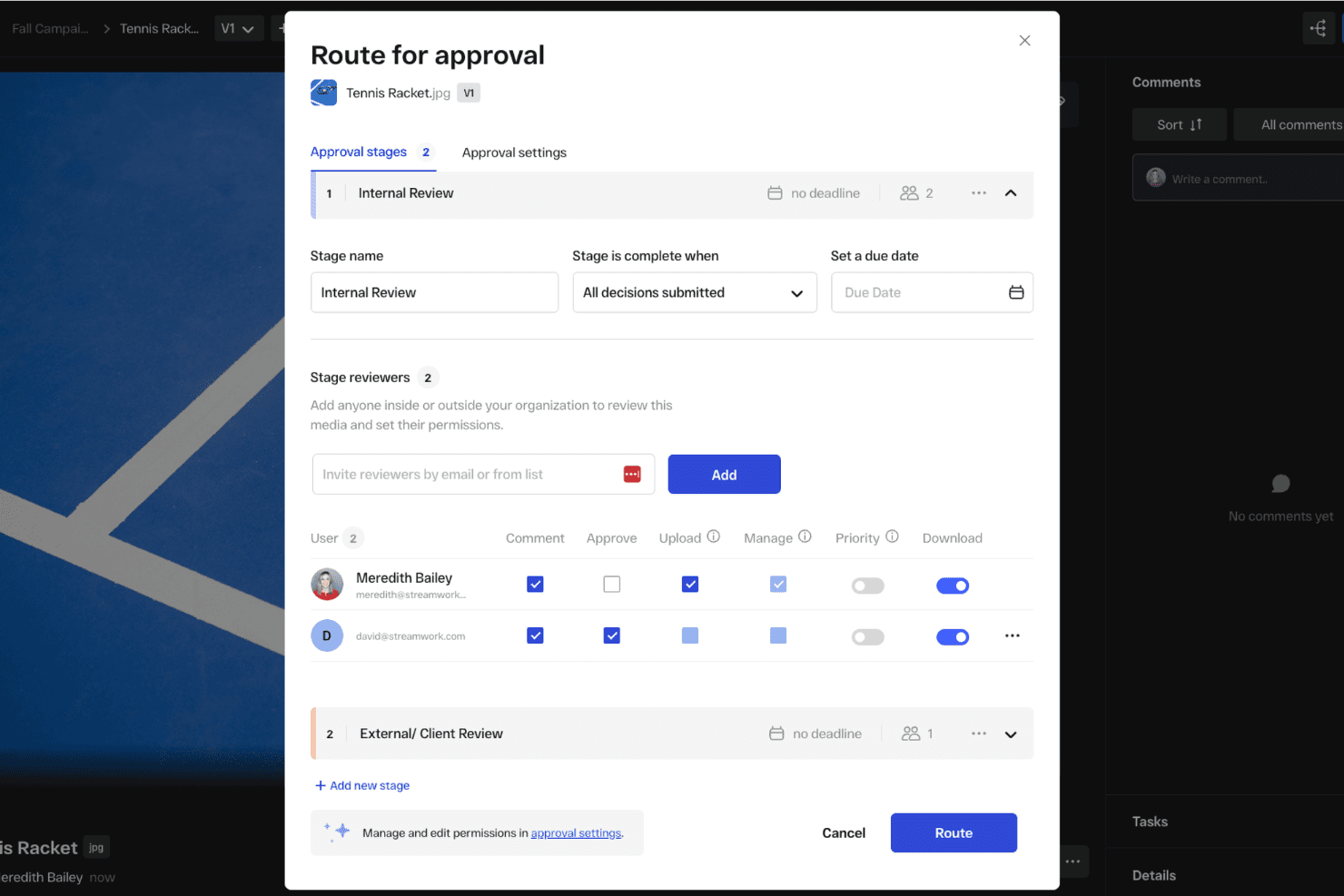
You can set up automated approval workflows to get feedback from external stakeholders. StreamWork is an AI-enabled online proofing and creative approval platform that handles multi-stage approval routing, version tracking, time-stamped feedback, and external reviewer access.
Who Is StreamWork Best For?
StreamWork suits marketing teams and creative agencies that need to manage multi-stage content approvals with external stakeholders like clients, executives, or legal reviewers.
Why I Picked StreamWork
I picked StreamWork as one of the best because it handles the part of stakeholder management that tends to break down most: getting sign-off from people outside your team. I love that external reviewers, whether that's a client, legal, or a senior executive, can approve directly through a single link with no account required. Multi-stage routing lets you sequence approvals through legal, then brand, then leadership, and every decision gets a timestamped audit trail.
StreamWork Key Features
- Multi-stage approval routing: Build sequential approval workflows that move through distinct groups—like legal, brand, and leadership—one stage at a time.
- Time-stamped, pinned comments: Reviewers can leave feedback anchored to a specific location on a file or exact frame in a video, keeping context intact.
- Automated reminders and deadlines: StreamWork sends nudges to approvers automatically, so you're not manually following up to keep reviews on schedule.
- One-click audit trail: Every version, comment, and approval decision is logged and accessible in a single click for governance and accountability purposes.
StreamWork Integrations
StreamWork lists seven integrations, including Adobe Creative Cloud, Slack, monday.com, Asana, Dropbox, Figma, and Box. It also offers an API and webhooks for custom integrations.
Pros and Cons
Pros:
- Multi-stage routing records approval decisions
- Pinned comments preserve review context
- External stakeholders approve without accounts
Cons:
- Creative reviews replace relationship tracking
- No stakeholder mapping or contact database
Learn more about StreamWork: Best for all-in-one PM and stakeholder tracking
- Free plan available
- From $7/user/month (billed annually)
Visit WebsiteCustomer Rating:4.6/5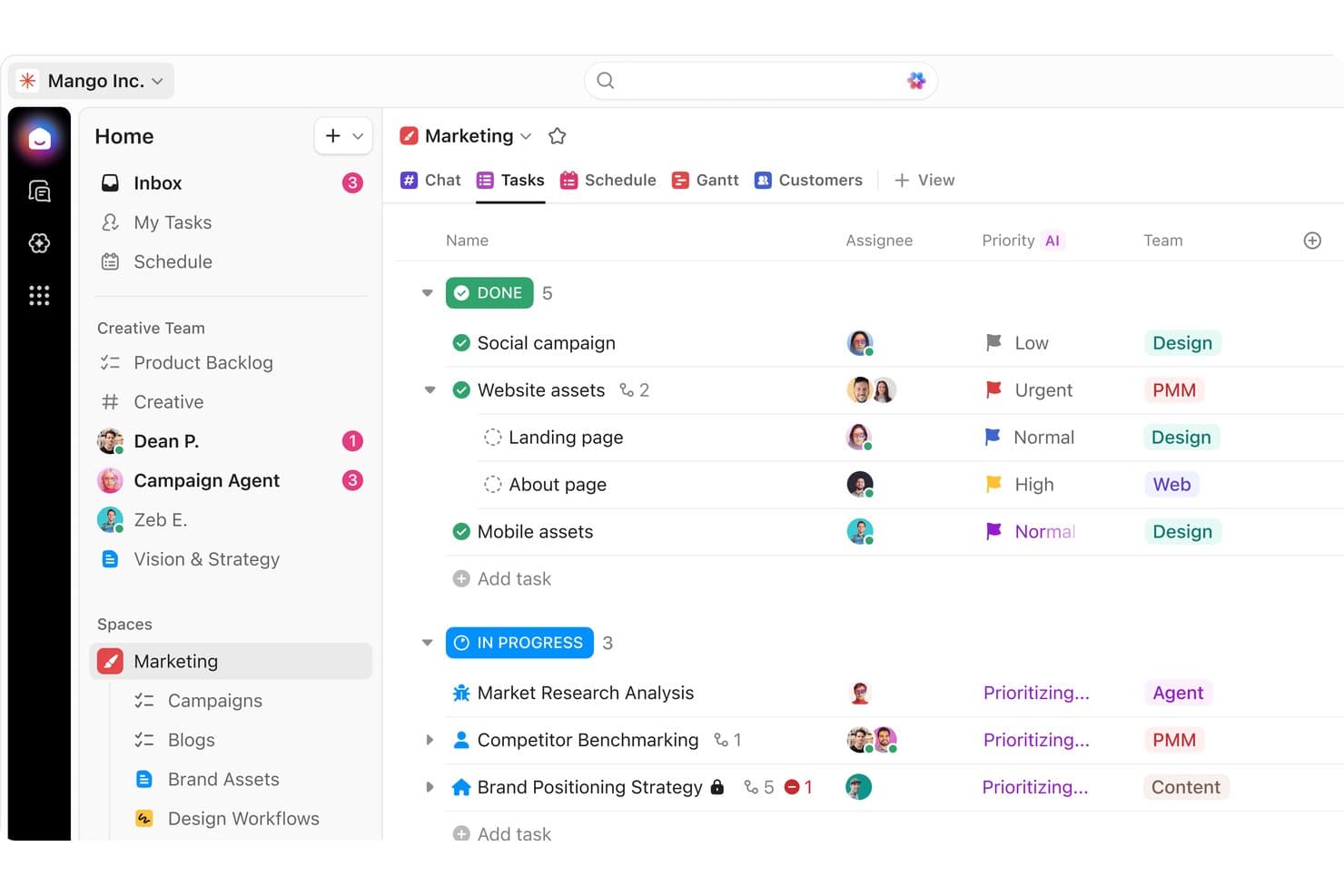
ClickUp organizes marketing tasks by status, priority, and team for stakeholders. ClickUp is a general-purpose work management platform that combines task tracking, project planning, stakeholder analysis templates, custom fields, dashboards, and collaboration tools in a single workspace.
Who Is ClickUp Best For?
ClickUp works well for cross-functional teams that already manage projects in one workspace and want to layer stakeholder tracking on top without adopting a separate tool.
Why I Picked ClickUp
I've included ClickUp in my top picks because it lets teams run stakeholder tracking and project delivery in the same workspace, without juggling separate tools. I particularly like its Stakeholder Analysis Template, which uses influence and support scoring across grouped views to help teams prioritize who needs attention and what action to take. The AI Notetaker also adds real value, automatically turning meeting touchpoints with stakeholders into assigned tasks tied directly to your project records.
ClickUp Key Features
- Stakeholder Analysis Template: A pre-built template with custom fields for influence and support scoring, plus grouped views that organize stakeholders by influence level, action type, and support status.
- Unlimited dashboards: Business plan users can build multiple dashboards with custom cards to track engagement activity and share progress with leadership across projects.
- Automations: Rule-based automations trigger task assignments, status updates, and reminders based on stakeholder record changes, reducing manual follow-up across your team.
- Guest access with permissions: External stakeholders can be invited as guests with role-specific permissions, controlling exactly what they can view or edit within your workspace.
ClickUp Integrations
ClickUp has native integrations with Slack, Microsoft Teams, Google Calendar, Zoom, HubSpot, Zendesk, GitHub, and Tableau. It also supports custom integrations through its API and Zapier.
Pros and Cons
Pros:
- Dashboards connect engagement with delivery
- Meeting notes become assigned follow-ups
- Stakeholder templates speed influence assessment
Cons:
- Cluttered workflows can hinder executive adoption
- Stakeholder relationships require manual modeling
Learn more about ClickUp: Best for infrastructure and government engagement teams
- Free demo available
- Pricing upon request
Visit WebsiteCustomer Rating:5/5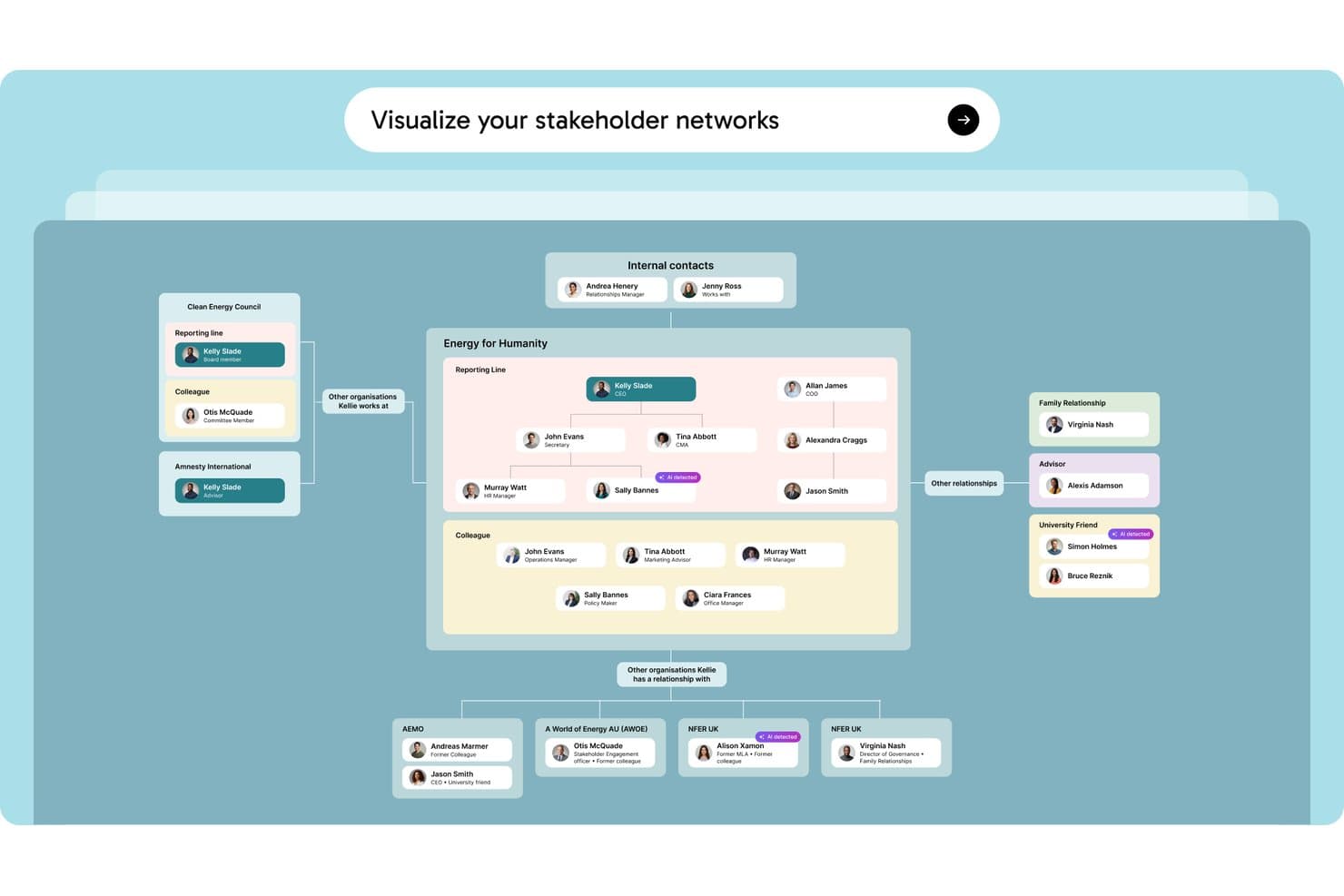
Simply Stakeholders maps relationships between stakeholders, internal contacts, and external organizations in a visual network. Simply Stakeholders is a stakeholder relationship management platform designed for complex, long-term engagement programs, offering multi-dimensional stakeholder mapping, interaction tracking, sentiment analysis, and AI-generated reporting.
Who Is Simply Stakeholders Best For?
Simply Stakeholders is a strong fit for community engagement officers, communications teams, and program managers working in infrastructure, energy, and government sectors.
Why I Picked Simply Stakeholders
I've included Simply Stakeholders in my top picks because it's purpose-built for the long-term, relationship-heavy engagement programs common in infrastructure and government work. I particularly like its multi-dimensional stakeholder mapping, which lets you score each stakeholder across influence, interest, impact, criticality, and position simultaneously. Its AI-driven sentiment analysis also updates based on logged interactions, so your team can spot shifting opposition before it becomes a problem on a major project.
Simply Stakeholders Key Features
- Outlook and Gmail plugins: Save emails, meetings, and contact details directly into the platform from your inbox without switching tools.
- Grievance management module: Log, track, and resolve community grievances in a dedicated add-on module built for public-facing engagement programs.
- Role-based access controls: Restrict access to confidential contacts and interactions so only the right team members can view or engage sensitive stakeholder records.
- Mobile app: Access stakeholder records, log interactions, and manage tasks on the go via Android and iOS apps.
Simply Stakeholders Integrations
Simply Stakeholders offers Outlook and Gmail plugins, plus an API for custom integrations. It also supports Zapier.
Pros and Cons
Pros:
- Role controls protect confidential stakeholder records
- AI summarizes interactions and tracks sentiment
- Maps stakeholders across five dimensions
Cons:
- Limited fit for product management teams
- Large contact imports require upfront setup
Learn more about Simply Stakeholders: Best for property and GIS-linked stakeholder tracking
- Free trial available and free demo available
- Pricing upon request
Visit WebsiteCustomer Rating:4.8/5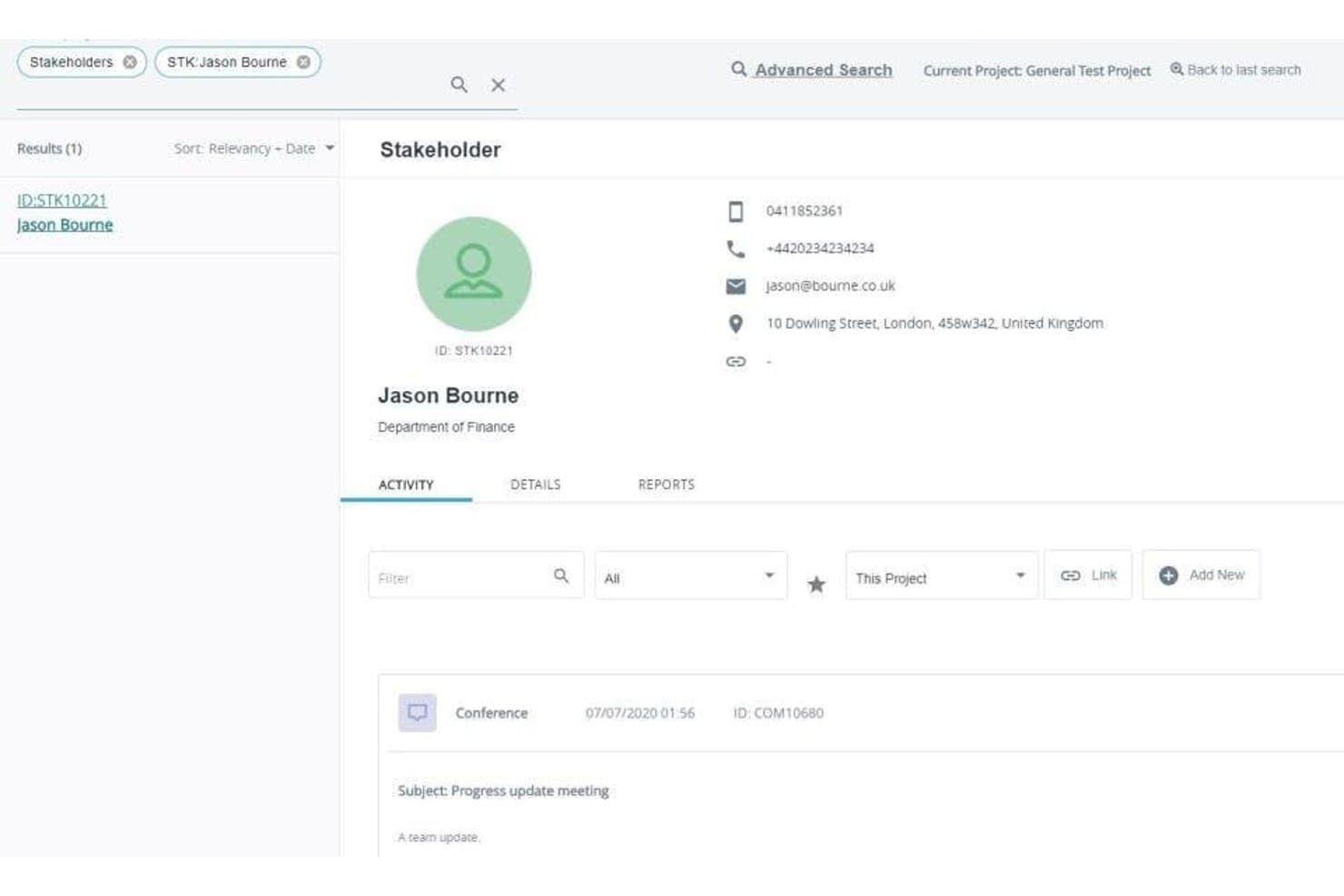
Darzin's stakeholder profiles log contact details and a full activity history of every interaction. Darzin is a stakeholder management platform purpose-built for public consultation and engagement teams, combining stakeholder mapping, multi-channel interaction tracking, AI sentiment analysis, issue management, and cross-project reporting.
Who Is Darzin Best For?
Darzin is a strong fit for public consultation and community engagement teams in government who need to manage stakeholder relationships across complex, multi-project environments.
Why I Picked Darzin Software
I picked Darzin as one of the best because it's genuinely built like a CRM, but wired specifically for stakeholder relationships rather than sales pipelines. I love that it maps stakeholders by influence, interest, and impact, while also linking affected properties to a GIS map so you can see exactly who raised which issues and where. AI sentiment analysis runs across text-heavy feedback, surfacing common themes and points of disagreement without manual review.
Darzin Software Key Features
- Outlook and Gmail plugins: Email plugins automatically log emails to the correct stakeholder record and create a new contact if one doesn't exist.
- Cross-project reporting: You can run automated reports across multiple projects or your entire organization from a single view.
- Survey creation and publishing: You can build and publish surveys directly in the platform, with responses matched to stakeholder records automatically.
- Mobile field apps: iOS and Android apps let you capture notes and interactions while working on-site or in the field.
Darzin Software Integrations
Darzin connects with Outlook and Gmail through plugins. Native integrations and API availability aren’t clearly documented.
Pros and Cons
Pros:
- Centralized interaction history spans engagement channels
- AI sentiment analysis surfaces feedback themes
- GIS links issues to affected properties
Cons:
- Limited public review evidence
- No roadmap or backlog workflows
Learn more about Darzin Software: Best for community and public engagement tracking
- Free demo available
- Pricing upon request
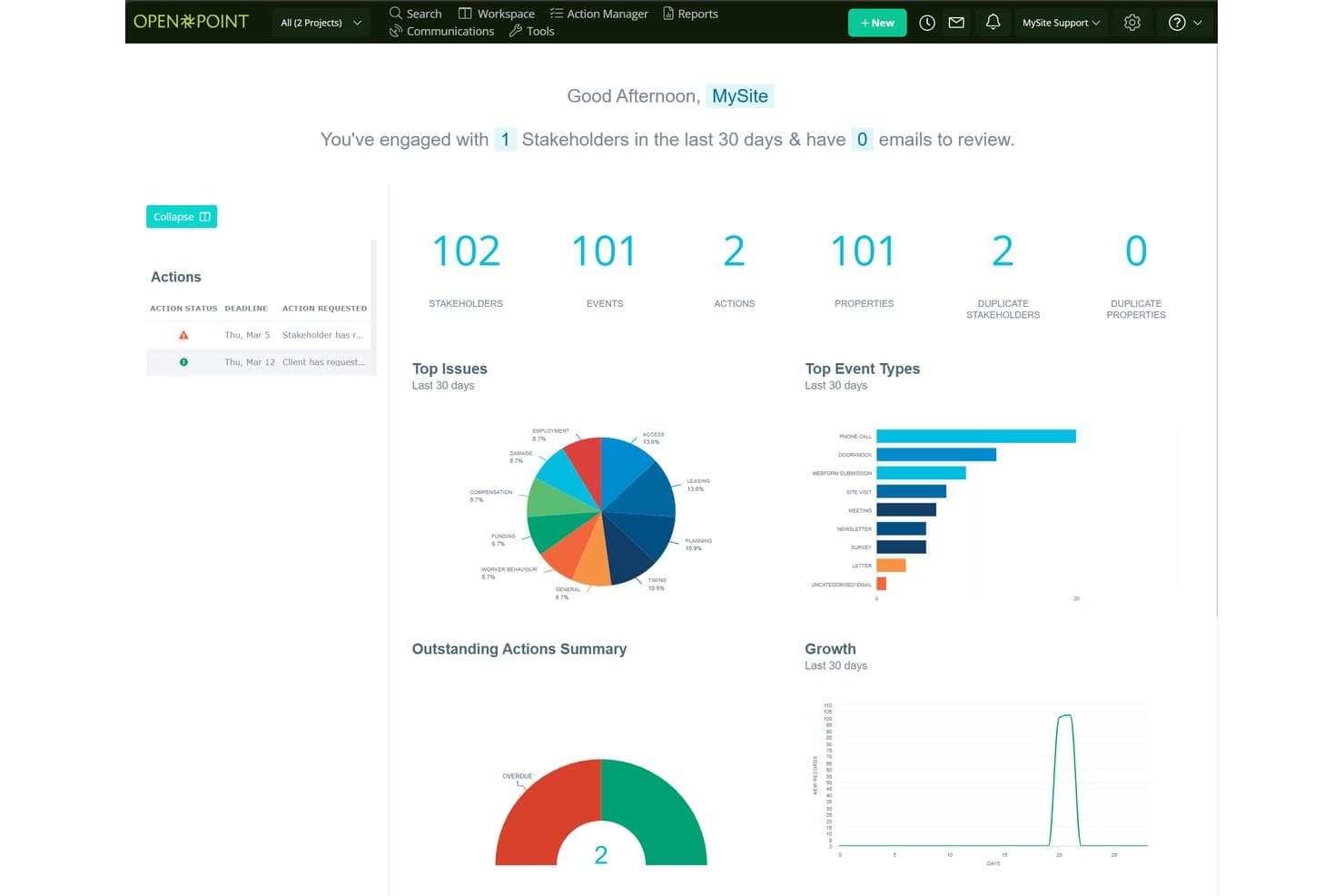
Social Pinpoint centralizes stakeholder data, events, and actions in one dashboard. Social Pinpoint is a stakeholder engagement platform that combines a stakeholder relationship management system, community engagement tools, interaction tracking, and AI-driven sentiment analysis and reporting.
Who Is Social Pinpoint Best For?
Social Pinpoint suits teams in government, infrastructure, and utilities that need to manage public consultation and community engagement across large-scale projects.
Why I Picked Social Pinpoint
I picked Social Pinpoint as one of the best because no other tool on this list combines a full community engagement toolkit with a stakeholder relationship management system in one platform. I love that it captures every interaction across email, SMS, calls, and webforms, then links them directly to stakeholder records and projects. Its AI-driven sentiment tagging flags negative responses in real time, so I can spot rising community opposition before it escalates.
Social Pinpoint Key Features
- Outlook add-in: Saves emails from Outlook directly into stakeholder records, keeping your interaction history complete without manual entry.
- GIS-based map layers: Visualizes stakeholder concentrations as icons, heatmaps, or clusters on a custom base map to identify geographic hot spots for specific issues.
- 40+ community engagement tools: Includes social maps, quick polls, participatory budgeting, idea walls, forums, and Q&A tools for structured public consultation.
- Cross-project reporting: Compares engagement activity, sentiment, and themes across multiple projects, programs, regions, and time periods in one dashboard.
Social Pinpoint Integrations
Documented integrations include Microsoft Outlook, Social Point, and its stakeholder management module. Social Pinpoint also offers an open REST API for CRM, GIS, and document management connections, plus SAML SSO with Microsoft Entra ID and Okta.
Pros and Cons
Pros:
- Supports audits with detailed interaction histories
- Maps geographic engagement hotspots and sentiment
- Links community feedback to stakeholder records
Cons:
- Targets consultation teams over product managers
- Lacks influence-interest stakeholder mapping
Learn more about Social Pinpoint: Best for building stakeholder plans around projects
- 30-day free trial
- From $12/user/month
Visit WebsiteCustomer Rating:4.4/5
Smartsheet offers a useful stakeholder communication plan template. Smartsheet is a spreadsheet-based work management platform that supports stakeholder tracking through customizable registers, engagement plan templates, Gantt and calendar views, automated reminders, and reporting dashboards.
Who Is Smartsheet Best For?
Smartsheet is a strong fit for project-driven teams that want to manage stakeholder registers, engagement plans, and communication logs in the same place they run their projects.
Why I Picked Smartsheet
I picked Smartsheet as one of the best because it's the only tool on this list that lets you manage stakeholder plans directly inside your project work. I love that free engagement plan templates come with built-in Gantt and calendar views, so you can plot outreach tasks on the same timeline as your deliverables. Unlimited free Contributors and Guests mean external stakeholders can be part of the plan without adding to your seat count.
Smartsheet Key Features
- Stakeholder register builder: Create custom stakeholder logs with dropdown columns, conditional formatting, and row-level comments, attachments, and activity history.
- Automated reminders and alerts: Set up rule-based automations to trigger outreach reminders, approval requests, and status alerts across your team.
- Reporting dashboards: Build unlimited reports and dashboards across all plans to visualize stakeholder activity and share progress with leadership.
- Dynamic View: Control exactly which rows and columns external stakeholders can see or edit, giving you scoped, secure access without extra licensing costs.
Smartsheet Integrations
Smartsheet offers nearly 100 integrations, including Microsoft 365, Google Workspace, Slack, Power BI, Tableau, HubSpot, Microsoft Dynamics 365, and Jira through a connector add-on.
Pros and Cons
Pros:
- External participants can contribute without full access
- Flexible registers support custom engagement workflows
- Stakeholder plans share project timelines
Cons:
- Users report dated, changing interface experiences
- Stakeholder mapping requires manual setup
Learn more about Smartsheet:
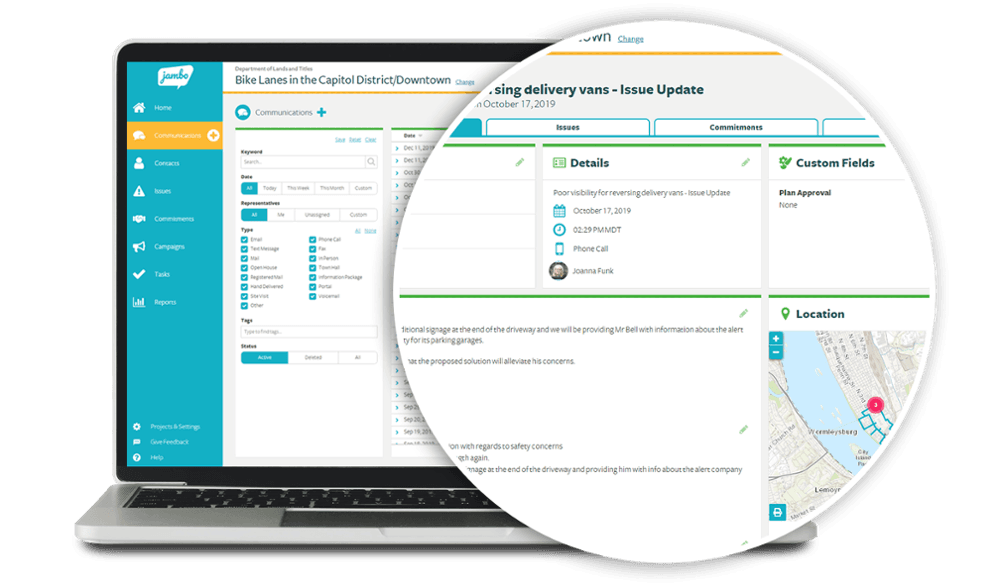
Jambo allows stakeholders to dig down into the detail. Jambo is a stakeholder relationship management (SRM) platform built for engagement and consultation teams, offering interaction tracking, issue and grievance logging, sentiment analysis, geospatial mapping, and compliance reporting.
Who Is Jambo Best For?
Jambo is a strong fit for government, energy, and infrastructure teams that manage community and regulatory engagement across multiple projects.
Why I Picked Jambo
I picked Jambo as one of the best because it's purpose-built for engagement and consultation teams in a way that generic CRMs simply aren't. I love how it ties interaction logging directly to issues and grievances, so when a community concern escalates, your full communication history is already attached. Its AI Sentiment scoring also updates automatically from interaction records, giving you a real-time read on stakeholder mood across a project without manual tagging.
Jambo Key Features
- Outlook add-in: A free Microsoft Outlook add-in logs emails and meetings directly into Jambo and creates contact records automatically.
- Visual risk matrix: Issues and grievances are ranked by impact and urgency on a visual matrix, giving your team a clear view of escalating concerns.
- Global View dashboard: Combines data across all your projects into a single view, with the ability to split by project, sub-project, or program.
- Geospatial mapping: A built-in Esri map viewer displays engagement locations and hotspots, with an optional add-on for ArcGIS Pro integration and project boundary layers.
Jambo Integrations
Jambo has documented integrations with Microsoft Outlook and Esri ArcGIS Pro. Enterprise and higher plans include a public API and Zapier.
Pros and Cons
Pros:
- Supports compliance-focused reporting workflows
- Links grievances with engagement records
- Centralizes stakeholder communication histories
Cons:
- Campaign coordination tools remain unreleased
- No influence-interest stakeholder mapping
Learn more about Jambo:- Best for field-based community engagement teams
- Free demo available
- Pricing upon request
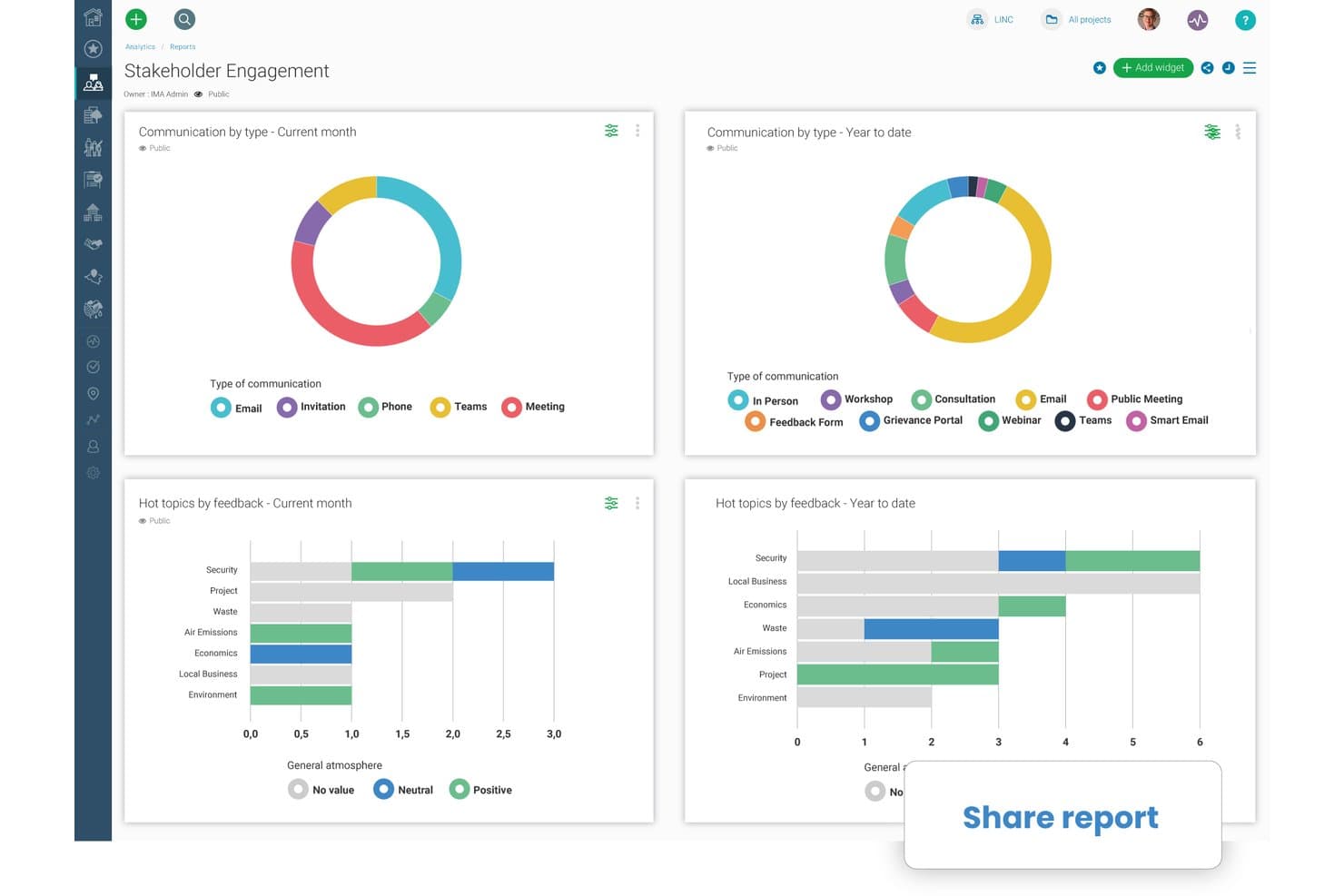
Borealis lets users share stakeholder engagement reports instantly. Borealis is a stakeholder engagement platform built for field-based and community relations teams, combining GIS mapping, interaction tracking, engagement planning, grievance management, and AI-powered reporting in one place.
Who Is Borealis Best For?
Borealis is a strong fit for community relations and public engagement teams working in regulated, land-based industries like energy, mining, and utilities.
Why I Picked Borealis
Borealis earns its spot on my shortlist because it's purpose-built for community relations teams doing real field work, not just desk-based stakeholder tracking. I love that its built-in GIS and ArcGIS mapping links stakeholders directly to physical assets and locations, which matters when your team is managing land-based projects across multiple sites. The offline mobile app means field staff can log interactions and grievances on-site without waiting for connectivity.
Borealis Key Features
- AI-powered report drafting: Borealis automatically generates draft reports from your logged project data, pulling in relevant interactions, issues, and stakeholder details.
- "Ask AI" query tool: You can ask direct questions about your project data in plain language, and the AI returns answers with cited sources from within Borealis.
- Grievance and contribution portals: Built-in online portals let community members submit complaints, donation requests, or concerns directly into the platform for your team to manage.
- Power BI API connection: Borealis connects to Power BI via API, letting you pull engagement and reporting data into your existing analytics environment.
Borealis Integrations
Borealis offers built-in integrations with Outlook, Gmail, Mailchimp, ArcGIS, and the U.S. Government Officials Database. Its API connects with Power BI, CRM, project management tools, and other corporate systems.
Pros and Cons
Pros:
- AI drafts reports from logged engagement data
- Offline mobile logging supports field visits
- GIS maps stakeholders to physical assets
Cons:
- Online engagement options remain relatively limited
- Configuration can complicate initial onboarding
Learn more about Borealis: - Best for sales team stakeholder mapping in Salesforce
- Free demo available
- Pricing upon request
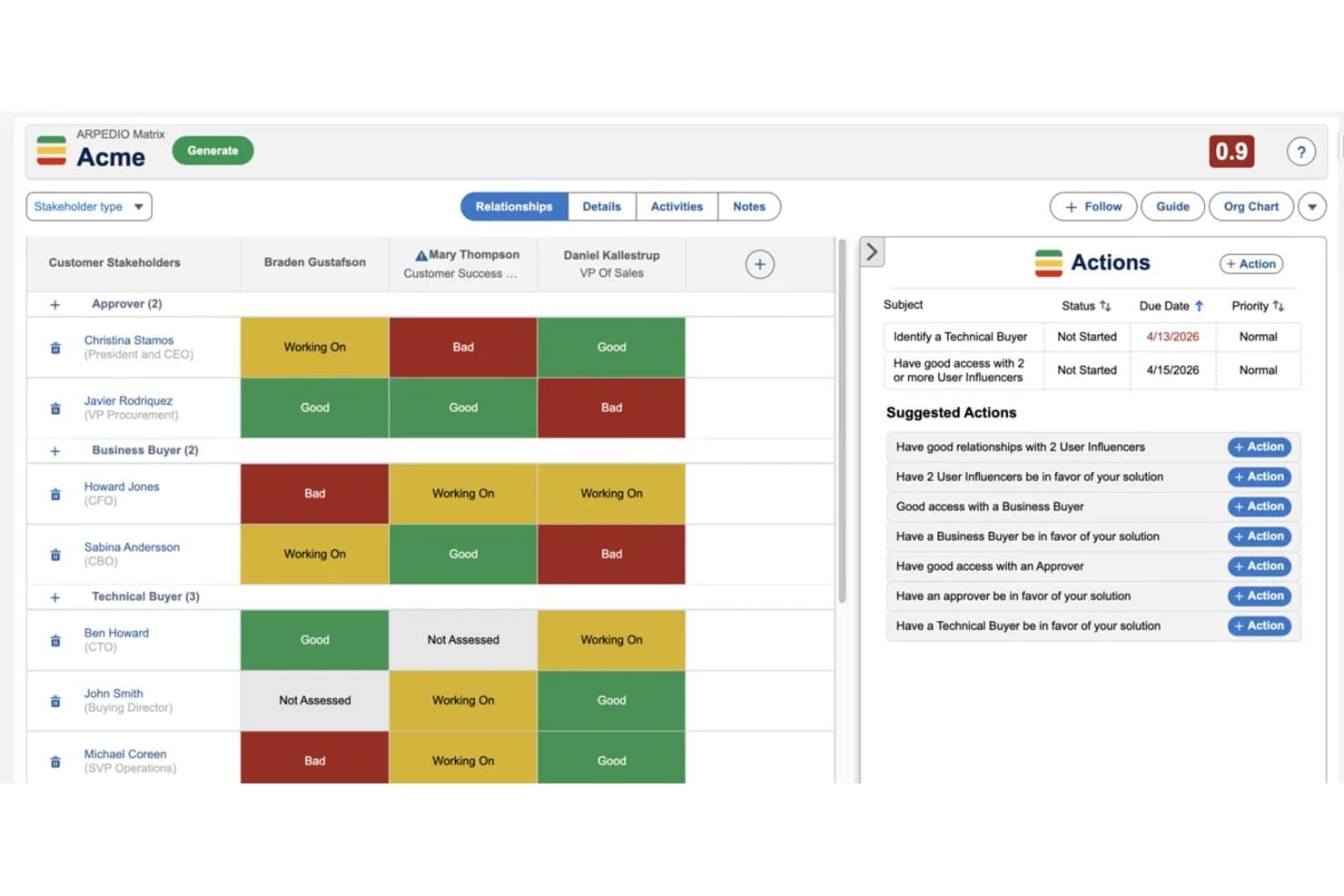
Arpedio maps stakeholder relationships and tracks engagement status visually. Arpedio is a Salesforce-native account-based selling platform that combines AI-powered stakeholder mapping, relationship scoring, interaction tracking, and account planning tools for enterprise sales teams.
Who Is Arpedio Best For?
Arpedio is built for enterprise sales teams—strategic account managers, key account managers, and RevOps leaders—who run complex B2B deals entirely inside Salesforce.
Why I Picked Arpedio
Arpedio earns its spot on my shortlist because it's the only stakeholder mapping tool I've found that's built entirely inside Salesforce rather than bolted onto it. For sales teams running complex B2B deals, that means AI-generated org charts built from existing contact and activity data, with no manual diagramming required. I also like the relationship matrix, which scores each stakeholder on access, influence, and support level, so reps can immediately see who's a champion and who's a blocker.
Arpedio Key Features
- Sentiment agent: Tracks whether individual stakeholder relationships are warming, cooling, or stalled based on activity data, and surfaces coaching prompts for reps.
- Account plan records: Structured Salesforce records that include an executive summary, SWOT analysis, success criteria, and milestones tied to specific stakeholders.
- Activity history continuity: Logs emails, calls, meetings, and notes to contact records so the full relationship history carries over when reps change.
- White-space analysis matrix: Maps your Salesforce product catalogue against account dimensions like regions and business units to surface revenue gaps.
Arpedio Integrations
Arpedio runs natively in Salesforce Lightning and integrates with Einstein Activity Capture, Salesforce Inbox, and Outreach for activity data. It also supports custom activity connectors, but no native Jira, Slack, Asana, or product-tool integrations are documented.
Pros and Cons
Pros:
- Sentiment signals flag cooling relationships early
- Relationship history survives account team changes
- AI-built org charts reduce manual mapping
Cons:
- No classic influence-interest grid
- Sales focus excludes project stakeholder workflows
Learn more about Arpedio:  Best for sales account stakeholder mapping
- Free demo available
- Pricing upon request
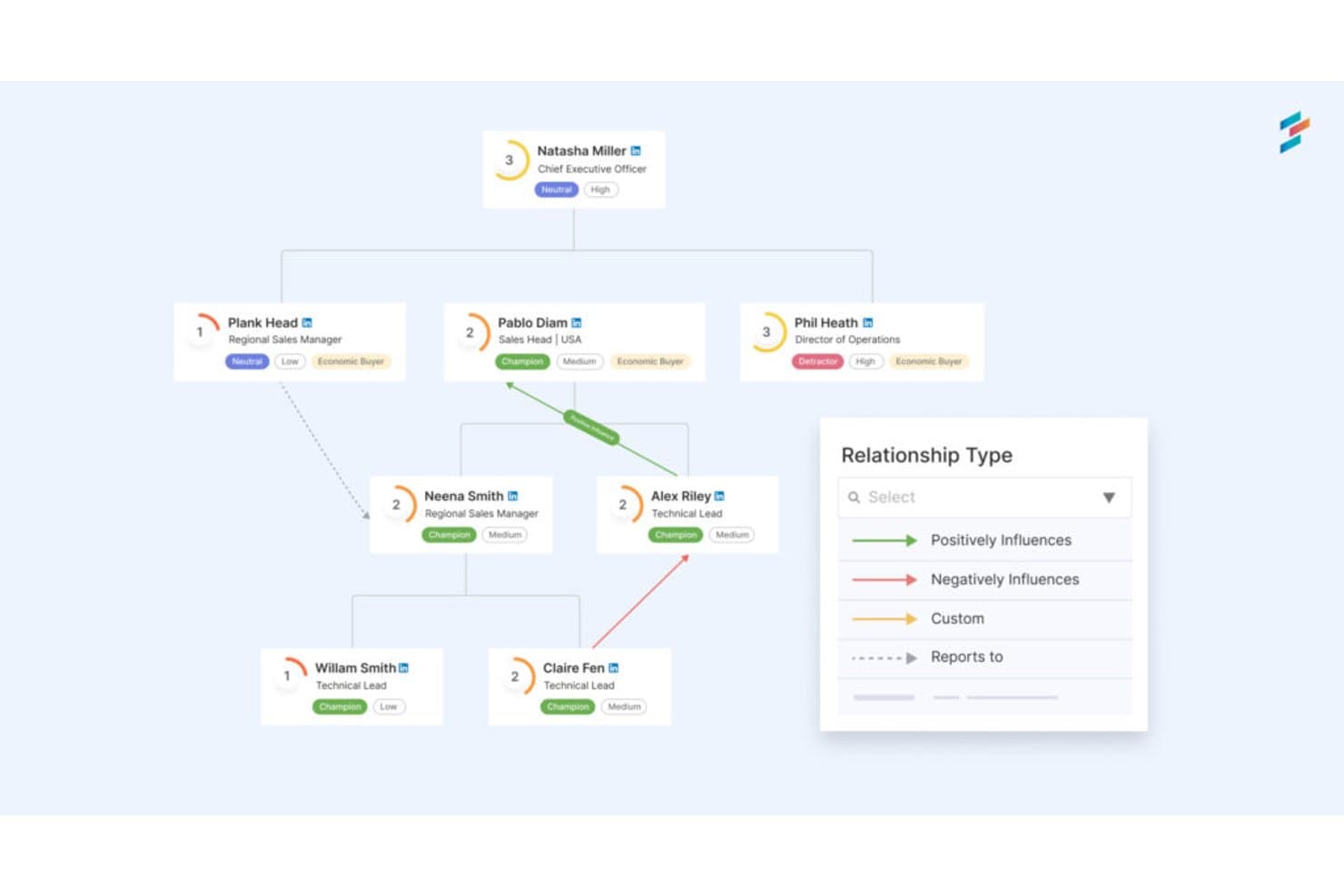
DemandFarm maps stakeholder relationships and influence across org charts. DemandFarm is a B2B key account management platform that combines relationship mapping, AI-driven sentiment analysis, interaction tracking, and deal risk assessment for sales teams managing complex customer accounts.
Who Is DemandFarm Best For?
DemandFarm is a strong fit for B2B sales teams managing strategic accounts with complex, multi-contact buying committees.
Why I Picked DemandFarm
DemandFarm earns its spot on my shortlist because of how well it handles B2B account relationship mapping. I love that its Relationship Maps auto-generate from CRM contacts and let you layer on power and affinity scores for each person in a buying committee. The Kampanion AI goes further, flagging silent influencers and cold decision makers before they become deal risks. That level of contact-level intelligence is rare in a sales account tool.
DemandFarm Key Features
- Automated risk surveillance: Monitors account health and flags relationship cracks, slow-moving objectives, and at-risk contacts before they threaten deals.
- Engagement analytics: Tracks how frequently and meaningfully your team engages each contact, so you can prioritize outreach where it matters most.
- White Space Planner: Identifies untapped revenue opportunities within existing accounts by mapping where growth potential remains uncovered.
- CRM-mirrored permissions: Syncs access controls directly with your CRM so users only see the account data they're already authorized to view.
DemandFarm Integrations
DemandFarm integrations include Salesforce, HubSpot, Microsoft Dynamics, Microsoft Teams, Outlook, Gmail Calendar, Slack, and Gong. No public API documentation is listed for custom integrations.
Pros and Cons
Pros:
- Mirrors CRM permissions across account teams
- Flags silent influencers before deals stall
- Maps buying committees with power scores
Cons:
- Offers no roadmap or consultation planning
- Focuses on sales accounts, not general stakeholders
Learn more about DemandFarm:
Other Stakeholder Management Software
Here are some additional stakeholder management software options that didn’t make it onto my shortlist, but are still worth checking out:
- 11TractivityBest for large-scale public engagement audit trails
- 12PublicInputBest for multi-channel civic engagement tracking
- 13monday AI WorkspaceBest for managing stakeholders within project boards
- 14KintoneBest for no-code custom workflow apps
- 15StakeTrackerBest for a secure, online stakeholder management system
- 16Engagement HubBest for public consultation engagement teams
- 17SMARTBest for intelligent stakeholder engagement
How I Evaluate Stakeholder Management Software
I split my evaluation into three parts: core functionality first (can the tool map stakeholders by influence and log interaction history?), then standout features like native roadmap integration, and finally what the vendor offers beyond features—onboarding support, pricing transparency, and team scalability.
Core Functionality (Table Stakes For This List)
When I'm selecting tools for my list, I score each one on a scale from 0 (does not offer the functionality) to 5 (excels in this area) for each core functionality listed below. I then convert the total into a percentage to help assess each tool's overall fit, with extra weight on any functionalities I've deemed essential.
- Stakeholder Mapping (Essential): I check whether the tool offers visual grids or matrices that let you plot stakeholders by influence and interest, not just flat lists.
- Interaction Tracking (Essential): Each tool should log contacts and communication history in one place, ideally capturing multi-channel exchanges with searchable records.
- Engagement Planning: I look for structured scheduling of outreach activities tied directly to stakeholder records, with reminders and team assignment options.
- Risk & Sentiment Assessment: Structured scoring matters here. I evaluate whether you can tag sentiment or opposition levels using defined criteria, not just free-text notes.
- Reporting & Analytics: Dashboards that visualize engagement trends and stakeholder coverage tell me more than raw data exports or static summary tables.
- Collaboration & Access Controls: I check for role-based permissions so multiple teams can coordinate on shared stakeholder data without exposing sensitive records.
Once I have a list of tools that meet the criteria, I consider what sets each platform apart.
Differentiating Factors (What Sets Vendors Apart)
Here's how I compare and contrast different vendors:
Standout Features
Meeting and calendar integration is where I see the biggest time savings. Tools that sync with your calendar to auto-log stakeholder touchpoints eliminate the "did I follow up?" guesswork after a packed sprint review week. I also evaluate AI-generated stakeholder summaries, which pull sentiment snapshots from meeting notes so you're not manually writing recaps. Custom stakeholder portals matter too. Giving executives a self-serve view of roadmap status cuts down on ad hoc update requests that pull PMs out of deep work.
Beyond Features
I check whether a tool fits cross-functional teams, not just PMs. If a VP of sales can't onboard in minutes and pull a stakeholder view without training, adoption stalls and your data stays incomplete. Integration depth matters just as much—native connections to Jira, Slack, or Salesforce mean stakeholder records stay current without duplicate entry across systems. I also evaluate how licensing scales as stakeholder volume grows, since a pricing model that penalizes you for adding external collaborators can quietly break your budget mid-rollout.
How to Choose Stakeholder Management Software
It’s easy to get bogged down in long feature lists and complex pricing structures. To help you stay focused as you work through your unique software selection process, here’s a checklist of factors to keep in mind:
| Factor | What to Consider |
|---|---|
| FactorScalability | What to ConsiderCan the software grow with your team? Consider user limits and pricing as your team expands. |
| FactorIntegrations | What to ConsiderDoes it integrate with your existing tools like CRM or project management platforms? |
| FactorCustomizability | What to ConsiderCan you tailor the software to fit your specific workflows? Look for flexible dashboards and fields. |
| FactorEase of use | What to ConsiderIs the interface intuitive for your team? Test with a demo to gauge the learning curve. |
| FactorImplementation and onboarding | What to ConsiderHow quickly can your team get up and running? Look for training resources and support options. |
| FactorCost | What to ConsiderDoes the pricing align with your budget? Consider hidden fees or necessary add-ons. |
| FactorSecurity safeguards | What to ConsiderDoes the tool comply with your data security standards? Check for encryption and user permissions. |
| FactorSupport availability | What to ConsiderWhat support channels are available? Ensure support aligns with your team's needs and time zones. |
Trends in Stakeholder Management Software
We've seen significant innovations and shifts that are reshaping how organizations communicate, collaborate, and engage with their stakeholders, resulting in many changing trends in stakeholder management software. I have identified several trends that both reflect the changing priorities and demands of the industry and highlight the direction in which stakeholder management technology is moving.
Data-Driven Insights and Analytics
- AI-Powered Analytics: The use of artificial intelligence to analyze stakeholder feedback and engagement levels has become more prevalent. This technology provides deeper insights into stakeholder sentiments, enabling organizations to tailor their strategies more effectively.
- Predictive Analytics: Tools are increasingly incorporating predictive analytics features that forecast future stakeholder behaviors and preferences based on historical data. This functionality allows for proactive rather than reactive stakeholder management.
Novel and Unusual Functionalities
- Blockchain for Transparency: Some tools are experimenting with blockchain technology to enhance transparency and security in stakeholder communications. This novel approach is particularly appealing for organizations that prioritize data integrity and transparency.
- Virtual Reality (VR) Engagement: Although still in its infancy, the use of VR for stakeholder engagement represents a cutting-edge approach to immersive communication strategies, offering stakeholders a unique way to experience and interact with project outcomes.
Personalization and Segmentation
- AI-Driven Personalization: There's a growing trend towards using AI to tailor communications and engagement strategies to individual stakeholder preferences and behaviors. This level of personalization enhances the effectiveness of engagement efforts by ensuring that stakeholders receive relevant and timely information.
The trends in stakeholder management software highlight a shift towards more integrated, intelligent, and immersive tools. As these trends continue to evolve, they offer a glimpse into the future of stakeholder management, where technology will play a pivotal role in building and maintaining robust stakeholder relationships.
What Is Stakeholder Management Software?
Stakeholder management software is a tool that helps organizations track and manage interactions with stakeholders. Project managers, team leaders, and communication officers generally use these tools to improve communication and engagement with stakeholders. Task tracking, reporting, and communication features help with organizing stakeholder interactions and ensuring project alignment. Overall, these tools provide better management of stakeholder relationships and project outcomes.
Features
When selecting stakeholder management software, keep an eye out for the following key features:
- Contact management: Centralizes stakeholder information, making it easy to access and update details for effective communication.
- Task tracking: Helps you assign and monitor tasks, ensuring deadlines are met and projects stay on track.
- Reporting: Provides insights into stakeholder engagement and project progress, aiding in informed decision-making.
- Communication tools: Facilitates direct communication with stakeholders, improving engagement and transparency.
- Customizable dashboards: Allows you to tailor the interface to fit your workflow, enhancing usability and efficiency.
- Gantt charts: Visualize project timelines and milestones, helping teams plan and execute projects efficiently.
- Automated reminders: Keeps your team on schedule by sending alerts about upcoming tasks and deadlines.
- Integration capabilities: Connects with other tools in your tech stack, ensuring seamless data flow and collaboration.
- Security safeguards: Protects stakeholder data with encryption and access controls, maintaining privacy and compliance.
- Analytics: Offers detailed insights into stakeholder interactions and project metrics, supporting strategic planning.
Benefits
Implementing stakeholder management software provides several benefits for your team and your business. Here are a few you can look forward to:
- Improved communication: Facilitates direct interaction with stakeholders, ensuring everyone stays informed and engaged.
- Enhanced organization: Centralizes stakeholder data and project details, making it easier to manage information and tasks.
- Increased efficiency: Automates reminders and task tracking, helping your team meet deadlines without manual oversight.
- Better decision-making: Provides detailed reporting and analytics, giving you insights to make informed strategic choices.
- Greater transparency: Offers visibility into project progress and stakeholder engagement, keeping everyone on the same page.
- Customizable workflows: Allows you to tailor processes to fit your unique needs, improving overall productivity.
- Data security: Protects sensitive stakeholder information with robust encryption and access controls, ensuring compliance and privacy.
Costs & Pricing
Selecting stakeholder management software requires an understanding of the various pricing models and plans available. Costs vary based on features, team size, add-ons, and more. The table below summarizes common plans, their average prices, and typical features included in stakeholder management software solutions:
Plan Comparison Table for Stakeholder Management Software
| Plan Type | Average Price | Common Features |
|---|---|---|
| Plan TypeFree Plan | Average Price$0 | Common FeaturesBasic contact management, limited task tracking, and simple reporting. |
| Plan TypePersonal Plan | Average Price$5-$25/user/month | Common FeaturesTask tracking, basic integrations, and limited customization options. |
| Plan TypeBusiness Plan | Average Price$25-$50/user/month | Common FeaturesAdvanced reporting, enhanced security features, and more integrations. |
| Plan TypeEnterprise Plan | Average Price$50-$100/user/month | Common FeaturesFull customization, priority support, and comprehensive analytics and reporting. |
Stakeholder Management Software FAQs
Here are some answers to common questions about stakeholder management software:
How do I know if my team needs stakeholder management software?
If your team struggles with keeping track of stakeholder interactions and feedback, you might need stakeholder management software. Evaluate your current processes: Are you missing deadlines or forgetting important communications? If so, these tools can help organize and automate these tasks, allowing your team to focus on strategic decisions.
Is training required to use stakeholder management software?
Training is often recommended, though many tools are designed to be intuitive. Look for software that offers tutorials, webinars, or interactive guides to help your team get started. For example, a quick product tour can familiarize your team with the interface, ensuring they can use the tool effectively from the start.
What common implementation challenges should you anticipate?
Implementing a new system often involves migrating data, training users, and aligning workflows. Many teams underestimate these steps, which can cause delays or frustration. If your team doesn’t adopt the tool, or the data isn’t cleaned before migration, you’ll likely face issues early on.