

10 Best Rapid Application Development Software in 2026

Best Rapid Application Development Software Shortlist


Rapid application development software lets your team design, build, and deploy applications much faster using visual tools and low-code platforms. If you’re searching for the best rapid application development tools, you’re likely looking for ways to speed up your project delivery, improve team collaboration, and adapt quickly when priorities shift. Choosing the right software can determine how easily you turn ideas into reliable apps without unnecessary delays or technical bottlenecks. This list highlights the platforms I think you should consider if you want to move projects forward with clarity and control this 2026.
Why Trust Our Software Reviews
We’ve been testing and reviewing product management software since 2020. As product managers ourselves, we know how critical and difficult it is to make the right decision when selecting software.
We invest in deep research to help our audience make better software purchasing decisions. We’ve tested more than 2,000 tools for different product management use cases and written over 1,000 comprehensive software reviews. Learn how we stay transparent & our software review methodology.
Best Rapid Application Development Software Summary
This comparison chart summarizes pricing details for my top rapid application development software selections to help you find the best one for your budget and business needs.
| Tool | Best For | Trial Info | Price | ||
|---|---|---|---|---|---|
| 1 | Best for flexible data-driven app creation | Free plan + free demo available | From $20/user/month (billed annually) | Website | |
| 2 | Best for complex enterprise workflows | Free plan + free demo available | Pricing upon request | Website | |
| 3 | Best for connecting databases and APIs easily | 14-day free trial available | From $125/user/month | Website | |
| 4 | Best for complex workflow orchestration | Free demo | Pricing upon request | Website | |
| 5 | Best for low-code deployment on private cloud | Free demo available | Pricing upon request | Website | |
| 6 | Best for multi-user collaborative development | Free plan + free demo available | From $1090/month | Website | |
| 7 | Best for building custom business apps fast | 14-day free trial available | From $49/month (billed annually) | Website | |
| 8 | Best for Salesforce ecosystem extensibility | 30-day free trial + free plan + free demo available | From $25/user/month (billed annually) | Website | |
| 9 | Best for native Microsoft 365 integration | Free plan | From $20/user/month (billed annually) | Website | |
| 10 | Best for internal tools built on existing data | Free plan + free demo | From $10/builder/month (billed annually) | Website |
Best Rapid Application Development Software Reviews
Below are my detailed summaries of the best rapid application development software that made it onto my shortlist. My reviews offer a detailed look at the features, integrations, and best use cases of each platform to help you find the best one for you.
Airtable
Best for flexible data-driven app creation
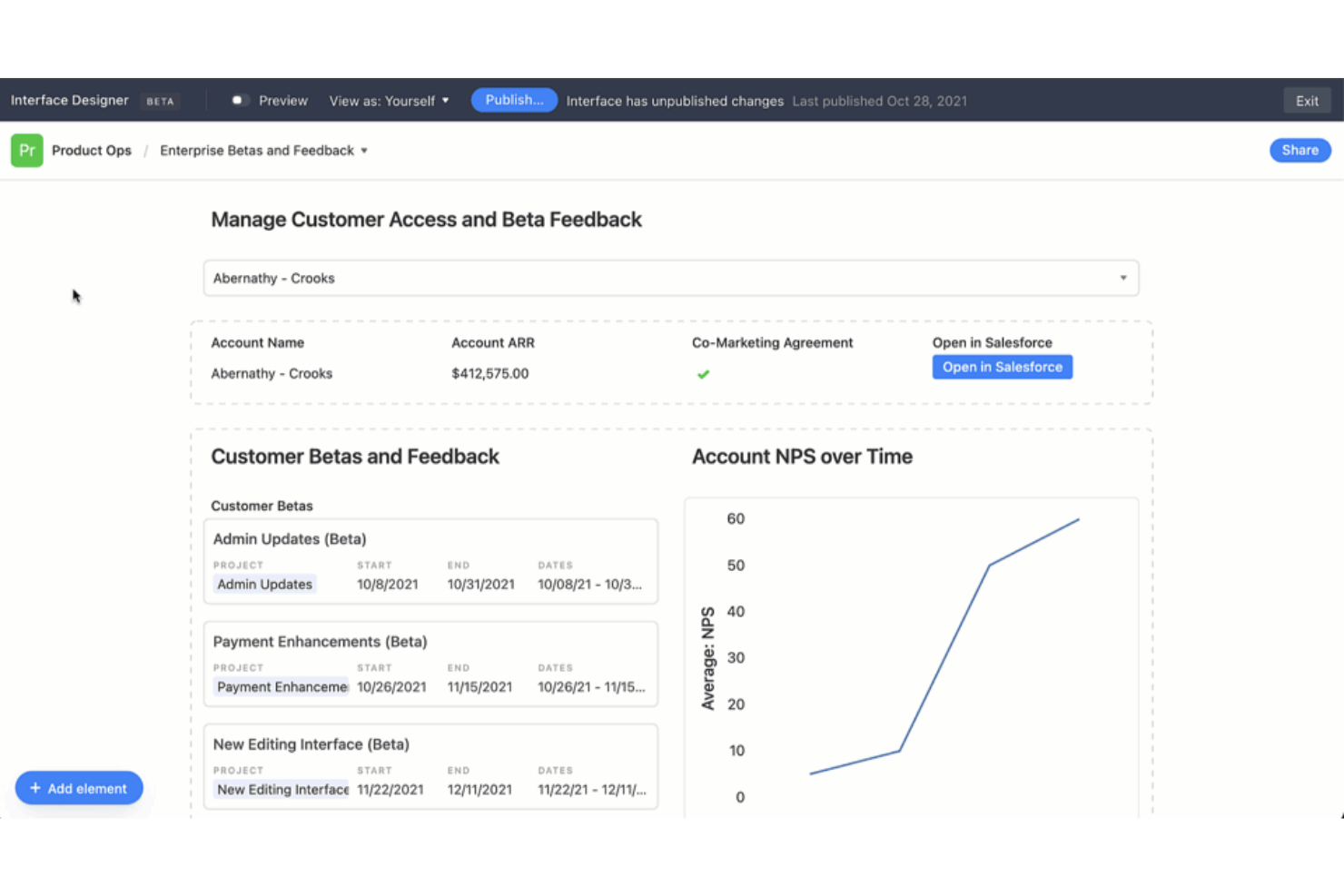
Built on a relational database foundation, Airtable is a no-code app-building platform that lets teams create custom interfaces, automate workflows, and build data-driven applications from a single connected data source.
Who Is Airtable Best For?
Airtable is a strong fit for operations, marketing, and product teams that need to build custom apps around structured data without relying on a dedicated engineering team.
Why I Picked Airtable
I've included Airtable in my top picks because the way it separates data modeling from app presentation is genuinely clever. I use the Interface Designer to build custom front-end views on top of my base data, so the same underlying records can power a project tracker, a client portal, and a content calendar simultaneously. Airtable's 30+ field types, including linked records and lookup fields, let me model complex relational data without writing a single line of code.
Airtable Key Features
- Automation builder: A no-code workflow automation tool with triggers, conditional logic, and actions that run across your bases or connected apps.
- Native form builder: Create data-entry forms that feed directly into any Airtable base, with field validation and conditional field visibility.
- Airtable AI: AI-powered fields that can summarize records, generate text, and categorize data automatically within your base.
- Multiple view types: Switch between grid, Kanban, Gantt, calendar, and gallery views on the same dataset without duplicating data.
Airtable Integrations
Airtable offers native integrations with tools like Google Drive, Slack, Salesforce, Jira, GitHub, Zendesk, Snowflake, Tableau Cloud, Miro, and Stripe, and it connects with Zapier. An API is available for custom integrations.
Pros and Cons
Pros:
- Automations reduce manual workflow steps
- Interface Designer enables custom dashboards quickly
- Grid view supports rapid prototyping of apps
Cons:
- Limited scripting compared to developer-focused tools
- Record limits restrict large-scale applications
Best for complex enterprise workflows
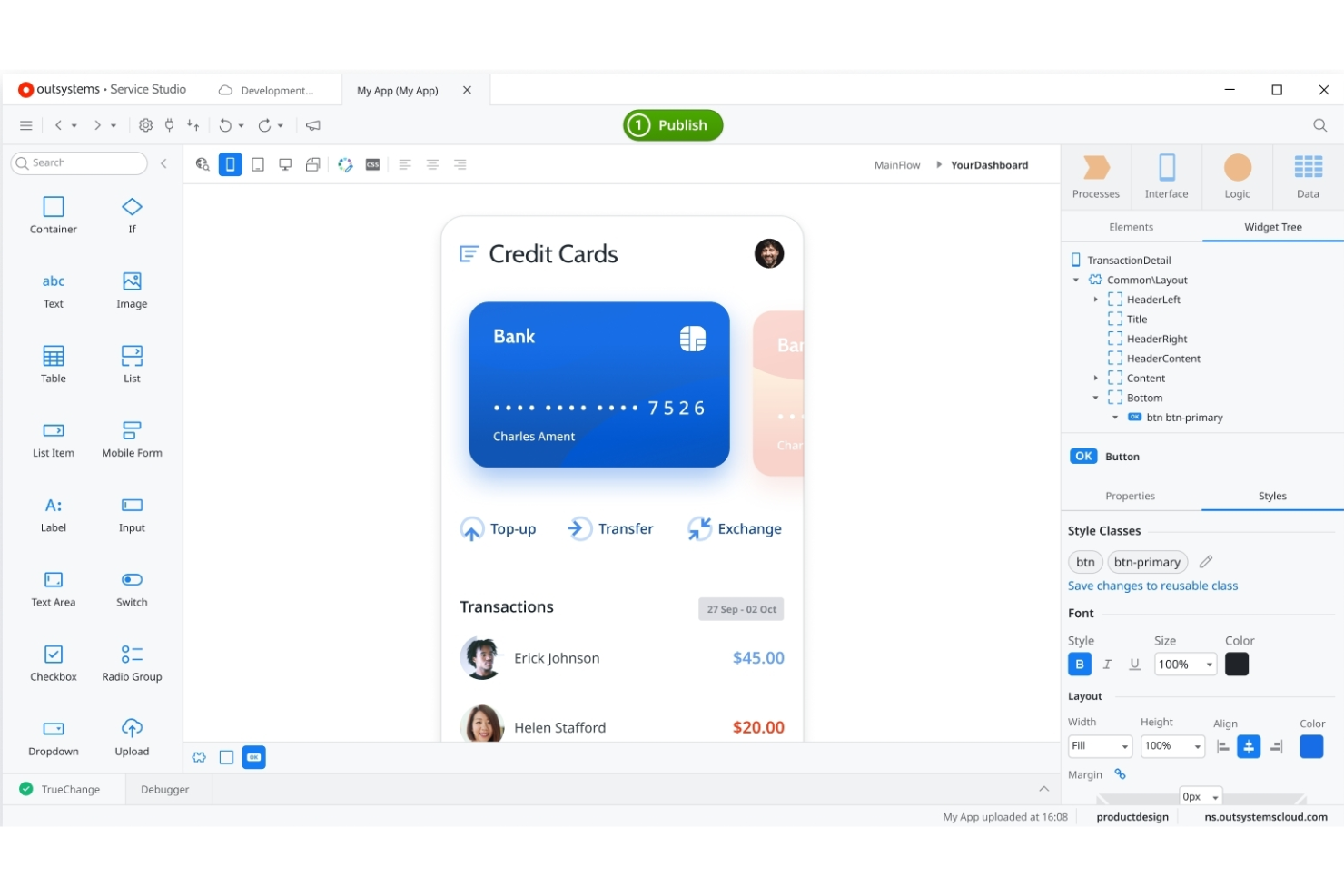
OutSystems is a low-code development platform that combines visual app building, automated DevOps, and architecture governance tools for developing enterprise-grade web and mobile applications.
Who Is OutSystems Best For?
OutSystems is built for enterprise development teams that need to ship production-grade applications at scale, particularly in heavily regulated industries like finance and healthcare.
Why I Picked OutSystems
I picked OutSystems as one of the best because its Process Builder lets you map and execute genuinely complex, multi-step workflows with branching logic, parallel execution, and human task assignments built in. I also like its AI Mentor System, which actively flags architecture issues before they become technical debt. In practice, my team can model an approval chain spanning multiple departments and deploy it without writing custom orchestration logic from scratch.
OutSystems Key Features
- ODC Studio: A visual development environment where you build app logic, UI, and data models in a single drag-and-drop interface.
- Forge marketplace: A library of reusable, community-built components, connectors, and templates you can add directly to your projects.
- Experience Builder: A template-based tool for scaffolding mobile app UIs with pre-built screens and navigation patterns.
- TrueChange engine: A real-time error detection layer that identifies broken references and logic inconsistencies as you build.
OutSystems Integrations
OutSystems offers pre-built connectors to 400+ systems through its Forge marketplace, including SAP, Salesforce, ServiceNow, MongoDB, PostgreSQL, PayPal, Zendesk, Twilio, and OpenAI. It also natively integrates with databases like SQL Server, Oracle, MySQL, and IBM DB2, and supports consuming and exposing SOAP web services and REST APIs for custom integrations.
Pros and Cons
Pros:
- Automated deployment across multiple environments
- Built-in governance supports enterprise compliance needs
- Visual development accelerates complex app creation
Cons:
- Heavy platform infrastructure requirements
- Steep resource requirements for on-premises hosting

Best for connecting databases and APIs easily
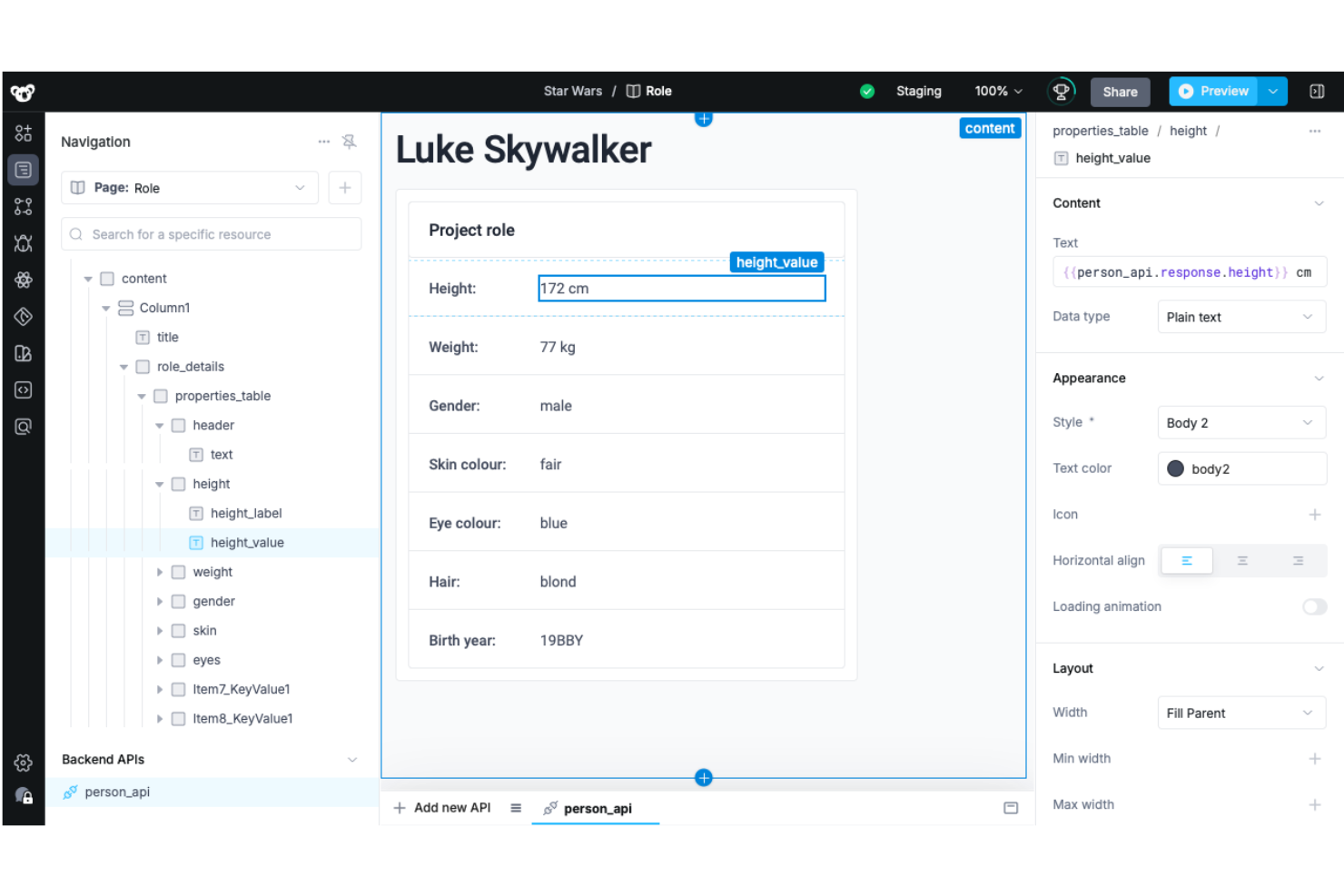
Superblocks is a rapid application development platform that lets engineering and business teams build internal tools, AI-powered apps, and data-connected workflows on top of databases, APIs, and cloud data platforms.
Who Is Superblocks Best For?
Superblocks is a strong fit for engineering teams at mid-size to enterprise companies that need to build and maintain internal tools on top of existing databases and APIs.
Why I Picked Superblocks
I picked Superblocks because it removes the hardest part of building internal tools: connecting live data sources to a working UI. You can query PostgreSQL, MySQL, MongoDB, Snowflake, and REST APIs side by side in a single workflow editor, then bind those results directly to table or form components. I also rely on its API abstraction layer, which centralizes authentication and secrets management so individual apps never expose credentials directly.
Superblocks Key Features
- Drag-and-drop UI editor: Build app interfaces using a library of pre-built components like tables, charts, buttons, and forms without writing frontend code.
- Scheduled jobs: Configure time-based automation to run backend workflows, data syncs, or scripts on a recurring schedule.
- Git-based version control: Connect apps to a Git repository to track changes, manage branches, and roll back to previous versions.
- Role-based access control: Set granular permissions at the app, page, or data source level to control who can view or edit each resource.
Superblocks Integrations
Superblocks offers 64 native integrations across databases, data warehouses, APIs, cloud storage, streaming, and AI categories, including PostgreSQL, MySQL, MongoDB, Snowflake, Google BigQuery, Salesforce, Slack, Jira Cloud, GitHub, and Stripe. You can also connect to any service that accepts REST or GraphQL APIs.
Pros and Cons
Pros:
- Supports custom scripting in Python and JavaScript
- Built-in audit logging for compliance tracking
- Direct integration with internal REST and SQL APIs
Cons:
- Requires knowledge of internal APIs
- Requires deep internal API knowledge
Appian
Best for complex workflow orchestration
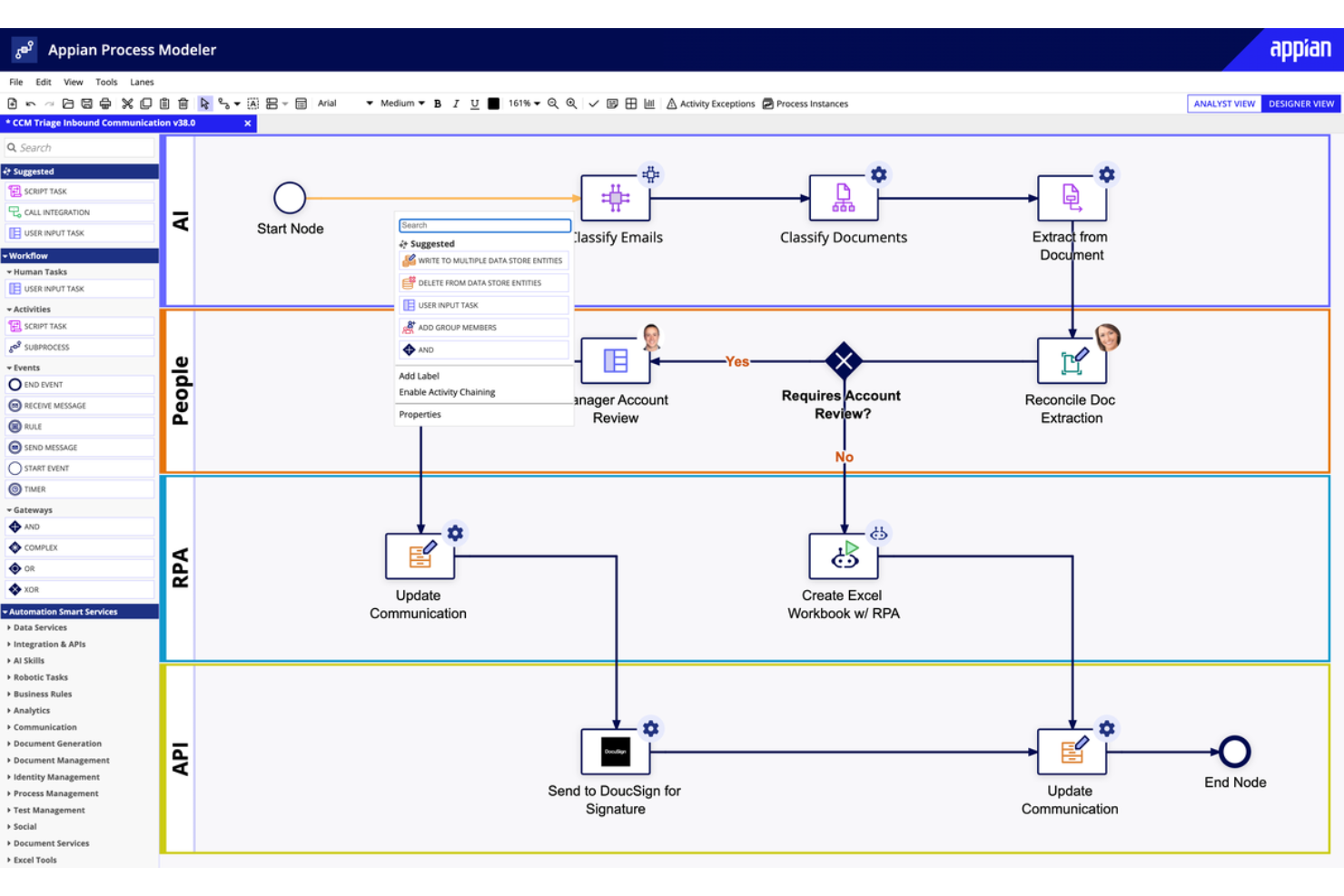
Appian is a low-code platform built around business process management (BPM) that lets teams design, automate, and deploy enterprise applications with built-in process modeling, case management, and AI capabilities.
Who Is Appian Best For?
Appian is built for enterprise organizations in heavily regulated industries like financial services, government, healthcare, and insurance.
Why I Picked Appian
I've included Appian in my top picks because its process orchestration engine is genuinely built for multi-system, multi-step workflows that other low-code tools can't handle. I use Appian's native BPMN process modeler to design end-to-end workflows that span multiple departments, data sources, and human decision points. Appian's case management layer lets me handle dynamic, exception-driven processes where the workflow path changes based on real-time data, not just linear logic.
Appian Key Features
- Low-code UI designer: A drag-and-drop interface builder for creating web and mobile app screens directly connected to your process data.
- Data fabric: A unified data access layer that lets you query and surface data from multiple external systems without migrating it into Appian.
- Robotic process automation (RPA): Built-in bots that automate repetitive UI-based tasks across legacy systems without APIs.
- AI skills: Pre-built AI capabilities for document extraction, classification, and intelligent decision routing within workflows.
Appian Integrations
Appian offers hundreds of prebuilt connectors through its AppMarket, including connections to Salesforce, SAP, Oracle, Microsoft SharePoint, DocuSign, AWS, Google Cloud, and Microsoft Dynamics. It also supports RPA and IDP for connecting to legacy systems that lack APIs, and provides an Integration SDK and full API support for building custom integrations.
Pros and Cons
Pros:
- Built-in AI tools automate document processing
- Business rules engine enables dynamic app logic
- Visual process modeller supports complex workflow design
Cons:
- Limited native integrations listed for external tools
- Steep learning curve for new users
Best for low-code deployment on private cloud
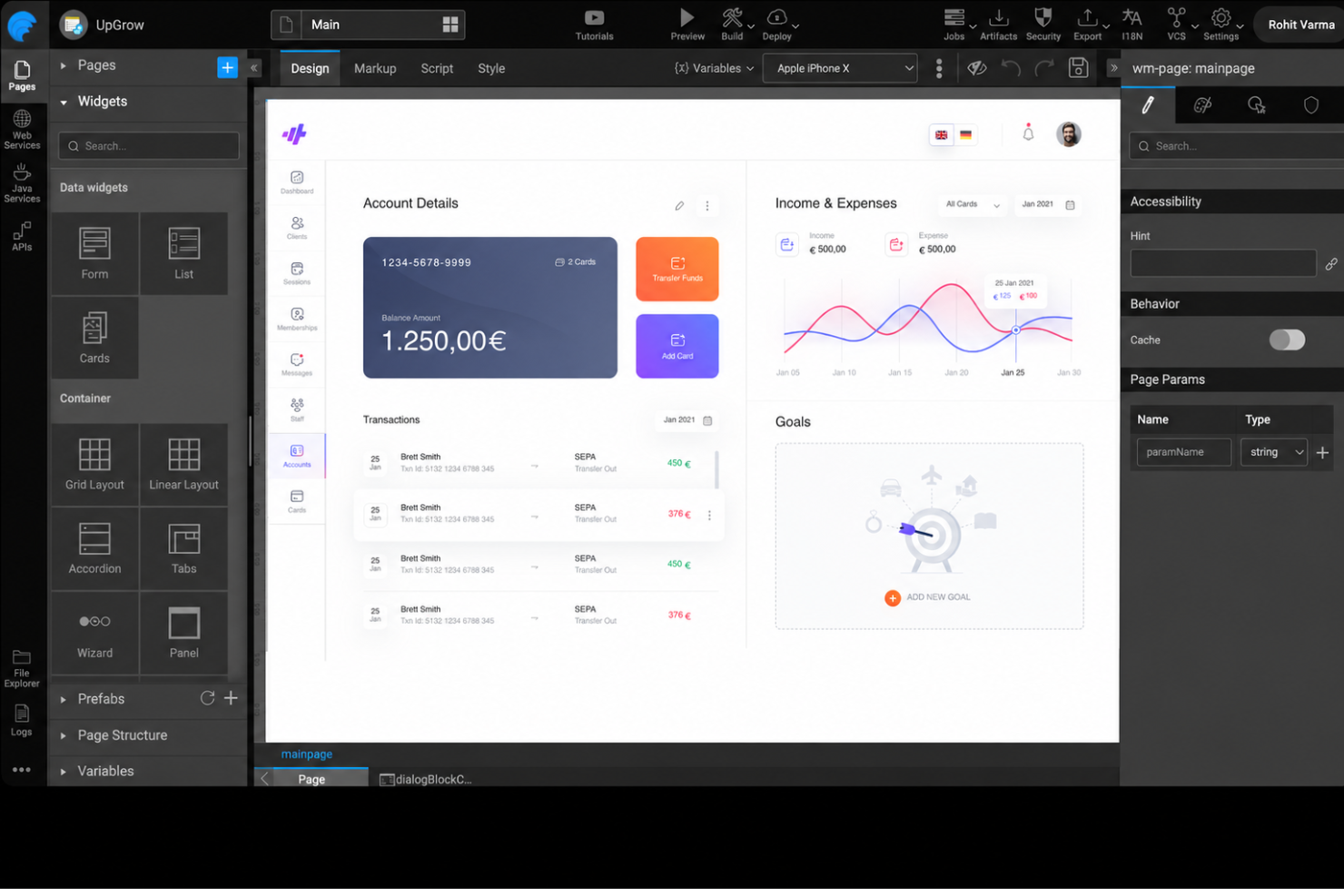
WaveMaker is a low-code rapid application development platform for building and deploying enterprise-grade web and mobile apps using a visual drag-and-drop canvas, AI-assisted code generation, and open-standards-based architecture.
Who Is WaveMaker Best For?
WaveMaker suits mid-to-large enterprises with in-house development teams that build and maintain multiple internal applications across business units.
Why I Picked WaveMaker
WaveMaker earns its spot on my shortlist because it's one of the only low-code platforms where you can self-host the development studio itself, not just the apps you build. That means your code, your data, and your dev environment all stay within your own infrastructure. I also like that WaveMaker supports CI/CD pipeline integration, so teams can connect to existing DevOps toolchains and deploy builds directly into private cloud environments on their own release schedule.
WaveMaker Key Features
- Visual data modeler: A built-in tool for designing and managing database schemas with entity-relationship mapping directly inside the studio.
- SAML and LDAP authentication support: Connect apps to enterprise identity providers like Active Directory for centralized user authentication.
- Internationalization (i18n) support: Configure multi-language app versions using built-in locale settings and message bundle management.
- Live preview mode: Test and interact with your app in real time as you build, without needing to compile or deploy first.
WaveMaker Integrations
WaveMaker supports integrations with databases like Oracle, MySQL, Microsoft SQL Server, PostgreSQL, and IBM DB2, as well as version control systems like GitHub, Bitbucket, and Apache Subversion. It also supports deployment to Amazon AWS, Microsoft Azure, Apache Tomcat, Oracle WebLogic Server, and IBM WebSphere. An API is available for building custom integrations through REST and SOAP web services.
Pros and Cons
Pros:
- Built-in API designer for backend services
- Supports on-premises and cloud deployment options
- Generates exportable Java code for full control
Cons:
- Requires specific Java coding expertise
- Performance tuning requires Java development expertise
Mendix
Best for multi-user collaborative development
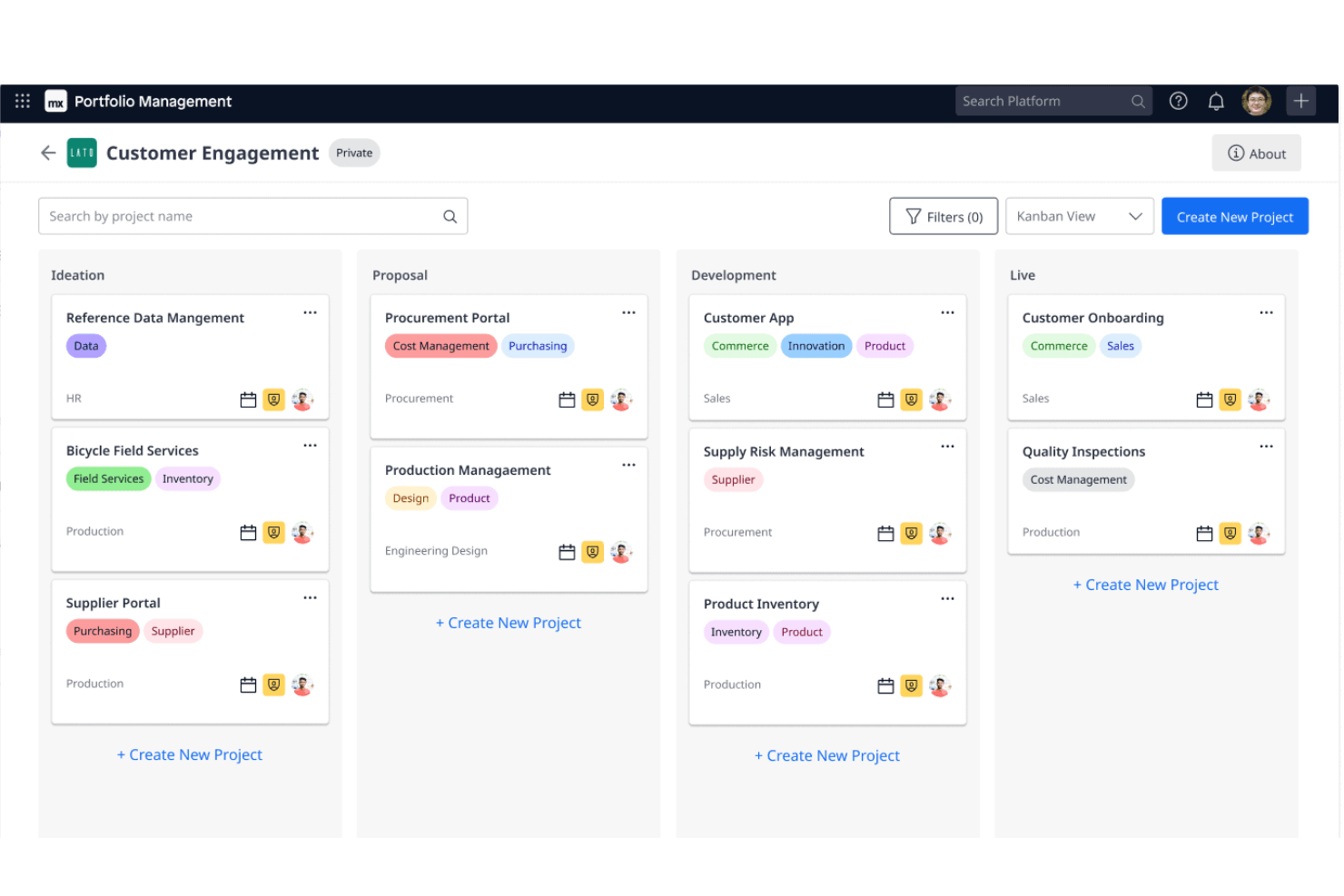
Mendix is a low-code rapid application development platform that combines visual app building, AI-assisted development, process orchestration, and multi-user collaboration tools for building enterprise web and mobile applications.
Who Is Mendix Best For?
Mendix is a strong fit for mid-to-large enterprises where business analysts and developers build applications together in shared, concurrent workflows.
Why I Picked Mendix
Mendix earns its spot on my shortlist because of how it handles multi-user development across different skill levels. Mendix Studio Pro is a multi-user modelling IDE where business analysts and IT engineers work together in a unified environment to model app elements concurrently. What I find particularly strong is the Team Server: it uses Git technology and enables multiple developers to work on the same project, continuously merging model changes into revisions held inside the version control repository. Model-driven merging also works at a higher level of accuracy than merging raw code because Mendix understands the semantics of the models, which results in fewer conflicts.
Mendix Key Features
- Maia AI assistant: An AI co-developer built into Studio Pro that generates microflows, suggests logic, and writes code based on natural language prompts.
- Visual microflow editor: A drag-and-drop logic builder for designing business process flows, decision trees, and data manipulation without writing code.
- Mendix Marketplace: A catalog of pre-built modules, widgets, and connectors you can drop directly into your app.
- Multi-cloud deployment: Deploy apps to any cloud provider, on-premises infrastructure, or Mendix Cloud from a single project.
Mendix Integrations
Mendix supports connections to other apps and services through industry-standard protocols such as REST, SOAP, JDBC, and OData. Through the Mendix Marketplace and its connector framework (Mendix Connect), it offers connectors for services like SAP, Salesforce, Kafka, Redis, Slack, and Twitter. An API is available for custom integrations.
Pros and Cons
Pros:
- Real-time collaboration tools for business and IT
- Built-in app store offers reusable components
- Multi-cloud deployment supports hybrid IT strategies
Cons:
- Limited offline capabilities for mobile apps
- Performance tuning requires Mendix-specific knowledge

Knack
Best for building custom business apps fast
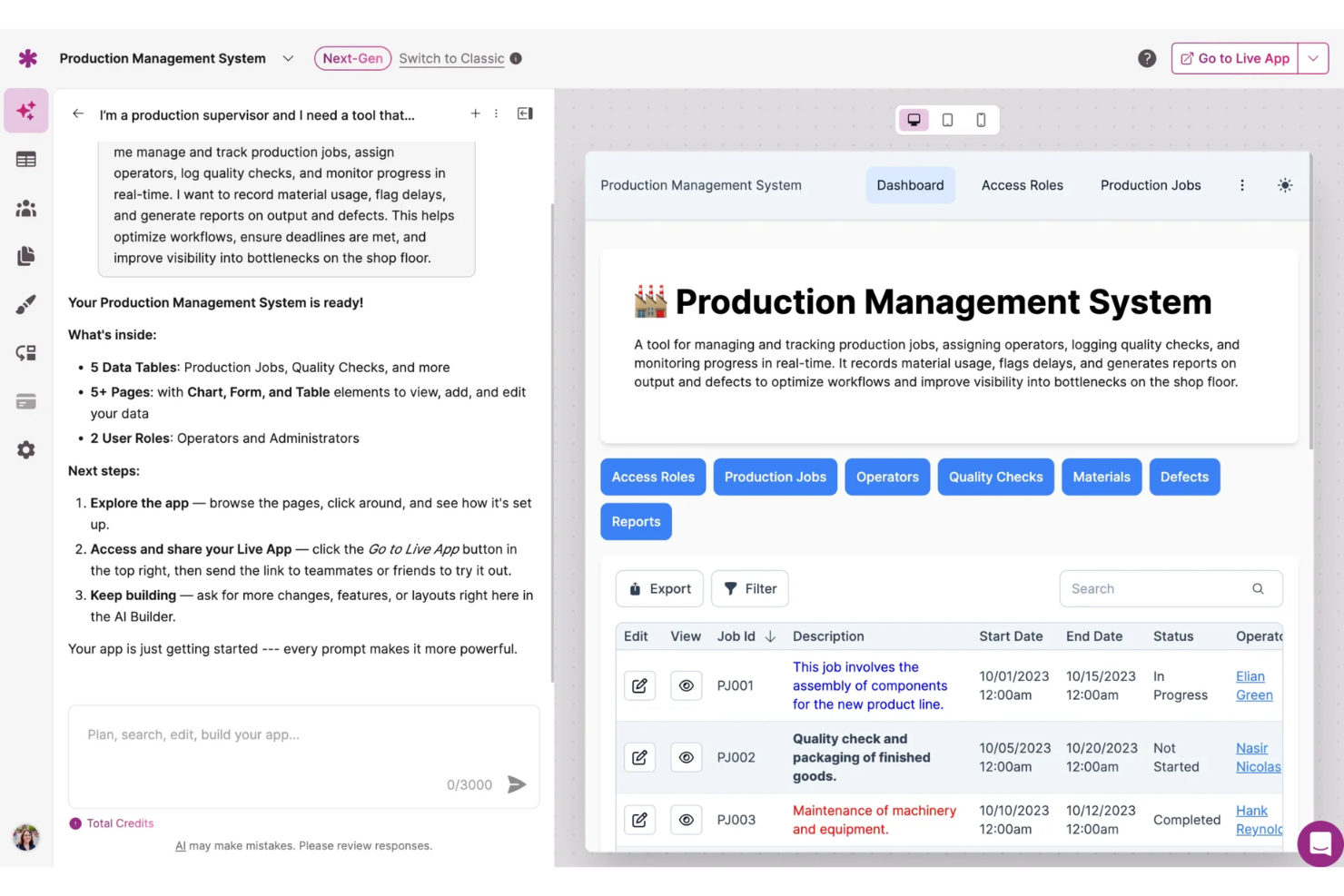
Knack is a no-code, AI-powered rapid application development platform for building custom business apps, online databases, workflows, and portals without writing code.
Who Is Knack Best For?
Knack is a strong fit for small to mid-sized businesses and operations teams that need to build and manage custom apps without relying on developers.
Why I Picked Knack
I picked Knack as one of the best because it's genuinely built for speed when it comes to custom app development. I love that Knack's AI-powered app builder lets you describe what you need and get a working app structure in minutes, rather than spending weeks in development cycles. Its no-code database lets you define data relationships, custom fields, and workflow automations without touching a line of code. You can also start from a pre-built template for common use cases like inventory management, project tracking, or customer portals, which cuts initial setup time significantly.
Knack Key Features
- User access and permissions: Control who sees and interacts with your app by assigning role-based access and permissions to different user groups.
- Reports and dashboards: Build real-time reports and dashboards directly within your app to track data and monitor operations.
- Form builder: Create custom forms to collect, validate, and store data in your app's database without any coding.
- E-commerce capabilities: Add online payment processing and sales functionality directly to your custom-built application.
Knack Integrations
Knack offers 500+ integrations through its built-in Knack Flows automation engine, including Google Sheets, Salesforce, Stripe, Slack, Mailchimp, QuickBooks, Google Calendar, Microsoft Excel, PayPal, and DocuSign. It also connects with Zapier and Make, and provides an API for custom integrations.
Pros and Cons
Pros:
- Built-in workflow automation for business processes
- Supports complex relationships between data tables
- Drag-and-drop builder for custom data models
Cons:
- No built-in version control for applications
- Limited mobile app customization options
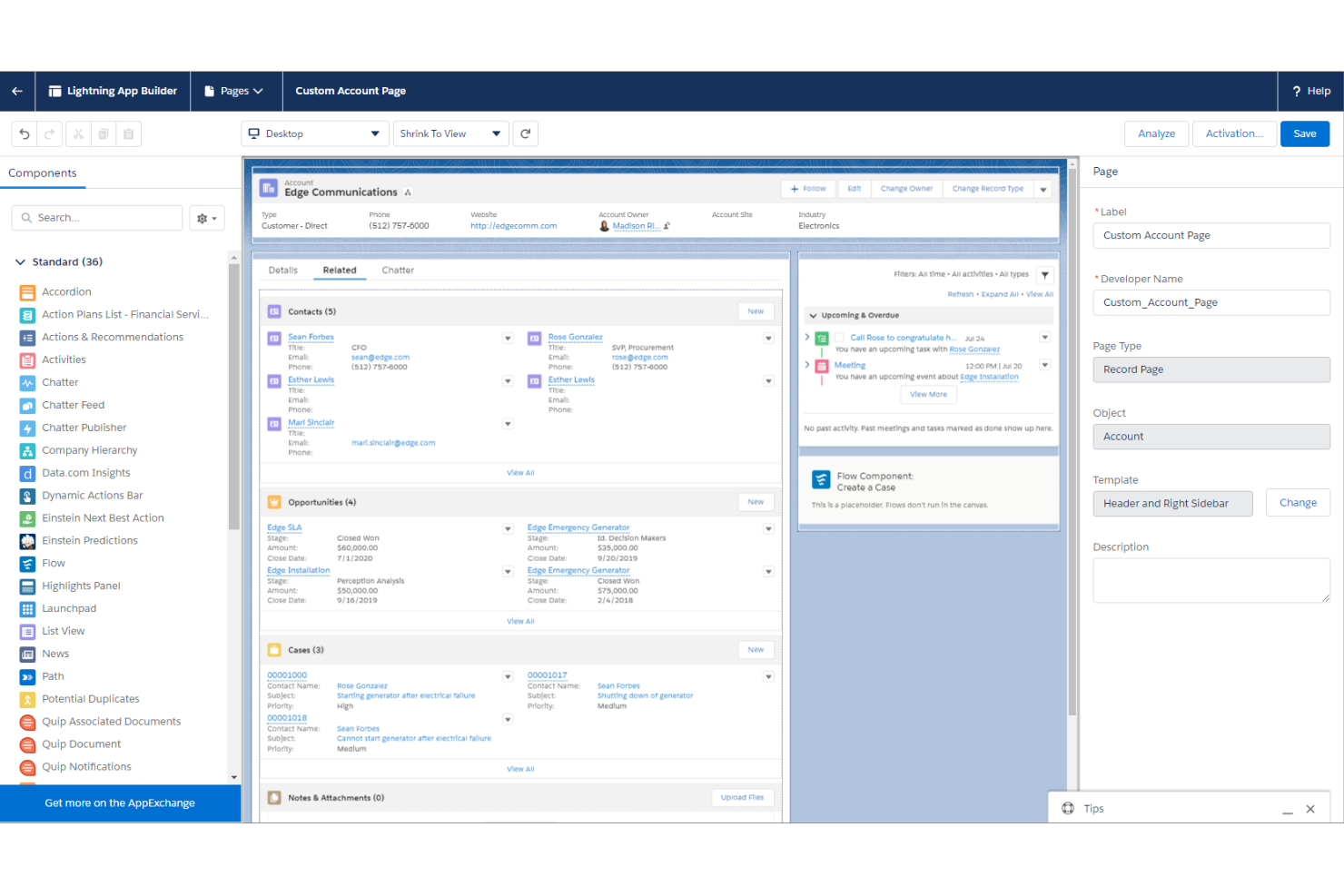
Salesforce Lightning is a no-code and pro-code app development environment built into the Salesforce platform, combining a component-based UI framework, flow automation, and app builder tools to create custom business applications.
Who Is Salesforce Lightning Best For?
Salesforce Lightning is a natural fit for organizations already running on Salesforce that need developers or admins to build custom apps without leaving the platform.
Why I Picked Salesforce Lightning
Salesforce Lightning earns its spot on my shortlist because the Lightning Web Components (LWC) framework lets my team build fully custom UI components that slot directly into any Salesforce page, record, or app. I also rely on Lightning App Builder to assemble new apps from those components without writing layout code from scratch. What makes it stand out for extensibility is AppExchange, where I can pull in thousands of pre-built components and deploy them into existing Salesforce environments in minutes.
Salesforce Lightning Key Features
- Flow Builder: A point-and-click tool for building automated business logic, including record updates, approvals, and multi-step processes.
- Dynamic Forms: Lets you configure field visibility and placement rules directly on record pages without custom code.
- Schema Builder: A visual canvas for designing and modifying your Salesforce data model, including custom objects and relationships.
- Salesforce CLI: A command-line tooling layer for deploying metadata, managing sandboxes, and automating development pipelines.
Salesforce Lightning Integrations
Salesforce AppExchange (now AgentExchange) hosts over 4,000 marketplace apps and integrations, including tools like Slack, Google Workspace, Microsoft 365, and Jira. Salesforce Lightning also connects with Zapier and provides REST, SOAP, Bulk, and Streaming APIs for custom integrations.
Pros and Cons
Pros:
- Real-time CRM data access for custom apps
- Pre-built components reduce manual coding needs
- Drag-and-drop builder accelerates app prototyping
Cons:
- Sandbox environments have storage and refresh limits
- Custom code requires proprietary Apex language

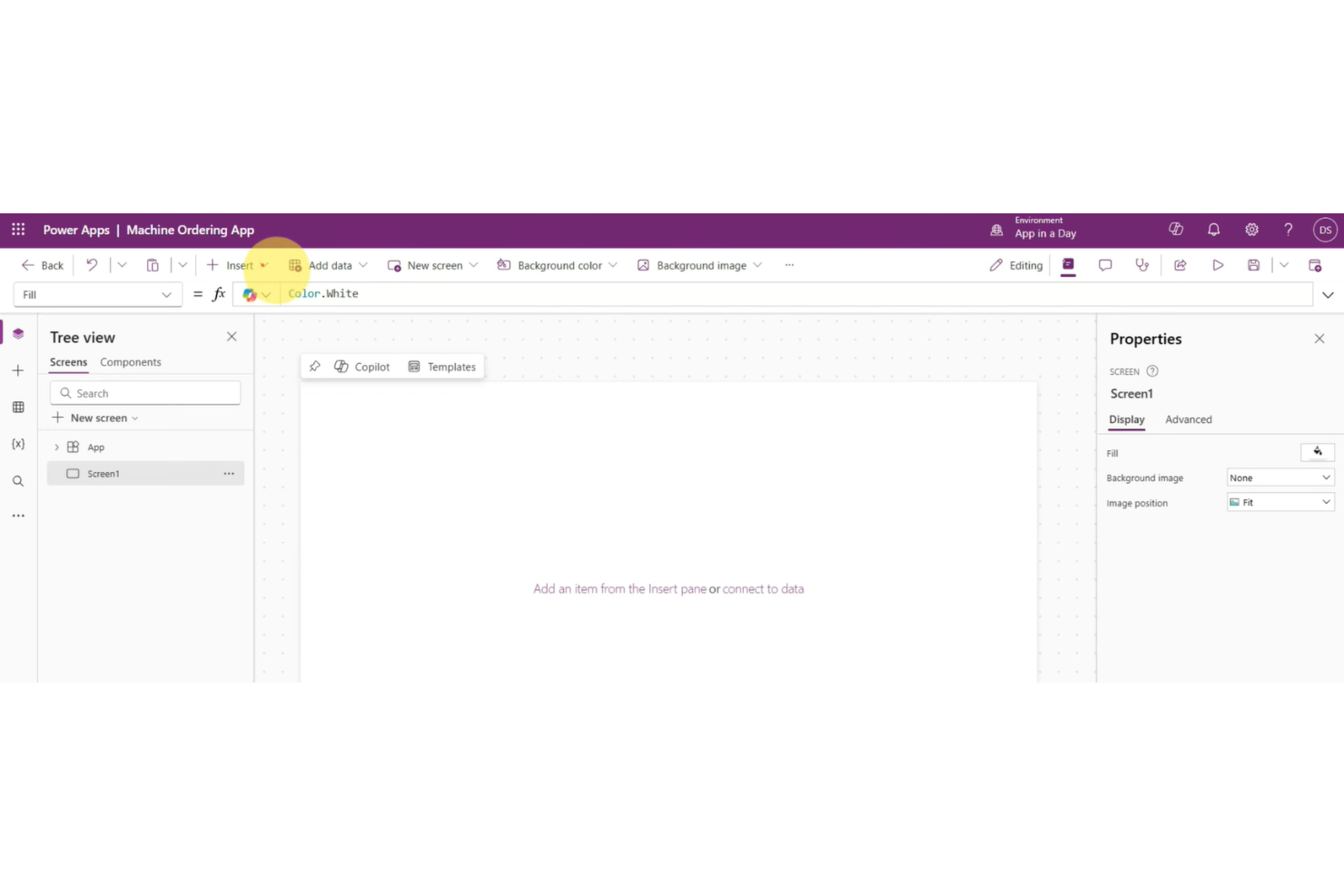
Microsoft Power Apps is a low-code application development platform that lets you build custom apps, connect to data sources, and automate workflows using a visual, drag-and-drop interface.
Who Is Microsoft Power Apps Best For?
Microsoft Power Apps is a natural fit for organizations already running on Microsoft 365 or Azure that want to build internal tools without standing up a separate development environment.
Why I Picked Microsoft Power Apps
Microsoft Power Apps earns its spot on my shortlist because the depth of its native Microsoft 365 integration is unmatched. I like that you can embed finished apps directly inside Microsoft Teams, so users never leave the tools they already work in. Power Apps also connects to SharePoint lists, Excel workbooks, and Dataverse without any middleware, which means my team can pull live business data into a custom app in minutes, not days.
Microsoft Power Apps Key Features
- AI Builder: Add pre-built AI models for form processing and object detection directly to your apps.
- Canvas and model-driven app types: Build a freeform canvas app for custom UI or a data-structured model-driven app.
- Power Fx formula language: Write app logic using Power Fx, an Excel-like formula language with no traditional coding required.
- Pre-built templates: Start from ready-made templates for scenarios like expense tracking, asset management, and approvals.
Microsoft Power Apps Integrations
Microsoft Power Apps offers 1,000+ connectors, including SharePoint, SQL Server, Office 365, Salesforce, and Twitter, plus connectors for Google Drive, Google Sheets, SAP, Oracle Database, and Amazon S3. You can also connect to on-premises data sources through a data gateway, and build custom connectors for any REST API.
Pros and Cons
Pros:
- AI Builder enables no-code AI features
- Built-in connectors for over 600 data sources
- Deep integration with the Microsoft 365 ecosystem
Cons:
- Requires separate Dataverse licensing
- Requires advanced configuration for external data

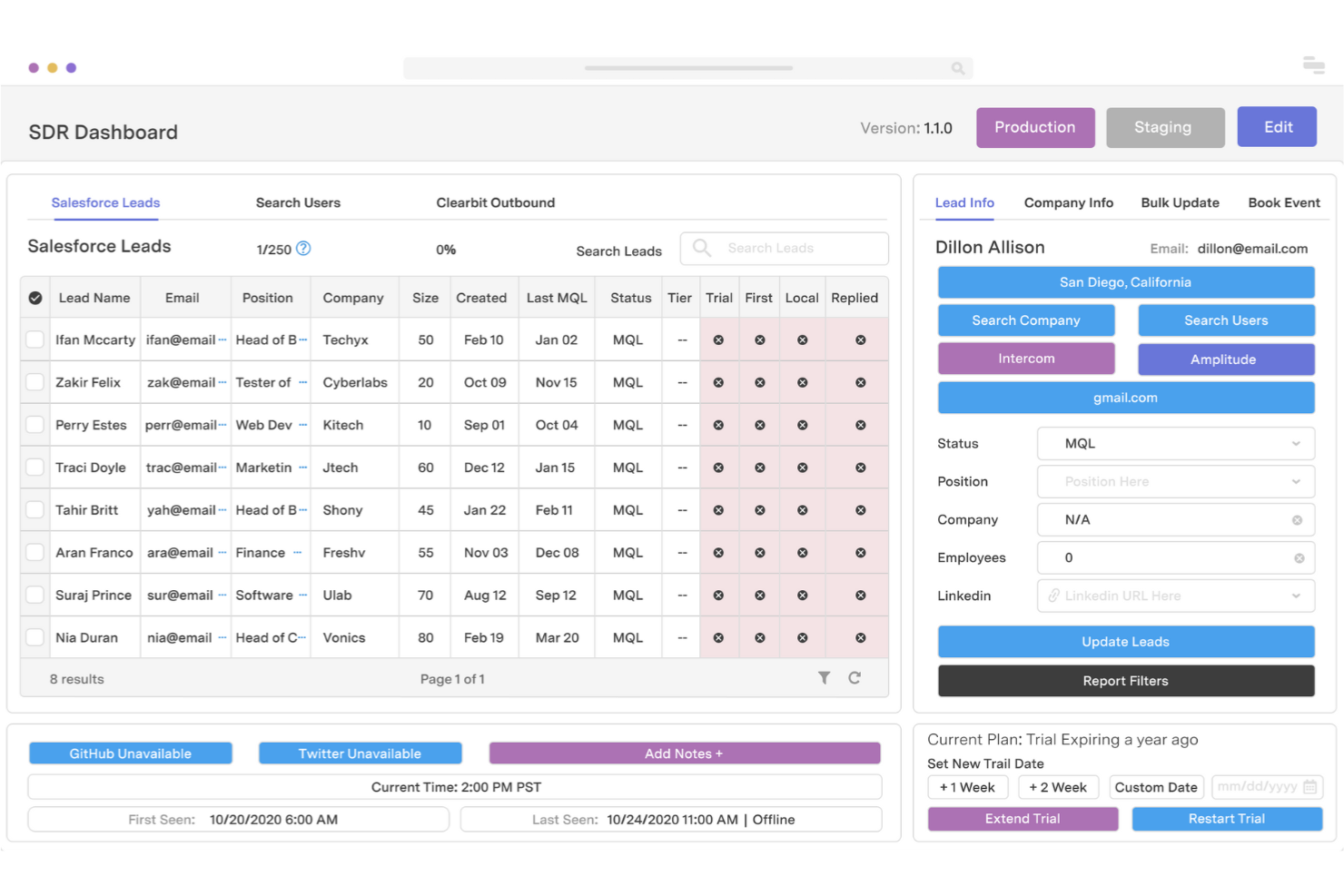
Retool is a low-code development platform for building internal tools, admin panels, dashboards, and CRUD apps on top of databases, APIs, and third-party services.
Who Is Retool Best For?
Retool is a strong fit for engineering and product teams at growth-stage and enterprise companies that need to ship internal tooling without dedicating full dev cycles to it.
Why I Picked Retool
I picked Retool as one of the best because it's purpose-built for querying and displaying existing data. I use its built-in SQL editor directly alongside the UI canvas, which means I can write a query, bind the results to a table component, and have a working admin panel in minutes. I also rely on Retool's transformer layer, which lets me reshape raw query results with JavaScript before they hit the UI.
Retool Key Features
- Retool Workflows: A visual automation builder for creating multi-step backend processes that run on triggers or schedules without leaving the platform.
- Git sync: Connect any Retool app to a GitHub or GitLab repository to manage version history, review diffs, and merge changes through standard pull requests.
- Custom components: Extend the component library by importing your own React components when the built-in options don't meet your requirements.
- Retool DB: A built-in PostgreSQL database that lets you store and query app data directly within Retool without setting up an external database.
Retool Integrations
Retool offers native integrations for many popular data sources, including PostgreSQL, MySQL, MongoDB, Snowflake, Google Sheets, Salesforce, Stripe, Slack, HubSpot, and Jira. It also connects to any service through REST API, GraphQL, gRPC, and SOAP API support for custom integrations.
Pros and Cons
Pros:
- Direct database and API query integration
- JavaScript support for custom business logic
- Drag-and-drop builder supports rapid UI assembly
Cons:
- Custom component development requires React knowledge
- Limited offline functionality for deployed apps
Other Rapid Application Development Software
Here are some additional rapid application development software options that didn’t make it onto my shortlist, but are still worth checking out:
- Linx
For backend serverless logic design
- AppSheet
For mobile app creation without coding
- Cursor
For collaborative AI code generation
- Lovable
For AI-powered automation builders
- Budibase
For open-source self-hosting options
- Skyve
For extensible open frameworks
- Magic Software
For cross-platform process integration
- Oracle APEX
For SQL-driven enterprise apps
- Quick Base
For workflow customization at scale


How I Evaluate Rapid Application Development Software
My evaluation splits into baseline requirements—like visual builders and one-click deployment—that every tool must clear, and differentiators like AI copilots and stakeholder feedback tools.
Core Functionality (Table Stakes For This List)
When I'm selecting tools for my list, I rank each one on a scale from 0 (does not offer the functionality) to 5 (excels in this area) for each core functionality listed below. Then, I calculate the tool's total score into a percentage. Each tool needs to achieve a minimum total score of 65% to be considered for inclusion.
- Visual development environment: I look for drag-and-drop builders that let a product manager design a working form or dashboard layout without writing CSS or HTML.
- Pre-built templates & components: A good library means you can spin up a customer feedback portal or inventory tracker from a template instead of starting blank.
- Data integration & APIs: I evaluate how the tool connects to databases, REST APIs, and SaaS platforms like CRMs or analytics tools your team already uses.
- Rapid prototyping & iteration: Real-time preview and version history matter here—I want to see how fast you can build an MVP and share it with stakeholders.
- One-click deployment: I check whether you can push an app to web, mobile, or cloud hosting without configuring servers or writing deployment scripts manually.
- Workflow & logic automation: I consider how the tool handles approval chains, conditional notifications, and status-based triggers through visual rule builders.
Once I have a list of tools that meet this criteria, I consider what sets each platform apart.
Differentiating Factors (What Sets Vendors Apart)
Here's how I compare and contrast different vendors:
Standout Features
AI-assisted development is a big differentiator. I look for tools where product managers can describe what they need in plain language and get a working component back. Turning a prompt into a functional form or dashboard without manual setup is a real time-saver. Code export matters too, especially for technical product managers who need to hand off apps to engineering or extend them with custom scripts. Built-in analytics is another feature I pay attention to. Tracking feature adoption and user behavior inside deployed apps helps product teams make data-driven iteration decisions.
Beyond Features
Pricing structure is a factor I evaluate closely. Some platforms charge per app, others per user or by end-user consumption, and that distinction shapes your total cost as prototypes move into production. Community and learning resources also matter—an active template marketplace and tutorials built for non-developers help product managers get up to speed faster. I also consider scalability. A tool that works for a quick internal dashboard but can't grow into a customer-facing app with thousands of users creates problems down the road.
How to Choose Rapid Application Development Software
It’s easy to get bogged down in long feature lists and complex pricing structures. To help you stay focused as you work through your unique software selection process, here’s a checklist of factors to keep in mind:
| Factor | What to Consider |
|---|---|
| Scalability | Will the platform support growth in users, data, and app complexity as your business expands? |
| Integrations | Does it connect with your current CRMs, databases, analytics, or messaging tools without extra work? |
| Customizability | Can you adapt workflows and designs to match your unique business processes or branding needs? |
| Ease of use | How steep is the learning curve for non-technical users? Is the interface intuitive for your team? |
| Implementation and onboarding | What resources and support are available for setup and training? How long until the team is productive? |
| Cost | Are there hidden costs for users, apps, add-ons, or integrations? Do pricing tiers match projected needs? |
| Security safeguards | Does the platform offer essential protections like encryption, role controls, and audit logs? |
| Support availability | Can you quickly access responsive support during setup and when issues come up in production? |
What Are Rapid Application Development Software?
Rapid application development software refers to platforms that let teams design, build, and deploy applications quickly using visual tools, pre-built components, and minimal coding. These solutions cater to both technical and non-technical users, enabling faster prototyping, easier collaboration, and reduced reliance on traditional software development cycles for business applications.
Features of Rapid Application Development Software
When selecting rapid application development software, keep an eye out for the following key features:
- Visual development environment: Lets you build app interfaces and workflows using drag-and-drop editors, allowing faster design without code.
- Pre-built templates and components: Provides reusable layouts, forms, and widgets to assemble common app types quickly and with greater consistency.
- Data integration and APIs: Connects your apps to databases and business systems, ensuring seamless data flow and real-time updates.
- Workflow automation: Enables you to establish rules and logic so processes work automatically, reducing manual tasks and errors.
- Real-time prototyping: Offers instant previews and updates, allowing teams to gather feedback and iterate on designs right away.
- Role-based access controls: Allows precise management of permissions, so team members only access what they need within projects and applications.
- Version control and rollback: Tracks changes and lets you restore previous app versions, supporting safer experimentation and easy recovery from mistakes.
- Responsive design support: Guarantees that the apps you build look and work well on any device, from desktops to smartphones.
- One-click deployment: Publishes your finished applications to web, mobile, or cloud environments with a single action, making launch simple and accessible.
- Built-in analytics: Includes dashboards for monitoring user behavior and app performance, helping teams make informed decisions for ongoing improvements.
Common Rapid Application Development Software AI Features
Beyond the standard rapid application development software features listed above, many of these solutions are incorporating AI with features like:
- AI-assisted component generation: Automatically creates UI elements or workflows from natural language prompts, letting teams turn ideas into working features faster.
- Automated workflow suggestions: Analyzes app logic and user behavior to recommend process improvements or new automation rules, helping teams optimize business operations.
- Intelligent data mapping: Uses AI to match and connect data sources, reducing manual setup when integrating new databases or APIs into your application.
- Predictive analytics integration: Embeds AI-driven forecasting and trend analysis directly into dashboards, enabling teams to make data-driven decisions within their custom apps.
- AI-powered user feedback analysis: Processes stakeholder comments and user feedback to surface common themes or actionable insights, speeding up iteration cycles.
Benefits of Rapid Application Development Software
Implementing rapid application development software provides several benefits for your team and your business. Here are a few you can look forward to:
- Accelerated prototyping: Visual editors and real-time previews let you build and revise app concepts rapidly, driving faster stakeholder feedback.
- Reduced reliance on developers: Drag-and-drop builders and pre-built components allow non-technical users to participate in app creation.
- Improved process automation: Built-in automation tools streamline routine workflows, decreasing manual effort and reducing errors.
- Flexible integration: Data connectors and APIs make it easier to unify information from multiple sources within custom applications.
- Enhanced collaboration: Features like multiplayer editing and embedded comments enable teams to work together on applications in real time.
- Lower implementation costs: Transparent pricing models and low-code tools help keep budgets predictable as your projects grow.
- Scalable deployment: Platforms that support both quick prototypes and production-ready apps ensure your solutions evolve as needed.
Costs and Pricing of Rapid Application Development Software
Selecting rapid application development software requires an understanding of the various pricing models and plans available. Costs vary based on features, team size, add-ons, and more. The table below summarizes common plans, their average prices, and typical features included in rapid application development software solutions:
Plan Comparison Table for Rapid Application Development Software
| Plan Type | Average Price | Common Features |
|---|---|---|
| Free Plan | $0 | Provides basic visual builders, limited templates, restricted integrations, single-user access, and community support. |
| Personal Plan | $10-$30/user/month | Includes standard templates, more integration options, limited automation, basic analytics, and email support. |
| Business Plan | $40-$80/user/month | Offers advanced automation, role-based permissions, enhanced integrations, team collaboration, and priority customer support. |
| Enterprise Plan | $100+/user/month | Features custom integrations, security certifications, dedicated onboarding, environment separation, and premium support. |
Rapid Application Development Software FAQs
Here are some answers to common questions about rapid application development software:
How is rapid application development software different from traditional development tools?
Rapid application development software uses visual builders, reusable components, and automation to speed up app creation, while traditional tools rely on manual coding and a longer development life cycle. This development approach helps teams iterate quickly and respond to changing requirements without deep programming expertise.
By utilizing an iterative development cycle rather than a rigid waterfall model, teams can significantly reduce development time and deliver a working model much faster. This fast-paced RAD methodology lowers barriers to entry, often functioning as a comprehensive low-code development platform for modern enterprises.
Can non-developers use rapid application development software?
Yes, most rapid application development software is designed for non-developers. Drag-and-drop interfaces, templates, and guided workflows make it possible for business users to build and update apps without writing code, though some advanced features may still require technical input.
This promotes heavy user involvement early in the process, allowing teams to gather continuous user feedback and quickly address core user needs before finalizing the application.
What types of apps can I build with rapid application development software?
You can build a wide range of business apps, including internal tools, workflow automation, data dashboards, customer portals, and mobile or web applications. The flexibility of these rapid application development tools supports both simple prototypes and complex, modular enterprise applications.
Whether you are building minor utilities or large-scale systems, these rad tools ensure that the final product directly aligns with what end-users actually require.
How secure are apps built with rapid application development software?
Security depends on the platform’s safeguards, such as encryption, access controls, and compliance certifications. Always review a vendor’s security documentation and ensure their practices align with your organization’s requirements before deploying sensitive data or workflows.
A proper development methodology ensures that security vetting and debugging are built into the production cycle, protecting data without making the deployment process time-consuming.
What should I consider when migrating from legacy systems?
Plan for data migration, integration with existing tools, and user training. Look for platforms that offer migration support, thorough documentation, and onboarding resources to help your team transition smoothly and minimize disruption to business operations.
Transitioning to a modern RAD model allows you to break your deployment into manageable sprints, making it much easier to adapt to evolving organizational goals compared to an older development model or a rigid spiral model.