

10 Best A/B Testing Software Reviewed in 2026

10 Best A/B Testing Software Shortlist


The best A/B testing software lets you experiment with product features, UI changes, and messaging—so you can make data-backed decisions that improve performance.
Without it, teams often rely on gut instinct or incomplete analytics, leading to changes that don’t move the needle or introduce risk.
I’ve evaluated 20+ A/B testing tools and know which ones offer reliable targeting, statistical rigor, and easy-to-read results.
In this guide, you’ll find platforms that help product teams run tests efficiently, learn faster, and optimize with confidence.
Why Trust Our Software Reviews
We’ve been testing and reviewing product management software since 2020. As product managers ourselves, we know how critical and difficult it is to make the right decision when selecting software.
We invest in deep research to help our audience make better software purchasing decisions. We’ve tested more than 2,000 tools for different product management use cases and written over 1,000 comprehensive software reviews. Learn how we stay transparent & our software review methodology.
The Best A/B Testing Software Comparison Chart
Here is a table you can use to compare the tools we just covered in the overviews.
| Tool | Best For | Trial Info | Price | ||
|---|---|---|---|---|---|
| 1 | Best for real-time optimization recommendations | 7-day free trial + free demo available | From $79/month | Website | |
| 2 | Best for self-serve experiment analytics | Free plan available | Pricing upon request | Website | |
| 3 | Best for AI-driven A/B testing | 14-day free trial | From $79/month (billed annually) | Website | |
| 4 | Best for customizable feature flagging options | 14-day free trial | From $12/service connection/month | Website | |
| 5 | Best for Shopify ecommerce stores | 30-day free trial available | From $29/month | Website | |
| 6 | Best for data-driven A/B testing | 30-day free trial + free demo available | From $350/100k users/month | Website | |
| 7 | Best for garnering website behavioral analytics | 30-day free trial + free demo available | Pricing upon request | Website | |
| 8 | Best for targeted product rollouts | Free demo available | Pricing upon request | Website | |
| 9 | Best for code-free webpage edits | Free trial available | From $49/month (billed annually) | Website | |
| 10 | Best for A/B testing of mobile notifications | 14 dayd free trial | From $330/month | Website |
Overviews Of The 10 Best A/B Testing Software
Here’s my in-depth review of each tool. I’ll walk you through the pros and cons, features and functionality to highlight what makes each tool great.

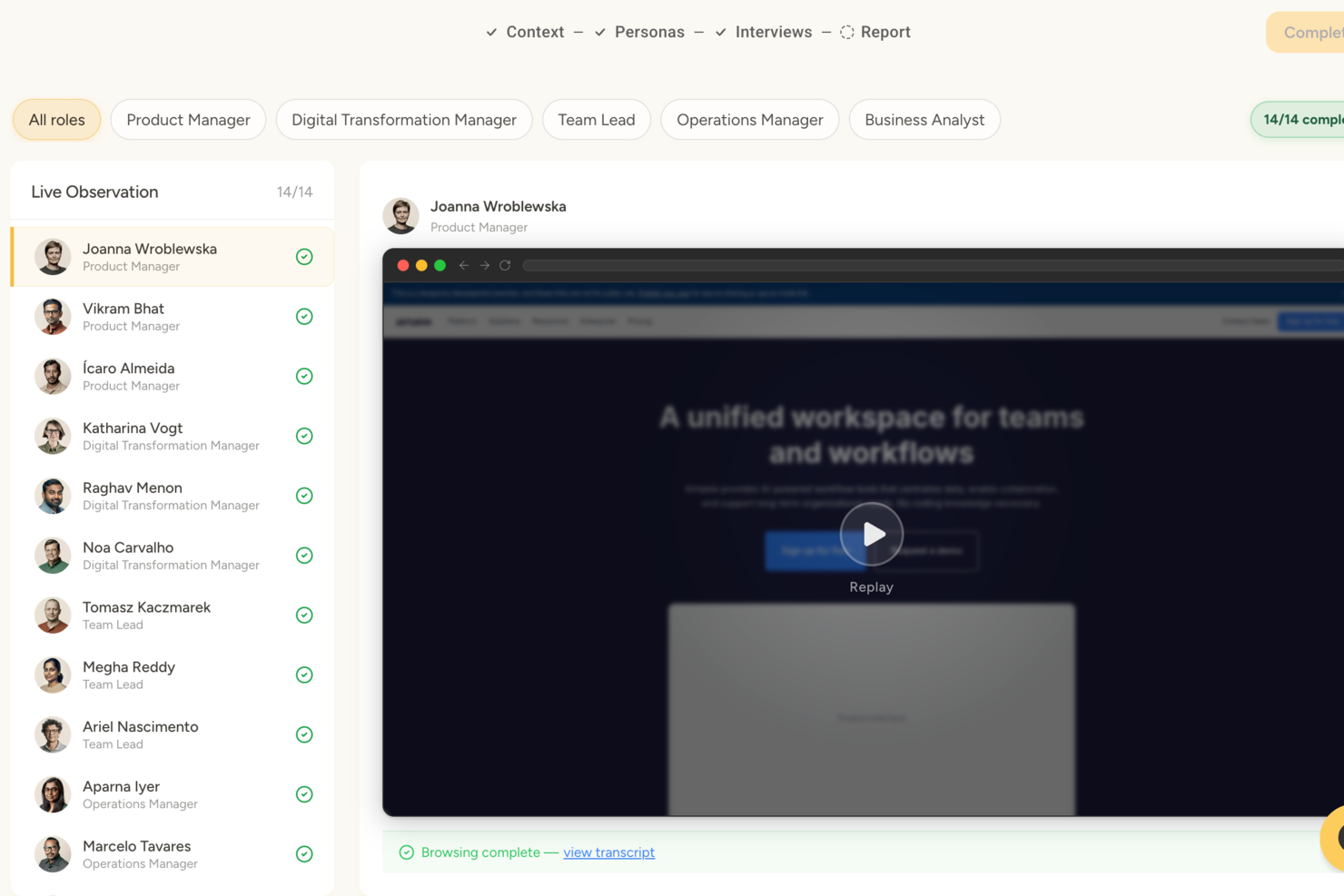
Articos is an AI-powered synthetic user research platform that generates personas based on behavioral science to simulate audience reactions, test messaging and concept variants, and produce structured research reports with prioritized insights.
Who Is Articos Best For?
Articos is a good choice for marketers, product teams, and UX researchers who need fast audience insights without recruiting live participants or running large-scale live traffic experiments.
Why I Picked Articos
I picked Articos as one of the best because its AI engine goes beyond surfacing what resonates with simulated personas. It delivers ranked optimization recommendations you can act on right away. When I run a concept test, Articos flags which messaging angles perform strongest and suggests specific copy or positioning adjustments, removing the guesswork from interpreting results and cutting the time between testing and iteration.
Articos Key Features
- Synthetic persona generation: Uses AI and behavioral science to simulate how different user segments would react to your content.
- Concept variant testing: Compares two content or messaging variants with the same simulated audience panel.
- Audience segmentation targeting: Allows you to define demographic and psychographic audience profiles for pre-launch tests.
- Structured insight reports: Present test results in themed findings and include persona quotes for stakeholder review.
Articos Integrations
Native integrations are not currently listed.
Pros and Cons
Pros:
- Compares message variants without live traffic
- Completes full studies in under 30 minutes
- AI personas include built-in skeptics
Cons:
- Vague inputs produce less reliable outputs
- Synthetic personas miss truly unexpected responses

Best for self-serve experiment analytics
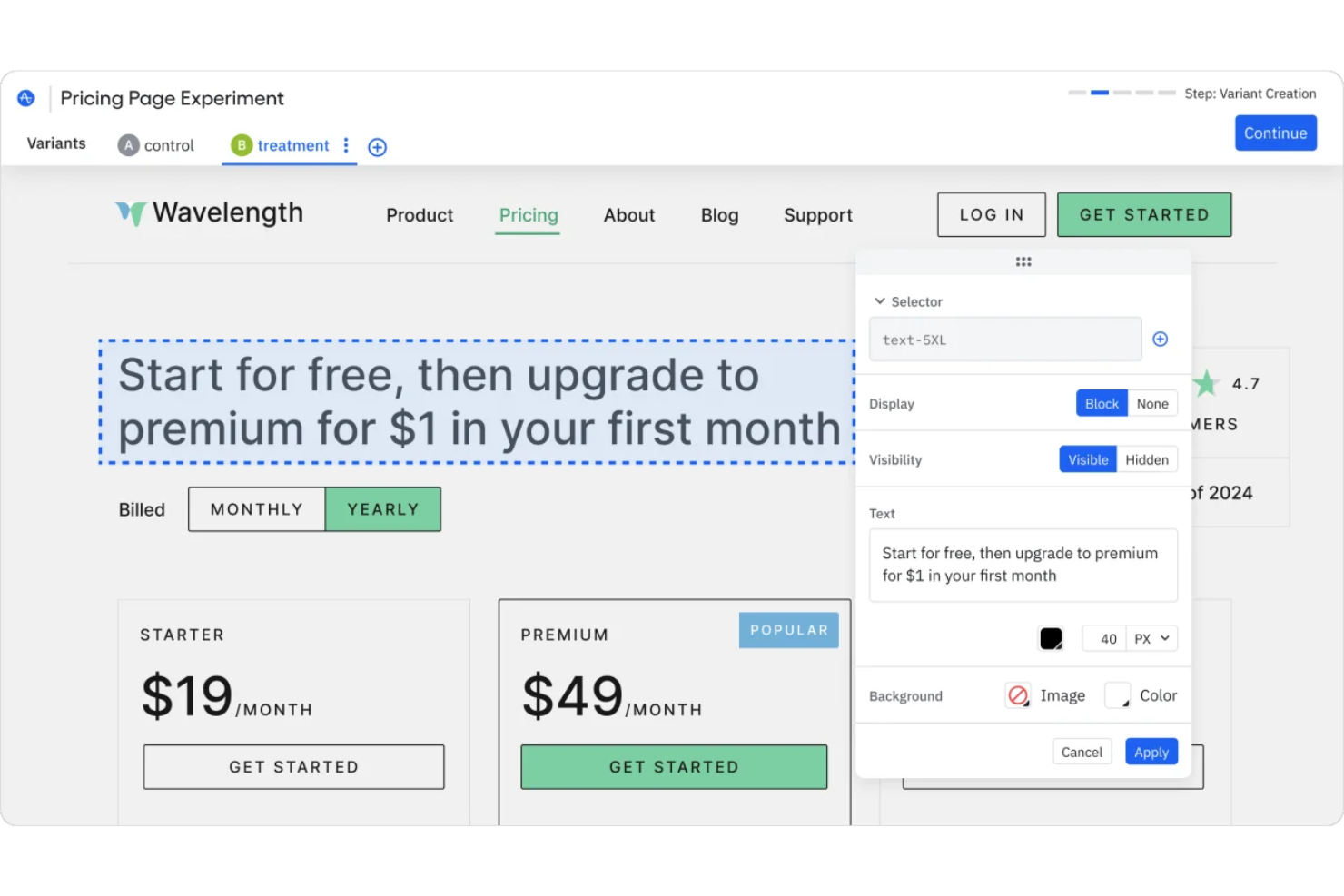
Amplitude is a feature experimentation and A/B testing platform that combines feature flags, a visual experiment editor, and built-in statistical analysis with its product analytics suite.
Who Is Amplitude Best For?
Amplitude suits product and growth teams at mid-size to enterprise digital companies that conduct experiments along with product analytics.
Why I Picked Amplitude
I picked Amplitude for its self-serve experiment analytics that help teams run and understand tests without heavy technical support. The guided experiment UX walks teams through setup using built-in best practices, so product managers can design, launch, and read results without leaning on data science. I also like that Amplitude shows which user segments are driving impact and flags data quality issues, so I'm not second-guessing whether a result is valid.
Amplitude Key Features
- Feature flags: Manage feature releases, target audiences, and connect experiments with product behavior data.
- Mutual exclusion groups: Prevent users from being included in competing experiments by separating test audiences.
- Sequential testing: Analyze experiments continuously and identify significant results without relying on fixed test windows.
- Experiment metrics: Define primary and secondary metrics to measure how variants impact user behavior and outcomes.
Amplitude Integrations
Amplitude integrates with 60+ tools, including Segment, Snowflake, BigQuery, Braze, Salesforce, attribution tools, and experimentation platforms. It also offers APIs for custom integrations, but does not currently support native Zapier integration.
Pros and Cons
Pros:
- CUPED variance reduction improves test accuracy
- Explore additional metrics after experiments run
- Experiments tie directly to behavioral analytics
Cons:
- Custom metric definitions can be tricky
- Advanced experimentation features may require higher-tier plans

Best for AI-driven A/B testing

Instapage is a landing page builder that focuses on optimizing conversions and maximizing ad ROI. It's designed to help you create personalized and high-converting landing pages tailored to your advertising campaigns.
Why I Picked Instapage
When it comes to A/B testing, Instapage offers AI-driven experiments that let you automatically direct traffic to the best-performing page variations, saving you time and helping you make data-driven decisions easily. Plus, Instapage's analytics provide heatmaps and real-time data on visitors and conversions, giving you insights into user behavior and helping you fine-tune your campaigns. These tools make it easy for anyone on your team to understand what's working and what needs adjustment.
Another reason I chose Instapage is its AdMap® feature, which allows you to visualize your ad campaign structures and link ads to relevant landing pages. This makes updating your campaigns more efficient and ensures that your ads are always aligned with your landing pages. Additionally, the Thor Render Engine® ensures fast mobile page loading, which enhances the user experience and can lead to higher conversion rates. These features work together to create a comprehensive A/B testing environment that helps you get the most out of your campaigns.
Standout Features
Features include AI content generation, which helps you quickly create headlines, text, and calls to action for rapid A/B testing. The visual collaboration feature enables real-time team collaboration on page designs, making it easier to gather feedback and streamline the review process. Instablocks® and global blocks allow you to create reusable templates, so you can quickly scale and update multiple pages without starting from scratch each time.
Integrations
Integrations include ActiveCampaign, Zapier, Mailchimp, Salesforce, Google Analytics, WordPress, Shopify, Google Ads, HubSpot, Slack, Zendesk, and AWeber.
Pros and Cons
Pros:
- fast loading speeds with a dual-cloud network
- strong integration capabilities
- user-friendly builder for landing page creation
Cons:
- higher pricing
- some users report limited customization and template options

Best for customizable feature flagging options

LaunchDarkly is a robust feature-flag management platform that helps you ship valuable and safe software releases. LaunchDarkly enables you to deliver immense value to your software sprint cycles in an Agile environment.
Why I picked LaunchDarkly: I’m amazed by the feature flagging and experimenting features that LaunchDarkly offers. LaunchDarkly features four easy steps to leverage feature flags: Flag creation, metric assignment, recording, and identification. Additionally, from a technical standpoint, LaunchDarkly is a comprehensive testing platform that caters to full-stack testing, including back-end and front-end elements.
Additionally, LaunchDarkly’s experiment builder ships a clean and easy-to-use interface. The builder allows you to tweak parameters like metrics and variations. Moreover, you can also define the traffic allocation for your variants to create granulated test cases.
LaunchDarklyStandout Features and Integrations
One standout feature includes flag triggers that help you automate changes based on customized metrics. For instance, you can configure to turn off a particular feature flag if a specific value (like CPU usage) exceeds a predefined threshold.
Integrations include tools like Akamai, Amplitude, Azure DevOps, Census, Cloudflare, Confluence, Datadog, Grafana, Heap, Honeycomb, Okta, and Pendo. Additionally, you can use a paid integration with Zapier to connect to thousands of other cloud-based apps. And if you are feeling adventurous, you can use its API to develop custom integrations.
Pros and Cons
Pros:
- Easy-to-use API
- Detailed documentation
- Great rule-based targeting features
Cons:
- Occasional lags in ticket resolution
- Challenging for custom role creation

Best for Shopify ecommerce stores

Founded in 2006, Crazy Egg developed one of the most nascent heatmap technologies to track visitor behavior on websites. Fast forward to the present, and Crazy Egg has many optimization features including A/B testing, error tracking, surveys and more.
Why I picked Crazy Egg: I’m amazed by the Shopify integration that Crazy Egg offers. Right off the bat, Crazy Egg features a “five visual snapshot” that provides heatmaps, scrollmaps and an interesting confetti report that depicts individual clicks on your website.
Crazy Egg provides a robust A/B testing solution. You can quickly tweak elements on your landing or checkout pages to track the corresponding impact on your sales. Additionally, the testing setup is quite simple: You only need to add the Crazy Egg snippet to any web page, and you’re ready.
Crazy Egg Standout Features and Integrations
One standout feature includes shopping cart abandonment analysis. Crazy Egg helps you understand at what point potential shoppers drop-off. You can analyze these website visitors’ browsing patterns and devise A/B testing to convert these “low-hanging fruits.”
Integrations include tools like Drupal, Google Tag Manager, Joomla, Marketo, Segment, Shopify, Squarespace, Wix, WordPress, and others.
Pros and Cons
Pros:
- Great heat mapping features
- Campaign duplicating features
- Robust reporting
Cons:
- Session recording replays aren’t very reliable
- Lack of integrations with 3rd party analytics tools

Best for data-driven A/B testing

For businesses seeking to optimize their strategies through data-driven insights, Omniconvert stands out as a comprehensive solution for A/B testing and conversion rate optimization. Designed with eCommerce companies in mind, it offers advanced segmentation and customer analytics to enhance user experiences and boost conversions. Whether you aim to tailor customer interactions or improve retention, Omniconvert provides the tools needed to address these challenges effectively.
Why I Picked Omniconvert
I picked Omniconvert for its exceptional ability to conduct data-driven A/B testing, which is crucial for businesses aiming to refine their marketing strategies. The platform's robust segmentation engine allows you to create tailored experiences based on visitor behaviors, UTM parameters, and custom attributes, ensuring precise targeting. Additionally, Omniconvert supports both Frequentist and Bayesian statistical models for analyzing test results, offering flexibility in data interpretation. These features make it a strong contender for those focused on leveraging data to enhance user engagement and conversion rates.
Omniconvert Key Features
In addition to its data-driven A/B testing capabilities, Omniconvert offers several features that cater to the needs of businesses looking to optimize their marketing strategies:
- Web Personalization: Tailor user experiences based on visitor behavior, geographic location, and traffic sources to increase engagement.
- Visual Editor: Create and implement A/B tests easily without the need for complex coding, allowing for quick experimentation.
- Split URL Testing: Conduct significant website changes by testing different URLs to determine the best-performing version.
- Detailed Reporting: Analyze test results with in-depth reports and integrate findings with platforms like Google Analytics for comprehensive insights.
Omniconvert Integrations
Integrations include Shopify, Google Analytics, Magento, WordPress, WooCommerce, PrestaShop, BigCommerce, Salesforce, HubSpot, and Mailchimp.
Pros and Cons
Pros:
- Users note a helpful and responsive support team.
- Supports Frequentist and Bayesian models for data analysis flexibility.
- Robust segmentation engine allows precise targeting for tests.
Cons:
- Outdated user interface may hinder usability, especially with navigation and data display
- Clunky mobile settings affect mobile optimization.

VWO
Best for garnering website behavioral analytics

VWO is an end-to-end testing optimization platform that helps businesses analyze and make data-driven decisions. VWO has three major product categories, namely Experiment, Observe and Personalize. A/B testing is an offering of the Experiment product module. Some useful behavioral analytics that VWO collects include dead clicks, rage clicks, time spent, drop-offs, and several others.
Why I picked VWO: I used to run a blog back in the day, and I was obsessed with various website metrics like bounce rate, page views, unique visitors and so on. VWO is your go-to if your digital products predominantly feature websites.
VWO offers various web page testing methods, including multivariate, split and A/B testing. Additionally, the platform features a useful visual editor with point-and-click features. You can quickly edit design elements like images, backgrounds, etc., without writing any HTML/CSS code.
VWO Standout Features and Integrations
One standout feature includes out-of-the-box widgets you can leverage to influence user behavior. VWO offers a huge widget library that you can experiment with to improve lead capturing and conversions.
Integrations include tools like 6sense, AT Internet, Adobe Analytics, BigCommerce, Braze, Clearbit, Contentful, Contentsquare, Drupal, and FullStory. Additionally, you can access plugins for content management systems (WordPress) and ecommerce platforms like Shopify.
Pros and Cons
Pros:
- Test scheduling
- Robust Bayesian model data analysis
- Easy to customize landing pages
Cons:
- Can’t allocate credits amongst internal teams
- Occasional platform bugs

Best for targeted product rollouts

Optimizely is a heavyweight in the Conversion Rate Optimization (CRO) and A/B testing space. Optimizely helps brands worldwide improve customer lifetime value and revenue. With over 10000 customers, Optimizely has three broad product pillars: Orchestrate, Experiment and Monetize. The A/B testing features fall under the Experient product category.
Why I picked Optimizely: As a former product manager, I recall having a constant see-saw of dilemmas when it came to product feature prioritization. Optimizely has an amazing targeted rollout to progressively release new features.
With targeted rollouts (aka feature flags), you can define customized traffic allocations for specific product features. Consequently, you can segment audiences based on various parameters. For instance, you can only roll out a new chatbot feature to beta customers. As a result, you can validate features before pushing them to production.
Optimizely Standout Features and Integrations
One standout feature is AI-generated insights that give you real-time guidance on optimizing content for improving conversions. Additionally, Optimizely also offers AI-powered recommendations for personalizing website and email copy.
Integrations include tools like 6Sense, Figma, FullContact, Glassbox, Hawksearch, Hearsay, Hootsuite, Invoca, Milanote, and Sprout Social. You can build new integrations using the Optimizely integration platform or access thousands of additional apps via Zapier (requires paid plan).
Pros and Cons
Pros:
- Robust server-side testing
- Multivariate testing
- Straightforward UI
Cons:
- Challenging to integrate third-party data sources
- Fragmented documentation

Best for code-free webpage edits

Convertize is an A/B testing software designed to help you optimize your website's performance. By allowing you to test different versions of your webpages, it empowers you to make data-driven decisions to boost conversions.
Why I Picked Convertize
One of the standout features of Convertize is its Smart Editor, which lets you modify webpages without needing any coding skills. This means you can quickly set up tests and see which version of your page resonates better with your audience. Additionally, the Autopilot function is a game-changer as it automatically directs more traffic to the better-performing page, saving you time and effort in monitoring and adjusting traffic manually.
Another reason I chose Convertize is its extensive library of over 150 A/B testing ideas, which are rooted in consumer psychology. This library gives you a head start by providing actionable ideas that you can implement to see immediate improvements. The Hybrid Statistics Engine is another feature that caught my eye because it speeds up the process of identifying which version of a webpage is performing better, ensuring that you can make informed decisions quickly.
Standout Features
Features include dynamic text, which allows you to personalize content based on visitor behavior, and geolocation targeting, which helps tailor the user experience based on where visitors are coming from. The platform also offers lightning mode to prevent flickering during tests, ensuring a smooth user experience while you're running experiments. These features work together to provide a robust environment for A/B testing, making it easier to achieve your conversion goals.
Integrations
Integrations include ClickFunnels, HubSpot, Wix, Shopify, WordPress, Google Analytics 4 (GA4), Google Tag Manager, Magento, WooCommerce, BigCommerce, PrestaShop, and Squarespace.

Leanplum
Best for A/B testing of mobile notifications

Leanplum’s founders are ex-Google employees who worked on YouTube monetization algorithms. Founded in 2012, Leanplum helps businesses increase customer engagement. Leanplum focuses on mobile website and application A/B testing to draw insights and improve user engagement rates.
Why I picked Leanplum: I’m amazed that changing small elements (like the time of a notification trigger) can result in massive engagement spikes. Leanplum enables you to define parameters that manipulate notification triggers. For instance, you can choose an “immediate” trigger or apply a “delay” based on conditions like whether the user opened a previous notification.
As you test variations, you will soon embark on that secret recipe that maximizes engagement. Leanplum helps you grasp which channels work better based on the collected sample size. For instance, you can analyze and make a data-driven decision between opting for in-app notifications and push notifications.
Leanplum Standout Features and Integrations
One standout feature is the automation of notification workflows. For instance, you can create a customized workflow that defines what kind of notifications would pop up after a day, two days or five days. As a result, you have granular control over your mobile application notification and messaging strategy.
Integrations include Amplitude, Branch.io, Inkit, InMobi, Kochava, Marketo, Twilio, Tune, and Radar. An API is also available for custom integrations.
Pros and Cons
Pros:
- Power analytics tools
- Great data segmentation
- Robust campaign reporting
Cons:
- Glitches with iOS integration
- Occasional sync glitches
When to Use A/B Testing Software
A/B testing software lets you run controlled experiments on your product to see what actually drives conversions, retention, or revenue. It takes the guesswork out of product decisions and replaces gut calls with data you can defend. If any of the scenarios below sound familiar, it's probably time to add it to your stack:
- Your team is shipping features and hoping for the best: You launched a redesigned onboarding flow last quarter but can't tell if it moved the needle. A/B testing ties every change to a measurable outcome, so you know what's working before you double down.
- Approval cycles are dragging because no one can agree: Your designer wants the CTA above the fold, your CPO wants it below, and the debate eats two weeks. Running a test settles it with user data in days, not meetings.
- You're optimizing conversion but can't isolate the variable: Say your trial-to-paid rate dipped 8% after a homepage refresh. A/B testing lets you isolate exactly which change caused the drop and roll it back before it costs you more.
- Managing growth experiments across teams is getting messy: You have three squads running separate tests in spreadsheets with no shared visibility. A proper testing platform centralizes results, prevents overlap, and keeps experiments statistically valid.
- It's taking too long to validate new pricing or packaging: Testing a new plan tier or annual discount manually means waiting months for behavioral signals. A/B testing accelerates that feedback loop so you can iterate before your next board review.
Other A/B Testing Software Options
Here are other tools that did not make it to my best list but are still worth considering:
- Yieldify
For AI-driven experience predictions
- Adobe Target
For personalized audience experiences
- Oracle Maxymiser
For consolidating customer data
- Google Optimize
For A/B testing and data-driven insights
- Monetate
For dynamic A/B testing
- Statsig
For advanced statistical analysis
- Split
For full-stack application testing
- Apptimize
For mobile A/B testing
- Intellimize
For ecommerce and SaaS businesses
- Zoho Pagesense
For conversion optimization
- Tggl
For gradual feature rollouts


How I Evaluate A/B Testing Software
I look at two layers: the baseline every tool must clear—things like stat analysis, traffic allocation, and SDK depth—and the differentiators that separate the right fit from the rest.
Core Functionality (Table Stakes For This List)
When I'm selecting tools for my list, I rank each one on a scale from 0 (does not offer the functionality) to 5 (excels in this area) for each core functionality listed below. Then, I calculate the tool's total score into a percentage. Each tool needs to achieve a minimum total score of 65% to be considered for inclusion.
- Experiment Creation & Variant Setup: I evaluate how easily you can spin up A/B or multivariate tests—whether that's through a visual editor, low-code interface, or code-based config.
- Traffic Allocation & Audience Targeting: Flexible traffic splits and targeting rules matter here, like segmenting by user plan tier, device type, or behavioral cohort.
- Statistical Analysis Engine: I check whether each tool offers clear significance calculations, confidence intervals, and methodology options like Bayesian or frequentist models.
- Feature Flag Support: Product teams often run experiments through flags, so I look for flag-based rollouts with targeting, kill switches, and percentage-based releases.
- Goal & Metric Tracking: Each tool should let you define primary and secondary success metrics per experiment—conversion rates, engagement events, retention, or revenue.
- SDKs & Platform Integrations: I look at SDK coverage across web, mobile, and server-side environments, plus native connections to analytics platforms and data warehouses.
Once I have a list of tools that meet this criteria, I consider what sets each platform apart.
Differentiating Factors (What Sets Vendors Apart)
Here's how I compare and contrast different vendors:
Standout Features
Server-side experimentation is a big differentiator—I look for tools that let product teams test backend logic like recommendation algorithms or pricing tiers, not just button colors. Holdout and mutual exclusion groups also matter when your team runs multiple experiments at once, since they prevent test contamination. I check whether a tool offers a searchable experiment repository too, which helps growing teams avoid re-running past tests and build on prior learnings.
Beyond Features
Pricing transparency matters a lot here—I evaluate whether costs scale predictably with monthly tracked users or experiments, since surprise overages can stall a growing experimentation program. Implementation speed is another factor I weigh. A tool that gets your team to its first test quickly, with solid onboarding resources and SDK documentation, delivers value faster. I also consider the integration ecosystem, especially native connections to analytics platforms and data warehouses where your product data already lives.
What Is A/B Testing Software?
A/B testing software is a tool that allows product managers, marketers, and UX teams to compare two or more versions of a digital experience—such as a webpage, app feature, or CTA—to see which performs better with users. It helps teams run controlled experiments, analyze results, and make data-driven decisions to improve conversions, user engagement, and overall product performance. This software addresses challenges such as relying on guesswork, slow iteration, and unclear impact from design or content changes.
A/B Testing Software FAQs
Find answers to common questions people ask about A/B testing software:
How do you perform an A/B test?
Here’s a six-step process you can follow for performing effective A/B tests:
- Define your goal: Determine your objectives for the A/B test.
- Identify testing scope: Decide which elements of your digital product you would like to test.
- Create variations: Develop multiple variants of your test elements. For instance, if you’re testing a CTA button, create variants with different combinations of colors, sizes, etc.
- Split traffic: Using A/B testing software, divide incoming traffic amongst your variants.
- Run Tests: Let the testing software run tests and collect data.
- Analyze results: Analyze your results to determine which variant performs better.
What are the types of A/B testing?
Here are some popular types of A/B testing:
- A/B/n testing: This is just an extension of the traditional A/B tests. A/B/n testing involves multiple variants.
- Multivariate testing: MVT involves testing combinations of multiple elements simultaneously. As a result, you can optimize complex pages with various elements to find the best combination.
- Split URL testing: Here, users get directed to entirely different URLs, rather than variations.
- Bandit testing: This involves dynamically allocating incoming traffic to the better-performing variant.
Most A/B testing tools support basic A/B/n testing, multivariate testing, and split URL tests. A/B/n lets you compare several versions of a single element. Multivariate testing helps you test combinations of changes, while split URL testing compares entirely different pages. Check your chosen tool for these options before starting.
Can A/B testing tools run multivariate or split URL tests?
Yes, many top A/B testing platforms offer multivariate and split URL testing alongside standard A/B tests. Multivariate testing lets you experiment with multiple changes at once, while split URL testing directs users to entirely different pages. Not all tools offer both features, so check compatibility if these testing methods matter to your team.
How long should I run an A/B test to get reliable results?
You should run an A/B test until you’ve collected enough data to reach statistical significance. Most product managers and marketers look for at least one to two weeks of traffic, but exact timing depends on your user volume and conversion rates. Some software will alert you when you’ve reached significance, helping you avoid ending tests too soon.
Do I need developer help to set up A/B tests?
No, many modern A/B testing tools are designed for non-technical users and offer visual editors or plugins. Marketers and product managers can usually set up basic tests without any coding. For more complex experiments, like custom event tracking or testing deep app flows, some developer input may still be helpful.
Usability
A/B testing tools that ship an easy-to-use and straightforward UI fare high in my books. Additionally, easy-to-use A/B testing tools pave the way for seamless onboarding. Beginners must get acquainted with an A/B testing tool quickly to create and execute tests on the go.
Software Integrations
I’ve mentioned the various integration possibilities that each tool offers. You can integrate A/B testing software with applications like collaboration tools, third-party analytics tools, CMS tools, and CRM tools.
Pricing
Lastly, the A/B testing software shouldn’t burn a hole in your pocket. I’ve mentioned each tool’s pricing along with their free trial availability. All the tools feature a per-month SaaS subscription charge.
The typical monthly subscription charge varies between $10 up to $2000 per month. Some tools haven’t mentioned pricing so you would need to contact their sales teams for a customized quote.
What’s Next?
Selecting the right A/B testing software can go a long way in unraveling unique insights about improving your customer experience and conversion rates. I hope my guide helps you choose the right A/B testing software that propels your understanding of what elevates your customers’ digital experience.
As a product manager, you must be constantly on edge hunting for ways to refine your digital products. Therefore, you can read about how feature flagging helps you manage a scaling a product, how to gather useful product feedback, or the 6 steps you can take to create a UX research plan.
Related tool lists:
Don’t forget to subscribe to our newsletter for more solutions and strategies from top product management strategists.