

10 Best LaunchDarkly Alternatives in 2026

Best LaunchDarkly Alternatives Shortlist


The strongest LaunchDarkly alternatives give you flexible feature flag management, easy experimentation, and clear controls—without sacrificing reliability or speed. If you’re evaluating LaunchDarkly alternatives, you’re likely dealing with scaling demands, complex governance needs, or a desire for more transparency in your release process.
This list helps you compare the top LaunchDarkly alternatives side by side, so you can confidently pick tools that match your workflow, compliance requirements, and developer stack. You’ll see where each platform stands out and which options are better suited for your goals.
What Is LaunchDarkly?
LaunchDarkly is a feature management platform that lets teams control feature releases with feature flags, enabling gradual rollouts, experimentation, and rapid rollback. It helps you separate code deployment from feature release, reducing risk and supporting continuous delivery. Teams use LaunchDarkly to test new features, target user segments, and ensure safer deployments without disrupting customer experience. This kind of tool is key for engineering, product, and DevOps teams managing frequent changes.
Best LaunchDarkly Alternatives Summary
This comparison chart summarizes pricing details for my top LaunchDarkly alternatives selections to help you find the best one for your budget and business needs.
| Tool | Best For | Trial Info | Price | ||
|---|---|---|---|---|---|
| 1 | Best with open-source flexibility | 14-day free trial + free demo available | From $75/seat/month | Website | |
| 2 | Best for product analytics integration | Free plan available | Pricing upon request | Website | |
| 3 | Best with enterprise-grade governance controls | Free plan available | Pricing upon request | Website | |
| 4 | Best for CI/CD pipeline integration | Free demo available | Pricing upon request | Website | |
| 5 | Best for experimentation and personalization | Free demo available | Pricing upon request | Website | |
| 6 | Best for developer-centric workflows | Free plan + free demo available | From $500/month (billed annually) | Website | |
| 7 | Best for simple feature flag management | Free forever plan + free demo available | From $110/month (billed annually) | Website | |
| 8 | Best with self-hosted deployment options | Free plan available | From $0.00005/event | Website | |
| 9 | Best for rapid experimentation at scale | Free plan available | From $150/month | Website | |
| 10 | Best for data-driven feature rollouts | Free plan + free demo available | Pricing upon request | Website |
Why Trust Our Software Reviews
We’ve been testing and reviewing product management software since 2020. As product managers ourselves, we know how critical and difficult it is to make the right decision when selecting software.
We invest in deep research to help our audience make better software purchasing decisions. We’ve tested more than 2,000 tools for different product management use cases and written over 1,000 comprehensive software reviews. Learn how we stay transparent & our software review methodology.
Best LaunchDarkly Alternatives Reviews
Below are my detailed summaries of the best LaunchDarkly alternatives that made it onto my shortlist. My reviews offer a detailed look at the features, use cases, and integrations of each platform to help you find the best one for you.

Unleash
Best with open-source flexibility
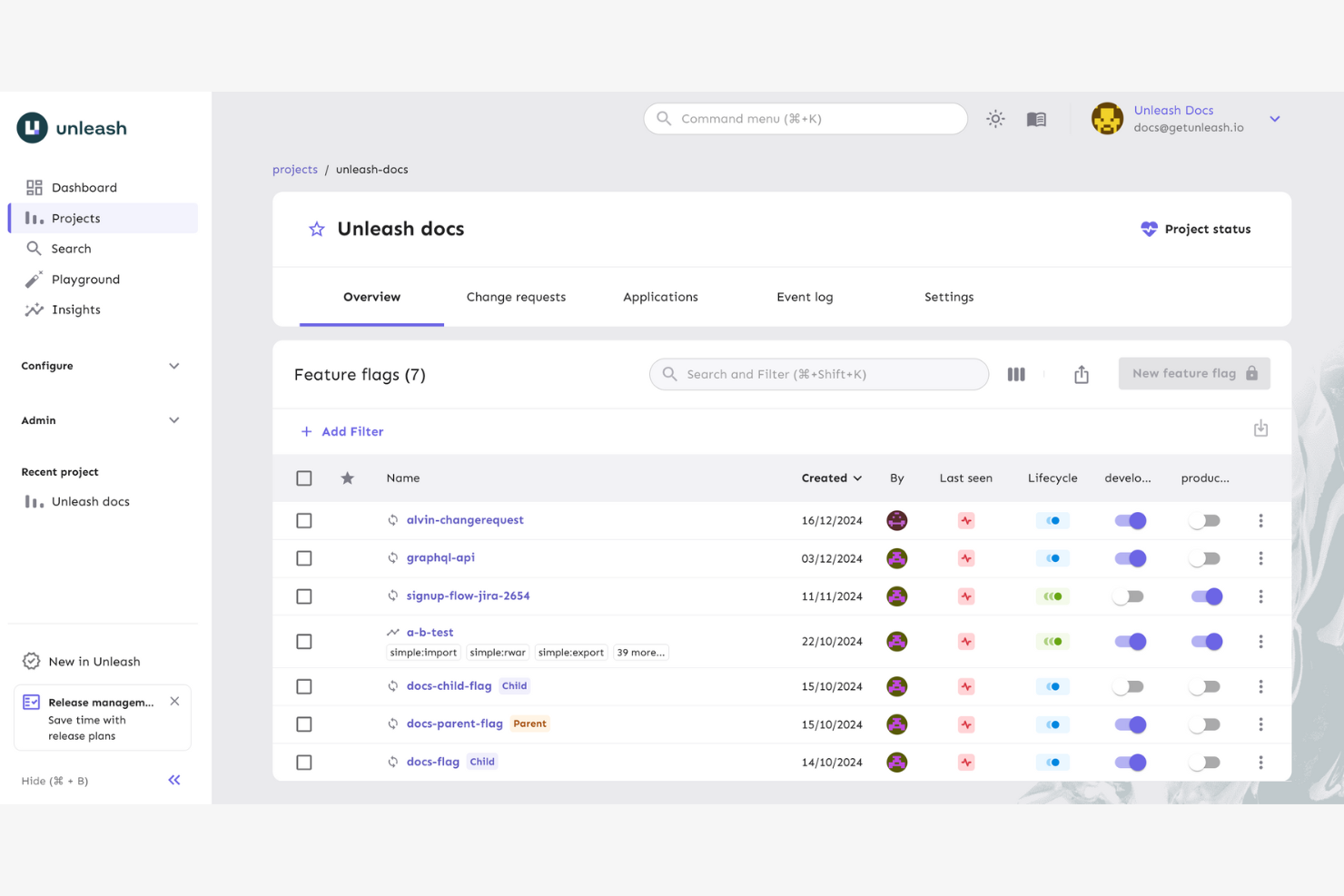
Unleash is a feature management solution designed for teams that want maximum control over their deployment strategies. If your business needs the freedom to self-host, customize, or audit every step of your feature flag lifecycle, Unleash can help.
Who Is Unleash Best For?
Unleash is well-suited for engineering teams that require full control and customization of feature flag infrastructure.
Why Unleash Is a Good LaunchDarkly Alternative
I picked Unleash because it's the only major feature management tool with a fully open-source core, which means my team can self-host the entire platform and own our data without relying on a third-party vendor. In practice, that means we can inspect, modify, and extend the codebase to fit our infrastructure—something LaunchDarkly simply doesn't allow. I also appreciate Unleash's activation strategies, which let my team define granular rollout rules using custom context fields beyond just user IDs or percentages. For engineering teams running strict compliance or data residency requirements, that level of control is hard to match.
Unleash Key Features
- Environment management: Organize feature flags across separate development, staging, and production environments with independent configurations.
- Change request workflows: Require peer review and four-eyes approval before any flag changes go live in production.
- Kill switches: Instantly disable features at runtime without a code deployment or redeployment.
- Audit logs: Access up to two years of flag change history to support compliance, security reviews, and incident analysis.
Unleash Integrations
Unleash offers native integrations with GitHub, GitLab, Jira, Slack, Segment, Datadog, Microsoft Teams, Azure DevOps, and Trello. An API is available for custom integrations.
Pros and Cons
Pros:
- Advanced rollout controls and activation strategies
- Feature flag logic runs locally for privacy
- Fully open-source core for self-hosting
Cons:
- Requires manual scaling and maintenance for growth
- Native A/B testing is limited

Best for product analytics integration
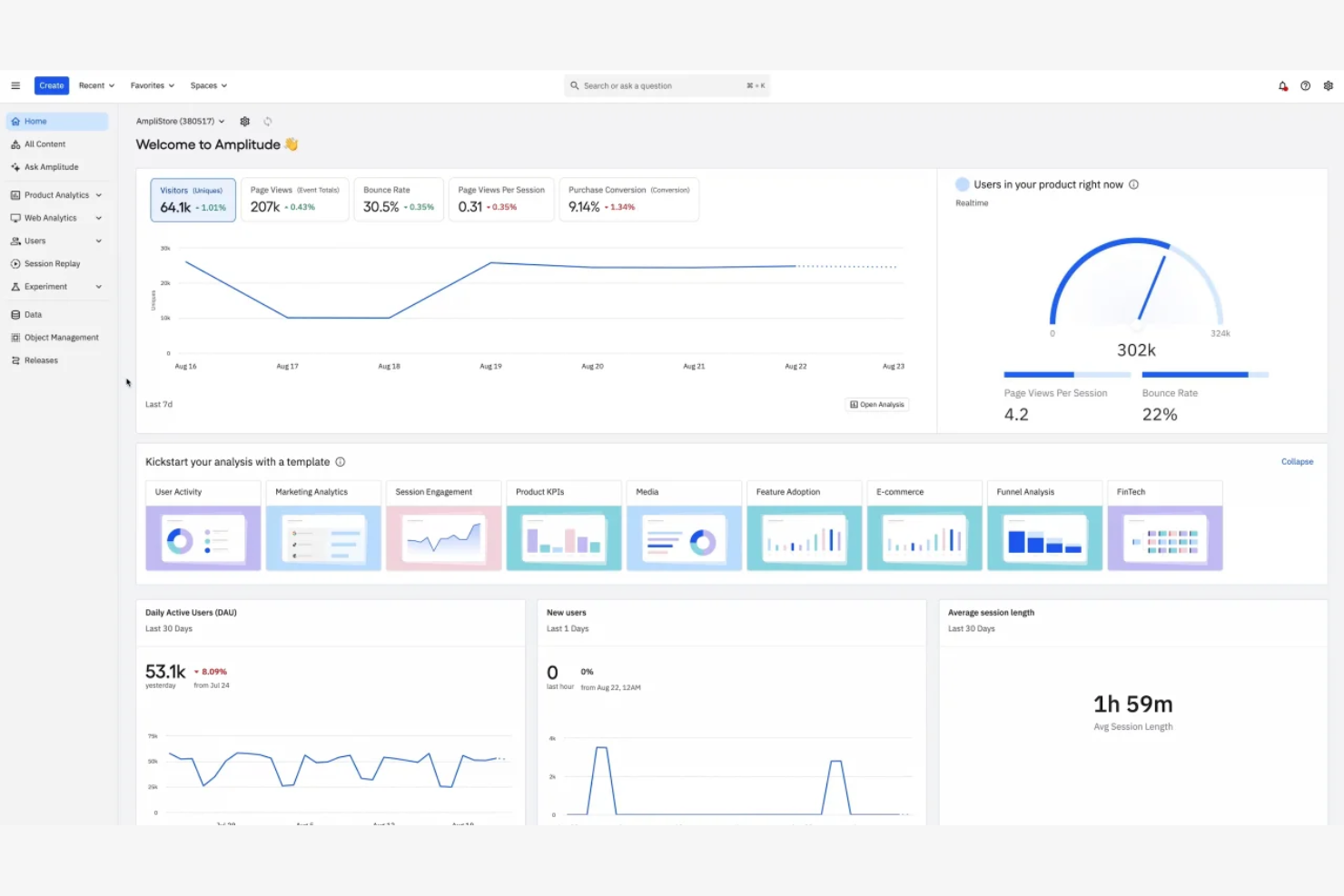
Amplitude gives product teams a way to tie feature flag rollouts to rich behavioral analytics, so you can closely measure user impacts. It’s a good pick for growth-focused organizations wanting to experiment and iterate based on real product data.
Who Is Amplitude Best For?
Amplitude is a strong fit for digital product teams who need to analyze feature adoption and user behavior with precision.
Why Amplitude Is a Good LaunchDarkly Alternative
I picked Amplitude because its feature experimentation is inseparable from its product analytics engine, which means flag rollouts come with built-in behavioral data—not just exposure metrics. When my team runs an A/B test or a phased feature rollout, I can immediately see how it shifts retention, conversion funnels, and user paths inside the same platform. I especially appreciate Amplitude's Experiment feature, which lets me define success metrics before a test launches and automatically surfaces statistical significance as data comes in. For product teams who want to move beyond simple flag management and actually understand how features change user behavior, that depth is hard to match.
Amplitude Integrations
Amplitude offers a broad catalog of native integrations, including Segment, mParticle, RudderStack, Braze, HubSpot, Salesforce, Snowflake, BigQuery, Optimizely, Split, Intercom, Mailchimp, and Google Tag Manager. An API is also available for custom integrations and data pipelines.
Amplitude Integrations
Amplitude offers native integrations with Segment, mParticle, Braze, HubSpot, Salesforce, Snowflake, BigQuery, Optimizely, Intercom, and Google Tag Manager. An API is available for custom integrations.
Pros and Cons
Pros:
- Enables experiment results tracking in real time
- Visualizes user paths after a feature launch
- Direct connection between feature flags and analytics
Cons:
- Higher cost at enterprise scale
- Analytics setup can take significant time

Harness
Best with enterprise-grade governance controls
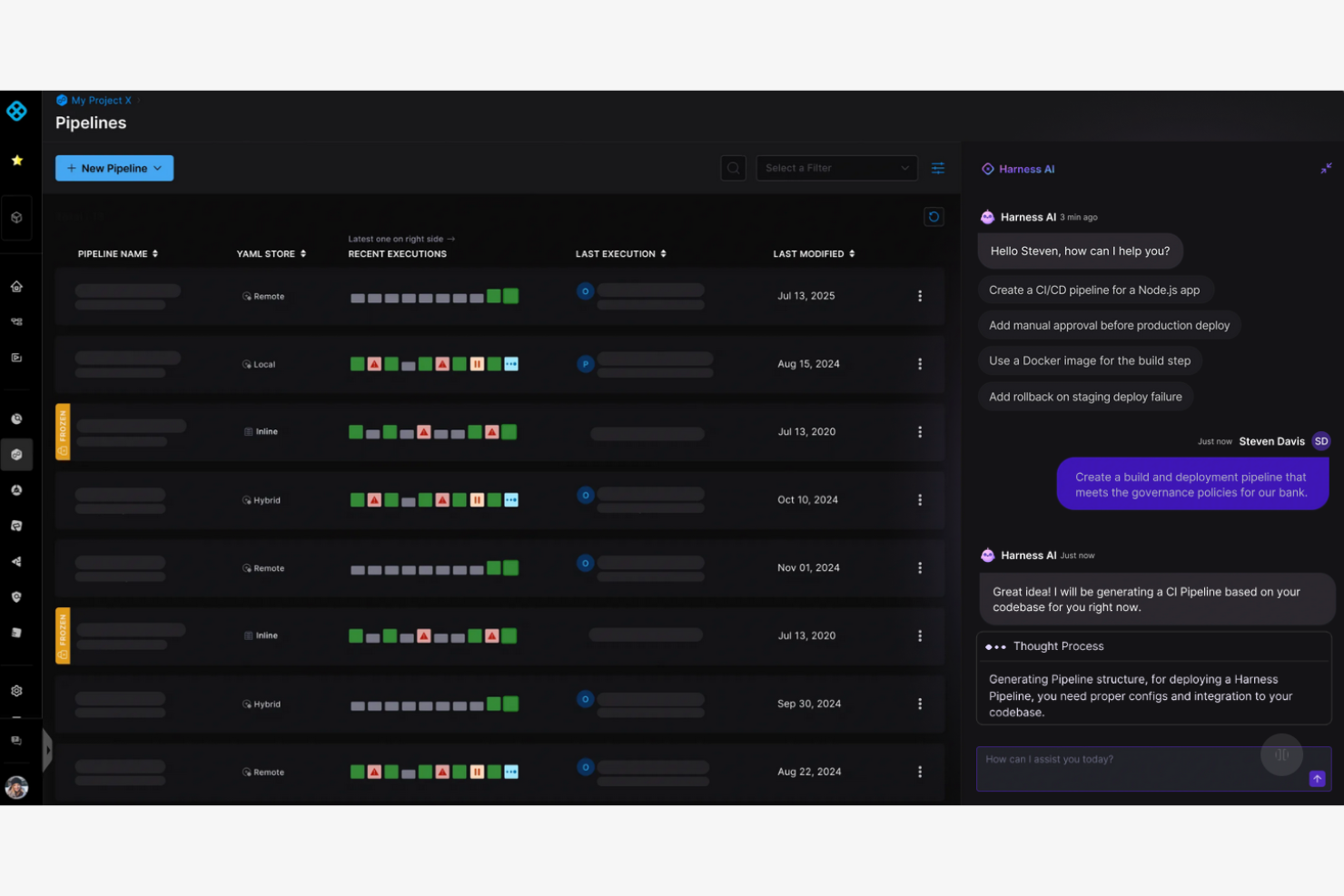
Harness is a feature management platform built for organizations that need tight operational oversight and compliance as they scale deployments. Large enterprises and highly regulated teams will find Harness valuable for minimizing risk across every stage of the release process.
Who Is Harness Best For?
Harness is a strong choice for large enterprises or compliance-driven teams managing complex, multi-environment software releases.
Why Harness Is a Good LaunchDarkly Alternative
I picked Harness because its governance controls go deeper than most feature management platforms I've used. It has built-in role-based access controls, approval workflows, and audit trails, so my team can enforce exactly who is allowed to create, modify, or toggle a flag in production. In practice, that means I can require a second approval before any flag change hits a regulated environment—something I haven't seen implemented this cleanly elsewhere. I also appreciate how Harness ties feature flags directly into its pipeline automation, giving my team a single place to manage both deployment controls and flag governance.
Harness Key Features
- Dynamic configurations: Adjust feature behavior in real time without deploying new code, letting any team iterate on live features instantly.
- Release monitoring: Automatically track performance and error metrics the moment a gradual rollout begins, with instant alerts tied to the specific flag causing an issue.
- Flexible targeting rules: Define exactly who sees a feature using custom segments, percentage rollouts, or specific user attributes.
- Flag lifecycle management: Track flag activity and surface stale or inactive flags for cleanup, with Jira integration to assign and prioritize code removal.
Harness Integrations
Harness offers native integrations with Jira and GitHub. Harness Pipelines is offered for custom integrations.
Pros and Cons
Pros:
- Release pipeline integration with feature flags
- In-depth audit logs for flag changes
- Enterprise RBAC and approval workflow enforcement
Cons:
- UI responsiveness occasionally lags with scale
- Governance features add operational complexity

Best for CI/CD pipeline integration
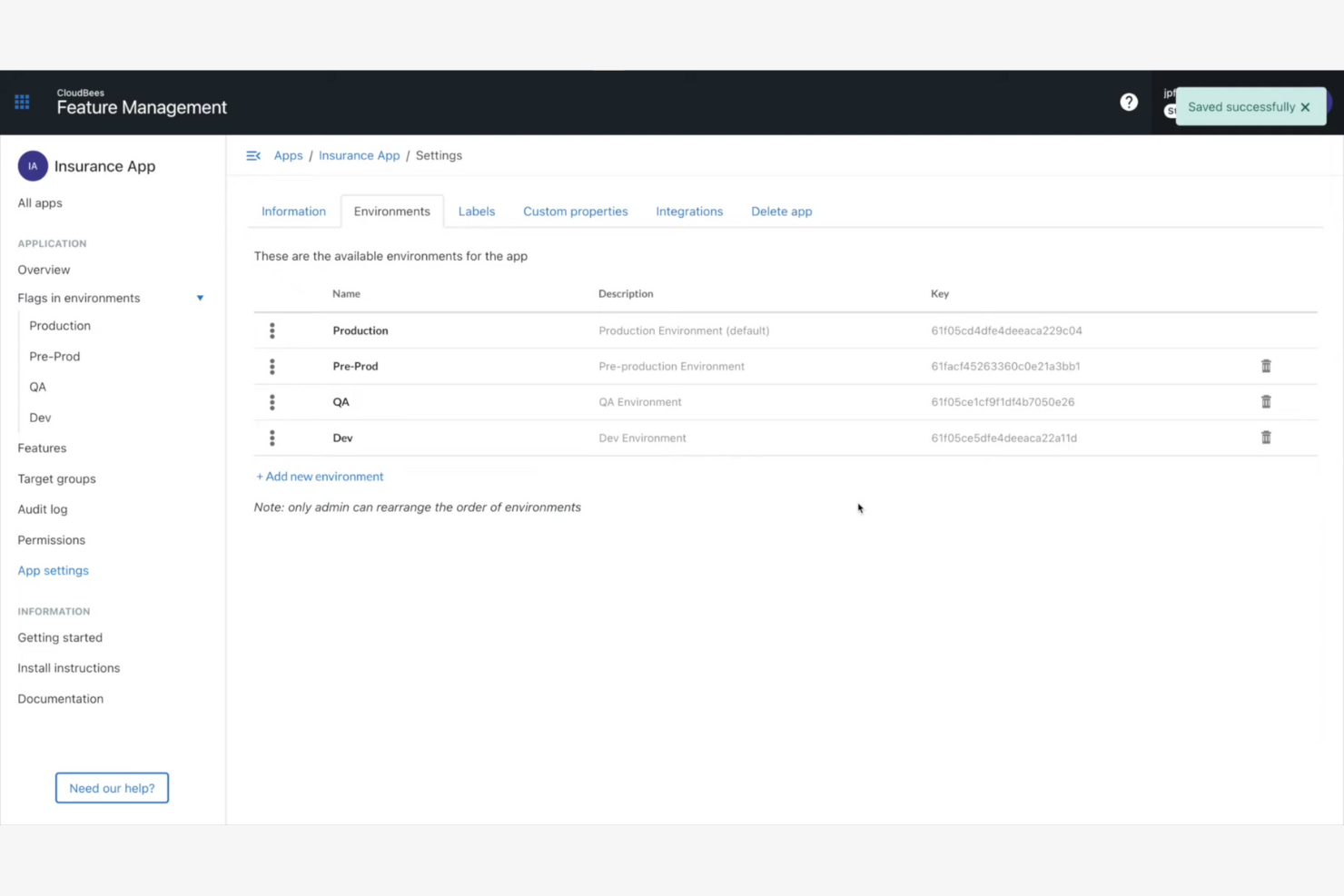
CloudBees offers feature management built specifically for teams invested in automated software delivery. It’s a good choice for engineering organizations that want feature flagging tightly aligned with their CI/CD pipelines and release governance.
Who Is CloudBees Best For?
CloudBees is a strong fit for DevOps teams in enterprises that need integrated feature management within complex CI/CD and release automation workflows.
Why CloudBees Is a Good LaunchDarkly Alternative
I picked CloudBees because its feature management is built directly into a broader CI/CD and software delivery platform, which means flag changes and release pipelines live in the same system. In practice, my team can gate deployments using feature flags without jumping between separate tools. I also appreciate CloudBees' release orchestration, which lets me tie flag rollouts to specific pipeline stages—so a flag only activates once a build passes defined quality gates. For engineering teams running complex, multi-stage delivery workflows, that level of pipeline-native control is something LaunchDarkly doesn't offer out of the box.
CloudBees Key Features
- Git-native release controls: Manage feature flag changes directly within Git workflows, keeping release decisions inside existing developer tooling without extra handoffs.
- Real-time exposure control: Adjust which users see a feature at any moment without triggering a new deployment or restarting services.
- Audit trail and governance tracking: Every flag change is automatically logged, attributed, and auditable to support enterprise compliance and security reviews.
- Unified control plane visibility: See what's live, what's changing, and who owns each release decision across teams and services from a single view.
CloudBees Integrations
CloudBees offers native integrations with Salesforce, AWS, Synaptics, Acquia, VMware, Adobe, and Google Cloud. An API is available for custom integrations.
Pros and Cons
Pros:
- Enterprise-focused compliance and auditing options
- Supports advanced release governance requirements
- Native feature management within CI/CD pipelines
Cons:
- Initial setup takes more time than LaunchDarkly
- UI complexity increases with large configurations
Best for experimentation and personalization
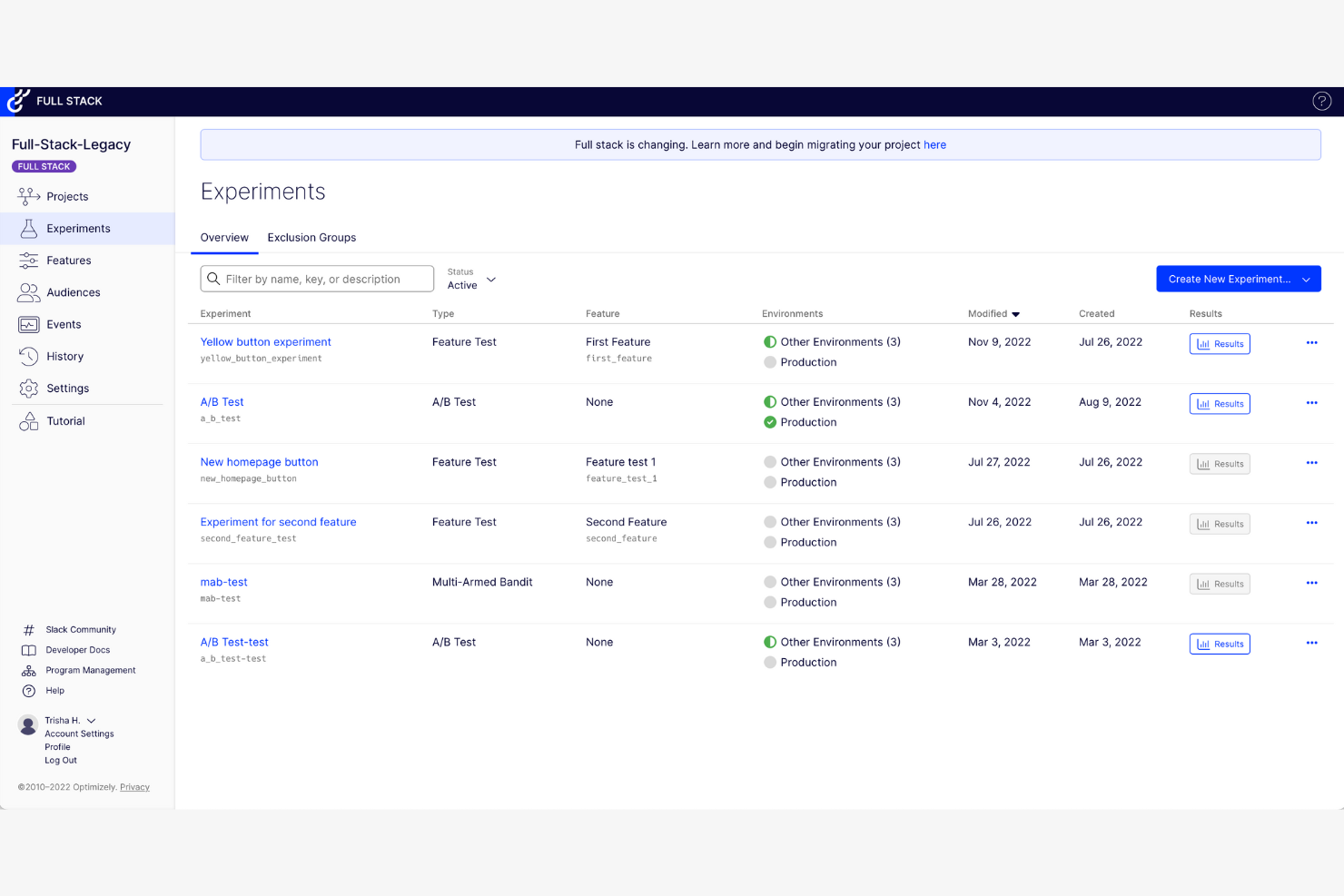
Optimizely is a feature management and digital experimentation platform that helps growth teams run product experiments at scale. If you're looking to optimize user experiences or test new features with precision, Optimizely offers sophisticated control for digital product owners and marketers.
Who Is Optimizely Best For?
Optimizely is a great fit for digital product teams and enterprise marketers who need to run controlled experiments and deliver personalized experiences at scale.
Why Optimizely Is a Good LaunchDarkly Alternative
I picked Optimizely because it goes further than flag management—it treats every feature release as an experiment opportunity. Its built-in Stats Engine handles significance testing automatically, so I'm not second-guessing results or waiting on a data team. I also appreciate Optimizely's audience segmentation tools, which let me deliver personalized variations to specific user groups based on behavior or attributes. For teams where experimentation and personalization aren't afterthoughts but core to the product strategy, Optimizely is purpose-built for that.
Optimizely Key Features
- Feature flags: Roll out, roll back, or target features to specific user segments without redeployment.
- Multi-armed bandit testing: Automatically shifts traffic to better-performing variations during live experiments.
- Visual editor: Build and launch A/B tests on web pages without writing code.
- Mutual exclusion groups: Prevent experiment overlap by isolating test audiences across concurrent experiments.
Optimizely Integrations
Optimizely offers 100+ native integrations with tools like Segment, Google Analytics, Adobe Analytics, Mixpanel, Amplitude, Slack, Jira, AWS, Shopify, and Salesforce. It’s also integrated with Zapier, and an API is available for custom integrations.
Pros and Cons
Pros:
- Built-in, user-friendly visual editor for non-technical users
- Strong support for omnichannel personalization
- An advanced experiment statistics engine included
Cons:
- High resource requirements for full-scale use
- Initial setup and experiment design can be complex
DevCycle
Best for developer-centric workflows
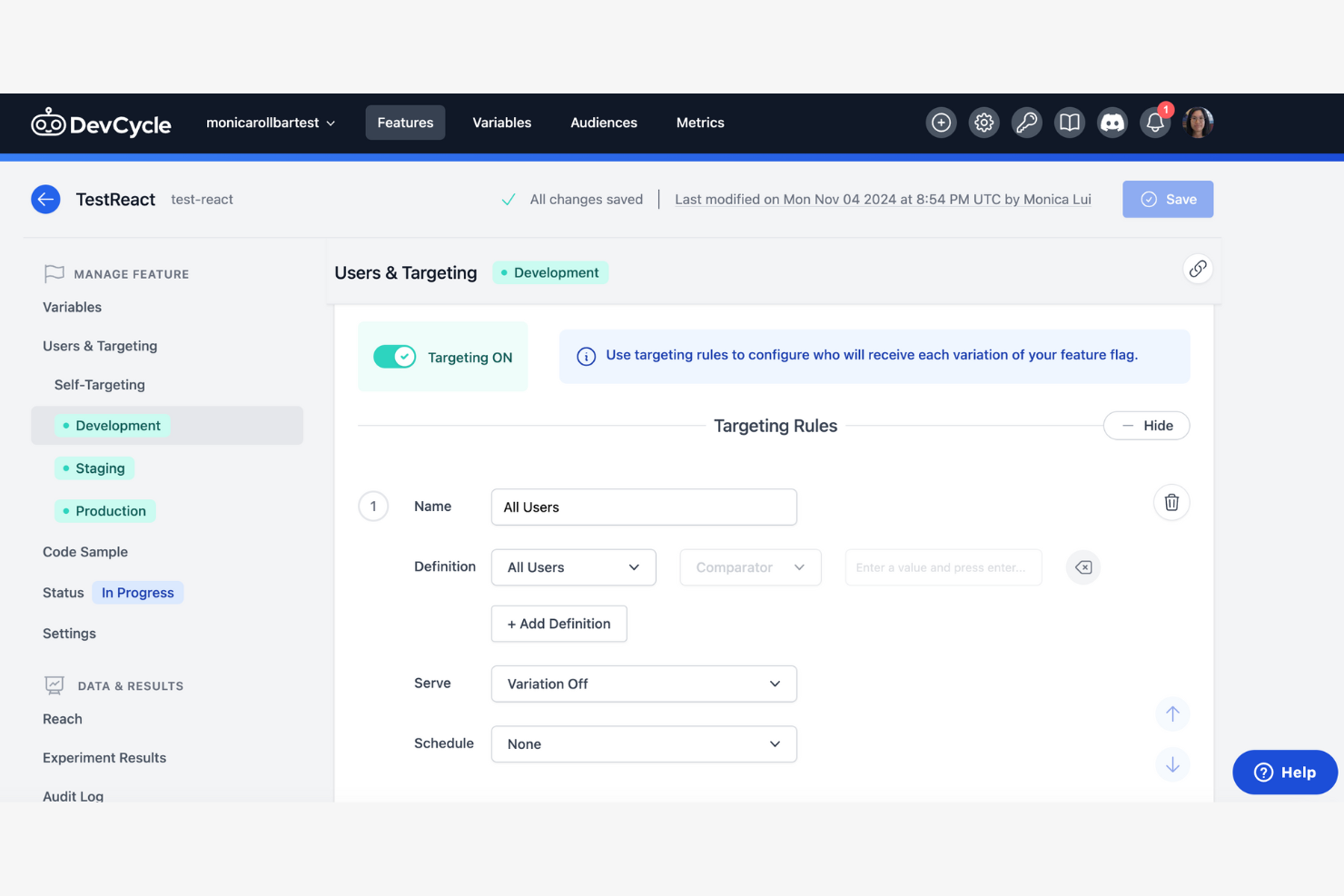
DevCycle is a feature management platform created for engineering teams who want to modernize how they release and manage software. It’s a strong pick for businesses looking for robust control, safety, and auditability in feature rollouts beyond basic flagging.
Who Is DevCycle Best For?
DevCycle is a great match for engineering teams at SaaS companies that need deep workflow automation and granular feature control.
Why DevCycle Is a Good LaunchDarkly Alternative
I picked DevCycle because it's built specifically for developers, and that focus shows in almost every part of the product. I appreciate that DevCycle uses OpenFeature, the CNCF open standard for feature flagging, which means my team isn't locked into proprietary SDKs the way you often are with LaunchDarkly. I also like the EdgeDB feature, which evaluates flags at the edge rather than at runtime—in practice, that means my team gets near-zero latency flag delivery without any extra infrastructure. For teams running continuous delivery pipelines, that combination of standards-based tooling and edge evaluation is genuinely hard to find elsewhere.
DevCycle Key Features
- Feature flag dashboard: View, manage, and audit all active flags across environments from a single interface.
- Code references scanning: Automatically detect where flags are referenced in your codebase to track usage and flag stale code.
- Gradual rollouts: Release features to a percentage of users and increase exposure incrementally based on real-time results.
- Local bucketing SDKs: Evaluate flags directly on the client device without sending user data to external servers.
DevCycle Integrations
DevCycle offers native integrations with Jira, GitHub, Slack, Bitbucket, Terraform, Snowflake, and Rollbar. Webhooks and an API are available for custom integrations.
Pros and Cons
Pros:
- Code references help manage technical debt
- Flag delivery happens at the edge for speed
- Built using the OpenFeature CNCF standard
Cons:
- Unpredictable costs on a larger scale
- Advanced data analysis is limited

Best for simple feature flag management
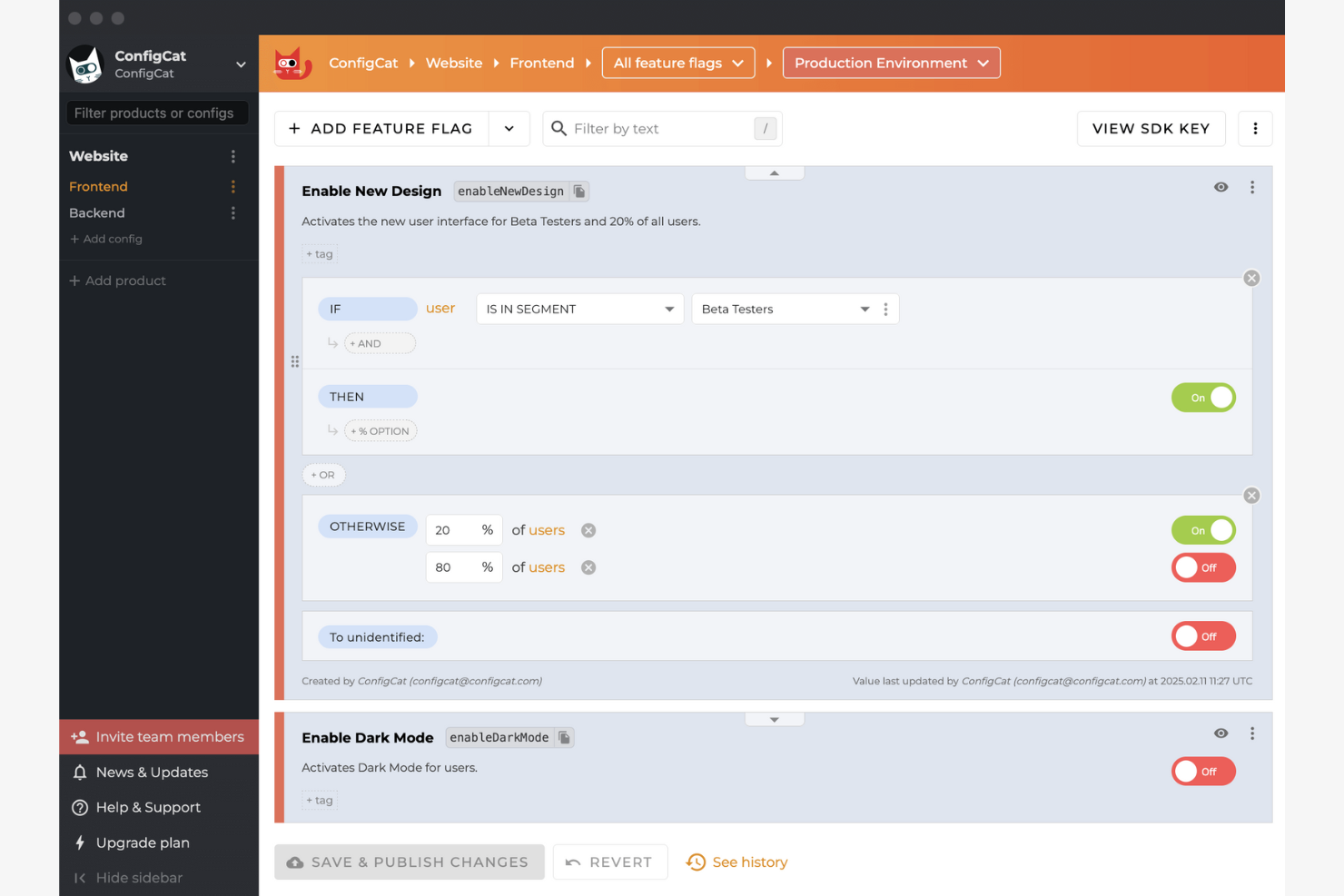
ConfigCat is a straightforward feature flag platform built for developers and product teams who want to deploy and control features without added complexity. I think it's a fit for small businesses and startups seeking quick setup and predictable, code-driven workflows for managing releases.
Who Is ConfigCat Best For?
ConfigCat is a good fit for engineering teams at startups or small companies who need fast, low-overhead feature flagging without enterprise-scale complexity.
Why ConfigCat Is a Good LaunchDarkly Alternative
I picked ConfigCat because it strips feature flagging down to exactly what most dev teams actually need. The setup is genuinely fast—you can have a flag live in your codebase within minutes using one of ConfigCat's 20+ open-source SDKs. I also appreciate the dedicated config page per environment, which makes it easy to manage separate flag states across development, staging, and production without any configuration bleed. For teams that don't need LaunchDarkly's full experimentation suite, ConfigCat keeps the workflow clean and predictable.
ConfigCat Key Features
- Percentage rollouts: Gradually release a feature to a defined percentage of your user base before a full launch.
- Tech debt CLI scanner: Automatically detects stale or zombie flags in your codebase and flags them for removal.
- Remote configuration management: Store and manage string, number, and boolean variables remotely, not just on/off toggles.
- Client-side flag evaluation: Feature flag logic runs on the client, so your users' data never leaves your system.
ConfigCat Integrations
ConfigCat offers native integrations with GitHub, GitLab, Bitbucket, Jira, monday, Twilio, Amplitude, Slack, and Trello. Zapier is supported, and an API is available for custom integrations.
Pros and Cons
Pros:
- Clear environment separation for flag states
- Reliable flag changes without system downtime
- Easy SDK setup for most frameworks
Cons:
- Missing advanced identity provider integrations
- Lacks built-in A/B testing tools

PostHog
Best with self-hosted deployment options
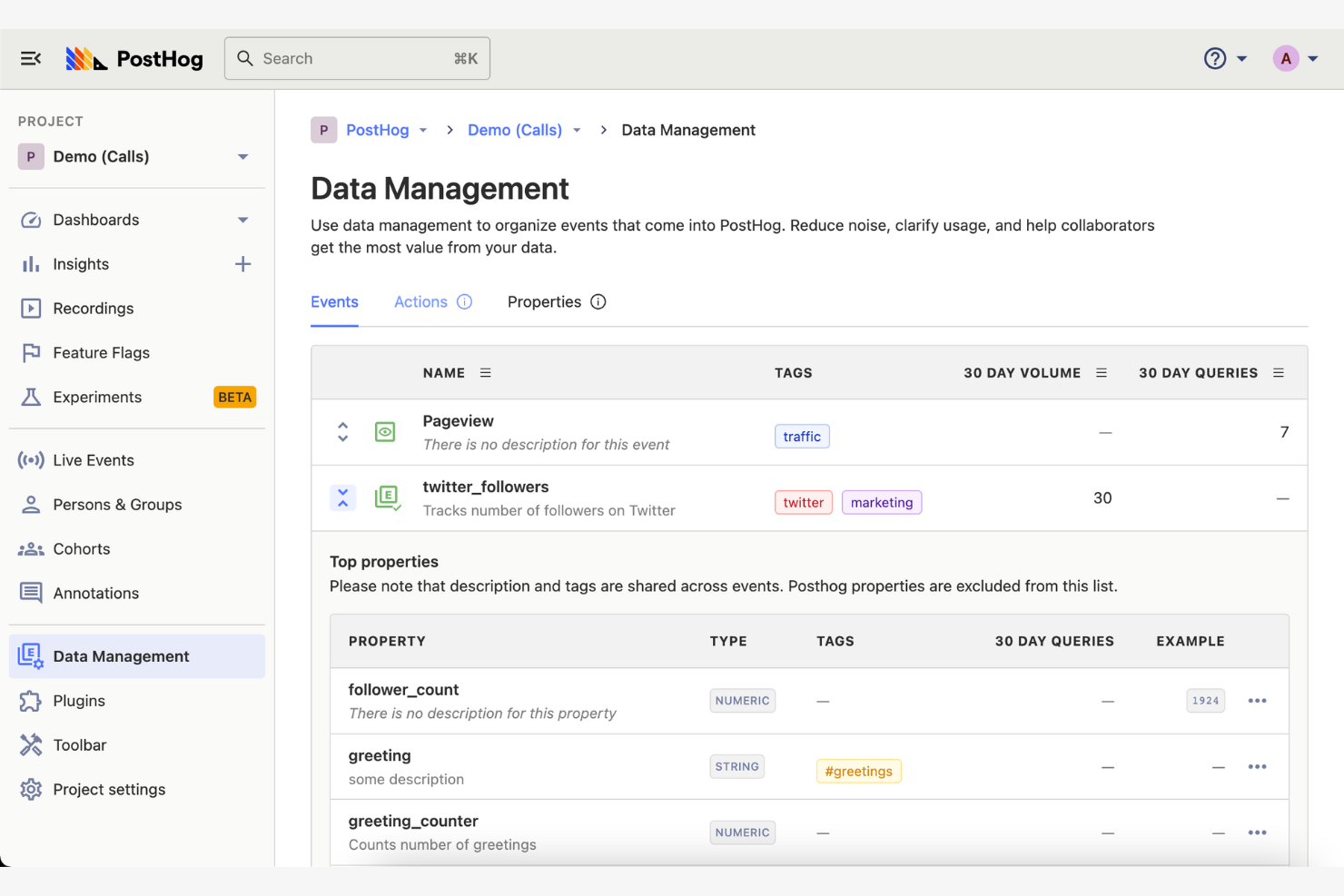
PostHog stands out for product and engineering teams that want robust analytics, feature flagging, session recording, and experimentation all in one place. If you're seeking deep product insight with full control over your data, PostHog could be a smart choice as a LaunchDarkly alternative.
Who Is PostHog Best For?
Growth-focused engineering teams at tech startups and digital-first companies who want direct control over analytics and feature management.
Why PostHog Is a Good LaunchDarkly Alternative
I picked PostHog largely because of its self-hosted deployment option, which lets my team run the entire platform on our own infrastructure. For teams operating under strict data residency or compliance requirements, that's a meaningful differentiator—most LaunchDarkly alternatives are cloud-only. Beyond that, I appreciate how PostHog bundles feature flags directly with session recording and funnel analysis, so I can watch exactly how users interact with a newly released feature. That kind of end-to-end visibility in a single self-hosted setup is genuinely hard to find elsewhere.
PostHog Key Features
- Feature flags: Roll out or roll back features for specific user segments without deploying new code.
- A/B testing: Run product experiments and measure statistical significance directly within the platform.
- User cohorts: Group users by behavior or properties to target feature releases or analyze adoption patterns.
- Event autocapture: Automatically tracks user interactions without requiring manual instrumentation for every action.
PostHog Integrations
PostHog offers native integrations with Confluence, HubSpot, GitHub, Mailchimp, Notion, Okta, Slack, Snowflake, WooCommerce, Salesforce, and Zendesk. An API is available for custom integrations.
Pros and Cons
Pros:
- Granular access control for feature management
- Offers generous free usage tiers
- Full visibility with bundled analytics and flags
Cons:
- The UI dashboard can feel cluttered
- Requires more setup than cloud tools


Statsig is built for teams who need precise control and insight as they scale feature releases and run experiments. I think you’ll appreciate its automated analysis and real-time experimentation if you’re shipping frequently and want to optimize every rollout.
Who Is Statsig Best For?
Statsig is a good fit for engineering or product teams at fast-growing tech companies that release new features often and need experimentation at scale.
Why Statsig Is a Good LaunchDarkly Alternative
I picked Statsig because it handles experimentation at a scale that few feature management platforms can match. I like how it runs A/B tests and feature rollouts simultaneously, analyzing statistical results in real time without requiring a separate analytics tool. In practice, that means my team can use its built-in Stats Engine to automatically detect metric regressions the moment a flag goes live—no manual data pulls needed. I've also found its experiment layers feature useful for running multiple concurrent tests on the same user group without overlap or interference.
Statsig Key Features
- Advanced targeting controls: Set up sophisticated flag targeting by user attributes, environments, or custom segments to control exactly who sees each feature.
- Session replay: Record and replay user sessions directly within Statsig to connect behavioral data to specific feature rollouts or experiment variants.
- Product analytics: Track core business metrics, user behavior trends, and custom events through built-in dashboards and a metrics explorer.
- Warehouse Native deployment: Run Statsig's Stats Engine directly inside your own data warehouse, keeping metric computation on your existing datasets without ETL pipelines.
Statsig Integrations
Statsig offers native integrations with Datadog, Amplitude, Slack, Heap, Stitch, RevenueCat, Pulumi, Mixpanel, Segment, Jira, and supports CI/CD workflows through its API. Webhooks and an API are also available for custom integrations.
Pros and Cons
Pros:
- Built-in support for sequential experiments
- Scales feature flags to millions of users
- Automated experiment analysis with actionable metrics
Cons:
- Granular RBAC requires the enterprise tier
- Initial setup can be complex

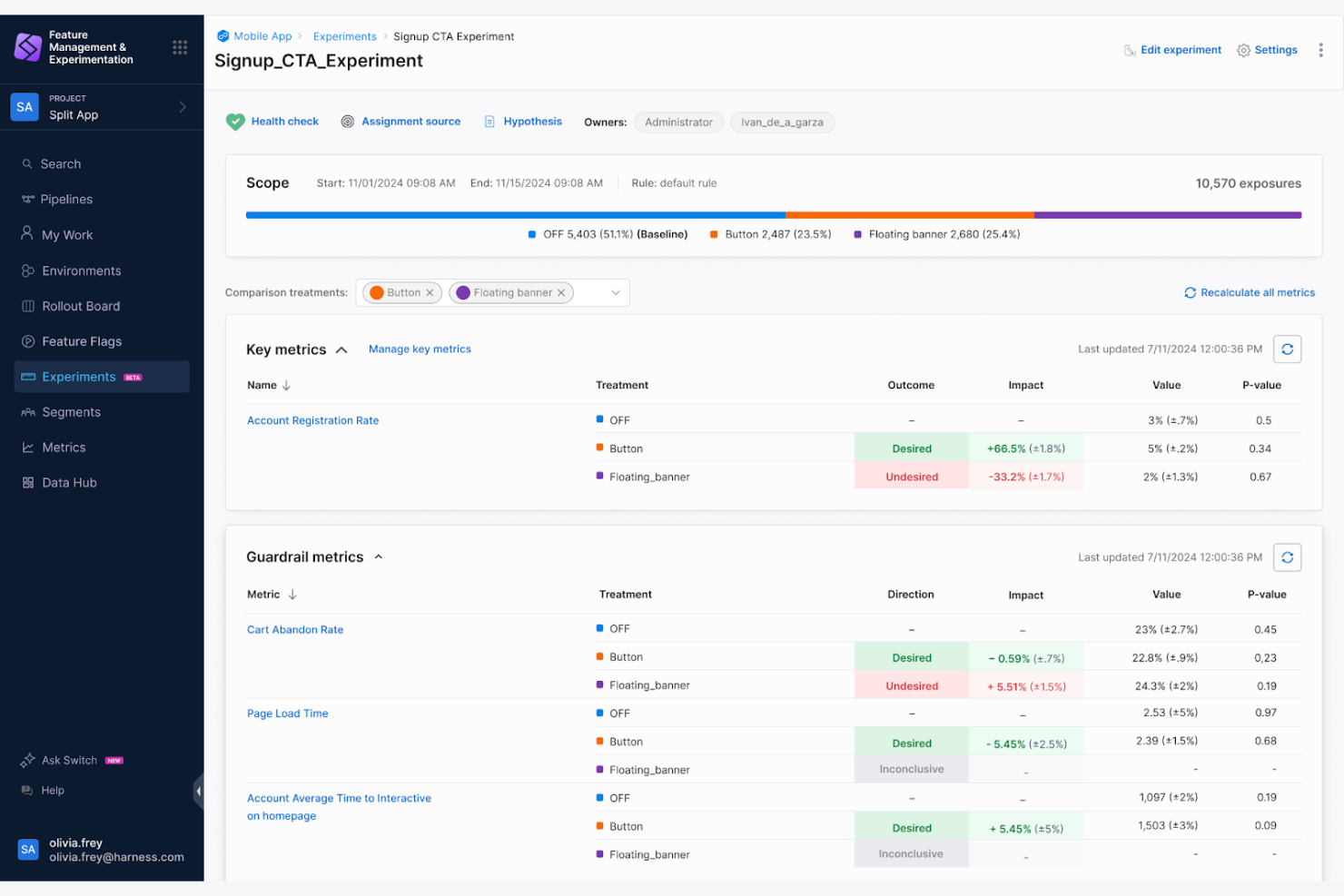
Split helps product and engineering teams make smarter feature release decisions by connecting feature flags to real-time analytics. It’s a practical choice for teams who want to reduce risk and tie feature rollouts to business impact.
Who Is Split Best For?
Split is a strong fit for data-focused engineering teams in SaaS companies or digital product businesses that need analytics-driven feature deployment.
Why Split Is a Good LaunchDarkly Alternative
I picked Split because it does something most feature flag tools don't: it ties flag activity directly to measurable feature impact through built-in experimentation and metrics monitoring. I use Split's feature data platform to track how a rollout is affecting key metrics in real time, so I can kill a flag or push it to 100% based on actual data rather than gut instinct. I also appreciate that Split lets you define metrics before a release, which means you're not scrambling to interpret results after the fact. For teams that run frequent releases, that kind of pre-defined measurement discipline makes a real difference.
Split Key Features
- Flexible targeting rules: Define exactly who sees a feature using custom user attributes, segments, or random percentage splits.
- Dynamic configurations: Adjust feature behavior in real time without deploying new code, so your team can iterate on the fly.
- Warehouse-native experimentation: Run experiments directly inside your existing data warehouse using your own SQL and governed data, with no ETL required.
- Flag lifecycle management: Track flag activity and flag stale flags for cleanup, which helps your team avoid code bloat over time.
Split Integrations
Native integrations are not publicly listed.
Pros and Cons
Pros:
- Supports feature experiments with statistical rigor
- Real-time impact analysis on user behavior
- Built-in metric tracking for feature releases
Cons:
- Some export and data sync delays
- UI can feel overly complex
Other LaunchDarkly Alternatives
Here are some additional LaunchDarkly alternative options that didn’t make it onto my shortlist, but are still worth checking out:
- VWO
For experimentation-driven feature releases
- Flagsmith
For open-source feature flaggin
- AB Tasty
For marketing-driven feature testing
- GrowthBook
For open-source A/B testing
- Configu
For configuration as code workflows
- Microsoft Azure App Configuration Feature Management
For native integration with Azure services
- Flipt
For self-hosted deployment flexibility
- FeatBit
For granular user targeting controls
- OpenFeature
For vendor-neutral SDK support


How I Evaluate LaunchDarkly Alternatives
I look at two layers: the core must-haves—like targeting segments for phased rollouts and real-time kill switches—and differentiators like pricing predictability and experimentation depth that separate the strongest options.
Core Functionality (Table Stakes For This List)
When I'm selecting tools for my list, I rank each one on a scale from 0 (does not offer the functionality) to 5 (excels in this area) for each core functionality listed below. Then, I calculate the tool's total score into a percentage. Each tool needs to achieve a minimum total score of 65% to be considered for inclusion.
- Feature Flag Management: I evaluate how each tool handles flag creation, toggling, and lifecycle across environments—like managing separate flags for staging vs. production.
- Targeted Rollouts & Segmentation: Percentage-based rollouts and attribute targeting matter here, such as releasing a feature to enterprise-tier accounts before free users.
- A/B Testing & Experimentation: I check whether the platform supports controlled experiments with metric tracking, not just flag variations without measurable outcomes.
- SDK & Platform Coverage: Broad SDK support across server, client, and mobile frameworks is what I look for, especially for teams shipping across iOS, web, and backend services.
- Real-Time Flag Updates: Fast propagation matters when you need to kill a broken feature in production—I evaluate whether changes stream instantly or rely on slow polling.
- Access Controls & Audit Logs: I look at role-based permissions and change history, like whether a PM can toggle flags in staging but needs approval for production changes.
Once I have a list of tools that meet this criteria, I consider what sets each platform apart.
Differentiating Factors (What Sets Vendors Apart)
Here's how I compare and contrast different vendors:
Standout Features
Product analytics integrations are a big differentiator. I check whether a tool connects natively to platforms like Amplitude or Mixpanel so you can tie flag exposure to retention or conversion metrics without manual data work. No-code flag management also matters for PMs who want to adjust targeting rules or schedule a rollout without filing an engineering ticket. I also evaluate automated flag cleanup, since stale flags pile up fast and tools that scan code references to surface removable flags save real engineering time.
Beyond Features
Pricing model transparency is one of the first things I evaluate, since unpredictable costs at scale are a common reason teams start looking beyond LaunchDarkly. I also consider ecosystem fit—whether the tool plugs into your existing CI/CD pipeline (GitHub Actions, GitLab CI) and observability stack (Datadog, Sentry) so flag changes correlate with deploy and error data. Time-to-value is worth weighing too, especially migration tooling or importers that reduce the switching cost when you're moving existing flags and segments from another platform.
Why Look For A LaunchDarkly Alternative?
While LaunchDarkly is a good choice of LaunchDarkly alternatives, there are a number of reasons why some users seek out alternative solutions. You might be looking for a LaunchDarkly alternative because…
- You need built-in A/B testing and experimentation tools
- Your team wants open-source or self-hosted options
- You require more advanced audience segmentation capabilities
- You need a simpler pricing model for growing teams
- Your compliance needs demand on-premise deployments
- You want integrations that LaunchDarkly doesn't provide
If any of these sound like you, you’ve come to the right place. My list contains several LaunchDarkly alternative options that are better suited for teams facing these challenges with LaunchDarkly and looking for alternative solutions.
LaunchDarkly Key Features
Here are the key feature set of LaunchDarkly to help you contrast and compare what alternative solutions offer:
- Feature flags: Manage feature rollouts by toggling new capabilities on or off in real time without redeploying your application.
- Targeting rules: Control which users or segments receive specific features based on attributes, geography, or custom logic.
- Experimentation: Run A/B or multivariate tests to evaluate the impact of changes on user behavior and business metrics.
- Kill switches: Instantly disable problematic features in production to minimize risk and protect the user experience.
- Progressive delivery: Gradually release new features to select user groups, tracking metrics, and scaling up based on real-time feedback.
- SDK support: Integrate LaunchDarkly into web, mobile, and backend systems using a wide range of official SDKs.
- Custom environments: Separate flags and configurations by environment (production, staging, testing) for safe testing and controlled releases.
- Advanced permissions: Set granular permissions and roles so teams can safely manage flags without risking production stability.
- Event tracking: Monitor usage, user activity, and flag evaluation with event data for analytics and troubleshooting.
Audit logs: Maintain a detailed record of changes made to feature flags, rules, and environments for compliance and transparency.