

The best AI product management tools support workflows by automating backlog updates, surfacing user insights, and aligning teams around clear priorities. These tools solve real blockers like duplicate documentation, missed deadlines, and scattered communication.
After reviewing and testing dozens of platforms, I’ve identified the top options that actually improve decision-making and collaboration. In the guide below, I’ll break down each tool’s standout features and show how they can fit into your product management workflow—whether you need stronger analytics, smoother roadmapping, or more efficient team coordination.
Why Trust Our Software Recommendations
6,700+
Reviews
20
Industry experts
16+
Evaluation factors
14
Years
Our team has been testing and reviewing software since 2012. As product managers ourselves, we know how difficult—and important—it is to choose the right software.
For this guide, we evaluated tools using hands-on testing and independent research, scoring tools using our selection criteria.
Our reviews reflect our human editorial judgment, not a sales pitch.
- Andrew LumbySenior TPM
- Cristiano ValimSenior UI/UX Lead
AI Product Management Tools Comparison Table
This comparison table summarizes pricing details for my top AI product management tool selections:
| Tool | Best For | Trial Info | Price | ||
|---|---|---|---|---|---|
| 1 | Best for omnichannel AI feedback synthesis | Free demo available | Pricing upon request | Website | |
| 2 | Best for customizable product workflows | Free plan available | From $11/user/month | Website | |
| 3 | Best for project lifecycle management | Free plan + 14-day free trial + free demo available | From $10/user/month (billed annually) | Website | |
| 4 | Best for quick and user-friendly mockups | Free plan + 14-day free trial available | From $144/user/year (billed annually) | Website | |
| 5 | Best for cross-team alignment | Free plan available | From $10/user/month (billed annually) | Website | |
| 6 | Best for product analytics | Free plan available | From $120/month (billed annually) | Website | |
| 7 | Best for behavioral analytics | Free plan + free demo available | Pricing upon request | Website | |
| 8 | Best for user feedback | Free plan + 14-day free trial + free demo available | From $19/user/month (billed annually) | Website | |
| 9 | Best for language processing | Free plan available | From $8/month | Website | |
| 10 | Best for task automation | Free trial available | From $19/user/month (billed annually) | Website |


Best AI Product Management Tool Reviews
Below are my detailed summaries of the best AI product management tools that made it onto my shortlist. My reviews offer a detailed look at the key features, pros & cons, integrations, and ideal use cases of each tool to help you find the best one for you and your team.
 Best for omnichannel AI feedback synthesis
- Free demo available
- Pricing upon request
Visit WebsiteRating:4.8/5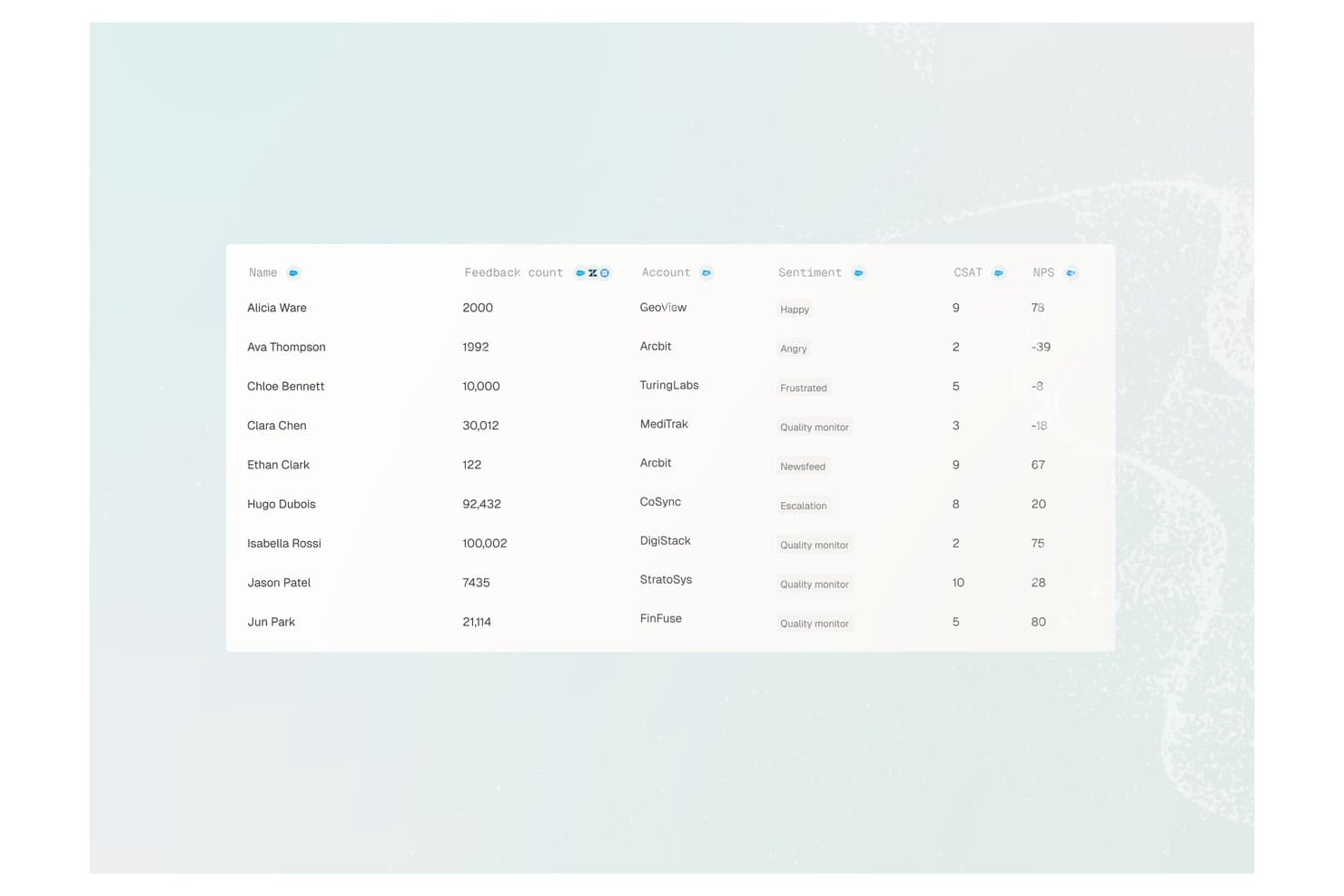
Enterpret offers a customer feedback analytics table displaying user names, feedback counts, account names, sentiment labels, CSAT scores, and NPS values. Enterpret is a customer intelligence platform that uses AI to aggregate, classify, and analyze feedback from 50+ channels — including support tickets, reviews, calls, and communities — into structured, searchable product insights.
Who Is Enterpret Best For?
Enterpret is a strong fit for mid-market and enterprise product teams that process high volumes of customer feedback across multiple channels every month.
Why I Picked Enterpret
I picked Enterpret as one of the best because its Adaptive Taxonomy automatically classifies incoming feedback from 50+ sources without manual tagging. I also love the Customer Context Graph, which ties every theme back to specific accounts and revenue weight, so my team knows which feedback signals actually drive retention. The MCP Server lets me query all of that structured context directly from Claude or Cursor.
Enterpret Key Features
- AI-powered dashboards: Searchable, customizable dashboards display feedback themes and sentiment insights from all connected channels.
- Automated alerting: Real-time notifications flag shifts in customer sentiment or new emerging topics across feedback sources.
- Data warehouse integration: Native connectors let you sync structured feedback data with platforms like Snowflake for analytics.
- Workflow integrations: Push synthesized customer insights directly into Jira, Slack, and other product management tools.
Enterpret Integrations
Enterpret offers native integrations with Zendesk, Intercom, Salesforce, Gong, Slack, Qualtrics, Linear, Jira, Google Play Store, and the Apple App Store. An API is available for custom integrations.
Pros and Cons
Pros:
- Synthesizes feedback across 50+ channels simultaneously
- Revenue-weighted insights tie feedback to business impact
- Adaptive taxonomy auto-classifies feedback without manual effort
Cons:
- Limited built-in product workflow management features
- Initial taxonomy setup requires significant configuration time
Learn more about Enterpret: Best for customizable product workflows
- Free plan available
- From $11/user/month
Visit WebsiteRating:4.6/5
monday.com's customizable product workflows help teams manage tasks, timelines, and priorities. I picked monday.com as an AI product management tool because it supports teams for customizable product workflows. The platform helps organize product tasks, track development progress, and coordinate work across teams. With features such as customizable boards, automation tools, and AI-assisted updates, monday.com helps product teams manage roadmaps, features, and releases in a single workspace.
Why I Picked monday.com
I picked monday.com because it supports teams for customizable product workflows. The platform helps product teams structure their work by organizing feedback, tracking tasks, and managing development processes across different teams. Features like AI Blocks help categorize information, assist with assigning tasks, and support teams in managing workflows more efficiently. In addition, AI-assisted summaries and automation tools help product teams monitor progress, coordinate communication, and keep product roadmaps, feature development, and releases organized in one workspace.
monday.com Key Features
In addition to customizable product workflows, monday.com offers:
- Customizable Dashboards: Tailor your project views with widgets and data visualization tools to track progress and performance metrics.
- Automations: Set up automated workflows to reduce repetitive tasks and ensure consistency in project execution.
- Gantt and Kanban Views: Utilize these visualization methods for better planning and tracking of project timelines and tasks.
- Resource Management: Allocate and manage your team's workload with tools designed to optimize resource utilization.
monday.com Integrations
Integrations include Slack, Google Drive, Trello, Salesforce, Microsoft Teams, Zoom, HubSpot, QuickBooks, Shopify, and Dropbox.
Pros and Cons
Pros:
- AI features assist with task summaries, automation, and content generation
- Automation capabilities help streamline repetitive workflows
- Versatile platform suitable for various business functions
Cons:
- Pricing may be expensive for small businesses or startups
- Performance may slow down when handling large boards or datasets
Learn more about monday AI Workspace: Best for project lifecycle management
- Free plan + 14-day free trial + free demo available
- From $10/user/month (billed annually)
Visit WebsiteRating:4.3/5
Wrike’s AI highlights summarize dashboard activity, flag potential bottlenecks, and surface recommendations to help teams focus on priority work. Wrike offers a dynamic solution for teams seeking to elevate their project management with AI-driven capabilities. Designed for businesses across various industries, Wrike appeals to those looking to automate repetitive tasks and enhance collaboration within their teams. By addressing challenges such as workflow inefficiencies and integration complexities, Wrike empowers users to focus on strategic initiatives rather than administrative burdens.
Why I Picked Wrike
I picked Wrike for its unique ability to integrate AI within its project management toolkit, making it a standout choice for AI product management. Wrike's AI features, such as task automation and real-time analytics, allow your team to manage projects more effectively by reducing manual input and providing actionable insights. Additionally, its robust AI component enables the generation of project plans and the summarization of discussions, ensuring that your team remains aligned and informed throughout the project lifecycle.
Wrike Key Features
In addition to its AI capabilities, Wrike also offers a range of features to enhance your project management experience:
- Task Automation: Streamline your workflow by automating repetitive tasks, allowing your team to focus on more strategic activities.
- Customizable Dashboards: Tailor your workspace to fit your team's specific needs, ensuring that you have the most relevant information at your fingertips.
- Real-Time Analytics: Gain insights into your project’s progress with up-to-date analytics that help you make informed decisions quickly.
- In-Platform Communication: Facilitate seamless communication within your team without needing to switch between different tools.
Wrike Integrations
Integrations include Google Workspace, QuickBooks, Jira, Salesforce, Microsoft Teams, Dropbox, Box, Adobe Creative Cloud, Slack, and GitHub. Wrike also offers an API for custom integrations.
Pros and Cons
Pros:
- Custom dashboards for product visibility
- Strong automation for cross functional teams
- AI supports product planning decisions
Cons:
- Advanced AI features cost more
- No purpose built product tool
 Best for quick and user-friendly mockups
- Free plan + 14-day free trial available
- From $144/user/year (billed annually)
Visit WebsiteRating:4.7/5
Canva helps teams create visuals with AI-driven design and content suggestions. Canva brings AI-driven design support to product management workflows, making it easier to turn ideas into professional visuals. From generating slide layouts to drafting copy and refining designs, its AI features help teams communicate roadmaps and strategies clearly—ideal for keeping stakeholders aligned.
Why I picked Canva: Canva’s AI tools speed up content creation for product updates, launch materials, and reports. Its intuitive interface and smart design suggestions help teams communicate ideas visually without needing advanced design skills. Real-time collaboration ensures product managers and stakeholders can co-create and finalize materials efficiently.
Standout features & integrations:
Features include a brand kit that helps your team maintain consistent branding across all designs. The platform's photo editor allows you to enhance images with filters and effects. Canva also offers a print service, so you can order physical copies of your designs directly through the platform.
Integrations include Slack, Google Drive, Dropbox, HubSpot, Mailchimp, Instagram, Facebook, Pinterest, LinkedIn, and YouTube.
Pros and Cons
Pros:
- Supports brand consistency
- Extensive template library
- Easy drag-and-drop interface
Cons:
- Occasionally slow performance
- Limited advanced design tools
Learn more about Canva: Best for cross-team alignment
- Free plan available
- From $10/user/month (billed annually)
Visit WebsiteRating:4.6/5
Notion organizes roadmaps, docs, and workflows with AI-driven support. Notion is an AI-enhanced workspace that helps product management teams organize roadmaps, documentation, and workflows in one place. Its AI features can summarize content, generate ideas, and streamline planning, making it a valuable hub for both strategic and operational tasks.
Why I picked Notion: Notion’s AI tools help product managers quickly generate documentation, extract insights, and organize project details. Its customizable structure supports tailored product management workflows, from backlog grooming to roadmap updates. Real-time collaboration and AI-assisted content creation keep teams aligned and moving faster.
Standout features & integrations:
Features include a drag-and-drop interface that lets you organize content easily. The template library provides ready-made solutions for various tasks. Notion also offers a web clipper to save content directly from the web into your workspace.
Integrations include Slack, Google Drive, Trello, Asana, Evernote, GitHub, Microsoft Teams, Zapier, Dropbox, and Typeform.
Pros and Cons
Pros:
- Extensive template library
- Real-time collaboration
- Highly customizable pages
Cons:
- Slight learning curve for complex setups
- Occasional syncing issues
Learn more about Notion: Best for product analytics
- Free plan available
- From $120/month (billed annually)
Visit WebsiteRating:4.5/5
Mixpanel uses AI to analyze user behavior and guide data-driven product decisions. Mixpanel is an analytics platform that helps product management teams track user interactions and turn data into actionable insights. While its foundation is product analytics rather than AI, it integrates machine learning to uncover behavioral patterns, highlight trends, and guide data-driven decisions that shape better product experiences.
Why I picked Mixpanel: Mixpanel leverages AI to deliver deep behavioral analytics, helping product managers prioritize features and optimize user journeys. Its AI-driven funnel and retention analysis reveal what drives engagement and loyalty. Real-time insights and intelligent segmentation make it a powerful tool for proactive, data-informed product management.
Standout features & integrations:
Features include cohort analysis, which helps you group users based on shared characteristics. A/B testing tools let you experiment with different product features to see what works best. Mixpanel also offers an in-depth dashboard for visualizing complex data in an easy-to-understand format.
Integrations include Salesforce, Slack, Segment, Zapier, Google Analytics, HubSpot, Shopify, WordPress, Intercom, and Marketo.
Pros and Cons
Pros:
- Advanced user segmentation
- Real-time data tracking
- Supports A/B testing
Cons:
- May need technical expertise
- Requires setup and maintenance
 Best for behavioral analytics
- Free plan + free demo available
- Pricing upon request
Visit WebsiteRating:4.5/5
Amplitude uses AI to reveal behavior patterns and optimize product experiences. Amplitude is an advanced analytics platform that helps product management teams understand user behavior and optimize product experiences. It incorporates AI machine learning to identify behavioral patterns, anticipate user actions, and provide insights that support data-informed decision-making.
Why I picked Amplitude: Amplitude uses AI to enhance behavioral analytics, making it easier to identify opportunities for improving user journeys. Its intelligent segmentation and cohort analysis reveal trends that impact retention and engagement. With real-time AI insights, teams can adapt strategies quickly and make smarter product decisions.
Standout features & integrations:
Features include funnel analysis, which helps you visualize user pathways and identify drop-off points. Pathfinder reports show the most common user journeys within your product. Additionally, Amplitude's predictive analytics provide forecasts on user behavior and product outcomes.
Integrations include Salesforce, Segment, Slack, Google Analytics, HubSpot, Marketo, Optimizely, Mixpanel, Shopify, and Zendesk.
Pros and Cons
Pros:
- Detailed cohort analysis
- Supports predictive analytics
- Advanced user segmentation
Cons:
- Can be data-intensive
- Slight learning curve
Learn more about Amplitude: Best for user feedback
- Free plan + 14-day free trial + free demo available
- From $19/user/month (billed annually)
Visit WebsiteRating:4.5/5
Productboard helps teams align roadmaps with customer needs and goals. Productboard is a product management platform built to help teams understand customer needs and prioritize features. While it isn’t an AI-first tool, it does leverage AI to organize and analyze user feedback more efficiently, making it easier for product managers to align roadmaps with real customer insights and business goals.
Why I picked Productboard: Productboard uses AI to analyze and prioritize user feedback, helping teams build customer-focused products. Its AI-powered insights create a single source of truth, making it easier to spot patterns and determine priorities. By consolidating feedback from multiple channels, it guides data-driven decisions that align product development with real customer needs.
Standout features & integrations:
Features include collaborative roadmapping, which lets your team share and align on product strategies. Customer insights tools help you keep user needs at the forefront. Data-driven prioritization ensures your team focuses on the most impactful features.
Integrations include Jira, Slack, Microsoft Teams, Salesforce, Trello, GitHub, Zendesk, Intercom, Confluence, and Asana.
Pros and Cons
Pros:
- Customizable roadmap views
- Easy feedback consolidation
- Centralizes customer insights
Cons:
- Higher cost for small teams
- Limited reporting options
Learn more about Productboard:

ChatGPT aids product management with AI-driven ideas, docs, and feedback analysis. ChatGPT is an AI language model that supports product management by generating ideas, drafting documentation, and analyzing feedback. Its natural language understanding helps teams tailor communication, plan features, and refine strategies with AI-driven insights.
Why I picked ChatGPT: ChatGPT excels at turning complex product requirements into clear, actionable plans. It can assist with roadmap narratives, summarize customer feedback, and brainstorm feature ideas. Its ability to understand context makes it a powerful partner for faster, more informed product management decisions.
Standout features & integrations:
Features include a user-friendly interface that allows easy interaction with the AI. It provides quick and accurate responses to a wide array of queries. Additionally, the model's ability to learn from interactions improves its usefulness over time.
Integrations include Slack, Microsoft Teams, Google Workspace, Trello, Zapier, Asana, Salesforce, HubSpot, monday.com, and Notion.
Pros and Cons
Pros:
- Quick response times
- Customizable to user needs
- Learns from interactions
Cons:
- Can produce irrelevant and incorrect outputs
- Limited by context understanding
Learn more about ChatGPT: 10Best for task automation
Motion
- Free trial available
- From $19/user/month (billed annually)
Visit WebsiteRating:4.2/5
Motion uses AI to manage tasks, prioritize work, and adapt schedules for projects. Motion is an AI-powered task management and automation tool that helps product management teams organize work, prioritize tasks, and streamline schedules. Its AI engine automatically adjusts plans based on changes, ensuring projects stay on track and aligned with product goals.
Why I picked Motion: Motion’s AI-driven scheduling adapts to shifting priorities, helping product managers focus on strategic initiatives. It intelligently prioritizes tasks, aligns deadlines, and integrates calendars for a unified view of work. These automation capabilities save time, reduce manual planning, and keep product teams operating efficiently.
Standout features & integrations:
Features include a smart calendar that automatically adjusts tasks based on your availability. Motion offers a focus mode to minimize distractions and increase concentration on important tasks. Additionally, the tool provides detailed analytics to help you understand how your time is spent.
Integrations include Google Calendar, Outlook, Slack, Trello, Asana, Todoist, Notion, Microsoft Teams, Zoom, and ClickUp.
Pros and Cons
Pros:
- Provides detailed time analytics
- Minimizes manual effort
- Intelligent task scheduling
Cons:
- May not suit complex workflows
- Limited customization options
Learn more about Motion:
Other AI Product Management Tools
Here are some additional AI product management tools options that didn’t make it onto my shortlist, but are still worth checking out:
- 11UizardBest for rapid prototyping
- 12UX PilotBest for AI guidance for UX workflows
- 13MazeBest for user testing insights
- 14MiroBest for visual ideation & stakeholder mapping
- 15ClickUpBest for all-in-one project management
- 16ProdPadBest for feature prioritization
- 17InriverBest for product information management
- 18VisilyBest for UI design collaboration
- 19Zeda.ioBest for Agile product development
- 20DovetailBest for research data organization
- 21Qualtrics CoreXMBest for customer experience insights
How I Evaluate AI Product Management Tools
To make this list, a tool's AI needs to handle real product work, like synthesizing feedback or drafting PRDs. From there, I evaluate three things. Core functionality carries the most weight, like aggregating feedback and prioritizing features. Then I look at standout features, like explainable AI recommendations, and what a tool offers beyond its feature set, like data privacy and security.
Core Functionality (Table Stakes For This List)
When I'm selecting tools for my list, I score each one on a scale from 0 (does not offer the functionality) to 5 (excels in this area) for each core functionality listed below. I then convert the total into a percentage to help assess each tool's overall fit, with extra weight on any functionalities I’ve deemed essential.
- Insight Synthesis (Essential): I assess how well AI connects feedback, research, and analytics to surface themes that guide product decisions.
- Prioritization Assistance (Essential): I look for explainable AI recommendations that rank ideas using criteria such as impact, effort, customer demand, and strategic fit.
- Artifact Generation: I check whether AI drafts usable PRDs, user stories, specifications, and release notes from product context.
- Natural Language Queries: I evaluate whether teams can ask open-ended questions and get accurate answers from feedback, documentation, and product data.
- Predictive Analytics: I look for forecasts tied to product decisions, such as feature adoption, roadmap impact, usage trends, or churn risk.
- Feedback Aggregation: I assess how AI collects, tags, and clusters feedback from sources such as support tickets, interviews, surveys, and analytics.
Once I have a list of tools that meet the criteria, I consider what sets each platform apart.
Differentiating Factors (What Sets Vendors Apart)
Here's how I compare and contrast different vendors:
Standout Features
I look for explainable AI recommendations that show why a feature scored high, not just that it did. When a tool surfaces the data signals behind a prioritization score, I can defend roadmap decisions to stakeholders with evidence instead of intuition. Voice-of-customer traceability matters just as much. I check whether generated insights link back to the original feedback sources, so if a VP asks "who actually requested this?" you can trace a theme to specific tickets or interviews. I also evaluate persona and segment tagging to see if AI automatically groups feedback by account value or user type, which shapes how you weigh competing priorities.
Beyond Features
I evaluate how each vendor handles data privacy, especially whether teams can opt out of AI model training on proprietary feedback. That matters when you're ingesting sensitive support tickets or customer interview transcripts. I also check integration depth—tools that offer bi-directional syncs with Jira or your CRM save hours over one-way imports that force manual reconciliation. Finally, I look at how quickly a non-technical PM can onboard without heavy configuration, since a tool no one adopts delivers zero value.
How to Choose AI Product Management Tools
It’s easy to get bogged down in long feature lists and complex pricing structures. To help you stay focused as you work through your unique software selection process, here’s a checklist of factors to keep in mind:
| Factor | What to Consider |
|---|---|
| FactorScalability | What to ConsiderCan the tool grow with your team? Consider whether it can handle more users, projects, and data as your needs expand. |
| FactorIntegrations | What to ConsiderDoes it connect with tools you already use? Check for compatibility with your existing tech stack to avoid data silos and manual workarounds. |
| FactorCustomizability | What to ConsiderCan you tailor the tool to fit your workflow? Look for options to customize dashboards, reports, and settings to match your team's processes. |
| FactorEase of use | What to ConsiderIs the tool intuitive for your team? A complicated interface can slow down adoption; look for simplicity and clarity in navigation and design. |
| FactorImplementation and onboarding | What to ConsiderHow quickly can you get started? Evaluate the availability of tutorials, support, and resources to help your team hit the ground running. |
| FactorCost | What to ConsiderHow does pricing fit your budget? Consider both upfront and ongoing costs, and compare them to the value and features offered in each plan. |
| FactorSecurity safeguards | What to ConsiderAre your data and privacy protected? Check for encryption, compliance standards, and user access controls to safeguard your information. |
| FactorSupport availability | What to ConsiderWhat support options are available? Consider the hours, channels, and responsiveness of support to ensure help is there when you need it. |
What Are AI Product Management Tools?
AI product management tools are software solutions that help product teams plan, develop, and deliver products more efficiently using artificial intelligence. Product managers, designers, and developers generally use these tools to enhance collaboration, decision-making, and user feedback integration.
Features like data analytics, automated task management, and user feedback collection help with streamlining workflows, improving product quality, and aligning team efforts. Overall, these tools provide significant value by optimizing the product management process and driving better outcomes.
Features of AI Product Management Tools
When selecting AI product management tools, keep an eye out for the following key features:
- Product roadmapping: Helps teams plan and visualize product development timelines, ensuring alignment across all stakeholders.
- User feedback collection: Gathers insights from users to inform product improvements and prioritize features.
- Data analytics: Provides insights into user behavior and product performance, aiding in data-driven decision-making.
- Automated task management: Supports project workflows by automating routine tasks and prioritizing activities based on deadlines.
- Real-time collaboration: Enables team members to work together simultaneously, enhancing communication and productivity.
- Customizable dashboards: Allows users to tailor their view to focus on the most relevant metrics and information.
- AI-driven insights: Utilizes artificial intelligence to offer predictive analytics and recommendations for product strategies.
- Integration capabilities: Connects with other tools in your tech stack, reducing data silos and manual data entry.
- Security safeguards: Protects sensitive data with encryption and compliance with industry standards.
- Onboarding resources: Offers tutorials, templates, and support to help teams quickly adopt and benefit from the tool.
Benefits of AI Product Management Tools
Implementing AI product management tools can provide several benefits for your team and your business. Here are a few you can look forward to:
- Improved decision-making: Data analytics and AI-driven insights help your team make informed decisions by providing clear and actionable data.
- Enhanced collaboration: Real-time collaboration features allow team members to work together efficiently, improving communication and productivity.
- Increased efficiency: Automated task management reduces manual work, allowing your team to focus on high-priority tasks and improve overall workflow.
- Better user understanding: User feedback collection gives you a deeper insight into customer needs, helping you tailor products more effectively to their preferences.
- Customizable workflows: Customizable dashboards and features let your team adapt the tool to fit specific project needs, enhancing flexibility.
- Faster product iterations: Quick access to data and user feedback allows for rapid testing and iteration, speeding up the development cycle.
- Data security: Security safeguards ensure that sensitive information is protected, giving your team peace of mind as they work.
Costs and Pricing of AI Product Management Tools
Selecting AI product management tools requires an understanding of the various pricing models and plans available. Costs vary based on features, team size, add-ons, and more. The table below summarizes common plans, their average prices, and typical features included in AI product management tools solutions:
Plan Comparison Table for AI Product Management Tools
| Plan Type | Average Price | Common Features |
|---|---|---|
| Plan TypeFree Plan | Average Price$0 | Common FeaturesBasic analytics, limited user feedback, and standard support. |
| Plan TypePersonal Plan | Average Price$5-$25/user/month | Common FeaturesCustomizable dashboards, task management, and basic integrations. |
| Plan TypeBusiness Plan | Average Price$30-$60/user/month | Common FeaturesAdvanced analytics, real-time collaboration, and enhanced security features. |
| Plan TypeEnterprise Plan | Average Price$80-$150/user/month | Common FeaturesFull customization, dedicated support, and extensive integration capabilities. |
AI Product Management Tools FAQs
Here are some answers to common questions about AI product management tools:
How can AI product management tools enhance team collaboration?
AI product management tools enhance collaboration by providing real-time updates and shared workspaces, allowing your team to work together efficiently. These tools often include features like collaborative roadmaps and communication channels, which help keep everyone aligned and informed about project progress and changes.
What should I consider when integrating AI product management tools with existing systems?
When integrating AI product management tools with your existing systems, ensure compatibility with your current tech stack to avoid data silos. Check if the tool supports APIs or pre-built integrations with software like Jira, Slack, or Salesforce to facilitate seamless data flow across platforms.
How do AI product management tools assist in prioritizing features?
These tools help prioritize features by analyzing user feedback, business goals, and market trends. They often include prioritization matrices or scoring systems that allow your team to evaluate and rank features based on strategic importance, user demand, and potential impact.
Are AI product management tools suitable for Agile development teams?
Yes, AI product management tools are well-suited for Agile teams, offering features like sprint planning, backlog management, and Kanban boards. These tools support iterative development by providing real-time insights and feedback, enabling your team to adapt quickly to changing requirements.
What security measures should I look for in AI product management tools?
Look for tools that offer encryption, access controls, and compliance with industry standards like GDPR or SOC 2. Ensuring that the tool has robust security measures in place protects your sensitive data and minimizes the risk of breaches or unauthorized access.
How can AI product management tools support data-driven decision-making?
AI product management tools support data-driven decisions by providing analytics and insights into user behavior, feature performance, and market trends. These tools help your team identify opportunities for improvement and make informed decisions based on real-time data and predictive analytics.
What’s Next:
If you're in the process of researching AI product management tools, connect with a SoftwareSelect advisor for free recommendations.
You fill out a form and have a quick chat where they get into the specifics of your needs. Then you'll get a shortlist of software to review. They'll even support you through the entire buying process, including price negotiations.