

10 migliori strumenti Kanban per l’efficienza del flusso di lavoro 2026

10 Elenco dei migliori strumenti Kanban


Esistono apparentemente innumerevoli soluzioni software Kanban disponibili, quindi è difficile capire quale sia la migliore per te. Vuoi aumentare la visibilità sui processi di lavoro, migliorare la collaborazione, ridurre i colli di bottiglia e ottimizzare l'efficienza complessiva del flusso di lavoro, ma devi capire quale strumento sia più adatto. Ci penso io! In questo articolo semplifico le cose, basandomi sulla mia esperienza nella gestione di prodotti grandi e complessi e sull'utilizzo di decine di strumenti diversi, per offrirti questo elenco dei migliori strumenti Kanban.
Perché fidarsi dei nostri consigli sui software
Il nostro team testa e recensisce software dal 2012. In quanto product manager noi stessi, sappiamo quanto sia difficile — e importante — scegliere il software giusto.
Per questa guida, abbiamo valutato gli strumenti attraverso test pratici e ricerche indipendenti, assegnando un punteggio agli strumenti in base ai nostri criteri di selezione.
Le nostre recensioni riflettono il nostro giudizio editoriale umano, non un discorso di vendita.
Riepilogo dei migliori strumenti Kanban
Questa tabella comparativa riassume i dettagli dei prezzi delle mie migliori selezioni di strumenti Kanban, per aiutarti a trovare quello più adatto al tuo budget e alle esigenze della tua azienda.
| Tool | Best For | Trial Info | Price | ||
|---|---|---|---|---|---|
| 1 | La scelta migliore per le funzionalità di reportistica Agile | Prova gratuita di 15 giorni | A partire da $1/utente/mese (minimo 12 utenti) | Website | |
| 2 | Ideale per modelli personalizzabili | Prova gratuita di 7 giorni + piano gratuito disponibile | A partire da $9/utente/mese (con fatturazione annuale) | Website | |
| 3 | Ideale per lo sviluppo di app senza codice | Prova gratuita di 30 giorni | Prezzi su richiesta | Website | |
| 4 | Ideale per i flussi di lavoro interfunzionali | Piano gratuito + prova gratuita di 14 giorni + dimostrazione gratuita disponibile | A partire da $10/utente/mese (con fatturazione annuale) | Website | |
| 5 | Ideale per monitorare il processo di sviluppo di nuove funzionalità | Piano gratuito + prova gratuita disponibile | A partire da $8/utente/mese (fatturati annualmente) | Website | |
| 6 | Ideale per limiti WIP integrati e sollecitazioni tramite IA | Piano gratuito disponibile | A partire da $7/utente/mese (con fatturazione annuale) | Website | |
| 7 | Ideale per unire pianificazione e sviluppo | Piano gratuito + prova gratuita di 14 giorni + demo gratuita disponibile | A partire da $8.50/utente/mese (fatturati annualmente) | Website | |
| 8 | Strumento Kanban flessibile che ti permette di creare reti di bacheche | Demo gratuita + prova gratuita di 14 giorni disponibile | Da $8/utente/mese (fatturazione annuale) | Website | |
| 9 | Prova gratuita di 30 giorni + demo gratuita disponibile | Prezzo su richiesta | Website | ||
| 10 | Strumento Kanban con automazione dei flussi di lavoro facile da usare | Piano gratuito disponibile | Da $5/utente/mese (fatturato annualmente) | Website |


Recensione dei migliori strumenti Kanban
Di seguito trovi i miei riepiloghi dettagliati dei migliori strumenti Kanban inclusi nel mio elenco. Le mie recensioni offrono un’analisi approfondita delle funzionalità principali, dei pro e dei contro, delle integrazioni e dei casi d’uso ideali di ogni strumento, per aiutarti a trovare quello più adatto a te.

La scelta migliore per le funzionalità di reportistica Agile
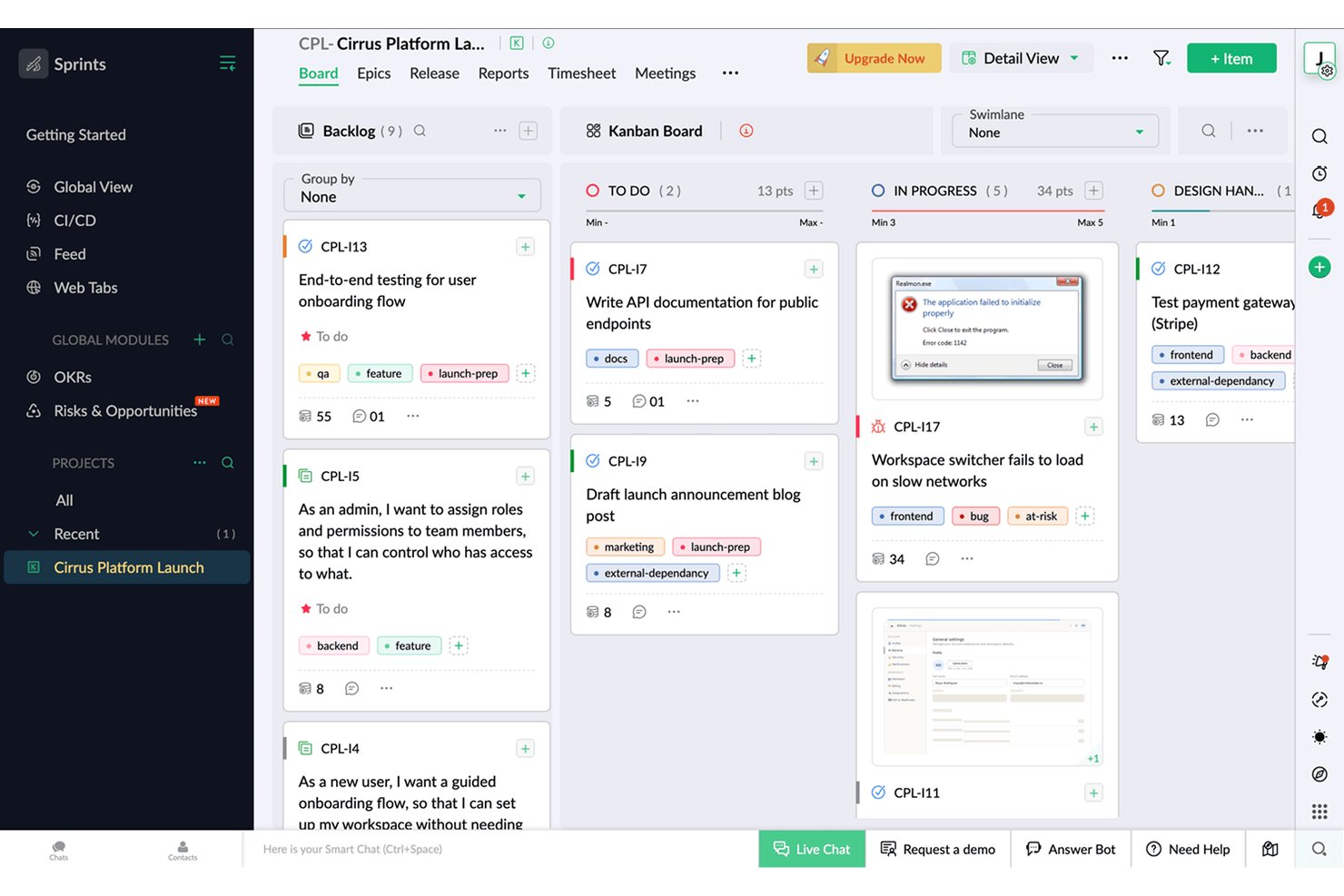
Zoho Sprints è uno strumento di gestione dei progetti Agile che supporta i flussi di lavoro Kanban, Scrum e Scrumban, con gestione integrata dell'arretrato, pianificazione degli sprint, monitoraggio del tempo e reportistica Agile tramite grafici di avanzamento residuo, velocità e diagrammi del flusso cumulativo.
Per chi è più adatto Zoho Sprints?
Zoho Sprints è particolarmente adatto ai responsabili Scrum e ai responsabili di prodotto che necessitano di una reportistica Agile dettagliata insieme alle attività quotidiane relative a sprint e arretrato.
Perché ho scelto Zoho Sprints
Zoho Sprints si è guadagnato un posto nella mia rosa di candidati grazie alla profondità della sua reportistica Agile, che va ben oltre ciò che offre la maggior parte degli strumenti Kanban. Include grafici di avanzamento residuo e di avanzamento cumulativo, monitoraggio della velocità, diagrammi del flusso cumulativo e report sui tempi di ciclo e di consegna, tutti disponibili in ogni piano. Apprezzo anche il fatto che i limiti WIP siano applicati rigorosamente per colonna, anziché essere semplicemente suggeriti: quando una colonna dello sprint raggiunge la capacità massima, la bacheca blocca effettivamente l'aggiunta di nuovi elementi invece di ignorare silenziosamente il limite.
Funzionalità principali di Zoho Sprints
- Gestione dell'arretrato e delle iniziative: Organizza gli elementi di lavoro nelle iniziative e in un arretrato prioritario, quindi inseriscili negli sprint in base alla capacità della tua squadra.
- Corsie: Dividi la bacheca Kanban in corsie orizzontali per squadra, tipo di lavoro o qualsiasi raggruppamento personalizzato, così da separare visivamente i flussi di lavoro paralleli.
- Monitoraggio integrato del tempo: Registra le ore direttamente sugli elementi di lavoro utilizzando un cronometro globale, con flussi di approvazione dei fogli presenze disponibili per i responsabili delle squadre.
- Portali per clienti e fornitori: Fornisci ai collaboratori esterni un accesso circoscritto ai progetti senza richiedere una licenza utente completa.
Integrazioni di Zoho Sprints
Zoho Sprints offre integrazioni native con GitLab, Bitbucket, Azure DevOps, Jenkins, le app Google, Microsoft 365, Zoho Cliq, Zoho Desk, Zoho Analytics e Zendesk. Supporta inoltre connessioni tramite API REST, webhook e Zapier.
Pros and Cons
Pros:
- La reportistica Agile dettagliata supporta le decisioni sui prodotti
- I rigorosi limiti WIP proteggono la produttività della squadra
- Il monitoraggio integrato del tempo collega l'impegno al lavoro
Cons:
- La terminologia Scrum può confondere le parti interessate non tecniche
- La gestione di più progetti diventa confusa
New Product Updates from Zoho Sprints
Zoho Sprints Adds Dashboard View for Custom Modules
Zoho Sprints adds a Dashboard view for custom modules with charts and tables for visualizing module records. This gives teams a clearer way to review custom data. For more information, visit Zoho Sprints’ official site.
 .
.
Ideale per modelli personalizzabili
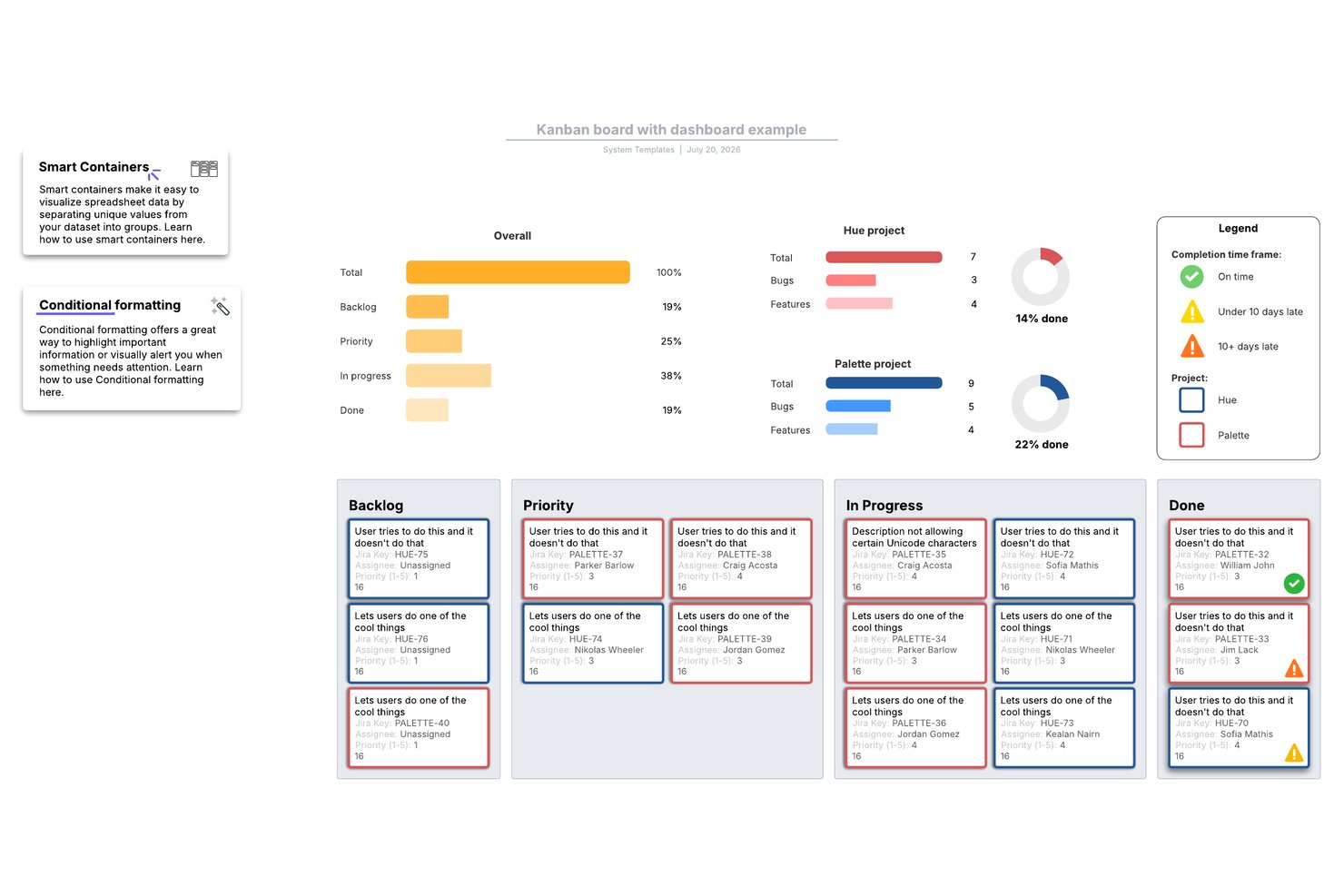
Lucidspark è uno strumento di lavagna con area di lavoro infinita che consente ai team di creare schede Kanban, gestire le attività con le Lucid Cards e collaborare in tempo reale utilizzando un'ampia libreria di modelli per la metodologia agile e la pianificazione dei progetti.
Per chi è più adatto Lucidspark?
Lucidspark è adatto ai team interfunzionali che organizzano cerimonie agili, come la pianificazione degli sprint e le retrospettive, e desiderano un'area di lavoro flessibile basata su modelli per organizzare visivamente il lavoro.
Perché ho scelto Lucidspark
Lucidspark si è guadagnato un posto nella mia lista ristretta grazie alla sua enorme libreria di modelli personalizzabili, davvero imbattibile per i team che organizzano cerimonie agili su un'area di lavoro visiva. Mi piace il fatto che sia possibile aprire un modello per la pianificazione dello sprint, il perfezionamento del backlog o la retrospettiva e adattare ogni colonna e disposizione delle schede al flusso di lavoro specifico del proprio team. In particolare, il modello di scheda agile consente di sincronizzare direttamente le Lucid Cards con Jira o Azure DevOps, così l'area di lavoro rimane collegata ai dati reali del backlog.
Funzionalità principali di Lucidspark
- Modifica collaborativa in tempo reale: più membri del team possono modificare contemporaneamente la stessa area di lavoro, con cursori in tempo reale, chat integrata e reazioni con emoji visibili a tutti i partecipanti.
- Sincronizzazione bidirezionale con Jira e Azure DevOps: le Lucid Cards si collegano direttamente al backlog esistente, mantenendo sincronizzati la scheda visiva e lo strumento di sviluppo senza aggiornamenti manuali.
- Attività di votazione e facilitazione: sessioni di votazione integrate, cronometri e modalità privata consentono ai team di svolgere retrospettive strutturate ed esercizi di prioritizzazione sull'area di lavoro.
- Tabelle dinamiche: un oggetto tabella nativo dell'area di lavoro che consente di organizzare e visualizzare i dati delle attività in un formato strutturato accanto a schede e diagrammi.
Integrazioni di Lucidspark
Lucidspark offre integrazioni bidirezionali native con Jira, Azure DevOps e Smartsheet. Supporta inoltre Asana e fornisce un'API per le integrazioni personalizzate.
Pros and Cons
Pros:
- I modelli agili personalizzabili si adattano a flussi di lavoro diversi
- Potenti strumenti di facilitazione supportano le retrospettive
- L'area di lavoro visiva supporta la pianificazione interfunzionale
Cons:
- Nessun limite WIP nativo per il controllo della produttività
- Analisi delle schede e visualizzazioni alternative limitate

Ideale per lo sviluppo di app senza codice
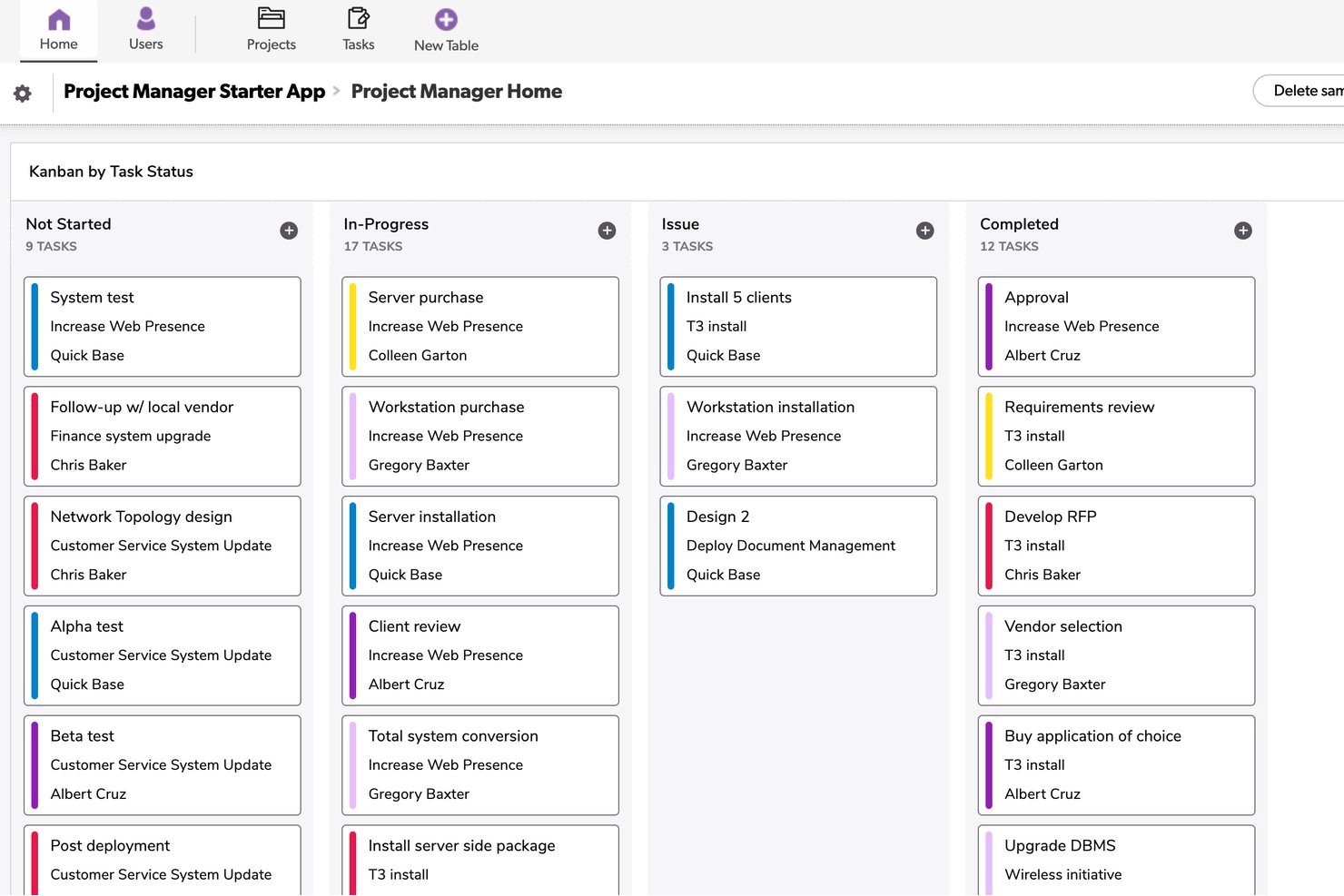
Quickbase è una piattaforma per la creazione di app senza codice che consente di creare bacheche kanban personalizzate, dashboard del portafoglio, diagrammi di Gantt e flussi di lavoro automatizzati basati sui propri modelli di dati.
Per chi è più adatto Quickbase?
Quickbase è adatto ai team operativi e di progetto delle aziende nei settori dell'edilizia, della produzione e dell'energia che necessitano di flussi di lavoro personalizzati basati sui propri modelli di dati.
Perché ho scelto Quickbase
Ho incluso Quickbase tra le mie scelte principali perché è l'unico strumento di questo elenco che consente di creare una bacheca kanban direttamente su un modello di dati personalizzato, un autentico elemento distintivo per i team di prodotto fortemente orientati alle attività operative. Mi piace il fatto che sia possibile inserire nelle schede della bacheca i record provenienti da tabelle collegate, così una scheda relativa a una consegna edilizia può mostrare in un unico punto i campi del budget, le specifiche allegate e i record delle attività secondarie. Anche la dashboard del portafoglio tra progetti è una funzionalità che raramente vedo realizzata così bene: consente di monitorare lo stato e le dipendenze tra più flussi di lavoro senza dover cambiare applicazione.
Funzionalità principali di Quickbase
- Colorazione delle schede basata su formule: Imposta i colori delle schede sulla bacheca kanban utilizzando formule personalizzate associate ai valori dei campi, così puoi evidenziare visivamente a colpo d'occhio priorità, stato o rischio.
- Visibilità delle bacheche basata sui ruoli: Controlla quali bacheche possono visualizzare determinati ruoli oppure contrassegna una bacheca come personale per consentire l'accesso solo a te.
- Record collegati delle tabelle secondarie: Allega i record secondari correlati direttamente al modulo di una scheda, così puoi visualizzare sottoattività, dipendenze o dati di supporto senza uscire dalla scheda.
- Generatore di automazioni senza codice (Pipelines): Crea automazioni dei flussi di lavoro basate su trigger senza scrivere codice, comprese automazioni generate dall'intelligenza artificiale a partire da descrizioni in testo semplice.
Integrazioni di Quickbase
Quickbase offre integrazioni native con Salesforce, SAP, Oracle e Microsoft Teams. Fornisce inoltre API RESTful e di governance per integrazioni personalizzate, oltre alla connettività con data warehouse e sistemi locali nel piano Enterprise.
Pros and Cons
Pros:
- Le bacheche personalizzate si adattano a dati di prodotto complessi
- Le dashboard del portafoglio collegano più flussi di lavoro
- I record collegati mantengono accessibili i dettagli di supporto
Cons:
- Nessun limite nativo per il lavoro in corso
- I limiti sul numero di schede ostacolano i flussi di lavoro ad alto volume

Wrike
Ideale per i flussi di lavoro interfunzionali
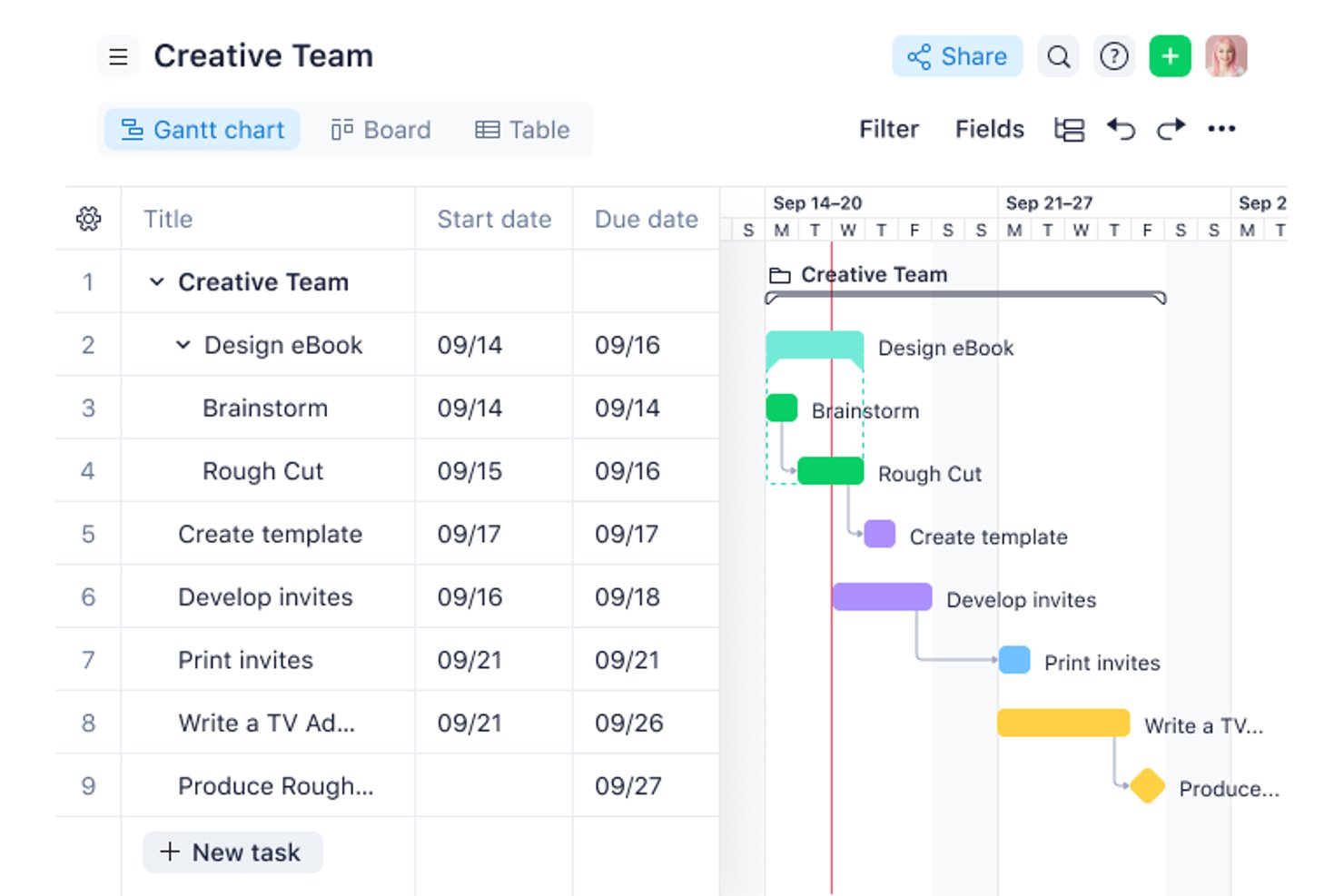
Wrike è una piattaforma di gestione dei progetti con una bacheca Kanban configurabile, oltre 15 viste sincronizzate, automazione senza codice, collaborazione assistita dall'IA e cruscotti interfunzionali progettati per supportare il lavoro a livello di più progetti e portafogli.
Per chi è più adatto Wrike?
Wrike è adatto ai responsabili di prodotto e ai team operativi che coordinano il lavoro tra più reparti, strumenti e parti interessate contemporaneamente.
Perché ho scelto Wrike
Wrike si è guadagnato un posto nella mia rosa di candidati perché la sua bacheca è progettata per gestire la complessità del lavoro interfunzionale, non solo gli sprint di un singolo team. Mi piace molto poter alternare la visualizzazione della bacheca tra attività individuali e viste a livello di portafoglio, così posso monitorare il lancio di un prodotto tra marketing, ingegneria e operazioni senza cambiare strumento. Le colonne con campi personalizzati e le corsie consentono di organizzare il lavoro per team, priorità o qualsiasi altra categoria rilevante in quel momento.
Funzionalità principali di Wrike
- Generatore di automazioni senza codice: Crea regole di automazione in linguaggio naturale per aumentare automaticamente la priorità delle attività a rischio e instradare il lavoro in arrivo verso le code appropriate.
- Moduli di richiesta: Crea moduli di raccolta delle richieste che assegnano automaticamente il lavoro inviato a progetti specifici o alle code dei team, senza dover effettuare uno smistamento manuale.
- Riepiloghi IA dei commenti: Wrike Copilot riassume le lunghe conversazioni nei commenti delle attività, permettendoti di rimanere aggiornato senza leggere ogni risposta.
- Alternanza della bacheca a livello di portafoglio: Passa dalla visualizzazione della bacheca a livello di singole attività a quella a livello di programma o portafoglio per monitorare contemporaneamente il lavoro su più progetti.
Integrazioni di Wrike
Wrike offre più di 400 integrazioni, tra cui Jira, GitHub, GitLab, Bitbucket, Slack, Microsoft Teams, Google Workspace, Salesforce, Tableau e Power BI. Wrike Sync fornisce la sincronizzazione bidirezionale con oltre 22 applicazioni, tra cui Jira e GitHub.
Pros and Cons
Pros:
- Le bacheche a livello di portafoglio supportano i piani evolutivi dei prodotti
- I campi personalizzati organizzano le fasi del flusso di lavoro interfunzionale
- Le viste sincronizzate collegano la pianificazione alla distribuzione
Cons:
- I limiti WIP non prevedono un'applicazione confermata
- La configurazione iniziale può gravare sui team più piccoli
New Product Updates from Wrike

Wrike Activity Reports Add Actor Type Details
Wrike’s Activity Report now displays actor type details, helping admins identify whether changes came from the UI, Automation, Wrike Agents, API, or AI via MCP. For more information, visit Wrike's official site.

Miro
Ideale per monitorare il processo di sviluppo di nuove funzionalità
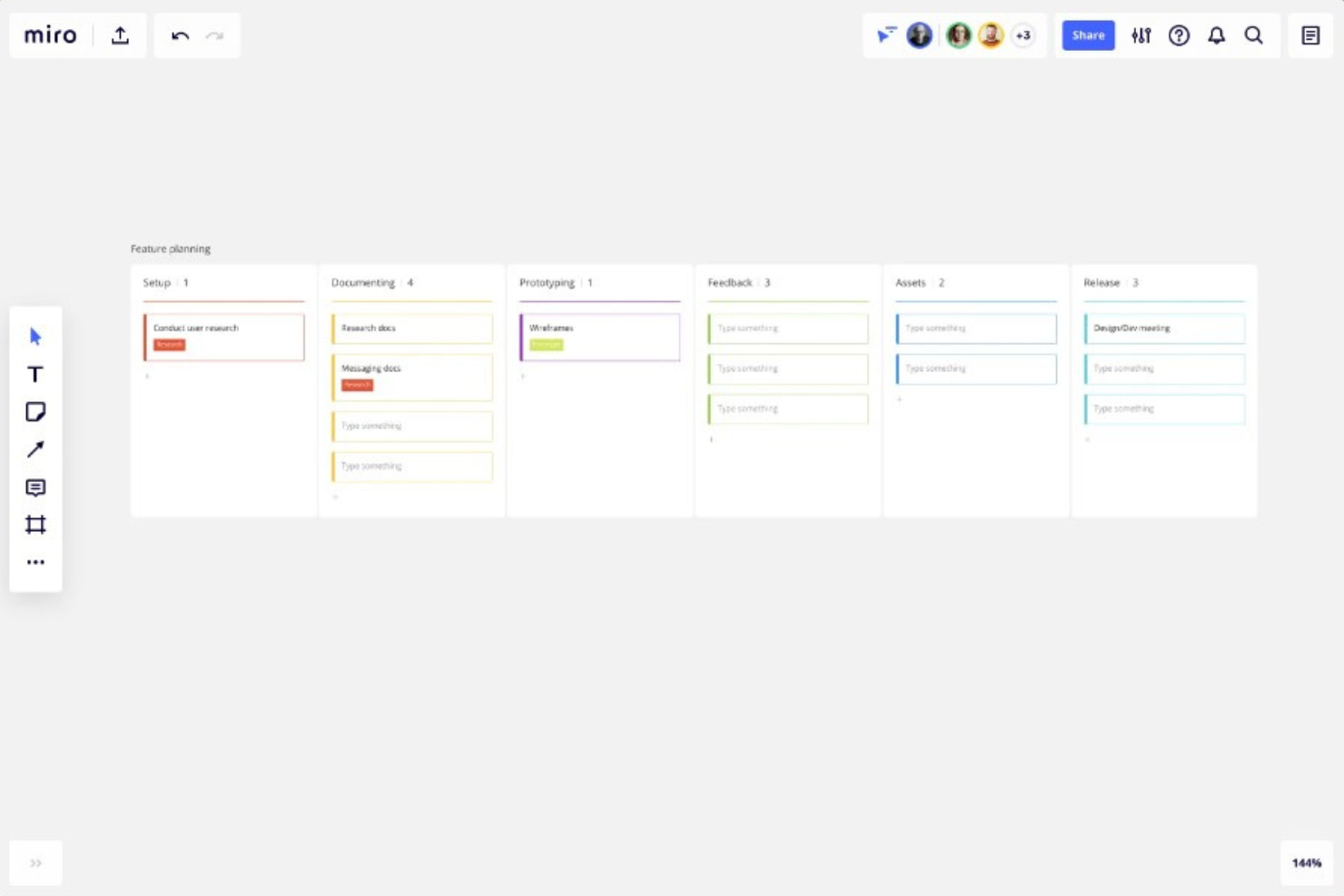
Miro è una piattaforma di collaborazione con area di lavoro infinita che riunisce le bacheche Kanban con piani di marcia, diagrammi e prototipi in un unico spazio di lavoro visivo.
Per chi è più adatto Miro?
Miro è particolarmente adatto ai responsabili di prodotto che hanno bisogno di collegare direttamente le bacheche Kanban a piani di marcia, prototipi e attività di analisi esplorativa in un unico spazio visivo.
Perché ho scelto Miro
Ho scelto Miro come uno dei migliori strumenti perché la sua area di lavoro infinita consente di affiancare direttamente una bacheca Kanban a piani di marcia, documenti di analisi esplorativa e prototipi, permettendoti di monitorare una nuova funzionalità dalla prima nota adesiva alla scheda finale in un unico spazio di lavoro. Mi piace molto che le viste Kanban, Sequenza temporale e Tabella condividano tutti gli stessi dati sottostanti: passare dall'avanzamento dello sprint alla vista del piano di marcia trimestrale richiede quindi un solo clic, invece di dover cambiare contesto tra strumenti diversi.
Funzionalità principali di Miro
- Schede sincronizzate: Trascina una scheda Kanban sull'area di lavoro per creare una copia collegata che si aggiorna in entrambe le direzioni quando viene modificata.
- Più viste della bacheca: Passa dalle viste Kanban, Sequenza temporale e Tabella senza duplicare i dati, così puoi passare dall'avanzamento dello sprint alla pianificazione trimestrale con un solo clic.
- Integrazione delle schede Jira: Trascina le schede Jira direttamente nella bacheca Kanban di Miro, converti le schede in ticket Jira e ottieni la sincronizzazione bidirezionale con il piano Business.
- Struttura Kanban generata dall'intelligenza artificiale: Usa Miro AI per generare una struttura Kanban a partire da una richiesta, utilizzando i contenuti della bacheca esistente come contesto.
Integrazioni di Miro
Miro pubblicizza oltre 250 integrazioni, tra cui Jira, Asana, Azure DevOps, Linear, ClickUp, Trello, Slack, Microsoft Teams, GitHub e Zapier. Il piano Business aggiunge la sincronizzazione bidirezionale con Jira, Asana, Linear, ClickUp e Azure DevOps.
Pros and Cons
Pros:
- Collega Kanban a piani di marcia e prototipi
- Sincronizza le viste Kanban, Sequenza temporale e Tabella
- Supporta la collaborazione in tempo reale sul prodotto tra team diversi
Cons:
- Non offre limiti obbligatori per il lavoro in corso
- Non dispone di sottoattività native né del monitoraggio del tempo
New Product Updates from Miro
Miro Adds Japan Data Residency for Enterprise Customers
Miro has introduced Japan data residency for enterprise customers, offering in-region storage for production data, backups, and metadata, plus in-region compute infrastructure. For more information, visit Miro's official site.

ClickUp
Ideale per limiti WIP integrati e sollecitazioni tramite IA
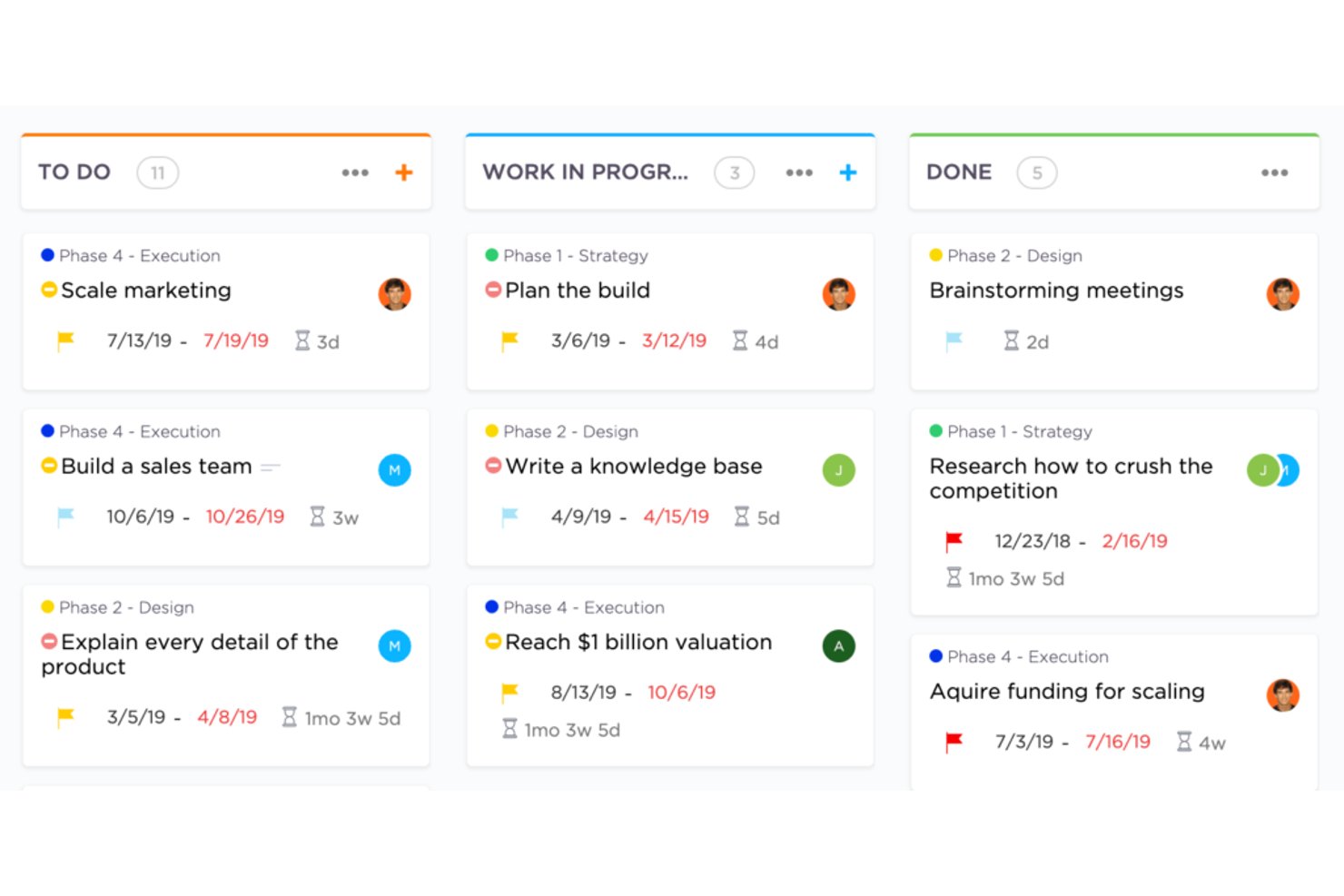
ClickUp è una piattaforma di gestione del lavoro con viste delle bacheche kanban, limiti WIP, gestione degli sprint, monitoraggio delle attività in più viste, monitoraggio nativo del tempo, automazioni e strumenti di IA integrati.
Per chi è più adatto ClickUp?
ClickUp è particolarmente adatto ai team di prodotto e di ingegneria che desiderano kanban, sprint, limiti WIP e monitoraggio del portafoglio in un unico spazio di lavoro.
Perché ho scelto ClickUp
Ho scelto ClickUp come uno dei migliori perché i suoi limiti WIP nativi vanno oltre un semplice limite: quando una colonna raggiunge il proprio limite, la bacheca lo segnala visivamente e i Super agenti IA di ClickUp inviano attivamente un messaggio al responsabile delle schede bloccate. Questo tipo di applicazione proattiva delle regole è qualcosa che raramente vedo integrato altrove. I punti sprint e i report sugli sprint completano il flusso di lavoro kanban, consentendo ai team di prodotto di gestire il backlog, monitorare la velocità e imporre una disciplina sulla produttività senza dover integrare strumenti separati.
Funzionalità principali di ClickUp
- Viste sincronizzate multiple: Passa dalle viste Elenco, Calendario, Gantt, Cronologia e Mappa mentale senza ricreare le attività: utilizzano tutte gli stessi dati.
- Gestione degli sprint: Pianifica e monitora gli sprint con i punti sprint direttamente nel piano gratuito, mentre i report completi sugli sprint sono disponibili nel piano Business.
- Monitoraggio nativo del tempo: Registra il tempo associato alle attività direttamente da ClickUp, a partire dal piano Unlimited, senza un'integrazione di terze parti.
- ClickUp Brain: Poni domande sulla tua bacheca, ad esempio quali attività sono bloccate o quali scadono a breve, e ricevi risposte dall'assistente IA integrato.
Integrazioni di ClickUp
ClickUp offre integrazioni native con Slack, HubSpot e Google Drive nei piani Unlimited e superiori. Supporta i webhook e un'API Enterprise per le integrazioni personalizzate.
Pros and Cons
Pros:
- I limiti WIP nativi segnalano le colonne bloccate
- Le viste sincronizzate collegano backlog e roadmap
- L'IA sollecita i responsabili delle schede bloccate
Cons:
- I controlli avanzati sono disponibili solo nei piani superiori
- L'ampio insieme di funzionalità rallenta la configurazione iniziale
New Product Updates from ClickUp
ClickUp Adds Meetings Hub, Super Agent Templates, and ZoomInfo Integration
ClickUp adds a searchable Meetings Hub, new ways to clone and template Super Agents, and a ZoomInfo integration through the App Center. These updates improve meeting retrieval, agent reuse, and access to sales intelligence. For more information, visit ClickUp’s official site.

Shortcut
Ideale per unire pianificazione e sviluppo
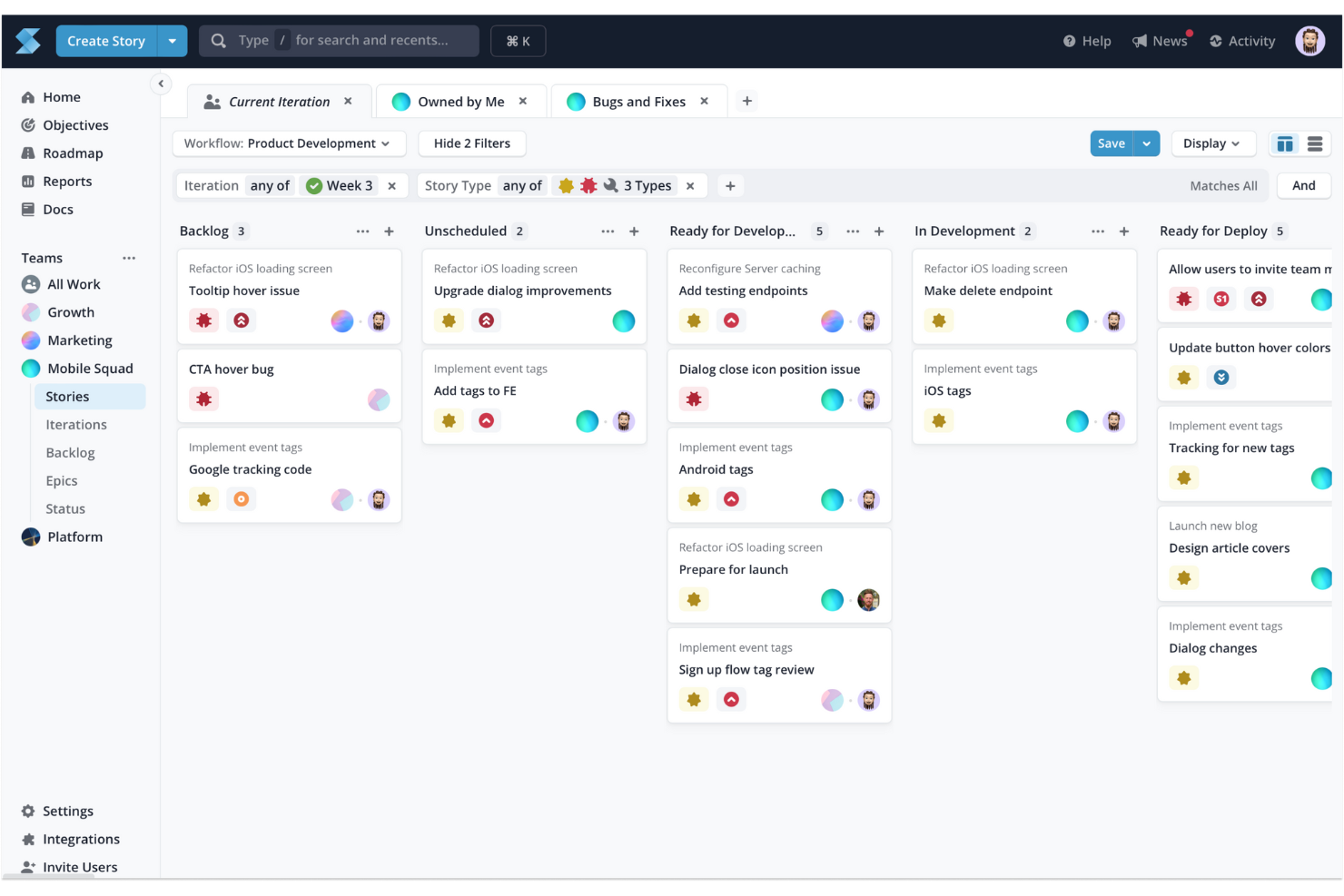
Shortcut è uno strumento di gestione dei progetti progettato per unire i team di pianificazione del prodotto e di sviluppo, concentrandosi sul miglioramento della collaborazione e dell'efficienza. Con funzionalità come bacheche Kanban, pianificazione degli sprint, roadmap e monitoraggio degli obiettivi, consente ai team di monitorare l'avanzamento del lavoro e allineare le attività agli obiettivi aziendali.
Organizza le attività utilizzando una bacheca Kanban e note adesive colorate disposte in colonne che denotano i diversi stadi del flusso di lavoro. Questa configurazione visiva permette al tuo team, anche tra reparti diversi, di comprendere rapidamente lo stato e la priorità delle attività.
Inoltre, Shortcut ti consente di progettare bacheche su misura per i tuoi flussi di lavoro unici, offrendo una panoramica che migliora la produttività e favorisce una comunicazione e collaborazione migliori tra i membri del team. Supporta anche funzionalità come la pianificazione degli sprint e la modifica dei documenti in tempo reale.
Le integrazioni includono Slack, GitHub, GitLab, Figma, Codestream, Bitbucket, Notion, Loom, Dailybot, Plecto, LinearB, Lambda Test, Testlodge, Google Calendar, Miro, Productboard, Sentry, FireHydrant e Vanta.

Strumento Kanban flessibile che ti permette di creare reti di bacheche
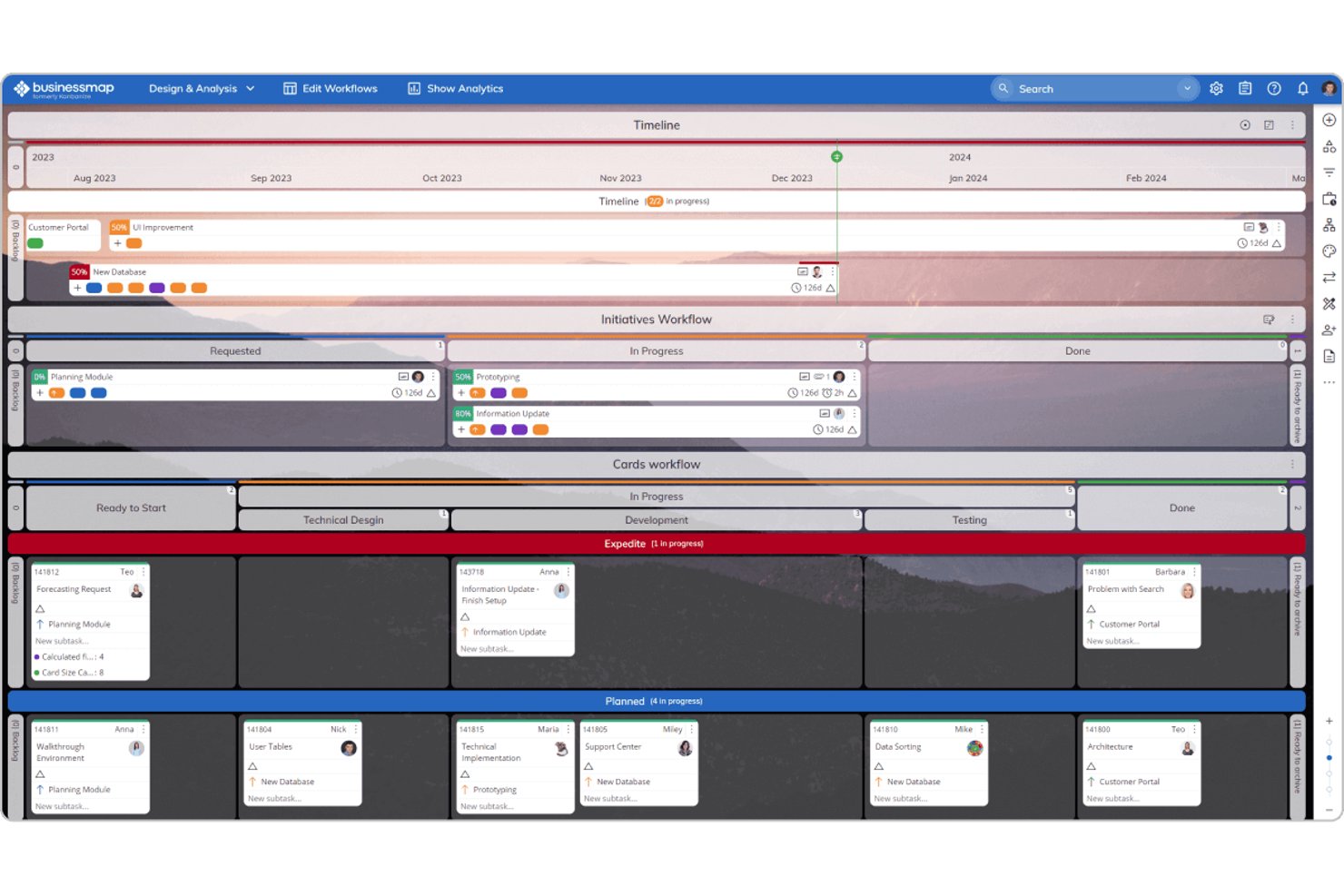
Businessmap è un software di project management agile basato su bacheche Kanban. Ti permette di creare qualsiasi cosa, da una singola bacheca a strutture complesse che mostrano tutto il lavoro svolto nella tua organizzazione. La caratteristica principale è la possibilità di creare una rete di bacheche collegate.
Queste possono espandersi orizzontalmente tra team o verticalmente tra livelli di management, aiutando la tua organizzazione ad avere una visione chiara sull'andamento dei lavori. Puoi inoltre creare flussi di lavoro tra ogni livello, rendendo facile la gestione delle dipendenze tra le attività e prevenendo i colli di bottiglia.
Un'altra funzione interessante sono le sotto-colonne. Questa funzione ti consente di suddividere ogni parte della tua bacheca Kanban in diverse fasi. Ad esempio, puoi visualizzare la colonna “in corso” in base alle attività svolte da ciascun team o dipartimento, così sai su cosa stanno lavorando questi gruppi.
Lo strumento si integra con numerosi altri strumenti, tra cui soluzioni di archiviazione cloud come Google Drive e strumenti di Business Intelligence come Tableau e Data Studio.
Inoltre, dispone di un'opzione di importazione per trasferire dati da altri strumenti di project management come Trello, Leankit e Asana.
Il prezzo di Businessmap parte da $179 al mese per un massimo di 15 utenti. Puoi anche registrarti per una prova gratuita sul sito web.
Trello
Strumento Kanban con automazione dei flussi di lavoro facile da usare
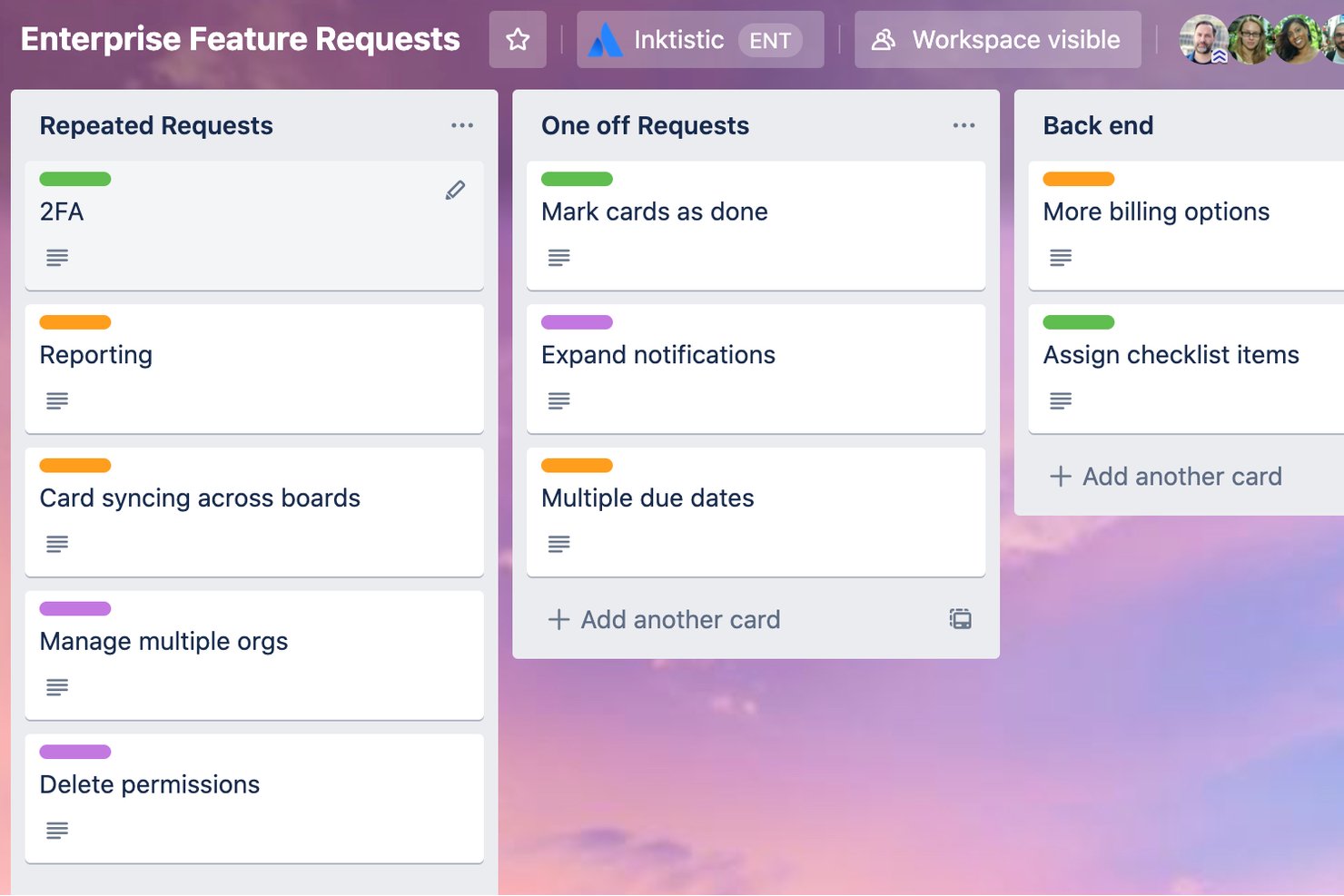
Trello è uno strumento di gestione delle attività facile da usare, ricco di funzionalità utili per aiutarti a portare a termine il lavoro. Configurare la tua bacheca è semplice e l'interfaccia utente è molto gradevole. È facile personalizzare le schede delle attività con tutte le informazioni di cui hai bisogno, come liste di controllo per le sotto-attività, note, campi personalizzati, scadenze e assegnatari.
Puoi anche utilizzare alcuni dei modelli già pronti dello strumento per iniziare più rapidamente. Mi piace molto la facilità con cui è possibile impostare l'automazione su Trello tramite istruzioni if/then. Basta inserire il trigger e l'azione nello strumento di automazione e il flusso di lavoro verrà eseguito ogni volta che si verifica un'azione pertinente.
Un esempio semplice è che puoi chiedere a Trello di spostare automaticamente una scheda sulla bacheca dei completati quando tutti gli elementi di una checklist sono stati spuntati. Trello si integra con molti altri strumenti, come Dropbox per l'archiviazione e Slack per le notifiche. È possibile impostare automazioni anche con questi strumenti, ad esempio per avvisare automaticamente le persone interessate su Slack quando vengono assegnate a un'attività. Inoltre, puoi accedere alle app mobili su iOS e Android.
È disponibile un piano gratuito che ti consente di creare fino a dieci bacheche senza limitare il numero di utenti.
I piani a pagamento partono da $6 e ti permettono di creare bacheche illimitate, utilizzare funzionalità avanzate e impostare più automazioni.
Altri strumenti Kanban
Ecco alcune opzioni aggiuntive di strumenti Kanban che non sono entrate nel mio elenco, ma che vale comunque la pena prendere in considerazione:
- Jira
Ideale per il kanban con reportistica agile su più team
- Smartsheet
Ideale per Kanban in stile foglio di calcolo su larga scala
- monday AI Workspace
Ideale per un backlog interfunzionale su un'unica bacheca
- Kanban Tool
Ideale per i puristi del Kanban che necessitano di hosting in sede
- Easy Projects
Ideale per i team operativi che monitorano tempi e budget
- Teamhood
Ideale per bacheche personalizzabili con metriche del flusso
- Notion
Ideale per mantenere documenti e bacheche in un unico spazio di lavoro


Come Valuto gli Strumenti Kanban
Valuto gli strumenti Kanban su due livelli: la base che ogni tool deve raggiungere—enforcement reale dei limiti WIP, flussi di lavoro configurabili, profondità a livello di scheda—e i fattori che distinguono le migliori soluzioni.
Funzionalità di Base (Requisiti Minimi per Questa Lista)
Quando seleziono gli strumenti per la mia lista, valuto ognuno su una scala da 0 (non offre la funzionalità) a 5 (eccelle in quest'area) per ciascuna funzionalità di base elencata di seguito. Poi, calcolo il punteggio totale dello strumento convertendolo in percentuale. Ogni strumento deve raggiungere un punteggio minimo totale del 65% per essere considerato per l'inclusione.
- Bacheche Kanban Visive: Verifico che le bacheche supportino lo spostamento delle schede tramite drag-and-drop, la personalizzazione delle colonne e le swimlane—come suddividere una bacheca per linea di prodotto o team.
- Limiti WIP: Ogni strumento dovrebbe permettere di fissare un limite al numero di schede in una colonna, con segnali visivi quando si supera la soglia così che i colli di bottiglia emergano prima della riunione giornaliera.
- Fasi di Flusso di Lavoro Personalizzabili: Cerco la possibilità di definire colonne e sotto-stati personalizzati, come suddividere "In Review" in revisione design e revisione ingegneristica.
- Gestione Dettagli delle Schede: Le schede devono contenere vero contesto—assegnatari, date di scadenza, sotto-attività, allegati, campi personalizzati—così una scheda funzionalità può includere specifica, mockup e criteri di accettazione nello stesso posto.
- Backlog e Prioritizzazione: Un backlog dedicato con funzionalità di ranking o scoring è importante, specialmente quando i product manager devono valutare decine di richieste prima di inserire il lavoro sulla bacheca.
- Analisi del Flusso e Reportistica: Valuto se lo strumento offre metriche specifiche Kanban come cycle time, lead time e diagrammi di flusso cumulativo per aiutare i team a individuare tendenze tra sprint o release.
Una volta che ho una lista di strumenti che rispondono ai criteri, considero cosa distingue ogni piattaforma.
Fattori Differenzianti (Cosa Distingue i Fornitori)
Ecco come confronto e metto in risalto i diversi fornitori:
Funzionalità di Spicco
Le regole di automazione fanno la differenza quando le schede seguono percorsi prevedibili—come assegnare automaticamente una scheda al QA quando passa in "Pronto per la Revisione". Cerco anche la mappatura delle dipendenze, che aiuta i product manager a individuare blocchi tra squad prima che ne rallentino il rilascio. Le bacheche a livello di portfolio sono importanti per team che gestiscono più prodotti, poiché raggruppano i Kanban dei singoli team in una vista unica che la leadership può usare per monitorare l'avanzamento senza approfondire le bacheche di ogni squadra.
Oltre le Funzionalità
Le integrazioni con lo stack di prodotto pesano molto nella mia valutazione—uno strumento Kanban deve sincronizzarsi con dove avviene effettivamente il lavoro di sviluppo, come Jira, GitHub o GitLab, così le schede riflettono lo stato reale del progresso tecnico. Considero anche quanto bene lo strumento scala al variare della dimensione del team, da un singolo PM con una sola bacheca fino a un’organizzazione prodotto con decine di squad. Anche la velocità di onboarding conta. I template preimpostati per i workflow PM più comuni, come la pianificazione sprint o le bacheche di discovery, riducono i tempi di avvio e aiutano i team ad adottare velocemente lo strumento.
Come scegliere uno strumento Kanban
È facile perdersi in lunghi elenchi di funzionalità e strutture tariffarie complesse. Per aiutarti a rimanere concentrato mentre porti avanti il tuo processo personalizzato di selezione del software, ecco un elenco di fattori da tenere a mente:
| Fattore | Cosa considerare |
|---|---|
| Scalabilità | Lo strumento può crescere insieme al tuo team? Considera le esigenze future relative a un maggior numero di utenti o progetti. Cerca strumenti che offrano livelli di prezzo flessibili o opzioni aziendali. |
| Integrazioni | Lo strumento funziona con il software che già utilizzi? Verifica la presenza di integrazioni con strumenti fondamentali come Slack, Google Workspace o Microsoft Office. Evita gli strumenti che richiedono trasferimenti manuali dei dati. |
| Personalizzazione | Puoi adattare lo strumento ai tuoi flussi di lavoro? Cerca opzioni per personalizzare bacheche, campi e notifiche. Evita gli strumenti rigidi che non si adattano ai tuoi processi. |
| Facilità d'uso | Lo strumento è intuitivo per il tuo team? Verifica che l'interfaccia sia semplice e chiara. Una curva di apprendimento ripida può ostacinarne l'adozione. |
| Implementazione e avvio | Con quale rapidità il tuo team può iniziare a utilizzare lo strumento? Valuta la disponibilità di materiali formativi, dell'assistenza durante la configurazione e la facilità di migrazione dei dati. |
| Costo | Lo strumento rientra nel tuo budget? Confronta i piani tariffari e considera i costi nascosti, come componenti aggiuntivi o limiti al numero di utenti. Cerca uno strumento che offra valore senza gravare eccessivamente sul budget. |
| Misure di sicurezza | Lo strumento protegge i tuoi dati? Assicurati che disponga di solide funzionalità di sicurezza, come la crittografia e backup regolari. Verifica la conformità alle normative sulla protezione dei dati. |
| Disponibilità dell'assistenza | Riceverai aiuto quando ne avrai bisogno? Controlla gli orari e i canali di assistenza disponibili. Cerca opzioni di supporto reattive, come chat o assistenza telefonica, soprattutto se il tuo team lavora in fusi orari diversi. |
Tendenze negli strumenti Kanban
Gli strumenti e la tecnologia Kanban continuano a evolversi rapidamente, riflettendo le esigenze crescenti dei professionisti della gestione dei prodotti di disporre di modalità più efficienti per organizzare, stabilire le priorità e monitorare le attività, senza dimenticare il proseguimento del passaggio dalle metodologie a cascata a quelle Agile. Di conseguenza, sono emerse diverse tendenze chiave che, a mio avviso, continueranno a influenzare gli strumenti Kanban e i professionisti della gestione dei prodotti in futuro.
- Integrazione con l'intelligenza artificiale e l'apprendimento automatico: gli strumenti Kanban incorporano sempre più l'intelligenza artificiale e l'apprendimento automatico per automatizzare la definizione delle priorità delle attività e prevedere i tempi di completamento dei progetti. Questa funzionalità migliora nel tempo, man mano che gli algoritmi apprendono dai modelli di flusso di lavoro del gruppo, rendendo questi strumenti più intelligenti e predittivi nella gestione delle tempistiche dei progetti.
- Sostenibilità e funzionalità ecologiche: un numero crescente di strumenti Kanban integra funzionalità mirate a promuovere la sostenibilità nelle pratiche di gestione dei progetti. Ciò include il monitoraggio dell'impronta di carbonio dei progetti e la promozione del minimalismo digitale per ridurre il consumo energetico. Queste funzionalità rispondono alla crescente domanda di pratiche aziendali attente all'ambiente e riflettono una tendenza più ampia verso la responsabilità ambientale nel settore tecnologico.
- Spazi di lavoro in realtà virtuale (VR): tra le funzionalità più innovative vi è l'introduzione di spazi di lavoro in realtà virtuale, che consentono agli utenti di interagire con le proprie bacheche Kanban in un ambiente virtuale tridimensionale. Questa funzionalità insolita risponde alla necessità di esperienze di gestione dei progetti più immersive e coinvolgenti, soprattutto nei settori creativi e orientati alla progettazione.
- Analisi dell'intelligenza emotiva: un'altra funzionalità innovativa è l'integrazione dell'analisi dell'intelligenza emotiva, che valuta il morale e lo stato di benessere del gruppo sulla base dei modelli di interazione e dei tassi di completamento delle attività. Questo approccio unico mira a fornire ai responsabili dei gruppi informazioni sul benessere dei propri gruppi, evidenziando la crescente attenzione alla salute mentale sul luogo di lavoro.
- Elementi di gamificazione: l'integrazione di elementi di gamificazione negli strumenti Kanban sta diventando sempre più popolare, con funzionalità come distintivi per i traguardi raggiunti, classifiche e sistemi di ricompensa. Questi elementi sono progettati per aumentare il coinvolgimento e la motivazione degli utenti, rendendo il completamento delle attività e il monitoraggio dei progressi dei progetti più interattivi e piacevoli per i membri del gruppo.
Queste tendenze riflettono le esigenze e le sfide in evoluzione affrontate dai professionisti della gestione dei prodotti. Mentre gli strumenti Kanban continuano a innovare, l'attenzione si concentra sulla creazione di ambienti più intelligenti, flessibili e collaborativi che non solo migliorano la produttività, ma danno anche priorità al benessere e al coinvolgimento dei gruppi.
Che cos'è uno strumento Kanban?
Kanban Tool è una piattaforma di gestione dei progetti che consente di organizzare le attività su bacheche digitali per ottenere una migliore visibilità e un flusso di lavoro più efficace. I responsabili di progetto, i responsabili di prodotto e i membri del gruppo la utilizzano per organizzare il lavoro, monitorare i progressi e individuare tempestivamente i colli di bottiglia. Aiuta a mantenere tutti allineati, a stabilire le giuste priorità e a garantire che nulla venga trascurato.
Funzionalità
Quando selezioni uno strumento Kanban, presta attenzione alle seguenti funzionalità chiave:
- Bacheche Kanban: visualizza i flussi di lavoro e gestisci le attività in modo efficace, aiutando i gruppi a vedere i progressi a colpo d'occhio.
- Assegnazione delle attività: assegna le attività ai membri del gruppo, assicurandoti che tutti conoscano le proprie responsabilità e scadenze.
- Monitoraggio dei progressi: controlla il completamento delle attività e lo stato dei progetti per mantenere i gruppi sulla buona strada e rispettare le scadenze.
- Opzioni di personalizzazione: adatta le bacheche e i flussi di lavoro alle esigenze e ai processi specifici del tuo gruppo.
- Integrazioni: collega altri strumenti come Slack o Google Workspace per semplificare il lavoro tra le diverse piattaforme.
- Funzionalità di automazione: automatizza le attività ripetitive per risparmiare tempo e ridurre gli errori manuali.
- Strumenti di reportistica: genera informazioni e analisi per valutare le prestazioni del gruppo e i risultati dei progetti.
- Accesso da dispositivi mobili: gestisci le attività ovunque ti trovi tramite app mobili, garantendo flessibilità e accessibilità.
- Strumenti di collaborazione: facilita la comunicazione del gruppo e la condivisione delle idee attraverso commenti e allegati.
- Funzionalità di sicurezza: proteggi i tuoi dati tramite la crittografia e la conformità alle normative sulla protezione dei dati.
Vantaggi
L'implementazione di uno strumento Kanban offre diversi vantaggi al tuo gruppo e alla tua azienda. Ecco alcuni dei vantaggi che puoi aspettarti:
- Organizzazione migliorata: Visualizza i flussi di lavoro con le bacheche kanban, aiutando il tuo team a rimanere organizzato e concentrato sulle attività.
- Collaborazione migliorata: Utilizza gli strumenti di collaborazione per facilitare la comunicazione e la condivisione di idee tra i membri del team.
- Maggiore produttività: Automatizza le attività ripetitive e monitora i progressi per assicurarti che il tuo team lavori in modo efficiente e rispetti le scadenze.
- Flessibilità: Personalizza i flussi di lavoro in base ai processi specifici del tuo team, consentendo di adattarsi facilmente ai cambiamenti.
- Migliore processo decisionale: Accedi agli strumenti di reportistica per ottenere informazioni sulle prestazioni del team e sui risultati dei progetti, supportando decisioni consapevoli.
- Accessibilità: Gestisci le attività da qualsiasi luogo grazie all'accesso mobile, offrendo flessibilità ai membri del team che lavorano da remoto o in mobilità.
- Sicurezza dei dati: Proteggi le informazioni della tua azienda con solide funzionalità di sicurezza, garantendo la conformità alle normative sulla protezione dei dati.
Costi & prezzi
La scelta di uno strumento kanban richiede la comprensione dei vari modelli e piani tariffari disponibili. I costi variano in base alle funzionalità, alle dimensioni del team, agli strumenti aggiuntivi e ad altri fattori. La tabella seguente riassume i piani più comuni, i relativi prezzi medi e le funzionalità tipicamente incluse nelle soluzioni con strumento kanban:
Tabella comparativa dei piani per lo strumento kanban
| Tipo di piano | Prezzo medio | Funzionalità comuni |
|---|---|---|
| Piano gratuito | $0 | Bacheche kanban di base, gestione limitata delle attività e strumenti di collaborazione di base. |
| Piano personale | $5-$15/user/month | Bacheche personalizzabili, assegnazione delle attività, monitoraggio dei progressi e accesso mobile. |
| Piano aziendale | $15-$30/user/month | Reportistica avanzata, funzionalità di automazione, integrazioni con strumenti popolari e sicurezza avanzata. |
| Piano aziendale | $30-$60/user/month | Utenti illimitati, assistenza dedicata, flussi di lavoro personalizzabili e analisi avanzate. |
Domande frequenti sullo strumento kanban
Ecco alcune risposte alle domande comuni sullo strumento kanban:
Gli strumenti kanban possono essere utilizzati dai team da remoto?
Sì, gli strumenti kanban sono ottimi per i team da remoto. Consentono ai membri del team di collaborare e monitorare i progressi da qualsiasi luogo. Cerca strumenti con solide funzionalità di collaborazione, accesso mobile e integrazioni con piattaforme di comunicazione come Slack o Microsoft Teams per migliorare il lavoro di squadra da remoto.
È difficile passare da un altro strumento di gestione dei progetti a uno strumento kanban?
Passare a uno strumento kanban può essere semplice se lo strumento offre un buon supporto per la configurazione iniziale. Molti strumenti forniscono modelli, video di formazione e visite guidate interattive per facilitare la transizione. Assicurati che il nuovo strumento possa importare i dati dal sistema precedente per ridurre al minimo le interruzioni e mantenere i progetti in linea con i piani.
Gli strumenti kanban supportano la gestione agile dei progetti?
Sì, molti strumenti kanban supportano le metodologie agili. Offrono funzionalità come la gestione del backlog, gli sprint e la definizione delle priorità delle attività, essenziali per i team agili. Se il tuo team segue pratiche agili, cerca strumenti che indichino esplicitamente il supporto per i framework agili, così da assicurarti che soddisfino le tue esigenze.
Quali difficoltà nella migrazione dei dati devo aspettarmi passando a un nuovo strumento kanban?
Potresti dover associare le schede, le colonne, gli allegati e le assegnazioni degli utenti esistenti al formato del nuovo strumento: prevedi alcune operazioni manuali di pulizia, soprattutto se il vecchio strumento utilizzava campi o stati personalizzati. Esamina i formati di importazione/esportazione (CSV, JSON) per poter trasferire uno storico significativo invece di iniziare da zero. Verifica inoltre come verranno migrate le attività archiviate e le schede collegate, poiché la loro assenza può compromettere la tracciabilità.
Come posso garantire una gestione efficace del cambiamento adottando uno strumento kanban in tutta un'organizzazione?
Comunica il “perché”: mostra ai team in che modo renderà il lavoro visibile e gestibile, invece di presentarlo come un altro semplice strumento. Crea un gruppo pilota che rappresenti team diversi e raccogli presto i feedback, così da cogliere le reali esigenze degli utenti. Fornisci una formazione non solo sul funzionamento, ma anche sui comportamenti da adottare (ad esempio, aggiornare le schede quando cambia lo stato), affinché il nuovo strumento diventi parte del modo di lavorare delle persone e non soltanto un’opzione aggiuntiva.
Qual è il prossimo passo:
Se stai cercando uno strumento kanban, contatta gratuitamente un consulente di SoftwareSelect per ricevere consigli.
Compili un modulo e fai una breve conversazione durante la quale approfondiranno le tue esigenze specifiche. In seguito riceverai una selezione ristretta di software da valutare. Ti assisteranno persino durante l'intero processo di acquisto, comprese le negoziazioni sul prezzo.