

10 migliori software per la gestione del ciclo di vita del prodotto (PLM) 2026

10 Elenco dei migliori software PLM
- 9. Technia PLM


Il miglior software per la gestione del ciclo di vita del prodotto (PLM) ti aiuta a centralizzare i dati dei prodotti, tenere traccia delle modifiche e coordinare team interfunzionali dall'ideazione alla fine del ciclo di vita. Senza un sistema PLM affidabile, è facile perdere il controllo delle versioni, duplicare il lavoro o non cogliere aggiornamenti fondamentali, soprattutto quando i team di ingegneria, progettazione e catena di approvvigionamento lavorano con strumenti diversi.
Ho valutato più di 30 piattaforme PLM e so quanto sia difficile trovarne una che supporti flussi di lavoro complessi senza complicare l'utilizzo per gli utenti. In questa guida ho selezionato strumenti che aiutano a standardizzare la documentazione, accelerare lo sviluppo dei prodotti e ridurre gli errori costosi durante tutto il ciclo di vita.
Che cos'è il software PLM?
Il software per la gestione del ciclo di vita del prodotto (PLM) è uno strumento che aiuta i team di prodotto, gli ingegneri e i produttori a gestire tutti i dati, i processi e la collaborazione relativi al prodotto durante l'intero ciclo di vita, dalla progettazione alla dismissione. Viene utilizzato per centralizzare la documentazione, tenere traccia delle revisioni, gestire la distinta base (BOM) e semplificare i flussi di lavoro interfunzionali. Il software PLM affronta problemi come le difficoltà nel controllo delle versioni, i team non coordinati e i ritardi nell'immissione dei prodotti sul mercato, fornendo un'unica fonte di verità per lo sviluppo del prodotto.
Perché fidarsi dei nostri consigli sui software
Il nostro team testa e recensisce software dal 2012. In quanto product manager noi stessi, sappiamo quanto sia difficile — e importante — scegliere il software giusto.
Per questa guida, abbiamo valutato gli strumenti attraverso test pratici e ricerche indipendenti, assegnando un punteggio agli strumenti in base ai nostri criteri di selezione.
Le nostre recensioni riflettono il nostro giudizio editoriale umano, non un discorso di vendita.
Tabella comparativa dei migliori software PLM
Ecco una tabella in cui puoi confrontare gli strumenti che abbiamo appena presentato nelle panoramiche.
| Tool | Best For | Trial Info | Price | ||
|---|---|---|---|---|---|
| 1 | Le migliori dashboard e visualizzazioni dei dati per il ciclo di vita dei prodotti | Piano gratuito + prova gratuita di 14 giorni + demo gratuita disponibile | A partire da $10/utente/mese (con fatturazione annuale) | Website | |
| 2 | Ideale grazie al punteggio integrato del rischio della catena di fornitura | Prova gratuita disponibile | Prezzi su richiesta | Website | |
| 3 | Ideale per la gestione flessibile delle distinte base | Piano gratuito disponibile | A partire da $75/postazione/mese (con fatturazione annuale) | Website | |
| 4 | Ideale per il ciclo di vita dei prodotti aziendali basato su modelli | Demo gratuita disponibile | Prezzo su richiesta | Website | |
| 5 | Ideale per i team aziendali PLM nordamericani | Piano gratuito disponibile | Prezzi su richiesta | Website | |
| 6 | Ideale per chi opera nell'ecosistema Salesforce | Demo gratuita disponibile | Prezzi disponibili su richiesta | Website | |
| 7 | Ideale per esigenze PLM aziendali su larga scala | Prova gratuita di 30 giorni | Prezzo su richiesta | Website | |
| 8 | Ideale per piccole e medie imprese in crescita | Prova gratuita di 10 giorni | Prezzo su richiesta | Website | |
| 9 | Non disponibile | Prezzo su richiesta | Website | ||
| 10 | Ideale per il PLM cloud con hosting predisposto per ITAR | Not available | Website |

Panoramiche dei migliori software PLM
Ecco una breve descrizione di ciascuno degli strumenti software PLM inclusi nella mia lista dei migliori. Ho aggiunto schermate dell’interfaccia utente di ogni piattaforma, oltre a note sul suo caso d’uso ideale e sulle funzionalità complessive.

Wrike
Le migliori dashboard e visualizzazioni dei dati per il ciclo di vita dei prodotti
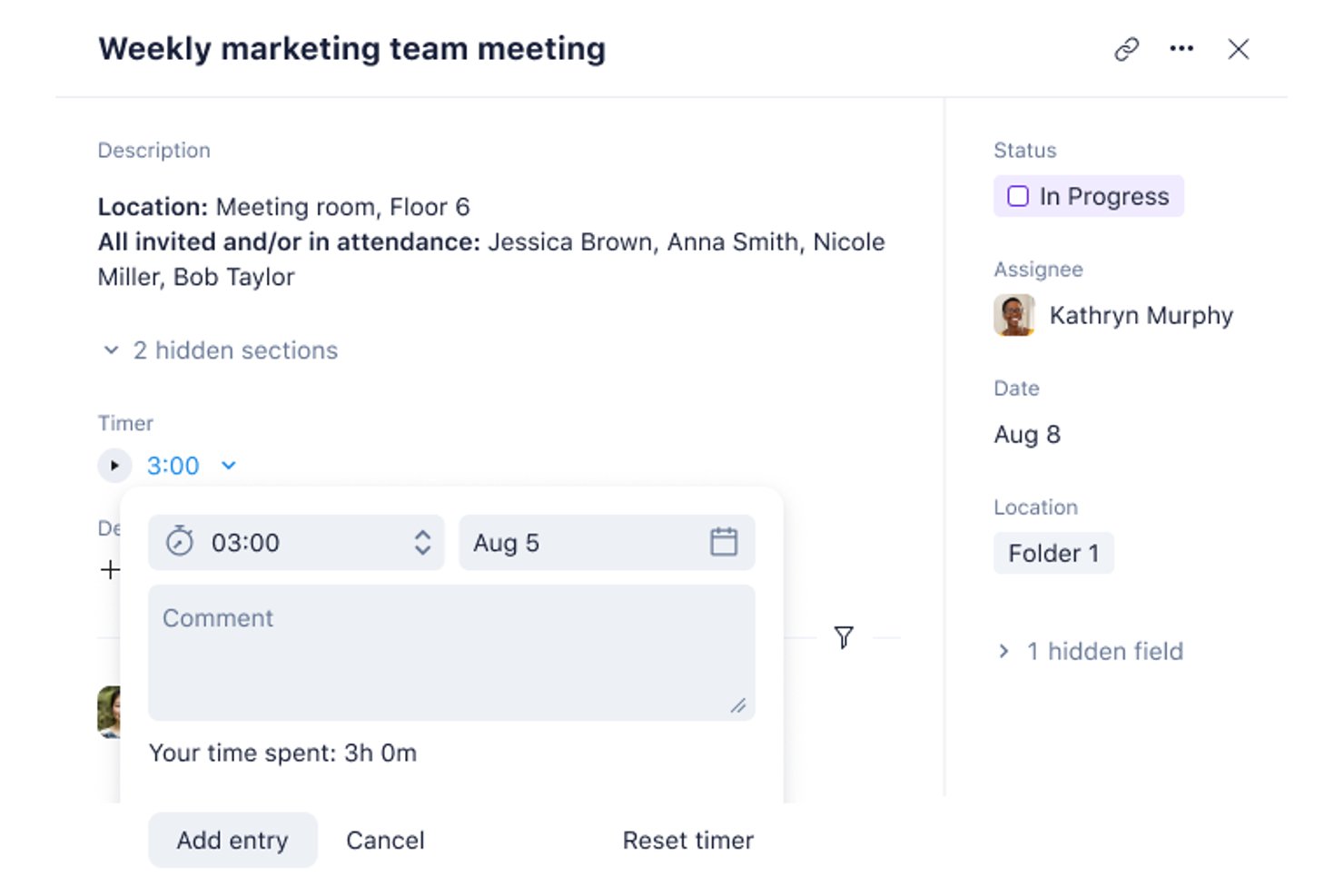
Wrike è una piattaforma collaborativa per la gestione del lavoro che supporta il coordinamento del ciclo di vita dei prodotti attraverso flussi di lavoro interfunzionali, processi di approvazione configurabili, dashboard in tempo reale e integrazioni con strumenti PLM, ERP e della catena di approvvigionamento.
Per chi è più adatto Wrike?
Wrike è particolarmente adatto ai team di prodotto interfunzionali che devono coordinare le attività di lancio, le approvazioni e la visibilità per gli stakeholder tra le funzioni di ingegneria, marketing e catena di approvvigionamento.
Perché ho scelto Wrike
Ho incluso Wrike tra le mie scelte principali perché le sue dashboard in tempo reale offrono ai team di prodotto una panoramica aggiornata dello stato dei programmi del ciclo di vita in ogni funzione, dall'ingegneria al marketing fino alla catena di approvvigionamento. Apprezzo in particolare i widget AI Insights, che evidenziano rischi e tendenze direttamente nelle dashboard senza richiedere uno strumento BI separato. Le dashboard condivisibili di Wrike consentono inoltre agli stakeholder interfunzionali di monitorare in un unico luogo la preparazione al lancio e lo stato delle approvazioni, evitando che qualcosa vada perso tra i team.
Funzionalità principali di Wrike
- Generatore di flussi di lavoro interfunzionali: Configura regole di automazione senza codice, moduli di richiesta e modelli per coordinare le attività tra i team di prodotto, ingegneria, marketing e catena di approvvigionamento.
- Controllo degli accessi basato sui ruoli: Assegna licenze complete o limitate, così gli stakeholder delle diverse funzioni possono visualizzare, modificare o approvare il lavoro senza accedere a progetti non pertinenti.
- Wrike Datahub: Recupera dati da più fonti esterne e li inserisce in flussi di lavoro unificati, collegando Wrike a strumenti ERP, CRM e BI in un unico luogo.
- Oltre 15 viste di progetto: Passa dalle viste Gantt, Kanban, tabella, calendario e altre ancora per monitorare i progressi dei programmi del ciclo di vita tra team e fasi.
Integrazioni di Wrike
Wrike dichiara oltre 400 integrazioni predefinite, tra cui Microsoft Dynamics 365, NetSuite, Jira, GitHub, Tableau e Power BI. Si collega a strumenti PLM, ERP e SCM, ma non è documentato alcun connettore PLM o CAD nativo specifico; Wrike Integrate e la sua API supportano connessioni personalizzate.
Pros and Cons
Pros:
- Le dashboard in tempo reale chiariscono lo stato dei programmi del ciclo di vita
- I flussi di lavoro configurabili supportano le approvazioni interfunzionali
- I recensori apprezzano la visibilità centralizzata sui progetti
Cons:
- Nessuna gestione strutturata della distinta base o dei componenti
- Mancano l'archiviazione CAD e il controllo delle revisioni
New Product Updates from Wrike

Wrike Activity Reports Add Actor Type Details
Wrike’s Activity Report now displays actor type details, helping admins identify whether changes came from the UI, Automation, Wrike Agents, API, or AI via MCP. For more information, visit Wrike's official site.
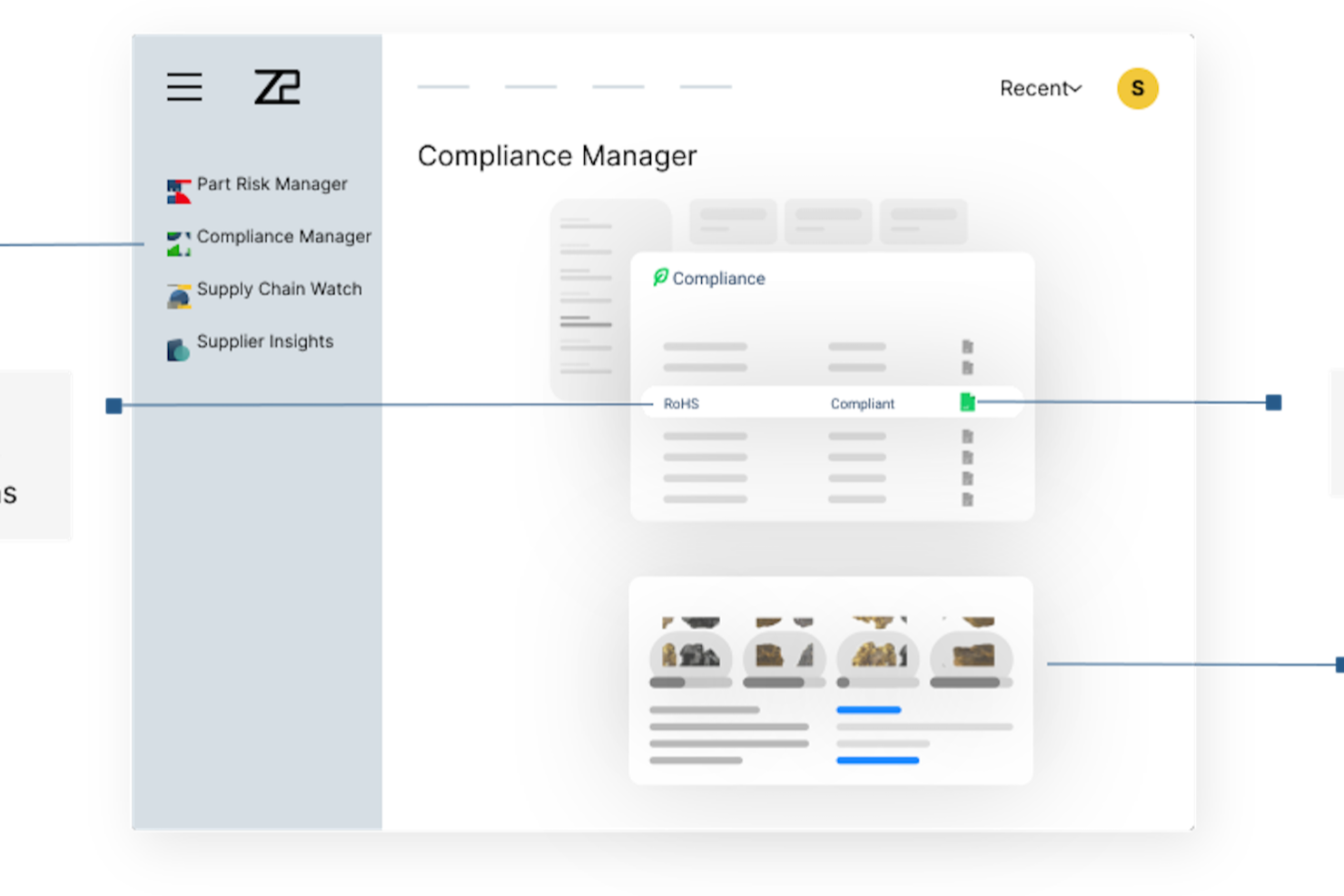
Z2Data è una piattaforma di intelligence sui componenti e di gestione dei rischi della catena di fornitura che monitora le distinte base per lo stato del ciclo di vita dei componenti, la conformità normativa rispetto a oltre 270 regolamenti e il rischio dei fornitori su un massimo di quattro livelli della rete di fornitura.
Per chi è più indicato Z2Data?
Z2Data è adatto ai responsabili della catena di fornitura e agli ingegneri della conformità nei settori caratterizzati da un uso intensivo dell'elettronica, come quello aerospaziale, dei dispositivi medici e automobilistico, che necessitano di una visibilità in tempo reale sui rischi dei componenti nelle reti di fornitori multilivello.
Perché ho scelto Z2Data
Z2Data si è guadagnato un posto nella mia rosa dei candidati perché il suo punteggio integrato del rischio della catena di fornitura offre ai flussi di lavoro PLM una funzionalità che la maggior parte degli strumenti PLM dedicati non offre nativamente. Apprezzo particolarmente il modo in cui Supply Chain Watch mappa le reti di fornitori fino a quattro livelli di profondità e rileva gli avvisi di interruzione fino a due settimane prima rispetto agli strumenti concorrenti. Per quanto riguarda la conformità, Compliance Manager verifica i componenti rispetto a oltre 270 regolamenti, tra cui RoHS, REACH e PFAS, e produce report pronti per gli audit fin dal primo giorno.
Funzionalità principali di Z2Data
- Gestore del rischio dei componenti: assegna un punteggio a ogni componente in base a sei fattori di rischio e prevede la fine del ciclo di vita con un anticipo fino a 36 mesi.
- Ricerca di componenti alternativi basata sull'IA: identifica componenti sostitutivi conformi a partire da un database di oltre un miliardo di componenti elettronici.
- Sincronizzazione delle revisioni della distinta base: importa gli aggiornamenti in tempo reale delle distinte base dal PLM o dall'ERP connesso, così il monitoraggio dei rischi riflette automaticamente ogni modifica al progetto.
- Dashboard dei rischi per i dirigenti: traduce i dati sui rischi relativi a componenti, fornitori e conformità in valori dei ricavi a rischio per la reportistica destinata alla direzione.
Integrazioni di Z2Data
Z2Data supporta connessioni in tempo reale alle distinte base provenienti da piattaforme PLM ed ERP esterne, ma non vengono indicati fornitori specifici. Le integrazioni native non sono documentate chiaramente e i dettagli delle API pubbliche non sono confermati.
Pros and Cons
Pros:
- Assegna un punteggio al rischio del ciclo di vita dei componenti con un anticipo fino a 36 mesi
- Verifica i componenti rispetto a oltre 270 regolamenti sulla conformità
- Mappa i fornitori di livello inferiore su quattro livelli della rete
Cons:
- Non gestisce i file CAD o i documenti di prodotto
- Non supporta gli ordini di modifica e la creazione di distinte base multilivello

OpenBOM
Ideale per la gestione flessibile delle distinte base
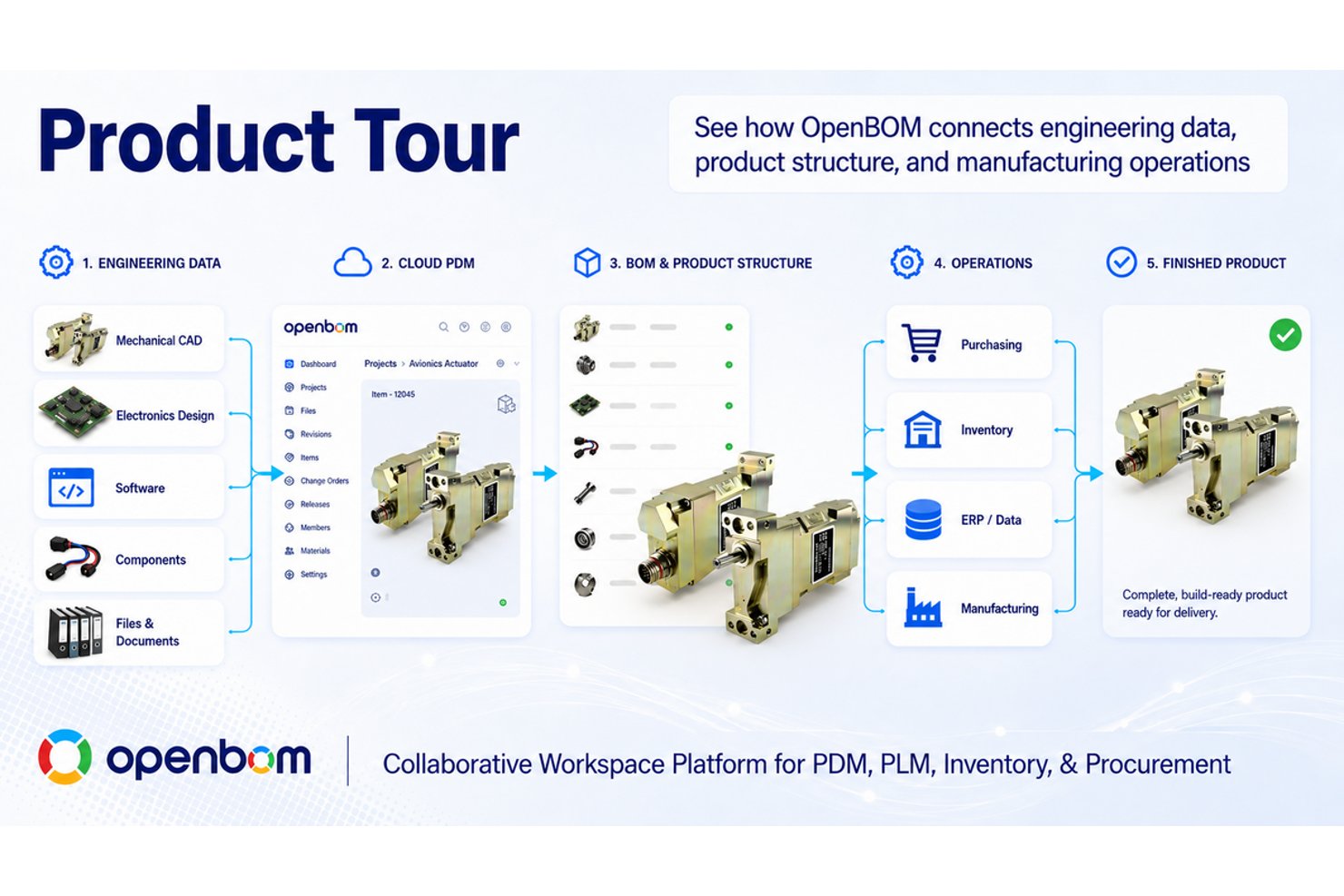
OpenBOM è una piattaforma PLM e di gestione delle distinte base (BOM) nativa del cloud che combina la creazione di distinte base multilivello, l'integrazione CAD, il PDM cloud, gli ordini di modifica ingegneristica e il monitoraggio degli approvvigionamenti e dell'inventario in un unico spazio di lavoro condiviso.
Per chi è più adatto OpenBOM?
OpenBOM è adatto a team di ingegneria e di sviluppo prodotto di piccole e medie dimensioni che necessitano di gestione delle distinte base, integrazione CAD e monitoraggio degli approvvigionamenti senza il sovraccarico dei sistemi PLM aziendali tradizionali.
Perché ho scelto OpenBOM
OpenBOM si è guadagnato un posto nella mia selezione perché gestisce in modo efficace la flessibilità delle distinte base durante l'intero ciclo di vita del prodotto. Mi piace il fatto che sia possibile mantenere una EBOM e una MBOM nello stesso spazio di lavoro, per poi risolvere le distinte base configurate in base alla data, al numero di serie o alla configurazione senza cambiare strumento. In pratica, questo significa che i team di ingegneria e approvvigionamento lavorano sempre sulla stessa struttura del prodotto, cosa che ho visto prevenire costosi disallineamenti durante i passaggi di consegne.
Funzionalità principali di OpenBOM
- Integrazione CAD: Si connette a un'ampia gamma di strumenti MCAD ed ECAD, tra cui SOLIDWORKS, Fusion 360, Onshape, Creo, NX, Altium e KiCAD, sincronizzando i metadati attraverso i rilasci.
- Co-modifica delle distinte base in tempo reale: Più membri del team possono modificare contemporaneamente le distinte base, in modo simile al lavoro in Google Sheets.
- Monitoraggio degli approvvigionamenti e dell'inventario: Include cataloghi dei componenti, controllo dell'inventario, richieste di offerta e ordini di acquisto nello stesso spazio di lavoro della distinta base.
- Flussi di lavoro per gli ordini di modifica ingegneristica (ECO): Consente ai team di gestire le revisioni, indirizzare le approvazioni e monitorare le modifiche direttamente all'interno della struttura del prodotto.
Integrazioni di OpenBOM
OpenBOM offre integrazioni documentate con SOLIDWORKS, Onshape, Fusion 360, Inventor, Solid Edge, Siemens NX, PTC Creo, CATIA, Altium e KiCAD. Supporta inoltre le connessioni ERP e le integrazioni personalizzate tramite la sua API REST.
Pros and Cons
Pros:
- Strutture EBOM e MBOM flessibili
- Collaborazione sulle distinte base in tempo reale tra funzioni diverse
- Approvvigionamenti e inventario condividono il contesto del prodotto
Cons:
- Le distinte base di grandi dimensioni possono diventare lente
- La gestione della conformità e dei requisiti rimane limitata

Ideale per il ciclo di vita dei prodotti aziendali basato su modelli

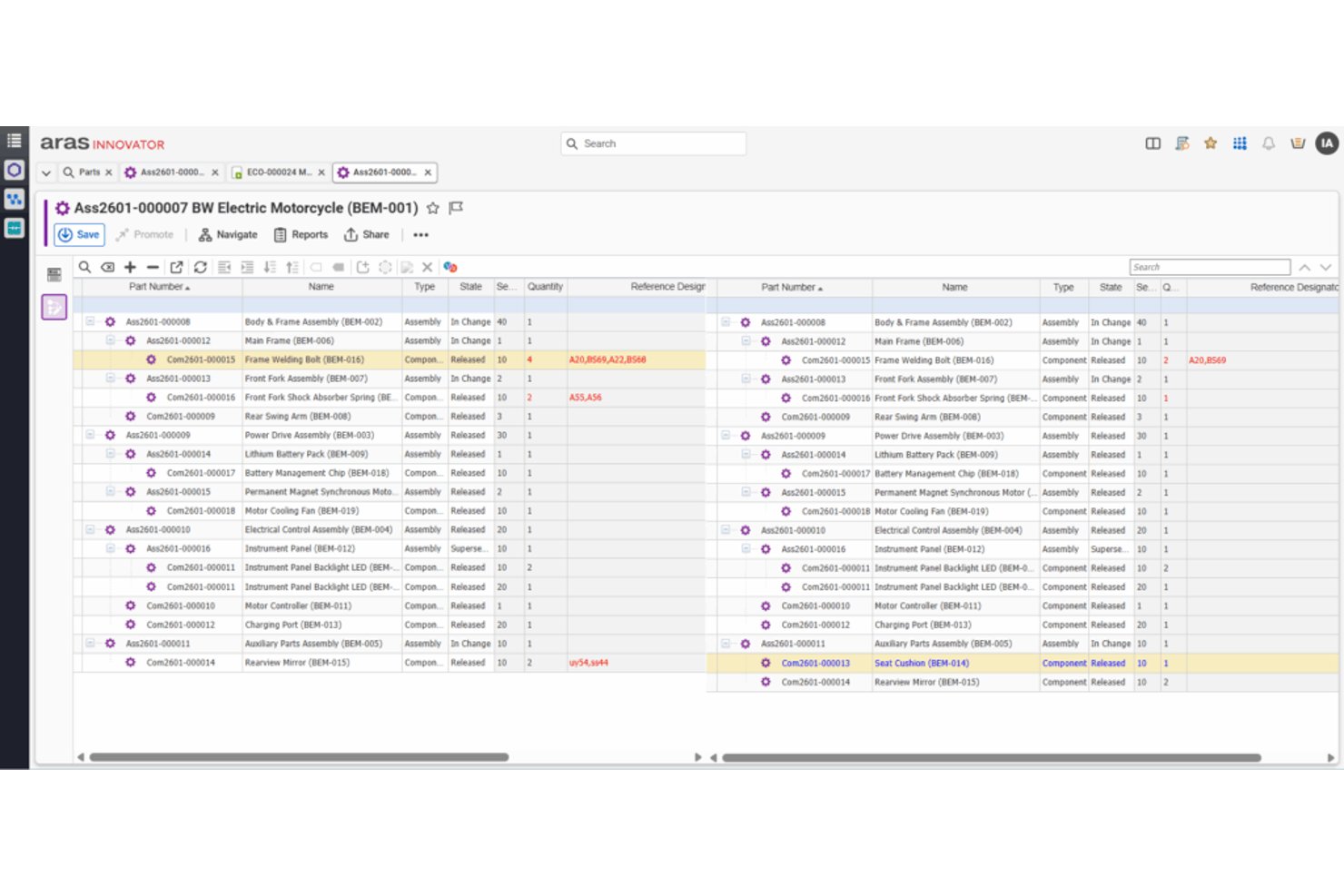
Aras PLM è una piattaforma PLM aziendale costruita attorno a un'architettura basata sul filo digitale, che offre gestione centralizzata dei dati di prodotto, monitoraggio del ciclo di vita delle distinte base, gestione delle modifiche ingegneristiche, gestione delle varianti e configurazione dei flussi di lavoro a basso codice.
A chi è più adatto Aras PLM?
Aras PLM è una soluzione particolarmente adatta ai team aziendali di ingegneria e R&D che necessitano di una piattaforma PLM altamente configurabile per gestire programmi di prodotto complessi durante l'intero ciclo di vita del prodotto.
Perché ho scelto Aras PLM
Aras PLM si guadagna un posto nella mia selezione perché è una delle poche piattaforme costruite attorno a un vero filo digitale, che collega requisiti, modifiche ingegneristiche e dati delle distinte base in ogni fase del ciclo di vita del prodotto, all'interno di un unico record connesso. Apprezzo in particolare la gestione delle varianti e dell'effettività, che consente di gestire la complessità delle configurazioni su una scala con cui la maggior parte degli strumenti PLM fatica a confrontarsi. Il suo costruttore di flussi di lavoro a basso codice consente inoltre ai team aziendali di configurare processi ripetibili di gestione delle modifiche senza un forte coinvolgimento degli sviluppatori.
Funzionalità principali di Aras PLM
- Motore di gestione delle varianti: gestisce configurazioni e varianti di prodotto complesse, con controlli di effettività in grado di gestire modifiche alle configurazioni su larga scala durante il ciclo di vita del prodotto.
- Applicazione per l'ingegneria dei requisiti: collega direttamente i requisiti di prodotto ai record di progettazione e ingegneria, offrendo ai team una tracciabilità completa dalla specifica al rilascio.
- Pianificazione dei processi di produzione: supporta la distinta base di produzione con strumenti dedicati alla definizione e alla gestione dei processi produttivi insieme ai dati ingegneristici.
- Costruttore di flussi di lavoro a basso codice: include uno strumento di gestione dei flussi di lavoro con funzionalità di trascinamento che consente ai team di configurare, automatizzare e tracciare i processi di approvazione delle modifiche senza scrivere codice personalizzato.
Integrazioni di Aras PLM
Aras PLM offre integrazioni documentate con SolidWorks, Siemens NX e SolidWorks Electrical, oltre a connessioni con strumenti MCAD, ECAD, di simulazione, ALM, ERP e Office. La sua API aperta e i servizi web supportano le integrazioni personalizzate.
Pros and Cons
Pros:
- Il filo digitale collega i dati del ciclo di vita
- I flussi di lavoro flessibili supportano programmi di prodotto complessi
- La gestione delle varianti affronta la complessità delle configurazioni
Cons:
- L'interfaccia può risultare poco intuitiva
- La sincronizzazione dei dati può richiedere attività di risoluzione dei problemi

Propel
Ideale per chi opera nell'ecosistema Salesforce
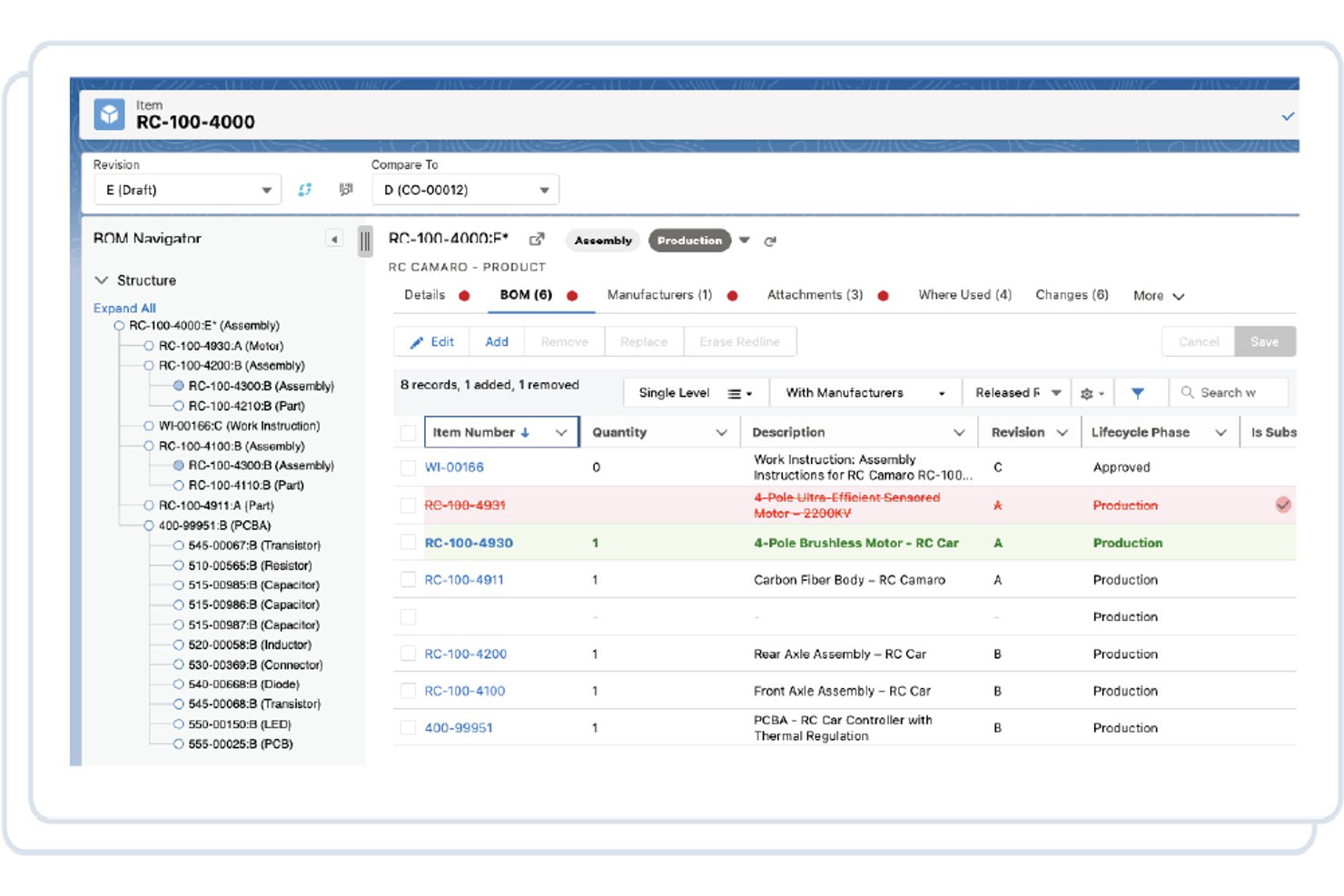
Propel è una piattaforma PLM nativa di Salesforce che combina la gestione del ciclo di vita del prodotto, la gestione della qualità e la gestione delle informazioni sul prodotto in un unico sistema unificato, con strumenti per la gestione delle distinte base, il controllo delle modifiche, l'integrazione CAD e la collaborazione con i fornitori.
Per chi è più adatto Propel?
Propel è particolarmente adatto ai team di prodotto e di ingegneria che utilizzano già Salesforce e desiderano PLM, QMS e PIM in un unico luogo.
Perché ho scelto Propel
Propel si è guadagnato un posto nella mia rosa di candidati perché è sviluppato nativamente su Salesforce, il che significa che i dati relativi a prodotti, qualità e vendite risiedono in un unico sistema connesso, senza middleware personalizzato. Apprezzo particolarmente il modo in cui il suo filo unificato del prodotto collega la gestione delle distinte base, i flussi di lavoro ECO e i processi QMS, così una modifica apportata in ambito ingegneristico viene automaticamente resa visibile in tutte le parti, i fornitori e i clienti interessati. Propel One AI rende l'analisi dell'impatto delle modifiche sensibilmente più rapida, attingendo ai dati delle distinte base, di Dove utilizzato e degli asset in servizio per segnalare costi e clienti interessati prima che venga approvato qualsiasi elemento.
Funzionalità principali di Propel
- Comunità dei fornitori: Un'area di lavoro con autorizzazioni e marchio personalizzabile in cui i fornitori possono accedere ai dati pertinenti delle distinte base e AML/AVL senza dover disporre di una licenza PLM completa.
- Modulo QMS: Gestione della qualità integrata che comprende NCMR, CAPA, SCAR, gestione dei reclami, gestione degli audit e invii digitali FDA MedWatch.
- Centro di progettazione: Un livello di integrazione CAD che sincronizza parti, distinte base, file e AML dai principali strumenti MCAD, ECAD e PDM direttamente in Propel.
- Strumento di configurazione a basso codice: Uno strumento di configurazione senza codice con funzionalità di trascinamento incluso in ogni licenza, per personalizzare flussi di lavoro e modelli di dati senza il supporto di uno sviluppatore.
Integrazioni di Propel
Propel offre integrazioni documentate con Salesforce, SOLIDWORKS, Onshape, Creo, Inventor, AutoCAD, NX, CATIA, Windchill, Autodesk Vault, Teamcenter e SiliconExpert. Supporta inoltre API e connettori dei partner per integrazioni personalizzate.
Pros and Cons
Pros:
- Dati PLM, QMS e PIM unificati
- Analisi dell'impatto ECO assistita dall'intelligenza artificiale
- I flussi di lavoro dei fornitori includono registri di audit
Cons:
- Una personalizzazione complessa può complicare gli aggiornamenti
- La ricerca e l'elaborazione possono sembrare lente

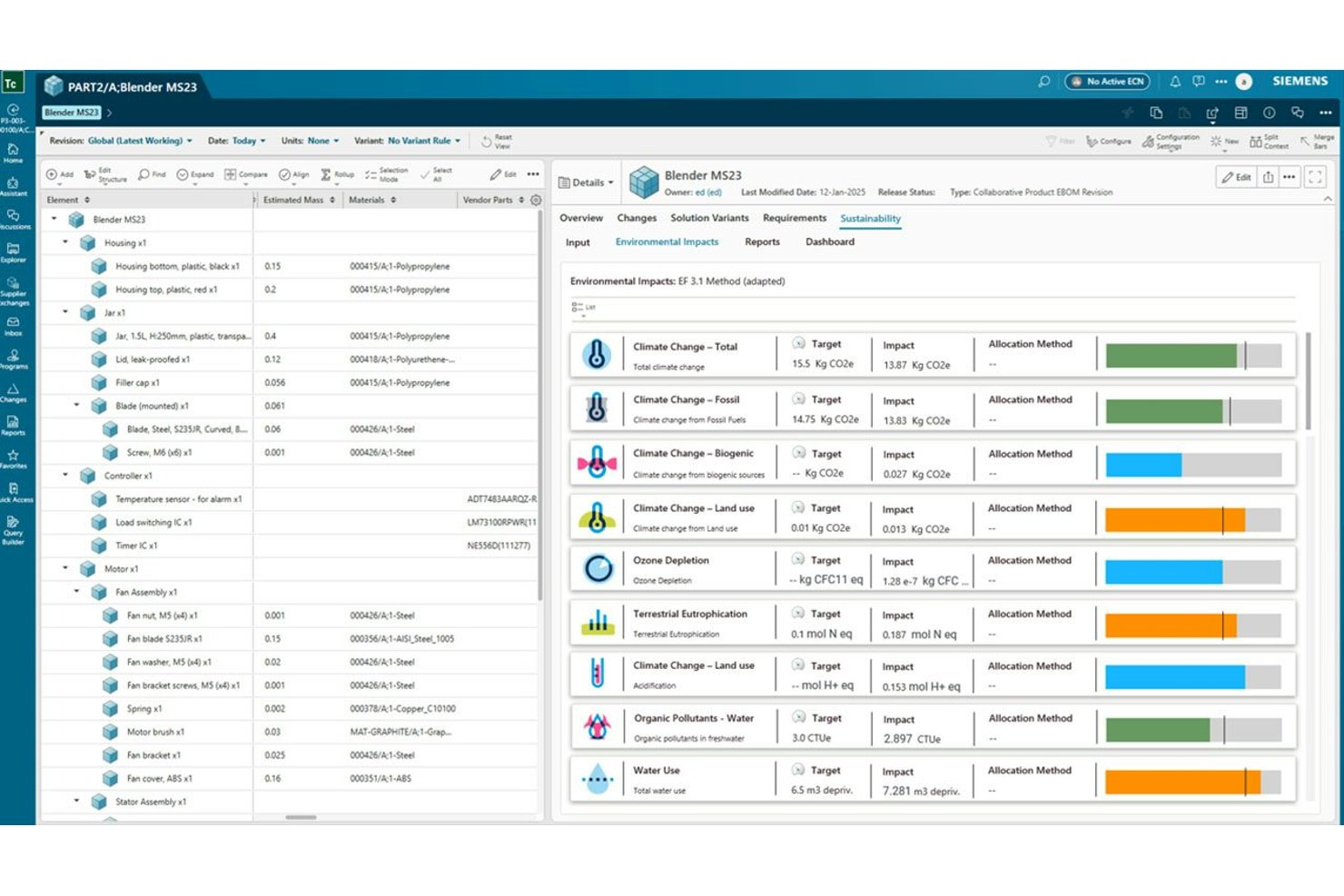
Siemens Teamcenter è una piattaforma PLM che gestisce i dati di prodotto, le distinte base multi-disciplinari, i flussi di lavoro per le modifiche ingegneristiche, le integrazioni CAD e la connettività del filo digitale durante l'intero ciclo di vita del prodotto.
Per chi è più indicato Siemens Teamcenter?
Teamcenter è progettato per le grandi aziende che gestiscono processi complessi di sviluppo del prodotto multi-disciplinari tra i team di ingegneria, produzione e assistenza.
Perché ho scelto Siemens Teamcenter
Siemens Teamcenter si è guadagnato un posto tra le migliori soluzioni della mia selezione perché nessun'altra piattaforma PLM eguaglia la sua profondità nell'intero ciclo di vita del prodotto su scala aziendale. Sono particolarmente colpito dalla gestione sincronizzata delle eBOM, delle MBOM e della distinta dei processi, che consente ai team numerosi e distribuiti su più sedi di monitorare un'unica struttura dall'ingegneria alla produzione senza dover riconciliare sistemi separati. L'IA agentica di Teamcenter Copilot può eseguire analisi dell'impatto e attivare flussi di lavoro per modifiche in più fasi tra varianti e domini, risultando davvero utile quando si gestiscono modifiche ingegneristiche complesse su centinaia di configurazioni.
Funzionalità principali di Siemens Teamcenter
- Gestione dei dati multi-CAD: Collega NX, SolidWorks, Creo, Inventor e AutoCAD a un unico archivio di dati di prodotto con funzioni di archiviazione, estrazione e tracciamento degli utilizzi.
- Tracciabilità dei requisiti: Consente di creare, collegare e valutare i requisiti in conformità agli standard INCOSE, con casi di prova generati dall'IA per standard come ISO 26262.
- Gestione delle varianti e delle configurazioni: Utilizza il Configuratore di prodotti di Teamcenter per creare e convalidare distinte base al 150%, inclusa l'analisi delle interferenze tra le configurazioni.
- Connettività del filo digitale: Collega requisiti, CAD, distinte base, produzione, qualità e dati di assistenza durante l'intero ciclo di vita del prodotto in un'unica struttura connessa.
Integrazioni di Siemens Teamcenter
Siemens Teamcenter dispone di integrazioni native con NX, Solid Edge, SolidWorks, Creo, Inventor, AutoCAD, PADS e Altium Designer. Si collega inoltre a Makersite e ai sistemi ERP tramite funzionalità di integrazione aziendale.
Pros and Cons
Pros:
- Collega le strutture eBOM, MBOM e BOP
- Supporta la tracciabilità dei dati di prodotto multi-disciplinari
- Automatizza l'analisi delle varianti e i flussi di lavoro per le modifiche
Cons:
- L'interfaccia complessa rallenta l'adozione da parte dei nuovi utenti
- I grandi volumi di dati possono causare prestazioni lente

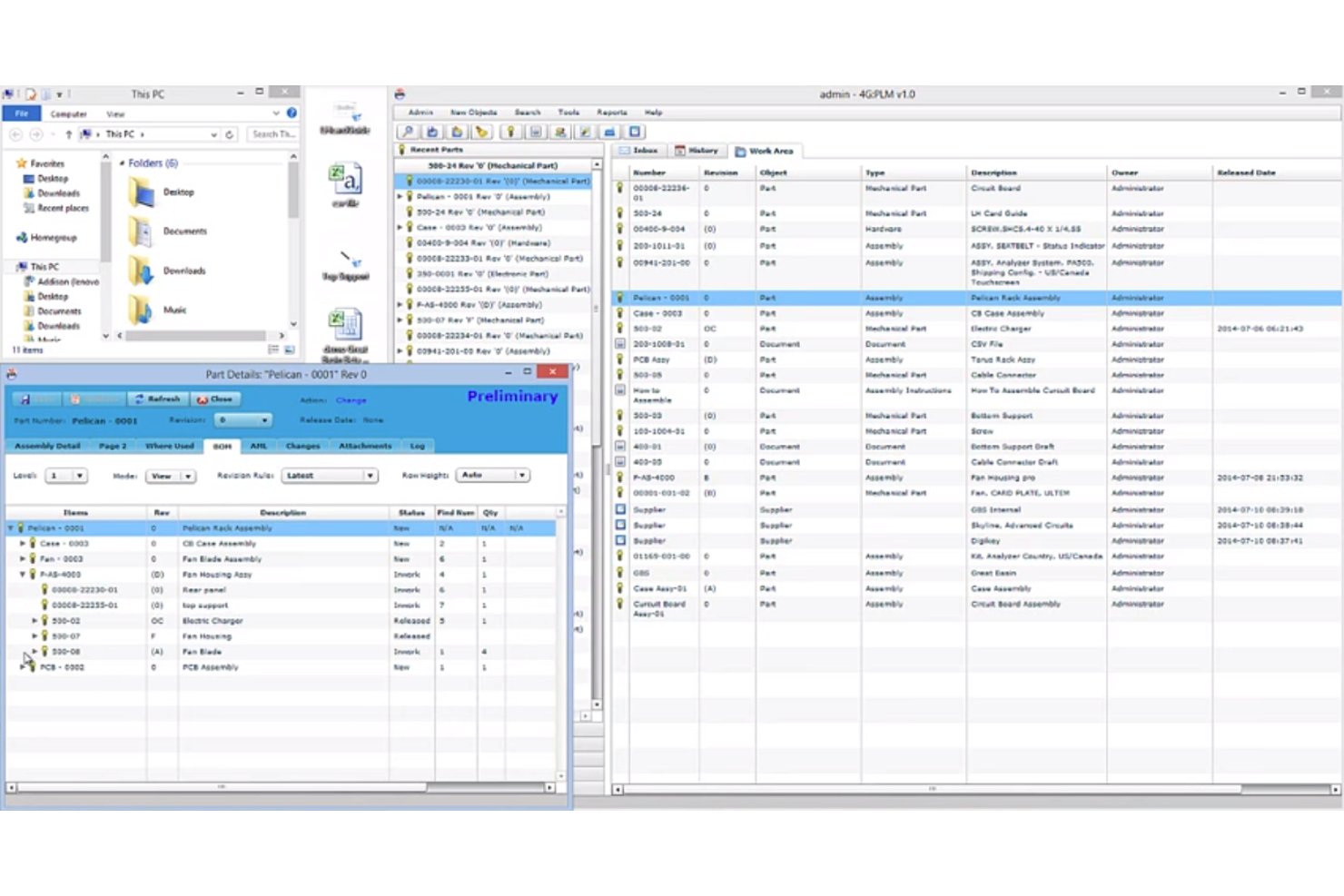
Arena PLM è una piattaforma di gestione del ciclo di vita del prodotto nativa per il cloud, che centralizza parti, distinte base, documenti, ordini di modifica e collaborazione con i fornitori in un unico sistema progettato per i team distribuiti di ingegneria e operazioni.
Per chi è più adatto Arena PLM?
Arena PLM è particolarmente adatto ai team di ingegneria e prodotto nei settori regolamentati, come dispositivi medici, aerospaziale ed elettronica, che necessitano di una gestione rigorosa delle modifiche e di una tracciabilità pronta per gli audit tra team distribuiti.
Perché ho scelto Arena PLM
Arena PLM si è guadagnato un posto nella mia lista ristretta perché le sue funzionalità di gestione delle modifiche sono realmente progettate per i team di prodotto in rapida crescita. Sono rimasto particolarmente colpito dai flussi di lavoro ECO automatizzati, che instradano gli ordini di modifica ingegneristica attraverso approvazioni basate sui ruoli e registrano ogni decisione con una tracciabilità completa delle revisioni. Quando il team cresce e le richieste di modifica aumentano, questa traccia di audit mantiene tutti allineati senza necessità di verifiche manuali.
Funzionalità principali di Arena PLM
- Accesso dei fornitori basato sui ruoli: I tipi di licenza dedicati ai fornitori consentono ai partner esterni di visualizzare e contribuire ai record di prodotto pertinenti senza accedere all'intero sistema.
- Marketplace di connettori CAD: I connettori nativi e sviluppati dai partner sincronizzano direttamente nei record di prodotto i progetti provenienti da strumenti come SOLIDWORKS, Altium Designer, Creo e Onshape.
- Supporto alla conformità per i settori regolamentati: Il supporto integrato per ITAR/EAR, 21 CFR Part 11 e un'edizione GovCloud per CMMC mantiene i dati di prodotto pronti per gli audit.
- Piattaforma di integrazione Arena Connect: Un livello di integrazione integrato collega Arena PLM a sistemi ERP come NetSuite, SAP e Oracle, mantenendo sincronizzati i dati di prodotto e di produzione.
Integrazioni di 4G:PLM
4G:PLM offre un'integrazione nativa con Onshape e integrazioni tramite marketplace con SOLIDWORKS, Altium Designer, Creo, NetSuite, SAP, Oracle, Microsoft Dynamics 365 e Teamcenter. L'API della piattaforma Arena Developer Platform supporta le integrazioni personalizzate.
Pros and Cons
Pros:
- Le approvazioni ECO automatizzate preservano la tracciabilità delle revisioni
- I ruoli dei fornitori supportano una collaborazione esterna controllata
- I record di conformità sono adatti ai team di prodotto dei settori regolamentati
Cons:
- Secondo alcuni recensori, l'interfaccia appare datata
- I flussi di lavoro e i report personalizzati risultano poco flessibili
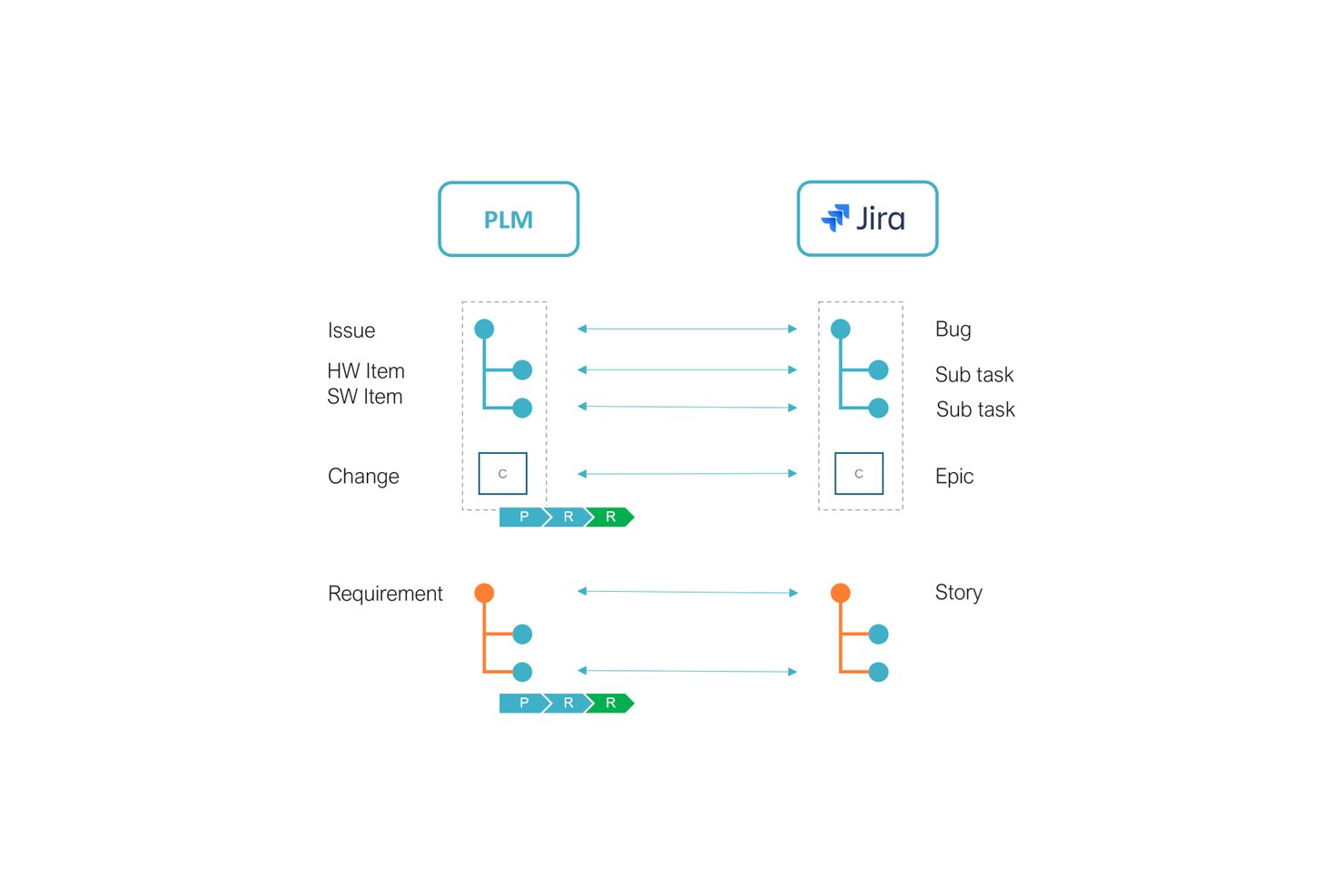
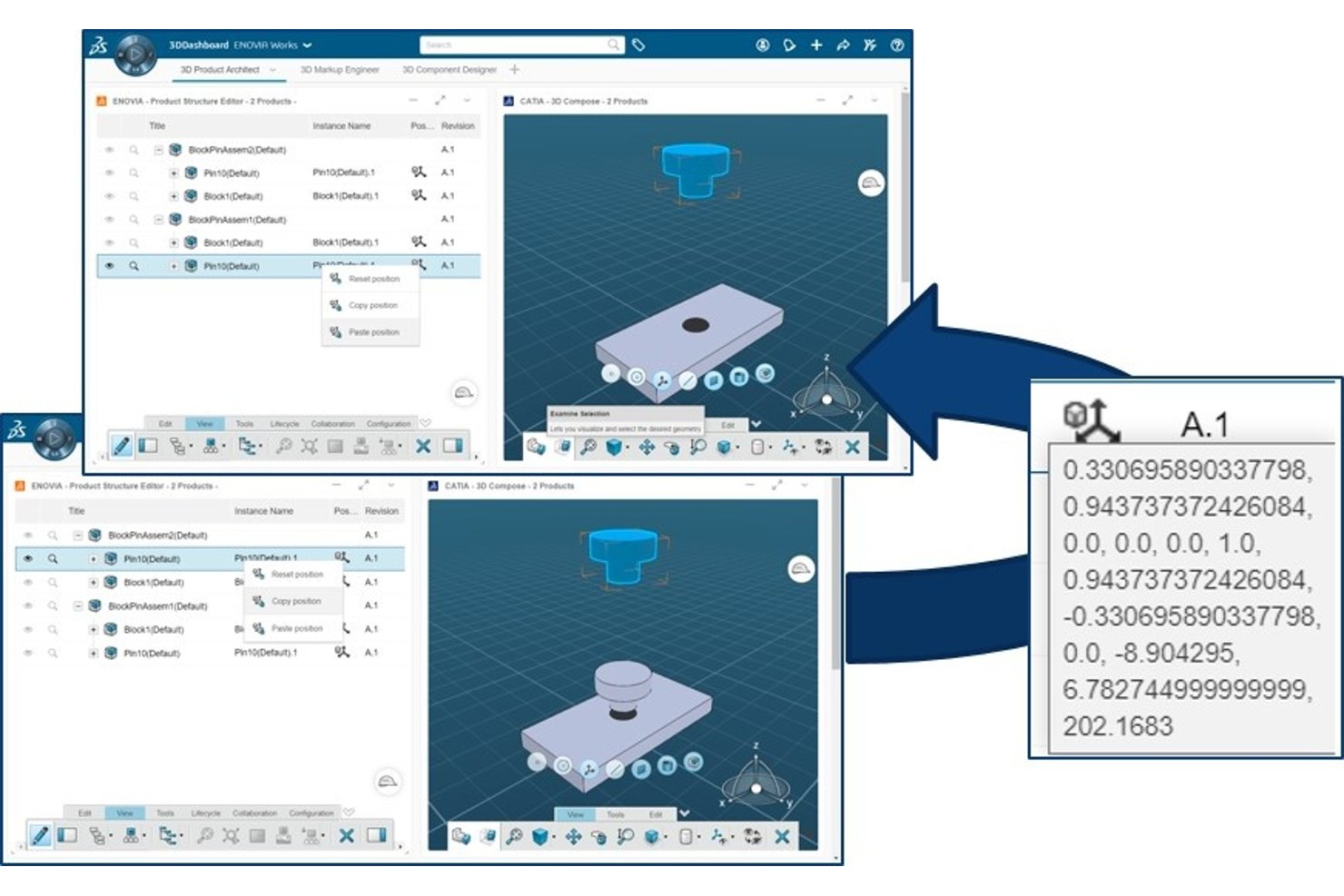
TECHNIA PLM è una soluzione di gestione del ciclo di vita del prodotto basata sulla piattaforma 3DEXPERIENCE di Dassault Systèmes, che combina la gestione centralizzata dei dati di prodotto, l'integrazione multi-CAD, la sincronizzazione delle distinte base tra progettazione e produzione, la gestione delle modifiche e la configurazione di flussi di lavoro a basso codice tramite il toolkit Value Components.
Per chi è più adatto Technia PLM?
Technia PLM è particolarmente adatto ai gruppi di progettazione e di prodotto che utilizzano già l'ecosistema Dassault Systèmes e necessitano di una gestione del ciclo di vita con estensioni configurabili dei flussi di lavoro a basso codice.
Perché ho scelto Technia PLM
Ho incluso Technia PLM tra le mie scelte principali perché è l'opzione più efficace che abbia trovato per i gruppi che utilizzano già Dassault Systèmes e necessitano di una soluzione PLM che vada oltre le funzionalità standard di ENOVIA. Apprezzo in particolare il toolkit Value Components, che consente agli amministratori di configurare flussi di lavoro e creare widget senza scrivere codice personalizzato, mantenendo la sicurezza degli aggiornamenti con l'evoluzione della piattaforma 3DEXPERIENCE. Anche XBOM Manager si distingue per la gestione sincronizzata delle distinte base eBOM, mBOM e sBOM tra i gruppi di progettazione e della catena di fornitura.
Funzionalità principali di Technia PLM
- Gestione dei dati multi-CAD: Gestisce i dati di progettazione provenienti da CATIA, SOLIDWORKS, NX, Creo, Inventor e Solid Edge all'interno di un unico ambiente di assemblaggio.
- Ricerca parametrica: Consente ai gruppi di cercare nei dati di prodotto utilizzando parametri configurabili, per individuare parti esistenti e ridurre le duplicazioni.
- Controllo degli accessi basato sui ruoli: Assegna diritti e autorizzazioni in base al ruolo dell'utente, per controllare chi può visualizzare, modificare o rilasciare i dati di prodotto.
- Distribuzione nel cloud e in sede: Supporta sia 3DDashboard (cloud) sia 3DSPACE (in sede), con Value Components eseguito su un'unica licenza in entrambi gli ambienti.
Integrazioni di Technia PLM
TECHNIA PLM si integra con CATIA V5, SOLIDWORKS, NX, Creo, Inventor e Solid Edge in assemblaggi CAD misti. Supporta inoltre la connettività SAP tramite 3DEXPERIENCE SAP Connector e una struttura di integrazione.
Pros and Cons
Pros:
- Sincronizza le distinte base di progettazione, produzione e assistenza
- Estende i flussi di lavoro tramite strumenti a basso codice sicuri rispetto agli aggiornamenti
- Supporta la collaborazione sui dati di prodotto tra più sedi
Cons:
- Richiede l'ecosistema Dassault 3DEXPERIENCE
- L'implementazione aziendale richiede una pianificazione considerevole

Duro
Ideale per il PLM cloud con hosting predisposto per ITAR

Altri strumenti PLM
Ecco alcuni altri strumenti che non sono entrati nella lista principale. Se hai bisogno di ulteriori suggerimenti per la gestione del ciclo di vita del prodotto, dai un’occhiata a questi.
- Onshape
Ideale per CAD e PDM nativi del cloud in un unico luogo
- SAP PLM
Ideale per i team che si occupano di prodotti e catene di approvvigionamento nell'ecosistema SAP
- Oracle PLM Cloud
Ideale per la conformità e gli approvvigionamenti connessi a Oracle ERP
- Infor PLM
Ideale per i flussi di lavoro di BOM e modifiche connessi all'ERP Infor
- Autodesk Fusion Lifecycle PLM
Ideale per i team di ingegneria nativi di Autodesk


Altre recensioni di software per la gestione dei prodotti
Cerchi altri software per supportare il tuo team di prodotto? Ecco altre recensioni di software che abbiamo scritto:
- Software per la gestione delle risorse digitali
- Software PLM agile
- Software di progettazione dei prodotti per il rendering 3D/2D
- Software ALM per la gestione dei cicli di vita dei prodotti digitali
Come Valuto i Software PLM
Divido la mia valutazione in due livelli: le capacità di base che ogni strumento PLM deve avere—gestione della distinta base (BOM), controllo delle modifiche, integrazione CAD—e i fattori che differenziano le opzioni più solide.
Funzionalità di Base (Requisiti Fondamentali per Questo Elenco)
Quando seleziono gli strumenti per il mio elenco, valuto ognuno su una scala da 0 (non offre la funzionalità) a 5 (eccelle in quest'area) per ciascuna delle funzionalità di base elencate di seguito. Poi, calcolo il punteggio totale dello strumento in percentuale. Ogni tool deve raggiungere un punteggio totale minimo del 75% per essere preso in considerazione per l'inclusione.
- Gestione dei Dati di Prodotto: Verifico se la piattaforma centralizza le schede dei componenti, le specifiche e i file in un archivio strutturato—così gli ingegneri non devono cercare nell'unità condivisa l'ultima revisione.
- Gestione della Distinta Base (BOM): Distinte multilivello con viste separate per ingegneria e produzione sono importanti, così come l'analisi delle occorrenze che mostra l'impatto a valle della sostituzione di un componente.
- Gestione delle Modifiche: Valuto i flussi di lavoro ECR/ECO, esaminando come vengono instradate le approvazioni, se l'analisi dell'impatto è integrata e quanto facilmente i team possono tracciare una modifica dalla richiesta fino al rilascio finale.
- Gestione dei Documenti & del Versionamento: Le funzioni di check-in/check-out, gli stati di ciclo di vita e i processi di rilascio controllati sono ciò che cerco—soprattutto per i team che gestiscono centinaia di disegni e schede tecniche contemporaneamente.
- Integrazione con Strumenti CAD & di Ingegneria: Connettori nativi per strumenti come SolidWorks, Creo o Siemens NX sono fondamentali, oltre alla capacità di sincronizzare metadati e distinte base nei sistemi ERP o MES a valle.
- Conformità & Tracciabilità: Per i team nei settori regolamentati, valuto la profondità della traccia di audit, il supporto alla firma elettronica e se la piattaforma include modelli di conformità preconfigurati per standard come ISO 13485 o RoHS.
Una volta che ho una lista di strumenti che soddisfano questi criteri, valuto cosa distingue ciascuna piattaforma.
Fattori Differenzianti (Cosa Distingue i Fornitori)
Ecco come confronto e metto a confronto i diversi fornitori:
Caratteristiche Distintive
I portali di collaborazione con i fornitori sono un grande elemento distintivo—controllo se produttori e fornitori esterni ottengano un accesso controllato a BOM ed ECO senza necessità di una licenza completa. La gestione dei requisiti è un'altra area che valuto, soprattutto per i team che devono tracciare requisiti del cliente o normativi dal momento della raccolta fino alla validazione del progetto e ai risultati dei test. Considero anche la continuità del digital thread, che collega i dati dal concept sino al servizio sul campo in una catena tracciabile unica.
Oltre le Funzionalità
Qui la specializzazione settoriale è molto importante. Un team che si occupa di dispositivi medici ha bisogno di flussi di lavoro preconfigurati per la conformità FDA, mentre un team automotive trae vantaggio da modelli allineati a IATF—perciò verifico se una piattaforma offre acceleratori verticali specifici. Il modello di implementazione è un altro fattore chiave, poiché alcune organizzazioni richiedono soluzioni on-premise per la protezione della proprietà intellettuale o motivi di residenza dei dati. Valuto anche il supporto all'implementazione, verificando se i fornitori offrono onboarding guidato, modelli con best practice e risorse formative che riducono il tempo di adozione per i team di ingegneria.
Usabilità
La facilità d'uso delle soluzioni software è sempre importante per me. È frustrante quando uno strumento pensato per supportare il tuo team richiede troppo tempo per essere implementato e compreso. Ho cercato piattaforme PLM con interfacce utente semplici e funzionalità intuitive.
Integrazioni
Idealmente, vorrai un software PLM che si colleghi agli altri importanti strumenti per lo sviluppo dei prodotti. Ho cercato software che si integrassero con programmi di progettazione assistita da computer (CAD), software per la gestione dei progetti e software per la pianificazione delle risorse aziendali (ERP). Ho inoltre prestato attenzione agli strumenti in grado di importare dati da fogli di calcolo o dotati di API utilizzabili per creare integrazioni personalizzate.
FAQ: maggiori informazioni sulla gestione del ciclo di vita del prodotto
Hai domande sui processi e sugli strumenti di gestione utilizzati durante il ciclo di vita di un prodotto? Consulta queste utili FAQ per trovare le risposte!
Qual è la differenza tra il software PLM e il software PDM?
Il software per la gestione del ciclo di vita del prodotto (PLM) copre tutte le fasi di un prodotto, dalla pianificazione e progettazione fino al lancio e agli aggiornamenti. Il software per la gestione dei dati di prodotto (PDM) gestisce nello specifico dati come file CAD, controllo delle versioni e documentazione. Mentre gli strumenti PLM supervisionano il flusso di lavoro e la collaborazione, gli strumenti PDM si concentrano sull’archiviazione sicura e sul monitoraggio delle informazioni sul prodotto. Se il tuo team ha bisogno sia di una supervisione dei processi sia di una gestione dettagliata dei dati, potresti aver bisogno di una soluzione PLM-PDM integrata.
Il software PLM può aiutare a garantire la conformità normativa nella produzione?
Sì, la maggior parte delle piattaforme software PLM supporta la conformità normativa dei produttori automatizzando la documentazione, applicando flussi di lavoro per le approvazioni e monitorando le modifiche. Questo aiuta il tuo team a mantenere l’ordine durante gli audit e garantisce che tutti i processi di conformità siano adeguatamente documentati. Alcuni strumenti PLM offrono persino modelli o moduli adattati agli standard più comuni del settore, così puoi semplificare la certificazione ed evitare lacune nella conformità.
Come si confrontano i sistemi PLM basati sul cloud con le soluzioni installate localmente?
I sistemi PLM basati sul cloud offrono un accesso semplice ai team distribuiti, costi iniziali inferiori e aggiornamenti automatici. Le soluzioni PLM installate localmente offrono un maggiore controllo sulla sicurezza e sulla personalizzazione dei dati, ma richiedono una manutenzione più impegnativa e un investimento IT maggiore. Se dai priorità alla collaborazione e alla scalabilità, il PLM basato sul cloud è generalmente la scelta migliore. Se hai rigide politiche di sicurezza, una soluzione installata localmente potrebbe soddisfare le tue esigenze.
Quali sono le difficoltà più comuni nell'implementazione del software PLM?
Tra le difficoltà più comuni vi sono la resistenza al cambiamento, i problemi di migrazione dei dati e la formazione degli utenti sul nuovo sistema. Per rendere efficace l’implementazione, concentrati su una comunicazione chiara con il tuo team, stabilisci tempistiche realistiche e collabora a stretto contatto con il team di supporto del fornitore. Dovrai inoltre ripulire i dati obsoleti e definire i flussi di lavoro prima del lancio, così da ridurre gli attriti.
Qual è il prossimo passo?
Non dimenticare di iscriverti alla nostra newsletter per ricevere ulteriori risorse e guide sulla gestione dei prodotti, oltre agli ultimi podcast, alle interviste e ad altri approfondimenti dei leader e degli esperti del settore.