

10 migliori software per test A/B recensiti nel 2026

10 Elenco dei migliori software per test A/B


Il miglior software per test A/B ti consente di sperimentare con le funzionalità dei prodotti, le modifiche all'interfaccia utente e i messaggi, così puoi prendere decisioni basate sui dati che migliorano le prestazioni.
Senza questo strumento, i team spesso si affidano all'intuito o ad analisi incomplete, dando vita a modifiche che non producono risultati o introducono rischi.
Ho valutato oltre 20 strumenti per test A/B e so quali offrono un targeting affidabile, rigore statistico e risultati facili da interpretare.
In questa guida troverai piattaforme che aiutano i team di prodotto a eseguire i test in modo efficiente, apprendere più rapidamente e ottimizzare con sicurezza.
Perché fidarsi dei nostri consigli sui software
Il nostro team testa e recensisce software dal 2012. In quanto product manager noi stessi, sappiamo quanto sia difficile — e importante — scegliere il software giusto.
Per questa guida, abbiamo valutato gli strumenti attraverso test pratici e ricerche indipendenti, assegnando un punteggio agli strumenti in base ai nostri criteri di selezione.
Le nostre recensioni riflettono il nostro giudizio editoriale umano, non un discorso di vendita.
Tabella comparativa dei migliori software per test A/B
Ecco una tabella che puoi utilizzare per confrontare gli strumenti appena illustrati nelle panoramiche.
| Tool | Best For | Trial Info | Price | ||
|---|---|---|---|---|---|
| 1 | Ideale per raccomandazioni di ottimizzazione in tempo reale | Prova gratuita di 7 giorni + demo gratuita disponibile | Da $79/mese | Website | |
| 2 | Ideale per l'analisi autonoma degli esperimenti | Piano gratuito disponibile | Prezzo su richiesta | Website | |
| 3 | Ideale per test A/B guidati dall'IA | Prova gratuita di 14 giorni + demo gratuita disponibile | Da $79/mese (fatturato annualmente) | Website | |
| 4 | Ideale per opzioni di feature flag altamente personalizzabili | Prova gratuita di 14 giorni | Da $12/connessione servizio/mese | Website | |
| 5 | Ideale per negozi ecommerce su Shopify | Prova gratuita di 30 giorni disponibile | Da $29/mese | Website | |
| 6 | Ideale per l’A/B testing basato sui dati | Prova gratuita di 30 giorni + demo gratuita disponibile | Da $350/100k utenti/mese | Website | |
| 7 | Ideale per ottenere analisi comportamentali degli utenti di siti web | Prova gratuita di 30 giorni + demo gratuita disponibile | Prezzo su richiesta | Website | |
| 8 | Ideale per rollout mirati di funzionalità di prodotto | Demo gratuita disponibile | Prezzo su richiesta | Website | |
| 9 | Ideale per modifiche alle pagine web senza codice | Prova gratuita disponibile | Da $49/mese (fatturato annualmente) | Website | |
| 10 | Ideale per A/B test delle notifiche mobili | Prova gratuita di 14 giorni | Da $330/mese | Website |
Panoramica dei 10 migliori software per test A/B
Ecco la mia recensione approfondita di ogni strumento. Ti illustrerò vantaggi e svantaggi, caratteristiche e funzionalità per evidenziare ciò che rende eccezionale ciascuno strumento.

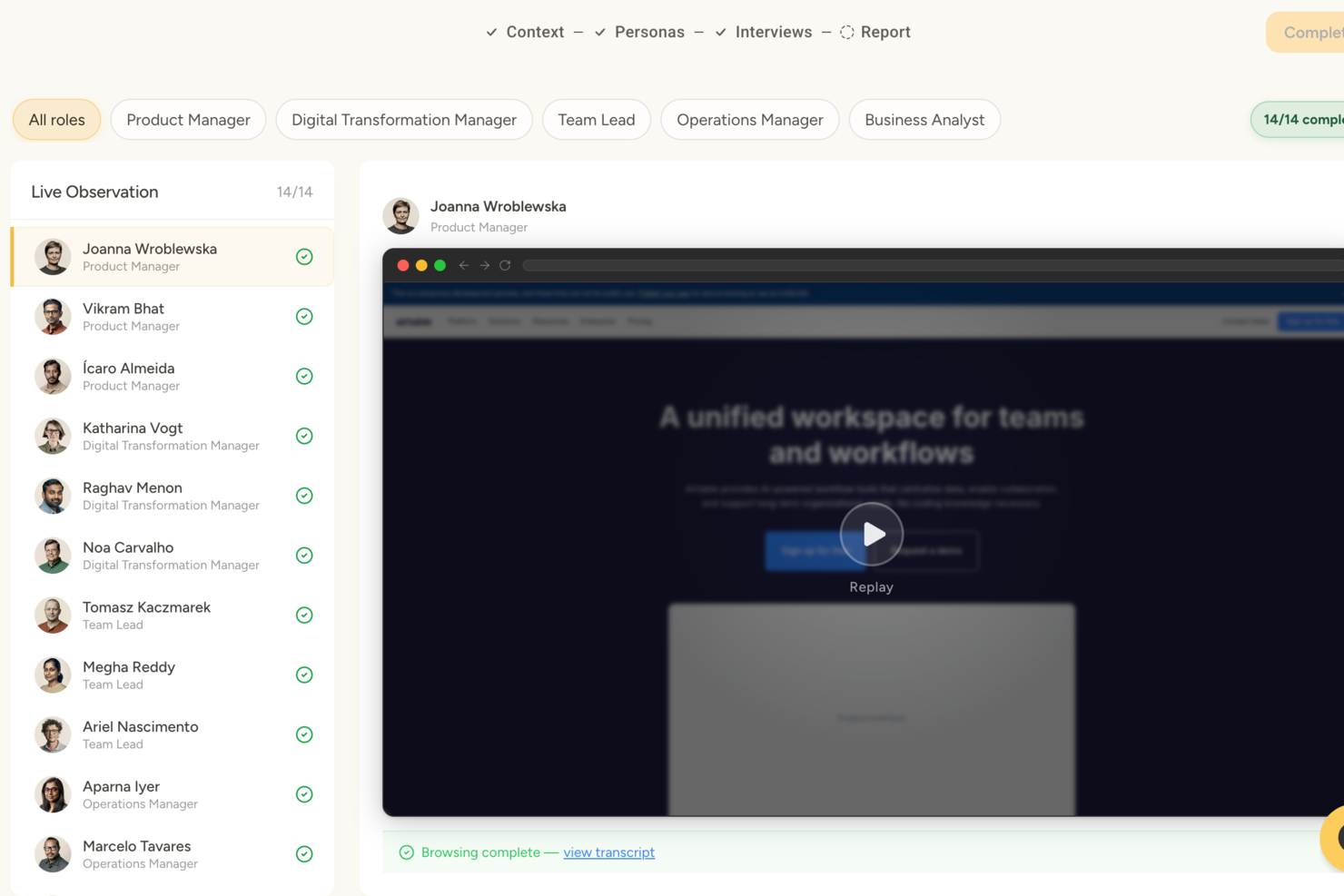
Articos è una piattaforma di ricerca utente sintetica basata su IA che genera personas utilizzando la scienza comportamentale per simulare le reazioni del pubblico, testare messaggi e varianti di concetto e produrre report di ricerca strutturati con approfondimenti prioritari.
Per chi è ideale Articos?
Articos è una buona scelta per marketer, team di prodotto e ricercatori UX che necessitano di insight sul pubblico in tempi rapidi, senza dover reclutare partecipanti reali o condurre sperimentazioni su larga scala con traffico live.
Perché ho scelto Articos
Ho scelto Articos tra i migliori perché il suo motore IA va oltre il semplice evidenziare ciò che risuona con le personas simulate. Fornisce raccomandazioni di ottimizzazione classificate su cui puoi agire immediatamente. Quando eseguo un test su un concetto, Articos segnala quali angolazioni di messaggio ottengono i risultati migliori e suggerisce specifiche modifiche al testo o al posizionamento, eliminando l'incertezza nell'interpretazione dei risultati e riducendo il tempo tra test e iterazione.
Funzionalità chiave di Articos
- Generazione di personas sintetici: Utilizza IA e scienza comportamentale per simulare come reagirebbero diversi segmenti di utenti ai tuoi contenuti.
- Test di varianti di concetto: Confronta due varianti di contenuto o messaggio con lo stesso pannello di pubblico simulato.
- Targeting per segmentazione del pubblico: Consente di definire profili di pubblico demografici e psicografici per test pre-lancio.
- Report di approfondimenti strutturati: Presenta i risultati dei test in tematiche e include citazioni delle personas per la revisione degli stakeholder.
Integrazioni di Articos
Le integrazioni native attualmente non sono elencate.
Pros and Cons
Pros:
- Le personas IA includono scettici integrati
- Completa studi completi in meno di 30 minuti
- Confronta le varianti di messaggio senza traffico live
Cons:
- Le personas sintetiche mancano di risposte veramente inattese
- Input vaghi producono risultati meno affidabili

Ideale per l'analisi autonoma degli esperimenti
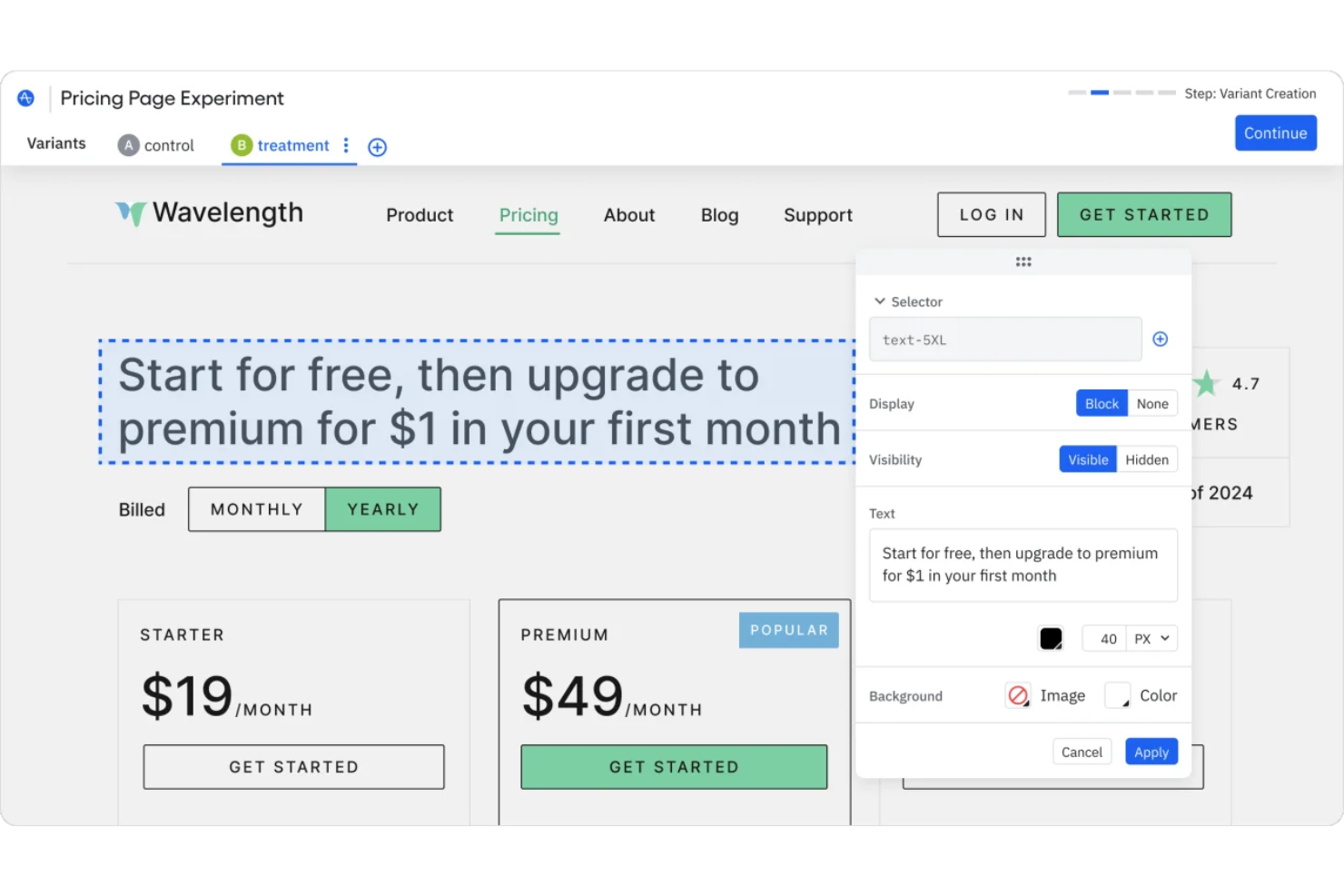
Amplitude è una piattaforma di sperimentazione delle funzionalità e A/B testing che combina feature flag, un editor visuale degli esperimenti e un'analisi statistica integrata con la propria suite di analytics di prodotto.
Per chi è consigliato Amplitude?
Amplitude è adatto a team di prodotto e di crescita di aziende digitali di medie e grandi dimensioni che effettuano esperimenti insieme ad analisi di prodotto.
Perché ho scelto Amplitude
Ho scelto Amplitude per le sue analisi autogestite degli esperimenti che aiutano i team a eseguire e comprendere i test senza dover ricorrere a un forte supporto tecnico. L'esperienza guidata all'interno della piattaforma accompagna i team nella configurazione seguendo le migliori pratiche preimpostate, permettendo così ai product manager di progettare, lanciare e interpretare i risultati degli esperimenti senza dipendere dalla data science. Mi piace anche che Amplitude mostri quali segmenti di utenti stanno generando impatto e segnali eventuali problemi di qualità dei dati, così non devo mettere in dubbio la validità di un risultato.
Caratteristiche principali di Amplitude
- Feature flag: Gestisci i rilasci delle funzionalità, i target di pubblico e collega gli esperimenti ai dati di comportamento del prodotto.
- Gruppi di esclusione reciproca: Evita che gli utenti vengano inclusi in esperimenti concorrenti separando i pubblici di test.
- Testing sequenziale: Analisi continua degli esperimenti e identificazione di risultati significativi senza dipendere da finestre di test fisse.
- Metriche dell'esperimento: Definisci metriche primarie e secondarie per misurare come le varianti influenzano il comportamento e i risultati degli utenti.
Integrazioni di Amplitude
Amplitude si integra con oltre 60 strumenti, inclusi Segment, Snowflake, BigQuery, Braze, Salesforce, strumenti di attribuzione e piattaforme di sperimentazione. Offre anche API per integrazioni personalizzate, ma attualmente non supporta una integrazione nativa con Zapier.
Pros and Cons
Pros:
- Gli esperimenti sono direttamente collegati all'analisi comportamentale
- Possibilità di analizzare metriche aggiuntive anche dopo l'esecuzione degli esperimenti
- La riduzione della varianza CUPED migliora la precisione dei test
Cons:
- Le funzionalità di sperimentazione avanzata potrebbero richiedere piani di livello superiore
- La definizione personalizzata delle metriche può risultare complicata

Ideale per test A/B guidati dall'IA
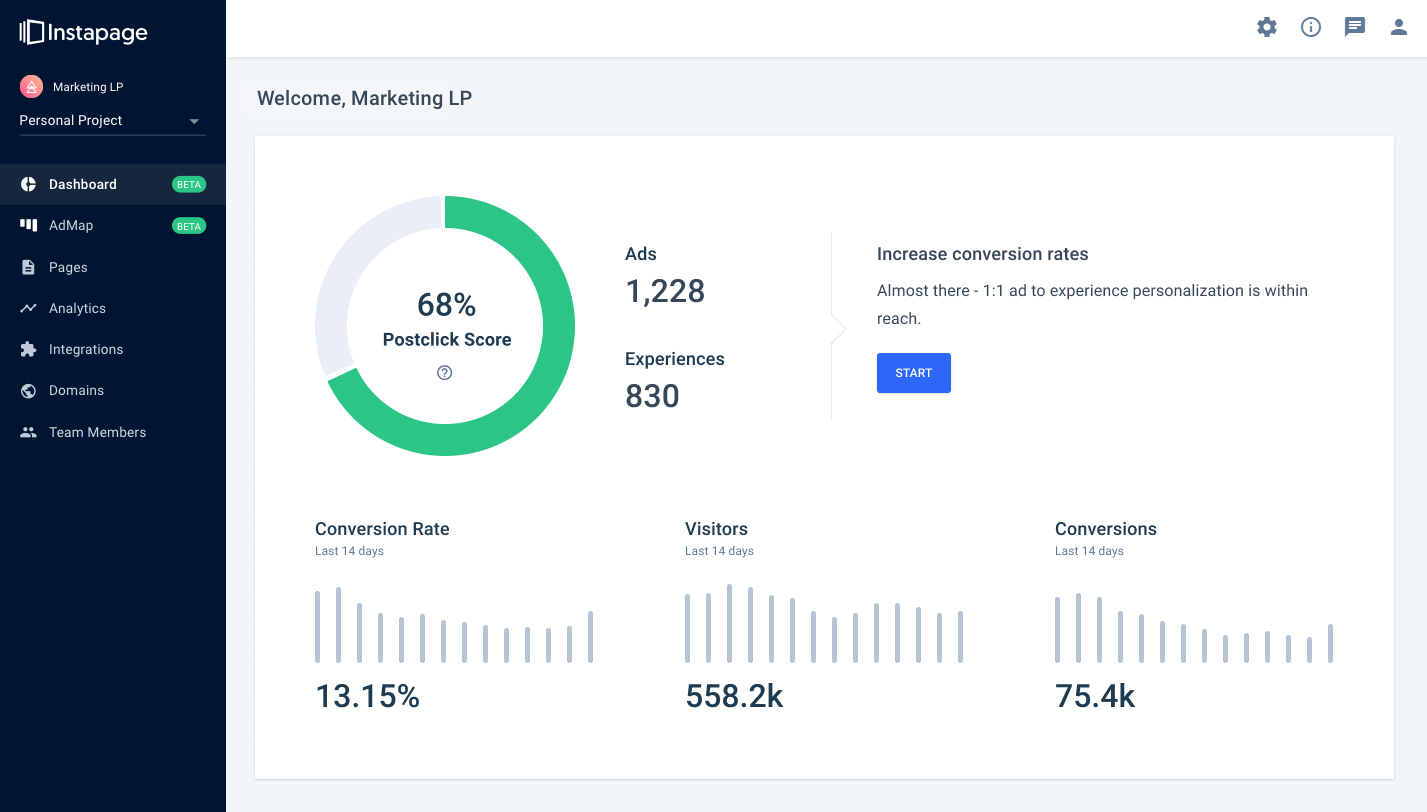
Instapage è un costruttore di landing page che si concentra sull'ottimizzazione delle conversioni e sulla massimizzazione del ROI pubblicitario. È progettato per aiutarti a creare landing page personalizzate e ad alta conversione adatte alle tue campagne pubblicitarie.
Perché ho scelto Instapage
Quando si tratta di test A/B, Instapage offre esperimenti guidati dall'IA che ti permettono di indirizzare automaticamente il traffico verso le varianti di pagina con le migliori prestazioni, risparmiando tempo e aiutandoti a prendere facilmente decisioni basate sui dati. Inoltre, le analisi di Instapage offrono heatmap e dati in tempo reale su visitatori e conversioni, fornendoti informazioni sul comportamento degli utenti e aiutandoti a perfezionare le tue campagne. Questi strumenti semplificano per ogni membro del team la comprensione di cosa funziona e cosa necessita di aggiustamenti.
Un altro motivo per cui ho scelto Instapage è la funzione AdMap®, che consente di visualizzare le strutture delle campagne pubblicitarie e collegare gli annunci alle landing page pertinenti. Questo rende l’aggiornamento delle tue campagne più efficiente e garantisce che i tuoi annunci siano sempre allineati con le landing page. Inoltre, il Thor Render Engine® assicura un caricamento rapido delle pagine su mobile, migliorando l’esperienza utente e potenzialmente aumentando i tassi di conversione. Queste caratteristiche lavorano insieme per creare un ambiente completo di test A/B che ti aiuta a ottenere il massimo dalle tue campagne.
Funzionalità distintive
Le funzionalità includono la generazione di contenuti tramite IA, che ti aiuta a creare rapidamente titoli, testi e call to action per test A/B rapidi. La funzione di collaborazione visiva consente la collaborazione del team in tempo reale nella progettazione delle pagine, rendendo più facile raccogliere feedback e semplificare il processo di revisione. Instablocks® e i blocchi globali ti permettono di creare modelli riutilizzabili, così puoi ridimensionare e aggiornare rapidamente più pagine senza partire da zero ogni volta.
Integrazioni
Le integrazioni includono ActiveCampaign, Zapier, Mailchimp, Salesforce, Google Analytics, WordPress, Shopify, Google Ads, HubSpot, Slack, Zendesk e AWeber.
Pros and Cons
Pros:
- builder intuitivo per la creazione di landing page
- ampie capacità di integrazione
- velocità di caricamento elevate con una rete dual-cloud
Cons:
- alcuni utenti segnalano opzioni di personalizzazione e template limitate
- prezzi più alti

Ideale per opzioni di feature flag altamente personalizzabili
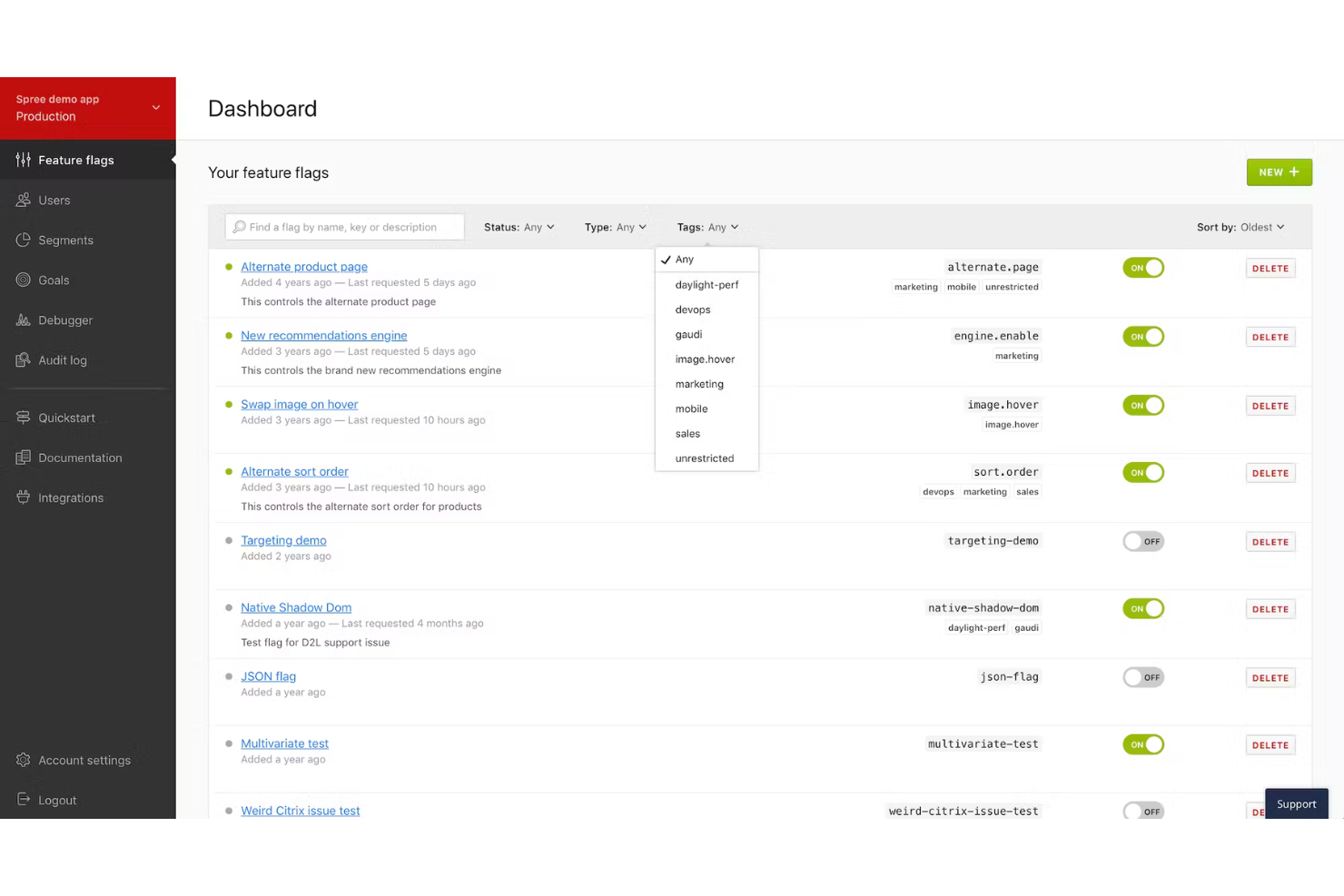
LaunchDarkly è una solida piattaforma di gestione delle feature flag che ti aiuta a distribuire rilasci software preziosi e sicuri. LaunchDarkly ti permette di apportare un valore enorme ai cicli di sprint del tuo software in un ambiente Agile.
Perché ho scelto LaunchDarkly: Sono impressionato dalle funzionalità di feature flagging e sperimentazione offerte da LaunchDarkly. LaunchDarkly propone quattro semplici passaggi per sfruttare le feature flag: creazione delle flag, assegnazione delle metriche, registrazione e identificazione. Inoltre, dal punto di vista tecnico, LaunchDarkly è una piattaforma di test completa che si presta a test full-stack, inclusi elementi di back-end e front-end.
Inoltre, il costruttore di esperimenti di LaunchDarkly offre un’interfaccia pulita e semplice da usare. Il builder ti consente di modificare parametri come metriche e varianti. Inoltre, puoi anche definire l’allocazione del traffico per le tue varianti in modo da creare casi di test dettagliati.
Funzionalità principali e integrazioni di LaunchDarkly
Una funzionalità principale sono i trigger delle flag che aiutano ad automatizzare i cambiamenti in base a metriche personalizzate. Ad esempio, puoi configurare lo spegnimento di una determinata feature flag se un valore specifico (ad esempio l’utilizzo della CPU) supera una soglia preimpostata.
Le integrazioni includono strumenti come Akamai, Amplitude, Azure DevOps, Census, Cloudflare, Confluence, Datadog, Grafana, Heap, Honeycomb, Okta e Pendo. Inoltre, puoi utilizzare un’integrazione a pagamento con Zapier per connetterti a migliaia di altre app cloud. Se ti senti creativo, puoi utilizzare la sua API per sviluppare integrazioni personalizzate.
Pros and Cons
Pros:
- Eccellenti funzionalità di targeting basate su regole
- Documentazione dettagliata
- API facile da usare
Cons:
- Creazione di ruoli personalizzati complessa
- Ritardi occasionali nella risoluzione dei ticket

Ideale per negozi ecommerce su Shopify
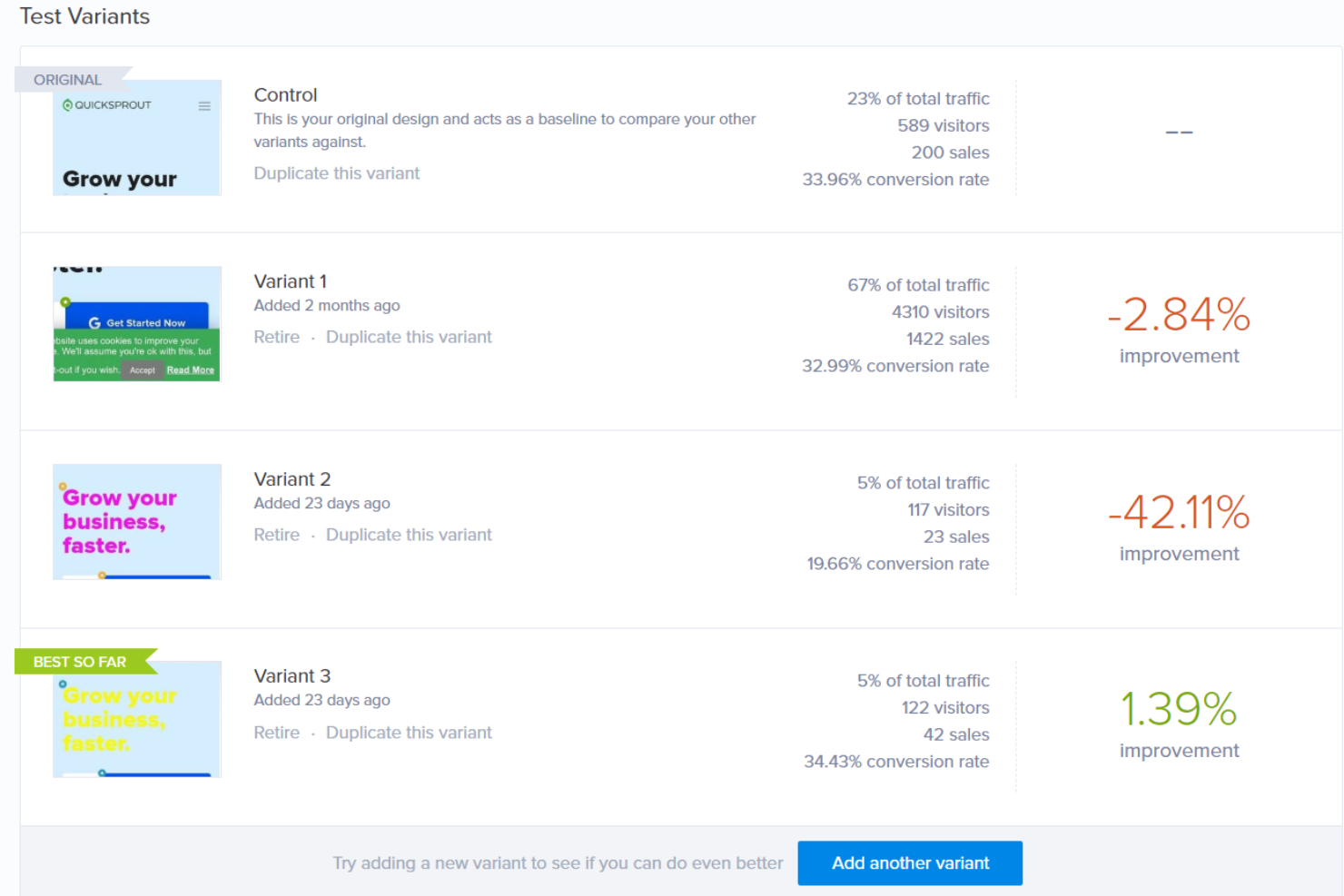
Fondata nel 2006, Crazy Egg ha sviluppato una delle tecnologie di heatmap più pionieristiche per tracciare il comportamento dei visitatori sui siti web. Oggi, Crazy Egg offre molte funzionalità di ottimizzazione tra cui A/B test, tracciamento degli errori, sondaggi e altro ancora.
Perché ho scelto Crazy Egg: Sono rimasto colpito dall'integrazione con Shopify che Crazy Egg offre. Sin da subito, Crazy Egg propone “cinque istantanee visive” che forniscono heatmap, scrollmap e un interessante report confetti che mostra i singoli clic sul tuo sito web.
Crazy Egg offre una solida soluzione di A/B test. Puoi modificare rapidamente gli elementi delle tue pagine di destinazione o di checkout per monitorare l'impatto corrispondente sulle tue vendite. Inoltre, la configurazione dei test è piuttosto semplice: basta aggiungere lo snippet di Crazy Egg a qualsiasi pagina web e sei pronto.
Le caratteristiche e le integrazioni di punta di Crazy Egg
Una caratteristica distintiva è l'analisi dell'abbandono del carrello. Crazy Egg ti aiuta a capire in quale punto i potenziali acquirenti abbandonano. Puoi analizzare i modelli di navigazione di questi visitatori del sito e progettare A/B test per convertire questi “frutti a portata di mano”.
Integrazioni includono strumenti come Drupal, Google Tag Manager, Joomla, Marketo, Segment, Shopify, Squarespace, Wix, WordPress e altri.
Pros and Cons
Pros:
- Reportistica avanzata
- Funzioni di duplicazione campagne
- Ottime funzioni di heat mapping
Cons:
- Mancanza di integrazioni con strumenti di analytics di terze parti
- I replay delle sessioni non sono molto affidabili

Ideale per l’A/B testing basato sui dati
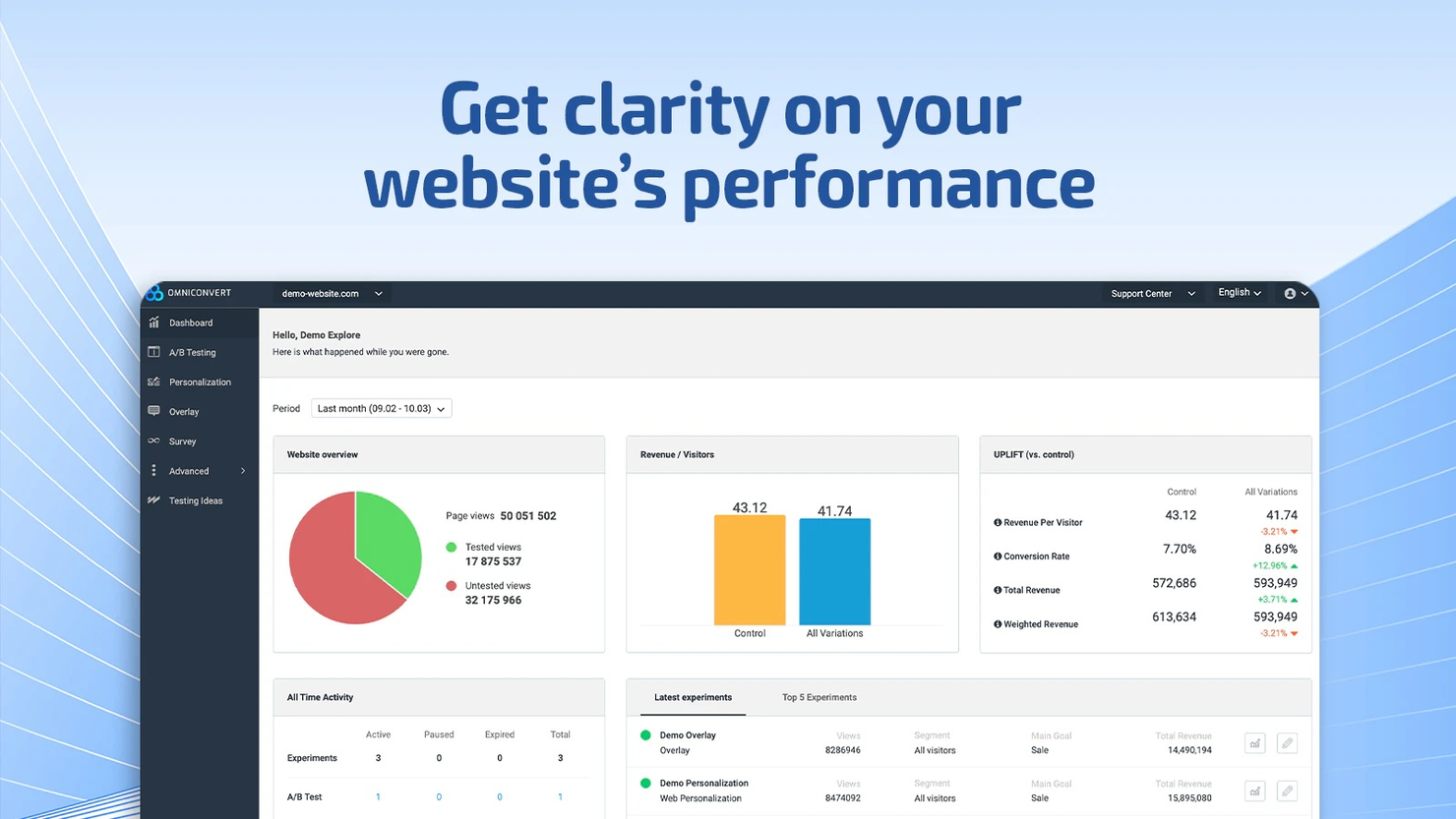
Per le aziende che desiderano ottimizzare le proprie strategie attraverso approfondimenti basati sui dati, Omniconvert si distingue come una soluzione completa per l’A/B testing e l’ottimizzazione del tasso di conversione. Progettato pensando alle aziende eCommerce, offre segmentazione avanzata e analisi dei clienti per migliorare le esperienze utente e aumentare le conversioni. Che tu voglia personalizzare le interazioni con i clienti o migliorare la fidelizzazione, Omniconvert fornisce gli strumenti necessari per affrontare efficacemente queste sfide.
Perché ho scelto Omniconvert
Ho scelto Omniconvert per la sua eccezionale capacità di condurre A/B test basati sui dati, fondamentale per le aziende che mirano a perfezionare le proprie strategie di marketing. Il motore di segmentazione avanzata della piattaforma permette di creare esperienze su misura in base ai comportamenti dei visitatori, ai parametri UTM e ad attributi personalizzati, garantendo un targeting preciso. Inoltre, Omniconvert supporta sia modelli statistici frequentisti che bayesiani per l’analisi dei risultati dei test, offrendo flessibilità nell’interpretazione dei dati. Queste caratteristiche lo rendono un forte candidato per chi vuole sfruttare i dati per aumentare coinvolgimento e tassi di conversione.
Caratteristiche principali di Omniconvert
Oltre alle sue capacità di A/B testing basato sui dati, Omniconvert offre diverse funzionalità pensate per soddisfare le esigenze delle aziende che cercano di ottimizzare le proprie strategie di marketing:
- Personalizzazione Web: Personalizza le esperienze degli utenti in base al comportamento dei visitatori, alla posizione geografica e alle fonti di traffico per aumentare l’engagement.
- Editor Visuale: Crea e implementa test A/B facilmente senza bisogno di codifica complessa, permettendo di sperimentare rapidamente.
- Split URL Testing: Apporta modifiche significative al sito testando diversi URL per determinare la versione con le migliori prestazioni.
- Reportistica dettagliata: Analizza i risultati dei test con report approfonditi e integra i risultati con piattaforme come Google Analytics per una visione completa.
Integrazioni Omniconvert
Le integrazioni includono Shopify, Google Analytics, Magento, WordPress, WooCommerce, PrestaShop, BigCommerce, Salesforce, HubSpot e Mailchimp.
Pros and Cons
Pros:
- Motore di segmentazione avanzato che consente un targeting preciso nei test.
- Supporta modelli frequentisti e bayesiani per una maggiore flessibilità nell’analisi dei dati.
- Gli utenti segnalano un team di supporto disponibile e reattivo.
Cons:
- Impostazioni mobile poco intuitive che influenzano l’ottimizzazione da dispositivi mobili.
- L’interfaccia utente datata può ostacolare l’usabilità, soprattutto nella navigazione e visualizzazione dei dati

VWO
Ideale per ottenere analisi comportamentali degli utenti di siti web
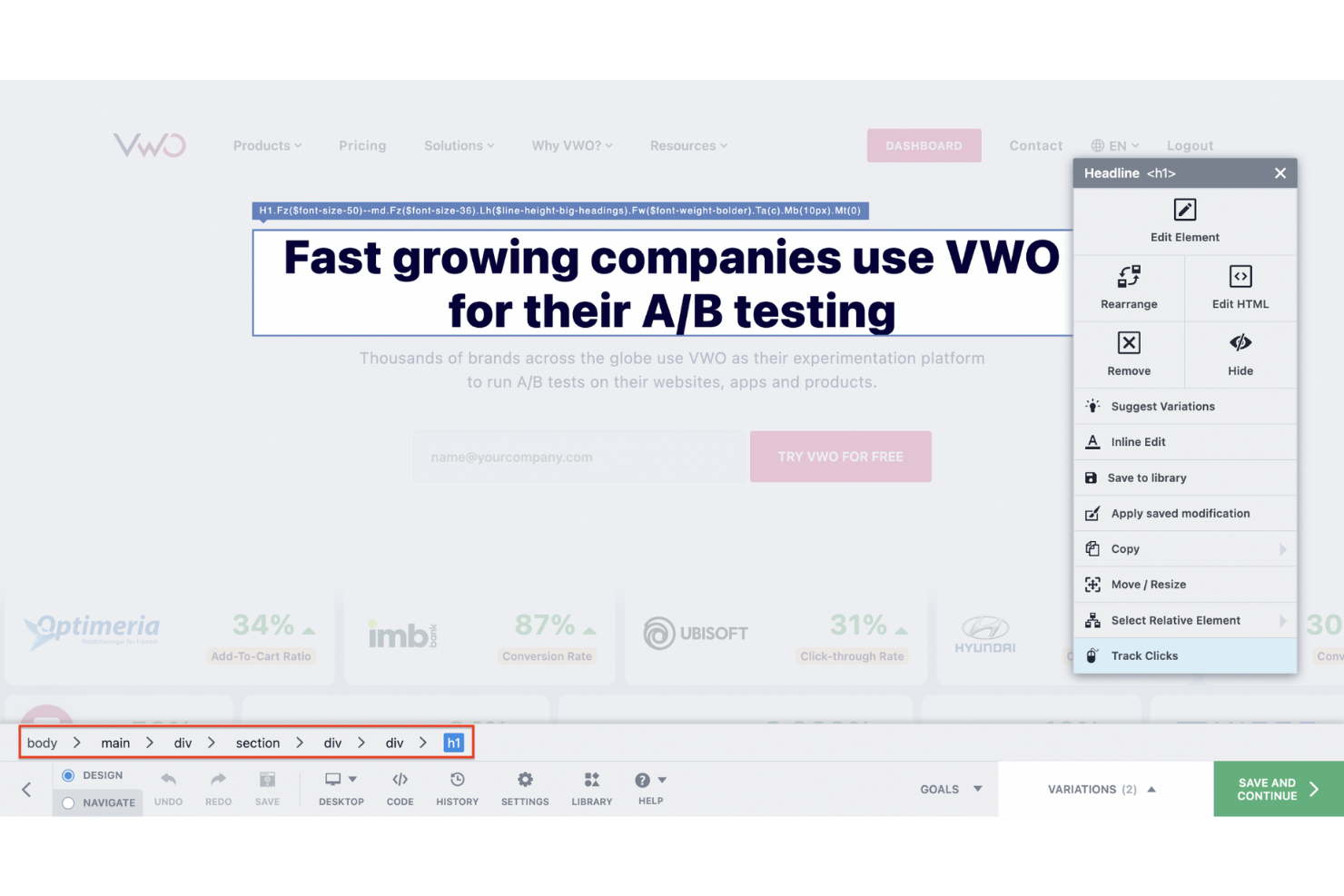
VWO è una piattaforma completa di ottimizzazione dei test che aiuta le aziende ad analizzare e prendere decisioni basate sui dati. VWO offre tre principali categorie di prodotti: Experiment, Observe e Personalize. Il test A/B è una delle funzionalità del modulo Experiment. Alcune delle analisi comportamentali utili raccolte da VWO includono dead click, rage click, tempo trascorso, abbandoni e molte altre.
Perché ho scelto VWO: Anni fa gestivo un blog e mi fissavo sulle metriche del sito come la frequenza di rimbalzo, le visualizzazioni di pagina, i visitatori unici e così via. VWO è la soluzione ideale se i tuoi prodotti digitali si concentrano principalmente su siti web.
VWO offre diversi metodi di test sulle pagine web, tra cui test multivariati, split e A/B. Inoltre, la piattaforma presenta un comodo editor visuale con funzionalità point-and-click. Puoi modificare rapidamente elementi di design come immagini, sfondi, ecc., senza scrivere alcun codice HTML/CSS.
Funzionalità principali e integrazioni di VWO
Una delle funzionalità principali sono i widget pronti all’uso che puoi sfruttare per influenzare il comportamento degli utenti. VWO offre una vasta libreria di widget con cui sperimentare per migliorare la raccolta di lead e le conversioni.
Le integrazioni includono strumenti come 6sense, AT Internet, Adobe Analytics, BigCommerce, Braze, Clearbit, Contentful, Contentsquare, Drupal e FullStory. Inoltre, puoi accedere a plugin per sistemi di gestione dei contenuti (WordPress) e piattaforme ecommerce come Shopify.
Pros and Cons
Pros:
- Personalizzazione semplice delle landing page
- Analisi dati con modello bayesiano avanzato
- Programmazione dei test
Cons:
- Bug occasionali della piattaforma
- Non è possibile allocare i crediti tra team interni

Ideale per rollout mirati di funzionalità di prodotto
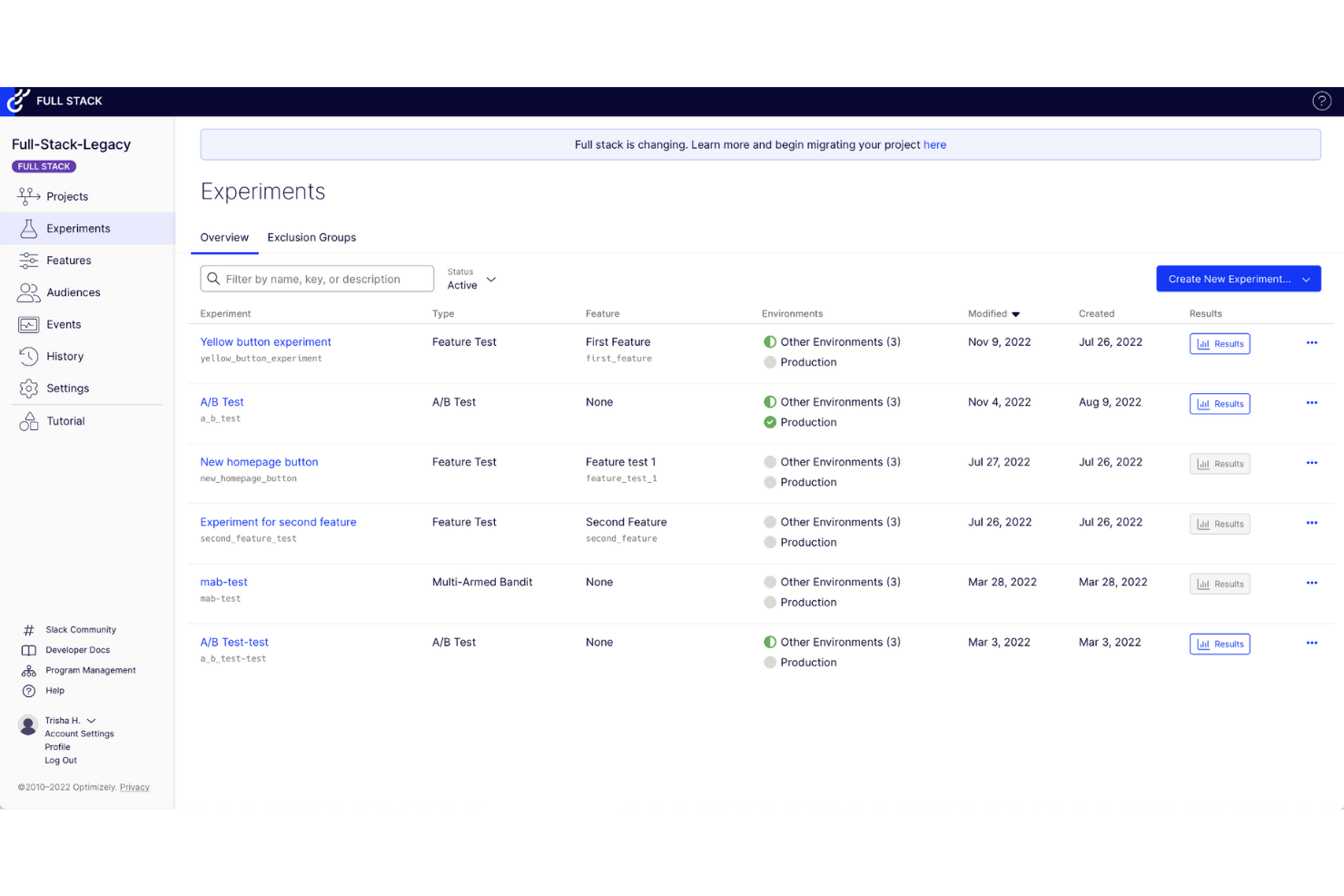
Optimizely è un gigante nel campo dell'Ottimizzazione del Tasso di Conversione (CRO) e dei test A/B. Optimizely aiuta i marchi di tutto il mondo a migliorare il valore a vita del cliente e i ricavi. Con oltre 10.000 clienti, Optimizely si basa su tre grandi pilastri di prodotto: Orchestrate, Experiment e Monetize. Le funzionalità di test A/B rientrano nella categoria di prodotto Experiment.
Perché ho scelto Optimizely: Da ex product manager, ricordo che avevo costantemente dei dilemmi riguardo alla priorità delle funzionalità di prodotto. Optimizely offre un incredibile rilascio mirato per distribuire gradualmente nuove funzionalità.
Con i rollout mirati (noti anche come feature flag), puoi definire allocazioni di traffico personalizzate per specifiche funzionalità di prodotto. Di conseguenza, puoi segmentare il pubblico secondo diversi parametri. Ad esempio, puoi rilasciare una nuova funzione di chatbot solo ai clienti beta. In questo modo puoi convalidare le funzionalità prima di rilasciarle in produzione.
Caratteristiche distintive e integrazioni di Optimizely
Una caratteristica distintiva è l'insight generato dall'IA che fornisce indicazioni in tempo reale sull'ottimizzazione dei contenuti per migliorare le conversioni. Inoltre, Optimizely offre anche raccomandazioni basate sull'intelligenza artificiale per personalizzare i testi del sito web e delle email.
Integrazioni includono strumenti come 6Sense, Figma, FullContact, Glassbox, Hawksearch, Hearsay, Hootsuite, Invoca, Milanote e Sprout Social. Puoi creare nuove integrazioni utilizzando la piattaforma di integrazione Optimizely o accedere a migliaia di app aggiuntive tramite Zapier (è richiesto un piano a pagamento).
Pros and Cons
Pros:
- Interfaccia utente semplice
- Test multivariati
- Test robusti lato server
Cons:
- Documentazione frammentata
- Integrazione complessa di fonti dati di terze parti

Ideale per modifiche alle pagine web senza codice
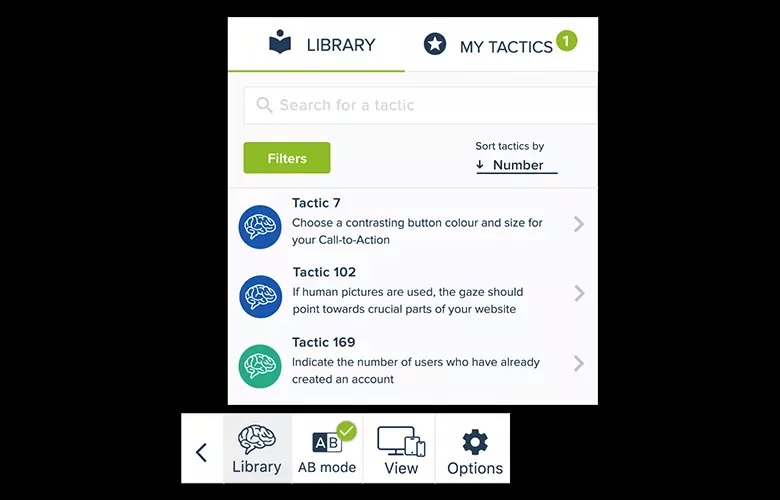
Convertize è un software di A/B testing progettato per aiutarti a ottimizzare le prestazioni del tuo sito web. Consentendoti di testare diverse versioni delle tue pagine web, ti permette di prendere decisioni basate sui dati per aumentare le conversioni.
Perché ho scelto Convertize
Una delle caratteristiche più interessanti di Convertize è il suo Smart Editor, che ti consente di modificare le pagine web senza bisogno di competenze di programmazione. Questo significa che puoi impostare rapidamente i test e vedere quale versione della tua pagina risuona meglio con il tuo pubblico. Inoltre, la funzione Autopilot è rivoluzionaria, poiché indirizza automaticamente più traffico verso la pagina con le migliori prestazioni, facendoti risparmiare tempo e fatica nel monitoraggio e nella regolazione manuale del traffico.
Un altro motivo per cui ho scelto Convertize è la sua estesa libreria di oltre 150 idee per A/B test, basate sulla psicologia del consumatore. Questa libreria ti offre un avvio rapido fornendoti idee pratiche che puoi implementare per vedere miglioramenti immediati. L'Hybrid Statistics Engine è un'altra funzionalità che mi ha colpito perché accelera il processo per identificare quale versione di una pagina web sta ottenendo risultati migliori, garantendo così che tu possa prendere decisioni informate in tempi rapidi.
Caratteristiche principali
Le funzionalità includono testo dinamico, che ti permette di personalizzare il contenuto in base al comportamento del visitatore, e il targeting per geolocalizzazione, che aiuta a personalizzare l'esperienza utente in base alla provenienza dei visitatori. La piattaforma offre anche la modalità lightning per prevenire sfarfallii durante i test, garantendo un'esperienza fluida mentre esegui gli esperimenti. Queste caratteristiche lavorano insieme per offrire un ambiente solido per l'A/B testing, rendendo più facile il raggiungimento degli obiettivi di conversione.
Integrazioni
Le integrazioni includono ClickFunnels, HubSpot, Wix, Shopify, WordPress, Google Analytics 4 (GA4), Google Tag Manager, Magento, WooCommerce, BigCommerce, PrestaShop e Squarespace.

Leanplum
Ideale per A/B test delle notifiche mobili
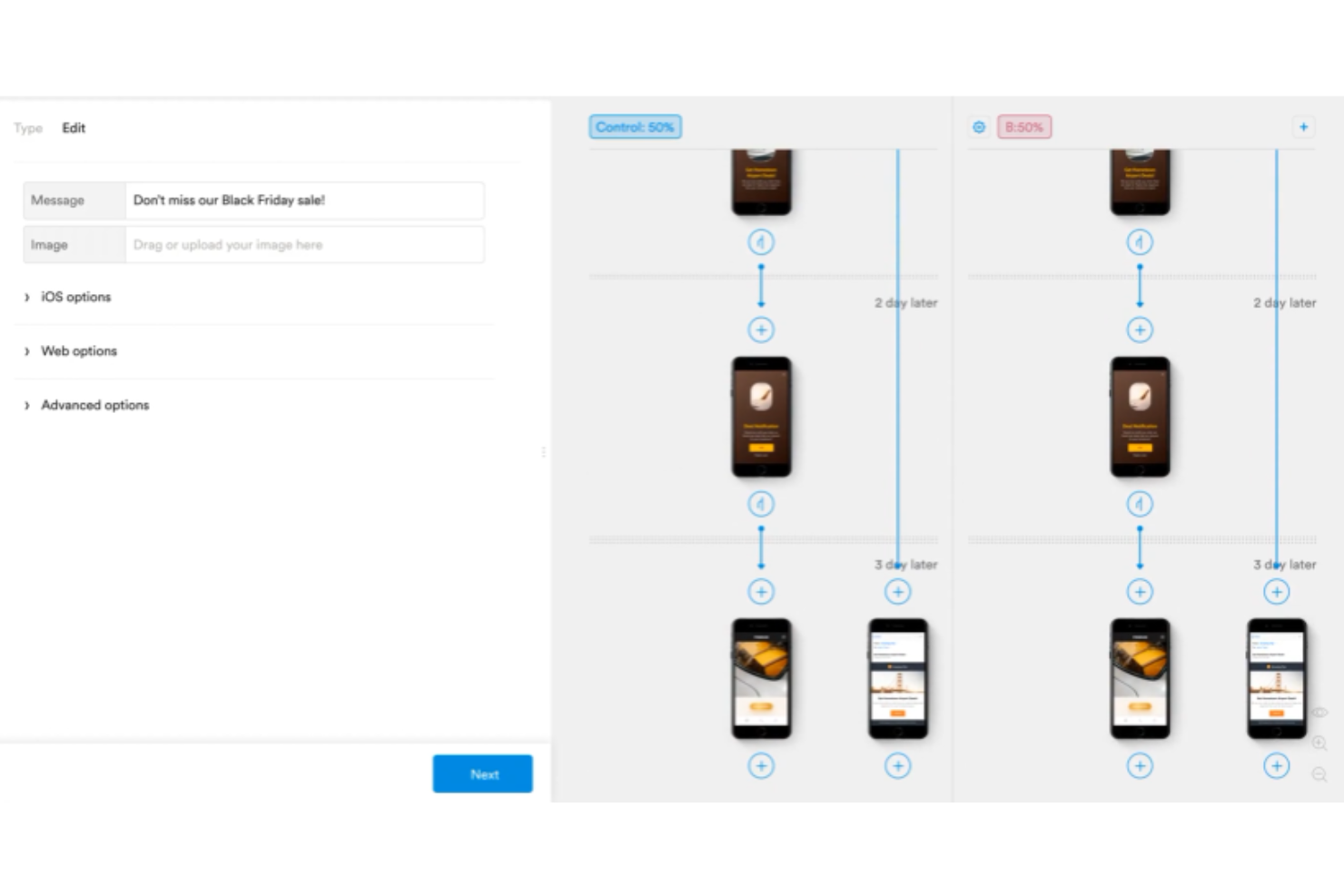
I fondatori di Leanplum sono ex-dipendenti Google che hanno lavorato agli algoritmi di monetizzazione di YouTube. Fondata nel 2012, Leanplum aiuta le aziende ad aumentare il coinvolgimento dei clienti. Leanplum si concentra su test A/B per siti web e applicazioni mobili, per ottenere insight e migliorare i tassi di engagement degli utenti.
Perché ho scelto Leanplum: Sono stupito di come cambiare piccoli elementi (come l'orario di invio di una notifica) possa causare forti incrementi di coinvolgimento. Leanplum ti permette di definire parametri che gestiscono i trigger delle notifiche. Ad esempio, puoi scegliere un trigger “immediato” oppure applicare un “ritardo” in base a condizioni, come se l’utente abbia aperto una notifica precedente.
Testando varie versioni, presto scoprirai quella ricetta segreta che massimizza il coinvolgimento. Leanplum ti aiuta a capire quali canali funzionano meglio, basandosi sulla dimensione del campione raccolto. Puoi, per esempio, analizzare e decidere in modo data-driven tra le notifiche in-app e le notifiche push.
Caratteristiche distintive e integrazioni di Leanplum
Una caratteristica di spicco è l'automazione dei flussi di lavoro per le notifiche. Ad esempio, puoi creare un workflow personalizzato che definisce che tipo di notifiche far apparire dopo un giorno, due giorni o cinque giorni. In questo modo hai un controllo dettagliato sulla strategia di notifiche e messaggistica della tua app mobile.
Le integrazioni includono Amplitude, Branch.io, Inkit, InMobi, Kochava, Marketo, Twilio, Tune e Radar. È disponibile anche un’API per integrazioni personalizzate.
Pros and Cons
Pros:
- Reportistica campagne solida
- Ottima segmentazione dei dati
- Strumenti analitici potenti
Cons:
- Occasionali problemi di sincronizzazione
- Problemi con l'integrazione iOS
Quando utilizzare un software per test A/B
Il software per test A/B ti consente di eseguire esperimenti controllati sul tuo prodotto per scoprire cosa determina realmente conversioni, fidelizzazione o ricavi. Elimina le supposizioni dalle decisioni sul prodotto e sostituisce le valutazioni istintive con dati che puoi sostenere. Se uno degli scenari seguenti ti è familiare, probabilmente è arrivato il momento di aggiungerlo al tuo ambiente tecnologico:
- Il tuo team rilascia funzionalità sperando che tutto vada per il meglio: hai lanciato un processo di inserimento riprogettato lo scorso trimestre, ma non riesci a capire se abbia prodotto risultati. I test A/B collegano ogni modifica a un risultato misurabile, così sai cosa funziona prima di investirci ulteriormente.
- I cicli di approvazione si stanno prolungando perché nessuno riesce a trovare un accordo: il tuo progettista vuole la CTA nella parte visibile senza scorrere, il tuo CPO la vuole più in basso e il dibattito dura due settimane. Eseguire un test risolve la questione con i dati degli utenti in pochi giorni, non con riunioni.
- Stai ottimizzando la conversione ma non riesci a isolare la variabile: supponiamo che il tasso di conversione da prova a pagamento sia diminuito dell'8% dopo un aggiornamento della pagina iniziale. I test A/B ti consentono di isolare esattamente quale modifica abbia causato il calo e di annullarla prima che ti costi di più.
- Gestire gli esperimenti di crescita tra i team sta diventando complicato: hai tre squadre che eseguono test separati in fogli di calcolo senza una visibilità condivisa. Una piattaforma di test adeguata centralizza i risultati, previene le sovrapposizioni e mantiene la validità statistica degli esperimenti.
- Ci vuole troppo tempo per convalidare nuovi prezzi o pacchetti: testare manualmente un nuovo livello di piano o uno sconto annuale significa attendere mesi per ottenere segnali comportamentali. I test A/B accelerano questo ciclo di riscontri, consentendoti di apportare modifiche prima della prossima revisione del consiglio di amministrazione.
Altre opzioni di software per test A/B
Ecco altri strumenti che non sono entrati nella mia lista dei migliori, ma che vale comunque la pena prendere in considerazione:
- Yieldify
Ideale per previsioni di esperienze guidate dall'AI
- Adobe Target
Ideale per esperienze personalizzate per il pubblico
- Oracle Maxymiser
Ideale per consolidare i dati dei clienti
- Google Optimize
Ideale per i test A/B e l’analisi basata sui dati
- Monetate
Ideale per test A/B dinamici
- Statsig
Ideale per analisi statistiche avanzate
- Split
Ideale per il testing di applicazioni full-stack
- Apptimize
Ideale per l'A/B testing su mobile
- Intellimize
Ideale per aziende ecommerce e SaaS
- Zoho Pagesense
Ideale per l'ottimizzazione delle conversioni
- Tggl
Ideale per rollout graduali delle funzionalità


Come valuto i software per test A/B
Esamino due livelli: il requisito minimo che ogni strumento deve soddisfare—elementi come analisi statistica, distribuzione del traffico e profondità degli SDK—e i fattori differenzianti che distinguono la soluzione giusta dalle altre.
Funzionalità core (requisiti fondamentali per questa lista)
Quando seleziono gli strumenti per la mia lista, assegno a ciascuno un punteggio da 0 (non offre la funzionalità) a 5 (eccelle in questo ambito) per ogni funzionalità core elencata qui sotto. Poi, calcolo il punteggio totale dello strumento come percentuale. Ogni strumento deve raggiungere un punteggio totale minimo del 65% per essere preso in considerazione per l'inclusione.
- Creazione dell'esperimento & configurazione delle varianti: Valuto quanto facilmente si possono avviare test A/B o multivariati—che sia tramite editor visivo, interfaccia low-code o configurazione tramite codice.
- Distribuzione del traffico & targeting del pubblico: Qui è importante offrire suddivisioni del traffico flessibili e regole di targeting, come segmentazione per livello di piano utente, tipo di dispositivo o coorte comportamentale.
- Motore di analisi statistica: Verifico se ogni strumento offre calcoli di significatività chiari, intervalli di confidenza e opzioni metodologiche come modelli bayesiani o frequentisti.
- Supporto dei feature flag: I team di prodotto spesso eseguono esperimenti tramite flag, quindi cerco rollout tramite flag con targeting, interruttori di spegnimento e rilasci basati su percentuale.
- Monitoraggio di obiettivi & metriche: Ogni strumento dovrebbe permettere di definire metriche di successo primarie e secondarie per ogni esperimento—tassi di conversione, eventi di engagement, retention o ricavi.
- SDK & integrazione con le piattaforme: Valuto la copertura degli SDK su piattaforme web, mobile e lato server, oltre alle connessioni native con piattaforme analitiche e data warehouse.
Dopo aver individuato gli strumenti che soddisfano questi criteri, considero ciò che distingue ciascuna piattaforma.
Fattori differenzianti (cosa distingue i fornitori)
Ecco come confronto e distinguo i diversi fornitori:
Caratteristiche distintive
L'esperimentazione lato server è un forte elemento di differenziazione—cerco strumenti che permettano ai team di prodotto di testare logiche back-end come algoritmi di raccomandazione o livelli di prezzo, non solo il colore dei pulsanti. Anche i gruppi di esclusione e controllo sono fondamentali quando il tuo team esegue più esperimenti contemporaneamente, poiché prevengono la contaminazione dei test. Verifico inoltre che uno strumento offra un archivio ricercabile di esperimenti, utile ai team in crescita per evitare di ripetere test già effettuati e costruire sulle conoscenze precedenti.
Oltre le caratteristiche
La trasparenza del prezzo è molto importante—valuto se i costi crescono in modo prevedibile con il numero di utenti monitorati mensilmente o con il numero di esperimenti, poiché costi imprevisti possono bloccare un programma di sperimentazione in crescita. Anche la velocità di implementazione è un altro fattore che considero. Uno strumento che consente al tuo team di eseguire rapidamente il primo test, con risorse di onboarding efficaci e documentazione SDK, porta valore più velocemente. Considero inoltre l'ecosistema di integrazione, specialmente le connessioni native con piattaforme analitiche e data warehouse dove già risiede il tuo dato prodotto.
Che cos'è un software per test A/B?
Il software per test A/B è uno strumento che consente a responsabili di prodotto, esperti di marketing e team UX di confrontare due o più versioni di un'esperienza digitale, come una pagina web, una funzionalità di un'app o una CTA, per capire quale offre prestazioni migliori con gli utenti. Aiuta i team a eseguire esperimenti controllati, analizzare i risultati e prendere decisioni basate sui dati per migliorare le conversioni, il coinvolgimento degli utenti e le prestazioni complessive del prodotto. Questo software affronta sfide come l'affidamento a congetture, le iterazioni lente e l'impatto poco chiaro delle modifiche al design o ai contenuti.
Domande frequenti sul software per i test A/B
Trova le risposte alle domande più comuni sul software per i test A/B:
Come si esegue un test A/B?
Ecco una procedura in sei passaggi da seguire per eseguire test A/B efficaci:
\u003col\u003e
\u003cli\u003e\u003cstrong\u003eDefinisci il tuo obiettivo\u003c/strong\u003e: stabilisci gli obiettivi del test A/B.\u003c/li\u003e
\u003cli\u003e\u003cstrong\u003eIndividua l’ambito del test\u003c/strong\u003e: decidi quali elementi del tuo prodotto digitale desideri testare.\u003c/li\u003e
\u003cli\u003e\u003cstrong\u003eCrea le varianti\u003c/strong\u003e: sviluppa più varianti degli elementi da testare. Ad esempio, se stai testando un pulsante CTA, crea varianti con diverse combinazioni di colori, dimensioni, ecc.\u003c/li\u003e
\u003cli\u003e\u003cstrong\u003eSuddividi il traffico\u003c/strong\u003e: utilizzando il software per i test A/B, suddividi il traffico in entrata tra le diverse varianti.\u003c/li\u003e
\u003cli\u003e\u003cstrong\u003eEsegui i test\u003c/strong\u003e: lascia che il software di test esegua i test e raccolga i dati.\u003c/li\u003e
\u003cli\u003e\u003cstrong\u003eAnalizza i risultati\u003c/strong\u003e: analizza i risultati per determinare quale variante offre prestazioni migliori.\u003c/li\u003e
\u003c/ol\u003e
\u0026nbsp;
Quali sono i tipi di test A/B?
Ecco alcuni tipi comuni di test A/B:
\u003cul\u003e
\u003cli\u003e\u003cstrong\u003eTest A/B/n:\u003c/strong\u003e è semplicemente un’estensione dei test A/B tradizionali. I test A/B/n prevedono più varianti.\u003c/li\u003e
\u003cli\u003e\u003cstrong\u003eTest multivariato:\u003c/strong\u003e i test MVT prevedono la verifica simultanea di combinazioni di più elementi. Di conseguenza, puoi ottimizzare pagine complesse con diversi elementi per trovare la combinazione migliore.\u003c/li\u003e
\u003cli\u003e\u003cstrong\u003eTest con URL separati:\u003c/strong\u003e in questo caso, gli utenti vengono indirizzati a URL completamente diversi, anziché a varianti della stessa pagina.\u003c/li\u003e
\u003cli\u003e\u003cstrong\u003eTest del bandito:\u003c/strong\u003e prevede l’assegnazione dinamica del traffico in entrata alla variante con le prestazioni migliori.\u003c/li\u003e
\u003c/ul\u003e
La maggior parte degli strumenti per i test A/B supporta i test A/B/n di base, i test multivariati e i test con URL separati. I test A/B/n consentono di confrontare diverse versioni di un singolo elemento. I test multivariati aiutano a verificare combinazioni di modifiche, mentre i test con URL separati confrontano pagine completamente diverse. Verifica che lo strumento scelto offra queste opzioni prima di iniziare.
Gli strumenti per i test A/B possono eseguire test multivariati o test con URL separati?
Sì, molte delle principali piattaforme per i test A/B offrono test multivariati e test con URL separati oltre ai test A/B standard. I test multivariati consentono di sperimentare più modifiche contemporaneamente, mentre i test con URL separati indirizzano gli utenti a pagine completamente diverse. Non tutti gli strumenti offrono entrambe le funzionalità, quindi verifica la compatibilità se questi metodi di test sono importanti per il tuo team.
Per quanto tempo devo eseguire un test A/B per ottenere risultati affidabili?
Dovresti eseguire un test A/B finché non avrai raccolto dati sufficienti per raggiungere la significatività statistica. La maggior parte dei responsabili di prodotto e dei professionisti del marketing considera un periodo di traffico di almeno una o due settimane, ma i tempi esatti dipendono dal volume degli utenti e dai tassi di conversione. Alcuni software ti avvisano quando hai raggiunto la significatività, aiutandoti a evitare di terminare i test troppo presto.
Ho bisogno dell'aiuto di uno sviluppatore per configurare i test A/B?
No, molti strumenti moderni per i test A/B sono progettati per utenti non tecnici e offrono editor visuali o plugin. I professionisti del marketing e i responsabili di prodotto possono solitamente configurare test di base senza scrivere codice. Per esperimenti più complessi, come il monitoraggio di eventi personalizzati o il test di flussi profondi di un’applicazione, il contributo di uno sviluppatore può comunque essere utile.\u003c!– wp:heading {\u0022level\u0022:3} –\u003e
\u003ch3 class=\u0022wp-block-heading\u0022\u003eUsabilità\u003c/h3\u003e
\u003c!– /wp:heading –\u003e \u003c!– wp:paragraph –\u003e
Gli strumenti per i test A/B che offrono un’interfaccia utente intuitiva e semplice da usare ottengono una valutazione elevata da parte mia. Inoltre, gli strumenti per i test A/B facili da usare favoriscono un inserimento iniziale fluido. I principianti devono poter acquisire rapidamente familiarità con uno strumento per i test A/B per creare ed eseguire test in qualsiasi momento.
\u003c!– /wp:paragraph –\u003e \u003c!– wp:heading {\u0022level\u0022:3} –\u003e
\u003ch3 class=\u0022wp-block-heading\u0022\u003eIntegrazioni software\u003c/h3\u003e
\u003c!– /wp:heading –\u003e \u003c!– wp:paragraph –\u003e
Ho menzionato le varie possibilità di integrazione offerte da ciascuno strumento. Puoi integrare il software per i test A/B con applicazioni come strumenti di collaborazione, strumenti di analisi di terze parti, strumenti CMS e strumenti CRM.
\u003c!– /wp:paragraph –\u003e \u003c!– wp:heading {\u0022level\u0022:3} –\u003e
\u003ch3 class=\u0022wp-block-heading\u0022\u003ePrezzi\u003c/h3\u003e
\u003c!– /wp:heading –\u003e \u003c!– wp:paragraph –\u003e
Infine, il software per i test A/B non dovrebbe costare una fortuna. Ho indicato i prezzi di ciascuno strumento e la disponibilità di una prova gratuita. Tutti gli strumenti prevedono un abbonamento SaaS con costo mensile.
\u003c!– /wp:paragraph –\u003e \u003c!– wp:paragraph –\u003e
Il costo tipico di un abbonamento mensile varia da $10 a $2000 al mese. Alcuni strumenti non indicano i prezzi, quindi dovrai contattare i rispettivi reparti vendite per ottenere un preventivo personalizzato.
Qual è il prossimo passo?
La scelta del software giusto per i test A/B può contribuire notevolmente a svelare informazioni uniche su come migliorare l’esperienza dei clienti e i tassi di conversione. Spero che la mia guida ti aiuti a scegliere il software per i test A/B più adatto, permettendoti di comprendere meglio cosa valorizza l’esperienza digitale dei tuoi clienti.
In qualità di product manager, devi essere costantemente alla ricerca di modi per perfezionare i tuoi prodotti digitali. Pertanto, puoi leggere come la gestione dei flag delle funzionalità ti aiuti a gestire la crescita di un prodotto, come raccogliere feedback utili sul prodotto oppure quali sono i 6 passaggi da seguire per creare un piano di ricerca UX.
Elenchi di strumenti correlati:
- Strumenti per la ricerca sugli utenti
- Software per il monitoraggio degli utenti
- Strumenti di analisi del comportamento degli utenti
Non dimenticare di iscriverti alla nostra newsletter per ricevere ulteriori soluzioni e strategie dai migliori esperti di gestione dei prodotti.