

10 migliori strumenti di automazione DevOps recensiti nel 2026

Selezione dei migliori strumenti di automazione DevOps


Gli strumenti di automazione DevOps sono piattaforme software che aiutano il tuo team ad automatizzare, gestire e coordinare le attività durante l'intero ciclo di vita dello sviluppo software e delle operazioni IT. Se stai cercando i migliori strumenti di automazione DevOps, probabilmente vuoi ridurre il lavoro manuale, migliorare la velocità di distribuzione e mantenere coerenti i tuoi flussi di lavoro man mano che i progetti crescono.
La scelta degli strumenti giusti può fare la differenza tra una gestione costante delle emergenze e una pipeline affidabile ed efficiente. Questo elenco include strumenti per CI/CD, infrastruttura come codice, gestione della configurazione e automazione delle policy, offrendoti opzioni per automatizzare pipeline, provisioning dell'infrastruttura o flussi di lavoro di governance. Abbiamo raccolto soluzioni adatte alle esigenze del tuo team e in grado di far progredire le tue pratiche DevOps.
Perché fidarsi dei nostri consigli sui software
Il nostro team testa e recensisce software dal 2012. In quanto product manager noi stessi, sappiamo quanto sia difficile — e importante — scegliere il software giusto.
Per questa guida, abbiamo valutato gli strumenti attraverso test pratici e ricerche indipendenti, assegnando un punteggio agli strumenti in base ai nostri criteri di selezione.
Le nostre recensioni riflettono il nostro giudizio editoriale umano, non un discorso di vendita.
Riepilogo dei migliori strumenti di automazione DevOps
Questa tabella comparativa riassume i dettagli dei prezzi delle mie migliori selezioni di strumenti di automazione DevOps, per aiutarti a trovare quello più adatto al tuo budget e alle esigenze della tua azienda.
| Tool | Best For | Trial Info | Price | ||
|---|---|---|---|---|---|
| 1 | Ideale per l'integrazione con GitHub | Piano gratuito disponibile | A partire da $4/utente/mese (fatturato annualmente) | Website | |
| 2 | Migliore per l'infrastructure as code | Piano gratuito disponibile | Prezzi su richiesta | Website | |
| 3 | Ideale per la continuous delivery automatizzata con IA | Piano gratuito disponibile | Prezzo su richiesta | Website | |
| 4 | Piattaforma DevSecOps tutto-in-uno | Piano gratuito disponibile | Da $29/utente/mese | Website | |
| 5 | Ideale per pipeline personalizzabili | Download gratuito disponibile | Gratuito da usare | Website | |
| 6 | Ideale per le risorse AWS | Prova gratuita fino a 6 mesi | Prezzo su richiesta | Website | |
| 7 | Ideale per la gestione delle configurazioni | Demo gratuita disponibile | Prezzo su richiesta | Website | |
| 8 | Ideale per l'integrazione con Jira | Prova gratuita di 30 giorni | Da $1,200 | Website | |
| 9 | Ideale per l'ecosistema Microsoft con IA integrata | Prova gratuita disponibile | Prezzo su richiesta | Website | |
| 10 | La dashboard di CircleCI mostra lo stato dei progetti, i workflow e l’attività CI/CD. | Piano gratuito + demo disponibili | Da $15/mese | Website |
Recensioni dei migliori strumenti di automazione DevOps
Di seguito trovi i miei riepiloghi dettagliati dei migliori strumenti di automazione DevOps inclusi nella mia selezione. Le mie recensioni offrono un’analisi approfondita delle funzionalità principali, dei pro e dei contro, delle integrazioni e dei casi d’uso ideali di ogni strumento, per aiutarti a trovare quello più adatto a te.

Ideale per l'integrazione con GitHub
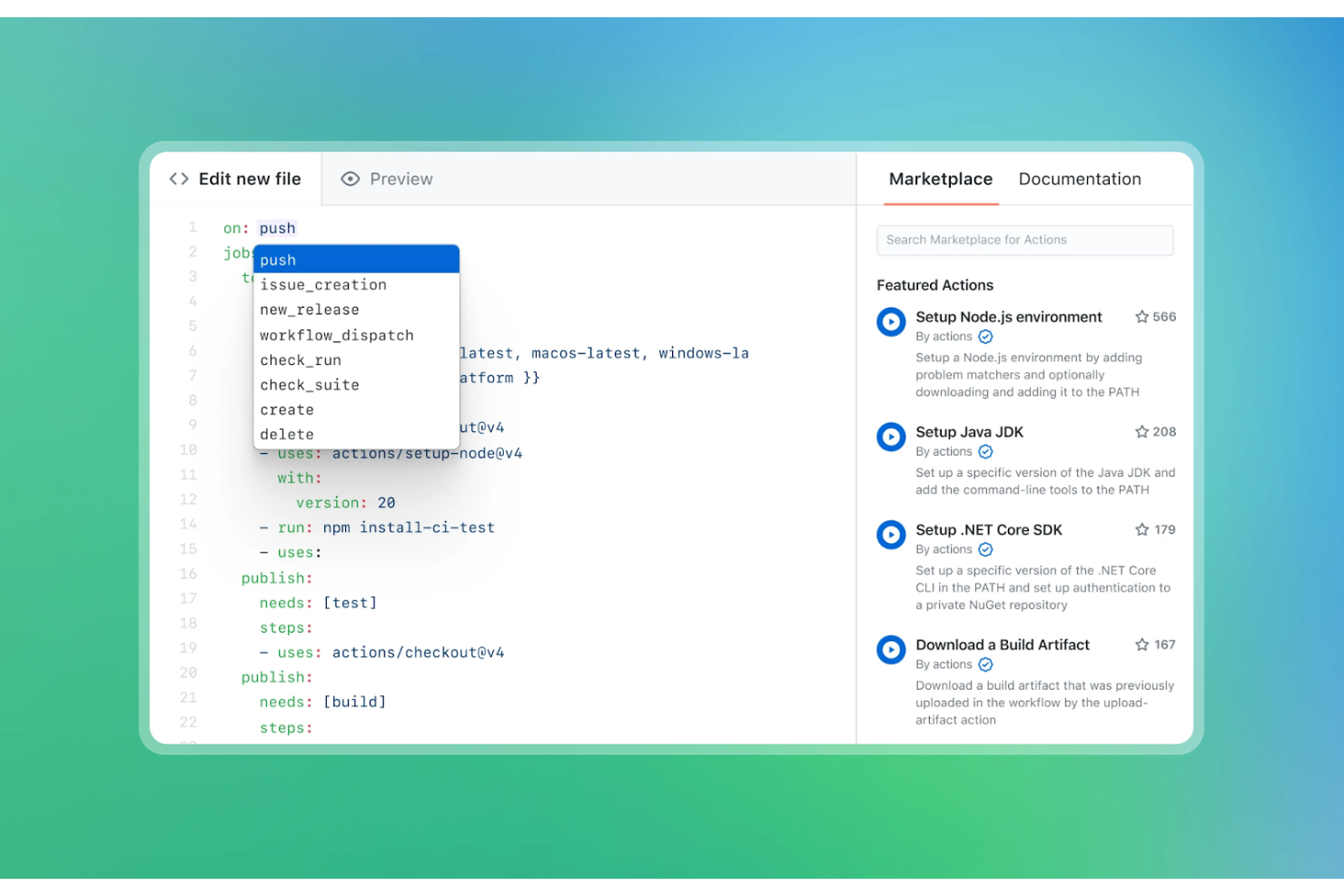
GitHub Actions è una piattaforma CI/CD pensata per gli sviluppatori che utilizzano già GitHub per il controllo versione. Automatizza il workflow di sviluppo software, dai test del codice al deployment, direttamente all'interno dell'ambiente GitHub.
Perché ho scelto GitHub Actions: Si integra nativamente con GitHub, risultando una scelta eccellente per i team già inseriti nell'ecosistema GitHub. Si possono creare workflow che costruiscono, testano e distribuiscono il codice basandosi su eventi come le pull request.
Con la sua ampia libreria di azioni preconfigurate, GitHub permette al tuo team di impostare rapidamente automazioni senza bisogno di scripting estensivo. Hai inoltre la flessibilità di personalizzare i workflow tramite file di configurazione YAML. È possibile costruire e distribuire applicazioni containerizzate utilizzando job nei workflow che creano immagini Docker e le caricano in un registro. GitHub Actions fornisce log dei workflow per il troubleshooting dei job falliti.
Funzionalità e integrazioni principali:
Funzionalità includono build a matrice che permettono di testare su diversi ambienti. Offre workflow riutilizzabili, consentendo di condividere attività comuni tra più progetti. È inoltre possibile utilizzare la gestione dei segreti per conservare e accedere in modo sicuro a informazioni sensibili.
Integrazioni includono AWS, Azure, Google Cloud Platform, Docker, Kubernetes, Slack, Jira, Microsoft Teams, Heroku, Twilio e altri.
Pros and Cons
Pros:
- Integrazione nativa con GitHub
- Ampia libreria di azioni predefinite
- Gestione dei segreti per la sicurezza
Cons:
- È richiesta conoscenza delle configurazioni YAML
- Strumenti di analisi e reportistica limitati

Migliore per l'infrastructure as code
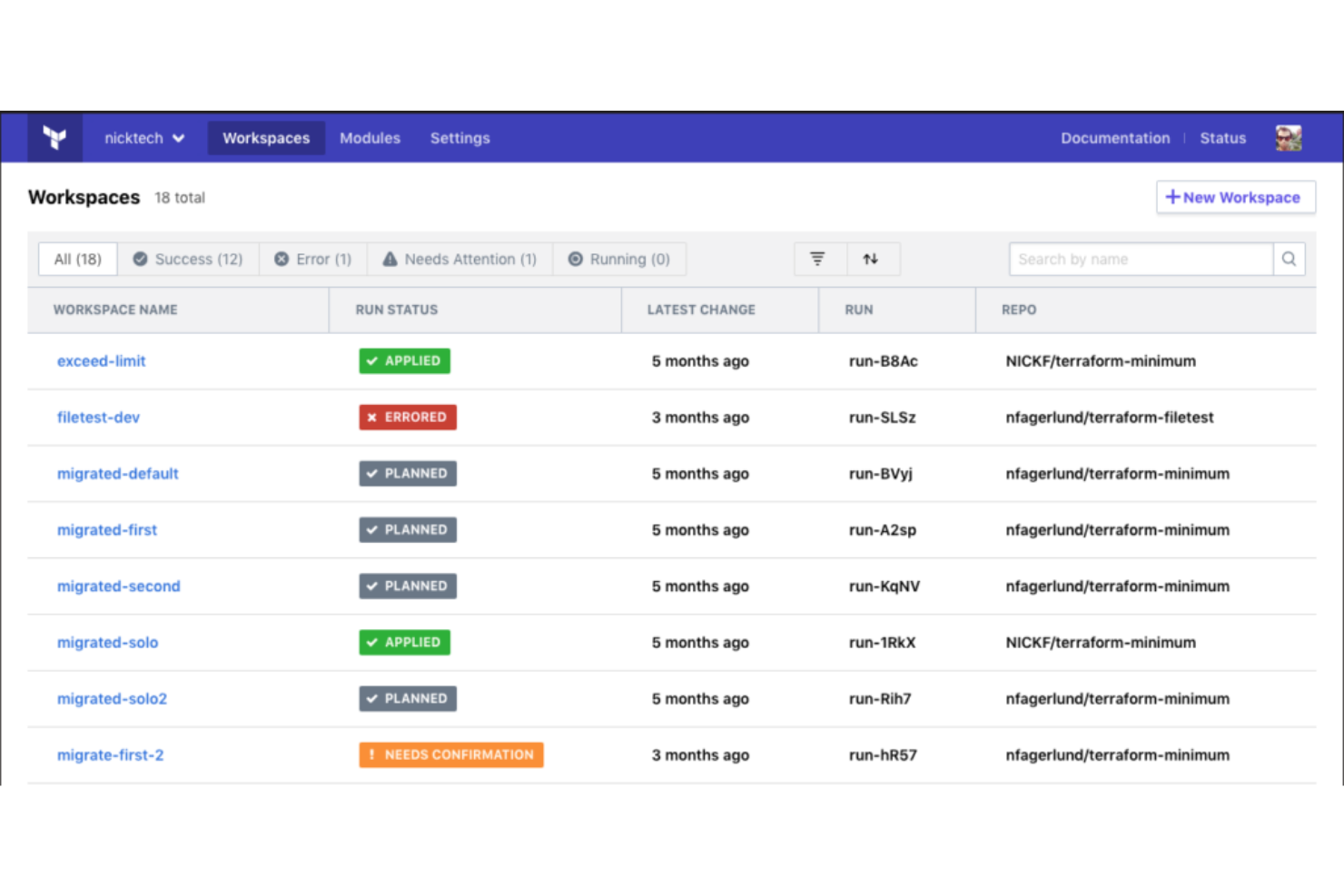
Terraform è uno strumento di infrastructure-as-code progettato per professionisti IT e team DevOps. Consente di creare, modificare e versionare l'infrastruttura in modo efficiente, supportando sia componenti di basso livello, come istanze di calcolo, sia componenti di alto livello, come le voci DNS.
Perché ho scelto Terraform: è uno strumento che si distingue nel fornire l'infrastruttura come codice, rendendolo ideale per i team che devono gestire infrastrutture complesse. La capacità di Terraform di supportare e gestire il provisioning automatico dell'infrastruttura su più provider cloud lo differenzia dagli altri.
Funzionalità come la sua architettura modulare e un ampio ecosistema di provider ne supportano i punti di forza. Le sue operazioni idempotenti sono essenziali per le pipeline CI/CD. Terraform permette di validare i file di configurazione per assicurarne la correttezza sintattica e semantica. È possibile versionare l'infrastruttura, garantendo coerenza e affidabilità tra i diversi deployment.
Funzionalità e integrazioni principali:
Funzionalità includono il suo linguaggio di configurazione che semplifica la descrizione dell'infrastruttura, la CLI di Terraform per i flussi di lavoro da riga di comando e la possibilità di collaborare con il proprio team utilizzando HCP Terraform.
Integrazioni includono AWS, Azure, Google Cloud Platform, Heroku, Confluent, UpCloud, DNSimple, Cloudflare, vSphere, Oracle Cloud Infrastructure, Docker, Kubernetes, Consul e altro ancora.
Pros and Cons
Pros:
- Supporta ambienti multi-cloud
- Capacità di versionamento dell'infrastruttura
- Ampio ecosistema di provider
Cons:
- Curva di apprendimento dovuta alla sintassi proprietaria HCL
- La gestione dei file di stato è complessa su larga scala

Harness
Ideale per la continuous delivery automatizzata con IA
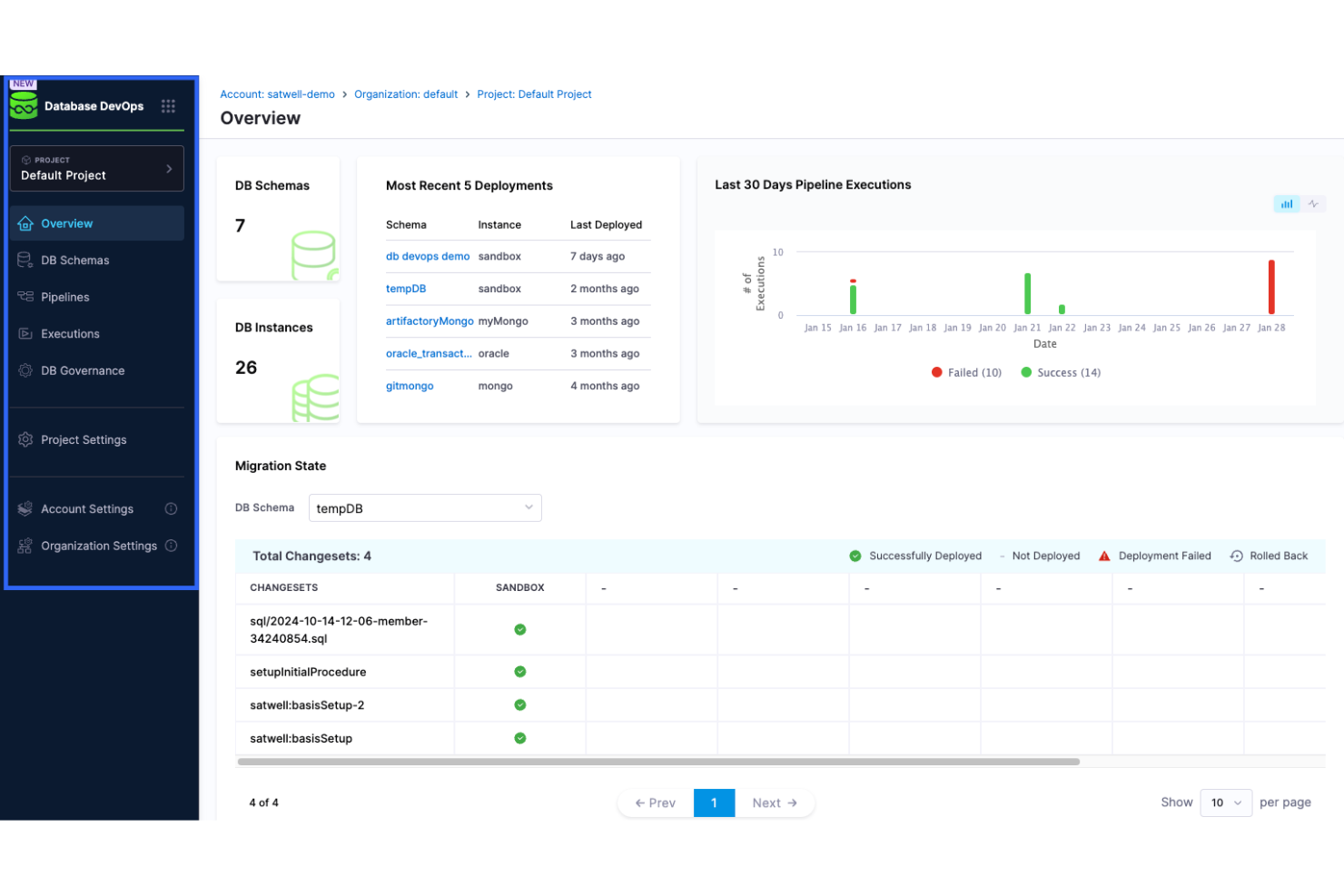
Harness è una piattaforma di continuous delivery pensata per i team DevOps e i professionisti IT. Automatizza il processo di distribuzione, permettendo al tuo team di rilasciare applicazioni in modo rapido e affidabile.
Perché ho scelto Harness: È progettata per la continuous delivery, offrendo funzionalità che semplificano e automatizzano la pipeline di distribuzione. Harness include capacità di rollback automatizzato, che assicurano stabilità durante i rilasci. Grazie ai suoi algoritmi di machine learning, puoi ridurre al minimo la supervisione manuale durante le distribuzioni. Puoi raccogliere e visualizzare metriche di sistema e di servizio utilizzando strumenti di monitoraggio come Prometheus e Grafana. Fornisce metriche di distribuzione in tempo reale, consentendo ai team di rilevare e risolvere rapidamente i problemi. Puoi inoltre beneficiare della sua dashboard intuitiva che offre una visibilità chiara sul tuo processo di distribuzione.
Funzionalità principali e integrazioni:
Le funzionalità includono verifiche continue che utilizzano il machine learning per rilevare anomalie. Offre distribuzioni canary automatizzate per ridurre i rischi durante gli aggiornamenti. Puoi anche utilizzare i suoi feature flag per gestire le distribuzioni senza influire sugli utenti finali.
Le integrazioni includono Kubernetes, Docker, AWS, Azure DevOps, Google Cloud Platform, GitHub, GitLab, Bitbucket, Jenkins, PagerDuty, Jira, Figma, Lucidchart, ServiceNow e altri ancora.
Pros and Cons
Pros:
- Rollback automatizzato
- Machine learning per il rilevamento delle anomalie
- Supporta le distribuzioni canary
Cons:
- La configurazione iniziale può essere complessa
- Richiede configurazione per un utilizzo ottimale

GitLab
Piattaforma DevSecOps tutto-in-uno
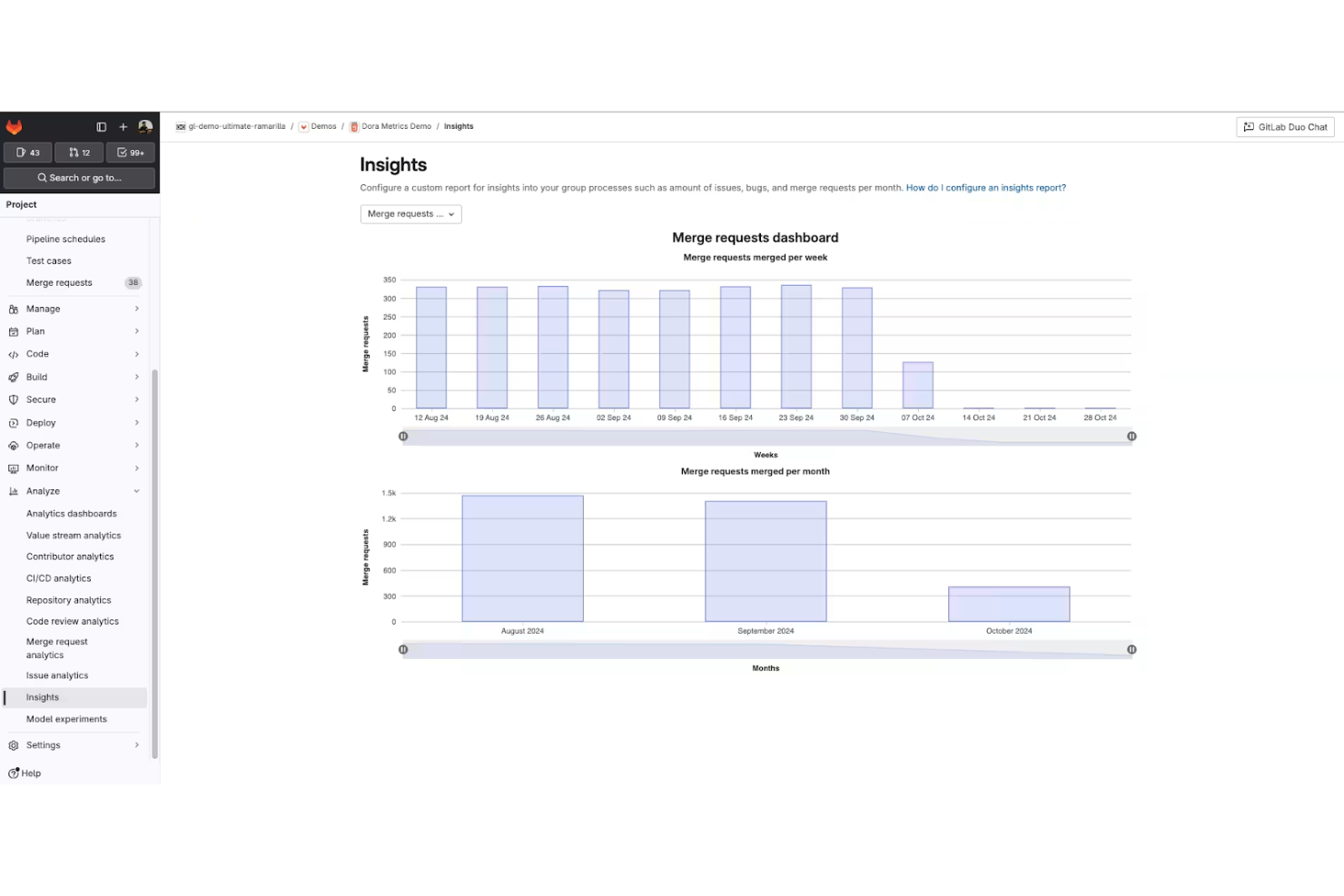
GitLab è una piattaforma DevOps completa progettata per i team di sviluppo software che desiderano gestire l'intero ciclo di vita dello sviluppo. Offre strumenti per la gestione del codice sorgente, CI/CD e monitoraggio, consentendo al tuo team di collaborare e innovare in modo efficiente.
Perché ho scelto GitLab: GitLab si distingue combinando controllo del codice sorgente, CI/CD, scansione di sicurezza e gestione dei progetti in un'unica piattaforma. Invece di integrare più strumenti per coprire pianificazione, test, sicurezza e distribuzione, GitLab mantiene tutto in un unico flusso di lavoro.
Questa unificazione è importante per i team che vogliono ridurre i cambi di contesto e garantire coerenza tra gli ambienti. I test di sicurezza integrati, le approvazioni delle merge e le pipeline di distribuzione consentono di anticipare i controlli di conformità e qualità del codice nel processo. Se la tua priorità è il controllo del ciclo di vita piuttosto che la flessibilità modulare, GitLab offre un'esperienza DevSecOps strettamente integrata.
Funzionalità principali e integrazioni:
Le funzionalità includono dashboard di monitoraggio che forniscono visibilità sulle prestazioni delle applicazioni insieme alle metriche di distribuzione e infrastruttura. Con le sue funzioni di tracciamento dei problemi e gestione dei progetti, puoi mantenere il tuo team allineato e concentrato. Hai anche a disposizione strumenti di test di sicurezza che si integrano naturalmente nel tuo flusso di lavoro.
Le integrazioni includono GitHub, Jira, Slack, Microsoft Teams, Jenkins, Docker, Kubernetes, Bitbucket, AWS, Google Cloud Platform e altro ancora.
Pros and Cons
Pros:
- Copre l'intero ciclo di vita DevOps
- Strumenti di test di sicurezza integrati
- Gestione efficiente dei registry dei container
Cons:
- Può essere complesso da configurare
- Richiede configurazione per un uso ottimale

Jenkins
Ideale per pipeline personalizzabili
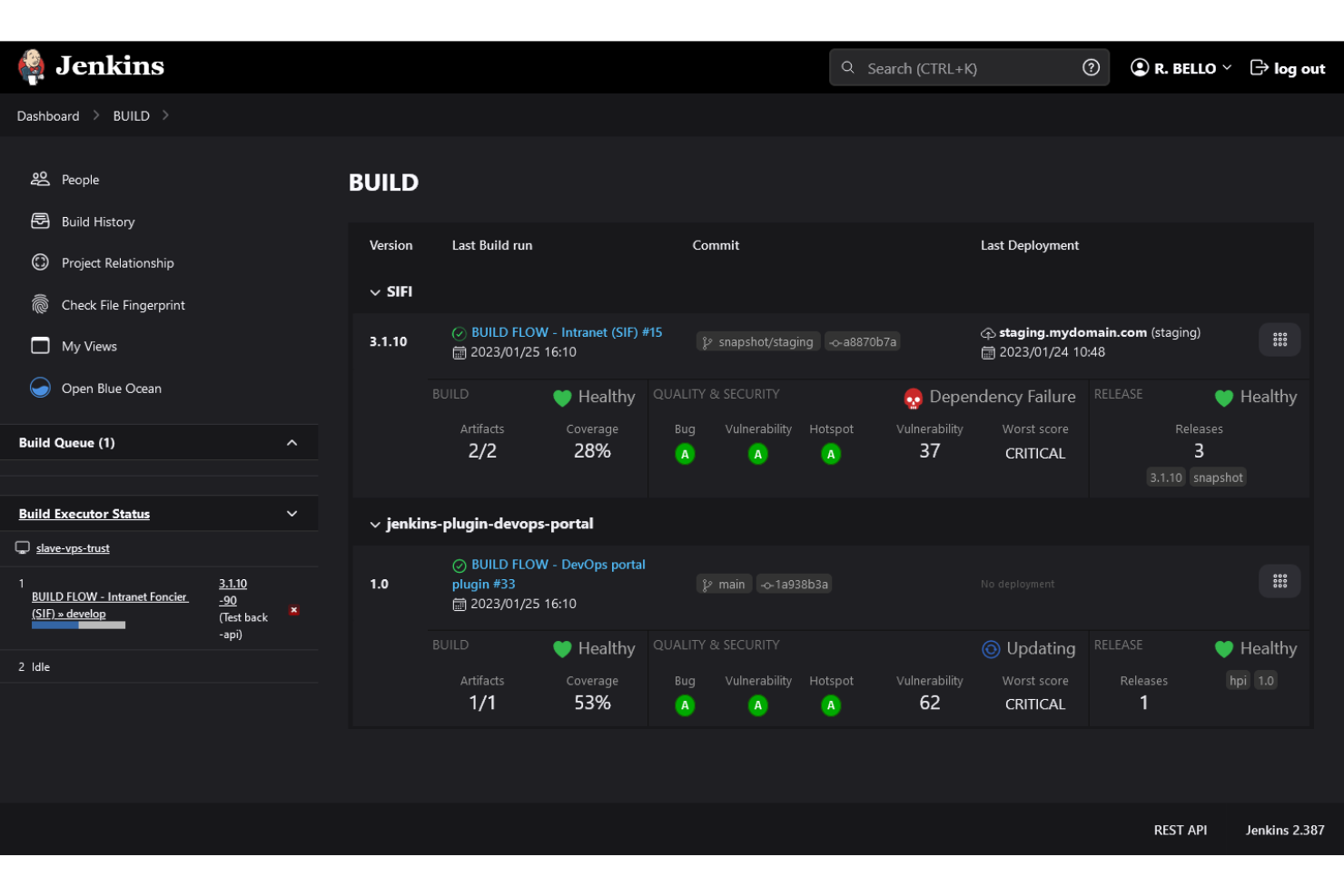
Jenkins è un server di automazione open-source ampiamente utilizzato da sviluppatori software e team DevOps. Aiuta ad automatizzare parti del processo di sviluppo software, inclusi la compilazione, il testing e il deployment del codice.
Perché ho scelto Jenkins: È particolarmente adatto alla creazione di pipeline personalizzabili, offrendo una flessibilità molto apprezzata da molti team. La sua natura open source permette un'estesa personalizzazione, rendendolo adattabile a diversi flussi di lavoro.
Le pipeline DevOps di Jenkins supportano molti linguaggi di programmazione per script di compilazione e distribuzione, e i plugin possono facilitare la risoluzione dei problemi aggiungendo informazioni diagnostiche più dettagliate. Puoi creare un ambiente di integrazione e distribuzione continua che si adatta alle esigenze uniche del tuo team.
Funzionalità principali e integrazioni:
Le funzionalità includono un'interfaccia web per una configurazione semplice, la possibilità di distribuire le build su più macchine e un ricco ecosistema di plugin che ne espande le capacità.
Le integrazioni includono GitHub, GitLab, Bitbucket, Docker, Kubernetes, Maven, Gradle, JUnit, Selenium e molte altre.
Pros and Cons
Pros:
- Ampia libreria di plugin
- Pipeline altamente personalizzabili
- Flessibilità open-source
Cons:
- Può essere complesso da configurare
- Richiede manutenzione e aggiornamenti

Ideale per le risorse AWS

AWS CloudFormation è uno strumento di infrastructure-as-code pensato per sviluppatori e professionisti IT che lavorano nell'ecosistema AWS. Automatizza il provisioning e la gestione delle risorse AWS, consentendo al tuo team di concentrarsi sulla creazione di applicazioni anziché sulla gestione dell'infrastruttura.
Perché ho scelto AWS CloudFormation: È progettato specificamente per la gestione delle risorse AWS, offrendo un modo strutturato per crearle e gestirle. Con i template CloudFormation puoi definire l'infrastruttura come codice, garantendo coerenza e ripetibilità. CloudFormation semplifica aggiornamenti e rollback negli ambienti cloud-native.
Le sue funzionalità di gestione degli stack ti permettono di aggiornare ed eliminare le risorse in modo fluido secondo necessità. Con AWS CloudFormation puoi modellare e distribuire ripetutamente le risorse AWS necessarie per l'orchestrazione dei container utilizzando template infrastructure-as-code. Puoi anche usare la funzione di rilevamento delle deviazioni per identificare modifiche alle risorse degli stack.
Caratteristiche principali e integrazioni:
Caratteristiche includono la possibilità di utilizzare JSON o YAML per definire l'infrastruttura. AWS CloudFormation offre stack set per distribuire risorse su più account e regioni. Puoi anche utilizzare i change set per visualizzare in anteprima le modifiche prima di applicarle ai tuoi stack.
Integrazioni includono AWS Lambda, AWS EC2, AWS S3, AWS RDS, AWS IAM, AWS CloudWatch, GitLab, Okta, PagerDuty, New Relic, Datadog e altro ancora.
Pros and Cons
Pros:
- Integrazione nativa con i servizi AWS
- Supporta l'infrastructure as code
- Gestione coerente delle risorse
Cons:
- Richiede comprensione dei servizi AWS
- Richiede conoscenze di JSON o YAML

Puppet
Ideale per la gestione delle configurazioni
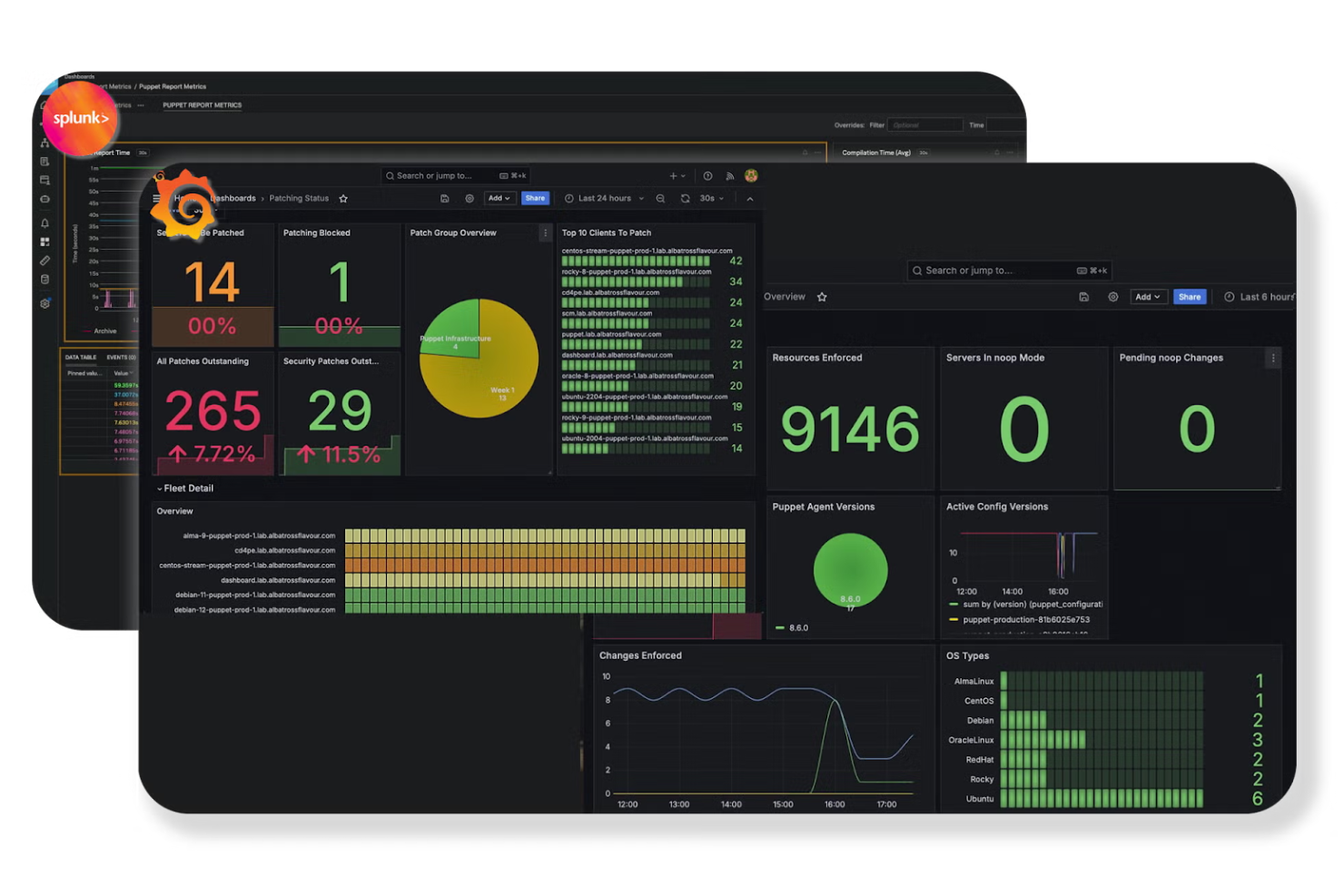
Puppet è uno strumento di gestione delle configurazioni progettato per amministratori IT e team DevOps. Automatizza il provisioning, la configurazione e la gestione dell'infrastruttura, aiutando il tuo team a mantenere ambienti coerenti.
Perché ho scelto Puppet: Lo strumento utilizza playbook per automatizzare la gestione delle configurazioni su più server e si adatta bene alle aziende con ambienti complessi. Funziona su sistemi operativi come Linux, Windows, Unix e ambienti cloud, consentendo configurazioni uniformi su infrastrutture eterogenee.
Puppet DSL è progettato su misura per la gestione delle configurazioni ma si integra bene con altri linguaggi di programmazione. Puoi inoltre sfruttare le sue capacità di automazione per ridurre l'intervento manuale e l'errore umano.
Caratteristiche principali e integrazioni:
Caratteristiche includono un linguaggio dichiarativo che semplifica la descrizione delle configurazioni. Puppet offre uno strato di astrazione delle risorse che garantisce coerenza nelle configurazioni. Include anche strumenti di reportistica per aiutarti a monitorare e gestire le modifiche.
Integrazioni includono AWS, Azure, Google Cloud Platform, VMware, Docker, GitHub, GitLab, Bitbucket, Jenkins, ServiceNow e altri.
Pros and Cons
Pros:
- Potenti capacità di gestione delle configurazioni
- Linguaggio dichiarativo per le configurazioni
- Solide funzionalità di conformità e governance
Cons:
- Curva di apprendimento ripida per i principianti
- Richiede l'installazione dell'agente sul nodo

Bamboo
Ideale per l'integrazione con Jira
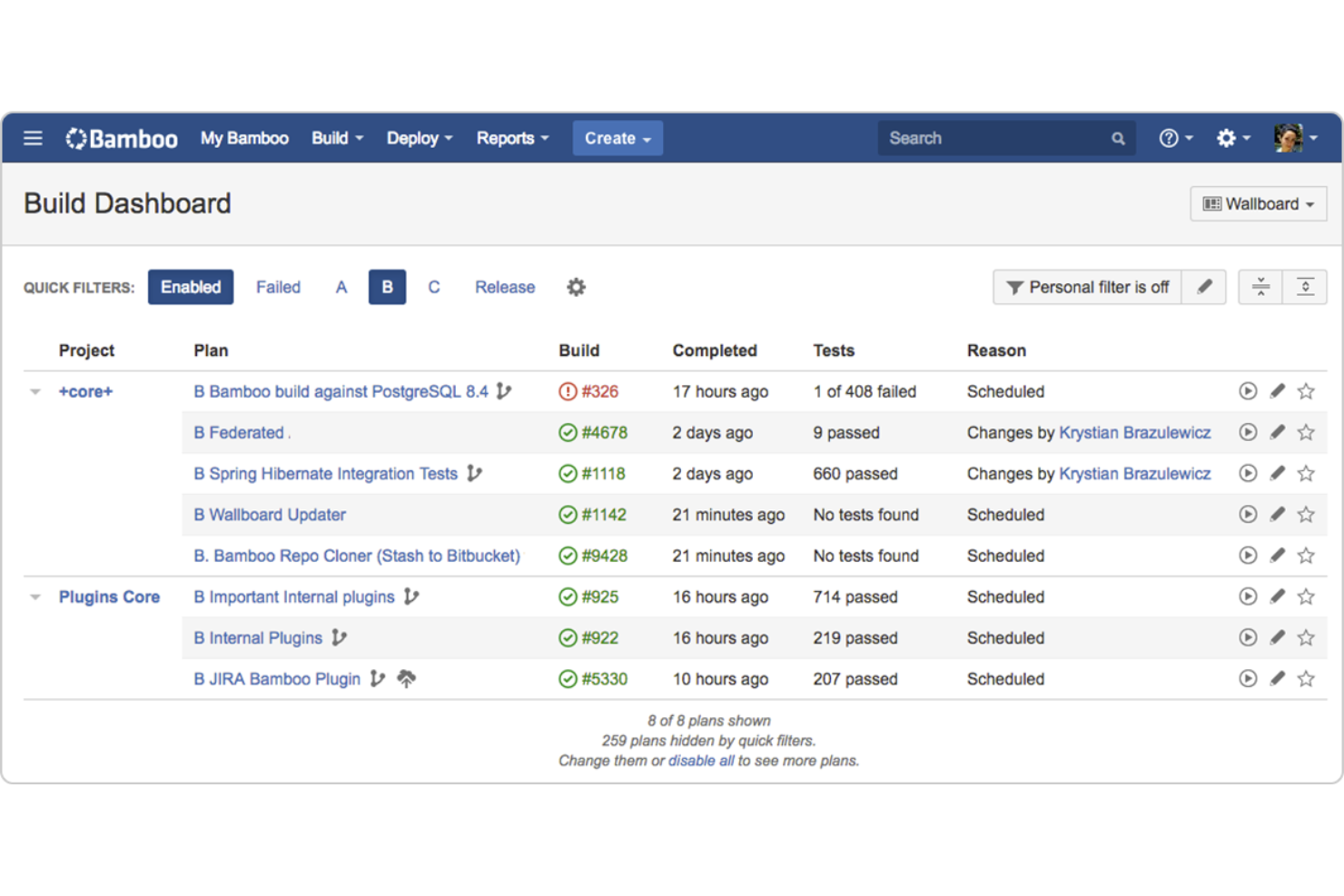
Bamboo è uno strumento di integrazione continua e distribuzione continua progettato per i team di sviluppo software. Automatizza il processo di build, test e distribuzione del codice, facilitando al tuo team la consegna di software di alta qualità.
Perché ho scelto Bamboo: È particolarmente efficace per i team che utilizzano Jira, grazie a una stretta integrazione che migliora il monitoraggio dei progetti. Bamboo supporta unioni e build automatizzate, integrandosi perfettamente con le sue capacità di integrazione. Questo strumento di CD permette la distribuzione continua tramite progetti di deploy automatizzati collegati ai piani di build, consentendo di gestire e visualizzare facilmente i rilasci. Puoi contare sul supporto nativo per Git, Subversion e Mercurial, che semplifica il controllo versione.
Funzionalità e integrazioni principali:
Funzionalità comprendono la possibilità di eseguire build parallele, garantendo una consegna più rapida del software. Offre progetti di distribuzione che aiutano a gestire facilmente i rilasci. Si possono anche utilizzare agenti dedicati per ottimizzare le risorse di build.
Integrazioni includono Jira, Bitbucket, Confluence, Slack, Fisheye, Crucible, AWS CodeDeploy, Docker, Selenium, Opsgenie e altro ancora.
Pros and Cons
Pros:
- Robusta integrazione con Jira
- Supporta build parallele
- Supporto nativo per progetti di distribuzione e automazione
Cons:
- Ecosistema di plugin limitato
- Configurazione complessa

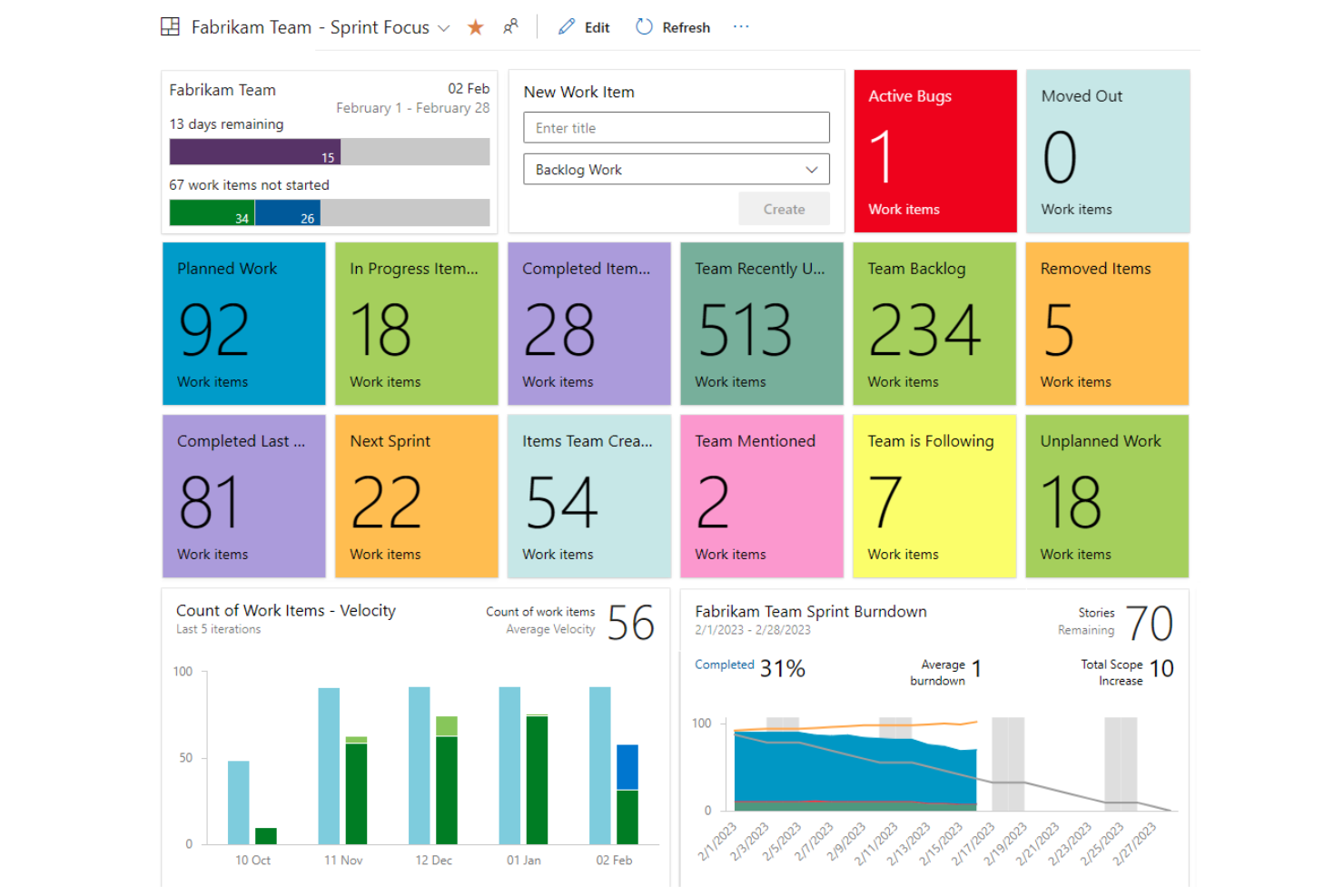
Azure DevOps è una suite completa di strumenti di sviluppo rivolta ai team di sviluppo software, in particolare a quelli che operano nell'ecosistema Microsoft. Offre funzionalità cloud per la pianificazione, lo sviluppo, la distribuzione e la gestione delle applicazioni, garantendo un flusso di lavoro coeso per il tuo team.
Perché ho scelto Azure DevOps: Supporta l'intero ciclo di vita del software end-to-end e si integra perfettamente con altri prodotti Microsoft, rendendolo una scelta eccellente per i team che già utilizzano le tecnologie Microsoft. Azure Pipelines consente l'integrazione e la distribuzione continua. Puoi creare, testare e distribuire app Python, Java, PHP, Ruby, Android e iOS, tra le altre. Integra suggerimenti di codice assistiti dall'IA e strumenti di revisione per accelerare lo sviluppo e ridurre l'errore umano.
Azure Pipelines supporta flussi di lavoro che creano immagini container e le inviano ai registry, aiutando i team a implementare la containerizzazione come parte delle pipeline CI/CD. Con Azure Boards puoi monitorare il lavoro con bacheche Kanban intuitive, backlog e reportistica personalizzata. Puoi anche gestire il tuo codice sorgente con Azure Repos, che offre repository Git privati illimitati.
Funzionalità distintive e integrazioni:
Le funzionalità includono Azure Test Plans per testare e rilasciare con sicurezza. Azure Artifacts consente di creare e condividere feed di pacchetti Maven, npm e NuGet. Puoi anche utilizzare il wiki integrato per documentare processi e conoscenze.
Le integrazioni includono GitHub, Slack, Jenkins, Docker, Kubernetes, Visual Studio, Microsoft Teams e molto altro.
Pros and Cons
Pros:
- Integrazione coesa con i prodotti Microsoft
- Ampie capacità CI/CD
- Supporta diversi linguaggi di programmazione
Cons:
- Configurazione complessa per i nuovi utenti
- Integrazioni limitate con piattaforme non Microsoft

CircleCI
La dashboard di CircleCI mostra lo stato dei progetti, i workflow e l’attività CI/CD.

CircleCI è una piattaforma di integrazione e distribuzione continua rivolta ai team di sviluppo software che desiderano costruire, testare e distribuire codice rapidamente. Automatizza il processo di sviluppo, garantendo feedback più veloci e rilasci più affidabili.
Perché ho scelto CircleCI: Si concentra sulla velocità e affidabilità assistite dall’intelligenza artificiale, rendendolo una scelta di spicco per i team che necessitano di tempi di consegna rapidi. La funzionalità di parallelismo di CircleCI consente di eseguire più test contemporaneamente, riducendo notevolmente i tempi di build. Grazie alle sue capacità di caching, puoi evitare lavori ridondanti e velocizzare le build.
Puoi anche personalizzare i tuoi workflow con file YAML per una maggiore flessibilità. I workflow automatizzati permettono la distribuzione continua attivando le release dopo build e test riusciti. Gli sviluppatori possono costruire, testare e distribuire applicazioni containerizzate definendo immagini Docker e workflow all’interno delle pipeline CI/CD.
Funzionalità e integrazioni principali:
Funzionalità includono la possibilità di eseguire job in container Docker, migliorando la riproducibilità. CircleCI offre un sistema di caching personalizzato per migliorare i tempi di build riutilizzando dati dei run precedenti. Puoi anche utilizzare la dashboard delle analisi per monitorare e ottimizzare i tuoi workflow.
Integrazioni includono GitHub, Bitbucket, AWS, Google Cloud Platform, Heroku, Docker, Slack, Jira, Maven, Datadog e altro ancora.
Pros and Cons
Pros:
- Tempi di build e test rapidi
- Supporta l’esecuzione parallela dei test
- Personalizzabile con file YAML
Cons:
- Supporto limitato per workflow di distribuzione multi-cloud
- Il debug dei workflow può essere meno intuitivo
Altri strumenti di automazione DevOps
Ecco alcune ulteriori opzioni di strumenti di automazione DevOps che non sono state incluse nella mia selezione, ma che vale comunque la pena valutare:
- Terragrunt
Ideale per la gestione dei moduli Terraform
- Spacelift
Ideale per la policy as code
- Northflank
Ideale per lo sviluppo rapido e la scalabilità con intelligenza artificiale


Come valuto gli strumenti di automazione DevOps
Valuto questi strumenti su due livelli: le funzionalità di base che uno strumento deve avere e i fattori differenzianti—come il supporto a GitOps o la value stream mapping—che rendono uno strumento più adatto di un altro.
Funzionalità di base (requisiti fondamentali per questa lista)
Quando seleziono gli strumenti per la mia lista, valuto ciascuno di essi su una scala da 0 (non offre la funzionalità) a 5 (eccelle in quest'area) per ogni funzionalità base elencata di seguito. Poi, calcolo il punteggio totale dello strumento come percentuale. Ogni strumento deve raggiungere un punteggio totale minimo del 65% per essere preso in considerazione per l'inclusione.
- Automazione pipeline CI/CD: Cerco strumenti che permettano ai team di definire pipeline di build, test e deploy su più fasi—come l'attivazione automatica di una suite di test su ogni pull request e la promozione in produzione all'unione.
- Supporto Infrastructure as Code: Che si tratti di moduli Terraform o template nativi, valuto quanto bene una piattaforma configuri e gestisca risorse cloud tramite file di configurazione versionati.
- Ecosistema di integrazione: Verifico la presenza di connessioni native agli strumenti che i team di prodotto usano quotidianamente—fornitori Git, container registry, piattaforme cloud e strumenti di project management come Jira o Linear.
- Orchestrazione & monitoraggio dei rilasci: Coordinare un rilascio multiservizio tra staging e produzione è dove la gestione diventa cruciale. Cerco funzionalità di rollback e monitoraggio in tempo reale dello stato del deployment.
- Gestione degli ambienti & delle configurazioni: Valuto come ogni strumento gestisce la creazione di ambienti di sviluppo, staging e produzione con configurazioni versionate e archiviazione sicura delle credenziali integrata.
- Reportistica & analisi DevOps: Dashboard con metriche DORA come frequenza dei deployment e lead time per le modifiche sono fondamentali. Cerco trasparenza sullo stato delle pipeline e la velocità di delivery.
Una volta che ho una lista di strumenti che soddisfano questi criteri, considero cosa distingue ciascuna piattaforma.
Fattori differenzianti (cosa distingue i fornitori)
Ecco come confronto i diversi fornitori:
Caratteristiche distintive
La value stream mapping è fondamentale per me—collega le attività di ingegneria ai risultati di prodotto, così puoi tracciare una funzionalità dal ticket in backlog fino al deploy in produzione. Cerco anche la gestione nativa dei feature flag, che permette ai team di prodotto di effettuare rollout controllati e test A/B senza ridistribuire il codice. I portali self-service per sviluppatori rappresentano un altro fattore importante, perché permettono ai team di creare ambienti e attivare deploy senza dover attendere l’intervento dell’ops.
Oltre le funzionalità
Sicurezza e conformità sono fondamentali—soprattutto per i team in settori regolamentati dove la certificazione SOC 2 o ISO 27001 è un requisito di base. Valuto anche la trasparenza dei prezzi, dato che i modelli basati sui minuti di build possono portare a costi imprevedibili man mano che cresce il volume delle pipeline. Un altro fattore che considero è quanto bene uno strumento si integri con le piattaforme di gestione prodotto come Jira o Linear, perché è proprio quel collegamento che consente ai product manager di tracciare una funzionalità rilasciata fino alla user story originale.
Come scegliere gli strumenti di automazione DevOps
È facile perdersi tra lunghi elenchi di funzionalità e strutture tariffarie complesse. Per aiutarti a rimanere concentrato mentre affronti il tuo specifico processo di selezione del software, ecco una lista di fattori da tenere presenti:
| Fattore | Cosa considerare |
|---|---|
| Scalabilità | Lo strumento crescerà insieme al tuo team? Cerca soluzioni in grado di gestire carichi di lavoro e numeri di utenti maggiori senza cali significativi delle prestazioni. |
| Integrazioni | Funziona con gli strumenti che già utilizzi? Verifica la compatibilità con i tuoi sistemi attuali, come il controllo delle versioni, i fornitori cloud e le piattaforme di comunicazione. |
| Personalizzazione | Puoi adattarlo alle tue esigenze? Valuta quanto sia semplice modificare i flussi di lavoro e le impostazioni in base ai tuoi processi e obiettivi specifici. |
| Semplicità d'uso | L'interfaccia è intuitiva per il tuo team? Considera la rapidità con cui il tuo team può imparare a usare lo strumento e iniziare a sfruttarlo efficacemente senza una formazione approfondita. |
| Implementazione e avvio | Quanto è agevole la transizione? Cerca strumenti con risorse chiare per l'avvio, come tutorial, modelli e supporto, che facilitino il passaggio. |
| Costo | Rientra nel tuo budget? Confronta i prezzi con il tuo budget e considera eventuali costi nascosti, come componenti aggiuntivi o aggiornamenti necessari, che potrebbero incidere sul totale. |
| Misure di sicurezza | I tuoi dati e le tue operazioni sono protetti? Assicurati che lo strumento offra misure di sicurezza, come crittografia e controlli degli accessi, per proteggere le informazioni sensibili. |
Cosa sono gli strumenti di automazione DevOps?
Gli strumenti di automazione DevOps sono soluzioni software che automatizzano i processi coinvolti nello sviluppo e nella distribuzione del software. Gli sviluppatori software, i professionisti IT e i team DevOps utilizzano generalmente questi strumenti per migliorare la collaborazione e l'efficienza. Le funzionalità di distribuzione automatizzata, integrazione continua e gestione dell'infrastruttura aiutano a ridurre gli errori e ad accelerare il processo di distribuzione. Nel complesso, questi strumenti offrono un valore significativo consentendo ai team di distribuire software di alta qualità più velocemente e in modo più affidabile.
Funzionalità
Quando selezioni gli strumenti di automazione DevOps, presta attenzione alle seguenti funzionalità principali:
- Distribuzione automatizzata: semplifica il processo di rilascio, riducendo gli errori manuali e accelerando i tempi di distribuzione.
- Integrazione continua: unisce regolarmente le modifiche al codice, assicurando che i nuovi aggiornamenti vengano testati e integrati senza problemi.
- Infrastruttura come codice: gestisce l'infrastruttura tramite codice, consentendo distribuzioni coerenti e ripetibili.
- Integrazione con il controllo delle versioni: funziona senza problemi con i sistemi di controllo delle versioni, facilitando la collaborazione e il monitoraggio delle modifiche.
- Policy come codice: applica la conformità e la governance definendo le policy nel codice, garantendo coerenza tra gli ambienti.
- Rilevamento delle deviazioni: identifica e corregge le modifiche impreviste nell'infrastruttura, mantenendo l'integrità del sistema.
- Flussi di lavoro personalizzabili: consentono ai team di adattare i processi alle proprie esigenze specifiche, aumentando flessibilità ed efficienza.
- Misure di sicurezza: forniscono crittografia e controlli degli accessi per proteggere i dati sensibili e garantire operazioni sicure.
- Scalabilità: supporta carichi di lavoro e team in crescita, gestendo una domanda maggiore senza problemi di prestazioni.
- Strumenti di collaborazione: rafforzano la comunicazione e il coordinamento del team, migliorando la produttività e i risultati del progetto.
Vantaggi
L'implementazione degli strumenti di automazione DevOps offre diversi vantaggi al tuo team e alla tua azienda. Ecco alcuni dei vantaggi che puoi aspettarti:
- Distribuzione più rapida: i processi di distribuzione automatizzati riducono le attività manuali, consentendo al team di rilasciare gli aggiornamenti più rapidamente.
- Collaborazione migliorata: l'integrazione con gli strumenti di controllo delle versioni e di collaborazione rafforza il lavoro di squadra e la comunicazione.
- Coerenza e affidabilità: l'infrastruttura come codice garantisce la coerenza degli ambienti, riducendo il rischio di errori.
- Maggiore sicurezza: le misure di sicurezza, come la crittografia e i controlli degli accessi, proteggono i dati e le operazioni.
- Scalabilità: supporta il team e il carico di lavoro in crescita, adattandosi alle maggiori esigenze senza compromettere le prestazioni.
- Riduzione dei tempi di inattività: il rilevamento delle deviazioni e l'integrazione continua aiutano a identificare e risolvere i problemi prima che causino interruzioni.
- Efficienza dei costi: l'automazione delle attività ripetitive consente di risparmiare tempo e risorse, portando a un utilizzo più efficiente del budget.
Costi e prezzi
La selezione degli strumenti di automazione DevOps richiede la comprensione dei vari modelli e piani tariffari disponibili. I costi variano in base alle funzionalità, alle dimensioni del team, ai componenti aggiuntivi e ad altri fattori. La tabella seguente riassume i piani comuni, i relativi prezzi medi e le funzionalità generalmente incluse nelle soluzioni di strumenti di automazione DevOps:
Tabella di confronto dei piani per gli strumenti di automazione DevOps
| Tipo di piano | Prezzo medio | Funzionalità comuni |
|---|---|---|
| Piano gratuito | $0 | Funzionalità CI/CD di base, integrazioni limitate e supporto della comunità. |
| Piano personale | $4-$29/utente/mese | Funzionalità CI/CD migliorate, supporto di base e accesso a modelli e script di automazione limitati. |
| Piano aziendale | $25-$52/utente/mese | Integrazioni avanzate, supporto prioritario, flussi di lavoro personalizzabili e funzionalità di sicurezza. |
| Piano aziendale avanzato | $75-$150/utente/mese | Misure di sicurezza complete, supporto dedicato, integrazioni personalizzate e analisi avanzate. |
Domande frequenti sugli strumenti di automazione DevOps
Ecco alcune risposte alle domande comuni sugli strumenti di automazione DevOps:
Qual è la differenza tra DevOps e gli strumenti di automazione DevOps?
DevOps è un insieme di pratiche volte a migliorare la collaborazione e l’efficienza tra i team di sviluppo e delle operazioni. Gli strumenti di automazione DevOps sono soluzioni software che automatizzano vari processi DevOps, come l’integrazione, i test e la distribuzione. Se stai implementando pratiche DevOps, l’utilizzo di strumenti di automazione può aiutare il tuo team a ridurre il lavoro manuale e ad aumentare la coerenza tra i progetti.
Gli strumenti di automazione DevOps possono funzionare con i sistemi obsoleti esistenti?
Sì, molti strumenti di automazione DevOps possono integrarsi con i sistemi obsoleti esistenti. Quando selezioni uno strumento, verifica la sua compatibilità con l’infrastruttura e il software attuali. Alcuni strumenti offrono componenti aggiuntivi o API per facilitare l’integrazione, contribuendo ad agevolare la transizione e garantendo che il tuo team possa sfruttare l’automazione senza dover rinnovare completamente i sistemi esistenti.
Come faccio a sapere se il mio team è pronto per gli strumenti di automazione DevOps?
Per determinare se il tuo team è pronto, valuta il flusso di lavoro attuale e individua i colli di bottiglia nei processi di sviluppo e distribuzione. Se le attività manuali stanno rallentando il tuo team, è un buon indicatore del fatto che l’automazione potrebbe apportare valore. Prendi in considerazione l’idea di iniziare con un progetto pilota per testare l’efficacia degli strumenti e ottenere il consenso del tuo team.
Gli strumenti di automazione DevOps sono sicuri?
Sì, la maggior parte degli strumenti di automazione DevOps include funzionalità di sicurezza come la crittografia e i controlli degli accessi. Tuttavia, è essenziale esaminare le misure di sicurezza specifiche di qualsiasi strumento che stai valutando. Cerca funzionalità come il controllo degli accessi basato sui ruoli e i registri di audit, per garantire che i tuoi dati e le tue operazioni rimangano sicuri mentre automatizzi i processi.
Prossimi passi:
Se stai cercando informazioni sugli strumenti di automazione DevOps, contatta gratuitamente un consulente SoftwareSelect per ricevere consigli.
Compili un modulo e fai una breve conversazione durante la quale il consulente approfondirà le tue esigenze specifiche. Dopodiché riceverai una selezione ristretta di software da esaminare. Ti assisterà anche durante l'intero processo di acquisto, comprese le trattative sul prezzo.