

10 migliori software per storie utente per team Agile nel 2026

Elenco dei migliori software per storie utente


Con così tanti software diversi per storie utente disponibili, capire quale sia quello giusto per te è difficile. Sai di voler mantenere l’attenzione sull’utente finale, descrivendo le funzionalità dal punto di vista dell’utente e conservandone una registrazione in un luogo consultabile, ma devi capire quale strumento sia il migliore a questo scopo. Ci penso io! In questo articolo ti aiuterò a rendere semplice la tua scelta, condividendo la mia esperienza personale nell’utilizzo di decine di strumenti diversi per storie utente con team numerosi, insieme alle mie scelte dei migliori software per storie utente.
Che cos’è il software per storie utente?
Il software per storie utente si riferisce agli strumenti che aiutano i team di sviluppo a creare, gestire e organizzare le storie utente come parte del processo di sviluppo Agile. In genere, il software per storie utente offre una piattaforma centralizzata in cui i team possono scrivere, organizzare e stabilire la priorità delle storie utente. Questi strumenti spesso includono funzionalità per la collaborazione, la gestione del backlog, la pianificazione degli sprint e il monitoraggio dei progressi delle storie utente durante tutto il ciclo di vita dello sviluppo.
L’obiettivo del software per storie utente è migliorare la comunicazione, la collaborazione e la trasparenza all’interno dei team di sviluppo, assicurandosi che tutte le persone coinvolte comprendano le esigenze e i requisiti degli utenti. Viene comunemente utilizzato nelle metodologie Agile e Scrum per supportare pratiche di sviluppo iterative e incrementali.
Perché fidarsi dei nostri consigli sui software
Il nostro team testa e recensisce software dal 2012. In quanto product manager noi stessi, sappiamo quanto sia difficile — e importante — scegliere il software giusto.
Per questa guida, abbiamo valutato gli strumenti attraverso test pratici e ricerche indipendenti, assegnando un punteggio agli strumenti in base ai nostri criteri di selezione.
Le nostre recensioni riflettono il nostro giudizio editoriale umano, non un discorso di vendita.
Tabella comparativa dei migliori software per storie utente
Ecco una tabella in cui puoi trovare tutti gli strumenti appena illustrati nelle panoramiche.
| Tool | Best For | Trial Info | Price | ||
|---|---|---|---|---|---|
| 1 | Ideale per la mappatura delle storie nella gestione agile dei prodotti | Prova gratuita di 14 giorni + dimostrazione gratuita disponibile | A partire da $9/utente/mese (con fatturazione annuale) | Website | |
| 2 | Ideale per una comunicazione e una collaborazione efficaci | Demo gratuita + prova gratuita di 30 giorni disponibile | A partire da $6/mese | Website | |
| 3 | Ideale per pianificare le storie insieme al codice e alla CI/CD | Prova gratuita di 30 giorni + demo gratuita | Da $19/utente/mese | Website | |
| 4 | Ideale per la pianificazione delle storie di nuovi prodotti guidata dalla strategia | Prova gratuita di 30 giorni | A partire da $74/utente/mese | Website | |
| 5 | Ideale per il monitoraggio nativo delle storie agili in Zoho | Piano gratuito e prova gratuita di 15 giorni disponibili | A partire da $3/utente/mese | Website | |
| 6 | Ideale per la gestione completa del backlog e il monitoraggio degli sprint | Piano gratuito disponibile | A partire da $7/utente/mese (con fatturazione annuale) | Website | |
| 7 | Ideale per creare e gestire le epiche | Piano gratuito + prova gratuita di 14 giorni + demo gratuita disponibile | A partire da $8.50/utente/mese (con fatturazione annuale) | Website | |
| 8 | Ideale per la pianificazione degli sprint tra i team di sviluppo e prodotto | Piano gratuito + demo gratuita + prova di 14 giorni disponibili | A partire da $9.05/utente/mese | Website | |
| 9 | Ideale come contenitore open source per Servlet Java | Piano gratuito disponibile | Piano gratuito disponibile | Website | |
| 10 | Ideale per la pianificazione degli sprint nell'ecosistema Microsoft | Piano gratuito disponibile + prova gratuita di 30 giorni + demo gratuita disponibile | A partire da $6/utente/mese | Website |

Panoramica delle 9 migliori soluzioni per storie utente
Ecco una breve descrizione di ciascun sistema per storie utente, per illustrare il caso d’uso migliore di ogni strumento, alcune funzionalità degne di nota e schermate che offrono una panoramica dell’interfaccia utente.

Ideale per la mappatura delle storie nella gestione agile dei prodotti
StoriesOnBoard è uno strumento dedicato alla mappatura delle storie utente che organizza l'elenco delle attività su tre livelli—obiettivi utente, passaggi e storie—con quadri di lavoro per l'assegnazione delle priorità, pianificazione dei rilasci e sincronizzazione bidirezionale con Jira, Azure DevOps e altri sistemi di gestione delle attività.
Per chi è più adatto StoriesOnBoard?
StoriesOnBoard è una soluzione ideale per i responsabili di prodotto e i team agili che necessitano di un metodo strutturato per mappare, assegnare priorità e pianificare gli elenchi delle attività insieme ai sistemi di gestione delle attività già in uso.
Perché ho scelto StoriesOnBoard
StoriesOnBoard è entrato nella mia rosa dei preferiti perché la sua struttura della mappa delle storie a tre livelli (obiettivi utente, passaggi, storie) è progettata appositamente per la pianificazione agile dei prodotti, in un modo che la maggior parte degli strumenti semplicemente non offre. Mi piace molto che l'assegnazione delle priorità sia integrata direttamente nel flusso di lavoro della mappatura, con la possibilità di utilizzare collaborativamente i punteggi RICE, MoSCoW, Kano e Valore rispetto allo sforzo, così il mio team può discutere i compromessi senza cambiare strumento. Le corsie dei rilasci ci permettono di inserire le storie con priorità nelle iterazioni pianificate e di aggregare istantaneamente le stime a livello di rilascio.
Funzionalità principali di StoriesOnBoard
- Sincronizzazione bidirezionale con i sistemi di gestione delle attività: Sincronizza automaticamente le schede delle storie in entrambe le direzioni con Jira, Azure DevOps, Trello e GitHub Issues, mantenendo allineati la mappa e l'elenco delle attività di sviluppo.
- Assistente IA per le storie: Genera storie utente, scrive i profili utente, raccoglie i criteri di accettazione e prepara bozze dei riepiloghi dei rilasci utilizzando una disponibilità mensile di token IA.
- Piano del portafoglio: Visualizza rilasci e iniziative tra più prodotti in viste a corsia con report sullo stato e modelli di pianificazione.
- Portale pubblico per i riscontri: Permette di raccogliere, etichettare e votare le idee di prodotto degli stakeholder esterni attraverso un portale personalizzato e condivisibile.
Integrazioni di StoriesOnBoard
StoriesOnBoard offre sei integrazioni native, tra cui Jira, Azure DevOps, Trello, GitHub Issues, Pivotal Tracker e Slack. Supporta anche Zapier, mentre le opzioni di integrazione personalizzate sono limitate dall'assenza di un'API pubblica completa.
Pros and Cons
Pros:
- Le mappe a tre livelli chiariscono l'ambito dei nuovi prodotti
- I punteggi RICE e Kano evidenziano i compromessi
- Le corsie dei rilasci collegano la fase di scoperta alla consegna
Cons:
- I report non includono le viste relative al lavoro residuo e alla velocità
- La modifica contemporanea limita la partecipazione ai workshop

Ideale per una comunicazione e una collaborazione efficaci

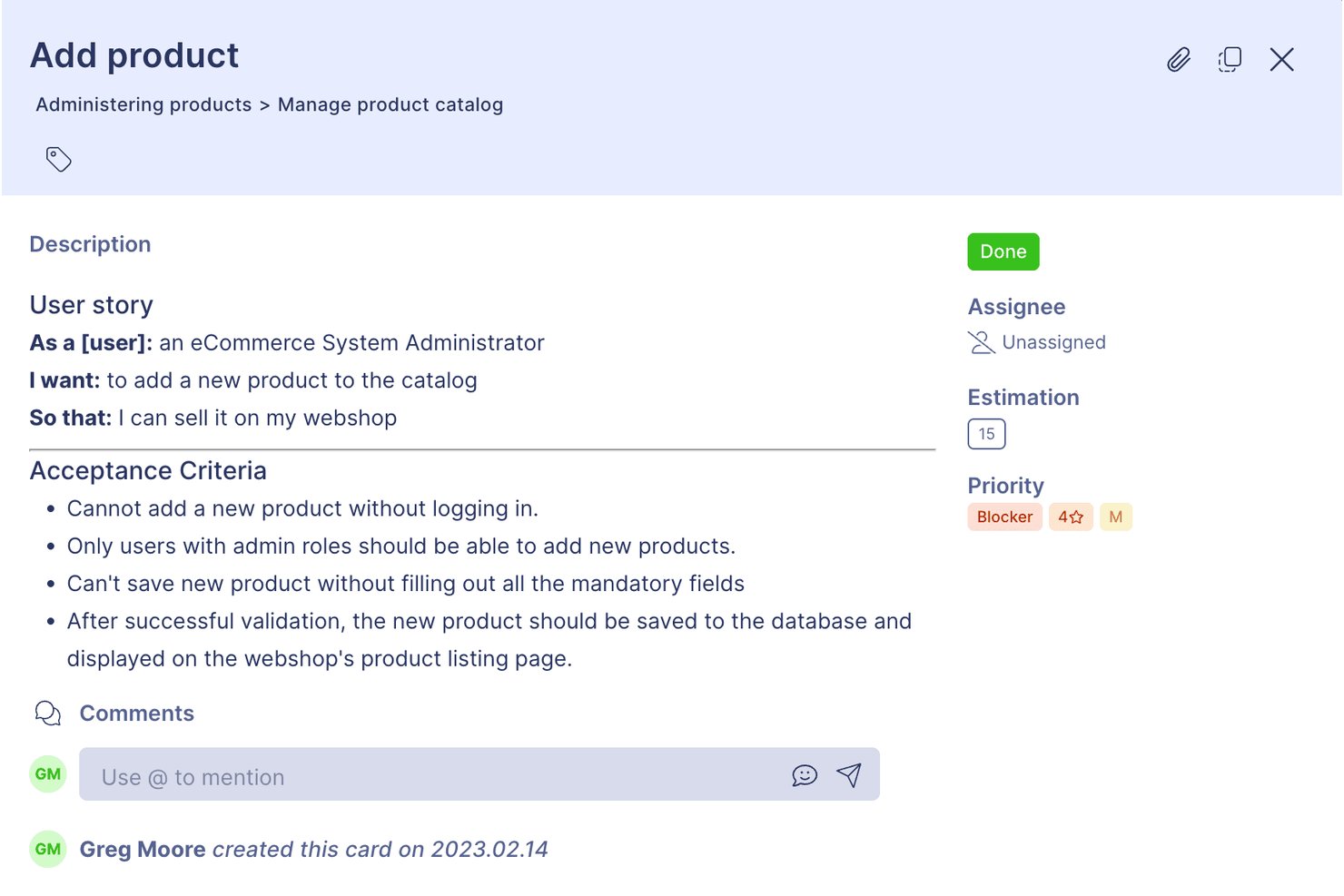
Visual Paradigm è una suite per la modellazione e la pianificazione agile che include la mappatura delle storie utente, la gestione del backlog, la pianificazione degli sprint e il monitoraggio dei criteri di accettazione, oltre a strumenti per UML, BPMN e la modellazione dei processi.
Per chi è più adatto Visual Paradigm?
Visual Paradigm è particolarmente adatto agli analisti aziendali e ai team di prodotto che hanno bisogno di collegare direttamente in un unico luogo i modelli di sistema, come i diagrammi UML o BPMN, alle storie utente e ai backlog degli sprint.
Perché ho scelto Visual Paradigm
Ho scelto Visual Paradigm come una delle soluzioni migliori perché considera la comunicazione una funzionalità strutturale, non un elemento secondario. Gli elementi di conferma consentono di allegare checklist dei criteri di accettazione direttamente a ogni storia, mentre PostMania permette agli stakeholder di commentare e approvare senza dover disporre di una licenza. Apprezzo anche il fatto che le note della conversazione mantengano discussioni e decisioni associate alla storia stessa, così nulla va perso in un thread separato.
Funzionalità principali di Visual Paradigm
- Editor di scenari scritti: Crea flussi di interazione tra utente e sistema, passo dopo passo, per ogni storia, con supporto per condizioni se-allora-altrimenti e cicli, convertibili direttamente in diagrammi di sequenza o di attività.
- Stima tramite tabella di affinità: Valuta le storie in base ad assi configurabili di impegno e rischio per generare punti storia e ore utili alla pianificazione degli sprint.
- Tracciabilità dal modello alla storia: Crea elementi del backlog direttamente da diagrammi dei casi d'uso, modelli BPMN o artefatti EA, mantenendo i collegamenti tra il modello di origine e la mappa delle storie.
- Commenti degli stakeholder tramite PostMania: Consenti agli stakeholder senza licenza di esaminare, commentare e approvare i diagrammi tramite un browser online, senza acquistare una postazione.
Integrazioni di Visual Paradigm
Visual Paradigm offre integrazioni con Jira e Atlassian Confluence, inclusa la creazione di elementi Jira a partire dai diagrammi e la pubblicazione su Confluence. Supporta inoltre importazioni da Visio, Bizagi, strumenti Rational, ErWin e PowerDesigner.
Pros and Cons
Pros:
- La tracciabilità dei modelli collega i requisiti alle storie
- Le checklist di accettazione chiariscono le aspettative degli stakeholder
- Gli storyboard aggiungono contesto oltre alle schede di testo
Cons:
- I flussi di lavoro incentrati sui diagrammi appesantiscono i team Scrum più orientati alla semplicità
- I diagrammi di grandi dimensioni possono rallentare le prestazioni

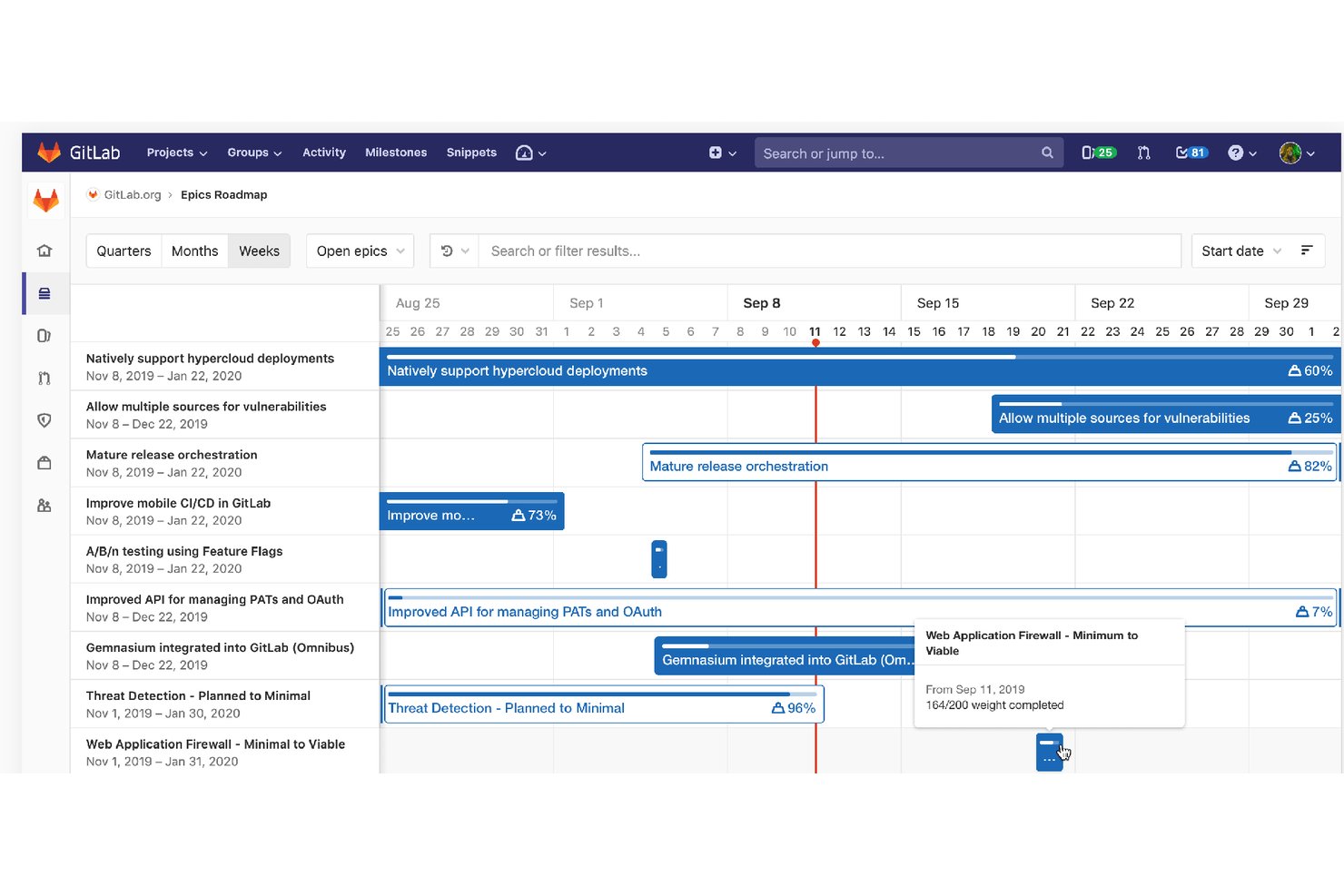
GitLab è una piattaforma DevSecOps che riunisce la creazione delle storie utente, la gestione del backlog, la pianificazione degli sprint e la definizione della roadmap con il codice sorgente, le pipeline CI/CD e gli strumenti di sicurezza in un unico ambiente.
Per chi è più adatto GitLab?
GitLab è particolarmente adatto ai team guidati dall'ingegneria che vogliono pianificare e monitorare le storie utente nella stessa piattaforma in cui scrivono, revisionano e distribuiscono il codice.
Perché ho scelto GitLab
Ho scelto GitLab come uno dei migliori perché è l'unico strumento di questo elenco in cui le storie utente e la base di codice condividono lo stesso ambiente. Quando creo un'attività utilizzando un modello di descrizione 'In qualità di… Voglio… così che…', posso collegarla direttamente a un ramo, a una richiesta di unione e a una pipeline CI/CD; inoltre, GitLab chiude automaticamente la storia al momento dell'unione. Mi affido anche alle cadenze delle iterazioni con avanzamento automatico del lavoro incompiuto per mantenere fluida la pianificazione degli sprint senza dover effettuare operazioni di pulizia manuali tra un ciclo e l'altro.
Funzionalità principali di GitLab
- Modelli di descrizione: Archivia i modelli Markdown 'In qualità di… Voglio… così che…' nel controllo versione e applicali in modo coerente a ogni progetto del tuo gruppo.
- Tabelloni degli epic e roadmap: Visualizza gli epic su una sequenza temporale in stile Gantt filtrata per milestone, etichetta o data per monitorare i progressi tra più flussi di lavoro.
- Limiti WIP: Imposta limiti sul numero di attività o sul peso totale per ogni elenco del tabellone, così da evitare che i team sovraccarichino una colonna dello sprint.
- Grafici burndown e burnup: Monitora i progressi dell'iterazione in base al numero di attività o al peso delle storie, con grafici generati automaticamente e aggiornati in tempo reale.
Integrazioni di GitLab
GitLab offre integrazioni native con Jira, Slack, Microsoft Teams, Jenkins, Confluence Cloud e Squash TM. Le API REST e GraphQL, i webhook, le pipeline CI/CD e le estensioni per IDE supportano flussi di lavoro di sviluppo personalizzati.
Pros and Cons
Pros:
- Le storie si collegano direttamente alle modifiche del codice
- I modelli standardizzano formati coerenti per le storie
- Le cadenze fanno avanzare automaticamente il lavoro incompiuto
Cons:
- I criteri di accettazione restano checklist non strutturate
- La navigazione orientata agli sviluppatori può rallentare la pianificazione degli utenti non tecnici

Ideale per la pianificazione delle storie di nuovi prodotti guidata dalla strategia
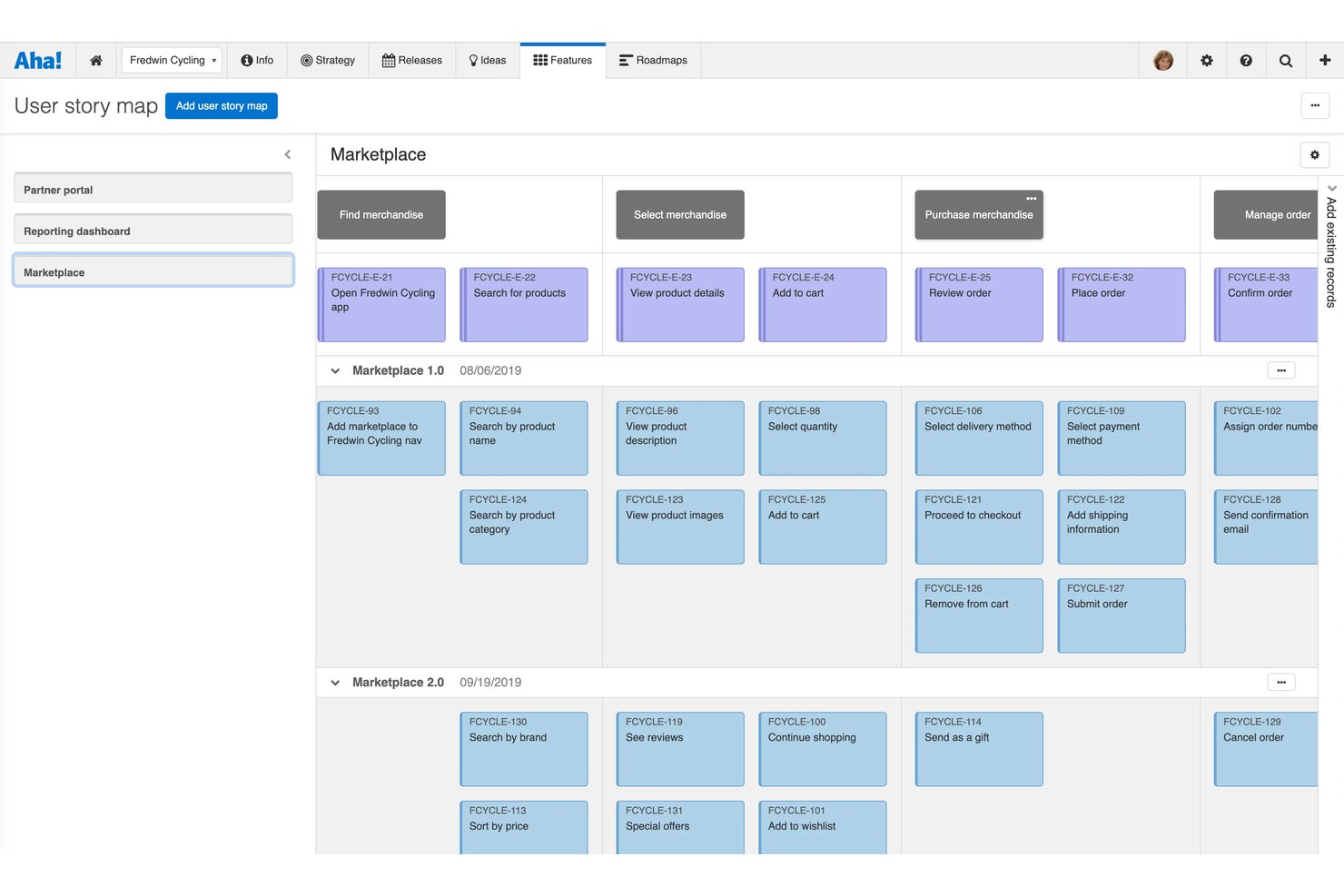
Aha! Roadmaps è una piattaforma di gestione dei prodotti che collega la strategia all'esecuzione attraverso una gerarchia strutturata di obiettivi, epiche, funzionalità e requisiti, con mappatura nativa delle storie utente, definizione delle priorità del backlog, criteri di accettazione assistiti dall'IA e sincronizzazione bidirezionale con strumenti di sviluppo come Jira e Azure DevOps.
A chi è più adatto Aha! Roadmaps?
Aha! Roadmaps è particolarmente adatto ai product manager che devono collegare direttamente la strategia aziendale alle storie utente e ai requisiti delle funzionalità.
Perché ho scelto Aha! Roadmaps
Aha! Roadmaps si è guadagnato un posto nella mia selezione perché è l'unico strumento che ho utilizzato in grado di tracciare un obiettivo aziendale fino a una singola storia utente senza perdere il filo. Adoro il modo in cui la gerarchia Obiettivi→Epiche→Funzionalità→Requisiti mi permette di collegare ogni storia a un'iniziativa strategica prima ancora che venga scritta una sola riga di codice. La mappa nativa delle storie utente mi consente inoltre di filtrare per profilo utente, così posso vedere immediatamente quali storie soddisfano ciascun tipo di utente all'interno di una versione.
Funzionalità principali di Aha! Roadmaps
- Generazione dei criteri di accettazione assistita dall'IA: Elle AI redige criteri di accettazione verificabili e testabili per le singole funzionalità, inclusi i casi limite, direttamente all'interno della scheda.
- Sincronizzazione bidirezionale con gli strumenti di sviluppo: I requisiti si sincronizzano bidirezionalmente con Jira, Azure DevOps, GitHub e GitLab, con mappatura personalizzabile dei campi tra i tipi di record.
- Campi per la stima delle storie: Ogni funzionalità e requisito supporta stime iniziali, dettagliate ed effettive dell'impegno in punti storia o tempo, con visualizzazione nel rapporto della capacità.
- Promozione da idea a storia: Le idee dei clienti raccolte in Aha! Ideas possono essere promosse direttamente a epiche, funzionalità o requisiti, collegando il feedback agli elementi del backlog.
Integrazioni di Aha! Roadmaps
Aha! Roadmaps offre oltre 40 integrazioni native, tra cui Jira, Azure DevOps, GitHub, GitLab, Rally, Slack, Microsoft Teams, Confluence, Figma e Zendesk. Fornisce inoltre un'API REST per le integrazioni personalizzate e supporta Zapier.
Pros and Cons
Pros:
- Tracciabilità dalla strategia alla storia
- Mappe delle storie filtrate per profilo utente
- Criteri di accettazione redatti dall'IA
Cons:
- L'esecuzione nativa delle iterazioni richiede un prodotto separato
- La configurazione estesa può risultare complessa per le squadre più piccole

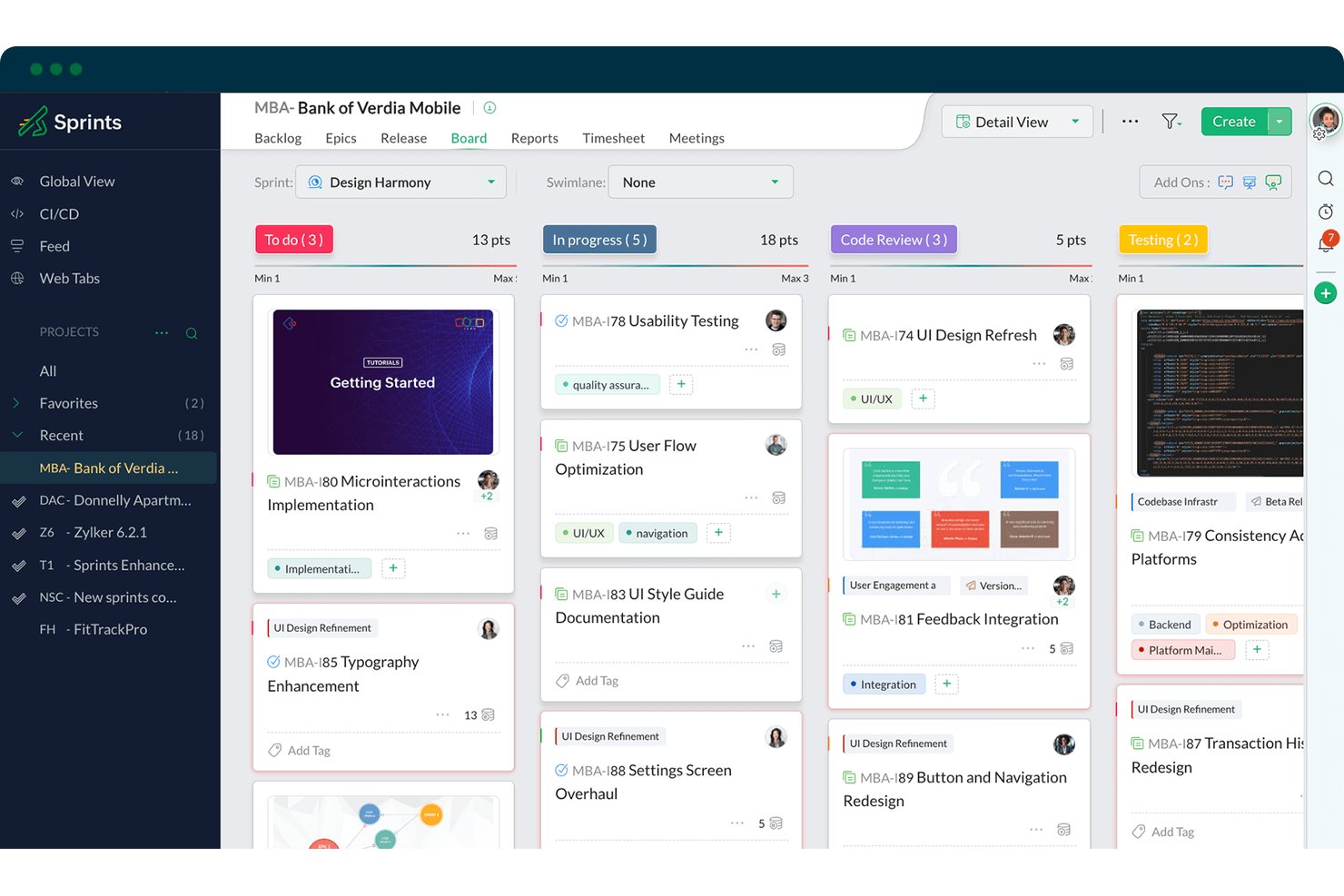
Zoho Sprints è uno strumento agile di gestione dei progetti che copre la creazione delle storie utente, la gestione del backlog e degli epic, la pianificazione degli sprint e le bacheche Scrum/Kanban all'interno di una suite più ampia per il ciclo di vita agile.
Per chi è più adatto Zoho Sprints?
Zoho Sprints è particolarmente adatto ai team agili che fanno già parte dell'ecosistema Zoho e desiderano una gestione completa di sprint e backlog senza sostenere i costi degli strumenti aziendali.
Perché ho scelto Zoho Sprints
Zoho Sprints si è guadagnato un posto nella mia selezione perché è progettato appositamente per gestire l'intero ciclo di vita agile delle storie, dal backlog allo sprint fino al rilascio, all'interno di un unico ambiente nativo. Apprezzo in particolare il modo in cui il modulo di gestione degli epic associa direttamente le storie utente agli epic con aggiornamenti aggregati in tempo reale sull'avanzamento, permettendomi di vedere a colpo d'occhio come le singole storie contribuiscono agli obiettivi più ampi. I team che utilizzano già Zoho ottengono ancora più valore, poiché Cliq, Desk e Analytics si collegano senza configurazioni aggiuntive, mantenendo in un unico luogo le discussioni sulle storie e la reportistica.
Funzionalità principali di Zoho Sprints
- Modello nativo per le storie utente: Struttura le storie utilizzando il formato 'In qualità di/Voglio/Così da' con campi integrati per titolo, descrizione e criteri di accettazione.
- Report di burndown e velocità: Tiene traccia dell'avanzamento dello sprint e della produttività del team nel tempo mediante grafici visivi collegati direttamente ai punti di stima delle storie.
- Criteri di accettazione basati su checklist: Consente ai team di aggiungere alle singole storie elementi verificabili della definizione di completamento utilizzando modelli di checklist riutilizzabili.
- Integrazione SCM: Collega GitHub, GitLab, Bitbucket e Azure DevOps, consentendo agli sviluppatori di associare commit e richieste pull a storie utente specifiche.
Integrazioni di Zoho Sprints
Zoho Sprints offre integrazioni native con GitHub, GitLab, Bitbucket, Azure DevOps, Jenkins, Jira, Zoho Analytics, Zoho Cliq, Microsoft Teams e Google Drive. Supporta inoltre API, webhook, Zoho Flow e Zapier per collegamenti personalizzati.
Pros and Cons
Pros:
- Associa le storie agli epic con aggiornamenti aggregati sull'avanzamento
- Collega i criteri di accettazione alle checklist
- Supporta flussi di lavoro agili dal backlog al rilascio
Cons:
- La terminologia Scrum può confondere gli stakeholder non tecnici
- Nessuna mappa delle storie o canvas dedicato al percorso

ClickUp
Ideale per la gestione completa del backlog e il monitoraggio degli sprint
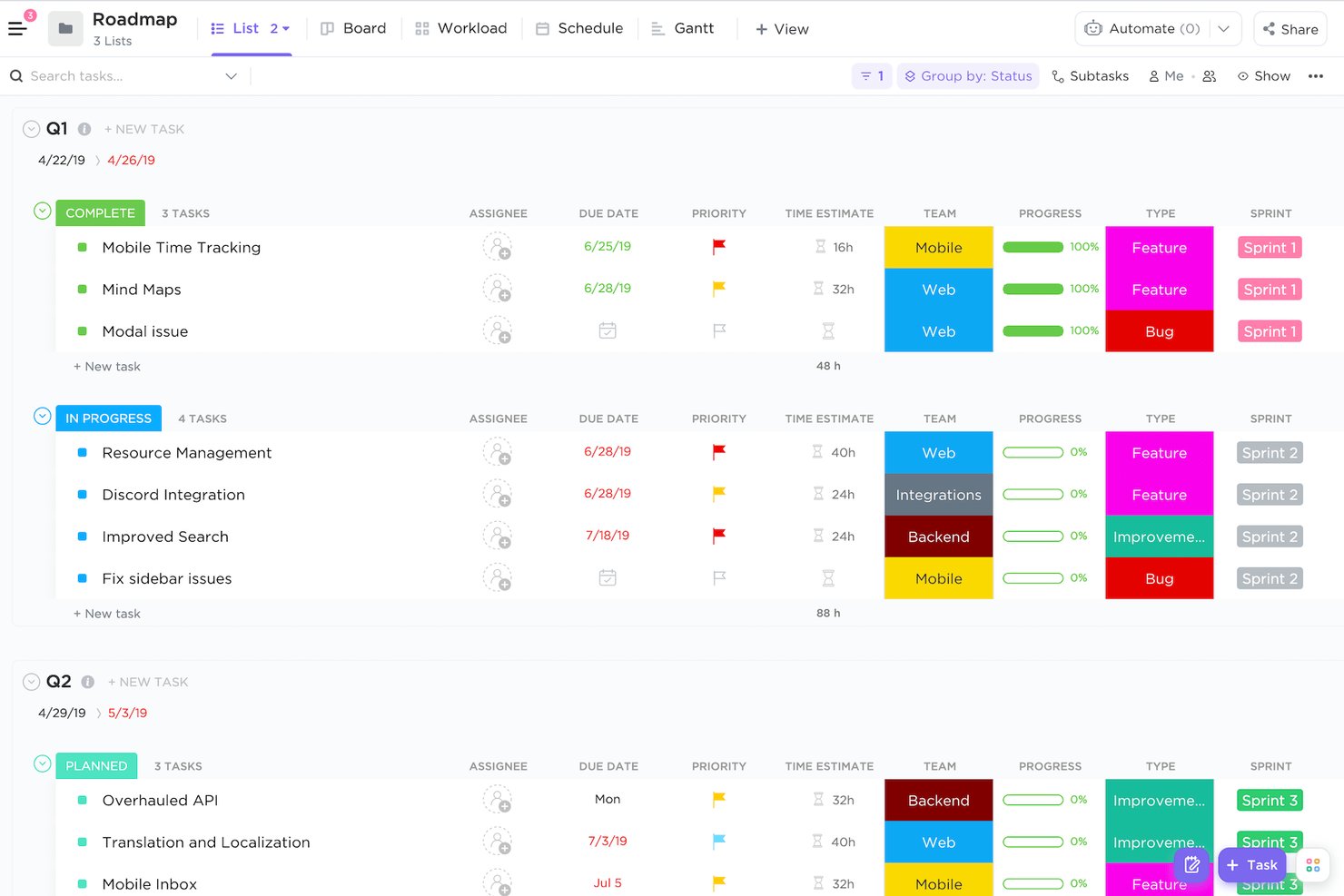
ClickUp è una piattaforma di gestione dei progetti che riunisce la creazione di storie utente, la gestione del backlog, la pianificazione degli sprint e la reportistica agile in un unico spazio di lavoro altamente personalizzabile.
Per chi è più adatto ClickUp?
ClickUp è adatto ai team di prodotto che desiderano gestire backlog, monitorare gli sprint, utilizzare documenti e collaborare in un unico spazio di lavoro senza dover gestire più strumenti.
Perché ho scelto ClickUp
ClickUp è entrato nella mia rosa dei preferiti perché mantiene l'intero flusso di lavoro delle storie, dalla gestione del backlog alla chiusura dello sprint, all'interno di un unico spazio di lavoro. Apprezzo particolarmente il fatto che i tipi di attività personalizzati consentano di etichettare il lavoro come 'Storia', 'Epica' o 'Errore' e di associare campi strutturati, come punti dello sprint, priorità e liste di controllo dei criteri di accettazione, direttamente a ciascun tipo di storia. Le cartelle Sprint native, con trasferimento automatico delle attività residue, e i pannelli di controllo del lavoro residuo fanno sì che non debba assemblare uno strumento di reportistica separato solo per monitorare la velocità.
Funzionalità principali di ClickUp
- Tipi di attività personalizzati: Definisci tipi di attività come 'Storia', 'Epica' o 'Errore' e associa campi personalizzati univoci a ciascun tipo per ottenere dati sulle storie strutturati e coerenti.
- IA ClickUp Brain: Utilizza l'IA per redigere storie utente, generare criteri di accettazione e riepilogare i progressi dello sprint direttamente nelle attività e nei documenti.
- Dipendenze tra attività: Collega le storie con relazioni di blocco o di attesa per individuare i problemi di sequenziamento prima dell'inizio della pianificazione dello sprint.
- Mappatura delle storie su lavagna: Mappa visivamente i percorsi degli utenti e i flussi delle storie su una lavagna, quindi converti direttamente forme e note adesive in attività del backlog.
Integrazioni di ClickUp
ClickUp offre oltre 200 integrazioni native, tra cui GitHub, GitLab, Bitbucket, Slack, Microsoft Teams, Figma, Miro, Google Drive e Google Calendar. Fornisce inoltre un'API, webhook e Zapier per connessioni personalizzate.
Pros and Cons
Pros:
- La gerarchia del backlog supporta la suddivisione delle epiche
- La reportistica degli sprint supporta le previsioni delle versioni
- I commenti mantengono le discussioni sui criteri di accettazione associate alle attività
Cons:
- La configurazione agile richiede una progettazione attenta dello spazio di lavoro
- I criteri di accettazione non dispongono di un punto di controllo dedicato nel flusso di lavoro
New Product Updates from ClickUp
ClickUp Adds Meetings Hub, Super Agent Templates, and ZoomInfo Integration
ClickUp adds a searchable Meetings Hub, new ways to clone and template Super Agents, and a ZoomInfo integration through the App Center. These updates improve meeting retrieval, agent reuse, and access to sales intelligence. For more information, visit ClickUp’s official site.

Shortcut
Ideale per creare e gestire le epiche

Shortcut è uno strumento di gestione agile dei progetti basato su una gerarchia strutturata di storie—epiche, storie, sotto-attività e checklist—con gestione dell'arretrato, pianificazione degli sprint, tabella di marcia e stesura assistita dall'AI delle storie tramite il suo agente Korey.
Per chi è più adatto Shortcut?
Shortcut è particolarmente adatto ai team di prodotto agili—soprattutto responsabili di prodotto e proprietari del prodotto di start-up e aziende di medie dimensioni—che necessitano di una gerarchia strutturata da epica a storia senza il sovraccarico di strumenti come Jira.
Perché ho scelto Shortcut
Shortcut si è guadagnato un posto nella mia selezione perché gestisce molto bene le epiche come livello organizzativo di primo piano. Apprezzo il fatto che ogni epica includa grafici ARC che monitorano le storie aggiunte, rimosse e completate, oltre a grafici della velocità che rendono le previsioni degli sprint basate su dati reali. Korey, l'agente AI di Shortcut, può anche redigere i criteri di accettazione direttamente dalle discussioni su Slack, colmando una lacuna che noto spesso nella pianificazione a livello di epica.
Funzionalità principali di Shortcut
- Modelli di storia: Precompila campi della storia come tipo, descrizione, etichette, responsabili e stato del flusso di lavoro per standardizzare i formati all'interno del team.
- Agente AI Korey: Trasforma discussioni su Slack e appunti non strutturati in storie organizzate, con criteri di accettazione redatti automaticamente e domande aperte evidenziate.
- Flussi di lavoro personalizzabili con limiti WIP: Imposta limiti per il lavoro in corso per ogni stato del flusso di lavoro, così da gestire il flusso e ridurre i colli di bottiglia negli sprint.
- Report sulle iterazioni: Accedi a report sulla riduzione del lavoro residuo, sulla velocità, sul flusso cumulativo, sul tempo di ciclo e sul tempo trascorso in ogni stato per monitorare in dettaglio l'avanzamento dello sprint.
Integrazioni di Shortcut
Shortcut offre integrazioni native con GitHub, GitLab, Bitbucket Cloud, Slack, Figma, Miro, Notion, Sentry e Zendesk. Fornisce inoltre accesso a API REST e webhook per integrazioni personalizzate, oltre a Zapier.
Pros and Cons
Pros:
- La gerarchia da epica a storia supporta la pianificazione del prodotto
- Korey redige storie a partire dalle discussioni su Slack
- I report sulle iterazioni supportano previsioni degli sprint basate su dati concreti
Cons:
- I criteri di accettazione non possono impedire la chiusura della storia
- Le autorizzazioni a livello di spazio di lavoro limitano la segmentazione per area di prodotto

Jira
Ideale per la pianificazione degli sprint tra i team di sviluppo e prodotto
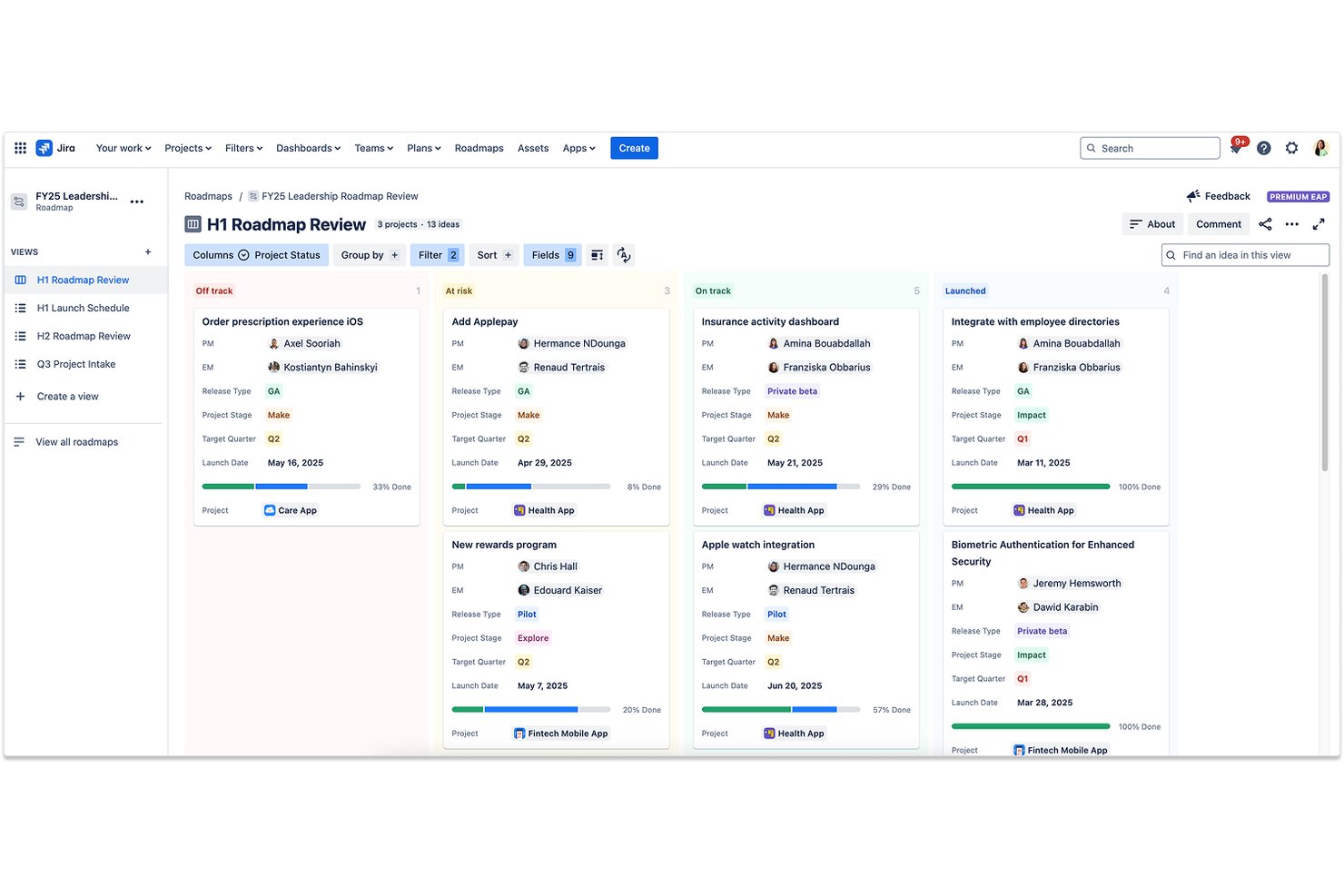
Jira è una piattaforma agile di gestione dei progetti che offre la creazione nativa delle storie utente, la gestione dei backlog multilivello, schede per la pianificazione degli sprint e la suddivisione del lavoro assistita dall'intelligenza artificiale tra i team di sviluppo e prodotto.
Per chi è più adatto Jira?
Jira è particolarmente adatto ai team di prodotto e di ingegneria che pianificano e realizzano il lavoro insieme nello stesso ambiente agile.
Perché ho scelto Jira
Jira si è guadagnato un posto nella mia rosa ristretta perché è l'unico strumento in cui i team di sviluppo e prodotto lavorano davvero nello stesso sprint, invece di utilizzare sistemi paralleli che si sincronizzano in modo imperfetto. Apprezzo molto il modo in cui la gerarchia nativa iniziativa→epica→storia consente al mio team di suddividere un nuovo concetto di prodotto in storie pronte per lo sprint senza uscire dalla scheda, mentre l'IA Rovo può suddividere automaticamente quelle epiche in attività con riepiloghi. I report sul burndown e sulla velocità della scheda Scrum mi forniscono poi dati reali per perfezionare la stima delle storie tra le varie versioni.
Funzionalità principali di Jira
- Gerarchia da iniziativa a sottoattività: la gerarchia nativa a quattro livelli di Jira consente di collegare le iniziative a epiche, storie e sottoattività all'interno di un'unica struttura di progetto.
- Agente di verifica della preparazione del lavoro: questo agente di intelligenza artificiale esamina gli elementi di lavoro per verificarne chiarezza e completezza prima che uno sviluppatore li prenda in carico.
- Mappe strategiche avanzate: una funzionalità Premium che offre visibilità tra i team su dipendenze tra più progetti, capacità e tempistiche.
- Integrazione con il pannello di sviluppo: commit, rami, richieste pull e stati delle distribuzioni da GitHub o Bitbucket vengono visualizzati direttamente su ogni scheda della storia.
Integrazioni di Jira
Jira supporta oltre 3.000 integrazioni del Marketplace, inclusi connettori per GitHub e GitLab, oltre a integrazioni documentate con Confluence, Bitbucket, Trello, Slack, Microsoft Teams, Google Workspace, Zoom, Figma e Gmail. Le sue API complete e la piattaforma Forge/Connect supportano connessioni personalizzate.
Pros and Cons
Pros:
- La suddivisione gerarchica collega le iniziative alle sottoattività
- Le schede degli sprint supportano la stima e la definizione delle priorità delle storie
- L'IA suddivide le epiche in attività di sviluppo operative
Cons:
- I criteri di accettazione richiedono campi personalizzati o checklist
- La pianificazione avanzata richiede configurazione e amministrazione aggiuntive

Ideale come contenitore open source per Servlet Java
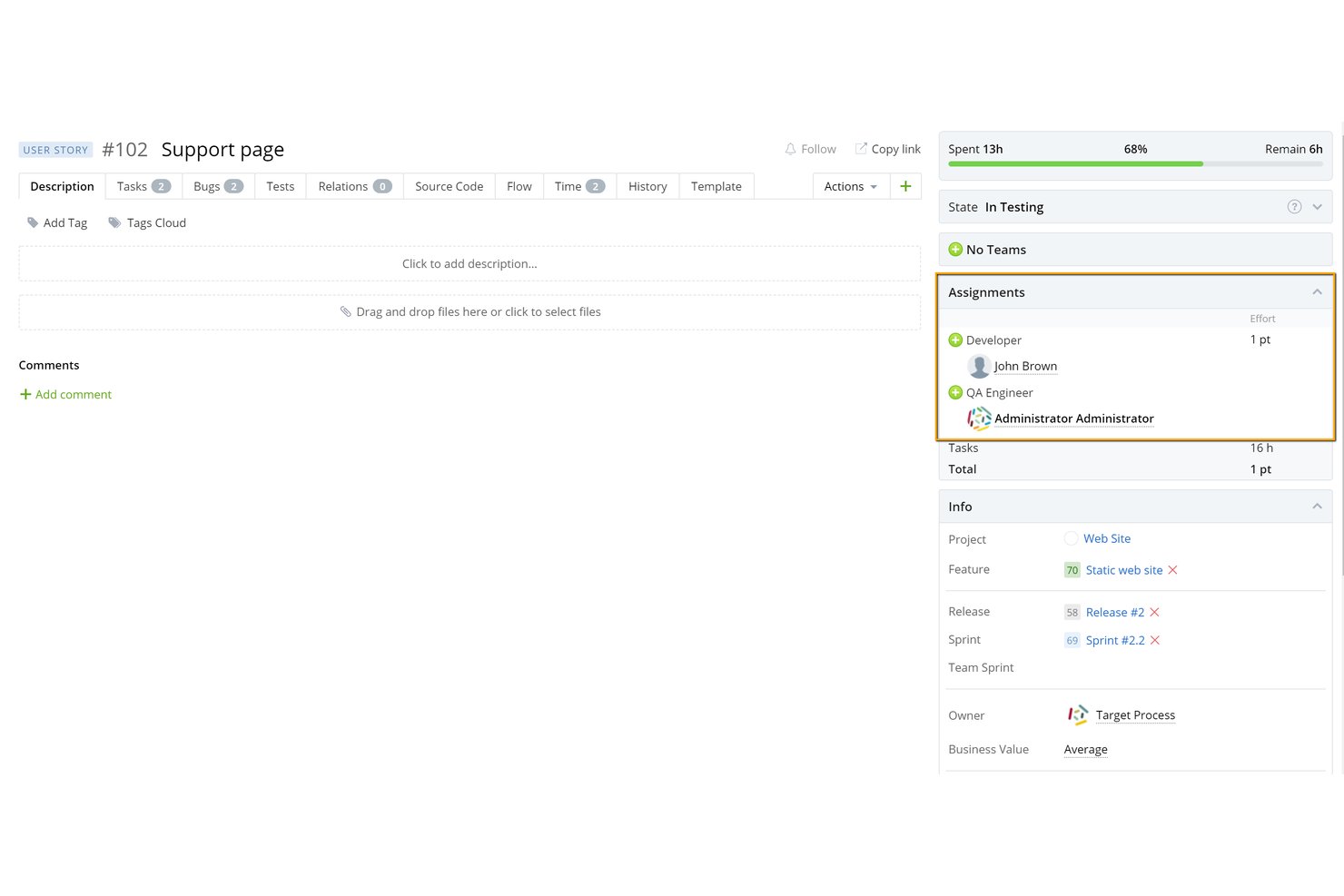
Apache Tomcat è un contenitore open source per Servlet Java che implementa le specifiche del livello web Jakarta EE, fornendo un ambiente di runtime per applicazioni web Java con gestione delle sessioni integrata, pooling delle connessioni JDBC, supporto SSL/TLS e funzionalità di clustering.
Per chi è più indicato Apache Tomcat?
Apache Tomcat è la scelta principale per i team di sviluppo Java e gli ingegneri DevOps che necessitano di un contenitore per servlet leggero e conforme agli standard, senza il sovraccarico di un server applicativo Jakarta EE completo.
Perché ho scelto Apache Tomcat
Apache Tomcat si è guadagnato un posto tra i migliori della mia lista ristretta perché è il contenitore open source per Servlet Java più collaudato sul campo tra quelli disponibili, e ritengo che questa reputazione sia meritata. Apprezzo il fatto che offra la piena conformità alle specifiche del livello web Jakarta EE, inclusi Servlet 6.1 e WebSocket 2.2 in Tomcat 11, senza il sovraccarico di un server applicativo completo. È inoltre il contenitore integrato predefinito per Spring Boot, il che significa che la maggior parte dei team Java lo utilizza già in produzione senza nemmeno pensarci.
Funzionalità principali di Apache Tomcat
- Applicazione Web Manager: Un'interfaccia grafica web integrata consente di distribuire, annullare la distribuzione, avviare, arrestare e ricaricare le applicazioni su un server attivo senza riavviare Tomcat.
- Pooling delle connessioni JDBC: Due opzioni di pooling incluse—Apache Commons DBCP 2 e Tomcat JDBC Pool—sono configurabili come DataSource JNDI per la gestione delle risorse del database.
- Replica delle sessioni SimpleTcpCluster: Il framework di clustering integrato supporta la replica delle sessioni in memoria tra i nodi utilizzando DeltaManager o BackupManager per il failover.
- Monitoraggio con MBean JMX: Tomcat espone i componenti interni del server—pool di thread, conteggi delle sessioni, frequenze delle richieste e stati del pool JDBC—come MBean JMX per l'integrazione con strumenti di monitoraggio esterni.
Integrazioni di Apache Tomcat
Apache Tomcat si integra con Jenkins, Maven, Ant, Docker, Kubernetes, AWS Elastic Beanstalk, Apache HTTP Server, IIS, Spring Boot e database JDBC. Supporta inoltre LDAP e Active Directory tramite JNDIRealm, oltre all'automazione personalizzata mediante JMX, attività Ant e plugin Maven.
Pros and Cons
Pros:
- Estremamente leggero per l'hosting di servlet Java
- Licenza open source gratuita e ampia adozione
- Avvio rapido con compatibilità con Spring Boot
Cons:
- Nessun supporto JTA o JMS integrato
- Manca un'API di gestione RESTful per l'automazione

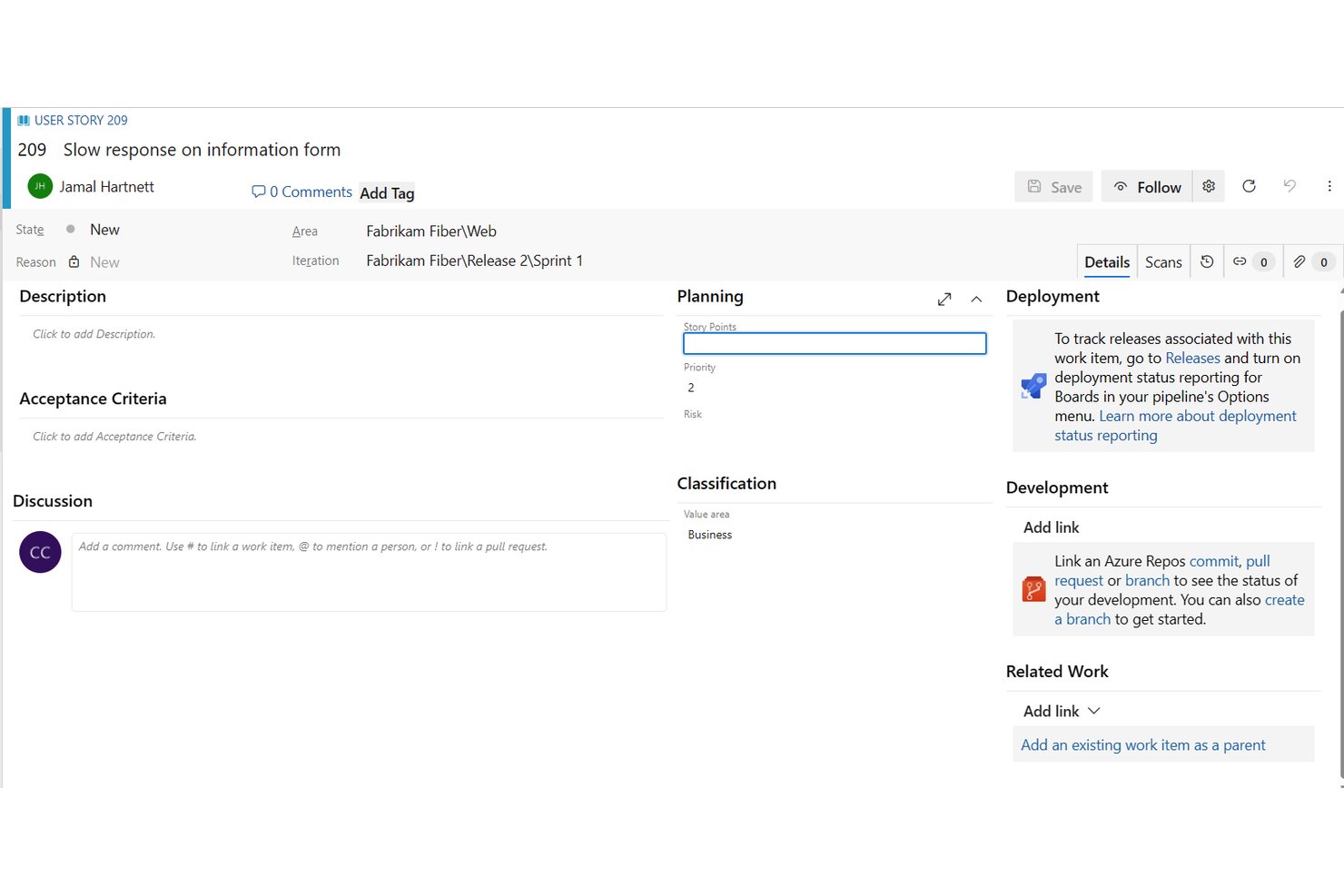
Azure Boards è uno strumento per il monitoraggio del lavoro all'interno di Azure DevOps che consente ai team di creare e gestire storie utente, epiche e funzionalità attraverso backlog multilivello, bacheche degli sprint e piani di distribuzione.
Per chi è più adatto Azure Boards?
Azure Boards è particolarmente adatto ai team Scrum e ai responsabili di prodotto che lavorano già nell'ecosistema Microsoft o GitHub e hanno bisogno di pianificazione degli sprint, gestione del backlog multilivello e tracciabilità della pipeline di sviluppo in un unico ambiente.
Perché ho scelto Azure Boards
Azure Boards si è guadagnato un posto nella mia rosa di strumenti preferiti per il modo in cui gestisce la pianificazione degli sprint per i team che lavorano già nell'ecosistema Microsoft o GitHub. Apprezzo particolarmente il fatto che l'hub degli sprint includa la pianificazione della capacità, consentendo di impostare le ore per persona, tenere conto dei giorni di assenza e visualizzare in tempo reale il lavoro rimanente rispetto alla capacità del team. In combinazione con backlog multilivello che articolano le epiche in storie e attività, aiuta a prendere decisioni sull'ambito dello sprint basate sul contesto effettivo del portafoglio.
Funzionalità principali di Azure Boards
- Gerarchia del backlog di portafoglio: epiche, funzionalità e storie sono organizzate su backlog multilivello con riordinamento tramite trascinamento e monitoraggio dell'avanzamento aggregato.
- Piani di distribuzione: una vista in stile calendario che mappa i risultati tra più team, con linee delle dipendenze che segnalano i conflitti di pianificazione tra gli elementi collegati.
- Passaggio all'agente di programmazione GitHub Copilot: assegna un elemento di lavoro a Copilot, che legge la descrizione e i commenti, quindi crea un ramo collegato e una richiesta di integrazione in bozza.
- Server MCP di Azure DevOps: consente agli agenti di intelligenza artificiale di creare storie, organizzare backlog, stimare gli elementi e individuare i conflitti tra dipendenze utilizzando comandi in linguaggio naturale.
Integrazioni di Azure Boards
Azure Boards offre integrazioni native con Azure Repos, Pipelines, Test Plans, Artifacts, Microsoft Teams, GitHub, GitHub Enterprise e Power BI. Supporta inoltre Slack, API REST, ganci di servizio e integrazioni del Marketplace per connettività personalizzata.
Pros and Cons
Pros:
- I backlog multilivello collegano le storie alla strategia
- La pianificazione della capacità degli sprint aiuta a definire l'ambito in modo concreto
- I piani di distribuzione evidenziano le dipendenze tra i team
Cons:
- I criteri di accettazione restano testo libero
- La gerarchia del backlog può confondere i nuovi team di prodotto
Altre opzioni di software per storie utente
- monday AI Workspace
Ideale per flussi di lavoro basati sull'intelligenza artificiale per sprint e storie
- Craft.io
Ideale per la pianificazione delle storie collegata alla strategia e agli OKR
- Asana
Ideale per la pianificazione di progetti tra team
- Miro
Ideale per la mappatura collaborativa e visiva delle storie utente
- Linear
Ideale per i cicli sprint dei team di sviluppo senza il sovraccarico di Scrum
- Easy Agile
Ideale per la gestione delle attività arretrate e la pianificazione degli sprint nativi di Jira


Come valuto gli strumenti per le storie utente
Divido la mia valutazione in tre parti. Le funzionalità principali hanno il peso maggiore: cerco strumenti che consentano di scrivere storie strutturate e gestire un backlog prioritizzato. Poi verifico le funzionalità distintive, come la generazione automatica di storie tramite intelligenza artificiale o il poker di pianificazione integrato, seguite dalla qualità dell'onboarding e dal rapporto qualità-prezzo.
Funzionalità principali (requisiti di base per questo elenco)
Quando seleziono gli strumenti da inserire nel mio elenco, assegno a ciascuno un punteggio su una scala da 0 (non offre la funzionalità) a 5 (eccelle in quest'area) per ogni funzionalità principale elencata di seguito. Converto quindi il totale in una percentuale per contribuire a valutare l'idoneità complessiva di ciascuno strumento, attribuendo un peso aggiuntivo alle funzionalità che ho considerato essenziali.
- Creazione di storie e modelli (essenziale): verifico se gli strumenti supportano il formato "In qualità di… voglio… affinché…" con campi personalizzabili, oppure se le storie sono semplicemente blocchi di testo.
- Gestione del backlog (essenziale): qui è importante una gerarchia multilivello: cerco la prioritizzazione tramite trascinamento e la possibilità di raggruppare le storie in macro-storie o temi.
- Monitoraggio dei criteri di accettazione: valuto se i criteri sono elementi selezionabili collegati al completamento della storia oppure semplici note a testo libero nascoste in un campo descrizione.
- Pianificazione di sprint e iterazioni: gli strumenti dovrebbero consentire di assegnare le storie agli sprint, con fasi del flusso di lavoro e visibilità della capacità, non soltanto con un'etichetta che indica "Sprint 4".
- Stima delle storie: cerco il supporto integrato per i punti storia o per il dimensionamento con taglie di abbigliamento, con totali a livello di backlog, non una soluzione alternativa basata su campi numerici personalizzati.
- Collaborazione e commenti del team: i commenti organizzati in thread, le @menzioni e i registri delle attività mantengono le conversazioni collegate alla storia invece di disperderle tra Slack o la posta elettronica.
Una volta ottenuto un elenco di strumenti che soddisfano i criteri, considero ciò che distingue ciascuna piattaforma.
Fattori distintivi (ciò che differenzia i fornitori)
Ecco come confronto i diversi fornitori:
Funzionalità distintive
Cerco una visualizzazione delle dipendenze che mostri i blocchi tra storie e tra team prima dell'impegno nello sprint: senza di essa, i team scoprono i conflitti a metà dello sprint. La generazione automatica di storie tramite intelligenza artificiale è un altro elemento distintivo; strumenti come Jira e Shortcut ora preparano bozze dei criteri di accettazione e dei casi limite a partire da una breve descrizione della macro-storia, facendo risparmiare tempo prezioso durante il perfezionamento. Valuto anche la presenza di un poker di pianificazione integrato, poiché i team distribuiti non dovrebbero aver bisogno di un'app separata solo per stimare insieme le storie.
Oltre le funzionalità
Valuto la rapidità con cui un team può adottare uno strumento senza far deragliare uno sprint in corso. I modelli guidati e il supporto integrato nell'app sono importanti, perché un responsabile Scrum non dovrebbe aver bisogno di una settimana di configurazione prima della prima sessione di perfezionamento. Verifico anche l'interoperabilità con gli strumenti di sviluppo e progettazione già in uso, come GitHub, Figma e Slack, poiché le integrazioni native riducono l'inserimento duplicato dei dati tra la gestione delle storie e il monitoraggio della distribuzione. La scalabilità completa la mia valutazione: sia le squadre individuali sia i portafogli composti da più team hanno bisogno di una visibilità chiara del backlog senza un ulteriore sovraccarico amministrativo.
Prezzi
Con qualsiasi buon software per storie utente, i prezzi dovrebbero essere proporzionati alle funzionalità offerte. Alcuni software sono gratuiti, ma hanno funzionalità limitate, e i marchi di prodotti attenti al budget sceglieranno di lavorare entro tali limitazioni. Altre aziende, invece, potrebbero aver bisogno di un insieme più ampio di funzionalità ed essere disposte a pagare per ottenerlo. In ogni caso, il software per storie utente con prove gratuite, prezzi scalabili per soddisfare tutte le esigenze e insiemi di funzionalità equi è l’ideale.
Le persone chiedono anche
Qual è il prossimo passo?
Ogni buon prodotto inizia con una storia utente. Le storie utente forniscono agli sviluppatori di prodotti un'idea precisa di ciò che devono realizzare, per chi lo stanno realizzando e perché lo stanno realizzando. Con l'aiuto di un eccellente software per la gestione delle storie utente, gli sviluppatori possono osservare i loro prodotti dal punto di vista degli utenti finali per garantire un'esperienza utente eccellente e ispirare la fidelizzazione al marchio.
Iscriviti alla newsletter di The CPO Club per ricevere recensioni di software, approfondimenti sullo sviluppo dei prodotti e opinioni autorevoli dalla nostra comunità in crescita.