

10 Migliori Software per Roadmap di Prodotto per l’Allineamento nel 2026

10 Migliori Software per Roadmap di Prodotto (Shortlist)


Il miglior software per roadmap di prodotto ti aiuta a visualizzare le priorità, allineare gli stakeholder e comunicare la strategia di prodotto con chiarezza. Senza lo strumento giusto, le roadmap spesso rimangono in presentazioni statiche o fogli di calcolo che diventano rapidamente obsoleti, causando confusione, disallineamento e lavoro duplicato.
Ho testato oltre 30 strumenti di roadmap e so cosa serve ai team di prodotto: viste flessibili, funzionalità di collaborazione e aggiornamenti in tempo reale.
In questa guida troverai software che semplificano l’adattamento della tua roadmap al variare delle priorità, così puoi mantenere i team allineati e consegnare ciò che conta di più.
Perché fidarsi dei nostri consigli sui software
Il nostro team testa e recensisce software dal 2012. In quanto product manager noi stessi, sappiamo quanto sia difficile — e importante — scegliere il software giusto.
Per questa guida, abbiamo valutato gli strumenti attraverso test pratici e ricerche indipendenti, assegnando un punteggio agli strumenti in base ai nostri criteri di selezione.
Le nostre recensioni riflettono il nostro giudizio editoriale umano, non un discorso di vendita.
Tabella Comparativa dei Migliori Software per Roadmap di Prodotto
Ecco una tabella che puoi usare per confrontare i software appena trattati nelle panoramiche.
| Tool | Best For | Trial Info | Price | ||
|---|---|---|---|---|---|
| 1 | Ideale per visualizzare le timeline dei progetti | Prova gratuita di 14 giorni + piano gratuito disponibile | Da $10/utente/mese (fatturato annualmente) | Website | |
| 2 | Ideale per roadmap personalizzabili | Demo gratuita disponibile | Prezzo su richiesta | Website | |
| 3 | Ideale per roadmap pubbliche personalizzate sincronizzate da Jira | Prova gratuita di 30 giorni + piano gratuito disponibile | A partire da $1.10/utente/mese | Website | |
| 4 | Ideale per una piattaforma altamente flessibile con un'ampia galleria di modelli | Piano gratuito disponibile | Da $10/utente/mese | Website | |
| 5 | Ideale per un'ampia raccolta di modelli per le roadmap | Demo gratuita disponibile | Prezzi su richiesta | Website | |
| 6 | Ideale per la pianificazione delle roadmap basata sulle mappe delle storie | Prova gratuita di 14 giorni + demo gratuita disponibile | A partire da $9/utente/mese (fatturato annualmente) | Website | |
| 7 | Ideale per la visualizzazione della roadmap collegata agli OKR | Prova gratuita di 14 giorni + demo gratuita disponibile | A partire da $19/utente/mese (fatturato annualmente) | Website | |
| 8 | Bäst för MIT-licensierad självhostad kanbanuppföljning | Gratisplan tillgänglig | Gratis för alltid | Website | |
| 9 | Ideale per i flussi di lavoro dal feedback alla roadmap in un unico spazio di lavoro | Piano gratuito + demo gratuita disponibile | A partire da $12/utente/mese (con fatturazione annuale) | Website | |
| 10 | Ideale per la discovery dei prodotti nativa di Atlassian | Piano gratuito disponibile | A partire da $10/utente/mese | Website |


Panoramica dei Migliori Software per Roadmap di Prodotto
Ecco una breve descrizione dei migliori strumenti per roadmap di prodotto con screenshot e informazioni sui prezzi.

Wrike
Ideale per visualizzare le timeline dei progetti
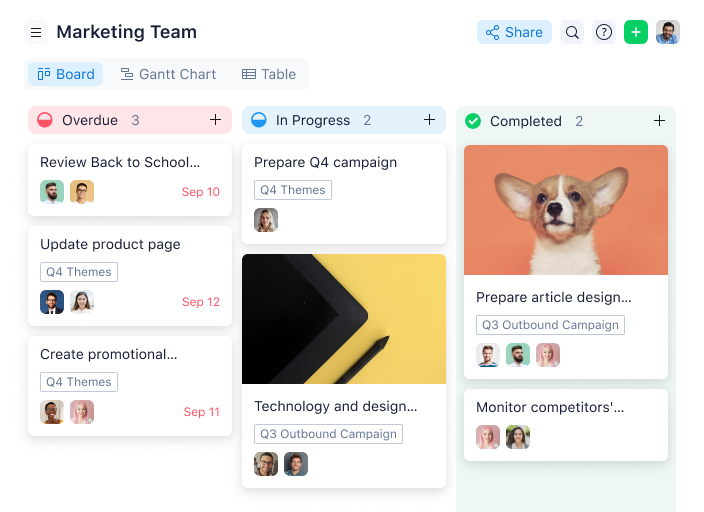
Wrike è una piattaforma di project management che offre ai team di prodotto strumenti per creare, visualizzare e gestire roadmap di prodotto con diagrammi di Gantt interattivi, flussi di lavoro personalizzati e collaborazione in tempo reale.
Per chi è Wrike?
Wrike è particolarmente indicato per team di prodotto e progetto di medie e grandi dimensioni che necessitano di una piattaforma centralizzata per la pianificazione trasversale e la visibilità sulle roadmap.
Perché ho scelto Wrike
Ho scelto Wrike tra i migliori per la sua capacità di gestire con il diagramma di Gantt interattivo la complessità delle reali tempistiche di prodotto. Lo utilizzo per mappare le dipendenze tra i compiti su più flussi di lavoro e, quando una scadenza cambia, Wrike riprogramma automaticamente tutte le attività collegate in tempo reale. Solo questa funzione fa risparmiare al mio team moltissimo lavoro manuale. Mi piace anche la funzione snapshot, che mi permette di catturare una vista congelata della timeline in qualsiasi momento—utile per confrontare pianificato e reale oppure condividere una versione pulita con gli stakeholder senza dare accesso in modifica.
Funzionalità principali di Wrike
- Visualizzazioni personalizzate di progetto: Passa dalla vista Board, Tabella, Gantt, Calendario e Grafico per monitorare l’avanzamento della roadmap nel formato più adatto al tuo team.
- Scrum board: Gestisci la pianificazione agile del prodotto con priorità del backlog, tracciamento degli sprint e collaborazione in tempo reale su board Scrum condivise.
- Prenotazione delle risorse: Riserva membri del team o ruoli specifici per determinati compiti e stima le ore necessarie per valutare la disponibilità prima di impegnarsi sulle tempistiche della roadmap.
- Automazione dei flussi di lavoro: Usa regole di automazione no-code per spostare i task tra le fasi di pipeline, segnalare elementi a rischio e avviare azioni senza intervento manuale.
Integrazioni Wrike
Wrike offre centinaia di integrazioni tramite funzionalità integrate e il marketplace, inclusi strumenti come Google Workspace, Microsoft 365, Salesforce e Slack. Supporta anche Zapier e mette a disposizione un’API per integrazioni personalizzate.
Pros and Cons
Pros:
- Collaborazione potenziata tramite la gestione centralizzata dei task
- Il diagramma di Gantt migliora la visualizzazione dei progetti
- Gestione delle scadenze e monitoraggio dei task migliorati grazie alle dashboard
Cons:
- Feedback misti degli utenti sulle funzionalità AI e automazione
- Alcuni utenti desiderano maggiore flessibilità nei diagrammi di Gantt
New Product Updates from Wrike

Wrike Activity Reports Add Actor Type Details
Wrike’s Activity Report now displays actor type details, helping admins identify whether changes came from the UI, Automation, Wrike Agents, API, or AI via MCP. For more information, visit Wrike's official site.

airfocus
Ideale per roadmap personalizzabili
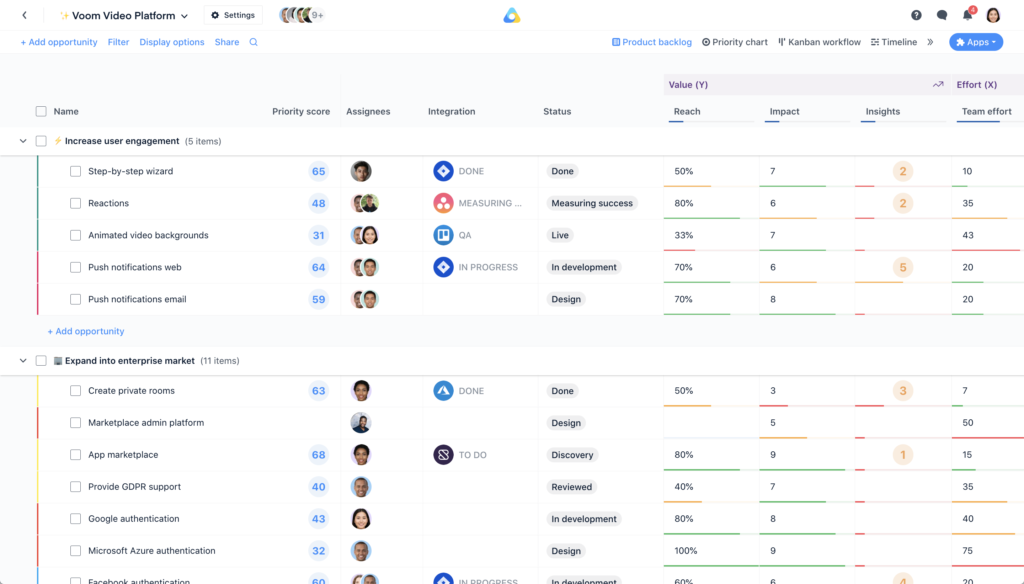
airfocus è una piattaforma software per la creazione di roadmap di prodotto che consente ai team di costruire, dare priorità e visualizzare le roadmap utilizzando modelli personalizzabili, framework di prioritizzazione e integrazioni con i più diffusi strumenti di project management.
Per chi è più indicato airfocus?
airfocus è adatto a product manager e team di prodotto di aziende di medie e grandi dimensioni che hanno bisogno di strumenti di roadmapping flessibili, capaci di adattarsi ai flussi di lavoro e ai processi di prioritizzazione già esistenti.
Perché ho scelto airfocus
airfocus si guadagna un posto nella mia shortlist grazie alla profondità di personalizzazione delle sue roadmap. Apprezzo il fatto che sia possibile costruire gerarchie di prodotto personalizzate: quindi, se il tuo team struttura il lavoro in base a epic, temi e iniziative in modo diverso rispetto ad altri team, puoi modellare tutto ciò in airfocus invece di dover adattare il tuo flusso di lavoro a un modello rigido. Utilizzo anche spesso la funzionalità di visualizzazione personalizzata delle roadmap, che mi permette di creare viste separate per il reparto ingegneria, la dirigenza e i clienti, partendo dai medesimi dati di base e condividendo tutto tramite URL sicuri, senza dover riformattare manualmente. Il portfolio rollup è un'altra funzione che trovo davvero utile: unisce le roadmap di più team in una sola visualizzazione, semplificando l'allineamento tra i diversi reparti su larga scala.
Caratteristiche principali di airfocus
- Priority Poker: Una sessione collaborativa e in tempo reale in cui i membri del team votano la priorità degli elementi per raggiungere rapidamente decisioni condivise.
- Obiettivi e OKR: Collega direttamente gli OKR aziendali agli elementi della roadmap e alle user story, per monitorare i progressi dei team in un'unica piattaforma.
- Moduli di feedback: Crea moduli personalizzabili per raccogliere idee, richieste di funzionalità e altre informazioni da stakeholder interni o esterni.
- Pianificazione della capacità: Assegna le risorse del team ai lavori in priorità e modifica i piani in tempo reale quando le priorità cambiano.
Integrazioni di airfocus
airfocus offre integrazioni nativamente con Jira, Trello, Asana, Azure DevOps, GitHub, Intercom e Zapier. È disponibile un API per integrazioni personalizzate.
Pros and Cons
Pros:
- Framework di prioritizzazione avanzati per decisioni ben informate
- Workflow altamente personalizzabili che aumentano flessibilità ed efficienza del team di prodotto
- Collaborazione in tempo reale che tiene informati tutti gli stakeholder
Cons:
- L'integrazione con JIRA manca di funzionalità importanti e può risultare complessa per alcuni utenti
- Personalizzazione limitata per le regole e i calcoli dei punteggi di priorità; inoltre alcune funzionalità avanzate sono limitate ai piani superiori
New Product Updates from airfocus

airfocus Adds Rich Text Fields, MCP Tools, and Admin Controls
airfocus adds rich text fields with bidirectional Jira sync, Check-in access for the agent and MCP server, an MCP Link Items tool, and admin-only integration management to improve product documentation, AI-assisted planning, and enterprise governance. For more information, visit airfocus’ official site.
 .
.
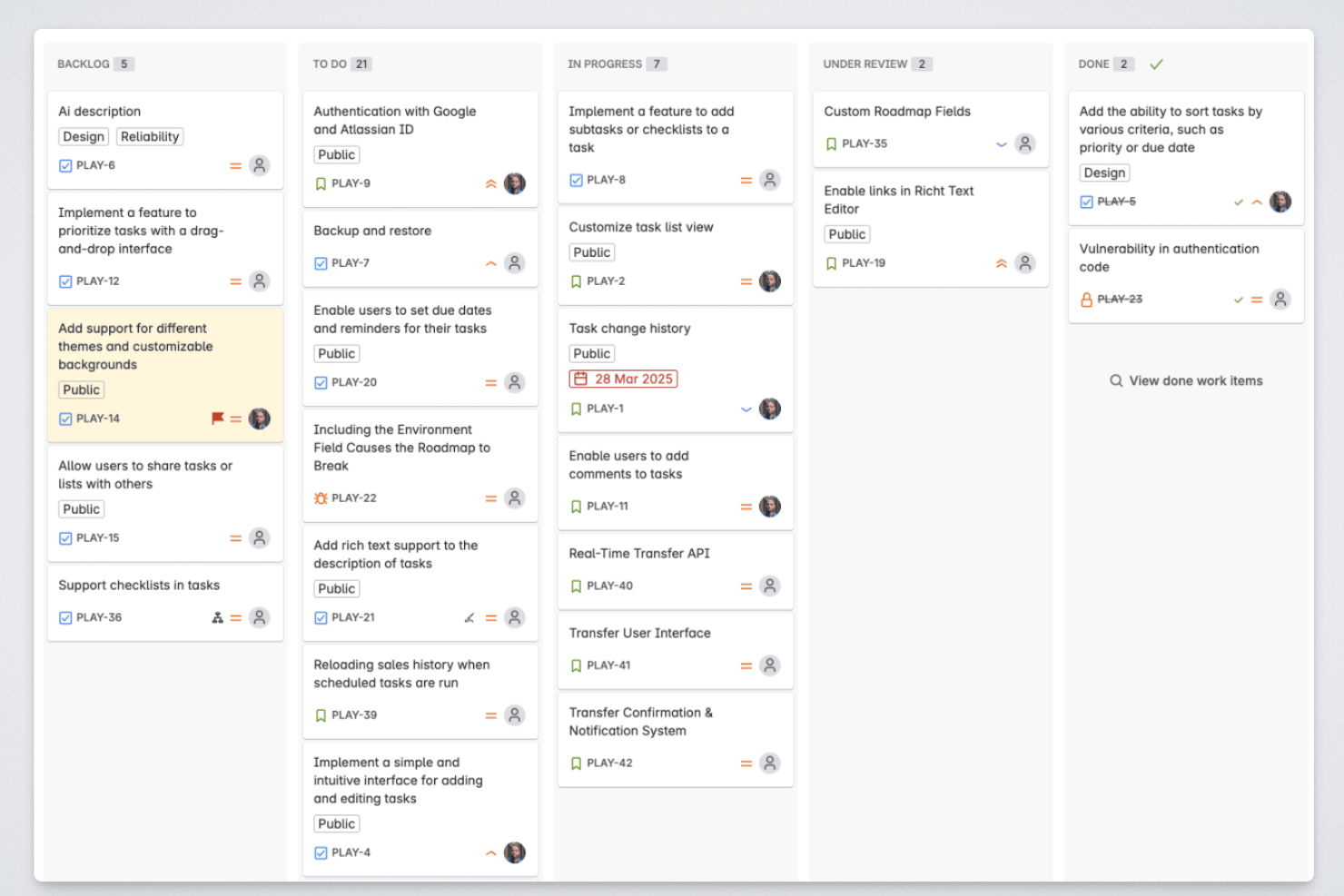
Released è uno strumento nativo di Jira per la gestione delle roadmap e della comunicazione delle versioni, che consente ai team di prodotto di pubblicare roadmap rivolte ai clienti, note di rilascio e portali per i feedback sincronizzati direttamente da Jira.
Per chi è più adatto Released?
Released è particolarmente adatto ai responsabili di prodotto delle aziende che utilizzano Jira Cloud e che hanno bisogno di condividere roadmap curate e aggiornate con clienti o dirigenti senza uscire dall'ecosistema Atlassian.
Perché ho scelto Released
Ho scelto Released come uno dei migliori strumenti perché risolve un problema che vedo continuamente: roadmap che risiedono in Jira ma non raggiungono mai le persone che ne hanno più bisogno. Mi piace il fatto che Hub legga in tempo reale le issue di Jira, così quando un'epic cambia stato, la roadmap rivolta ai clienti si aggiorna automaticamente. Posso anche controllare esattamente chi vede cosa: un portale pubblico per i clienti, una vista protetta da password per i dirigenti e un link accessibile solo su invito per i partner, tutto da un unico luogo.
Funzionalità principali di Released
- Note di rilascio generate dall'IA: Genera automaticamente note di rilascio curate e coerenti con il brand a partire dai ticket Jira completati.
- Portali con dominio personalizzato: Ospita la tua roadmap pubblica o privata, il registro delle modifiche e i portali per i feedback sul tuo dominio.
- Sicurezza SOC 2 Tipo 2: Soddisfa rigorosi requisiti di conformità aziendale con dati crittografati, SAML SSO e audit periodici di terze parti.
- Posta in arrivo centralizzata per i feedback: Aggrega i feedback provenienti da portali, moduli incorporati e Slack, tutti collegati direttamente a Jira.
Integrazioni di Released
Released offre integrazioni native con Jira Cloud e Jira Product Discovery, oltre che con Slack.
Pros and Cons
Pros:
- Sincronizza automaticamente in tempo reale lo stato della roadmap dalle epic di Jira
- Pubblica registri delle modifiche rivolti ai clienti con note di rilascio
- Supporta controlli di accesso al portale specifici per ruolo
Cons:
- Viste della roadmap limitate oltre ai formati rivolti al pubblico
- Non è adatto ai team di prodotto che non utilizzano Jira

Miro
Ideale per una piattaforma altamente flessibile con un'ampia galleria di modelli
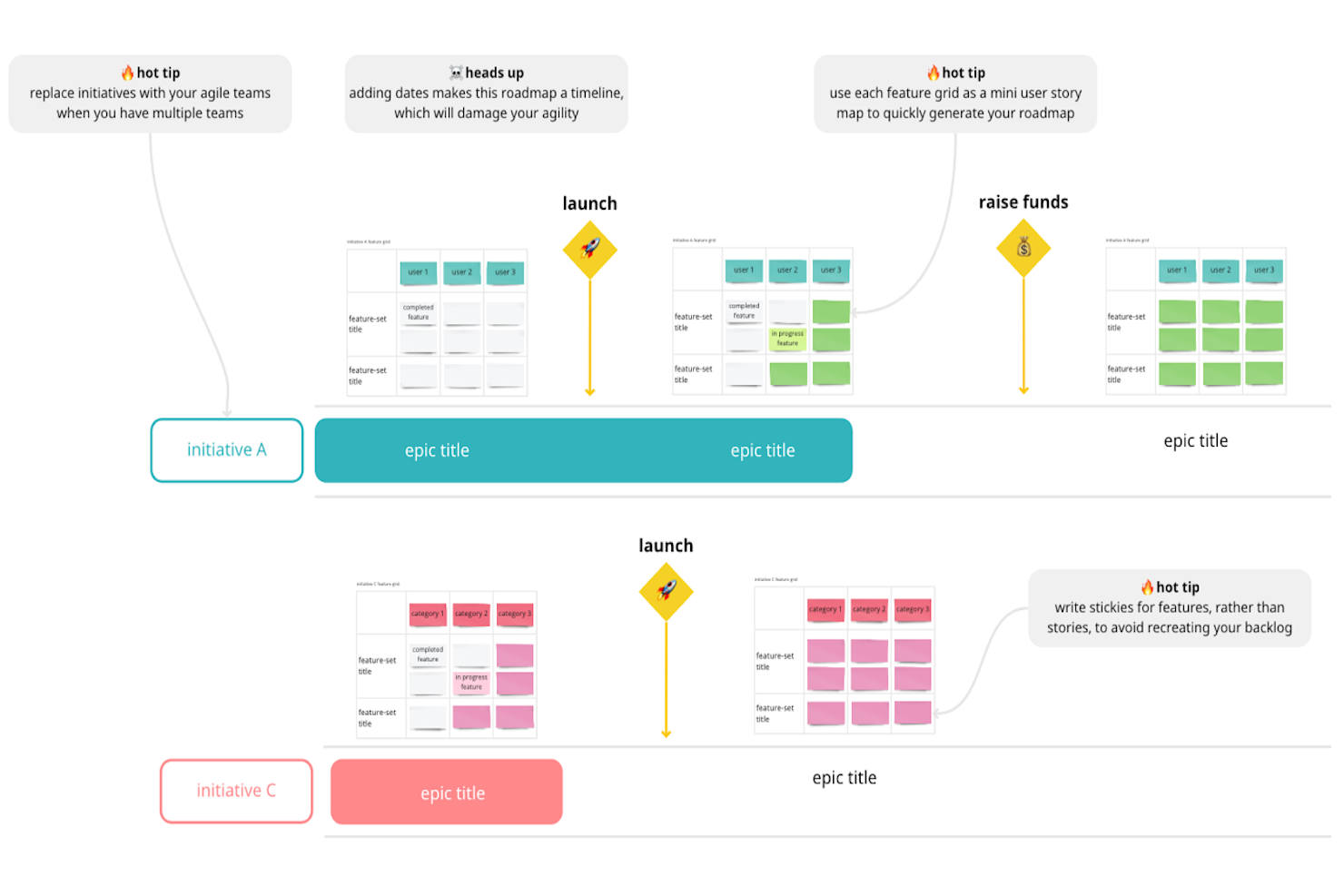
Miro è una piattaforma di collaborazione visiva che consente ai team di creare roadmap di prodotto utilizzando una tela infinita, oltre 60 modelli di roadmap e integrazioni bidirezionali con strumenti di distribuzione come Jira, Azure DevOps e Linear.
Per chi è più adatto Miro?
Miro è ideale per i team interfunzionali che desiderano uno spazio di lavoro visivo e flessibile per creare e condividere roadmap insieme ad altre attività di pianificazione, come le cerimonie degli sprint, la mappatura delle dipendenze e la pianificazione PI.
Perché ho scelto Miro
Miro si è guadagnato un posto nella mia lista ristretta perché l'ampiezza della sua libreria di modelli lo rende uno degli ambienti per la creazione di roadmap più flessibili che abbia utilizzato. Con oltre 60 modelli di roadmap di prodotto, che spaziano dalle bacheche Ora/Prossimo/Dopo alle tempistiche trimestrali e ai formati incentrati sul GTM, posso adattare il formato della roadmap al pubblico senza doverla ricostruire da zero. Mi piace anche il fatto che il copilota IA Stratega della roadmap possa suggerire idee strategiche ricavate dalle analisi aziendali, rendendo la pianificazione nelle fasi iniziali meno simile a un problema da tela bianca.
Funzionalità principali di Miro
- Sincronizzazione bidirezionale con gli strumenti di distribuzione: Miro si connette bidirezionalmente con Jira, Azure DevOps, Linear, Asana e ClickUp per mantenere la roadmap allineata ai dati aggiornati sulla distribuzione.
- Monitoraggio dello stato della roadmap: assegna stati—bozza, approvato, in fase di finalizzazione o obsoleto—direttamente agli elementi della roadmap per riflettere l'effettivo avanzamento della pianificazione.
- Flussi automatizzati di aggiornamento del team: Miro invia notifiche settimanali automatiche per mantenere informati i team interfunzionali senza dover effettuare solleciti manuali.
- Collegamento a OKR e portfolio: puoi collegare gli elementi della roadmap agli obiettivi aziendali e al portafoglio più ampio per mantenere l'allineamento strategico tra i team.
Integrazioni di Miro
Miro offre oltre 250 integrazioni, incluse integrazioni bidirezionali con Jira, Azure DevOps, Asana, Linear e ClickUp, oltre a CA Rally nel piano Enterprise. Supporta anche la connettività personalizzata tramite chiamate API MCP.
Pros and Cons
Pros:
- Oltre 60 modelli di roadmap supportano una pianificazione specifica per il pubblico
- La tela infinita supporta laboratori e contesto della roadmap
- Gli stati della roadmap e i collegamenti agli OKR preservano l'allineamento strategico
Cons:
- La definizione manuale delle priorità sostituisce i criteri di valutazione dedicati
- Le bacheche di grandi dimensioni diventano disordinate durante le pianificazioni complesse
New Product Updates from Miro
Miro Adds Japan Data Residency for Enterprise Customers
Miro has introduced Japan data residency for enterprise customers, offering in-region storage for production data, backups, and metadata, plus in-region compute infrastructure. For more information, visit Miro's official site.
Ideale per un'ampia raccolta di modelli per le roadmap

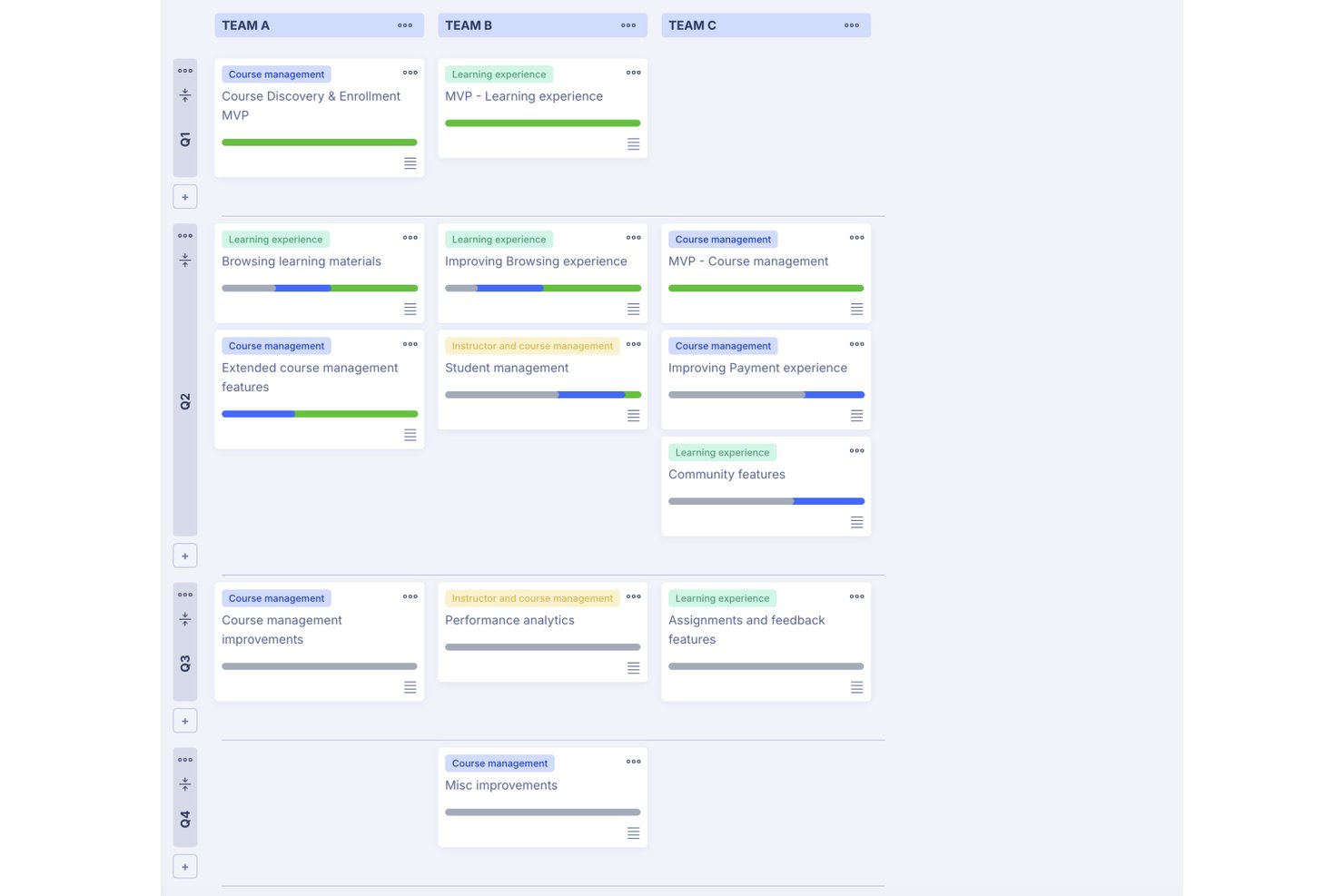
ProductPlan è una piattaforma software per la pianificazione dei prodotti che combina roadmap temporali visive, schede di definizione delle priorità, viste del portafoglio, raccolta dei feedback e strumenti di ricerca basati sull'IA.
A chi è più adatto ProductPlan?
ProductPlan è particolarmente adatto ai product manager che devono creare e condividere rapidamente roadmap curate con più team e diversi destinatari tra gli stakeholder.
Perché ho scelto ProductPlan
ProductPlan si è guadagnato un posto nella mia selezione ristretta grazie alla sua raccolta di modelli, la più ampia che abbia visto in questa categoria. Con circa 30 roadmap pronte all'uso, dedicate a casi d'uso relativi a prodotto, IT, ingegneria, marketing e portafogli dirigenziali, posso affidare a un nuovo PM una roadmap rivolta ai clienti o una sequenza temporale collegata agli OKR e averla operativa lo stesso giorno. Apprezzo anche il fatto che le viste specifiche per il pubblico mi consentano di mostrare alla dirigenza una vista pulita del portafoglio, mentre il team di ingegneria visualizza il monitoraggio delle dipendenze sullo stesso piano di base.
Funzionalità principali di ProductPlan
- Viste specifiche per il pubblico: Configura viste separate della roadmap per la dirigenza, il team di ingegneria e gli stakeholder esterni, tutte basate sullo stesso piano di base.
- Collegamento agli OKR: Collega direttamente i singoli elementi della roadmap agli Obiettivi e ai Risultati Chiave per mantenere allineate strategia ed esecuzione.
- Sondaggi di ricerca moderati dall'IA: Conduci sondaggi adattivi che modificano le domande successive in tempo reale e riassumono automaticamente le risposte trasformandole in informazioni utili.
- Sincronizzazione bidirezionale con Jira e Azure DevOps: Sincronizza testo, date, etichette e collegamenti padre/figlio tra ProductPlan e gli strumenti di distribuzione a livello di account.
Integrazioni di ProductPlan
ProductPlan offre sette integrazioni documentate, tra cui Jira, Azure DevOps, GitHub, Trello, Confluence, Slack e Microsoft Teams. Supporta inoltre Zapier e mette a disposizione un'API pubblica per integrazioni personalizzate.
Pros and Cons
Pros:
- I numerosi modelli coprono diversi scenari di roadmap
- Le viste specifiche per il pubblico semplificano la comunicazione con gli stakeholder
- La ricerca basata sull'IA collega i feedback alla pianificazione
Cons:
- La definizione delle priorità non include framework di valutazione denominati
- Le categorie del portafoglio possono essere difficili da organizzare

Ideale per la pianificazione delle roadmap basata sulle mappe delle storie
StoriesOnBoard è una piattaforma di gestione dei prodotti che combina la mappatura delle storie utente, la gestione del backlog, la visualizzazione delle roadmap e la raccolta dei feedback in un unico spazio di lavoro connesso.
Per chi è più adatto StoriesOnBoard?
StoriesOnBoard è adatto ai product manager e ai product owner che pianificano le proprie roadmap direttamente dalle mappe delle storie utente, invece di crearle come artefatti separati.
Perché ho scelto StoriesOnBoard
StoriesOnBoard è entrato nella mia rosa dei preferiti perché la roadmap non è un artefatto separato da gestire insieme al backlog: viene generata direttamente dalla mappa delle storie. Apprezzo molto il fatto che le roadmap di rilascio e di portafoglio vengano create mostrando gli elementi esistenti del backlog all'interno di una sequenza temporale visiva, evitando così la duplicazione del lavoro. Puoi suddividere i rilasci per trimestre o priorità, aggiungere corsie per flusso di lavoro e sincronizzare copie collegate per destinatari diversi, mantenendo al contempo ogni visualizzazione collegata agli stessi dati delle storie sottostanti.
Caratteristiche principali di StoriesOnBoard
- Posta in arrivo degli insight: Aggrega i feedback provenienti da Slack, email, Intercom e da un'estensione di Chrome, quindi li categorizza e assegna loro automaticamente una priorità.
- Framework di prioritizzazione: Supporta i metodi MoSCoW, Kano, RICE e la valutazione Valore rispetto a Sforzo per classificare le storie e gli elementi del backlog.
- Sincronizzazione bidirezionale con gli strumenti di distribuzione: Si connette in modo bidirezionale a Jira, Azure DevOps, GitHub, Trello e Pivotal Tracker per mantenere allineati le mappe delle storie e gli strumenti di distribuzione.
- Ospiti gratuiti illimitati: Gli stakeholder possono visualizzare le roadmap, aprire elementi e lasciare commenti senza costi aggiuntivi nella maggior parte dei piani.
Integrazioni di StoriesOnBoard
StoriesOnBoard offre integrazioni con Jira, Azure DevOps, GitHub, Trello, Pivotal Tracker, Confluence, Figma e Slack. Supporta anche Zapier.
Pros and Cons
Pros:
- Le roadmap emergono direttamente dalle mappe delle storie
- Le visualizzazioni del portafoglio collegano più backlog di prodotto
- Gli stakeholder possono commentare sulle roadmap condivise
Cons:
- I framework di prioritizzazione non supportano regole personalizzate per il team
- I report potrebbero non soddisfare le esigenze di analisi dettagliate

Craft.io
Ideale per la visualizzazione della roadmap collegata agli OKR
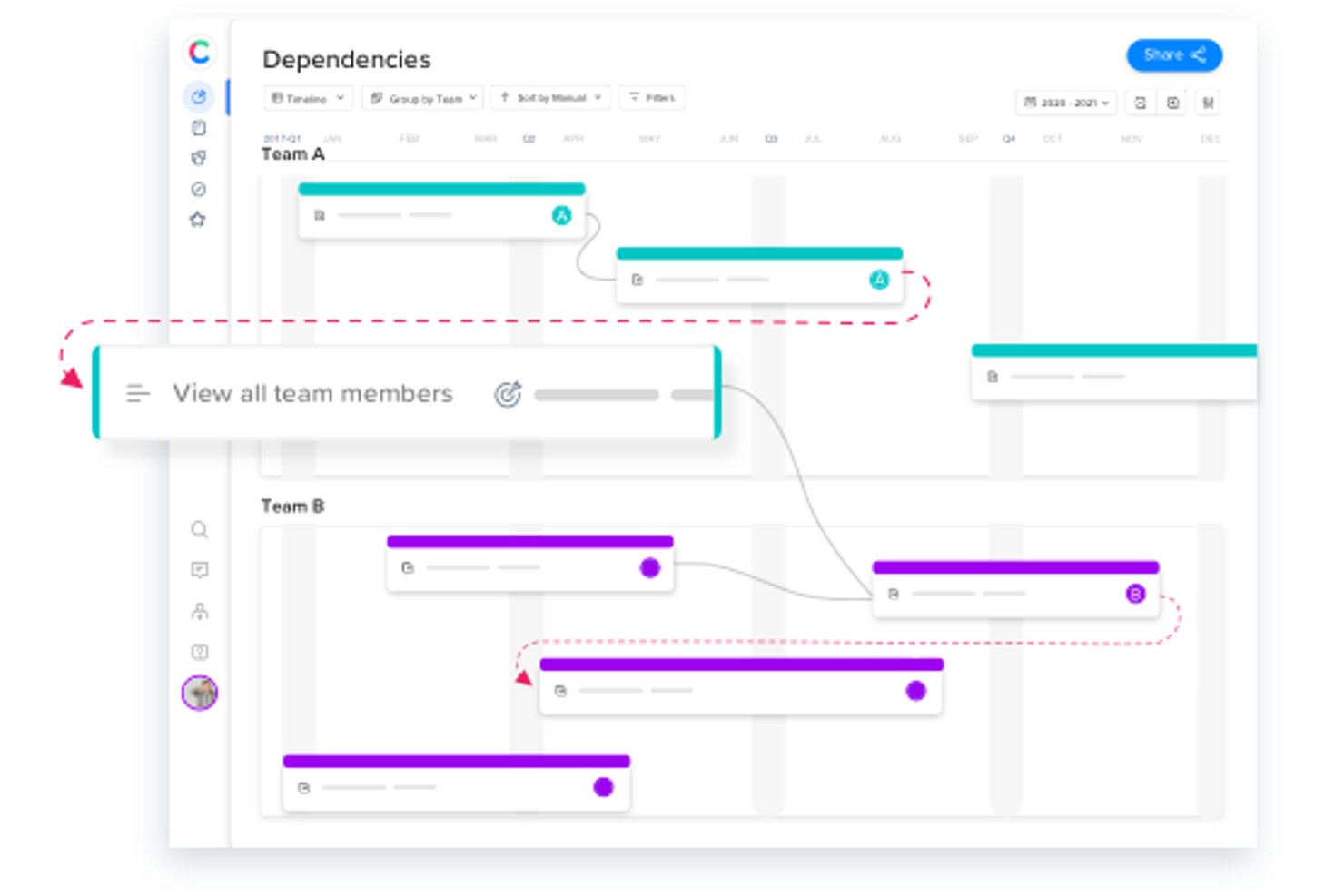
Craft.io è una piattaforma per la pianificazione dei prodotti che combina la gestione degli OKR, quadri di riferimento per la definizione delle priorità, raccolta dei feedback e visualizzazione della roadmap per più tipologie di pubblico in un unico spazio di lavoro.
A chi è più adatto Craft.io?
Craft.io è particolarmente adatto ai responsabili di prodotto che devono collegare direttamente i propri OKR alle visualizzazioni della roadmap e comunicare la strategia a diversi interlocutori.
Perché ho scelto Craft.io
Craft.io è entrato nella mia lista ristretta perché è uno dei pochi strumenti che consente di collegare direttamente gli OKR agli elementi della roadmap, invece di gestirli in un sistema separato. Mi piace il fatto che sia possibile assegnare gli OKR alle singole iniziative e monitorare poi i progressi in tempo reale tramite pannelli di controllo degli OKR, così la dirigenza può sempre vedere come il lavoro si collega agli obiettivi strategici. Il generatore di formule per la valutazione personalizzata della definizione delle priorità rende questo collegamento ancora più solido, consentendo al team di ponderare le funzionalità in base al loro impatto sugli OKR usando criteri personalizzati.
Caratteristiche principali di Craft.io
- Guru AI: Un livello di intelligenza artificiale che riassume le epopee, genera note di rilascio e redige documenti per la commercializzazione direttamente all'interno della piattaforma.
- Generatore di formule personalizzate: Uno strumento di valutazione che consente di definire criteri personalizzati per la definizione delle priorità e di ponderare i fattori oltre i quadri di riferimento integrati come RICE e MoSCoW.
- Posti gratuiti per collaboratori e visualizzatori: Un numero illimitato di interlocutori può visualizzare e commentare le roadmap senza essere conteggiato tra i posti a pagamento per gli editor.
- Sincronizzazione bidirezionale con gli strumenti di distribuzione: L'integrazione bidirezionale con Jira, Azure DevOps, GitHub, GitLab e Pivotal Tracker mantiene allineati i dati della roadmap e quelli dello sviluppo.
Integrazioni di Craft.io
Craft.io offre 13 integrazioni native, inclusa la sincronizzazione bidirezionale con Jira Software, Azure DevOps, GitHub, GitLab e Pivotal Tracker, oltre a Figma, Adobe XD, Axure, InVision, Miro, Salesforce, Slack e Microsoft Teams. Il piano Enterprise include un'API ed è supportato anche Zapier.
Pros and Cons
Pros:
- Le roadmap collegate agli OKR chiariscono l'allineamento strategico
- La valutazione personalizzata supporta una definizione delle priorità più articolata
- La votazione dei feedback collega le richieste alle priorità
Cons:
- I componenti aggiuntivi frammentano i flussi di lavoro relativi ai feedback e alla capacità
- La condivisione della roadmap con utenti esterni rimane poco chiara

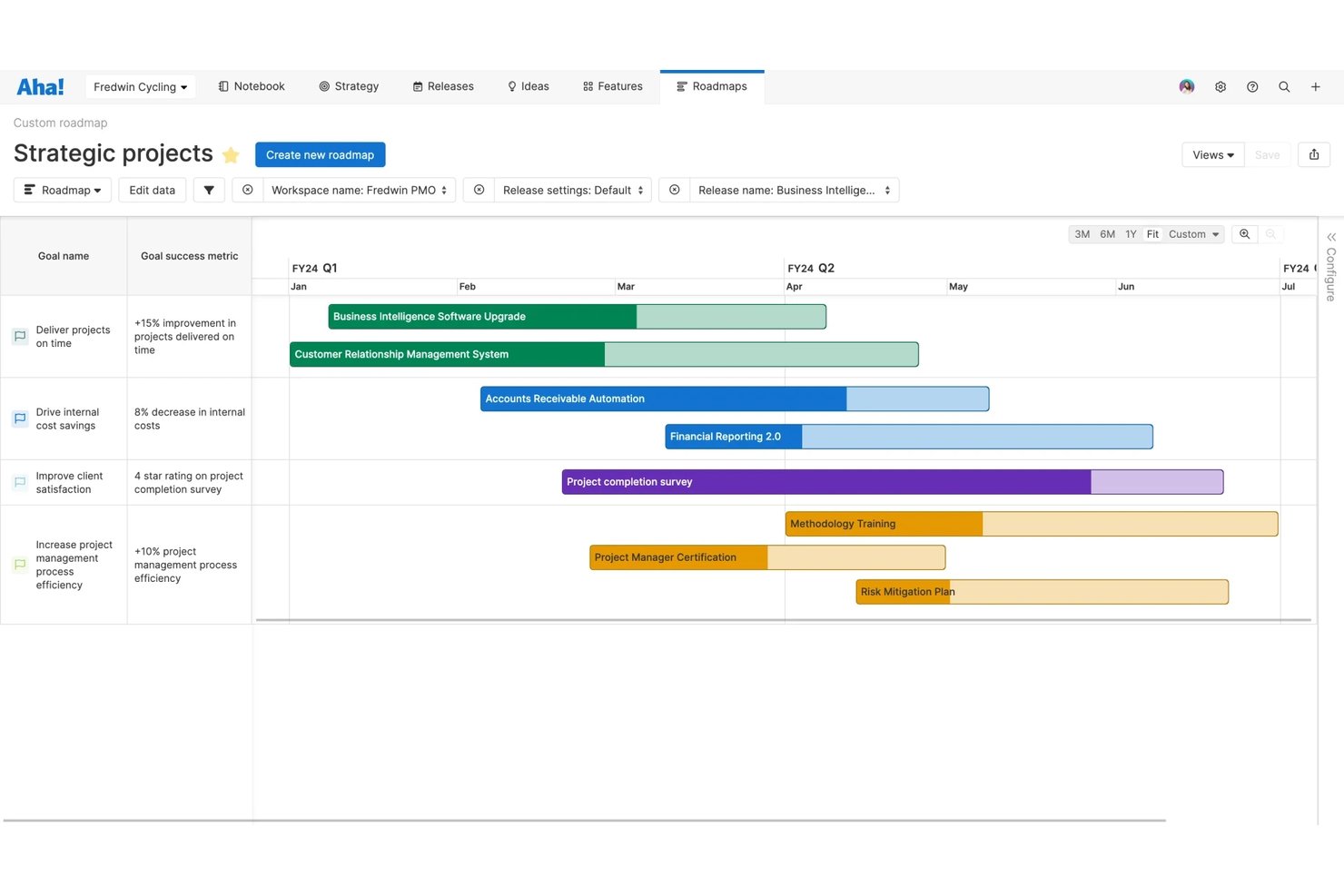
Kanboard är ett självhostat, MIT-licensierat kanbanverktyg som erbjuder uppgifts- och backlogghantering, automatiseringsregler, spårning av deluppgifter och ett pluginbibliotek för att utöka funktionaliteten med exempelvis kalendervyer och Git-integreringar.
Vem passar Kanboard bäst för?
Kanboard passar bra för teknikansvariga och IT-administratörer som vill ha ett självhostat kanbanverktyg utan licenskostnader och med full kontroll över sina data.
Varför jag valde Kanboard
Kanboard tar plats på min kortlista eftersom det är ett av få kanbanverktyg som är licensierade under MIT utan några begränsningar för öppen kärna. Jag gillar att man får full åtkomst till källkoden, underhållna Docker-avbildningar och Docker Compose-filer för MariaDB, Postgres och SQLite direkt från början. I praktiken innebär det att mitt team kan köra hela stacken på våra egna servrar, tillämpa WIP-gränser för att flagga överbelastade kolumner och automatisera tilldelning av uppgifter när arbetet går in i ett nytt steg.
Viktiga funktioner i Kanboard
- Automatiska åtgärder: Ange regler som utlöser ändringar av fält – till exempel omtilldelning av en uppgift eller uppdatering av dess färg – när den flyttas till en ny kolumn.
- LDAP- och OAuth2-autentisering: Anslut Kanboard till LDAP eller Active Directory direkt från början, eller lägg till GitHub-, GitLab- och andra OAuth2-inloggningar via pluginer.
- Anpassade filter och frågespråk: Sök efter och filtrera uppgifter efter tilldelad person, kategori, förfallodatum och beskrivning med hjälp av en inbyggd frågesyntax.
- Pluginbibliotek: Utöka Kanboard med communitybyggda pluginer för chattaviseringar, Git-webhooks, tidsspårning och mycket mer.
Integreringar med Kanboard
Kanboard erbjuder integreringar via pluginer med GitHub, GitLab, Bitbucket, Gitea, Gogs, Slack och Mattermost. Dess API och webhooks stöder anpassade integreringar.
Pros and Cons
Pros:
- MIT-licensen tillåter obegränsade ändringar av källkoden
- Självhostad distribution ger fullständig kontroll över data
- Automatisering stöder disciplinerat arbete enligt kanbanmetoden
Cons:
- Inbyggda verktyg för färdplaner och prioritering saknas
- Det går inte att samla in återkoppling från externa intressenter

Fibery
Ideale per i flussi di lavoro dal feedback alla roadmap in un unico spazio di lavoro
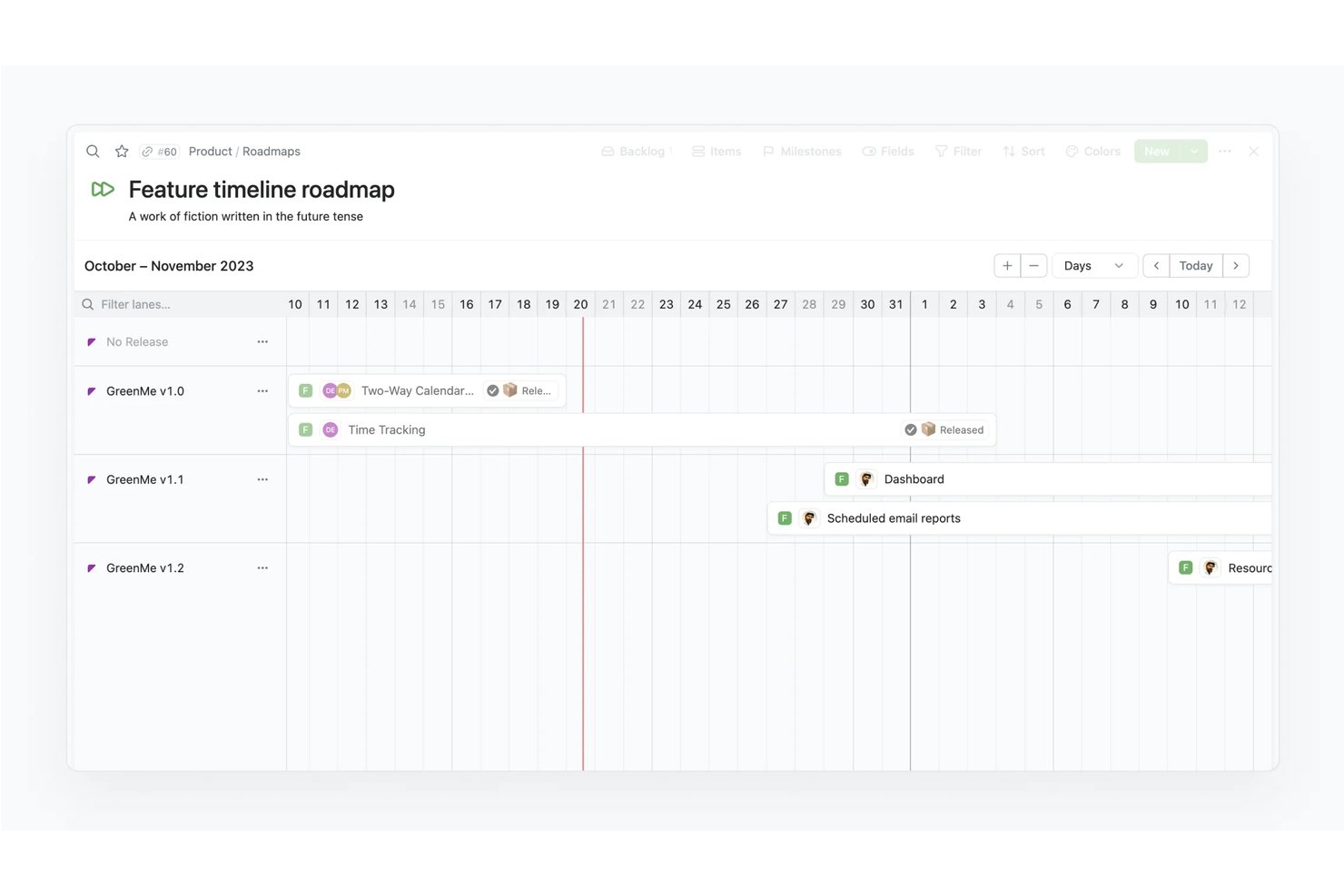
Fibery è una piattaforma di gestione dei prodotti che riunisce feedback dei clienti, prioritizzazione, specifiche e pianificazione della roadmap in un unico spazio di lavoro personalizzabile, con visualizzazioni della roadmap Timeline e Kanban, punteggi basati su formule e monitoraggio integrato della distribuzione degli sprint.
Per chi è più adatto Fibery?
Fibery è particolarmente adatto ai product manager che desiderano gestire la raccolta dei feedback, la prioritizzazione e la pianificazione della roadmap in un unico spazio di lavoro, invece di combinare strumenti separati.
Perché ho scelto Fibery
Fibery si è guadagnato un posto nella mia lista ristretta perché è l'unico strumento in cui feedback, prioritizzazione, specifiche e pianificazione della roadmap risiedono tutti in uno spazio di lavoro connesso. Mi piace molto la possibilità di ponderare il feedback dei clienti in base alla corrispondenza con l'ICP o all'MRR, assegnargli un punteggio tramite formule personalizzate e collegarlo direttamente agli elementi della roadmap in una visualizzazione Timeline o Kanban. È inoltre possibile collegare i piani di prodotto agli OKR aziendali senza mai uscire dalla piattaforma.
Funzionalità principali di Fibery
- Condivisione della roadmap pubblica e del changelog: Pubblica roadmap aggiornate in tempo reale e changelog aggiornati automaticamente, visualizzabili da stakeholder esterni e clienti senza una licenza a pagamento.
- Accesso gratuito per osservatori e ospiti: Invita osservatori con accesso in sola lettura o ospiti con collaborazione limitata senza alcun costo, mantenendo aperta la visibilità per gli stakeholder senza aumentare il numero di licenze.
- Sincronizzazione bidirezionale con Jira, GitHub e GitLab: Sincronizza in tempo reale richieste pull, rami, commit e problemi per mantenere la roadmap allineata a ciò che il team di sviluppo sta effettivamente distribuendo.
- Analisi dei feedback basata sull'IA: L'IA estrae dal feedback il livello di criticità, la persona target e il sentiment, e mostra gli input correlati mentre scrivi le specifiche o riepiloghi le registrazioni delle interviste.
Integrazioni di Fibery
Fibery offre integrazioni con Jira, GitHub, GitLab, Zendesk e Slack, oltre a un'API GraphQL e a un SDK per connettori personalizzati. Supporta anche Zapier.
Pros and Cons
Pros:
- Collega direttamente il feedback alle priorità della roadmap
- Le formule personalizzate supportano la prioritizzazione in stile RICE
- Collega le roadmap agli OKR aziendali
Cons:
- Il punteggio personalizzato richiede una configurazione iniziale
- Uno spazio di lavoro altamente configurabile richiede più tempo per essere appreso
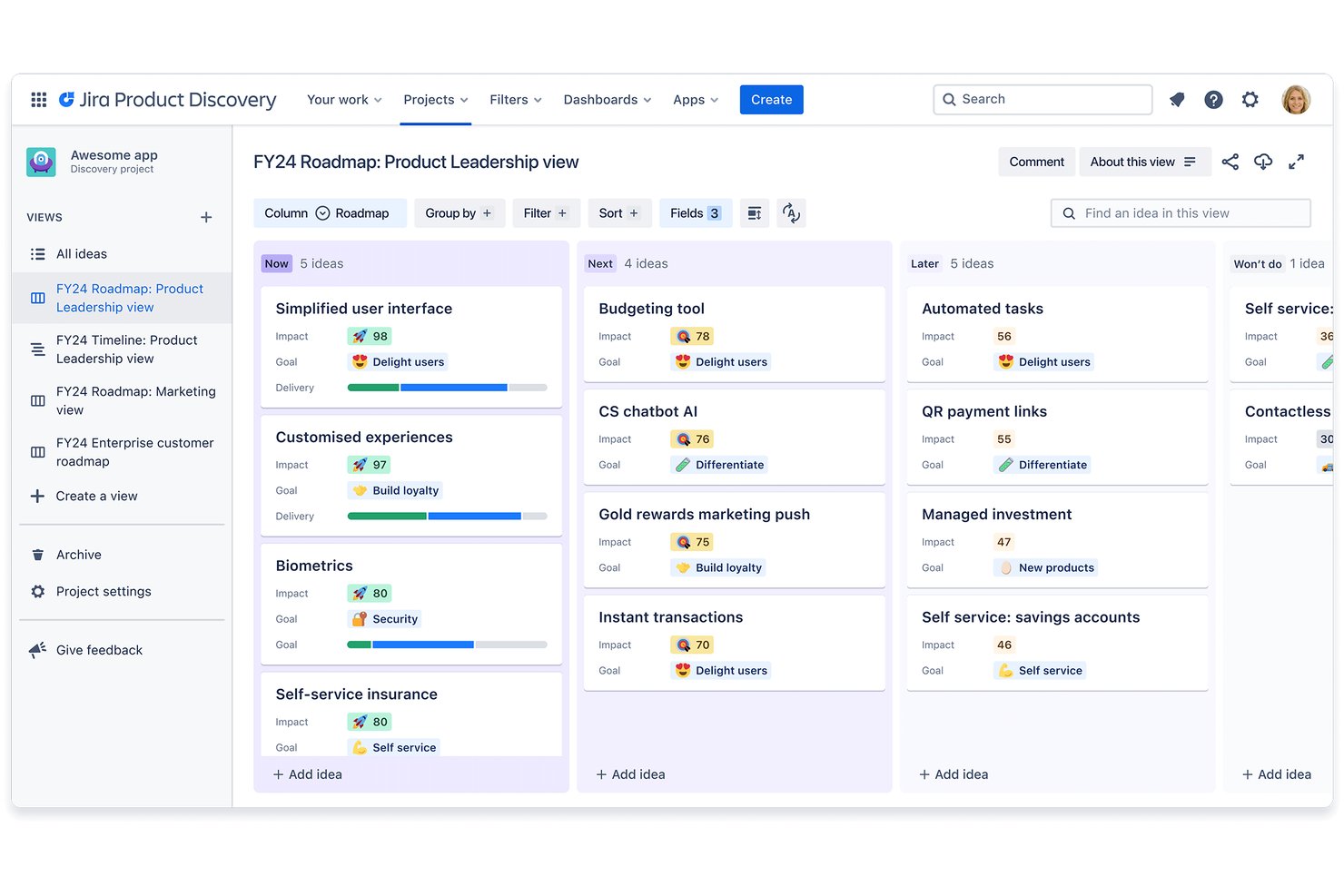
Jira Product Discovery è uno strumento per la roadmap dei prodotti sviluppato da Atlassian, che combina la raccolta delle idee, framework di prioritizzazione e visualizzazione della roadmap con collegamenti bidirezionali diretti ai flussi di lavoro di distribuzione di Jira.
Per chi è più adatto Jira Product Discovery?
Jira Product Discovery è particolarmente adatto ai product manager e ai product owner che lavorano già nell'ecosistema Atlassian e desiderano gestire la fase di discovery e la pianificazione della distribuzione in un unico flusso di lavoro connesso.
Perché ho scelto Jira Product Discovery
Jira Product Discovery è tra le mie scelte finali perché collega il pensiero strategico sul prodotto alla distribuzione in un modo che gli strumenti per la roadmap indipendenti non consentono. Mi piace poter collegare direttamente qualsiasi idea della roadmap agli epic e alle issue di Jira, così l'avanzamento della distribuzione viene visualizzato nell'area di lavoro dedicata alla discovery senza aggiornamenti manuali. I campi personalizzati e le formule permettono al mio team di applicare il punteggio RICE in modo coerente, mentre le viste a scheda, cronologia e matrice rendono semplice passare dalla pianificazione personale alla comunicazione delle priorità agli stakeholder.
Funzionalità principali di Jira Product Discovery
- Raccolta degli approfondimenti: Collega direttamente alle idee le prove raccolte dai clienti utilizzando la funzionalità integrata per gli approfondimenti, l'estensione di Chrome o le app di terze parti collegate.
- Accesso dei collaboratori: Invita gli stakeholder come collaboratori gratuiti, che potranno votare, commentare e reagire alle idee senza consumare un posto a pagamento per i creatori.
- Incorporamento della roadmap in Confluence: Incorpora le viste aggiornate della roadmap direttamente nelle pagine di Confluence, così gli stakeholder vedranno sempre le priorità attuali senza lasciare il proprio spazio di lavoro.
- Regole di automazione: Configura flussi di lavoro automatizzati con un massimo di 500 regole al mese nel piano Standard per ridurre gli aggiornamenti manuali ripetitivi in tutta la roadmap.
Integrazioni di Jira Product Discovery
Jira Product Discovery dispone di cinque integrazioni native documentate: Jira, Jira Service Management, Confluence, Atlassian Goals e Atlassian Projects. Si collega inoltre a Rovo e supporta fonti di approfondimenti di terze parti.
Pros and Cons
Pros:
- Le viste della roadmap si adattano ai diversi destinatari tra gli stakeholder
- Il punteggio RICE supporta una prioritizzazione ripetibile
- Il voto degli stakeholder raccoglie i contributi al prodotto tra i diversi team
Cons:
- Nessuna pianificazione nativa della capacità per le decisioni sulle risorse
- Nessuna modellazione degli scenari per priorità incerte
Altri Software per Roadmap di Prodotto
Eccone alcuni altri che non sono entrati nella lista principale. Se hai bisogno di ulteriori suggerimenti per software comodi di roadmap di prodotto, dai un’occhiata a questi:
- Productboard
Ideale per la definizione delle priorità delle funzionalità guidata dai clienti
- Dragonboat
Ideale per la creazione di roadmap di portafoglio orientate ai risultati
- ClickUp
Ideale per roadmap altamente visive e collaborative
- ProdPad
Ideale per roadmap snelle collegate agli OKR aziendali
- Tempo Roadmapping Software
Ideale per la sincronizzazione con Jira con controllo bidirezionale dei dati
- Canny
Ideale per dare priorità ai feedback ponderati in base ai ricavi
- Featurebase
Ideale per la trasparenza della roadmap collegata al feedback


Recensioni di Software Correlati
Ecco una raccolta delle nostre migliori recensioni di software nell’ambito UX e product management:
- Migliori Strumenti per il Product Management
- Migliori Software per la Pianificazione di Prodotto
- Migliori Software per lo Sviluppo di Prodotto
- Migliori Strumenti di Analisi di Prodotto
- Migliori Software per la Gestione delle Idee
- Migliori Software di Heatmap
Come Valuto gli Strumenti per la Roadmap di Prodotto
Suddivido la mia valutazione in criteri di base—come visualizzazioni della timeline, sincronizzazione con Jira e condivisione con stakeholder—e fattori differenzianti che separano gli strumenti pensati per PM singoli da quelli che scalano su più portfolio.
Funzionalità Principali (Requisiti Minimi per Questa Lista)
Quando seleziono gli strumenti per la mia lista, valuto ciascuno su una scala da 0 (non offre la funzionalità) a 5 (eccelle in questa area) per ogni funzionalità principale elencata di seguito. Poi calcolo il punteggio totale dello strumento in percentuale. Ogni strumento deve raggiungere un punteggio totale minimo del 75% per essere preso in considerazione.
- Opzioni di Visualizzazione della Roadmap: Controllo se ogni strumento offre diversi tipi di visualizzazione—cronologia, kanban, now-next-later—così i PM possono passare da una revisione su board a una presentazione di pianificazione trimestrale.
- Framework di Prioritizzazione delle Funzionalità: Sono importanti modelli di punteggio integrati come RICE o matrici valore-vs-sforzo. Cerco strumenti che permettano di personalizzare criteri e pesi per adattarli allo stile di pianificazione del team.
- Collegamento tra Strategia e Delivery: I migliori strumenti per roadmap collegano OKR o temi fino a epic e funzionalità con riepiloghi di avanzamento. Valuto quanto chiaramente ogni strumento traccia una scommessa strategica fino al lavoro in corso.
- Integrazioni con Strumenti di Sviluppo: Cerco una sincronizzazione bidirezionale con strumenti come Jira, Linear, Azure DevOps e GitHub, così lo stato della roadmap riflette il reale avanzamento delle delivery senza aggiornamenti manuali.
- Condivisione e Visualizzazioni per Stakeholder: I leader di prodotto condividono le roadmap con dirigenti, sales e clienti, ognuno con necessità di dettaglio diverse. Valuto se uno strumento supporta visualizzazioni specifiche per il pubblico con permessi granulari.
- Raccolta di Idee e Feedback: Una roadmap basata su veri feedback degli utenti è più solida. Cerco portali per idee, meccanismi di voto e la possibilità di collegare le richieste dei clienti direttamente agli elementi pianificati nella roadmap.
Una volta creata una lista di strumenti che soddisfano i criteri, considero cosa distingue ciascuna piattaforma dalle altre.
Fattori Differenzianti (Cosa Distingue i Fornitori)
Ecco come confronto i diversi fornitori:
Funzionalità Distintive
La pianificazione di scenari è un grande elemento differenziante. Prima di bloccare un piano trimestrale, voglio modellare i compromessi—cosa succede se posticipiamo la Funzionalità B per accelerare una integrazione con un partner? Valuto anche le capacità di pianificazione assistite dall’IA, dove gli strumenti riassumono automaticamente il feedback o suggeriscono punteggi di priorità per risparmiare ore di triage manuale. Il monitoraggio dei risultati completa il quadro. Uno strumento che collega le iniziative implementate ai KPI come il tasso di attivazione o la retention aiuta i PM a dimostrare che le decisioni sulla roadmap hanno portato a risultati reali.
Oltre le Funzionalità
Il modello di pricing è molto importante. La maggior parte degli strumenti di roadmap fa pagare per editor, ma alcuni richiedono anche un costo per ogni visualizzatore—e questo si somma rapidamente quando si condivide con 50 stakeholder tra vendite e leadership. Valuto anche la scalabilità: uno strumento che funziona per una singola squadra deve reggere anche quando un’organizzazione in crescita necessita riepiloghi a livello portfolio su dieci team di prodotto. Il time-to-value è un altro fattore che considero. Template iniziali per OKR o punteggi RICE possono fare la differenza tra una roadmap pubblicata in un giorno e settimane di configurazione.
Come Scegliere un Software per Roadmap di Prodotto
Mentre passi attraverso il tuo percorso unico di selezione del software, tieni a mente i seguenti punti:
- Allineamento agli Obiettivi Strategici: Scegliere il giusto software per la roadmap di prodotto richiede di comprendere quanto bene si allinea agli obiettivi strategici della tua azienda. Considera come il software permette di collegare funzionalità, compiti e traguardi direttamente agli obiettivi aziendali generali.
Per il monitoraggio dei progetti e la gestione delle milestone, valuta opzioni di software gratuito per le milestone che possono integrare le tue attività di pianificazione della roadmap. - Flessibilità e Scalabilità: Il software scelto dovrebbe essere flessibile e scalabile per adattarsi alla crescita e ai cambiamenti della tua organizzazione. Man mano che l’azienda si espande o cambia focus, il tuo software per la roadmap di prodotto deve potersi adattare facilmente, offrendo viste personalizzabili e funzionalità dedicate a diversi ruoli e dipartimenti.
- Capacità di Integrazione: Un’integrazione efficace con altri strumenti utilizzati dall’organizzazione è essenziale. Il software per la roadmap di prodotto deve poter collegarsi a strumenti di project management, sistemi di customer relationship management (CRM) e ad altre soluzioni per assicurare la coerenza dei dati e migliorare il flusso di lavoro.
- Esperienza Utente e Usabilità: Un aspetto fondamentale di qualsiasi software è la facilità d’uso. Il software per la roadmap di prodotto dovrebbe offrire un’interfaccia intuitiva che tutti i portatori di interesse possano utilizzare agevolmente, indipendentemente dalla loro dimestichezza tecnologica. Ciò include visualizzazioni chiare della roadmap, strumenti di pianificazione e prioritizzazione semplici da usare e requisiti minimi di formazione.
- Supporto e Risorse: Scegli software che offra un supporto solido e risorse formative adeguate. Questo include l’accesso a un team di assistenza clienti competente, documentazione completa, tutorial online e forum della community. Questa considerazione è particolarmente importante per le organizzazioni che operano in settori o regioni con accesso limitato ai servizi di supporto tecnico.
La scelta del software per la roadmap di prodotto adatto richiede una valutazione attenta di questi fattori, così da garantire che la soluzione non solo risponda alle esigenze attuali ma supporti anche la visione strategica e la crescita nel tempo.
Tendenze del Software per la Roadmap di Prodotto nel 2025
Nel 2025, il panorama dei software per la roadmap di prodotto continua a evolversi rapidamente, spinto dalla necessità di strumenti di pianificazione più dinamici, in grado di tenere il ritmo di ambienti aziendali in rapido cambiamento. Ecco una panoramica delle tendenze più recenti nel campo:
- Strumenti di Visualizzazione Avanzati: La tendenza verso strumenti di visualizzazione sempre più sofisticati è evidente, con un’attenzione particolare a roadmap in tempo reale e interattive. Questi strumenti sono progettati per offrire una chiara visibilità sullo stato dei progetti e sulle dipendenze, facilitando l’allineamento dei team e un rapido adattamento ai cambiamenti.
- Previsioni Guidate dall’Intelligenza Artificiale: Una funzionalità innovativa e insolita che sta prendendo piede è l’uso dell’IA per prevedere tempistiche e potenziali colli di bottiglia. Questa caratteristica sta diventando sempre più popolare poiché aiuta i product manager ad anticipare i problemi prima che si verifichino, assicurando un’esecuzione dei progetti più fluida.
- Prioritizzazione Automatica: L’IA viene anche utilizzata per automatizzare la prioritizzazione dei compiti in base ai dati storici e a criteri predefiniti. Questo approccio non solo consente di risparmiare tempo ma aumenta anche l’oggettività durante i processi decisionali.
- Feedback Collaborativi: Sono molto richieste le funzionalità che facilitano la raccolta di feedback in modo strutturato e semplificato sia dagli utenti che dagli stakeholder. Questa tendenza sottolinea l’importanza del design centrato sull’utente e del miglioramento continuo nello sviluppo dei prodotti.
Queste tendenze mostrano come il software per la roadmap di prodotto si stia sviluppando e raffinando per soddisfare le esigenze sempre più sofisticate dei product manager di oggi. Man mano che lo scenario dello sviluppo prodotti si fa più complesso, anche gli strumenti utilizzati per gestire e visualizzare la roadmap attraverso storyboard devono evolversi di conseguenza, offrendo soluzioni complete che non solo monitorano i progressi, ma prevedono anche le sfide future.
Che Cos’è un Software per la Roadmap di Prodotto?
Il software per la roadmap di prodotto è uno strumento che aiuta product manager, project manager e team trasversali a pianificare, visualizzare e comunicare la strategia e l’avanzamento di un prodotto nel tempo. Risolve problemi come priorità non allineate, tempistiche poco chiare e comunicazione frammentata tra gli stakeholder, fornendo una piattaforma centralizzata per gestire iniziative di prodotto, scadenze e obiettivi.
Caratteristiche di un Software per la Roadmap di Prodotto
Quando selezioni un software per la roadmap di prodotto, presta attenzione alle seguenti caratteristiche chiave:
- Roadmapping visivo: Crea linee temporali e roadmap chiare e interattive che ti permettono di vedere come le iniziative di prodotto si integrano nel tempo. Permette a tutto il team di allinearsi e concentrarsi su funzionalità, iniziative e piani futuri.
- Strumenti di collaborazione: La comunicazione integrata rende più facile lavorare con colleghi e stakeholder. Condividi feedback direttamente sulla roadmap, tagga le persone e aggiorna in modo che tutti possano contribuire e restare aggiornati sulle priorità.
- Framework di prioritizzazione: Usa strumenti integrati per classificare funzionalità, miglioramenti e idee in base a fattori come l’impatto sul cliente o lo sforzo richiesto. Puoi prendere decisioni più intelligenti su cosa sviluppare dopo ed evitare che le scelte difficili si trasformino in supposizioni.
- Monitoraggio dell’avanzamento: Monitora lo stato di progetti, attività o funzionalità mentre passano dall’idea allo sviluppo fino al completamento. Puoi individuare rapidamente ritardi, celebrare successi e mantenere tutti in carreggiata senza dover gestire in modo troppo dettagliato.
- Pianificazione dei rilasci: Pianifica i rilasci con le funzionalità raggruppate in base ai lanci imminenti. Sapere cosa verrà lanciato a breve ti aiuta a coordinare i lanci, comunicare i cambiamenti ed evitare emergenze last minute.
- Capacità di integrazione: Collega la tua roadmap agli strumenti che già usi—come piattaforme di project management, comunicazione o sviluppo per una sincronizzazione bidirezionale. Questo mantiene tutto aggiornato ed evita doppioni nell’inserimento dei dati.
- Viste e filtri personalizzati: Personalizza la visualizzazione della roadmap in base all’utente—sia per team, periodo di tempo o area di prodotto. Inoltre, crea una vista di roadmap di alto livello pensata appositamente per i decisori chiave.
- Gestione del feedback: Raccogli, organizza e incorpora il feedback di utenti e stakeholder interni per guidare la tua roadmap. La gestione del feedback può velocizzare il passaggio delle idee all’implementazione e dimostra ai tuoi utenti che il loro contributo conta.
- Permessi e controlli di condivisione: Modifica visualizzazioni e permessi per vari membri del team che possono modificare la roadmap, mantenendo riservati i piani sensibili pur permettendo a chi serve di collaborare dove necessario.
Funzionalità comuni dell’intelligenza artificiale nei software di roadmap di prodotto
Oltre alle classiche funzionalità elencate sopra, molte di queste soluzioni integrano l’AI con funzionalità come:
- Generazione intelligente di riassunti: L’AI crea riassunti facili da condividere della tua roadmap, degli aggiornamenti o dei feedback. Significa meno tempo speso a scrivere report e più tempo a costruire ottimi prodotti.
- Prioritizzazione automatica: L’AI analizza i feedback dei clienti, le tendenze di mercato e i contributi del team per suggerire quali funzionalità o attività dovrebbero essere sviluppate successivamente. Le automazioni possono farti risparmiare ore di lavoro manuale e aiutarti a scegliere i miglioramenti più impattanti.
- Previsioni predittive: L’AI può stimare possibili date di rilascio, necessità di risorse o rischi basandosi su dati storici e piani attuali, così puoi pianificare con meno sorprese.
- Rilevamento intelligente delle dipendenze: L’AI può identificare automaticamente le dipendenze tra gli elementi della roadmap, segnalando conflitti o colli di bottiglia per mantenere meglio i tuoi piani sulla giusta rotta.
- Analisi del sentiment: L’AI esamina i commenti degli utenti e i feedback per valutare il sentiment generale sugli elementi della roadmap, aiutandoti a comprendere la frustrazione degli utenti e le opportunità di miglioramento.
Vantaggi dei software di roadmap di prodotto
I software di roadmap di prodotto sono strumenti fondamentali per le organizzazioni che vogliono ottimizzare il processo di sviluppo prodotto e allinearlo agli obiettivi strategici. Offrendo una panoramica visiva e interattiva dell’evoluzione di un prodotto, questi software aiutano i team a dare priorità alle funzionalità, anticipare le sfide e gestire efficacemente le risorse. Di seguito sono riportati cinque principali vantaggi che i software di roadmap di prodotto offrono agli utenti e alle organizzazioni:
- Allineamento strategico: Garantisce che ogni funzionalità e attività presente nella roadmap supporti direttamente gli obiettivi aziendali più ampi. Questo allineamento aiuta le organizzazioni a focalizzare risorse ed energie sulle iniziative con maggior valore aggiunto.
- Collaborazione potenziata: Favorisce la comunicazione e la trasparenza tra diversi team e stakeholder. Utilizzando software di roadmap di prodotto, tutti i coinvolti hanno accesso ad aggiornamenti e informazioni in tempo reale, favorendo la collaborazione e riducendo le incomprensioni.
- Flessibilità aumentata: Permette rapide modifiche ai piani quando cambiano le condizioni di mercato o le priorità aziendali. Questa adattabilità è cruciale negli odierni ambienti di business frenetici, consentendo di rispondere velocemente a nuove opportunità o sfide.
- Migliore gestione delle risorse: Offre strumenti per pianificare e monitorare l’allocazione delle risorse umane e finanziarie. Una gestione efficace delle risorse evita il sovraccarico dei progetti e assicura che le attività critiche ricevano il supporto necessario per avere successo.
- Migliori decisioni: Integra dati provenienti da diverse fonti per offrire una panoramica completa sulla strategia di prodotto e sulla sua esecuzione. Questa integrazione permette decisioni più informate, aiutando i leader a dare priorità alle funzionalità basandosi su dati concreti e intuizioni chiare.
Il software per la roadmap di prodotto non solo semplifica il complesso compito della gestione del prodotto, ma migliora anche l'esecuzione strategica, garantendo che i team possano adattarsi ai cambiamenti e collaborare efficacemente. L'adozione di questo software può portare a notevoli miglioramenti nel modo in cui le organizzazioni pianificano, eseguono e raggiungono i propri obiettivi di sviluppo prodotto.
Costi e prezzi per il software per la roadmap di prodotto
Il software per la roadmap di prodotto offre una gamma di piani e opzioni di prezzo pensati per soddisfare le esigenze di diverse organizzazioni, dalle startup alle grandi imprese. Questi piani variano per funzionalità, livelli di supporto e scalabilità, per adattarsi ai requisiti e ai vincoli di budget di ogni azienda. Comprendere queste opzioni può aiutarti a scegliere il software giusto per ottimizzare il processo di sviluppo prodotto e allinearlo agli obiettivi aziendali.
Tabella comparativa dei piani per il software per la roadmap di prodotto
Di seguito una tabella che illustra la struttura di prezzi e piani del software per la roadmap di prodotto, aiutandoti a confrontare ciò che ogni opzione offre:
| Tipo di piano | Prezzo medio | Ideale per | Funzionalità comuni |
|---|---|---|---|
| Gratuito | $0 | Startup in fase iniziale | Roadmap di base, utenti limitati, integrazioni essenziali |
| Base | $10-20 per utente/mese | Piccoli team in crescita | Roadmap, gestione attività, integrazioni di base |
| Professionale | $20-50 per utente/mese | Organizzazioni mature | Roadmap avanzata, utenti illimitati, integrazioni complete, strumenti di reportistica |
| Enterprise | $50+ per utente/mese | Grandi aziende | Funzionalità personalizzabili, supporto dedicato, analisi avanzate, accesso API |
Quando valuti quale piano scegliere, considera la dimensione del tuo team e la complessità dei tuoi progetti. I piccoli team o le startup potrebbero trovarsi bene con i piani gratuiti o base, mentre le organizzazioni più grandi o chi necessita di funzionalità più sofisticate potrebbero optare per i piani professionale o enterprise. Ogni livello offre più funzioni e flessibilità, quindi valuta ciò che supporterà al meglio la crescita e la strategia prodotto della tua organizzazione.
FAQ sul Software per la Roadmap di Prodotto
Prima di approfondire gli strumenti per la roadmap di prodotto, rispondiamo ad alcune delle domande più comuni che i team di product management pongono sul software per la pianificazione della roadmap.
In che modo la prioritizzazione delle funzionalità può influenzare la gestione del mio prodotto?
Una solida prioritizzazione delle funzionalità negli strumenti di roadmap ti aiuta a concentrarti sul lavoro a maggior impatto ed evitare l’espansione incontrollata delle funzionalità (scope creep). Molte piattaforme includono sistemi di punteggio, votazioni o campi personalizzati che allineano la tua roadmap agli obiettivi aziendali. Mantenere la prioritizzazione coerente permette al team di lavorare in sintonia e assicura che vengano sviluppate le funzionalità di reale bisogno per gli utenti.
Come si presenta una roadmap agli stakeholder usando il software dedicato?
La maggior parte degli strumenti di roadmap permette di generare link condivisibili, esportare visualizzazioni o fare presentazioni in tempo reale. Utilizza le opzioni di filtro e timeline della piattaforma per evidenziare le release chiave e le principali milestone, adattandole ai tuoi stakeholder. Una presentazione interattiva e aggiornata aiuta il pubblico a comprendere rapidamente la visione di prodotto e le priorità.
Quanto è sicuro il software di roadmap prodotto per condividere piani sensibili con gli stakeholder?
I principali strumenti per la roadmap di prodotto offrono robuste funzionalità di sicurezza, come permessi a livello utente, crittografia dei dati e registri di audit. Puoi controllare chi visualizza o modifica roadmap specifiche e condividere i link con stakeholder esterni in modo sicuro. Ricorda sempre di verificare le certificazioni di conformità e la documentazione sulla sicurezza di ciascuna piattaforma prima di condividere dettagli sensibili.
Gli strumenti di roadmap possono integrarsi con software di project management o di sviluppo?
Sì, la maggior parte degli strumenti di roadmap si integra con software come Jira, Trello, Asana e Slack. In questo modo puoi sincronizzare la tua roadmap con le attività di progetto e i flussi di lavoro di sviluppo, mantenendo tutto aggiornato. Queste integrazioni fanno risparmiare tempo riducendo gli aggiornamenti manuali e offrendo visibilità tra tutti i tuoi strumenti di lavoro.
In che modo gli strumenti di roadmap aiutano ad allineare team remoti o distribuiti?
Gli strumenti di roadmap consentono ai team remoti di visualizzare aggiornamenti in tempo reale e di lavorare sempre sulla stessa base di informazioni. Molte piattaforme permettono di commentare direttamente gli elementi, menzionare i colleghi e impostare notifiche automatiche. Questa trasparenza rende più semplice per gruppi distribuiti monitorare i progressi, chiarire le priorità e ridurre le incomprensioni.
Quali funzionalità dovrebbe offrire un software di roadmap di prodotto per team interfunzionali?
Scegli un software per la roadmap di prodotto che offra collaborazione in tempo reale, viste personalizzabili e impostazioni chiare dei permessi. Queste funzioni aiutano i diversi reparti a comunicare efficacemente e mantengono tutti allineati. Strumenti con integrazioni incorporate, opzioni di condivisione semplici e supporto per cicli di feedback permettono a team di prodotto, ingegneria e marketing di collaborare senza attriti.
Cosa succede dopo?
I 10 migliori software per la roadmap di prodotto offrono una vasta gamma di funzionalità e possibilità. Consentono ai team di rimanere organizzati, tenere traccia dei progressi e comprendere meglio il processo di sviluppo. Le roadmap di prodotto forniscono ai team uno strumento essenziale per raggiungere i propri obiettivi nel modo più efficace possibile.
Il software giusto per la roadmap può fare davvero la differenza per assicurare il successo e aiutare i team a portare i loro prodotti al livello successivo. Sai cos’altro può fare la differenza? Iscriverti alla newsletter Product Manager per consigli, approfondimenti e novità settimanali.