

With so many VoC solutions available online, figuring out which one is right for you is difficult. You know you want to analyze and derive insights from customer feedback and interactions so you can align your product strategy, but need to figure out which tool is best. I've got you! In this post I'll help make your choice easy, sharing my personal experiences using dozens of different tools and having spent countless hours visualizing customer experience through many different lenses, with my picks of the best voice of customer analytics software.
Why Trust Our Software Recommendations
6,700+
Reviews
20
Industry experts
16+
Evaluation factors
14
Years
Our team has been testing and reviewing software since 2012. As product managers ourselves, we know how difficult—and important—it is to choose the right software.
For this guide, we evaluated tools using hands-on testing and independent research, scoring tools using our selection criteria.
Our reviews reflect our human editorial judgment, not a sales pitch.
Expert reviewers:
- Andrew LumbySenior TPM
- Cristiano ValimSenior UI/UX Lead


Voice of Customer Analytics Tools Comparison Table
Here’s a comparison table that summarizes basic details about each of my top voice of customer analytics tools:
| Tool | Best For | Trial Info | Price | ||
|---|---|---|---|---|---|
| 1 | Best for automated feedback tagging | Free demo available | Pricing upon request | Website | |
| 2 | Best for analytics on unified feedback sources | Free demo available | Pricing upon request | Website | |
| 3 | Best for survey distribution across web and mobile | 14-day free trial available | Pricing upon request | Website | |
| 4 | Best for conversational surveys | Free plan available | From $19/user/month (billed annually) | Website | |
| 5 | Best for collecting feedback from email surveys | 10-day free trial | From $114/month (billed annually) | Website | |
| 6 | Best for gamifying the survey and feedback processes | 7-day free trial + free demo | Pricing upon request | Website | |
| 7 | Best for linking feedback themes to revenue risk | Free demo available | From $25,000/year (billed annually) | Website | |
| 8 | Best for breaking down cross-team feedback silos | 30-day free trial | Pricing upon request | Website | |
| 9 | Best for advanced data analytics and insights | Free demo available | Pricing upon request | Website | |
| 10 | Best for generating visual infographic reports | Free demo available | Pricing upon request | Website |


Overviews Of The 10 Best Voice of Customer Analytics Tools
Here’s a brief description of each voice of customer analytics software that showcases each vendor’s best use case, their noteworthy features, and some pros and cons. I’ve also included screenshots to give you a snapshot of their user interface.
 Best for automated feedback tagging
- Free demo available
- Pricing upon request
Visit WebsiteCustomer Rating:4.4/5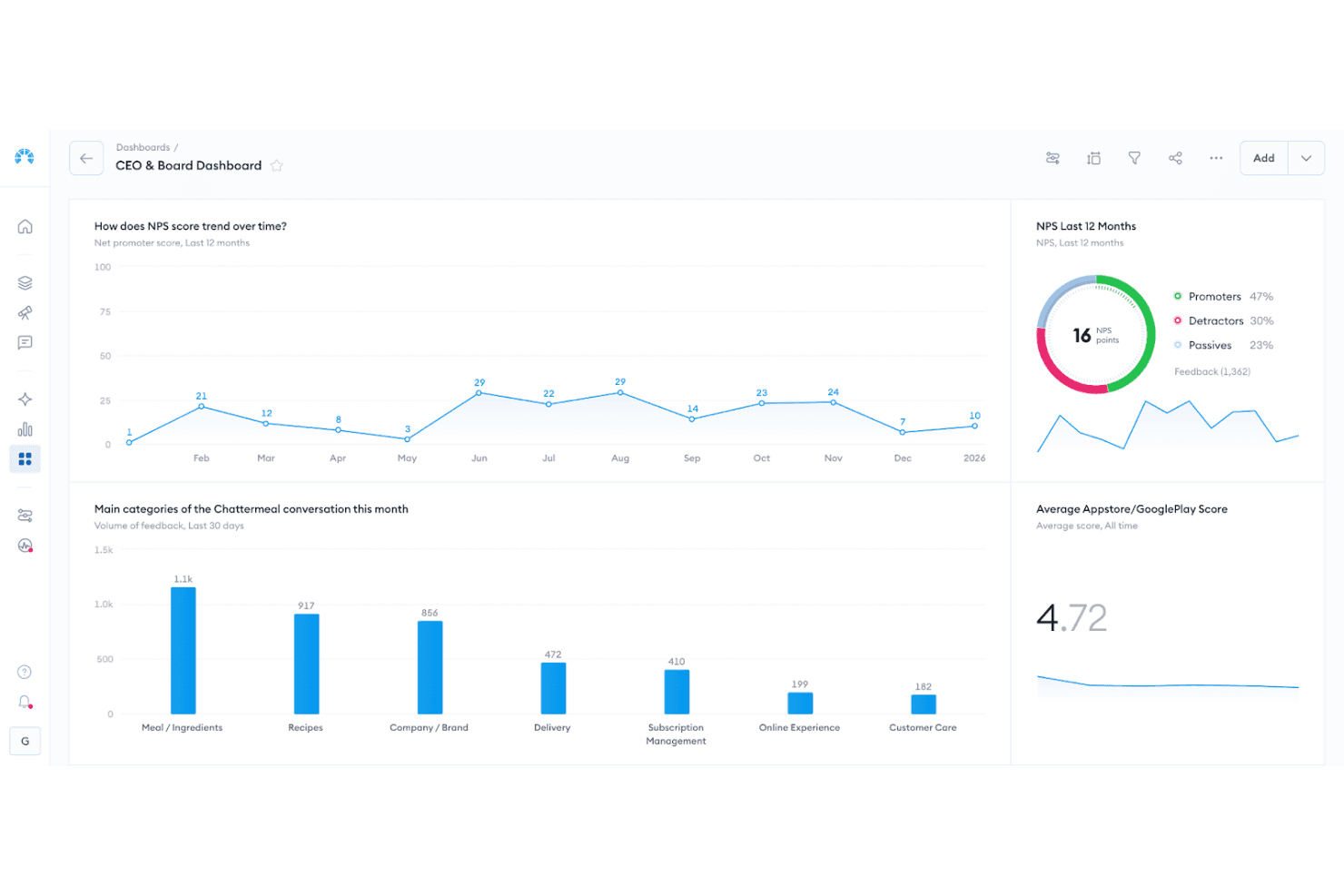
Chattermill dashboard visualizing sentiment themes, feedback volume, and trend changes over time. Chattermill is an AI-native voice of customer analytics platform that aggregates feedback from surveys, reviews, support tickets, social media, and calls, then applies aspect-based sentiment analysis and automated theme tagging across all of it.
Who Is Chattermill Best For?
Chattermill is a strong fit for enterprise CX and product teams that need to automatically categorize high volumes of customer feedback across dozens of channels without manual tagging work.
Why I Picked Chattermill
Chattermill earns its spot on my shortlist because its automated tagging is genuinely built for scale. Lyra AI applies aspect-based sentiment analysis to every comment, splitting a single piece of feedback into multiple themes, each with its own sentiment score, without any manual sorting on your end. I also love that custom themes can be added directly in Settings and apply going forward within 24 hours, so your taxonomy evolves as your product does rather than staying frozen at onboarding.
Chattermill Key Features
- Impact Analysis: Links specific feedback themes to metrics like NPS, CSAT, and sentiment to show which issues are actually moving your scores up or down.
- Anomaly detection and alerting: Monitors feedback in real time and sends alerts to Slack, email, or Jira when sentiment drops or volume spikes on a specific topic.
- MCP server integration: Lets AI assistants like Claude, ChatGPT, and Gemini query your Chattermill data directly, and push insights into tools like Linear and Notion.
- Proactive Insights: A Lyra Agent feature that continuously scans all channels and delivers ranked lists of issues, praise, and feature requests to the right teams on a set schedule.
Chattermill Integrations
Chattermill offers 65+ native integrations, including Zendesk, Intercom, Qualtrics, SurveyMonkey, Trustpilot, Google Reviews, Salesforce, Talkdesk, Slack, and Jira. It also supports API, CSV uploads, and connectors for Snowflake, Databricks, Amazon S3, and Google Cloud Platform.
Pros and Cons
Pros:
- Impact analysis links themes to outcomes
- Custom taxonomies evolve with products
- Aspect-level sentiment reveals multiple issues
Cons:
- Historical theme changes need support
- Sentiment can miss customer nuance
Learn more about Chattermill: Best for analytics on unified feedback sources
- Free demo available
- Pricing upon request
Visit WebsiteCustomer Rating:4.8/5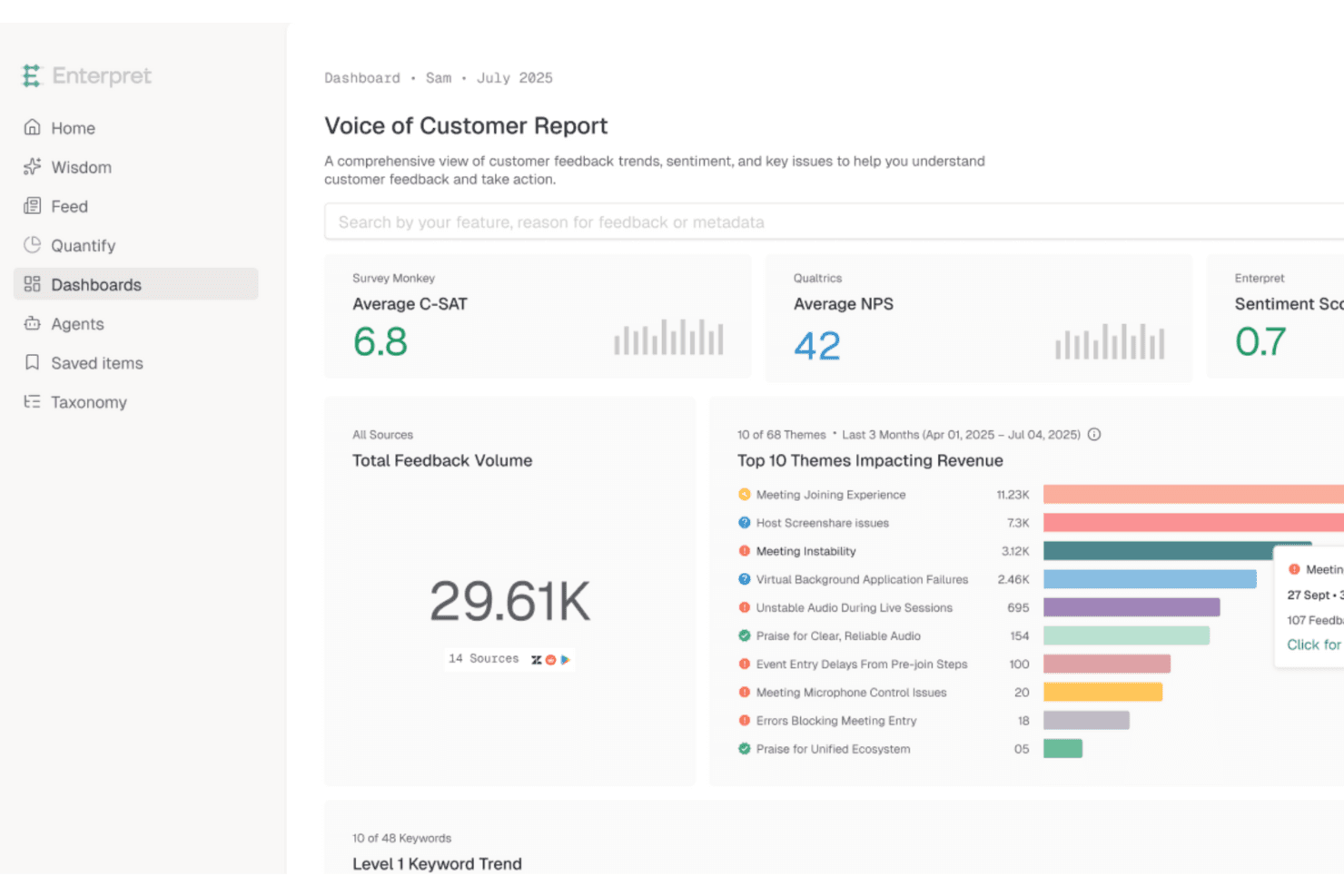
Enterpret unifies feedback data to surface revenue-impacting customer insights. Enterpret is a customer intelligence platform that aggregates feedback from support, sales, surveys, reviews, social, and CRM sources into a unified dataset, then uses an adaptive AI taxonomy to classify, analyze, and surface themes and sentiment trends.
Who Is Enterpret Best For?
Enterpret fits mid-market to enterprise product and CX teams that need to analyze feedback from many different channels without stitching together separate tools.
Why I Picked Enterpret
Enterpret earns its spot on my shortlist because it treats fragmented feedback as an infrastructure problem, not a reporting one. I love how its adaptive taxonomy automatically classifies incoming feedback from support tickets, Gong call transcripts, App Store reviews, and Reddit threads into a unified five-level hierarchy, without manual tagging. What really sets it apart is that you can rank those themes by ARR or NPS impact, so you're not just seeing what customers say most often but what's actually tied to revenue risk.
Enterpret Key Features
- Closed-loop follow-up workflows: When a linked Jira or Linear issue is resolved, Enterpret drafts personalized replies to affected customers and tracks sentiment changes after sending.
- Custom AI enrichments: Write natural-language prompts or Python functions to extract specific signals—like competitor mentions—and apply them back to historical data.
- Anomaly detection alerts: Enterpret flags spikes, drops, and sentiment shifts in real time and routes alerts to Slack or email as they happen.
- Customer Context Graph: Connects individual feedback records to account-level data like ARR, lifecycle stage, and LTV to surface revenue-linked customer intelligence.
Enterpret Integrations
Enterpret offers 50+ native integrations, including Zendesk, Gong, Qualtrics, G2, Salesforce, Jira, Linear, Slack, and Snowflake. It also supports webhooks, CSV uploads, email ingestion, Export API 2.0, and Zapier.
Pros and Cons
Pros:
- Closed-loop follow-ups connect insights to action
- Revenue-linked themes sharpen prioritization
- Adaptive taxonomy reduces manual tagging
Cons:
- Data mapping requires onboarding support
- Complex filters can slow or crash
Learn more about Enterpret: Best for survey distribution across web and mobile
- 14-day free trial available
- Pricing upon request
Visit WebsiteCustomer Rating:4.7/5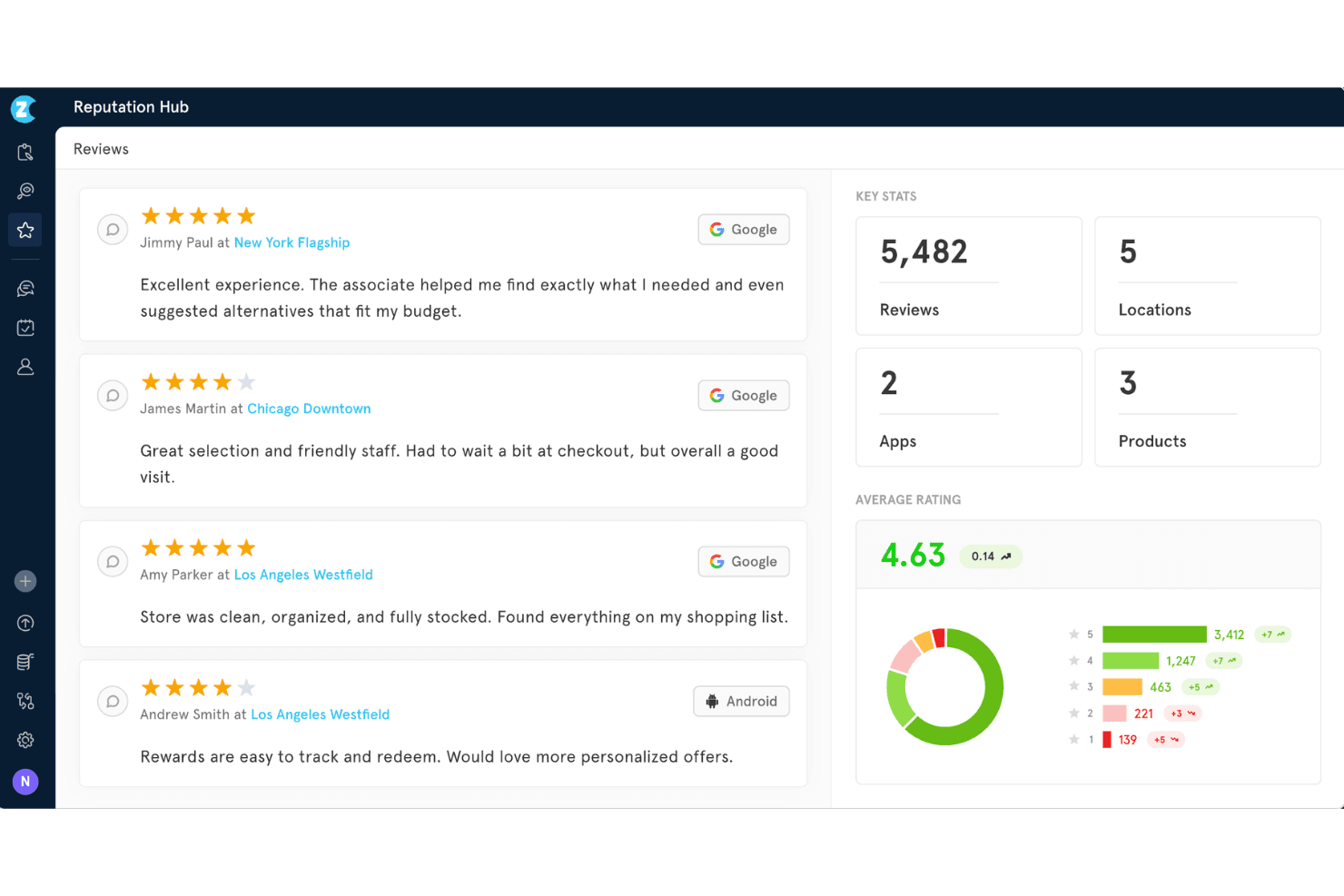
Zonka Feedback offers a Reputation Hub dashboard that displays customer reviews, key stats, average ratings, and review distribution across multiple locations. Zonka Feedback is a multichannel VoC analytics platform that combines survey distribution, AI-powered thematic and sentiment analysis, and role-based dashboards to surface customer insights across web, mobile, helpdesk, and review channels.
Who Is Zonka Feedback Best For?
Zonka Feedback is a strong fit for CX and customer success teams that need to collect feedback across web, mobile, and support channels and quickly surface actionable themes without a heavy implementation lift.
Why I Picked Zonka Feedback
I picked Zonka Feedback as one of the best because its survey distribution reach is genuinely hard to replicate, covering email, SMS, WhatsApp, in-app mobile SDK, kiosk, QR codes, and website widgets in one platform. Where I find it especially useful for VoC analytics is how it pairs that collection breadth with per-theme sentiment and intent detection, so feedback from a post-support email and an in-app widget can be analyzed together without stitching data manually. The AI Impact Analysis then scores which themes are actually moving your NPS or CSAT scores.
Zonka Feedback Key Features
- Role-based dashboards: Pre-built dashboard views tailored for CX, product, support, and frontline leaders surface relevant metrics without custom setup.
- Ask AI copilot: A plain-language query interface lets you ask questions like "why is CSAT dropping?" and get summarized, actionable answers from your feedback data.
- Closed-loop case management: Assign, escalate, and resolve feedback cases directly in the platform, with workflows triggered automatically by sentiment or urgency signals.
- MCP server integration: Connects your CX data to AI assistants like Claude and ChatGPT so you can query feedback trends without leaving your existing tools.
Zonka Feedback Integrations
Zonka Feedback offers 20+ integrations, including Salesforce, Zendesk, Intercom, Jira, Slack, Google Sheets, Google Business, App Store, Play Store, and G2. It also supports REST API, webhooks, Make, Integrately, and Zapier.
Pros and Cons
Pros:
- Impact analysis connects themes to satisfaction outcomes
- Per-theme sentiment reveals conflicting customer priorities
- Cross-channel survey distribution reaches web and mobile
Cons:
- No native call transcript or social listening
- Advanced reporting customization remains limited
Learn more about Zonka Feedback: Best for conversational surveys
- Free plan available
- From $19/user/month (billed annually)
Visit WebsiteCustomer Rating:4.4/5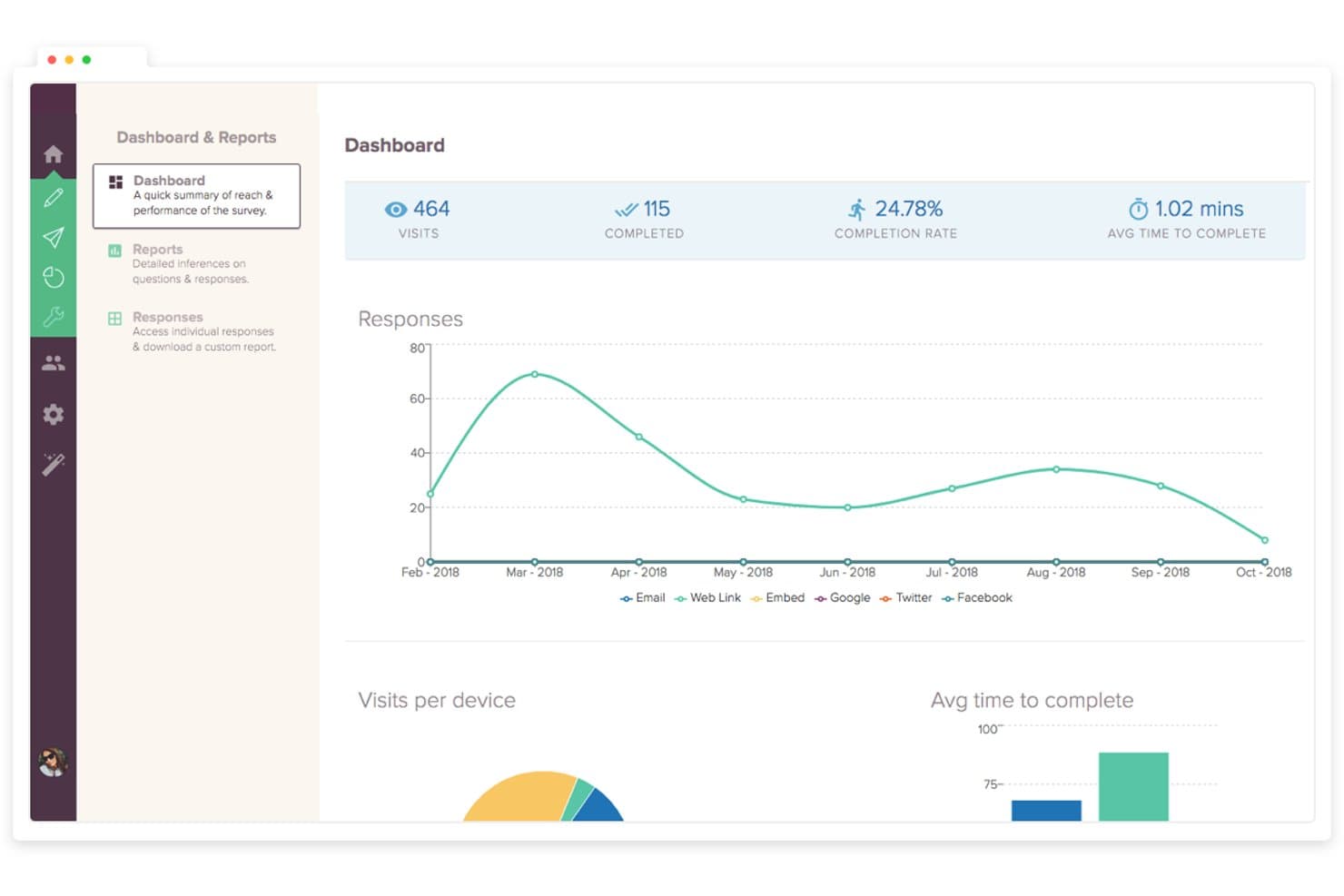
SurveySparrow tracks survey visits, completions, and response trends over time. SurveySparrow is a voice of customer analytics platform that combines conversational surveys, AI-powered text analytics (CogniVue), review aggregation from 100+ platforms, and built-in ticket management with closed-loop alerting.
Who Is SurveySparrow Best For?
SurveySparrow is a strong fit for CX and customer success teams that collect high volumes of survey feedback and need built-in tools to act on it.
Why I Picked SurveySparrow
I've included SurveySparrow in my top picks because its conversational, chat-style survey format consistently drives higher response rates than traditional forms, which means you're working with richer, more complete feedback from the start. I also like how Echo, its AI follow-up feature, automatically probes vague answers in real time, so you're not left guessing what a respondent meant. Layer CogniVue's Key Drivers analysis on top, and you can see exactly which themes are hurting your NPS or CSAT scores and in what order to address them.
SurveySparrow Key Features
- Emerging Topics detection: CogniVue automatically flags new recurring themes in your feedback so you can spot rising issues before they become widespread problems.
- Deep Dive heatmaps: Sentiment breakdowns by topic and sub-topic are visualized across dimensions like location, product variables, and review platform in a heatmap view.
- Closed-loop ticket management: Survey responses and reviews automatically convert into tickets with SLA tracking, auto-assignment, and escalation rules built in.
- Smart Filters: Reusable, saved filters let you slice feedback by response properties, contact attributes, and question answers across your CogniVue analysis.
SurveySparrow Integrations
SurveySparrow offers native integrations with Salesforce, HubSpot, Zendesk, Intercom, Power BI, Tableau, Airtable, Slack, and monday.com. It also provides a REST API, webhooks, and Zapier connectivity for custom workflows.
Pros and Cons
Pros:
- CogniVue prioritizes themes by customer impact
- Echo probes vague responses in real time
- Conversational surveys encourage richer customer feedback
Cons:
- Key Driver insights refresh only monthly
- Survey and review analysis remains siloed
Learn more about SurveySparrow: Best for collecting feedback from email surveys
- 10-day free trial
- From $114/month (billed annually)
Visit WebsiteCustomer Rating:4.6/5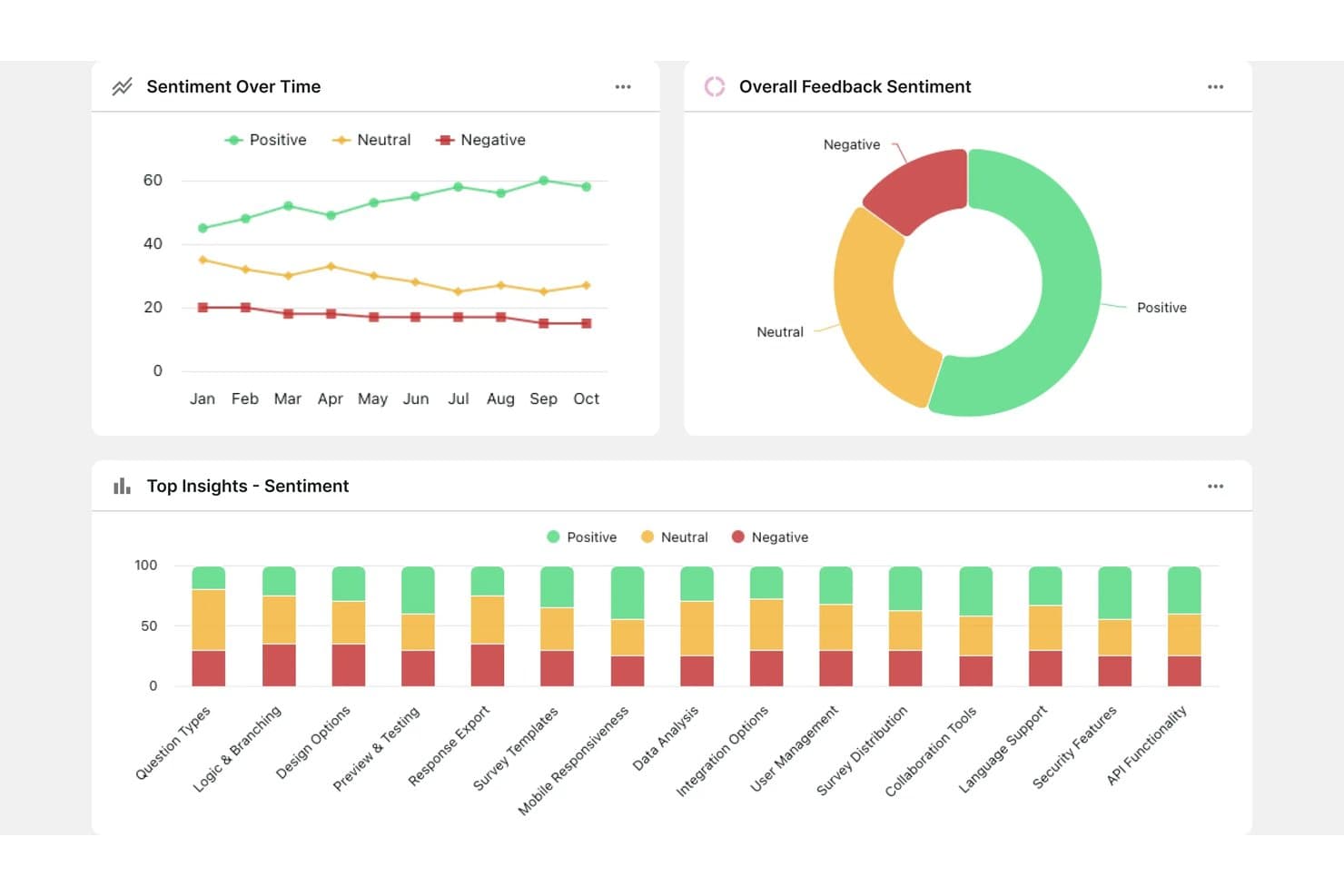
Survicate tracks customer sentiment trends across topics over time. Survicate is a customer feedback platform that collects, aggregates, and analyzes VoC data across email, web, in-app, and mobile channels, with an AI-powered Research Hub that pulls in reviews, support tickets, and call transcripts alongside survey responses.
Who Is Survicate Best For?
Survicate is a strong fit for CX and customer success teams that need to collect structured feedback through email surveys and connect those responses to support and CRM workflows.
Why I Picked Survicate
I picked Survicate as one of the best because email survey collection is genuinely built into the platform, not bolted on through a third-party integration. I like that the first survey question sits directly inside the email body, so recipients answer from their inbox without clicking through to a separate page. Survicate also ties those responses back to named contacts in your CRM, so your VoC data arrives already enriched and ready for analysis.
Survicate Key Features
- Research Hub: Aggregates feedback from 15+ sources—including support tickets, app reviews, call transcripts, and raw files—into a single AI-analyzed dataset.
- Dissatisfaction Radar: Sends instant Slack and email alerts when negative feedback is detected, so your team can follow up before issues escalate.
- AI theme and sentiment detection: Automatically groups open-text responses into themes and labels each as positive, neutral, or negative, updating continuously as new feedback arrives.
- CRM enrichment: Syncs survey responses with Salesforce, HubSpot, and Pipedrive so every piece of feedback is tied to a named contact and their account data.
Survicate Integrations
Survicate offers 40+ native integrations, including Salesforce, HubSpot, Zendesk, Intercom, Slack, Productboard, Linear, Google Sheets, Looker Studio, and Power BI. Webhooks, an Export API, and Zapier support custom connectivity.
Pros and Cons
Pros:
- Alerts support timely dissatisfaction follow-up
- AI themes connect feedback across channels
- Embedded email questions encourage immediate responses
Cons:
- Revenue and churn links require manual work
- English-only insights limit global analysis
Learn more about Survicate: Best for gamifying the survey and feedback processes
- 7-day free trial + free demo
- Pricing upon request
Visit WebsiteCustomer Rating:4.7/5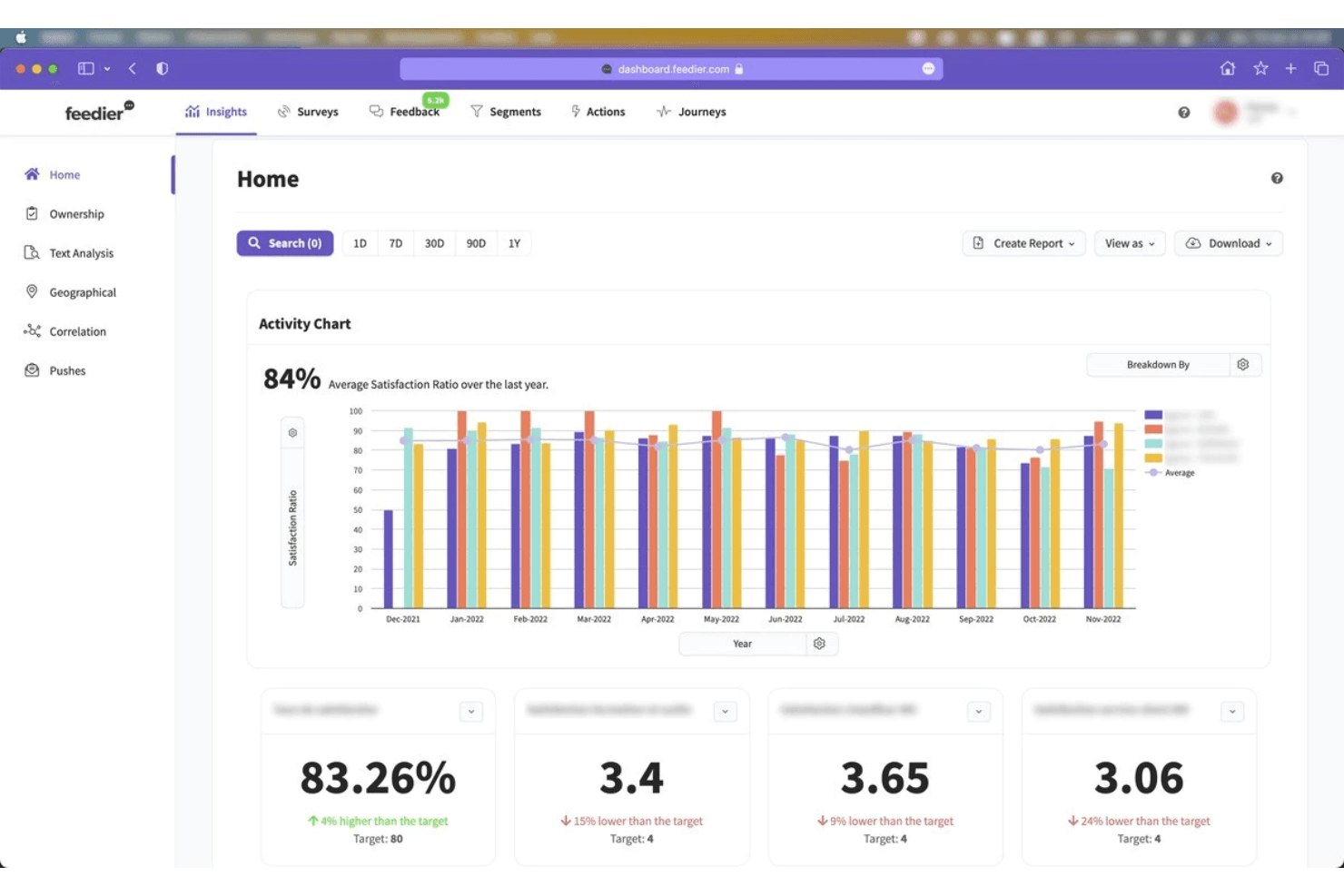
Feedier's dashboard allows businesses to analyze and visualize customer feedback in real-time with a user-friendly interface and customizable reporting. Feedier is an AI-powered voice of customer analytics platform that aggregates feedback from 20+ sources—including surveys, reviews, support tickets, and social channels—and applies aspect-level sentiment analysis, theme detection, and revenue-impact scoring to turn raw feedback into prioritized insights.
Who Is Feedier Best For?
Feedier suits mid-market and enterprise teams managing feedback across multiple business units, regions, or languages who need AI-driven analysis tied to revenue impact.
Why I Picked Feedier
I picked Feedier as one of the best because it turns feedback collection into something people actually want to engage with, using gamified survey flows that boost response rates before AI takes over to analyze what those responses mean. I love how its aspect-level sentiment scoring breaks a single comment into multiple scored dimensions, so a response that's positive about delivery but negative about product quality doesn't get flattened into one ambiguous rating. Its Business Impact Score then ranks those findings by estimated NPS and revenue impact, so you're not just collecting feedback—you're walking into prioritization conversations with evidence.
Feedier Key Features
- Multi-source feedback aggregation: Pulls in data from 20+ native connectors—including review sites, social channels, CRM platforms, and support tools—into a single workspace.
- Ask Feedier conversational analyst: A chat-based interface that lets you query your feedback data in plain language and returns reports, action plans, or verbatim exports on demand.
- Closed-loop alert workflows: Configurable alerts fire when feedback volume shifts, triggering automated notifications via email, MS Teams, Salesforce, or webhooks.
- Customer-specific taxonomy: Each account gets its own nested classification system, refined over time through a human validation loop that improves AI precision.
Feedier Integrations
Feedier offers 20+ native integrations, including Qualtrics, Medallia, Typeform, Zendesk, ServiceNow, Salesforce, HubSpot, Trustpilot, Google Reviews, and Power BI. It also supports REST API, webhooks, CSV, SFTP, and custom connectors.
Pros and Cons
Pros:
- Auditable taxonomies support defensible research findings
- Revenue impact connects feedback to product priorities
- Aspect-level sentiment supports precise prioritization
Cons:
- No native roadmap workflow for product teams
- Limited recent reviews complicate vendor validation
Learn more about Feedier: Best for linking feedback themes to revenue risk
- Free demo available
- From $25,000/year (billed annually)
Visit WebsiteCustomer Rating:4.8/5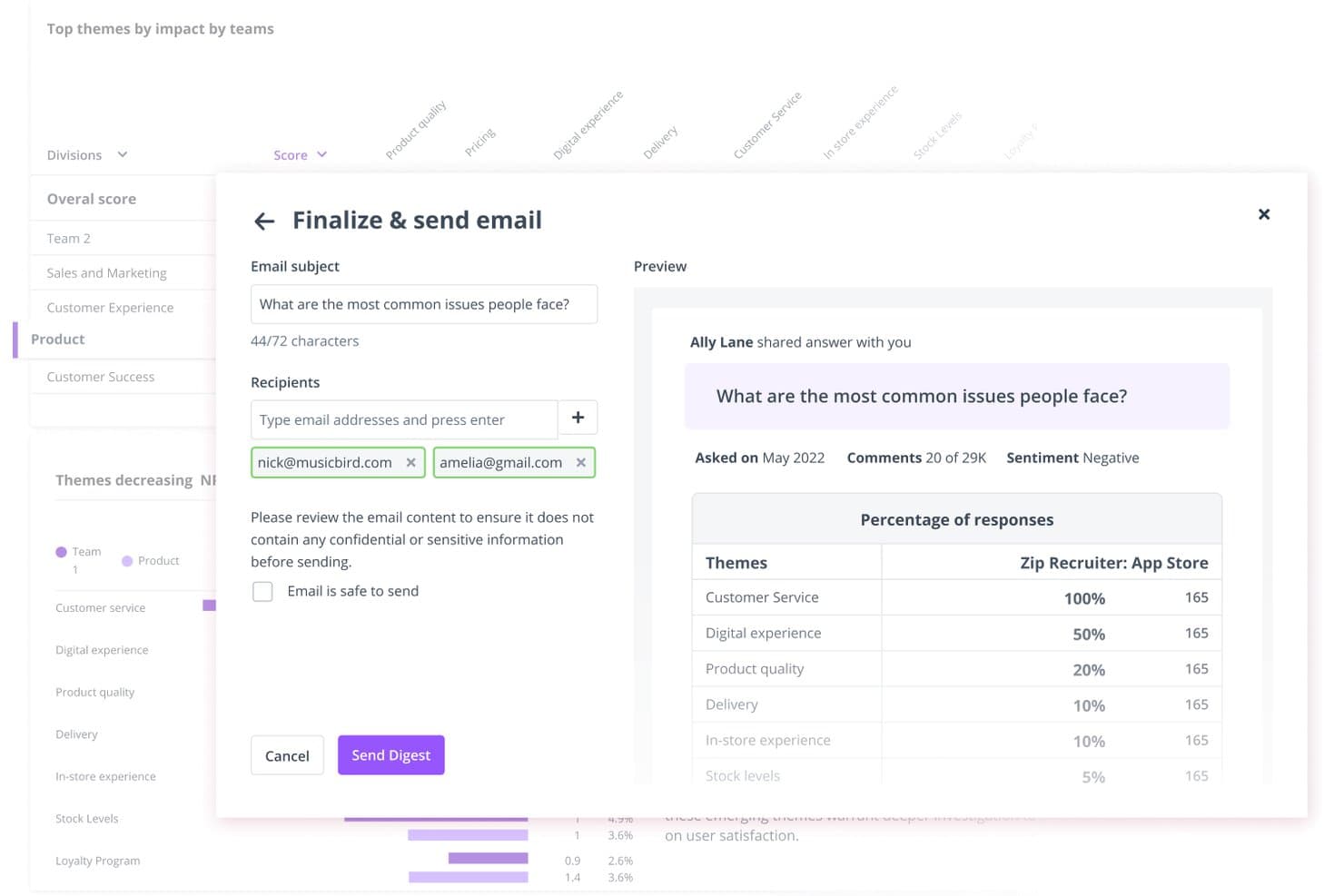
Thematic lets users share customer insight digests via email directly from the platform. Thematic is a voice of customer analytics platform that aggregates feedback from surveys, support tickets, reviews, call transcripts, and social channels, then uses AI to surface themes, detect sentiment, and track how those themes shift over time.
Who Is Thematic Best For?
Thematic is a strong fit for enterprise CX and research teams that need to connect customer feedback directly to revenue impact and prioritization decisions.
Why I Picked Thematic
I picked Thematic as one of the best because it's the only tool on my list that directly ties feedback themes to revenue risk, a connection most VoC platforms leave you to make manually. Its Revenue at Risk feature ranks themes by expected dollars at risk, calculated from churn likelihood and customer value, so you know exactly which complaints deserve priority. I also like how the Theming Agent surfaces emerging issues in real time, before they compound into churn.
Thematic Key Features
- Multi-source feedback aggregation: Thematic pulls data from surveys, support tickets, call transcripts, app reviews, social channels, and data warehouses into one unified analysis layer.
- Agentic Answers: Ask questions in plain English and get multi-step AI responses with citations and charts pulled directly from your feedback data.
- Automated theme discovery: The Theming Agent surfaces emerging and rare themes in real time, and a monthly workflow emails or Slacks newly identified themes as they appear.
- BI tool integrations: Push analyzed data directly to Power BI, Tableau, Looker, or Snowflake for reporting in your existing analytics environment.
Thematic Integrations
Thematic offers native integrations with Qualtrics, Medallia, Zendesk, Intercom, Salesforce, Trustpilot, Slack, Snowflake, Power BI, and Tableau. It also supports API, sFTP, CSV/Excel uploads, and custom integrations through a Customer Success Manager.
Pros and Cons
Pros:
- Connects themes to source customer quotes
- Surfaces emerging themes across every comment
- Links feedback themes to revenue risk
Cons:
- Impact scores can confuse some users
- Initial taxonomy setup requires substantial client effort
Learn more about Thematic: Best for breaking down cross-team feedback silos
- 30-day free trial
- Pricing upon request
Visit WebsiteCustomer Rating:4.6/5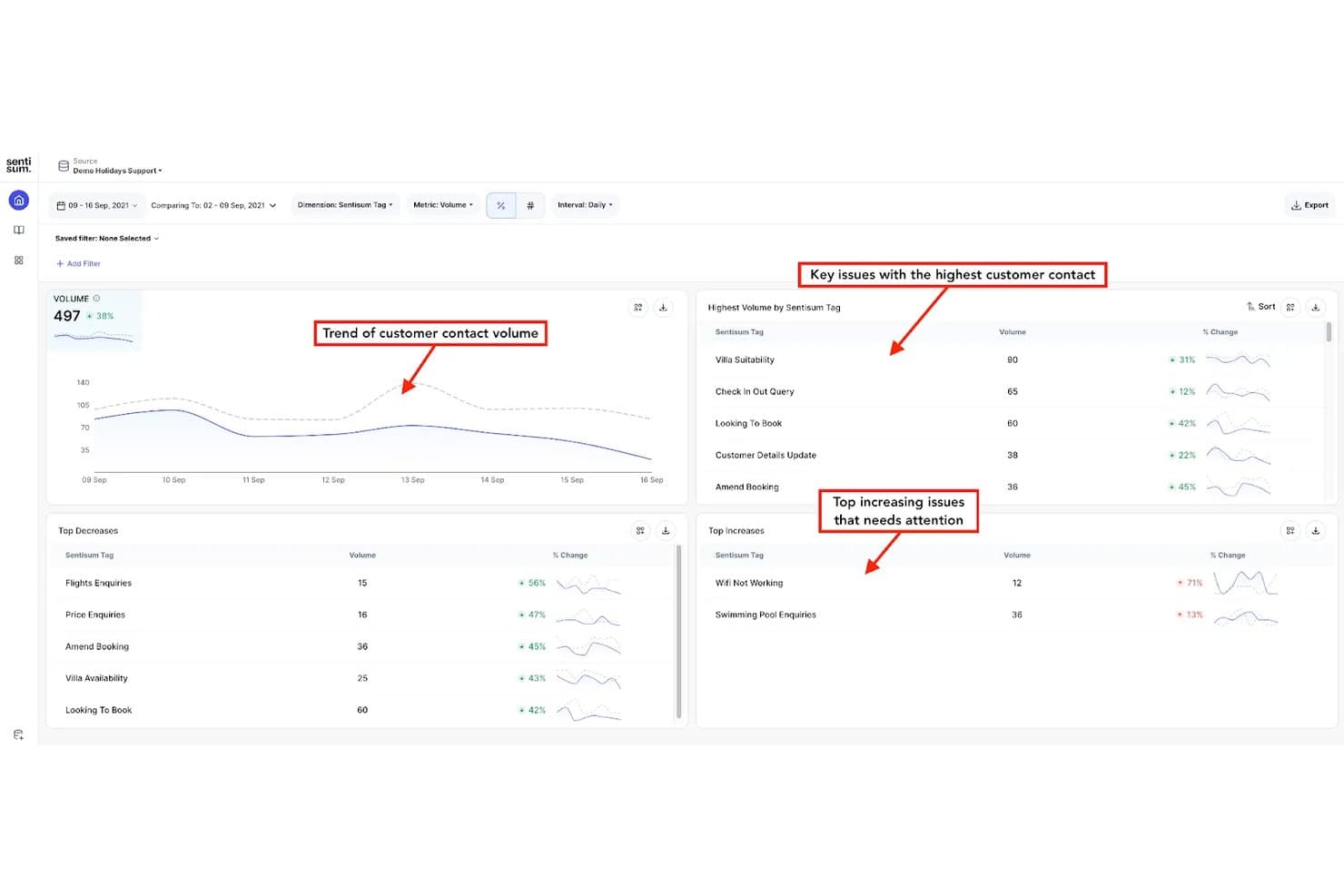
SentiSum tracks customer contact trends and top issues by volume and change. SentiSum is an AI-native voice of customer analytics platform that aggregates feedback from support tickets, calls, surveys, reviews, social posts, and CRM notes into a unified view, with built-in sentiment analysis, theme detection, and anomaly alerting.
Who Is SentiSum Best For?
SentiSum fits mid-market to enterprise CX and support teams that receive high volumes of feedback across multiple channels and need a single place to surface what's driving churn, escalations, and customer effort.
Why I Picked SentiSum
SentiSum earns its spot on my shortlist because it directly tackles the problem of feedback living in disconnected silos across teams. I love how Unified Signals pulls tickets, call transcripts, NPS surveys, reviews, and CRM notes into one view, so support, CX, and product teams are all working from the same data. The Early Warning Agent then monitors that unified feed hourly, flagging anomalies with an AI-written root-cause summary before issues escalate.
SentiSum Key Features
- Kyo AI engine: A domain-trained NLP model that analyzes feedback across 100+ languages, returning confidence scores and verbatim evidence alongside every insight.
- Impact-to-revenue linking: Assigns a dollar value to each identified root cause so you can rank fixes by business cost rather than volume alone.
- Early Warning Agent: Monitors feedback hourly for anomalies in volume, sentiment, and resolution time, then sends an AI-written root-cause summary to Slack, email, or Zendesk.
- Action tracking: Converts any insight or conversation into an assigned task with a priority, due date, status, and comment thread directly inside the platform.
SentiSum Integrations
SentiSum offers 100+ documented integrations, including Zendesk, Freshdesk, Intercom, Salesforce, HubSpot, Qualtrics, SurveyMonkey, Trustpilot, Slack, and Jira. It also provides Microsoft Teams connectivity and API access for custom integrations.
Pros and Cons
Pros:
- Flags emerging problems with root-cause evidence
- Links customer issues to revenue impact
- Unifies feedback across organizational silos
Cons:
- Machine-learning classifications may require manual correction
- Support operations outweigh product research workflows
Learn more about SentiSum: Best for advanced data analytics and insights
- Free demo available
- Pricing upon request
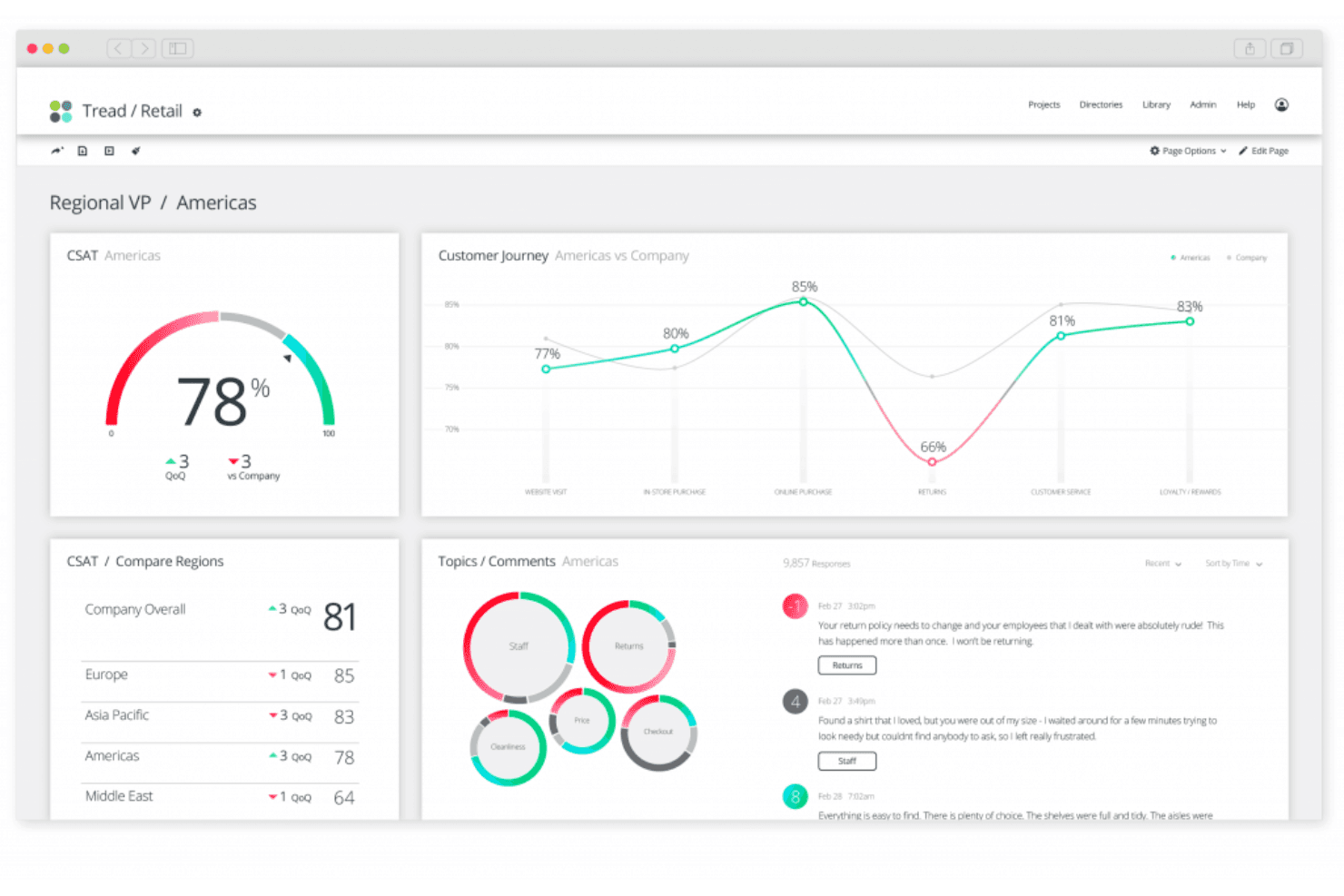
Qualtrics XM's dashboard relays real-time insights on customer feedback. Qualtrics XM is a voice of customer analytics platform that aggregates feedback across surveys, contact center interactions, digital channels, and online reviews, then applies text analysis, sentiment scoring, and AI-driven theme detection to surface insights at scale.
Who Is Qualtrics XM Best For?
Qualtrics XM is a strong fit for enterprise CX and research teams that need to unify feedback across surveys, contact centers, digital channels, and online reviews in one platform.
Why I Picked Qualtrics XM
Qualtrics XM earns its spot as one of the best on my shortlist because the depth of its analytics goes well beyond basic sentiment scoring. I particularly like how Text iQ scores sentiment at the topic level, so when a customer says "service was great but pricing felt unfair," the platform separates those signals rather than averaging them into noise. Paired with Focus Areas, which calculates a Priority Score using impact and room for improvement, I can surface which issues actually move the needle on retention.
Qualtrics XM Key Features
- XM Discover Connectors: Ingests feedback from contact center calls, chat, CRM systems, social platforms, review sites, and online communities into a single analysis environment.
- Recommended Topics: Automatically surfaces emerging themes from open-text fields once a question reaches 500+ untagged comments, supporting ten languages including English, Spanish, and Japanese.
- Closed-loop workflow engine: Triggers automated alerts and action tasks based on survey events, metric thresholds, or verbatim topic mentions across CX dashboards.
- Stats iQ: Runs advanced statistical analysis including key-driver analysis, crosstabs, and response weighting directly within the platform on paid research plans.
Qualtrics XM Integrations
Qualtrics XM offers documented native and first-party integrations with Salesforce, HubSpot, ServiceNow, Zendesk, Freshdesk, Jira, Slack, Microsoft Teams, Tableau, and Twilio. It also supports custom integrations through its API and Zapier.
Pros and Cons
Pros:
- Omnichannel dashboards unify surveys, reviews, and conversations
- Focus Areas connects issues to business outcomes
- Topic-level sentiment separates mixed customer feedback
Cons:
- Processing delays can postpone updated insights
- Advanced text analysis requires higher-tier access
Learn more about Qualtrics XM: Best for generating visual infographic reports
- Free demo available
- Pricing upon request
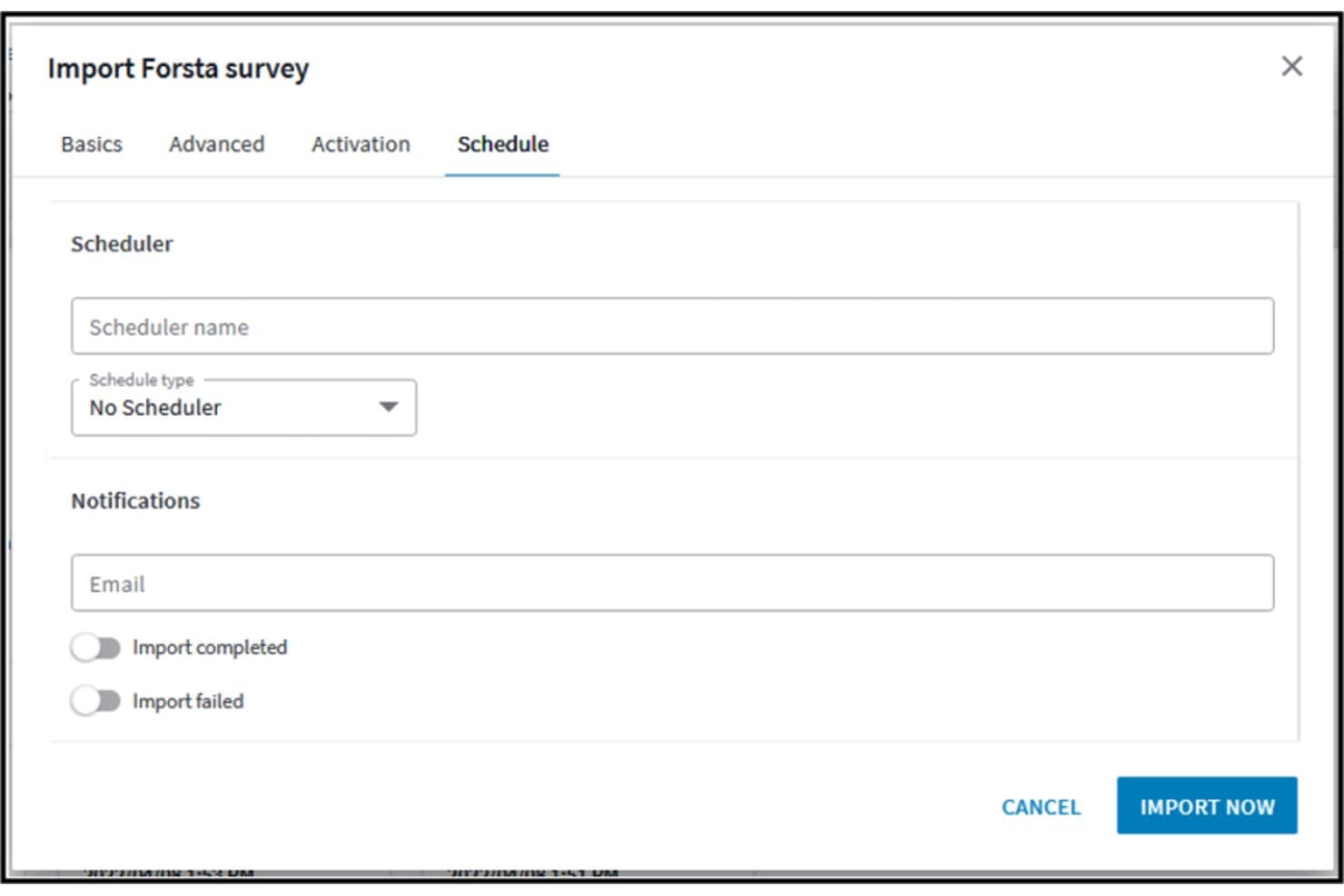
Forsta HX lets users schedule and set email notifications for survey imports. Forsta HX is an AI-powered voice of customer analytics platform that aggregates feedback from surveys, calls, reviews, social media, and support channels, and analyzes it through text analytics, sentiment detection, and visual infographic reporting tools.
Who Is Forsta HX Best For?
Forsta HX is a strong fit for enterprise CX and market research teams that need to turn large volumes of customer feedback into polished, stakeholder-ready visual reports.
Why I Picked Forsta HX
Forsta HX earns its spot on my shortlist because of how well its Visualizations module turns raw feedback data into stakeholder-ready infographic reports. I love that you can import a branded PowerPoint master, then auto-generate editable slides directly from your data using StoryCreator, cutting reporting time by up to 40%. Narrative HX layers in generative-AI sentiment and theme detection across roughly 50 languages, so the insights feeding those reports are sharp, not just pretty.
Forsta HX Key Features
- Spotlight omnichannel analytics: Pulls calls, chats, surveys, reviews, tickets, and social posts into a single dashboard with source-linked drivers and AI-generated smart summaries.
- Narrative HX text analytics: Detects sentiment, emotion, effort, and emerging themes across roughly 50 languages using generative AI with no manual rules required.
- Action Management: Automatically routes cases and sends alerts to the right people based on configurable rules, with mobile support and conditional case-closure logic.
- SmartHub data aggregation: Combines CX, operational, and financial data from sources like CRM, social media, and purchase history into a central contact database.
Forsta HX Integrations
Forsta HX integrates with Salesforce, Microsoft Dynamics 365, Adobe Analytics, Contentsquare, Google, Brandwatch, Tableau, Slack, Zendesk, and Zapier. REST and SOAP APIs support custom integrations.
Pros and Cons
Pros:
- Market-research analysis supports significance testing
- Cross-channel sentiment links insights to source feedback
- Branded infographic reports automate stakeholder storytelling
Cons:
- Product roadmap faces post-acquisition uncertainty
- Enterprise setup can overwhelm smaller teams
Learn more about Forsta HX:
Other Options
Here are a few more worthwhile options that didn’t make the best voice of customer analytics software list:
- 11KlaviyoBest for AI predictive analytics
- 12UnwrapBest for advanced AI feedback categorization
- 13InMomentBest for real-time closed-loop feedback alerts
- 14BrandwatchBest for social listening-led insights
- 15PendoBest for generating digital product analytics
- 16Sprinklr InsightsBest for enterprise with custom AI models
- 17Medallia Experience CloudBest for omnichannel VoC programs
- 18AlidaBest for community-based longitudinal research
- 19KapicheBest for contact centre and churn signals
- 20unitQBest for AI-driven product quality feedback loops
Related UX Tool Reviews
Here's a roundup of some of our top software reviews in the UX and product management space:
- Best Product Management Tools
- Best Product Planning Software
- Best Product Development Software
- Best Product Analytics Tools
- Best Idea Management Software
- Best Heatmap Software
How I Evaluate Voice of Customer Analytics
I split my evaluation into three parts, with the most weight on core functions: combine feedback across channels and surface sentiment and recurring themes. Next, I consider standout features such as verbatim highlight reels that give teams customer context. Finally, I look beyond features at onboarding, support, and value for the price.
Core Functionality (Table Stakes For This List)
When I'm selecting tools for my list, I score each one on a scale from 0 (does not offer the functionality) to 5 (excels in this area) for each core functionality listed below. I then convert the total into a percentage to help assess each tool's overall fit, with extra weight on any functionalities I’ve deemed essential.
- Feedback Sources (Essential): I look for ways to bring surveys, reviews, and support tickets into one dataset, with reliable syncing that limits manual imports.
- Text And Sentiment Analysis (Essential): I assess how well the tool detects sentiment and topics in open-text feedback, including mixed reactions to a product change.
- Theme Detection: I check whether it groups recurring requests and friction across channels, so teams can spot a growing onboarding issue without reading every response.
- Insight Reporting: I look for clear, shareable dashboards that help product and customer teams connect feedback themes to decisions.
- Feedback Tagging: I evaluate whether teams can apply custom tags by product area or issue, then use those categories to filter feedback.
- Historical Trends: I check whether teams can compare sentiment and theme patterns over time, such as before and after a release.
Once I have a list of tools that meet the criteria, I consider what sets each platform apart.
Differentiating Factors (What Sets Vendors Apart)
Here's how I compare and contrast different vendors:
Standout Features
I look for closed-loop alerts that notify product or support teams the moment negative feedback spikes around a specific feature area. Without that trigger, emerging issues sit unread for days. I also evaluate whether a tool links feedback themes to revenue signals like churn or expansion, because connecting a recurring complaint to measurable business impact changes how leadership prioritizes fixes. Verbatim highlight reels matter too. When I can pull real customer quotes into a sprint review, stakeholders grasp the problem faster than any chart allows.
Beyond Features
I evaluate how easily non-technical teammates can self-serve insights, because a tool only product managers use becomes another silo. Cross-functional adoption matters most when support leads or sales reps need to pull feedback without filing a request. I also check onboarding support and time-to-value, since taxonomy setup and source integrations can stall teams that lack internal data science resources. Finally, I look at two-way sync depth with tools like Jira or Productboard—without real-time updates flowing back into your backlog, insights stay trapped in a dashboard no one revisits.
How to Choose Voice of Customer Analytics Software
As you work through your own unique software selection process, keep the following points in mind:
- Identifying Key Pain Points: Voice of customer analytics software helps you identify and address specific pain points in customer interactions. When choosing a software solution, consider how effectively it can analyze customer feedback across multiple channels, such as surveys, social media, and customer service interactions. The right tool should offer robust text and sentiment analysis to discern common complaints and praises, enabling you to pinpoint areas for improvement or opportunities for expansion.
- Integration Capabilities: Ensuring seamless integration with your existing technology stack is crucial. Voice of customer analytics software should be able to integrate easily with your customer relationship management (CRM) system, enterprise resource planning (ERP) software, and other data management tools. This integration enables a unified view of customer insights across all departments, enhancing the coordination of responses and strategies.
- Scalability: As your business grows, so does the volume of customer feedback. The chosen voice of customer analytics software must scale with your business needs without degrading performance or requiring extensive additional investments. Look for solutions that offer flexible pricing plans and the ability to handle increasing amounts of data and more complex analytics as your customer base expands.
- Real-Time Data Processing: In today’s fast-paced market, the ability to process and react to customer feedback in real-time can be a significant advantage. Evaluate voice of customer analytics software for its capability to provide live updates and alerts. This feature allows your team to respond swiftly to customer complaints and queries, thereby improving customer satisfaction and loyalty.
- Comprehensive Reporting Tools: Effective decision-making is based on comprehensive and actionable insights. The ideal voice of customer analytics software should offer detailed reporting features that allow you to create custom reports based on specific data points. These tools should help you visualize data trends over time, compare feedback across different customer segments, and track the impact of changes made based on customer feedback.
By carefully considering these aspects, you can select voice of customer analytics software that not only meets your immediate needs but also supports your long-term customer engagement strategies.
Trends in VoC Analytics Software
As organizations strive to align their strategies with shifting customer expectations, the development of VoC tools is focused on enhancing the extraction and utilization of meaningful feedback. Here's a breakdown of the current trends based on the latest product updates, press releases, and release logs from leading providers in this rapidly advancing field:
- Immediate Feedback Utilization: VoC software is increasingly capable of real-time data processing, allowing businesses to act on customer feedback instantly. This shift is crucial for improving customer experience and satisfaction by enabling immediate responses to both positive and negative feedback, thus preventing potential customer churn.
- Automated Insights Generation: Automation in generating insights from customer data is on the rise. Tools now use advanced AI to identify patterns and predict trends without manual intervention, which significantly streamlines the decision-making process.
- Predictive Analytics: The use of predictive analytics in VoC software is becoming more prevalent. These capabilities allow companies to forecast future customer behaviors and preferences, enabling proactive strategy adjustments.
- Emotion Detection Technology: Some of the most novel features include advanced emotion detection technologies that go beyond traditional sentiment analysis, using voice intonation and facial recognition to gauge customer feelings.
- AI-Driven Qualitative Analysis: Cutting-edge tools now offer AI-driven analysis of qualitative data, such as open-ended survey responses and social media posts, to extract more detailed insights than ever before.
These advancements reflect the evolving needs of businesses to not only gather vast amounts of customer data but also to interpret and act on this information swiftly and efficiently. As UX experts and product managers navigate these trends, the focus will likely continue on integrating advanced technologies to enhance customer understanding and operational agility.
What is Voice of Customer Analytics Software?
Voice of customer analytics software refers to tools used to collect, analyze, and interpret customer feedback and sentiments to gain insights into customer preferences, expectations, and overall satisfaction. It aims to capture this input across various touchpoints, helping businesses make informed decisions to enhance the customer experience.
Key features you can expect include sentiment analysis, feedback collection and management, customer journey mapping, trend identification, and reporting and visualization tools. These features enable businesses to extract meaningful insights from customer feedback and align their strategies with customer expectations.
Features of Voice of Customer Analytics Software
Choosing the right features in VoC software is essential to leverage customer data effectively and align business strategies with customer needs. Here are some features to look for when evaluating your options:
- Sentiment Analysis: This feature automatically identifies the tone and emotions in customer feedback. It helps businesses gauge the overall sentiment about their products or services, allowing them to address areas that provoke negative responses and reinforce those that generate positivity.
- Text Analytics: This tool deciphers unstructured text data from surveys, reviews, and social media. It's vital for extracting themes and patterns that highlight what customers care about most, informing product development and marketing strategies.
- Feedback Management: This function consolidates feedback from multiple sources into a single platform. Centralizing data enables a holistic view of customer opinions, ensuring that no critical insights are overlooked and enhancing decision-making efficiency.
- Trend Detection: By identifying trends over time, businesses can track changes in customer expectations and satisfaction. This feature is key for adapting to shifting market conditions and preemptively addressing emerging needs.
- Integration Capabilities: Seamless integration with other business systems (like CRM or ERP) ensures that customer insights are accessible across the organization. This interconnectedness promotes a unified approach to customer experience management.
- Real-Time Analytics: This enables immediate analysis of incoming feedback. Quick responses to customer concerns can significantly improve satisfaction rates and mitigate potential negative experiences.
- Customer Journey Mapping: This feature visualizes the path customers take from awareness to purchase and beyond. Understanding this journey allows businesses to optimize touchpoints for better experiences and increased loyalty.
- Customizable Dashboards: These provide personalized views of key metrics relevant to specific business needs. Custom dashboards help different departments focus on the insights that matter most to their operational goals.
- Predictive Analytics: By forecasting future trends based on historical data, businesses can anticipate customer needs and preferences before they become apparent. This proactive approach ensures that companies stay ahead of the curve.
- Multi-language Support: This caters to global businesses by analyzing feedback in various languages. It expands the reach of VoC programs and ensures that insights are gathered from a diverse customer base.
By prioritizing the right selection of features to meet your unique business needs, you'll be able to find a tool that's most suitable. Selecting the right VoC analytics software positions a company to not only meet but exceed customer expectations, securing a competitive advantage in the market.
Benefits of Voice of Customer Analytics Software
Voice of Customer (VoC) analytics software is a crucial tool for businesses seeking to understand and enhance their customer experiences. By effectively capturing and analyzing customer feedback, these tools provide valuable insights that can guide strategic decisions and improve customer satisfaction. Here are five primary benefits of integrating VoC analytics software into your business processes:
- Enhanced Customer Insights: VoC analytics software provides a deeper understanding of customer needs and preferences. This enhanced insight helps businesses tailor their products and services to better meet customer expectations, thereby increasing satisfaction and loyalty.
- Improved Product Development: By aggregating and analyzing customer feedback, VoC tools enable businesses to identify common pain points and areas for improvement. This information is invaluable for guiding product development and innovation, ensuring that new offerings are well-aligned with customer desires.
- Increased Operational Efficiency: VoC software automates the collection and analysis of customer feedback, significantly reducing the time and effort required to gather actionable insights. This automation allows teams to focus more on implementing changes rather than on data processing.
- Better Customer Retention: With real-time feedback analysis, VoC tools help businesses quickly identify and address customer issues. This proactive approach to problem resolution can significantly improve customer retention rates by demonstrating a commitment to customer satisfaction.
- Enhanced Competitive Advantage: By leveraging the detailed insights provided by VoC analytics, businesses can stay ahead of the competition. Understanding customer trends and feedback in real-time allows for more Agile responses to market changes and customer needs, giving businesses a competitive edge.
These tools help companies to dissect customer feedback from various channels and turn it into actionable insights. By leveraging the power of customer feedback, businesses can drive improvements across their products, services, and customer interactions, ultimately leading to greater customer satisfaction and business success.
Costs & Pricing For Voice of Customer Analytics Software
VoC software platforms can vary in terms of features, scalability, and pricing, catering to businesses of different sizes and needs. Understanding the different plan options and their corresponding pricing structures can help software buyers make an informed decision that aligns with their business objectives and budget constraints.
Plan Comparison Table For VoC Analytics Software
Below is a table that outlines the pricing and plan structures of VoC analytics software, helping you to compare your options at a glance:
| Plan Type | Average Price | Common Features |
|---|---|---|
| Plan TypeFree | Average Price$0 | Common FeaturesBasic analytics, limited surveys, community support |
| Plan TypeBasic | Average Price$10 - $50 per month | Common FeaturesEnhanced analytics, more surveys, email support |
| Plan TypeProfessional | Average Price$50 - $200 per month | Common FeaturesFull analytics suite, unlimited surveys, phone support |
| Plan TypeEnterprise | Average Price$200+ per month | Common FeaturesAdvanced features, custom integrations, dedicated support |
When considering which plan to choose, think about the scale of your customer feedback operations and the depth of analytics you require. Smaller businesses may find that basic plans suffice, while larger organizations might need the advanced features and support offered by professional or enterprise plans. Each step up in pricing typically offers greater functionality and support, so align your choice with both your current needs and future growth expectations.
People Also Ask
Got any questions about voice of customer analytics tools? Check out these FAQs to grasp a better understanding:
What is the Voice of the Customer?
Voice of the customer (VoC) refers to collecting and analyzing customer feedback to utilize and incorporate information such as dislikes and pain points into building a better product. Typically, you can generate data points and metrics on the voice of the customer from various channels like surveys, social media platforms, SMS, and customer reviews.
Why is VoC data important?
VoC helps companies improve the customer experience, which is a determining factor of customer loyalty. Additionally, VoC data gives your company valuable, constructive feedback on aspects you can improve. By analyzing actual user feedback, you’ll be in a better position to foresee which future product feature requests are worth your time.
What’s the difference between VoC and CSAT feedback?
CSAT (customer satisfaction) is a surface-level quantification of how satisfied customers are with a particular product or service.
VoC is more specific and captures an in-depth analysis of why a customer likes or dislikes your product. Furthermore, VoC analytics help you understand how users perceive your brand.
What is sentiment analysis?
Sentiment analysis is the process of analyzing customer feedback to determine the overall sentiment, whether positive, negative, or neutral. Sentiment analysis leverages natural language processing (NLP) techniques to identify and extract emotions from text data.