

10 migliori software per l’approvazione dei design recensiti nel 2026

Elenco dei migliori software per l'approvazione dei progetti


In qualità di product manager, conosci bene le difficoltà legate alla gestione delle approvazioni dei progetti. Rincorrere i feedback, tenere traccia delle modifiche e fare in modo che tutti siano sulla stessa lunghezza d'onda può essere una vera sfida. È qui che entra in gioco il software per l'approvazione dei progetti, che semplifica il flusso di lavoro e ti fa risparmiare tempo.
Grazie alla mia esperienza nel testare e recensire software, ho individuato i migliori strumenti per aiutare il tuo team ad affrontare queste sfide comuni. Che tu stia cercando qualcosa di specifico o voglia semplicemente esplorare le opzioni disponibili, sei nel posto giusto. Iniziamo.
Perché fidarsi dei nostri consigli sui software
Il nostro team testa e recensisce software dal 2012. In quanto product manager noi stessi, sappiamo quanto sia difficile — e importante — scegliere il software giusto.
Per questa guida, abbiamo valutato gli strumenti attraverso test pratici e ricerche indipendenti, assegnando un punteggio agli strumenti in base ai nostri criteri di selezione.
Le nostre recensioni riflettono il nostro giudizio editoriale umano, non un discorso di vendita.
Riepilogo dei migliori software per l'approvazione dei progetti
Questa tabella comparativa riassume i dettagli sui prezzi delle mie migliori selezioni di software per l’approvazione dei progetti, per aiutarti a trovare la soluzione più adatta al tuo budget e alle esigenze della tua azienda.
| Tool | Best For | Trial Info | Price | ||
|---|---|---|---|---|---|
| 1 | Ideale per moduli di richiesta personalizzabili | Prova gratuita di 14 giorni + piano gratuito disponibile | Da $10/utente/mese (fatturazione annuale) | Website | |
| 2 | Ideale per la conformità alla sicurezza | Demo gratuita + prova gratuita di 10 giorni disponibile | Da $249/mese | Website | |
| 3 | Ideale per la collaborazione in tempo reale | Prova gratuita di 14 giorni | Da $35/5 utenti/mese | Website | |
| 4 | Ideale per revisioni video | Piano gratuito + demo gratuita disponibile | A partire da $66/mese (fatturato annualmente) | Website | |
| 5 | Ideale per i team di marketing | Demo gratuita disponibile | Prezzo su richiesta | Website | |
| 6 | Ideale per il settore della stampa | Demo gratuita disponibile | Prezzo su richiesta | Website | |
| 7 | Ideale per team aziendali | Demo gratuita disponibile | Prezzi su richiesta | Website | |
| 8 | Ideale per la conformità al brand | Piano gratuito disponibile | A partire da $39/utente/mese | Website | |
| 9 | Ideale per il feedback sul web design | Piano gratuito + prova gratuita di 14 giorni disponibile | Da $35/utente/mese | Website | |
| 10 | Ideale per agenzie web | Piano gratuito + demo gratuita disponibile | Da $35/utente/mese | Website |

Recensioni dei migliori software per l'approvazione dei progetti
Di seguito trovi i miei riepiloghi dettagliati dei migliori software per l’approvazione dei progetti inclusi nel mio elenco. Le mie recensioni offrono uno sguardo approfondito sulle funzionalità principali, sui pro e contro, sulle integrazioni e sui casi d’uso ideali di ogni strumento, per aiutarti a trovare quello più adatto a te.

Wrike
Ideale per moduli di richiesta personalizzabili
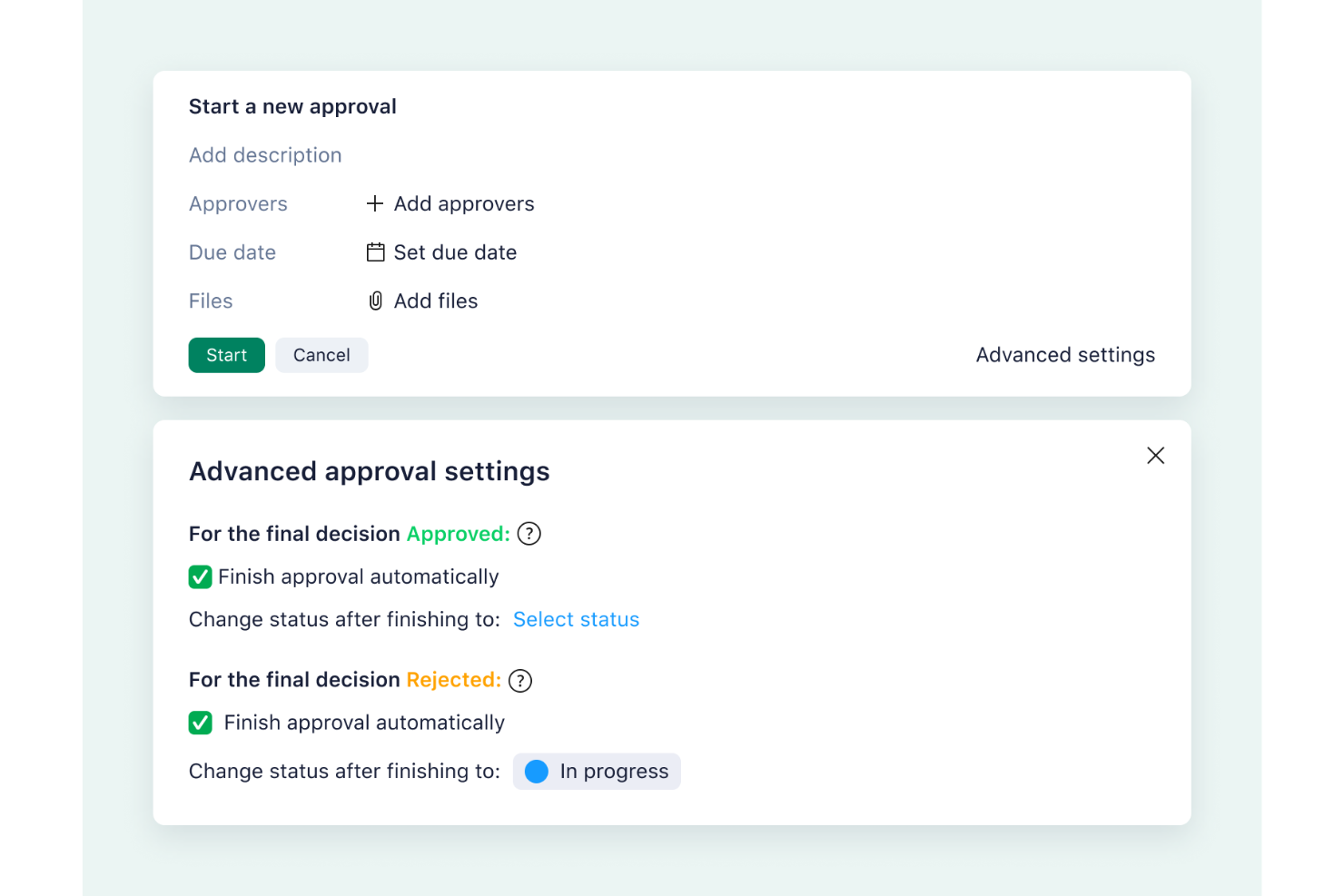
Per i team di progettazione che cercano una soluzione intuitiva ed efficiente per snellire i processi di approvazione, Wrike offre una piattaforma interessante pensata per soddisfare le vostre esigenze. Grazie alle sue robuste capacità nella gestione di flussi di lavoro collaborativi, Wrike conquista i professionisti creativi e i project manager che desiderano aumentare produttività e trasparenza. Questo strumento affronta le sfide della gestione di approvazioni di design complesse, offrendo funzionalità che semplificano il feedback, automatizzano le attività ripetitive e garantiscono il completamento puntuale dei progetti.
Perché ho scelto Wrike
Ho scelto Wrike per la sua esclusiva capacità di integrare la verifica online direttamente nella sua struttura di project management, fondamentale per le attività di approvazione dei design. Questa funzione consente di fornire e ricevere feedback pratici sul lavoro di design senza la necessità di passare da uno strumento all'altro. Inoltre, i moduli di richiesta personalizzabili di Wrike semplificano la presentazione dei brief creativi, garantendo chiarezza fin dall'inizio. Queste funzionalità rispondono all’esigenza comune di una comunicazione fluida e di una documentazione accurata nei flussi di lavoro di progettazione.
Caratteristiche principali di Wrike
Oltre alle sue capacità principali di approvazione dei design, ecco altre funzioni vantaggiose per i team creativi:
- Mappatura Mentale: Questa funzione aiuta il tuo team a fare brainstorming e organizzare idee in modo visivo, facilitando una direzione di progetto più chiara.
- Diagrammi di Gantt: Puoi visualizzare le tempistiche dei progetti e le dipendenze, fondamentale per gestire progetti di design complessi con più stakeholder.
- Comunicazione sulla Piattaforma: Wrike consente al tuo team di comunicare direttamente sulla piattaforma, riducendo la necessità di strumenti di comunicazione esterni e raccogliendo tutte le discussioni relative ai progetti in un unico posto.
- Analisi in tempo reale: Questa funzione offre approfondimenti sulle prestazioni dei progetti, permettendo decisioni informate e modifiche dove necessario.
Integrazioni di Wrike
Le integrazioni includono Microsoft Teams, Jira, GitHub, QuickBooks, NetSuite e oltre 400 altre applicazioni. È disponibile un'API per integrazioni personalizzate.
Pros and Cons
Pros:
- Include moduli di richiesta personalizzabili
- Supporta oltre 30 formati di file inclusi i video
- Si integra con strumenti popolari come Microsoft Teams e Adobe Creative Cloud
Cons:
- Non include strumenti integrati di chat o videochiamata per la comunicazione diretta
- I piani di livello superiore possono essere costosi per piccoli team o singoli utenti
New Product Updates from Wrike

Wrike Activity Reports Add Actor Type Details
Wrike’s Activity Report now displays actor type details, helping admins identify whether changes came from the UI, Automation, Wrike Agents, API, or AI via MCP. For more information, visit Wrike's official site.

Ideale per la conformità alla sicurezza
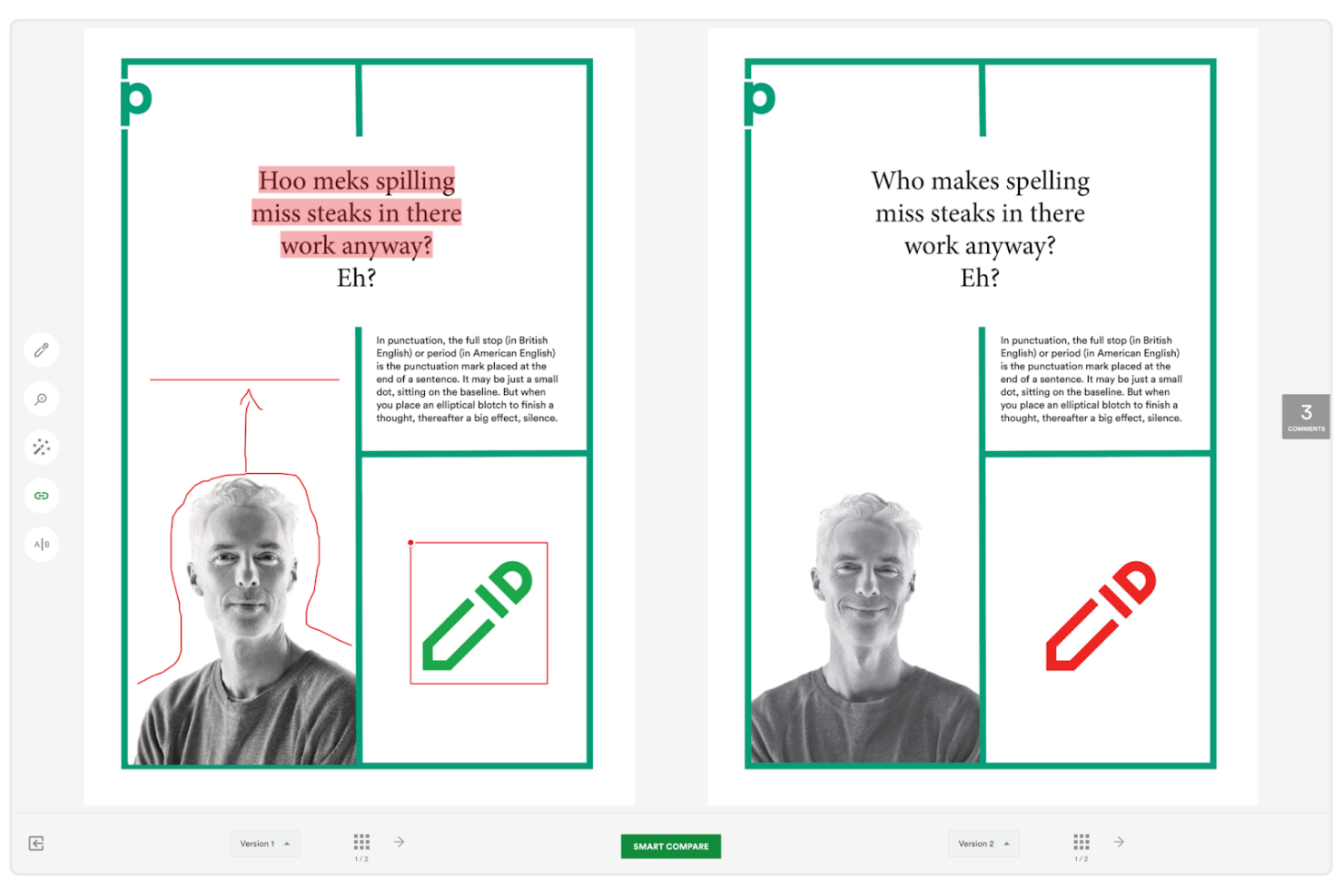
PageProof è uno strumento di revisione online progettato per i team di marketing e creativi, che si concentra su processi di approvazione dei design sicuri ed efficienti. Aiuta i team a gestire feedback e approvazioni garantendo al contempo la conformità agli standard di sicurezza.
Perché ho scelto PageProof: È l'ideale per i team in cui la conformità alla sicurezza è importante. Lo strumento offre funzioni di crittografia per proteggere i tuoi file e i feedback. I revisori possono annotare direttamente sulle bozze, facilitando la raccolta di feedback all'interno del team. L'automazione del flusso di lavoro aiuta a snellire il processo di approvazione, assicurando che nulla venga trascurato.
Caratteristiche e integrazioni salienti:
Caratteristiche includono l'automazione dei flussi di lavoro che aiuta il tuo team a gestire le approvazioni in modo efficiente. Il software offre crittografia per garantire che i tuoi file e le discussioni rimangano al sicuro. Strumenti di annotazione e markup consentono risposte precise direttamente sui design.
Le integrazioni includono Adobe Creative Cloud, Microsoft Office, Slack, Trello, Dropbox, Google Drive, Asana, Jira, Basecamp e monday.com.
Pros and Cons
Pros:
- Flussi di lavoro personalizzabili
- Tracciabilità dettagliata delle revisioni
- Funzionalità di sicurezza di alto livello
Cons:
- Configurazione iniziale complessa
- Curva di apprendimento per i nuovi utenti

Ideale per la collaborazione in tempo reale
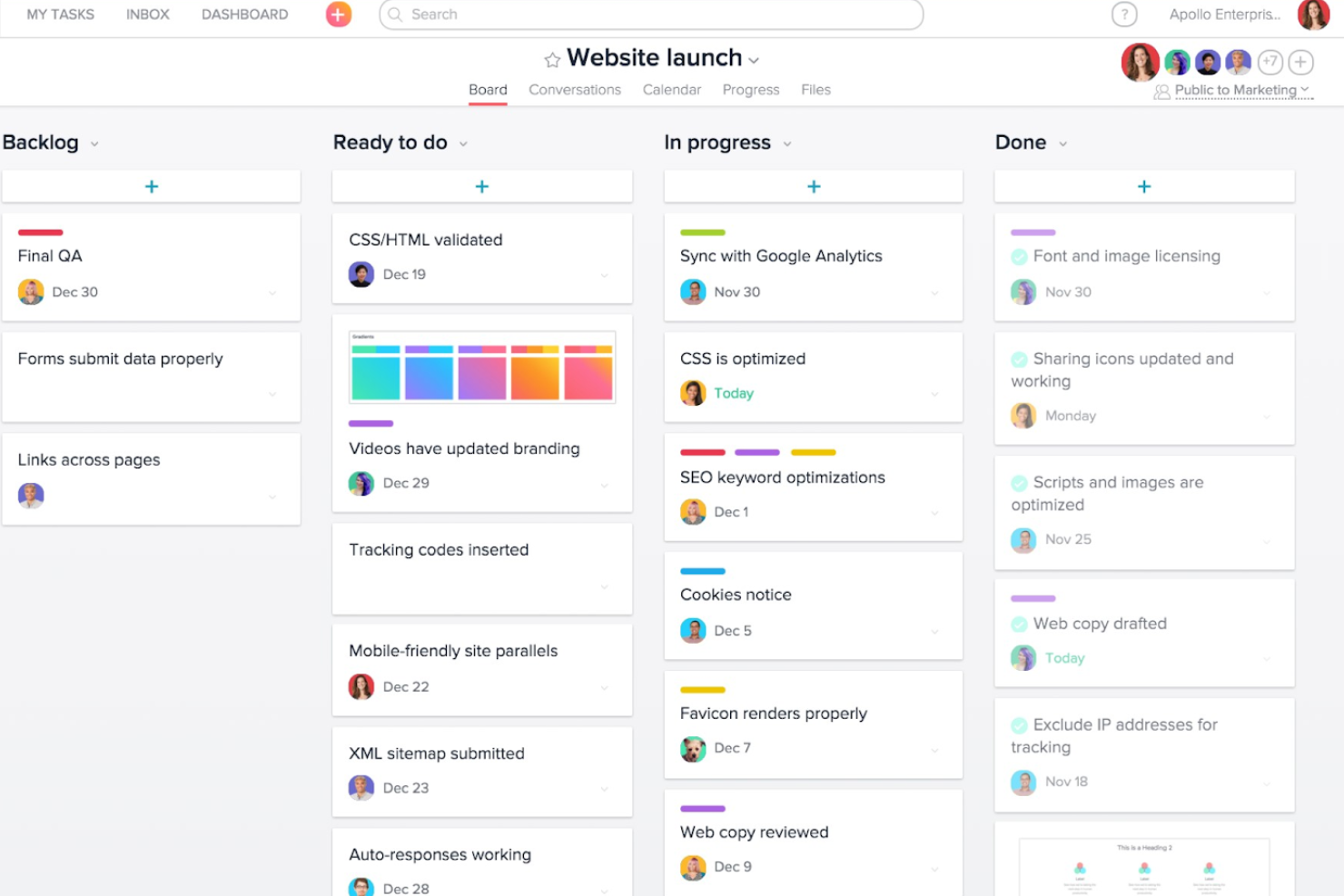
Approval Studio è un software di revisione online per team creativi, focalizzato sulla facilitazione dei flussi di lavoro di revisione dei progetti di design. Si rivolge principalmente ai team che necessitano di un feedback efficiente e del controllo delle versioni per progetti grafici.
Perché ho scelto Approval Studio: È progettato per migliorare la collaborazione in tempo reale grazie a funzionalità come annotazioni e revisioni esterne. Lo strumento supporta diversi formati di file, consentendo al tuo team di lavorare con media di vario tipo. Il controllo delle versioni garantisce che tutti siano allineati, riducendo i malintesi. Le sue capacità di integrazione con piattaforme come Adobe e Shopify lo rendono una scelta versatile per i progetti creativi.
Funzionalità e integrazioni principali:
Funzionalità includono strumenti di annotazione, controllo delle versioni e opzioni per revisione esterna. Queste funzionalità aiutano il tuo team a fornire feedback precisi e a monitorare efficacemente le modifiche. Il software supporta anche diversi formati di file, rendendolo adattabile alle diverse esigenze di progetto.
Integrazioni includono Adobe, Shopify, Slack, Google Drive, Dropbox, Trello, Asana, Jira e monday.com.
Pros and Cons
Pros:
- Supporta vari formati di file
- Strumenti di comunicazione integrati
- Interfaccia intuitiva
Cons:
- Può essere costoso per team piccoli
- Opzioni di integrazione limitate

Ideale per revisioni video
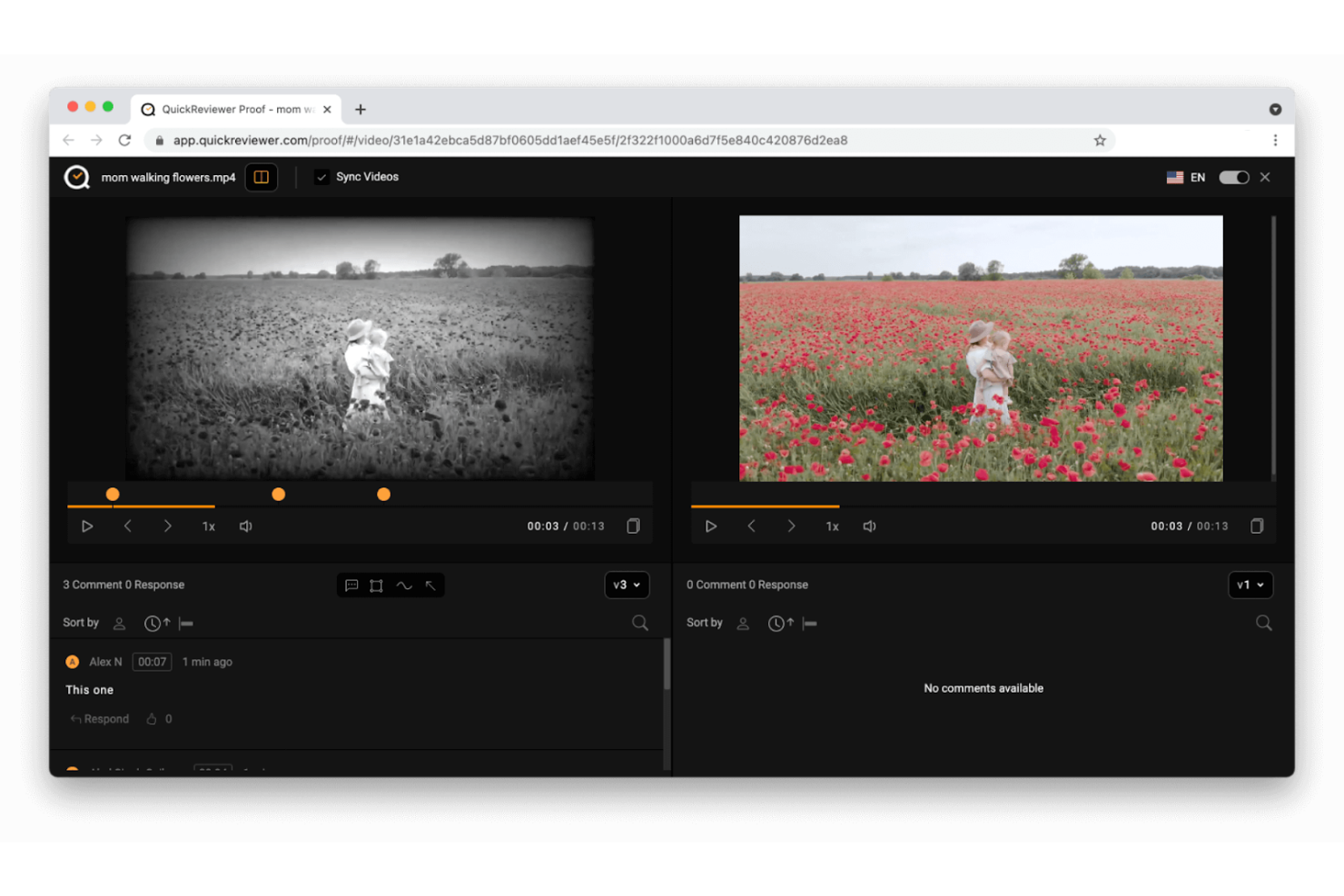
QuickReviewer è uno strumento collaborativo di revisione e approvazione progettato per i team creativi, con particolare attenzione alla semplificazione dell’approvazione di progetti video e di design. Serve ai team marketing e di design consentendo feedback efficienti e collaborazione su progetti multimediali.
Perché ho scelto QuickReviewer: Si distingue in particolare per la revisione dei video, offrendo funzioni come il commento fotogramma per fotogramma. Il tuo team può fornire feedback precisi sui contenuti video, migliorando la comunicazione e i risultati dei progetti. Lo strumento supporta molti tipi di file, risultando così versatile per diversi progetti creativi. L’enfasi sul video lo rende un’ottima scelta per i team che lavorano su contenuti multimediali.
Funzionalità e integrazioni principali:
Funzionalità comprendono strumenti avanzati di annotazione che consentono al tuo team di lasciare feedback dettagliati sui file di design. Lo strumento offre il controllo delle versioni, garantendo che tutti lavorino sull’ultima iterazione del file. Inoltre, dispone di una dashboard centralizzata per gestire tutte le revisioni e approvazioni in un unico luogo.
Integrazioni: tra cui Slack, Trello, Asana, Dropbox, Google Drive, Microsoft Teams, Jira, monday.com, Basecamp e Adobe Creative Cloud.
Pros and Cons
Pros:
- Controllo dettagliato delle versioni
- Supporta molti tipi di file
- Commenti video fotogramma per fotogramma
Cons:
- Potrebbe richiedere supporto tecnico
- Curva di apprendimento per i nuovi utenti

Admation
Ideale per i team di marketing
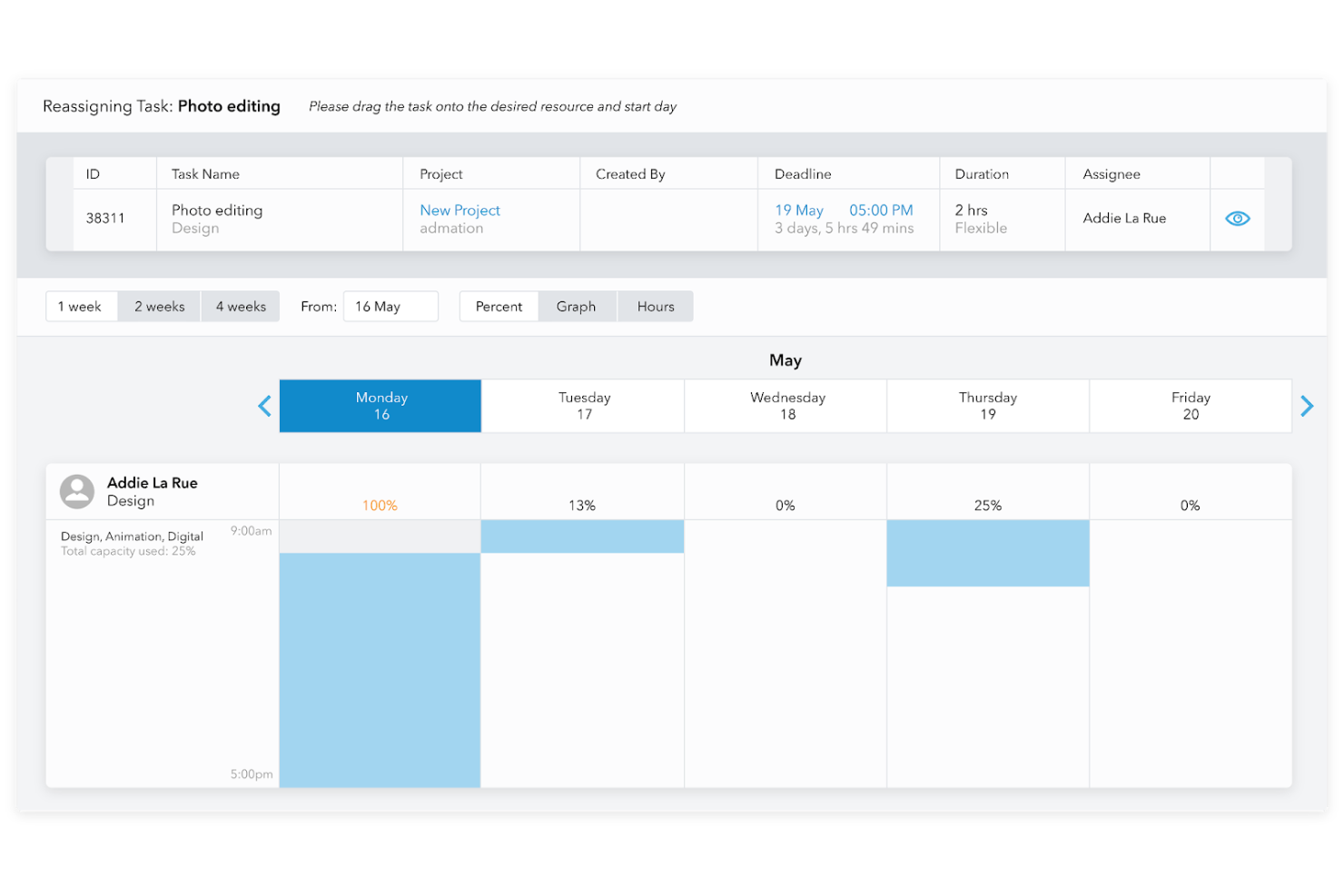
Admation è uno strumento di project management e approvazione dei progetti creato su misura per i team di marketing, che li aiuta a gestire i progetti creativi e le approvazioni in modo efficiente. Consente agli utenti di centralizzare i feedback, monitorare l'avanzamento dei progetti e assicurarsi che le scadenze vengano rispettate.
Perché ho scelto Admation: È progettato specificatamente per i team di marketing, offrendo funzionalità come il monitoraggio dei progetti e la gestione delle risorse. Il tuo team può beneficiare di una dashboard centralizzata che mantiene tutti i dettagli del progetto organizzati. Lo strumento offre flussi di lavoro di approvazione personalizzabili, rendendo più semplice la gestione di più campagne. Il suo focus sulle esigenze di marketing lo rende un valido alleato per i team creativi.
Caratteristiche principali e integrazioni:
Caratteristiche includono il monitoraggio dei progetti, che aiuta il tuo team a seguire i progressi e le scadenze. Il software offre flussi di lavoro di approvazione personalizzabili, permettendo di adattare il processo alle esigenze del team. Inoltre, include funzionalità di gestione delle risorse che aiutano ad allocare e monitorare efficacemente le risorse del gruppo.
Integrazioni includono Adobe Creative Cloud, Slack, Trello, Asana, Google Drive, Dropbox, Microsoft Teams, Jira, Basecamp e monday.com.
Pros and Cons
Pros:
- Supporta più campagne
- Monitoraggio dettagliato delle risorse
- Adattato ai flussi di lavoro di marketing
Cons:
- Curva di apprendimento per i nuovi utenti
- Potrebbe richiedere un tempo iniziale di configurazione piuttosto lungo

Ideale per il settore della stampa
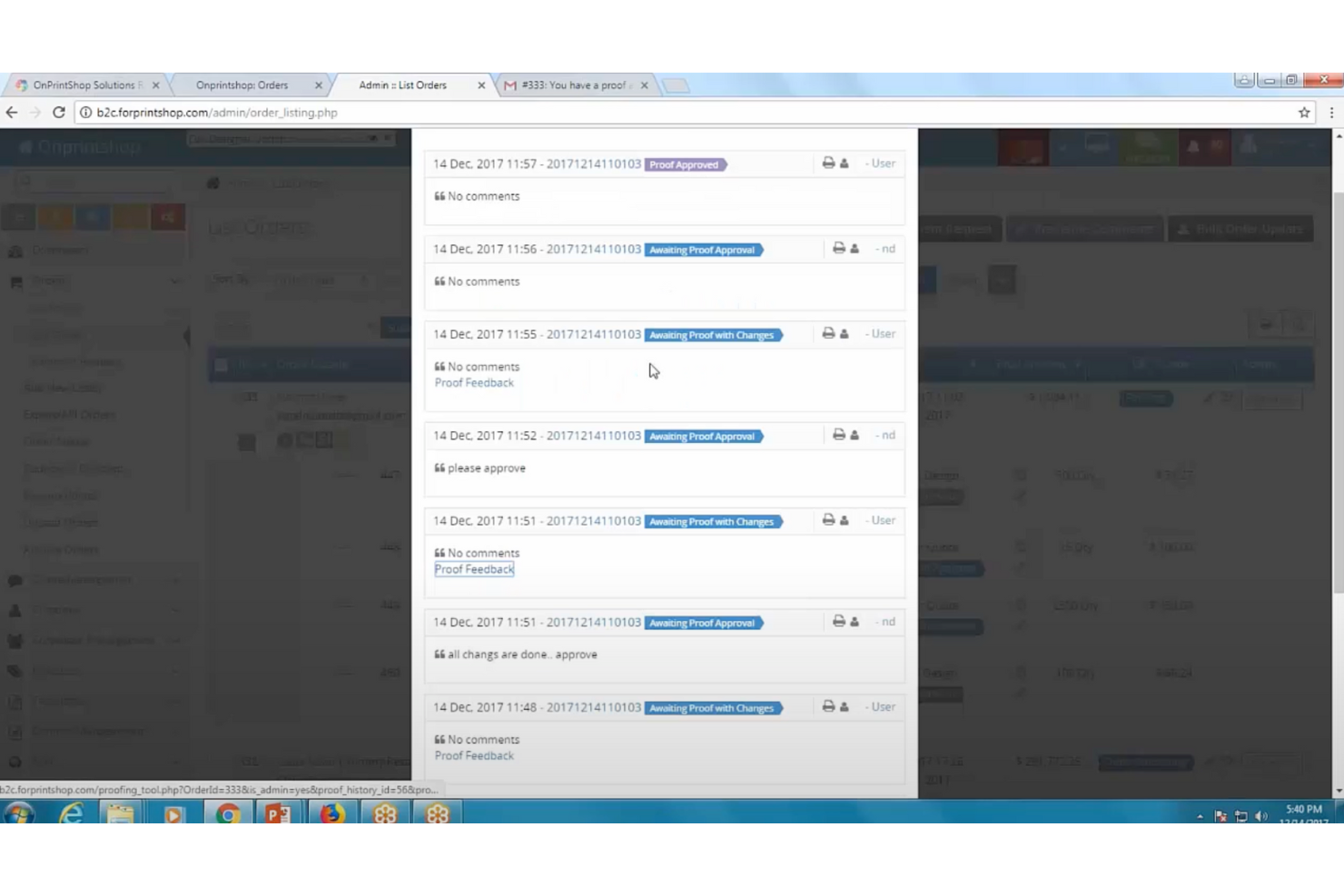
OnPrintShop è un software di verifica delle bozze pensato per l'industria della stampa, che aiuta le aziende di stampa a gestire in modo efficiente le approvazioni dei progetti. Serve i fornitori di servizi di stampa snellendo il processo di verifica e migliorando la comunicazione con i clienti.
Perché ho scelto OnPrintShop: È specificamente progettato per il settore della stampa, rendendolo ideale per le aziende di questo ambito. Il software offre funzionalità come la verifica online delle bozze, che consente ai tuoi clienti di esaminare e approvare facilmente i progetti. Supporta inoltre diversi formati di file, garantendo compatibilità con vari strumenti di progettazione. L'attenzione alle esigenze specifiche del settore lo distingue rispetto agli strumenti di approvazione grafica più generici.
Caratteristiche principali & integrazioni:
Caratteristiche includono la verifica online delle bozze che semplifica il processo di approvazione da parte del cliente. Lo strumento supporta molteplici formati di file, consentendo la presentazione di progetti diversificati. Offre inoltre un'interfaccia personalizzabile che si adatta alle esigenze aziendali.
Integrazioni includono Adobe, CorelDRAW, Dropbox, Google Drive, QuickBooks, Xero, Microsoft Dynamics, SAP e Salesforce.
Pros and Cons
Pros:
- Opzioni di reportistica dettagliate
- Funzionalità specifiche per il settore
- Template personalizzabili
Cons:
- Limitato al settore della stampa
- Leggera curva di apprendimento

Ideale per team aziendali
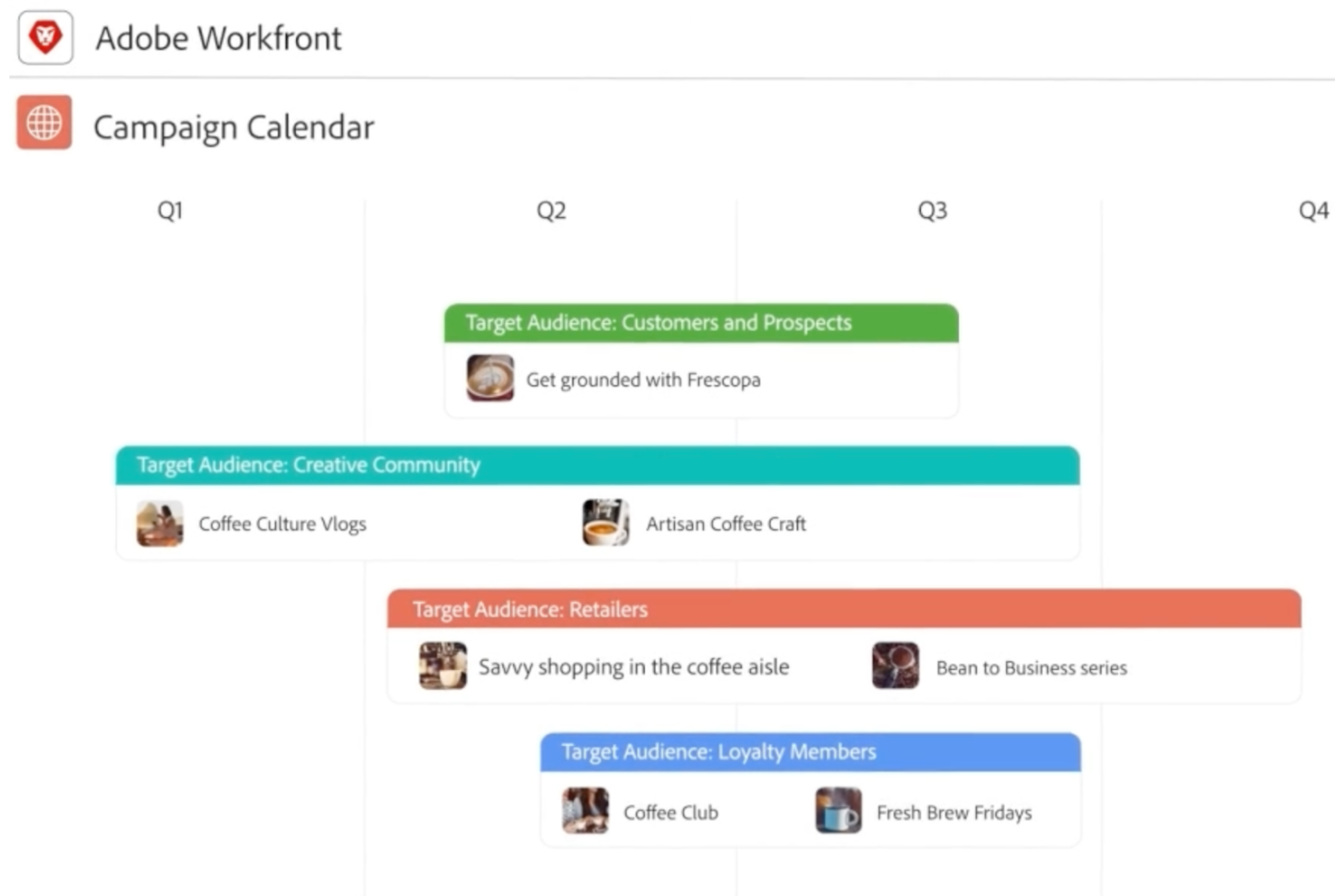
Adobe Workfront è un software di gestione progetti e approvazione dei design pensato per i team aziendali, che aiuta a gestire progetti su larga scala e ottimizzare i flussi di lavoro. Permette alle aziende di organizzare le attività, collaborare sui progetti e monitorare l'avanzamento in modo efficiente.
Perché ho scelto Adobe Workfront: È pensato per i team aziendali con funzionalità come avanzate capacità di gestione dei progetti. Il tuo team può beneficiare di assegnazioni dettagliate delle attività e aggiornamenti in tempo reale. Il software supporta flussi di lavoro complessi, rendendolo adatto a grandi organizzazioni con esigenze progettuali diverse. L'integrazione con altri prodotti Adobe ne aumenta l'utilità per i team creativi e di marketing.
Funzionalità e integrazioni principali:
Funzionalità includono strumenti avanzati di reportistica che forniscono approfondimenti sui tuoi progetti. Il software offre dashboard personalizzabili, permettendo di adattare l'interfaccia alle esigenze del team. Inoltre, supporta la gestione delle risorse, aiutandoti ad allocare e tracciare efficacemente le risorse.
Integrazioni includono Adobe Creative Cloud, Salesforce, Microsoft Teams, Slack, Jira, Google Drive, Dropbox, Asana, Trello e Zoom.
Pros and Cons
Pros:
- Funzionalità di reportistica dettagliata
- Scalabile per grandi team
- Ampie opzioni di personalizzazione
Cons:
- Costo elevato per team di piccole dimensioni
- Procedura di configurazione piuttosto complessa

Ideale per la conformità al brand
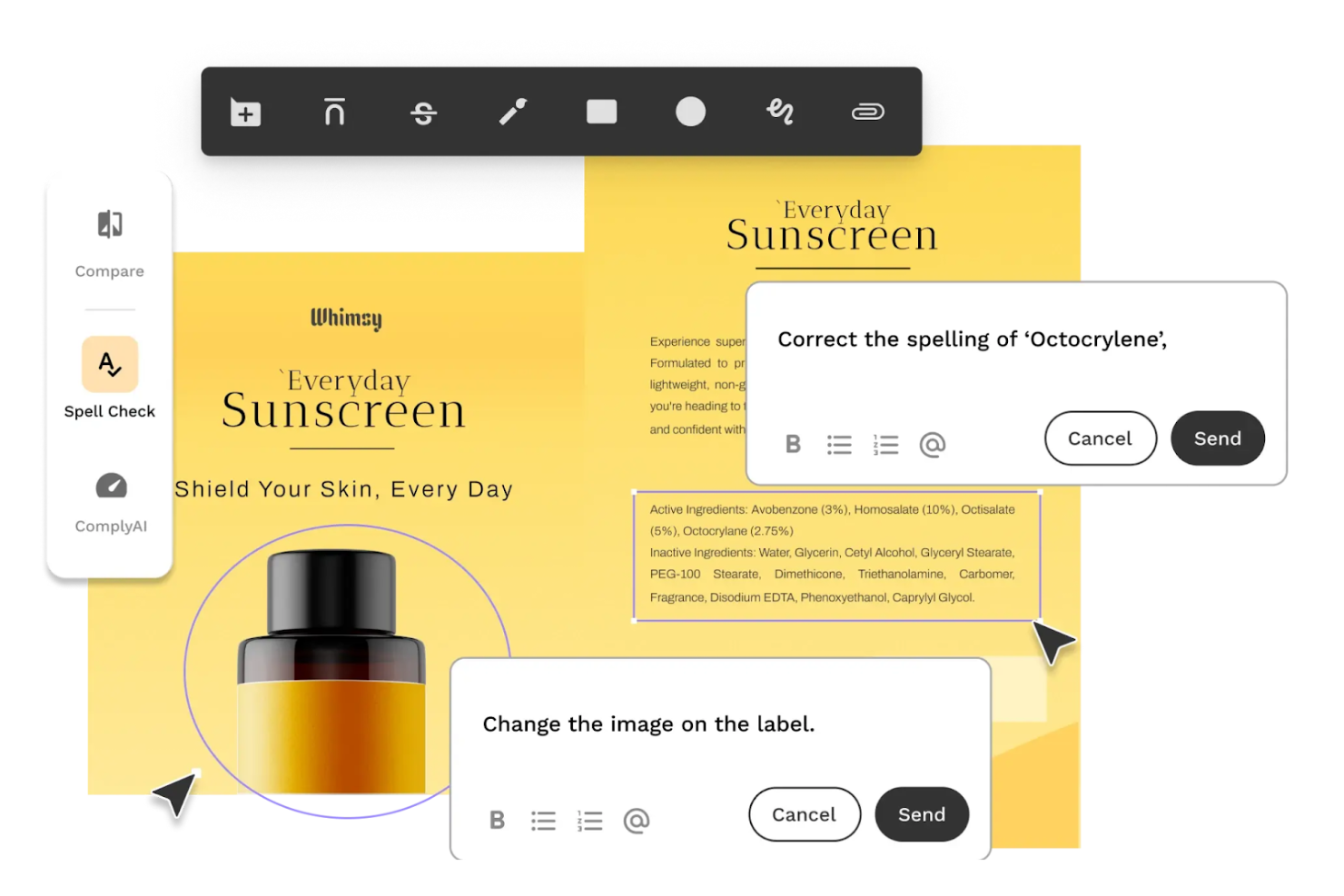
Artwork Flow è un software di approvazione dei progetti grafici pensato per i team di marketing e branding, che li aiuta a garantire la conformità al brand e a semplificare i processi di approvazione. Permette agli utenti di gestire in modo efficiente i progetti creativi centralizzando feedback e approvazioni.
Perché ho scelto Artwork Flow: È progettato per garantire la conformità al brand grazie a funzionalità come il controllo delle versioni e l’integrazione delle linee guida del brand. Il tuo team può utilizzare questi strumenti per mantenere la coerenza su tutti i progetti. Il software supporta l'automazione del flusso di lavoro, permettendo di gestire efficacemente le approvazioni. L’attenzione all’integrità del marchio lo rende uno strumento prezioso per i team di marketing.
Funzionalità e integrazioni principali:
Funzionalità includono il controllo delle versioni, che aiuta il team a gestire in modo efficace le iterazioni dei progetti grafici. Lo strumento offre l’automazione del flusso di lavoro per mantenere i progetti in movimento senza intoppi. Inoltre, prevede l’integrazione delle linee guida del brand, assicurando che i progetti rimangano coerenti con l’identità del tuo marchio.
Integrazioni includono Adobe Creative Cloud, Slack, Trello, Asana, Google Drive, Dropbox, Microsoft Teams, HubSpot, Jira e monday.com.
Pros and Cons
Pros:
- Raccolta centralizzata dei feedback
- Automazione dei flussi di lavoro
- Tracciamento dettagliato delle versioni
Cons:
- Costo elevato per team piccoli
- Curva di apprendimento per i nuovi utenti


Pastel è uno strumento collaborativo di raccolta feedback progettato per web designer e sviluppatori, che li aiuta a raccogliere e gestire feedback sui progetti web. Permette ai team di interagire direttamente sui siti live, migliorando la comunicazione e la gestione dei progetti.
Perché ho scelto Pastel: È perfetto per il feedback sul web design, offrendo funzionalità come commenti in tempo reale direttamente sulle pagine web. Questo permette al tuo team e ai clienti di discutere le modifiche nel contesto, riducendo le incomprensioni. Lo strumento supporta feedback visivi, rendendo più semplice individuare i problemi e discutere gli elementi di design. La sua attenzione ai progetti web lo rende una scelta ideale per i designer che hanno bisogno di feedback precisi.
Funzionalità e integrazioni principali:
Funzionalità includono commenti in tempo reale, che permettono al tuo team di lasciare feedback direttamente sulle pagine web. Lo strumento offre anche feedback visivi, aiutando a individuare esattamente dove sono necessari i cambiamenti. Inoltre, fornisce una dashboard centralizzata per gestire tutti i commenti e le attività del progetto.
Integrazioni includono Slack, Trello, Asana, Jira, Basecamp, monday.com, ClickUp, Google Drive, Dropbox e Microsoft Teams.
Pros and Cons
Pros:
- Gestione progetti semplice
- Strumenti di feedback visivo
- Feedback diretto sui siti live
Cons:
- Può richiedere una formazione iniziale
- Funzionalità di reportistica di base

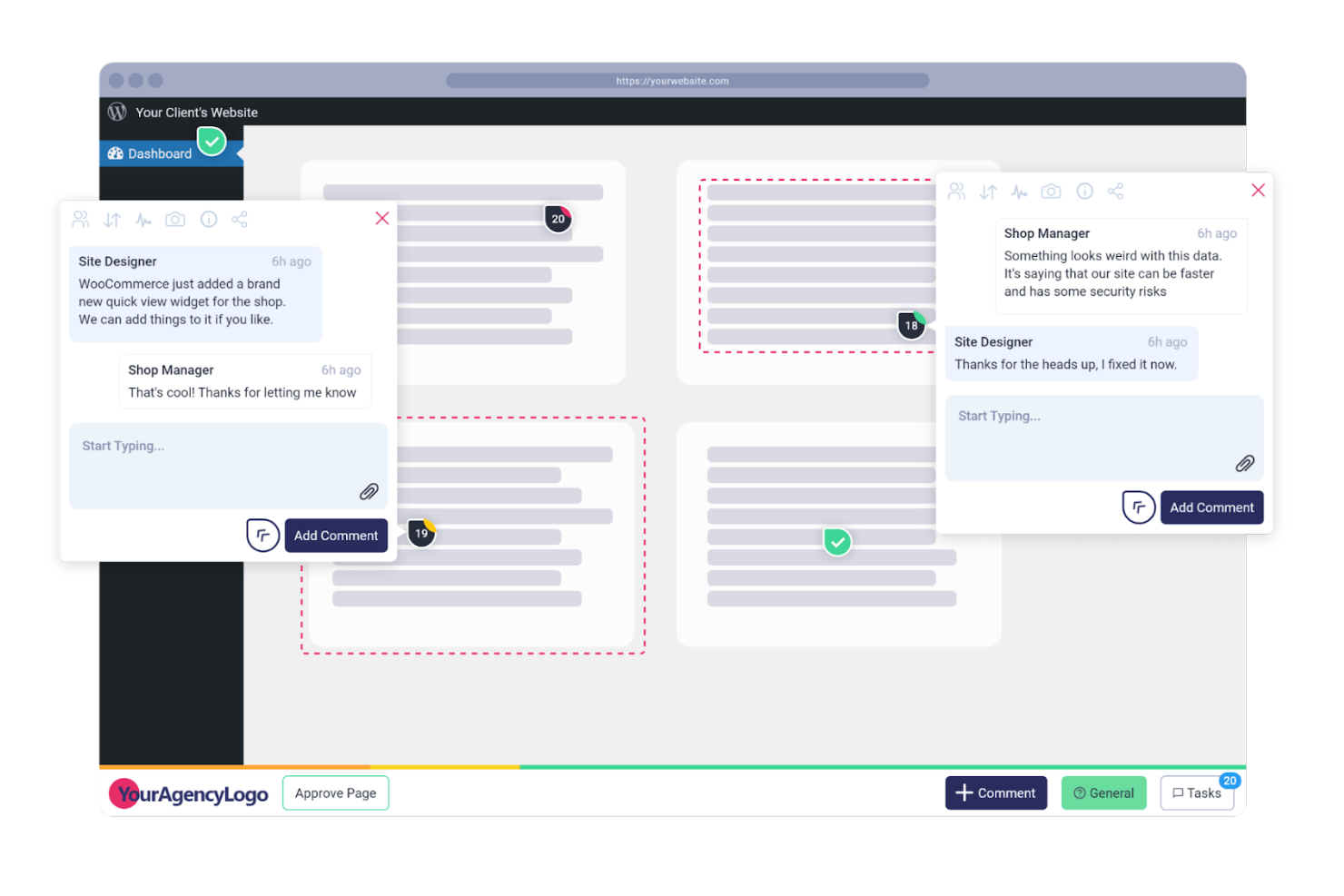
Atarim è uno strumento collaborativo per l'approvazione dei progetti grafici, progettato specificamente per le agenzie web, che aiuta a ottimizzare il feedback dei clienti e la gestione dei progetti. Permette ai professionisti del web di gestire i progetti dei siti in modo efficiente centralizzando tutte le comunicazioni e le attività.
Perché ho scelto Atarim: È pensato per le agenzie web, offrendo funzionalità come la collaborazione visiva direttamente sui siti live. Il tuo team può lasciare commenti e feedback in tempo reale, semplificando la comunicazione con i clienti. Lo strumento offre anche funzionalità di gestione dei progetti, permettendoti di monitorare i progressi e le scadenze. Il suo focus sulle esigenze dei progetti web lo rende una scelta eccellente per le agenzie.
Funzionalità principali & integrazioni:
Funzionalità includono collaborazione visiva, che permette a team e clienti di lasciare feedback direttamente sui siti web. Lo strumento offre la gestione delle attività, aiutandoti a monitorare le tappe dei progetti. Inoltre, dispone di una dashboard centralizzata che aggrega tutte le comunicazioni e le attività in un unico posto.
Integrazioni includono Slack, Trello, Asana, monday.com, ClickUp, Basecamp, Jira, Google Drive, Dropbox e HubSpot.
Pros and Cons
Pros:
- Flussi di lavoro personalizzabili
- Gestione centralizzata delle attività
- Feedback in tempo reale sui siti web
Cons:
- Maggiore complessità per team piccoli
- Curva di apprendimento per i nuovi utenti
Altri software per l'approvazione dei progetti
Ecco alcune opzioni aggiuntive di software per l’approvazione dei progetti che non sono entrate nel mio elenco, ma che vale comunque la pena considerare:
- GoVisually
Ideale per il feedback visivo
- GoProof
Ideale per l'integrazione con Adobe
- Cage
Ideale per team creativi


Come Valuto i Software per l'Approvazione dei Design
Valuto gli strumenti per l'approvazione dei design su due livelli: le funzionalità di base di annotazione e workflow che un tool deve possedere, e i fattori distintivi—come conformità, integrazioni e prezzi—che sono i più rilevanti.
Funzionalità Core (Requisiti Fondamentali per Questa Lista)
Quando seleziono gli strumenti per la mia lista, valuto ognuno di essi su una scala da 0 (non offre la funzionalità) a 5 (eccelle in questa area) per ciascuna delle funzionalità fondamentali elencate di seguito. Successivamente, trasformo il punteggio totale dello strumento in una percentuale. Ogni strumento deve raggiungere un punteggio minimo totale del 65% per essere considerato per l'inclusione.
- Annotazione Visiva & Markup: Controllo se i revisori possono fissare commenti e disegnare direttamente sugli asset, non solo lasciare note generiche in una sidebar separata dal design.
- Workflow di Approvazione Strutturati: L'instradamento a più stadi con approvatori designati è importante qui, soprattutto per i team che gestiscono revisioni parallele tra stakeholder di prodotto, legali e di brand.
- Tracciamento & Confronto delle Versioni: Cerco la versione automatica con confronto affiancato, in modo che i revisori possano confermare esattamente cosa è cambiato tra un round e l'altro senza dover scaricare file.
- Supporto Multi-Formato di File: Uno strumento dovrebbe visualizzare i tipi di file effettivamente usati dal tuo team—PDF, PNG, file Figma, video—nativamente nel browser invece di richiedere download separati.
- Registro delle Attività & Storico delle Approvazioni: Verifico se la piattaforma registra chi ha approvato cosa e quando, fondamentale per i team che devono tracciare le decisioni di approvazione dopo il rilascio.
- Accesso Collaborativo per gli Stakeholder: L'accesso per revisori ospiti tramite link condivisibili è molto importante, poiché i product manager spesso necessitano di input da partner esterni o dirigenti che non hanno un account a pagamento.
Una volta che ho una lista di strumenti che soddisfano i criteri, considero cosa rende ogni piattaforma unica.
Fattori Differenzianti (Cosa Distingue i Fornitori)
Ecco come confronto e metto a confronto i vari fornitori:
Funzionalità Distintive
La sincronizzazione in tempo reale con strumenti di design è un grande elemento distintivo—gli strumenti che estraggono la versione più recente da Figma o Adobe Creative Cloud evitano ai revisori di inseguire file obsoleti. Cerco anche controlli di revisione automatizzati che rilevino errori ortografici, incoerenze nel brand o elementi mancanti prima che inizi la revisione umana. È utile valutare anche la gestione digitale degli asset integrata, dato che i team che approvano decine di asset per sprint traggono vantaggio dall'archiviare e taggare i file definitivi nello stesso luogo in cui vengono revisionati.
Oltre le Funzionalità
Il modello di prezzo conta molto qui, soprattutto per le licenze degli ospiti. I product manager coinvolgono regolarmente dirigenti, legali e partner esterni per le revisioni, quindi verifico se uno strumento fa pagare per ogni revisore o offre accesso ospite illimitato. La profondità dell'integrazione con strumenti come Jira, Linear o Asana è un altro fattore che valuto, poiché lo stato dell'approvazione deve fluire nella pianificazione degli sprint senza aggiornamenti manuali. Considero anche se una piattaforma può scalare su più linee di prodotto o brand all'interno di un singolo workspace.
Come scegliere un software per l'approvazione dei progetti
È facile perdersi in lunghi elenchi di funzionalità e strutture tariffarie complesse. Per aiutarti a rimanere concentrato mentre affronti il tuo specifico processo di selezione del software, ecco una lista di fattori da tenere presenti:
| Fattore | Cosa considerare |
| Scalabilità | Assicurati che il software possa crescere insieme al tuo team. Cerca soluzioni in grado di gestire carichi di lavoro in aumento e team più numerosi senza sacrificare le prestazioni. |
| Integrazioni | Verifica se si integra con gli strumenti che già utilizzi. Tra questi rientrano software di progettazione come Adobe e strumenti di gestione dei progetti come Trello o Asana. |
| Personalizzazione | Cerca opzioni che consentano di adattare i flussi di lavoro alle tue esigenze. La possibilità di personalizzare dashboard e processi di approvazione può migliorare l'efficienza del tuo team. |
| Facilità d'uso | Valuta se l'interfaccia è intuitiva e facile da usare. Il tuo team dovrebbe essere in grado di utilizzare il software con una formazione minima. |
| Budget | Considera il costo in relazione al tuo budget. Cerca prezzi trasparenti, senza costi nascosti, e verifica se è disponibile una prova gratuita per testare il software. |
| Misure di sicurezza | Verifica che il software includa solide misure di sicurezza per proteggere i tuoi dati. Questo è essenziale se gestisci informazioni sensibili. |
| Assistenza | Considera la disponibilità e la qualità dell'assistenza clienti. Assicurati che siano disponibili diversi canali, come chat, email e telefono, per ricevere aiuto quando necessario. |
| Meccanismi di feedback | Assicurati che il software supporti la raccolta di feedback dettagliati. Cerca funzionalità come strumenti di annotazione e thread di commenti per garantire una comunicazione chiara. |
Tendenze nei software per l'approvazione dei design
Nella mia ricerca, ho raccolto innumerevoli aggiornamenti dei prodotti, comunicati stampa e registri delle versioni di diversi fornitori di software per l'approvazione dei design. Ecco alcune delle tendenze emergenti che sto monitorando:
- Collaborazione in tempo reale: un numero sempre maggiore di strumenti sta dando priorità a questa funzionalità, in particolare le agenzie creative e i freelance, per esaminare e modificare insieme gli elementi creativi. Ciò consente di ottenere feedback più rapidi, tempi di consegna più brevi e meno ritardi su più formati.
- Analisi basate sull'intelligenza artificiale: alcuni fornitori stanno introducendo funzionalità di intelligenza artificiale che analizzano i modelli nei cicli di revisione creativa. Queste analisi possono evidenziare i colli di bottiglia, suggerire i passaggi successivi o contribuire a ottimizzare i flussi di lavoro personalizzati sulla base dei dati dei progetti precedenti.
- Funzionalità di sicurezza avanzate: poiché la protezione dei contenuti creativi sensibili sta diventando uno standard del settore, molte piattaforme stanno investendo nei controlli delle autorizzazioni, nell'autenticazione a livello di API e nella crittografia dei dati. Ciò aiuta i team a garantire la conformità mantenendo al sicuro gli elementi del marchio durante l'intero processo di approvazione delle grafiche.
- Cicli di feedback integrati: molti strumenti ora supportano feedback e annotazioni centralizzati direttamente sui file di design. Ciò consente di monitorare commenti, modifiche e decisioni in un unico spazio, migliorando il controllo delle versioni e riducendo la necessità di e-mail o riunioni di aggiornamento.
- Attenzione all'esperienza utente: i fornitori continuano a perfezionare le proprie interfacce per rendere più semplice l'adozione dei software per l'approvazione dei design. Layout più semplici, onboarding più rapido e minori requisiti di formazione rendono questi strumenti più accessibili sia ai team interni sia agli interlocutori esterni.
Che cos'è un software per l'approvazione dei design?
I software per l'approvazione dei design vengono utilizzati per gestire il processo di feedback e approvazione dei progetti creativi, dalla grafica per i social media ai documenti con elementi del marchio e alle campagne digitali. Sono particolarmente utili per i team creativi, le agenzie e i freelance che devono raccogliere contributi, gestire le modifiche e ottenere l'approvazione finale dei lavori visivi.
Il software supporta attività fondamentali come la collaborazione in tempo reale, la revisione creativa e il monitoraggio dei progetti. Molti strumenti ora includono funzionalità come analisi basate sull'intelligenza artificiale, controllo delle versioni e sistemi di feedback integrati per contribuire a ridurre i cicli di revisione e mantenere i progetti nei tempi previsti. Alcune piattaforme supportano persino flussi di lavoro per l'approvazione delle grafiche adattati alla conformità del marchio o normativa.
Che tu stia gestendo le approvazioni dei clienti o lavorando su elementi creativi interni, questi strumenti offrono uno spazio centralizzato per accompagnare i design attraverso ogni fase della revisione.
Funzionalità dei software per l'approvazione dei design
Quando valuti gli strumenti per l'approvazione dei design, cerca queste funzionalità essenziali:
- Collaborazione in tempo reale: consente a più revisori di lasciare feedback e prendere decisioni rapidamente.
- Controllo delle versioni: mantiene organizzate tutte le modifiche e le iterazioni, così i team lavorano sempre sul file corretto.
- Cicli di feedback integrati: riunisce i commenti tra documenti e formati, facilitando il monitoraggio dei progressi.
- Analisi basate sull'intelligenza artificiale: aiuta a individuare problemi del flusso di lavoro o feedback ripetitivi e suggerisce modi per migliorare il ciclo di revisione.
- Funzionalità di sicurezza avanzate: includono il controllo delle autorizzazioni, l'integrazione con le API e la crittografia per proteggere i lavori sensibili.
- Flussi di lavoro personalizzati: adattano il processo di approvazione alle tue esigenze specifiche, incluse fasi facoltative o approvazioni esterne.
- Strumenti di annotazione: consentono agli utenti di lasciare feedback direttamente su documenti, file di progettazione grafica o formati per l'illustrazione.
- Funzionalità di gestione dei progetti: monitorano scadenze, attività e approvazioni in un unico sistema.
- Interfaccia intuitiva: riduce la curva di apprendimento, facilitando l'inizio del lavoro sia per i membri del team sia per i clienti.
- Approvazioni in più fasi: consente processi di approvazione complessi che coinvolgono più interlocutori.
Vantaggi dei software per l'approvazione dei design
L'implementazione di un software per l'approvazione dei design offre diversi vantaggi al tuo team e alla tua azienda. Ecco alcuni dei benefici che puoi aspettarti:
- Comunicazione migliorata: Gli strumenti di collaborazione e annotazione in tempo reale migliorano il modo in cui il team scambia feedback, riducendo i problemi di comunicazione e accelerando il processo decisionale.
- Risparmio di tempo: Il controllo delle versioni e i cicli di feedback integrati garantiscono che tutti siano allineati, riducendo al minimo il tempo dedicato a e-mail e riunioni di confronto.
- Sicurezza avanzata: Le funzionalità di sicurezza avanzate proteggono i dati sensibili dei tuoi progetti, garantendo la conformità agli standard del settore e tutelando la reputazione della tua azienda.
- Maggiore efficienza: I flussi di lavoro personalizzabili e gli insight basati sull'intelligenza artificiale ottimizzano i processi, consentendo al tuo team di concentrarsi sulla creatività e sulla produttività.
- Gestione migliore dei progetti: Le funzionalità di gestione dei progetti aiutano a organizzare le attività e le scadenze, garantendo che i progetti vengano consegnati nei tempi previsti e rispettando l'ambito concordato.
- Approvazioni semplificate: Le approvazioni in più fasi coinvolgono tutte le parti interessate necessarie, garantendo un feedback completo e riducendo la probabilità che vengano trascurati dei dettagli.
- Esperienza intuitiva: Un'interfaccia intuitiva consente al tuo team di adattarsi rapidamente e utilizzare il software in modo efficace, riducendo la curva di apprendimento e aumentando i tassi di adozione.
Costi e prezzi dei software per l'approvazione dei progetti grafici
La scelta di un software per l'approvazione dei progetti grafici richiede la comprensione dei vari modelli e piani tariffari disponibili. I costi variano in base alle funzionalità, alle dimensioni del team, ai componenti aggiuntivi e ad altri fattori. La tabella seguente riassume i piani più comuni, i relativi prezzi medi e le funzionalità tipicamente incluse nelle soluzioni software per l'approvazione dei progetti grafici:
Tabella comparativa dei piani per i software di approvazione dei progetti grafici
| Tipo di piano | Prezzo medio | Funzionalità comuni |
| Piano gratuito | $0/utente/ mese | Strumenti di feedback di base, spazio di archiviazione limitato e controllo delle versioni di base. |
| Piano personale | $5-$25/utente/mese | Strumenti di feedback avanzati, spazio di archiviazione moderato, controllo delle versioni e strumenti di annotazione. |
| Piano aziendale | $25-$50/ utente/mese | Collaborazione di gruppo, maggiore spazio di archiviazione, sicurezza avanzata e flussi di lavoro personalizzabili. |
| Piano per grandi aziende | $50+/utente/ mese | Spazio di archiviazione illimitato, sicurezza completa, approvazioni in più fasi e supporto dedicato. |
Domande frequenti sul software per l'approvazione dei progetti grafici
Ecco alcune risposte alle domande più comuni sul software per l’approvazione dei progetti grafici:
In che modo il software per l'approvazione dei progetti grafici migliora la collaborazione?
Il software per l’approvazione dei progetti grafici migliora la collaborazione consentendo ai membri del team di fornire feedback in tempo reale, direttamente sui file di progetto. Questo riduce la necessità di lunghe conversazioni via e-mail e riunioni, garantendo che le parti interessate e i designer siano allineati. Gli strumenti centralizzano inoltre i feedback, rendendo semplice per i team accedervi e agire di conseguenza.
Il software per l'approvazione dei progetti grafici è in grado di gestire diversi tipi di file?
Sì, la maggior parte dei software per l’approvazione dei progetti grafici è in grado di gestire diversi tipi di file, tra cui immagini, video e documenti. Questa flessibilità consente al team di lavorare su progetti diversi senza dover passare da uno strumento all’altro. Garantisce che tutti i feedback e le approvazioni siano gestiti in un unico luogo.
Cosa devo cercare nella sicurezza di un software per l'approvazione delle opere grafiche?
Quando valuti la sicurezza, verifica che il software offra la crittografia end-to-end per proteggere i tuoi dati. Cerca la conformità a standard di settore come GDPR o SOC 2. Queste funzionalità garantiscono che i tuoi progetti grafici e feedback sensibili siano protetti dagli accessi non autorizzati.
Come integro il software per l'approvazione dei progetti grafici con gli strumenti che già utilizzo?
Molte soluzioni software per l’approvazione dei progetti grafici offrono integrazioni con strumenti popolari come Adobe Creative Cloud, Slack e Trello. Queste integrazioni consentono di collegare il software di progettazione agli strumenti di gestione dei progetti e comunicazione, creando un flusso di lavoro armonioso per il team.
Il software per l'approvazione dei progetti grafici richiede un periodo di apprendimento?
Sebbene possa essere necessario un periodo di apprendimento, la maggior parte dei software per l’approvazione dei progetti grafici è progettata per essere intuitiva. Cerca strumenti con interfacce intuitive e risorse formative disponibili, come tutorial e webinar. Questo può aiutare il team ad adattarsi rapidamente e a sfruttare al meglio le funzionalità del software.
In che modo il software per l'approvazione dei progetti grafici supporta i team che lavorano da remoto?
Il software per l’approvazione dei progetti grafici supporta i team che lavorano da remoto consentendo la collaborazione in tempo reale indipendentemente dalla posizione. I membri del team possono accedere ai progetti e revisionarli da qualsiasi luogo, fornendo feedback e approvazioni senza ritardi. Questa flessibilità garantisce che i progetti continuino a procedere senza intoppi, anche quando i membri del team si trovano in luoghi diversi.
Qual è il prossimo passo?
Se stai valutando un software per l'approvazione dei progetti grafici, contatta gratuitamente un consulente SoftwareSelect per ricevere consigli personalizzati.
Compili un modulo e fai una breve conversazione durante la quale il consulente approfondirà le tue esigenze specifiche. In seguito riceverai una selezione ristretta di software da valutare. Ti assisterà anche durante l'intero processo di acquisto, comprese le trattative sul prezzo.