

10 migliori strumenti di progettazione di prodotti recensiti per 2026

10 Elenco dei migliori strumenti di progettazione dei prodotti


In qualità di responsabile di prodotto, conosco bene la difficoltà di trasformare idee brillanti in progetti rifiniti e intuitivi.
Nei giorni migliori, adoravo vedere i modelli schematici prendere vita, collaborare con progettisti e ingegneri che semplicemente capivano al volo e osservare gli utenti interagire con un prodotto dall'utilizzo immediato.
Ma nei giorni più difficili, mi trovavo ad affrontare strumenti di progettazione macchinosi che rendevano la collaborazione un incubo, cicli di riscontri interminabili che rallentavano ogni attività e passaggi di consegne agli sviluppatori frustranti, che portavano a incomprensioni e aspettative diverse.
Ripensandoci, mi sono reso conto che molte di queste difficoltà derivavano dal fatto di non avere il miglior strumento di progettazione dei prodotti per semplificare il processo.
Per questo ho raccolto questo elenco dei miei migliori strumenti di progettazione dei prodotti, così potrai dedicare meno tempo a lottare con il software e più tempo a creare prodotti che i tuoi utenti apprezzeranno. Iniziamo.
Perché Fidarsi delle Nostre Recensioni Software
Testiamo e recensiamo software per il product management dal 2020. Come product manager sappiamo quanto sia fondamentale e difficile fare la scelta giusta in termini di software. Investiamo in una ricerca approfondita per aiutare il nostro pubblico a prendere decisioni migliori sugli acquisti di software. Abbiamo testato oltre 2.000 strumenti per diversi casi d’uso e scritto più di 1.000 recensioni approfondite.Scopri come assicuriamo la trasparenza & la nostra metodologia di recensione software.
Riepilogo dei migliori strumenti di progettazione dei prodotti
Questa tabella comparativa riassume i dettagli sui prezzi dei miei migliori strumenti di progettazione dei prodotti, per aiutarti a trovare quello più adatto al tuo budget e alle esigenze della tua azienda.
| Tool | Best For | Trial Info | Price | ||
|---|---|---|---|---|---|
| 1 | Ideale per analizzare i feedback degli utenti nel design | Piano gratuito disponibile | Da $10/mese (fatturazione annuale) | Website | |
| 2 | La migliore piattaforma di design facile da usare per creare grafiche per i social media | Piano gratuito disponibile | Da $12/mese (fatturazione annuale) | Website | |
| 3 | Il miglior strumento di design collaborativo per wireframe e progettazione UI/UX | Piano gratuito disponibile | A partire da $16/utente/mese (fatturato annualmente) | Website | |
| 4 | Ideale per progettare rapidamente wireframe a bassa fedeltà con componenti dell'interfaccia utente predefiniti | Disponibile una prova gratuita di 14 giorni | A partire da 16 $/utente/mese (con fatturazione annuale) | Website | |
| 5 | Ideale per prototipazione e wireframing cloud-based di app multi-dispositivo | Piano gratuito + demo gratuita disponibile | Da $12/mese (fatturazione annuale) | Website | |
| 6 | Miglior strumento di design vettoriale per la progettazione di animazioni e motion design | Prova gratuita di 7 giorni disponibile | Da $22.99/mese (fatturato annualmente) | Website | |
| 7 | Ideale per creare design UI/UX nell'ambiente Mac | Prova gratuita di 30 giorni | Da $12/editor/mese (fatturato annualmente) | Website | |
| 8 | Ideale per veloci studi 3D e produzione di grafiche di presentazione pulite | Prova gratuita di 30 giorni | Da $119 /anno | Website | |
| 9 | Ideale per la progettazione di prodotti meccanici 3D | Demo gratuita disponibile | Prezzo su richiesta | Website | |
| 10 | Ideale per la gestione delle immagini vettoriali | Prova gratuita di 15 giorni | Da $89/anno | Website |
Recensioni dei migliori strumenti di progettazione dei prodotti
Di seguito trovi i miei riepiloghi dettagliati dei migliori strumenti di progettazione dei prodotti entrati nel mio elenco ristretto. Le mie recensioni offrono uno sguardo approfondito alle caratteristiche principali, ai pro e contro, alle integrazioni e ai casi d’uso ideali di ogni strumento, per aiutarti a trovare quello più adatto a te.

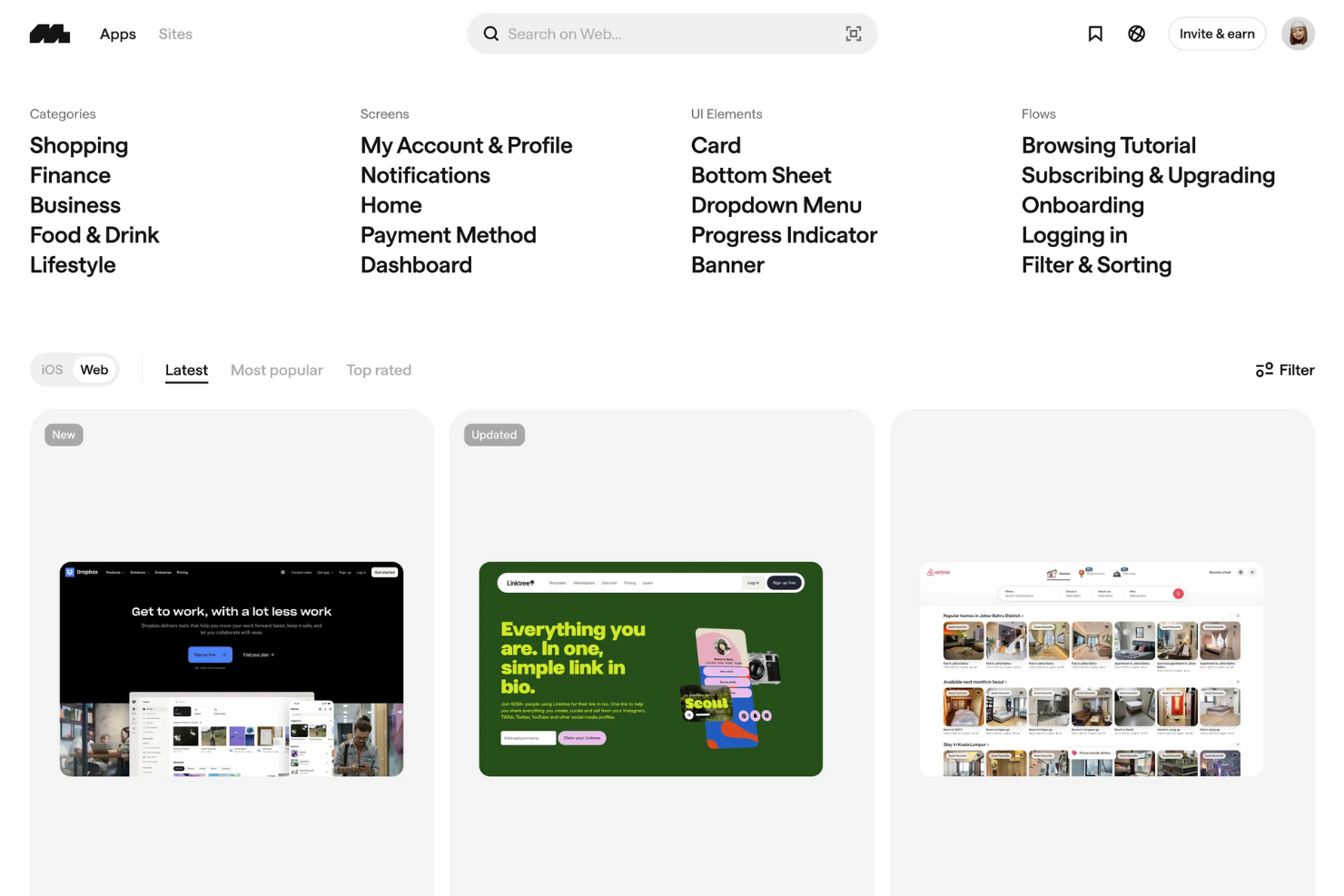
Mobbin è un vero e proprio tesoro per i product designer, offrendo un'enorme libreria di ispirazione per il design tratta da app mobili e web reali. È una risorsa di riferimento per scoprire i più recenti pattern di UI e UX, aiutandoti a creare design innovativi e di facile utilizzo.
Perché ho scelto Mobbin: Ho scelto Mobbin perché colma il divario tra l'ispirazione per il design e le informazioni concrete sugli utenti. Puoi esplorare flussi utente dettagliati e pattern, oltre a esaminare i feedback analizzati dall’IA per vedere cosa piace agli utenti. Questa combinazione ti aiuta a progettare prodotti che non solo hanno un ottimo aspetto, ma funzionano anche meglio nel mondo reale.
Apprezzo anche la sua integrazione con strumenti come Figma e HubSpot, che rende facile passare dalla ricerca all’iterazione senza interrompere il tuo flusso di lavoro.
Funzionalità distintive e integrazioni di Mobbin
Le funzionalità distintive includono una vasta libreria di UI con flussi utente a schermo intero, analisi dei feedback guidate dall’IA che mettono in evidenza i principali trend di design, e corsi formativi per migliorare le tue competenze di design. Mobbin offre inoltre prototipi interattivi e anteprime video per aiutarti a visualizzare l’esperienza utente prima della messa in opera.
Le integrazioni includono Figma, Zapier, Stripe, Vercel, Notion, Supabase, Slack, Trello, GitHub, Asana, Google Workspace e Airtable.
Pros and Cons
Pros:
- Vasta libreria di schermate reali di app
- Si integra con Figma e Zapier
- L'IA analizza i feedback degli utenti centralizzati
Cons:
- Focalizzato principalmente sui design per dispositivi mobili
- Personalizzazione limitata per le raccolte salvate
Canva
La migliore piattaforma di design facile da usare per creare grafiche per i social media
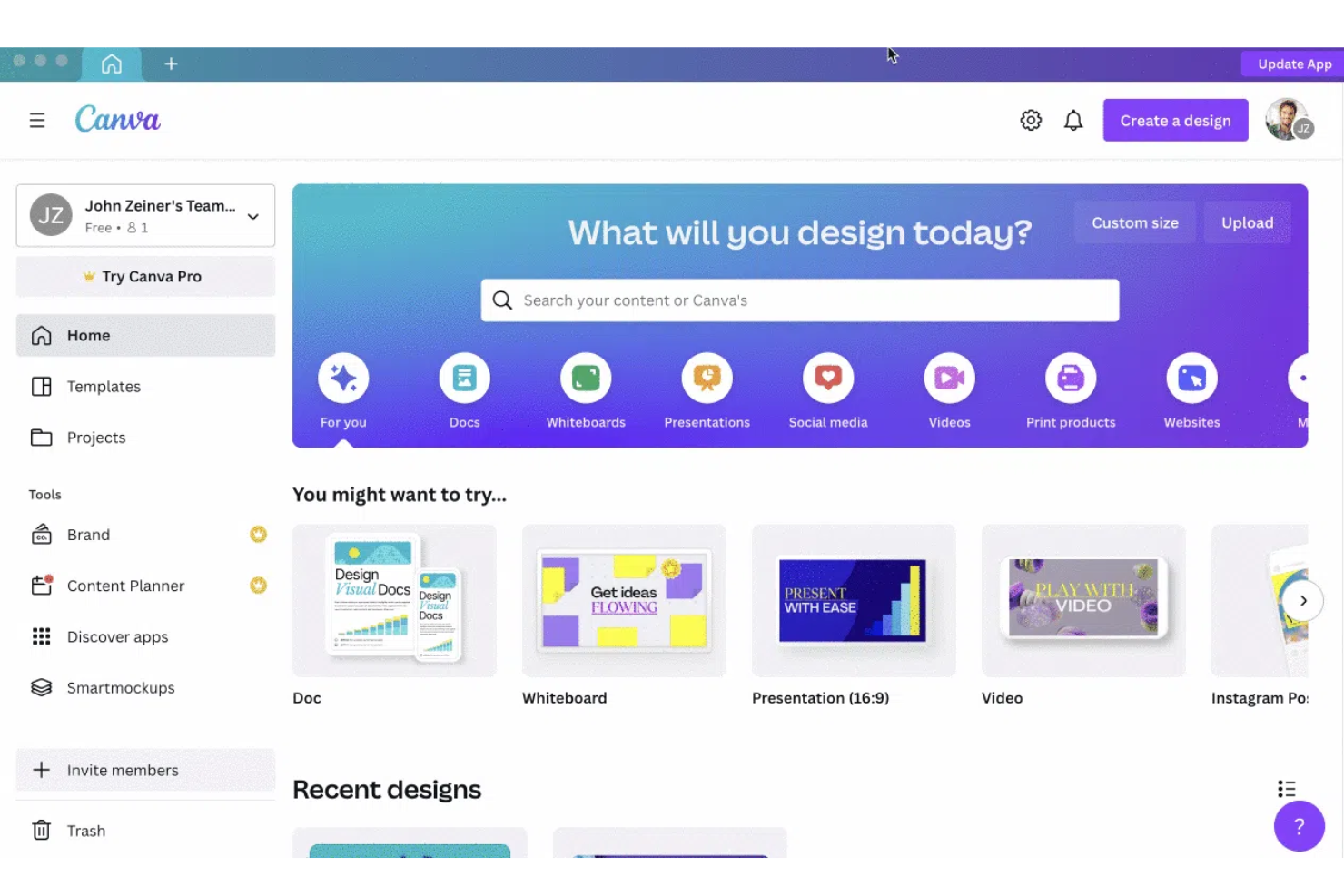
Canva è l'applicazione di riferimento per il design pensata per chi non è designer ma desidera creare post accattivanti per i social media, presentazioni, poster e altri contenuti visivi. Grazie a un'interfaccia intuitiva drag-and-drop e a un'ampia libreria di template ed elementi di design come font, illustrazioni, foto stock, clip audio e video, Canva è lo strumento di progettazione perfetto per i non-designer.
L'applicazione è accessibile su iOS, Android e sul web.
Perché ho scelto Canva: È una soluzione completa per qualsiasi esigenza di design. Che tu sia principiante o esperto, la ricchezza di strumenti, la vasta libreria di template ed elementi vettoriali sia gratuiti sia a pagamento, le funzionalità collaborative e l'elevato livello di personalizzazione ti aiuteranno a creare design di grande impatto in modo rapido e semplice. L'app offre oltre 400.000 preset professionali, di cui 250.000 gratuiti. Questi includono presentazioni, email, video, audio, post sui social media, ecc.
Canva offre inoltre spazio di archiviazione cloud illimitato per tutti i tuoi progetti e la sua interfaccia è disponibile in oltre 130 lingue, facilitando ulteriormente l'utilizzo da parte di designer e non-designer di tutto il mondo.
Funzionalità e integrazioni principali di Canva
Funzionalità principali comprendono accessibilità da qualsiasi dispositivo, modifica di testo e immagini, personalizzazione dei colori e opzioni di design illimitate. La ricerca e le categorie organizzate semplificano la selezione di immagini stock, icone e font. La collaborazione in tempo reale permette agli utenti di invitare altre persone per modificare o fornire feedback. Canva offre anche suggerimenti di design basati sull'IA, gestione del brand kit per garantire coerenza, una vasta libreria di template e la possibilità di pubblicare direttamente sui social media o servizi di stampa.
Integrazioni includono strumenti come Bizplay, Bransfetch, Dropbox, Dynamic QR Codes, FlippingBook, Google Maps, HubSpot, LinkedIn, MailChimp, Mockups, Publr e VNTANA.
Pros and Cons
Pros:
- Enorme libreria di template per formati di design diversificati
- Directory brand per archiviare tutte le informazioni legate al marchio (anche i colori)
- Interfaccia pulita
Cons:
- Nessuna opzione tipografica avanzata come crenatura e spostamento di base
- Opzioni di stampa diretta non disponibili

Figma
Il miglior strumento di design collaborativo per wireframe e progettazione UI/UX
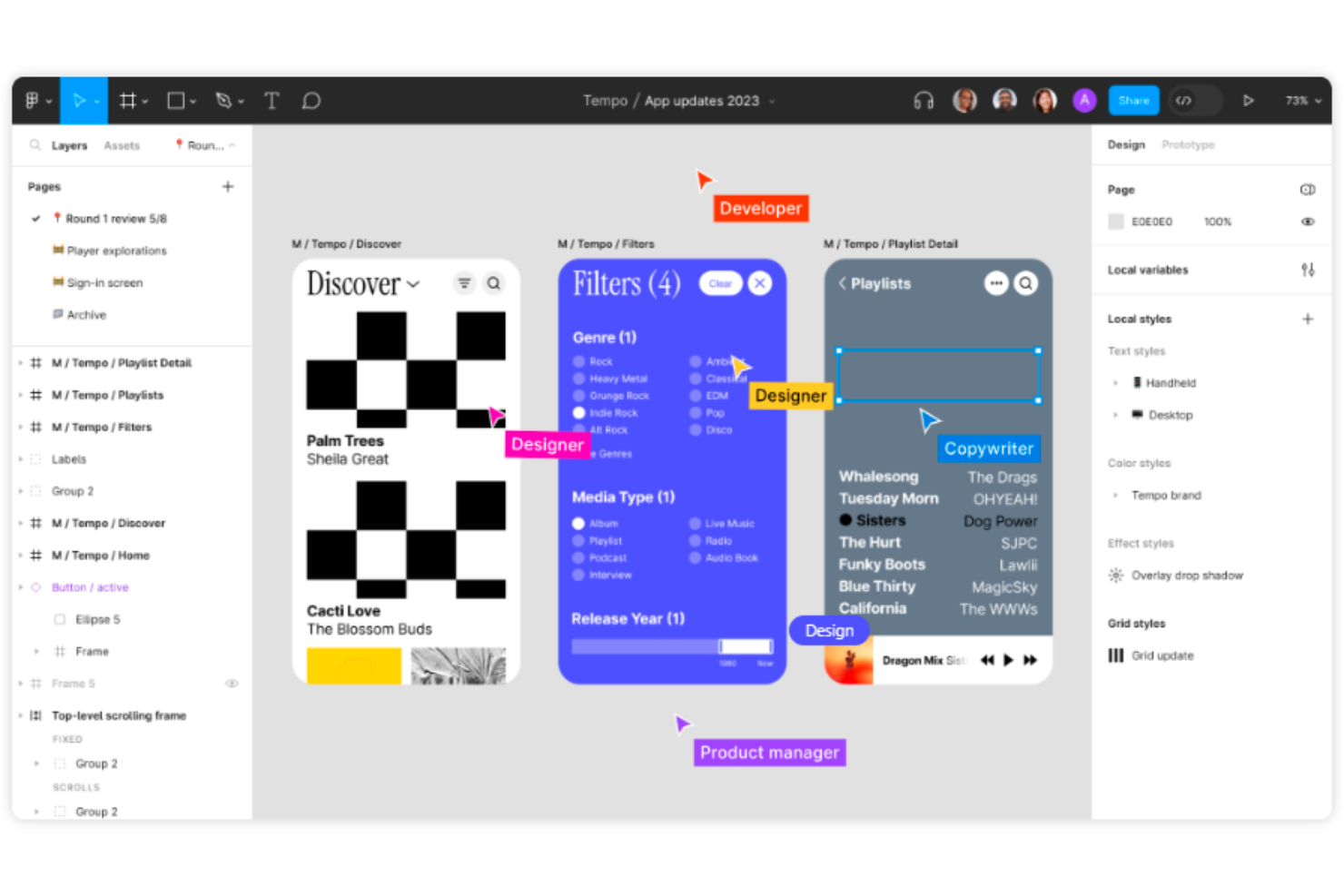
Figma è uno strumento collaborativo di progettazione di interfacce che facilita la creazione di wireframe per siti web, la realizzazione di post per i social media, la progettazione di interfacce per app mobili e la generazione di prototipi. Grazie a elementi UI intuitivi, sovrapposizioni dinamiche, GIF animate e compatibilità multipiattaforma, Figma rappresenta un punto di riferimento nel settore del design.
Perché ho scelto Figma: Nessun altro strumento per la progettazione di prodotti offre funzionalità collaborative paragonabili a Figma. Con Figma è possibile progettare, presentare e collaborare da qualsiasi luogo.
Per osservare come si evolve un design in tempo reale, i membri del team possono co-creare e fornire feedback in tempo reale. Utilizzando la modalità osservazione di Figma, puoi seguire ogni mossa del presentatore per capire come progredisce un progetto e come replicare eventuali modifiche, se necessario. Inoltre, Figma dispone di plugin per qualsiasi esigenza— immagini stock, accessibilità dei colori, diagrammi di flusso, grafici e molto altro.
Funzionalità e integrazioni principali di Figma
Le funzionalità di spicco includono collaborazione cloud per un lavoro di squadra in tempo reale, progettazione e prototipazione integrate, sistema di componenti riutilizzabili per la coerenza, controllo delle versioni per un facile tracciamento, numerosi plugin per automazione e accessibilità e accesso multipiattaforma per lavorare ovunque.
Le integrazioni includono oltre 30 strumenti, tra cui Asana, Confluence, Dropbox, GitLab, Lingo, Microsoft Teams, Mixpanel, Pendo, Sprig e UserTesting.
Pros and Cons
Pros:
- Funzionalità di drag-and-drop e importazione file per prototipi senza interruzioni
- Ottimi plugin
- Collaborazione in tempo reale eccellente
Cons:
- Nessun supporto offline o su dispositivi mobili
- La presenza di più pagine complica le micro-interazioni nei prototipi

Balsamiq
Ideale per progettare rapidamente wireframe a bassa fedeltà con componenti dell'interfaccia utente predefiniti
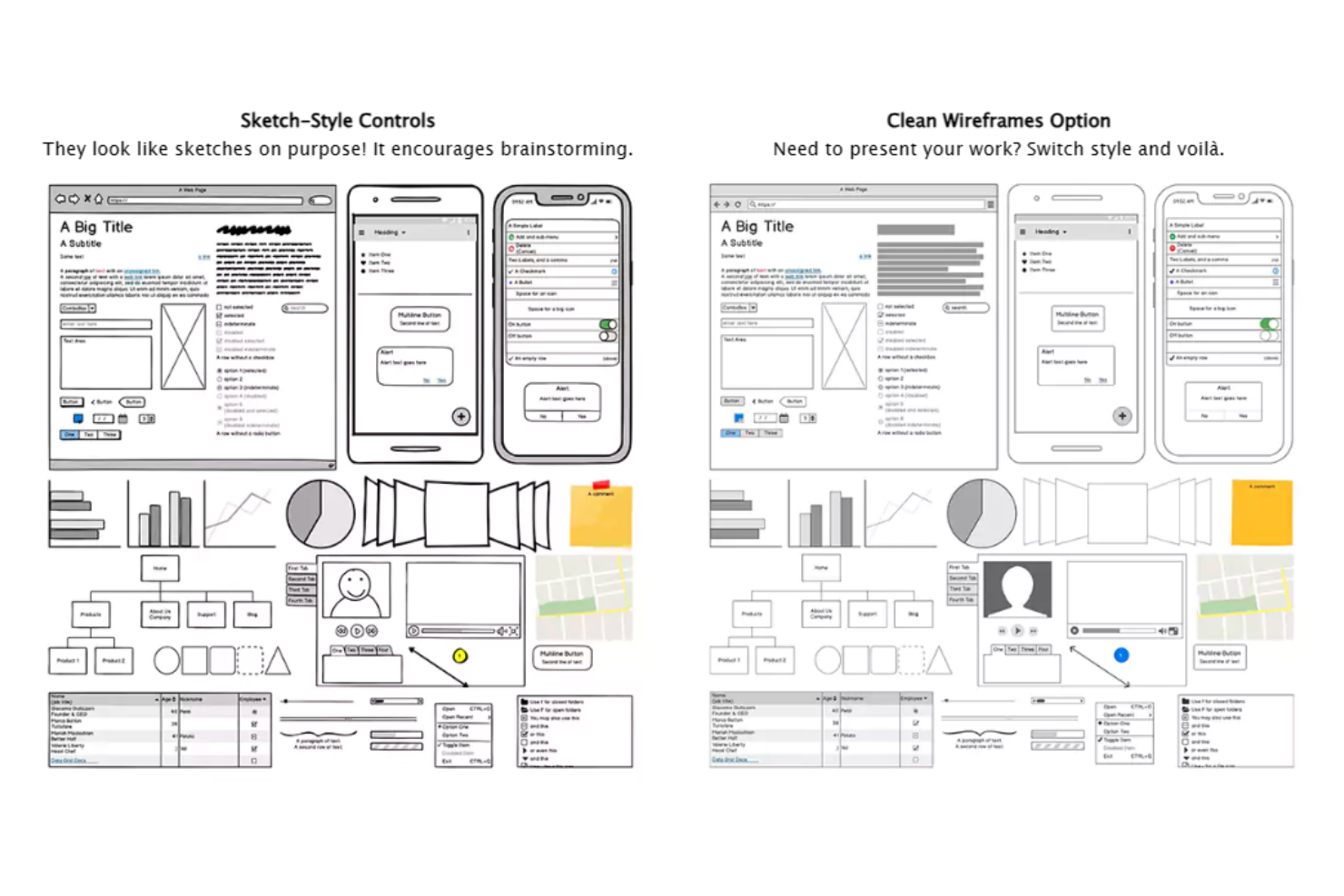
Balsamiq è uno strumento di wireframing dell'interfaccia utente a bassa fedeltà, facile da usare e rapido da imparare, che simula l'esperienza di disegnare un progetto su un blocco note o una lavagna. È disponibile per Mac e PC (con acquisto e installazione di una licenza singola una tantum). Dispone anche di una versione web chiamata Balsamiq Cloud (che segue un modello di prezzi con abbonamento mensile).
Perché ho scelto Balsamiq: facilita la creazione di wireframe e mockup a bassa fedeltà. Non richiede configurazioni iniziali né una curva di apprendimento. Dispone di un'enorme libreria di risorse integrate contenente vari elementi, come modelli preimpostati e componenti dell'interfaccia utente. È possibile trascinare e rilasciare questi elementi per creare rapidamente progetti e collegare tra loro i riquadri. Balsamiq è uno strumento eccellente per creare schermate di base e prototipi per la progettazione di app e siti web.
Funzionalità distintive e integrazioni di Balsamiq
Le funzionalità distintive includono un'interfaccia utente pulita, intuitiva ed estremamente facile da usare, che mette subito a disposizione tutte le opzioni per gli elementi di progettazione predefiniti. Gli utenti possono semplicemente trascinare icone e componenti direttamente nei propri progetti di wireframe grezzi, rendendo il processo di realizzazione rapido e fluido. Lo strumento offre inoltre collegamenti tra più mockup per simulare il flusso di lavoro dell'utente.
Balsamiq consente inoltre agli utenti di esportare immagini autonome di PDF con collegamenti ipertestuali cliccabili e offre un processo di onboarding fluido per i nuovi utenti.
Le integrazioni includono Confluence, Trello, Google Workspace, Jira, Jira Service Management, Azure AD e Shift.
Pros and Cons
Pros:
- Componenti e modelli predefiniti per wireframe rapidi
- Semplici funzioni di collegamento e presentazione interattiva a schermo intero
- Wireframe per dispositivi mobili, web e desktop all'interno di un'unica app
Cons:
- Opzioni di personalizzazione limitate per la creazione di mappe del sito
- Nessun contenuto di guida o onboarding disponibile

Marvel
Ideale per prototipazione e wireframing cloud-based di app multi-dispositivo
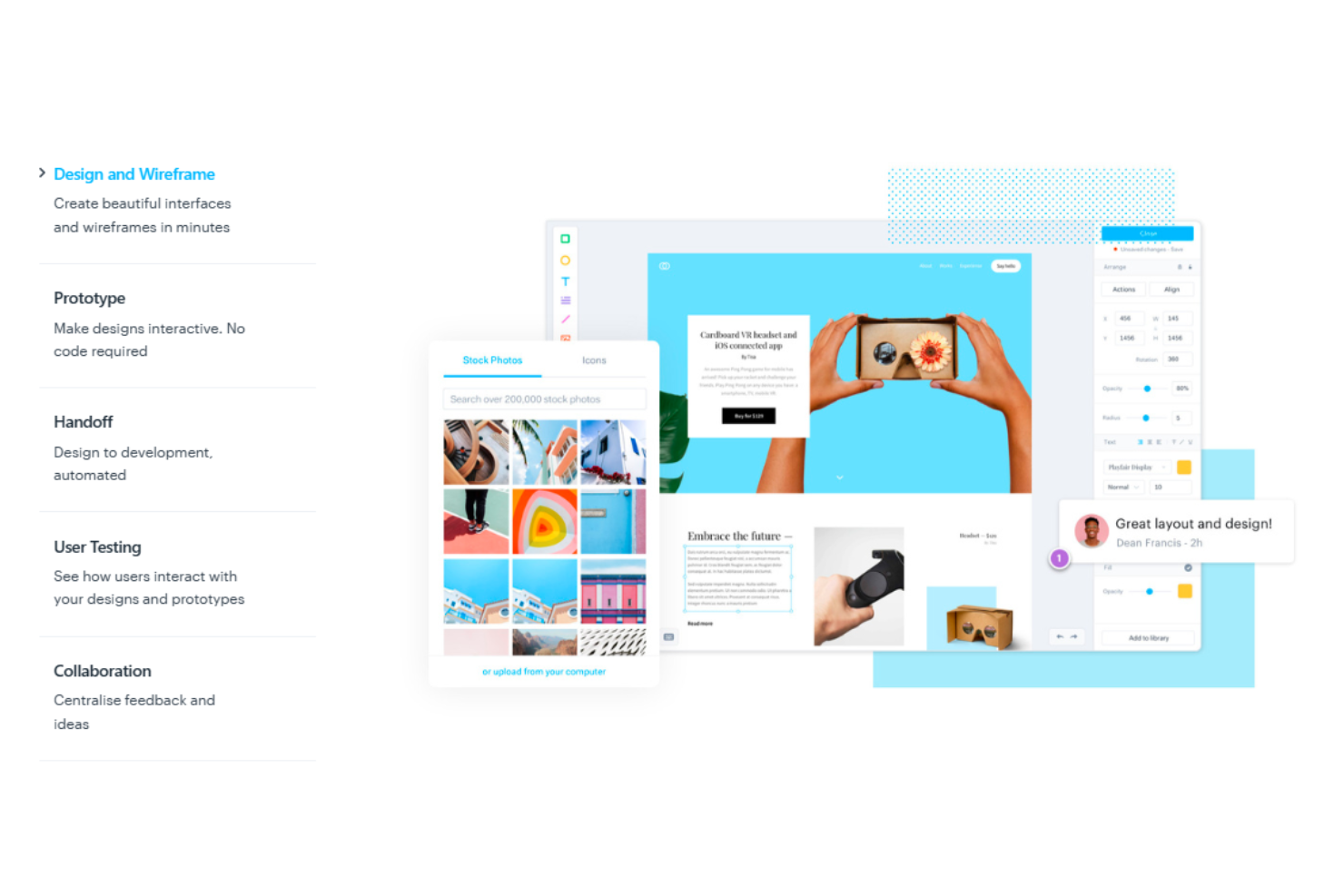
Marvel è una piattaforma di design per prodotti digitali ideale per i principianti che desiderano visualizzare i propri progetti tramite wireframe e prototipi. Il software aiuta gli utenti a creare rapidamente layout di base. In seguito, è possibile mostrare ai clienti come un sito web o un'applicazione verrebbero visualizzati su più piattaforme. Marvel è una manna per i designer che vogliono creare prototipi realistici in tempi brevi.
Perché ho scelto Marvel: Marvel offre un'interfaccia utente estremamente intuitiva e pulita, permettendo di collaborare e assemblare rapidamente i progetti per il web. Le sue funzionalità multipiattaforma consentono agli utenti di creare prototipi e mockup interattivi accessibili in tempo reale, dando un senso di autenticità ai progetti, soprattutto nel caso di app multi-dispositivo.
Inoltre, Marvel mette a disposizione strumenti utili per visualizzare gli stili CSS, che puoi sfruttare durante la costruzione dell'HTML. Di conseguenza, puoi inviare i progetti ai clienti tramite link condivisibili per la revisione e l'approvazione, seguiti da un passaggio fluido agli sviluppatori con specifici parametri di design e codice.
Caratteristiche principali e integrazioni di Marvel
Caratteristiche principali includono modelli di mockup preimpostati e sfondi caricati per wireframing rapido. Marvel offre una solida sincronizzazione dei file Sketch e vaste opzioni di prototipazione come collegamenti, ancore, scorrimento, ultima pagina visitata e interazioni con immagini a livelli. Altre funzionalità includono test con utenti, trasferimento del design agli sviluppatori e strumenti di gestione progetti per organizzare i flussi di lavoro e le sessioni di test. Marvel supporta inoltre la collaborazione in tempo reale, consentendo ai team di commentare direttamente sui progetti. L'automazione del trasferimento di design fornisce agli sviluppatori codice CSS, Swift e Android XML.
Integrazioni includono Ballpark, Confluence, Dropbox Paper, Jira, Microsoft, Niice, Sketch, Smartmockups, YouTube, Zeroheight e altri. Marvel si integra inoltre con quattro strumenti sviluppati dalla propria piattaforma proprietaria, Marvel LABS: BotBot, Dashboard, Keynote e Userflows.
Pros and Cons
Pros:
- Interfaccia intuitiva per creare prototipi personalizzati
- Specifiche di design per sviluppare guide CSS dedicate agli sviluppatori
- La condivisione tramite link semplifica la collaborazione tra stakeholder
Cons:
- Organizzare schermi e flussi ripetitivi è impegnativo
- Manca di animazioni e di funzionalità avanzate come transizioni più rapide

Miglior strumento di design vettoriale per la progettazione di animazioni e motion design
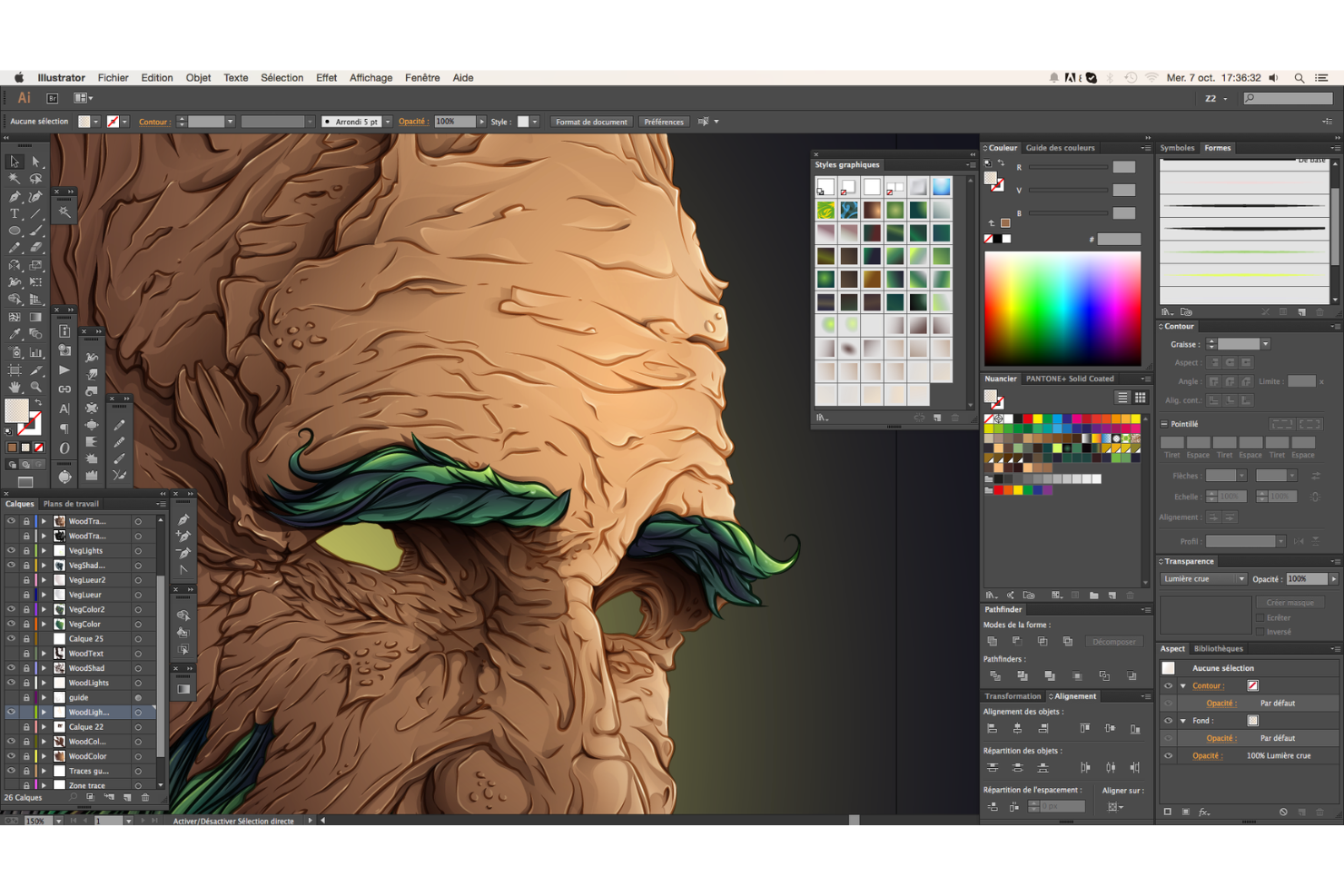
Adobe Illustrator fa parte di Adobe Cloud, offrendo funzionalità di illustrazione vettoriale e modifica di alto livello per gli esperti di design di animazione. Puoi utilizzare Adobe Illustrator per progettare praticamente qualsiasi cosa, inclusi siti web, loghi, giochi, film d'animazione e molto altro.
Perché ho scelto Adobe Illustrator: È un software basato su vettori, perfetto per produrre immagini nitide, loghi e materiali stampati. Insieme a Photoshop e agli altri prodotti di Adobe Creative Cloud, Illustrator è lo strumento ideale per il design delle animazioni. Il software supporta effetti 3D realistici, illuminazione e trame (collegate agli asset di Adobe Substance 3D). Con la funzione Intertwine, Illustrator consente inoltre di sovrapporre testo e oggetti. Illustrator offre ai designer il pieno controllo sulle proprie creazioni tramite punti di ancoraggio, tracciati e curve, per liberare tutto il loro potenziale creativo.
Inoltre, con l’introduzione dell’AI generativa, Adobe Illustrator può aiutare i designer a migliorare il processo creativo generando nuovi concetti e opportunità, suggerendo elementi di design unici e molto altro.
Caratteristiche distintive e integrazioni di Adobe Illustrator
Caratteristiche distintive includono la funzionalità “condividi per revisione” che permette la collaborazione tra i membri del team e la facile condivisione dei design creati con i clienti per revisione e approvazione. Gli utenti possono annotare e commentare direttamente il link, accelerando il processo di realizzazione. Illustrator supporta anche la ricerca e il filtraggio dei livelli, rendendo il flusso di lavoro di design più efficiente. La funzione “retype” identifica qualsiasi tipo di carattere incorporato nei design e lo abbina al tipo di carattere Adobe più simile disponibile. Il software include anche una funzione AI “recolor” che applica qualsiasi tema cromatico scelto all’intera grafica vettoriale.
Integrazioni includono i prodotti Adobe come Creative Cloud, Experience Cloud, Illustrator, Photoshop, Stock e altri.
Pros and Cons
Pros:
- Pubblicazioni con tavole da disegno multipagina
- Connessione con Photoshop e altri prodotti Adobe
- Vectorgrafia, tracciatura, esportazione file e gestione immagini semplici
Cons:
- Gli stessi strumenti su desktop e tablet di Illustrator
- Gestione delle tavole da disegno di grandi dimensioni leggermente lenta
Sketch
Ideale per creare design UI/UX nell'ambiente Mac
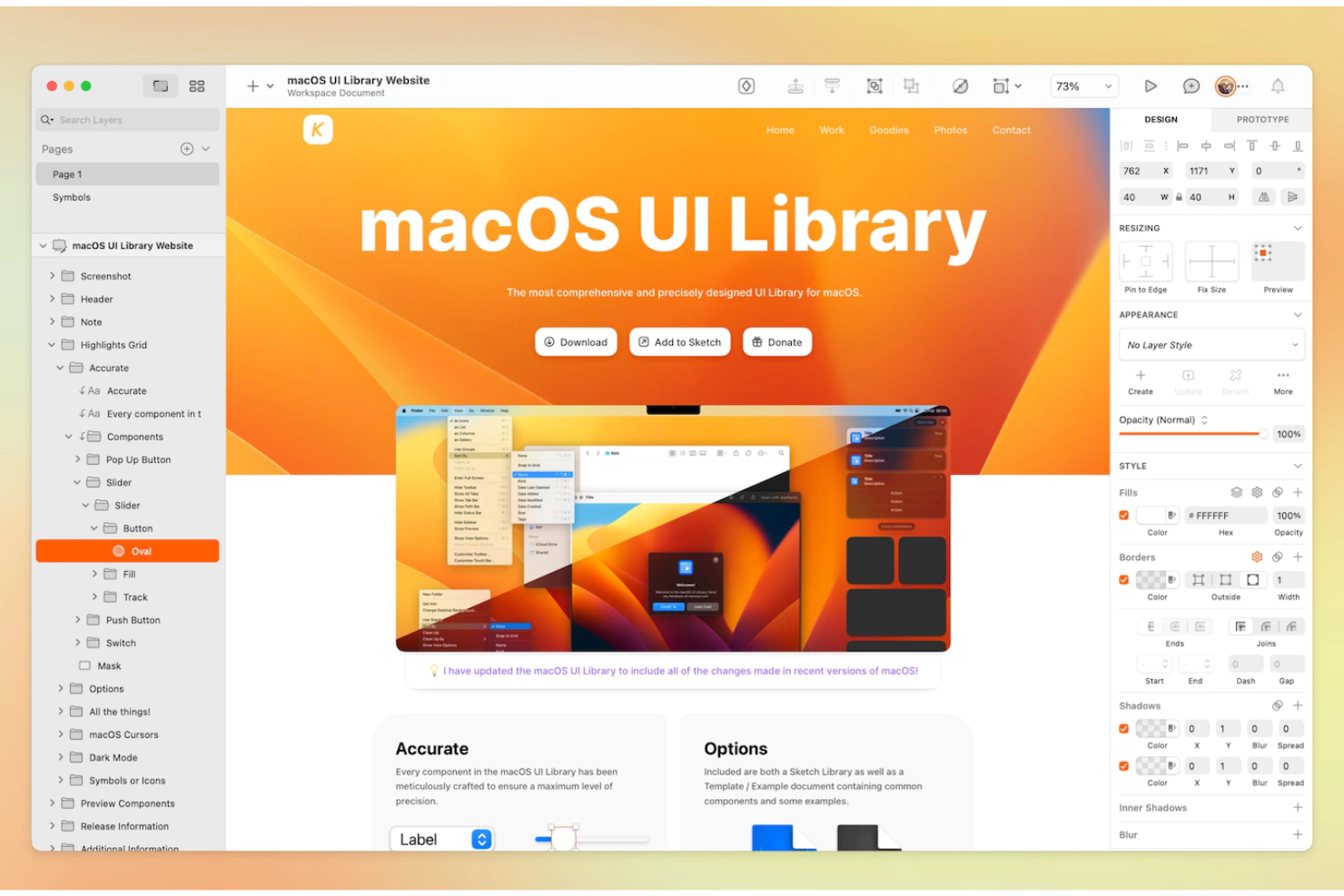
Sketch ti aiuta a passare rapidamente dall'ideazione alla produzione. Lo strumento dispone di un potente editor di immagini vettoriali per progettare icone, illustrazioni, interfacce utente e molto altro. Offre anche una funzione di prototipazione integrata per la creazione Agile di concept di design interattivi.
Sketch ha tutto ciò di cui hai bisogno per organizzare e produrre progetti di interfaccia ad alta fedeltà, dai semplici wireframe a mockup di alta qualità. Il software vanta inoltre una vivace comunità di sviluppo di plugin che amplia le capacità dello strumento.
Perché ho scelto Sketch: È un'applicazione di design potente nativa per Mac che consente di aprire facilmente file Figma e accedere ai file locali mentre si lavora in modalità offline. Lo strumento è dotato di un'interfaccia utente pulita e intuitiva. Inoltre, le sue potenti funzioni collaborative sono ideali per i membri del team che lavorano da remoto. Sketch offre anche eccellenti capacità grafiche vettoriali con scalabilità senza perdita di qualità.
Se utilizzi MacOS, Sketch è lo strumento di riferimento per il design di prodotto per creare, annotare e condividere prototipi e mockup.
Caratteristiche principali e integrazioni di Sketch
Caratteristiche principali includono librerie condivise, stili e componenti, modelli di design riutilizzabili, controllo sui profili colore, supporto per font variabili e OpenType, tavole da disegno facilmente esportabili e spazio di archiviazione illimitato. Tuttavia, una delle sue funzionalità migliori e più sottovalutate è la possibilità di trascinare e rilasciare tra le app. Così facendo, puoi importare file in Sketch e inviarli tramite email o anche tramite messaggio di testo una volta completato il lavoro. Il team di Sketch rilascia inoltre aggiornamenti e miglioramenti regolari per ottimizzare il software.
Integrazioni includono oltre 30 strumenti come Avocode, BrandFolder, CI Hub, Doplr, Flinto, Jira, Lingo, Notion, Overflow, Phrase e altri.
Pros and Cons
Pros:
- Interfaccia utente intuitiva
- Modalità offline con accesso ai file locali
- Funzione cronologia delle versioni per visualizzare diverse iterazioni di design
Cons:
- Nessuna versione per Windows
- Funzionalità di prototipazione carenti

SketchUp
Ideale per veloci studi 3D e produzione di grafiche di presentazione pulite
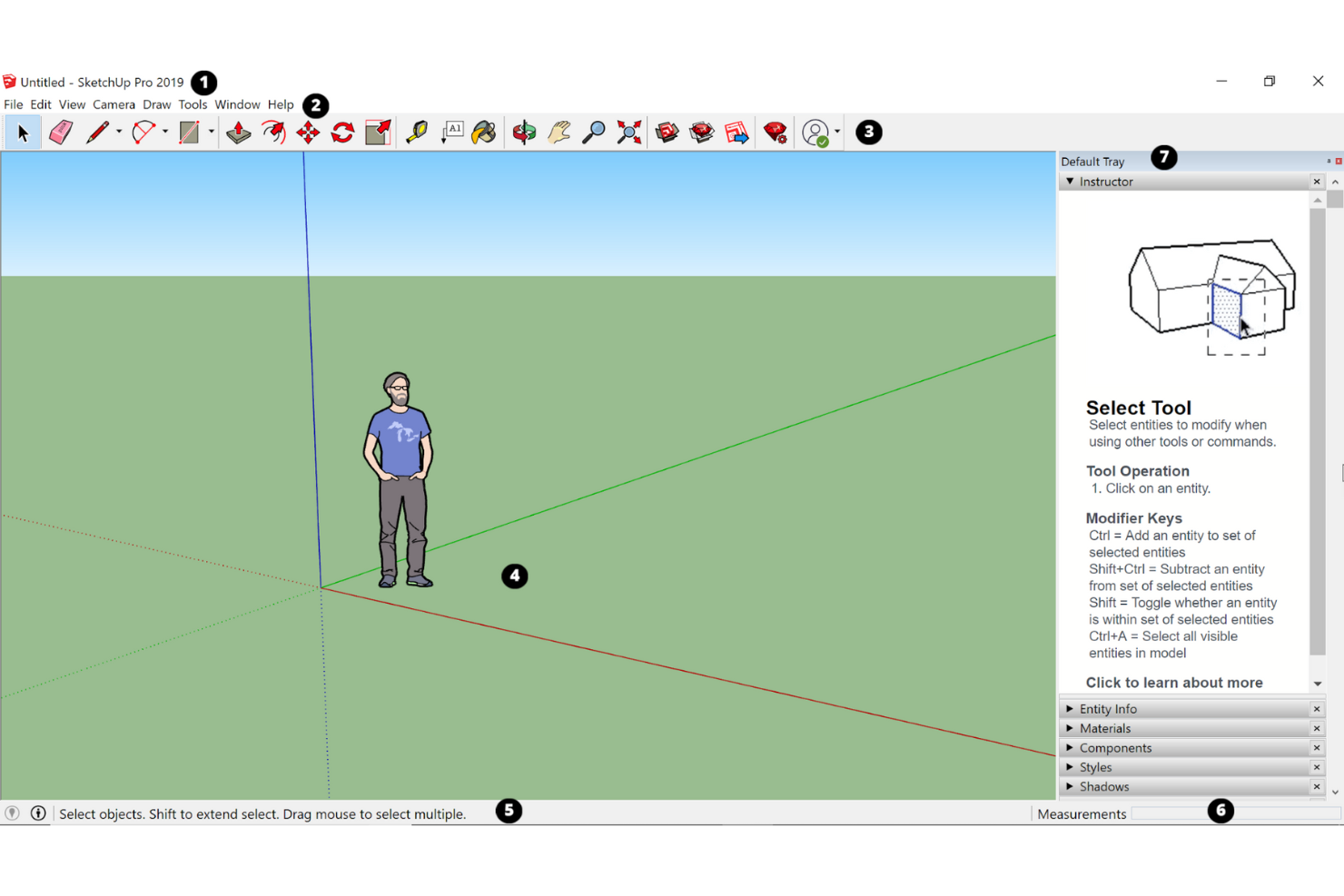
SketchUp è un software CAD 3D utilizzato principalmente da architetti, ingegneri e interior designer. Sia i principianti che i designer esperti lo usano per visualizzare gli spazi, creare modelli con oggetti ed esportarli per il rendering, al fine di realizzare visualizzazioni 3D di alta qualità. SketchUp è uno strumento eccellente per rendering, diagrammi, progettazione iterativa, animazioni di volo e fasi di progetto.
Perché ho scelto SketchUp: È particolarmente utile per modelli volumetrici preliminari e studi di design nella fase concettuale di grandi progetti come edifici commerciali. Offre una struttura di modellazione adattabile, una navigazione semplice e viste configurabili.
Con la libreria 3D di SketchUp, gli utenti possono controllare facilmente i comandi iterativi e creare rapidamente forme e volumi diversi. Il software aiuta i designer di prodotto e gli ingegneri a risparmiare tempo e visualizzare i propri concetti in modo accurato, sia spazialmente che materialmente, davanti ai clienti.
Caratteristiche distintive e integrazioni di SketchUp
Caratteristiche distintive includono la sua interfaccia utente estremamente intuitiva per il rendering rapido di layout e prototipi e l’enorme magazzino di componenti 3D gratuiti. SketchUp offre anche plug-in di terze parti come Vray e Enscape per rendering precisi e veloci, e Revit per la documentazione tecnica del progetto.
Integrazioni includono strumenti come 3D Warehouse, AUGmentecture, CabWriter, D5 Render, MeshCAM, Opencities Planner, ProjectVIEW ERP, Snaptrude, Trimble Novapoint e Yulio.
Pros and Cons
Pros:
- Strumenti di modellazione 3D intuitivi per render facili
- Interfaccia pulita e vasta libreria di componenti disponibile online
- Visualizzazione della disposizione, dei cambiamenti e dei possibili esiti di ristrutturazione
Cons:
- Nessun comando diretto per copia-incolla
- Nessuna modellazione NURBS o vere curve

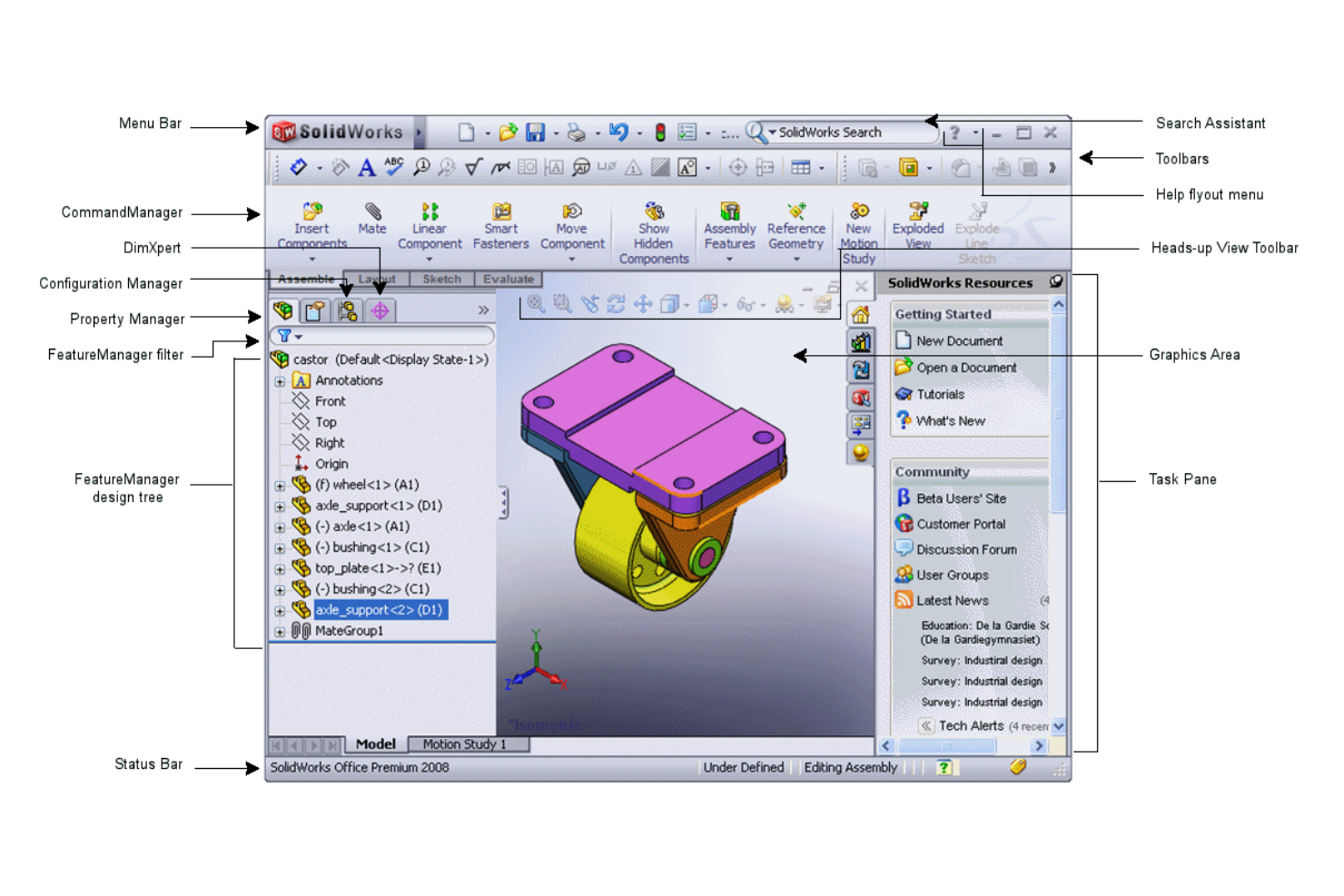
SOLIDWORKS è un programma di progettazione assistita da computer (CAD) 3D per sviluppare, esaminare e valutare progetti 3D. È particolarmente utile per lo sviluppo di prodotti nei settori della progettazione meccanica ed elettrica.
Perché ho scelto SolidWorks: SOLIDWORKS è uno dei migliori strumenti CAD per la progettazione 3D di componenti meccanici e grandi assiemi grazie alle sue funzioni interattive di facile utilizzo e intuitive push-and-pull.
SOLIDWORKS permette a più ingegneri e sviluppatori di prodotto di collaborare insieme, velocizzando il processo di progettazione. Il software aggiorna automaticamente anche i file 3D Sculptor, registrando in tempo reale le modifiche di progettazione.
Caratteristiche principali e integrazioni di SolidWorks
Caratteristiche principali includono la funzione Animation Wizard che consente agli utenti di osservare in tempo reale gli effetti della deformazione o della distribuzione dello stress in un progetto industriale. Questo aiuta a eliminare errori nelle applicazioni pratiche. Inoltre, il software supporta diversi tipi di analisi, tra cui Statica, Termica, Fatica, Flusso, Lineare, Non lineare, Drop-test, Instabilità (Buckling) e anche Simulazione degli stampi. Puoi anche importare molti componenti meccanici standard utilizzando la SOLIDWORKS Design Library, secondo le specifiche di progettazione basate su vari standard come ANSI, DIN, ISO, BIS, ecc.
SOLIDWORKS può anche generare disegni di produzione 2D per comunicare con i fornitori nelle attività di creazione di utensili e test di qualità.
Integrazioni includono ArtiosCAD, Canvas Envision, CoLab, Fishbowl, HSMWorks, Lattice Technology, Makersite, Valispace, Unifize e Vectary Web AR.
Pros and Cons
Pros:
- Permette simulazioni che rispecchiano accuratamente scenari reali
- Funzione Animation Wizard per vedere l'impatto in tempo reale della deformazione da stress
- Enorme libreria ricca di parti standard come viti, cuscinetti, ecc.
Cons:
- Componenti complessi aumentano esponenzialmente i tempi di soluzione
- Capacità di collaborazione limitate e prestazioni talvolta instabili

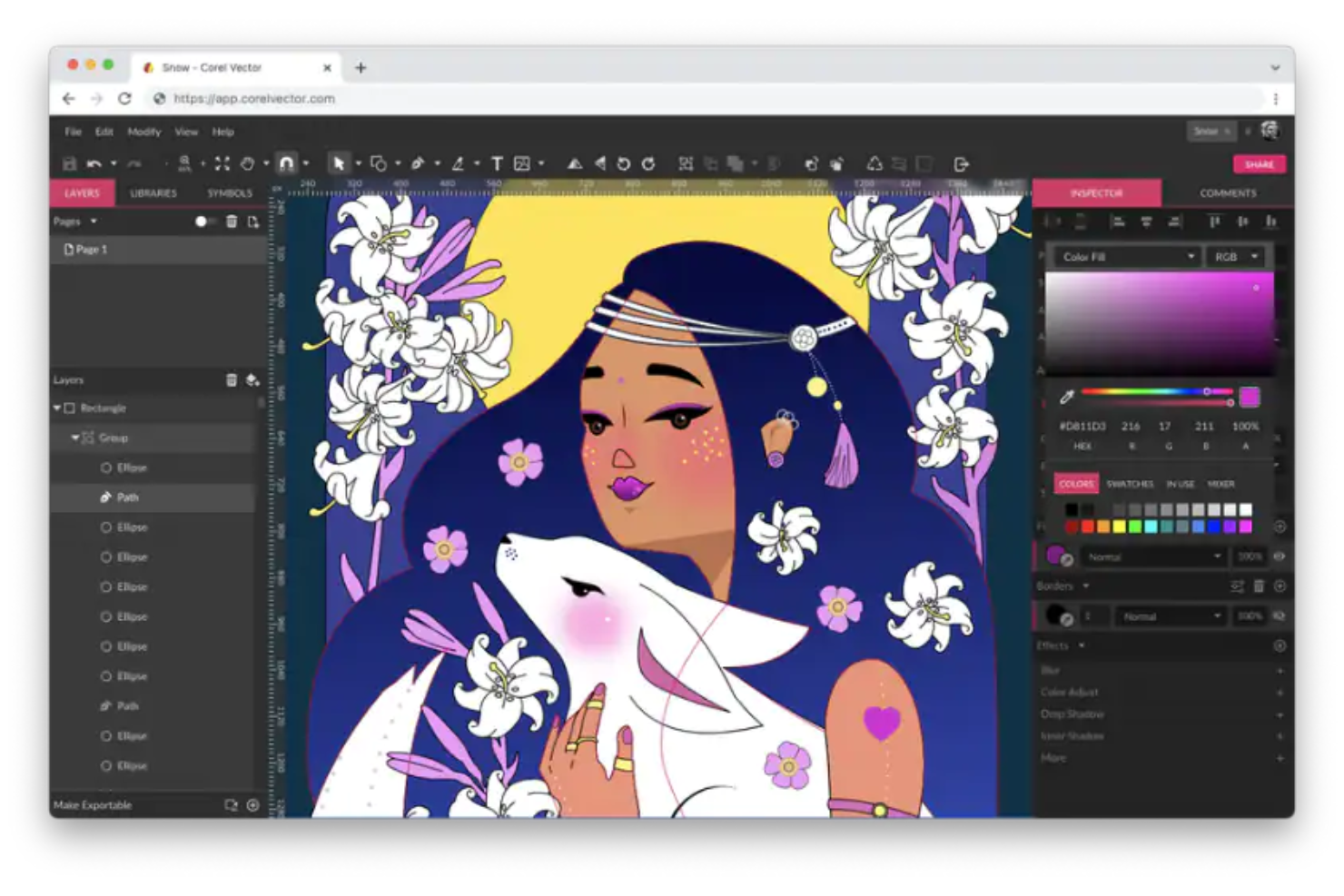
Corel Vector è uno strumento di grafica vettoriale multipiattaforma, ricco di funzionalità e basato sul web, che aiuta le aziende a creare e accedere ad opere digitali, elementi grafici per il web e materiali di stampa. Lo strumento fa parte della CorelDRAW Graphics Suite. Progettato con un'interfaccia all'avanguardia e facile da usare, Corel Vector permette agli utenti di realizzare un'ampia gamma di progetti di design.
Perché ho scelto Corel Vector: Corel Vector ha molte funzionalità interessanti, in particolare per gestire la modifica di immagini vettoriali e le necessità di gestione di testo e tipografia. È disponibile su tutte le piattaforme e dispositivi, incluso MacOS, e facilita la collaborazione centralizzata archiviando tutti i design in un unico repository.
Gli utenti possono creare opere partendo da semplici linee o forme e aggiungere effetti unici come contorni, riempimenti a rete e fusioni alle immagini vettoriali utilizzando gli strumenti di illustrazione vettoriale integrati di Corel Vector. Permette anche alle aziende di gestire operazioni di fotoritocco e di impostare layout per documenti e brochure.
Inoltre, lo strumento consente di importare ed esportare creazioni in diversi formati (incluso il formato nativo GVDESIGN). Consente anche agli utenti di selezionare numerosi componenti vettoriali ed esportarli dal pannello di esportazione.
Caratteristiche distintive e integrazioni di Corel Vector
Caratteristiche distintive includono funzioni avanzate di gestione vettoriale come pennelli e linee configurabili, fusione delle forme, operazioni booleane sui tracciati, opzioni di riempimento sofisticate (tra cui mesh (involucro), texture, gradiente e PostScript), spazi di colore (CMYK, tinta piatta, Pantone, RGB, HSB e scala di grigi) per stampa e schermi, plug-in e script di terze parti, e molto altro.
Inoltre, consente di creare, progettare e validare codici QR. Lo strumento dispone anche di riconoscimento intelligente delle forme, un tool per la creazione di tabelle testuali, e uno strumento LiveSketch che permette di disegnare linee a mano libera con lo stilo, che l'app trasforma successivamente in curve Bézier grazie alla correzione intelligente delle tracce.
Integrazioni includono Adobe Illustrator, Google Cloud Platform e Google Drive.
Pros and Cons
Pros:
- Funzione di conversione immagine in DXF per l'industria della lamiera
- Modifica, tracciatura e creazione di contorni facilitati per bitmap
- Interfaccia pulita ed ecosistema di supporto solido per la gestione di immagini vettoriali
Cons:
- Linee, archi e spline si distorcono durante l'estrazione in formato CAD
- La gestione delle licenze può essere complicata per più utenti
Altri strumenti di progettazione dei prodotti
Ecco alcune opzioni aggiuntive di strumenti di progettazione dei prodotti che non sono entrate nel mio elenco ristretto, ma che vale comunque la pena prendere in considerazione:


Come Valuto gli Strumenti di Product Design
Dalla creazione di wireframe dei concetti iniziali alla consegna delle specifiche all'ingegneria, cerco due cose: la base minima che uno strumento deve avere per qualificarsi, e ciò che distingue i migliori.
Funzionalità di Base (Requisiti Minimi per Questa Lista)
Quando seleziono gli strumenti per la mia lista, valuto ciascuno su una scala da 0 (non offre la funzionalità) a 5 (eccelle in quest'area) per ogni funzionalità di base elencata di seguito. Poi, calcolo il punteggio totale dello strumento come percentuale. Ogni strumento deve ottenere un punteggio totale minimo del 75% per essere considerato.
- Wireframing e Prototipazione: Valuto se uno strumento supporta tutta la gamma di fedeltà, dai wireframe grezzi in fase di scoperta fino ai prototipi interattivi con transizioni che i PM possono mostrare agli stakeholder.
- Collaborazione in Tempo Reale: I team devono poter co-modificare schermate, lasciare commenti su elementi specifici e taggare i colleghi per la revisione. Controllo la presenza di cursori live, indicatori di presenza e feedback in thread.
- Supporto ai Design System: Cerco librerie di componenti condivisi e gestione degli stili che permettano ai team di mantenere la coerenza su tutte le superfici del prodotto, come fanno Figma e Sketch con i simboli riutilizzabili.
- Editing Vettoriale e UI: Strumenti come Figma, Penpot e Adobe XD gestiscono auto-layout e operazioni booleane in modo diverso. Valuto la profondità delle funzionalità di editing vettoriale e i controlli per i layout responsivi.
- Consegna agli Sviluppatori: Controllo se gli ingegneri possono ispezionare le specifiche, copiare snippet di codice CSS o specifici per la piattaforma, ed esportare asset direttamente dai file di design senza ulteriori passaggi.
- Integrazioni ed Ecosistema di Plugin: I team di prodotto si affidano quotidianamente a Jira, Slack e strumenti simili. Cerco integrazioni native con piattaforme PM e di sviluppo, oltre a un marketplace aperto per l'estensione dei flussi di lavoro.
Una volta che ho una lista di strumenti che soddisfano questi criteri, considero ciò che differenzia ciascuna piattaforma.
Fattori di Differenziazione (Cosa Distingue i Fornitori)
Ecco come confronto e metto a confronto i diversi fornitori:
Funzionalità di Spicco
Il design assistito dall'AI è un fattore di differenziazione sempre più importante. Valuto se uno strumento può generare suggerimenti di layout o trasformare schizzi grezzi in componenti modificabili, risparmiando ore nelle fasi iniziali di esplorazione. Anche l'esportazione da design a codice è rilevante—gli strumenti che generano codice React o SwiftUI pronto per la produzione colmano il divario tra design e ingegneria. Cerco anche funzionalità di whiteboarding integrate, per mappare user journey e fare brainstorming prima di passare a schermate ad alta fedeltà.
Oltre le Funzionalità
I modelli di prezzo variano molto—alcuni strumenti fanno pagare per ogni editor mentre gli spettatori possono accedere ai file gratuitamente, dettaglio importante quando PM, sviluppatori e stakeholder hanno bisogno di visibilità. Valuto anche come una piattaforma si scala per il team che la utilizza: dal PM singolo che abbozza flussi fino a un team di prodotto di 50 persone con permessi a livelli. Per le aziende, controllo la conformità SOC 2 Type II, il supporto SSO e il provisioning SCIM, poiché spesso sono requisiti chiave per l'approvazione degli acquisti.
Come scegliere uno strumento di progettazione dei prodotti
È facile perdersi in lunghi elenchi di funzionalità e strutture tariffarie complesse. Per aiutarti a rimanere concentrato mentre affronti il tuo esclusivo processo di selezione del software, ecco una lista di fattori da tenere a mente:
| Fattore | Elementi da considerare |
|---|---|
| Scalabilità | Lo strumento può crescere insieme al tuo team? Considera i limiti di utenti e l'impatto dei costi aggiuntivi sul budget con l'espansione del team. |
| Integrazioni | Si collega agli strumenti esistenti come Slack, Jira o Trello? Verifica la compatibilità per evitare interruzioni nel flusso di lavoro. |
| Personalizzazione | Puoi adattare lo strumento al tuo flusso di lavoro? Cerca opzioni per modificare modelli, dashboard e impostazioni in base alle esigenze specifiche del tuo team. |
| Facilità d'uso | Lo strumento è intuitivo per tutti i membri del team? Considera la curva di apprendimento e la disponibilità di risorse di formazione per consentire a tutti di diventare rapidamente operativi. |
| Implementazione e avvio | Quanto tempo occorrerà per configurare lo strumento e formare il team? Valuta la disponibilità di assistenza e risorse per garantire una transizione fluida. |
| Costo | Il prezzo rientra nel tuo budget? Confronta i modelli di abbonamento, i costi nascosti e la disponibilità di una prova gratuita prima di prendere un impegno. |
| Misure di sicurezza | Lo strumento soddisfa le tue esigenze di sicurezza? Verifica la crittografia dei dati, i controlli di accesso degli utenti e la conformità a normative come il GDPR, se applicabile. |
| Disponibilità dell'assistenza | L'assistenza clienti è disponibile quando ne hai bisogno? Considera gli orari di apertura e i canali disponibili, come chat, telefono o e-mail, per ricevere assistenza. |
Che cos'è uno strumento di progettazione dei prodotti?
Uno strumento di progettazione dei prodotti è un software che aiuta i team a creare e gestire progetti di progettazione dall'ideazione al completamento. Designer, product manager e professionisti UX utilizzano generalmente questi strumenti per migliorare la collaborazione e la creatività. La prototipazione, la collaborazione in tempo reale e le funzionalità di integrazione aiutano a rendere più efficienti i processi di progettazione e la comunicazione del team. Questi strumenti offrono valore semplificando i flussi di lavoro di progettazione e favorendo la produttività del team.
Funzionalità
Quando selezioni uno strumento di progettazione dei prodotti, presta attenzione alle seguenti funzionalità chiave:
- Prototipazione: consente di creare modelli interattivi per visualizzare il prodotto finale e raccogliere feedback nelle prime fasi del processo di progettazione.
- Collaborazione in tempo reale: consente ai membri del team di lavorare contemporaneamente, migliorando la comunicazione e accelerando le iterazioni di progettazione.
- Funzionalità di integrazione: si collega ad altri strumenti come Slack, Jira o Trello per ottimizzare i flussi di lavoro e migliorare la produttività.
- Gestione del sistema di progettazione: aiuta a mantenere la coerenza tra i progetti organizzando e aggiornando componenti e stili di progettazione.
- Test degli utenti: facilita la raccolta del feedback degli utenti sui prototipi per garantire che la progettazione soddisfi le esigenze e le aspettative degli utenti.
- Raccolta dei feedback: semplifica il processo di raccolta e gestione dei feedback delle parti interessate e dei membri del team.
- Controllo delle versioni: tiene traccia delle modifiche e conserva la cronologia delle iterazioni di progettazione, consentendo di consultare facilmente le versioni precedenti.
- Modelli personalizzabili: offre modelli di progettazione predefiniti che possono essere adattati ai requisiti specifici del progetto.
- Guide interattive del prodotto: guidano i nuovi utenti attraverso le funzionalità dello strumento, riducendo la curva di apprendimento e migliorando la fase di avvio.
- Misure di sicurezza: garantiscono la protezione dei dati tramite la crittografia e la conformità a normative come il GDPR, mantenendo al sicuro le informazioni degli utenti.
Vantaggi
L'implementazione di uno strumento di progettazione dei prodotti offre diversi vantaggi al tuo team e alla tua azienda. Ecco alcuni dei benefici che puoi aspettarti:
- Migliore collaborazione: gli strumenti di collaborazione in tempo reale consentono ai membri del team di lavorare insieme in modo efficiente, riducendo i problemi di comunicazione e accelerando le tempistiche dei progetti.
- Maggiore creatività: la prototipazione e i modelli personalizzabili favoriscono l'esplorazione creativa, consentendo ai team di sperimentare e innovare senza dover partire da zero.
- Progettazione coerente: la gestione del sistema di progettazione garantisce che tutti i progetti mantengano un aspetto e un'esperienza uniformi, rafforzando l'identità del marchio e riducendo gli errori.
- Processo decisionale consapevole: i test degli utenti e la raccolta dei feedback forniscono informazioni preziose, aiutando i team a prendere decisioni di progettazione basate sui dati.
- Flussi di lavoro efficienti: le funzionalità di integrazione collegano gli strumenti esistenti, ottimizzando i processi e risparmiando tempo grazie alla riduzione delle attività manuali.
- Gestione sicura dei dati: le misure di sicurezza proteggono le informazioni sensibili, garantendo la conformità alle normative e mantenendo la fiducia degli utenti.
- Avvio semplice: le guide interattive del prodotto e le risorse di formazione aiutano i nuovi utenti a diventare rapidamente operativi, riducendo al minimo i tempi di inattività e migliorando la produttività.
Costi e prezzi
La selezione di uno strumento per la progettazione dei prodotti richiede la comprensione dei vari modelli di prezzo e dei piani disponibili. I costi variano in base alle funzionalità, alle dimensioni del team, ai componenti aggiuntivi e ad altri fattori. La tabella seguente riassume i piani più comuni, i relativi prezzi medi e le funzionalità tipicamente incluse nelle soluzioni di progettazione dei prodotti:
Tabella di confronto dei piani per gli strumenti di progettazione dei prodotti
| Tipo di piano | Prezzo medio | Funzionalità comuni |
|---|---|---|
| Piano gratuito | $0 | Prototipazione di base, collaborazione limitata e accesso ad alcuni modelli. |
| Piano personale | $10-$30/utente/mese | Prototipazione avanzata, collaborazione in tempo reale e gestione del sistema di progettazione. |
| Piano aziendale | $30-$60/utente/mese | Funzionalità complete di integrazione, strumenti per i test con gli utenti e sicurezza avanzata. |
| Piano aziendale avanzato | $60+/utente/mese | Funzionalità personalizzabili, assistenza dedicata e misure di sicurezza complete. |
Domande frequenti sugli strumenti di progettazione dei prodotti
Se non hai mai avuto esperienza nella progettazione di prodotti e di interfacce UI/UX, dopo aver letto la mia guida potresti avere alcune domande. Ecco alcune domande comuni che altre persone pongono su questo argomento.
Perché la progettazione dei prodotti è importante?
La progettazione dei prodotti è fondamentale perché determina l’aspetto, la sensazione e il funzionamento dei prodotti. Ciò influisce direttamente sull’esperienza degli utenti e sul successo commerciale.
Una progettazione dei prodotti ben realizzata migliora l’usabilità, l’estetica e la funzionalità, dando luogo a esperienze utente più coinvolgenti, a una maggiore fidelizzazione al marchio e a una migliore capacità di mantenere i clienti nel corso degli anni.
Una strategia di progettazione e sviluppo dei prodotti elaborata con cura garantisce che i prodotti soddisfino le esigenze degli utenti e contribuiscano alla loro soddisfazione complessiva.
Qual è la differenza tra un progettista di prodotti e un designer UX?
I progettisti di prodotti sono responsabili dell’intera progettazione del prodotto, che comprende aspetti visivi, funzionalità e considerazioni aziendali. Lavorano con team interfunzionali. Devono possedere conoscenze adeguate di design industriale, progettazione delle interfacce utente e ricerca sugli utenti.
I designer UX, invece, si concentrano sulla creatività e sull’usabilità per ottimizzare le interazioni degli utenti. Sono particolarmente competenti nella ricerca sugli utenti, nella psicologia e nella progettazione delle interazioni.
Le organizzazioni utilizzano spesso i due titoli in modo intercambiabile, ma la differenza principale tra un “progettista di prodotti” e un “designer UX” riguarda gli ambienti di lavoro. I designer UX sono più adatti a requisiti basati su progetti, mentre i progettisti di prodotti sono pensati per ambienti agili basati sui prodotti e in continua innovazione. Sebbene entrambi contribuiscano alla realizzazione di prodotti incentrati sull’utente, i progettisti di prodotti hanno un ambito di lavoro più ampio, mentre i designer UX si concentrano sulla creazione di esperienze utente fluide.
I progettisti di prodotti utilizzano il CAD?
Sì, i progettisti di prodotti utilizzano il CAD per creare modelli 2D e 3D dettagliati che facilitano la visualizzazione, la prototipazione e l’analisi. I software CAD vengono utilizzati in diversi settori, tra cui l’ingegneria aerospaziale, il settore automobilistico, l’ingegneria meccanica, la progettazione architettonica, l’elettronica di consumo e la progettazione di gioielli.
Dove posso saperne di più sulla progettazione dei prodotti?
In qualità di responsabile di prodotto, conosco bene la difficoltà di trasformare grandi idee in progetti curati e intuitivi.
Nei giorni migliori, adoravo vedere i modelli strutturali prendere vita, collaborare con designer e ingegneri che avevano capito tutto e osservare gli utenti interagire con un prodotto dall’utilizzo immediato.
Ma nei giorni più difficili, mi trovavo ad affrontare strumenti di progettazione macchinosi che trasformavano la collaborazione in un incubo, cicli di riscontri infiniti che rallentavano ogni attività e passaggi di consegne frustranti agli sviluppatori, che portavano ad aspettative non allineate.
Col senno di poi, ho capito che molte di queste difficoltà derivavano dal fatto di non disporre dello strumento migliore per la progettazione dei prodotti e semplificare il processo.
Per questo ho creato questo elenco dei migliori strumenti per la progettazione dei prodotti, così potrai dedicare meno tempo a lottare con i software e più tempo a creare prodotti che i tuoi utenti ameranno. Iniziamo.
Se hai appena iniziato, valuta la possibilità di frequentare un corso di progettazione dei prodotti presso un’università locale o online. Per continuare a imparare, consiglio di entrare a far parte di una comunità di progettazione grafica, in particolare di quelle incentrate sui prodotti digitali.
Cosa succede ora:
Se stai cercando uno strumento per la progettazione dei prodotti, contatta gratuitamente un consulente SoftwareSelect per ricevere consigli.
Compili un modulo e fai una breve conversazione durante la quale il consulente approfondirà le tue esigenze specifiche. In seguito riceverai una selezione ristretta di software da valutare. Ti supporterà anche durante l'intero processo di acquisto, comprese le trattative sul prezzo.