

10 migliori software per la progettazione dell’apprendimento recensiti per il 2026

10 La selezione dei migliori software per la progettazione didattica


Solo chi ha lavorato nella progettazione didattica comprende davvero quanto sia difficile insegnare cose nuove alle persone, ed è per questo che sono estremamente esigente nella scelta del mio software per la progettazione didattica. È già abbastanza difficile bilanciare tutti gli aspetti che rendono efficaci i contenuti formativi, quindi gli strumenti che utilizzi dovrebbero rendere il tuo processo di progettazione il più efficiente possibile.
A proposito di imparare cose nuove, ho deciso di formarmi autonomamente su dozzine di strumenti software per la progettazione didattica e di restringere la scelta alle opzioni migliori in assoluto. Ecco gli strumenti che hanno ottenuto da me il massimo dei voti, con tutti i dettagli rilevanti necessari per confrontarli e metterli a paragone!
Che cos'è il software per la progettazione didattica?
Il software per la progettazione didattica (noto anche come software per la progettazione dell'insegnamento o IDS) è uno strumento digitale che facilita la creazione e l'erogazione di esperienze di apprendimento digitale. Utilizzato spesso da educatori, progettisti didattici e formatori aziendali, supporta la produzione di corsi eLearning strutturati, contenuti multimediali interattivi e basi di conoscenza complete.
Le funzionalità importanti del software per la progettazione didattica includono:
- Elementi di ludicizzazione
- Personalizzazione
- Librerie di contenuti
- Strumenti per creare tutorial
- Strumenti per creare valutazioni interattive
- Presentazioni delle lezioni
- Integrazione video
Perché Fidarsi delle Nostre Recensioni Software
Testiamo e recensiamo software per il product management dal 2020. Come product manager sappiamo quanto sia fondamentale e difficile fare la scelta giusta in termini di software. Investiamo in una ricerca approfondita per aiutare il nostro pubblico a prendere decisioni migliori sugli acquisti di software. Abbiamo testato oltre 2.000 strumenti per diversi casi d’uso e scritto più di 1.000 recensioni approfondite.Scopri come assicuriamo la trasparenza & la nostra metodologia di recensione software.
| Tool | Best For | Trial Info | Price | ||
|---|---|---|---|---|---|
| 1 | Ideale per la creazione di corsi con l'ausilio dell'IA | Piano gratuito + demo gratuita disponibile | Da $119/mese (fatturato annualmente) | Website | |
| 2 | Ideale per contenuti eLearning interattivi e multimodali | Prova gratuita di 14 giorni disponibile | Da $970/autore (fatturazione annuale) | Website | |
| 3 | Ideale per lo sviluppo eLearning completo | Prova gratuita di 30 giorni disponibile | Da $1.449/utente (fatturato annualmente) | Website | |
| 4 | Ideale per la progettazione collaborativa dei corsi nel cloud | Prova gratuita di 14 giorni + demo gratuita disponibile | Da $1.650/utente (fatturazione annuale) | Website | |
| 5 | Ideale per ottimizzare la creazione dei contenuti con strumenti di authoring robusti | Versione di prova gratuita disponibile | Prezzo su richiesta | Website | |
| 6 | Ideale per creare contenuti eLearning interattivi | Prova gratuita disponibile | Da $33.99/mese | Website | |
| 7 | Ideale per creare basi di conoscenza e manuali utente | Prova gratuita di 30 giorni | $29.99/utente/mese. | Website | |
| 8 | Ideale per aumentare la produttività grazie alle funzionalità di formazione on-demand | Demo gratuita disponibile | Prezzo su richiesta | Website | |
| 9 | Ideale per l’autoproduzione con PowerPoint e l’integrazione con LMS | Prova gratuita di 14 giorni | $67/utente/mese (fatturato annualmente) | Website | |
| 10 | Ideale per la sua funzione di sviluppo rapido di eLearning | Prova gratuita di 30 giorni + demo gratuita disponibile | Da $129/mese (fatturato annualmente) | Website |

Panoramiche dei 12 migliori software per la progettazione didattica

Ideale per la creazione di corsi con l'ausilio dell'IA
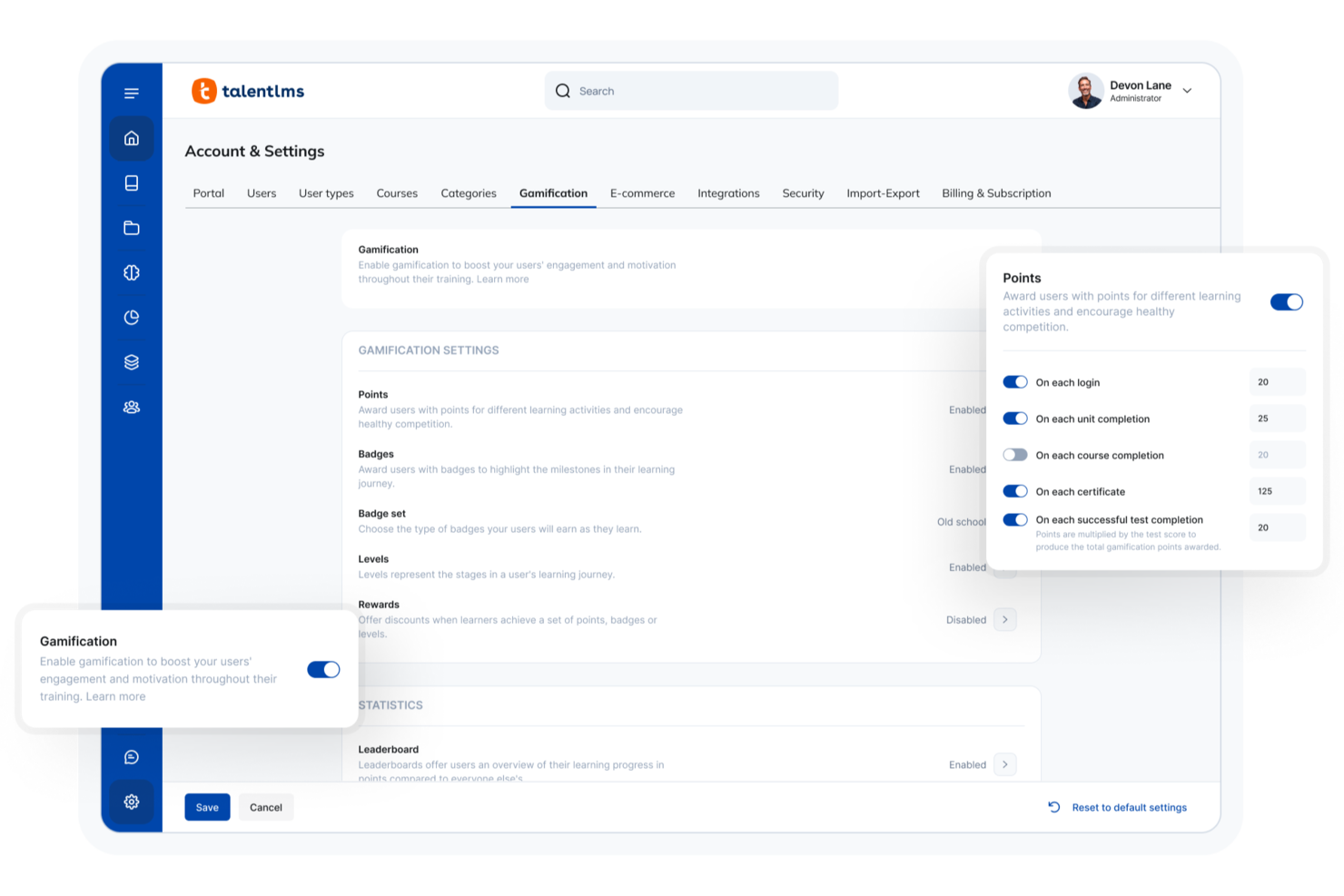
Per chi cerca un software di progettazione didattica adattabile, TalentLMS offre una piattaforma versatile che si rivolge a diverse esigenze formative. Che tu sia nella formazione aziendale, nell'istruzione o in un settore specializzato, TalentLMS propone la creazione di corsi supportata dall'IA e un'ampia libreria di risorse per migliorare i tuoi programmi di apprendimento. La sua capacità di integrarsi con vari strumenti garantisce un'esperienza fluida, aiutandoti ad affrontare sfide come l'onboarding, la conformità e lo sviluppo delle competenze.
Perché ho scelto TalentLMS
Ho scelto TalentLMS per il suo approccio innovativo alla progettazione didattica, in particolare per la creazione di corsi guidata dall'IA che semplifica lo sviluppo dei contenuti educativi. Questo strumento consente di creare percorsi di apprendimento personalizzati, assicurando che ogni discente riceva la formazione più pertinente. Inoltre, le sue capacità di formazione sulle competenze permettono di mirare a specifiche abilità, rendendolo ideale per le organizzazioni focalizzate sullo sviluppo della forza lavoro. Con queste funzionalità, TalentLMS risponde alla sfida di offrire soluzioni formative personalizzate su larga scala.
Funzionalità principali di TalentLMS
Oltre alla creazione di corsi e alla formazione sulle competenze, ho trovato diversi altri strumenti preziosi per la progettazione dell'apprendimento:
- Elementi di gamification: Integra elementi simili ai giochi per aumentare il coinvolgimento e la motivazione dei discenti.
- Branding personalizzato: Personalizza il portale formativo con logo, colori e temi della tua organizzazione per mantenere la coerenza del marchio.
- Accessibilità mobile: Garantisce che i discenti possano accedere ai materiali formativi ovunque e in qualsiasi momento da dispositivi mobili.
- Analisi in tempo reale: Ottieni dati dettagliati sui progressi dei discenti e sull'efficacia dei corsi grazie ad avanzati strumenti di analisi e reportistica.
Integrazioni di TalentLMS
Le integrazioni includono Salesforce, Shopify, WordPress, Zoom, Microsoft Teams, GoTo, BigBlueButton, Intercom, Zendesk Chat, LinkedIn Learning e altro ancora.
Pros and Cons
Pros:
- Branding personalizzabile per mantenere l'identità organizzativa
- La creazione flessibile dei corsi supporta diverse esigenze formative
- Gli strumenti basati sull'IA semplificano la creazione e la gestione dei corsi
Cons:
- La libreria dei contenuti può essere carente in aree altamente specializzate
- Saltuari problemi tecnici influenzano l'esperienza d'uso
New Product Updates from TalentLMS
TalentLMS Adds Learning Paths, AI Video, and Learner Experience Updates
TalentLMS introduced updates across learning management, content creation, and learner experience, including Learning Paths for Groups, AI video generation in TalentCraft, video bookmarking, and expanded administration tools. For more information, visit TalentLMS’s official site.

Ideale per contenuti eLearning interattivi e multimodali
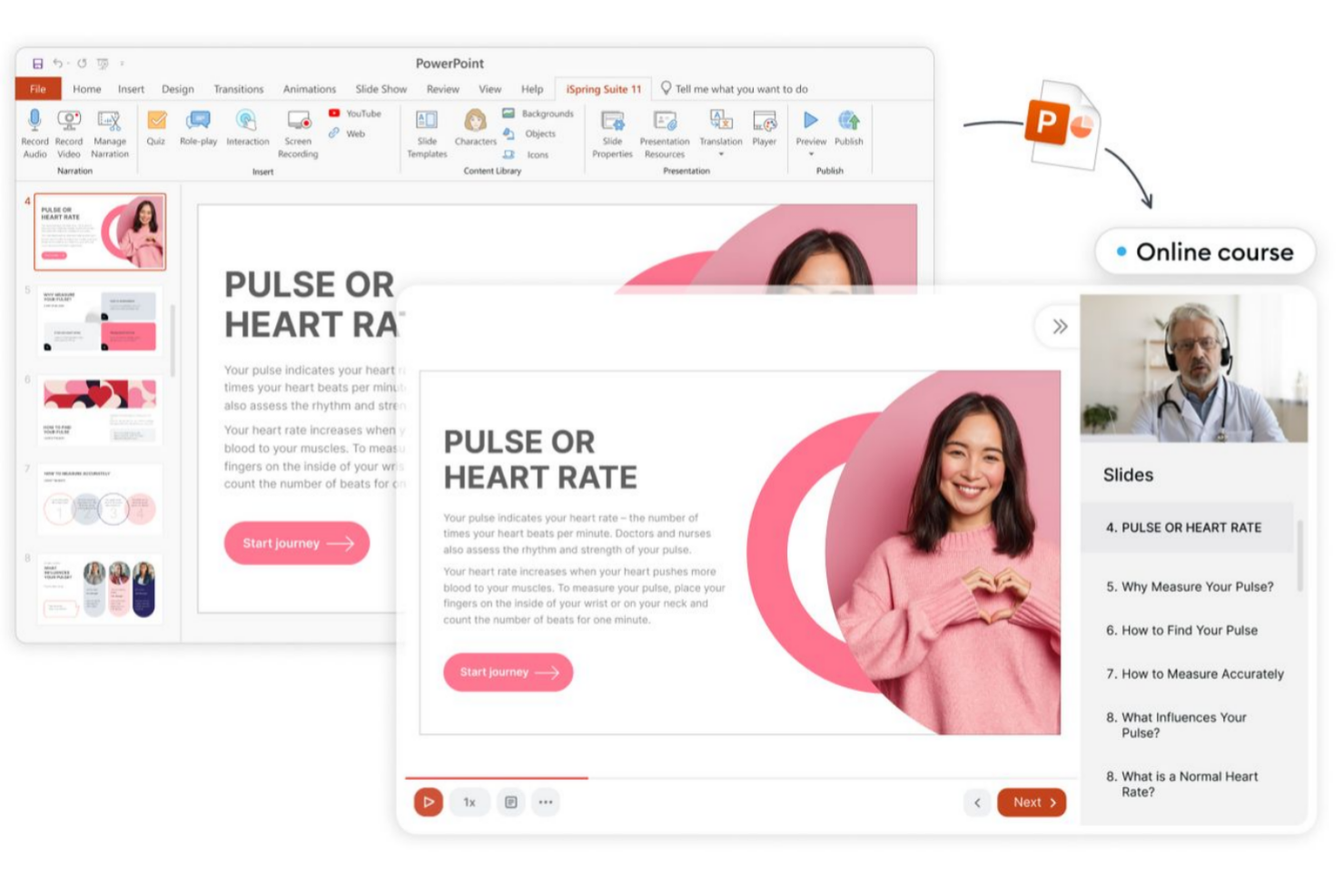
iSpring Suite è uno strumento di authoring che consente di trasformare slide PPT, PDF o semplici appunti di esperti di materia in corsi interattivi in tempi record. Lo strumento funziona direttamente in PowerPoint, quindi lavori in un'interfaccia familiare fin dall'inizio, senza curva di apprendimento.
Perché ho scelto iSpring Suite
Oltre all’interfaccia intuitiva, adoro iSpring Suite per l’ampia gamma di formati di contenuti disponibili per uno sviluppo rapido. Puoi creare bellissimi corsi basati su slide, video tutorial, simulazioni di ruolo e quiz interattivi, tutto in un unico posto. Inoltre, il suo player adattivo fa sì che i contenuti appaiano al meglio su una varietà di dispositivi e dimensioni dello schermo. Lo strumento offre anche una Content Library integrata con oltre 120.000 risorse pronte all’uso, come location, personaggi, icone e template per corsi.
Funzionalità chiave di iSpring Suite
Oltre alle sue capacità multimediali e interattive di eLearning, iSpring Suite offre anche diverse altre funzionalità preziose:
- Possibilità di convertire presentazioni in file SCORM: Apri slide esistenti, arricchiscile con quiz e altri contenuti e ottieni un corso SCORM pronto all’uso in pochi secondi.
- Generatore di personaggi integrato: Ti permette di creare personaggi personalizzati per rendere i corsi più coinvolgenti e immersivi.
- Voce fuori campo e sottotitoli: Aggiungi voci fuori campo e sottotitoli ai corsi per rispondere alle diverse esigenze e preferenze di apprendimento.
- Assistente AI: Per la generazione istantanea di contenuti e immagini, oltre che per la traduzione dei corsi (solo nella versione premium, iSpring Suite AI).
Integrazioni di iSpring Suite
Le integrazioni includono Zoom, Microsoft Teams, Google Meet, Salesforce, Shopify, Tilda, Udemy, Go1, LinkedIn Learning e GoodHabitz. Per integrazioni personalizzate, gli utenti possono utilizzare Albato o l’API REST di iSpring LMS.
Pros and Cons
Pros:
- Assistente AI integrato che velocizza la scrittura, la modifica e la formattazione
- Collaborazione e lavoro di squadra in tempo reale
- Generazione di immagini e voce fuori campo tramite AI, oltre alla traduzione
Cons:
- Grafica limitata rispetto ai concorrenti
- Manca di alcune compatibilità con macOS

Ideale per lo sviluppo eLearning completo
Articulate 360 è una scelta ideale per i professionisti che desiderano creare esperienze di e-learning coinvolgenti, particolarmente in ambito aziendale ed educativo. Offre una suite completa di strumenti progettati per semplificare lo sviluppo di corsi interattivi, rendendolo una risorsa preziosa per instructional designer e responsabili della formazione. Affrontando sfide come l'interattività dei corsi e il coinvolgimento degli studenti, Articulate 360 ti consente di offrire esperienze di apprendimento efficaci con sicurezza.
Perché ho scelto Articulate 360
Ho scelto Articulate 360 per la sua reputazione come soluzione completa per lo sviluppo di corsi eLearning, offrendo tutto ciò di cui hai bisogno per creare contenuti interattivi e coinvolgenti. Con il potente strumento Storyline 360, puoi progettare corsi personalizzati che includono quiz, interazioni ed elementi multimediali. Inoltre, Rise 360 ti permette di creare corsi reattivi che si adattano perfettamente a qualsiasi dispositivo, garantendo agli studenti un'esperienza senza interruzioni. Queste caratteristiche rendono Articulate 360 una scelta di spicco per chi desidera potenziare le proprie capacità di progettazione didattica.
Caratteristiche principali di Articulate 360
Oltre ai suoi strumenti principali, Articulate 360 offre diverse funzionalità che supportano ulteriormente la creazione dei tuoi corsi.
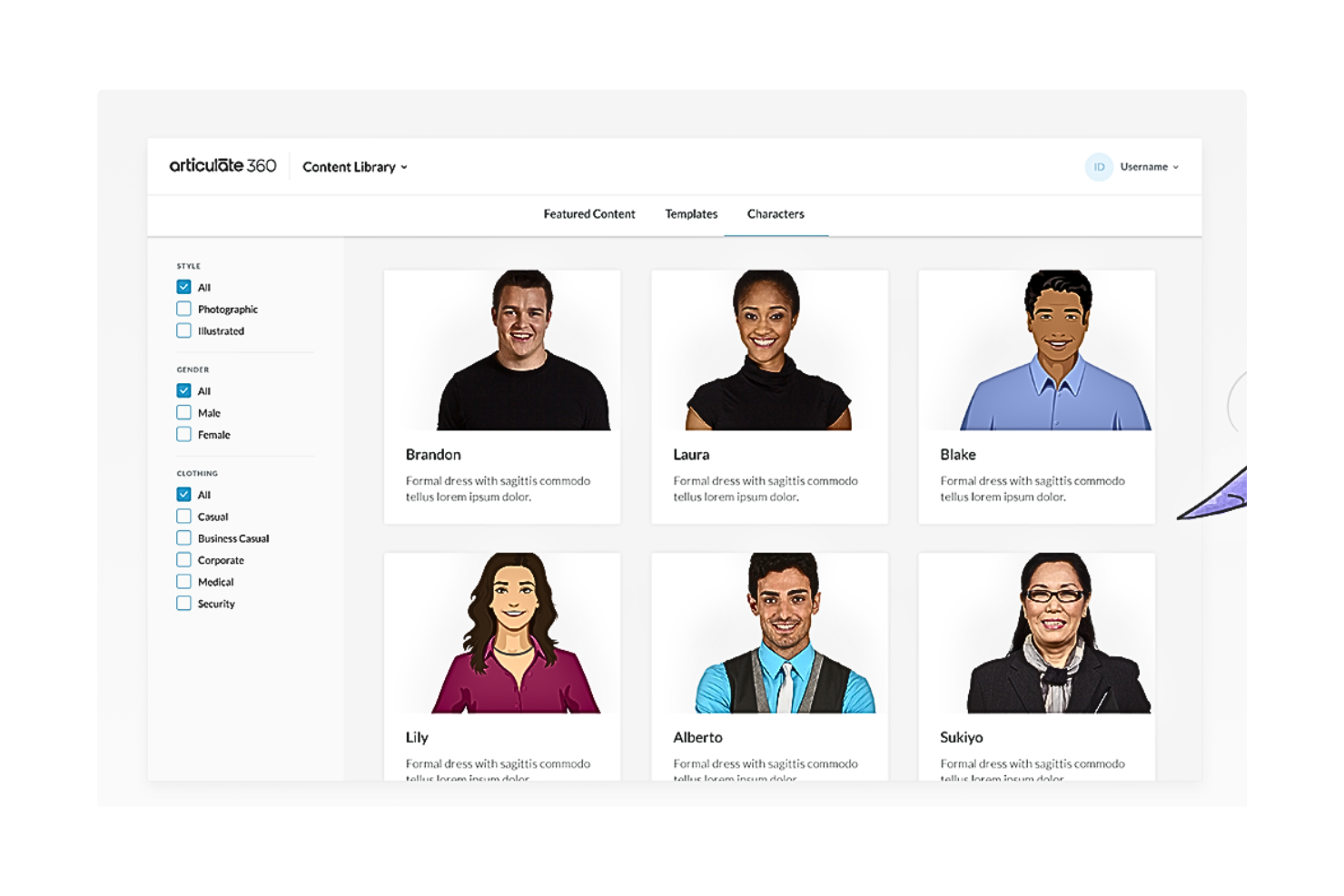
- Content Library 360: Accesso a una vasta raccolta di modelli, personaggi e risorse stock per arricchire il design dei tuoi corsi.
- Review 360: Una piattaforma collaborativa che permette di raccogliere feedback dagli stakeholder e semplificare il processo di revisione.
- Articulate Live: Webinar di formazione dal vivo e risorse per aiutarti a padroneggiare il software e migliorare le tue competenze nell'e-learning.
- Supporto alla traduzione: Strumenti per tradurre facilmente i tuoi corsi in più lingue, ampliando la tua portata a livello globale.
Integrazioni di Articulate 360
Le integrazioni includono Slack, Microsoft Teams, Zapier e opzioni API personalizzate.
Pros and Cons
Pros:
- Design responsivo per funzionalità senza interruzioni su diversi dispositivi.
- Ampia libreria di risorse con modelli personalizzabili.
- Suite di strumenti completa per lo sviluppo di corsi completi.
Cons:
- Potrebbe risultare complesso per chi cerca soluzioni semplici
- Flessibilità limitata per stili di apprendimento autodidattici.
- Il prezzo potrebbe essere un ostacolo per individui o piccole organizzazioni.

Elucidat
Ideale per la progettazione collaborativa dei corsi nel cloud
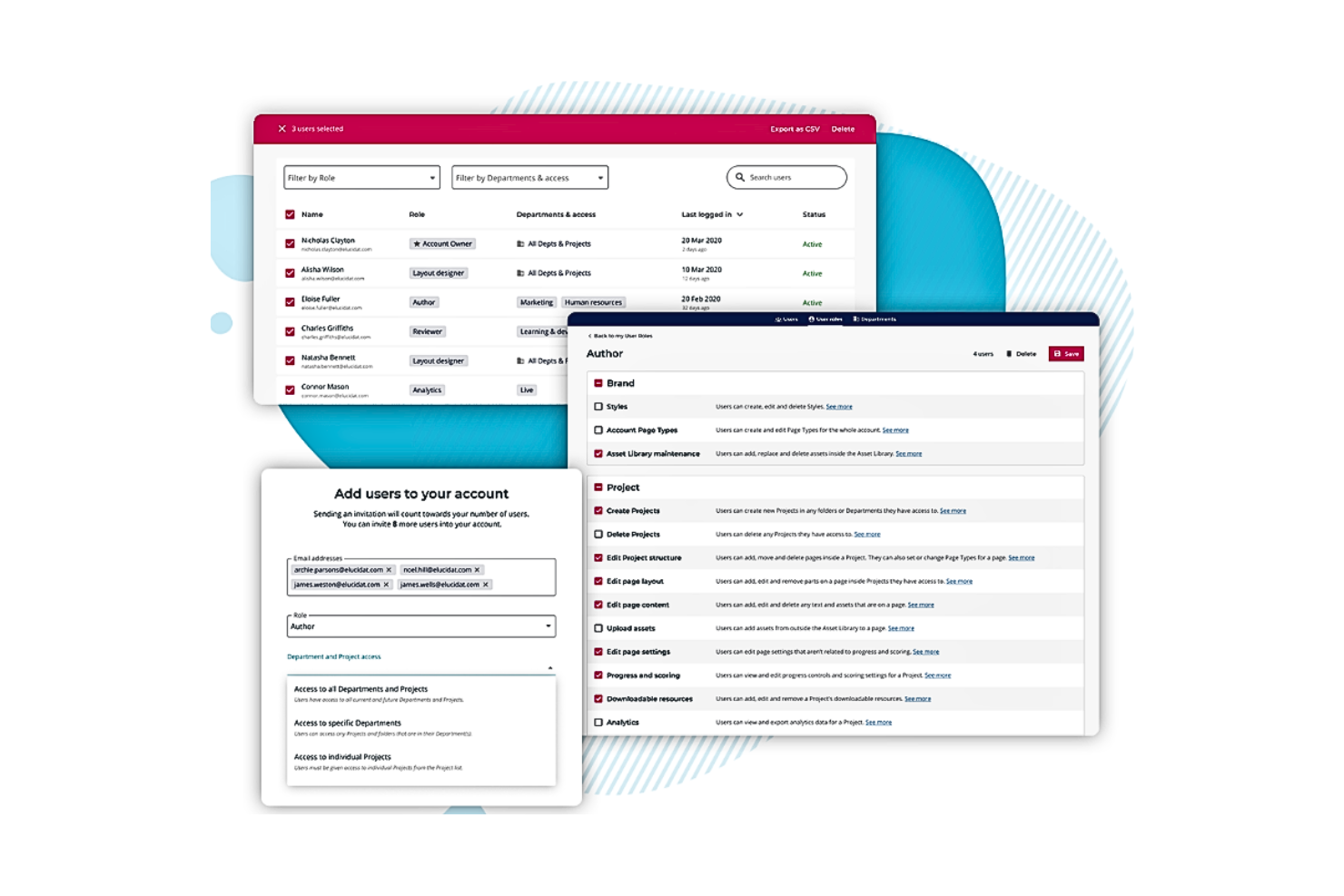
Elucidat è un software di progettazione dell'apprendimento basato sul cloud che si rivolge alle grandi organizzazioni desiderose di migliorare i propri programmi di formazione. La sua piattaforma supporta collaborazione e scalabilità, rendendolo ideale per i team che devono creare contenuti digitali formativi coinvolgenti. Con funzionalità pensate per semplificare la creazione e la gestione dei corsi, Elucidat aiuta a offrire esperienze di apprendimento di alta qualità in diversi settori.
Perché ho scelto Elucidat
Ho scelto Elucidat per le sue eccezionali capacità di progettazione collaborativa dei corsi tramite la sua piattaforma cloud. Questo strumento consente al tuo team di lavorare insieme in modo fluido, offrendo funzionalità come la modifica in tempo reale e il controllo delle versioni per garantire che tutti siano sincronizzati. Le analisi della piattaforma forniscono approfondimenti dettagliati sul coinvolgimento degli utenti, permettendoti di perfezionare i contenuti sulla base di dati concreti. Inoltre, i suoi strumenti di progettazione responsiva assicurano che i tuoi corsi siano ottimizzati su qualsiasi dispositivo, rispondendo alle esigenze dei moderni utenti.
Caratteristiche principali di Elucidat
Oltre alle sue capacità collaborative di progettazione dei corsi, Elucidat offre numerose altre funzionalità che lo rendono una scelta di spicco:
- Learning Accelerator: Questa funzionalità aiuta a velocizzare il processo di creazione dei contenuti, fornendo modelli e temi predefiniti che consentono di produrre materiali formativi più rapidamente.
- Traduzione automatica: Con il supporto di oltre 75 lingue, questa funzionalità garantisce che i tuoi contenuti siano accessibili a un pubblico globale senza la necessità di un'estesa traduzione manuale.
- Compatibilità SCORM: La compatibilità di Elucidat con SCORM consente di integrare facilmente i corsi con vari sistemi di gestione dell'apprendimento, mantenendo coerenza e monitorando i progressi degli utenti.
- Analisi avanzate: La piattaforma offre analisi dettagliate che forniscono approfondimenti sul comportamento degli utenti e sull'efficacia dei corsi, aiutandoti a prendere decisioni basate sui dati per migliorare i programmi di formazione.
Integrazioni di Elucidat
Le integrazioni includono Moodle, SAP Litmos, Cornerstone, Degreed, Docebo, SuccessFactors, Saba, TalentLMS, Absorb LMS e LearnUpon.
Pros and Cons
Pros:
- Interfaccia intuitiva senza necessità di conoscenze di programmazione.
- Basato su cloud per un accesso facile da qualsiasi dispositivo.
- Ottimo per la collaborazione grazie agli aggiornamenti in tempo reale.
Cons:
- Il costo elevato potrebbe non essere accessibile alle piccole imprese
- Gli utenti possono incontrare una curva di apprendimento dovuta all'ampia gamma di funzionalità.
- Mancano alcune funzionalità di personalizzazione avanzata.

Ideale per ottimizzare la creazione dei contenuti con strumenti di authoring robusti
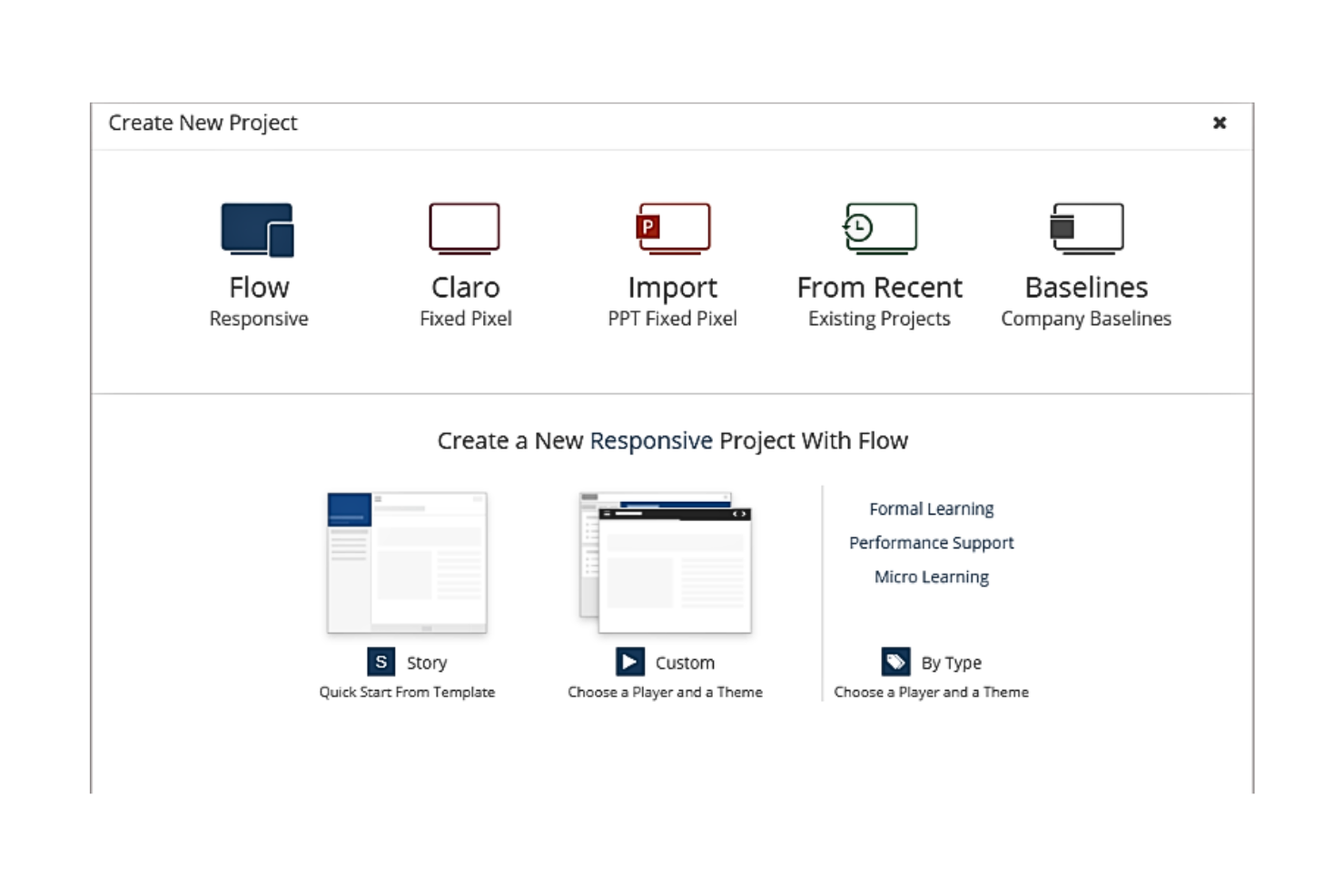
DominKnow è uno strumento eLearning estremamente versatile progettato per semplificare il processo di creazione dei contenuti. Grazie a una gamma di funzionalità di authoring al suo nucleo, consente di creare, condividere, riutilizzare e collaborare su corsi e materiali didattici in modo snello, rendendolo particolarmente efficace per chi desidera ottimizzare il processo di creazione dei contenuti.
Perché ho scelto DominKnow: Ho scelto DominKnow per la sua capacità di trasformare il panorama dell'eLearning offrendo una suite completa di strumenti di authoring robusti. Rispetto ad altri software di progettazione didattica, DominKnow si distingue per la possibilità di semplificare la creazione dei contenuti, trasformando compiti complessi in attività gestibili. Ecco perché ritengo sia ideale per ottimizzare la creazione dei contenuti.
Funzionalità distintive & Integrazioni
DominKnow vanta una potente suite di funzionalità tra cui gestione dei contenuti, progettazione di corsi responsivi e authoring collaborativo. Queste capacità garantiscono collaborazione e coerenza su tutti i corsi. Le integrazioni principali includono sistemi di gestione dell'apprendimento (LMS) come Moodle e Canvas, e altre piattaforme come xAPI e SCORM per il monitoraggio dei progressi degli utenti.
Pros and Cons
Pros:
- Capacità di authoring complete
- Forte integrazione con diverse piattaforme LMS
- Consente la collaborazione nella creazione dei corsi
Cons:
- Prezzo superiore rispetto ad altre opzioni
- Curva di apprendimento più ripida per i nuovi utenti
- La fatturazione annuale può rappresentare un impegno per alcuni
Ideale per creare contenuti eLearning interattivi

Adobe Captivate è uno strumento di authoring eLearning potente, noto per la sua capacità di creare contenuti eLearning dinamici e interattivi. Consente agli sviluppatori di progettare esperienze di apprendimento digitale uniche e coinvolgenti, adattandosi perfettamente alla sua reputazione di strumento ideale per la creazione di contenuti eLearning interattivi.
Perché ho scelto Adobe Captivate: Ho scelto Adobe Captivate per le sue solide capacità nel creare contenuti eLearning altamente interattivi. Offre un livello di interattività che molti altri strumenti non hanno, permettendo ai progettisti di corsi di coinvolgere gli studenti in modo più efficace. Questo alto grado di personalizzazione e interazione è il motivo per cui ho stabilito che Adobe Captivate è il miglior strumento per la creazione di contenuti eLearning interattivi.
Funzionalità principali e integrazioni
Le funzionalità di Adobe Captivate includono design reattivo dei corsi, conversione di PowerPoint in eLearning e scenari avanzati di quiz. Si integra con Adobe Creative Cloud, che offre ulteriori risorse per la creazione di contenuti, così come con i principali sistemi di gestione dell'apprendimento (LMS) per la distribuzione dei contenuti.
Pros and Cons
Pros:
- Avanzate capacità di creazione di contenuti interattivi
- Integrazione con Adobe Creative Cloud e varie piattaforme LMS
- Funzioni per convertire presentazioni PowerPoint in corsi eLearning
Cons:
- Il software può risultare complesso per i principianti
- Il prezzo può essere elevato per singoli o piccole organizzazioni
- La complessità dello strumento può comportare una curva di apprendimento più ripida

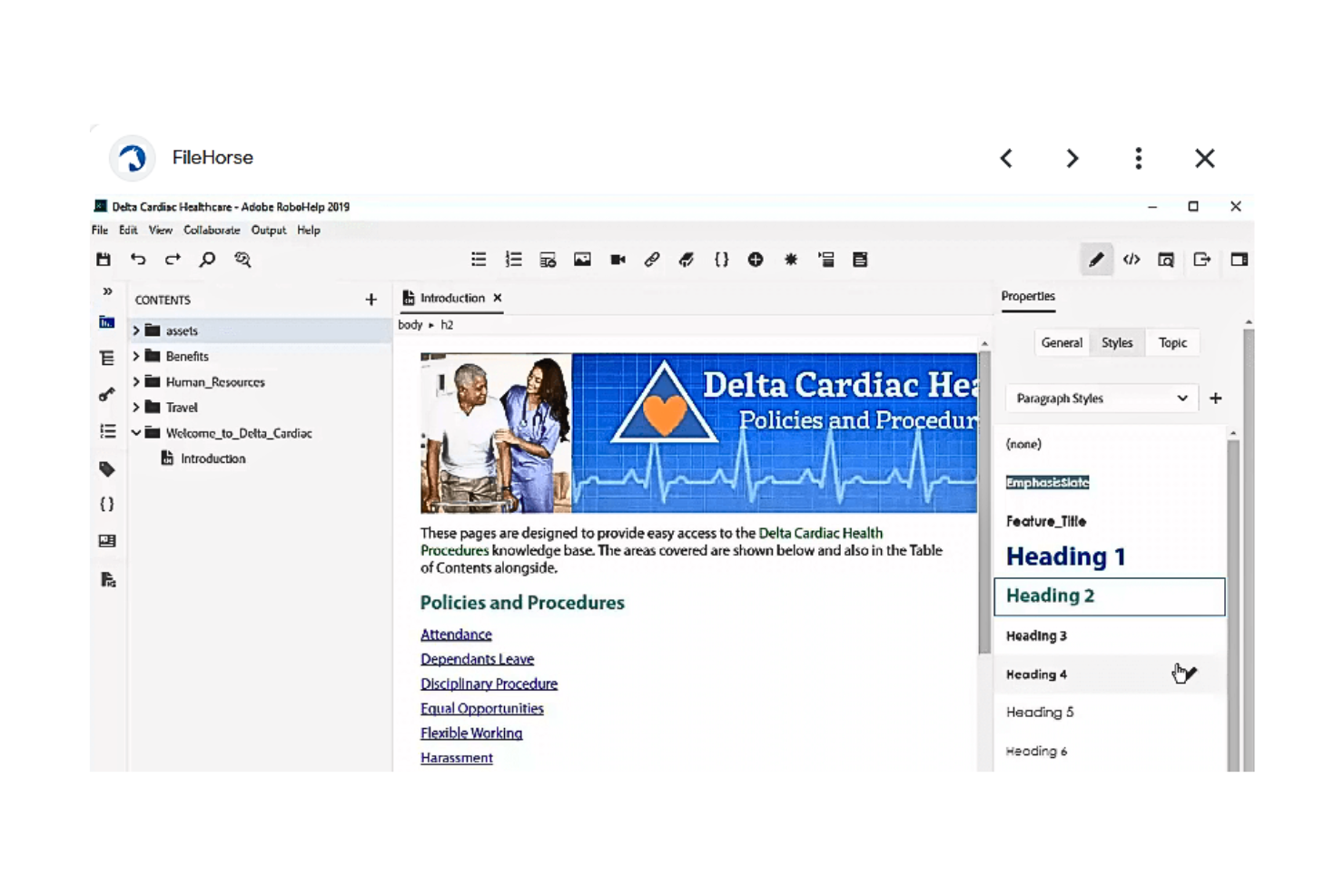
Adobe RoboHelp è uno strumento di authoring professionale ideale per sviluppare sistemi di help, contenuti e-learning, basi di conoscenza e molto altro. Combina una ricca gamma di funzionalità con un'interfaccia utente intuitiva per consentire la creazione di vari tipi di contenuti informativi, rendendolo la scelta perfetta per basi di conoscenza e manuali utente.
Perché ho scelto Adobe RoboHelp: Nella mia ricerca del miglior software per la progettazione dell'apprendimento, Adobe RoboHelp si è distinto per la sua particolare forza nella creazione di basi di conoscenza e manuali utente. Offre una combinazione di funzionalità che si adattano precisamente a queste esigenze, mentre molti altri sul mercato non sono specializzati in questo. Perciò, ho scelto RoboHelp come il miglior strumento per creare basi di conoscenza e manuali utente.
Caratteristiche principali & integrazioni
Adobe RoboHelp offre funzionalità come un editor HTML WYSIWYG, single sourcing, output multilingue e gestione dei contenuti. Può integrarsi con Adobe Captivate per importare simulazioni e demo, e con altri strumenti di Adobe Creative Cloud per migliorare le capacità multimediali.
Pros and Cons
Pros:
- Funzionalità solide per creare basi di conoscenza e manuali utente
- Integrazione con Adobe Creative Cloud
- Output di contenuti multilingue
Cons:
- Il prezzo potrebbe essere elevato per le organizzazioni più piccole
- Ha una curva di apprendimento per i principianti
- Integrazioni limitate oltre all'ecosistema di software Adobe

Ideale per aumentare la produttività grazie alle funzionalità di formazione on-demand
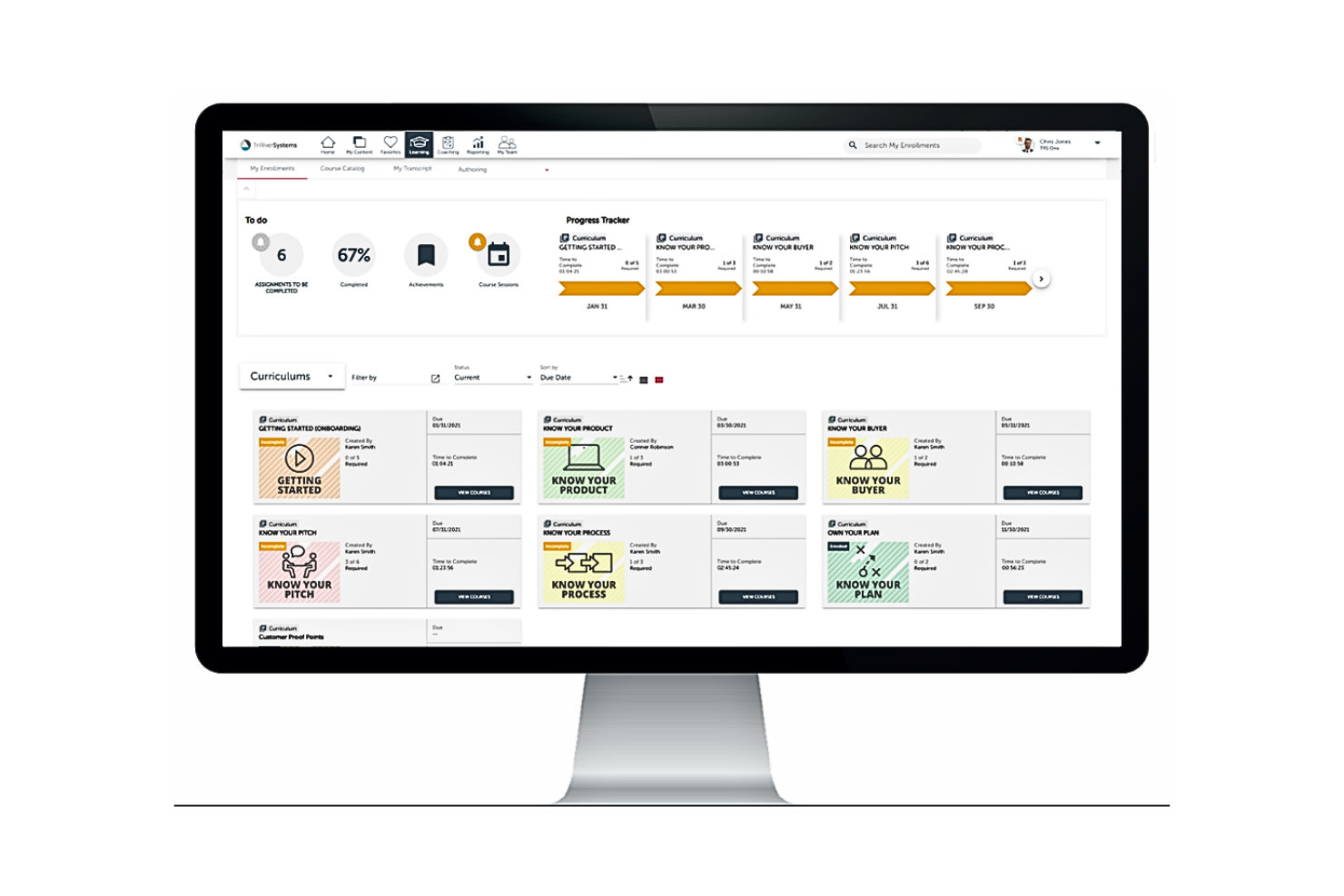
Brainshark offre una piattaforma innovativa progettata per migliorare l'apprendimento e la produttività grazie alle sue capacità di formazione on-demand. La sua suite di strumenti e funzionalità consente di creare, distribuire e monitorare i contenuti, rispondendo perfettamente all'esigenza delle aziende di aumentare produttività ed efficienza nella formazione.
Perché ho scelto Brainshark: Ho selezionato Brainshark per la sua capacità di migliorare l'esperienza formativa tradizionale, ponendo l'accento sulla formazione on-demand. Confrontando diverse piattaforme, ho valutato che Brainshark disponesse delle funzionalità più efficaci per rendere i moduli formativi flessibili e accessibili. Per questo motivo, credo fermamente che Brainshark sia ideale per aumentare la produttività offrendo possibilità di formazione on-demand senza pari.
Funzionalità e integrazioni principali
Brainshark mette a disposizione numerose funzionalità, tra cui la creazione di contenuti, il coaching e l’analisi dei dati, che consentono alle organizzazioni di attuare la formazione nei momenti più opportuni. La sua integrazione con piattaforme di rilievo come Salesforce, Microsoft Dynamics e Seismic lo rende versatile e adattabile a diversi contesti aziendali.
Pros and Cons
Pros:
- Funzionalità di formazione on-demand
- Integrazione con i principali sistemi CRM
- Analitiche e reportistica avanzate
Cons:
- Commissione base aggiuntiva per l'utilizzo
- Può essere necessario un periodo di orientamento per gli utenti
- Le opzioni di personalizzazione possono essere limitate per alcuni casi specifici

Ideale per l’autoproduzione con PowerPoint e l’integrazione con LMS
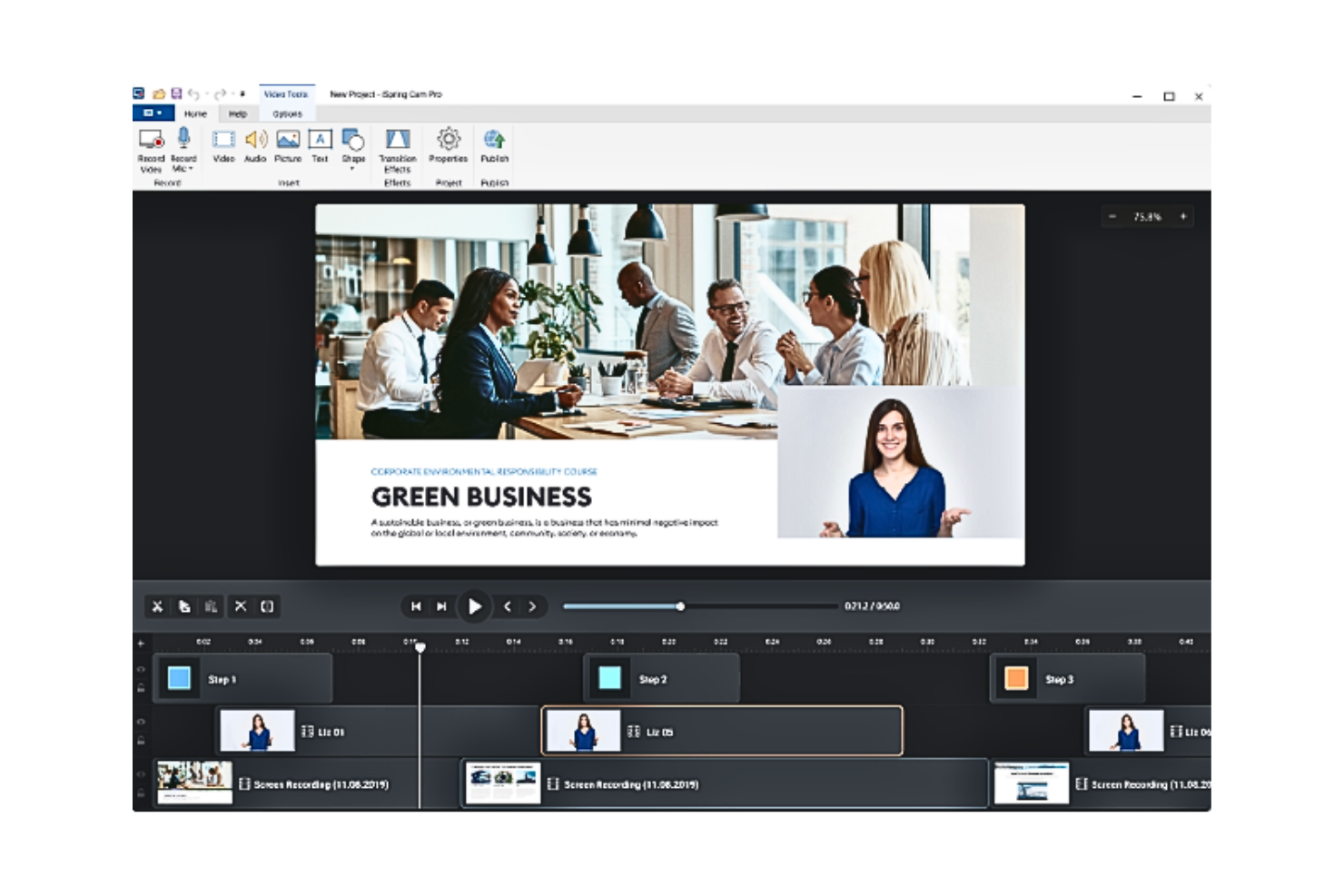
iSpring Suite 11 è uno strumento versatile per l’autoproduzione di contenuti eLearning che si integra perfettamente con PowerPoint, trasformando le presentazioni in corsi coinvolgenti e interattivi. Progettato per educatori e team di formazione, offre una soluzione pratica per chi desidera migliorare il contenuto didattico senza la necessità di software complessi. Sfruttando le sue funzionalità, puoi affrontare la sfida di creare esperienze formative dinamiche che catturano e istruiscono l’audience.
Perché ho scelto iSpring Suite 11
Ho scelto iSpring Suite 11 per la sua notevole capacità di potenziare la creazione di corsi basati su PowerPoint e per la sua integrazione senza soluzione di continuità con LMS. La sua caratteristica distintiva è la conversione delle presentazioni PowerPoint in corsi conformi a SCORM, permettendo di sfruttare contenuti già esistenti garantendo la compatibilità con i principali sistemi di gestione della formazione. L’inclusione di elementi interattivi, come quiz e simulazioni, non solo arricchisce l’esperienza di apprendimento ma risponde anche alla necessità di una didattica coinvolgente. Questo rende iSpring Suite 11 una scelta pratica per chi desidera ottimizzare i processi di progettazione formativa.
Funzionalità chiave di iSpring Suite 11
Oltre all’integrazione con PowerPoint e alla compatibilità con LMS, ho riscontrato anche diverse altre funzionalità degne di nota in iSpring Suite 11:
- Quiz gamificati: Crea quiz interattivi che aumentano il coinvolgimento dei partecipanti con vari tipi di domande e opzioni di feedback.
- Simulazioni guidate da personaggi: Progetta scenari ramificati e giochi di ruolo per simulare situazioni reali, offrendo agli utenti esperienza pratica.
- Produzione di video tutorial: Realizza tutorial video completi e walkthrough per spiegare efficacemente processi complessi.
- Assistenza tecnica 24/7: Ottieni supporto continuo per assicurare la continuità operativa e la risoluzione tempestiva di eventuali problemi.
Integrazioni di iSpring Suite 11
Le integrazioni includono Moodle, Google Classroom e un API JavaScript per integrazioni personalizzate.
Pros and Cons
Pros:
- Integrazione con PowerPoint per la creazione dei corsi
- Supporta la creazione di corsi conformi a SCORM per un’integrazione LMS facilitata
- Converte le presentazioni in file SCORM per compatibilità LMS.
Cons:
- Potrebbe essere limitato per chi non utilizza molto PowerPoint
- Le funzionalità avanzate possono richiedere un certo apprendimento ai principianti.
- Il prezzo elevato può essere un ostacolo per piccole organizzazioni.


Lectora è uno strumento completo per lo sviluppo di eLearning che si concentra sulla creazione rapida ed efficiente di corsi. La sua potente suite di funzionalità consente agli utenti di sviluppare rapidamente contenuti eLearning interattivi e di livello professionale, perfettamente in linea con le esigenze di ambienti di apprendimento ad alta velocità.
Perché ho scelto Lectora: Lectora mi ha colpito tra molti software di progettazione dell'apprendimento per la sua enfasi sullo sviluppo rapido di eLearning. Si distingue per la sua capacità unica di facilitare la creazione veloce di esperienze di apprendimento interattive.
Dato il suo impegno nella produzione di contenuti di apprendimento a ritmo sostenuto, ho determinato che Lectora è la soluzione migliore per lo sviluppo rapido di eLearning.
Funzionalità e integrazioni principali
Lectora offre una vasta gamma di funzionalità utili, tra cui modelli personalizzabili, un'interfaccia utente intuitiva e strumenti per sviluppare contenuti responsivi e accessibili.
Offre integrazione con varie piattaforme LMS, come Moodle, Blackboard e Canvas, insieme ad altri strumenti come Tin Can API e SCORM per il tracciamento dei contenuti.
Pros and Cons
Pros:
- Capacità di sviluppo rapido di eLearning
- Facile integrazione con le principali piattaforme LMS
- Modelli personalizzabili per la creazione versatile di corsi
Cons:
- Il prezzo può essere un ostacolo per le piccole organizzazioni
- Richiede una curva di apprendimento per sfruttare tutte le sue funzionalità
- Nessuna opzione di fatturazione mensile, solo piani annuali disponibili
Altri software per la progettazione didattica degni di nota
Di seguito è riportato un elenco di altri software per la progettazione didattica che ho selezionato, ma che non sono rientrati tra i primi 12.
- Lectora Inspire
Ideale per creare esperienze di apprendimento immersive
- dominKnow | ONE
Ideale per il suo versatile sistema di gestione dei contenuti eLearning
- Adapt Learning
Ideale per creare apprendimento responsivo su più dispositivi
- Rise
Ideale per la sua interfaccia user-friendly e il design reattivo


Come Valuto i Software di Learning Design
Valuto questi strumenti su due livelli: le capacità fondamentali di authoring e valutazione che ogni piattaforma deve avere, e i differenziatori—come la mappatura delle competenze o i workflow per gli esperti di materia (SME)—che determinano se sono adatti.
Funzionalità di Base (Requisiti Minimi per Questa Lista)
Quando seleziono gli strumenti per la mia lista, valuto ciascuno su una scala da 0 (non offre la funzionalità) a 5 (eccelle in quest'area) per ogni funzionalità fondamentale elencata di seguito. Poi calcolo il punteggio totale dello strumento trasformandolo in percentuale. Ogni strumento deve raggiungere un punteggio totale minimo del 65% per essere preso in considerazione.
- Strumenti di Course Authoring: Cerco editor flessibili che permettono di creare moduli completi con video, testo e risorse incorporate—come la registrazione di una dimostrazione di un framework di prioritizzazione da inserire in una lezione.
- Elementi Interattivi di Apprendimento: Quiz e verifiche delle conoscenze sono indispensabili, ma valuto anche se uno strumento supporta esercizi basati su scenari come simulazioni di decisioni tra stakeholder.
- Progettazione di Percorsi di Apprendimento: Controllo se è possibile sequenziare corsi in curriculum strutturati—ad esempio, mappando il percorso di un nuovo PM da fondamenti di discovery a roadmap avanzate.
- Libreria di Contenuti & Template: Template predefiniti e blocchi di contenuto riutilizzabile fanno risparmiare ore di lavoro di progettazione, quindi valuto la profondità e varietà di ciò che ogni piattaforma offre già pronta.
- Monitoraggio del Progresso dei Discenti: I soli tassi di completamento non bastano. Cerco reportistica che mostri punteggi nelle valutazioni, tendenze di coinvolgimento e progressione del livello di competenze all’interno di un team PM.
- Collaboration & Workflow di Revisione: I responsabili di prodotto e gli SME devono revisionare e approvare i contenuti prima della pubblicazione, quindi valuto come ogni strumento gestisce feedback multi-stakeholder e controllo delle versioni.
Una volta che ho una lista di strumenti che soddisfano questi criteri, considero ciò che distingue ciascuna piattaforma.
Fattori Differenzianti (Cosa Distingue i Fornitori)
Ecco come confronto e metto a confronto i diversi fornitori:
Funzionalità Distintive
La generazione di contenuti supportata dall’IA è un differenziatore importante. Gli strumenti in grado di creare domande per i quiz o outline dei corsi partendo da una scheda di prodotto permettono ai responsabili della formazione di risparmiare ore di lavoro manuale. Valuto anche la mappatura di competenze e capacità, che permette di associare lezioni a specifiche competenze PM come discovery o gestione degli stakeholder, e di monitorare la crescita del team rispetto a tali parametri. I workflow di contributo degli SME sono altrettanto importanti, dato che i responsabili di prodotto devono spesso aggiungere la loro expertise a un corso senza dover imparare uno strumento di authoring completo.
Oltre alle Funzionalità
La profondità dell’integrazione è fondamentale. Verifico se una piattaforma si connette a strumenti LMS come Docebo o Cornerstone e strumenti PM come Jira o Productboard, visto che ciò determina quanto facilmente l’apprendimento si inserisce nei workflow esistenti. Anche la struttura delle licenze è un fattore chiave: la tariffazione per autore è adatta per team di formazione piccoli, mentre il modello per discente ha più senso per l’adozione in tutta l’organizzazione. Infine, valuto se uno strumento riesce a collegare i dati di completamento dei corsi a risultati misurabili, come l’associazione di un programma di certificazione PM a parametri reali delle competenze all’interno del team.
Come scegliere il software per la progettazione didattica
Durante la valutazione delle opzioni di software per la progettazione didattica, considera:
- Quali sono i tuoi obiettivi rispetto ai materiali che stai creando? - Inizia identificando gli obiettivi principali che i tuoi utenti sperano di raggiungere e determina l'insieme di materiali che dovrai creare per aiutarli a raggiungerli.
- Chi dovrà utilizzarlo? - Valuta il numero di persone del tuo team che dovranno utilizzare il software, come utenti attivi o come visualizzatori/commentatori.
- Con quali altri strumenti deve funzionare? - Determina quali strumenti stai sostituendo, quali rimarranno in uso e quali strumenti esistenti dovrai integrare, se applicabile, come il tuo sistema di gestione dell'apprendimento. Decidi se gli strumenti esistenti devono integrarsi con il nuovo strumento di progettazione dell'apprendimento.
- Quali risultati sono importanti? - Tieni conto del risultato che il software deve fornire per essere considerato efficace. Considera quale capacità vuoi acquisire o cosa vuoi migliorare e come misurerai il successo. Ad esempio, potresti aver bisogno che il software ti aiuti a monitorare e confrontare nel tempo i risultati delle valutazioni. Tieni sempre presenti i risultati che vuoi ottenere mentre valuti le diverse opzioni, per dare priorità al massimo impatto per il tuo team.
- Come si integrerebbe nella tua organizzazione?- Le caratteristiche e le funzioni del software sono in linea con gli obiettivi e i requisiti della tua organizzazione? Ci sono somiglianze tra le interfacce del nuovo strumento e di quello attuale che renderanno più facile per i membri del tuo team imparare a utilizzarlo? Come per tutti gli strumenti software, il numero di funzionalità non è importante quanto il valore che ciascuna di esse offre alla tua organizzazione.
Domande più comuni relative al software per la progettazione dell'apprendimento
Quali sono i vantaggi dell'utilizzo del software per la progettazione dell'apprendimento?
Il software per la progettazione dell’apprendimento offre diversi vantaggi, tra cui:
\u003col\u003e
\t\u003cli\u003e\u003cstrong\u003eEfficienza\u003c/strong\u003e: semplifica il processo di creazione e distribuzione dei corsi, facendoti risparmiare tempo e fatica.\u003c/li\u003e
\t\u003cli\u003e\u003cstrong\u003eCoinvolgimento\u003c/strong\u003e: grazie a funzionalità come quiz, contenuti interattivi e supporto multimediale, aumenta il coinvolgimento e la ritenzione degli studenti.\u003c/li\u003e
\t\u003cli\u003e\u003cstrong\u003eFlessibilità\u003c/strong\u003e: questi strumenti supportano spesso l’apprendimento mobile, consentendo agli studenti di accedere ai corsi in qualsiasi momento e ovunque si trovino.\u003c/li\u003e
\t\u003cli\u003e\u003cstrong\u003eIntegrazione\u003c/strong\u003e: molti strumenti per la progettazione dell’apprendimento si integrano facilmente con LMS, sistemi HR o siti web, creando un ecosistema di apprendimento.\u003c/li\u003e
\t\u003cli\u003e\u003cstrong\u003eAnalisi\u003c/strong\u003e: solide funzionalità di reporting offrono informazioni sui progressi degli studenti e sull’efficacia dei corsi, supportando le strategie future di sviluppo dei corsi.\u003c/li\u003e
\u003c/ol\u003e
Quanto costano generalmente gli strumenti software per la progettazione dell'apprendimento?
Il prezzo del software per la progettazione dell’apprendimento varia notevolmente in base alle funzionalità specifiche, al numero di utenti e al livello di assistenza clienti offerto. In genere viene applicato un modello di prezzo basato su abbonamento, con addebito mensile o annuale.
Quali sono i modelli di prezzo tipici per il software per la progettazione dell'apprendimento?
La maggior parte degli strumenti software per la progettazione dell’apprendimento segue un modello di prezzo basato su abbonamento. Alcuni offrono prezzi a livelli, con diversi livelli di funzionalità disponibili a prezzi differenti. Altri possono applicare un costo per utente o per corso oppure fornire accesso illimitato a una tariffa fissa.
Qual è la fascia di prezzo tipica del software per la progettazione dell'apprendimento?
Il prezzo del software per la progettazione dell’apprendimento può variare da circa $20 al mese per gli strumenti di base a diverse centinaia di dollari al mese per soluzioni più complete destinate alle aziende.
Quali sono i software per la progettazione dell'apprendimento più economici e più costosi?
Il software per la progettazione dell’apprendimento meno costoso parte in genere da circa $20 al mese per le funzionalità di base. Nella fascia più alta, le soluzioni complete con funzionalità avanzate possono costare diverse centinaia di dollari al mese. Ad esempio, Adobe Captivate parte da $33.99 per utente al mese, mentre Articulate 360 parte da $999 per utente all’anno (circa $83 per utente al mese).
Esistono opzioni gratuite per il software per la progettazione dell'apprendimento?
Sì, sono disponibili opzioni gratuite, come Moodle, un sistema di gestione dell’apprendimento open source. Tuttavia, tieni presente che, sebbene il software in sé possa essere gratuito, potrebbero esserci costi associati all’hosting, alla personalizzazione e all’assistenza. Inoltre, le versioni gratuite dei software a pagamento spesso presentano limitazioni relative alle funzionalità, al numero di utenti o ai corsi.
Recensioni di altri software di progettazione
- Strumenti per il feedback sul design
- Strumenti di prototipazione per Android
- Software per la progettazione di prodotti
- Software collaborativo per la progettazione
Riepilogo
In conclusione, la scelta del software per la progettazione dell'apprendimento è un aspetto fondamentale per creare corsi di eLearning coinvolgenti ed efficienti. Lo strumento scelto non dovrebbe solo essere in grado di distribuire efficacemente i contenuti, ma anche offrire funzionalità aggiuntive come l'integrazione con altri sistemi, un design intuitivo e report dettagliati.
Punti chiave
- Definisci le tue esigenze: il software per la progettazione dell'apprendimento "migliore" è soggettivo e dipende in larga misura dalle tue esigenze e dal tuo contesto specifici. Definisci le funzionalità essenziali di cui hai bisogno, il tuo budget e il livello di assistenza desiderato prima di iniziare la ricerca.
- Considera usabilità e assistenza: anche il software più ricco di funzionalità può rivelarsi inadeguato se non è intuitivo o non dispone di un'assistenza clienti adeguata. Considera la curva di apprendimento e il livello di assistenza offerto dal fornitore del software.
- Valuta le funzionalità principali: considera la proposta di valore unica di ogni strumento. Alcuni eccellono nell'interattività, altri nell'integrazione e altri ancora nell'esperienza utente. Individua le funzionalità più in linea con i tuoi obiettivi di eLearning.
Tenendo presenti questi fattori, sarai in grado di scegliere il software per la progettazione dell'apprendimento più adatto alle tue esigenze.
E adesso?
Per ampliare il tuo arsenale di strumenti, potresti anche dare un'occhiata ad alcuni di questi fantastici podcast sulla progettazione didattica: per creare ottimi prodotti formativi, avrai bisogno di ottimi strumenti e anche di ottime competenze!
Non dimenticare di iscriverti alla nostra newsletter per ricevere altre risorse e guide sulla gestione dei prodotti, oltre agli ultimi podcast, alle interviste e ad altri approfondimenti di leader ed esperti del settore.