

Görünüşe göre sayısız mobil prototipleme çözümü mevcut; bu nedenle hangisinin sizin için en iyi olduğunu belirlemek zor olabilir. Ekibinizin uygulama arayüzlerini, kullanıcı etkileşimlerini ve kullanıcı akışlarını görselleştirmesini, böylece gerçek geliştirme aşamasından önce tasarım fikirleri üzerinde yineleme yapabilmesini istiyorsunuz; ancak hangi aracın en uygun olduğunu belirlemeniz gerekiyor. Size yardımcı olabilirim! Bu yazıda en iyi mobil uygulama prototipleme araçlarını inceliyor, onlarca ürünü yönetme ve büyük ekiplerde farklı araçlarla çalışma deneyimimi kullanarak bunları doğru şekilde değerlendiriyorum.
Why Trust Our Software Recommendations
6,700+
Reviews
20
Industry experts
16+
Evaluation factors
14
Years
Our team has been testing and reviewing software since 2012. As product managers ourselves, we know how difficult—and important—it is to choose the right software.
For this guide, we evaluated tools using hands-on testing and independent research, scoring tools using our selection criteria.
Our reviews reflect our human editorial judgment, not a sales pitch.
Expert reviewers:
- Andrew LumbySenior TPM
- Cristiano ValimSenior UI/UX Lead


Mobil Uygulama Prototipleme Araçları Karşılaştırma Tablosu
Bu karşılaştırma tablosu, en iyi mobil uygulama prototipleme araçları seçimlerimin fiyatlandırma ayrıntılarını özetlemektedir:
Score legend (out of 5)
- Excellent4.5–5
- Good4–4.4
- Average3–3.9
- Below average2–2.9
- Poor1–1.9
Sorted by: Default
| Tool | Starting Price | Website | ||||||
|---|---|---|---|---|---|---|---|---|
Best for dynamic mind mapping | 1.8 out of 5 | 1 | 1 | 2 | 4 | 1 | $9/user/month Free plan + 7-day trial + demo available | Website |
Best for collaborative app wireframing | 2.0 out of 5 | 1 | 2 | 3 | 3 | 1 | $8/user/month Free plan + 14-day trial available | Book Demo |
Best for AI-driven flows without design skills | 3.4 out of 5 | 3 | 3 | 4 | 4 | 3 | $14/user/month Free plan available | Website |
Best for Adobe ecosystem design handoff | 3.6 out of 5 | 4 | 3 | 4 | 4 | 3 | $91.99/month Free trial available | Website |
Best for no-code conditional logic in prototypes | 4.0 out of 5 | 4 | 5 | 3 | 5 | 3 | $29/user/month Free plan available | Website |
Best for design-to-dev handoff in one workspace | 4.4 out of 5 | 4 | 5 | 5 | 5 | 3 | $3/user/month Free plan available | Website |
Best for code-backed design system prototyping | 4.2 out of 5 | 4 | 5 | 4 | 5 | 3 | $49/user/month Free plan + 14-day free trial + demo available | Website |
Best for pre-built iOS and Android UI kits | 4.2 out of 5 | 3 | 5 | 5 | 4 | 4 | $19/user/month Free plan + 10-day trial available | Website |
Best for gesture-rich touch interaction prototyping | 4.8 out of 5 | 5 | 5 | 5 | 4 | 5 | $24/user/month 15-day free trial | Website |
Best for AI-generated interaction logic | 4.0 out of 5 | 4 | 5 | 3 | 3 | 5 | $25/user/month Free plan + free demo available | Website |


En İyi Mobil Uygulama Prototipleme Aracı İncelemeleri
Aşağıda, kısa listeme giren en iyi mobil uygulama prototipleme araçlarının ayrıntılı özetlerini bulabilirsiniz. İncelemelerim, size en uygun aracı bulmanıza yardımcı olmak için her aracın temel özelliklerini, avantajlarını \u0026 dezavantajlarını, entegrasyonlarını ve ideal kullanım alanlarını ayrıntılı şekilde ele alıyor.
 Best for dynamic mind mapping
- Free plan + 7-day trial + demo available
- From $9/user/month (billed annually)
Visit WebsiteCustomer Rating:4.5/5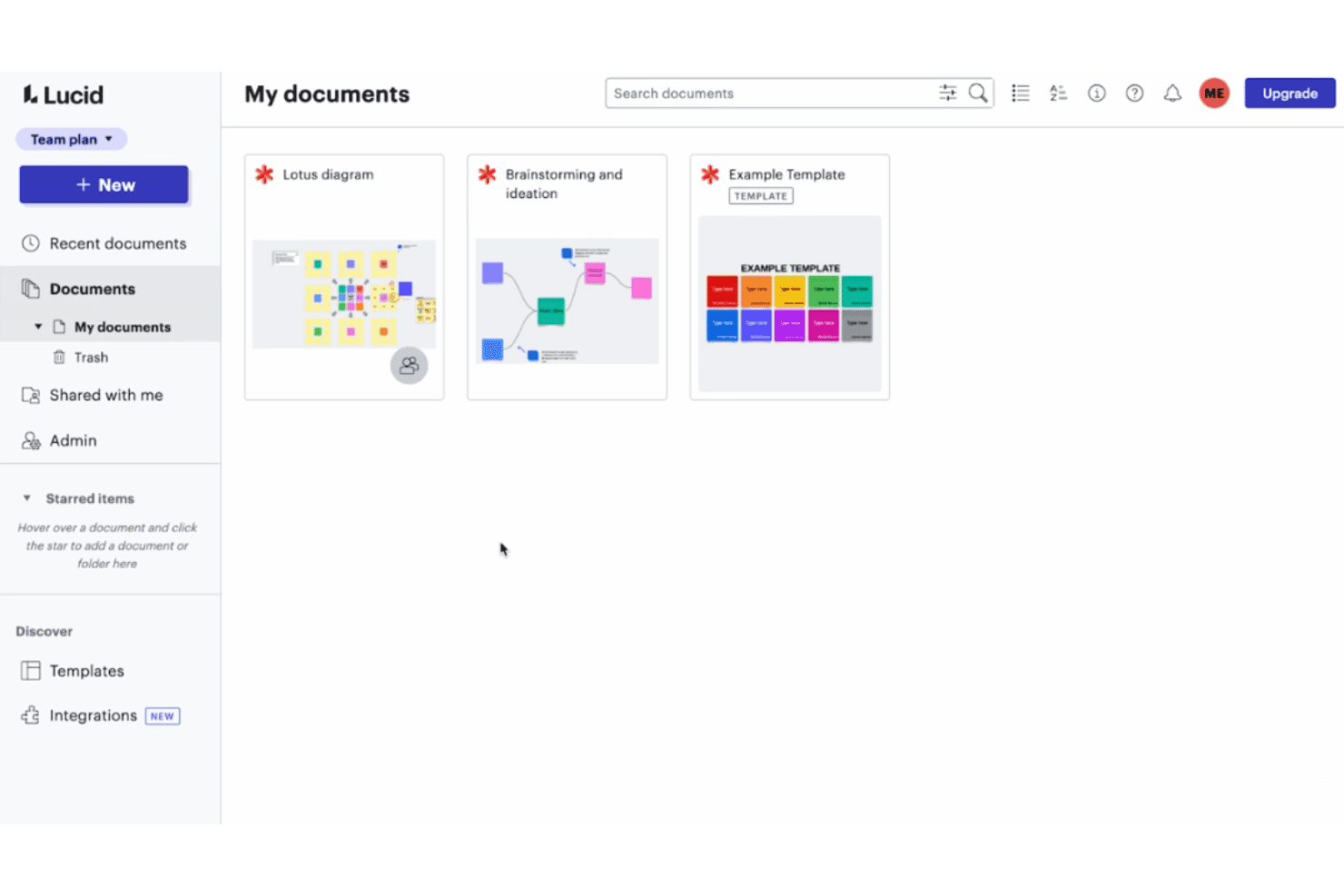
Lucidspark makes collaborative brainstorming easy with an intuitive canvas and built-in workshop tools. Lucidspark is a virtual whiteboard by Lucid Software that supports early-stage product ideation through dynamic mind mapping, user flow planning, mobile wireframe templates, and collaborative brainstorming with AI-assisted tools.
Who Is Lucidspark Best For?
Lucidspark suits product teams in early discovery who need a shared space to brainstorm, map ideas, and plan user flows before committing to a design tool.
Why I Picked Lucidspark
I picked Lucidspark as one of the best because its dynamic mind mapping gives product teams a genuinely fast way to move from raw ideas to structured user flows before any screen design begins. AI-suggested branches help expand concepts quickly, and collapsible map sections let you zoom into specific flows without losing the bigger picture. I also like how sticky notes convert directly into Jira or Azure DevOps tickets, so early ideation feeds straight into the development backlog.
Lucidspark Key Features
- Mobile wireframe templates: Pre-built templates for mobile screens, wireflows, and task flows let your team sketch app structures without starting from scratch.
- Presentation mode with Paths: Guide stakeholders through a structured board walkthrough using set views, without leaving the canvas.
- Lucid AI idea generation: AI generates sticky note ideas, groups related concepts into themes, and builds mind map branches directly on the board.
- Figma frame embedding: Drop live Figma frames onto the board as refreshable images that collaborators can view without a Figma license.
Lucidspark Integrations
Lucidspark has 116 marketplace integrations, including Figma, Jira, Azure DevOps, Slack, Microsoft Teams, Zoom, Google Workspace, Confluence, Asana, and Loom. It also offers Extension and REST APIs for custom integrations.
Pros and Cons
Pros:
- Wireflow templates clarify navigation before screens
- Guest collaboration lowers stakeholder participation friction
- Fast mind mapping for early app concepts
Cons:
- Mobile apps edit boards, not prototypes
- No clickable screen-to-screen prototype playback
Learn more about Lucidspark: 2Best for collaborative app wireframing
Miro
- Free plan + 14-day trial available
- From $8/user/month (billed annually)
Visit WebsiteCustomer Rating:4.8/5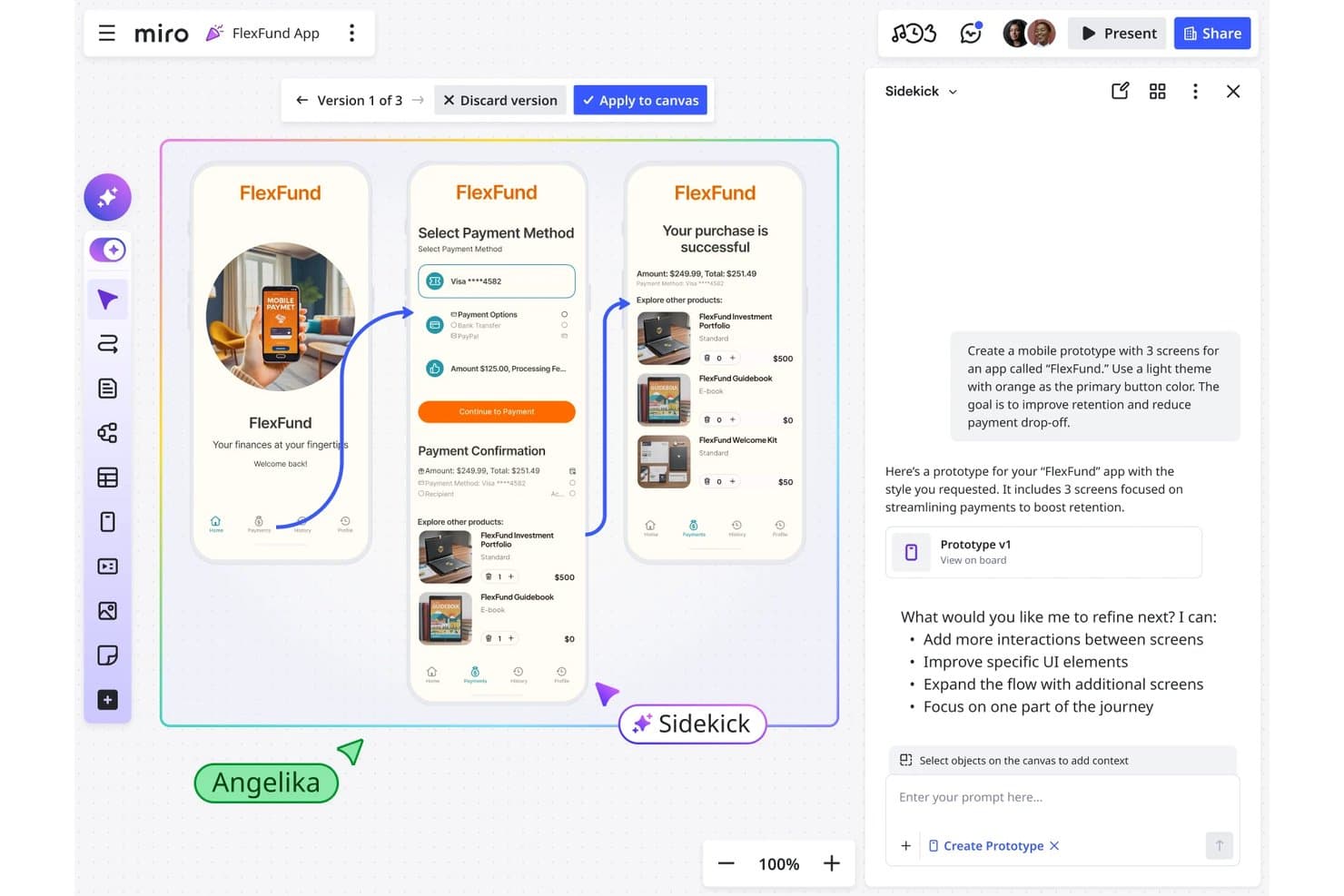
Miro lets users build interactive mobile app prototypes with AI assistance. Miro is a visual collaboration platform that includes built-in wireframing and low-to-mid-fidelity prototyping tools, letting teams generate app screens from AI prompts, build clickable flows, and hand off designs directly to coding agents.
Who Is Miro Best For?
Miro suits product managers and founders who need to turn early ideas into clickable app flows quickly, without relying on a dedicated designer.
Why I Picked Miro
Miro earns its spot on my shortlist because it's the strongest option when multiple stakeholders need to contribute to app wireframes without handing off to a designer first. I love how AI can generate clickable mobile screens directly from sticky notes or a PRD already on the board, so a PM can go from discovery artifacts to a navigable flow in a single session. The MCP server integration also lets coding agents like Claude Code or Cursor read the prototype in context and generate working code, which I think is a genuinely differentiated handoff path.
Miro Key Features
- AI screen generation: Miro generates editable mobile screens from a text prompt, sticky notes, a PRD, or a screenshot of a competitor's UI.
- Version switcher: Each iteration is saved as a named version, letting you switch between variants or compare them side by side on the canvas.
- UX heuristic audit: The AI Researcher Sidekick reviews your prototype against Nielsen's 10 usability heuristics and flags accessibility and usability issues.
- MCP server integration: Coding agents like Claude Code and Cursor can read the prototype and its surrounding board context to generate working application code.
Miro Integrations
Miro supports 250+ integrations, including Figma, Jira, Linear, Asana, Azure DevOps, Microsoft 365, Google Workspace, and Atlassian. Its developer platform provides APIs and SDKs for custom integrations, while MCP connects prototypes with Claude Code, Cursor, and GitHub Copilot.
Pros and Cons
Pros:
- Supports rapid stakeholder feedback and flow iteration
- Keeps research, wireframes, and prototypes together
- Generates clickable flows from PRDs and sticky notes
Cons:
- Offers no documented on-device mobile preview
- Omits swipe, pinch, and long-press interactions
 Best for AI-driven flows without design skills
- Free plan available
- From $14/user/month
Visit WebsiteCustomer Rating:4.8/5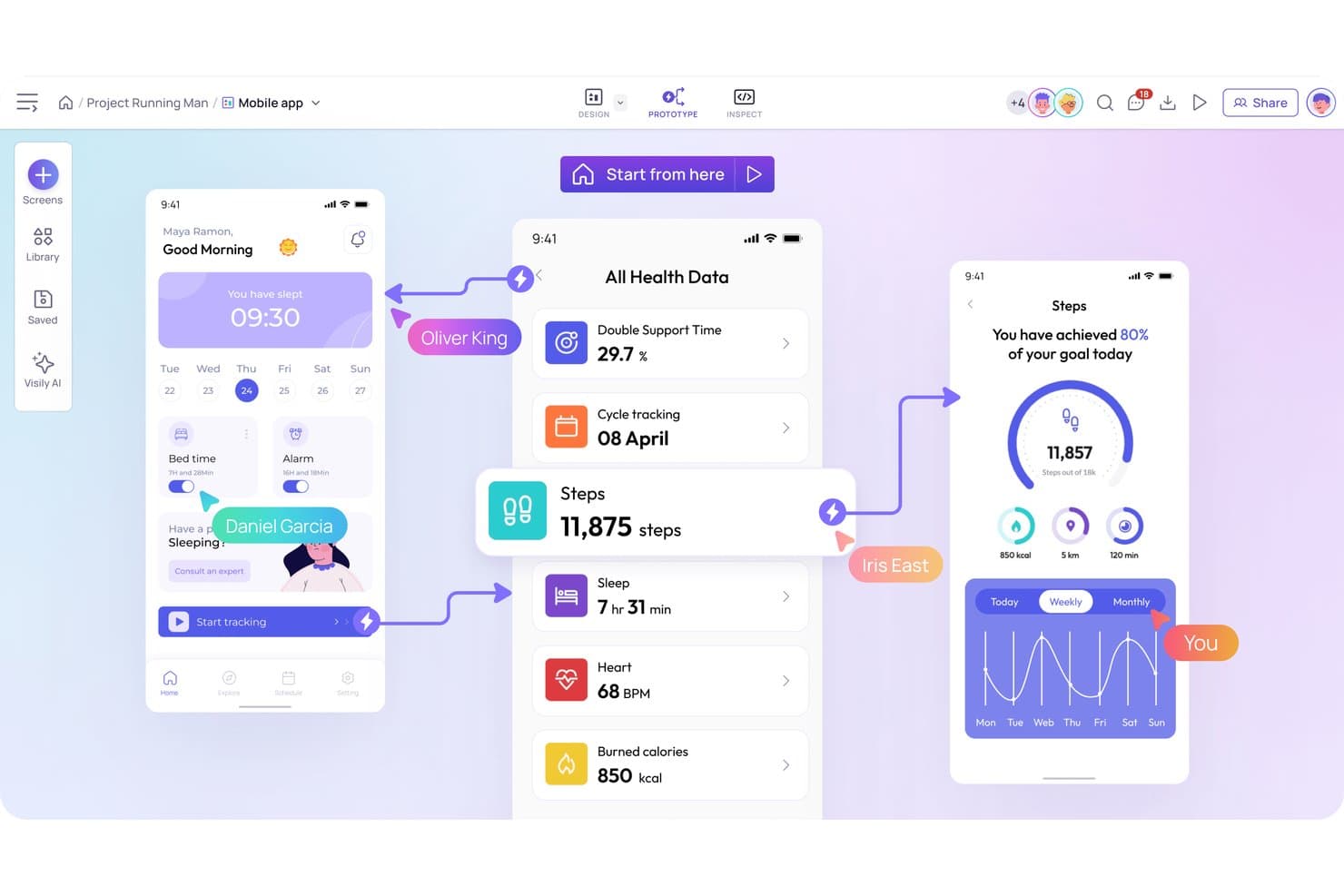
Visily lets users build interactive mobile app prototypes with linked screens. Visily is a browser-based wireframing and prototyping tool that combines AI-powered screen generation, drag-and-drop design, and clickable prototype flows with built-in sharing and developer handoff features.
Who Is Visily Best For?
Visily is a strong fit for product managers and startup founders who need to turn ideas into clickable mobile prototypes quickly, without any design background.
Why I Picked Visily
I've included Visily in my top picks because it's the only tool on this list built from the ground up for product managers who need to move from idea to clickable mobile prototype without any design background. I particularly like Auto-Prototyping, which uses AI to link screens into flows automatically, so I'm not manually drawing connections between 15 app screens. The sketch-to-design and screenshot-to-design inputs are genuinely useful too, letting me drop in a rough sketch or grab a competitor's screen and get an editable wireframe in seconds.
Visily Key Features
- Overlay prototyping: Set popups, toasts, and dropdowns as overlays with position controls, background dimming, and canvas preview.
- Gesture triggers: Supports tap, long press, swipe, and drag interactions, plus per-screen or per-container scrolling with fixed-position elements.
- Export to code: Generates React, Vue, or HTML from your screens and sends designs directly to AI coding agents via the Visily MCP server.
- Slack and Jira integration: Embeds boards in Jira tickets and pushes comment notifications to Slack, with the ability to reply directly from Slack.
Visily Integrations
Visily integrates with Slack and Notion, plus Figma through its plugin and Jira through an Atlassian Marketplace app. Its MCP server connects designs with AI coding agents, including Cursor, Claude Code, Codex, Kiro, and Lovable.
Pros and Cons
Pros:
- Pinned feedback keeps stakeholder reviews contextual
- Supports swipe, drag, and long-press interactions
- AI generates multi-screen mobile flows quickly
Cons:
- Manual positioning slows complex screen layouts
- No conditional logic for dynamic prototypes
Learn more about Visily: Best for Adobe ecosystem design handoff
- Free trial available
- From CAD $91.99/month
Visit WebsiteCustomer Rating:4.3/5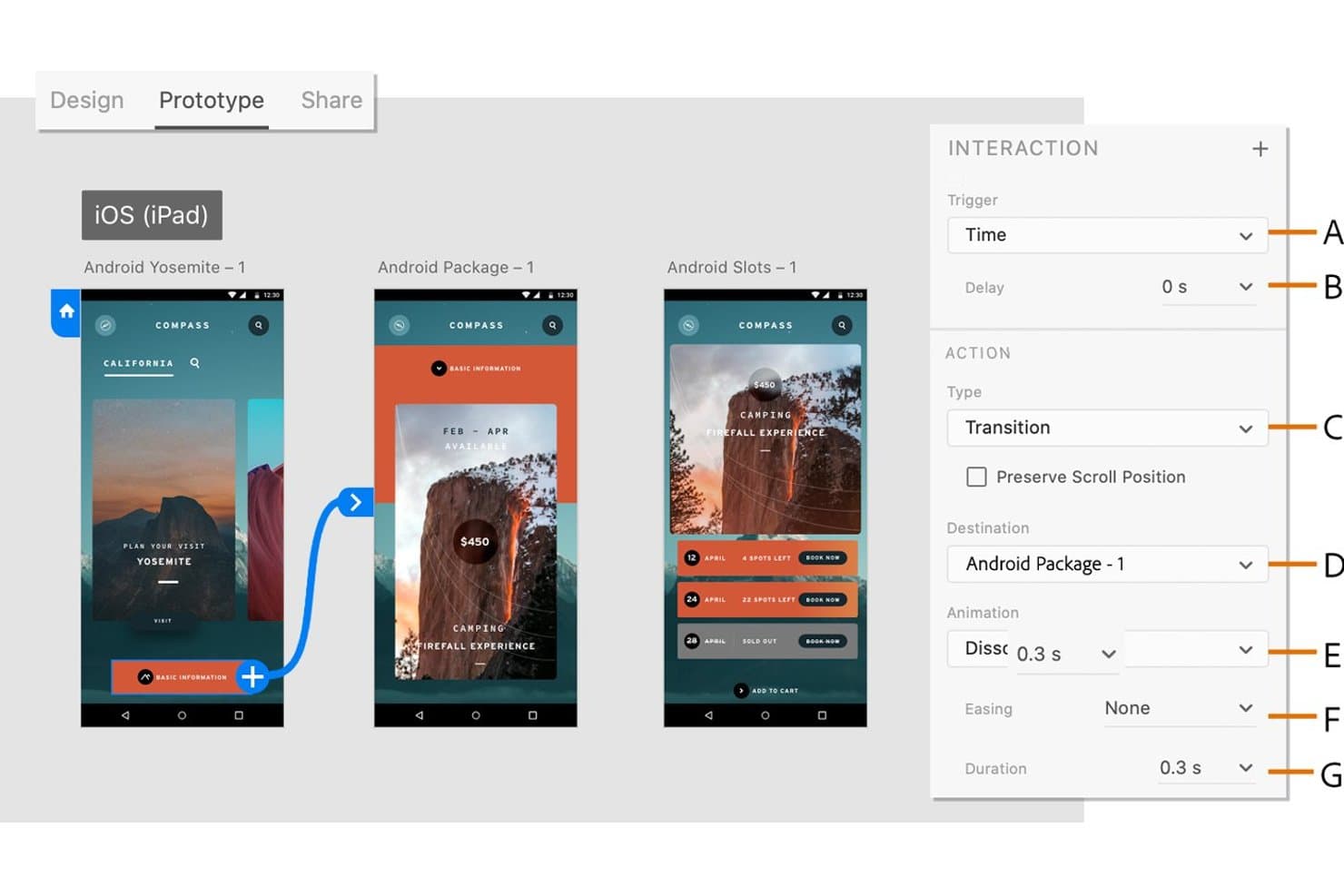
Adobe XD lets users define timed transitions between prototype screens. Adobe XD is a design and prototyping tool for desktop that lets you build interactive mobile app mockups using artboards, component states, Auto-Animate, and shareable prototype links with built-in design specs.
Who Is Adobe XD Best For?
Adobe XD fits designers and product teams already working inside the Adobe ecosystem who need a familiar, code-free tool for mobile app prototyping and design handoff.
Why I Picked Adobe XD
Adobe XD earns its spot on my shortlist because it's purpose-built for teams already living inside the Adobe ecosystem who need a clean path from design to developer handoff. I love that you can publish a Development link directly from XD, giving developers instant access to design specs, spacing, and exportable assets without any extra steps. Multiple Flows let me keep login, onboarding, and core app navigation in one file, each with its own shareable prototype link for stakeholder review.
Adobe XD Key Features
- Auto-Animate: Animates matching layers between artboards to simulate transitions like swipes, carousels, and screen changes without manual keyframing.
- Component states: Lets you define default, hover, toggle, and custom states for UI elements like buttons, switches, and checkboxes within a single component.
- Scroll groups: Creates horizontally, vertically, or free-scrolling content areas within an artboard to simulate lists, carousels, and maps.
- Voice triggers: Lets you assign spoken command phrases as prototype triggers, making it possible to prototype voice-assistant and hands-free app flows.
Adobe XD Integrations
Adobe XD offers documented integrations with Jira Cloud, Slack, Zoom, Photoshop, Illustrator, After Effects, and Creative Cloud Libraries. It also supports third-party plugins through its plugin manager and provides a plugin API for custom integrations.
Pros and Cons
Pros:
- Multiple flows organize complex app journeys
- Design specs clarify developer handoff
- Auto-Animate creates convincing screen transitions
Cons:
- Missing variables restricts realistic interaction logic
- Maintenance mode limits future product development
 Best for no-code conditional logic in prototypes
- Free plan available
- From $29/user/month (billed annually)
Visit WebsiteCustomer Rating:3.6/5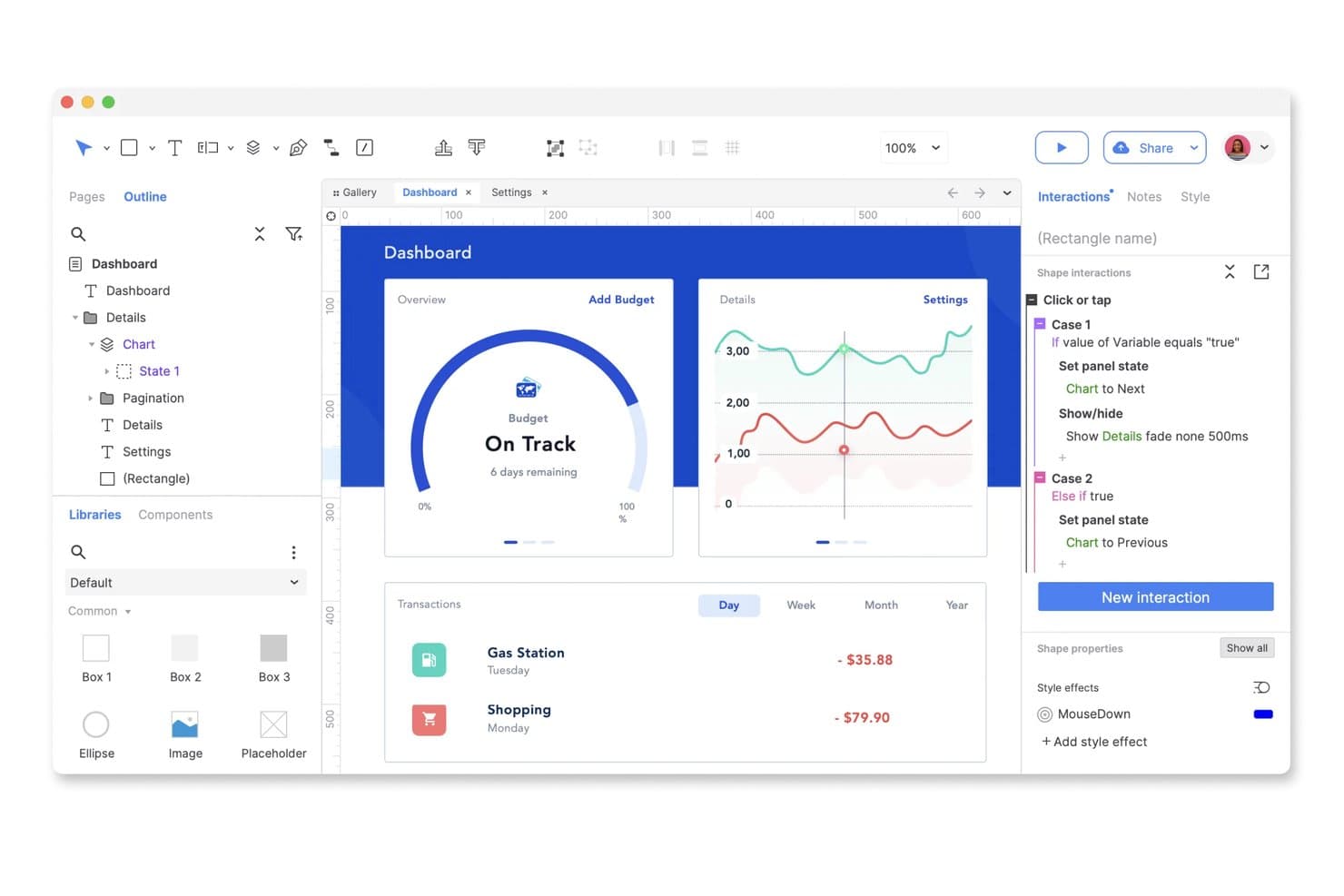
Axure RP lets users build interactive dashboard prototypes with conditional logic. Axure RP is a desktop-based prototyping tool that combines wireframing, flow diagramming, and high-fidelity interactive prototyping with no-code conditional logic, dynamic panels, variables, and data-driven repeaters.
Who Is Axure RP Best For?
Axure RP is a strong fit for UX/UI designers and product designers who need to simulate complex, state-based app logic without writing a single line of code.
Why I Picked Axure RP
I've included Axure RP in my top picks because no other tool on this list handles no-code conditional logic as deeply. You can build multi-state dynamic panels that simulate real mobile screen behavior, like a swipeable carousel that responds to a user's previous input, using variables and conditions without touching code. I also like that repeater widgets let you prototype data-driven lists with real imported CSV data, so filtering and sorting behave exactly as they would in a live app.
Axure RP Key Features
- Adaptive views: Design one page with multiple layout versions for phone, tablet, and desktop, with device presets like iPhone 12 that activate automatically based on browser width.
- Multi-device prototype preview: Publish to Axure Cloud and view prototypes in any browser or via the iOS and Android apps, with offline download support for on-device testing.
- Developer handoff with Inspect: Automatically generated redlines, CSS inspection, and image asset export give developers everything they need directly from the prototype.
- Pinned threaded comments: Reviewers drop comments anywhere on the design, reply in threads, teammates, and resolve feedback—all without a paid account.
Axure RP Integrations
Axure RP integrates with Jira, Confluence, Slack, Microsoft Teams, Figma, Sketch, and Adobe XD for delivery, collaboration, and design handoff. It also connects with Maze, Hotjar, UXTweak, UserTesting, and UserZoom for third-party usability testing.
Pros and Cons
Pros:
- Supports offline mobile prototype previews
- Models data-driven lists with imported datasets
- Simulates complex app logic without code
Cons:
- Desktop editor limits live collaboration
- No documented pinch or multi-touch gestures
Learn more about Axure RP: Best for design-to-dev handoff in one workspace
- Free plan available
- From $3/user/month
Visit WebsiteCustomer Rating:4.7/5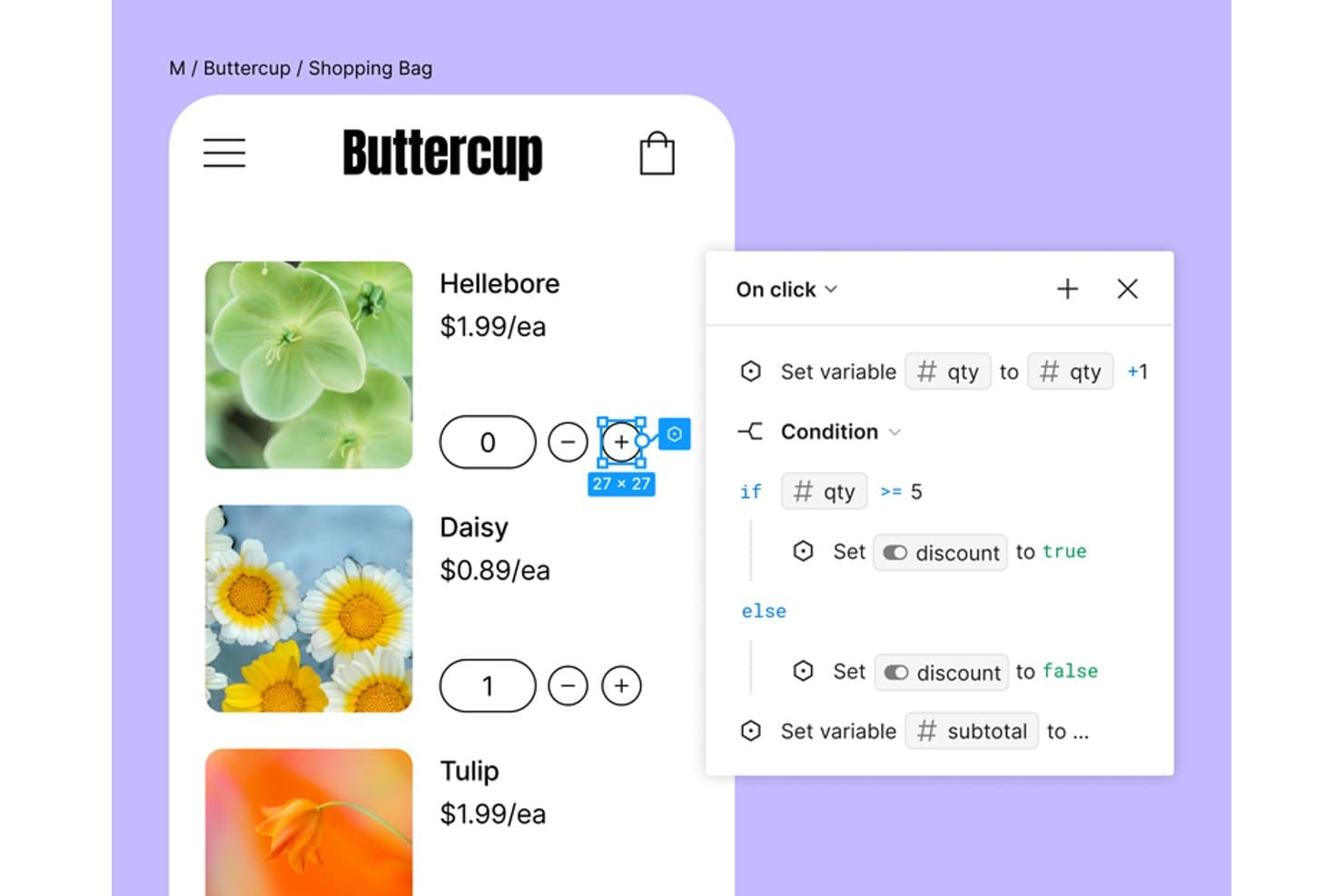
Figma lets users add conditional logic to interactive mobile prototypes. Figma is a browser-based UI design and prototyping tool that lets teams design screens, build interactive mobile app flows with variables and conditional logic, mirror prototypes on real devices, and hand off designs to developers—all without leaving a single workspace.
Who Is Figma Best For?
Figma is the go-to choice for cross-functional product teams where designers, product managers, and developers need to work in the same files without switching tools.
Why I Picked Figma
Figma earns its spot on my shortlist because design and developer handoff happen in the same file, with no exports or third-party tools required. I love how Dev Mode lets developers inspect spacing, copy code snippets, and mark screens "Ready for dev" while I'm still refining flows in the same workspace. Variables and conditional logic also let me build prototype states, like a cart total updating on item add, without duplicating dozens of frames.
Figma Key Features
- Smart Animate: Animates matching layers between frames to simulate realistic transitions like swipes, toggles, and pull-to-refresh without duplicating frames.
- Interactive components: Lets you embed hover, pressed, and toggle states directly inside component variants, reducing the total number of prototype connections needed.
- Figma Mirror: Streams your selected canvas frame live to an iOS or Android device over any network connection for real-time mobile preview.
- Maze integration: Sends your Figma prototype directly to Maze in one click for unmoderated usability testing with automated reports.
Figma Integrations
Figma offers native integrations with Jira, Slack, Microsoft Teams, Google Chat, Maze, UserTesting, dscout, UXtweak, Sprig, and Asana. Its REST API, webhooks, and Zapier support custom integrations and broader product workflows.
Pros and Cons
Pros:
- Design-to-development handoff stays in one workspace
- Dynamic variables support app-like prototype logic
- Realistic mobile previews across devices
Cons:
- Pinch zoom and live input are missing
- Large files can become slow
 Best for code-backed design system prototyping
- Free plan + 14-day free trial + demo available
- From $49/user/month
Visit WebsiteCustomer Rating:4.2/5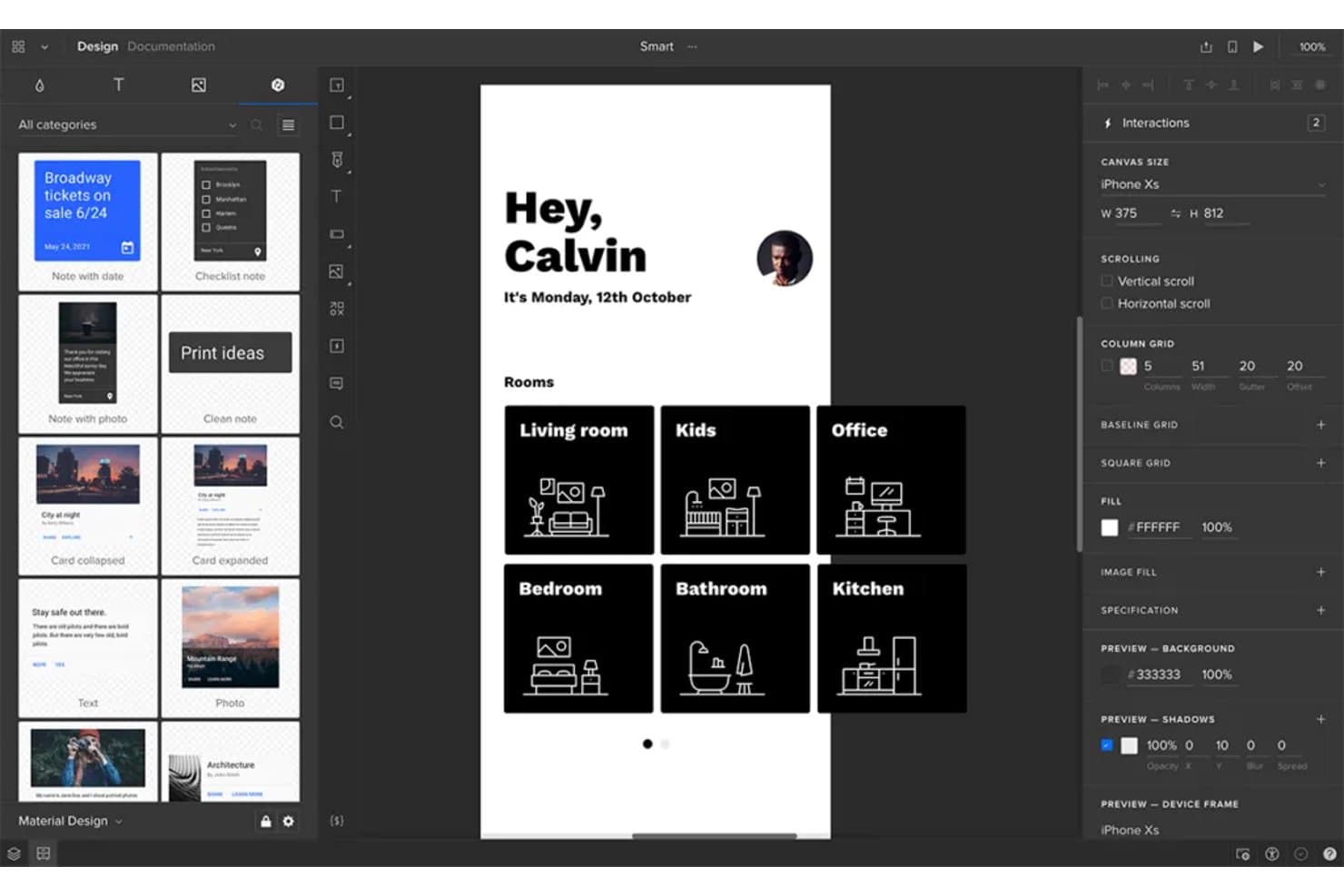
UXPin lets users prototype mobile app screens with real UI components. UXPin is a prototyping tool that lets product and design teams build interactive mobile app prototypes using a combination of no-code interactions, conditional logic, variables, and real React components through its Merge and Forge features.
Who Is UXPin Best For?
UXPin is a strong fit for UX/UI and product designers who need to bridge the gap between design and engineering using real component libraries.
Why I Picked UXPin
I picked UXPin as one of the best because it's the only tool on this list that lets you prototype directly with real React components via Merge, so what stakeholders approve in Preview is built from the same code that ships. I love that you can wire up conditional logic, variables, and API requests inside those components, which means a mobile app prototype can validate actual form inputs or pull live data. Forge extends this further by generating UI from a screenshot using your own component library.
UXPin Key Features
- Mirror app: Scan a QR code to preview your prototype live on an iOS or Android device, with real-time updates as you edit—no cable or shared Wi-Fi required.
- Stakeholder approval: Reviewers can formally approve a prototype directly from the shared preview link, giving PMs a clear sign-off record without email chains.
- Pinned comments: Collaborators can drop comments tied to a specific spot on the canvas in both the editor and preview, with , assignment, and resolve tracking.
- FullStory session recording: Enable session recording in the Share modal to capture every tester's actions on a shared preview link inside your FullStory account.
UXPin Integrations
UXPin offers five documented native integrations: Jira Cloud, Slack, FullStory, Storybook, and Git. It also supports the UXPin Figma plugin and Sketch import, but no public UXPin API is documented for custom integrations.
Pros and Cons
Pros:
- Pinned feedback keeps stakeholder decisions traceable
- Conditional logic validates realistic mobile flows
- Real React components reduce handoff rework
Cons:
- Complex prototypes can experience performance slowdowns
- Pinch and multi-touch gestures remain unsupported
Learn more about UXPin: Best for pre-built iOS and Android UI kits
- Free plan + 10-day trial available
- From $19/user/month
Visit WebsiteCustomer Rating:4.2/5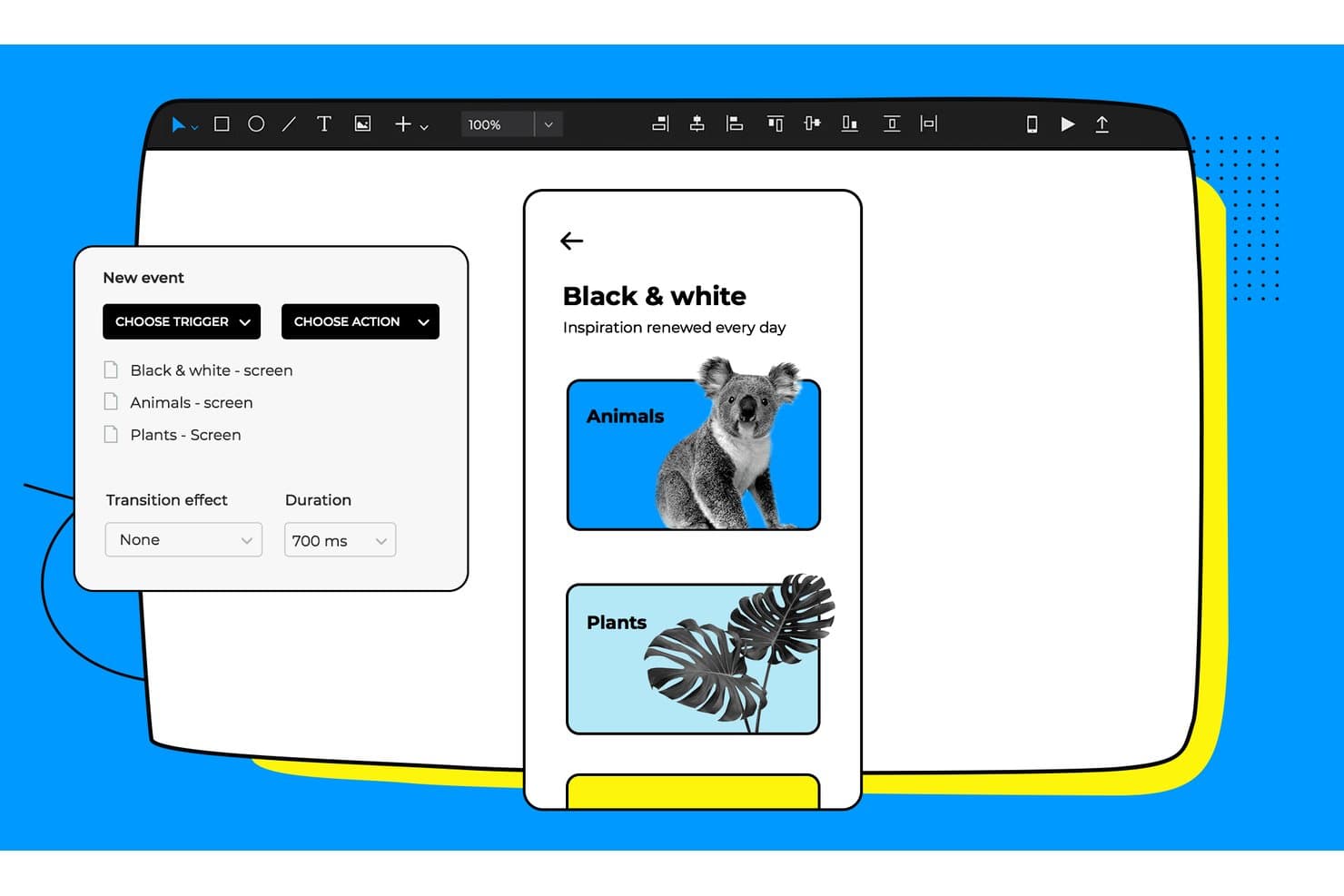
Justinmind lets users add triggers and transitions between prototype screens. Justinmind is a desktop-based mobile app prototyping tool for macOS and Windows that combines no-code interaction design, a library of 4,000+ pre-built UI components, gesture and touch simulation, and developer handoff features.
Who Is Justinmind Best For?
Justinmind is a strong fit for UX/UI and product designers who need a deep library of platform-accurate mobile components without building one from scratch.
Why I Picked Justinmind
I picked Justinmind as one of the best because its library of 4,000+ pre-built UI components covers iOS 18, Android/Material Design 3, and Apple Watch out of the box, so you're not building components from scratch before you can prototype. I love that the kits are updated for new device generations, including iPhone 16 and Galaxy S25 frames, which means your mockups reflect what users are actually holding. Pair that with a full gesture trigger set, tap, swipe in eight directions, pinch, and orientation changes, and you get mobile prototypes that feel genuinely native.
Justinmind Key Features
- No-code condition builder: A visual expression editor lets you set logic rules and conditions on any element without writing code.
- Masters: Reusable element groups that update across every screen simultaneously when you edit the source.
- Developer handoff panel: Inspectable CSS, spacing measurements, hex colors, and asset exports are available directly in the browser for developers.
- JIRA and Azure DevOps integration: Link UI elements to work items and sync requirements between your prototype and project management tools.
Justinmind Integrations
Justinmind offers documented integrations with Jira, Confluence, Azure DevOps, UserTesting, and Validately, plus imports from Figma, Sketch, Adobe XD, Photoshop, and Illustrator. Its Java-based API and SDK support custom plugins and integrations.
Pros and Cons
Pros:
- Complex flows work without writing code
- Realistic gestures model native touch interactions
- 4,000-plus platform-accurate mobile components
Cons:
- Mobile viewers report rendering and stability issues
- Desktop-only workflow limits browser-based collaboration
Learn more about Justinmind: Best for gesture-rich touch interaction prototyping
- 15-day free trial
- From $24/user/month (billed annually)
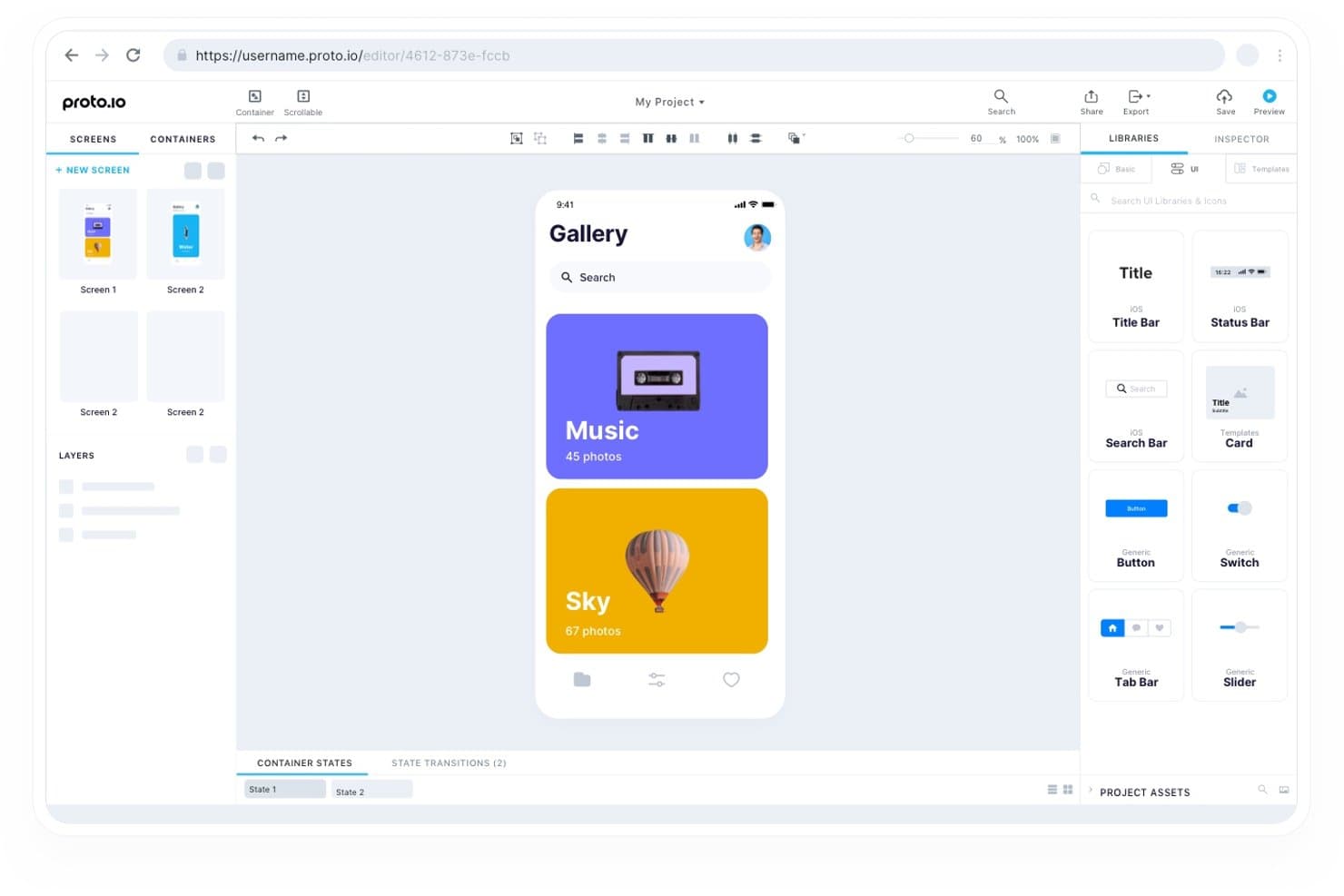
Proto.io lets users build interactive mobile prototypes with reusable UI components. Proto.io is a browser-based mobile app prototyping tool that supports no-code interactive prototype building with gesture and touch event handling, timeline-based animations, a native iOS and Android preview app, and a component library spanning iOS, Android, and web UI patterns.
Who Is Proto.io Best For?
Proto.io suits UX/UI designers and product designers who need to simulate realistic touch and gesture interactions across iOS and Android without writing a line of code.
Why I Picked Proto.io
Proto.io earns its spot on my shortlist because of how deep its gesture and touch interaction support goes. I can stack multiple events on a single element, so a swipe left triggers one action while a tap-hold triggers another on the same button, which is exactly how real mobile apps behave. The native iOS and Android player app also lets me hand a phone to a stakeholder and have them experience a fully gesture-accurate prototype offline, no browser required.
Proto.io Key Features
- Variables and logic engine: Set global variables, write JavaScript expressions, and display real user data dynamically across prototype screens.
- Reusable component containers: Sync edits across all screens instantly by building shared containers and custom components into a project design system.
- Offline HTML export: Package your entire prototype as a downloadable HTML file for sharing and previewing without an internet connection.
- Design tool import: Bring in frames and layer hierarchies directly from Figma, Sketch, Adobe XD, and Photoshop via dedicated plugins.
Proto.io Integrations
Proto.io integrates with Figma, Sketch, Adobe XD, Photoshop, Jira, Confluence, and Trello, plus UserTesting, UserZoom, Userlytics, Lookback, UXArmy, and Validately through share links.
Pros and Cons
Pros:
- Variables simulate realistic data-driven product flows
- Native previews validate touch behavior on devices
- Gesture stacking mirrors complex mobile interactions
Cons:
- Linking interactions takes time to learn
- Large projects can slow during editing
Learn more about Proto.io:
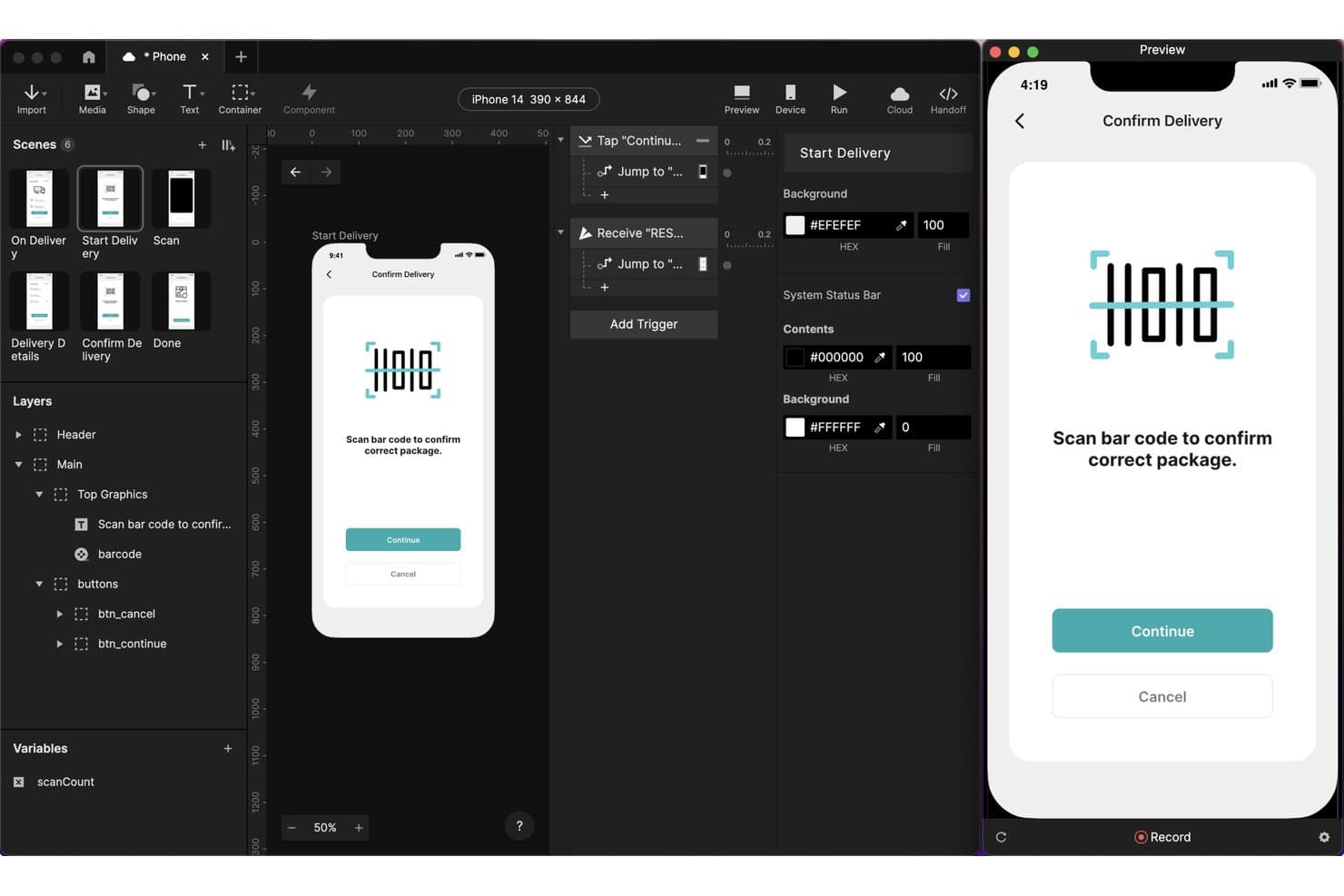
ProtoPie lets users prototype barcode scanning interactions for mobile apps. ProtoPie is a mobile app prototyping tool that lets you build high-fidelity, interactive prototypes using layer-level triggers, gesture and sensor inputs, conditional logic, variables, and AI-generated interaction logic—with built-in handoff tools and on-device preview across iOS and Android.
Who Is ProtoPie Best For?
ProtoPie is a strong fit for UX/UI and product designers who need to prototype complex mobile interactions—gestures, sensors, voice, and conditional logic—that go beyond what Figma handles natively.
Why I Picked ProtoPie
ProtoPie earns its spot on my shortlist because its AI-generated interaction logic genuinely changes how fast you can go from idea to testable prototype. I've used the AI prompt feature to describe a conditional gesture flow in plain language and watch it place editable triggers, variables, and responses directly on the canvas. Paired with Developer Handoff, which auto-documents durations, easing, and layer properties from a recorded scenario, your engineering team gets precise specs without a separate documentation pass.
ProtoPie Key Features
- Multi-device prototyping: Send and Receive triggers let two prototypes communicate across separate devices in real time, simulating cross-device app experiences.
- Built-in user testing: Run moderated and unmoderated test sessions with OTP-protected links, session replay, and task scoring directly inside ProtoPie.
- Gesture and sensor triggers: Prototype with tap, long press, fling, pinch, rotate, tilt, compass, sound, and voice triggers for precise mobile interaction simulation.
- ProtoPie Connect: A desktop app that connects your prototype to live APIs, Arduino, Unity, Unreal, and web embeds without writing code.
ProtoPie Integrations
ProtoPie integrates with Figma, Sketch, Adobe XD, Claude Code, Cursor, VS Code, Codex, Lookback, UserTesting, UserZoom GO, and Useberry. ProtoPie Connect supports APIs, Arduino, Unity, Unreal, web embeds, and custom Socket.IO plugins.
Pros and Cons
Pros:
- Documents interaction details for developers
- Simulates gestures, sensors, and voice
- AI generates editable interaction logic
Cons:
- Remote feedback needs paid sharing access
- Imported screens require one-way design updates
Learn more about ProtoPie:
Diğer Mobil Uygulama Prototipleme Araçları
İşte kısa listeme giremeyen, ancak yine de göz atmaya değer bazı ek mobil uygulama prototipleme aracı seçenekleri:
- 11SketchBest for Mac-native UI design with free handoff
- 12Origami StudioBest for sensor and hardware interaction testing
- 13Fluid UIBest for on-device mockup testing on any budget
- 14MarvelBest mobile app prototyping tool for beginners
- 15MockplusBest for prototyping with perpetual licensing
- 16BubbleBest for prototyping that ships as a real app
- 17FramerBest for motion-driven interactive prototypes
- 18PrincipleBest for timeline animation in mobile flows
- 19Mockitt PrototypeBest for AI-generated prototypes from requirements
How I Evaluate Mobile App Prototyping Tools
I split my evaluation into three parts. Core functionality carries the most weight—I look for tools that link screens into realistic flows and preview accurately on actual mobile devices. Then I check for standout features like dynamic data and variables. Finally, I consider pricing flexibility and onboarding speed.
Core Functionality (Table Stakes For This List)
When I'm selecting tools for my list, I score each one on a scale from 0 (does not offer the functionality) to 5 (excels in this area) for each core functionality listed below. I then convert the total into a percentage to help assess each tool's overall fit, with extra weight on any functionalities I've deemed essential.
- Interactive Prototyping (Essential): I evaluate how well a tool links screens into realistic flows with transitions, conditional logic, and variables that mimic real app behavior.
- Mobile Device Preview: Previewing on an actual phone matters. I check whether the tool offers a companion app or browser-based preview that renders accurately on-device.
- Screen & UI Component Design: Good mobile UI kits save hours. I look for pre-built component libraries tailored to iOS and Android patterns with easy customization.
- Gesture & Touch Support: I check for swipe, scroll, pinch, and long-press support so prototypes feel native rather than like a slideshow of static screens.
- Sharing & Feedback Collection: Teams need contextual comments pinned to specific screens. I evaluate sharing permissions, threaded feedback, and notification options for stakeholders.
Once I have a list of tools that meet the criteria, I consider what sets each platform apart.
Differentiating Factors (What Sets Vendors Apart)
Here's how I compare and contrast different vendors:
Standout Features
Dynamic data and variables separate basic prototypes from ones that actually convince stakeholders. I look for conditional logic that lets a prototype respond to user input—like showing a personalized dashboard based on a selected role during onboarding. Built-in user testing tools also matter. Tools like Marvel and Maze offer native heatmaps and session recordings, which means I can validate flows without switching to a separate research platform. I also check for design-to-code automation, since auto-generated front-end code cuts handoff friction between product and engineering.
Beyond Features
I check whether a tool connects to Jira, Slack, or Figma so prototypes stay linked to the workflows my team already uses. Pricing structure matters too—per-seat models can quietly bloat costs as a team scales, so I look for transparent tiers with free plans that let me validate fit before requesting budget. For teams in regulated industries, I also evaluate compliance certifications like SOC 2 and GDPR, since cloud-hosted prototypes often contain sensitive roadmap details that require strong access controls and audit logs.
Mobil Uygulama Prototipleme Aracı Nasıl Seçilir?
Uzun özellik listeleri ve karmaşık fiyatlandırma yapıları arasında kaybolmak kolaydır. Kendinize özgü yazılım seçim sürecinizi yürütürken odaklanmanıza yardımcı olmak için göz önünde bulundurmanız gereken faktörlerden oluşan bir kontrol listesi hazırladım:
| Faktör | Göz Önünde Bulundurulması Gerekenler |
|---|---|
| FaktörÖlçeklenebilirlik | Göz Önünde Bulundurulması GerekenlerAraç ekibinizle birlikte büyüyebilir mi? İhtiyaçlarınız genişledikçe çözümün daha fazla kullanıcıyı, projeyi veya karmaşıklığı yönetip yönetemeyeceğini değerlendirin. Esnek fiyatlandırma ve özellikler arayın. |
| FaktörEntegrasyonlar | Göz Önünde Bulundurulması GerekenlerMevcut araçlarınıza bağlanabiliyor mu? Sorunsuz iş akışları sağlamak için Slack, Jira veya tasarım yazılımı gibi ekibinizin favori uygulamalarıyla entegre olup olmadığını kontrol edin. |
| FaktörÖzelleştirilebilirlik | Göz Önünde Bulundurulması Gerekenlerİhtiyaçlarınıza uyacak şekilde düzenleyebilir misiniz? Arayüz düzenleri veya iş akışları gibi unsurları ekibinizin süreçlerine ve tercihlerine uyacak şekilde değiştirip değiştiremeyeceğinizi değerlendirin. |
| FaktörKullanım kolaylığı | Göz Önünde Bulundurulması GerekenlerEkibinizin öğrenmesi kolay mı? Kapsamlı bir eğitim gerektirmeden hızlı benimsenmeyi teşvik etmek için öğrenme eğrisini ve arayüzün sezgisel olup olmadığını göz önünde bulundurun. |
| FaktörUygulama ve işe alıştırma | Göz Önünde Bulundurulması GerekenlerNe kadar hızlı başlayabilirsiniz? Ekibinizin aracı hemen etkili şekilde kullanmaya başlamasına yardımcı olacak eğitimler, şablonlar ve destek gibi mevcut kaynakları arayın. |
| FaktörMaliyet | Göz Önünde Bulundurulması GerekenlerBütçenize uygun mu? Fiyatlandırma planlarını karşılaştırın ve ihtiyaç duyduğunuz özelliklerin maliyeti haklı çıkarıp çıkarmadığını değerlendirin. Gizli ücretlere veya uzun vadeli taahhütlere dikkat edin. |
| FaktörGüvenlik önlemleri | Göz Önünde Bulundurulması GerekenlerVerileriniz korunuyor mu? Aracın şifreleme ve GDPR veya CCPA gibi ilgili düzenlemelere uyumluluk da dahil olmak üzere güvenlik standartlarınızı karşıladığından emin olun. |
| FaktörDestek seçenekleri | Göz Önünde Bulundurulması GerekenlerHangi destek seçenekleri mevcut? Sorunlarla karşılaştığınızda size yardımcı olmak için sohbet, e-posta veya telefon desteği de dahil olmak üzere güvenilir müşteri hizmetlerinin bulunup bulunmadığını kontrol edin. |
Mobil Uygulama Prototipleme Araçları Nedir?
Mobil uygulama protipleme araçları, bir mobil uygulama geliştirilmeden önce nasıl görüneceğini ve nasıl bir kullanım deneyimi sunacağını hızlı bir şekilde oluşturmanıza, paylaşmanıza ve test etmenize olanak tanıyan yazılımlardır. Tasarımcılar, geliştiriciler ve ürün ekipleri bu araçları ekran taslakları oluşturmak, etkileşimler ayarlamak ve kod yazmadan geri bildirim almak için kullanır. Fikirlerinizin uygulamada nasıl çalıştığını görebilir, sorunları erkenden tespit edebilir ve geliştirme için zaman ve para harcamadan önce değişiklikler yapabilirsiniz.
Özellikler
Mobil uygulama protipleme araçlarını seçerken aşağıdaki temel özelliklere dikkat edin:
- Etkileşimli prototipler: Kullanıcı deneyimini simüle etmek ve geri bildirim toplamak için tıklanabilir ve etkileşimli maketler oluşturmanızı sağlar.
- İş birliği araçları: Ekip üyelerinin gerçek zamanlı olarak birlikte çalışmasını sağlar; böylece herkesin tasarım sürecine uyum sağlamasına ve katkıda bulunmasına olanak tanır.
- Sürükle ve bırak arayüzü: Kullanıcıların kodlama bilgisine ihtiyaç duymadan tasarım öğelerini kolayca düzenlemesine olanak tanıyarak tasarım sürecini basitleştirir.
- Geri bildirim toplama: Kullanıcı ve paydaş geri bildirimlerinin doğrudan araç içinde toplanmasını kolaylaştırarak tasarımların geliştirilmesine ve iyileştirilmesine yardımcı olur.
- Entegrasyon olanakları: İş akışlarını kolaylaştırmak ve üretkenliği artırmak için Slack veya Jira gibi ekibinizin kullandığı diğer yazılım araçlarına bağlanır.
- Şablon kitaplığı: Prototipleme sürecini hızlandırmak ve projeler arasında tutarlılık sağlamak için önceden tasarlanmış şablonlar sunar.
- Sürüm kontrolü: Tasarım yinelemelerini takip ederek ekiplerin gerektiğinde önceki sürümlere dönmesine ve net bir proje geçmişi tutmasına olanak tanır.
- Animasyon araçları: Prototiplere animasyon ekleme olanağı sunarak kullanıcı etkileşimini geliştirir ve tasarımları daha ilgi çekici hâle getirir.
- Özelleştirilebilir tasarım bileşenleri: Kullanıcıların tasarım öğelerini belirli proje ihtiyaçlarına göre uyarlamasına olanak tanıyarak prototiplerin esnekliğini ve uyarlanabilirliğini artırır.
- Güvenlik önlemleri: Şifreleme ve ilgili düzenlemelere uyum yoluyla veri koruması sağlayarak hassas proje bilgilerinin güvende tutulmasına yardımcı olur.
Faydalar
Mobil uygulama protipleme araçlarını kullanmak ekibiniz ve işletmeniz için çeşitli faydalar sağlar. Yararlanabileceğiniz bazı avantajlar şunlardır:
- Daha hızlı yinelemeler: Sürükle ve bırak arayüzleri ile etkileşimli prototipler gibi özellikleri kullanarak tasarımlarda hızlıca değişiklik yapın ve yeni fikirleri test edin.
- Geliştirilmiş iş birliği: Gerçek zamanlı iş birliği araçları, ekip üyelerinin katkıda bulunmasına ve geri bildirim vermesine olanak tanıyarak herkesin uyumlu ve sürece dahil olmasını sağlar.
- Maliyet tasarrufu: Kullanıcı testleri ve geri bildirim toplama yoluyla tasarım kusurlarını erkenden belirleyerek geliştirme sırasında maliyetli revizyon ihtiyacını azaltın.
- Geliştirilmiş kullanıcı deneyimi: Kullanıcı ihtiyaçlarını karşılayan ilgi çekici ve kullanıcı dostu tasarımlar oluşturmak için animasyon araçlarını ve özelleştirilebilir bileşenleri kullanın.
- Kolaylaştırılmış iş akışları: Diğer yazılım araçlarıyla entegrasyon olanakları, tasarım süreçlerini mevcut iş akışlarına bağlayarak ekibinizin daha verimli çalışmasına yardımcı olur.
- Etkili iletişim: Etkileşimli prototipleri kullanarak tasarım kavramlarını ve fikirlerini paydaşlarla net bir şekilde paylaşın; böylece herkes proje vizyonunu anlar.
- Veri güvenliği: Şifreleme ve veri düzenlemelerine uyum da dahil olmak üzere güvenlik önlemleriyle hassas proje bilgilerini koruyun.
Maliyetler ve Fiyatlandırma
Mobil uygulama protipleme araçlarını seçmek, mevcut çeşitli fiyatlandırma modellerinin ve planların anlaşılmasını gerektirir. Maliyetler özelliklere, ekip büyüklüğüne, eklentilere ve daha fazlasına göre değişir. Aşağıdaki tabloda yaygın planlar, ortalama fiyatları ve mobil uygulama protipleme aracı çözümlerinde genellikle sunulan özellikler özetlenmiştir:
Mobil Uygulama Prototipleme Araçları için Plan Karşılaştırma Tablosu
| Plan Türü | Ortalama Fiyat | Yaygın Özellikler |
|---|---|---|
| Plan TürüÜcretsiz Plan | Ortalama Fiyat$0 | Yaygın ÖzelliklerTemel prototipleme olanakları, sınırlı iş birliği özellikleri ve küçük bir şablon kitaplığı. |
| Plan TürüKişisel Plan | Ortalama Fiyat$5-$25/kullanıcı/ay | Yaygın ÖzelliklerDaha fazla tasarım öğesi, gelişmiş iş birliği araçları ve daha geniş bir şablon yelpazesine erişim. |
| Plan Türüİşletme Planı | Ortalama Fiyat$25-$50/kullanıcı/ay | Yaygın ÖzelliklerGelişmiş prototipleme özellikleri, öncelikli destek ve diğer işletme araçlarıyla entegrasyon. |
| Plan TürüKurumsal Plan | Ortalama Fiyat$50-$100/kullanıcı/ay | Yaygın ÖzelliklerÖzelleştirilebilir çözümler, kapsamlı güvenlik özellikleri, özel hesap yönetimi ve API erişimi. |
Mobil Uygulama Prototipleme Araçları SSS
Mobil uygulama prototipleme araçları hakkında sık sorulan soruların bazı yanıtları:
Mobil uygulama prototipleme araçları web tasarımı için kullanılabilir mi?
Evet, birçok mobil uygulama prototipleme aracı web tasarımını da destekler. Bu araçlar genellikle hem mobil hem de web arayüzlerine yönelik özelliklerle birlikte gelir ve farklı ekran boyutlarına uyum sağlayan duyarlı düzenler tasarlamanıza olanak tanır. Bu çok yönlülük, onları platformlar arası projeler üzerinde çalışan ekipler için uygun hâle getirir. Bir araç seçerken, ızgara sistemleri ve duyarlı kırılma noktaları gibi web tasarımı için gerekli özelliklere sahip olduğundan emin olun.
Mobil uygulama prototipleme araçları kullanıcı testlerine nasıl yardımcı olur?
Mobil uygulama prototipleme araçları, kullanıcıların etkileşim kurabileceği etkileşimli taslaklar oluşturarak kullanıcı testlerini kolaylaştırır. Bu etkileşim, geliştirme başlamadan önce kullanıcı deneyimi, gezinme ve tasarım öğeleri hakkında geri bildirim toplamanıza olanak tanır. Erken test yaparak olası sorunları belirleyebilir ve gerekli düzenlemeleri yapabilirsiniz; böylece zaman ve kaynak tasarrufu sağlarsınız. Kullanıcı etkileşimlerini izlemek için kolay paylaşım seçenekleri ve analizler sunan araçları tercih edin.
Mobil uygulama prototipleme araçlarını kullanmak için kodlama becerilerine ihtiyacım var mı?
Hayır, çoğu mobil uygulama prototipleme aracı kodlama becerisi olmayan kullanıcılar için tasarlanmıştır. Bu araçlarda genellikle etkileşimli tasarımlar oluşturmayı kolaylaştıran sürükle ve bırak arayüzleri ile önceden oluşturulmuş bileşenler bulunur. Ancak bazı gelişmiş özellikler, tasarım ilkeleri hakkında temel düzeyde bilgi gerektirebilir. Prototipleme konusunda yeniyseniz kullanımı kolaylığı ön planda tutan ve başlamanıza yardımcı olacak eğitimler veya şablonlar sunan araçlarla başlayın.