

If you're exploring options beyond Aha!, you're likely facing challenges in managing your product roadmaps effectively. You need a tool that fits your team's specific needs, whether that's better collaboration, more intuitive interfaces, or features that align with your industry.
In my experience, finding the right software can be overwhelming with so many choices available. I aim to cut through the noise with well-researched insights on the best Aha! alternatives.
In this article, I'll guide you through the top options that could better suit your business. You'll find unbiased reviews focused on addressing your team's unique challenges and helping you make an informed decision.
What Is Aha!?
Aha! is a product roadmap software designed to help teams plan and execute their product strategies effectively. It's commonly used by product managers, developers, and marketers who need a clear vision and alignment on product goals. Features like goal setting, timeline planning, and reporting support your team's efforts in organizing and prioritizing tasks. Overall, Aha! provides a structured approach to managing product roadmaps, ensuring everyone is on the same page.
Why Trust Our Software Recommendations
6,700+
Reviews
20
Industry experts
16+
Evaluation factors
14
Years
Our team has been testing and reviewing software since 2012. As product managers ourselves, we know how difficult—and important—it is to choose the right software.
For this guide, we evaluated tools using hands-on testing and independent research, scoring tools using our selection criteria.
Our reviews reflect our human editorial judgment, not a sales pitch.
Expert reviewers:
- Andrew LumbySenior TPM
- Cristiano ValimSenior UI/UX Lead


Aha! Alternatives Comparison Table
This comparison table highlights pricing details for my top Aha! alternatives.
| Tool | Best For | Trial Info | Price | ||
|---|---|---|---|---|---|
| 1 | Best for publishing Jira roadmaps and updates | 30-day free trial + free plan available | From $1.10/user/month | Website | |
| 2 | Best for no-code app building | Free plan available; 14-day free trial | From $20/user/month (billed annually) | Website | |
| 3 | Best for feedback-powered roadmaps | Free plan available | From $7/per maker/month | Website | |
| 4 | Best for customer feedback integration | Free demo available | Pricing upon request | Website | |
| 5 | Best for strategic roadmapping | Free demo available | Pricing upon request | Website | |
| 6 | Best for Agile portfolio management | Free trial available | Pricing upon request | Website | |
| 7 | Best for idea management | 14-day free trial + free demo available | Pricing upon request | Website | |
| 8 | Best for manufacturing roadmaps | Free demo available | From $99/user/month | Website | |
| 9 | Best for product strategy alignment | Free demo available | Pricing upon request | Website | |
| 10 | Best for prioritization tools | Free demo available | Pricing upon request | Website |


Best Aha! Alternatives Reviews
Below are my detailed summaries of the best Aha! alternatives that made it onto my shortlist. My reviews offer a detailed look at the key features, pros & cons, integrations, and ideal use cases of each tool to help you find the best one for you.
 Best for publishing Jira roadmaps and updates
- 30-day free trial + free plan available
- From $1.10/user/month
Visit WebsiteCustomer Rating:5/5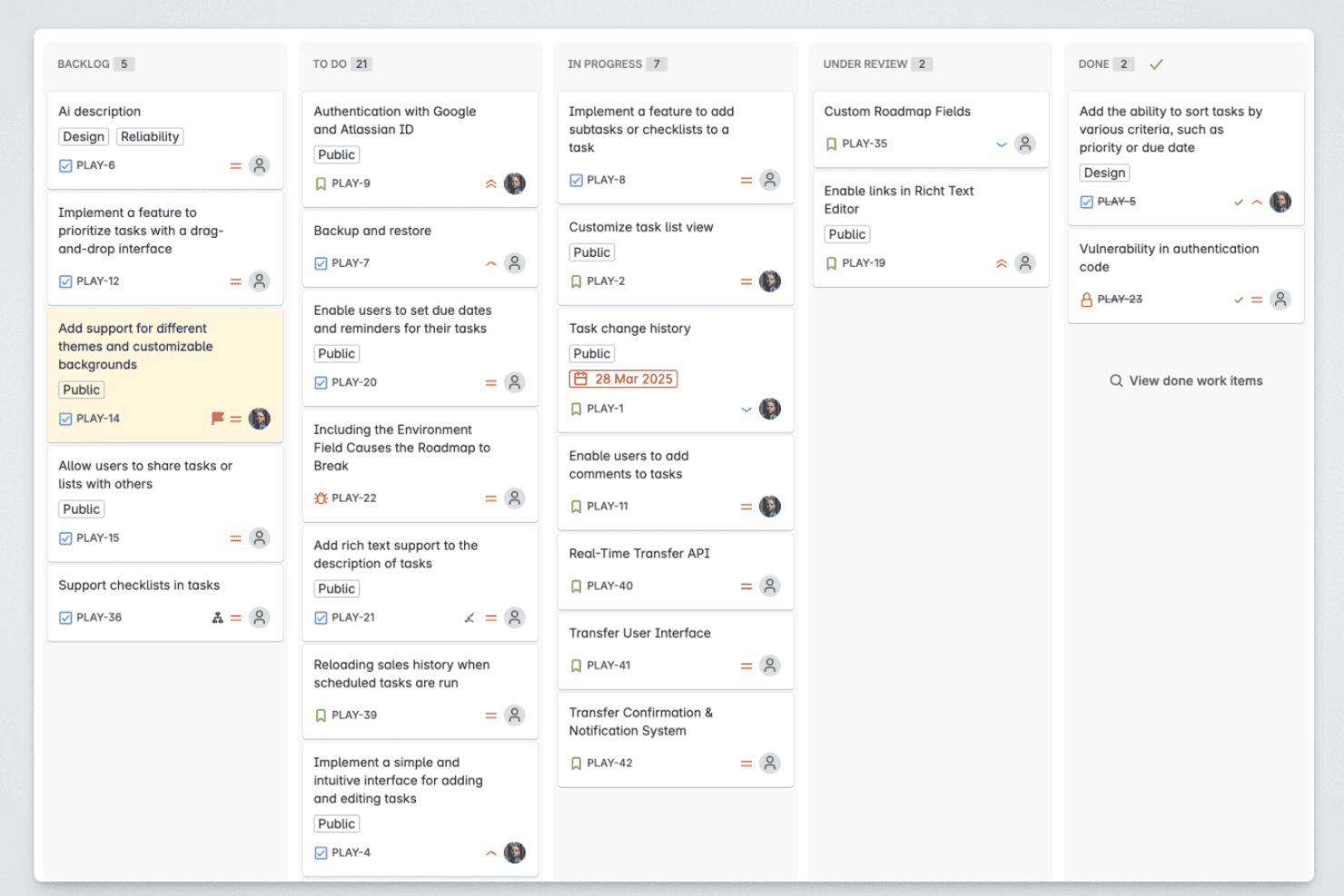
Released lets product managers organize roadmap items across backlog, in-progress, review, and completed stages. Released is a product management platform for Jira-centered teams that need lightweight roadmapping, customer feedback, and stakeholder communication without the complexity of a heavyweight Aha! alternative.
Who Is Released Best For?
Released suits product managers and product operations teams that collect customer feedback and share roadmap context with Jira stakeholders.
Why Released Is a Good Best Aha! Alternatives
I picked Released because I can publish Jira roadmaps and updates without moving teams into a separate planning system. I use its roadmap views to give stakeholders clear delivery context, then share progress updates alongside customer feedback. That keeps Jira work connected to the product story stakeholders need to follow.
Released Key Features
- AI release notes: Generate release notes from Jira tickets.
- Public pages: Publish product content on your website.
- No-login access: Let external viewers access shared content without Jira accounts.
- Atlassian Forge: Run the app on Atlassian’s cloud platform.
Released Integrations
Released is built as a Jira app, with native integration for Jira issues and projects. No additional native integrations or API for custom integrations are clearly documented.
Pros and Cons
Pros:
- No-login pages simplify stakeholder access
- AI reduces manual release-note drafting
- Roadmaps stay tied to delivery work
Cons:
- Some requested workflow features remain unavailable
- Limited depth for strategic portfolio planning
Learn more about Released: Best for no-code app building
- Free plan available; 14-day free trial
- From $20/user/month (billed annually)
Visit WebsiteCustomer Rating:4.6/5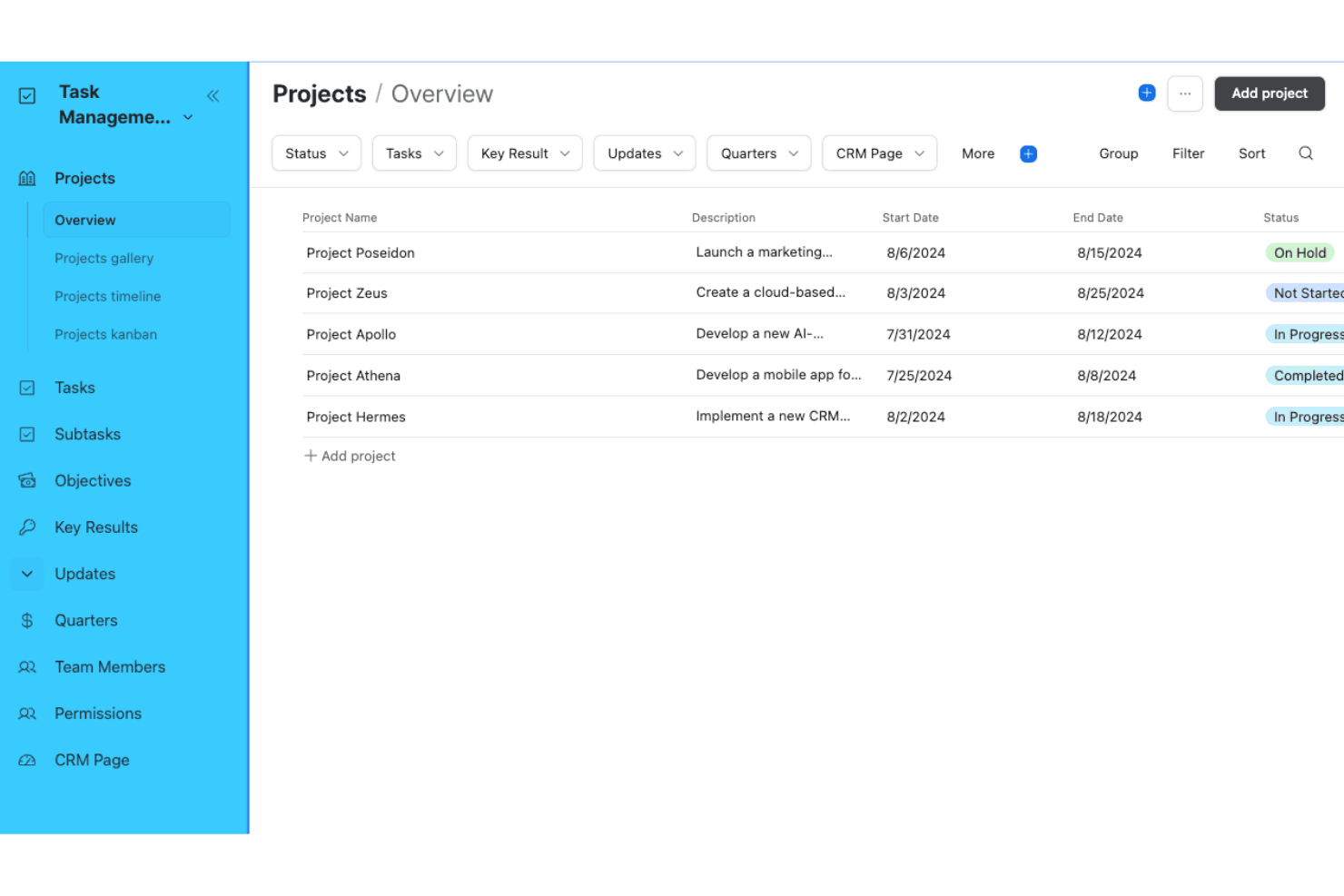
Airtable is a flexible, spreadsheet-like tool that lets teams build workflows and manage projects without writing code. Airtable is a flexible work management platform for product teams that need to organize product data, coordinate workflows, and build tailored tools without relying on engineering resources.
Who Is Airtable Best For?
Product managers and operations teams can use Airtable to build tailored internal apps without depending on engineering for every workflow change.
Why Airtable Is a Good Best Aha! Alternatives
I picked Airtable because its no-code app building helps product teams turn product data into tailored internal tools. I use linked records, custom Interfaces, and automations to create launch trackers, intake portals, and prioritization workflows without waiting for engineering support.
Airtable Key Features
- Custom views: Display records in grid, calendar, gallery, kanban, or timeline formats.
- Form builder: Create branded forms that capture structured submissions directly into a base.
- Record-level permissions: Control who can view, edit, or comment on specific records.
- Revision history: Review previous record values and restore earlier versions when needed.
Airtable Integrations
Airtable offers native integrations with Box and Google Drive, plus partner extensions for Formstack, Loom, Miro, Pexels, and Typeform. It also supports Make and Workato, connects with Zapier, and provides a Web API for custom integrations.
Pros and Cons
Pros:
- Forms simplify structured customer feedback collection
- Custom interfaces support tailored product workflows
- Flexible relational structure for product data
Cons:
- Complex bases require careful schema design
- Lacks dedicated product roadmapping capabilities
Learn more about Airtable: Best for feedback-powered roadmaps
- Free plan available
- From $7/per maker/month
Visit WebsiteCustomer Rating:4.9/5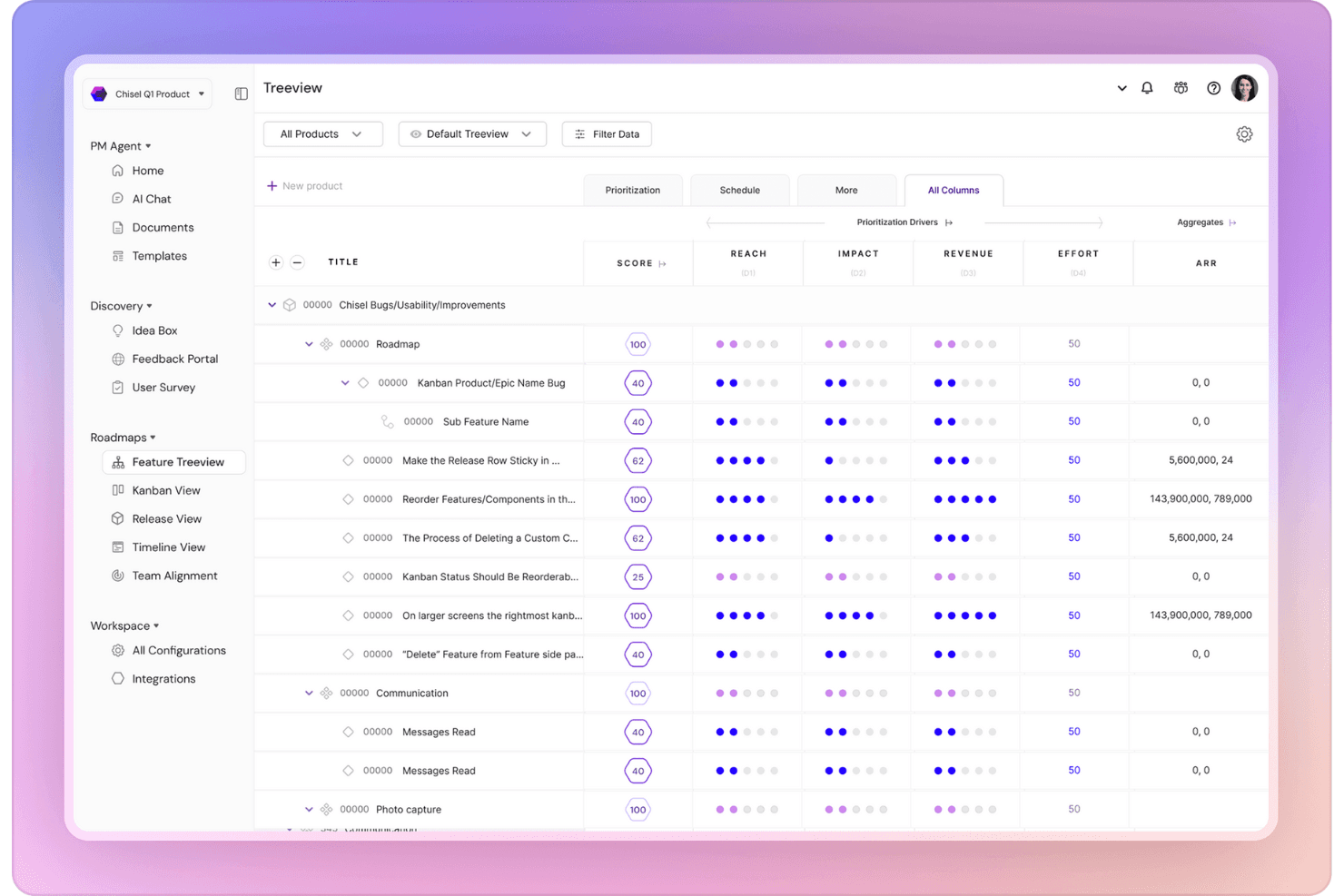
Chisel offers a Treeview feature for organizing product components. For product teams seeking an Aha! alternative, Chisel combines product planning, customer insights, prioritization, and agile delivery tools to connect strategy with execution.
Who Is Chisel Best For?
Product teams that need to collect customer feedback, connect it to product ideas, and prioritize roadmap decisions in one workspace.
Why Chisel Is a Good Best Aha! Alternatives
I picked Chisel because its feedback-powered roadmaps connect customer requests with product ideas and prioritization decisions. I like how my team can collect feedback, score opportunities, and turn validated ideas into roadmap items. That keeps customer evidence visible when we decide what moves into agile delivery.
Chisel Key Features
- Timeline view: Arrange initiatives and releases against dates.
- Kanban view: Move work items across customizable workflow columns.
- Sprint planning: Assign work to sprints and track delivery status.
- Jira integration: Link Chisel work items with Jira issues.
Chisel Integrations
Chisel integrates with Jira, allowing teams to link Chisel work items with Jira issues. Native integrations beyond Jira and API support are not clearly documented.
Pros and Cons
Pros:
- Offers timeline, Kanban, and sprint planning views
- Supports structured prioritization with scoring frameworks
- Connects customer feedback to roadmap decisions
Cons:
- Roadmap presentation feels less polished than Aha!
- Feedback workflows require careful initial configuration
Learn more about Chisel: Best for customer feedback integration
- Free demo available
- Pricing upon request
Visit WebsiteCustomer Rating:4.5/5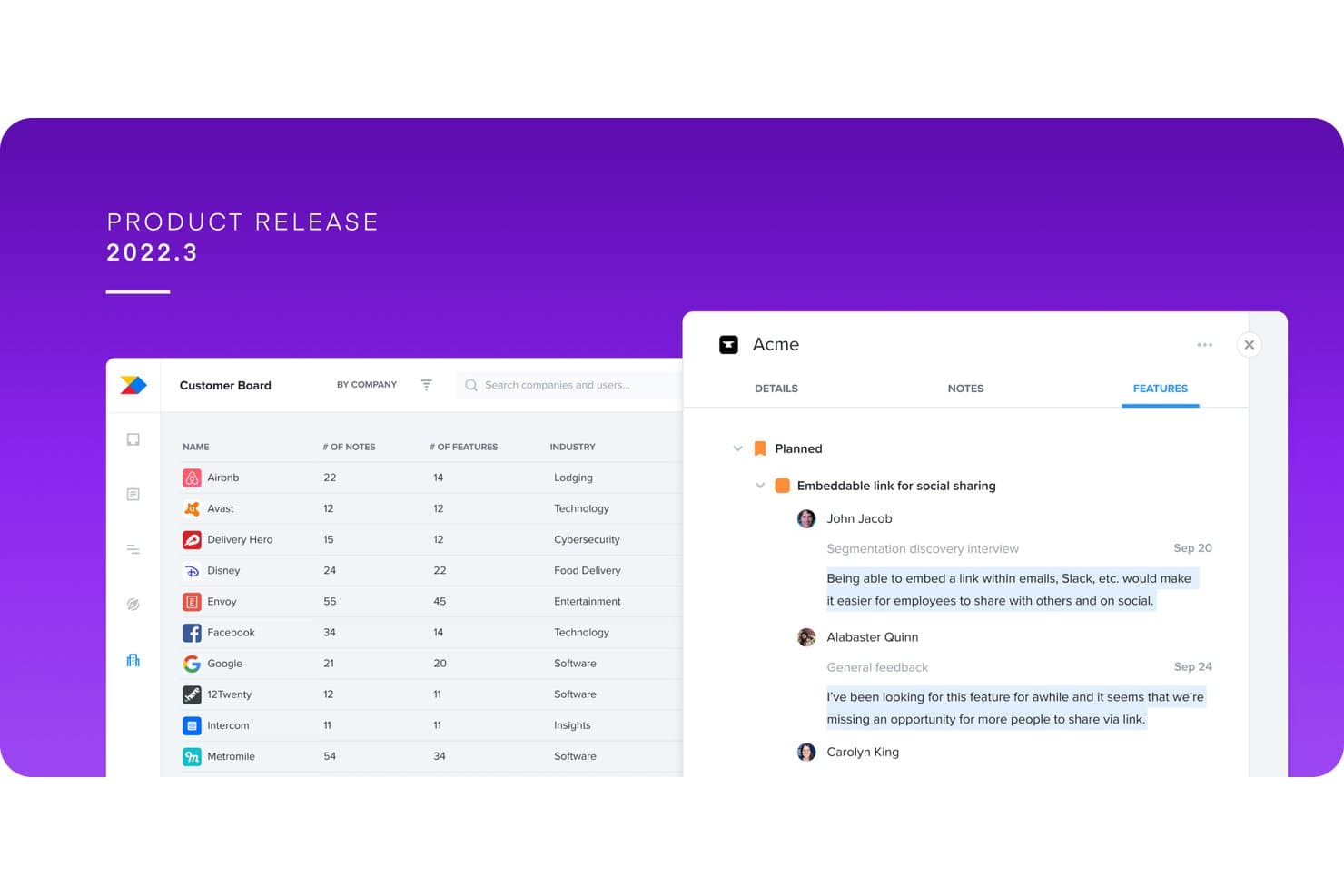
Productboard centralizes customer feedback linked to product features. Productboard is a product management platform for teams that need to connect customer needs, product strategy, and delivery priorities in one workspace.
Who Is Productboard Best For?
Productboard suits product managers and product teams that need to connect customer feedback with product strategy and priorities.
Why Productboard Is a Good Best Aha! Alternatives
I picked Productboard because its customer feedback integration connects feedback from multiple sources to product insights and feature ideas. I use those insights to identify recurring requests, assess customer impact, and tie evidence directly to roadmap priorities. That helps replace scattered feedback with traceable product decisions.
Productboard Key Features
- Product hierarchy: Organize products, components, features, and subfeatures.
- Prioritization frameworks: Score initiatives with custom criteria and formulas.
- Roadmap views: Create timeline, column, and swimlane roadmap views.
- Product objectives: Connect initiatives to measurable goals and outcomes.
Productboard Integrations
Productboard offers 25+ native integrations, including Zendesk, Slack, Intercom, Jira, Azure DevOps, Trello, GitHub, Salesforce, Amplitude, and Mixpanel. It also connects with Zapier and provides an API for custom integrations.
Pros and Cons
Pros:
- Supports structured scoring across product initiatives
- Connects customer impact to roadmap priorities
- Consolidates feedback into actionable product insights
Cons:
- Roadmap views offer less presentation flexibility
- Feedback triage can create duplicate insights
Learn more about Productboard: Best for strategic roadmapping
- Free demo available
- Pricing upon request
Visit WebsiteCustomer Rating:4.4/5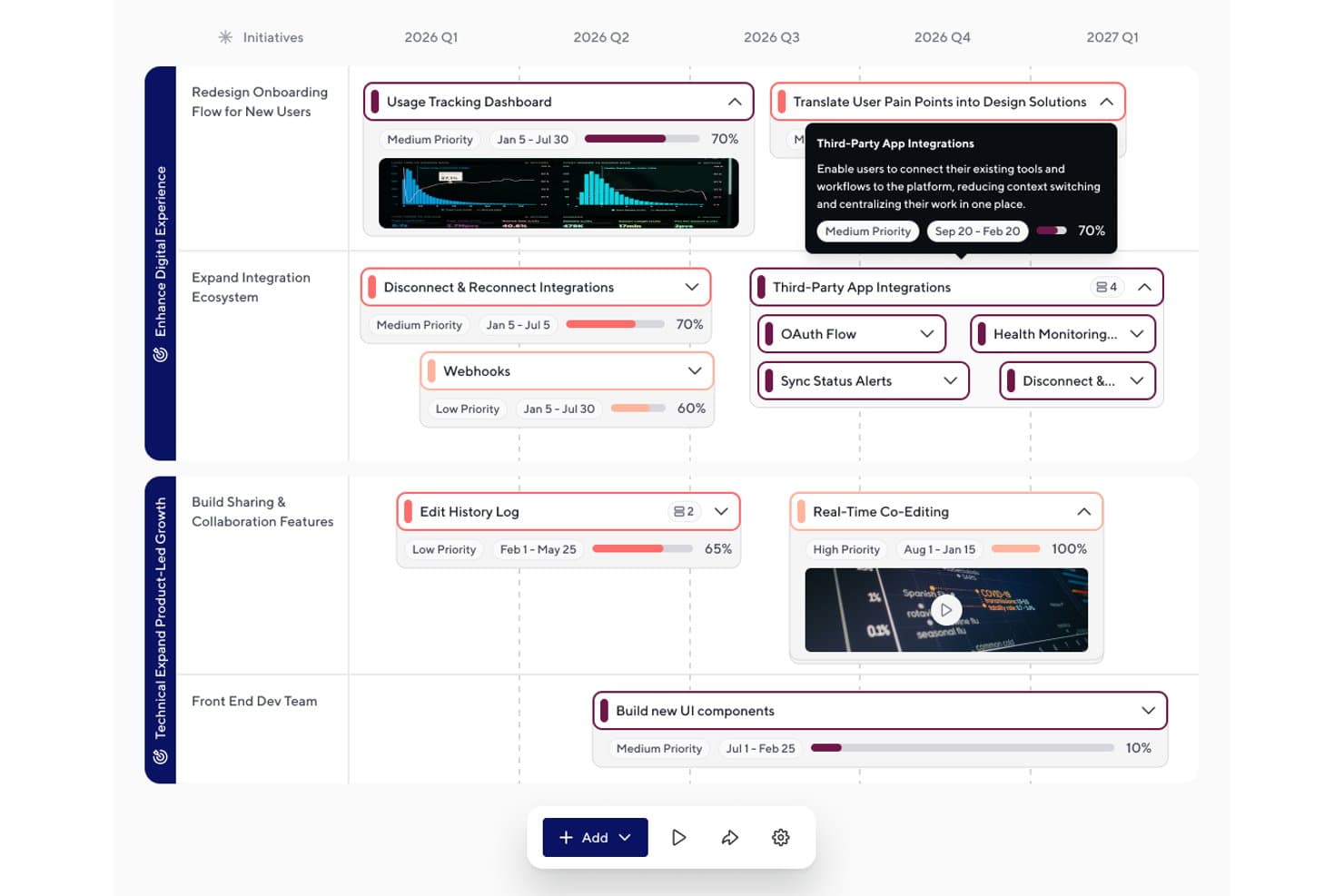
ProductPlan organizes initiatives and features on a timeline roadmap. ProductPlan is product management software for teams that need to turn strategy into clear, shareable roadmaps and align stakeholders around priorities, timelines, and product decisions.
Who Is ProductPlan Best For?
Product leaders and cross-functional teams can use ProductPlan to align stakeholders around product strategy, priorities, and roadmap decisions.
Why ProductPlan Is a Good Best Aha! Alternatives
I picked ProductPlan because its strategic roadmapping tools help my team connect product goals with delivery plans. We use timeline and swimlane views to show priorities, milestones, and dependencies across products. Shareable roadmaps also give executives and delivery teams one clear view of strategy without exposing every backlog detail.
ProductPlan Key Features
- Roadmap templates: Start planning with pre-built layouts.
- Jira integration: Import delivery data from Jira.
- Custom fields: Add structured details to roadmap items.
- Sharing controls: Set viewer and editor permissions.
ProductPlan Integrations
ProductPlan offers a native Jira integration that imports delivery data into roadmaps.
Pros and Cons
Pros:
- Timeline and swimlane planning support
- Executive-friendly sharing and presentation controls
- Clear strategy-to-delivery roadmap views
Cons:
- Roadmap updates can require manual upkeep
- Limited backlog depth for delivery management
Learn more about ProductPlan: Best for Agile portfolio management
- Free trial available
- Pricing upon request
Visit WebsiteCustomer Rating:4.4/5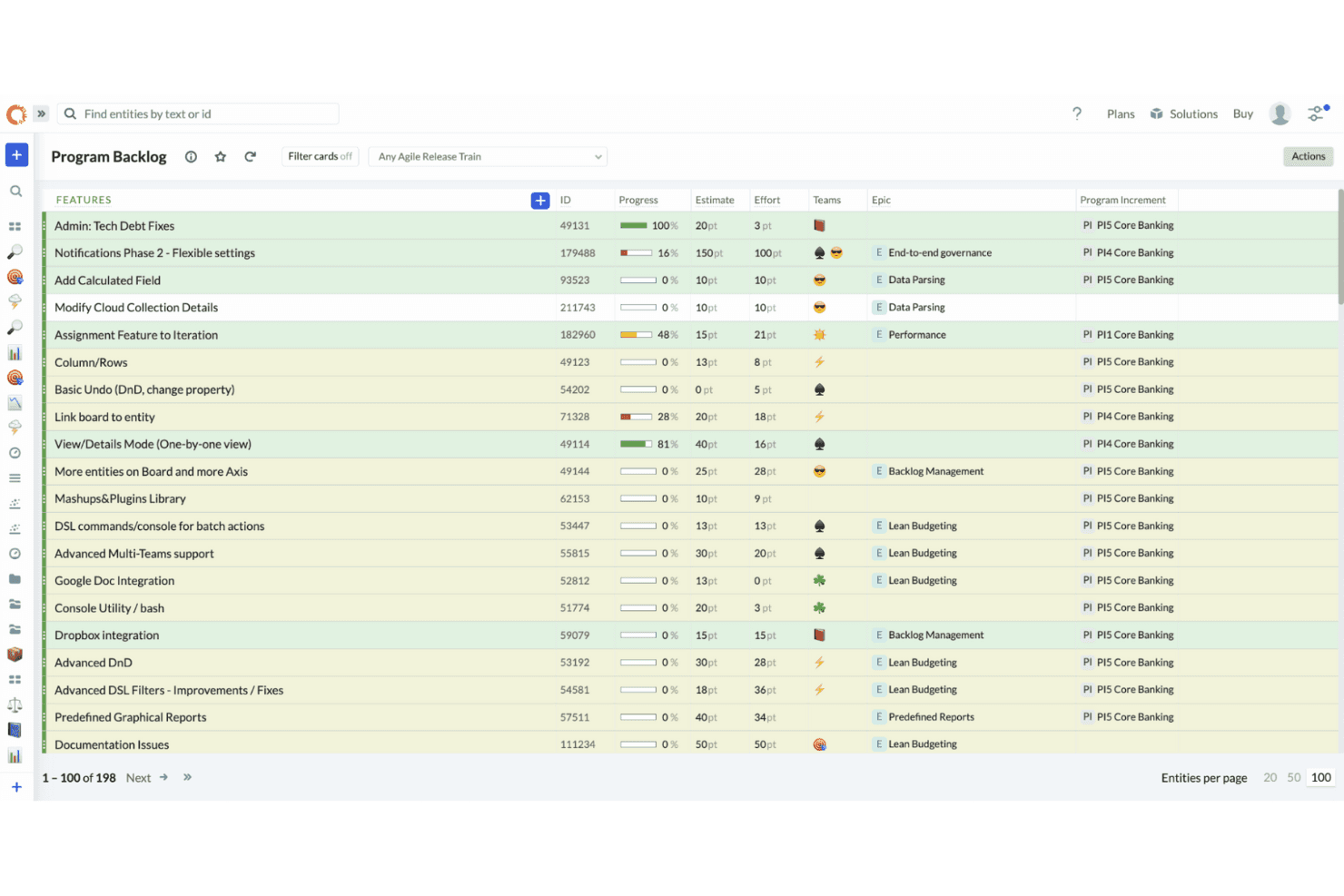
Targetprocess helps Agile teams plan, track, and align work with portfolio goals visually. Targetprocess is a product roadmapping platform for agile product teams that connects strategy, roadmaps, and delivery, helping organizations coordinate priorities and manage complex portfolios.
Who Is Targetprocess Best For?
Targetprocess suits product operations and portfolio leaders coordinating agile teams, dependencies, and priorities across complex product portfolios.
Why Targetprocess Is a Good Best Aha! Alternatives
I picked Targetprocess as one of the best because its agile portfolio management connects product strategy with delivery. I use portfolio hierarchies, dependency views, and capacity planning to coordinate initiatives across teams. That helps me evaluate tradeoffs before committing roadmap work.
Targetprocess Key Features
- Custom views: Configure boards, lists, timelines, and other layouts for different workflows.
- Workflow customization: Define statuses, rules, fields, and transitions for product processes.
- Reporting dashboards: Build dashboards with charts, metrics, and configurable reports.
- Tool integrations: Connect Targetprocess with development, collaboration, and communication tools.
Targetprocess Integrations
Targetprocess offers a native Jira integration and documented integrations with GitHub, GitLab, Azure DevOps, Bitbucket, Slack, Miro, and Zapier. It also provides a REST API for custom integrations, plus CSV import and export.
Pros and Cons
Pros:
- Custom workflows support varied agile processes
- Dependency views expose cross-team delivery risks
- Portfolio hierarchies connect strategy with delivery
Cons:
- Dense views can slow everyday navigation
- Complex configuration requires dedicated administration
Learn more about Targetprocess: Best for idea management
- 14-day free trial + free demo available
- Pricing upon request
Visit WebsiteCustomer Rating:4.2/5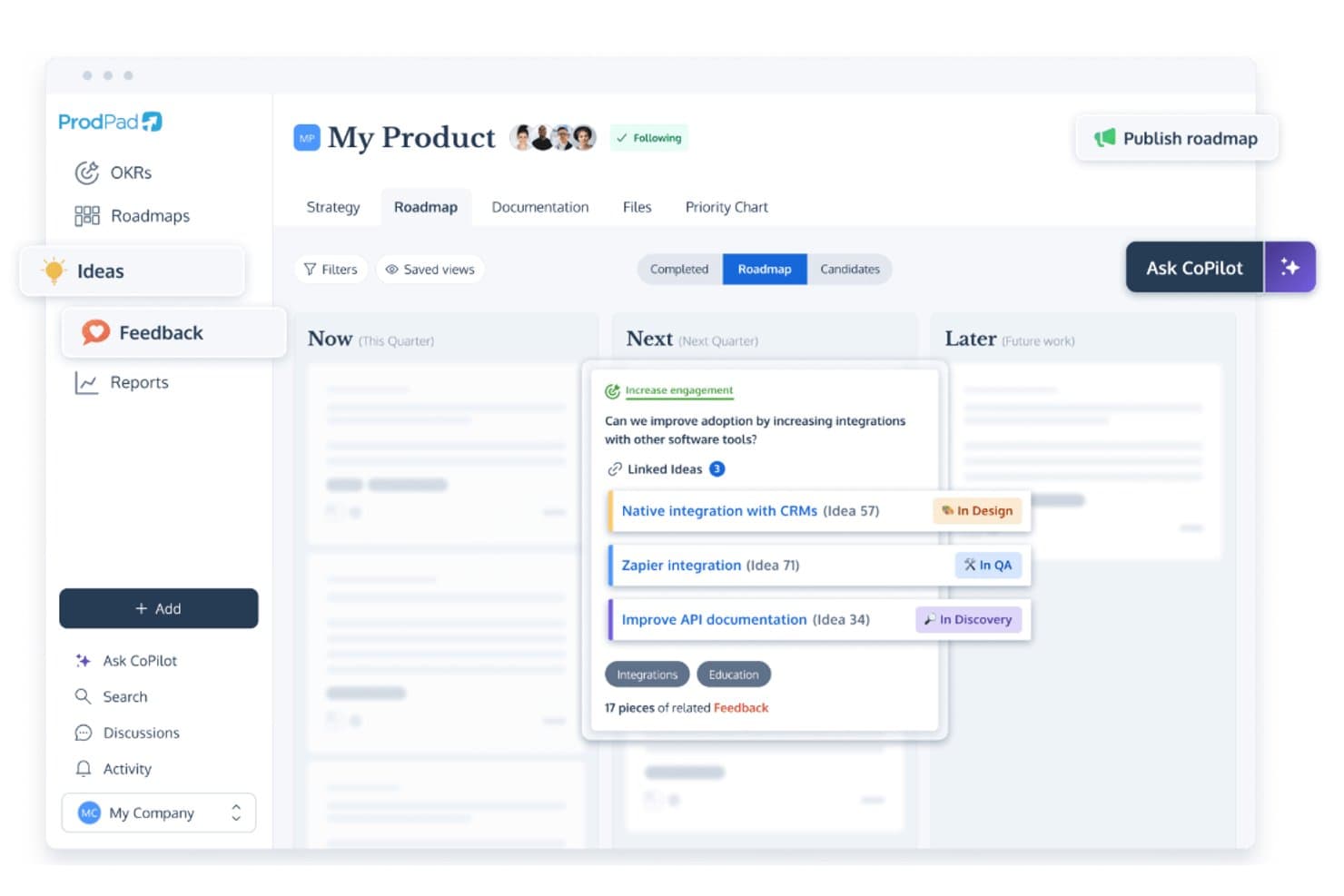
ProdPad links roadmap ideas to feedback and tracks development status. ProdPad is product roadmap software for product managers who need to capture customer ideas, connect them to strategy, and align cross-functional teams around priorities.
Who Is ProdPad Best For?
ProdPad suits product managers and teams that need to collect customer ideas, connect them to strategy, and guide discovery priorities.
Why ProdPad Is a Good Best Aha! Alternatives
I picked ProdPad as a Best Aha! alternative because it’s built for idea management. I use its idea capture and strategy-linking features to connect customer feedback with product goals, then guide discovery priorities. That gives my team a clearer path from scattered requests to a focused roadmap.
ProdPad Key Features
- Roadmap views: Display initiatives across timelines, teams, or product areas.
- Prioritization scoring: Rank opportunities using customizable scoring criteria.
- Product specifications: Document requirements, assumptions, and acceptance criteria.
- Release planning: Group planned work into releases with target dates.
ProdPad Integrations
ProdPad offers native integrations with Jira, Azure DevOps, GitHub, Linear, Trello, Slack, Microsoft Teams, Salesforce, Intercom, and Confluence. It also connects with Zapier and provides an API and custom webhooks for additional integrations.
Pros and Cons
Pros:
- Supports clear Now-Next-Later roadmaps
- Organizes ideas throughout the product lifecycle
- Connects feedback to product strategy
Cons:
- Customization falls short for complex requirements
- Visual overviews clutter with many stories
Learn more about ProdPad: Best for manufacturing roadmaps
- Free demo available
- From $99/user/month
Visit WebsiteCustomer Rating:4.2/5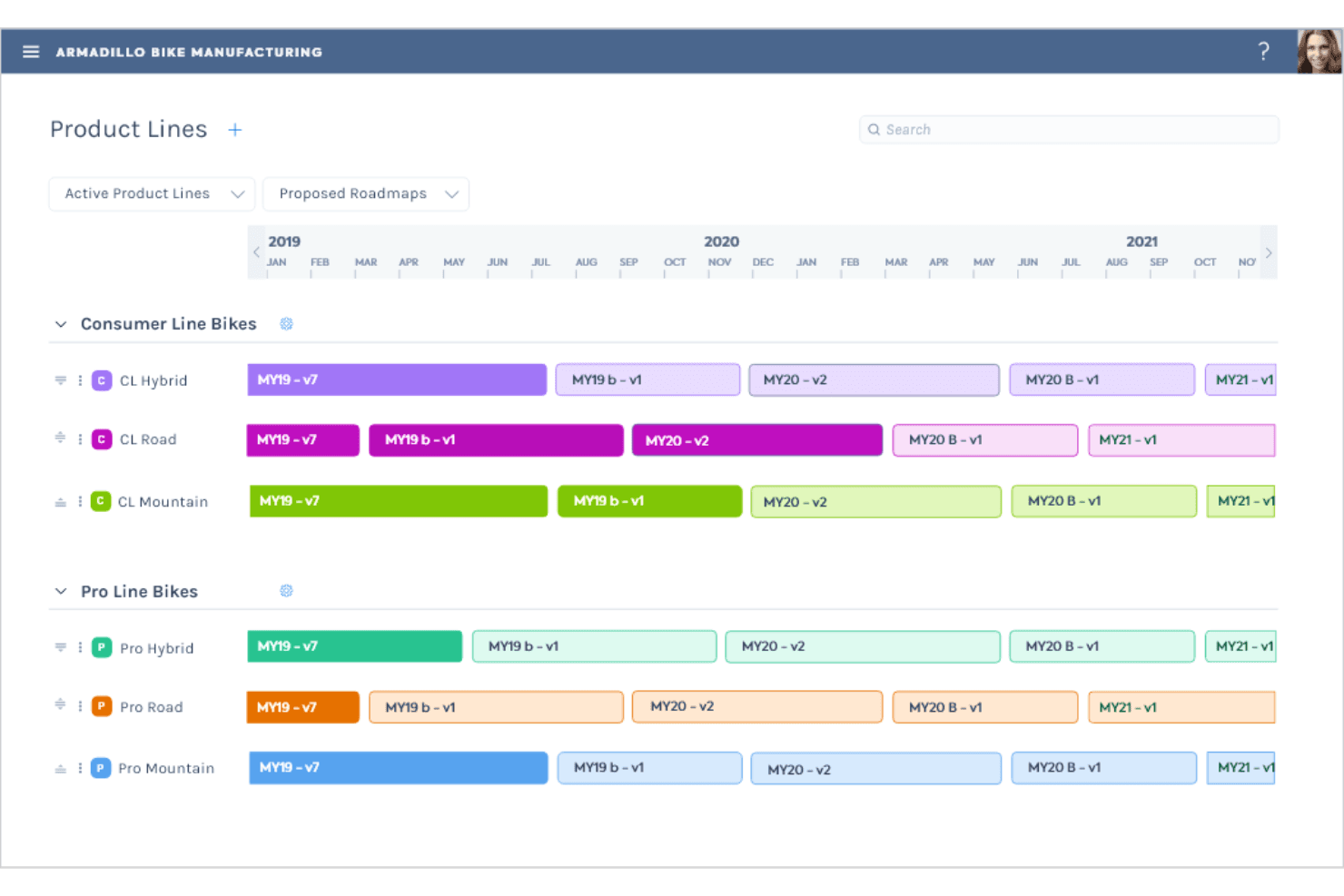
Gocious helps manufacturing teams plan and align product development with business goals. Gocious is a product management and portfolio planning platform for manufacturers that connects product strategy, market needs, and engineering capacity to help teams make clearer investment decisions and coordinate complex product portfolios.
Who Is Gocious Best For?
Gocious suits product teams at manufacturers that need to align product roadmaps with market demand, engineering capacity, and portfolio strategy.
Why Gocious Is a Good Best Aha! Alternatives
I picked Gocious because it connects manufacturing roadmaps with market demand and engineering capacity. I use its portfolio planning tools to compare product investments, map dependencies, and test what-if scenarios before committing resources. That makes it useful when a roadmap must reflect production constraints, customer needs, and broader portfolio strategy.
Gocious Key Features
- Product structure management: Organize products and modules in hierarchical views.
- Feature lifecycle tracking: Monitor feature status from introduction through retirement.
- Real-time dashboards: Display live roadmap and portfolio data in dashboard views.
- Task management: Create and manage tasks within Plans and Capabilities.
Gocious Integrations
Gocious offers an out-of-the-box Jira Cloud integration, plus API connections, batch or file transfers, and bespoke connectors for other systems. Its Open API supports custom connections with systems such as Salesforce, Oracle, and Tableau, and Gocious supports Zapier.
Pros and Cons
Pros:
- Compares roadmap scenarios before investment decisions
- Replaces scattered spreadsheets with shared portfolio data
- Connects products, modules, and lifecycle dependencies
Cons:
- Requires substantial data migration from spreadsheets
- Limited project delivery status tracking
Learn more about Gocious: Best for product strategy alignment
- Free demo available
- Pricing upon request
Visit WebsiteCustomer Rating:4.8/5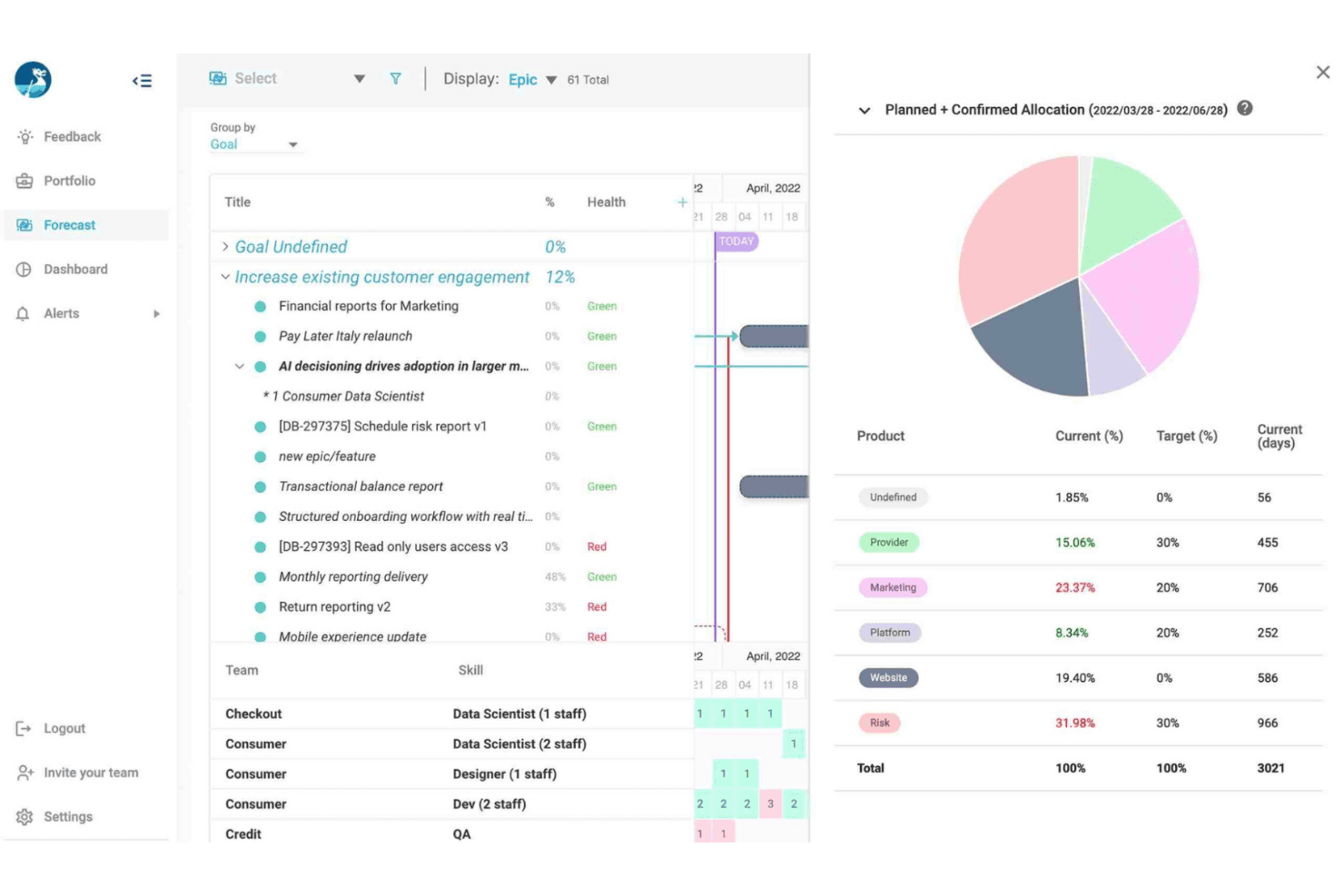
Dragonboat helps product teams align strategy with goals by planning, prioritizing, and tracking initiatives. Dragonboat is a product portfolio and roadmapping platform for product managers who need to connect customer needs, business goals, and delivery plans while prioritizing work across teams.
Who Is Dragonboat Best For?
Dragonboat suits product leaders who need to connect strategy, customer needs, and portfolio priorities across multiple teams.
Why Dragonboat Is a Good Best Aha! Alternatives
I picked Dragonboat as one of the best because it’s best for product strategy alignment. I use portfolio roadmaps, prioritization frameworks, and capacity planning to connect business goals with customer needs and delivery work. That helps my team compare initiatives, test tradeoffs, and explain why priorities change.
Dragonboat Key Features
- Jira integration: Sync initiatives and delivery items with Jira.
- Azure DevOps integration: Connect roadmap items with Azure DevOps work.
- Dependency mapping: Link related work items and identify dependencies.
- Custom roadmap views: Filter and display roadmap data by chosen fields.
Dragonboat Integrations
Dragonboat integrates with Jira and Azure DevOps, connecting roadmap initiatives with delivery work in each platform.
Pros and Cons
Pros:
- Flexible roadmap views support stakeholder conversations
- Supports portfolio-level prioritization and capacity planning
- Connects strategy, outcomes, and delivery plans
Cons:
- Delivery tracking feels less detailed than dedicated tools
- Initial configuration requires substantial planning
Learn more about Dragonboat: 10Best for prioritization tools
airfocus
- Free demo available
- Pricing upon request
Visit WebsiteCustomer Rating:4.4/5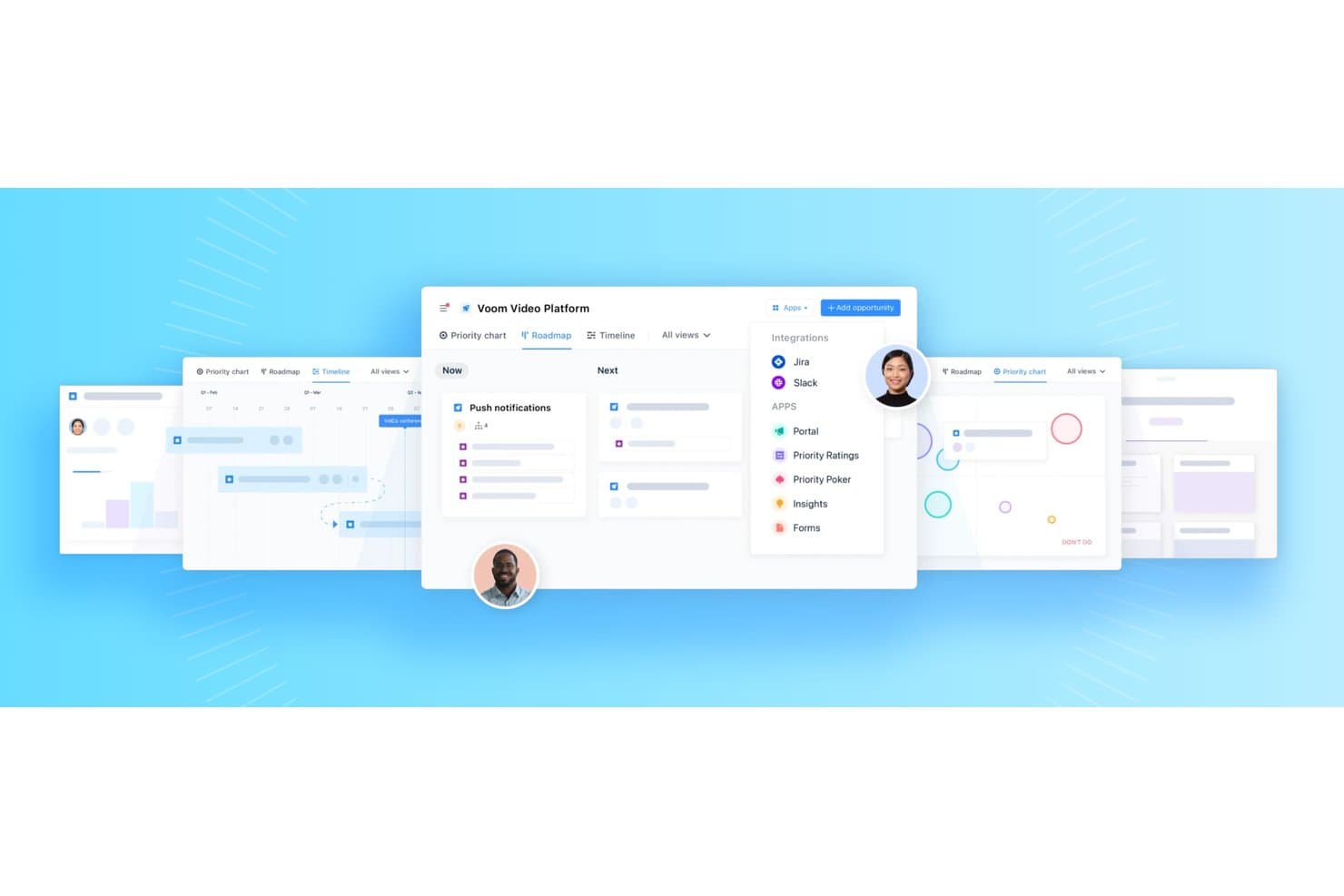
airfocus supports roadmap, timeline, and priority chart views with app integrations. airfocus is a product management platform for teams that need to connect customer feedback, product strategy, roadmaps, and delivery priorities in one workspace.
Who Is airfocus Best For?
Product managers and product operations teams that need a shared workspace for prioritizing roadmaps, customer feedback, and strategic initiatives.
Why airfocus Is a Good Best Aha! Alternatives
I picked airfocus because its prioritization tools help my team score initiatives against customer feedback, strategic goals, and business impact. We use prioritization views to compare competing requests, then connect decisions to roadmaps and delivery plans. That gives us a clear record of why one initiative moves ahead of another.
airfocus Key Features
- Objectives and OKRs: Create and track product objectives with built-in OKRs.
- Dependency tracking: Map dependencies across teams, products, and work items.
- AI-assisted authoring: Co-author product requirements documents and specifications.
- Branded portal: Share a branded portal for user engagement.
airfocus Integrations
airfocus offers native integrations with Jira, Trello, Asana, Azure DevOps, Shortcut, GitHub, Linear, Intercom, and Slack, and connects with Zapier. It also supports webhooks and APIs for custom integrations.
Pros and Cons
Pros:
- Modular workspaces support tailored product workflows
- Customer feedback connects directly to roadmaps
- Custom scoring aligns priorities with strategy
Cons:
- Initial workspace configuration requires careful planning
- Delivery task tracking remains relatively limited
Other Aha! Alternatives
Here are some additional Aha! alternatives that didn’t make it onto my shortlist, but are still worth checking out:
- 11Craft.ioBest for product lifecycle management
- 12PlanviewBest for hybrid work and resource modeling
- 13JiraBest for project tracking
- 14monday AI WorkspaceBest for team collaboration
How I Evaluate an Aha! Alternative
I split my evaluation into three parts. First, core functionality—which carries the most weight—where I check that a tool can build visual roadmaps and apply structured prioritization frameworks. Second, I look for standout features like customer-facing idea portals or AI-powered scoring. Third, I consider pricing transparency and onboarding speed.
Core Functionality (Table Stakes For This List)
When I'm selecting tools for my list, I score each one on a scale from 0 (does not offer the functionality) to 5 (excels in this area) for each core functionality listed below. I then convert the total into a percentage to help assess each tool's overall fit, with extra weight on any functionalities I’ve deemed essential.
- Roadmapping & Visualization (Essential): I look for customizable timeline, swimlane, or board views that group initiatives and support stakeholder-ready sharing.
- Prioritization Frameworks (Essential): I assess weighted scoring, value-versus-effort views, or configurable scorecards for ranking features and initiatives.
- Idea & Feedback Management: I check whether teams can capture requests, organize feedback, collect votes, and link insights to roadmap decisions.
- Strategic Planning Tools: I look for goals or OKRs linked to initiatives, with progress views that connect product strategy to planned work.
- Release & Sprint Planning: I evaluate release grouping, sprint tracking, dependencies, and delivery timelines tied directly to roadmap items.
- Cross-Functional Collaboration: I consider stakeholder permissions, comments, notifications, and contribution workflows for product, engineering, sales, and leadership.
Once I have a list of tools that meet the criteria, I consider what sets each platform apart.
Differentiating Factors (What Sets Vendors Apart)
Here's how I compare and contrast different vendors:
Standout Features
Customer-facing idea portals let you collect feature requests and votes directly from users, which closes the gap between raw feedback and roadmap decisions. I look for portal branding options and voting controls that keep submissions organized. AI-powered prioritization is another differentiator—tools like ProductBoard and airfocus use machine learning to surface high-impact ideas and auto-suggest scores, saving hours of manual ranking. I also evaluate usage-based pricing tiers, since viewer-only seats can dramatically lower costs when dozens of stakeholders need read-only access.
Beyond Features
I check whether a tool publishes clear pricing tiers and distinguishes viewer seats from full editor seats, since total cost shifts fast once you invite sales, leadership, and support into a shared roadmap. Onboarding speed matters just as much—I look for pre-built templates for roadmaps, OKRs, and scorecards that let a small team ship its first stakeholder update within a day, not after a weeks-long consulting engagement. I also evaluate data portability through CSV exports, open APIs, and native Aha! import options to keep switching costs low.
Why Look For An Aha! Alternative?
Aha! is a well-known name in product management software, but it doesn’t meet every team’s needs. You might be exploring alternatives if:
- Aha! pricing doesn't align with your budget.
- Your team relies on specific integrations that Aha! doesn’t support.
- You’re looking for a simpler user interface for day-to-day use.
- You want deeper customization for your workflows or dashboards.
- You work in a niche industry with unique requirements.
- You need tools that support multiple languages or distributed teams.
If any of these challenges sound familiar, you're not alone. Many product teams seek Aha! alternatives that better align with their budget, tech stack, and feedback processes.
Aha! Key Features
Here’s a quick overview of Aha!’s core capabilities, so you can compare what other tools bring to the table:
- Roadmapping: Build visual product roadmaps to align initiatives and track long-term goals.
- Idea and feedback management: Collect and manage feature requests and input from customers or stakeholders.
- Goal setting: Define product objectives and monitor progress at every stage.
- Release planning: Organize upcoming launches to support your development process.
- Workflow customization: Adapt task flows and statuses to match your team's operations.
- Analytics and reporting: Track key metrics to inform prioritization and streamline delivery decisions.
- Collaboration tools: Connect team members in a shared workspace with real-time updates.
- Prioritization frameworks: Evaluate initiatives and backlog items using custom scoring models.
- Custom dashboards: Create views and widgets tailored to your product, engineering, or leadership needs.
- Feedback integration: Link product feedback and feedback collection directly into your roadmap via a feedback board or portal.
Whether you’re focused on building better products or just need a tool that better fits your process, exploring cost-effective alternatives to Aha! can help you find a solution that works for your team.