Gerir um projeto de aplicação móvel pode ser avassalador. Enfrenta prazos apertados, requisitos complexos dos utilizadores e a necessidade de colaborar eficazmente com a sua equipa. O software de design de aplicações móveis ajuda a simplificar estes desafios, disponibilizando ferramentas que facilitam o design e a criação de protótipos para a web.
Com base na minha experiência, escolher o software certo pode fazer uma diferença significativa no seu fluxo de trabalho. Por isso, testei e analisei várias opções para lhe apresentar uma lista imparcial das melhores escolhas.
Neste artigo, encontrará informações sobre as funcionalidades únicas de cada ferramenta e sobre a forma como podem beneficiar a sua equipa. Quer esteja à procura de colaboração, criação de protótipos com geradores de maquetas ou funcionalidades de teste com utilizadores, encontrará aqui tudo o que precisa. Vamos conhecer o melhor software de design de aplicações móveis disponível atualmente.
Why Trust Our Software Recommendations
6,700+
Reviews
20
Industry experts
16+
Evaluation factors
14
Years
Our team has been testing and reviewing software since 2012. As product managers ourselves, we know how difficult—and important—it is to choose the right software.
For this guide, we evaluated tools using hands-on testing and independent research, scoring tools using our selection criteria.
Our reviews reflect our human editorial judgment, not a sales pitch.
Expert reviewers:
- Andrew LumbySenior TPM
- Cristiano ValimSenior UI/UX Lead


Tabela comparativa de software de design de aplicações móveis
Esta tabela comparativa resume os detalhes de preços das minhas principais escolhas de software de design de aplicações móveis:
| Tool | Best For | Trial Info | Price | ||
|---|---|---|---|---|---|
| 1 | Best for cross-functional design handoff | Free plan available | From $3/user/month | Website | |
| 2 | Best for AI-generated wireframes without design skills | Free plan available | From $14/user/month | Website | |
| 3 | Best for prototyping mobile apps from scratch | Free plan + 30-day free trial + free demo available | From $4.95/user/month (billed annually) | Website | |
| 4 | Best for code-backed mobile design systems | Free plan + 14-day free trial + demo available | From $49/user/month | Website | |
| 5 | Best for Adobe Creative Cloud prototyping | Free trial available | From CAD $91.99/month | Website | |
| 6 | Best for open-source app UI and dev handoff | Free plan + 14-day free trial + free demo available | From $7/user/month | Website | |
| 7 | Best for functional wireframes with working forms | Free plan + 10-day trial available | From $19/user/month | Website | |
| 8 | Best for macOS-native UI design | Free plan + 30-day free trial available | From $12/user/month (billed annually) | Website | |
| 9 | Best for logic-driven mobile wireframing | Free plan + 30-day free trial available | From $29/user/month (billed annually) | Website | |
| 10 | Best for sensor-driven interaction prototyping | Free plan + free demo available | From $25/user/month | Website |


Análise do melhor software de design de aplicações móveis
Abaixo encontrará os meus resumos detalhados do melhor software de design de aplicações móveis que entrou na minha lista restrita. As minhas análises apresentam uma visão detalhada das principais funcionalidades, vantagens & desvantagens, integrações e casos de utilização ideais de cada ferramenta, para o ajudar a encontrar a melhor opção para si.
 Best for cross-functional design handoff
- Free plan available
- From $3/user/month
Visit WebsiteCustomer Rating:4.7/5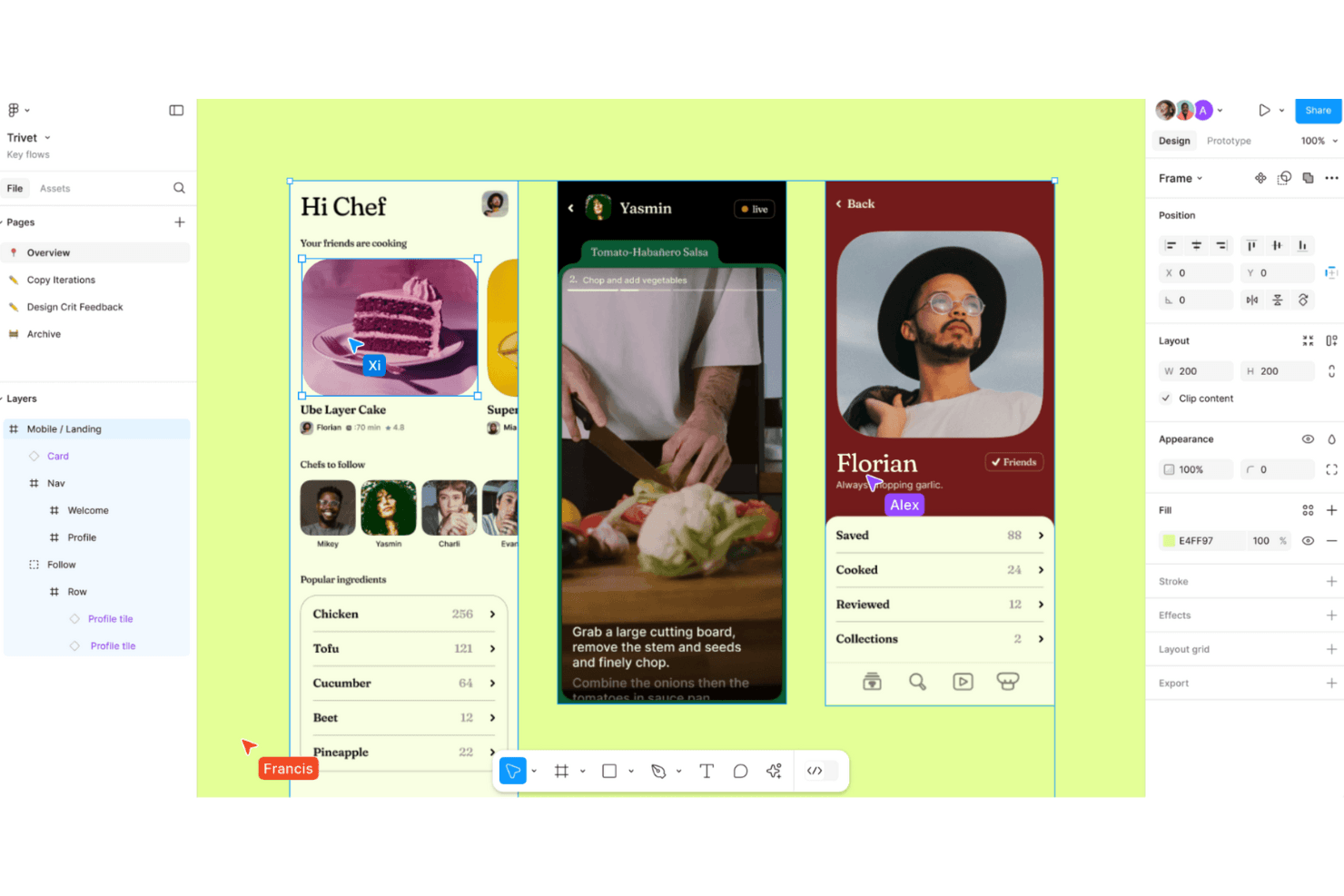
Figma enables collaborative design workflows with real-time editing and prototyping for seamless creativity. Figma is a browser-based UI design tool that combines screen design, interactive prototyping, design system management, and developer handoff in a single collaborative environment.
Who Is Figma Best For?
Figma is a strong fit for cross-functional product teams where designers, product managers, and developers need to collaborate on app design without switching tools.
Why I Picked Figma
Figma earns its spot on my shortlist because no other tool collapses the gap between design and development the way it does. Dev Mode generates iOS and Android code snippets directly from your design layers, and Code Connect maps those layers to real production components in your codebase. I also love that product managers, QA, and other stakeholders can comment and inspect specs without needing a paid seat, which makes cross-functional handoff genuinely frictionless.
Figma Key Features
- Smart Animate: Automatically animates matching layers between frames to create realistic transitions, parallax effects, and touch gestures in prototypes.
- Interactive components: Switch between component variants automatically, reducing the number of frames needed to represent animated states.
- Variable modes: Define and apply multiple themes, such as light and dark mode, across your designs using a single set of variables.
- Figma Mirror: View and play desktop frames on a real iOS or Android device in real time through the Figma mobile app.
Figma Integrations
Figma connects with Slack, Jira, Notion, Google Workspace, GitHub, and Storybook, with a VS Code extension for developer workflows. Its REST API, plugins, webhooks, Code Connect, and MCP Server support custom design-to-development integrations.
Pros and Cons
Pros:
- Developer specs connect designs to implementation
- Prototypes support complex conditional user flows
- Real-time multiplayer keeps app reviews aligned
Cons:
- Mobile app cannot edit design files
- Large files can cause noticeable performance slowdowns
 Best for AI-generated wireframes without design skills
- Free plan available
- From $14/user/month
Visit WebsiteCustomer Rating:4.8/5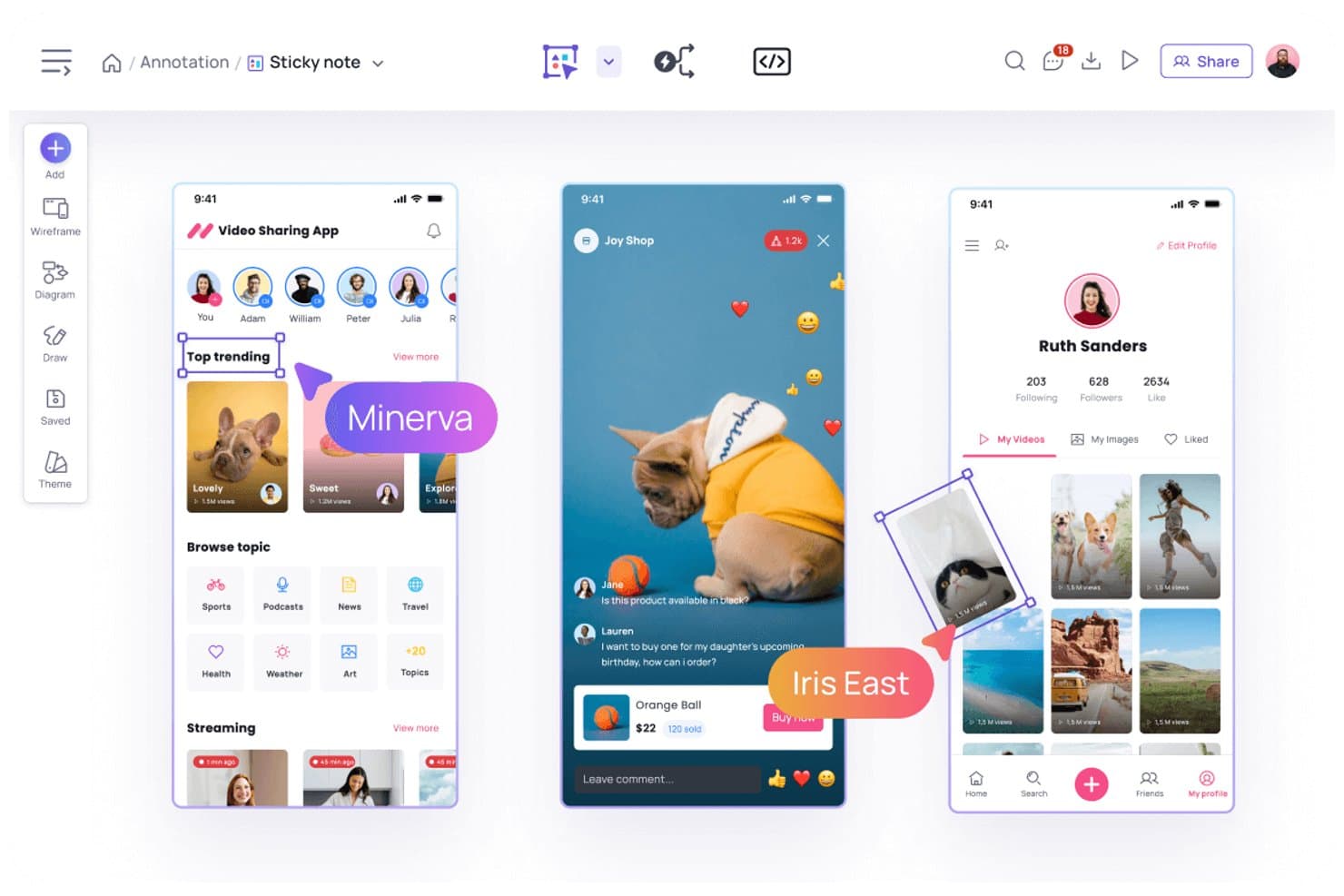
Visily lets users annotate designs with sticky notes and comments. Visily is a browser-based AI design tool that lets you create mobile and web app wireframes, mockups, and interactive prototypes using text prompts, screenshots, sketches, or templates.
Who Is Visily Best For?
Visily is a strong fit for product managers and non-designers who need to turn ideas into wireframes and prototypes quickly, without relying on a dedicated design team.
Why I Picked Visily
I picked Visily as one of the best because it's the only tool on my list where you can go from a rough sketch or a screenshot to a structured mobile wireframe in seconds, no design background required. I love how the AI UI Design Generator handles multiple input types: paste in a screenshot of an existing app, describe a screen in plain text, or draw a rough diagram, and Visily converts it into an editable wireframe. Auto-Prototype then links those screens into a clickable flow automatically, without any manual wiring.
Visily Key Features
- Fidelity switching: Toggle between high-fidelity and low-fidelity views instantly, keeping all elements in place while only the visual style changes.
- Smart Components: Prebuilt, editable UI elements—like nav bars, cards, tables, and charts—that can be broken down into individual parts or populated with CSV data.
- Real-time collaboration: Co-edit boards simultaneously with teammates using cursor chat, commenting, emoji reactions, and follower mode.
- Inspect Mode: View element specs, CSS and Tailwind properties, pixel spacing, and exportable assets directly from any design board.
Visily Integrations
Visily offers integrations with Figma, Jira, Slack, and Notion. Its MCP server connects to Claude Code, Codex, Cursor, Gemini CLI, ChatGPT, and Lovable for developer handoff.
Pros and Cons
Pros:
- Inspect Mode provides detailed developer specifications
- Auto-Prototype creates linked mobile app flows
- AI converts screenshots and sketches into wireframes
Cons:
- Manual adjustments replace missing auto-layout capabilities
- No native device-specific mobile simulators
Learn more about Visily: Best for prototyping mobile apps from scratch
- Free plan + 30-day free trial + free demo available
- From $4.95/user/month (billed annually)
Visit WebsiteCustomer Rating:4.5/5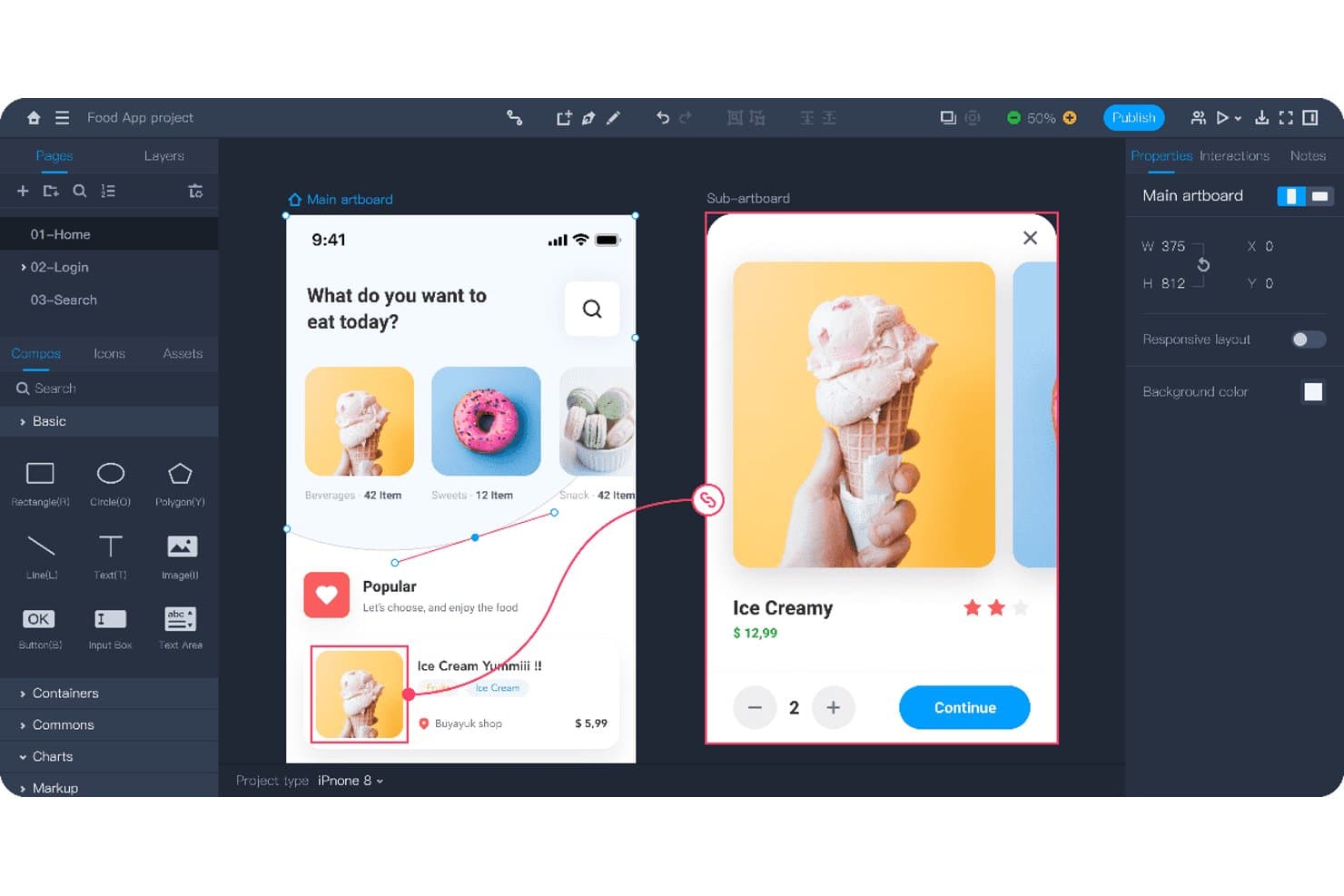
Mockplus lets users design and prototype mobile app screens interactively. Mockplus RP is a browser-based prototyping and wireframing tool that combines drag-and-drop screen design, interactive prototype building, flowcharts, and real-time team collaboration across web, iOS, and Android projects.
Who Is Mockplus Best For?
Mockplus RP is a strong fit for UX/UI designers who need to go from blank canvas to testable mobile prototype without a steep learning curve or a high price tag.
Why I Picked Mockplus
I picked Mockplus RP as one of the best because it's built specifically for taking a mobile app from zero to testable prototype, and it shows in the details. I love that preset iOS, Android, and Material Design artboards let you skip the blank-canvas friction, while a library of 3,000+ UI components means you're building real screens, not placeholders. Component states (hover, pressed, selected, and custom) combined with tap, swipe, and slide gesture interactions let me simulate actual mobile UX flows without writing a line of code.
Mockplus Key Features
- Flowchart and sitemap builder: Drag-and-drop user flow and sitemap diagrams that connect directly to your artboards.
- Axure import: Import existing Axure projects with up to 95% of details preserved and fully editable in Mockplus RP.
- Real-time co-editing: Teams of up to 10 users can design together simultaneously on the free plan, with comments and activity feeds included.
- QR code preview sharing: Share prototypes instantly via QR code so stakeholders can review designs on a real mobile device.
Mockplus RP Integrations
Through Mockplus Cloud, Mockplus RP integrates with Figma, Sketch, Adobe XD, Photoshop, Axure, Slack, Jira, Confluence, and Lark. No public API or GitHub integration is documented.
Pros and Cons
Pros:
- Axure imports preserve editable details
- Real-time co-design supports stakeholder feedback
- Rapid screen creation from templates
Cons:
- Design systems need separate product
- Prototype logic requires rebuilding in code
Learn more about Mockplus: Best for code-backed mobile design systems
- Free plan + 14-day free trial + demo available
- From $49/user/month
Visit WebsiteCustomer Rating:4.2/5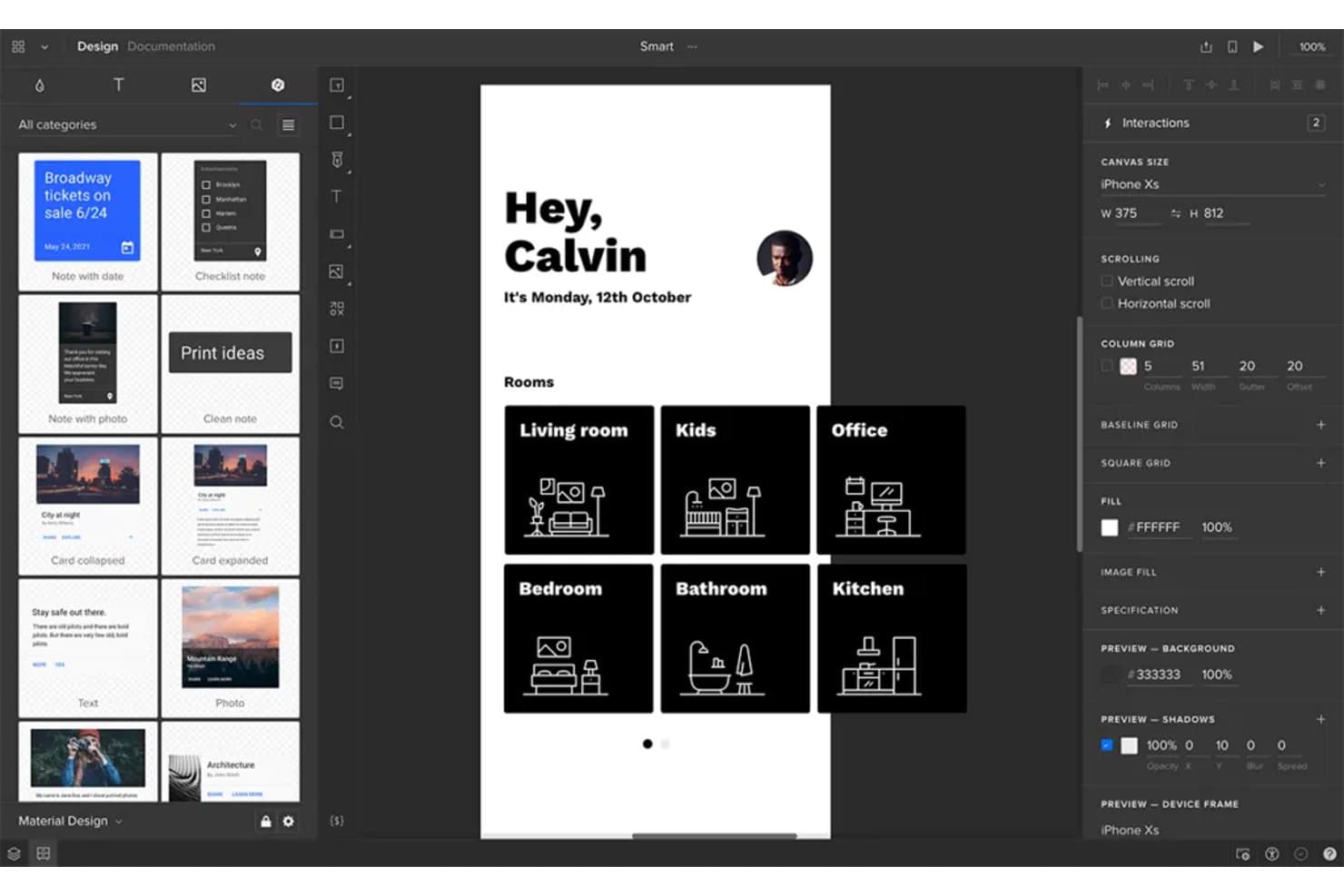
UXPin lets users design and prototype mobile app screens visually. UXPin is a browser-based mobile app design tool that combines wireframing, high-fidelity prototyping, and code-backed design systems built on real React components synced from Git, Storybook, or npm.
Who Is UXPin Best For?
UXPin is a strong fit for UX/UI designers and front-end developers who need design systems backed by real production components.
Why I Picked UXPin
UXPin earns its spot on my shortlist because it's the only mobile app design tool where your prototypes run on actual production React components, not vector replicas. I love how Merge pulls components directly from Git, Storybook, or npm so your design system and codebase stay in sync by default. When a developer updates a component, every design instance updates too, which eliminates the drift that makes most handoffs painful.
UXPin Key Features
- Mobile gesture triggers: UXPin supports tap, swipe, press and hold, touch down, and touch up interactions for building realistic mobile prototypes.
- UXPin Mirror: Scan a QR code to preview live prototypes on real iOS or Android devices, with the canvas updating on your phone as you edit.
- Conditional logic and variables: Set up if/else interactions, regex validation, and expressions to create prototypes that respond dynamically to user input.
- Developer handoff specs: UXPin auto-generates CSS, dimensions, and element notes that developers can inspect and copy directly from a shared preview link.
UXPin Integrations
UXPin integrates with Storybook, npm, Figma, Sketch, Jira, Slack, FullStory, StackBlitz, and CodeSandbox. Enterprise plans add Git integration for GitHub and Bitbucket.
Pros and Cons
Pros:
- Live device previews update as designs change
- Advanced logic models real app behavior
- Production components keep prototypes aligned with code
Cons:
- Design tokens remain limited beyond colors
- React-centric workflows limit native mobile coverage
Learn more about UXPin: Best for Adobe Creative Cloud prototyping
- Free trial available
- From CAD $91.99/month
Visit WebsiteCustomer Rating:4.3/5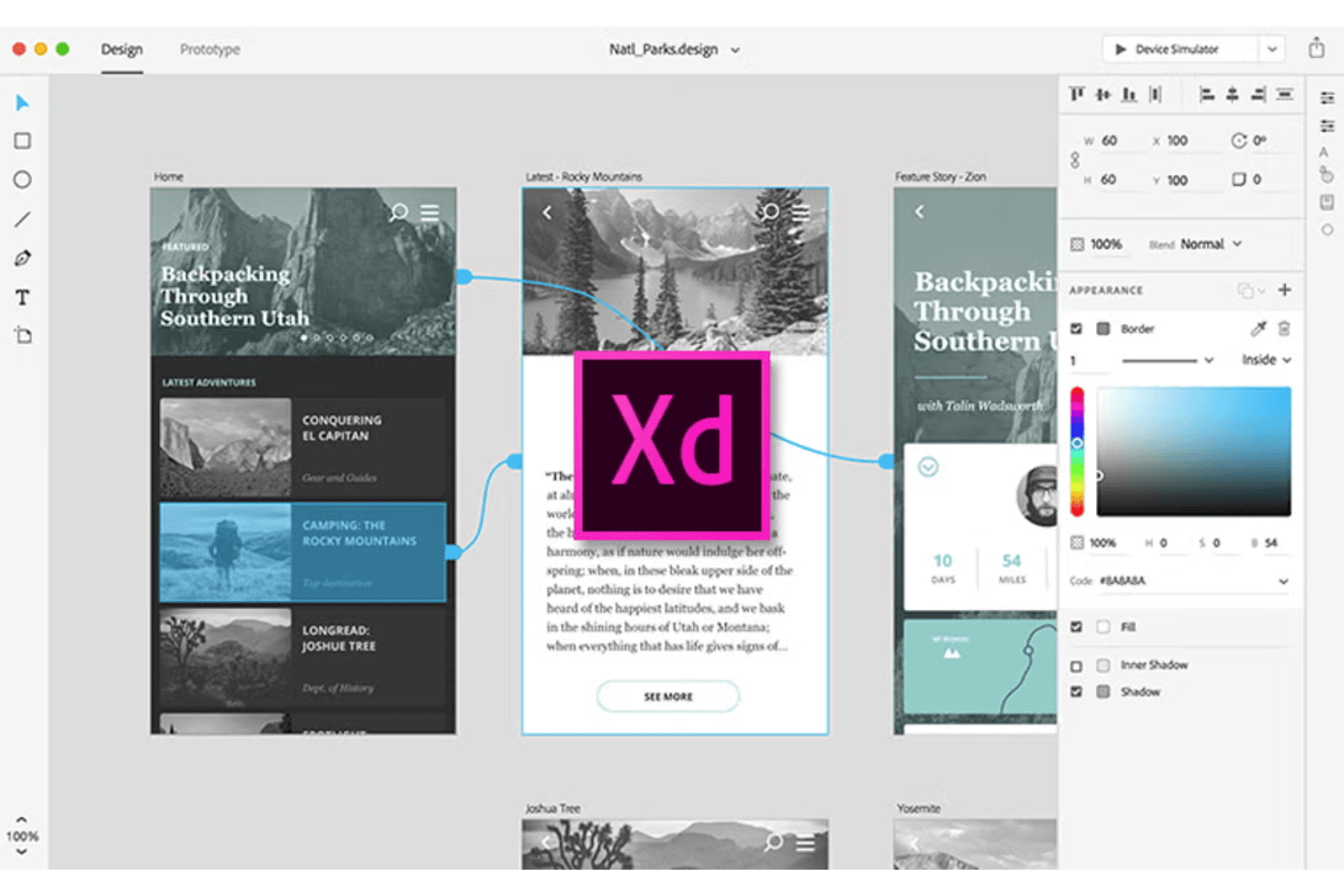
Adobe XD supports UI/UX design with interactive prototypes. Adobe XD is a desktop-based UI/UX design tool that covers screen design, interactive prototyping, component libraries, and developer handoff within the Adobe Creative Cloud ecosystem.
Who Is Adobe XD Best For?
Adobe XD fits UX/UI designers and product designers who are already working within the Adobe Creative Cloud ecosystem and want a familiar, fast tool for building interactive prototypes.
Why I Picked Adobe XD
I picked Adobe XD as one of the best because it's the natural home for prototyping when your team already lives in Creative Cloud. Auto-Animate lets you wire up micro-interactions between artboards using matched layer names, so swipe gestures and ripple effects feel close to native without extra tooling. Component states add Hover and Toggle behaviors automatically, which means interactive flows come together fast when you're validating a mobile UI before handing off specs.
Adobe XD Key Features
- UI kits: Access pre-built iOS, Android, and Windows UI kits directly from the File menu to jump-start mobile screen design.
- Repeat grid: Select any element or group and tile it into a repeatable grid pattern, then drag to resize rows and columns instantly.
- Multiple flows: Organize and share distinct user flows from a single document without creating separate prototype files.
- Live mobile preview: Connect iOS or Android devices via USB to see your designs update in real time as you edit on desktop.
Adobe XD Integrations
Documented integrations include Photoshop, Illustrator, After Effects, Creative Cloud Libraries, and Adobe Asset Link. Marketplace plugins connect Adobe XD with Jira, Slack, and Zoom, while third-party plugins support code export.
Pros and Cons
Pros:
- Multiple flows simplify stakeholder review
- Live USB previews expose mobile behavior early
- Auto-Animate supports native-feeling microinteractions
Cons:
- Collaboration lacks presence indicators and granular permissions
- Maintenance mode limits long-term product viability
 Best for open-source app UI and dev handoff
- Free plan + 14-day free trial + free demo available
- From $7/user/month
Visit WebsiteCustomer Rating:4.5/5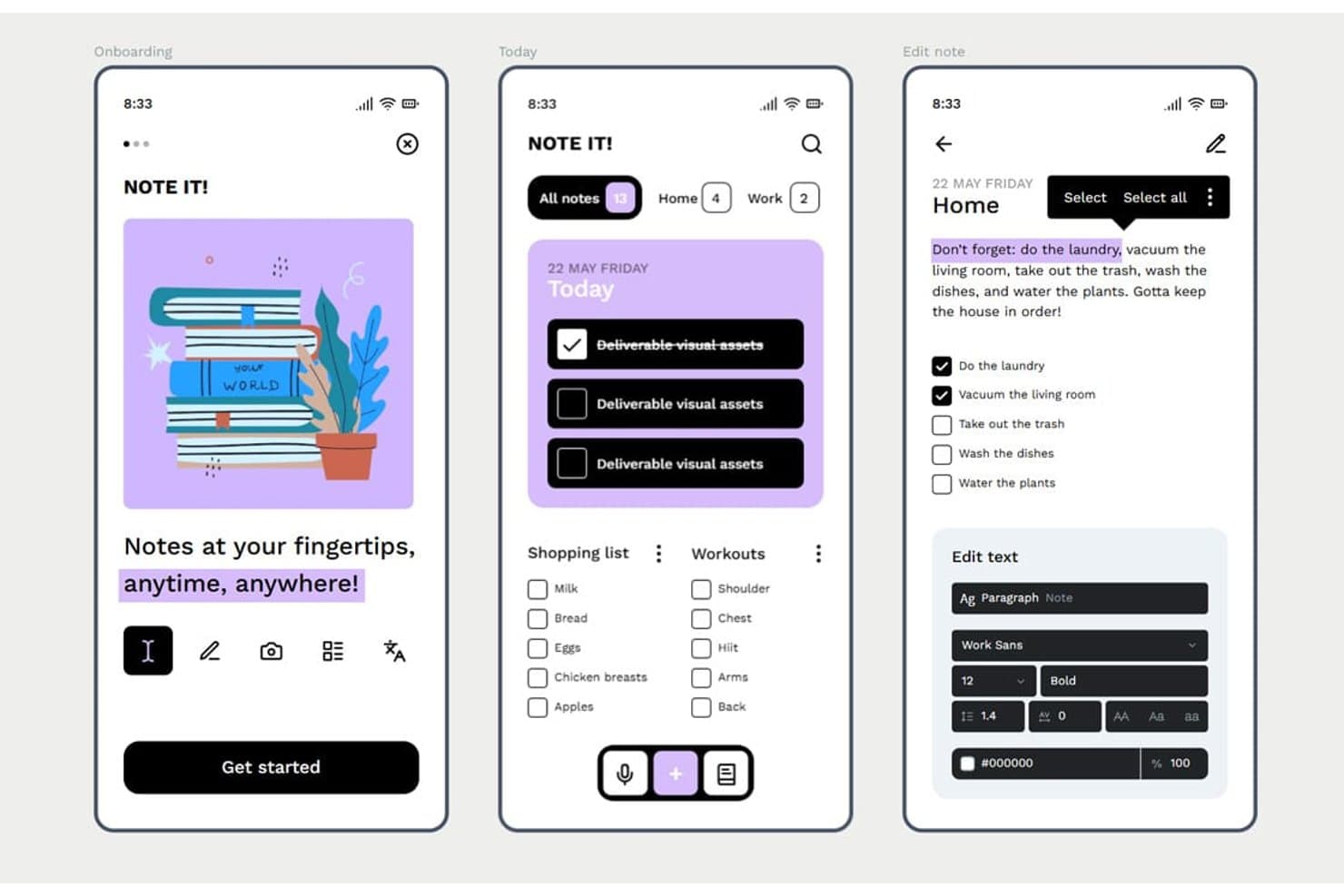
Penpot lets users design mobile app screens with rich text and task UIs. Penpot is an open-source, browser-based UI design tool that offers vector editing, Flex and CSS Grid layout, component libraries with design tokens, interactive prototyping, and developer handoff through an Inspect mode and Code tab.
Who Is Penpot Best For?
Penpot is a strong fit for UX/UI designers and front-end developers who need a free, open-source design tool with CSS-native layouts and built-in developer handoff.
Why I Picked Penpot
I've included Penpot in my top picks because it's the only open-source design tool with native CSS Flex and Grid layouts, which means the specs your developers see in the Code tab map directly to how they'll build the UI. I also like that design tokens follow the W3C DTCG format, so a color or spacing change in a token set cascades across components automatically. That combination of layout fidelity and token-driven components makes Penpot a strong fit for teams maintaining a mobile UI design system alongside a live codebase.
Penpot Key Features
- Boolean operations: Combine, subtract, intersect, or exclude vector shapes to build custom UI elements and icons directly on the canvas.
- Shared component libraries: Publish design assets across files and teams so all collaborators always pull from the same up-to-date components.
- Multiplayer editing with comments: Edit files simultaneously with teammates and leave threaded comments with replies, notifications, and read/unread tracking.
- Version history with pinned saves: Manually pin named versions alongside autosaved history to restore or preview earlier states of a file.
Penpot Integrations
Penpot supports integrations with GitHub, GitLab, Slack, and Storybook through its REST/RPC APIs and webhooks. It also offers a free, open-source MCP server for design-to-code workflows and custom integrations.
Pros and Cons
Pros:
- Native tokens support consistent design systems
- CSS-native layouts simplify developer handoff
- Open-source design control
Cons:
- No adaptive mobile device previewing
- Prototyping lacks gestures and conditional logic
Learn more about Penpot: Best for functional wireframes with working forms
- Free plan + 10-day trial available
- From $19/user/month
Visit WebsiteCustomer Rating:4.2/5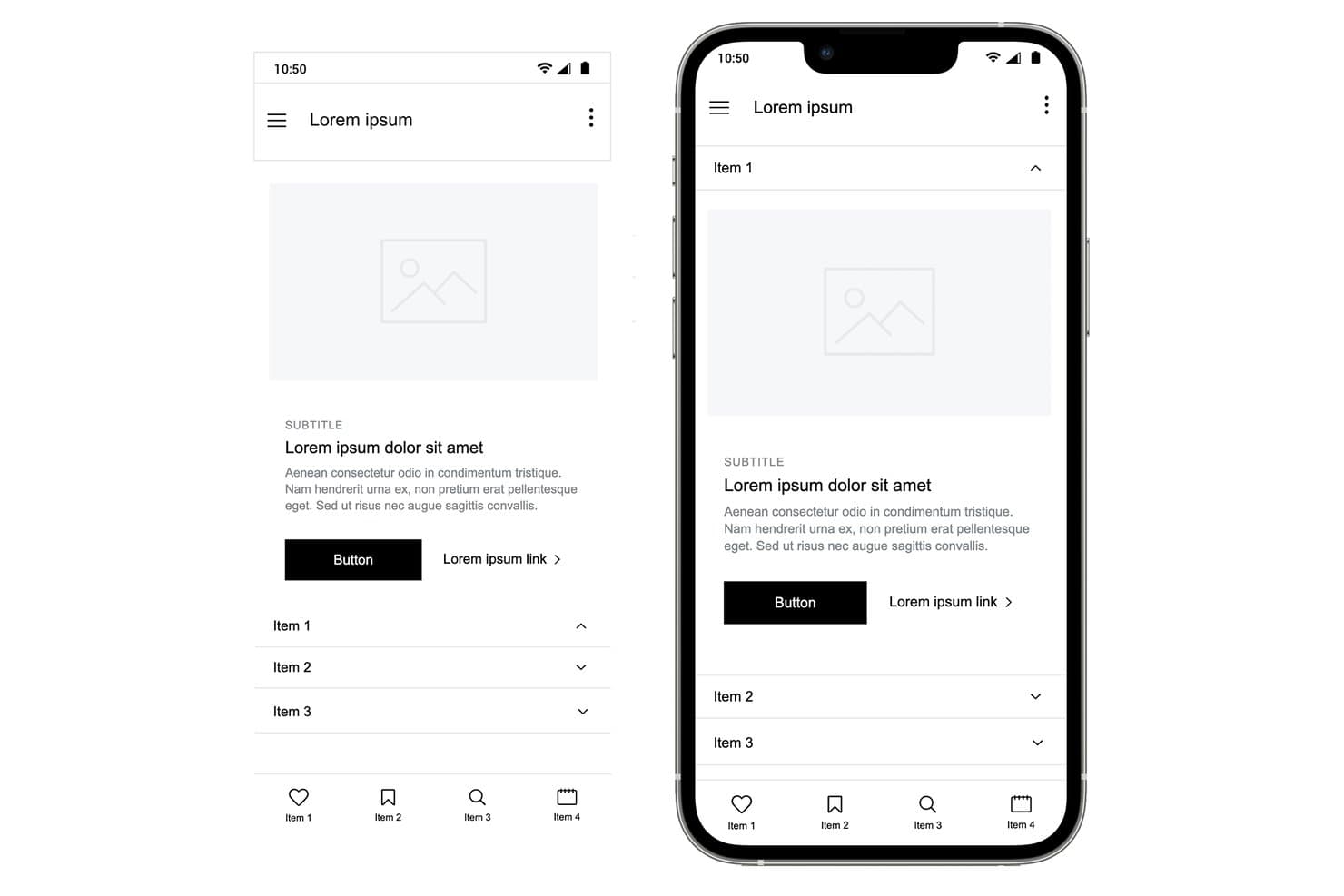
Justinmind lets users design mobile wireframes with accordion menus and nav bars. Justinmind is a desktop-based UI design and prototyping tool for web and mobile apps that covers wireframing, interactive prototyping, user flows, and developer handoff specifications.
Who Is Justinmind Best For?
Justinmind is a strong fit for UX designers and product managers who need to prototype realistic, data-driven interactions—especially working forms—without writing code.
Why I Picked Justinmind
I picked Justinmind as one of the best because its functional wireframing capabilities go well beyond basic click-through prototypes. I love that you can build form fields with real validation logic, populate data grids from a CSV file using Data Masters, and wire up conditional business rules, all without writing a single line of code. In practice, that means my team can simulate a working loan application or onboarding flow that behaves like the real thing before any developer writes a line of code.
Justinmind Key Features
- iOS and Android UI kits: Access 4,000+ prebuilt components for iOS and Android, including an iOS 18 UI library and current device frames like iPhone 16 and Galaxy S25.
- Mobile gesture support: Wire up tap, swipe, pinch, scroll, and rotate interactions to simulate native mobile app behavior in your prototype.
- On-device preview app: Use the Justinmind Viewer app on iPhone, iPad, or Android to test your prototype live via QR code scanning.
- Figma and Sketch import: Bring in existing design files from Figma or Sketch and continue building your prototype without starting from scratch.
Justinmind Integrations
Justinmind offers native integrations with Jira and Azure DevOps, plus the Justinmind+ for Confluence add-on. It also supports Figma and Sketch imports and provides an API/SDK for custom integrations.
Pros and Cons
Pros:
- Mobile gestures and device previews improve validation
- CSV-backed data grids support realistic testing
- Functional forms simulate real app logic
Cons:
- Advanced interactions require higher-tier plans
- Desktop-only editing limits distributed design collaboration
Learn more about Justinmind: Best for macOS-native UI design
- Free plan + 30-day free trial available
- From $12/user/month (billed annually)
Visit WebsiteCustomer Rating:4.5/5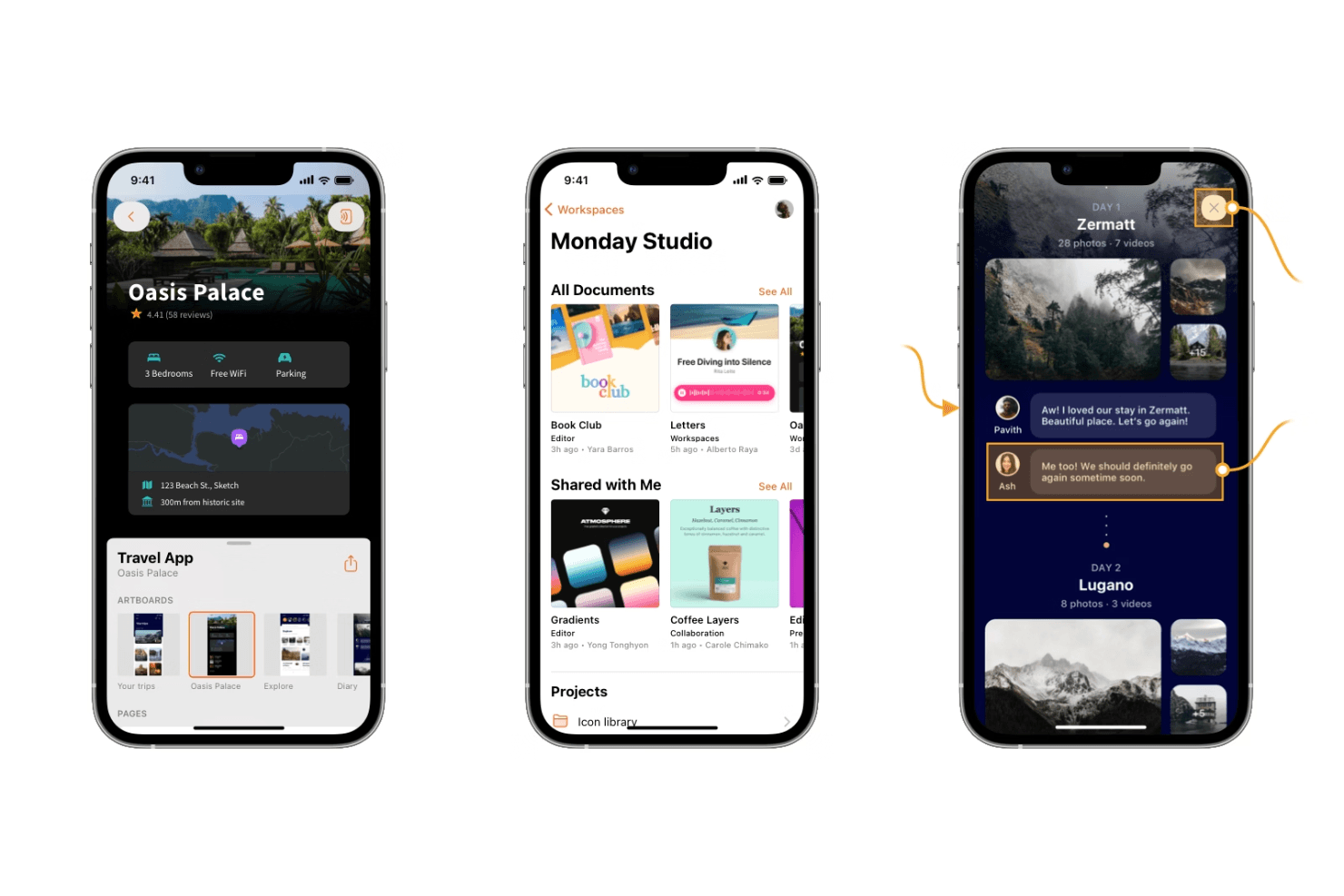
Sketch offers powerful design tools for creating sleek, modern mobile interfaces. Sketch is a macOS-native UI design tool that combines vector editing, auto-layout, interactive prototyping, design system management, and developer handoff in a single offline-capable editor.
Who Is Sketch Best For?
Sketch is the go-to choice for UI and product designers who work primarily on macOS and build iOS-focused mobile app interfaces.
Why I Picked Sketch
Sketch earns its spot on my shortlist because it's the most refined macOS-native editor available for UI design work. I love how Stacks auto-layout handles padding, distribution, and wrapping natively in the Mac app, which speeds up building mobile screens considerably. The vector tools, smooth corners, and P3 color support also make iOS-style UI feel genuinely native to design in Sketch.
Sketch Key Features
- Free developer handoff: Developers can inspect layers, copy CSS and SwiftUI color values, measure between elements, and export assets directly in the browser—no paid seat required.
- MCP server with AI integration: A built-in, local-only MCP server connects Sketch to Claude, Cursor, and other AI coding tools, letting agents read frames and generate implementation-ready code.
- Workspace Libraries with admin controls: Admins can manage who updates or uses a shared component library and control when updates roll out across the team.
- Design tokens export: Color Variables, Layer Styles, and Text Styles can be exported as CSS or JSON, or shared via a live public token link that stays current automatically.
Sketch Integrations
Sketch offers integrations with Slack, Jira, Notion, Zeplin, ProtoPie, Principle, Proto.io, and Origami, plus an open JavaScript API for custom extensions.
Pros and Cons
Pros:
- Private AI supports design-to-code workflows
- Free developer handoff supports unlimited developers
- Native offline Mac editor
Cons:
- No Android preview app complicates testing
- Mac-only editor limits cross-platform teams
 Best for logic-driven mobile wireframing
- Free plan + 30-day free trial available
- From $29/user/month (billed annually)
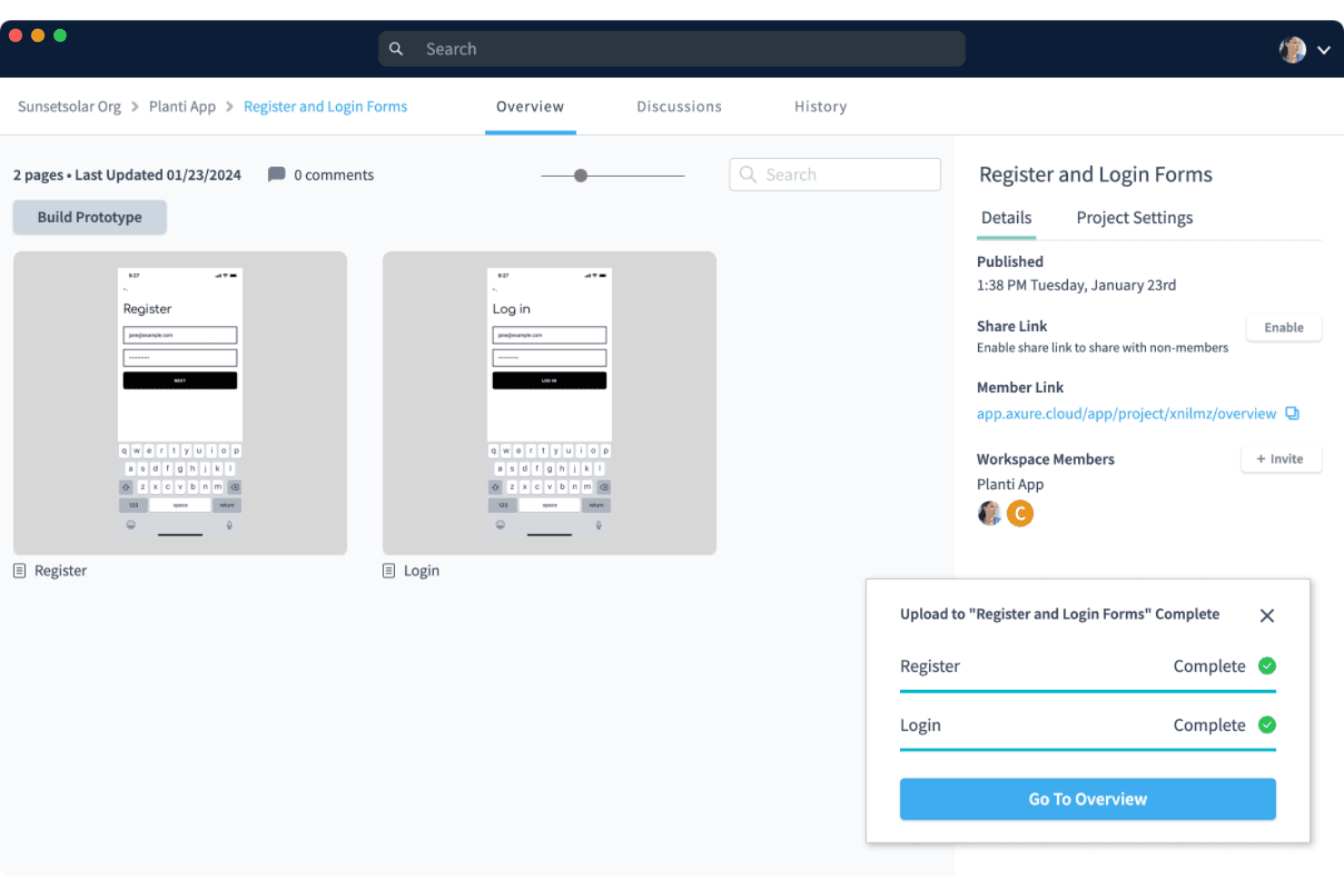
Axure RP supports wireframing and prototyping with a clean, user-friendly interface for building interactive designs. Axure RP is a desktop-based wireframing and prototyping tool that lets you build interactive mockups using conditional logic, variables, dynamic panels, and adaptive views for multiple screen sizes.
Who Is Axure RP Best For?
Axure RP is a strong fit for UX designers and product designers who need to prototype complex, logic-driven mobile app flows without writing code.
Why I Picked Axure RP
I've included Axure RP in my top picks because no other tool on this list matches its depth of interaction logic for mobile wireframing. I can build dynamic panels with multiple states to simulate swipeable carousels or conditional nav flows, add real variables, and wire up working form inputs without touching code. For complex mobile app flows where click-through prototypes simply don't cut it, Axure RP handles the logic that other tools can't.
Axure RP Key Features
- Adaptive views: Create alternate versions of a single page for different screen sizes, with device presets for iOS, Android, and desktop that auto-display the correct view in the browser.
- Free reviewer accounts: Stakeholders and developers can view, comment on, and inspect prototypes at no extra cost, with access to redlines, measurements, and CSS via Axure Cloud Inspect.
- Repeater widgets: Build data-driven tables and grids that users can sort and filter directly within a running prototype.
- Check-in/check-out team authoring: Team plan users can check out pages to edit offline, then check in with notes, with automatic style merging and full version history.
Axure RP Integrations
Axure RP has seven documented integrations, including Jira, Confluence, Slack, Microsoft Teams, Figma, Sketch, and Adobe XD. These support prototype embedding, activity notifications, and importing or hosting design content in Axure Cloud.
Pros and Cons
Pros:
- Adapts layouts across multiple screen sizes
- Supports working forms and filterable data
- Simulates complex mobile flows without code
Cons:
- Mobile previews lack native OS simulation
- Requires desktop installation for authoring
Learn more about Axure RP : 10Best for sensor-driven interaction prototyping
ProtoPie
- Free plan + free demo available
- From $25/user/month
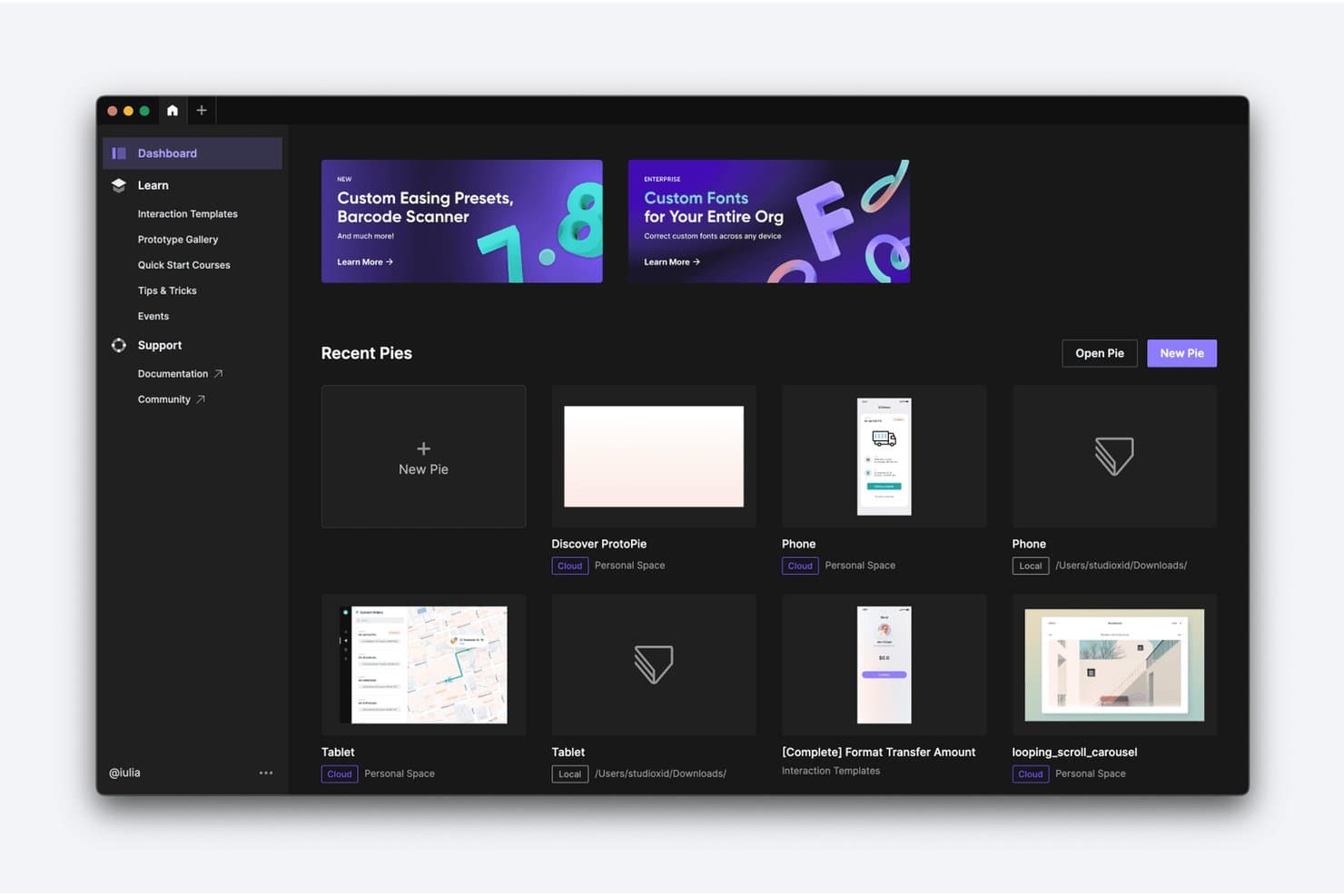
ProtoPie lets users manage and organize prototypes from a central dashboard. ProtoPie is a high-fidelity interactive prototyping tool that lets you layer conditional logic, variables, device sensors, voice triggers, and multi-device communication onto screens imported from Figma, Sketch, or Adobe XD.
Who Is ProtoPie Best For?
ProtoPie is a strong fit for UX and product designers who need to prototype gesture-based, sensor-driven, or multi-device interactions that standard design tools can't replicate.
Why I Picked ProtoPie
ProtoPie earns its spot on my shortlist because no other tool I've tested comes close for sensor-driven interaction prototyping. I've used it to build prototypes that respond to a phone's gyroscope and compass in real time, something Figma's prototyping simply can't do. Its conditional logic and variable system let you wire up branching flows and error states that behave like the real app, and the free Player app delivers those interactions on an actual iOS or Android device, sensors included.
ProtoPie Key Features
- Multi-device communication: Link two or more devices running ProtoPie Player so they send and receive data from each other in real time during prototype testing.
- ProtoPie MCP: Exports your prototype's triggers, variables, and formulas as structured data that AI coding agents like Cursor and Claude Code can read directly.
- Interaction recordings: Auto-generates frame-by-frame playback of user flows, capturing easing, delay, and layer properties so developers can inspect every interaction detail.
- ProtoPie Connect add-on: Connects prototypes to external hardware, APIs, and platforms like Unity and Unreal for testing interactions beyond standard mobile screens.
ProtoPie Integrations
ProtoPie integrates with Figma, Sketch, and Adobe XD through plugins, plus Claude Code, Cursor, VS Code, and Codex through ProtoPie MCP. ProtoPie Connect supports APIs, Unity, Unreal, Arduino, and custom Socket.IO plugins.
Pros and Cons
Pros:
- Frame-by-frame handoff clarifies motion behavior
- Conditional logic models complex app states
- Sensor prototypes behave authentically on devices
Cons:
- Complex interaction setup demands practice
- Screen design requires importing elsewhere
Learn more about ProtoPie:
Outro software de design de aplicações móveis
Eis algumas opções adicionais de software de design de aplicações móveis que não entraram na minha lista restrita, mas que ainda vale a pena conhecer:
- 11Proto.ioBest for pre-dev app behavior simulation
- 12FramerBest for AI-assisted web-to-app design iteration
- 13MockFlowBest for wireframe-to-dev token handoff
- 14BalsamiqBest for early-stage mobile app wireframing
- 15Fluid UIBest for quick stakeholder feedback on mobile flows
- 16MarvelBest for in-prototype usability testing
- 17UizardBest for AI-generated app screen mockups
- 18PrincipleBest for USB-mirrored iOS animation prototyping
- 19MoqupsBest for wireframing without design experience
- 20Origami StudioBest for near-native iOS interaction prototyping
How I Evaluate Mobile App Design Software
I split my evaluation into three parts, with the most weight on core functionality: creating mobile screens, linking realistic flows, and previewing them on devices. Next, I look for standout features such as design tokens. Finally, I consider beyond-feature fit, including onboarding, support, and pricing as teams grow.
Core Functionality (Table Stakes For This List)
When I'm selecting tools for my list, I score each one on a scale from 0 (does not offer the functionality) to 5 (excels in this area) for each core functionality listed below. I then convert the total into a percentage to help assess each tool's overall fit, with extra weight on any functionalities I’ve deemed essential.
- Screen Design (Essential): I look for precise layout and editing controls to create connected mobile screens, from a simple sign-up form to a complex settings page.
- Interactive Prototyping (Essential): I assess whether flows can represent realistic taps, gestures, transitions, and states, such as validation errors in a registration flow.
- Design Systems: I check for reusable components and shared styles, and whether updates carry through screens so interface patterns stay consistent.
- Developer Handoff: I look for inspectable measurements, specs, and exportable assets that help developers build screens as designed.
- Real-Time Collaboration: I consider how teams can co-edit, comment, and review the same file while discussing a flow or screen.
- Device Preview: I check whether interactive designs can be previewed on mobile device sizes or screens to assess layouts and behavior.
Once I have a list of tools that meet the criteria, I consider what sets each platform apart.
Differentiating Factors (What Sets Vendors Apart)
Here's how I compare and contrast different vendors:
Standout Features
I look for auto-layout engines that adapt components when content or screen sizes change, since a button that breaks when its label grows from "Save" to "Save and Continue" signals a brittle design system. Version history with branching is equally important—I check whether a team can fork a flow, test a redesigned onboarding sequence, and merge or roll back without overwriting production files. I also evaluate each tool's plugin and API ecosystem, because connecting design data to issue trackers or code repositories cuts repetitive handoff work.
Beyond Features
I check how each tool fits into sprint-based workflows—whether it connects to Jira, Slack, or GitHub so design updates flow into tickets without manual re-linking. Scaling matters too: a three-person startup needs fast, low-overhead licensing, while a 50-seat product org needs permission tiers and governed design libraries. I also evaluate onboarding quality, because a tool that ships strong templates and docs gets cross-functional teammates contributing faster than one that assumes deep design fluency.
Como escolher software de design de aplicações móveis
É fácil perder-se em listas extensas de funcionalidades e estruturas de preços complexas. Para o ajudar a manter-se concentrado enquanto percorre o seu processo específico de seleção de software, eis uma lista de fatores a ter em conta:
| Fator | O que considerar |
| Escalabilidade | Certifique-se de que o software consegue crescer com a sua equipa. Procure soluções que suportem um número crescente de utilizadores, projetos e níveis de complexidade sem problemas de desempenho. |
| Integrações | Verifique se a ferramenta se integra com outro software utilizado pela sua equipa, como ferramentas de gestão de projetos, plataformas de comunicação e ambientes de desenvolvimento. |
| Personalização | Procure ferramentas que permitam adaptar a interface e as funcionalidades ao seu fluxo de trabalho. Considere opções que lhe permitam criar componentes ou modelos personalizados. |
| Facilidade de utilização | Escolha software com uma interface intuitiva que a sua equipa consiga aprender rapidamente. Procure funcionalidades como a utilização de arrastar e largar e uma navegação intuitiva. |
| Orçamento | Considere tanto os custos iniciais como as despesas a longo prazo. Certifique-se de que os preços estão alinhados com o seu orçamento e avalie se as funcionalidades justificam o custo. |
| Medidas de segurança | Certifique-se de que o software cumpre as normas de segurança do setor para proteger os seus dados. Procure funcionalidades como encriptação de dados, autenticação de utilizadores e atualizações regulares. |
| Colaboração | Avalie até que ponto a ferramenta apoia a colaboração da equipa. Procure opções de edição em tempo real, comentários e partilha de opiniões para melhorar o trabalho em equipa. |
| Suporte | Considere a disponibilidade e a qualidade do apoio ao cliente. Procure opções que ofereçam assistência 24 horas por dia, 7 dias por semana, documentação abrangente e fóruns comunitários ativos. |
Tendências no software de design de aplicações móveis
Na minha pesquisa, recolhi inúmeras atualizações de produtos, comunicados de imprensa e registos de lançamento de diferentes fornecedores de software de design de aplicações móveis. Eis algumas das tendências emergentes que tenho acompanhado:
- Colaboração em tempo real: As equipas precisam cada vez mais de trabalhar em conjunto em tempo real, independentemente da sua localização. Software como o Figma permite que vários utilizadores editem designs simultaneamente, tornando a colaboração mais eficiente e reduzindo os problemas de comunicação.
- Integração de realidade aumentada (AR): As funcionalidades de AR estão a tornar-se cada vez mais comuns nas ferramentas de design, permitindo aos designers criar experiências imersivas. Esta tendência apoia setores como o comércio a retalho e os videojogos, nos quais é vantajoso visualizar produtos em ambientes reais.
- Design de interfaces de utilizador por voz (VUI): À medida que os dispositivos ativados por voz se tornam mais populares, as ferramentas estão a adaptar-se para suportar o design de VUI. O Adobe XD, por exemplo, inclui funcionalidades para criar protótipos de interações por voz, ajudando os designers a criar experiências de utilizador mais inclusivas e modernas.
- Gestão de sistemas de design: Atualmente, mais ferramentas disponibilizam funcionalidades para gerir e manter sistemas de design, garantindo a consistência entre projetos. O UXPin disponibiliza bibliotecas de sistemas de design que ajudam as equipas a manter os elementos de design uniformes e atualizados.
- Sugestões de design baseadas em IA: A IA começa a desempenhar um papel na sugestão de melhorias de design, na geração de maquetas e na automatização de tarefas repetitivas. Algumas ferramentas estão a incorporar IA para ajudar os designers a otimizar esquemas e combinações de cores, poupando tempo e estimulando a criatividade.
O que é o software de design de aplicações móveis?
- Colaboração em tempo real: Trabalhe simultaneamente com colegas em diferentes plataformas — seja em dispositivos Mac, Windows ou móveis — para atualizar designs, partilhar opiniões e evitar problemas de controlo de versões.
- Criação de protótipos interativos: Simule as interações dos utilizadores com protótipos dinâmicos que imitam o comportamento das aplicações. Ferramentas como o InVision facilitam o teste da usabilidade e a recolha atempada de opiniões das partes interessadas.
- Gestão de sistemas de design: Mantenha a consistência visual e funcional através de bibliotecas centralizadas de componentes reutilizáveis, tipos de letra e modelos de design que podem ser utilizados em vários projetos.
- Interface de arrastar e largar: Ideal para utilizadores sem experiência em programação, esta funcionalidade permite aos designers criar esquemas e modificar elementos visualmente, tornando-a acessível quer esteja a criar designs para dispositivos Android ou Apple.
- Integração de realidade aumentada: Crie experiências imersivas em aplicações, pré-visualizando a forma como os elementos digitais interagem com o mundo real, o que é particularmente útil para pré-visualizações de produtos ou aplicações baseadas na localização.
- Design de interfaces de utilizador por voz: Acompanhe o crescimento das experiências centradas na voz, concebendo e testando interações por voz diretamente na interface de utilizador da sua aplicação móvel.
- Ferramentas avançadas de animação: Dê vida aos designs com transições, gestos e animações que ajudam a visualizar a forma como a aplicação responderá às ações do utilizador.
- Funcionalidades de teste com utilizadores: Recolha informações em tempo real dos utilizadores de teste para avaliar a usabilidade e identificar problemas antes do lançamento — algo essencial para aperfeiçoar tanto o design Web como os fluxos móveis.
- Sugestões de design baseadas em IA: Utilize a inteligência integrada para automatizar tarefas repetitivas, melhorar esquemas e estimular a criatividade com recomendações inteligentes.
- Exportação de recursos de design: Transfira facilmente ficheiros e elementos de design para os programadores, garantindo o alinhamento entre a sua plataforma de design e o ambiente de produção, quer se destinem à App Store, ao Google Play ou a uma implementação interna.
Características do software de design de aplicações móveis
Ao selecionar software de design de aplicações móveis, tenha em atenção as seguintes características fundamentais:
- Interface intuitiva: Permite aos designers criar rapidamente protótipos e iterar sem uma curva de aprendizagem acentuada.
- Compatibilidade multiplataforma: Permite aos utilizadores criar designs para iOS e Android simultaneamente, simplificando o desenvolvimento.
- Colaboração em tempo real: Suporta o trabalho conjunto de vários utilizadores no mesmo projeto, para obter feedback e iterar mais rapidamente.
- Ferramentas de design responsivo: Garantem que os esquemas se adaptam automaticamente a diferentes tamanhos de ecrã e orientações do dispositivo.
- Bibliotecas de componentes: Fornecem elementos de interface de utilizador reutilizáveis para manter a consistência e acelerar o processo de design.
- Prototipagem interativa: Permite aos designers simular interações da aplicação e fluxos de utilizador sem escrever código.
- Controlo de versões: Regista as alterações ao design e permite reverter para versões anteriores quando necessário.
- Ferramentas de transferência para programadores: Geram especificações de design e recursos para simplificar a transição do design para o desenvolvimento.
- Integrações de terceiros: Ligam-se a outras ferramentas, como o Slack, o Jira ou plataformas de testes de usabilidade, para melhorar o fluxo de trabalho.
- Armazenamento e sincronização na nuvem: Garantem o acesso aos designs a partir de qualquer dispositivo e fazem automaticamente cópias de segurança do trabalho.
Benefícios do software de design de aplicações móveis
A implementação de software de design de aplicações móveis proporciona vários benefícios à sua equipa e à sua empresa. Eis alguns dos benefícios que pode esperar:
- Melhor colaboração: As funcionalidades de edição em tempo real permitem que a sua equipa trabalhe em conjunto de forma eficiente, independentemente do local onde se encontra.
- Prototipagem mais rápida: As interfaces de arrastar e largar e as ferramentas de prototipagem interativa de aplicações permitem criar e testar rapidamente designs de aplicações.
- Design consistente: A gestão de sistemas de design garante que todos os seus projetos mantêm um aspeto e uma experiência uniformes.
- Maior criatividade: As sugestões de design baseadas em IA e as ferramentas avançadas de animação ajudam a estimular novas ideias e a aperfeiçoar designs existentes.
- Maior envolvimento dos utilizadores: As funcionalidades de testes com utilizadores permitem recolher feedback para criar designs que correspondam às expectativas do seu público.
- Maior acessibilidade: Funcionalidades como o design de interfaces de utilizador por voz tornam as suas aplicações mais inclusivas e modernas.
- Transição simplificada para o desenvolvimento: Exporte facilmente os recursos de design para garantir uma transição fluida do design para o desenvolvimento de aplicações móveis.
Custos e preços do software de design de aplicações móveis
A seleção de software de design de aplicações móveis exige uma compreensão dos vários modelos de preços e planos disponíveis. Os custos variam consoante as funcionalidades, o tamanho da equipa, os complementos, entre outros fatores. A tabela abaixo resume os planos comuns, os respetivos preços médios e as funcionalidades normalmente incluídas nas soluções de software de design de aplicações móveis:
Tabela de comparação de planos de software de design de aplicações móveis
| Tipo de plano | Preço médio | Funcionalidades comuns |
| Plano gratuito | $0 | Prototipagem básica, armazenamento limitado e apoio da comunidade. |
| Plano pessoal | $5-$25/utilizador/ mês | Prototipagem avançada, modelos personalizados e apoio por e-mail. |
| Plano empresarial | $25-$50/ utilizador/mês | Ferramentas de colaboração em equipa, gestão de sistemas de design e apoio prioritário. |
| Plano para empresas | $50-$100/ utilizador/mês | Integrações personalizadas, gestão dedicada da conta e funcionalidades de segurança reforçadas. |
Perguntas frequentes sobre software de design de aplicações móveis
Eis algumas respostas a perguntas comuns sobre software de design de aplicações móveis:
Qual é o principal fator a ter em conta ao conceber aplicações móveis?
O principal fator é a simplicidade. O seu design deve ser intuitivo e fácil de compreender pelos utilizadores, sem necessidade de orientações excessivas. Concentre-se numa navegação clara e garanta que a aplicação funciona conforme esperado pelos utilizadores. Isto ajuda a melhorar a satisfação dos utilizadores e reduz a frustração.
Qual é a diferença entre um programador de aplicações e um designer de aplicações?
Um programador de aplicações concentra-se em criar uma aplicação rápida, segura e eficiente. O designer, por outro lado, garante que a aplicação é visualmente apelativa e fácil de navegar. Ambos os papéis são cruciais para criar uma aplicação bem-sucedida que corresponda às necessidades e expectativas dos utilizadores.
Quais são as cinco perguntas importantes a fazer a um cliente antes de criar a sua aplicação?
Pergunte qual é o objetivo da aplicação, quais são as funcionalidades pretendidas, quem é o público-alvo, qual é o orçamento e se existem restrições de design. Compreender estes aspetos ajuda a alinhar o design com as expectativas do cliente e garante que a aplicação cumpre eficazmente a função a que se destina.
Como escolher o software de design de aplicações móveis adequado?
Ao selecionar uma ferramenta de design de aplicações móveis, tenha em conta fatores como a facilidade de utilização, as funcionalidades disponíveis, as capacidades de integração e a escalabilidade. Avalie a capacidade do software para responder às suas necessidades específicas de design de produtos e certifique-se de que permite a colaboração entre os membros da sua equipa de design.
Quais são os desafios comuns no design de aplicações móveis?
Entre os desafios comuns incluem-se a manutenção de uma experiência de utilizador consistente em diferentes dispositivos, a garantia do desempenho da aplicação e a preservação de um design intuitivo. Também é importante equilibrar a estética com a funcionalidade para corresponder às expectativas dos utilizadores.
Como pode o software de design de aplicações móveis melhorar a colaboração da equipa?
Muitas ferramentas disponibilizam funcionalidades de colaboração em tempo real, permitindo que os membros da equipa trabalhem nos designs em simultâneo. Isto reduz os problemas de comunicação e acelera o processo de design, garantindo que todos estão alinhados e podem contribuir eficazmente.