

I migliori strumenti di gestione dei prodotti basati sull'IA supportano i flussi di lavoro automatizzando gli aggiornamenti del backlog, mettendo in evidenza le opinioni degli utenti e allineando i team su priorità chiare. Questi strumenti risolvono ostacoli concreti come la documentazione duplicata, le scadenze non rispettate e la comunicazione frammentata.
Dopo aver esaminato e testato dozzine di piattaforme, ho individuato le migliori opzioni che migliorano concretamente il processo decisionale e la collaborazione. Nella guida qui sotto analizzerò le funzionalità distintive di ciascuno strumento e mostrerò come possano integrarsi nel tuo flusso di lavoro per la gestione dei prodotti, sia che tu abbia bisogno di analisi più approfondite, di una pianificazione della roadmap più fluida o di un coordinamento del team più efficiente.
Perché fidarsi dei nostri consigli sui software
6,700+
Reviews
20
Industry experts
16+
Evaluation factors
14
Years
Il nostro team testa e recensisce software dal 2012. In quanto product manager noi stessi, sappiamo quanto sia difficile — e importante — scegliere il software giusto.
Per questa guida, abbiamo valutato gli strumenti attraverso test pratici e ricerche indipendenti, assegnando un punteggio agli strumenti in base ai nostri criteri di selezione.
Le nostre recensioni riflettono il nostro giudizio editoriale umano, non un discorso di vendita.
- Andrew LumbySenior TPM
- Cristiano ValimSenior UI/UX Lead
Tabella comparativa degli strumenti di gestione dei prodotti basati sull'IA
Questa tabella comparativa riassume i dettagli sui prezzi degli strumenti di gestione dei prodotti basati sull’IA che ho selezionato:
| Tool | Best For | Trial Info | Price | ||
|---|---|---|---|---|---|
| 1 | Ideale per la sintesi di feedback IA omnicanale | Demo gratuita disponibile | Prezzo su richiesta | Website | |
| 2 | Ideale per flussi di lavoro di prodotto personalizzabili | Piano gratuito disponibile | A partire da $9/utente/mese (fatturato annualmente) | Website | |
| 3 | Ideale per la gestione del ciclo di vita del progetto | Prova gratuita di 14 giorni + piano gratuito disponibile | Da $10/utente/mese (fatturazione annuale) | Website | |
| 4 | Ideale per mockup rapidi e intuitivi | Piano gratuito disponibile | Da $12/mese (fatturati annualmente) | Website | |
| 5 | Ideale per l’allineamento tra team | Piano gratuito disponibile | Da $10/utente/mese (fatturato annualmente) | Website | |
| 6 | Ideale per l'analisi dei prodotti | Piano gratuito + demo gratuita disponibile | Da $1200/anno (fatturazione annuale) | Website | |
| 7 | Ideale per l'analisi comportamentale | Piano gratuito disponibile | Prezzi su richiesta | Website | |
| 8 | Ideale per il feedback degli utenti | Prova gratuita di 14 giorni + piano gratuito + demo gratuita disponibile | Da $19/maker/mese (fatturazione annuale) | Website | |
| 9 | Ideale per l'elaborazione del linguaggio | Piano gratuito disponibile | A partire da $8/mese | Website | |
| 10 | Ideale per l'automazione delle attività | Prova gratuita disponibile | Da $29/utente/mese | Website |


Recensioni dei migliori strumenti di gestione dei prodotti basati sull'IA
Di seguito sono riportati i miei riepiloghi dettagliati dei migliori strumenti di gestione dei prodotti basati sull’IA inclusi nel mio elenco. Le mie recensioni offrono una panoramica approfondita delle funzionalità principali, dei pro e dei contro, delle integrazioni e dei casi d’uso ideali di ogni strumento, per aiutarti a trovare quello più adatto a te e al tuo team.
 Ideale per la sintesi di feedback IA omnicanale
- Demo gratuita disponibile
- Prezzo su richiesta
Visit WebsiteRating:4.8/5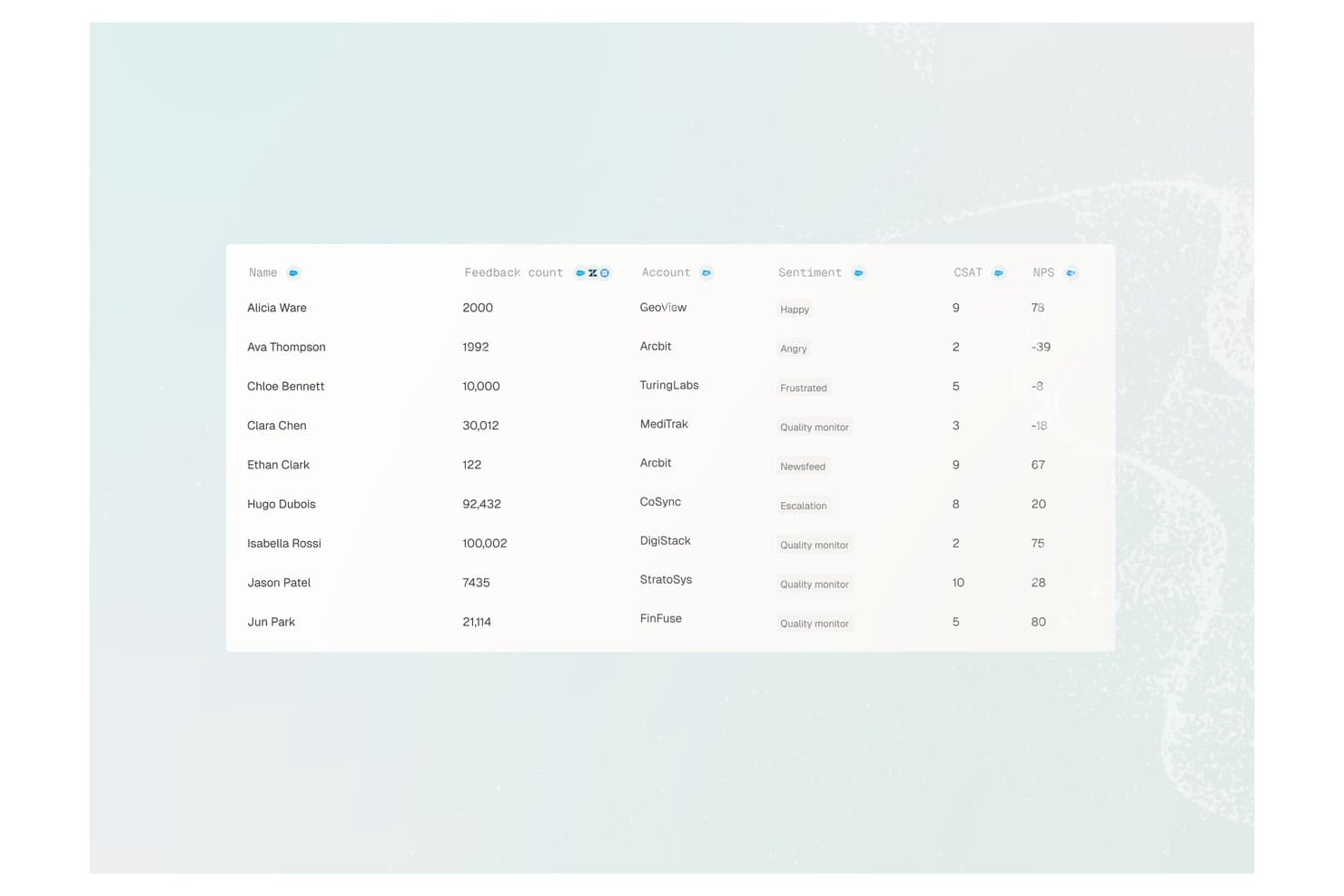
Enterpret offre una tabella di analisi dei feedback dei clienti che mostra nomi utenti, numero di feedback, nomi account, etichette di sentiment, punteggi CSAT e valori NPS. Enterpret è una piattaforma di customer intelligence che utilizza l'IA per aggregare, classificare e analizzare i feedback provenienti da oltre 50 canali — inclusi ticket di supporto, recensioni, chiamate e community — trasformandoli in approfondimenti di prodotto strutturati e ricercabili.
Per chi è più indicato Enterpret?
Enterpret è particolarmente adatto a team di prodotto di medie e grandi aziende che gestiscono ogni mese elevate quantità di feedback provenienti da più canali.
Perché ho scelto Enterpret
Ho scelto Enterpret tra i migliori perché la sua tassonomia adattiva classifica automaticamente i feedback in arrivo da oltre 50 fonti, senza richiedere il tagging manuale. Apprezzo molto anche il Customer Context Graph, che collega ogni tema a specifici account e al relativo peso in termini di ricavi, così il mio team sa quali feedback contribuiscono realmente alla retention. Il server MCP mi consente di interrogare tutto questo contesto strutturato direttamente da Claude o Cursor.
Caratteristiche principali di Enterpret
- Dashboard basate sull'IA: Dashboard ricercabili e personalizzabili mostrano i temi dei feedback e le analisi sul sentiment da tutti i canali collegati.
- Segnalazioni automatiche: Notifiche in tempo reale segnalano cambiamenti nel sentiment dei clienti o l'emergere di nuovi argomenti nelle fonti di feedback.
- Integrazione con data warehouse: Connettori nativi permettono di sincronizzare i dati strutturati dei feedback con piattaforme come Snowflake per le analisi.
- Integrazioni nei workflow: Invia insight sintetizzati sui clienti direttamente in Jira, Slack e altri strumenti di gestione prodotto.
Integrazioni di Enterpret
Enterpret offre integrazioni native con Zendesk, Intercom, Salesforce, Gong, Slack, Qualtrics, Linear, Jira, Google Play Store e Apple App Store. È disponibile anche un'API per integrazioni personalizzate.
Pros and Cons
Pros:
- La tassonomia adattiva classifica automaticamente i feedback senza sforzo manuale
- Le analisi ponderate per ricavi collegano i feedback all'impatto sul business
- Sintetizza feedback da oltre 50 canali contemporaneamente
Cons:
- La configurazione iniziale della tassonomia richiede tempo significativo
- Funzionalità limitate di gestione dei workflow di prodotto integrate
Learn more about Enterpret: Ideale per flussi di lavoro di prodotto personalizzabili
- Piano gratuito disponibile
- A partire da $9/utente/mese (fatturato annualmente)
Visit WebsiteRating:4.6/5
I flussi di lavoro di prodotto personalizzabili di monday.com aiutano i team a gestire attività, scadenze e priorità. Ho scelto monday.com come strumento di gestione prodotto alimentato dall'IA perché supporta i team con flussi di lavoro di prodotto personalizzabili. La piattaforma aiuta ad organizzare le attività di prodotto, monitorare i progressi dello sviluppo e coordinare il lavoro tra i team. Con funzionalità come bacheche personalizzabili, strumenti di automazione e aggiornamenti assistiti dall'IA, monday.com consente ai team di prodotto di gestire roadmap, funzionalità e rilasci in un unico spazio di lavoro.
Perché ho scelto monday.com
Ho scelto monday.com perché supporta i team con flussi di lavoro di prodotto personalizzabili. La piattaforma aiuta i team di prodotto a strutturare il proprio lavoro organizzando il feedback, tracciando le attività e gestendo i processi di sviluppo tra diversi team. Funzionalità come AI Blocks aiutano a categorizzare le informazioni, agevolano l'assegnazione delle attività e supportano i team nella gestione più efficiente dei flussi di lavoro. Inoltre, i riepiloghi assistiti dall'IA e gli strumenti di automazione aiutano i team di prodotto a monitorare i progressi, coordinare la comunicazione, e mantenere roadmap, sviluppo delle funzionalità e rilasci organizzati in un unico spazio di lavoro.
Caratteristiche principali di monday.com
Oltre ai flussi di lavoro di prodotto personalizzabili, monday.com offre:
- Dashboard personalizzabili: Personalizza la visualizzazione dei tuoi progetti con widget e strumenti di visualizzazione dati per monitorare i progressi e le metriche delle performance.
- Automazioni: Crea flussi di lavoro automatici per ridurre le attività ripetitive e garantire coerenza nell'esecuzione dei progetti.
- Vista Gantt e Kanban: Utilizza questi metodi di visualizzazione per una migliore pianificazione e monitoraggio delle scadenze e delle attività di progetto.
- Gestione delle risorse: Assegna e gestisci il carico di lavoro del tuo team con strumenti pensati per ottimizzare l'utilizzo delle risorse.
Integrazioni di monday.com
Le integrazioni includono Slack, Google Drive, Trello, Salesforce, Microsoft Teams, Zoom, HubSpot, QuickBooks, Shopify e Dropbox.
Pros and Cons
Pros:
- Piattaforma versatile adatta a vari ambiti aziendali
- Le automazioni aiutano a semplificare i flussi di lavoro ripetitivi
- Le funzionalità IA assistono con riepiloghi attività, automazioni e generazione di contenuti
Cons:
- Le prestazioni possono diminuire gestendo bacheche o dataset di grandi dimensioni
- Il prezzo può essere elevato per piccole imprese o startup
Learn more about monday AI Workspace: Ideale per la gestione del ciclo di vita del progetto
- Prova gratuita di 14 giorni + piano gratuito disponibile
- Da $10/utente/mese (fatturazione annuale)
Visit WebsiteRating:4.3/5
Le funzionalità AI di Wrike riassumono l'attività della dashboard, segnalano potenziali colli di bottiglia e offrono suggerimenti per aiutare i team a concentrarsi sul lavoro prioritario. Wrike offre una soluzione dinamica per i team che desiderano migliorare la gestione dei progetti grazie alle funzionalità supportate dall'intelligenza artificiale. Progettato per aziende di diversi settori, Wrike si rivolge a chi vuole automatizzare le attività ripetitive e rafforzare la collaborazione all'interno dei team. Affrontando sfide come l'inefficienza dei flussi di lavoro e le complessità d'integrazione, Wrike consente agli utenti di concentrarsi su iniziative strategiche invece che su incombenze amministrative.
Perché ho scelto Wrike
Ho scelto Wrike per la sua capacità unica di integrare l'IA nel suo strumento di gestione dei progetti, rendendolo una scelta di spicco per la gestione dei prodotti con intelligenza artificiale. Le funzionalità AI di Wrike, come l'automazione delle attività e l'analisi in tempo reale, permettono al tuo team di gestire i progetti in modo più efficace riducendo l'inserimento manuale e fornendo insight utili. Inoltre, il suo potente componente AI consente la generazione di piani di progetto e la sintesi delle discussioni, assicurando che il tuo team rimanga allineato e informato durante tutto il ciclo di vita del progetto.
Caratteristiche principali di Wrike
Oltre alle funzionalità AI, Wrike offre una gamma di strumenti per migliorare la tua esperienza nella gestione dei progetti:
- Automazione delle attività: Semplifica il flusso di lavoro automatizzando le attività ripetitive, permettendo al team di concentrarsi su attività più strategiche.
- Dashboard personalizzabili: Personalizza l'area di lavoro in base alle esigenze specifiche del tuo team, assicurandoti di avere sempre le informazioni più rilevanti a portata di mano.
- Analisi in tempo reale: Ottieni informazioni sull'andamento dei tuoi progetti con analisi aggiornate che aiutano a prendere decisioni informate in modo rapido.
- Comunicazione integrata: Favorisci la comunicazione fluida all'interno del team senza la necessità di passare da uno strumento all'altro.
Integrazioni di Wrike
Le integrazioni includono Google Workspace, QuickBooks, Jira, Salesforce, Microsoft Teams, Dropbox, Box, Adobe Creative Cloud, Slack e GitHub. Wrike offre anche un'API per integrazioni personalizzate.
Pros and Cons
Pros:
- L'IA supporta le decisioni nella pianificazione del prodotto
- Automazione avanzata per team interfunzionali
- Dashboard personalizzabili per la visibilità dei prodotti
Cons:
- Nessuno strumento prodotto specifico
- Le funzionalità AI avanzate hanno un costo maggiore
 Ideale per mockup rapidi e intuitivi
- Piano gratuito disponibile
- Da $12/mese (fatturati annualmente)
Visit WebsiteRating:4.7/5
Canva aiuta i team a creare visual con suggerimenti per design e contenuti basati sull’IA. Canva porta il supporto alla progettazione basato sull’IA nei flussi di lavoro di gestione prodotto, rendendo più semplice trasformare le idee in visual professionali. Dalla generazione di layout per le presentazioni alla stesura dei testi e al perfezionamento dei progetti, le sue funzionalità IA aiutano i team a comunicare roadmap e strategie in modo chiaro—ideale per mantenere allineati gli stakeholder.
Perché ho scelto Canva: Gli strumenti IA di Canva accelerano la creazione di contenuti per aggiornamenti di prodotto, materiali di lancio e report. La sua interfaccia intuitiva e i suggerimenti intelligenti per la progettazione aiutano i team a comunicare idee in modo visivo senza richiedere competenze grafiche avanzate. La collaborazione in tempo reale garantisce che product manager e stakeholder possano co-creare e finalizzare materiali in modo efficiente.
Funzionalità e integrazioni principali:
Funzionalità includono un brand kit che aiuta il tuo team a mantenere la coerenza del marchio in tutti i progetti. L'editor di foto della piattaforma consente di migliorare le immagini con filtri ed effetti. Canva offre anche un servizio di stampa, così puoi ordinare copie fisiche dei tuoi progetti direttamente tramite la piattaforma.
Integrazioni includono Slack, Google Drive, Dropbox, HubSpot, Mailchimp, Instagram, Facebook, Pinterest, LinkedIn e YouTube.
Pros and Cons
Pros:
- Interfaccia drag-and-drop facile da usare
- Ampia libreria di template
- Supporta la coerenza del marchio
Cons:
- Strumenti di progettazione avanzati limitati
- Prestazioni a volte lente
Learn more about Canva: Ideale per l’allineamento tra team
- Piano gratuito disponibile
- Da $10/utente/mese (fatturato annualmente)
Visit WebsiteRating:4.6/5
Notion organizza pianificazioni, documenti e flussi di lavoro con il supporto dell’AI. Notion è uno spazio di lavoro potenziato dall’AI che aiuta i team di gestione prodotto a organizzare pianificazioni, documentazione e flussi di lavoro in un unico posto. Le sue funzionalità di intelligenza artificiale possono riassumere i contenuti, generare idee e semplificare la pianificazione, rendendolo un hub prezioso sia per le attività strategiche che operative.
Perché ho scelto Notion: Gli strumenti di intelligenza artificiale di Notion aiutano i responsabili di prodotto a generare rapidamente documentazione, estrarre insight e organizzare i dettagli del progetto. La sua struttura personalizzabile supporta flussi di lavoro di gestione prodotto su misura, dalla gestione del backlog agli aggiornamenti della roadmap. La collaborazione in tempo reale e la creazione di contenuti assistita dall’AI mantengono il team allineato e ne velocizzano l’operatività.
Funzionalità e integrazioni principali:
Funzionalità includono un’interfaccia drag-and-drop che consente di organizzare i contenuti con facilità. La libreria di template offre soluzioni pronte per vari compiti. Notion mette a disposizione anche un web clipper per salvare contenuti dal web direttamente nello spazio di lavoro.
Integrazioni includono Slack, Google Drive, Trello, Asana, Evernote, GitHub, Microsoft Teams, Zapier, Dropbox e Typeform.
Pros and Cons
Pros:
- Pagine altamente personalizzabili
- Collaborazione in tempo reale
- Ampia libreria di template
Cons:
- Occasionali problemi di sincronizzazione
- Leggera curva di apprendimento per le configurazioni complesse
Learn more about Notion: Ideale per l'analisi dei prodotti
- Piano gratuito + demo gratuita disponibile
- Da $1200/anno (fatturazione annuale)
Visit WebsiteRating:4.5/5
Mixpanel utilizza l'IA per analizzare il comportamento degli utenti e guidare decisioni di prodotto basate sui dati. Mixpanel è una piattaforma di analisi che aiuta i team di gestione prodotto a tracciare le interazioni degli utenti e trasformare i dati in intuizioni azionabili. Sebbene il suo punto di forza sia l'analisi del prodotto piuttosto che l'IA, integra il machine learning per scoprire modelli comportamentali, evidenziare le tendenze e guidare decisioni basate sui dati che plasmano esperienze di prodotto migliori.
Perché ho scelto Mixpanel: Mixpanel sfrutta l'IA per offrire analisi comportamentali approfondite, aiutando i product manager a dare priorità alle funzionalità e ottimizzare i percorsi degli utenti. Le sue analisi di funnel e retention basate su IA rivelano cosa guida l'engagement e la fedeltà. Insight in tempo reale e segmentazione intelligente lo rendono uno strumento potente per una gestione prodotto proattiva e basata sui dati.
Funzionalità e integrazioni di spicco:
Funzionalità includono l'analisi delle coorti, che ti aiuta a raggruppare gli utenti in base a caratteristiche comuni. Gli strumenti di A/B testing ti permettono di sperimentare con diverse funzionalità di prodotto per vedere cosa funziona meglio. Mixpanel offre anche una dashboard approfondita per visualizzare dati complessi in un formato di facile comprensione.
Integrazioni includono Salesforce, Slack, Segment, Zapier, Google Analytics, HubSpot, Shopify, WordPress, Intercom e Marketo.
Pros and Cons
Pros:
- Supporta l'A/B testing
- Monitoraggio dati in tempo reale
- Segmentazione avanzata degli utenti
Cons:
- Richiede configurazione e manutenzione
- Potrebbe richiedere competenze tecniche
 Ideale per l'analisi comportamentale
- Piano gratuito disponibile
- Prezzi su richiesta
Visit WebsiteRating:4.5/5
Amplitude utilizza l'IA per rivelare schemi comportamentali e ottimizzare le esperienze di prodotto. Amplitude è una piattaforma di analisi avanzata che aiuta i team di gestione prodotto a comprendere il comportamento degli utenti e a ottimizzare le esperienze del prodotto. Integra l'apprendimento automatico dell'IA per individuare schemi comportamentali, anticipare le azioni degli utenti e fornire approfondimenti che supportano decisioni basate sui dati.
Perché ho scelto Amplitude: Amplitude utilizza l'IA per migliorare l'analisi comportamentale, facilitando l'identificazione delle opportunità per ottimizzare i percorsi utente. La segmentazione intelligente e l'analisi delle coorti rivelano tendenze che influenzano la fidelizzazione e il coinvolgimento. Grazie agli approfondimenti in tempo reale offerti dall'IA, i team possono adattare rapidamente le strategie e prendere decisioni di prodotto più informate.
Funzionalità e integrazioni principali:
Funzionalità includono l'analisi dei funnel, che aiuta a visualizzare i percorsi degli utenti e a identificare i punti di abbandono. I report Pathfinder mostrano i percorsi utente più comuni all'interno del prodotto. Inoltre, le analisi predittive di Amplitude forniscono previsioni sui comportamenti degli utenti e sui risultati di prodotto.
Integrazioni includono Salesforce, Segment, Slack, Google Analytics, HubSpot, Marketo, Optimizely, Mixpanel, Shopify e Zendesk.
Pros and Cons
Pros:
- Segmentazione avanzata degli utenti
- Supporta l'analisi predittiva
- Analisi dettagliata delle coorti
Cons:
- Ha una leggera curva di apprendimento
- Può richiedere grandi volumi di dati
Learn more about Amplitude: Ideale per il feedback degli utenti
- Prova gratuita di 14 giorni + piano gratuito + demo gratuita disponibile
- Da $19/maker/mese (fatturazione annuale)
Visit WebsiteRating:4.5/5
Productboard aiuta i team ad allineare le roadmap alle esigenze e agli obiettivi dei clienti. Productboard è una piattaforma di gestione del prodotto progettata per aiutare i team a comprendere le esigenze dei clienti e a dare priorità alle funzionalità. Sebbene non sia uno strumento progettato principalmente per l’IA, utilizza comunque l’intelligenza artificiale per organizzare e analizzare il feedback degli utenti in modo più efficiente, facilitando l’allineamento delle roadmap dei product manager con i reali insight dei clienti e gli obiettivi aziendali.
Perché ho scelto Productboard: Productboard utilizza l’IA per analizzare e dare priorità ai feedback degli utenti, aiutando i team a sviluppare prodotti focalizzati sui clienti. I suoi insight potenziati dall’IA creano un’unica fonte attendibile, rendendo più semplice individuare schemi e definire priorità. Raggruppando il feedback da molteplici canali, guida decisioni basate sui dati che allineano lo sviluppo del prodotto alle reali esigenze dei clienti.
Caratteristiche distintive & integrazioni:
Caratteristiche includono la creazione collaborativa della roadmap, che permette al team di condividere e allineare le strategie di prodotto. Gli strumenti per insight dei clienti aiutano a mantenere le necessità degli utenti sempre in primo piano. La prioritizzazione basata sui dati garantisce che il team si concentri sulle funzionalità di maggiore impatto.
Integrazioni includono Jira, Slack, Microsoft Teams, Salesforce, Trello, GitHub, Zendesk, Intercom, Confluence e Asana.
Pros and Cons
Pros:
- Centralizza gli insight dei clienti
- Consolidamento semplice dei feedback
- Visualizzazioni della roadmap personalizzabili
Cons:
- Opzioni di reportistica limitate
- Costi elevati per piccoli team
Learn more about Productboard: Ideale per l'elaborazione del linguaggio
- Piano gratuito disponibile
- A partire da $8/mese
Visit WebsiteRating:4.4/5
ChatGPT aiuta la gestione del prodotto con idee, documenti e analisi dei feedback basati sull'IA. ChatGPT è un modello linguistico di intelligenza artificiale che supporta la gestione del prodotto generando idee, redigendo documentazione e analizzando i feedback. La sua comprensione del linguaggio naturale aiuta i team a personalizzare la comunicazione, pianificare le funzionalità e affinare le strategie grazie alle intuizioni guidate dall'intelligenza artificiale.
Perché ho scelto ChatGPT: ChatGPT eccelle nel trasformare requisiti di prodotto complessi in piani chiari e attuabili. Può aiutare nella stesura di roadmap, riassumere i feedback dei clienti e proporre idee per nuove funzionalità. La sua capacità di comprendere il contesto lo rende un potente alleato per decisioni di product management più rapide e informate.
Funzionalità e integrazioni principali:
Funzionalità includono un'interfaccia utente intuitiva che facilita l'interazione con l'IA. Fornisce risposte rapide e accurate a una vasta gamma di domande. Inoltre, la sua capacità di apprendere dalle interazioni ne migliora l'utilità nel tempo.
Integrazioni includono Slack, Microsoft Teams, Google Workspace, Trello, Zapier, Asana, Salesforce, HubSpot, monday.com e Notion.
Pros and Cons
Pros:
- Apprende dalle interazioni
- Personalizzabile sulle esigenze dell'utente
- Tempi di risposta rapidi
Cons:
- Limitato nella comprensione del contesto
- Può produrre risultati irrilevanti o scorretti
Learn more about ChatGPT: 10Ideale per l'automazione delle attività
Motion
- Prova gratuita disponibile
- Da $29/utente/mese
Visit WebsiteRating:4.2/5
Motion utilizza l’intelligenza artificiale per gestire le attività, dare priorità al lavoro e adattare le pianificazioni dei progetti. Motion è uno strumento di gestione delle attività e automazione basato su intelligenza artificiale che aiuta i team di product management a organizzare il lavoro, a dare priorità alle attività e a ottimizzare gli orari. Il motore di intelligenza artificiale adatta automaticamente i piani in base ai cambiamenti, assicurando che i progetti rimangano nei tempi e allineati agli obiettivi di prodotto.
Perché ho scelto Motion: La programmazione guidata dall’AI di Motion si adatta alle priorità che cambiano, aiutando i product manager a concentrarsi sulle iniziative strategiche. Assegna in modo intelligente la priorità alle attività, sincronizza le scadenze e integra i calendari per una visione unificata del lavoro. Queste capacità di automazione fanno risparmiare tempo, riducono la pianificazione manuale e permettono ai team di prodotto di lavorare in modo efficiente.
Funzionalità e integrazioni principali:
Funzionalità includono un calendario intelligente che regola automaticamente le attività in base alla tua disponibilità. Motion offre una modalità di concentrazione per ridurre le distrazioni e aumentare l’attenzione sulle attività importanti. Inoltre, lo strumento fornisce analisi dettagliate per aiutarti a capire come viene utilizzato il tuo tempo.
Integrazioni includono Google Calendar, Outlook, Slack, Trello, Asana, Todoist, Notion, Microsoft Teams, Zoom e ClickUp.
Pros and Cons
Pros:
- Programmazione intelligente delle attività
- Riduce gli sforzi manuali
- Fornisce analisi dettagliate sull’utilizzo del tempo
Cons:
- Opzioni di personalizzazione limitate
- Potrebbe non adattarsi a flussi di lavoro complessi
Learn more about Motion:
Altri strumenti di gestione dei prodotti basati sull'IA
Ecco alcune opzioni aggiuntive di strumenti di gestione dei prodotti basati sull’IA che non sono entrate nel mio elenco, ma che vale comunque la pena prendere in considerazione:
Come Valuto gli Strumenti di Product Management con AI
Per essere inclusi in questa lista, l’AI di uno strumento deve svolgere veri compiti da PM—come trasformare feedback sparsi in temi prioritari o generare automaticamente user story. Suddivido la mia valutazione in funzionalità centrali che ogni strumento deve offrire e fattori differenzianti che distinguono le buone scelte da quelle eccellenti.
Funzionalità Centrali (Requisiti Minimi per Questa Lista)
Quando seleziono gli strumenti per la mia lista, ne valuto ciascuno su una scala da 0 (non offre la funzionalità) a 5 (eccelle in quest’area) per ogni funzionalità centrale elencata qui sotto. Poi calcolo il punteggio totale dello strumento in percentuale. Ogni strumento deve ottenere un punteggio totale minimo del 65% per essere preso in considerazione.
- Roadmap & Prioritizzazione con AI: Cerco AI in grado di valutare e classificare le funzionalità usando dati come richieste dei clienti, stime di sforzo e obiettivi strategici—non solo ordinamento manuale tramite drag-and-drop.
- Sintesi di Feedback con AI: Lo strumento dovrebbe raccogliere segnali da ticket di supporto, chiamate commerciali o recensioni e raggrupparli automaticamente in temi, risparmiando ore di tagging manuale ai PM.
- Generazione PRD & Story: Valuto se l’AI può redigere artefatti di prodotto utili da un prompt o da note di discovery, come trasformare i risultati di interviste in criteri di accettazione.
- Integrazioni con Dati di Prodotto: Strumenti come Productboard e Airfocus si collegano a Jira, Slack, Intercom e Amplitude—verifico ampiezza e profondità simili nella connettività dei dati.
- Insight & Analytics con AI: Valuto se lo strumento evidenzia schemi che i PM potrebbero non notare, come segnalare un calo nell’adozione di una funzionalità o prevedere rischi per le consegne dai dati degli sprint.
- Gestione dei Flussi di Lavoro di Prodotto: I flussi di lavoro PM sottostanti—visualizzazione backlog, timeline roadmap, monitoraggio dei rilasci—devono essere abbastanza solidi da fare da fondamento alle capacità AI.
Una volta che ho una lista di strumenti che soddisfano i criteri, considero cosa distingue ogni piattaforma.
Fattori Differenzianti (Cosa Distingue i Fornitori)
Ecco come confronto i vari fornitori:
Funzionalità Distintive
L’allineamento tra strategia ed esecuzione è un grande elemento distintivo—cerco AI che sappia collegare una voce del backlog a un OKR aziendale e spiegare perché appartiene alla roadmap. Le note di rilascio auto-generate fanno risparmiare davvero tempo ai PM, soprattutto ai team che rilasciano settimanalmente su più prodotti. Anche agenti AI personalizzati sono elementi distintivi. Le migliori implementazioni consentono di automatizzare attività ricorrenti come la manutenzione dei ticket obsoleti o la segnalazione di richieste duplicate tra i vari team.
Altri Aspetti Oltre le Funzionalità
Privacy dei dati e governance dell’AI sono molto rilevanti qui. Verifico se il fornitore permette di escludere i dati di prodotto dall’addestramento del modello—questo aspetto interessa in particolare i team enterprise. Dimensione e composizione del team sono fattori chiave. Un solo PM in una startup ha esigenze diverse rispetto a un’organizzazione prodotto da 30 persone che gestisce più linee prodotto con viste di portafoglio. Valuto anche la trasparenza dei prezzi, dato che le funzionalità AI spesso hanno costi a consumo che possono aumentare improvvisamente man mano che cresce l’adozione nei team.
Come scegliere gli strumenti di gestione dei prodotti basati sull'IA
È facile perdersi in lunghi elenchi di funzionalità e strutture tariffarie complesse. Per aiutarti a rimanere concentrato mentre affronti il tuo particolare processo di selezione del software, ecco una lista di fattori da tenere a mente:
| Fattore | Cosa considerare |
|---|---|
| FattoreScalabilità | Cosa considerareLo strumento può crescere insieme al tuo team? Valuta se è in grado di gestire più utenti, progetti e dati man mano che le tue esigenze aumentano. |
| FattoreIntegrazioni | Cosa considerareSi collega agli strumenti che già utilizzi? Verifica la compatibilità con il tuo insieme di tecnologie esistente per evitare silos di dati e soluzioni manuali. |
| FattorePersonalizzazione | Cosa considerarePuoi adattare lo strumento al tuo flusso di lavoro? Cerca opzioni per personalizzare dashboard, report e impostazioni in base ai processi del tuo team. |
| FattoreFacilità d'uso | Cosa considerareLo strumento è intuitivo per il tuo team? Un'interfaccia complicata può rallentare l'adozione; cerca semplicità e chiarezza nella navigazione e nel design. |
| FattoreImplementazione e inserimento | Cosa considerareQuanto rapidamente puoi iniziare? Valuta la disponibilità di tutorial, assistenza e risorse per aiutare il tuo team a partire con il piede giusto. |
| FattoreCosto | Cosa considerareIn che modo i prezzi rientrano nel tuo budget? Considera sia i costi iniziali sia quelli ricorrenti e confrontali con il valore e le funzionalità offerte da ciascun piano. |
| FattoreMisure di sicurezza | Cosa considerareI tuoi dati e la tua privacy sono protetti? Verifica la presenza di crittografia, standard di conformità e controlli degli accessi degli utenti per proteggere le tue informazioni. |
| FattoreDisponibilità dell'assistenza | Cosa considerareQuali opzioni di assistenza sono disponibili? Considera gli orari, i canali e la rapidità di risposta del supporto per assicurarti di ricevere aiuto quando ne hai bisogno. |
Cosa sono gli strumenti di gestione dei prodotti basati sull'IA?
Gli strumenti di gestione dei prodotti basati sull'intelligenza artificiale sono soluzioni software che aiutano i team di prodotto a pianificare, sviluppare e distribuire i prodotti in modo più efficiente utilizzando l'intelligenza artificiale. I responsabili di prodotto, i progettisti e gli sviluppatori utilizzano generalmente questi strumenti per migliorare la collaborazione, il processo decisionale e l'integrazione dei riscontri degli utenti.
Funzionalità come l'analisi dei dati, la gestione automatizzata delle attività e la raccolta dei riscontri degli utenti aiutano a ottimizzare i flussi di lavoro, migliorare la qualità dei prodotti e allineare gli sforzi del team. Nel complesso, questi strumenti offrono un valore significativo ottimizzando il processo di gestione dei prodotti e favorendo risultati migliori.
Funzionalità degli strumenti di gestione dei prodotti basati sull'intelligenza artificiale
Quando selezioni strumenti di gestione dei prodotti basati sull'intelligenza artificiale, presta attenzione alle seguenti funzionalità chiave:
- Pianificazione della tabella di marcia del prodotto: aiuta i team a pianificare e visualizzare le tempistiche di sviluppo del prodotto, garantendo l'allineamento di tutte le parti interessate.
- Raccolta dei riscontri degli utenti: raccoglie informazioni dagli utenti per orientare i miglioramenti del prodotto e stabilire la priorità delle funzionalità.
- Analisi dei dati: fornisce informazioni sul comportamento degli utenti e sulle prestazioni del prodotto, favorendo un processo decisionale basato sui dati.
- Gestione automatizzata delle attività: supporta i flussi di lavoro dei progetti automatizzando le attività di routine e dando priorità alle attività in base alle scadenze.
- Collaborazione in tempo reale: consente ai membri del team di lavorare insieme contemporaneamente, migliorando la comunicazione e la produttività.
- Pannelli di controllo personalizzabili: consente agli utenti di personalizzare la propria visualizzazione per concentrarsi sulle metriche e sulle informazioni più rilevanti.
- Informazioni basate sull'intelligenza artificiale: utilizza l'intelligenza artificiale per offrire analisi predittive e consigli sulle strategie di prodotto.
- Capacità di integrazione: si collega ad altri strumenti del tuo insieme di tecnologie, riducendo i silos di dati e l'inserimento manuale dei dati.
- Misure di sicurezza: protegge i dati sensibili mediante la crittografia e la conformità agli standard del settore.
- Risorse per l'inserimento: offre tutorial, modelli e assistenza per aiutare i team ad adottare rapidamente lo strumento e trarne vantaggio.
Vantaggi degli strumenti di gestione dei prodotti basati sull'intelligenza artificiale
L'implementazione di strumenti di gestione dei prodotti basati sull'intelligenza artificiale può offrire diversi vantaggi al tuo team e alla tua azienda. Eccone alcuni che puoi aspettarti:
- Miglioramento del processo decisionale: l'analisi dei dati e le informazioni basate sull'intelligenza artificiale aiutano il tuo team a prendere decisioni consapevoli fornendo dati chiari e utilizzabili.
- Collaborazione migliorata: le funzionalità di collaborazione in tempo reale consentono ai membri del team di lavorare insieme in modo efficiente, migliorando la comunicazione e la produttività.
- Maggiore efficienza: la gestione automatizzata delle attività riduce il lavoro manuale, consentendo al tuo team di concentrarsi sulle attività ad alta priorità e migliorare il flusso di lavoro complessivo.
- Migliore comprensione degli utenti: la raccolta dei riscontri degli utenti offre una conoscenza più approfondita delle esigenze dei clienti, aiutandoti ad adattare i prodotti alle loro preferenze in modo più efficace.
- Flussi di lavoro personalizzabili: i pannelli di controllo e le funzionalità personalizzabili consentono al tuo team di adattare lo strumento alle esigenze specifiche del progetto, aumentando la flessibilità.
- Iterazioni più rapide del prodotto: l'accesso rapido ai dati e ai riscontri degli utenti consente test e iterazioni veloci, accelerando il ciclo di sviluppo.
- Sicurezza dei dati: le misure di sicurezza garantiscono la protezione delle informazioni sensibili, offrendo tranquillità al tuo team durante il lavoro.
Costi e prezzi degli strumenti di gestione dei prodotti basati sull'intelligenza artificiale
La selezione di strumenti di gestione dei prodotti basati sull'intelligenza artificiale richiede la comprensione dei vari modelli e piani tariffari disponibili. I costi variano in base alle funzionalità, alle dimensioni del team, ai componenti aggiuntivi e ad altri fattori. La tabella seguente riassume i piani comuni, i relativi prezzi medi e le funzionalità tipicamente incluse nelle soluzioni di gestione dei prodotti basate sull'intelligenza artificiale:
Tabella comparativa dei piani per gli strumenti di gestione dei prodotti basati sull'intelligenza artificiale
| Tipo di piano | Prezzo medio | Funzionalità comuni |
|---|---|---|
| Tipo di pianoPiano gratuito | Prezzo medio$0 | Funzionalità comuniAnalisi di base, riscontri limitati degli utenti e assistenza standard. |
| Tipo di pianoPiano personale | Prezzo medio$5-$25/user/month | Funzionalità comuniPannelli di controllo personalizzabili, gestione delle attività e integrazioni di base. |
| Tipo di pianoPiano aziendale | Prezzo medio$30-$60/user/month | Funzionalità comuniAnalisi avanzate, collaborazione in tempo reale e funzionalità di sicurezza avanzate. |
| Tipo di pianoPiano aziendale | Prezzo medio$80-$150/user/month | Funzionalità comuniPersonalizzazione completa, assistenza dedicata e ampie capacità di integrazione. |