

10 Migliori Strumenti di Gestione del Prodotto Agile per 2026

10 Elenco dei migliori strumenti di Agile Product Management


Esistono così tanti strumenti di Agile Product Management che selezionare quello giusto può essere complicato. Vorresti migliorare la collaborazione del team, accelerare il time-to-market e adottare un approccio di sviluppo che metta al centro le esigenze in evoluzione del cliente, ma hai bisogno dello strumento più adatto al tuo gruppo. Nessun problema! In questo articolo condivido la mia esperienza personale nella gestione di centinaia di prodotti, utilizzando diverse piattaforme con team numerosi, e ti propongo la mia selezione dei migliori software di Agile product management.
Cos'è un software di Agile Product Management?
Un software di agile product management è uno strumento specializzato che si allinea ai principi della metodologia Agile e offre una piattaforma in cui i team di prodotto possono pianificare, monitorare e gestire il lavoro in maniera collaborativa e iterativa, assicurando che lo sviluppo del prodotto resti sempre aderente alle esigenze dei clienti e alle dinamiche di mercato.
Le caratteristiche principali includono la pianificazione degli sprint, la gestione del backlog, il tracciamento delle user story, strumenti di collaborazione e funzionalità di reportistica e analisi. In generale, questo software aiuta i team a dare priorità e rilasciare funzionalità in cicli brevi e iterativi, promuovendo flessibilità e reattività all'interno del processo di sviluppo prodotto.
Perché Fidarsi delle Nostre Recensioni Software
Testiamo e recensiamo software per il product management dal 2020. Come product manager sappiamo quanto sia fondamentale e difficile fare la scelta giusta in termini di software. Investiamo in una ricerca approfondita per aiutare il nostro pubblico a prendere decisioni migliori sugli acquisti di software. Abbiamo testato oltre 2.000 strumenti per diversi casi d’uso e scritto più di 1.000 recensioni approfondite.Scopri come assicuriamo la trasparenza & la nostra metodologia di recensione software.
Panoramica dei migliori software di Agile Product Management
Ecco una breve descrizione di ciascuna delle migliori soluzioni Agile presenti in questa top 30.

Ideale per riunioni giornaliere agili, sprint e retrospettive
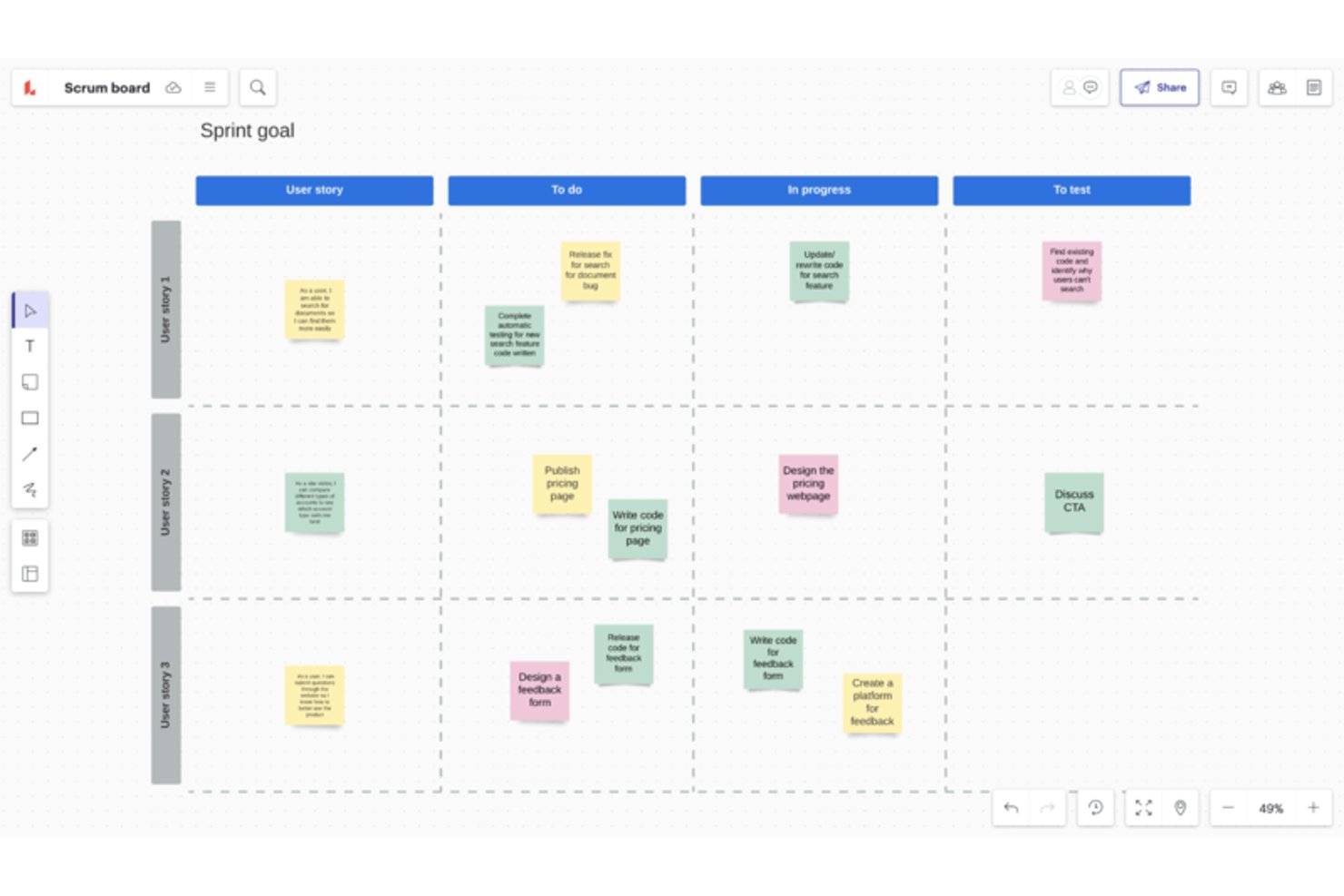
Lucidspark è uno strumento di lavagna virtuale che aggiunge funzionalità per le cerimonie agili—modelli per la pianificazione degli sprint, stima dei punti delle storie, attività retrospettive e mappatura delle dipendenze tra team—ai sistemi esistenti come Jira e Azure DevOps.
Per chi è più adatto Lucidspark?
Lucidspark è particolarmente adatto ai facilitatori Scrum e ai coach agili che facilitano cerimonie come la pianificazione degli sprint, le retrospettive e le riunioni giornaliere tra team distribuiti.
Perché ho scelto Lucidspark
Lucidspark si guadagna un posto nella mia lista dei migliori strumenti come lavagna infinita per le riunioni giornaliere agili, la pianificazione degli sprint e le retrospettive, perché è progettato attorno alle cerimonie stesse. Mi piace molto l'attività di stima del team, in cui l'intero team inserisce contemporaneamente i voti dei punti delle storie sulle schede e li esamina insieme: riproduce la sensazione del poker di pianificazione in presenza senza gli imbarazzanti scambi avanti e indietro. Gli strumenti di facilitazione integrati, come la votazione a tempo, la modalità privata anonima e le lavagne per i gruppi di lavoro, fanno sembrare la gestione di una retrospettiva con un team distribuito davvero strutturata anziché caotica.
Funzionalità principali di Lucidspark
- Sincronizzazione bidirezionale con Jira e Azure DevOps: le modifiche apportate in Lucidspark aggiornano il progetto Jira o Azure DevOps collegato e le modifiche apportate lì vengono automaticamente riflesse nella lavagna.
- Mappatura delle dipendenze: i team possono tracciare le dipendenze direttamente sulla lavagna e questi collegamenti si sincronizzano in entrambe le direzioni con Jira o Azure DevOps, offrendo visibilità tra i team.
- Tabelle dinamiche: le schede importate dall'elenco delle attività possono essere organizzate in tabelle per la stima dell'impegno, il monitoraggio degli assegnatari e la valutazione della capacità del team.
- Generazione di idee con Lucid AI: l'IA integrata può generare lavagne, riassumere le note adesive, ordinare le idee e rendere disponibile un assistente conversazionale per supportare le sessioni di pianificazione.
Integrazioni di Lucidspark
Lucidspark offre oltre 100 integrazioni, inclusa la sincronizzazione bidirezionale con Jira Cloud e Azure DevOps Cloud, oltre a Airtable, Asana, Google Sheets, monday.com e Smartsheet. Si collega inoltre a Microsoft Teams, Slack e Microsoft Copilot e supporta un server MCP e una piattaforma per sviluppatori per integrazioni personalizzate.
Pros and Cons
Pros:
- Facilita sessioni strutturate di pianificazione degli sprint
- Rende visibili le dipendenze tra i team
- Supporta la partecipazione anonima alle retrospettive
Cons:
- Non sostituisce un sistema di gestione dell'elenco delle attività
- Non offre report nativi sulla velocità

Wrike
Ideale per le integrazioni
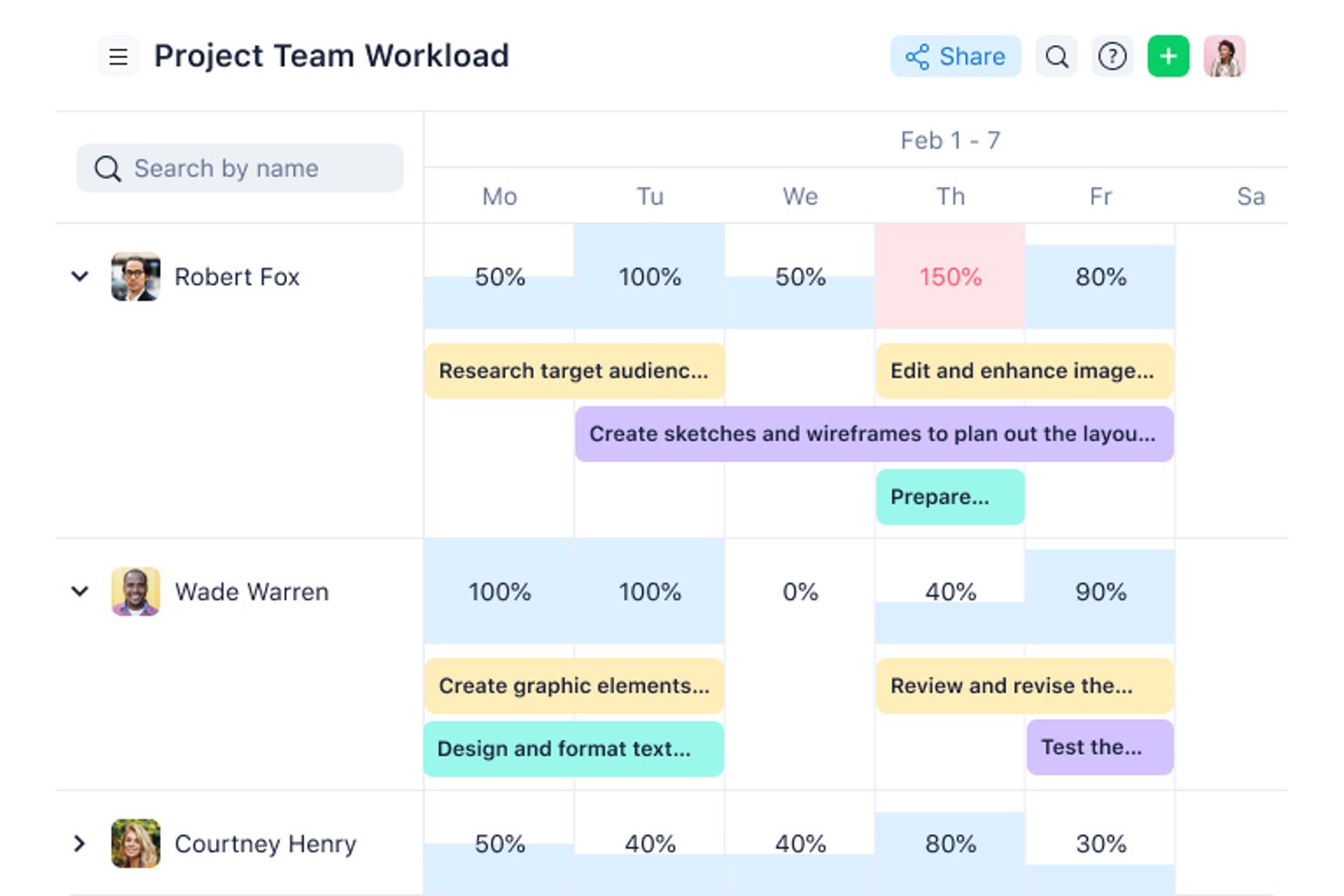
Wrike è una piattaforma di gestione del lavoro che supporta i flussi di lavoro agili tramite schede Kanban, diagrammi di Gantt, modelli di sprint personalizzabili e dashboard interfunzionali.
A chi è più adatto Wrike?
Wrike è particolarmente adatto ai team interfunzionali che devono collegare i flussi di lavoro agili tra un'ampia gamma di strumenti, da Jira e GitHub a Salesforce e Slack.
Perché ho scelto Wrike
Ho incluso Wrike tra le mie scelte migliori perché la profondità delle sue integrazioni è davvero difficile da eguagliare quando i flussi di lavoro agili si estendono su più strumenti. Con oltre 400 connettori preconfigurati che coprono strumenti di sviluppo come Jira e GitHub, CRM come Salesforce e piattaforme di business intelligence come Tableau, posso mantenere sincronizzati schede degli sprint, dashboard e report in un intero stack tecnologico. La sincronizzazione bidirezionale con Jira è ciò che mi colpisce di più, poiché i team di ingegneria possono aggiornare i ticket in Jira mentre il lavoro sul prodotto rimane automaticamente aggiornato in Wrike.
Funzionalità principali di Wrike
- Modello di spazio Scrum: uno spazio agile preconfigurato che aggiunge tipi di elementi personalizzati—Epic, funzionalità, storie, bug e sprint—insieme a flussi di lavoro personalizzati e regole di automazione.
- Vista a scheda Kanban: disponibile in tutti i piani, incluso quello gratuito, con fasi del flusso di lavoro personalizzabili e limiti WIP per gestire il lavoro in corso.
- Diagrammi di Gantt interattivi: disponibili nel piano Team e nei piani superiori, questi diagrammi si collegano direttamente alle attività aggiornate in tempo reale e supportano le dipendenze tra attività per monitorare le tempistiche.
- Wrike Copilot: un assistente IA che risponde alle domande, segnala i rischi dei progetti e aiuta a stabilire le priorità del lavoro nell'intero spazio di lavoro agile.
Integrazioni di Wrike
Wrike offre oltre 400 integrazioni, tra cui Jira, GitHub, GitLab, Bitbucket, Azure, Slack, Microsoft Teams e Google Workspace. La sua sincronizzazione bidirezionale con oltre 22 sistemi include Jira e GitHub, mentre un'API supporta le integrazioni personalizzate.
Pros and Cons
Pros:
- Le schede Kanban includono limiti WIP configurabili
- Le tempistiche Gantt collegano le dipendenze della roadmap alle attività
- Le dashboard supportano la visibilità interfunzionale degli sprint
Cons:
- La definizione delle priorità del backlog non include RICE e WSJF
- Il monitoraggio degli sprint si basa su tipi di elementi personalizzati
New Product Updates from Wrike

Wrike Activity Reports Add Actor Type Details
Wrike’s Activity Report now displays actor type details, helping admins identify whether changes came from the UI, Automation, Wrike Agents, API, or AI via MCP. For more information, visit Wrike's official site.
 .
.
Ideale per la collaborazione da remoto durante gli sprint
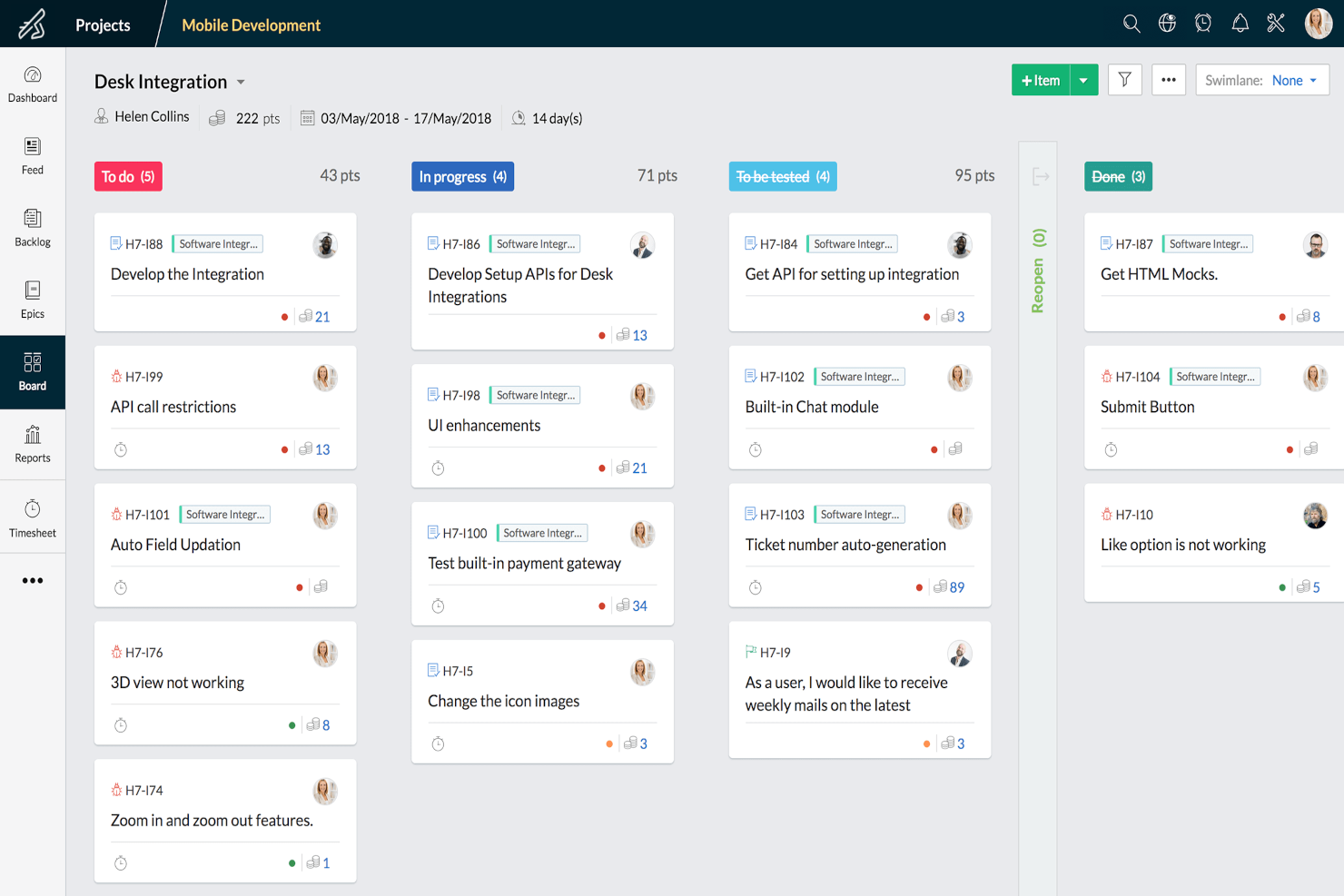
Zoho Sprints è uno strumento agile di gestione dei progetti che combina bacheche Scrum e Kanban, gestione del backlog, pianificazione degli sprint, monitoraggio delle release e funzionalità integrate di collaborazione del team come chat, feed e riunioni.
Per chi è più adatto Zoho Sprints?
Zoho Sprints è particolarmente adatto a Scrum Master, product owner e product manager di team distribuiti che necessitano di strumenti di collaborazione integrati insieme al flusso di lavoro degli sprint.
Perché ho scelto Zoho Sprints
Ho incluso Zoho Sprints tra le mie scelte migliori perché la sua suite di collaborazione integrata lo distingue dagli strumenti che si affidano ad aggiunte di terze parti per il lavoro di squadra da remoto. Durante uno sprint, il team può tenere riunioni quotidiane tramite Zoho Meeting integrato, condividere aggiornamenti attraverso il feed del team e chattare direttamente sulla piattaforma senza cambiare scheda. Apprezzo anche il fatto che i portali per clienti e fornitori consentano ai collaboratori esterni di partecipare al flusso di lavoro senza dover acquistare una licenza completa.
Funzionalità principali di Zoho Sprints
- Bacheche Scrum e Kanban: Entrambi i tipi di bacheca includono limiti WIP e corsie, disponibili in tutti i piani, incluso quello gratuito.
- Report di burndown e velocità: I grafici integrati monitorano i progressi dello sprint e prevedono la capacità futura utilizzando i dati storici sulla velocità.
- Pianificatore delle stime: Una funzionalità in stile planning poker in cui i membri del team votano collaborativamente sulle stime degli elementi di lavoro.
- Integrazioni con strumenti di ingegneria del software: Sincronizzazione bidirezionale con Azure DevOps, oltre a connessioni con GitHub, GitLab, Bitbucket e Jenkins per i flussi di lavoro dei team di sviluppo.
Integrazioni di Zoho Sprints
Zoho Sprints si integra con Azure DevOps, GitHub, GitLab, Bitbucket, Jenkins, Jira, Trello, Microsoft 365, le app Google, Zoho Cliq e Zoho Meeting. La sua API REST, i webhook e le funzioni personalizzate supportano ulteriori integrazioni.
Pros and Cons
Pros:
- Il supporto integrato per le riunioni facilita i rituali degli sprint da remoto
- Report dettagliati sulla velocità e sul flusso
- Le bacheche Scrum e Kanban includono limiti WIP
Cons:
- Manca una roadmap visiva dedicata alla strategia
- La mappatura delle dipendenze tra team rimane limitata
New Product Updates from Zoho Sprints
Zoho Sprints Adds Dashboard View for Custom Modules
Zoho Sprints adds a Dashboard view for custom modules with charts and tables for visualizing module records. This gives teams a clearer way to review custom data. For more information, visit Zoho Sprints’ official site.
 .
.
Celoxis
Ideale per l'allocazione interfunzionale delle risorse

Celoxis è una piattaforma di gestione del portafoglio progetti (PPM) che copre la pianificazione agile dei progetti, la gestione delle risorse, il monitoraggio del portafoglio, la personalizzazione dei flussi di lavoro e la reportistica di livello business intelligence per una vasta gamma di team e tipologie di progetto.
Per chi è ideale Celoxis?
Celoxis è adatto a organizzazioni di medie e grandi dimensioni che gestiscono più progetti e coinvolgono team interfunzionali con esigenze complesse di risorse e reportistica.
Perché ho scelto Celoxis
Ho incluso Celoxis nella mia shortlist grazie al modo in cui gestisce l'allocazione delle risorse tra diversi dipartimenti che portano avanti tipologie di progetto differenti simultaneamente. Posso assegnare le risorse per ruolo e allocarle in base alla percentuale di disponibilità, evitando così doppie prenotazioni tra ingegneria, design e QA. La prenotazione 'soft' mi consente di riservare in via provvisoria la capacità prima che un progetto sia confermato, così la pianificazione degli sprint parte sempre conoscendo la disponibilità effettiva del personale.
Funzionalità principali di Celoxis
- Bacheche Kanban: Visualizza le attività degli sprint e gestisci il lavoro in corso con schede attività tramite drag-and-drop.
- Diagrammi di Gantt interattivi: Pianifica le tempistiche di progetto con dipendenze tra attività, milestone e programmazione drag-and-drop.
- Moduli di richiesta progetto: Raccogli e approva nuove richieste di progetto tramite moduli di inserimento e flussi di lavoro personalizzabili.
- App per flussi di lavoro personalizzati: Crea moduli e flussi di lavoro senza codifica per rischi, bug, richieste di modifica e altri processi.
Integrazioni di Celoxis
Celoxis si integra con strumenti come Microsoft Project, Jira, QuickBooks Online, Salesforce, Okta, Slack e GitHub, con ulteriori integrazioni disponibili tramite Zapier. Inoltre offre un'API per integrazioni personalizzate.
Pros and Cons
Pros:
- Disponibile in cloud o su installazione on-premises
- I diagrammi di Gantt si aggiornano automaticamente con le modifiche alle attività
- Tiene traccia dei budget di progetto, dei costi e della redditività
Cons:
- La reportistica richiede configurazione per workflows complessi
- L'app mobile ha meno funzionalità rispetto alla versione desktop

airfocus
Ideale con la definizione integrata delle priorità
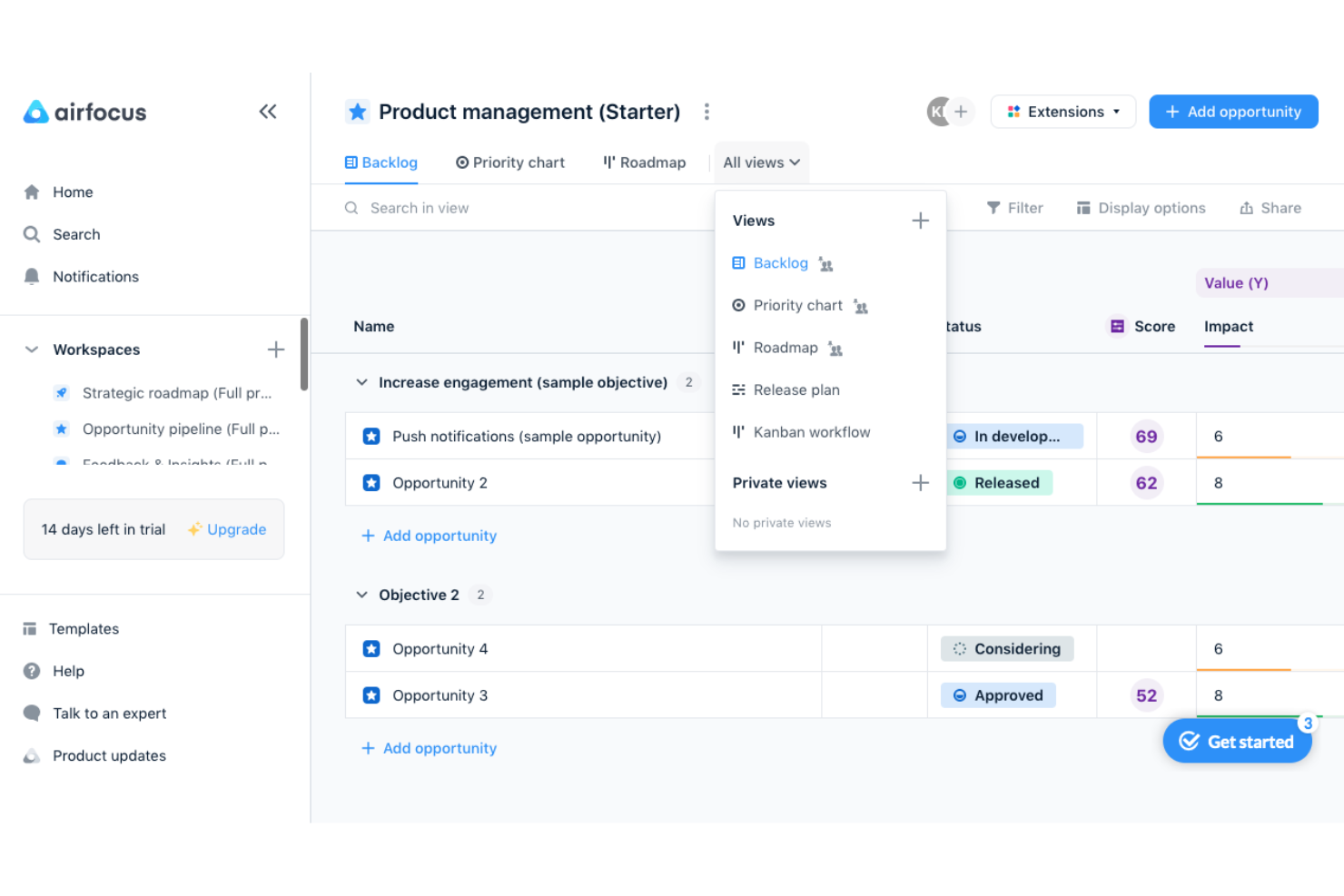
airfocus è una piattaforma di gestione dei prodotti che combina la creazione di roadmap, la definizione delle priorità del backlog, il monitoraggio degli OKR e la gestione dei feedback in un unico livello strategico che si connette a strumenti di sviluppo come Jira e Azure DevOps.
Per chi è più adatto airfocus?
airfocus è adatto ai responsabili di prodotto e ai responsabili della gestione del prodotto che danno priorità alla strategia e alla creazione di roadmap rispetto all'esecuzione degli sprint, soprattutto a coloro che gestiscono già la distribuzione in Jira o Azure DevOps.
Perché ho scelto airfocus
airfocus rientra nella mia selezione perché la sua funzionalità integrata per la definizione delle priorità va ben oltre un semplice elenco ordinato. Apprezzo in particolare l'app Priority Poker, che consente al team di assegnare un punteggio agli elementi del backlog in modo collaborativo, e le formule di punteggio personalizzate, che permettono di confrontare fattori come il valore per il cliente, l'allineamento strategico e l'impegno richiesto. Quando il mio backlog contiene 80 elementi in competizione per il prossimo sprint, la visualizzazione del grafico delle priorità rende evidente a colpo d'occhio la scelta giusta.
Funzionalità principali di airfocus
- Collegamento tra OKR e backlog: L'app Objectives & OKRs collega direttamente gli obiettivi strategici agli elementi della roadmap, così le priorità restano legate agli obiettivi aziendali.
- Sincronizzazione bidirezionale con gli strumenti di sviluppo: airfocus si sincronizza in entrambe le direzioni con Jira, Azure DevOps, Linear e GitHub, così i team di ingegneria possono mantenere il loro flusso di lavoro esistente.
- Portali per gli stakeholder: È possibile condividere le roadmap tramite portali personalizzati e protetti da password senza concedere agli stakeholder l'accesso completo allo strumento.
- Rilevamento tramite IA delle deviazioni strategiche: L'agente di IA segnala quando l'esecuzione si discosta dagli obiettivi dichiarati, evidenziando ostacoli e rischi nell'intero portafoglio.
Integrazioni di airfocus
airfocus offre integrazioni documentate con Jira, Azure DevOps, Linear, Shortcut, GitHub, Trello, Asana, Microsoft Planner, Slack e Microsoft Teams. Supporta inoltre Zapier, webhook, un'API aperta e un server MCP.
Pros and Cons
Pros:
- Il punteggio personalizzato chiarisce i compromessi complessi del backlog
- Priority Poker favorisce decisioni condivise sulla definizione delle priorità
- Le roadmap collegano la strategia al contesto di esecuzione
Cons:
- Il monitoraggio degli sprint dipende da strumenti di distribuzione esterni
- La reportistica nativa sulla velocità non è disponibile
New Product Updates from airfocus

airfocus Adds Rich Text Fields, MCP Tools, and Admin Controls
airfocus adds rich text fields with bidirectional Jira sync, Check-in access for the agent and MCP server, an MCP Link Items tool, and admin-only integration management to improve product documentation, AI-assisted planning, and enterprise governance. For more information, visit airfocus’ official site.
 .
.
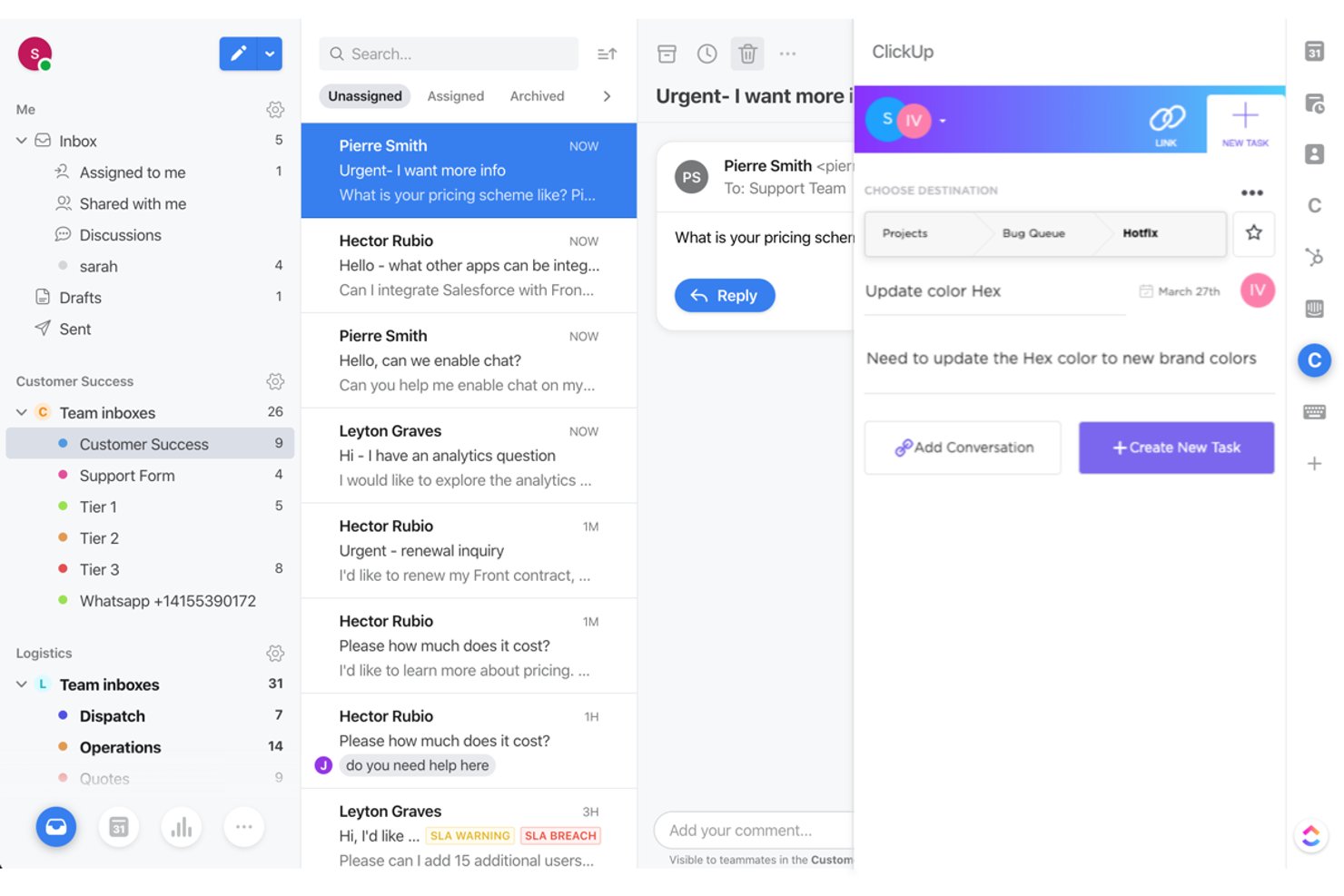
ClickUp
Bedst til AI-valideret indsamling af dokumentation
Strike Graph er en fleksibel platform til automatisering af compliance, der er udviklet til at forenkle forberedelse af revisioner, afgrænsning af kontroller og løbende risikostyring for teknologivirksomheder i vækst.
Hvem egner Strike Graph sig bedst til?
Strike Graph er ideel til små og mellemstore softwarevirksomheder samt startups, der ønsker en fleksibel compliance-platform, så de kan overholde kravene, efterhånden som de vokser.
Hvorfor Strike Graph er et godt alternativ til Drata
Jeg valgte Strike Graph på grund af platformens AI-validerede indsamling af dokumentation, som forenkler forberedelsen af revisioner i regulerede brancher. Dens automatiserede risikovurderinger og politikstyring håndterer komplekse compliancebehov, mens AI-validering af revisionsdokumentation sparer dit team tid og reducerer manuelle fejl under revisioner.
Vigtige funktioner i Strike Graph
- Automatiseret sporing af kontroller: Overvåg og opdater compliancekontroller via et centralt kontrolpanel.
- Integreret revisionsstyring: Forbinder brugere direkte med uafhængige revisorer via platformen, så de kan gennemføre test fra start til slut og udarbejde officielle revisionsrapporter.
- Samarbejdsområde til revisioner: Tildel opgaver, og del dokumentation med teammedlemmer under revisionsprocessen.
- Integreret politikbibliotek: Få adgang til og implementer færdige politikskabeloner for hurtigere opsætning af compliance.
Integrationer i Strike Graph
Indbyggede integrationer er ikke tydeligt dokumenteret. Strike Graph tilbyder en API til brugerdefinerede integrationer.
Pros and Cons
Pros:
- AI validerer automatisk revisionsdokumentation
- Centralt kontrolpanel sporer compliancekontroller
- Tilpasningsbare rammer passer til komplekse krav
Cons:
- Integrationer kræver arbejde med en brugerdefineret API
- Prisen oplyses ikke på forhånd
New Product Updates from ClickUp
ClickUp Adds Meetings Hub, Super Agent Templates, and ZoomInfo Integration
ClickUp adds a searchable Meetings Hub, new ways to clone and template Super Agents, and a ZoomInfo integration through the App Center. These updates improve meeting retrieval, agent reuse, and access to sales intelligence. For more information, visit ClickUp’s official site.
 .
.
Jira
Ideale per applicare l'agile su larga scala tra team e portafogli

Jira è una piattaforma agile di gestione dei progetti che combina la gestione del backlog, la pianificazione degli sprint, la definizione della roadmap e schede Scrum e Kanban configurabili con report integrati sulla velocità e l'automazione dei flussi di lavoro assistita dall'IA.
Per chi è più adatto Jira?
Jira è ideale per i team di prodotto e di ingegneria che devono coordinare più squadre, gestire backlog complessi e applicare pratiche agili su larga scala in un'intera organizzazione.
Perché ho scelto Jira
Jira è nella mia lista ristretta perché nessun altro strumento adatta l'agile in modo altrettanto fluido, passando da una singola squadra a un portafoglio composto da più team. Apprezzo in particolare il modo in cui il collegamento dagli obiettivi al backlog consente ai team di prodotto di collegare direttamente gli OKR al lavoro degli sprint, mantenendo allineate strategia e realizzazione senza aggiornamenti manuali. Rovo AI aggiunge un valore concreto segnalando i rischi legati alle dipendenze e suddividendo automaticamente le iniziative man mano che il lavoro procede nel flusso di lavoro.
Funzionalità principali di Jira
- Schede Scrum e Kanban: Schede completamente configurabili con corsie, limiti WIP e stati personalizzati delle colonne per i flussi di lavoro Scrum e Kanban.
- Automazione senza codice: L'automazione basata su regole è disponibile in ogni piano e consente ai team di attivare azioni e agenti IA senza scrivere codice.
- Report integrati sulla velocità e sul burndown: I report degli sprint, i grafici della velocità e i diagrammi del flusso cumulativo pronti all'uso monitorano le prestazioni del team durante ogni sprint.
- Accesso per gli ospiti: I collaboratori esterni possono visualizzare e contribuire ai progetti Jira senza occupare un posto utente a pagamento.
Integrazioni di Jira
Jira offre integrazioni native con Confluence, Bitbucket, Figma, Slack, Gmail e gli strumenti Google e Microsoft. Il suo Marketplace offre oltre 3.000 integrazioni e la sua API supporta connessioni personalizzate.
Pros and Cons
Pros:
- Adatta la governance agile a più team
- Collega direttamente gli obiettivi strategici al lavoro del backlog
- I report integrati sulla velocità supportano le retrospettive degli sprint
Cons:
- Il punteggio avanzato delle priorità richiede strumenti separati
- I flussi di lavoro configurabili possono risultare eccessivi per i team più piccoli

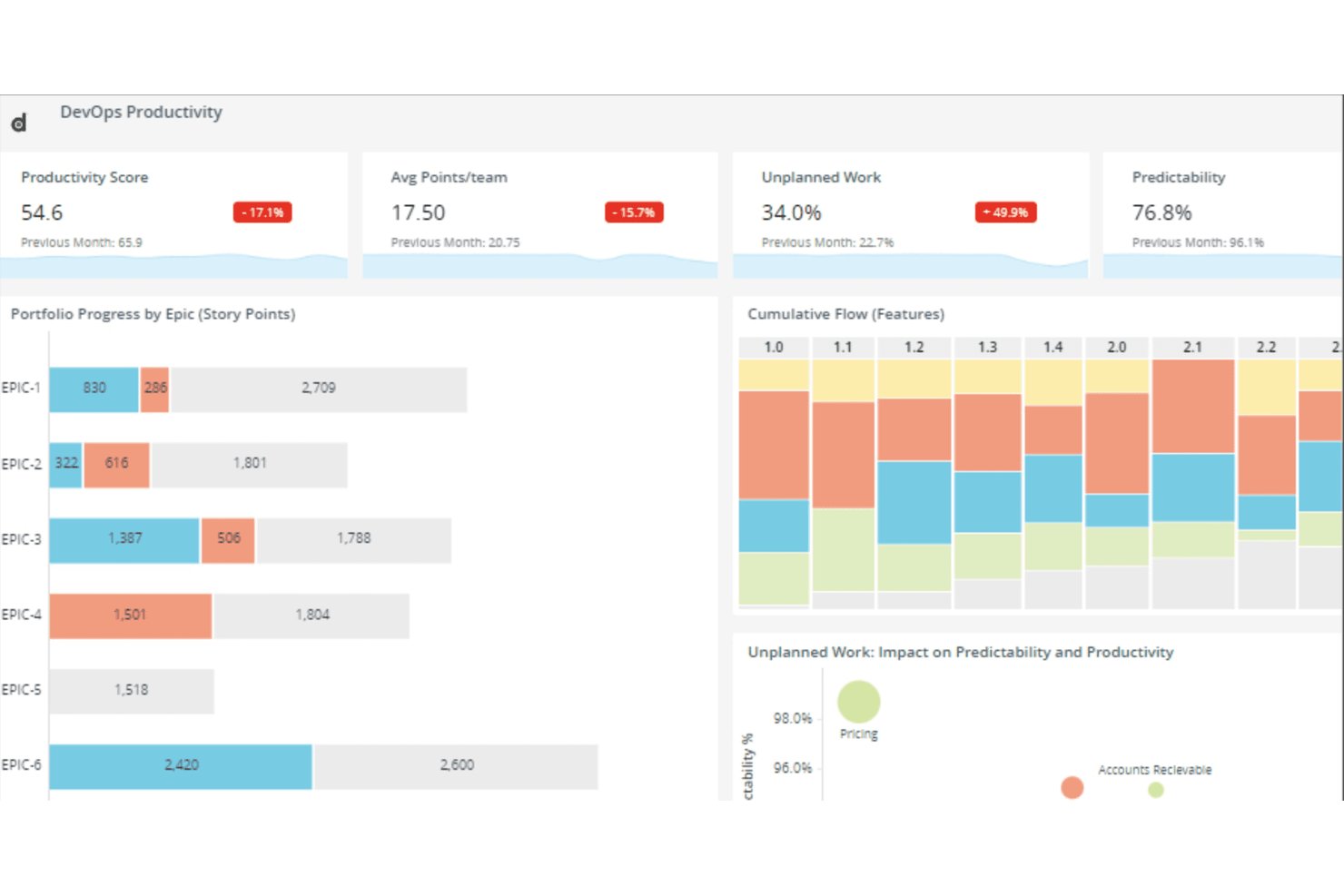
Digital.ai Agility è una piattaforma aziendale di pianificazione agile che copre la pianificazione a livello di portafoglio, programma e team in un unico luogo, con supporto SAFe integrato, pianificazione PI, gestione del backlog, definizione della roadmap, monitoraggio delle dipendenze e report sulle prestazioni.
A chi è più adatto Digital.ai Agility?
Digital.ai Agility è particolarmente adatto agli uffici di gestione dei progetti aziendali e ai responsabili dei programmi agili che gestiscono SAFe su larga scala tra più team e portafogli.
Perché ho scelto Digital.ai Agility
Digital.ai Agility si distingue nella mia selezione perché nessun altro strumento che ho esaminato gestisce SAFe su larga scala in modo altrettanto nativo. La pianificazione PI integrata opera a livello di portafoglio, programma e team senza richiedere plugin di terze parti, mentre la tracciabilità dagli OKR al backlog collega direttamente gli obiettivi strategici a epiche e storie. Apprezzo inoltre il fatto che il monitoraggio delle dipendenze tra team sia incluso in tutte le edizioni, consentendo ai team di individuare i blocchi a monte e a valle prima che diventino rischi per il rilascio.
Caratteristiche principali di Digital.ai Agility
- Modulo IdeaSpace: Uno spazio dedicato alla raccolta, allo sviluppo e alla definizione delle priorità delle idee incentrate sui clienti prima che entrino nel backlog di esecuzione.
- Analisi Agility Lens: Un lago dati Premium che aggrega dati da Digital.ai e strumenti di terze parti, con oltre 100 metriche predefinite e analisi self-service.
- Sincronizzazione bidirezionale: Le edizioni Pro e Premium si collegano a Jira, Azure DevOps, ServiceNow e Rally con la sincronizzazione bidirezionale dei dati tramite Agility Sync.
- Opzioni di distribuzione flessibili: Ogni edizione supporta sia la distribuzione in sede sia quella ospitata, rendendola adatta ai settori regolamentati e ai team governativi.
Integrazioni di Digital.ai Agility
Digital.ai Agility supporta integrazioni bidirezionali con Jira, Azure DevOps, ServiceNow, Rally e Salesforce tramite Agility Sync, disponibile nelle edizioni Pro e Premium. Offre inoltre un'integrazione con GitHub e un framework per integrazioni personalizzate.
Pros and Cons
Pros:
- Pianificazione PI SAFe integrata
- La pianificazione dal portafoglio al team favorisce l'allineamento aziendale
- Report dettagliati migliorano il coordinamento tra team
Cons:
- La navigazione complessa rallenta il lavoro quotidiano
- Le funzionalità variano significativamente tra le edizioni

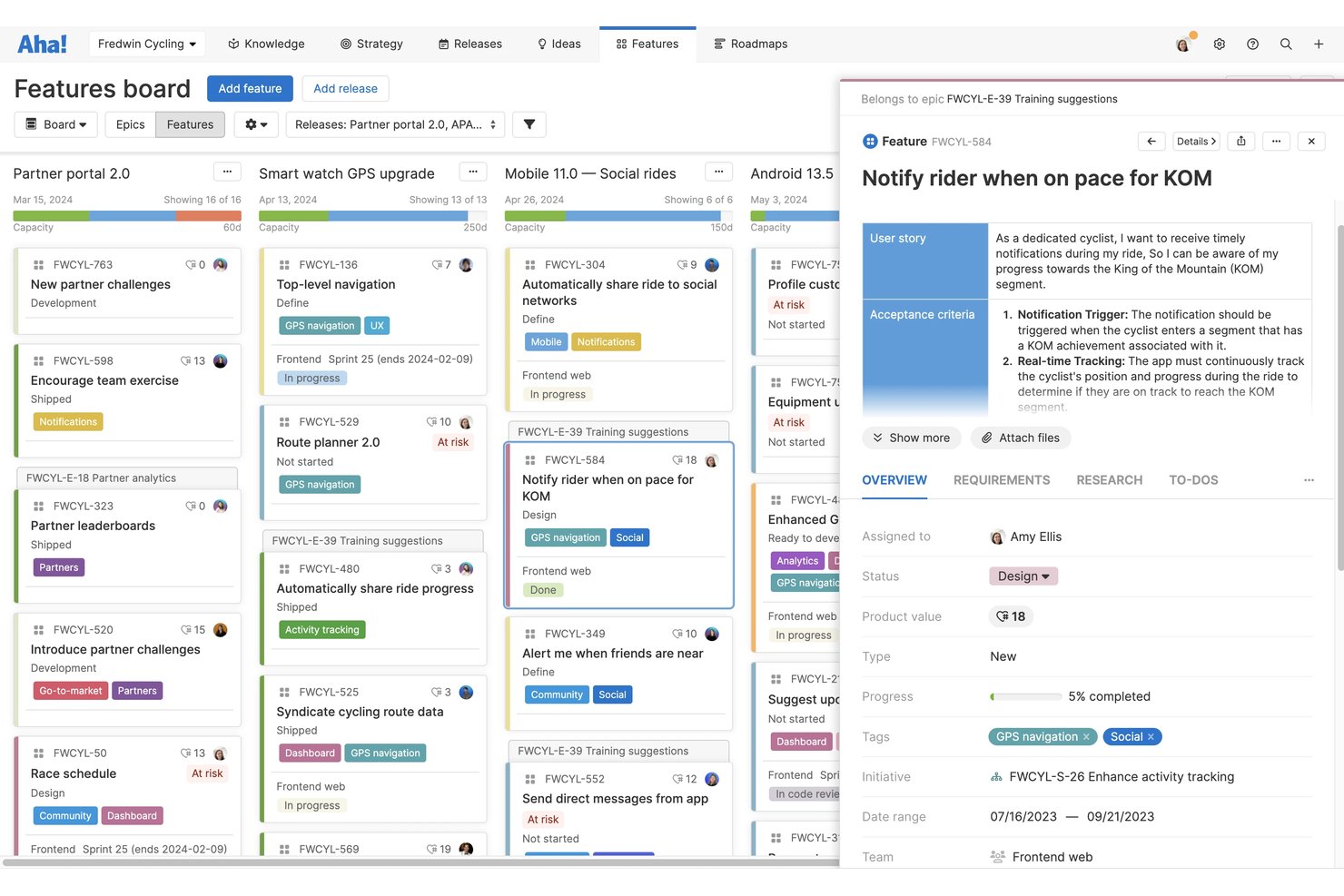
Aha! è una suite agile per la gestione dei prodotti che connette strategia, pianificazione della roadmap, raccolta di idee e distribuzione degli sprint attraverso una serie di prodotti integrati: Roadmaps, Ideas, Develop e Discovery.
Per chi è più indicato Aha!?
Aha! è particolarmente adatto ai responsabili di prodotto e ai responsabili del prodotto di aziende di medie e grandi dimensioni che hanno bisogno di collegare la strategia di alto livello alla distribuzione a livello di sprint in un unico luogo.
Perché ho scelto Aha!
Ho scelto Aha! come uno dei migliori perché è l'unico strumento nella mia lista che collega realmente un obiettivo strategico fino a una storia dello sprint. È possibile definire un obiettivo aziendale, collegarlo a un'iniziativa, suddividerlo in funzionalità e inserirlo direttamente in uno sprint di Develop, con grafici del lavoro rimanente e del tempo di ciclo che completano il processo. Apprezzo anche il fatto che la definizione delle priorità basata su schede di valutazione mantenga le decisioni sull'elenco di lavoro legate alla strategia anziché alle semplici intuizioni.
Funzionalità principali di Aha!
- Portale delle idee: Gestisci portali personalizzati in cui gli utenti possono inviare, votare e monitorare le idee, ricevendo automaticamente gli aggiornamenti sullo stato.
- Assistente AI (Elle): Genera storie utente, crea record, analizza i temi dei commenti e produce modelli a bassa fedeltà nell'intera suite Aha! utilizzando crediti AI condivisi.
- Supporto al framework SAFe: Pianifica e coordina il lavoro tra più team utilizzando il supporto integrato per il framework Agile scalato in Aha! Develop.
- Report sulle prestazioni degli sprint: Accedi direttamente in Aha! Develop ai grafici del lavoro rimanente, del lavoro completato, del tempo di ciclo e della velocità di elaborazione per monitorare lo stato degli sprint e le tendenze di distribuzione.
Integrazioni di Aha!
Aha! documenta oltre 40 integrazioni per Roadmaps e oltre 35 integrazioni per Develop, tra cui Jira, Azure DevOps, GitHub, Azure Pipelines, Salesforce e Zendesk. Un'API aperta supporta le integrazioni personalizzate e l'esportazione dei dati.
Pros and Cons
Pros:
- Collega direttamente la strategia alle storie degli sprint
- Definisce le priorità degli elenchi di lavoro con un processo decisionale basato su schede di valutazione
- Raccoglie idee tramite portali di commenti personalizzati
Cons:
- I portafogli di grandi dimensioni possono confondere gli utenti
- La gestione quotidiana degli sprint risulta meno snella
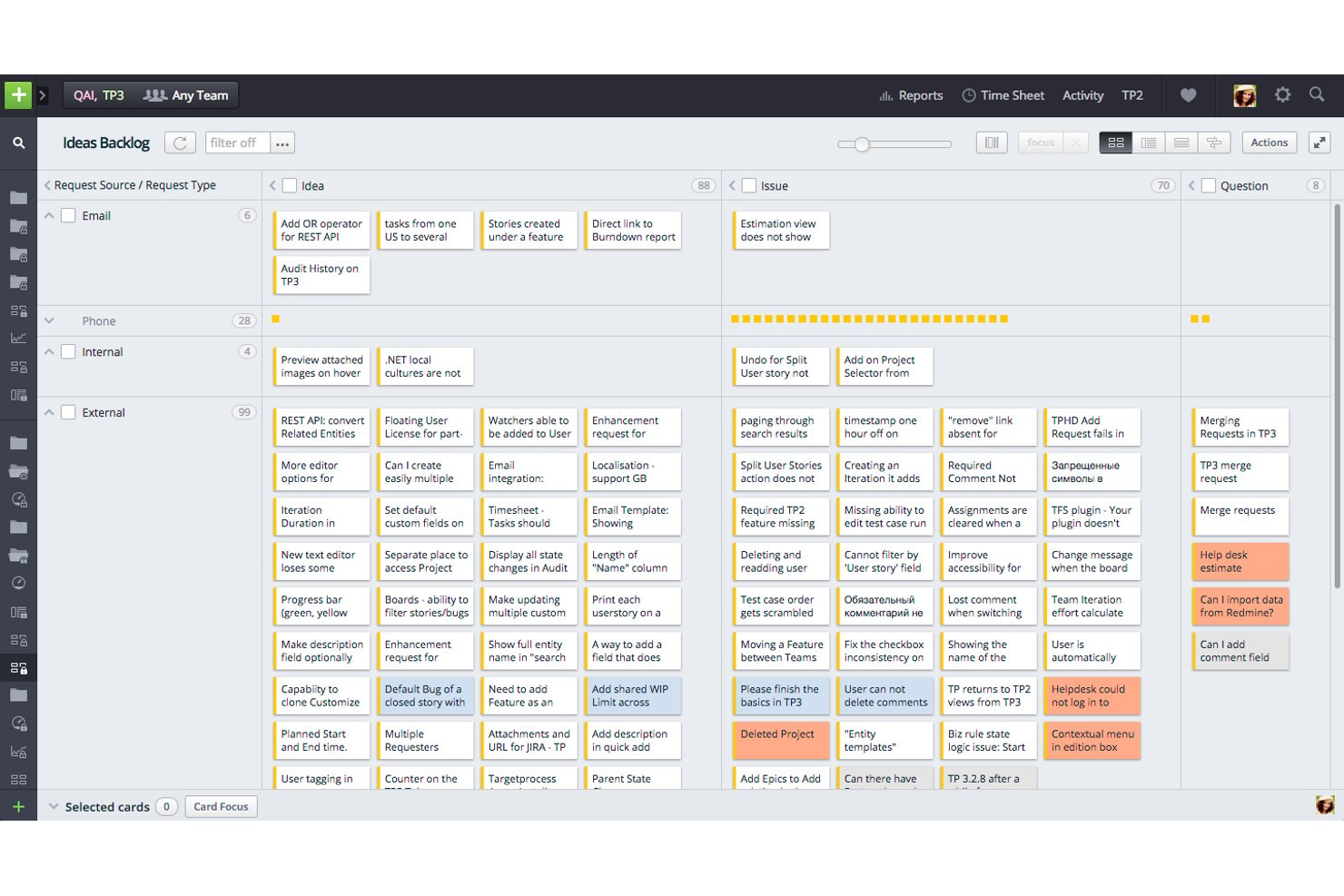
IBM Targetprocess è una piattaforma agile per la gestione dei progetti progettata per team di livello aziendale, che offre la gestione dei backlog su più livelli, la pianificazione di sprint e iterazioni, strutture di portfolio allineate a SAFe, la definizione di roadmap e la tracciabilità dagli OKR al backlog tra team, ART e treno della soluzione.
Per chi è più adatto Targetprocess?
Targetprocess è particolarmente adatto ai team aziendali che utilizzano SAFe o framework agili scalati, nei quali la gestione del lavoro tra ART, treno della soluzione e portfolio è una realtà quotidiana.
Perché ho scelto Targetprocess
Ho scelto Targetprocess come uno dei migliori perché è l'unico strumento della mia lista che mappa l'intera gerarchia SAFe, dalle iniziative epiche di portfolio fino alle storie a livello di team, senza richiedere soluzioni alternative. Apprezzo soprattutto il modo in cui gli OKR si collegano direttamente agli elementi del backlog, così l'avanzamento di un Risultato chiave si aggiorna automaticamente quando i team completano il lavoro. La soluzione per la pianificazione PI collega gli obiettivi a livello di ART alle singole iterazioni dei team, esattamente ciò di cui hanno bisogno i programmi agili su larga scala.
Funzionalità principali di Targetprocess
- Gestione del backlog su più livelli: Organizza il lavoro tra iniziative epiche di portfolio, funzionalità e storie con prioritizzazione tramite trascinamento e operazioni batch.
- Valutazioni SAFe Misurare e migliorare: Esegui valutazioni della maturità a livello di Team, ART, Solution Train e Portfolio per monitorare l'adozione dell'agile.
- Pianificazione degli scenari: Modella e confronta le opzioni strategiche a livello di portfolio prima di impegnarti in una direzione.
- Report e dashboard personalizzati: Crea report visivi e tabellari con formule personalizzate, report BI e grafici dell'andamento del lavoro residuo tra team e programmi.
Integrazioni di IBM Targetprocess
IBM Targetprocess elenca decine di integrazioni, tra cui Jira, Azure DevOps, GitHub, Jenkins, Miro, Slack e Microsoft Teams. Offre inoltre un'API REST per integrazioni personalizzate e supporta il collegamento dei commit Git.
Pros and Cons
Pros:
- La gerarchia SAFe approfondita supporta la pianificazione scalata
- Gli OKR collegano la strategia all'esecuzione del backlog
- I report configurabili supportano le decisioni a livello di portfolio
Cons:
- La struttura aziendale risulta eccessiva per i team di prodotto più piccoli
- I recensori segnalano una navigazione confusa per le attività semplici
Tabella comparativa dei software di Agile Product Management
Qui trovi una tabella dove puoi confrontare tutti gli strumenti appena descritti nelle panoramiche.
| Tool | Best For | Trial Info | Price | ||
|---|---|---|---|---|---|
| 1 | Ideale per riunioni giornaliere agili, sprint e retrospettive | Versione di prova gratuita + piano gratuito disponibili | A partire da $9/utente/mese (con fatturazione annuale) | Website | |
| 2 | Ideale per le integrazioni | Piano gratuito + demo gratuita + prova di 14 giorni disponibili | Da $10/utente/mese (con fatturazione annuale) | Website | |
| 3 | Ideale per la collaborazione da remoto durante gli sprint | Prova gratuita di 15 giorni | Da $1/utente/mese (minimo 12 utenti) | Website | |
| 4 | Ideale per l'allocazione interfunzionale delle risorse | Prova gratuita + demo gratuita disponibile | Da $10/utente/mese (fatturazione annuale) | Website | |
| 5 | Ideale con la definizione integrata delle priorità | Demo gratuita disponibile | Prezzi su richiesta | Website | |
| 6 | Bedst til AI-valideret indsamling af dokumentation | Gratis demo tilgængelig | Pris oplyses efter anmodning | Website | |
| 7 | Ideale per applicare l'agile su larga scala tra team e portafogli | Piano gratuito + demo gratuita + prova di 14 giorni disponibili | A partire da $9.05/utente/mese | Website | |
| 8 | Ideale per SAFe aziendale e pianificazione PI | Demo gratuita disponibile | Prezzi su richiesta | Website | |
| 9 | Ideale per collegare direttamente la strategia agli sprint | Not available | Website | ||
| 10 | Ideale per la pianificazione di portfolio Agile scalati | Demo gratuita disponibile | Prezzi su richiesta | Website |
Altre opzioni
Ecco qualche altra soluzione che non è entrata tra i migliori, nel caso avessi bisogno di ulteriori suggerimenti di software che adottano la metodologia Agile durante il ciclo di vita di un prodotto.
- OnePlan
Ideale per la gestione del registro delle attività
- Miro
Gestione agile dei prodotti in tempo reale
- monday AI Workspace
Ideale per gli avvisi sui rischi degli sprint basati sull'IA
- Zenhub
Ideale per il monitoraggio agile degli sprint nativo di GitHub
- GitLab
Ideale per la pianificazione e la distribuzione agile dei team di sviluppo
- Linear
Ideale per la pianificazione di sprint e cicli guidata dal team di ingegneria
- Shortcut
Ideale per metodologie ibride Scrum e Kanban
- Jira Align
Ideale per il monitoraggio delle dipendenze a livello aziendale e dei PI
- Planview AgilePlace
Ideale per il flusso Kanban a livello di portafoglio
- Azure Boards
Ideale per il monitoraggio agile integrato con DevOps


Come ho scelto i migliori software di Agile Product Management
Ti stai chiedendo come ho selezionato i migliori software di Agile Product Management per questa lista? Ho iniziato prendendo in esame i software con un'elevata quantità di recensioni positive da parte degli utenti.
Ho esplorato ciascuna piattaforma per capire quali funzionalità offriva e cosa la distinguesse dalla concorrenza. Ho scelto le migliori per finalizzare la mia "long list".
A quel punto, ho applicato i seguenti criteri di valutazione per vedere come ogni piattaforma si posizionasse rispetto alle altre. Ho attinto ai miei anni di esperienza nella gestione agile dei prodotti per individuare le soluzioni più promettenti in termini di valore. Così sono arrivato alla shortlist finale.
Come Valuto il Software di Product Management Agile
Divido la mia valutazione in due livelli: le capacità agili di base—come la pianificazione degli sprint e la gestione del backlog—che ogni strumento deve avere, e i fattori differenzianti che separano le migliori opzioni.
Funzionalità Principali (Requisiti Minimi per Questa Lista)
Quando seleziono gli strumenti per la mia lista, valuto ciascuno di essi su una scala da 0 (non offre la funzionalità) a 5 (eccelle in quest'area) per ogni funzionalità principale elencata qui sotto. Poi, calcolo il punteggio totale dello strumento in percentuale. Ogni strumento deve raggiungere un punteggio totale minimo del 65% per essere considerato per l'inclusione.
- Gestione del Backlog: Valuto come ogni strumento gestisce la creazione, la classificazione e la raffinazione degli elementi del backlog—se è possibile riorganizzare le priorità con drag-and-drop, applicare modelli di punteggio come RICE e filtrare tramite campi personalizzati.
- Pianificazione e Monitoraggio degli Sprint: Ogni strumento dovrebbe permettere ai team di definire gli sprint, stimare gli story point, assegnare la capacità e monitorare i progressi tramite viste a bacheca—simile a come Jira e Azure DevOps strutturano i loro flussi di lavoro per gli sprint.
- Roadmapping Agile: Cerco roadmap che si colleghino direttamente a epic e release, così che quando uno sprint consegna una funzionalità, gli stakeholder possano vedere in tempo reale come questa si integra nel piano prodotto più ampio.
- Gerarchia di User Story ed Epic: Una chiara struttura di suddivisione del lavoro è importante. Verifico se i team possono organizzare il lavoro dai temi e dalle iniziative di alto livello fino a epic, storie e sotto-attività con relazioni visibili genitore-figlio.
- Reportistica e Analisi Agile: Gli strumenti dovrebbero includere report standard agili—grafici burndown, trend di velocità, diagrammi di flusso cumulativi—che aiutano scrum master e product owner a individuare i colli di bottiglia tra gli sprint.
- Integrazioni con Strumenti di Sviluppo: Controllo la presenza di sincronizzazione nativa a due vie con piattaforme di sviluppo come GitHub, GitLab e Bitbucket, così che i team di prodotto e gli sviluppatori restino allineati senza dover aggiornare manualmente lo stato tra i diversi sistemi.
Una volta che ho una lista di strumenti che soddisfano i criteri, considero ciò che distingue ciascuna piattaforma.
Fattori Differenzianti (Cosa Distingue i Fornitori)
Ecco come confronto e metto a confronto i diversi fornitori:
Funzionalità Distintive
Cerco strumenti che colleghino il lavoro degli sprint a OKR o metriche guida principali, così ogni epic possa essere ricondotto a un risultato aziendale misurabile. La gestione delle idee e dei feedback è un altro elemento di differenziazione—strumenti come Productboard e Aha! permettono di incanalare direttamente le richieste dei clienti nel backlog per la prioritizzazione. Il supporto al portfolio e a SAFe è importante anche per le organizzazioni più grandi che eseguono PI planning su più team e flussi di valore.
Oltre le Funzionalità
La profondità delle integrazioni conta più della semplice presenza di un connettore. Valuto se gli strumenti offrono una sincronizzazione bidirezionale con le piattaforme di sviluppo come GitHub e GitLab, oltre a connessioni con gli strumenti di design e analisi già utilizzati dal team. L'adattabilità alla scala è altrettanto rilevante—uno strumento adatto a un singolo team scrum può risultare insufficiente quando si coordinano sprint tra cinque squadre. Verifico anche la presenza di template agili preimpostati e risorse per l'onboarding, poiché una maggiore rapidità di implementazione significa che il team passa meno tempo a configurare i flussi di lavoro e più tempo a rilasciare.
Domande frequenti sulla gestione Agile dei prodotti
Trova le risposte alle domande più comuni che le persone fanno su questo argomento.
Quali sono le caratteristiche chiave del software di gestione Agile dei prodotti?
Quando scegli un software di gestione Agile dei prodotti, cerca i seguenti elementi:
- Modelli di roadmap di prodotto: Le esigenze di workflow semplici dovrebbero essere automatizzate o accelerate in un perfetto ambiente Agile; i modelli sono un modo per dare priorità all’agilità.
- Collaborazione semplice tra stakeholder: L’iterazione, la prioritizzazione e gli stand-up funzionano al meglio quando agli stakeholder viene data trasparenza sul lavoro del team.
- Metrica del backlog di prodotto: I team devono essere in grado di esaminare quali elementi sono necessari e desiderati, così da poter prendere decisioni rapide e dare priorità alle funzionalità.
- User story robuste e flessibili: Il processo Agile si basa molto sulla capacità dei membri del team di comprendere il percorso del cliente.
- Ruoli e permessi per scrum master: Se lo sviluppo del prodotto Agile segue il percorso scrum, la possibilità di assegnare facilmente lo scrum master è fondamentale.
Quali sono i vantaggi del software di gestione Agile dei prodotti?
Il software di gestione Agile dei prodotti aiuta i team di sviluppo a iterare, ottenere feedback tempestivi e rimanere reattivi al cambiamento, così da creare prodotti che i clienti adorano. I sistemi di gestione Agile aiutano i team a restare organizzati e concentrati, a comunicare chiaramente tra loro e a dare priorità alle azioni in base a ciò che è più importante in ogni fase del ciclo di sviluppo del prodotto.
A proposito di vantaggi, puoi scoprire come il feature flagging può aiutare il tuo team a gestire la scalabilità del prodotto.
Chi utilizza il software di gestione Agile dei prodotti?
Generalmente, il software di gestione Agile dei prodotti viene utilizzato dai product manager e dai loro team. Più nello specifico, il product owner, lo scrum master e altri stakeholder (potenzialmente IT, operation e personale di marketing dell’azienda a seconda della struttura organizzativa) avranno tutti accesso a questi strumenti di gestione Agile per collaborare e iterare durante il processo di sviluppo.
Se stai cercando di assumere un product manager, scopri come creare una job description efficace per attrarre i migliori talenti.
Come posso implementare la gestione Agile del portafoglio prodotti?
Se stai leggendo questo contenuto, significa che sei coinvolto nella creazione di più prodotti contemporaneamente. Anche se trarrai sicuramente beneficio dalla gestione del portafoglio prodotti, ci sono alcuni principi fondamentali da seguire per garantirne il successo. Questi sono:
- Testing, apprendimento e adattamento
- Trasparenza a tutti i livelli
- Sperimentazione continua
Una volta compresi questi principi, dovrai decidere se sviluppare o acquistare il tuo framework, creare una strategia di implementazione e preparare la tua organizzazione ai nuovi processi. Puoi leggere tutto su questo processo di implementazione e sui principi di gestione nel nostro guida all’implementazione del portafoglio prodotti.
E adesso?
Puoi certamente approfondire ulteriormente questo argomento. Ad esempio, abbiamo un ottimo articolo su cosa sia un Epic Agile, corredato anche di un modello utile. Ti consiglio anche di leggere come utilizzare la mappatura delle user story per migliorare la prioritizzazione del backlog Agile.
Elenco di tool correlati:
- Strumenti di gestione del prodotto
- Software di gestione del prodotto gratuito
- Strumenti per product backlog
Rimani aggiornato con altri consigli dal settore iscrivendoti alla newsletter per Product Manager.