

10 migliori soluzioni software PLM agili del 2026

10 La migliore selezione di software PLM Agile


Potresti ritrovarti a gestire scadenze, risorse e coordinamento del team. È qui che entra in gioco il software PLM Agile, aiutandoti a semplificare queste attività.
In base alla mia esperienza, questi strumenti possono fare una differenza significativa nel modo in cui gestisci i progetti e collabori con il tuo team. Aiutano tutti a essere sempre sulla stessa lunghezza d'onda, rendendo ogni attività più fluida ed efficiente.
In questo articolo condividerò le mie migliori scelte di software PLM Agile, basate su test indipendenti e su una conoscenza approfondita del mondo della gestione dei prodotti. Troverai recensioni imparziali e approfondite, incentrate su ciò che conta davvero per te e per il tuo team.
Perché Fidarsi delle Nostre Recensioni Software
Testiamo e recensiamo software per il product management dal 2020. Come product manager sappiamo quanto sia fondamentale e difficile fare la scelta giusta in termini di software. Investiamo in una ricerca approfondita per aiutare il nostro pubblico a prendere decisioni migliori sugli acquisti di software. Abbiamo testato oltre 2.000 strumenti per diversi casi d’uso e scritto più di 1.000 recensioni approfondite.Scopri come assicuriamo la trasparenza & la nostra metodologia di recensione software.
Riepilogo dei migliori software PLM Agile
Questa tabella comparativa riassume i dettagli sui prezzi delle mie migliori selezioni di software PLM Agile, per aiutarti a trovare la soluzione più adatta al tuo budget e alle esigenze della tua azienda.
| Tool | Best For | Trial Info | Price | ||
|---|---|---|---|---|---|
| 1 | Ideale per le sue opzioni di prioritizzazione del backlog | Prova gratuita di 15 giorni | Da $1/utente/mese (minimo 12 utenti) | Website | |
| 2 | Ideale per canvas infiniti | Prova gratuita + piano gratuito disponibili | Da $9/utente/mese (fatturato annualmente) | Website | |
| 3 | Ideale per la gestione di cicli di vita del prodotto complessi | Prova gratuita di 14 giorni + piano gratuito disponibile | Da $10/utente/mese (fatturato annualmente) | Website | |
| 4 | Ideale per lo sviluppo iterativo visivo | Piano gratuito disponibile | Da $8/membro/mese (fatturazione annuale) | Website | |
| 5 | Ideale per un controllo accurato del ciclo di vita | Prova gratuita di 30 giorni | A partire da $545/anno | Website | |
| 6 | Migliori capacità di lancio globale del prodotto | Demo gratuita disponibile | Prezzi su richiesta | Website | |
| 7 | Ideale per la gestione dei dati dei prodotti | Demo gratuita disponibile | Prezzi su richiesta | Website | |
| 8 | Le migliori soluzioni per l'intero ciclo di vita del prodotto | Offre una prova gratuita | Prezzo su richiesta | Website |


Recensione dei migliori software PLM Agile
Di seguito trovi i miei riepiloghi dettagliati dei migliori software PLM Agile inclusi nella mia selezione. Le mie recensioni offrono uno sguardo approfondito sulle caratteristiche principali, sui pro e & contro, sulle integrazioni e sui casi d’uso ideali di ogni strumento, per aiutarti a trovare quello più adatto a te.

Ideale per le sue opzioni di prioritizzazione del backlog
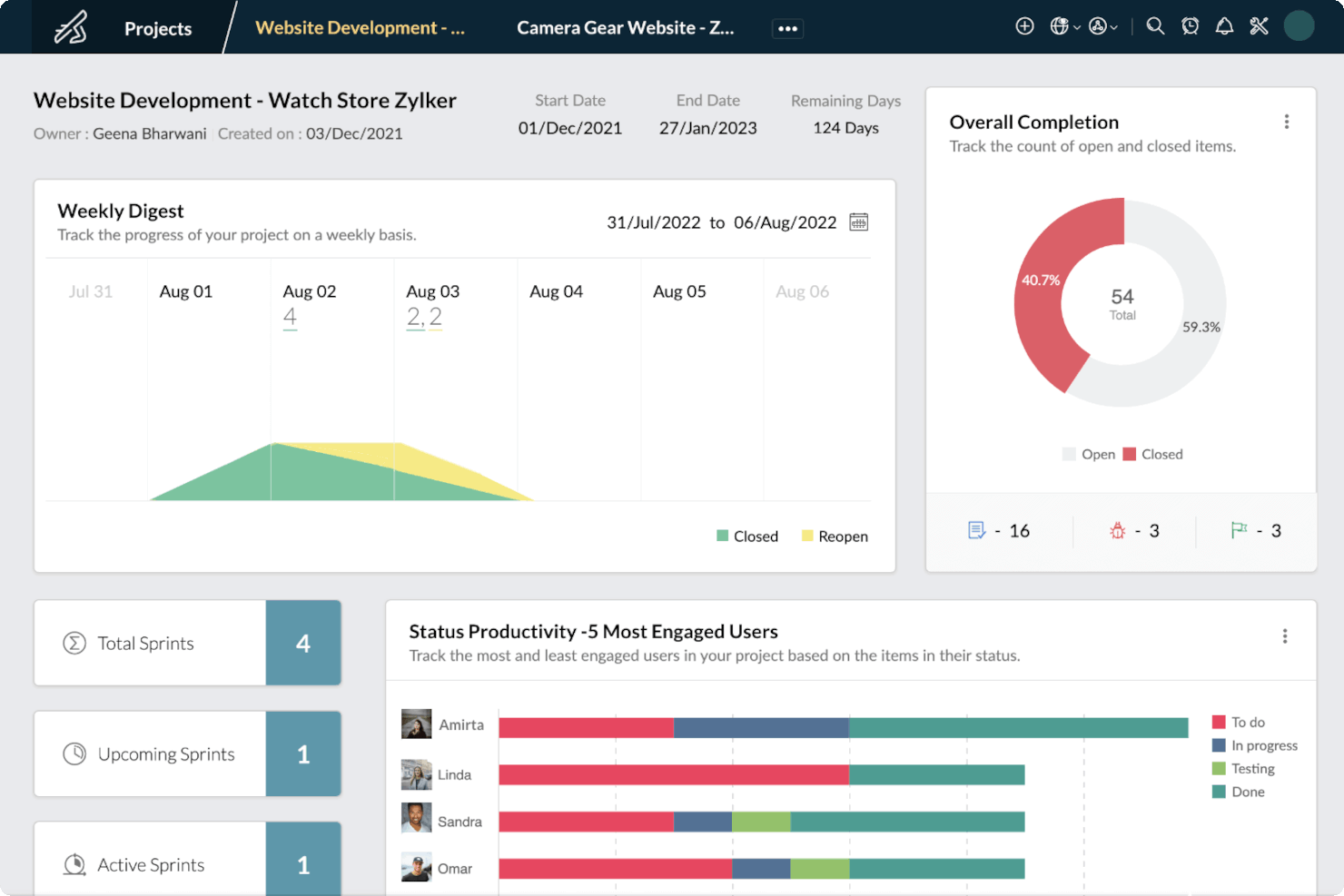
Zoho Sprints è una soluzione di gestione progetti pensata per i team agili al fine di monitorare e gestire con efficienza i loro prodotti. Gli utenti possono utilizzare le bacheche Scrum e Kanban per gestire il ciclo di vita di un prodotto, anche se la piattaforma in sé non è progettata come soluzione PLM. Tuttavia, Zoho Sprints merita di essere menzionato in questa lista in quanto offre una serie di funzionalità PLM, inclusa la gestione delle attività, la collaborazione e funzioni di reportistica.
Perché ho scelto Zoho Sprints: Zoho Sprints offre agli utenti una panoramica dall’alto dell’avanzamento dei loro progetti e consente di monitorare i rispettivi calendari di rilascio. La piattaforma è disponibile in quattro diversi piani, con il piano Gratuito che è il più limitato e il piano Premium il più completo. La differenza di prezzo tra ciascun piano a pagamento è talmente esigua che rende conveniente abbonarsi subito al piano Premium. Il piano Gratuito offre solo funzionalità limitate di gestione del backlog e di reportistica, mentre il piano a pagamento più economico include molte più funzionalità di gestione e di reportistica e persino l’integrazione con Zoho Analytics, che offre maggiori approfondimenti su determinati prodotti. Zoho Sprints dispone anche di ulteriori funzionalità e integrazioni che possono trasformare la piattaforma in una soluzione PLM improvvisata.
Le aziende che utilizzano Zoho Sprints come soluzione PLM possono impiegare le bacheche Scrum e Kanban per monitorare i progetti. Zoho Sprints migliora la collaborazione tra i membri del team e visualizza i flussi di attività attraverso le schede Kanban. Le diverse funzionalità a disposizione delle aziende per la gestione del ciclo di vita del prodotto includono bacheche Scrum e Kanban, gestione degli Epic, gestione degli elementi di lavoro, gestione dei rilasci e integrazioni. La maggior parte di queste funzionalità è disponibile a pagamento dietro un costo contenuto, sostenibile dalla maggior parte delle aziende, anche considerando il piano Premier.
Anche se Zoho Sprints non è stato concepito come soluzione PLM, offre comunque numerose funzionalità e integrazioni supportate che possono aiutare gli utenti a gestire i cicli di vita dei prodotti. Quando si sceglie di utilizzare questa soluzione, è ideale abbonarsi al piano Premium ed esplorare le integrazioni disponibili per disporre di una piattaforma migliore per monitorare i cicli di vita dei prodotti.
Caratteristiche e integrazioni principali di Zoho Sprints
Le funzionalità includono roadmap delle funzionalità, gestione dei progetti, report e analisi, pianificazione/monitoraggio delle attività, gestione dei clienti, definizione delle priorità e notifiche.
Le integrazioni includono Microsoft Office 365, Microsoft Teams, Google Drive, Zendesk e ServiceNow. Sono supportate anche integrazioni tramite Zapier e Zoho Flow. Far parte dell’ecosistema Zoho consente di connettersi a numerosi altri servizi Zoho per vendite, marketing, CRM, assistenza clienti e altre opzioni.
Zoho Sprints parte da $3/utente/mese fino a 100 utenti e offre una prova gratuita di 15 giorni.
Pros and Cons
Pros:
- Grande scalabilità funzionale aggiungendo altri prodotti Zoho
- Prezzi accessibili
- Interfaccia facile da usare
Cons:
- Zoho Sprints non dispone di un'app mobile dedicata
- Alcune limitazioni nelle personalizzazioni
New Product Updates from Zoho Sprints
Zoho Sprints Adds Dashboard View for Custom Modules
Zoho Sprints adds a Dashboard view for custom modules with charts and tables for visualizing module records. This gives teams a clearer way to review custom data. For more information, visit Zoho Sprints’ official site.
 .
.
Ideale per canvas infiniti
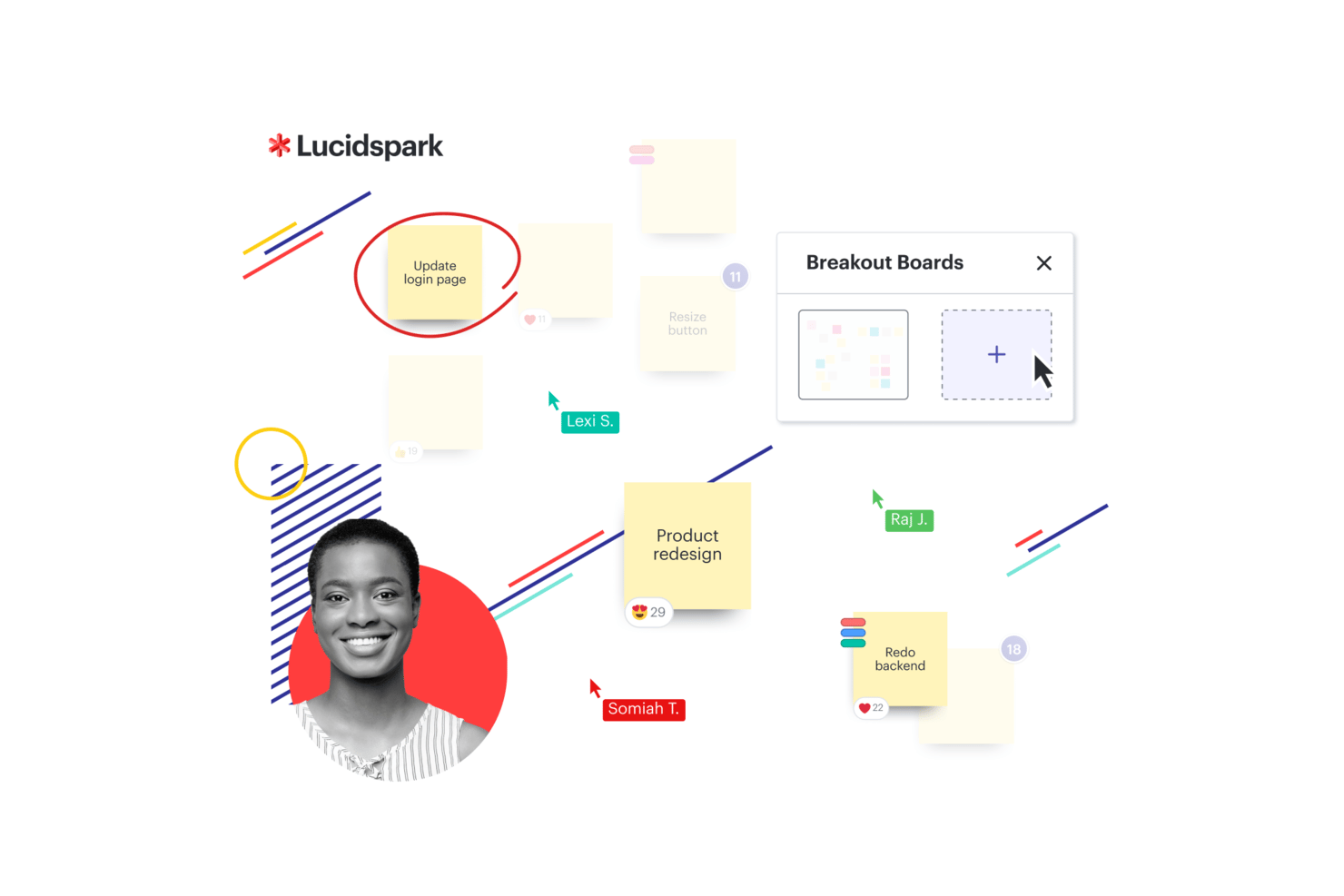
Per i team che cercano una soluzione PLM agile, Lucidspark offre una lavagna virtuale progettata per la collaborazione e lo sviluppo delle idee. Viene utilizzata in diversi settori come istruzione e sanità e supporta lo sviluppo agile e la pianificazione dei progetti. Grazie alle integrazioni con strumenti come Atlassian e Google Sheets, Lucidspark aiuta i team a mantenere flussi di lavoro connessi e a supportare decisioni informate.
Perché ho scelto Lucidspark
Ho scelto Lucidspark per la sua efficacia nella collaborazione in tempo reale e nelle attività creative, entrambe fondamentali per processi PLM agili. La tela infinita offre ai team lo spazio necessario per fare brainstorming e organizzare idee in piena libertà, sostenendo la fase iniziale di ideazione. Integra inoltre oltre 100 applicazioni, tra cui Atlassian, facilitando il coordinamento tra diversi strumenti e il mantenimento di flussi di lavoro agili.
Caratteristiche principali di Lucidspark
Oltre alla tela infinita e alle numerose integrazioni, ho apprezzato anche altre funzionalità di valore:
- Mappe mentali dinamiche: permettono al team di organizzare e collegare visivamente le idee, facilitando la pianificazione completa dei progetti.
- Funzionalità AI: aiutano ad automatizzare le attività ripetitive e migliorano le sessioni di brainstorming con suggerimenti intelligenti.
- Attività interattive: favoriscono il coinvolgimento del team e il processo decisionale tramite strumenti come sessioni di votazione e giochi collaborativi.
- Template di risorse: offrono layout predefiniti per semplificare i processi e garantire coerenza nell'esecuzione dei progetti.
Integrazioni di Lucidspark
Le integrazioni includono Atlassian, Google Sheets, Microsoft Teams, Slack, ServiceNow, Google Cloud, Amazon, Nvidia, Dropbox e Gmail.
Pros and Cons
Pros:
- Template workflow Kanban disponibili per i team
- Collaborazione in tempo reale per i team
- Integrazione con Google Drive e Jira
Cons:
- I piani team partono da $10 al mese per utente
- È richiesto il pagamento annuale per l'accesso

Wrike
Ideale per la gestione di cicli di vita del prodotto complessi
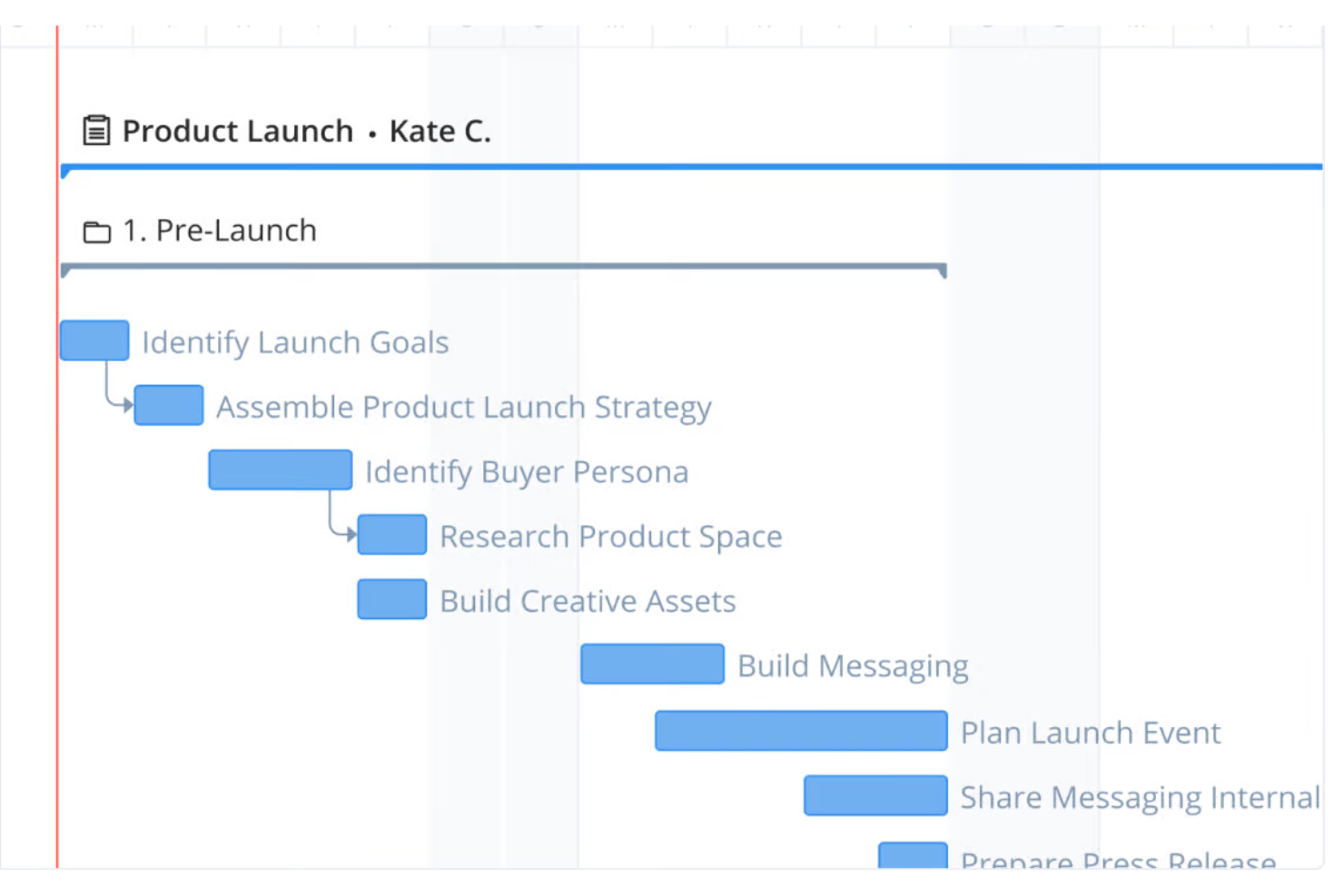
Wrike è una solida piattaforma di gestione progetti e collaborazione progettata per migliorare i flussi di lavoro e la produttività del team. Con le sue funzionalità versatili, Wrike supporta diverse metodologie di project management, compreso l’Agile, rendendolo una scelta ideale per la gestione del ciclo di vita del prodotto (PLM).
Perché ho scelto Wrike: Apprezzo la flessibilità della piattaforma nella gestione di cicli di vita del prodotto complessi. Wrike offre flussi di lavoro personalizzabili in linea con le metodologie Agile, permettendo ai team di adattarsi rapidamente ai cambiamenti di requisiti. Le sue bacheche Kanban e i diagrammi di Gantt offrono rappresentazioni visive delle fasi del prodotto, aiutando i team a monitorare i progressi, identificare i colli di bottiglia e prendere decisioni basate sui dati.
Inoltre, le funzionalità collaborative di Wrike migliorano la comunicazione e il coordinamento tra i membri del team. La modifica in tempo reale, i commenti sulle attività e le @menzioni garantiscono che tutti rimangano aggiornati. Le sue robuste capacità di reportistica e analisi permettono ai team di generare report dettagliati sulle prestazioni del progetto, monitorare le metriche chiave e utilizzare le informazioni raccolte per ottimizzare i processi.
Caratteristiche distintive e integrazioni di Wrike
Funzionalità incluse: monitoraggio del tempo, gestione delle risorse, visualizzazioni del carico di lavoro, dashboard personalizzati, modelli di progetto, integrazione con il calendario, moduli di richiesta, revisione e approvazioni, accesso da app mobile, condivisione file, ruoli e permessi utente, automazione con Wrike Integrate, dipendenze tra attività, monitoraggio tappe fondamentali e gestione dei rischi.
Integrazioni includono Slack, Google Drive, Microsoft Teams, Salesforce, Adobe Creative Cloud, Dropbox, Jira, Trello, Asana, HubSpot, GitHub, Bitbucket, Okta, OneLogin, Box, Zapier, Outlook, Zoom, Evernote e Marketo.
Pros and Cons
Pros:
- Ampie opzioni di personalizzazione
- Possibilità di automatizzare i flussi di lavoro
- Diagrammi di Gantt e bacheche Kanban visivi e intuitivi
Cons:
- La piattaforma può richiedere tempo per essere appresa
- Nessuna funzione di chat integrata per comunicazioni rapide al di fuori delle attività di progetto
New Product Updates from Wrike

Wrike Activity Reports Add Actor Type Details
Wrike’s Activity Report now displays actor type details, helping admins identify whether changes came from the UI, Automation, Wrike Agents, API, or AI via MCP. For more information, visit Wrike's official site.

Miro
Ideale per lo sviluppo iterativo visivo
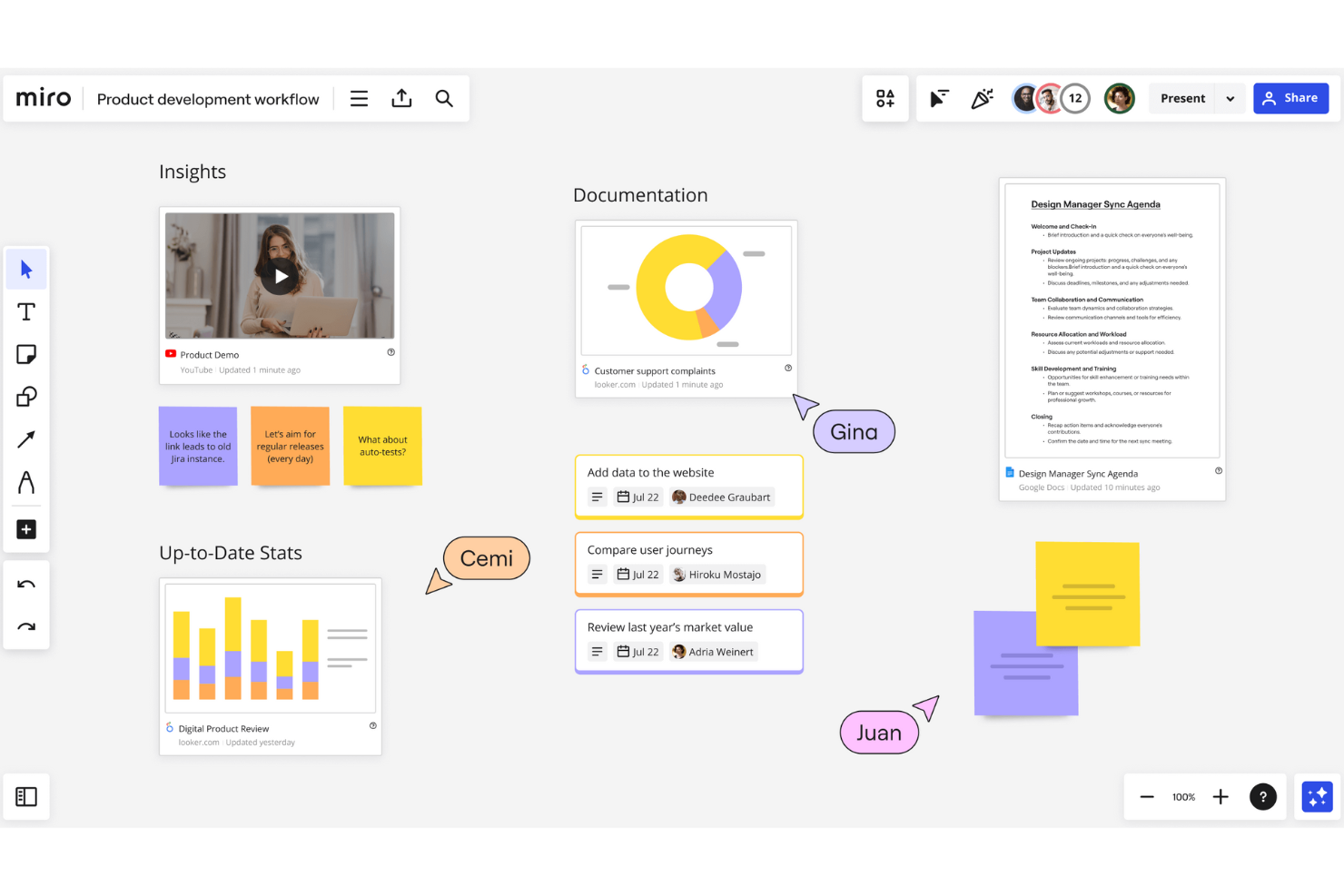
Miro è uno spazio di lavoro collaborativo online che offre un'ampia gamma di strumenti e funzionalità per la gestione dei progetti, la creazione di diagrammi, la mappatura dei processi, la visualizzazione dei contenuti e molto altro
Perché ho scelto Miro: Come software PLM agile, Miro si distingue per la sua capacità di facilitare la collaborazione in tempo reale e lo sviluppo iterativo. La piattaforma offre strumenti come lavagne digitali, mappe mentali e bacheche Kanban che consentono ai team di fare brainstorming, pianificare e gestire i progetti con flessibilità. Grazie all'interfaccia intuitiva di Miro, i team possono visualizzare facilmente flussi di lavoro complessi, dare priorità alle attività e monitorare l'avanzamento tramite modelli personalizzabili e framework agili. Questa adattabilità garantisce ai team una risposta rapida ai cambiamenti.
Miro supporta inoltre una dettagliata mappatura delle user story, pianificazione degli sprint e sessioni di retrospettiva. Offrendo una piattaforma centralizzata dove tutti gli stakeholder possono collaborare, condividere feedback e prendere decisioni informate in tempo reale, la piattaforma assicura che l'intero ciclo di vita del prodotto venga gestito in modo efficiente.
Funzionalità e integrazioni di spicco di Miro
Le funzionalità includono strumenti per il brainstorming, modalità presentazione, diagrammi di flusso, creazione di diagrammi, integrazione video chat, condivisione schermo, bacheche Kanban, mappe mentali, flussi di lavoro agili, collaborazione a distanza tra team, post-it digitali, strumenti di gestione progetti, loop di feedback e strumenti di sketching.
Le integrazioni includono Microsoft Teams, Google Drive, Slack, Box, Airtable, Notion, Azure, Webex, Jira, Asana, Monday.com, Confluence, Zoom e Figma.
Pros and Cons
Pros:
- Gli utenti possono collaborare in tempo reale sulla stessa area di lavoro
- Lavagna infinita per processi iterativi
- Modelli di flusso di lavoro predefiniti
Cons:
- A causa della sua flessibilità, la piattaforma può richiedere tempo per essere appresa
- Alcune integrazioni disponibili solo nei piani di livello superiore
New Product Updates from Miro
Miro Adds Japan Data Residency for Enterprise Customers
Miro has introduced Japan data residency for enterprise customers, offering in-region storage for production data, backups, and metadata, plus in-region compute infrastructure. For more information, visit Miro's official site.


Autodesk Fusion Lifecycle, ora noto come Fusion 360, offre agli utenti un database centrale dei prodotti.
Perché ho scelto Autodesk Fusion Lifecycle: La piattaforma centralizza la gestione dei dati di prodotto, consentendo un controllo accurato e completo del ciclo di vita del prodotto. Il database centralizzato rappresenta un'unica fonte attendibile per i dati di prodotto, eliminando confusione e imprecisioni. I tuoi team avranno accesso alle informazioni più aggiornate e le utilizzeranno solo nello svolgimento delle loro attività.
Autodesk Fusion Lifecycle aiuta aziende di qualsiasi dimensione a controllare dati e processi in base ai ruoli o ai privilegi dei dipendenti grazie alle impostazioni di autorizzazione. I manager possono estendere l'accesso agli stakeholder della supply chain e ai fornitori esterni per stabilire una collaborazione efficiente. La piattaforma ottimizza inoltre i processi fornendo metriche di progetto sempre aggiornate e affidabili.
Caratteristiche e integrazioni principali di Autodesk Fusion Lifecycle
Caratteristiche includono gestione delle attività, controllo delle versioni, gestione dei progetti, dati di progettazione per la produzione, gestione della progettazione, strumenti CAD e visualizzazione dati.
Integrazioni includono OpenBOM, AWS Secrets Manager, Autodesk PD&M Collection, Bantam Tools, HSMWorks, Modecsoft, Autodesk A360, SimLab Composer, CAMplete TruePath e Causeway Flow.
Autodesk Fusion Lifecycle ha un costo a partire da $545/anno. Autodesk Fusion Lifecycle offre una prova gratuita di 30 giorni.
Pros and Cons
Pros:
- È facile da comprendere per i nuovi utenti.
- La piattaforma consente agli utenti di creare disegni 3D più rapidamente.
- Ha un'interfaccia utente intuitiva.
Cons:
- La piattaforma può risultare lenta e presentare bug occasionali.
- Alcune opzioni di progettazione richiedono plugin aggiuntivi.


Dassault ENOVIA consente alle aziende di lanciare i propri prodotti in tutto il mondo simultaneamente.
Perché ho scelto Dassault ENOVIA: Il tipico lancio di un prodotto prevede la partenza nei mercati sviluppati e successivamente l'espansione in altri paesi. Questa piattaforma aiuta gli utenti a lanciare i loro prodotti a livello globale nello stesso momento, favorendo una maggiore fidelizzazione dei clienti e ricavi superiori. Inoltre, riduce il time-to-market riutilizzando funzioni di progettazione.
Dassault ENOVIA si rivolge ad aziende di medie e grandi dimensioni che operano in diversi settori, come il trasporto, le attrezzature industriali e il settore marittimo. Offre una soluzione completa per la gestione del ciclo di vita del prodotto. Può anche aiutare queste organizzazioni a ridurre i costi e aumentare la produttività, poiché è una soluzione SaaS e non richiede hardware aggiuntivo.
Caratteristiche e integrazioni distintive di Dassault ENOVIA
Caratteristiche includono gestione del design high-tech, pianificazione del prodotto, qualità e conformità, gestione dei programmi, relazioni strategiche con i fornitori, gestione delle configurazioni e dei cambiamenti, e classificazione e gestione della proprietà intellettuale.
Integrazioni includono Adlib, API C++ e ENOVIA X-BOM per SAP.
Dassault ENOVIA offre prezzi personalizzati su richiesta.
Pros and Cons
Pros:
- È facile da utilizzare anche per principianti senza alcun supporto.
- I product manager avranno un maggiore controllo sulla tempistica del prodotto.
- I team possono collaborare facilmente e comprendere lo stato del prodotto in qualsiasi momento.
Cons:
- Talvolta si riscontrano problemi di performance a causa delle molteplici funzionalità.
- Non è presente una sezione FAQ per rispondere alle domande.


PTC Windchill offre agli utenti soluzioni per la gestione del ciclo di vita e dei dati dei prodotti.
Perché ho scelto PTC Windchill: lo strumento aiuta le organizzazioni a distribuire, trasferire, pubblicare e condividere informazioni in tempo reale. È inoltre possibile utilizzare queste informazioni per visualizzare i dati dei prodotti. In questo modo, i team hanno tutti gli insight fruibili necessari per migliorare lo sviluppo dei prodotti.
PTC Windchill offre un software PLM completo per aziende di tutte le dimensioni. Consente ai team di individuare i problemi di progettazione nelle prime fasi del ciclo di vita e di risolverli prima di passare alla fase successiva. La funzione di prova della credibilità integrata nel software aiuta gli utenti a proteggere la proprietà intellettuale dell'organizzazione.
Funzionalità distintive e integrazioni di PTC Windchill
Le funzionalità includono la gestione della qualità e della distinta base, la gestione dell'esternalizzazione, la struttura della piattaforma, la visualizzazione e l'analisi dei dati, la base di conoscenze tecniche, la gestione dell'affidabilità e dei requisiti e la gestione della collaborazione.
Le integrazioni includono XDocs DITA CCMS, TouchBase, Procurence Meercat, ProWritingAid, OpenBOM, See Electrical, Rimsys, Arbortext, PTC Move, PTC Implementer, OpsHub e Kovair Software.
PTC Windchill offre prezzi personalizzati su richiesta.
Pros and Cons
Pros:
- Gli utenti possono eseguire ricerche rapide dei dati di cui hanno bisogno.
- La gestione del ciclo di vita del prodotto attraverso il processo di richiesta di modifica è semplice.
- L'interfaccia utente facilita il monitoraggio e l'individuazione della cronologia dei prodotti.
Cons:
- Gli utenti potrebbero riscontrare blocchi della piattaforma quando utilizzano aree di lavoro con modelli di grandi dimensioni.
- I nuovi utenti potrebbero aver bisogno di una guida per iniziare a utilizzare la piattaforma.


SAP PLM offre alle aziende soluzioni per gestire l'intero ciclo di vita dei loro prodotti.
Perché ho scelto SAP PLM: Fin dall'inizio del ciclo di vita del prodotto, dalla concezione e brainstorming fino alla produzione e al servizio, le funzionalità di SAP PLM possono ottimizzare i tuoi processi. Semplifica le proposte di progetto, le attività, l'avanzamento e le tempistiche, così puoi monitorare i dati da un'unica piattaforma. Puoi utilizzare la piattaforma per progettare, pianificare e gestire la produzione del prodotto con maggior controllo e visibilità.
SAP PLM è un software a livello enterprise che fa parte della SAP Business Suite, e offre un'integrazione eccellente con le altre piattaforme della suite. Include anche funzionalità che consentono decisioni più rapide e migliori sui piani di prodotto per soddisfare esigenze personalizzate di diversi stakeholder. I programmi, i responsabili di prodotto e di progetto possono collaborare per garantire che tutti gli stakeholder chiave siano sempre informati su ciò che accade.
Funzionalità e integrazioni principali di SAP PLM
Funzionalità includono la coordinazione dei piani di progetto, il controllo dei documenti di progetto, la gestione commerciale dei progetti, la collaborazione sul prodotto e la visualizzazione aziendale, l’ingegneria del prodotto e la gestione del portafoglio progetti.
Integrazioni includono tutte le piattaforme della SAP Business Suite.
SAP PLM offre prezzi personalizzati su richiesta. SAP PLM offre una prova gratuita, ma non fornisce facilmente i dettagli.
Pros and Cons
Pros:
- Gli utenti possono facilmente avviare le prime fasi di budget, come la preventivazione
- La piattaforma si adatta bene a diversi progetti, come progettazione software e ingegneria
- Eccellente per indirizzare gli utenti a report e istruzioni
Cons:
- Può risultare difficile da apprendere e da utilizzare
- Il numero di funzionalità può essere eccessivo per i progetti più piccoli
Come Valuto i Software Agile PLM
Divido la mia valutazione in due livelli: le capacità di base che ogni strumento deve soddisfare—come la gestione di distinte base multilivello e i flussi di lavoro ECO—e i fattori differenzianti che separano le migliori opzioni.
Funzionalità Principali (Requisiti Minimi per Questa Lista)
Quando seleziono gli strumenti per la mia lista, valuto ciascuno su una scala da 0 (non offre la funzionalità) a 5 (eccelle in questo ambito) per ogni funzionalità principale elencata qui sotto. Poi calcolo il punteggio totale dello strumento in percentuale. Ogni strumento deve raggiungere un punteggio minimo totale del 65% per essere preso in considerazione per l'inclusione.
- Gestione Distinte Base (BOM): Valuto se lo strumento gestisce distinte base multilivello con cronologia delle revisioni, tracciabilità dell’utilizzo nei vari assemblaggi e viste multiple della distinta come passaggi da EBOM a MBOM per la consegna alla produzione.
- Gestione delle Modifiche: Qui è importante un solido flusso di lavoro ECR/ECO/ECN con approvazioni basate sui ruoli e analisi dell’impatto—soprattutto per i team che gestiscono decine di ordini di modifica per sprint.
- Controllo Documenti & CAD: Controllo la presenza di un archivio adeguato con check-in/check-out, gestione delle revisioni e connettori nativi a strumenti CAD come SolidWorks, PTC Creo o Autodesk Inventor.
- Gestione Dati di Prodotto: L’anagrafica articoli dovrebbe supportare attributi configurabili, stati di ciclo di vita e classificazioni delle parti, così che i team possano gestire dati tra sedi e dipartimenti diversi.
- Compliance & Qualità: Esamino come ciascuno strumento traccia i requisiti normativi come RoHS, REACH o standard FDA e se processi di qualità come CAPA sono collegati ai record di prodotto.
- Integrazioni ERP & di Sistema: Connettori predefiniti con ERP come SAP, Oracle o NetSuite sono importanti, così come API aperte che permettano ai team di sincronizzare dati di BOM e articoli verso MES o approvvigionamento.
Una volta che ho una lista di strumenti che soddisfano i criteri, considero cosa distingue ogni piattaforma.
Fattori Differenzianti (Cosa Distingue i Fornitori)
Ecco come confronto i diversi fornitori:
Funzionalità Distintive
I portali di collaborazione fornitori sono un grande fattore differenziante—cerco strumenti che permettano a produttori su commessa e fornitori di accedere a BOM condivisi e notifiche ECO senza bisogno di una licenza completa. Anche le analisi potenziate dall’AI sono importanti, soprattutto per segnalare rischi di obsolescenza dei componenti prima che interrompano la produzione. Un visualizzatore 3D in-browser è prezioso per revisioni tra funzioni diverse, dove attori come acquisti o ingegneri qualità devono annotare i progetti senza una licenza CAD.
Oltre le Funzionalità
La compatibilità con il settore è molto importante nel PLM—valuto se un fornitore offre template preconfigurati e quadri di compliance per verticali come dispositivi medici (ISO 13485) o aerospaziale (ITAR). L’implementazione e il time-to-value sono altri fattori chiave. Le implementazioni PLM possono durare mesi, quindi verifico la disponibilità di strumenti di migrazione dati in grado di gestire distinte legacy da fogli di calcolo o sistemi più vecchi. Certificazioni di sicurezza come SOC 2 Tipo II e il supporto per firme elettroniche con registro di audit completo sono anch’essi pesati nella mia valutazione, soprattutto per i settori regolamentati.
Come scegliere un software PLM Agile
È facile perdersi in lunghi elenchi di funzionalità e strutture tariffarie complesse. Per aiutarti a rimanere concentrato mentre affronti il tuo processo di selezione del software, unico per le tue esigenze, ecco una lista di fattori da tenere a mente:
| Fattore | Cosa considerare |
|---|---|
| Scalabilità | Il software può crescere insieme alla tua azienda? Cerca strumenti in grado di gestire un aumento degli utenti e dei dati senza problemi. |
| Integrazioni | Funziona bene con gli altri strumenti che utilizzi? Verifica la compatibilità con i sistemi e le API esistenti. |
| Personalizzazione | Puoi adattarlo ai tuoi processi? Assicurati di poter modificare i flussi di lavoro e le impostazioni in base alle tue esigenze. |
| Facilità d'uso | Il tuo team lo adotterà facilmente? Cerca interfacce intuitive che richiedano una formazione minima. |
| Implementazione e avvio | Quanto velocemente puoi iniziare? Valuta il tempo e le risorse necessari per rendere il software operativo e ottenere risultati. |
| Costo | Rientra nel tuo budget? Confronta i modelli tariffari e fai attenzione ai costi nascosti nei contratti a lungo termine. |
| Misure di sicurezza | I tuoi dati sono protetti? Assicurati che il software rispetti gli standard di sicurezza e offra la crittografia. |
| Disponibilità dell'assistenza | Potrai ricevere aiuto quando ne avrai bisogno? Verifica la disponibilità di canali di assistenza come chat, e-mail e telefono. |
Che cos'è un software PLM Agile?
Il software PLM agile è uno strumento utilizzato per gestire l'intero ciclo di vita di un prodotto, dalla concezione al ritiro. Professionisti come responsabili di prodotto, ingegneri e designer utilizzano questi strumenti per migliorare la collaborazione e l'efficienza nello sviluppo dei prodotti. Funzionalità come le tempistiche dei progetti, la collaborazione tra team e la gestione della conformità aiutano a organizzare le attività e a garantire che i prodotti soddisfino gli standard. Nel complesso, questi strumenti rendono la gestione di dati e flussi di lavoro complessi dei prodotti più semplice e organizzata.
Funzionalità
Quando selezioni un software PLM agile, presta attenzione alle seguenti funzionalità chiave:
- Tempistiche dei progetti: monitora e gestisci le scadenze per garantire la consegna puntuale dei prodotti e modifica le pianificazioni secondo necessità.
- Collaborazione tra team: facilita la comunicazione e il coordinamento tra i membri del team per migliorare produttività e creatività.
- Cronologia delle versioni: conserva un registro delle modifiche e degli aggiornamenti per garantire l'accuratezza e la tracciabilità dei dati dei prodotti.
- Gestione della conformità: garantisce che i prodotti soddisfino gli standard e le normative del settore, riducendo il rischio di non conformità.
- Integrazione dei dati: collega altri sistemi e strumenti per ottimizzare il flusso dei dati e migliorare l'accessibilità delle informazioni.
- Flussi di lavoro personalizzabili: adatta i processi alle esigenze specifiche della tua azienda e migliora l'efficienza operativa.
- Analisi in tempo reale: accedi a informazioni aggiornate sui dati per prendere decisioni consapevoli e individuare le aree di miglioramento.
- Interfaccia intuitiva: semplifica la navigazione e l'utilizzo per favorire l'adozione e ridurre i tempi di formazione.
- Misure di sicurezza: proteggi i dati sensibili con la crittografia e la conformità agli standard di sicurezza.
- Scalabilità: supporta la crescita degli utenti e dei dati senza compromettere le prestazioni o le funzionalità.
Vantaggi
L'implementazione di un software PLM agile offre diversi vantaggi al tuo team e alla tua azienda. Ecco alcuni dei vantaggi che puoi aspettarti:
- Collaborazione migliorata: migliora il lavoro di squadra fornendo strumenti che facilitano la comunicazione e il coordinamento tra i membri del team.
- Maggiore efficienza: accelera lo sviluppo dei prodotti con funzionalità come le tempistiche dei progetti e i flussi di lavoro personalizzabili.
- Conformità migliorata: riduci il rischio di non conformità grazie alla gestione integrata della conformità e al monitoraggio delle normative.
- Processo decisionale migliorato: prendi decisioni consapevoli con l'analisi in tempo reale e le funzionalità di integrazione dei dati, che offrono informazioni preziose.
- Sicurezza dei dati: proteggi le informazioni sensibili con misure di sicurezza, garantendo la privacy dei dati e la conformità agli standard.
- Scalabilità: supporta la crescita della tua azienda senza problemi di prestazioni, grazie a un software scalabile che si adatta all'aumento degli utenti e dei dati.
Costi e prezzi
La scelta di un software PLM agile richiede la comprensione dei vari modelli e piani tariffari disponibili. I costi variano in base alle funzionalità, alle dimensioni del team, ai componenti aggiuntivi e ad altri fattori. La tabella seguente riassume i piani più comuni, i relativi prezzi medi e le funzionalità tipicamente incluse nelle soluzioni software PLM agili:
Tabella di confronto dei piani per il software PLM agile
| Tipo di piano | Prezzo medio | Funzionalità comuni |
|---|---|---|
| Piano gratuito | $0 | Gestione di base dei progetti, assistenza limitata agli utenti e archiviazione di base dei dati. |
| Piano personale | $5-$25/user/month | Strumenti di collaborazione avanzati, flussi di lavoro personalizzabili e reportistica standard. |
| Piano aziendale | $30-$60/user/month | Analisi avanzate, integrazione con altri strumenti e gestione della conformità. |
| Piano aziendale | $70-$150/user/month | Personalizzazione completa, assistenza dedicata e misure di sicurezza di livello aziendale. |
Domande frequenti sul software PLM agile
\u003cspan style=\u0022font-weight: 400\u0022\u003eEcco alcune risposte alle domande più comuni sul software PLM agile:\u003c/span\u003e
Cosa offre alle aziende il software PLM?
Il software PLM offre agilità alla tua azienda per aiutarti a gestire la complessità, crescere quando sei pronto e soddisfare la domanda dei clienti, adattandoti al contempo ai cambiamenti imprevisti. Questo software garantisce la tracciabilità dei prodotti, che può aumentare la velocità dello sviluppo poiché gli stakeholder che lavorano in diversi Paesi, uffici, fusi orari e lingue collaborano in modo efficiente. Puoi anche utilizzare il software PLM agile per promuovere l’innovazione, poiché può fornire dati sui consumatori in tempo reale durante lo sviluppo di nuovi prodotti.
Sono necessarie competenze tecniche per implementare il software PLM agile?
\u003cspan style=\u0022font-weight: 400\u0022\u003eNo, non sono necessarie competenze tecniche approfondite per implementare il software PLM agile. La maggior parte delle soluzioni è progettata con interfacce intuitive e offre supporto durante il processo di inserimento. Tuttavia, è utile avere una persona con familiarità con l’IT che gestisca le integrazioni e risolva eventuali problemi tecnici.\u003c/span\u003e
Quali altri software per prodotti dovrei utilizzare?
Come puoi vedere da questo articolo, il software PLM è uno strumento efficace per monitorare lo sviluppo del tuo prodotto durante tutto il suo ciclo di vita. Tuttavia, la gestione del prodotto può comprendere più del semplice sviluppo. Per assicurarti di non trascurare una componente chiave del tuo ruolo, puoi consultare questi articoli per scoprire un elenco di strumenti software per prodotti che ti aiuteranno a eccellere.
\u003cul\u003e
\t\u003cli\u003e\u003ca href=\u0022https://cpoclub.com/tools/best-product-feedback-software/\u0022\u003eI 10 migliori software per i riscontri sui prodotti\u003c/a\u003e\u003c/li\u003e
\t\u003cli\u003e\u003ca href=\u0022https://cpoclub.com/tools/best-user-onboarding-software/\u0022\u003eI 10 migliori software di inserimento degli utenti per aiutare i clienti a imparare a utilizzare il tuo prodotto\u003c/a\u003e\u003c/li\u003e
\t\u003cli\u003e\u003ca href=\u0022https://cpoclub.com/tools/best-wireframing-tools/\u0022\u003eI 10 migliori strumenti wireframe per progettare app e siti web\u003c/a\u003e\u003c/li\u003e
\u003c/ul\u003e
Qual è il prossimo passo:
Se stai effettuando una ricerca sul software PLM agile, contatta gratuitamente un consulente SoftwareSelect per ricevere consigli.
Compili un modulo e fai una breve conversazione durante la quale vengono analizzate nel dettaglio le tue esigenze. Dopodiché riceverai una selezione ristretta di software da esaminare. Ti offriranno supporto durante l'intero processo di acquisto, comprese le negoziazioni sul prezzo.