

Gli strumenti di ricerca sugli utenti basati sull'IA utilizzano l'intelligenza artificiale per automatizzare e migliorare il modo in cui raccogli, analizzi e utilizzi gli insight sugli utenti. Se stai cercando modi per accelerare la ricerca, ridurre il lavoro manuale o ottenere feedback più approfonditi da utenti reali o simulati, questi strumenti sono pensati per te. Con così tante opzioni disponibili, è difficile sapere quali piattaforme offrano risultati affidabili e si adattino davvero al tuo flusso di lavoro. Questa guida ti aiuterà a confrontare rapidamente i migliori strumenti di ricerca sugli utenti basati sull'IA, così potrai trovare la soluzione giusta per migliorare il processo di ricerca del tuo team e prendere decisioni più efficaci sui prodotti.
Perché fidarsi dei nostri consigli sui software
6,700+
Reviews
20
Industry experts
16+
Evaluation factors
14
Years
Il nostro team testa e recensisce software dal 2012. In quanto product manager noi stessi, sappiamo quanto sia difficile — e importante — scegliere il software giusto.
Per questa guida, abbiamo valutato gli strumenti attraverso test pratici e ricerche indipendenti, assegnando un punteggio agli strumenti in base ai nostri criteri di selezione.
Le nostre recensioni riflettono il nostro giudizio editoriale umano, non un discorso di vendita.
Revisori esperti:
- Andrew LumbySenior TPM
- Cristiano ValimSenior UI/UX Lead


Tabella comparativa degli strumenti di ricerca sugli utenti basati sull'IA
Questa tabella comparativa riassume i dettagli sui prezzi delle mie migliori selezioni di strumenti di ricerca sugli utenti basati sull’IA per commercialisti:
| Tool | Best For | Trial Info | Price | ||
|---|---|---|---|---|---|
| 1 | Il migliore con tassonomia di feedback adattiva | Demo gratuita disponibile | Prezzi su richiesta | Website | |
| 2 | Ideale per l’analisi delle risposte ai sondaggi guidata dall'IA | Prova gratuita di 7 giorni + demo gratuita disponibile | A partire da $79/mese | Website | |
| 3 | Ideale per ampi pannelli di partecipanti | Demo gratuita disponibile | Prezzo su richiesta | Website | |
| 4 | Il migliore per l'analisi qualitativa dei dati potenziata dall’IA | Piano gratuito + demo gratuita disponibile | Prezzo su richiesta | Website | |
| 5 | Ideale per repository di ricerca collaborativi | Prova gratuita di 15 giorni | Da $15/utente/mese (fatturato annualmente) | Website | |
| 6 | Ideale per reclutamento e ricerca integrati | Prova gratuita + demo gratuita disponibili | Da $129/sedile/mese | Website | |
| 7 | Piano gratuito disponibile | A partire da $49/mese | Website | ||
| 8 | Ideale per la programmazione automatica delle interviste | Demo gratuita disponibile | Prezzi su richiesta | Website | |
| 9 | Ideale per l'automazione della ricerca basata su voce | Demo gratuita disponibile | Prezzo su richiesta | Website | |
| 10 | Ideale per la sintesi delle emozioni e dei temi tra studi diversi | Demo gratuita disponibile | Prezzo su richiesta | Website |


Recensioni degli strumenti di ricerca sugli utenti basati sull'IA
Di seguito trovi i miei riepiloghi dettagliati dei migliori strumenti di ricerca sugli utenti basati sull’IA inclusi nel mio elenco. Le mie recensioni offrono uno sguardo approfondito sulle funzionalità, sulle capacità e sui casi d’uso migliori di ciascuna piattaforma, per aiutarti a trovare quella più adatta a te.
 Il migliore con tassonomia di feedback adattiva
- Demo gratuita disponibile
- Prezzi su richiesta
Visit WebsiteCustomer Rating:4.8/5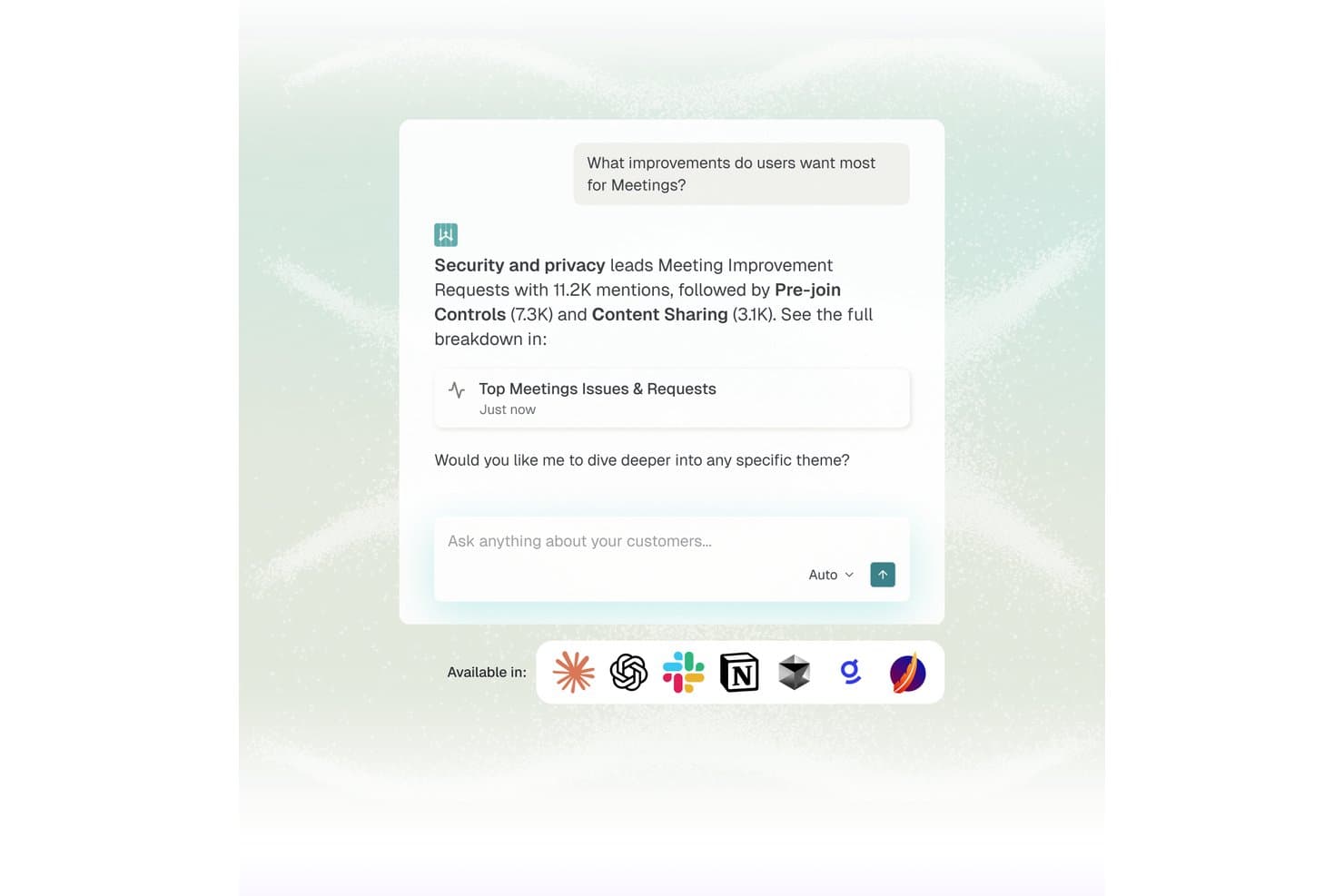
Enterpret offre un'interfaccia chat basata su AI che evidenzia i principali temi emersi dal feedback degli utenti, come sicurezza e controlli pre-accesso, ricavati dalle richieste di miglioramento dei meeting. Enterpret è una piattaforma di intelligence sul feedback dei clienti che aggrega segnali da oltre 50 fonti e utilizza una tassonomia AI adattiva per classificare automaticamente i feedback, evidenziare temi ricorrenti e rendere le informazioni interrogabili in linguaggio naturale.
Per Chi È Ideale Enterpret?
Enterpret è particolarmente indicato per team di prodotto di medie e grandi aziende che gestiscono alti volumi di feedback dei clienti attraverso diversi canali ogni mese.
Perché Ho Scelto Enterpret
Enterpret si guadagna un posto nella mia shortlist perché la sua tassonomia adattiva è davvero diversa da qualsiasi altra cosa che abbia testato. Con l'evolversi dei prodotti, cambiano anche le categorie di feedback, ma l'AI di Enterpret ristruttura automaticamente la sua tassonomia a 5 livelli per riflettere i nuovi temi senza bisogno di re-tag manuali. Apprezzo anche il fatto che Wisdom AI permette al mio team di interrogare l'intero corpus di feedback in linguaggio naturale e ricevere prove citate e collegate alla fonte all'istante.
Caratteristiche Chiave di Enterpret
- Wisdom AI per interrogazioni in linguaggio naturale: Permette agli utenti di cercare nei dati di feedback unificati in linguaggio semplice per ottenere insight immediati con prove collegate alle fonti.
- Customer context graph: Collega ogni feedback agli attributi del cliente, al segmento e all'utilizzo per filtraggi e segmentazioni approfonditi.
- Ingestione in tempo reale del feedback: Aggrega feedback di prodotto da oltre 50 fonti come Zendesk, Intercom, G2, Slack e recensioni sugli app store.
- Integrazioni di automazione dei workflow: Attiva azioni e invia insight direttamente su Jira, Linear e Slack per collegare le scoperte allo sviluppo prodotto.
Integrazioni di Enterpret
Enterpret offre integrazioni native con Zendesk, Intercom, Salesforce, Gong, Slack, Qualtrics, Linear, Jira, Google Play Store e Apple App Store. È disponibile un'API per integrazioni personalizzate.
Pros and Cons
Pros:
- La tassonomia adattiva si aggiorna automaticamente con l'evoluzione dei prodotti
- Le interrogazioni in linguaggio naturale restituiscono prove citate dei feedback
- Aggrega segnali da oltre 50 fonti di feedback
Cons:
- Focalizzata principalmente sul feedback, non sulla ricerca tramite interviste
- L'impostazione e la configurazione della tassonomia richiedono tempo significativo
Learn more about Enterpret: Ideale per l’analisi delle risposte ai sondaggi guidata dall'IA
- Prova gratuita di 7 giorni + demo gratuita disponibile
- A partire da $79/mese

Articos ti consente di testare le reazioni delle personas a diversi tipi di copy di brand. Articos è una piattaforma di ricerca utente basata sull'IA che simula interviste con partecipanti, genera personas sintetici e analizza le risposte per produrre report di ricerca strutturati con punteggi di affidabilità e catene di evidenze.
Per chi è ideale Articos?
Articos è ideale per ricercatori UX, product manager e consulenti di ricerche di mercato che devono condurre studi senza il tempo o il budget necessari per il reclutamento tradizionale dei partecipanti.
Perché ho scelto Articos
Articos è tra le mie scelte principali perché apprezzo molto il modo in cui gestisce l’analisi delle risposte ai sondaggi, eliminando il rumore che si ha spesso dalle risposte grezze dell’IA. Ogni studio produce 17 temi focalizzati (rispetto ai 142 di un modello linguistico con un rapporto di rumore di 22:1), supportati da punteggi di affidabilità e catene di evidenza. L’architettura ipotesi-indipendente fa sì che le personas non possano percepire quale esito mi aspetto, quindi i risultati resistono meglio a una verifica critica. Questo rappresenta una differenza importante quando devo presentare i risultati a un cliente.
Funzionalità principali di Articos
- Generazione di personas sintetici: Crea personas IA calibrate con la scienza della personalità Big Five e garantisce diversità di posizione su cinque archetipi (campioni, pragmatici, scettici, oppositori e osservatori).
- Feedback immediato del sondaggio: Ottieni rapidamente feedback qualitativi e quantitativi da utenti sintetici, ricevendo preziose informazioni in pochi minuti invece che in giorni.
- Corroborazione web: Confronta i risultati dello studio con fonti esterne in tempo reale per validare le intuizioni sintetiche.
- Esportazione PDF white-label: Esporta i risultati dello studio come report personalizzati e pronti per i clienti, direttamente dalla piattaforma.
Integrazioni di Articos
Articos non dispone di integrazioni native. La piattaforma funziona nel browser, con i risultati delle ricerche disponibili come esportazioni PDF white-label che puoi condividere tramite i tuoi strumenti esistenti.
Pros and Cons
Pros:
- Architettura ipotesi-indipendente riduce il bias di conferma
- Report pronti in meno di 30 minuti
- Personas scettiche e late-adopter integrate
Cons:
- Le personas sintetiche non possono sostituire esperienze vissute
- Nessuna integrazione nativa con altri strumenti
Learn more about Articos: Ideale per ampi pannelli di partecipanti
- Demo gratuita disponibile
- Prezzo su richiesta
Visit WebsiteCustomer Rating:4.5/5
La dashboard dell'area di lavoro UserTesting mostra test, sessioni e una panoramica del progetto. UserTesting è una piattaforma di ricerca utente alimentata dall'intelligenza artificiale che consente di reperire partecipanti, avviare test di usabilità, catturare feedback video e analizzare informazioni sugli utenti su larga scala.
Per chi è ideale UserTesting?
UserTesting è particolarmente indicato per ricercatori UX e team di prodotto nelle grandi aziende che necessitano di accedere a un ampio e diversificato pannello di partecipanti.
Perché ho scelto UserTesting
Ho scelto UserTesting come uno dei migliori perché posso accedere immediatamente a un vasto pannello globale di partecipanti e avviare studi con filtri demografici molto specifici. Mi piace poter effettuare test sia moderati che non moderati, per poi usare l'analisi video basata su intelligenza artificiale per individuare rapidamente le informazioni chiave. Il mio team usa UserTesting per validare rapidamente prototipi e concetti con utenti reali su larga scala.
Funzionalità principali di UserTesting
- Task builder: Crea attività e scenari personalizzati per i partecipanti da completare durante gli studi.
- Highlight reels: Compila e condividi i momenti video più importanti delle sessioni utente.
- Analisi del sentimento: Rileva e tagga automaticamente feedback positivo o negativo nelle risposte.
- Test di app mobile: Esegui test di usabilità su dispositivi iOS e Android con utenti reali.
Integrazioni UserTesting
Le integrazioni includono Slack, Teams, Jira, Figma, FigJam e Miro.
Pros and Cons
Pros:
- Accesso a un ampio bacino di partecipanti a livello globale
- Supporta studi sia moderati che non moderati
- Targeting demografico e comportamentale avanzato
Cons:
- Integrazioni nativamente limitate con altre piattaforme
- Variabilità occasionale nella qualità dei partecipanti
Learn more about UserTesting: Il migliore per l'analisi qualitativa dei dati potenziata dall’IA
- Piano gratuito + demo gratuita disponibile
- Prezzo su richiesta

Dashboard dei progetti Dovetail con studi appuntati e vista a cartelle. Dovetail è una piattaforma di ricerca utenti basata sull'intelligenza artificiale che consente ai team di centralizzare i dati di ricerca, trascrivere interviste, analizzare feedback qualitativi e organizzare insight provenienti da più fonti in un unico spazio di lavoro.
Per chi è più adatto Dovetail?
Dovetail è particolarmente indicato per ricercatori UX e team di prodotto in aziende di medie e grandi dimensioni che devono analizzare e organizzare dati di ricerca qualitativa.
Perché ho scelto Dovetail
Ho scelto Dovetail tra i migliori perché posso utilizzare la sua analisi potenziata dall'IA per individuare rapidamente schemi nelle trascrizioni delle interviste e nei feedback aperti. Mi piace poter auto-etichettare i dati qualitativi e generare riepiloghi istantanei per grandi progetti di ricerca. Il mio team utilizza Dovetail per centralizzare note, evidenziare momenti chiave e organizzare le scoperte per una facile condivisione.
Funzionalità principali di Dovetail
- Supporto file video e audio: Carica e analizza le registrazioni direttamente sulla piattaforma.
- Spazio di lavoro collaborativo: Più utenti possono lavorare insieme a progetti di ricerca in tempo reale.
- Campi e tag personalizzati: Crea e gestisci i tuoi metadati per organizzare i dati di ricerca.
- Importazione dati da fonti esterne: Porta dati di ricerca da strumenti come Google Drive e Zoom.
Integrazioni di Dovetail
Dovetail offre integrazioni native con Zoom, Google Drive, Slack e Figma, e mette a disposizione un’API per integrazioni personalizzate.
Pros and Cons
Pros:
- L’IA etichetta e riassume automaticamente i dati qualitativi
- Supporta il caricamento di file video e audio
- Consente la collaborazione in tempo reale
Cons:
- Nessuno strumento integrato per il reclutamento dei partecipanti
- Il listino prezzi non è pubblicato in modo trasparente online
Learn more about Dovetail: Ideale per repository di ricerca collaborativi
- Prova gratuita di 15 giorni
- Da $15/utente/mese (fatturato annualmente)
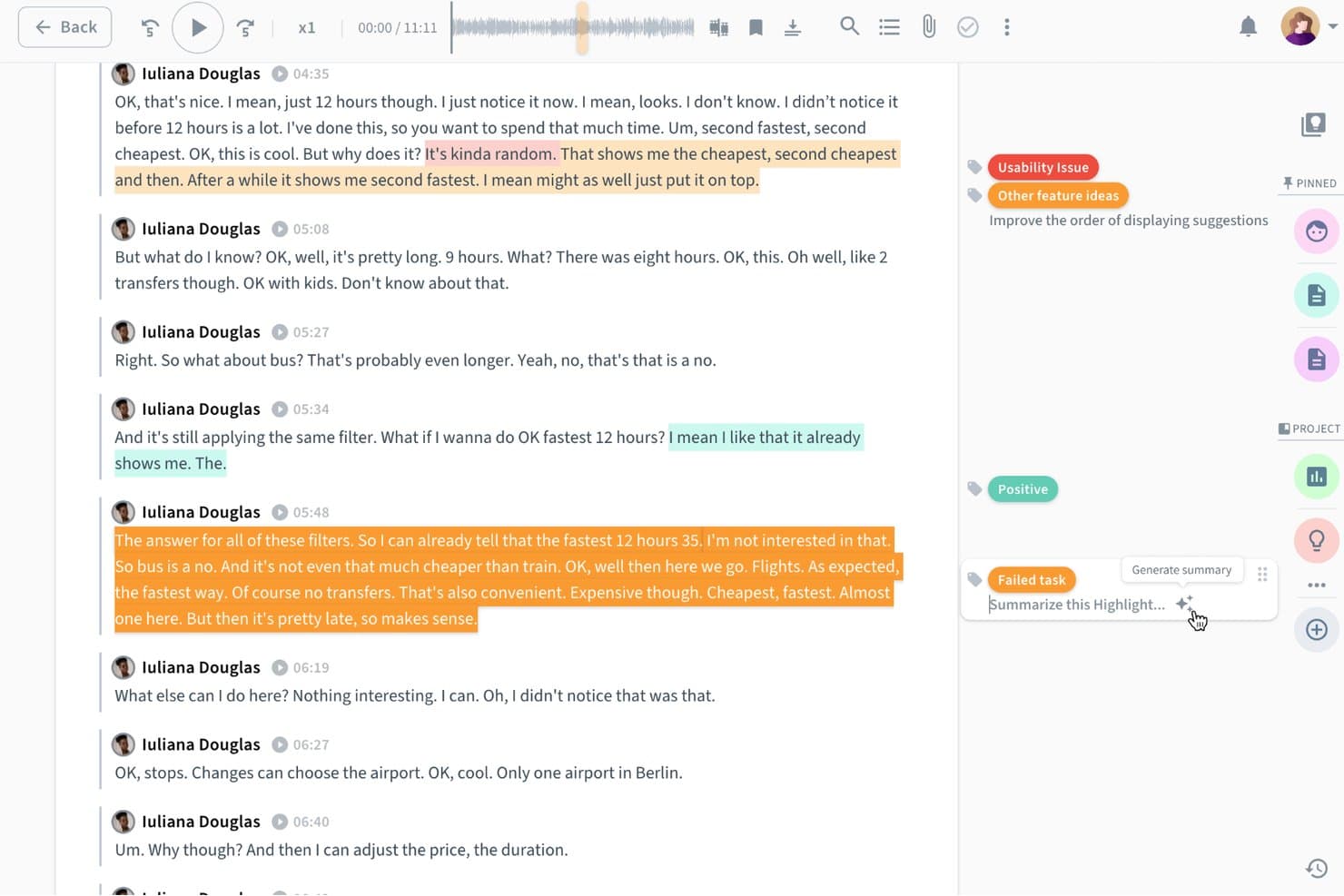
Condens consente agli utenti di creare istantaneamente riepiloghi automatici dei momenti salienti della ricerca contrassegnati dall'IA. Condens è una piattaforma di repository per la ricerca sugli utenti che centralizza i dati di ricerca, supporta l'assegnazione di tag e l'analisi dei risultati qualitativi e consente ai team di collaborare sugli insight tra diversi studi.
Per chi è più adatto Condens?
Condens è ideale per i team di ricerca UX che hanno bisogno di uno spazio condiviso in cui archiviare, contrassegnare e consultare nuovamente i risultati di diversi studi.
Perché ho scelto Condens
Condens si è guadagnato un posto nella mia selezione per la sua capacità di gestire repository di ricerca collaborativi all'interno di un team di prodotto. Apprezzo in particolare il livello di assegnazione dei tag e sintesi, che consente di collegare i dati grezzi delle sessioni agli insight strutturati e di individuare schemi ricorrenti tra più studi senza dover ricominciare da zero ogni volta. Il repository condiviso permette a ricercatori, product manager e designer di lavorare tutti sullo stesso insieme di evidenze, riducendo la ricerca duplicata e mantenendo le decisioni basate su risultati reali.
Caratteristiche principali di Condens
- Creazione automatica di raccolte di momenti salienti basata sull'IA: Condens estrae e mette automaticamente in evidenza i momenti chiave dalle registrazioni delle sessioni, aiutandoti a creare clip dei momenti salienti senza dover scorrere manualmente le registrazioni.
- Schede degli insight collegate alle evidenze: Puoi allegare direttamente alle schede degli insight clip di dati grezzi, citazioni e note, mantenendo intatto il percorso delle evidenze per ogni risultato.
- Ricerca tra gli studi: Una ricerca globale consente di interrogare contemporaneamente risultati, tag e citazioni di tutti gli studi precedenti presenti nel repository.
- Tassonomia dei tag personalizzabile: I team possono creare e gestire una struttura di tag condivisa per categorizzare i dati in modo coerente tra progetti e ricercatori.
Integrazioni di Condens
Le integrazioni native di Condens non sono documentate in modo chiaro.
Pros and Cons
Pros:
- L'IA mette in evidenza i momenti salienti delle registrazioni
- Collega direttamente le evidenze agli insight
- Cerca risultati negli studi precedenti
Cons:
- Le funzionalità di IA si concentrano sull'estrazione dei momenti salienti
- Meno adatto all'analisi della ricerca quantitativa
Learn more about Condens: Ideale per reclutamento e ricerca integrati
- Prova gratuita + demo gratuita disponibili
- Da $129/sedile/mese

La dashboard di Great Question mostra studi, interviste e metriche dei partecipanti. Great Question è una piattaforma di ricerca utente basata su intelligenza artificiale che combina il reclutamento dei partecipanti, la pianificazione, la creazione di sondaggi, la gestione delle interviste e le funzionalità di repository di ricerca in un unico sistema.
Per chi è ideale Great Question?
Great Question è particolarmente adatto a ricercatori UX e team di prodotto presso aziende SaaS che necessitano di strumenti integrati per il reclutamento dei partecipanti e la gestione della ricerca.
Perché ho scelto Great Question
Ho scelto Great Question tra i migliori perché posso gestire il reclutamento dei partecipanti, le domande di screener e la pianificazione tutto in un unico posto. Il mio team utilizza il CRM di ricerca integrato per monitorare il coinvolgimento dei partecipanti e automatizzare il contatto. Apprezzo poter avviare interviste, sondaggi e studi tramite diario senza dover cambiare strumento.
Funzionalità principali di Great Question
- Repository di ricerca: Archivia, organizza e ricerca tutti i dati di ricerca in un unico posto.
- Trascrizione automatica: Converte automaticamente le registrazioni delle interviste in trascrizioni ricercabili.
- Creazione di sondaggi: Crea e distribuisci sondaggi personalizzati ai partecipanti.
- Gestione dei panel: Mantieni e segmenta i panel di partecipanti per studi futuri.
Integrazioni di Great Question
Great Question offre integrazioni native con Slack, HubSpot, Salesforce, Segment e Zapier. È disponibile un'API per integrazioni personalizzate.
Pros and Cons
Pros:
- Reclutamento partecipanti integrato
- Pianificazione automatica e sincronizzazione calendario
- Repository di ricerca con tagging e ricerca
Cons:
- Opzioni di analisi e reportistica limitate
- Nessuna funzione avanzata di analisi AI
Learn more about Great Question:
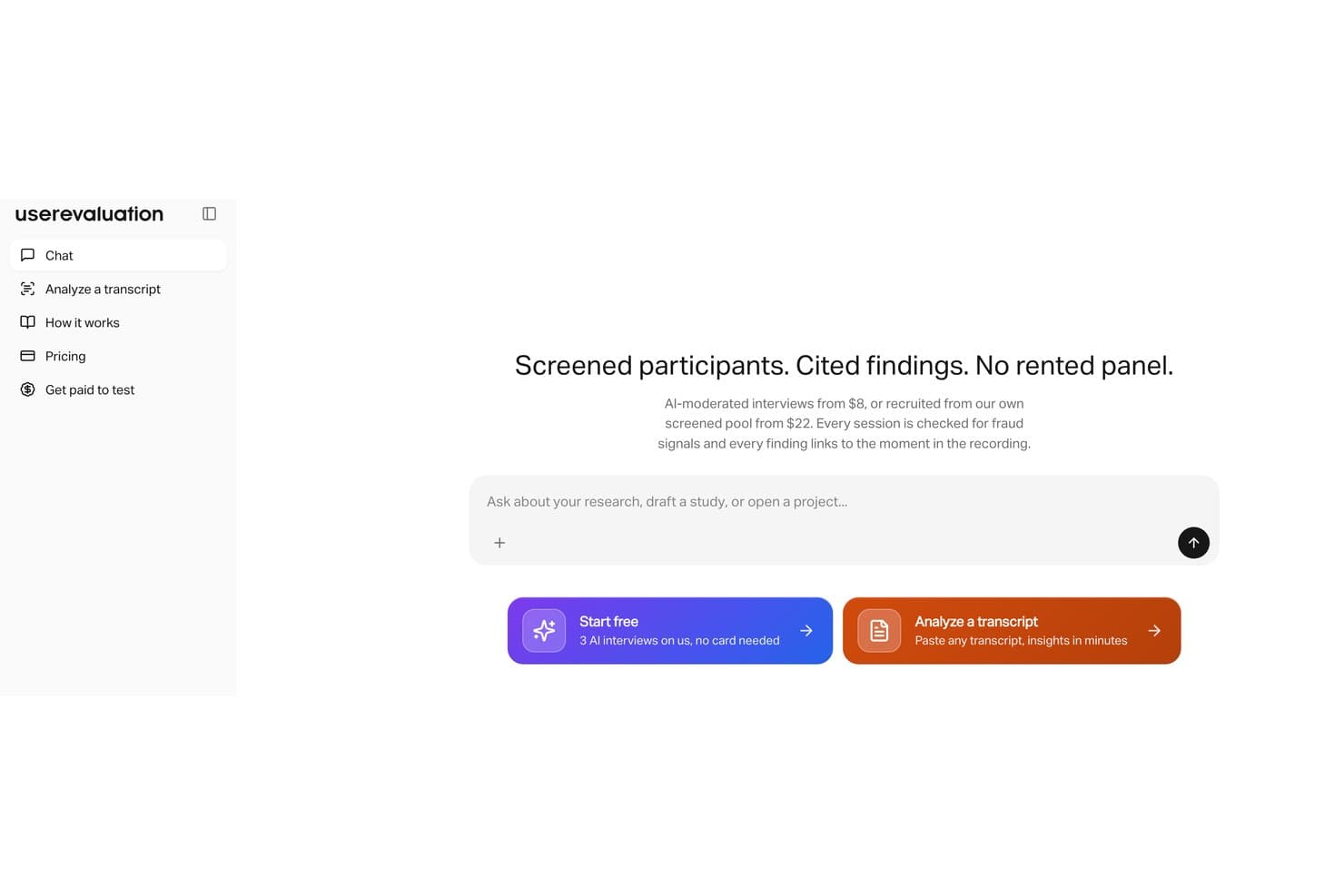
User Evaluation conduce interviste moderate dall'IA con partecipanti preselezionati. User Evaluation è una piattaforma di ricerca sugli utenti basata sull'intelligenza artificiale che consente di caricare interviste, chiamate e sondaggi per generare automaticamente trascrizioni, analisi tematiche, report sui risultati e citazioni dai propri dati qualitativi.
Per chi è più indicato User Evaluation?
User Evaluation è particolarmente adatto ai ricercatori UX e ai gruppi di prodotto che devono trasformare grandi volumi di dati qualitativi in risultati corredati di citazioni e pronti per la verifica, senza dover effettuare manualmente la sintesi.
Perché ho scelto User Evaluation
Ho scelto User Evaluation come uno dei migliori strumenti perché gestisce l'intero flusso di sintesi della ricerca in un unico posto, dalla generazione delle trascrizioni ai report sui risultati organizzati per tema e corredati di fonti. Ciò che trovo davvero utile è il collegamento automatico delle citazioni, che riconduce ogni risultato generato dall'IA a un momento specifico della registrazione dell'intervista o della chiamata. Questo significa che, quando una parte interessata mette in discussione un risultato, è possibile indicare l'esatta evidenza senza dover esaminare ore di materiale grezzo.
Funzionalità principali di User Evaluation
- Caricamento di dati in più formati: Importa direttamente nella piattaforma file video, audio e di testo provenienti da interviste, chiamate e sondaggi per l'analisi.
- Interfaccia conversazionale basata sull'IA: Interroga i dati della ricerca in modo conversazionale per individuare risposte specifiche o schemi ricorrenti tra più sessioni.
- Analisi del sentimento: Rileva automaticamente il tono emotivo nelle risposte dei partecipanti per mettere in evidenza le aree di difficoltà o di soddisfazione.
- Etichettatura collaborativa: Aggiungi etichette e annotazioni ai segmenti delle trascrizioni insieme ai membri del gruppo per organizzare i risultati prima di generare i report.
Integrazioni di User Evaluation
Le integrazioni native non sono documentate chiaramente.
Pros and Cons
Pros:
- I risultati corredati di citazioni risalgono ai momenti di origine
- Analizza insieme interviste, chiamate e sondaggi
- Le domande conversazionali fanno emergere schemi ricorrenti tra più sessioni
Cons:
- Le integrazioni native rimangono scarsamente documentate
- I risultati dell'analisi del sentimento richiedono una validazione qualitativa
Learn more about User Evaluation: Ideale per la programmazione automatica delle interviste
- Demo gratuita disponibile
- Prezzi su richiesta

La dashboard delle interviste di Outset mostra video, trascrizione e insight generati dall'IA. Outset è una piattaforma di ricerca utente con intelligenza artificiale che automatizza il reclutamento dei partecipanti, la programmazione delle interviste e la gestione delle sessioni per i team che conducono studi di ricerca qualitativa.
Per chi è più indicato Outset?
Outset è particolarmente adatto a ricercatori UX e team di prodotto in startup e aziende di medie dimensioni che devono automatizzare la logistica delle interviste qualitative.
Perché ho scelto Outset
Ho scelto Outset come uno dei migliori perché posso automatizzare l'intero processo di programmazione delle interviste, dall'invio degli inviti alla gestione dei cambi di appuntamento, senza dover intervenire manualmente. Il mio team utilizza il suo matching dei partecipanti basato su intelligenza artificiale per riempire rapidamente le sessioni di ricerca con utenti qualificati. Mi piace anche che Outset gestisca i promemoria e la sincronizzazione del calendario, così posso concentrarmi sullo svolgimento delle interviste invece che sulla logistica.
Funzionalità principali di Outset
- Trascrizione automatica: Genera trascrizioni delle interviste di ricerca in tempo reale.
- Sintesi delle interviste tramite IA: Produce sintesi concise dei risultati principali dopo ogni sessione.
- Gestione del consenso dei partecipanti: Tiene traccia e archivia in modo sicuro i moduli di consenso dei partecipanti.
- Screener personalizzati: Permette di creare e distribuire sondaggi screener per qualificare i partecipanti alla ricerca.
Integrazioni Outset
Le integrazioni native non sono elencate pubblicamente.
Pros and Cons
Pros:
- Automatizza la programmazione dei partecipanti e i promemoria
- L'intelligenza artificiale abbina i partecipanti ai criteri di ricerca
- Gestione integrata del consenso e degli screener
Cons:
- Nessuna integrazione nativa con piattaforme di ricerca
- Manca la ramificazione avanzata negli screener
Learn more about Outset: Ideale per l'automazione della ricerca basata su voce
- Demo gratuita disponibile
- Prezzo su richiesta

L'agente di ricerca Listen ha un'interfaccia con suggerimenti e raccomandazioni per la ricerca. Listen è una piattaforma di ricerca utente alimentata dall'intelligenza artificiale che automatizza le interviste vocali, trascrive le conversazioni e analizza i dati qualitativi per team che conducono ricerca utente su larga scala.
Per chi è ideale Listen?
Listen è particolarmente adatto per i ricercatori UX e i team di prodotto in organizzazioni di medie e grandi dimensioni che necessitano di automatizzare e analizzare interviste utente basate su voce.
Perché ho scelto Listen
Ho scelto Listen tra i migliori perché posso automatizzare le interviste utente vocali e ricevere trascrizioni istantanee e analisi guidate dall'IA. Il mio team utilizza il suo agente di ricerca per programmare, condurre e analizzare le interviste senza sforzi manuali. Mi piace che Listen gestisca tutto, dalla registrazione alla sintesi degli insight, così possiamo concentrarci sull'interpretazione dei risultati.
Funzionalità principali di Listen
- Trascrizione vocale automatica: converte automaticamente le interviste registrate in testo ricercabile.
- Analisi del sentiment alimentata dall'IA: rileva e tagga il tono emotivo nelle risposte degli utenti.
- Modelli di intervista personalizzabili: consente di progettare e riutilizzare formati di intervista strutturati.
- Tagging e organizzazione degli insight: permette di categorizzare e organizzare i risultati per revisioni future.
Integrazioni di Listen
Le integrazioni native non sono elencate pubblicamente.
Pros and Cons
Pros:
- Automatizza completamente le interviste vocali
- L'agente IA adatta le domande in tempo reale
- Supporto multilingue per pool di partecipanti diversificati
Cons:
- Nessun supporto per video o condivisione dello schermo
- Mancanza di strumenti di analisi e visualizzazione approfonditi
Learn more about Listen: Ideale per la sintesi delle emozioni e dei temi tra studi diversi
- Demo gratuita disponibile
- Prezzo su richiesta
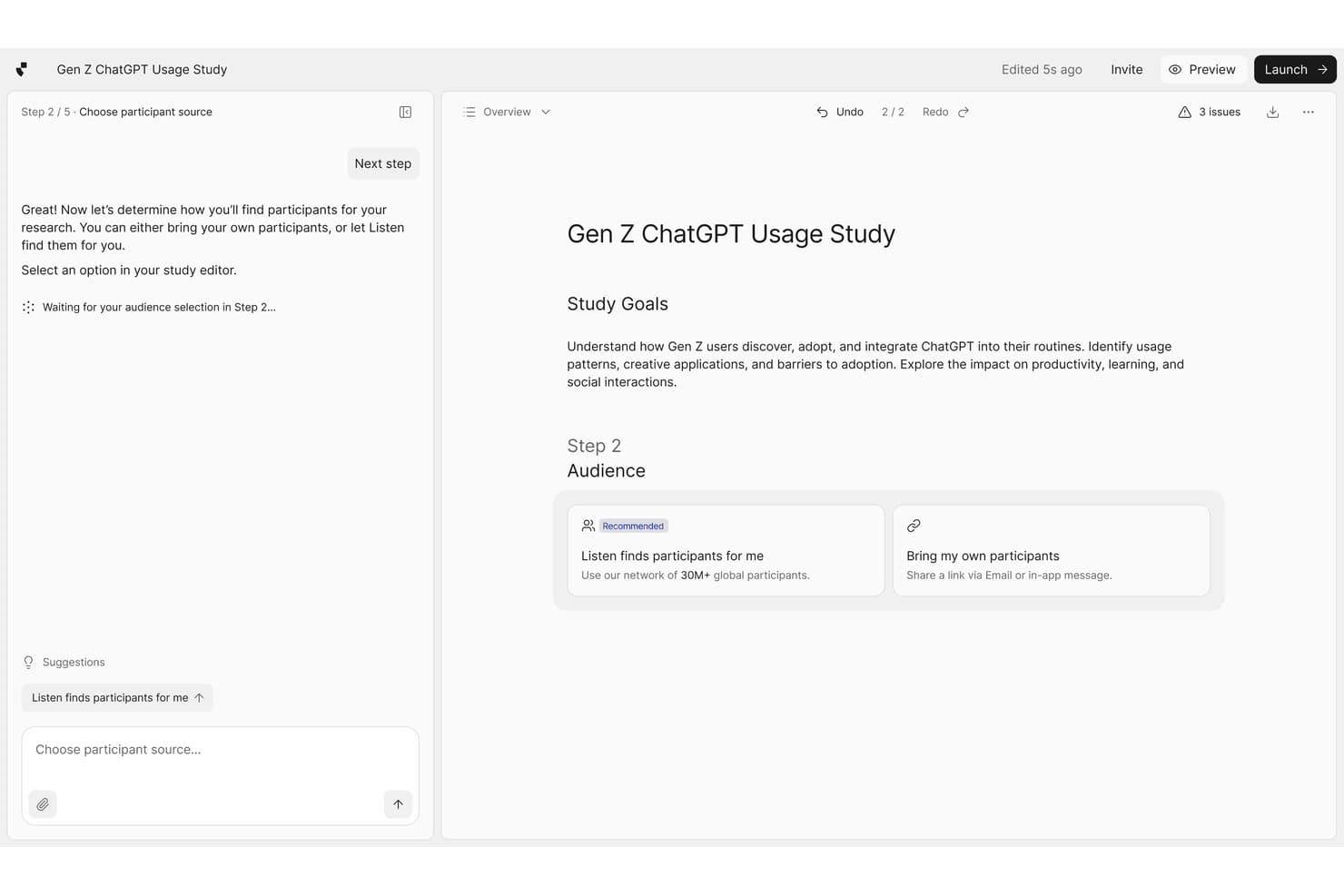
Listen Labs guida gli utenti nella selezione dei partecipanti agli studi di ricerca. Listen Labs è una piattaforma di ricerca sugli utenti basata sull'intelligenza artificiale che aggrega i dati delle interviste provenienti da più studi, contrassegnando i segnali emotivi e mettendo in evidenza i temi ricorrenti attraverso un'analisi automatizzata.
Per chi è più adatto Listen Labs?
Listen Labs è particolarmente adatto ai ricercatori UX e ai team di prodotto che conducono più cicli di ricerca qualitativa e hanno bisogno di collegare nel tempo i modelli emotivi emersi da studi diversi.
Perché ho scelto Listen Labs
La sintesi tra studi diversi è il motivo per cui Listen Labs si è guadagnato un posto nella mia rosa di candidati. Mi piace molto il modo in cui contrassegna automaticamente i segnali emotivi all'interno delle risposte alle interviste e mette poi in evidenza i temi ricorrenti non solo all'interno di un singolo studio, ma anche tra più cicli di ricerca nel tempo. Ciò significa che, se l'ansia legata a una specifica fase di onboarding continua a emergere in tre studi distinti, Listen Labs collega questi elementi per te. Ho constatato che questa funzionalità, da sola, fa risparmiare ore di codifica manuale e di confronto incrociato.
Funzionalità principali di Listen Labs
- Trascrizione automatica delle interviste: Listen Labs trascrive le interviste registrate agli utenti e converte le risposte vocali in testo ricercabile e strutturato.
- Raccolte di momenti salienti generate dall'IA: La piattaforma seleziona automaticamente i momenti più pertinenti delle interviste e li raccoglie in video salienti condivisibili.
- Etichettatura del sentiment dei partecipanti: Listen Labs assegna alle singole risposte indicatori del sentiment, consentendo di filtrare e ordinare i dati in base al tono emotivo.
- Archivio della ricerca: Tutti gli studi passati, le trascrizioni e i tag vengono archiviati in una libreria centralizzata che puoi cercare e consultare in qualsiasi momento.
Integrazioni di Listen Labs
Listen Labs offre integrazioni documentate con Qualtrics, Rally e Decipher (Forsta), oltre a un'API per integrazioni personalizzate e la creazione programmatica di studi.
Pros and Cons
Pros:
- Collega i temi emersi in più studi di ricerca
- Contrassegna i segnali emotivi nelle risposte alle interviste
- Crea raccolte di momenti salienti delle interviste generate dall'IA e condivisibili
Cons:
- Si concentra principalmente sui dati delle interviste qualitative
- I tag automatici del sentiment richiedono la verifica del ricercatore
Learn more about Listen Labs:
Altri strumenti di ricerca sugli utenti basati sull'IA
Ecco alcune ulteriori opzioni di strumenti di ricerca sugli utenti basati sull’IA che non sono entrate nel mio elenco, ma che vale comunque la pena valutare:
- 11GetWhyIdeale per la ricerca aziendale sugli insight dei consumatori
- 12
- 13MazeIdeale per la raccolta rapida di feedback sui prototipi
- 14LyssnaIdeale per test di attività non moderati
- 15LooppanelIdeale per insight sull'usabilità da videochiamate
- 16DscoutIdeale per studi longitudinali sugli utenti
- 17UserologyIdeale per la moderazione vocale basata sull'intelligenza artificiale con consapevolezza dello schermo
Come valuto gli strumenti di ricerca degli utenti basati sull'IA
Per creare questo elenco, l'IA di uno strumento deve essere in grado di gestire attività di ricerca degli utenti reali, come trascrivere interviste o sintetizzare temi. Dopodiché, valuto tre aspetti. La funzionalità principale ha il peso maggiore, ad esempio l'archiviazione dei materiali di ricerca e la gestione degli studi. Poi considero le funzionalità distintive, come il rilevamento di schemi ricorrenti tra più studi, e ciò che uno strumento offre oltre al proprio insieme di funzionalità, ad esempio se gli insight dell'IA includono citazioni delle fonti.
Funzionalità principali (requisiti fondamentali per questo elenco)
Quando seleziono gli strumenti per il mio elenco, assegno a ciascuno un punteggio su una scala da 0 (non offre la funzionalità) a 5 (eccelle in quest'area) per ogni funzionalità principale elencata di seguito. Poi converto il totale in una percentuale per contribuire a valutare l'idoneità complessiva di ciascuno strumento, attribuendo un peso aggiuntivo alle funzionalità che ho ritenuto essenziali.
- Sintesi degli insight (essenziale): valuto quanto bene l'IA identifichi temi, sentiment e contraddizioni tra interviste, sondaggi e studi di usabilità.
- Trascrizione e acquisizione (essenziale): cerco trascrizioni ricercabili con etichette degli interlocutori, indicazioni temporali e acquisizione accurata da interviste, chiamate e sessioni di usabilità.
- Repository di ricerca: verifico se i team possono organizzare, applicare tag, cercare e recuperare trascrizioni, note, clip ed elementi di prova di supporto.
- Reportistica assistita dall'IA: valuto riepiloghi, raccolte di momenti salienti e report che collegano i risultati a citazioni o ad altre prove della fonte.
- Gestione dei partecipanti e degli studi: considero la selezione dei partecipanti, il reclutamento, la pianificazione, il monitoraggio degli studi e le operazioni di ricerca in un unico flusso di lavoro.
- Query in linguaggio naturale: verifico se i team possono porre domande di ricerca in modo conversazionale e ricevere risposte pertinenti supportate dalle fonti.
Una volta ottenuto un elenco di strumenti che soddisfano i criteri, considero ciò che distingue ciascuna piattaforma.
Fattori distintivi (ciò che differenzia i fornitori)
Ecco come confronto e metto in contrapposizione i diversi fornitori:
Funzionalità distintive
Cerco il rilevamento di schemi ricorrenti tra più studi, che faccia emergere temi e contraddizioni ricorrenti in diversi studi, non solo in singole sessioni. Quando si conduce una ricerca continua, individuare un problema che compare in tre distinti cicli di interviste ha più valore di una menzione isolata. Valuto anche se le risposte generate dall'IA citano citazioni o clip specifiche. Strumenti come Marvin e Notably gestiscono questo aspetto in modo diverso, ma la tracciabilità è ciò che impedisce che la sintesi si trasformi in una semplice supposizione. L'analisi del sentiment e delle emozioni aggiunge un ulteriore livello, segnalando frustrazione o confusione che i partecipanti non esprimono esplicitamente.
Oltre le funzionalità
Verifico se i temi generati dall'IA rimandano alle citazioni delle fonti, perché una sintesi priva di citazioni può fuorviare silenziosamente la pianificazione della roadmap. Strumenti come Marvin e Notably gestiscono la tracciabilità in modo diverso, quindi confronto il modo in cui ciascuno fa emergere le prove. Valuto anche le integrazioni con Jira, Slack e gli strumenti di analisi dei prodotti: se gli insight non confluiscono nei flussi di lavoro esistenti, si bloccano. Anche la privacy dei dati è importante: qualsiasi piattaforma che registri interviste deve essere conforme al GDPR e alla SOC 2 prima che valga la pena avviare un progetto pilota.
Come scegliere gli strumenti di ricerca sugli utenti basati sull'IA
È facile perdersi in lunghi elenchi di funzionalità e strutture tariffarie complesse. Per aiutarti a rimanere concentrato mentre affronti il tuo specifico processo di selezione del software, ecco una lista di fattori da tenere a mente:
| Fattore | Cosa considerare |
|---|---|
| FattoreScalabilità | Cosa considerareLo strumento sarà in grado di gestire il volume attuale e futuro delle tue attività di ricerca? Considera i limiti degli utenti, lo spazio di archiviazione e i limiti dei progetti. |
| FattoreIntegrazioni | Cosa considerareSi collega in modo nativo ai tuoi strumenti principali (ad esempio Slack, Jira e Google Workspace)? Se necessario, verifica il supporto per API o Zapier. |
| FattorePersonalizzazione | Cosa considerarePuoi adattare flussi di lavoro, tag e modelli al tuo processo di ricerca? Evita sistemi rigidi che rallentano il tuo team. |
| FattoreFacilità d'uso | Cosa considerareQuanto rapidamente i nuovi membri del team possono imparare a usare lo strumento? Cerca una navigazione chiara, esigenze formative minime e flussi di lavoro intuitivi. |
| FattoreImplementazione e avvio | Cosa considerareQuali risorse sono necessarie per iniziare? Valuta la disponibilità di supporto per l'avvio, assistenza nella migrazione e materiali formativi. |
| FattoreCosto | Cosa considerareIl prezzo è compatibile con il tuo budget e con le tue modalità di utilizzo? Fai attenzione ai costi nascosti, agli addebiti per utente o ai componenti aggiuntivi obbligatori. |
| FattoreMisure di sicurezza | Cosa considerareLo strumento soddisfa i tuoi standard di privacy e sicurezza dei dati? Verifica la crittografia, i controlli degli accessi e le certificazioni di conformità. |
| FattoreDisponibilità dell'assistenza | Cosa considerareÈ disponibile un'assistenza tempestiva quando ne hai bisogno? Verifica la presenza di supporto tramite chat dal vivo, e-mail o telefono e controlla i tempi di risposta abituali. |
Cosa sono gli strumenti di ricerca sugli utenti basati sull'IA?
Gli strumenti di ricerca sugli utenti basati sull'IA sono piattaforme software che utilizzano l'intelligenza artificiale per automatizzare e migliorare il processo di raccolta, analisi e organizzazione dei dati della ricerca sugli utenti. Questi strumenti aiutano i team a raccogliere note dalle interviste, trascrivere le sessioni, identificare schemi e generare insight più rapidamente rispetto ai metodi manuali. Sono pensati per product manager, ricercatori UX e team che devono gestire e sintetizzare in modo efficiente grandi volumi di feedback qualitativo.
Caratteristiche degli strumenti di ricerca degli utenti basati sull'IA
Quando selezioni strumenti di ricerca degli utenti basati sull'IA, presta attenzione alle seguenti caratteristiche chiave:
- Trascrizione automatizzata: converte le interviste audio o video in testo ricercabile, facendo risparmiare tempo e riducendo il lavoro manuale.
- Annotazione basata sull'IA: acquisisce i punti chiave e le attività da svolgere durante le sessioni dal vivo o registrate, aiutando i team a concentrarsi sulla conversazione.
- Analisi del sentiment: utilizza l'IA per rilevare e classificare le emozioni o gli atteggiamenti degli utenti nei feedback, evidenziando tendenze e punti critici.
- Etichettatura e categorizzazione: consente agli utenti di organizzare gli insight per temi, argomenti o etichette personalizzate, semplificando l'analisi e la creazione di report.
- Archivi ricercabili: memorizza tutti i dati della ricerca in una posizione centralizzata e ricercabile, rendendo facile recuperare i risultati passati.
- Strumenti di collaborazione: consentono a più membri del team di esaminare, annotare e discutere i risultati della ricerca in tempo reale.
- Creazione di raccolte di momenti salienti: genera automaticamente clip o riepiloghi dei momenti importanti delle interviste per una condivisione rapida.
- Opzioni di esportazione: consentono agli utenti di scaricare trascrizioni, note o report in vari formati per ulteriori analisi o presentazioni.
- Funzionalità di integrazione: collegano gli altri strumenti del flusso di lavoro, come le piattaforme di gestione dei progetti o di analisi, per semplificare i processi.
- Modelli personalizzabili: forniscono modelli predefiniti o modificabili per guide alle interviste, annotazioni e report, così da standardizzare le pratiche di ricerca.
Vantaggi degli strumenti di ricerca degli utenti basati sull'IA
L'implementazione di strumenti di ricerca degli utenti basati sull'IA offre diversi vantaggi al tuo team e alla tua azienda. Ecco alcuni dei benefici che puoi aspettarti:
- Analisi dei dati più rapida: la trascrizione e l'etichettatura basate sull'IA accelerano il processo di trasformazione delle interviste grezze in informazioni chiave fruibili.
- Maggiore accuratezza: l'annotazione automatizzata e l'analisi del sentiment riducono il rischio di errori umani e di dettagli trascurati.
- Conoscenza centralizzata: gli archivi ricercabili e gli strumenti di collaborazione mantengono tutti i dati della ricerca organizzati e accessibili al team.
- Pratiche di ricerca coerenti: i modelli personalizzabili e i flussi di lavoro standardizzati aiutano a garantire che la ricerca venga condotta e documentata in modo uniforme.
- Collaborazione del team potenziata: le funzionalità di annotazione e condivisione in tempo reale facilitano il lavoro di squadra sui progetti di ricerca.
- Operazioni di ricerca scalabili: l'automazione consente di gestire volumi maggiori di interviste e feedback senza aumentare il carico di lavoro manuale.
- Decisioni migliori: l'accesso rapido alle informazioni chiave sintetizzate supporta scelte più informate in ambito di prodotto e progettazione.
Costi e prezzi degli strumenti di ricerca degli utenti basati sull'IA
La selezione di strumenti di ricerca degli utenti basati sull'IA richiede la comprensione dei vari modelli e piani tariffari disponibili. I costi variano in base alle funzionalità, alle dimensioni del team, ai componenti aggiuntivi e ad altri fattori. La tabella seguente riassume i piani più comuni, i relativi prezzi medi e le funzionalità normalmente incluse nelle soluzioni per strumenti di ricerca degli utenti basati sull'IA:
Tabella comparativa dei piani per gli strumenti di ricerca degli utenti basati sull'IA
| Tipo di piano | Prezzo medio | Funzionalità comuni |
|---|---|---|
| Tipo di pianoPiano gratuito | Prezzo medio$0 | Funzionalità comuniMinuti di trascrizione limitati, annotazione di base, spazio di archiviazione limitato e accesso per un singolo utente. |
| Tipo di pianoPiano personale | Prezzo medio$10-$30/user/month | Funzionalità comuniInterviste illimitate, trascrizioni ricercabili, analisi del sentiment di base e assistenza tramite e-mail. |
| Tipo di pianoPiano aziendale | Prezzo medio$30-$80/user/month | Funzionalità comuniCollaborazione del team, etichettatura avanzata, integrazioni, opzioni di esportazione e assistenza prioritaria. |
| Tipo di pianoPiano per aziende | Prezzo medio$80-$150/user/month | Funzionalità comuniConfigurazione iniziale personalizzata, sicurezza avanzata, responsabile dell'account dedicato, accesso API e strumenti per la conformità. |
Domande frequenti sugli strumenti di ricerca degli utenti basati sull'IA
Ecco alcune risposte alle domande comuni sugli strumenti di ricerca degli utenti basati sull’IA:
In che modo gli strumenti di ricerca degli utenti basati sull'IA migliorano il processo di ricerca?
Gli strumenti basati sull’IA per la ricerca degli utenti automatizzano attività ripetitive come la trascrizione, la presa di appunti e l’assegnazione di tag, velocizzando l’analisi e riducendo il lavoro manuale. Fungendo da instancabile assistente alla ricerca, queste piattaforme gestiscono le attività che richiedono più tempo, consentendo ai team UX di concentrarsi maggiormente sull’interpretazione degli insight e meno sul lavoro amministrativo. L’utilizzo dell’IA generativa in questa fase contribuisce a ottimizzare il passaggio dall’ideazione alla creazione dei deliverable finali.
Gli strumenti di ricerca degli utenti basati sull'IA possono gestire sia dati qualitativi sia quantitativi?
Sì, i migliori strumenti di IA per la ricerca UX sono progettati per gestire dataset qualitativi, come interviste e risposte a domande aperte dei sondaggi, ma alcuni supportano anche l’analisi quantitativa. Queste piattaforme assistite dall’IA possono identificare rapidamente i temi principali tra centinaia di risultati. Inoltre, le sessioni moderate dall’IA possono ora migliorare la raccolta dei dati generando automaticamente domande di approfondimento pertinenti sulla base degli input dei partecipanti, così da delineare un percorso dell’utente più accurato.
Gli strumenti di ricerca degli utenti basati sull'IA sono sicuri per i dati sensibili?
Sì, gli strumenti affidabili di ricerca UX basati sull’IA utilizzano crittografia, controlli degli accessi e certificazioni di conformità per proteggere le informazioni sensibili. Quando si utilizza un LLM o uno strumento specifico come ChatGPT per elaborare i feedback, è importante garantire la protezione della privacy degli stakeholder. Esamina sempre il modo in cui queste funzionalità di IA gestiscono i dati, per assicurarti che rispettino gli standard della tua organizzazione per il mantenimento di un’esperienza utente sicura.
Quali integrazioni dovrei cercare negli strumenti di ricerca degli utenti basati sull'IA?
Cerca integrazioni con i metodi di ricerca esistenti e con le piattaforme che il tuo team utilizza già, tra cui piattaforme di gestione dei progetti, archiviazione cloud e strumenti di comunicazione. Potrebbero essere inclusi strumenti in grado di trasformare gli insight in wireframe o di sincronizzare le note adesive digitali di una sessione di brainstorming. Questo contribuisce a semplificare i flussi di lavoro e garantisce che i risultati della ricerca siano facilmente condivisi all’interno dell’organizzazione.
Quanto tempo occorre per implementare uno strumento di ricerca degli utenti basato sull'IA?
I tempi di implementazione variano, ma la maggior parte degli strumenti basati sul cloud può essere configurata in poche ore o in alcuni giorni. Fattori come la migrazione dei dati, la formazione del team e la configurazione delle integrazioni possono influire sulle tempistiche durante il passaggio a flussi di lavoro più moderni e automatizzati.