

10 Migliori Soluzioni di Software per il Feedback degli Utenti per Team di Prodotto nel 2026

10 Shortlist dei Software di Feedback degli Utenti


Con così tante soluzioni di feedback degli utenti disponibili, capire quale sia la più adatta per te può essere complicato. Sai di voler raccogliere approfondimenti sulle esperienze degli utenti, le loro preferenze e le criticità per prendere decisioni informate e migliorare il prodotto, ma devi individuare lo strumento migliore. Nessun problema! In questo articolo ti aiuterò a scegliere facilmente, sfruttando la mia esperienza personale con dozzine di strumenti diversi testati su grandi team e prodotti eterogenei, per proporti le mie scelte dei migliori software di feedback degli utenti.
Perché Fidarsi delle Nostre Recensioni Software
Testiamo e recensiamo software per il product management dal 2020. Come product manager sappiamo quanto sia fondamentale e difficile fare la scelta giusta in termini di software. Investiamo in una ricerca approfondita per aiutare il nostro pubblico a prendere decisioni migliori sugli acquisti di software. Abbiamo testato oltre 2.000 strumenti per diversi casi d’uso e scritto più di 1.000 recensioni approfondite.Scopri come assicuriamo la trasparenza & la nostra metodologia di recensione software.
Riepilogo dei Migliori Software di Feedback degli Utenti
Questo grafico comparativo riassume i dettagli sui prezzi delle mie selezioni di software per feedback degli utenti per aiutarti a trovare quello più adatto alle tue esigenze di budget e di business.
| Tool | Best For | Trial Info | Price | ||
|---|---|---|---|---|---|
| 1 | Ideale per insight contestuali basati sull'IA | Demo gratuita disponibile | Prezzi su richiesta | Website | |
| 2 | Ideale per feedback su cui poter intervenire | Piano gratuito disponibile | A partire da 29 $/mese (con fatturazione annuale) | Website | |
| 3 | Ideale per la categorizzazione automatizzata dei feedback | Demo gratuita disponibile | Prezzi su richiesta | Website | |
| 4 | Ideale per la creazione e la distribuzione avanzata di sondaggi omnicanale | Demo gratuita disponibile | Prezzi su richiesta | Website | |
| 5 | Ideale per il feedback in tempo reale su più sedi | Demo gratuita disponibile | Prezzi su richiesta | Website | |
| 6 | Ideale per programmi aziendali di ascolto della voce del cliente | Demo gratuita disponibile | Prezzi su richiesta | Website | |
| 7 | Ideale per collegare il feedback all'impatto sui ricavi | Prova gratuita di 30 giorni | Prezzi disponibili su richiesta | Website | |
| 8 | Ideale per assegnare priorità ai feedback in base ai ricavi | Prova gratuita di 30 giorni + demo gratuita disponibile | A partire da 16.000 $/anno | Website | |
| 9 | Ideale per acquisire feedback visivi e video sui bug | Prova gratuita di 15 giorni | A partire da $45/month | Website | |
| 10 | Ideale per l'analisi di repository di ricerca basata sull'IA | Piano gratuito + demo gratuita disponibile | Prezzi su richiesta | Website |
Recensioni dei Migliori Software di Feedback degli Utenti
Qui di seguito trovi i miei riassunti dettagliati dei migliori software di feedback degli utenti che hanno superato la mia selezione. Le mie recensioni offrono un’analisi dettagliata delle funzionalità chiave, vantaggi e svantaggi, integrazioni e casi d’uso ideali di ciascuno strumento per aiutarti a trovare quello più adatto a te.

Ideale per insight contestuali basati sull'IA
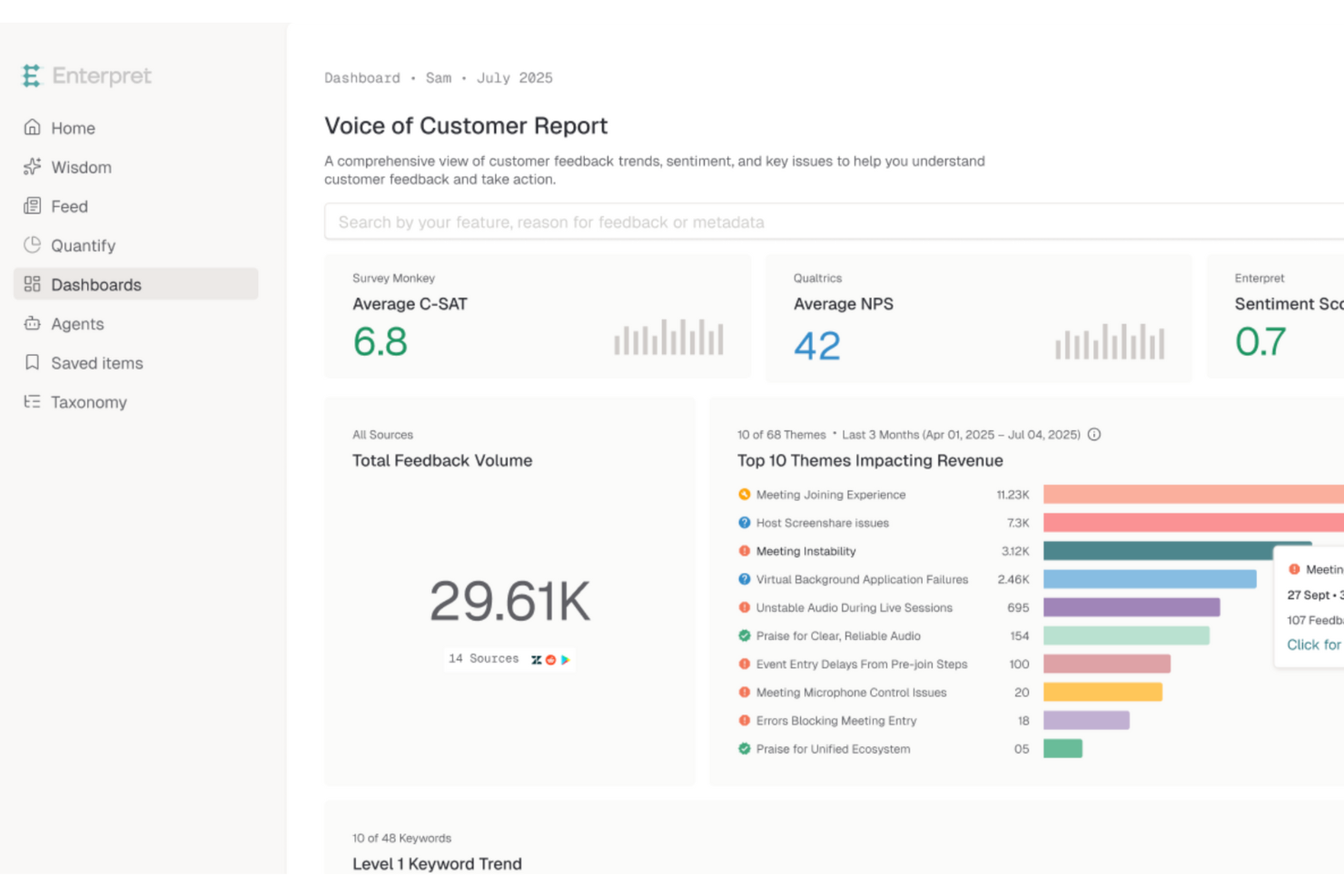
Enterpret è una piattaforma di intelligence dei clienti che aggrega i feedback provenienti da strumenti di supporto, CRM, chiamate commerciali, sondaggi e siti di recensioni in un archivio unificato, quindi utilizza l'IA per categorizzarli, analizzarli e individuare tendenze trasversali.
Per chi è più adatto Enterpret?
Enterpret è particolarmente adatto ai ricercatori UX e ai team di prodotto di aziende del mercato medio e grandi imprese che raccolgono già feedback tramite diversi strumenti e hanno bisogno dell'IA per interpretarli.
Perché ho scelto Enterpret
Enterpret è entrato nella mia rosa dei preferiti perché la sua IA non si limita ad aggiungere etichette ai feedback: costruisce un 'Grafo del contesto dei clienti' dinamico che collega ogni feedback ad aree specifiche del prodotto, segmenti di clientela e risultati aziendali come abbandono e ricavi. Mi piace il modo in cui la Tassonomia adattiva si aggiorna con l'evolversi del linguaggio dei clienti, mantenendo accurate le categorie senza interventi manuali. Quando un team come quello di Canva elabora i feedback di oltre 200 milioni di utenti, questo tipo di analisi dell'IA auto-correttiva è ciò che distingue i segnali dal rumore.
Funzionalità principali di Enterpret
- Ricerca in linguaggio naturale: Interroga l'intero archivio dei feedback utilizzando il linguaggio naturale invece di filtri o logica booleana.
- Prioritizzazione collegata ai ricavi: Collega i dati di Salesforce e HubSpot ai feedback per classificare i problemi in base al rischio di abbandono e all'impatto su NPS e CSAT.
- Intelligence commerciale e di mercato: Individua gli ostacoli alla chiusura delle trattative e le tendenze della concorrenza nelle chiamate commerciali e nei dati di mercato, insieme ai feedback dei clienti.
- Modulo Chiudi il ciclo: Rileva automaticamente quando un problema segnalato è stato risolto e attiva flussi di lavoro di follow-up in strumenti come Jira, Linear e Slack.
Integrazioni di Enterpret
Enterpret offre integrazioni documentate con Salesforce, HubSpot, Zendesk, Qualtrics, SurveyMonkey, Typeform, Jira, Linear, Slack e Zapier. Supporta inoltre la connettività personalizzata tramite API, webhook, caricamenti CSV, Snowflake e Segment.
Pros and Cons
Pros:
- Collega i feedback ai ricavi e all'abbandono
- La tassonomia adattiva rivela l'evoluzione dei temi dei clienti
- La ricerca in linguaggio naturale supporta l'analisi tra team
Cons:
- Richiede strumenti separati per raccogliere i feedback
- Gli utenti segnalano imprecisioni e problemi con i filtri

Userback
Ideale per feedback su cui poter intervenire
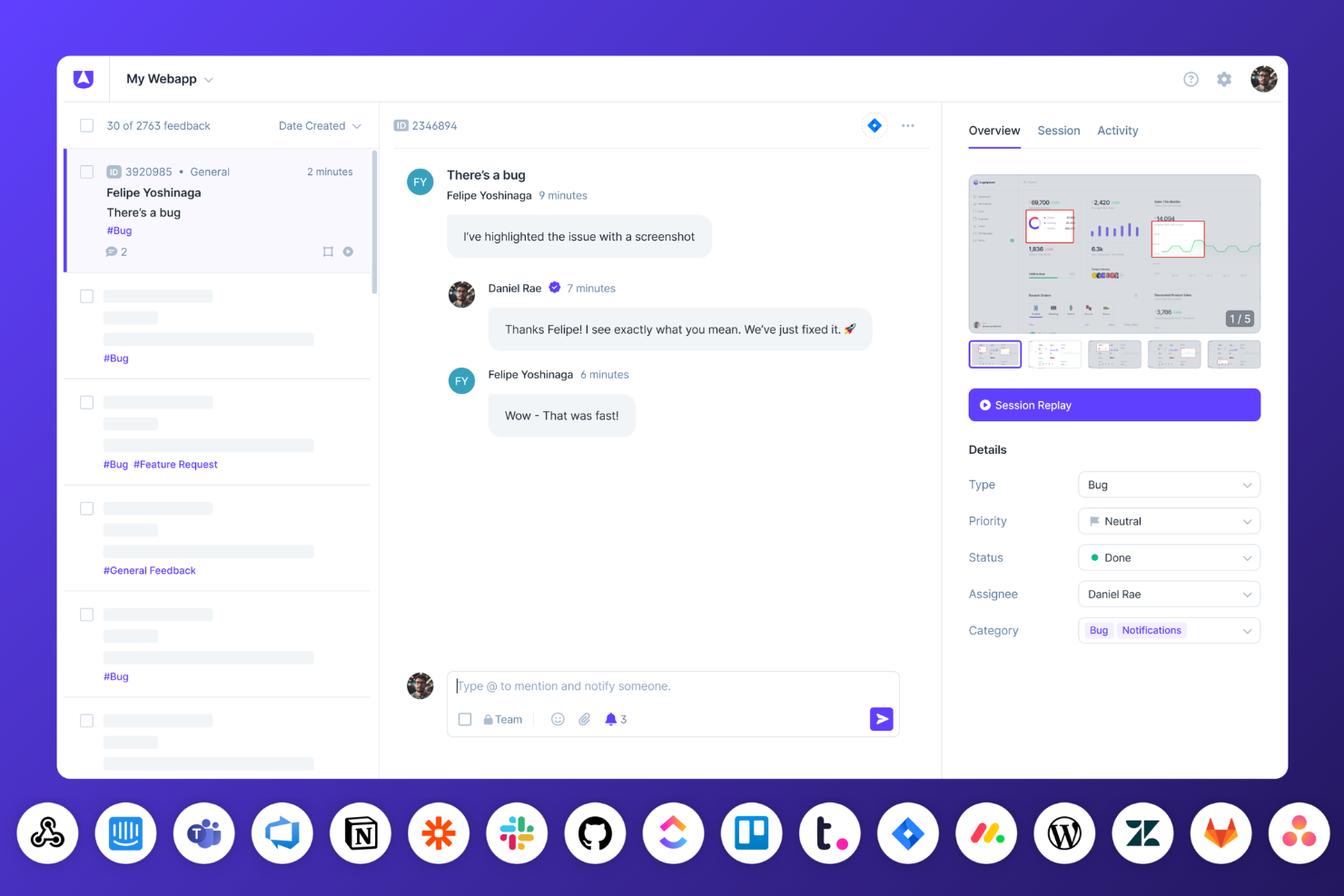
Userback è una piattaforma per la raccolta dei feedback degli utenti che combina widget incorporabili, strumenti di annotazione visiva, sondaggi in-app, riproduzione delle sessioni e informazioni basate sull'IA per aiutare i team a raccogliere, organizzare e utilizzare i feedback dei clienti.
Per chi è più adatto Userback?
Userback è particolarmente indicato per product manager e team addetti al successo dei clienti che hanno bisogno di feedback visivi e ricchi di contesto, su cui poter intervenire immediatamente.
Perché ho scelto Userback
Ho scelto Userback come una delle migliori soluzioni perché ogni feedback arriva con un contesto concreto su cui poter intervenire: screenshot annotati, riproduzioni delle sessioni e registri della console acquisiti vengono inclusi automaticamente. Mi piace il fatto che Feedback e approfondimenti sull'IA raggruppi poi le segnalazioni simili e faccia emergere i temi ricorrenti, consentendo di individuare gli schemi senza dover effettuare ordinamenti manuali. I connettori MCP, che trasferiscono direttamente i feedback a strumenti come Cursor o Claude, colmano il divario tra ciò che segnalano gli utenti e ciò che gli sviluppatori correggono effettivamente.
Funzionalità principali di Userback
- Sondaggi NPS, CSAT e CES: Esegui sondaggi in-app utilizzando modelli predefiniti, con opzioni di targeting basate sul dispositivo, sulla pagina o sul segmento di utenti.
- Portale delle funzionalità: Uno spazio della community personalizzato con il brand, in cui gli utenti possono inviare, visualizzare e votare le richieste di funzionalità, completo di roadmap pubblica e annunci.
- Estensione del browser: Consente ai team interni e ai clienti di lasciare feedback su qualsiasi pagina web senza bisogno di codice o installazione.
- Casella di posta dei feedback e bacheche Kanban: Uno spazio di lavoro centralizzato per gestire, filtrare, unire e assegnare i feedback ricevuti tra i vari progetti.
Integrazioni di Userback
Userback offre oltre 12 integrazioni, tra cui Jira, ClickUp, Asana, Intercom, Zendesk, Slack, Microsoft Teams e connettori MCP per Claude, ChatGPT e Cursor. Supporta inoltre Zapier e fornisce accesso all'API REST e webhook nel piano Business Plus.
Pros and Cons
Pros:
- I feedback annotati acquisiscono un contesto tecnico utile per intervenire
- L'IA raggruppa i temi ricorrenti e le segnalazioni simili
- I sondaggi misurano la soddisfazione all'interno dei percorsi del prodotto
Cons:
- La definizione delle priorità non prevede un punteggio ponderato in base ai ricavi
- Le impostazioni delle notifiche possono risultare eccessive
New Product Updates from Userback

Userback Mobile SDK Adds In-App Surveys
Userback’s Mobile SDK now supports in-app surveys, enabling iOS and Android users to submit NPS, CSAT, and other survey responses without leaving your app. For more information, visit Userback's official site.
 .
.
Ideale per la categorizzazione automatizzata dei feedback
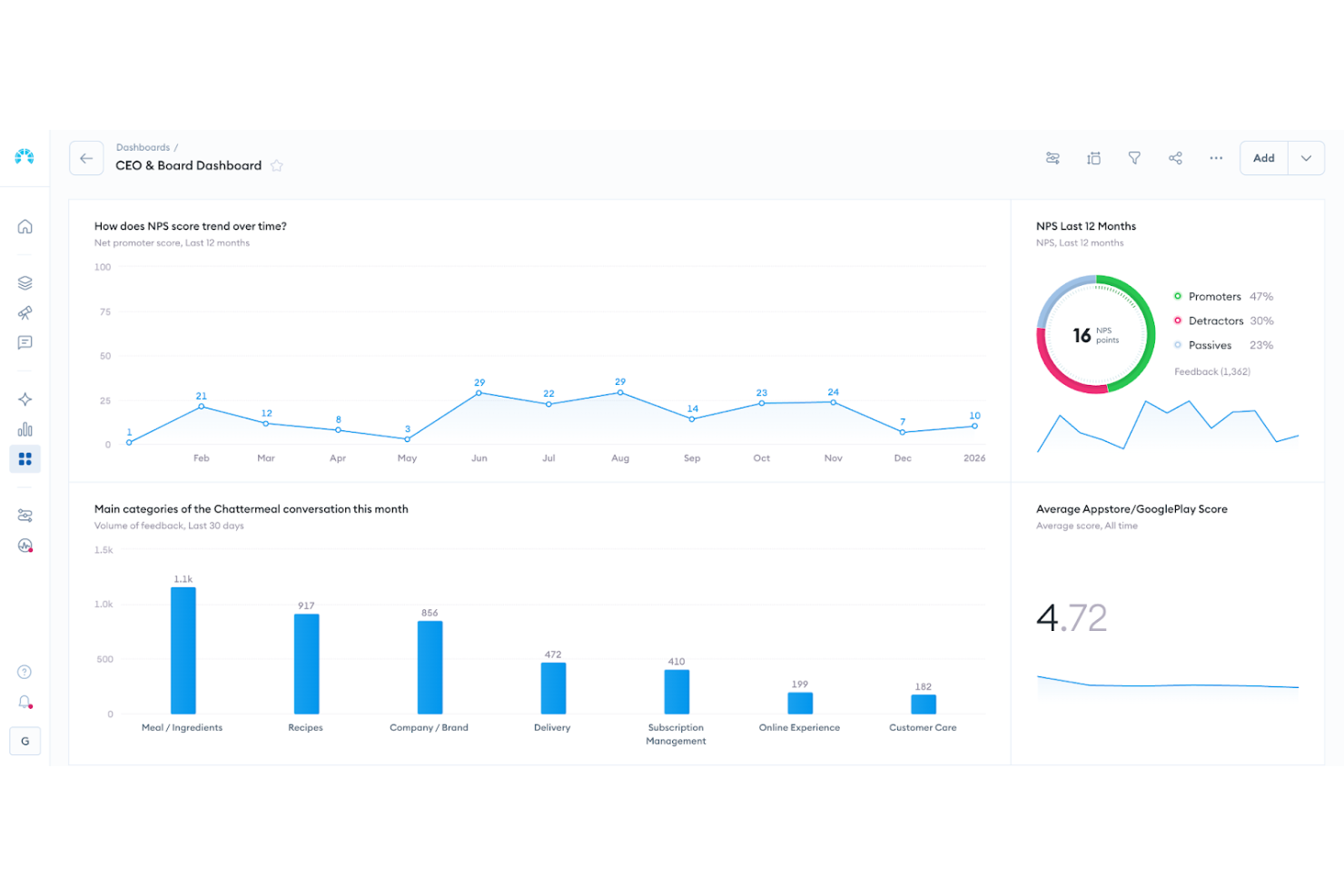
Chattermill è una piattaforma di analisi dei feedback nativa per l'IA che aggrega i feedback dei clienti provenienti da oltre 65 fonti multicanale in un repository centrale, quindi applica categorizzazione automatica, analisi del sentiment e rilevamento dei temi per individuare schemi in grandi volumi di dati non strutturati.
Per chi è più adatto Chattermill?
Chattermill è particolarmente adatto ai team aziendali CX e VoC che raccolgono già feedback tramite altri strumenti e necessitano di un'analisi basata sull'IA per interpretarli su larga scala.
Perché ho scelto Chattermill
Ho scelto Chattermill come una delle soluzioni migliori perché la sua categorizzazione basata sull'IA fa qualcosa che la maggior parte degli strumenti non riesce a fare: categorizza automaticamente i feedback non strutturati provenienti da decine di canali senza intervento manuale. Precision Insights assegna temi e sentiment a ogni elemento di feedback su larga scala, facendo emergere automaticamente gli schemi. Lyra Agent si spinge oltre, fornendo su richiesta risposte a livello di analista supportate da citazioni verificate dei clienti.
Funzionalità principali di Chattermill
- Rilevamento delle anomalie: segnala automaticamente aumenti o diminuzioni imprevisti nei temi dei feedback e invia avvisi in tempo reale a Slack, email o Jira.
- Analisi collegata ai ricavi: collega i temi dei feedback ai dati CRM e delle transazioni per mostrare come i problemi dei clienti siano correlati all'abbandono o all'impatto sui ricavi.
- Integrazioni MCP e competenze: consente di interrogare i dati dei feedback direttamente da strumenti di IA come Claude, ChatGPT e Notion AI.
- Arricchimento contestuale: associa metadati, tra cui ID cliente, canale e posizione, a ogni elemento di feedback per consentire filtri e report più precisi.
Integrazioni di Chattermill
Chattermill offre oltre 65 integrazioni native, tra cui Zendesk, Intercom, Qualtrics, SurveyMonkey, Trustpilot, Salesforce, Slack, Jira e Snowflake. Supporta inoltre connessioni API, feed di dati sicuri e caricamenti CSV per centralizzare i feedback.
Pros and Cons
Pros:
- Automatizza la categorizzazione dei feedback non strutturati
- Collega i temi dei clienti ai risultati sui ricavi
- Individua le anomalie con avvisi interni attuabili
Cons:
- Non raccoglie direttamente i feedback
- Non supporta la votazione delle richieste da parte dei clienti

Ideale per la creazione e la distribuzione avanzata di sondaggi omnicanale
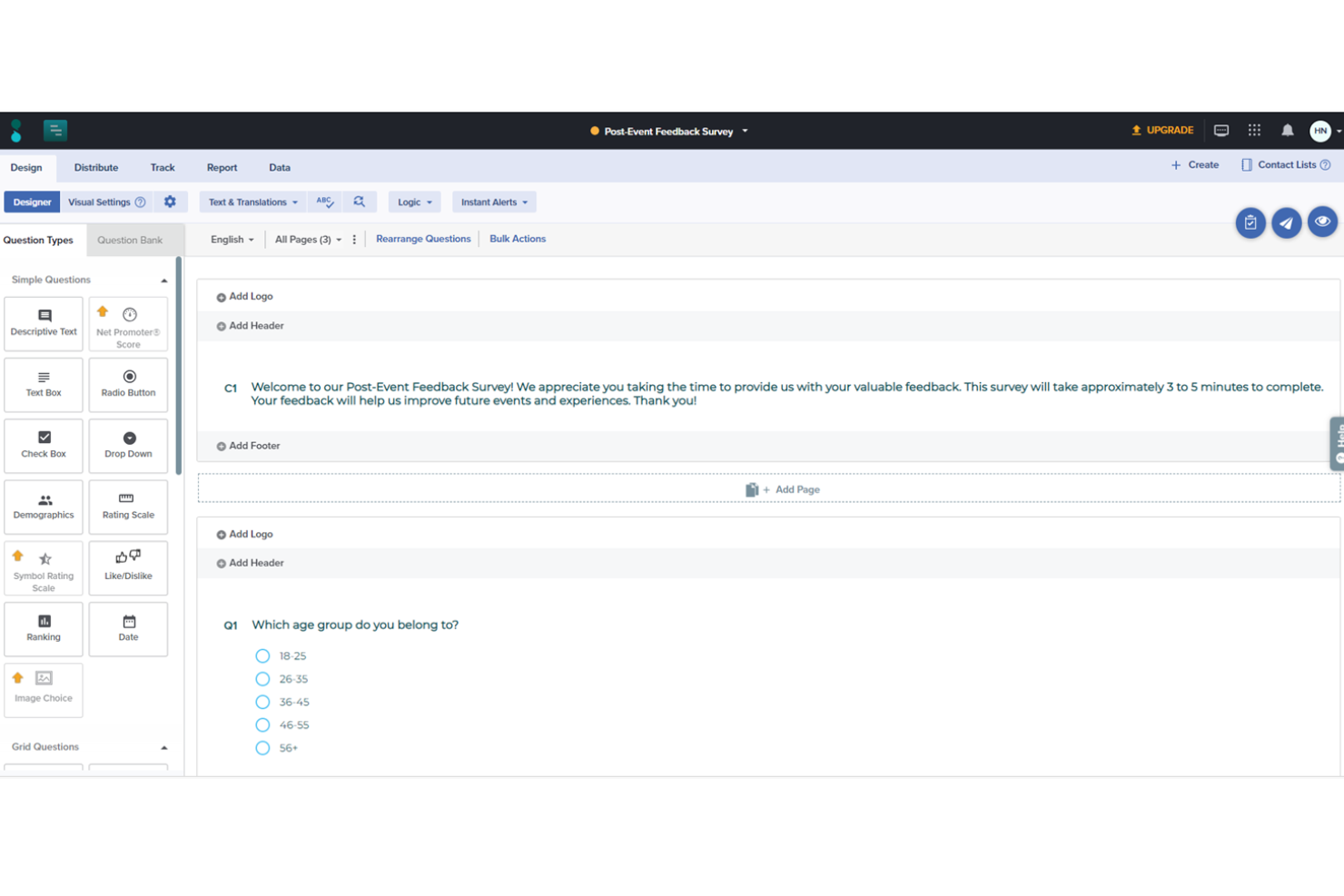
Sogolytics è una piattaforma omnicanale per sondaggi e gestione dell'esperienza che supporta la raccolta di feedback tramite e-mail, chat, social media, applicazioni e altro ancora, con analisi del sentiment basata sull'IA, flussi di lavoro automatizzati e report in tempo reale integrati.
Per chi è più indicato Sogolytics?
Sogolytics è particolarmente adatto ai team che si occupano dell'esperienza e del successo dei clienti e che devono raccogliere feedback attraverso più canali e agire su di essi tramite flussi di lavoro strutturati.
Perché ho scelto Sogolytics
Sogolytics si è guadagnato un posto nella mia lista ristretta perché copre più canali di feedback in un'unica piattaforma rispetto a quasi qualsiasi altra soluzione che abbia valutato. Apprezzo in particolare il modo in cui i flussi di lavoro dei sondaggi attivati si avviano automaticamente in base agli eventi del ciclo di vita, così una conferma di consegna può avviare immediatamente un sondaggio CSAT senza alcuna configurazione manuale. L'analisi del sentiment e il rilevamento dei temi basati sull'IA fanno quindi emergere in tempo reale gli schemi presenti in tutte queste risposte, esattamente ciò di cui i team CX hanno bisogno per intervenire rapidamente sui problemi dei clienti.
Funzionalità principali di Sogolytics
- Analisi dei fattori chiave: Identifica quali fattori specifici, come i tempi di attesa per l'assistenza o le fasi di onboarding, influenzano maggiormente i punteggi di soddisfazione dei clienti e l'intenzione di rinnovo.
- Monitoraggio degli SLA: Assegna responsabili e scadenze ai casi di feedback aperti e monitora i tempi di risoluzione rispetto agli accordi sui livelli di servizio definiti.
- Oltre 100 modelli di sondaggio: Include modelli predefiniti per CSAT, NPS e feedback generici che puoi distribuire immediatamente attraverso qualsiasi canale supportato.
- Controlli di accesso ai dati basati sui ruoli: Consente di definire chi può visualizzare, modificare o esportare i dati di feedback tra team e reparti.
Integrazioni di Sogolytics
Sogolytics elenca 14 integrazioni, tra cui Salesforce, HubSpot, Zendesk, Intercom, Slack, Microsoft Teams, ServiceNow, Snowflake, Shopify e Stripe. Elenca anche Zapier.
Pros and Cons
Pros:
- La raccolta omnicanale acquisisce feedback attraverso più canali
- L'IA fa emergere rapidamente sentiment e temi
- I sondaggi attivati raccolgono automaticamente i feedback relativi al ciclo di vita
Cons:
- Manca un flusso di lavoro per le votazioni o la definizione delle priorità delle richieste
- Mancano una roadmap pubblica e un registro delle modifiche
New Product Updates from Sogolytics
Sogolytics Adds Teams and Slack Surveys and Custom Automations
Sogolytics adds native Microsoft Teams and Slack survey distribution, a Custom Automations Builder, Derived Fields, PointClickCare integration, and authenticator-based MFA. These updates expand survey distribution and workflow automation while adding new data management and security capabilities. For more information, visit Sogolytics’ official site.
 .
.
Ideale per il feedback in tempo reale su più sedi
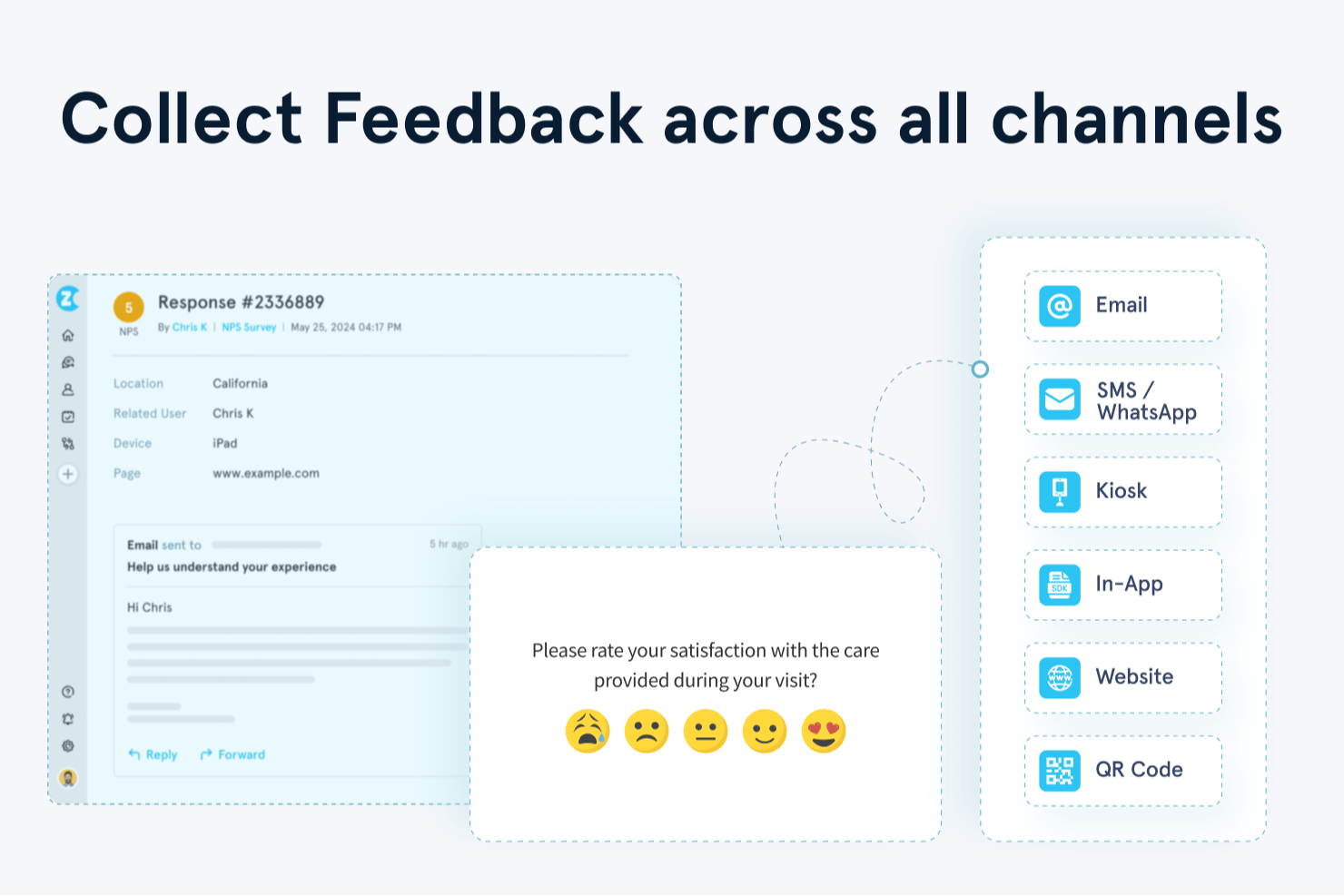
Zonka Feedback è una piattaforma multicanale per il feedback degli utenti che raccoglie e centralizza le risposte da chioschi offline, email, SMS, WhatsApp, sondaggi web e in-app, applicando quindi analisi del sentiment basata sull'IA, categorizzazione tematica e report in tempo reale tra sedi e team.
Per chi è più adatto Zonka Feedback?
Zonka Feedback è particolarmente indicato per i team CX e del successo dei clienti che gestiscono il feedback proveniente da più sedi fisiche o digitali, soprattutto nei settori della vendita al dettaglio, dell'ospitalità e della sanità.
Perché ho scelto Zonka Feedback
Zonka Feedback è entrato nella mia selezione ristretta grazie alla sua capacità di gestire efficacemente il feedback proveniente da più sedi fisiche in tempo reale. Apprezzo in particolare la modalità chiosco offline, che consente di mantenere attivi i sondaggi su iPad o tablet Android anche in assenza di connessione, sincronizzando poi automaticamente le risposte. Gli amministratori possono monitorare da remoto il tempo di attività, la batteria e lo stato di sincronizzazione di ogni dispositivo, facilitando la gestione della raccolta dei feedback in decine di sedi senza dover essere presenti sul posto.
Funzionalità principali di Zonka Feedback
- Distribuzione di sondaggi multicanale: Distribuisci sondaggi tramite email, SMS, WhatsApp, web, SDK in-app e chioschi offline da un'unica piattaforma.
- Analisi tematica e del sentiment basata sull'IA: Contrassegna automaticamente le risposte con temi, sentiment ed emozioni per individuare schemi ricorrenti in grandi volumi di feedback.
- Avvisi in tempo reale e gestione dei casi: Attiva notifiche istantanee tramite Slack, MS Teams, email o SMS quando arrivano valutazioni basse, con assegnazione delle attività integrata.
- Co-pilota IA Ask AI: Ti consente di interrogare l'intero insieme di dati dei feedback usando domande in linguaggio naturale per ottenere risposte immediate supportate dai dati.
Integrazioni di Zonka Feedback
Zonka Feedback offre oltre 20 integrazioni, tra cui Salesforce, HubSpot, Zendesk, Intercom, Jira, Slack e Microsoft Teams. Supporta inoltre connessioni tramite API, webhook, Make, Integrately e Zapier.
Pros and Cons
Pros:
- Monitora il tempo di attività dei chioschi in più sedi
- Rileva automaticamente sentiment e temi
- I recensori apprezzano l'assistenza clienti tempestiva
Cons:
- Nessuna bacheca per le votazioni sulle richieste di funzionalità
- Alcuni recensori segnalano bug e instabilità

Medallia
Ideale per programmi aziendali di ascolto della voce del cliente
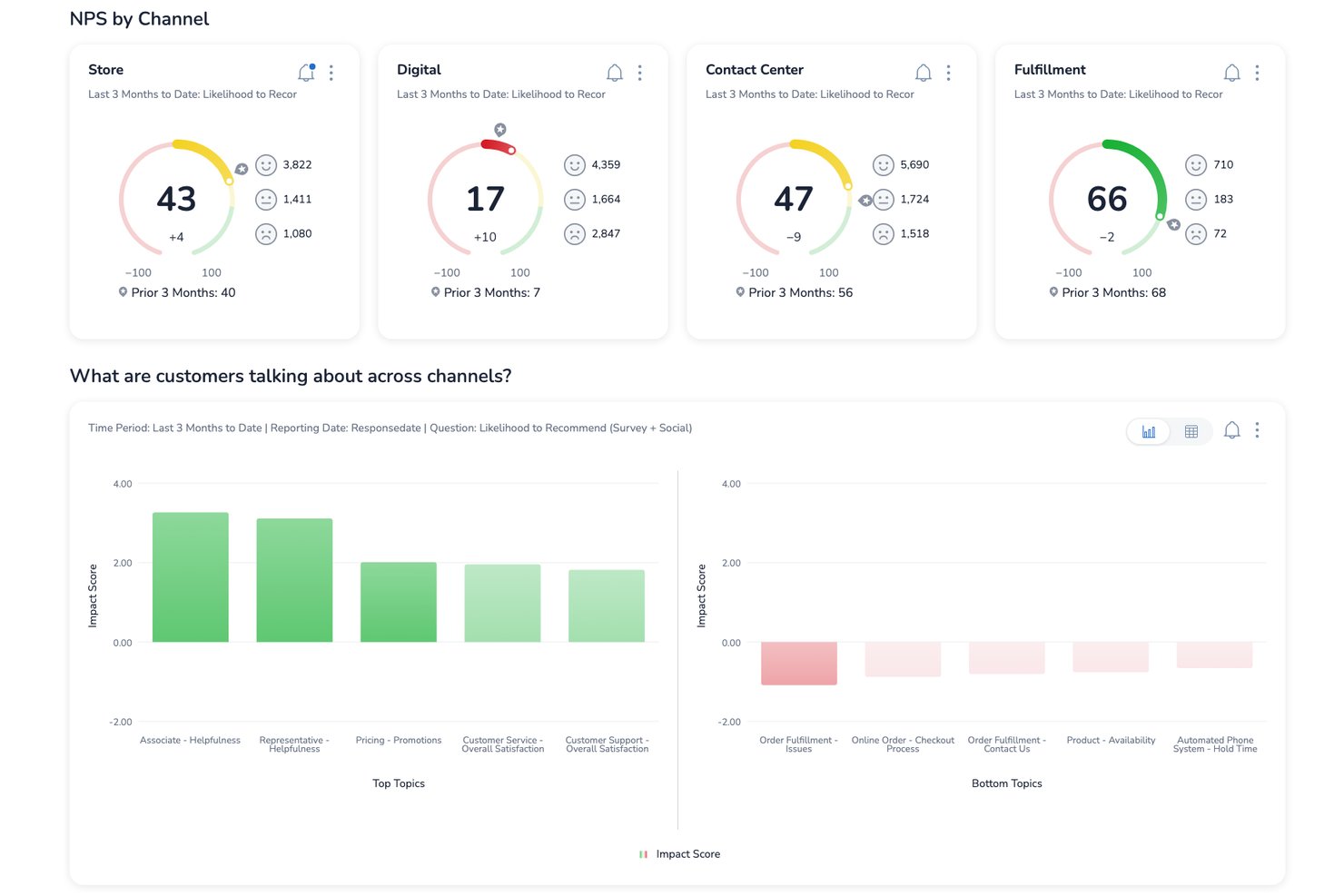
Medallia è una piattaforma aziendale per il feedback dei clienti che acquisisce segnali provenienti da canali web, mobili, in-app, vocali, video e social, per poi centralizzarli in profili cliente unificati con analisi testuale basata sull'intelligenza artificiale, gestione dei casi a ciclo chiuso e reportistica basata sui ruoli.
Per chi è più adatta Medallia?
Medallia è particolarmente adatta ai team aziendali di esperienza del cliente che gestiscono programmi di ascolto della voce del cliente a livello organizzativo, su più canali e in diverse regioni.
Perché ho scelto Medallia
Medallia è entrata nella mia lista ristretta perché nessun'altra piattaforma che ho valutato acquisisce segnali della voce del cliente su una scala aziendale altrettanto ampia. Sono particolarmente colpito da TX Profiles, che crea sequenze temporali continue a 360 gradi per ogni cliente attraverso i canali web, mobili, vocali e social. Il suo livello di analisi testuale basata sull'intelligenza artificiale individua quindi temi, sentiment ed emozioni in tempo reale, consentendo ai team CX di intervenire sulle tendenze prima che si aggravino.
Caratteristiche principali di Medallia
- TX Profiles: Crea sequenze temporali continue a livello individuale e di account, aggregando in un unico luogo le interazioni dei clienti provenienti da ogni canale.
- Gestione dei casi a ciclo chiuso: Attiva automaticamente azioni di follow-up e avvisa i team a contatto con i clienti quando il feedback richiede una risposta diretta.
- Analisi testuale e vocale multilingue: Rileva temi, sentiment, emozioni e impegno in decine di lingue utilizzando modelli di argomenti predefiniti e personalizzati.
- Reportistica basata sui ruoli: Fornisce dashboard personalizzate e visualizzazioni del feedback adattate alla funzione di ciascun team, senza limiti di utenti.
Integrazioni di Medallia
Medallia offre integrazioni con Salesforce, Adobe e ServiceNow, incorporando gli insight sui clienti in queste piattaforme. Il suo Portale per sviluppatori supporta la connettività personalizzata, sebbene le funzionalità specifiche dell'API non siano documentate.
Pros and Cons
Pros:
- Acquisisce feedback da web, dispositivi mobili e canali vocali
- Collega i temi del sentiment ai risultati CSAT
- Gli avvisi a ciclo chiuso sollecitano un follow-up tempestivo con i clienti
Cons:
- L'implementazione aziendale richiede una pianificazione significativa
- Nessuna funzionalità di votazione per le richieste di prodotto

Pendo
Ideale per collegare il feedback all'impatto sui ricavi

Pendo è uno strumento per il feedback degli utenti che puoi utilizzare per creare procedure guidate all'interno dell'app, migliorare l'onboarding dei nuovi utenti e presentare le nuove funzionalità agli utenti esistenti. Puoi utilizzare Pendo per archiviare i feedback degli utenti, ottenendo una visione migliore delle funzionalità da migliorare e delle nuove funzionalità che i clienti desiderano vedere.
Pendo ti consente di generare report e metriche utilizzando i feedback degli utenti raccolti dal software, così puoi dare priorità alle nuove funzionalità che possono contribuire ad aumentare i tuoi ricavi. Comprendere cosa pensano i clienti dei tuoi prodotti e servizi è un ottimo modo per determinare le aree in cui eccelli e quelle in cui devi migliorare, e la funzionalità di analisi del sentiment di Pendo può aiutarti.
Pendo può aiutarti ad analizzare le recensioni online per valutare se i clienti hanno un'opinione positiva o negativa dei tuoi prodotti e servizi. Invece di inviare un sondaggio online a un cliente, puoi utilizzare Pendo per presentare NPS, quiz e sondaggi direttamente ai clienti tramite la tua app mobile, aumentando i tassi di risposta.
Pendo si integra con altri strumenti aziendali, tra cui Calendly, Figma, QualtricsXM, Amazon Redshift e TrustRadius.
Pendo offre un piano gratuito, mentre i prezzi dei piani a pagamento sono disponibili su richiesta.

Ideale per assegnare priorità ai feedback in base ai ricavi
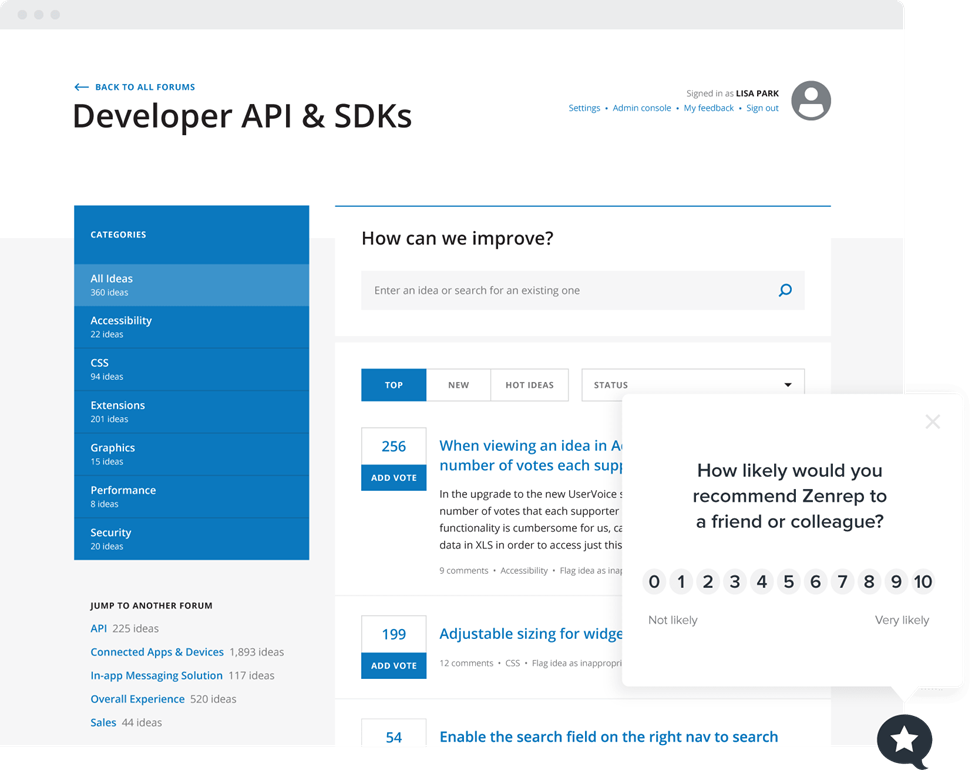
UserVoice è una piattaforma aziendale di analisi dei clienti che raccoglie feedback attraverso portali, widget integrati nell'app e integrazioni, quindi li centralizza, categorizza e assegna loro una priorità utilizzando analisi basate sull'intelligenza artificiale e un sistema di valutazione ponderato in base ai ricavi.
Per chi è più adatto UserVoice?
UserVoice è una soluzione particolarmente adatta ai responsabili di prodotto e ai team dedicati al successo dei clienti di aziende del mercato medio e di grandi aziende che hanno bisogno di collegare direttamente il feedback dei clienti all'impatto sui ricavi.
Perché ho scelto UserVoice
UserVoice si è guadagnato un posto nella mia lista perché collega direttamente il feedback ai ricavi. La sua funzione di indicizzazione classifica le idee in base all'ARR e al valore dell'account recuperati da Salesforce o HubSpot, quindi una richiesta proveniente da un account da 200.000 $ supera automaticamente quella di un utente in prova gratuita. La funzione di analisi delle idee tramite AI riassume poi queste richieste classificate in temi facili da comprendere, così non devo analizzare manualmente centinaia di invii per individuare ciò che fa davvero la differenza.
Funzionalità principali di UserVoice
- Rilevamento dei temi tramite AI: identifica automaticamente i temi ricorrenti tra i feedback inviati e collega ogni tema agli invii originali dei clienti.
- Portale di feedback: uno spazio pubblico in cui i clienti possono pubblicare idee, votare le richieste esistenti, commentare e iscriversi agli aggiornamenti sullo stato.
- Estensione per Chrome: consente ai team interni di acquisire feedback direttamente da e-mail, strumenti di assistenza e altri flussi di lavoro senza passare a un'app separata.
- Analisi dell'impatto: mostra urgenza, sentimento, importanza e ricavi associati a ogni richiesta in un'unica vista per prendere decisioni rapidamente.
Integrazioni di UserVoice
UserVoice offre integrazioni native con Salesforce, HubSpot, Zendesk, Gainsight, Slack, Microsoft Teams, Jira, Azure DevOps, FullStory e Dragonboat. La sua API di amministrazione supporta integrazioni personalizzate ed esportazioni di dati.
Pros and Cons
Pros:
- La definizione delle priorità ponderata sui ricavi orienta le decisioni sul piano di sviluppo
- I temi rilevati dall'AI fanno emergere le problematiche ricorrenti dei clienti
- Gli aggiornamenti sullo stato aiutano a chiudere il ciclo del feedback
Cons:
- La configurazione può richiedere da quattro a sei settimane
- I report avanzati sembrano limitati per alcuni team

Usersnap
Ideale per acquisire feedback visivi e video sui bug

Usersnap è un software per il feedback dei clienti destinato alle aziende SaaS che raccolgono feedback tramite video e sondaggi rivolti ai clienti. Puoi utilizzare Usersnap per etichettare e assegnare i problemi al team di sviluppo del prodotto tramite la dashboard di Usersnap.
Il software può contribuire a migliorare il coinvolgimento dei clienti condividendo lo stato dei ticket e rispondendo direttamente a chi invia il feedback, così da chiudere il ciclo del feedback dei clienti. Se vuoi comprendere meglio i problemi che i clienti riscontrano con i tuoi prodotti, Usersnap è il software ideale per il feedback degli utenti grazie alla sua funzione di feedback video.
Con Usersnap, i clienti possono registrare i propri schermi per acquisire i problemi, fornendo un contesto migliore che aiuta a trovare rapidamente le soluzioni. Questa funzione di feedback visivo consente di acquisire metadati critici come l'URL, le informazioni sul browser e gli errori del registro della console, che puoi inviare ai tuoi ingegneri per aiutare i clienti.
Usersnap si integra con altri strumenti per il feedback dei clienti e la gestione dei prodotti, come Basecamp, Trello, WordPress, Evernote e GitLab.
I prezzi di Usersnap partono da $9/month/fino a 2 utenti e viene offerta una prova gratuita di 15 giorni.


Altri Software di Feedback degli Utenti
Ecco alcune ulteriori opzioni di software per feedback degli utenti che non sono entrate nella mia shortlist, ma che vale comunque la pena considerare:
- SurveySparrow
Ideale per i sondaggi conversazionali
- Canny
Software per il feedback degli utenti per analizzare il feedback di clienti specifici
- Survicate
Ideale per l'integrazione del feedback dei clienti
- Unwrap
Ideale per il rilevamento automatico delle tendenze nei feedback
- Formsuite
Ideale per moduli di feedback generati dall'IA
- Productboard
Ideale per la definizione delle priorità delle funzionalità ponderata in base ai ricavi
- ProdPad
Ideale per collegare direttamente i feedback ai risultati della roadmap
- Featurebase
Ideale per chiudere il ciclo di feedback con gli utenti
- Frill
Ideale per bacheche di idee con votazione ponderata in base ai ricavi


Come valuto i software per il feedback degli utenti
Divido la mia valutazione in criteri di base—come la raccolta multicanale e la chiusura del feedback loop—e fattori distintivi che separano gli strumenti pensati per team di prodotto seri dagli altri.
Funzionalità di base (Requisiti minimi per questa lista)
Quando seleziono gli strumenti per la mia lista, valuto ciascuno su una scala da 0 (non offre la funzionalità) a 5 (eccelle in quest'area) per ogni funzionalità di base elencata di seguito. Successivamente, calcolo il punteggio totale dello strumento in percentuale. Ogni strumento deve raggiungere un punteggio minimo totale del 65% per essere preso in considerazione.
- Raccolta di feedback multicanale: Controllo se lo strumento raccoglie input da widget in-app, email, sondaggi e fonti terze come Intercom o Zendesk—non solo un unico modulo di raccolta.
- Archivio centralizzato dei feedback: Ogni invio dovrebbe confluire in un unico hub ricercabile collegato ai record dei clienti, così i product manager possono filtrare per account, segmento o livello di piano.
- Tagging e categorizzazione del feedback: Valuto in che modo ogni strumento permette di organizzare gli invii—attraverso tag manuali, gerarchie di categorie o rilevamento delle tematiche tramite intelligenza artificiale su grandi volumi.
- Prioritizzazione delle richieste di funzionalità: Qui contano punteggio e ranking. Cerco upvoting, punteggi ponderati sul fatturato o framework come RICE che aiutino i team a decidere cosa sviluppare dopo.
- Chiusura del feedback loop: Gli strumenti dovrebbero permettere di aggiornare i richiedenti quando una funzionalità viene rilasciata o avanza nella pipeline—tramite notifiche email, pagine di stato o changelog in-app.
- Integrazioni con strumenti di prodotto e roadmap: Valuto le connessioni con strumenti come Jira, Linear e Productboard affinché il feedback fluisca direttamente nei flussi di lavoro di pianificazione e sviluppo.
Una volta stilata una lista di strumenti che rispettano questi criteri, considero cosa distingue ciascuna piattaforma.
Fattori distintivi (Cosa differenzia i fornitori)
Ecco come confronto e metto a confronto i diversi fornitori:
Funzionalità degne di nota
Le analisi potenziate dall'intelligenza artificiale sono un fattore distintivo importante. Gli strumenti che rilevano automaticamente tematiche e sentiment in centinaia di invii fanno risparmiare ai product manager ore di tag manuale. Valuto anche la ponderazione del valore del cliente, che collega il feedback ai dati di fatturato così che i team possano dare priorità alle richieste dei clienti più importanti rispetto al solo numero di voti. Anche i portali pubblici per il feedback hanno un peso. Offrono ai clienti uno spazio trasparente per inviare e votare idee, riducendo le richieste duplicate e costruendo fiducia nella base utenti.
Oltre le funzionalità
La profondità delle integrazioni conta molto in questo ambito. Controllo se gli strumenti offrono sincronizzazione bidirezionale con Jira o Linear, non solo un invio unidirezionale, poiché i team di prodotto hanno bisogno che il feedback sia collegato direttamente ai ticket di sviluppo. Anche la scalabilità è un fattore chiave. Una startup di cinque persone e un team enterprise multiprodotto hanno esigenze molto diverse quanto a workspace, permessi e governance. Valuto attentamente anche i modelli di prezzo, soprattutto come i costi crescono rispetto al volume di feedback e ai posti dei collaboratori man mano che l'organizzazione si espande.
Come Scegliere un Software di Feedback degli Utenti
È facile perdersi tra lunghe liste di funzioni e strutture di prezzi complesse. Per aiutarti a restare focalizzato durante il tuo processo di selezione del software, ecco una checklist dei fattori da tenere in considerazione:
| Fattore | Cosa Considerare |
|---|---|
| Scalabilità | Il software crescerà con la tua azienda? Valuta se supporta volumi crescenti di feedback e utenti senza problemi significativi di prestazioni. |
| Integrazioni | Funziona con gli strumenti che già usi? Verifica se si integra facilmente con il tuo CRM, software di project management e piattaforme di comunicazione. |
| Personalizzazione | Puoi adattarlo alle tue esigenze? Cerca opzioni per personalizzare moduli di feedback, dashboard e report in base al tuo flusso di lavoro. |
| Facilità d’uso | È facile da usare per il tuo team? Valuta la curva di apprendimento e se l’interfaccia è abbastanza intuitiva da poter essere utilizzata da tutti i collaboratori in modo efficace. |
| Implementazione e onboarding | Quanto tempo ci vuole per iniziare? Valuta il processo di onboarding, i tempi di configurazione e la disponibilità di risorse formative come tutorial e guide. |
| Costo | Rientra nel tuo budget? Confronta i prezzi rispetto alle funzionalità offerte. Considera eventuali costi nascosti o spese aggiuntive per utenti o funzioni extra. |
| Sicurezza | Quanto sono sicuri i tuoi dati? Verifica che sia conforme agli standard di settore per la protezione dei dati e che includa funzioni come crittografia e backup regolari. |
Che Cos’è un Software di Feedback degli Utenti?
Il software di feedback degli utenti è uno strumento che ti aiuta a raccogliere e interpretare i feedback dei tuoi clienti o utenti. Product manager, marketer e team di assistenza clienti lo usano per capire cosa piace, cosa non piace o cosa va migliorato. Ti permette di creare sondaggi, individuare tendenze nei risultati e decidere cosa migliorare di seguito—così sai sempre che stai lavorando sulle cose che contano davvero.
Funzionalità
Quando selezioni un software per la raccolta del feedback degli utenti, presta attenzione alle seguenti caratteristiche chiave:
- Creazione di sondaggi: Ti consente di progettare e distribuire sondaggi per raccogliere in modo efficace le opinioni degli utenti.
- Analisi dei dati: Fornisce strumenti per interpretare i dati dei feedback e individuare tendenze e schemi.
- Capacità di integrazione: Garantisce la compatibilità con software già utilizzati come CRM e strumenti di gestione dei progetti.
- Form personalizzabili: Ti permette di adattare i moduli di feedback in base alle tue specifiche esigenze e flussi di lavoro.
- Analisi in tempo reale: Offre informazioni immediate sui feedback degli utenti, aiutandoti a prendere decisioni tempestive.
- Raccolta di feedback multicanale: Rende possibile raccogliere opinioni da diverse piattaforme, tra cui siti web e app mobili.
- Analisi del sentiment: Sfrutta l'intelligenza artificiale per identificare ed interpretare emozioni e sentimenti degli utenti nei feedback.
- Visualizzazione roadmap: Aiuta a pianificare e prioritizzare lo sviluppo del prodotto in base al feedback degli utenti.
- Tutele di sicurezza: Protegge i dati degli utenti tramite crittografia e rispetto degli standard di protezione dei dati.
- Logica condizionale: Consente di personalizzare sondaggi e moduli in base alle risposte degli utenti, aumentando il coinvolgimento.
Vantaggi
L’implementazione di un software per il feedback degli utenti apporta numerosi vantaggi al tuo team e alla tua attività. Ecco alcuni benefici a cui puoi aspirare:
- Migliore processo decisionale: L’accesso ad analisi in tempo reale e all’analisi dei dati aiuta il tuo team a prendere decisioni informate rapidamente.
- Sviluppo prodotto potenziato: Le informazioni raccolte tramite il feedback e la visualizzazione della roadmap guidano il team nel prioritizzare funzionalità importanti per gli utenti.
- Soddisfazione del cliente: L’analisi del sentiment e i moduli personalizzabili consentono di comprendere e rispondere efficacemente alle esigenze degli utenti, aumentando la soddisfazione.
- Risparmio di tempo: Le capacità di integrazione e la raccolta di feedback multicanale semplificano il processo di raccolta delle opinioni, facendo risparmiare tempo prezioso al team.
- Protezione dei dati: Le tutele di sicurezza garantiscono che i dati degli utenti siano gestiti in modo sicuro, rafforzando la fiducia dei clienti.
- Coinvolgimento maggiore: La logica condizionale e i sondaggi personalizzati aumentano il coinvolgimento e la propensione degli utenti a fornire ulteriori feedback.
- Analisi cross-platform: La raccolta di feedback multicanale ti offre una panoramica completa sull’esperienza utente attraverso le diverse piattaforme.
Costi e prezzi
La scelta di un software di feedback degli utenti richiede la comprensione dei vari modelli di prezzo e dei piani disponibili. I costi variano in base alle funzionalità, alle dimensioni del team, agli add-on e altro ancora. La tabella seguente riassume i piani comuni, i prezzi medi e le funzionalità tipiche incluse nelle soluzioni software per il feedback degli utenti:
Tabella di confronto dei piani per i software di feedback utenti
| Tipo di piano | Prezzo medio | Funzionalità comuni |
|---|---|---|
| Piano gratuito | $0 | Creazione di sondaggi di base, risposte limitate e analisi essenziali. |
| Piano personale | $5-$25/user/month | Form personalizzabili, integrazioni di base e analisi standard. |
| Piano business | $30-$75/user/month | Opzioni avanzate per i sondaggi, feedback multicanale e strumenti di reportistica avanzati. |
| Piano enterprise | $100-$200/user/month | Risposte illimitate, funzionalità di sicurezza avanzate e supporto dedicato per l’account. |
Domande frequenti sul software di feedback degli utenti
Ecco alcune risposte alle domande più comuni sul software di feedback degli utenti:
I dati raccolti tramite il software di feedback degli utenti sono sicuri?
Sì, le soluzioni affidabili di software per il feedback degli utenti danno priorità alla sicurezza dei dati. Implementano la crittografia e rispettano gli standard del settore per la protezione dei dati. Prima di acquistare, esamina le funzionalità di sicurezza e le politiche del software. Assicurati che soddisfino i requisiti della tua organizzazione per proteggere le informazioni sensibili degli utenti.
In che modo il software di feedback degli utenti può migliorare il processo decisionale?
Aiuta il tuo team a vedere cosa pensano realmente gli utenti del tuo prodotto o servizio, così gli aggiornamenti possono essere basati su input reali e non su supposizioni. Noterai schemi su ciò che gli utenti apprezzano o meno, consentendo al tuo team di concentrarsi sui cambiamenti più incisivi. Inoltre, offre una visione più chiara di dove i tuoi sforzi stanno dando risultati.
Come si analizza il feedback degli utenti per ottenere insight concreti?
Inizia raggruppando i commenti o le risposte per argomento, così potrai capire quali aree vengono menzionate più spesso. Cerca parole o temi ricorrenti che mostrano le tendenze nel sentiment degli utenti. Riassumere questi punti aiuta il team a comprendere il messaggio generale che sta dietro ai singoli commenti.
Come possono i team incentivare più utenti a lasciare un feedback?
Rendi facile e veloce per gli utenti esprimere un’opinione, mantenendo i moduli semplici e disponibili in punti familiari, come dopo aver completato un’attività o su una pagina prodotto. Dai riscontro quando ricevi un feedback, così gli utenti si sentiranno ascoltati. Quando le persone sanno che le loro opinioni contano, saranno più propense a rispondere di nuovo.
Quali sono le sfide più comuni nella gestione del feedback degli utenti?
Potresti ricevere troppi feedback da elaborare in modo efficiente o potrebbero essere dispersi su diversi canali. È anche facile focalizzarsi sulle opinioni più estreme invece che su insight equilibrati. Stabilire obiettivi chiari su quale tipo di feedback raccogliere aiuta il tuo team a restare focalizzato.
Come si chiude il cerchio dopo aver raccolto il feedback degli utenti?
Condividi aggiornamenti o risposte che mostrino agli utenti che il loro contributo ha portato a dei cambiamenti. Anche solo un breve riscontro aiuta a costruire fiducia e mantiene attivo il flusso di feedback. Quando gli utenti vedono che le loro opinioni portano a risultati concreti, saranno più disponibili a continuare a collaborare con il tuo team.
Cosa succede adesso:
Se stai valutando diversi software per il feedback degli utenti, contatta un consulente SoftwareSelect per ricevere gratuitamente dei consigli personalizzati.
Compili un modulo e fai una breve chiamata nella quale approfondiscono le tue esigenze specifiche. Successivamente, riceverai una lista ristretta di software da considerare. Sarai seguito anche durante tutto il processo d'acquisto, comprese le negoziazioni sui prezzi.