

10 Migliori Strumenti di Reportistica Visiva per Analisti nel 2026

10 Shortlist dei migliori strumenti di reporting visivo


Con così tante soluzioni di reporting visivo disponibili, scegliere quella giusta per te può essere complicato. Sai di voler trasformare set di dati complessi in presentazioni chiare e visivamente coinvolgenti che ti permettano di ottenere rapidamente informazioni utili, ma devi ancora capire quale strumento sia il migliore per questo scopo. Ci penso io! In questo articolo ti aiuterò a scegliere facilmente, condividendo la mia esperienza personale maturata nell'uso di decine di strumenti diversi con grandi team e progetti vari, e ti presenterò le mie scelte dei migliori strumenti di reporting visivo.
Perché Fidarsi delle Nostre Recensioni Software
Testiamo e recensiamo software per il product management dal 2020. Come product manager sappiamo quanto sia fondamentale e difficile fare la scelta giusta in termini di software. Investiamo in una ricerca approfondita per aiutare il nostro pubblico a prendere decisioni migliori sugli acquisti di software. Abbiamo testato oltre 2.000 strumenti per diversi casi d’uso e scritto più di 1.000 recensioni approfondite.Scopri come assicuriamo la trasparenza & la nostra metodologia di recensione software.
Riepilogo dei migliori strumenti di reporting visivo
Questa tabella comparativa riassume i dettagli sui prezzi delle mie migliori selezioni di strumenti di reporting visivo per aiutarti a trovare quello più adatto alle tue esigenze di budget e business.
| Tool | Best For | Trial Info | Price | ||
|---|---|---|---|---|---|
| 1 | Segmenta dati di business intelligence completi secondo qualsiasi criterio | Prova gratuita di 15 giorni + piano gratuito + demo gratuita disponibile | A partire da $24/mese (fatturazione annuale) | Website | |
| 2 | Usa le dashboard per costruire una narrazione attorno ai tuoi dati | Prova gratuita + piano gratuito disponibili | A partire da $15/utente/mese (fatturazione annuale) | Website | |
| 3 | Migliore reportistica visiva per programmare l'invio dei report agli account email | Prova gratuita di 14 giorni + piano gratuito disponibile | Da $10/utente/mese (fatturato annualmente) | Website |

Recensioni dei migliori strumenti di reporting visivo
Di seguito trovi i miei riassunti dettagliati dei migliori strumenti di reporting visivo che sono entrati nella mia shortlist. Le mie recensioni offrono una panoramica approfondita sulle funzionalità chiave, i pro e i contro, le integrazioni disponibili e i casi d’uso ideali di ciascuno strumento, per aiutarti a individuare quello più adatto a te.

Segmenta dati di business intelligence completi secondo qualsiasi criterio
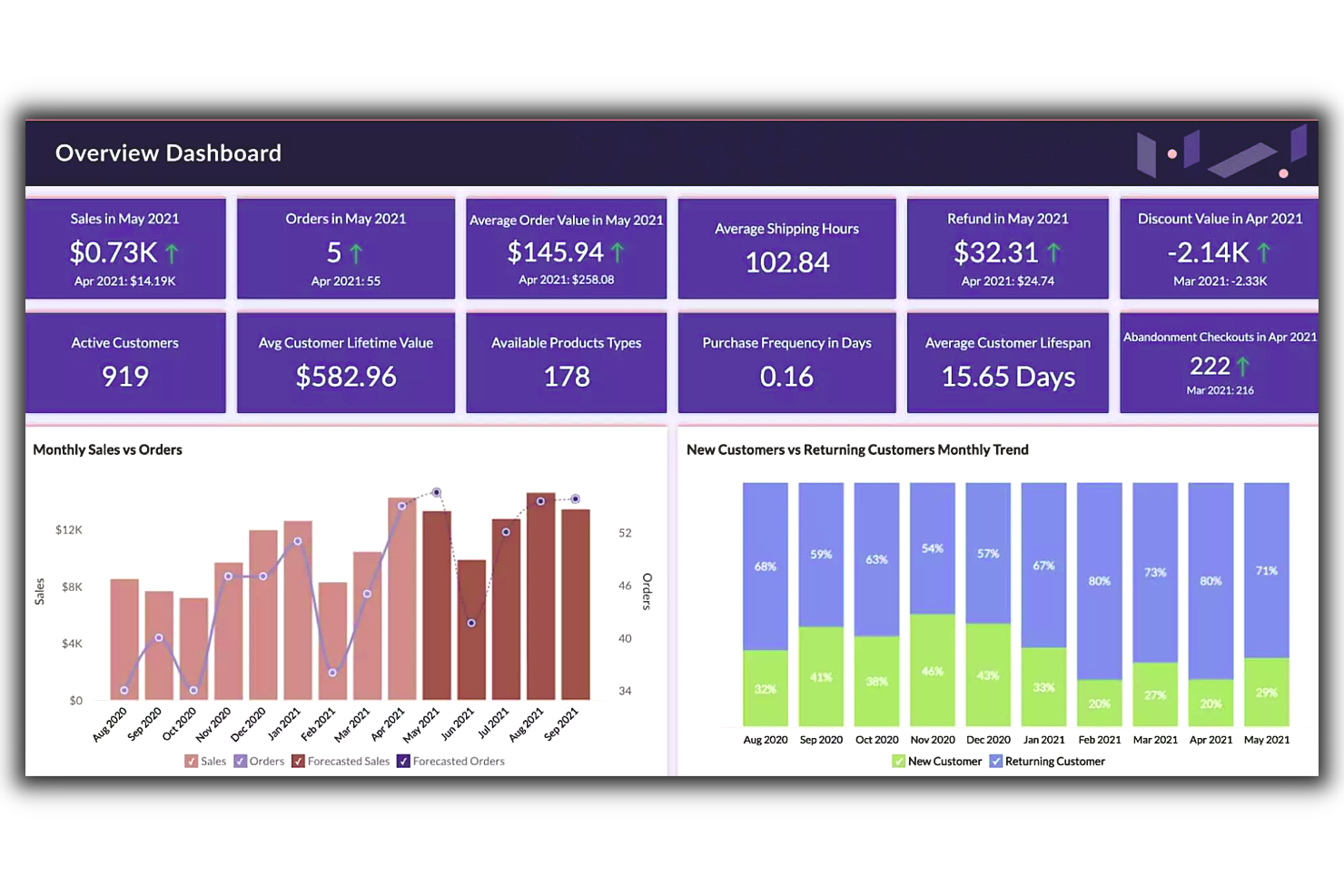
Zoho Analytics è una piattaforma di business intelligence basata sul cloud con un'enfasi sui report visivi. Aiuta i product manager a rispondere alle domande chiave sui loro prodotti utilizzando dashboard e report interattivi che rendono facile l'esplorazione dei dati. Gli utenti possono collegarsi a database, fogli di calcolo, applicazioni cloud e perfino fonti di social media per importare i dati necessari alle analisi. La piattaforma poi funge da hub per organizzare e presentare queste informazioni in maniera visivamente accattivante. Offre diverse opzioni di visualizzazione interattive che semplificano il confronto affiancato dei risultati. Questo aiuta i product manager a ottenere un quadro accurato di come diversi fattori influenzino i loro prodotti senza dover affrontare complessi fogli di calcolo o ipotizzare cosa possa causare determinati risultati.
Una delle caratteristiche uniche di Zoho Analytics è la capacità di approfondire facilmente i set di dati. Gli utenti possono raggruppare o segmentare i loro dati secondo qualsiasi criterio scelto. Zoho consente di creare report visivi in pochi minuti grazie a strumenti drag-and-drop. Questi report sono poi personalizzabili, permettendo la modifica di colori, font e dimensioni. Gli utenti possono anche impostare notifiche e-mail automatiche quando vengono soddisfatti determinati criteri o si verificano determinate azioni. Zoho permette inoltre di effettuare analisi sofisticate sui dati di prodotto. Questo include l'analisi delle tendenze di vendita nel tempo e la segmentazione dei clienti per località o altre informazioni demografiche. Ciò consente alle aziende di ottenere una maggiore comprensione del comportamento dei clienti e di individuare aree dove potrebbero migliorare o necessitano di intervento.
Le integrazioni includono Microsoft Office 365, Microsoft Teams, Google Drive, Zendesk e ServiceNow. Sono supportate anche le integrazioni tramite Zapier e Zoho Flow. Essendo parte dell'ecosistema Zoho, è possibile collegarsi a diversi servizi Zoho per le vendite, il marketing, il CRM, il servizio clienti e altro ancora.
Zoho Analytics ha un costo a partire da $24/mese e offre una prova gratuita di 15 giorni.
New Product Updates from Zoho Analytics

Zoho Analytics Adds Exogenous Variables to Multivariate Forecasting
Zoho Analytics introduces exogenous variables for multivariate forecasting using the VARX model. This helps forecasts account for external drivers such as marketing spend, discounts, and seasonality. For more information, visit Zoho Analytics’ official site.
 .
.
Tableau
Usa le dashboard per costruire una narrazione attorno ai tuoi dati
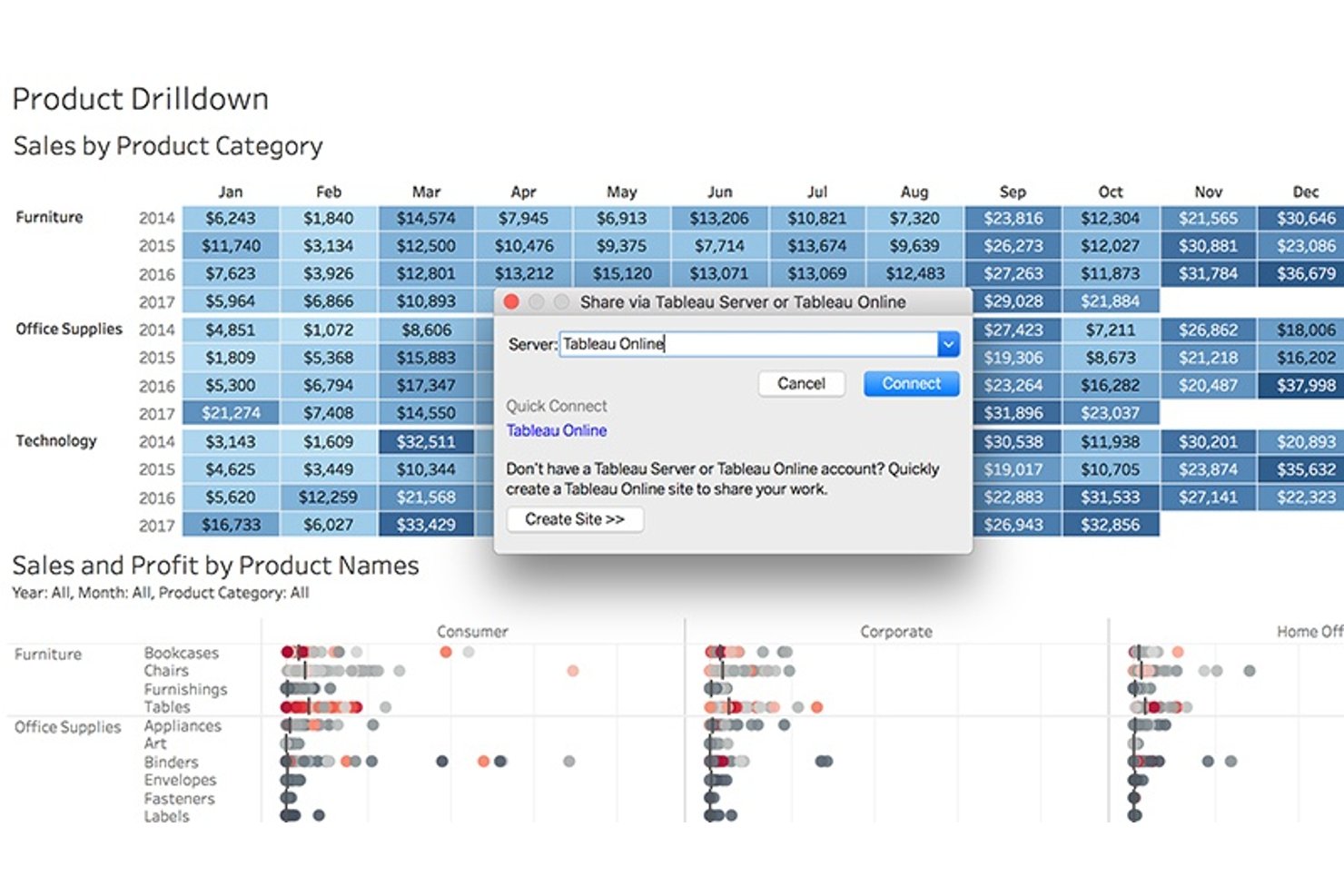
Tableau è una soluzione di business intelligence e analisi dei dati. Questo strumento ti aiuta a raccogliere dati da più fonti e a creare set di dati collettivi che puoi condividere con i colleghi in tempo reale.
Uno dei punti di forza di questa piattaforma è che permette di creare una narrazione attorno all'analisi dei dati. Puoi mappare ogni fonte di dati e creare dashboard e report personalizzati per rendere le informazioni accessibili anche a chi non si occupa di dati regolarmente.
Gli strumenti di previsione dei dati di Tableau ti aiutano a pianificare con precisione i progetti futuri e la sua community di utenti condivide ottimi modelli e offre suggerimenti.
Tableau ha un costo a partire da $70/utente/mese. È disponibile una prova gratuita di 14 giorni.

Wrike
Migliore reportistica visiva per programmare l'invio dei report agli account email


Wrike è una soluzione di gestione dei progetti che offre un'ampia gamma di strumenti di reportistica visiva per dati di progetto e di prodotto. Questo software di project management e strumento di reportistica è altamente configurabile, permettendo agli utenti di personalizzare dashboard, flussi di lavoro, moduli di richiesta e report.
Wrike è dotato di uno strumento di reportistica intuitivo che consente a te e agli altri stakeholder di scegliere tra dodici diverse visualizzazioni di KPI e metriche. Permette inoltre di monitorare l'avanzamento, l'utilizzo del budget, la produttività del team, la gestione del tempo e lo stato del portfolio. Oltre alla reportistica visiva, Wrike offre la possibilità di programmare la consegna dei report direttamente nella casella di posta o di distribuirli ad altri reparti e stakeholder.
Wrike dispone anche di un generatore di report facile da usare che include un'ampia selezione di modelli predefiniti per tracciare KPI e metriche standard. Gli strumenti di reportistica visiva del software possono essere facilmente riconfigurati per adattarsi alle esigenze specifiche di singoli team e reparti. Sono disponibili diverse soluzioni pensate appositamente per settori specifici, tra cui servizi professionali e marketing.
Inoltre, il software consente di creare report completamente da zero e di creare nuovi modelli o modificare e adattare report visivi precedenti.
Wrike offre centinaia di integrazioni native predefinite, inclusa la possibilità di integrarsi senza problemi con QuickBooks, Zendesk e Salesforce, oltre a soluzioni di gestione dei file come Dropbox, Google e Microsoft.
New Product Updates from Wrike

Wrike Activity Reports Add Actor Type Details
Wrike’s Activity Report now displays actor type details, helping admins identify whether changes came from the UI, Automation, Wrike Agents, API, or AI via MCP. For more information, visit Wrike's official site.
Come valuto gli strumenti di reportistica visiva
SUDDIVIDO la mia valutazione in criteri di base—un PM può collegare Jira, creare una dashboard KPI e condividerla con la leadership?—e fattori differenzianti che separano i buoni strumenti da quelli eccellenti.
Funzionalità di base (Requisiti indispensabili per questa lista)
Quando seleziono gli strumenti per la mia lista, valuto ciascuno su una scala da 0 (non offre la funzionalità) a 5 (eccelle in quest'area) per ogni funzionalità di base elencata di seguito. Poi calcolo il punteggio totale dello strumento convertendolo in percentuale. Ogni strumento deve ottenere un punteggio totale minimo del 65% per essere considerato per l'inclusione.
- Costruttore di dashboard visive: Valuto la varietà di grafici e la flessibilità del layout—un PM può costruire un funnel di adozione delle funzionalità, un grafico della velocità del team e una dashboard dei ricavi senza soluzioni alternative?
- Integrazioni con fonti dati: Lo strumento deve potersi collegare nativamente ai principali strumenti per PM come Jira, Amplitude, Mixpanel o Google Analytics e supportare anche import di database e fogli di calcolo.
- Visualizzazione roadmap e timeline: Cerco viste Gantt, layout a corsie (swimlane) o bacheche now/next/later che permettano ai team di prodotto di mappare visualmente rilasci e dipendenze.
- Report interattivi e filtri: I grafici statici non bastano. Verifico se i portatori di interesse possono approfondire per coorte, intervallo di date o feature per rispondere autonomamente alle proprie domande successive.
- Condivisione e collaborazione: I report di prodotto raggiungono un pubblico ampio. Valuto opzioni come link condivisibili, invio programmato via email, distribuzione tramite Slack e integrazione in strumenti come Confluence o Notion.
- Aggiornamento dati in tempo reale: Le dashboard perdono credibilità se i dati sono obsoleti. Considero la frequenza di aggiornamento delle fonti collegate—almeno ogni ora, con preferenza per aggiornamento quasi in tempo reale.
Una volta definita la lista di strumenti che soddisfano questi criteri, considero cosa distingue ogni piattaforma.
Fattori differenzianti (Cosa distingue i vari fornitori)
Ecco come confronto i diversi fornitori:
Funzionalità distintive
Intuizioni basate su AI possono far risparmiare ore di analisi manuale. Cerco strumenti che segnalino anomalie come un calo improvviso dell’adozione di una funzionalità o un picco di abbandono senza bisogno di impostazioni extra. Anche i template preimpostati specifici per PM sono importanti perché riducono i tempi di configurazione; una buona libreria di template dovrebbe includere tracker per OKR, dashboard di lancio e report di sprint pronti da popolare. Valuto anche se uno strumento supporta report in stile storyboard, che permettono ai PM di guidare i dirigenti dentro una narrazione piuttosto che mostrare solo una parete di grafici.
Oltre le funzionalità
La struttura dei prezzi è molto importante per i team di prodotto. Verifico se uno strumento offre visualizzatori gratuiti così che dirigenti e partner cross-funzionali possano accedere alle dashboard senza aumentare i costi. Il time-to-value è un altro fattore critico—un PM può collegare Jira e pubblicare una dashboard live in meno di un’ora senza dover aprire un ticket all’ingegneria? Valuto anche la profondità delle integrazioni, in particolare se i connettori verso strumenti come Amplitude, Productboard o BigQuery supportano la sincronizzazione bidirezionale anziché solo importazioni unidirezionali che rischiano di diventare obsolete.
Come scegliere gli strumenti di reporting visivo
È facile perdersi tra lunghe liste di funzionalità e strutture di prezzo complesse. Per aiutarti a rimanere concentrato durante il tuo personale processo di selezione del software, ecco una checklist dei fattori da tenere a mente:
| Fattore | Da considerare |
|---|---|
| Scalabilità | Lo strumento può crescere con la tua azienda? Considera se può gestire volumi di dati e utenti crescenti senza problemi di prestazioni. |
| Integrazioni | Si connette ai tuoi sistemi esistenti? Valuta la compatibilità con le tue fonti dati e il software attuale. |
| Personalizzazione | Puoi adattarlo alle tue esigenze? Cerca la possibilità di personalizzare dashboard e report secondo i tuoi workflow. |
| Facilità d’uso | È intuitivo per il tuo team? Garantisciti che lo strumento sia user-friendly e non richieda una formazione estesa per iniziare a usarlo. |
| Implementazione e onboarding | Quanto velocemente puoi implementarlo? Considera tempo e risorse necessari per onboarding del team e integrazione con i tuoi sistemi. |
| Costo | Rientra nel tuo budget? Analizza la struttura dei prezzi, eventuali costi nascosti, e confrontala con le funzionalità offerte. |
| Sicurezza | I tuoi dati sono protetti? Verifica gli standard di crittografia, i controlli di accesso e la conformità alle normative sulla protezione dei dati. |
| Disponibilità del supporto | L’assistenza è facilmente raggiungibile? Assicurati che il fornitore offra canali di supporto adeguati, come chat, email o telefono, e controlla i tempi di risposta. |
Cosa sono gli strumenti di reporting visivo?
Gli strumenti di reporting visivo sono software che ti aiutano a trasformare dati grezzi in grafici, tabelle e dashboard di facile lettura. Analisti, manager e responsabili di team usano questi strumenti per individuare tendenze, monitorare l’andamento e condividere rapidamente le informazioni. Rendono più semplice comprendere dati complessi e comunicare i risultati in modo immediato.
Funzionalità
Quando selezioni strumenti di reporting visivo, presta attenzione alle seguenti funzionalità chiave:
- Dashboard personalizzabili: Ti permettono di adattare le visualizzazioni alle esigenze specifiche della tua azienda e ai flussi di lavoro.
- Aggiornamenti dati in tempo reale: Garantiscono che le informazioni che analizzi e riporti siano sempre attuali e accurate.
- Integrazione dei dati: Si connette senza problemi con varie fonti di dati per offrire una panoramica completa delle tue analisi.
- Visualizzazioni interattive: Permettono agli utenti di interagire con i dati tramite grafici e diagrammi dinamici, ottenendo così approfondimenti più dettagliati.
- Analisi predittiva: Utilizza dati storici per prevedere tendenze future, aiutandoti a prendere decisioni aziendali informate.
- Interfaccia intuitiva: Rende facile per i membri del team di qualsiasi livello di competenza navigare e utilizzare lo strumento in modo efficace.
- Funzionalità di collaborazione: Consentono ai team di condividere approfondimenti e lavorare insieme in modo efficiente su progetti basati sui dati.
- Misure di sicurezza: Proteggono i dati sensibili con crittografia e controlli di accesso, garantendo la conformità alle normative.
- Risorse di formazione e supporto: Forniscono agli utenti gli strumenti e le guide necessarie per massimizzare il potenziale del software.
- Scalabilità: Supporta l'aumento dei volumi di dati e del numero di utenti, garantendo l'usabilità a lungo termine durante la crescita dell'azienda.
Vantaggi
L'implementazione di strumenti di reporting visivo offre diversi vantaggi per il tuo team e la tua azienda. Eccone alcuni a cui puoi guardare con fiducia:
- Miglioramento nel processo decisionale: Gli aggiornamenti dati in tempo reale e le analisi predittive aiutano a prendere decisioni informate basate sulle informazioni più recenti.
- Collaborazione potenziata: Le funzionalità collaborative consentono ai membri del team di condividere approfondimenti e lavorare efficacemente su progetti guidati dai dati.
- Maggiore efficienza: Dashboard personalizzabili e interfacce intuitive facilitano una rapida visualizzazione e analisi dei dati.
- Migliori approfondimenti dai dati: Le visualizzazioni interattive e l'integrazione dei dati offrono una visione chiara e completa delle metriche aziendali.
- Scalabilità: La capacità di gestire crescenti volumi di dati e utenti garantisce che gli strumenti rimangano utili man mano che la tua azienda cresce.
- Sicurezza dei dati: Le misure di sicurezza proteggono le informazioni sensibili garantendo la conformità alle normative sulla protezione dei dati.
- Risorse di formazione accessibili: Le risorse di formazione e supporto consentono al tuo team di sfruttare appieno le potenzialità del software.
Costi & Prezzi
La scelta di strumenti di reporting visivo richiede la comprensione dei diversi modelli di prezzo e piani disponibili. I costi variano in base alle funzionalità, alla dimensione del team, agli add-on e altro. La tabella qui sotto riassume i piani più comuni, i prezzi medi e le funzionalità tipicamente incluse nelle soluzioni di reporting visivo:
Tabella di confronto dei piani per strumenti di reporting visivo
| Tipo di piano | Prezzo medio | Funzionalità comuni |
|---|---|---|
| Piano gratuito | $0 | Visualizzazioni di base, fonti di dati limitate e supporto dalla community. |
| Piano personale | $5-$25/user/month | Dashboard personalizzabili, integrazione con più fonti dati e supporto via email. |
| Piano business | $30-$60/user/month | Analisi avanzate, aggiornamenti in tempo reale, strumenti di collaborazione e supporto telefonico. |
| Piano enterprise | $75-$150/user/month | Integrazione dati completa, analisi predittiva, supporto dedicato e potenziamenti della sicurezza. |
Domande frequenti sugli strumenti di reportistica visiva
Ecco alcune risposte alle domande comuni sugli strumenti di reportistica visiva:
Gli strumenti di reportistica visiva richiedono competenze tecniche?
No, la maggior parte degli strumenti di reportistica visiva è progettata per essere intuitiva e non richiede competenze tecniche approfondite. Spesso dispongono di interfacce drag-and-drop e un design intuitivo. Tuttavia, alcune funzionalità avanzate possono necessitare di un po’ di formazione o supporto. È utile esplorare le risorse di formazione offerte dal fornitore per iniziare.
Come si mantiene l’accuratezza e la coerenza dei report nel tempo?
L’accuratezza deriva dall’utilizzo di fonti dati verificate e dall’applicazione di regole coerenti durante la creazione dei report. È importante stabilire un programma di revisione per individuare tempestivamente eventuali discrepanze. Il tuo team dovrebbe concordare le definizioni dei dati affinché tutti interpretino i risultati allo stesso modo.
Quali sono le insidie più comuni nell’implementare strumenti di reportistica visiva nei team?
I team spesso si trovano ad affrontare sfide come report duplicati, formati incoerenti o dashboard poco utilizzate. Questi problemi derivano solitamente da ruoli poco chiari o dalla mancanza di standard condivisi. Definire processi chiari per la creazione e la revisione dei report aiuta a mantenere l’allineamento.
Come si garantisce che i dashboard rimangano pertinenti agli obiettivi aziendali?
I dashboard necessitano di revisioni regolari per restare allineati agli obiettivi del team. Se cambiano gli obiettivi o i parametri, aggiorna le visualizzazioni e le fonti dati di conseguenza. Incoraggia il feedback degli utenti chiave affinché i report continuino a supportare le decisioni quotidiane.
Come possono i team incentivare l’adozione degli strumenti di reportistica visiva tra i dipendenti?
Stimola i dipendenti a utilizzare lo strumento mostrando come possa integrarsi nella loro routine quotidiana. Offri brevi sessioni pratiche per aiutarli a sentirsi a proprio agio nell’utilizzo. Quando i team vedono come lo strumento semplifica il loro lavoro, saranno più propensi ad affidarsi ad esso con continuità.
Cosa fare dopo:
Se sei alla ricerca di strumenti di reportistica visiva, contatta un consulente di SoftwareSelect per ricevere consigli gratuiti.
Compila un modulo e fai una breve chiacchierata in cui ti aiuteranno a identificare le tue esigenze specifiche. Riceverai quindi una lista ristretta di software tra cui scegliere. Ti supporteranno persino durante tutto il processo d’acquisto, incluse le trattative sui prezzi.