

10 migliori piattaforme per il feedback dei prodotti per approfondimenti sugli utenti nel 2026

Shortlist dei migliori software per il feedback sui prodotti


Sul mercato esistono innumerevoli soluzioni di software per il feedback sui prodotti, quindi capire quale sia la migliore per te non è semplice. Vuoi raccogliere, centralizzare e analizzare i feedback e trasformarli in attività concrete per i team di sviluppo, ma devi capire quale strumento è il più adatto.
Ti aiuto io! In questo articolo ti facilito la scelta sfruttando la mia esperienza nella gestione di prodotti grandi e complessi e l'utilizzo di decine di strumenti diversi per offrirti questa shortlist dei migliori software per il feedback sui prodotti.
Perché Fidarsi delle Nostre Recensioni Software
Testiamo e recensiamo software per il product management dal 2020. Come product manager sappiamo quanto sia fondamentale e difficile fare la scelta giusta in termini di software. Investiamo in una ricerca approfondita per aiutare il nostro pubblico a prendere decisioni migliori sugli acquisti di software. Abbiamo testato oltre 2.000 strumenti per diversi casi d’uso e scritto più di 1.000 recensioni approfondite.Scopri come assicuriamo la trasparenza & la nostra metodologia di recensione software.
Riepilogo dei migliori software per il feedback sui prodotti
Questa tabella comparativa sintetizza i dettagli sui prezzi delle mie migliori scelte di software per il feedback sui prodotti per aiutarti a trovare quello più adatto alle tue esigenze e al tuo budget.
| Tool | Best For | Trial Info | Price | ||
|---|---|---|---|---|---|
| 1 | Ideale per approfondimenti sul grafo della conoscenza clienti | Demo gratuita disponibile | Prezzo su richiesta | Website | |
| 2 | Ideale per una raccolta feedback completa | Piano gratuito disponibile | Da $29/mese (fatturazione annuale) | Website | |
| 3 | Ideale per sondaggi omnicanale avanzati | Demo gratuita disponibile | Prezzi su richiesta | Website | |
| 4 | Ideale per l'analisi multilingue del feedback | Demo gratuita disponibile | Prezzo su richiesta | Website | |
| 5 | Ideale per workflow di feedback closed loop dettagliati | Nessuna prova gratuita disponibile | Prezzo su richiesta | Website | |
| 6 | Ideale per team di prodotto che utilizzano Jira | Piano gratuito disponibile | Da $1,10/utente/mese | Website | |
| 7 | Ideale per il feedback durante tutto il percorso utente | Prova di 10 giorni | Da $56/mese | Website | |
| 8 | Ideale per dare priorità alle richieste di funzionalità | Piano gratuito disponibile | Da $19/mese | Website | |
| 9 | Ideale per sondaggi visivamente accattivanti | Piano gratuito disponibile | Da $19/mese | Website | |
| 10 | Ideale per la categorizzazione automatizzata dei feedback | Demo gratuita disponibile | Prezzo su richiesta | Website |

Recensioni dei migliori software per il feedback sui prodotti
Qui trovi una breve descrizione di ciascun software per il feedback sui prodotti per illustrarne i migliori casi d’uso, le funzionalità di rilievo e screenshot che offrono una panoramica dell’interfaccia utente.

Ideale per approfondimenti sul grafo della conoscenza clienti
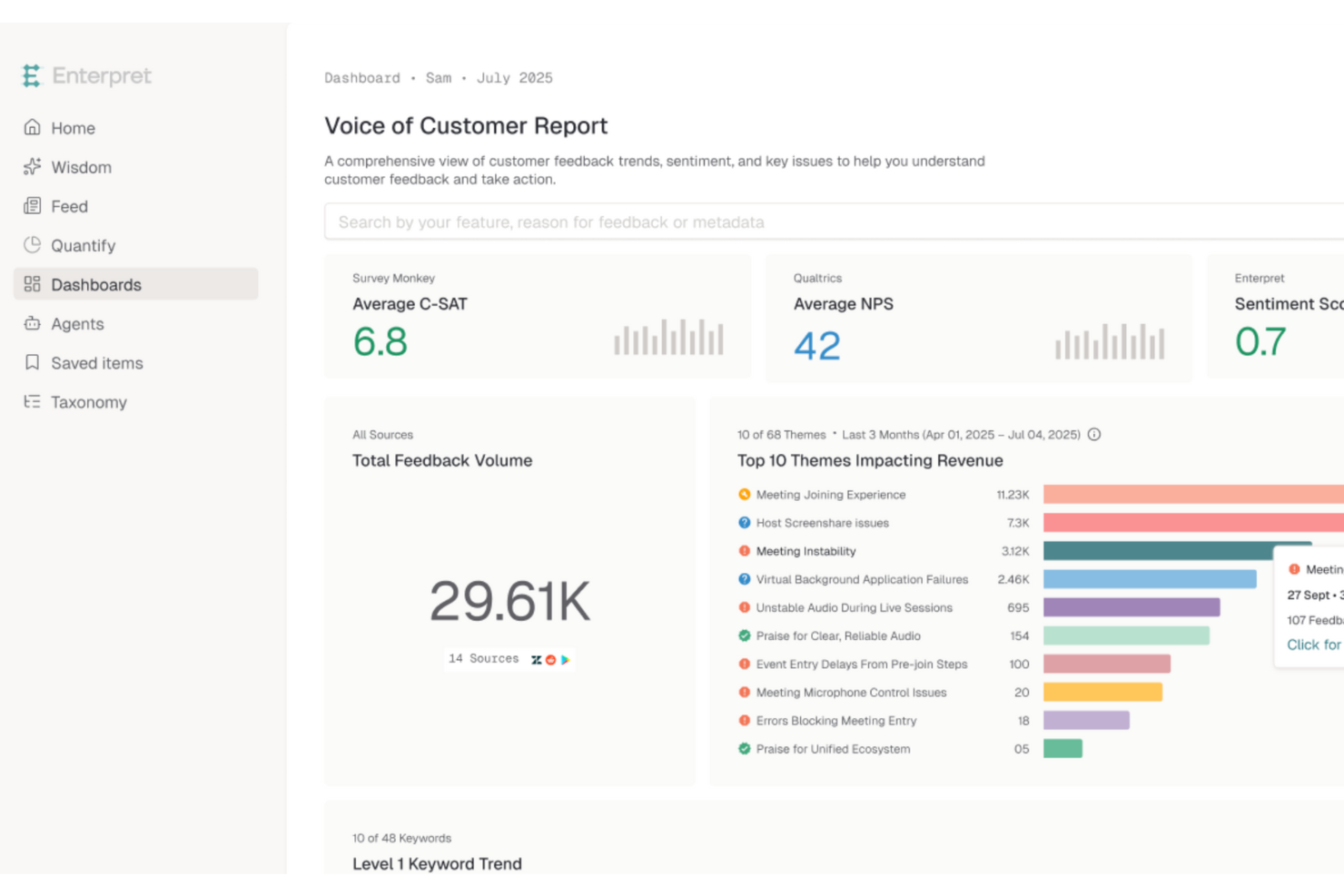
Enterpret si distingue per le sue approfondite conoscenze sul grafo della clientela, rendendolo una scelta eccellente per il software di raccolta feedback sui prodotti. Progettato per team orientati alla gestione del prodotto e all'esperienza cliente, centralizza i feedback da oltre 50 fonti in una singola vista strutturata. Questo ti aiuta a scoprire schemi, comprendere chiaramente le esigenze dei clienti e prendere decisioni di prodotto più sicure.
Perché ho scelto Enterpret
Ho scelto Enterpret per i suoi insight sul grafo della conoscenza clienti, che offrono ai team di prodotto una visione chiara di come i feedback siano collegati agli utenti e all'impatto sul prodotto. Questa capacità aiuta a trasformare feedback frammentati in un contesto significativo anziché semplici commenti isolati. Unita alla sua tassonomia adattiva che organizza i feedback in temi rilevanti, Enterpret rende più facile identificare le priorità e agire in modo informato sul prodotto.
Caratteristiche principali di Enterpret
Oltre agli insight sul grafo della conoscenza clienti, Enterpret offre:
- Query in linguaggio naturale: Ti permette di porre domande sui feedback e ricevere approfondimenti immediati, semplificando l'interpretazione dei dati.
- Workflow automatizzati: Integra le insight negli strumenti esistenti come Jira, assicurando che i feedback generino azioni concrete.
- Avvisi contestuali: Rileva e indirizza i problemi in tempo reale ai membri del team appropriati, garantendo risposte tempestive.
- Follow-up sulle risoluzioni: Notifica automaticamente i clienti riguardo alle questioni risolte, favorendo fiducia e coinvolgimento.
Integrazioni di Enterpret
Le integrazioni includono Slack, Jira, Salesforce, Zendesk, Intercom, HubSpot, GitHub, Asana, Microsoft Teams e Google Workspace. È inoltre disponibile un'API per integrazioni personalizzate.
Pros and Cons
Pros:
- Potenti analisi dei feedback che offrono insight concreti sui clienti
- Supporta query personalizzate per analisi approfondite
- Fornisce riassunti visivi chiari per gli stakeholder
Cons:
- Richiede un'attenta messa a punto della tassonomia inizialmente
- Gli utenti segnalano occasionali ritardi nell'elaborazione dei dati

Userback
Ideale per una raccolta feedback completa
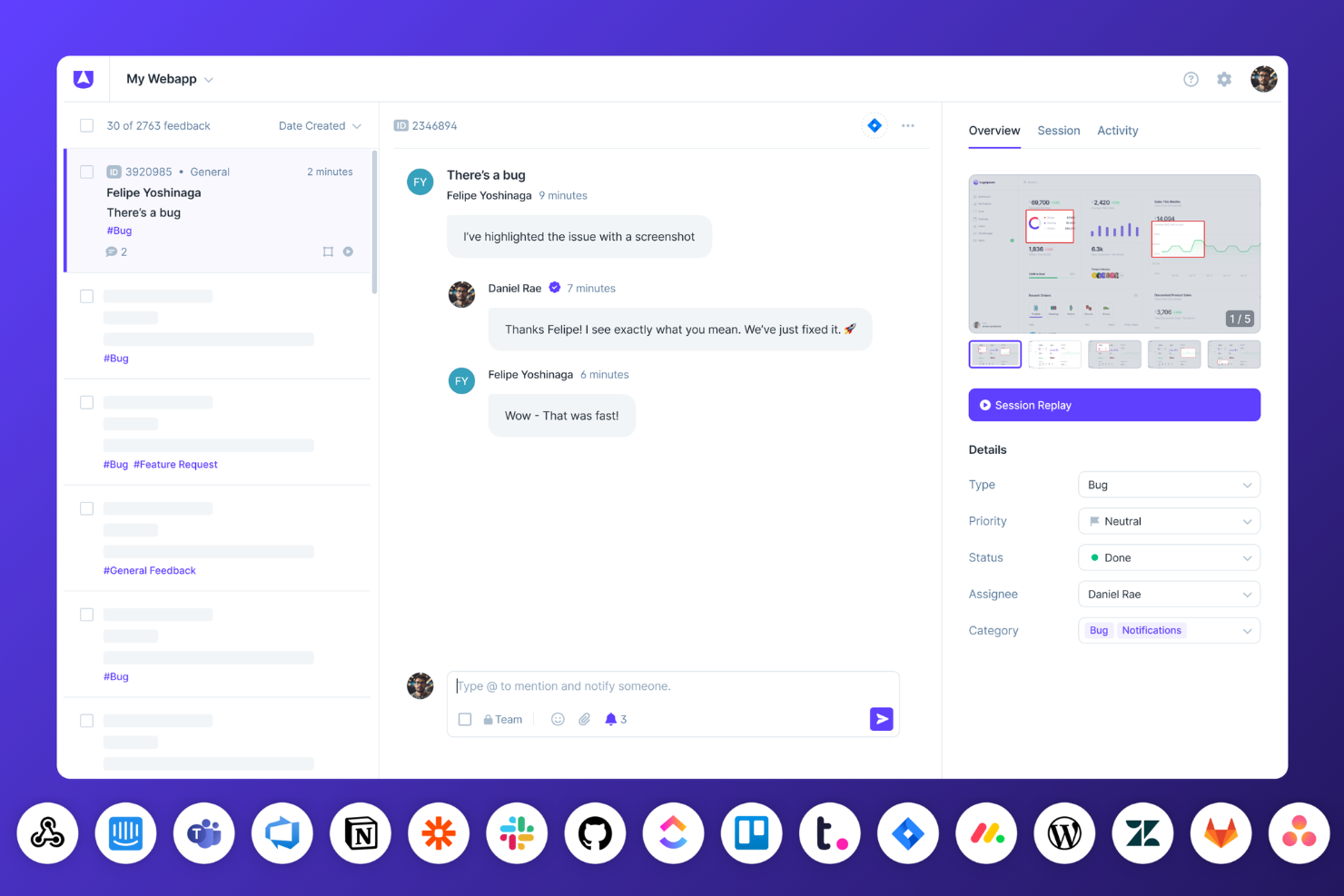
Userback è un versatile software per la raccolta di feedback sui prodotti che aiuta le aziende a raccogliere, organizzare e agire sui feedback degli utenti direttamente dai loro siti web e applicazioni. Offre un widget di feedback personalizzabile e strumenti di feedback visivo, consentendo agli utenti di segnalare problemi con screenshot, annotazioni e registrazioni video. Userback fornisce anche la riproduzione delle sessioni, permettendo di osservare le reali interazioni degli utenti per identificare problemi di usabilità e migliorare l’esperienza del prodotto. Inoltre, Userback supporta una roadmap pubblica per coinvolgere gli utenti nello sviluppo del prodotto condividendo le funzionalità in arrivo e raccogliendo contributi.
La piattaforma supporta una varietà di metodi di raccolta feedback, inclusi sondaggi in-app e sondaggi Net Promoter Score (NPS), offrendo una panoramica completa della soddisfazione degli utenti e delle prestazioni del prodotto. Permette di gestire e dare priorità ai feedback in modo efficiente con strumenti di automazione che assegnano automaticamente i compiti, categorizzano i feedback e attivano notifiche in base a condizioni specifiche. Gli strumenti visivi di Userback, incluse le riproduzioni delle sessioni e le annotazioni sugli schermi, offrono un contesto dettagliato che aiuta i team a comprendere e risolvere rapidamente i problemi. La sicurezza è un aspetto fondamentale, con conformità al GDPR, certificazione SOC 2 Type II e protocolli di crittografia dei dati.
La dashboard di reporting in tempo reale di Userback ti aiuta a monitorare i feedback e i progressi nei vari progetti, con opzioni per esportare dati nei formati CSV, XML e JSON per analisi esterne. La piattaforma offre anche estensioni per browser per una rapida raccolta dei feedback durante le revisioni dei siti e fornisce opzioni di feedback mirate con funzionalità di identificazione degli utenti, offrendo ai team una comprensione più profonda delle singole esperienze utente.
Le integrazioni includono Jira, Asana, Wrike, Webhook, Slack, Microsoft Teams, Notion, Trello, GitHub, monday.com, GitLab, Intercom, Zendesk, ClickUp, WordPress, Linear, Basecamp, Azure DevOps e Zapier.
New Product Updates from Userback

Userback Mobile SDK Adds In-App Surveys
Userback’s Mobile SDK now supports in-app surveys, enabling iOS and Android users to submit NPS, CSAT, and other survey responses without leaving your app. For more information, visit Userback's official site.
 .
.
Ideale per sondaggi omnicanale avanzati
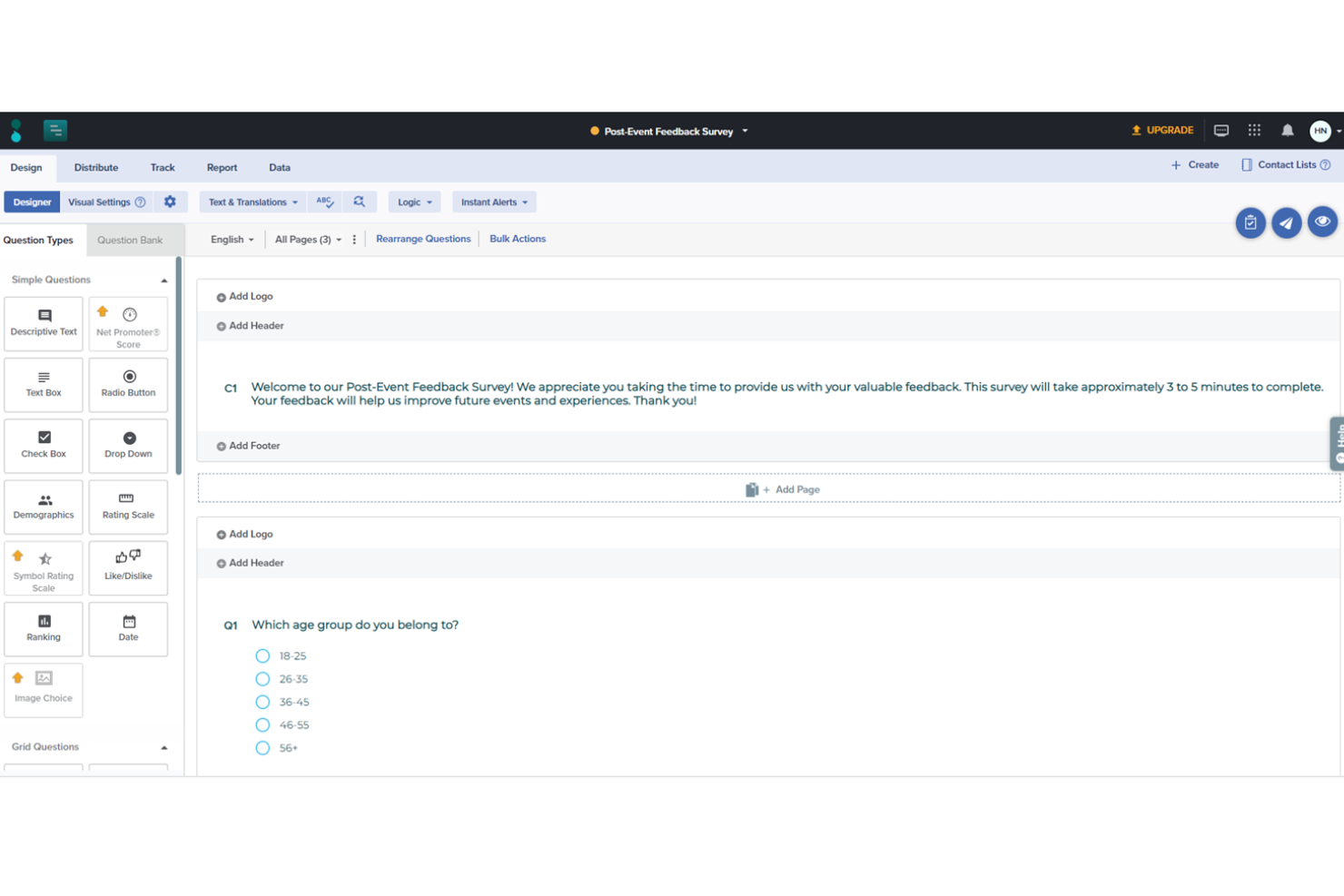
Sogolytics è una piattaforma completa progettata per la creazione, la distribuzione e l'analisi di sondaggi. È ampiamente utilizzata per raccogliere feedback in diversi contesti, tra cui la soddisfazione dei clienti, il coinvolgimento dei dipendenti e le ricerche di mercato.
Ciò che distingue Sogolytics come piattaforma di feedback sui prodotti sono le sue avanzate capacità di creazione e distribuzione di sondaggi omnicanale. Gli utenti possono progettare sondaggi utilizzando oltre 50 tipi di domande, applicare una logica ramificata sofisticata ed assicurarsi che i sondaggi siano visivamente coinvolgenti con il pieno controllo del branding. Le opzioni di distribuzione sono ampie, includendo email, SMS, social media, codici QR e incorporamenti nei siti web, consentendo di raggiungere i partecipanti ovunque si trovino per la raccolta del feedback.
Sogolytics eccelle anche nei suoi strumenti di analisi del feedback degli utenti. La piattaforma offre il monitoraggio delle risposte in tempo reale e potenti funzionalità di reportistica che permettono agli utenti di segmentare i dati, confrontare le risposte e generare report dettagliati. Questi report possono essere personalizzati ed esportati in diversi formati, come Excel, Word e PowerPoint, facilitando la condivisione dei dati con gli stakeholder.
Le principali integrazioni includono Salesforce, Zapier, Google Analytics, Google Spreadsheets, HubSpot CRM, Slack e Asana.
New Product Updates from Sogolytics
Sogolytics Adds Teams and Slack Surveys and Custom Automations
Sogolytics adds native Microsoft Teams and Slack survey distribution, a Custom Automations Builder, Derived Fields, PointClickCare integration, and authenticator-based MFA. These updates expand survey distribution and workflow automation while adding new data management and security capabilities. For more information, visit Sogolytics’ official site.
 .
.
Ideale per l'analisi multilingue del feedback
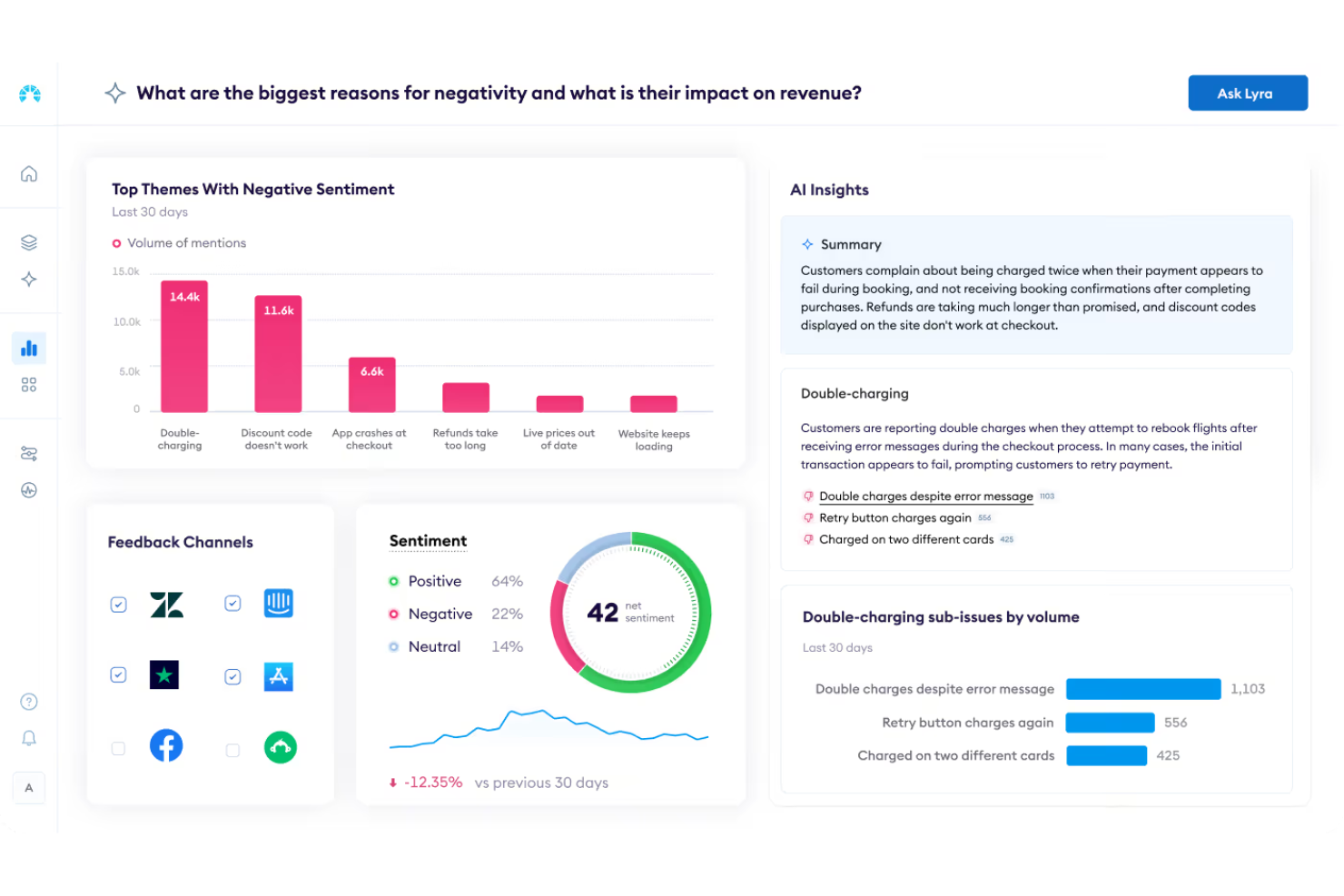
Chattermill fornisce strumenti per l'analisi del feedback dei clienti proveniente da più fonti su un'unica piattaforma. Aiuta i team di prodotto a raccogliere e rivedere feedback da sondaggi, ticket di assistenza e recensioni, per comprendere il sentiment degli utenti e le problematiche ricorrenti. La piattaforma supporta anche l'analisi del feedback multilingue, consentendo ai team di esaminare i riscontri provenienti da clienti di lingue e mercati diversi.
Perché ho scelto Chattermill
Ho scelto Chattermill per la sua analisi multilingue del feedback, che aiuta i team a valutare i riscontri dei clienti in diverse lingue su un'unica piattaforma. Ciò consente ai team di prodotto di comprendere il sentiment e le criticità comuni nei mercati globali. Chattermill unifica inoltre i feedback provenienti da fonti come sondaggi, ticket di assistenza e recensioni, aiutando i team a identificare tendenze e migliorare le decisioni di prodotto.
Caratteristiche principali di Chattermill
Oltre all'analisi multilingue del feedback, Chattermill offre:
- Creazione di dashboard personalizzate: Consente al team di monitorare metriche personalizzate importanti per il business.
- Visualizzazione interattiva dei dati: Fornisce chiarezza nei report trasformando set di dati complessi in formati visuali di facile comprensione.
- Avvisi automatizzati: Tiene informati sui principali cambiamenti nelle tendenze del feedback dei clienti, permettendo risposte tempestive.
Integrazioni di Chattermill
Le integrazioni includono Zendesk, SurveyMonkey, Salesforce, Intercom, Medallia, Qualtrics, Slack, Google Cloud Platform, Freshdesk e Amazon S3.
Pros and Cons
Pros:
- La categorizzazione automatica raggruppa argomenti simili per un monitoraggio più rapido
- Le intuizioni dai feedback rivelano criticità comuni e trend emergenti degli utenti
- L'analisi delle tendenze evidenzia problemi ricorrenti che incidono sull'esperienza prodotto
Cons:
- La configurazione iniziale dell'analisi tematica può risultare complessa
- Le opzioni di esportazione dati e reportistica sono poco flessibili per analisi approfondite

Ideale per workflow di feedback closed loop dettagliati
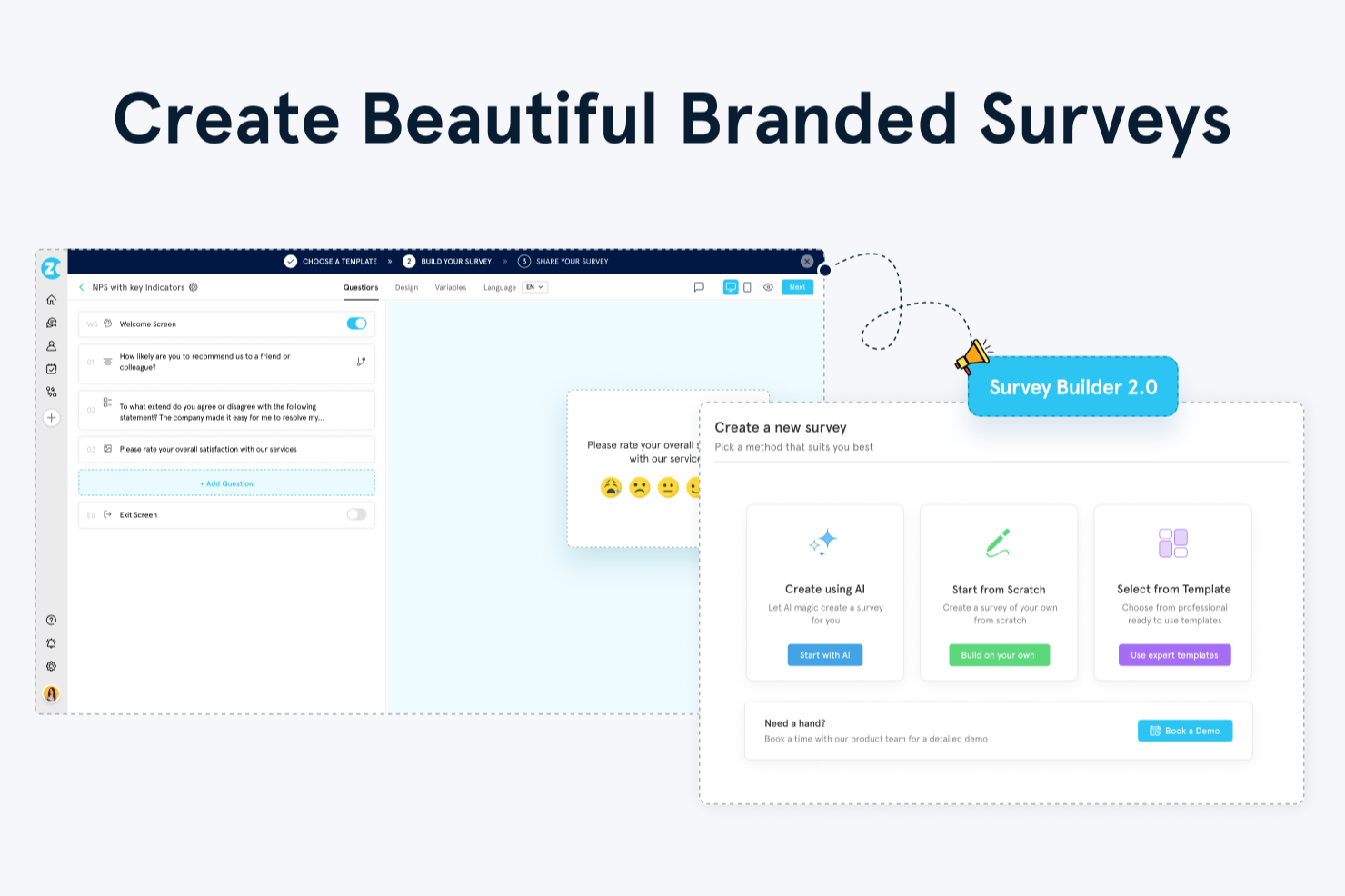
Zonka Feedback è una piattaforma di raccolta feedback multicanale che offre sondaggi in-applicazione, misurazione NPS/CSAT/CES, analisi tematica basata su AI e strumenti di automazione dei processi per i team CX e di prodotto.
Per chi è più adatto Zonka Feedback?
Zonka Feedback è ideale per team di prodotto, CX e customer success di medie e grandi aziende che necessitano di una raccolta di feedback strutturata e multicanale, affiancata da analisi avanzate e automazione dei flussi di lavoro.
Perché ho scelto Zonka Feedback
Ho incluso Zonka Feedback tra le mie migliori scelte perché il suo generatore di workflow closed-loop va ben oltre le semplici notifiche email. Posso configurare flussi di lavoro a più step che inoltrano automaticamente la risposta NPS di un detrattore al membro del team corretto, creano una task di follow-up e avviano una mail personalizzata di risposta, tutto senza bisogno di intervento manuale. Lo strato di azioni guidate dalle metriche CX aggiunge un vantaggio unico: è possibile configurare percorsi di escalation basati su soglie di punteggio, sentiment o urgenza rilevata da AI, così una CSAT a una stella con sentiment negativo segue un percorso diverso rispetto a una risposta passiva.
Funzionalità chiave di Zonka Feedback
- Analisi tematica AI: Etichetta e raggruppa le risposte a testo libero in temi ricorrenti tra i dati del tuo sondaggio.
- Trigger comportamentali per sondaggi: Avvia i sondaggi in base ad azioni specifiche svolte nell'applicazione, tempo sulla pagina o segmenti di utenti.
- Costruttore di sondaggi multilingue: Crea e distribuisci sondaggi in più lingue partendo da un unico sondaggio, grazie al supporto alla traduzione automatica.
- Inbox delle risposte in tempo reale: Visualizza, filtra e gestisci tutte le risposte ai sondaggi in arrivo in un feed centralizzato e in tempo reale.
Integrazioni di Zonka Feedback
Zonka Feedback offre integrazioni native con Salesforce, HubSpot, Jira, Freshdesk, Zendesk, Intercom, HelpScout, Front, Slack e Microsoft Teams, così come Google Sheets, Pipedrive, Mailchimp, ActiveCampaign e Zoom. Si collega anche a Zapier, Make e Integrately. Un'API e i webhooks consentono integrazioni personalizzate.
Pros and Cons
Pros:
- I sondaggi si distribuiscono via email, SMS, web, in-app e offline
- Monitoraggio NPS, CSAT e CES integrato
- Auto-tagging AI per analisi delle risposte aperte
Cons:
- I sondaggi multilingue sono disponibili solo nei piani di livello superiore
- La visualizzazione dei report su mobile è meno dettagliata rispetto alla versione desktop

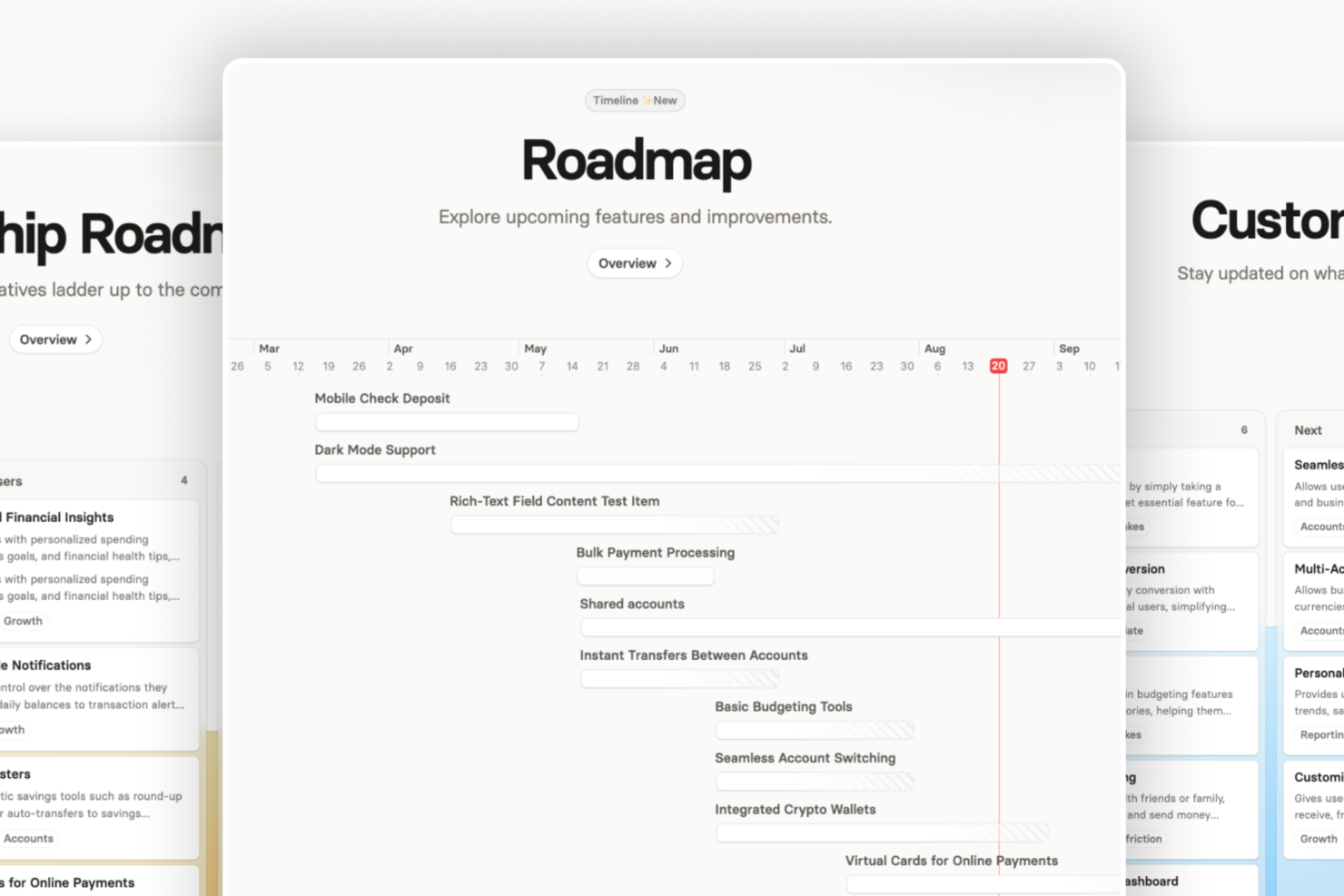
Released è una piattaforma per il feedback sui prodotti che ti permette di pubblicare changelog in-app, raccogliere reazioni degli utenti e integrare gli aggiornamenti di prodotto con strumenti come Slack e Microsoft Teams.
Per chi è ideale Released?
Released è perfetto per product manager e team SaaS che hanno bisogno di un modo strutturato per tenere gli utenti informati su nuove funzionalità e aggiornamenti del prodotto.
Perché ho scelto Released
Released merita un posto nella mia shortlist per quanto collega in modo efficace i flussi di lavoro del feedback dei clienti con Jira. Mi piace il fatto che il tuo team possa raccogliere feedback da più canali e collegare automaticamente le segnalazioni alle attività Jira rilevanti, fornendo ai product manager e agli ingegneri un contesto più approfondito durante la definizione delle priorità di sviluppo. Released supporta anche roadmap pubbliche, changelog in-app e portali per il feedback, aiutando i team a tenere informati gli utenti mentre mantengono un workflow centralizzato all'interno del loro ecosistema Jira esistente.
Caratteristiche principali di Released
- Note di rilascio redatte dall’IA: Released recupera i ticket Jira completati e genera una prima bozza delle note di rilascio, che puoi rivedere e pubblicare direttamente dallo strumento.
- Lista dei desideri e votazione degli utenti: Offri agli utenti uno spazio per proporre nuove funzionalità e aggiungere elementi a una wishlist personale, potendo anche limitare il numero di segnalazioni per persona per individuare le reali priorità.
- Inbox del feedback: Raccogli segnalazioni dal tuo portale, dai moduli incorporati e da Slack in un unico posto, con ogni voce collegata automaticamente alla rispettiva attività Jira.
- Visualizzazioni della roadmap specifiche per pubblico: Crea viste personalizzate per clienti, dirigenti e partner, tutte sincronizzate in tempo reale da Jira con opzioni di accesso flessibili.
Integrazioni di Released
Released offre integrazioni native con Jira, Slack, Confluence e HubSpot. È disponibile un’API per integrazioni personalizzate.
Pros and Cons
Pros:
- Changelog in-app con reazioni degli utenti
- Portali feedback pubblici e privati
- Integrazione nativa con Jira e Slack
Cons:
- Analisi e reportistica avanzate limitate
- Alcune personalizzazioni richiedono piani a pagamento

Ideale per il feedback durante tutto il percorso utente
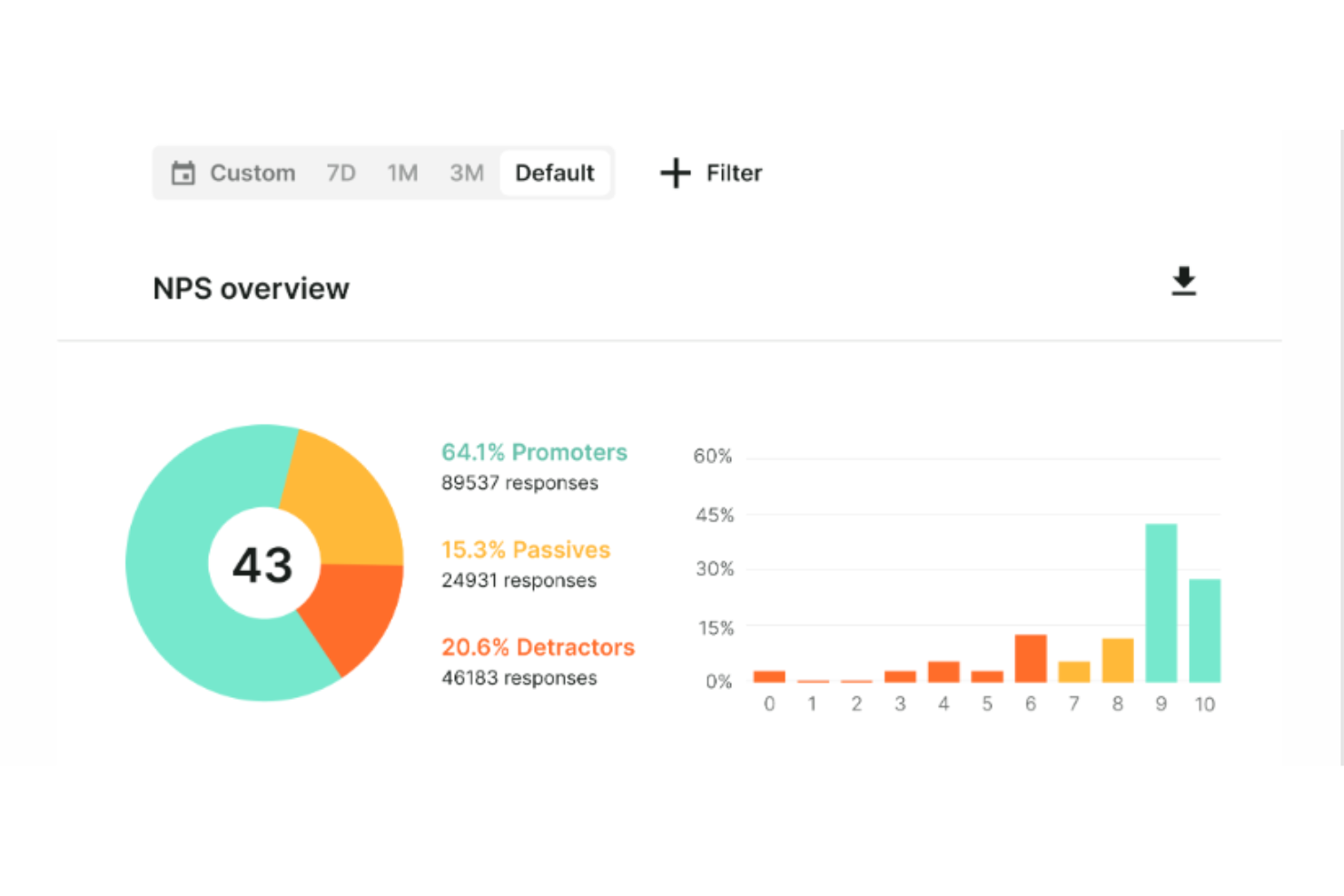
Survicate è uno strumento di raccolta dei feedback che permette alle aziende di raccogliere e analizzare le opinioni dei clienti tramite sondaggi mirati. Offre diversi tipi di sondaggi, tra cui NPS, CSAT e CES, che possono essere distribuiti su vari canali, come email, web, dispositivi mobili e all'interno del prodotto. In generale, Survicate si propone di aiutare le aziende a comprendere le esigenze dei clienti, raccogliere feedback sui prodotti e prendere decisioni basate sui dati raccolti.
Questa piattaforma consente alle aziende di creare sondaggi mirati che possono essere incorporati direttamente nei loro prodotti. In questo modo, le aziende possono raccogliere feedback preziosi dagli utenti mentre interagiscono con il prodotto durante tutto il percorso utente, ottenendo così informazioni sulla soddisfazione, richieste di funzionalità e possibili aree di miglioramento. Survicate offre inoltre modelli di sondaggio personalizzabili che possono essere adattati per rispecchiare l’aspetto grafico del prodotto, garantendo così un'esperienza utente coerente.
Le caratteristiche principali includono loghi, colori del brand e messaggi personalizzabili per la coerenza del marchio, targeting avanzato, integrazione via email, raccolta automatica dei feedback e sondaggi ricorrenti per approfondimenti continui, analisi in tempo reale, un costruttore di sondaggi drag-and-drop e un hub centralizzato dei feedback.
Survicate si integra con molte applicazioni di terze parti, tra cui Google Analytics, Google Sheets, HubSpot, Microsoft Teams, Zendesk, Slack, Productboard, Segment, Mixpanel e Mailchimp.
Survicate ha un costo a partire da $59/mese. È inclusa una prova gratuita di 10 giorni.
Pros and Cons
Pros:
- Può acquisire risposte parziali
- Facile da configurare e utilizzare
- Offre punteggi NPS e CSAT in tempo reale
Cons:
- I servizi di assistenza clienti potrebbero essere migliorati
- Alcuni problemi con l'eliminazione dei feedback
New Product Updates from Survicate

Survicate MCP Support Now Available
Survicate now supports MCP, letting teams use AI tools like Claude, ChatGPT, and Slack to explore survey results, analyze responses and insights, and draft new surveys. For more information, visit Survicate's official site.
 .
.
Canny
Ideale per dare priorità alle richieste di funzionalità
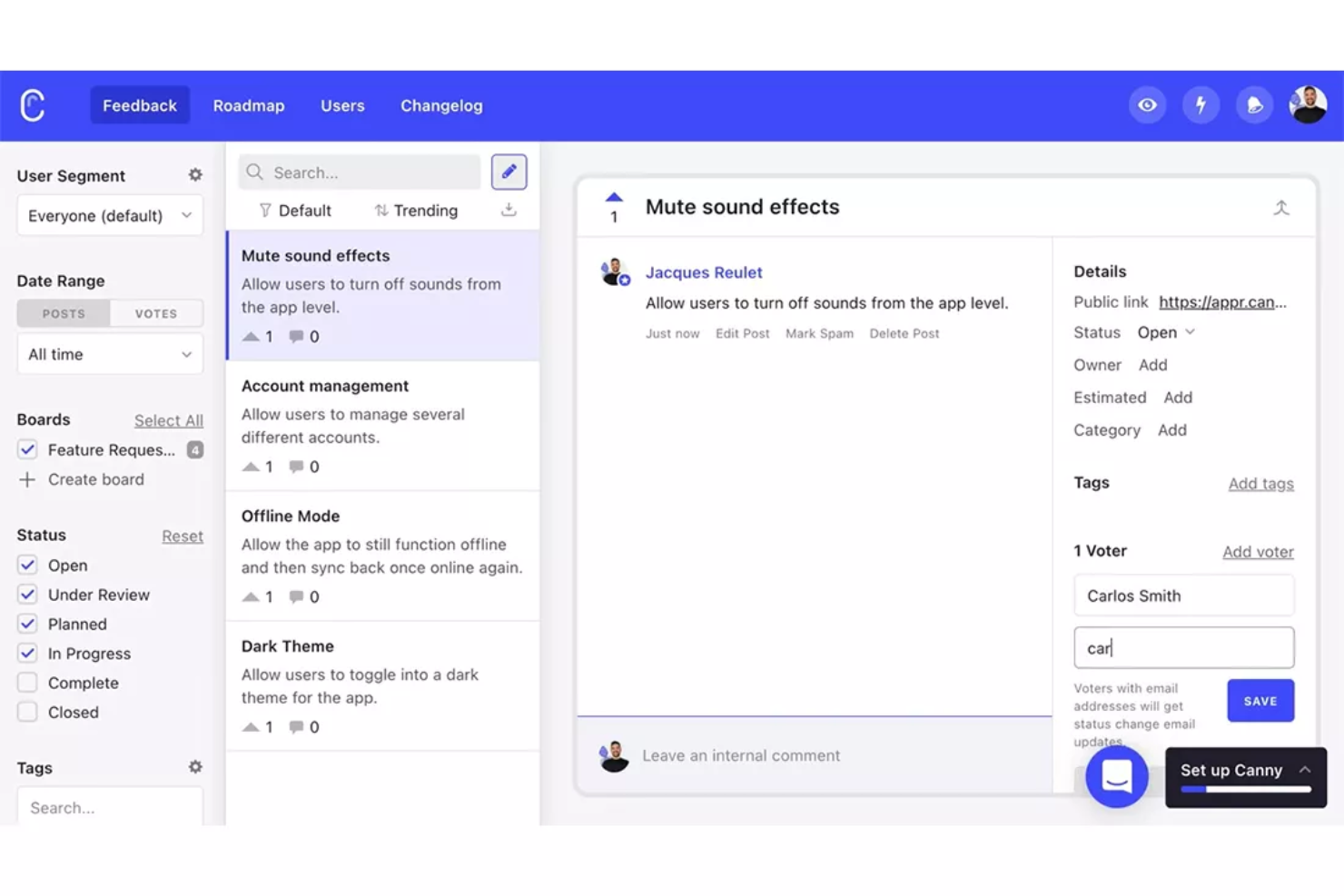
Canny è un software per la gestione del feedback dei clienti progettato per aiutare le aziende a raccogliere e dare priorità alle richieste di funzionalità, al fine di comprendere e soddisfare meglio le esigenze dei clienti. La piattaforma consente inoltre di costruire roadmap di prodotto basate sui suggerimenti degli utenti, assicurando che gli sforzi di sviluppo siano allineati alle aspettative dei clienti.
Una caratteristica distintiva di Canny è la sua capacità di consolidare il feedback proveniente da molteplici fonti all'interno di una piattaforma centralizzata. Questa capacità di integrazione significa che il feedback disperso tra e-mail, ticket di supporto e altri canali può essere organizzato in modo coerente in un'unica posizione, pronto per essere utilizzato dai team di prodotto.
Canny va oltre nella raccolta del feedback grazie a funzionalità di analisi. Ad esempio, gli utenti possono ordinare il feedback e creare segmenti di clientela per comprendere meglio quali funzionalità di prodotto dare priorità nella prossima iterazione. La piattaforma consente anche la comunicazione diretta con i clienti e la collaborazione interna su punti di feedback specifici.
Canny si integra con Jira, Asana, ClickUp, GitHub, Zendesk, Slack, Microsoft Teams, Google Workspace, Zapier, Segment, Google Analytics, e altri ancora.

Ideale per sondaggi visivamente accattivanti
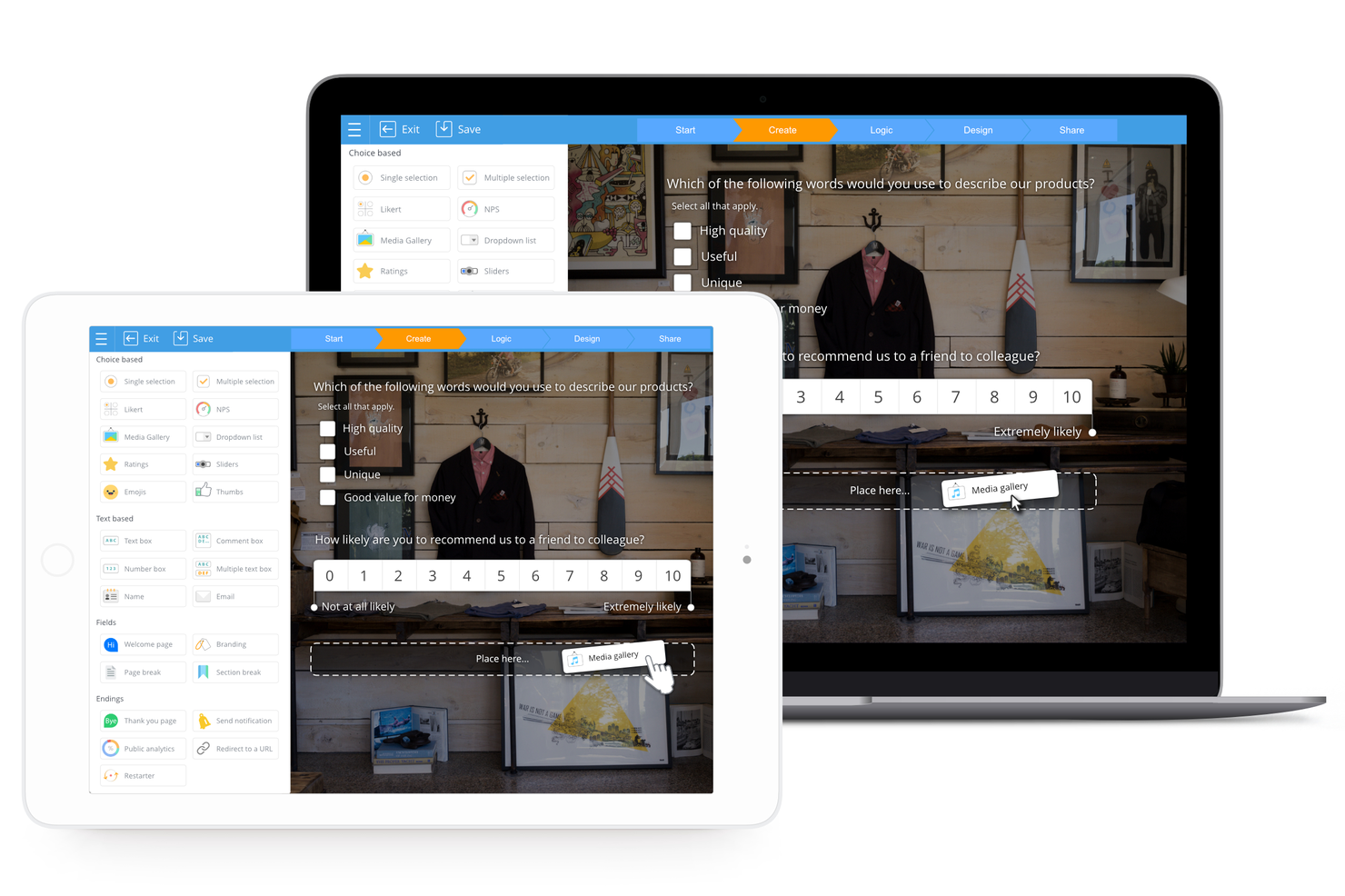
SurveyLegend è una piattaforma basata sul web progettata per creare, distribuire e analizzare sondaggi, moduli e questionari. Si distingue per l'offerta di una suite di funzionalità che si concentrano sulla creazione di questionari visivamente accattivanti e interattivi, un fattore chiave per aumentare i tassi di risposta e ottenere feedback di qualità.
Ho scelto SurveyLegend come software per il feedback sui prodotti perché offre una piattaforma intuitiva per creare sondaggi visivamente coinvolgenti, accessibili da qualsiasi dispositivo. Ciò che rende SurveyLegend diverso è la sua attenzione al design e all'esperienza utente, con sondaggi ottimizzati per dispositivi mobili e una varietà di opzioni di condivisione, inclusi social media, email e SMS. Credo che SurveyLegend sia la scelta ideale per sondaggi visivamente attraenti grazie alla possibilità di progettare e configurare facilmente sondaggi che attirano l'attenzione e ottengono risposte.
SurveyLegend offre un set completo di strumenti per la creazione e la gestione dei sondaggi, consentendo agli utenti di costruire sondaggi tramite un'interfaccia intuitiva drag-and-drop, senza necessità di scrivere codice. Supporta sondaggi multilingue, compresi quelli in lingue da destra a sinistra, e offre una varietà di tipi di domande e campi, come testo, scelta e opzioni multimediali.
SurveyLegend si integra con Google Sheets, consentendo agli utenti di inviare automaticamente i dati dei sondaggi a un foglio di calcolo. Si integra inoltre con Mailchimp, permettendo la popolazione automatica delle liste email con i dati dei sondaggi. Inoltre, SurveyLegend può generare lead in Salesforce catturando le risposte ai sondaggi come potenziali clienti.

Unwrap
Ideale per la categorizzazione automatizzata dei feedback
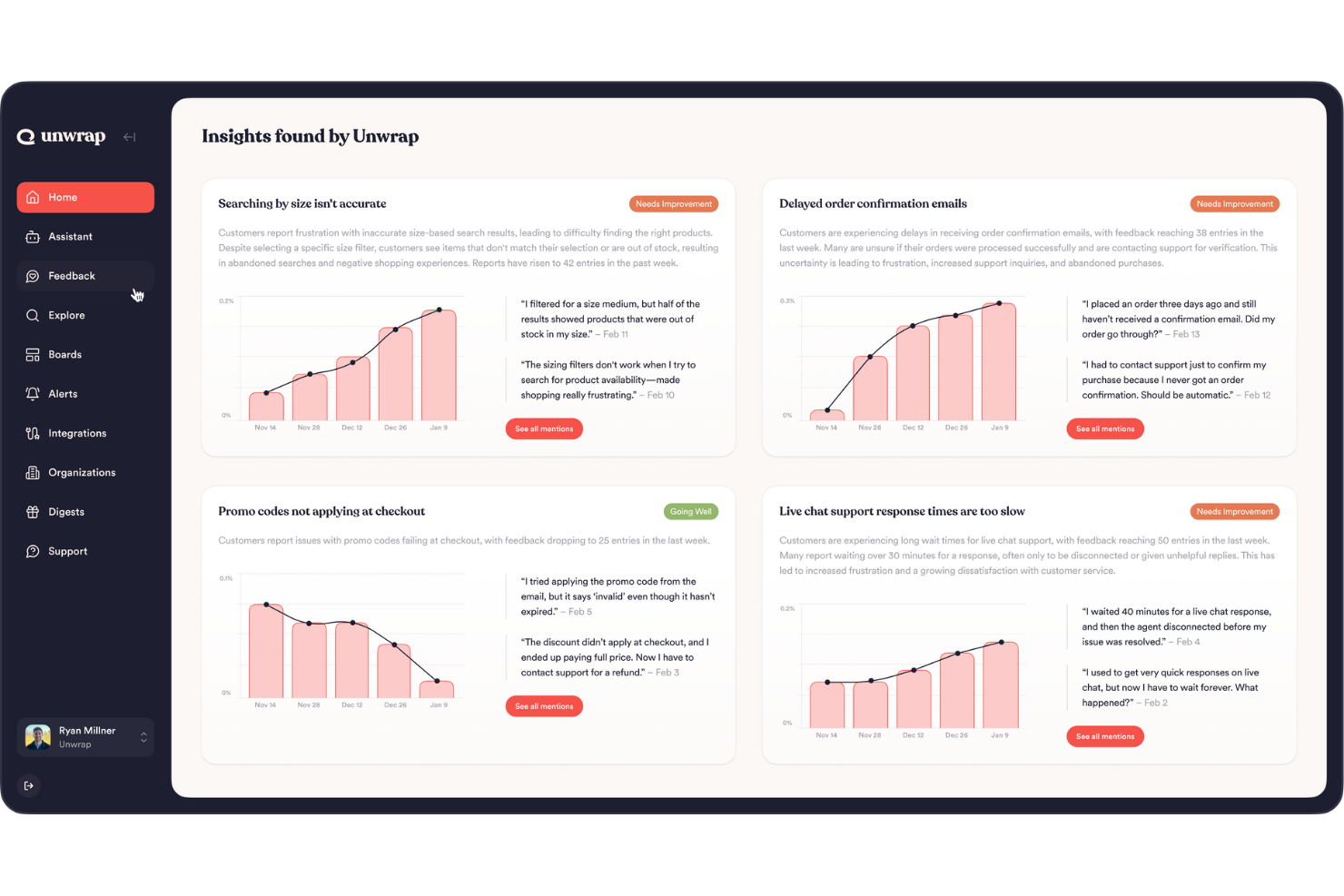
Unwrap offre un approccio innovativo al feedback sui prodotti, rendendolo una scelta ideale per aziende di settori come retail, viaggi, logistica e software. Potresti trovarlo particolarmente interessante se sei un product manager o un responsabile dell'assistenza clienti alla ricerca di insight attuabili senza il fastidio del lavoro manuale. Automatizzando l'identificazione delle tendenze e offrendo supporto personalizzato, Unwrap AI ti aiuta a comprendere e rispondere ai bisogni dei clienti, migliorando così le tue offerte di prodotto e i processi decisionali.
Perché ho scelto Unwrap AI
Ho scelto Unwrap per la sua capacità unica di automatizzare la categorizzazione del feedback dei clienti, fondamentale per chiunque sia interessato a software di feedback sui prodotti. La funzione Auto Tagger assicura che il feedback sia organizzato senza sforzo, permettendoti di concentrarti sull’analisi invece che sull’organizzazione. In aggiunta, la funzione Assistant sfrutta il trattamento del linguaggio naturale per fornire risposte istantanee, corredate di aneddoti dei clienti e dati visuali. Queste funzionalità risolvono la sfida comune di analizzare efficacemente i feedback e ottenere insight significativi.
Funzionalità chiave di Unwrap AI
Oltre alla categorizzazione automatizzata dei feedback, Unwrap offre:
- Dashboard: Dashboard personalizzabili permettono al tuo team di visualizzare i dati e collaborare in modo efficace.
- Avvisi: Notifiche in tempo reale via Slack e email ti aiutano a intervenire non appena vengono rilevate anomalie.
- Responder: Questa funzione facilita la comunicazione mirata con gli utenti su più canali per aumentare il coinvolgimento dei clienti.
- Campi di metadati personalizzati: Questi campi ti permettono di migliorare l’analisi dei feedback integrando dati più specifici.
Integrazioni di Unwrap AI
Le integrazioni includono Google Maps, Help Scout, Hubspot, Intercom, Jira, Instagram, Reddit, Medallia, Qualtrics, Salesforce e Snowflake.
Pros and Cons
Pros:
- Offre insight in tempo reale per decisioni e azioni rapide
- Automatizza l’analisi dei feedback, riducendo l’impegno manuale e risparmiando tempo
- Il rilevamento proattivo delle tendenze aiuta a identificare tempestivamente nuove problematiche
Cons:
- Meno completo per le grandi aziende rispetto ad alcuni concorrenti
- La configurazione della tassonomia dei feedback può richiedere uno sforzo extra per la personalizzazione
Altri software per il feedback sui prodotti
Ecco alcune altre opzioni di software per il feedback sui prodotti che non sono entrate nella mia shortlist, ma che vale comunque la pena prendere in considerazione:
- Lightster
Ideale per interazioni dirette con il pubblico target
- Formsuite
Migliore per feedback di prodotto tramite sondaggi supportati dall’IA
- Mouseflow
Ideale per feedback basati sui trigger degli eventi
- Qualaroo
Ideale per il test di prototipi di design
- Pendo
Ideale per decisioni sul prodotto
- Uservoice
Ideale per organizzare feedback provenienti da più fonti
- Sprig
Ideale per analizzare i feedback su larga scala con l'IA
- Usersnap
Ideale per la segnalazione di bug
- ProdPad
Ideale per trasformare il feedback in roadmap attuabili
- Mopinion
Ideale per creare moduli di feedback personalizzati
- Featurebase
Ideale per bacheche pubbliche di suggerimenti
- Userpilot
Ideale per l'adozione del prodotto
- Forsta
Ideale per la gestione dell’esperienza cliente
- Savio
Ideale per aggregare il feedback dei clienti
- Jotform
Ideale per feedback sui prodotti B2B aziendali
- UserGuiding
Le migliori micro-indagini sugli utenti con approfondimenti
- airfocus
Ideale per la collaborazione tra team
- SurveySparrow
Ideale per l'analisi dei feedback con sondaggi su misura
- Zeda.io
Ideale per la scoperta e il feedback di prodotto guidati dal cliente
- PathPro
Ideale per la votazione delle funzionalità


Come Valuto il Software per il Feedback sui Prodotti
Divido la mia valutazione in due livelli: i requisiti di base che uno strumento deve soddisfare, come un portale per il feedback con collegamenti alla roadmap e report sui trend, e i fattori che distinguono le migliori opzioni tra loro.
Funzionalità di Base (Requisiti Minimi per Questa Lista)
Quando seleziono gli strumenti per la mia lista, valuto ciascuno su una scala da 0 (non offre la funzionalità) a 5 (eccelle in quest'area) per ogni funzionalità di base elencata di seguito. Calcolo poi il punteggio totale dello strumento in percentuale. Ogni strumento deve raggiungere un punteggio totale minimo del 65% per essere preso in considerazione.
- Raccolta di Feedback Multicanale: Verifico quanti canali di input uno strumento supporta nativamente, dai widget in-app e integrazioni con il supporto alle estensioni browser e ai comandi Slack.
- Archivio Centralizzato per il Feedback: Ogni feedback deve confluire in un unico database ricercabile e taggabile. Cerco funzionalità di autocategorizzazione, deduplicazione e filtri flessibili per segmento o fonte.
- Collegamento Feedback-Funzionalità: Valuto come ogni strumento connette una richiesta del cliente a una specifica funzionalità o elemento di roadmap, come collegare un ticket Zendesk a un aggiornamento di integrazione pianificato.
- Prioritizzazione e Analisi: L'ordinamento in base al numero di voti è un requisito minimo. Cerco sistemi di punteggio ponderato, rilevamento dei trend e la possibilità di suddividere i dati per segmento di clientela o dimensione dell'affare.
- Portale per Feedback Pubblico o Privato: Che si tratti di una bacheca di voto personalizzata o di un modulo di invio privato, verifico la profondità della personalizzazione, i controlli di accesso e la visibilità dello stato per gli utenti finali.
- Comunicazione a Ciclo Chiuso: Valuto come uno strumento notifichi agli utenti quando la loro richiesta passa da "in revisione" a "rilasciata", inclusi changelog, banner in-app e aggiornamenti automatici via email.
Dopo aver selezionato gli strumenti che soddisfano questi criteri, considero ciò che distingue ciascuna piattaforma.
Fattori Differenzianti (Cosa Distingue i Fornitori)
Ecco come confronto e metto a confronto i diversi fornitori:
Caratteristiche Distintive
La sintesi automatica tramite intelligenza artificiale è un grande elemento di differenziazione. Gli strumenti che rilevano automaticamente i temi tra centinaia di richieste fanno risparmiare ore di etichettatura manuale ai product manager. Cerco anche una prioritizzazione ponderata sui ricavi, dove i dati CRM collegano direttamente il valore dell'affare alle richieste di funzionalità così che i team possano vedere l'impatto aziendale di ciò che costruiranno dopo. Anche l'analisi di chiamate e trascrizioni conta: alcuni strumenti raccolgono feedback direttamente da chiamate commerciali o di assistenza, catturando intuizioni che non finiscono mai su un ticket di supporto o su un portale.
Oltre le Caratteristiche
La profondità delle integrazioni conta. Valuto se uno strumento si integra bi-direzionalmente con piattaforme di sviluppo come Jira o Linear, così che i feedback fluiscano nella pianificazione degli sprint senza passaggi manuali. Anche la scalabilità è fondamentale: un singolo product manager in una startup ha esigenze molto diverse rispetto a un'organizzazione che gestisce decine di linee prodotto, quindi verifico come permessi, workspaces e prezzi crescano insieme al team. Infine, considero la sicurezza, inclusa la conformità SOC 2, il supporto SSO e le opzioni di residenza dei dati, dal momento che questi strumenti spesso archiviano informazioni sensibili dei clienti.
Come scegliere un software per il feedback sui prodotti
È facile perdersi tra lunghe liste di funzionalità e strutture di prezzi complesse. Per aiutarti a restare concentrato durante il tuo processo di selezione del software, ecco una checklist di fattori da tenere a mente:
| Fattore | Cosa considerare |
|---|---|
| Scalabilità | Il software può crescere con il tuo team? Verifica se supporta un aumento degli utenti e dei dati senza cali di prestazioni |
| Integrazioni | Funziona con i tuoi strumenti attuali? Assicurati che si colleghi alle principali piattaforme come CRM, project management e strumenti di comunicazione per evitare interruzioni ai flussi di lavoro. |
| Personalizzazione | Puoi adattare lo strumento alle tue necessità? Cerca opzioni per modificare i flussi, i campi e le dashboard per adattarli ai tuoi processi. |
| Facilità d'uso | È facile da usare per il tuo team? Un'interfaccia semplice e una navigazione intuitiva possono farti risparmiare tempo e ridurre la frustrazione. |
| Implementazione e onboarding | Quanto tempo serve per iniziare? Considera il tempo e le risorse necessari per l'installazione e la formazione. Cerca l'onboarding guidato o materiali di supporto. |
| Costo | Il prezzo è in linea con il tuo budget? Confronta i costi con le funzionalità offerte e fai attenzione a eventuali costi nascosti o limiti di piano |
| Garanzie di sicurezza | I tuoi dati sono protetti? Verifica gli standard di crittografia, la localizzazione dei dati e la conformità a regolamenti sulla protezione, come il GDPR. |
| Disponibilità dell'assistenza | Puoi ricevere aiuto quando ne hai bisogno? Controlla la presenza di opzioni di supporto 24/7 e la disponibilità di risorse come FAQ, tutorial e forum della community. |
Che cos'è un software per il feedback sui prodotti?
Il software per la raccolta dei feedback sui prodotti è un tipo speciale di strumento che aiuta i product manager a raccogliere, gestire e analizzare i feedback di utenti, clienti e stakeholder riguardo a un determinato prodotto. Lo strumento automatizza il processo di raccolta dei feedback trasformandolo in dati che tu e i tuoi team potete analizzare per offrire una migliore esperienza al cliente.
Questi strumenti sono fondamentali per comprendere le esigenze dei clienti, migliorare le funzionalità dei prodotti e prendere decisioni basate sui dati per arricchire l’esperienza generale del prodotto. Le funzionalità comuni includono categorizzazione e tag, analisi del sentiment degli utenti, rapporti sulle tendenze, sondaggi di feedback e collaborazione.
Caratteristiche
Quando scegli un software per la raccolta dei feedback sui prodotti, presta attenzione alle seguenti caratteristiche chiave:
- Raccolta dei feedback: Raccoglie opinioni e suggerimenti degli utenti tramite sondaggi, moduli o portali, fornendo un modo centralizzato per ascoltare i clienti.
- Analisi dei dati: Elabora e interpreta i dati provenienti dai feedback per individuare tendenze e approfondimenti, aiutando i team a prendere decisioni informate.
- Prioritizzazione delle funzionalità: Aiuta a classificare le richieste e i feedback degli utenti in base all’importanza e all’impatto, guidando le priorità di sviluppo del prodotto.
- Capacità di integrazione: Si collega con altri strumenti come CRM e software di gestione dei progetti per garantire un flusso d’informazioni senza interruzioni tra le piattaforme.
- Dashboard personalizzabili: Permette ai team di personalizzare la visualizzazione dei dati dei feedback, offrendo approfondimenti che si allineano a obiettivi e metriche specifiche.
- Interfaccia intuitiva: Garantisce che lo strumento sia facile da usare, riducendo la curva di apprendimento e aumentando l’adozione da parte dei team.
- Strumenti di reportistica: Genera report visivi che riassumono le informazioni ricavate dai feedback, facilitando la comunicazione chiara con gli stakeholder.
- Garanzie di sicurezza: Protegge i dati degli utenti con crittografia e conformità alle normative come il GDPR, assicurando privacy e fiducia dei dati.
- Integrazione con roadmap: Allinea i feedback alle roadmap di prodotto, assicurando che le esigenze degli utenti siano riflesse nei piani futuri del prodotto.
- Strumenti di collaborazione: Favorisce la comunicazione e il lavoro di squadra tra product manager, designer e sviluppatori, migliorando il processo di raccolta dei feedback.
Vantaggi
L’implementazione di un software per la raccolta dei feedback sui prodotti offre numerosi vantaggi per il tuo team e la tua azienda. Eccone alcuni a cui puoi aspirare:
- Decisioni più efficaci: Analizzando i dati degli utenti, i team possono prendere decisioni informate che rispecchiano i reali bisogni dei clienti.
- Sviluppo prodotto potenziato: La priorità alle funzionalità in base ai feedback assicura che gli sforzi di sviluppo si concentrino su ciò che gli utenti desiderano di più.
- Maggiore soddisfazione dei clienti: Rispondere direttamente ai feedback degli utenti aiuta a costruire fiducia e soddisfazione tra i clienti.
- Collaborazione efficiente: Le funzioni che facilitano il lavoro di squadra migliorano la comunicazione tra product manager, designer e sviluppatori.
- Risparmio di tempo: Automatizzare la raccolta e l’analisi dei feedback riduce il lavoro manuale, permettendo ai team di concentrarsi su compiti strategici.
- Maggiore allineamento con le roadmap: Integrare i feedback con le roadmap di prodotto garantisce che lo sviluppo si allinei alle aspettative utente e agli obiettivi aziendali.
- Approfondimenti basati sui dati: L’accesso a report dettagliati e dashboard fornisce informazioni utili, aiutando i team a comprendere tendenze e comportamenti degli utenti.
Costi e prezzi
La scelta di un software per la raccolta dei feedback sui prodotti richiede la comprensione dei vari modelli e piani di prezzo disponibili. I costi variano in base alle funzionalità, alla dimensione del team, agli add-on e altro. La tabella qui sotto riepiloga i piani comuni, i prezzi medi e le caratteristiche tipiche incluse nelle soluzioni di feedback sui prodotti:
Tabella comparativa dei piani per software di feedback sui prodotti
| Tipo di piano | Prezzo medio | Funzionalità comuni |
|---|---|---|
| Piano gratuito | $0 | Raccolta feedback di base, spazio di archiviazione limitato e reportistica di base. |
| Piano personale | $10-$30/user/month | Raccolta avanzata dei feedback, strumenti di analisi dati e dashboard personalizzabili. |
| Piano business | $50-$100/user/month | Funzioni di collaborazione per il team, integrazione con altri strumenti e garanzie di sicurezza avanzate. |
| Piano enterprise | $150+/user/month | Soluzioni personalizzabili, supporto dedicato e funzionalità avanzate di conformità e protezione dei dati. |
Domande frequenti sul software per il feedback sui prodotti
Ecco alcune risposte alle domande più comuni sul software per il feedback sui prodotti:rn
Come faccio a sapere se il mio team ha bisogno di un software per il feedback sui prodotti?
Se il tuo team fa fatica a organizzare e agire sul feedback dei clienti, probabilmente hai bisogno di un software per il feedback sui prodotti. Questo strumento aiuta a centralizzare il feedback, facilitandone l’analisi e la prioritizzazione. Valuta il tuo processo attuale e se supporta i tuoi obiettivi. In caso contrario, il software potrebbe rendere più snello il tuo flusso di lavoro e migliorare il processo decisionale.
Il software per il feedback sui prodotti può integrarsi con i miei strumenti attuali?
Sì, la maggior parte dei software per il feedback sui prodotti può integrarsi con strumenti popolari come CRM, software di project management e piattaforme di comunicazione. Controlla le opzioni di integrazione offerte da ciascun fornitore per assicurarti che siano compatibili con i sistemi che già utilizzi. Questo aiuterà a mantenere un flusso di lavoro coerente tra i vari strumenti.
Quanto è sicuro il software per il feedback sui prodotti?
Il software per il feedback sui prodotti normalmente include funzionalità di sicurezza come la crittografia dei dati e la conformità a regolamenti come il GDPR. Quando valuti le opzioni, verifica le misure di sicurezza adottate e assicurati che soddisfino gli standard della tua organizzazione. Questo è fondamentale per proteggere le informazioni sensibili dei clienti e mantenere la fiducia.
Avrò bisogno di formazione per utilizzare il software per il feedback sui prodotti?
La maggior parte dei software per il feedback sui prodotti è pensata per essere intuitiva, ma a seconda della complessità dello strumento potrebbe essere necessaria una certa formazione. Cerca fornitori che offrano materiali di supporto come tutorial, webinar e documentazione. Queste risorse possono aiutare il tuo team a imparare rapidamente e a sfruttare al meglio il software.
Cosa succede adesso?
Se sei alla ricerca di un software per il feedback sui prodotti, contatta gratuitamente un consulente SoftwareSelect per ricevere consigli personalizzati.
Basta compilare un modulo e fare una breve chiacchierata in cui approfondiscono le tue esigenze specifiche. Riceverai quindi una selezione di software da valutare. Ti accompagneranno anche in tutto il processo di acquisto, comprese le trattative sui prezzi.